I’m not proud of it, but I’ve been drunk on agent skills. It’s time to reset. It’s easy to fall into skills bloat as you accrue different ones for every possible scenario. Doing software engineering? Coding in Go? Performing security analysis? Add a skill! Nowadays, any of us can do basically anything. Maybe not well, but with agent skills, we get just enough confidence to try it. But we’re blowing tokens and confusing our agents with all this extra context. Plus, you only really need skills when there’s a specific (temporary?) gap in the LLM’s knowledge. Let’s be smarter. Can we do just-in-time discovery and lazy-loading of skills for our coding sessions?
Case 1: Preload skills globally or in your project
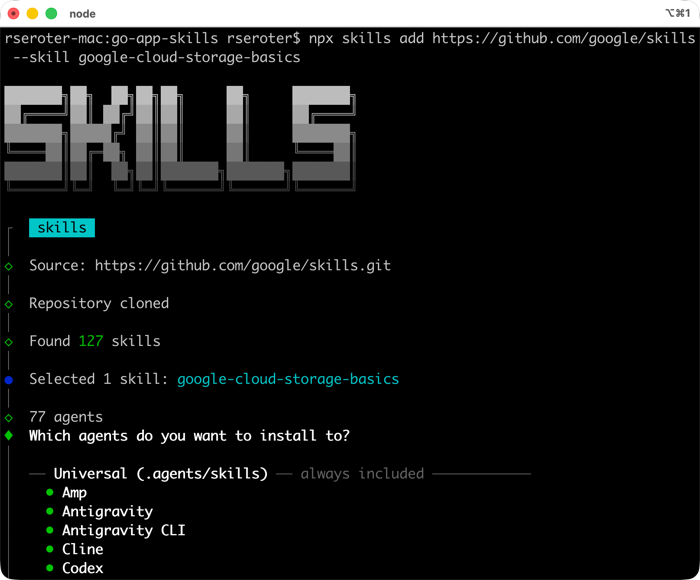
As a baseline, many of us default to installing skills ahead of time. It’s easy to grab skill files manually, or use something like the skills CLI to install into global or project directories.
For instance, before starting my coding session, I could find and install a skill for working with Google Cloud Storage.
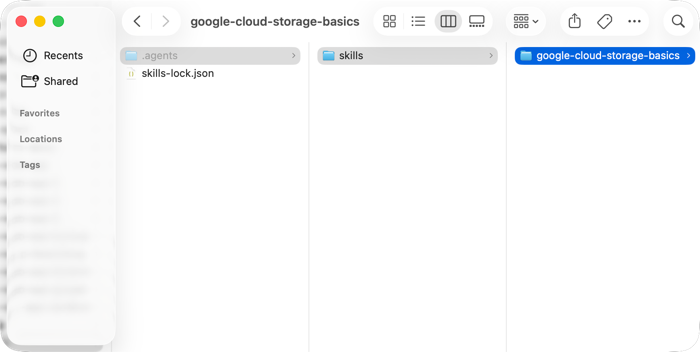
If I choose to install into my local project directory (instead of globally), I end up with these new files on disk.
I’m using Google Antigravity here, but you’d expect to see this skill show up in whatever agentic tool you have. Both my Antigravity desktop app and CLI show this pre-existing skill.
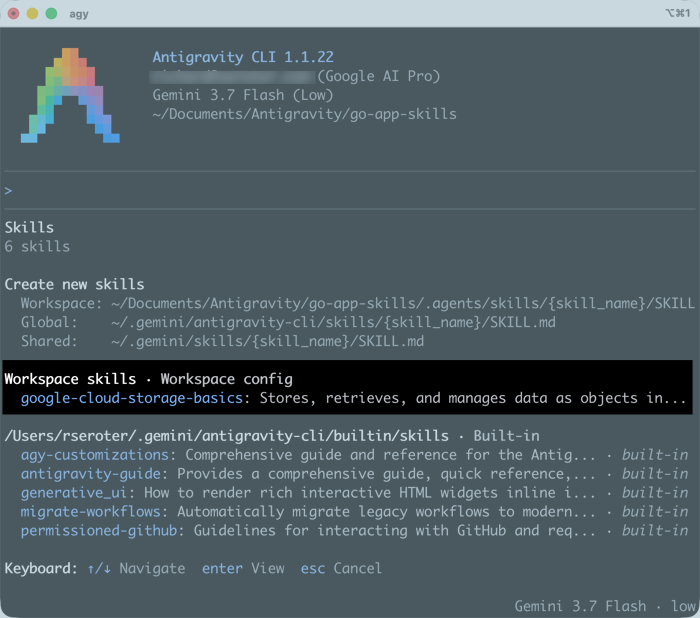
To be sure, this is a perfectly valid way to work. But the front matter of EVERY skill comes into play in all your agentic coding turns. That gets hefty over time. You could choose to just pre-load or copy the “right” skills into your project before each session. But that assumes you know where you’re heading before every session. I sure don’t! Let’s look at more dynamic scenarios.
Case 2: Find known skills during a session and use them
Let’s consider a case where I know where the desired skills live on the internet, but I only want to grab them if I really need them.
For example, maybe I use all sorts of clouds and pick the right one for the problem at hand. In my current coding session, I’m thinking through web app ideas, and landed on a fun concept for a fast-turnaround marketplace. Its bursty use and global footprint are great for Google Cloud. I need good guidance for picking the right architecture, so I asked Google Antigravity to find the right Google Skill to help out, and store it locally.
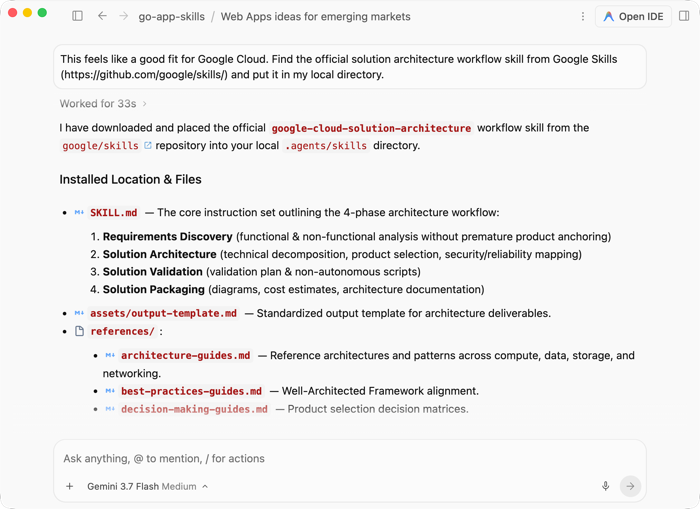
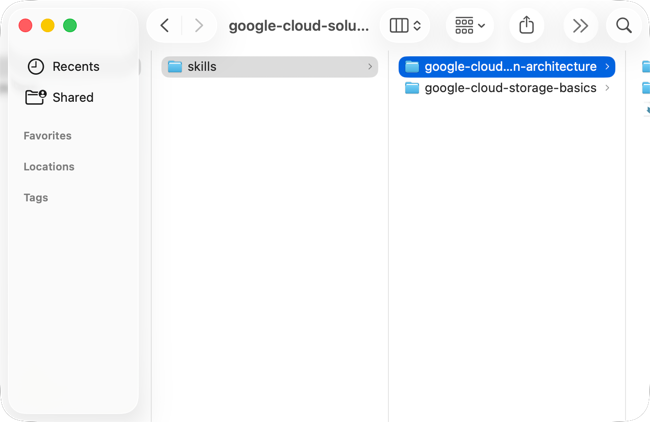
When this finished a few moments later, I had another skill in my local project directory.
Most importantly, this skill is automatically active in this coding session. I can see that in Antigravity’s list of active skills.
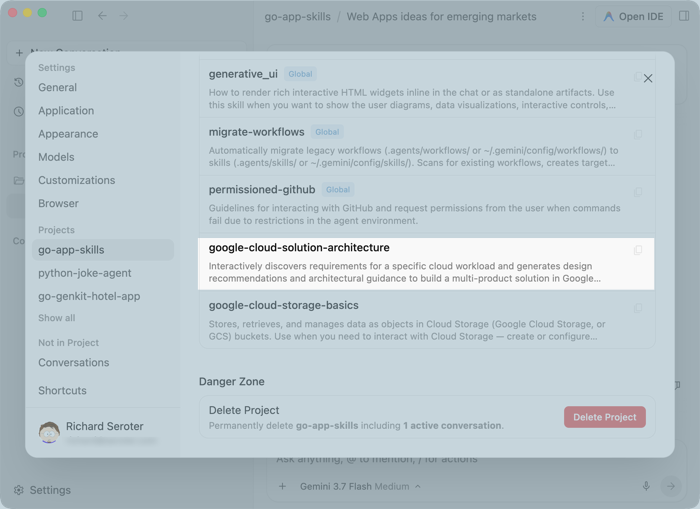
My current session got better as I discovered and loaded agents on-the-fly. And these skills stay with this project and aren’t just part of the LLM (or coding session’s) temporary memory.
Case 3: Search for skills during a session and use them
The above case assumed that I knew the location of the skill I wanted. You need to be careful about loading random skills, but what if you wanted to search without knowing ahead of time where the most suitable skill was at?
I continued my coding session by asking for the best skills for Go developers.
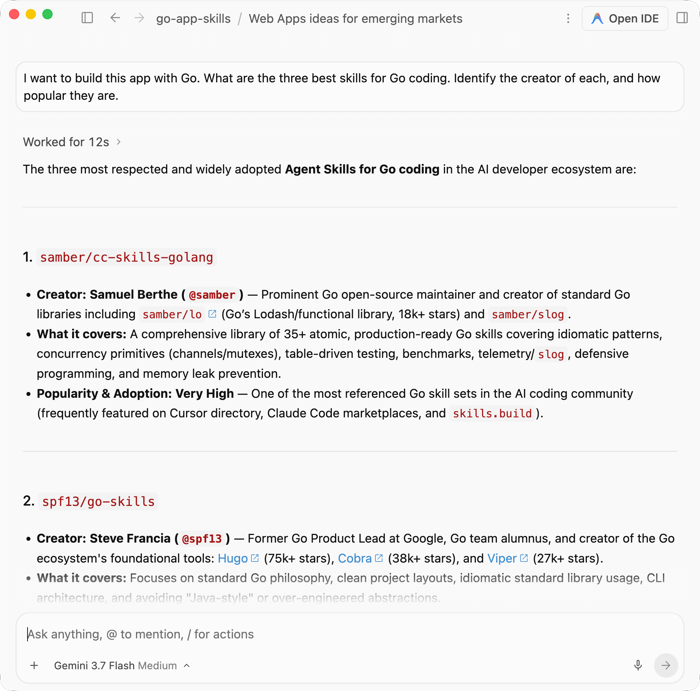
I know Steve (the creator of the 2nd of the 3 provided options) so I told Antigravity to load Steve’s skills. Sure enough, I got a handful of terrific Go skills installed into my project.
You don’t have to know skills or sources you want ahead of time. You can search for them during a session and keep going without ever breaking flow.
Case 4: Use a seed skill that grabs the “right” skill for the scenario
I’ve seen more of this pattern lately. You know you will need a set of related skills, but don’t know which ones, or when. A seed skill is your entry point that pulls the right skill at the right time. Addy’s Osmani’s agent skills do something like this. The “meta skill” routes you to the right skill for your situation. But it does require you to install all the skills (I believe).
Could you create a seed skill that acts as a lightweight entrypoint, and then just-in-time downloads the “right” skill from a pre-defined list? Sure you can.
Specifically, I want a skill that knows about all of the Google Cloud databases, but only retrieves the corresponding skill if our session demands it.
I used Antigravity to build it (in a different session) and here’s the gist (minus the scripts and references it also created).
---
name: gcp-database-seed-skill
description: >-
  Dynamic seed skill for Google Cloud database solutions. Use this skill when the user is designing,
  choosing, provisioning, migrating, or optimizing databases on Google Cloud (Cloud SQL for MySQL/PostgreSQL/SQL Server,
  AlloyDB for PostgreSQL, Cloud Spanner, Firestore, or Bigtable), or when well-architected cloud database guidance is needed.
  Automatically routes, downloads, and installs specialized skills from google/skills on demand.
---

# Google Cloud Database & Architecture Advisor (Seed Skill)

This seed skill provides a lightweight, progressive entrypoint for all database workloads on Google Cloud. Instead of loading bulky documentation upfront, it assesses workload requirements, recommends the optimal database solution, and dynamically downloads and installs specialized skills from the official [google/skills](https://github.com/google/skills) repository into your local workspace.

---

## Workflow & Step-by-Step Procedure

When invoked on a database-related prompt, follow this 4-step workflow:

```mermaid
flowchart LR
    Step1[1. Assess Workload] --> Step2[2. Determine Database & WAF Needs]
    Step2 --> Step3[3. Download & Install Skill]
    Step3 --> Step4[4. Execute Guided Solution]
```

### Step 1: Assess Workload Requirements
Evaluate the user's requirements against key architectural dimensions:
1. **Engine Compatibility**: Does the workload require MySQL, PostgreSQL, SQL Server, or open-standard ANSI SQL?
2. **Scalability & Scale**: Single-instance vertical scaling vs. distributed multi-node horizontal sharding?
3. **Availability & DR**: Regional HA (99.95% - 99.99%) vs. Global Multi-Region zero downtime (99.999%)?
4. **Workload Characteristics**: Standard OLTP vs. High-throughput HTAP with columnar queries vs. Vector/AI search vs. NoSQL?
5. **Migration vs. New Build**: Existing application lift-and-shift vs. greenfield cloud-native design?

> 📖 Consult the detailed [Database Decision Matrix](./references/database_decision_matrix.md) for complete comparison tables.

---

### Step 2: Select the Target Skills

Map the workload to the primary database skill and check for relevant **Well-Architected Framework** pillars:

#### A. Database Engine Selection
*   **Cloud SQL (`cloud-sql-basics` / `cloud-sql-mysql` / `cloud-sql-postgresql` / `cloud-sql-sqlserver`)**:
    *   *Select when:* Straightforward relational databases (MySQL, PostgreSQL, SQL Server), standard web apps, migration-friendly lift-and-shift via Database Migration Service (DMS).
*   **AlloyDB for PostgreSQL (`alloydb-basics` / `alloydb`)**:
    *   *Select when:* Demanding enterprise PostgreSQL workloads, up to 4x transactional performance, up to 100x faster analytical/HTAP queries with columnar engine, or in-database vector search (Vertex AI / ScaNN integration).
*   **Cloud Spanner (`spanner`)**:
    *   *Select when:* Mission-critical global databases, massive scale exceeding single-instance limits, synchronous multi-region replication, horizontal scaling, and 99.999% availability with zero downtime.
*   **Discovery / Undecided (`cloud-databases-onboarding`)**:
    *   *Select when:* User is unsure or needs interactive discovery across relational, NoSQL (Firestore, Bigtable), and analytical stores.

#### B. Well-Architected Framework Triggers
Check if cross-cutting architectural pillars should be retrieved:
*   **Reliability & HA:** Mentions of 99.999% SLA, DR, RTO/RPO, regional failover → Fetch `well-architected-reliability`.
*   **Security & IAM:** Questions about Private IP, PSA, CMEK encryption, or IAM DB auth → Fetch `google-cloud-recipe-auth`.
*   **Performance & Tuning:** Connection pooling, read replicas, latency optimization → Fetch `google-cloud-solution-architecture`.
*   **Cost Optimization:** Committed Use Discounts (CUDs), rightsizing, auto-pause → Fetch `google-cloud-solution-architecture`.

> 📖 Consult [Well-Architected Triggers](./references/well_architected_triggers.md) for full trigger criteria.

---

### Step 3: Download and Install the Specialized Skill

Execute the bundled installer helper to fetch the required skill(s) directly from `google/skills` into the workspace's `.agents/skills/` directory:

```bash
# Example: Install Cloud SQL basics
python3 scripts/install_gcp_skill.py --skill cloud-sql-basics

# Example: Install AlloyDB basics
python3 scripts/install_gcp_skill.py --skill alloydb-basics

# Example: Install Cloud Spanner
python3 scripts/install_gcp_skill.py --skill spanner

# Example: Install Well-Architected Reliability
python3 scripts/install_gcp_skill.py --skill well-architected-reliability

# Example: Install all core database skills
python3 scripts/install_gcp_skill.py --all-databases
```

*Alternative using npm/npx:*
```bash
npx skills add google/skills
```

---

### Step 4: Proceed with Implementation

Once the skill is installed into `.agents/skills/`, it is immediately available for subsequent operations.
1. Reference the newly installed `SKILL.md` in `.agents/skills/<skill-name>/`.
2. Provide concrete `gcloud` commands, Terraform/IaC snippets, or client library examples tailored to the user's selected database.
3. Verify connectivity (e.g. Cloud SQL Auth Proxy, IAM authentication, VPC Private Service Access).

---

## Reference Guides

*   [Database Decision Matrix](./references/database_decision_matrix.md): Deep-dive comparison between Cloud SQL, AlloyDB, Spanner, Firestore, and Bigtable.
*   [Well-Architected Framework Triggers](./references/well_architected_triggers.md): Detailed rules for triggering security, reliability, performance, cost, and operational pillars.
*   [Known Skills Catalog](./references/known_skills_catalog.md): Complete list of remote paths and metadata in `google/skills`.
*   [Prompt Routing Scenarios & Examples](./examples/prompt_routing_scenarios.md): Real-world examples of user requests and the exact skills retrieved.
After adding this seed skill to my current coding session, I started up a database conversation regarding my app idea. We landed on Firestore as the best choice, so I asked the seed skill to retrieve only the Firestore skill.
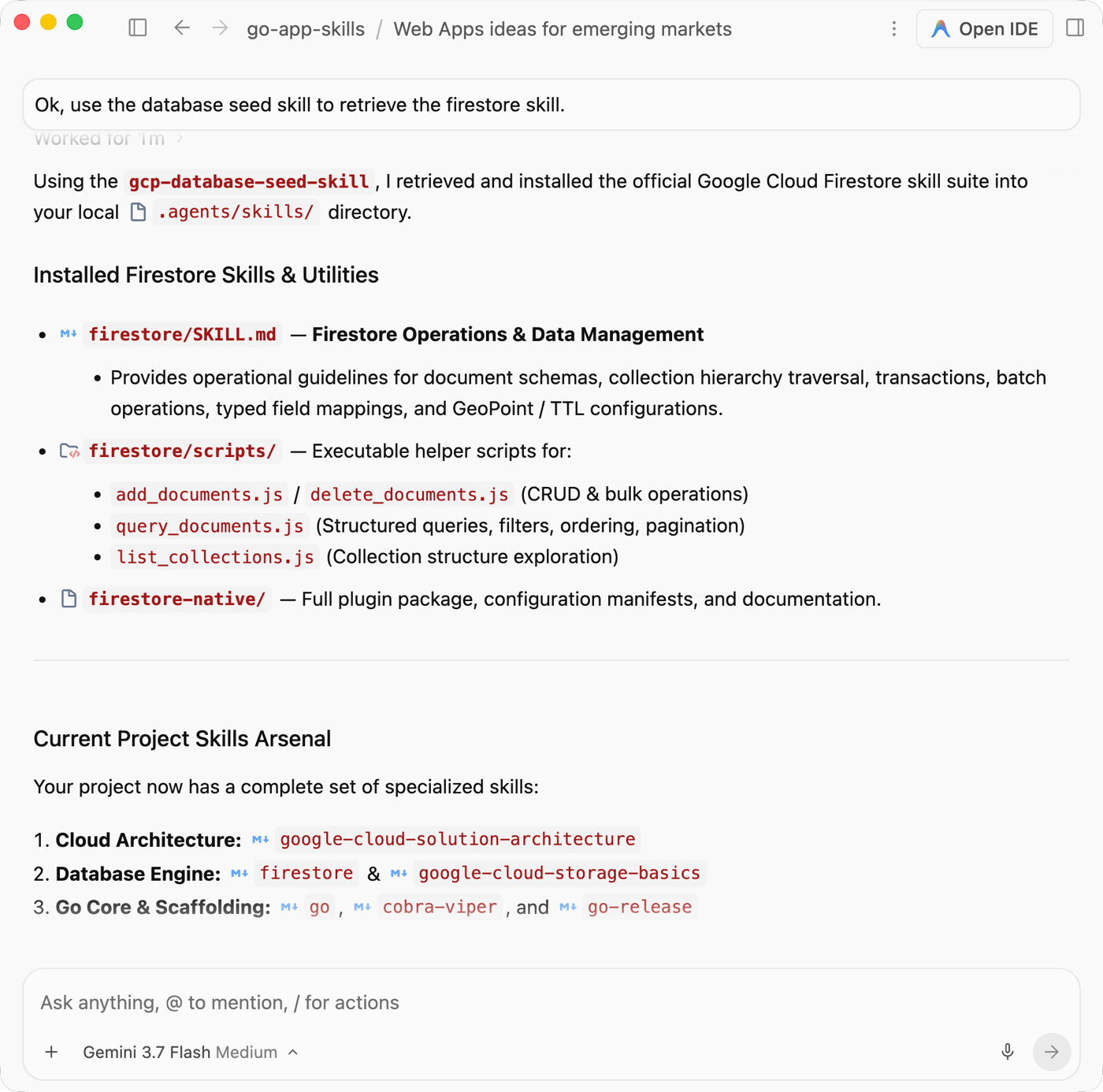
Here, I didn’t need to download or pre-load all the possible Google Cloud database skills. There’s a lot of them. I only got the one I needed for this particular coding session. Seems cleaner?
A word about MCPs
If your skills make use of remote or local MCP servers, circumstances are different. While MCP now supports a stateless interaction pattern, most existing MCP servers don’t. When your coding session starts, there’s a handshake that happens. This means that if you introduce a new MCP during a session (in your mcp_config.json), you likely have to fork your current session, or start a new one. My tests showed this to be the case most of the time, but your mileage may vary.
I mention this because you could see skills that make heavy use of managed MCPs. That’s cool, but downloading those skills on the fly might mean they only partially work because your coding harness can’t “see” the referenced MCP server. Just be cautious!
We’re seeing an emerging “open knowledge layer” consisting of MCPs, skills, and plugins. I’d imagine we will see patterns evolve for how and when to use each component. What do you think of this lazy loading pattern I demonstrated here?


Leave a Reply