If you’ve been a software developer for more than five minutes, then you probably have some old code running somewhere. It probably works fine, so who cares if it’s a little dusty and based on an n-5 language version? Remember that upgrades are an important means for grabbing security patches and performance improvements. But those syntax and architectural changes are important too.
I wondered which popular languages provided deterministic tools for upgrading code to the latest version. Let’s see what Go, Java, C#, JavaScript, Python, and Rust have to offer.
Go offers the built-in go fix tool
Bias alert: I lead the product and engineering of Go at Google. But I’ve also used Go for years before that org shift happened a few months back.
Go includes syntax modernization directly inside the standard toolchain. It uses modular static analyzers to inspect packages and automatically rewrite legacy code patterns. Go projects are simple—no random XML or JSON settings, no “project” files—so this can be a focused, efficient tool.
How do you use it? Update your Go toolchain version in the go.mod file. Run go fix. That’s it. This tool was recently rewritten atop the go/analysis engine to be even more powerful.
Let’s see an example. Maybe I’ve got a CLI tool written in idiomatic Go 1.18 code. This CLI tool renames image files. The code does safe concurrency and uses a helper for slices.
package main

import (
	"flag"
	"fmt"
	"io/fs"
	"log"
	"os"
	"path/filepath"
	"strings"
	"sync"
)

// Supported image extensions (Go 1.18 slice)
var imageExts = []string{".jpg", ".jpeg", ".png", ".gif", ".webp"}

// RenameRegistry ensures destination filenames are unique, resolving collisions thread-safely.
type RenameRegistry struct {
	mu    sync.Mutex
	names map[string]int
}

func NewRenameRegistry() *RenameRegistry {
	return &RenameRegistry{
		names: make(map[string]int),
	}
}

// GetUniqueName returns a collision-free filename in the destination directory.
func (r *RenameRegistry) GetUniqueName(base, ext, destDir string) string {
	r.mu.Lock()
	defer r.mu.Unlock()

	count := r.names[base]
	r.names[base] = count + 1

	var targetName string
	if count == 0 {
		targetName = base + ext
	} else {
		targetName = fmt.Sprintf("%s_%d%s", base, count, ext)
	}

	// Double check disk existence to avoid overwriting existing files
	for {
		targetPath := filepath.Join(destDir, targetName)
		if _, err := os.Stat(targetPath); os.IsNotExist(err) {
			break
		}
		// If it exists, increment the counter and try again
		count++
		r.names[base] = count + 1
		targetName = fmt.Sprintf("%s_%d%s", base, count, ext)
	}

	return targetName
}

// isImageFile checks if a file has a supported image extension (pre-slices inline check)
func isImageFile(path string) bool {
	ext := strings.ToLower(filepath.Ext(path))
	for _, item := range imageExts {
		if item == ext {
			return true
		}
	}
	return false
}

func main() {
	// Parse CLI flags
	srcDir := flag.String("src", ".", "Source directory containing photos")
	destDir := flag.String("dest", "", "Destination directory for renamed photos (defaults to source)")
	dryRun := flag.Bool("dry", false, "Dry run mode (lists proposed changes without executing)")
	verbose := flag.Bool("verbose", false, "Enable verbose logging output")
	flag.Parse()

	// Default destination to source directory if not specified
	if *destDir == "" {
		*destDir = *srcDir
	}

	// Clean paths
	*srcDir = filepath.Clean(*srcDir)
	*destDir = filepath.Clean(*destDir)

	log.Printf("Starting photorename CLI...")
	log.Printf("Source directory: %s", *srcDir)
	log.Printf("Destination directory: %s", *destDir)
	if *dryRun {
		log.Printf("DRY RUN MODE ENABLED - No files will be moved or renamed.")
	}

	// Scan source directory recursively
	var photos []string
	err := filepath.WalkDir(*srcDir, func(path string, d fs.DirEntry, err error) error {
		if err != nil {
			return err
		}
		if !d.IsDir() && isImageFile(path) {
			photos = append(photos, path)
		}
		return nil
	})

	if err != nil {
		log.Fatalf("Error scanning source directory: %v", err)
	}

	totalPhotos := len(photos)
	log.Printf("Found %d photo(s) to process.", totalPhotos)
	if totalPhotos == 0 {
		return
	}

	// Ensure destination directory exists (unless dry run)
	if !*dryRun {
		if err := os.MkdirAll(*destDir, 0755); err != nil {
			log.Fatalf("Failed to create destination directory: %v", err)
		}
	}

	registry := NewRenameRegistry()
	var wg sync.WaitGroup
	// Allocate worker pool limit using custom new helper (pre-Go 1.26 newexpr target)
	limit := newInt(4)
	// Limit concurrency using a semaphore (buffered channel)
	sem := make(chan struct{}, *limit)

	var successCount int
	var successMu sync.Mutex

	for _, photoPath := range photos {
		photoPath := photoPath
		wg.Add(1)
		sem <- struct{}{}

		go func() {
			defer wg.Done()
			defer func() { <-sem }()

			logDebug(*verbose, "[Processing] %s", photoPath)

			// Get file info for modification time
			info, err := os.Stat(photoPath)
			if err != nil {
				log.Printf("Error stating file %s: %v", photoPath, err)
				return
			}

			// Format modification time as YYYYMMDD_HHMMSS
			modTime := info.ModTime()
			baseName := fmt.Sprintf("IMG_%s", modTime.Format("20060102_150405"))
			ext := strings.ToLower(filepath.Ext(photoPath))

			// Get unique target name to avoid collisions
			targetName := registry.GetUniqueName(baseName, ext, *destDir)
			targetPath := filepath.Join(*destDir, targetName)

			if *dryRun {
				log.Printf("[Dry-Run] Would rename: %s -> %s", photoPath, targetPath)
				successMu.Lock()
				successCount++
				successMu.Unlock()
				return
			}

			// Perform the rename/move operation
			err = os.Rename(photoPath, targetPath)
			if err != nil {
				log.Printf("Rename failed for %s -> %s, attempting copy: %v", photoPath, targetPath, err)
			} else {
				logDebug(*verbose, "[Success] Renamed: %s -> %s", photoPath, targetPath)
				successMu.Lock()
				successCount++
				successMu.Unlock()
			}
		}()
	}

	wg.Wait()

	if *dryRun {
		log.Printf("Dry run complete. Checked %d/%d photos.", successCount, totalPhotos)
	} else {
		log.Printf("Renaming complete. Successfully processed %d/%d photos.", successCount, totalPhotos)
	}
}

// logDebug helper that prints debug logs using interface{} (pre-Go 1.18 any)
func logDebug(verbose bool, format string, args ...interface{}) {
	if verbose {
		log.Printf(format, args...)
	}
}

// newInt is a custom helper to return a pointer to an int value (pre-Go 1.26 newexpr helper target)
func newInt(x int) *int {
	return &x
}
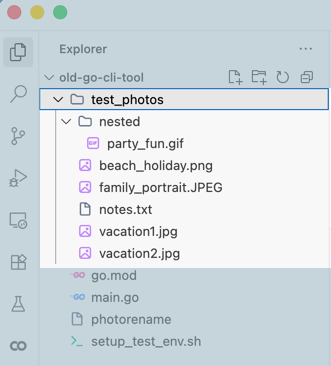
On disk, my app contained a folder of randomly named pictures in various folders, as well as a misplaced text file that should be ignored:
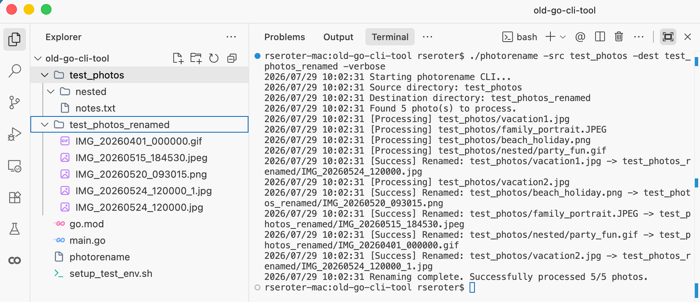
After building and running the tool, it takes milliseconds to complete. And I end up with renamed files in a fresh folder.
Let’s modernize! I updated my go.mod to now reference Go 1.26.
go mod edit -go=1.26
Then ran the following command to do a dry run and see what it would change.
go fix -diff ./...
I get back a +/- view in the console that shows me which modernizers kicked in.

It won’t find EVERY opportunity to upgrade the code, as it looks for specific patterns. But in this case, it refactored legacy handling of slices, deleted some now-unnecessary code for loop variable shadowing, upgraded an interface parameter to any, and improved a pointer. All in under a second.
Go has a backwards compatibility promise, so it doesn’t need an aggressive modernizer. Instead, a first-party tool like go fix —which is an Abstract Syntax Tree (AST) that focuses on grammar and structural shape of source code—is meant for continuous codebase modernizations.
And I’ll note that Dart, the language that powers the popular Flutter framework, also has a pretty great dart fix command that does similar things. Google is pretty good at these things.
Java has built-in analysis tools, but relies on third party modernization tools
Modernizing Java code is a lot more than updating your build file! Bumping the version in your maven/gradle file simply tells the compiler what byte code to emit, but your source code doesn’t change.
The JDK does ship with diagnostic tools to help you identify upgrade issues, but these are read-only. No proactive rewrites. Useful JDK tools include:
jdeps: This scans your class files and JARs to report any static dependencies. It helps you get ready for migrations by finding deprecated features, broken third-party tools, and any references to restricted internal JDK APIs.jdeprscan: Another static analysis tool that scans class files, directories, and JAR files for any use of deprecated Java APIs.
Many Java rewrites start in the IDE, like IntelliJ. There are some built-in analyzers and code fixing tools. You’re constrained to the GUI here, so people doing at-scale rewrites often use OpenRewrite. This build plug-in can upgrade syntax and do framework refactoring.
Given its established enterprise presence, Java has many documented modernization practices and a strong ecosystem of vendor-created modernization tools. But don’t look deeply into the built-in toolchain for a lot of support.
C# (.NET) provides a built in upgrade assistant
For some reason, .NET has had an (unnecessarily?) exciting journey. That means you need some industrial-strength modernization tooling to get you from one major iteration to the next.
Microsoft doesn’t bake any modernization tools directly into the language toolchain. They introduced the .NET Upgrade Assistant years ago, powered by their Roslyn compiler platform. You could run this sophisticated tool as a Visual Studio plug-in or via a standalone CLI. It scanned your code and then helped you upgrade to the latest version. It covered a lot of ground, because .NET projects are relatively heavy and the framework has seen some major architectural changes over the years.
However, this tool is now deprecated in favor of the GitHub Copilot modernization chat agent. That’s a very different solution. Now you have commercial implications that impact who can access it. It’s online-only, and internet-dependent. You’re not running this easily in a headless fashion. And now it’s non-deterministic, and not following preset rules. That’s also a “plus” as you’ll probably see deeper modernizations, self-correcting loops, and more flexibility. But some big token costs!
Like Java, C#/.NET has a massive community and plenty of well-documented practices. The ever-changing tools landscape means those practices aren’t timeless, but it’s not hard to find experts to help you modernize .NET apps. Just don’t look at the framework for a major assist.
JavaScript doesn’t offer built-in tools for modernization
You won’t find a built-in modernizer for JavaScript/TypeScript. It’s a fluid, fast-moving, and fragmented ecosystem with different pace layers. You’ve got the language-level updates (ECMAScript) and then the framework-level (React, Next.js, Angular, Vue). Instead of using heavyweight Node.js-native AST-style parsers, developers are embracing faster structural engines and framework CLI orchestrators.
These developers relied heavily on codemods, like jscodeshift. But that can be heavy and slow on giant repos. There’s a new class of Rust-based codemod engines like ast-grep, jssg, and GritQL.
You’ve also got framework-first codemod orchestrators like the upgrade CLI baked into Next.js . Angular provides an ng update experience. Tailwind also offers a version upgrade tool.
JavaScript is probably too decentralized to offer a single, language-included code modernization tool. But the ecosystem has stepped up with useful options.
Python relies on third party modernizers
Plenty of devs are still scarred by the Python 2 to Python 3 migration. Python 3 came out in 2008, but Python 2 wasn’t retired until 2020. This wasn’t a simple version bump, but what felt like a whole different programming language. Python 3 did ship with an official AST-based modernization tool called 2to3. But it had issues, and didn’t make migrations easy.
Today’s Python doesn’t include any built-in source code rewriting tools. For any minor release upgrade, modernizing this code is entirely an ecosystem (third party) story. The built-in tooling basically covers diagnostics and signaling of deprecation. You get runtime warnings for deprecated API use, and compiler warnings for risky or outdated control flows. That’s about it.
Here’s where the ecosystem stepped up. You have syntax fixers like ruff that work at the base layer of the language. It includes many built-in rules and is used by many OSS projects. Another option is LibCST from Meta that preserves all the whitespace, inline comments, and code formatting which makes it good at complex refactorings. Then, like with JavaScript, there are framework-specific upgraders like django-upgrade for Django.
Rust offers a built-in cargo fix tool
Rust, like Go years earlier, added a native code modernizer in their toolchain. However, it’s quite different in how it works, despite doing conceptually-similar things.
cargo fix uses rustc compiler diagnostics to detect deprecated features or edition-incompatible idioms to drive changes to source files. A foundational part of Rust modernization relies on Editions. Rust uses an “Edition” approach (2015, 2018, 2021, 2024) to introduce potential opt-in breaking syntax changes without breaking the ecosystem. cargo fix was introduced to automate code modifications needed to transition crates (packages) from one Edition to the next.
I can’t run cargo fix to jump from a 2018 Edition to 2024. I’d execute a step-by-step path to first go to 2021, then to 2024. The tool’s goal is to modify code so that it’s valid in both the current Edition and target one simultaneously.
Of note, there are more modernization options than just cargo fix. Clippy is the official code linting tool for Rust. It analyzes source code to catch any design mistakes and improve your code. cargo upgrade also upgrades crate dependencies, while cargo outdated shows you a detailed tree of outdated dependencies. Our friend ast-grep also applies to Rust and can help you with codebase-wide refactoring.
Wrap Up
Does any of this matter now that we have LLMs? Can I just point Claude Code, Cursor, or Google Antigravity at a legacy code base and ask it to shine it up? Sort of.
Yes, you can use LLMs for some of this code modernization effort. But solely relying on an LLM? You’ll see a significant token spend, it’ll take magnitudes longer to execute a modernization, and you risk context truncation or degradation across massive files. It’s an “and” where you ideally couple LLMs with deterministic tools like some of the ones we listed here.
What did I get wrong? Do you have other favorite tools that help you modernize code written in your favorite language?


Leave a Reply