Category: Cloud

  • Adding circuit breakers to your .NET applications

    Adding circuit breakers to your .NET applications

    Apps fail. Hardware fails. Networks fail. None of this should surprise you. As we build more distributed systems, these failures create unpredictability. Remote calls between components might experience latency, faults, unresponsiveness, or worse. How do you keep a failure in one component from creating a cascading failure across your whole environment?

    In his seminal book Release It!, Michael Nygard introduced the “circuit breaker” software pattern. Basically, you wrap calls to downstream services, and watch for failure. If there are too many failures, the circuit “trips” and the downstream services isn’t called any longer. Or at least for a period of time until the service heals itself.
    How do we use this pattern in our apps? Enter Hystrix from Netflix OSS. Released in 2012, this library executes each call on a separate thread, watches for failures in Java calls, invokes a fallback operation upon failure, trips a circuit if needed, and periodically checks to see if the downstream service is healthy. And it has a handy dashboard to visualize your circuits. It’s wicked. The Spring team worked with Netflix and created a easy-to-use version for Spring Boot developers. Spring Cloud Hystrix is the result. You can learn all about it in my most recent Pluralsight course.

    But why do Java developers get to have all the fun? Pivotal released an open-source library called Steeltoe last year. This library brings microservices patterns to .NET developers. It started out with things like a Git-backed configuration store, and service discovery. The brand new update offers management endpoints and … an implementation of Hystrix for .NET apps. Note that this is for .NET Framework OR .NET Core apps. Everybody gets in on the action.
    Let’s see how Steeltoe Hystrix works. I built an ASP.NET Core service, and than called it from a front-end app. I wrapped the calls to the service using Steeltoe Hystrix, which protects my app when failures occur.
    Dependency: the recommendation service

    This service returns recommended products to buy, based on your past purchasing history. In reality, it returns four products that I’ve hard-coded into a controller. LOWER YOUR EXPECTATIONS OF ME.

    This is an ASP.NET Core MVC Web API. The code is in GitHub, but here’s the controller for review:

    namespace core_hystrix_recommendation_service.Controllers
    {
        [Route("api/[controller]")]
        public class RecommendationsController : Controller
        {
            // GET api/recommendations
            [HttpGet]
            public IEnumerable<Recommendations> Get()
            {
                Recommendations r1 = new Recommendations();
                r1.ProductId = "10023";
                r1.ProductDescription = "Women's Triblend T-Shirt";
                r1.ProductImage = "https://cdn.shopify.com/s/files/1/0692/5669/products/charcoal_pivotal_grande_43987370-6045-4abf-b81c-b444e4c481bc_1024x1024.png?v=1503505687";
    
                Recommendations r2 = new Recommendations();
                r2.ProductId = "10040";
                r2.ProductDescription = "Men's Bring Back Your Weekend T-Shirt";
                r2.ProductImage = "https://cdn.shopify.com/s/files/1/0692/5669/products/m2_1024x1024.png?v=1503525900";
    
                Recommendations r3 = new Recommendations();
                r3.ProductId = "10057";
                r3.ProductDescription = "H2Go Force Water Bottle";
                r3.ProductImage = "https://cdn.shopify.com/s/files/1/0692/5669/products/Pivotal-Black-Water-Bottle_1024x1024.png?v=1442486197";
    
                Recommendations r4 = new Recommendations();
                r4.ProductId = "10059";
                r4.ProductDescription = "Migrating to Cloud Native Application Architectures by Matt Stine";
                r4.ProductImage = "https://cdn.shopify.com/s/files/1/0692/5669/products/migrating_1024x1024.png?v=1458083725";
    
                return new Recommendations[] { r1, r2, r3, r4 };
            }
        }
    }
    

    Note that the dependency service has no knowledge of Hystrix or how the caller invokes it.

    Caller: the recommendations UI

    The front-end app calls the recommendation service, but it shouldn’t tip over just because the service is unavailable. Rather, bad calls should fail quickly, and gracefully. We could return cached or static results, as an example. Be aware that a circuit breaker is much more than fancy exception handling. One big piece is that each call executes in its own thread. This implementation of the bulkhead patterns prevents runaway resource consumption, among other things. Besides that, circuit breakers are also machinery to watch failures over time, and allow the failing service to recover before allowing more requests.

    This ASP.NET Core app uses the mvc template. I’ve added the Steeltoe packages to the project. There are a few Nuget packages to choose from. If you’re running this in Pivotal Cloud Foundry, there’s a set of packages that make it easy to integrate with Hystrix dashboard embedded there. Here, let’s assume we’re running this app somewhere else. That means I need the base package “Steeltoe.CircuitBreaker.Hystrix” and “Steeltoe.CircuitBreaker.Hystrix.MetricsEvents” which gives me a stream of real-time data to analyze.

    <Project Sdk="Microsoft.NET.Sdk.Web">
      <PropertyGroup>
        <TargetFramework>netcoreapp2.0</TargetFramework>
      </PropertyGroup>
      <ItemGroup>
        <PackageReference Include="Microsoft.AspNet.WebApi.Client" Version="5.2.3" />
        <PackageReference Include="Microsoft.AspNetCore.All" Version="2.0.0" />
        <PackageReference Include="Microsoft.Extensions.Configuration" Version="2.0.0" />
        <PackageReference Include="Steeltoe.CircuitBreaker.Hystrix" Version="1.1.0" />
        <PackageReference Include="Steeltoe.CircuitBreaker.Hystrix.MetricsEvents" Version="1.1.0" />
      </ItemGroup>
      <ItemGroup>
        <DotNetCliToolReference Include="Microsoft.VisualStudio.Web.CodeGeneration.Tools" Version="2.0.0" />
      </ItemGroup>
    </Project>
    

    I built a class (“RecommendationService”) that calls the dependent service. This class inherits from HystrixCommand. There are a few ways to use these commands in calling code. I’m adding it to the ASP.NET Core service container, so my constructor takes in a IHystrixCommandOptions.

    //HystrixCommand means no result, HystrixCommand<string> means a string comes back
    public class RecommendationService: HystrixCommand<List<Recommendations>>
    {
      public RecommendationService(IHystrixCommandOptions options):base(options) {
         //nada
      }
    

    I’ve got inherited methods to use thanks to the base class. I call my dependent service by overriding Run (or RunAsync). If failure happens, the RunFallback (or RunFallbackAsync) is invoked and I just return some static data. Here’s the code:

    protected override List<Recommendations> Run()
    {
      var client = new HttpClient();
      var response = client.GetAsync("http://localhost:5000/api/recommendations").Result;
    
      var recommendations = response.Content.ReadAsAsync<List<Recommendations>>().Result;
    
      return recommendations;
    }
    
    protected override List<Recommendations> RunFallback()
    {
      Recommendations r1 = new Recommendations();
      r1.ProductId = "10007";
      r1.ProductDescription = "Black Hat";
      r1.ProductImage = "https://cdn.shopify.com/s/files/1/0692/5669/products/hatnew_1024x1024.png?v=1458082282";
    
      List<Recommendations> recommendations = new List<Recommendations>();
      recommendations.Add(r1);
    
      return recommendations;
    }
    

    My ASP.NET Core controller uses the RecommendationService class to call its dependency. Notice that I’ve got an object of that type coming into my constructor. Then I call the Execute method (that’s part of the base class) to trigger the Hystrix-protected call.

    public class HomeController : Controller
    {
      public HomeController(RecommendationService rs) {
      this.rs = rs;
      }
    
      RecommendationService rs;
    
      public IActionResult Index()
      {
        //call Hystrix-protected service
        List<Recommendations> recommendations = rs.Execute();
    
        //add results to property bag for view
        ViewData["Recommendations"] = recommendations;
    
        return View();
      }
    

    Last thing? Tying it all together. In the Startup.cs class, I added two things to the ConfigureServices operation. First, I added a HystrixCommand to the service container. Second, I added the Hystrix metrics stream.

    // This method gets called by the runtime. Use this method to add services to the container.
    public void ConfigureServices(IServiceCollection services)
    {
      services.AddMvc();
    
      //add QueryCommand to service container, and inject into controller so it gets config values
      services.AddHystrixCommand<RecommendationService>("RecommendationGroup", Configuration);
    
      //added to get Metrics stream
      services.AddHystrixMetricsStream(Configuration);
    }
    

    In the Configure method, I added couple pieces to the application pipeline.

    // This method gets called by the runtime. Use this method to configure the HTTP request pipeline.
    public void Configure(IApplicationBuilder app, IHostingEnvironment env)
    {
       if (env.IsDevelopment())
       {
         app.UseDeveloperExceptionPage();
       }
       else
       {
         app.UseExceptionHandler("/Home/Error");
       }
    
       app.UseStaticFiles();
    
       //added
       app.UseHystrixRequestContext();
    
       app.UseMvc(routes =>
       {
         routes.MapRoute(
           name: "default",
           template: "{controller=Home}/{action=Index}/{id?}");
       });
    
       //added
       app.UseHystrixMetricsStream();
    }
    

    That’s it. Notice that I took advantage of ASP.NET Core’s dependency injection, and known extensibility points. Nothing unnatural here.

    You can grab the source code for this from my GitHub repo.

    Testing the circuit

    Let’s test this out. First, I started up the recommendation service. Pinging the endpoint proved that I got back four recommended products.

    2017.09.21-steeltoe-01

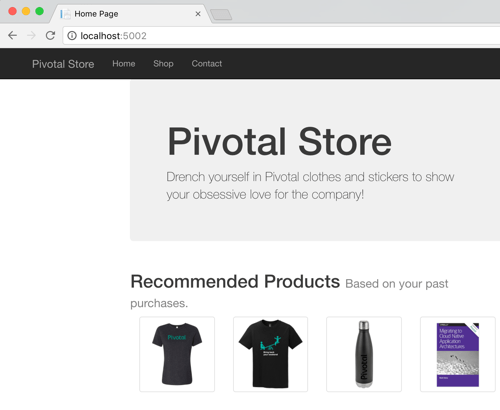
    Great. Next I started up the MVC app that acts as the front-end. Loading the page in the browser showed the four recommendations returned by the service.

    2017.09.21-steeltoe-02

    That works. No big deal. Now let’s turn off the downstream service. Maybe it’s down for maintenance, or just misbehaving. What happens?

    2017.09.21-steeltoe-03

    The Hystrix wrapper detected a failure, and invoked the fallback operation. That’s cool. Let’s see what Hystrix is tracking in the metrics stream. Just append /hystrix/hystrix.stream to the URL and you get a data stream that’s fully compatible with Spring Cloud Hystrix.

    2017.09.21-steeltoe-04

    Here, we see a whole bunch of data that Hystrix is tracking. It’s watching request count, error rate, and lots more. What if you want to change the behavior of Hystrix? Amazingly, the .NET version of Hystrix in Steeltoe has the same broad configuration surface that classic Hystrix does. By adding overrides to the appsettings.json file, you can tweak the behavior of commands, the thread pool, and more. In order to see the circuit actually open, I stretched the evaluation window (from 10 to 20 seconds), and reduced the error limit (from 20 to 3). Here’s what that looked like:

    {
    "hystrix": {
      "command": {
          "default": {
            "circuitBreaker": {
              "requestVolumeThreshold": 3
            },
            "metrics" : {
              "rollingStats": {
                "timeInMilliseconds" : 20000
              }
            }
          }
        }
      }
    }
    

    Restarting my service shows new threshold in the Hystrix stream. Super easy, and very powerful.

    2017.09.21-steeltoe-05

    BONUS: Using the Hystrix Dashboard

    Look, I like reading gobs of JSON in the browser as much as the next person with too much free time. However, normal people like dense visualizations that help them make decisions quickly. Fortunately, Hystrix comes with an extremely data-rich dashboard that makes it simple to see what’s going on.

    This is still a Java component, so I spun up a new project from start.spring.io and added a Hystrix Dashboard dependency to my Boot app. After adding a single annotation to my class, I spun up the project. The Hystrix dashboard asks for a metrics endpoint. Hey, I have one of those! After plugging in my stream URL, I can immediately see tons of info.

    2017.09.21-steeltoe-06.png

    As a service owner or operator, this is a goldmine. I see request volumes, circuit status, failure counts, number of hosts, latency, and much more. If you’ve got a couple services, or a couple hundred, visualizations like this are a life saver.

    Summary

    As someone who started out their career as a .NET developer, I’m tickled to see things like this surface. Steeltoe adds serious juice to your .NET apps and the addition of things like circuit breakers makes it a must-have. Circuit breakers are a proven way to deliver more resilient service environments, so download my sample apps and give this a spin right now!

  • Surprisingly simple messaging with Spring Cloud Stream

    Surprisingly simple messaging with Spring Cloud Stream

    You’ve got a lot of options when connecting microservices together. You could use service discovery and make direct calls. Or you might use a shared database to transfer work. But message brokers continue to be a popular choice. These range from single purpose engines like Amazon SQS or RabbitMQ, to event stream processors like Azure Event Hubs or Apache Kafka, all the way to sophisticated service buses like Microsoft BizTalk Server. When developers choose any one of those, they need critical knowledge to be use them effectively. How can you shrink the time to value and help developers be productive, faster? For Java developers, Spring Cloud Stream offers a valuable abstraction.

    Spring Cloud Stream offers an interface for developers that requires no knowledge of the underlying broker. That broker, either Apache Kafka or RabbitMQ, gets configured by Spring Cloud Stream. Communication to and from the broker is also done via the Stream library.

    What’s exciting to me is that all brokers are treated the same. Spring Cloud Stream normalizes behavior, even if it’s not native to the broker. For example, want a competing consumer model for your clients, or partitioned processing? Those concepts behave differently in RabbitMQ and Kafka. No problem. Spring Cloud Stream makes it work the same, transparently. Let’s actually try both of those scenarios.

    Competing consumers through “consumer groups”

    By default, Spring Cloud Stream sets up everything as a publish-subscribe relationship. This makes it easy to share data among many different subscribers. But what if you want multiple instances of one subscriber (for scale out processing)? One solution is consumer groups. These don’t behave the same in both messaging brokers. Spring Cloud Stream don’t care! Let’s build an example app using RabbitMQ.

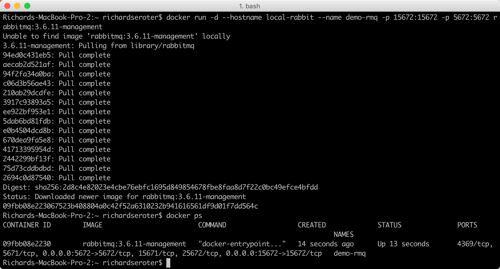
    Before writing code, we need an instance of RabbitMQ running. The most dead-simple option? A Docker container for it. If you’ve got Docker installed, the only thing you need to do is run the following command:

    -docker run -d –hostname local-rabbit –name demo-rmq -p 15672:15672 -p 5672:5672 rabbitmq:3.6.11-management

    2017.09.05-stream-02

    After running that, I have a local cache of the image, and a running container with port mapping that makes the container accessible from my host.

    How do we get messages into RabbitMQ? Spring Cloud Stream supports a handful of patterns. We could publish on a schedule, or on-demand. Here, let’s build a web app that publishes to the bus when the user issues a POST command to a REST endpoint.

    Publisher app

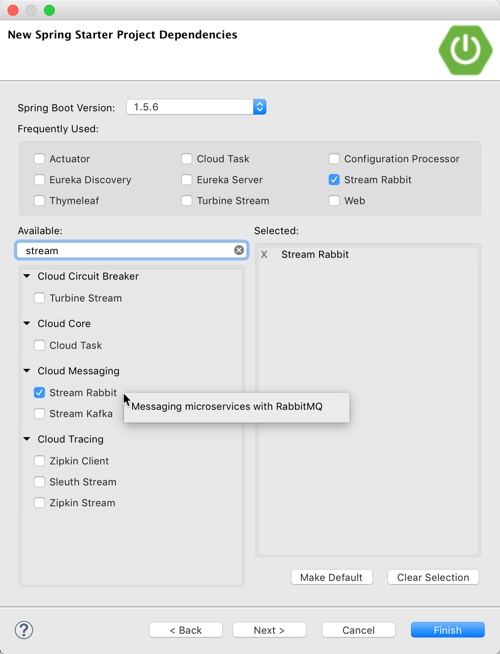
    First, build a Spring Boot application that leverages spring-cloud-starter-stream-rabbit (and spring-boot-starter-web). This brings in everything I need to use Spring Cloud Stream, and RabbitMQ as a destination.

    2017.09.05-stream-01

    Add a new class that acts as our REST controller. A simple @EnableBinding annotation lights this app up as a Spring Cloud Stream project. Here, I’m using the built-in “Source” interface that defines a single communication channel, but you can also build your own.

    @EnableBinding(Source.class)
    @RestController
    public class BriefController {
    

    In this controller class, add an @Autowired variable that references the bean that Spring Cloud Stream adds for the Source interface. We can then use this variable to directly publish to the bound channel! Same code whether talking to RabbitMQ or Kafka. Simple stuff.

    @EnableBinding(Source.class)
    @RestController
    public class BriefController {
      //refer to instance of bean that Stream adds to container
      @Autowired
      Source mysource;
    
      //take in a message via HTTP, publish to broker
      @RequestMapping(path="/brief", method=RequestMethod.POST)
      public String publishMessage(@RequestBody String payload) {
    
        System.out.println(payload);
    
        //send message to channel
        mysource.output().send(MessageBuilder.withPayload(payload).build());
    
        return "success";
      }
    

    Our publisher app is done, so all that’s left is some basic configuration. This configuration tells Spring Cloud Stream how to connect to the right broker. Note that we don’t have to tell Spring Cloud Stream to use RabbitMQ; it happens automatically by having that dependency in our classpath. No, all we need is connection info to our broker, an explicit reference to a destination (without it, the RabbitMQ exchange would be called “output”), and a command to send JSON.

    server.port=8080
    
    #rabbitmq settings for Spring Cloud Stream to use
    spring.rabbitmq.host=127.0.0.1
    spring.rabbitmq.port=5672
    spring.rabbitmq.username=guest
    spring.rabbitmq.password=guest
    
    spring.cloud.stream.bindings.output.destination=legalbriefs
    spring.cloud.stream.default.contentType=application/json
    

    Consumer app

    This part’s almost too easy. Here, build a new Spring Boot application and only choose the spring-cloud-starter-stream-rabbit dependency.

    In the default class, decorate it with @EnableBinding and use the built-in Sink interface. Then, all that’s left is to create a method to process any messages found in the broker. To do that, we decorate the operation with @StreamListener, and all the content type handling is done for us. Wicked.

    @EnableBinding(Sink.class)
    @SpringBootApplication
    public class BlogStreamSubscriberDemoApplication {
    
      public static void main(String[] args) {
        SpringApplication.run(BlogStreamSubscriberDemoApplication.class, args);
      }
    
      @StreamListener(target=Sink.INPUT)
      public void logfast(String msg) {
        System.out.println(msg);
      }
    }
    

    The configuration for this app is straightforward. Like above, we have connection details for RabbitMQ. Also, note that the binding now references “input”, which was the name of the channel in the default “Sink” interface. Finally, observe that I used the SAME destination as the source, to ensure that Spring Cloud Stream wires up my publisher and subscriber successfully. For kicks, I didn’t yet add the consumer group settings.

    server.port=0
    
    #rabbitmq settings for Spring Cloud Stream to use
    spring.rabbitmq.host=127.0.0.1
    spring.rabbitmq.port=5672
    spring.rabbitmq.username=guest
    spring.rabbitmq.password=guest
    
    spring.cloud.stream.bindings.input.destination=legalbriefs
    

    Test the solution

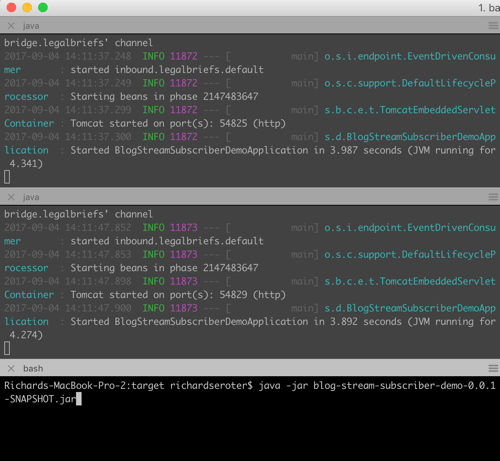
    Let’s see how this works. First, start up three instances of the subscriber app. I generated a jar file, and started up three instances in the shell.

    2017.09.05-stream-04

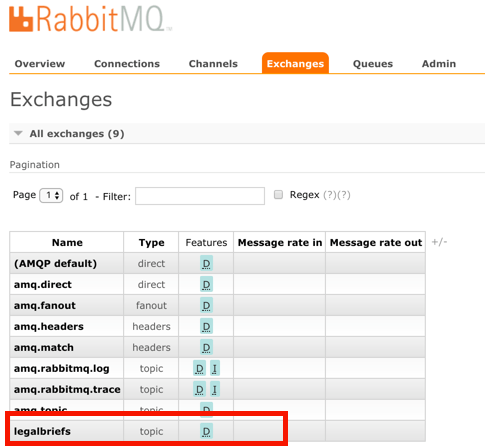
    When you start up these apps, Spring Cloud Stream goes to work. Log into the RabbitMQ admin console, and notice that one exchange got generated. This one, named “legalbriefs”, maps to the name we put in our configuration file.

    2017.09.05-stream-12

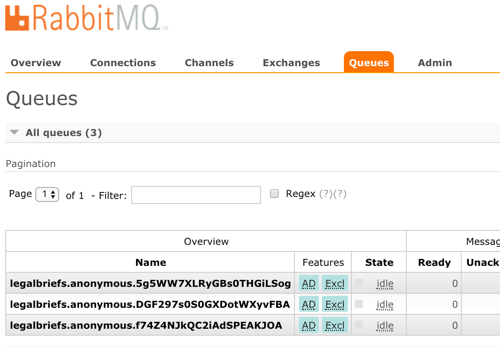
    We also have three queues that map to each of the three app instances we started up.

    2017.09.05-stream-13

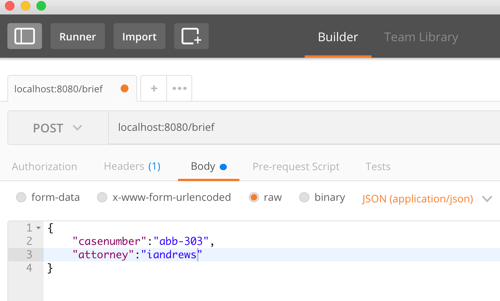
    Nice! Finally, start up the publisher, and post a message to the /briefs endpoint.

    2017.09.05-stream-05

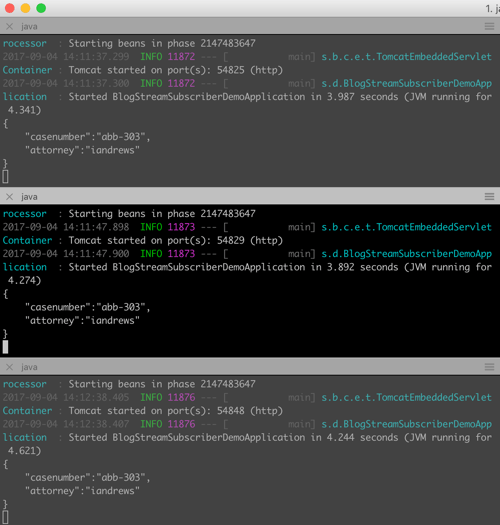
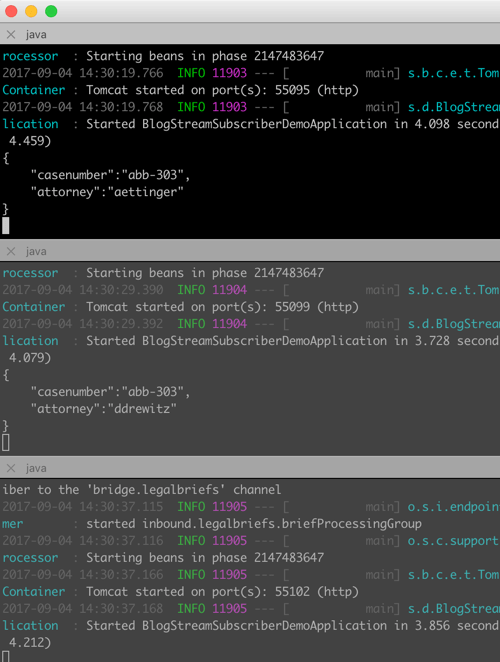
    What happens? As expected, each subscriber gets a copy of the message, because by default, everything happens in a pub/sub fashion.

    2017.09.05-stream-06

    Add consumer group configuration

    We don’t want each instance to get a copy. Rather, we want these instances to share the processing load. Only one should get each message. In the subscriber app, we add a single line to our configuration file. This tells Spring Cloud Stream that all the instances form a single consumer group that share work.

    #adds consumer group processing
    spring.cloud.stream.bindings.input.group=briefProcessingGroup
    

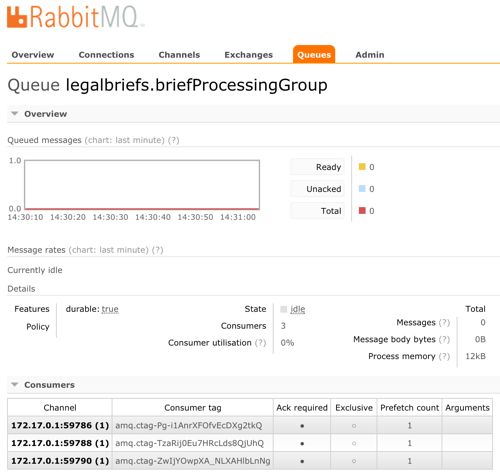
    After regenerating the subscriber jar file, and starting up each file, we see a different setup in RabbitMQ. What you see is a single, named queue, but three “consumers” of the queue.

    2017.09.05-stream-07

    Send in two different messages, and see that each is only processed by a single subscriber instance. This is a simple way to use a message broker to scale out processing.

    2017.09.05-stream-08

    Doing stateful processing using partitioning

    Partitioning feels like a related, but different scenario than consumer groups. Partitions in Kafka introduce a level of parallel processing by writing data to different partitions. Then, each subscriber pulls from a given partition to do work. Here in Spring Cloud Stream, partitioning is useful for parallel processing, but also for stateful processing. When setting it up, you specify a characteristic that steers messages to a given partition. Then, a single app instance processes all the data in that partition. This can be handy for event processing or any scenario where it’s useful for related messages to get processed by the same instance. Think counters, complex event processing, or time-sensitive calculations.

    Unlike with consumer groups. partitioning requires configuration changes to both publishers AND subscribers.  On the publisher side, all that’s needed is (a) the number of partitions, and (b) the expression that describes how data is partitioned. That’s it. No code changes.

    #adding configuration for partition processing
    spring.cloud.stream.bindings.output.producer.partitionKeyExpression=payload.attorney
    spring.cloud.stream.bindings.output.producer.partitionCount=3
    

    On the subscriber side, you set the number of partitions, and set the “partitioned” property equal to “true.” What’s also interesting, but logical, is that as each subscriber starts, you need to give it an “index” so that Spring Cloud Streams knows which partition it should read from.

    #add partition processing
    spring.cloud.stream.bindings.input.consumer.partitioned=true
    #spring.cloud.stream.instanceIndex=0
    spring.cloud.stream.instanceCount=3
    

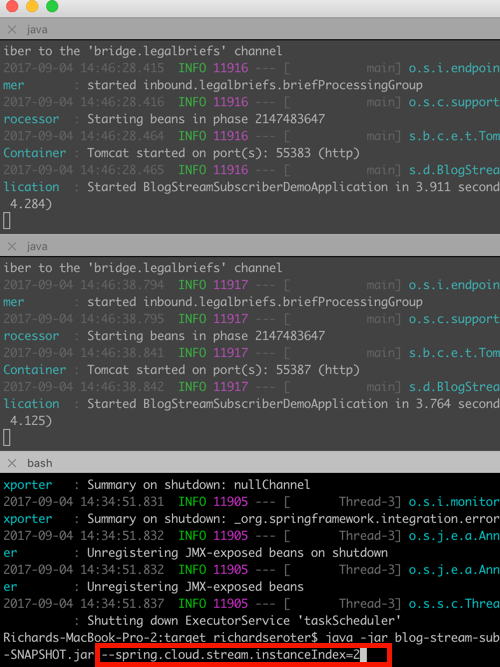
    Let’s start everything up again. The publisher starts up the same as before. Now though, each subscriber instance starts up with a “”spring.cloud.stream.instanceIndex=X” flag that specifies which index applies.

    2017.09.05-stream-09

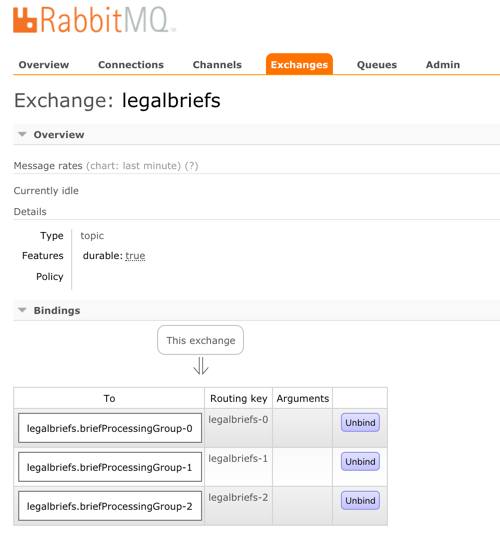
    In RabbitMQ, the setup is different than before. Now, we have three queues, each with a different “routing key” that corresponds to its partition.

    2017.09.05-stream-10

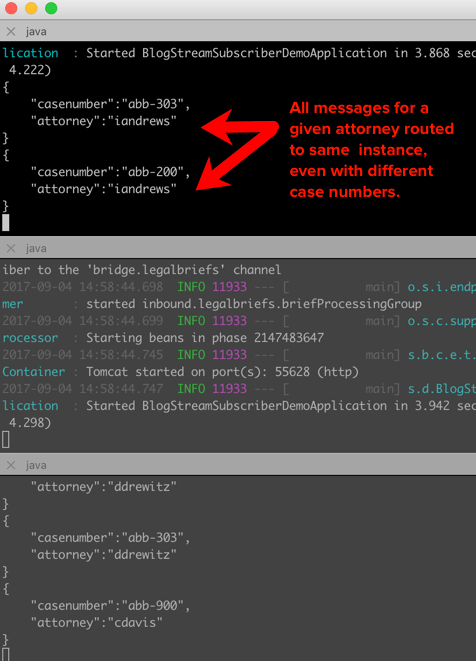
    Send in a message, and notice that all messages with the same attorney name go to one instance. Change the case number, and see that all messages still go to the same place. Switch the attorney ID, and observe that a different partition (likely) gets it. If you have more data varieties than you do partitions, you’ll see a partition handle more than one set of data. No problem, just know that happens.

    2017.09.05-stream-11

    Summary

    It shouldn’t have to be hard to deal with message brokers. Of course there are plenty of scenarios where you want to flex the advanced options of a broker, but there are also many cases where you just want a reliable intermediary. In those cases, Spring Cloud Stream makes it super easy to abstract away knowledge of the broker, while still normalizing behavior across the unique engines.

    In my latest Pluralsight course, I spent over an hour digging into Spring Cloud Stream, and another ninety minutes working with Spring Cloud Data Flow. That project helps you quickly string together Stream applications. Check it out for a deeper dive!

  • My new Pluralsight course about coordinating Java microservices with Spring Cloud, is out!

    No microservice is an island. Oh sure, we all talk about isolated components and independent teams. But your apps and services get combined and used in all sorts of ways. It’s inevitable. As you consider how your microservices interact with each other, you’ll uncover new challenges. Fortunately, there’s technology that’s made those challenges easier to solve.

    Spring Boot is hot. Like real hot. At this point, it’s basically the de facto way for Java developers build modern apps.

    Spring Cloud builds on Spring Boot and introduces all sorts of distributed systems capabilities to your code. Last year I delivered a Pluralsight course that looked at building services with it. But that was only half of the equation. A big portion of Spring Cloud simplifies interactions between services. So, I set out to do a sequel course on Spring Cloud, and am thrilled that the course came out today.

    2017.08.26-pluralsight-01

    This course, Java Microservices with Spring Cloud: Coordinating Services, focuses on helping you build a more effective, maintainable microservices architecture. How do you discover services? Can you prevent cascading failures? What are your routing options? How does messaging play a role? Can we rethink data integration and do it better? All those questions get answered in this ~6 hour course. The six modules of the course include:

    1. Introducing Spring Cloud and microservices coordination scenarios. A chat about the rise of microservices, problems that emerge, and what Spring Cloud is all about.
    2. Locating services at runtime using service discovery. The classic “configuration management DB” can’t keep up with the pace of change in a microservices architecture. No, you need a different way to see a live look at what services exist, and where they are. Enter Spring Cloud Eureka. We take a deep look at how to use it to register and discovery services.
    3. Protecting systems with circuit breakers. What happens when a service dependency goes offline? Bad things. But you can fail fast and degrade gracefully by using the right approach. We dig into Spring Cloud Hystrix in this module and look at the interesting ways to build a self-healing environment.
    4. Routing your microservices traffic. A centralized load balancer may not be the right fit for a fast-changing environment. Same goes for API gateways. This module looks at Spring Cloud Ribbon for client-side load balancing, and Spring Cloud Zuul as a lightweight microproxy.
    5. Connecting microservices through messaging. Message brokers offer one convenient way to link services in a loosely coupled way. Spring Cloud Stream is a very impressive library that makes messaging easy. Add competing consumers, partition processing, and more, whether you’re using RabbitMQ or Apache Kafka underneath. We do a deep dive in this module.
    6. Building data processing pipelines out of microservices. It’s time to rethink how we process data, isn’t it? This shouldn’t be the realm of experts, and require bulky, irregular updates. Spring Cloud Data Flow is one of the newest parts of Spring Cloud, and promises to mess with your mind. Here, we see how to do real-time or batch processing by connecting individual microservices together. Super fun.

    It’s always a pleasure creating content for the Pluralsight audience, and I do hope you enjoy the course!

  • Introducing cloud-native integration (and why you should care!)

    Introducing cloud-native integration (and why you should care!)

    I’ve got three kids now. Trying to get anywhere on time involves heroics. My son is almost ten years old and he’s rarely the problem. The bottleneck is elsewhere. It doesn’t matter how much faster my son gets himself ready, it won’t improve my family’s overall speed at getting out the door. The Theory of Constraints says that you improve the throughput of your process by finding and managing the bottleneck, or constraint. Optimizing areas outside the constraint (e.g. my son getting ready even faster) don’t make much of a difference. Does this relate to software, and application integration specifically? You betcha.

    Software delivery goes through a pipeline. Getting from “idea” to “production” requires a series of steps. And then you repeat it over and over for each software update. How fast you get through that process dictates how responsive you can be to customers and business changes. Your development team may operate LIKE A MACHINE and crank out epic amounts of code. But if your dedicated ops team takes forever to deploy it, then it just doesn’t matter how fast your devs are. Inventory builds up, value is lost. My assertion is that the app integration stage of the pipeline is becoming a bottleneck. And without making changes to how you do integration, your cloud-native efforts are going to waste.

    What’s “cloud native” all about? At this month’s Integrate conference, I had the pleasure of talking about it. Cloud-native refers to how software is delivered, not where. Cloud-native systems are built for scale, built for continuous change, and built to tolerate failure. Traditional enterprises can become cloud natives, but only if they make serious adjustments to how they deliver software.

    Even if you’ve adjusted how you deliver code, I’d suspect that your data, security, and integration practices haven’t caught up. In my talk, I explained six characteristics of a cloud-native integration environment, and mixed in a few demos (highlighted below) to prove my points.

    #1 – Cloud-native integration is more composable

    By composable, I mean capable of assembling components into something greater. Contrast this to classic integration solutions where all the logic gets embedded into a single artifact. Think ETL workflows where ever step of the process is in one deployable piece. Need to change one component? Redeploy the whole thing. One step require a ton of CPU processing? Find a monster box to host the process in.

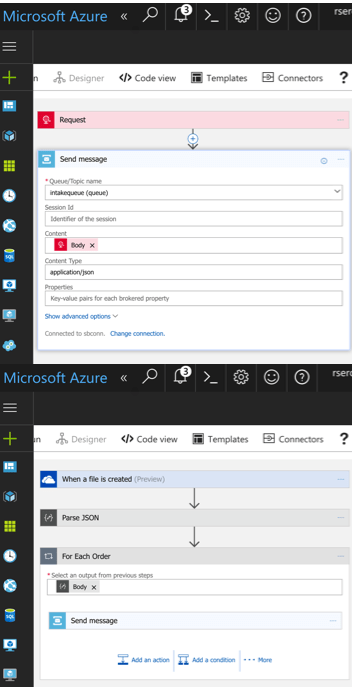
    A cloud-native integration gets built by assembling independent components. Upgrade and scale each piece independently. To demonstrate this, I built a series of Microsoft Logic Apps. Two of them take in data. The first takes in a batch file from Microsoft OneDrive, the other takes in real-time HTTP requests. Both drop the results to a queue for later processing.

    2017.07.10-integrate-01

    The “main” Logic App takes in order entries, enriches the order via a REST service I have running in Azure App Service, calls an Azure Function to assign a fraud score, and finally dumps the results to a queue for others to grab.

    2017.07.10-integrate-02

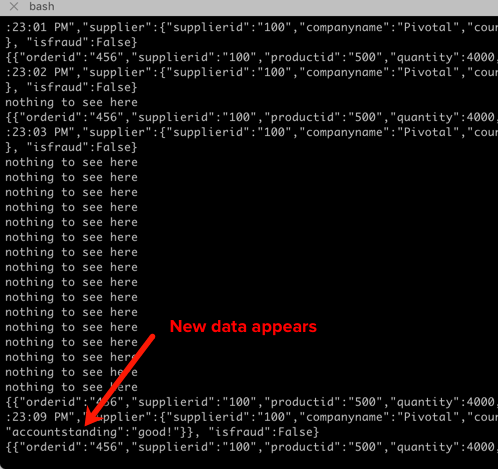
    My REST API sitting in Azure App Service is connected to a GitHub repo. This means that I should be able to upgrade that individual service, without touching the data pipeline sitting Logic Apps. So that’s what I did. I sent in a steady stream of requests, modified my API code, pushed the change to GitHub, and within a few seconds, the Logic App is emitting out a slightly different payload.

    2017.07.10-integrate-03

    #2 – Cloud-native integration is more “always on”

    One of the best things about early cloud platforms being less than 100% reliable was that it forced us to build for failure. Instead of assuming the infrastructure was magically infallible, we built systems that ASSUMED failure, and architected accordingly.

    For integration solutions, have we really done the same? Can we tolerate hardware failure, perform software upgrades, or absorb downstream dependency hiccups without stumbling? A cloud-native integration solution can handle a steady load of traffic while staying online under all circumstances.

    #3 – Cloud-native integration is built for scale

    Elasticity is a key attribute of cloud. Don’t build out infrastructure for peak usage; build for easy scale when demand dictates. I haven’t seen too many ESB or ETL solutions that transparently scale, on-demand with no special considerations. No, in most cases, scaling is a carefully designed part of an integration platform’s lifecycle. It shouldn’t be.

    If you want cloud-native integration, you’ll look to solutions that support rapid scale (in, or out), and let you scale individual pieces. Event ingestions unexpected and overwhelming? Scale that, and that alone. You’ll also want to avoid too much shared capacity, as that creates unexpected coupling and makes scaling the environment more difficult.

    #4 – Cloud-native integration is more self-service

    The future is clear: there will be more “citizen integrators” who don’t need specialized training to connect stuff. IFTTT is popular, as are a whole new set of iPaaS products that make it simple to connect apps. Sure, they aren’t crazy sophisticated integrations; there will always be a need for specialists there. But integration matters more than ever, and we need to democratize the ability to connect our stuff.

    One example I gave here was Pivotal Cloud Cache and Pivotal GemFire. Pivotal GemFire is an industry-leading in-memory data grid. Awesome tech, but not trivial to properly setup and use. So, Pivotal created an opinionated slice of GemFire with a subset of features, but an easier on-ramp. Pivotal Cloud Cache supports specific use cases, and an easy self-service provisioning experience. My challenge to the Integrate conference audience? Why couldn’t we create a simple facade for something powerful, but intimidating, like Microsoft BizTalk Server? What if you wanted a self-service way to let devs create simple integrations? I decided use the brand new Management REST API from BizTalk Server 2016 Feature Pack 1 to build one.

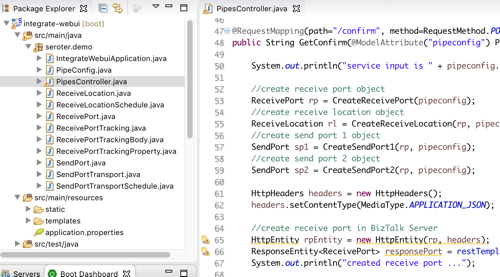
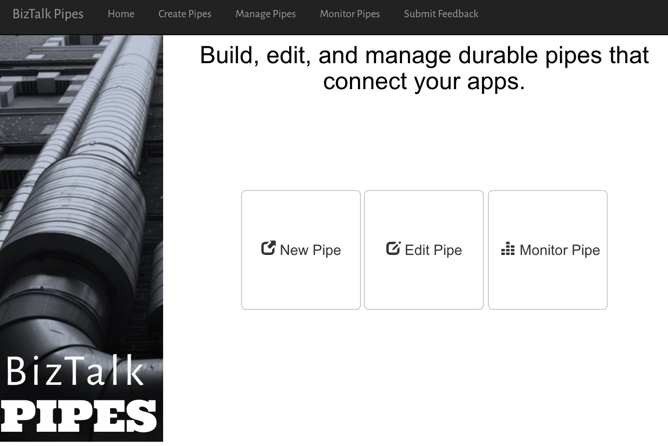
    I used the incomparable Spring Boot to build a Java app that consumed those REST APIs. This app makes it simple to create a “pipe” that uses BizTalk’s durable bus to link endpoints.

    2017.07.10-integrate-05

    I built a bunch of Java classes to represent BizTalk objects, and then created the required API payloads.

    2017.07.10-integrate-04

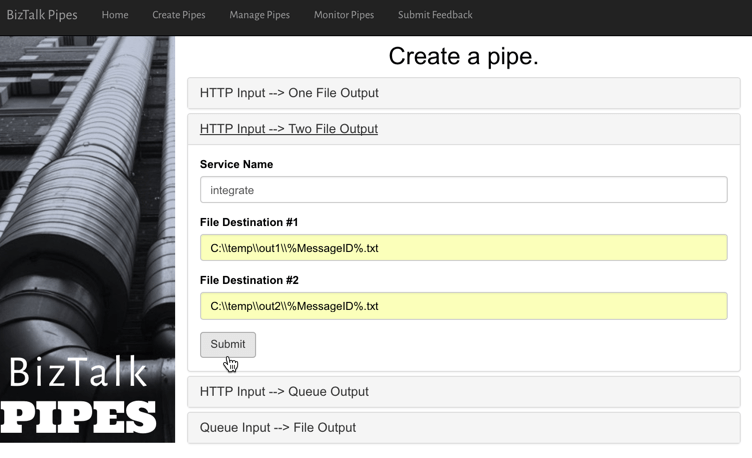
    The result? Devs can create a new pipe that takes in data via HTTP and drops the result to two file locations.

    2017.07.10-integrate-06

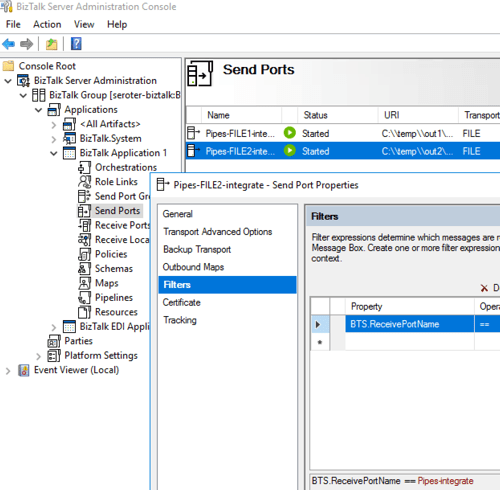
    When I click the button above, I use those REST APIs to create a new in-process HTTP receive location, two send ports, and the appropriate subscriptions.

    2017.07.10-integrate-07

    Fun stuff. This seems like one way you could unlock new value in your ESB, while giving it a more cloud-native UX.

    #5 – Cloud-native integration supports more endpoints

    There’s no turning back. Your hippest integration offered to enterprise devs CANNOT be SharePoint. Nope. Your teams want to creatively connect to Slack, PagerDuty, Salesforce, Workday, Jira, and yes, enterprisey things like SQL Server and IBM DB2.

    These endpoints may be punishing your integration platform with a constant data stream, or, process data irregularly, in bulk. Doing newish patterns like Event Sourcing? Your apps will talk to an integration platform that offers a distributed commit log. Are you ready? Be ready for new endpoints, with new data streams, consumed via new patterns.

    #6 – Cloud-native integration demands complete automation

    Are you lovingly creating hand-crafted production servers? Stop that. And devs should have complete replicas of production environments, on their desktop. That means packaging and automating the integration bus too. Cloud-natives love automation!

    Testing and deploying integration apps must be automated. Without automated tests, you’ll never achieve continuous delivery of your whole system. Additionally, if you have to log into one of your integration servers, you’re doing it wrong. All management (e.g. monitoring, deployments, upgrades) should be done via remote tools and scripts. Think fleets of servers, not long-lived named instances.

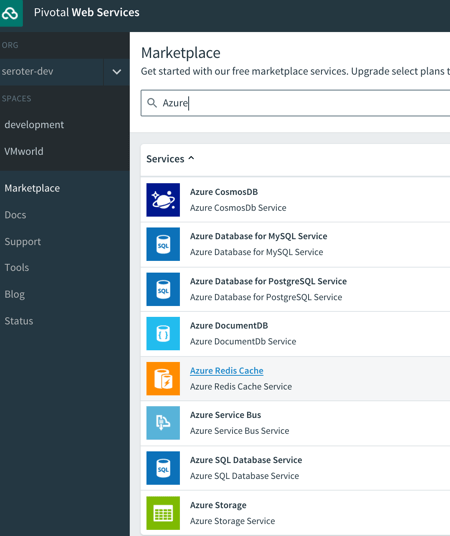
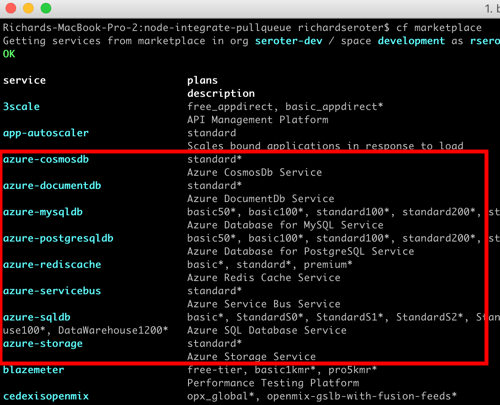
    To demonstrate this concept, I discussed automating the lifecycle of your integration dependency. Specifically, through the use of a service broker. Initially part of Cloud Foundry, the service broker API has caught on elsewhere. A broad set of companies are now rallying around a single API for advertising services, provisioning, de-provisioning, and more. Microsoft built a Cloud Foundry service broker, and it handles lots of good things. It handles lifecycle and credential sharing for services like Azure SQL Database, Azure Service Bus, Azure CosmosDB, and more. I installed this broker into my Pivotal Web Services account, and it advertised available services.

    2017.07.10-integrate-08

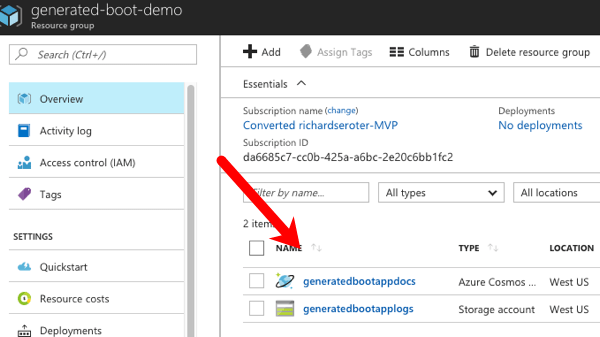
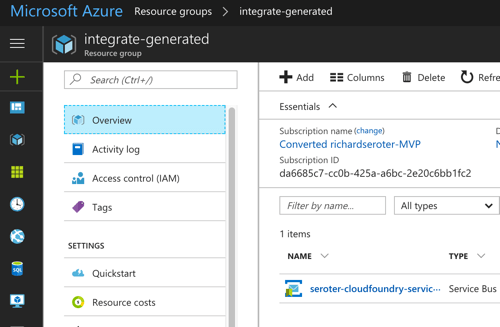
    Simply by typing in cf create-service azure-servicebus standard integratesb -c service-bus-config.json I kicked off a fast, automated process to generate an Azure Resource Group and create a Service Bus namespace.

    2017.07.10-integrate-09

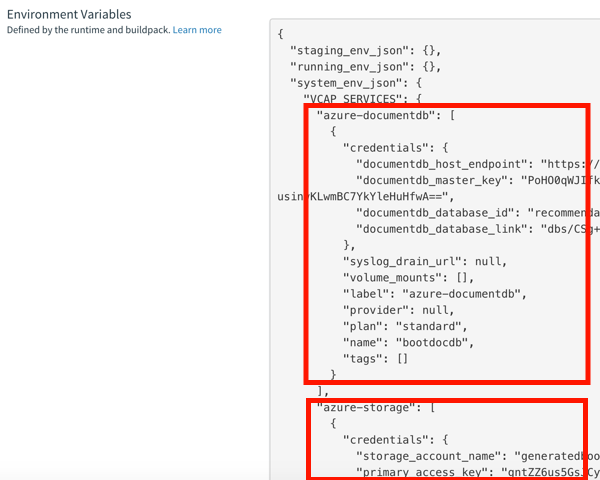
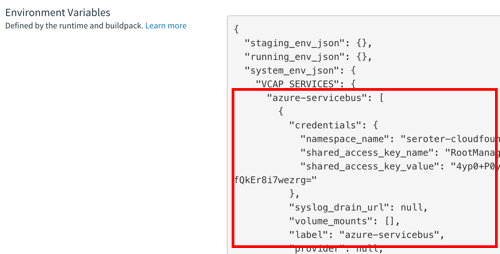
    Then, my app automatically gets access to environment variables that hold the credentials. No more embedding creds in code or config, no need to go to the Azure Portal. This makes integration easy, developer-friendly, and repeatable.

    2017.07.10-integrate-10

    Summary

    It’s such an exciting time to be a software developer. We’re solving new problems in new ways, and making life better for so many. The last thing we want is to be held back by a bottleneck in our process. Don’t let integration slow down your ambitions. The technology is there to help you build integration platforms that are more scalable, resilient, and friendly-to-change. Go for it!

  • Using speaking opportunities as learning opportunities

    Over this summer, I’ll be speaking at a handful of events. I sign myself up for these opportunities —in addition to teaching courses for Pluralsight —so that I commit time to learning new things. Nothing like a deadline to provide motivation!

    Do you find yourself complaining that you have a stale skill set, or your “brand” is unknown outside your company? You can fix that. Sign up for a local user group presentation. Create a short “course” on a new technology and deliver it to colleagues at lunch. Start a blog and share your musings and tech exploration. Pitch a talk to a few big conferences. Whatever you do, don’t wait for others to carve out time for you to uplevel your skills! For me, I’m using this summer to refresh a few of my own skill areas.

    In June, I’m once again speaking in London at Integrate. Application integration is arguably the most important/interesting part of Azure right now. Given Microsoft’s resurgence in this topic area, the conference matters more than ever. My particular session focuses on “cloud-native integration.” What is it all about? How do you do it? What are examples of it in action? I’ve spent a fair amount of time preparing for this, so hopefully it’s a fun talk. The conference is nearly sold out, but I know there are handful of tickets left. It’s one of my favorite events every year.

    Coming up in July, I’m signed up to speak at PerfGuild. It’s a first-time, online-only conference 100% focused on performance testing. My talk is all about distributed tracing and using it to uncover (and resolve) latency issues. The talk builds on a topic I covered in my Pluralsight course on Spring Cloud, with some extra coverage for .NET and other languages. As of this moment, you can add yourself to the conference waitlist.

    Finally, this August I’ll be hitting balmy Orlando, FL to speak at the Agile Alliance conference. This year’s “big Agile” conference has a track centered on foundational concepts. It introduces attendees to concepts like agile project delivery, product ownership, continuous delivery, and more. My talk, DevOps Explained, builds on things I’ve covered in recent Pluralsight courses, as well as new research.

    Speaking at conferences isn’t something you do to get wealthy. In fact, it’s somewhat expensive. But in exchange for incurring that cost, I get to allocate time for learning interesting things. I then take those things, and share them with others. The result? I feel like I’m investing in myself, and I get to hang out at conferences with smart people.

    If you’re just starting to get out there, use a blog or user groups to get your voice heard. Get to know people on the speaking circuit, and they can often help you get into the big shows! If we connect at any of the shows above, I’m happy to help you however I can.

  • How should you model your event-driven processes?

    How should you model your event-driven processes?

    During most workdays, I exist in a state of continuous partial attention. I bounce between (planned and unplanned) activities, and accept that I’m often interrupt-driven. While that’s not an ideal state for humans, it’s a great state for our technology systems. Event-driven applications act based on all sorts of triggers: time itself, user-driven actions, system state changes, and much more. Often, these batch-or-realtime, event-driven activities are asynchronous and coordinated in some way. What options do you have for modeling event-driven processes, and what trade-offs do you make with each option?

    Option #1 – Single, Deterministic Process

    In this scenario, the event handler is monolithic in nature, and any embedded components are purpose-built for the process at hand. Arguably, it’s just a visually modeled code class. While initiated via events, the transition between internal components is pre-determined. The process is typically deployed and updated as a single unit.

    What would you use to build it?

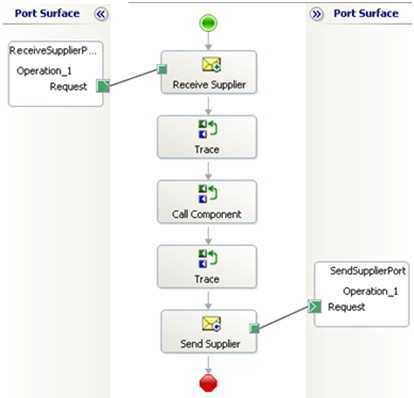
    You’ve seen (and built?) these before. A traditional ETL job fits the bill. Made up of components for each stage, it’s a single process executed as a linear flow. I’d also categorize some ESB workflows—like BizTalk orchestrations—in this category. Specifically, those with send/receive ports bound to the specific orchestration, embedded code, or external components built JUST to support that orchestration’s flow.

    2017.05.02-event-01

    In any of these cases, it’s hard (or impossible) to change part of the event handler without re-deploying the entire process.

    What are the benefits?

    Like with most monolithic things, there’s value in (perceived) simplicity and clarity. A few other benefits:

    • Clearer sense of what’s going on. When there’s a single artifact that explains how you handle a given event, it’s fairly simple to grok the flow. What happens when sensor data comes in? Here you go. It’s predictable.
    • Easier to zero-in on production issues. Did a step in the bulk data sync job fail? Look at the flow and see what bombed out. Clean up any side effects, and re-run. This doesn’t necessarily mean things are easy to fix—frankly, it could be harder—but you do know where things went wrong.
    • Changing and testing everything at once. If you’re worried about the side effects of changing a piece of a flow, that risk may lessen when you’re forced to test the whole thing when one tiny thing changes. One asset to version, one asset to track changes for.
    • Accommodates companies with teams of specialists. From what I can tell, many large companies still have centers-of-excellence for integration pros. That means most ETL and ESB workflows come out of here. If you like that org structure, then you’ll prefer more integrated event handlers.

    What are the risks?

    These processes are complicated, not complex. Other risks:

    • Cumbersome to change individual parts of the process. Nowadays, our industry prioritizes quick feedback loops and rapid adjustments to software. That’s difficult to do with monolithic event-driven processes. Is one piece broken? Better prioritize, upgrade, compile, test, and deploy the whole thing!
    • Non-trivial to extend the process to include more steps. When we think of event-driven activities, we often think of fairly dynamic behavior. But when all the event responses are tightly coordinated, it’s tough to add/adjust/remove steps.
    • Typically centralizes work within a single team. While your org may like siloed teams of experts, that mode of working doesn’t lend itself to agility or customer focus. If you build a monolithic event-driven process, expect delivery delays as the work queues up behind constrained developers.
    • Process scales as one single unit. Each stage of an event-driven workflow will have its own resource demands. Some will be CPU intensive. Others produce heavy disk I/O. If you have a single ETL or ESB workflow to handle events, expect to scale that entire thing when any one component gets constrained. That’s pretty inefficient and often leads to over-provisioning.

    Option #2 – Orchestrated Components

    In this scenario, you’ve got a fairly loose wrapper around independent services that respond to events. These are individual components, built and delivered on their own. While still somewhat deterministic—you are still modeling a flow—the events aren’t trapped within that flow.

    What would you use to build it?

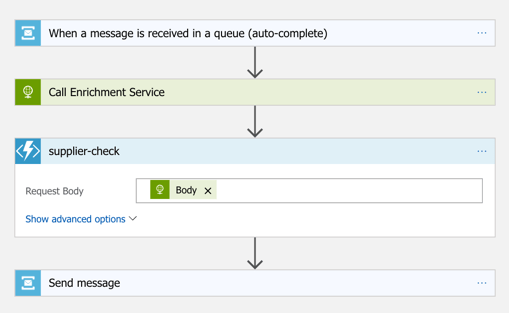
    Without a doubt, you can still use traditional ESB tools to construct this model. A BizTalk orchestration that listens to events and calls out to standalone services? That works. Most iPaaS products also fit the bill here. If you build something with Azure Logic Apps, you’re likely going to be orchestrating a set of services in response to an event. Those services could be REST-based APIs backed by API Management, Azure Functions, or a Service Bus queue that may trigger a whole other event-driven process!

    2017.05.02-event-02.png

    You could also use tools like Spring Cloud Data Flow to build orchestrated, event-driven processes. Here, you chain together standalone Spring Boot apps atop a messaging backbone. The services are independent, but with a wrapper that defines a flow.

    What are the benefits?

    The main benefits of this model stem from the decoupling and velocity that comes with it. Others are:

    • Distributed development. While you still have someone stitching the process together, develop the components independently. And hopefully, you get more people in the mix who don’t even need to know the “wrapper” technology. Or in the case of Spring Cloud Data Flow or Logic Apps, the wrapper technology is dev-oriented and easier to understand than traditional integration systems. Either way, this means more parallel development and faster turnaround of the entire workflow.
    • Composable processes. Configure or reconfigure event handlers based on what’s needed. Reuse each step of the event-driven process (e.g. source channel, generic transformation component) in other processes.
    • Loose grip on the event itself. There could be many parties interested in a given event. Your flow may be just one. While you could reuse the inbound channel to spawn each event-driven processes, you can also wiretap orchestrated processes.

    What are the risks?

    You’ve got some risks with a more complex event-driven flow. Those include:

    • Complexity and complicated-ness. Depending on how you build this, you might not only be complicated but also complex! Many moving parts, many distributed components. This might result in trickier troubleshooting and less certainty about how the system behaves.
    • Hidden dependencies. While the goal may be to loosely orchestrate services in an event-driven flow, it’s easy to have leaky abstractions. “Independent” services may share knowledge between each other, or depend on specific underlying infrastructure. This means that you need good documentation, and services that don’t assume that dependencies exist.
    • Breaking changes and backwards compatibility. Any time you have a looser federation of coordinated pieces, you increase the likelihood of one bad actor causing cascading problems. If you have a bunch of teams that build/run services on their own, and one team combines them into an event-driven workflow, it’s possible to end up with unpredictable behavior. Mitigation options? Strong continuous integration practices to catch breaking changes, and a runtime environment that catches and isolates errors to minimize impact.

    Option #3 – Choreographed Components

    In this scenario, your event-driven processes are extremely fluid. Instead of anything dictating the flow, services collaborate by publishing and subscribing to messages. It’s fully decentralized. Any given services has no idea who or what is upstream or downstream of it. They do their job, and any service that wants to do subsequent work, great.

    What would you use to build it?

    In these cases, you’re often working with low-level code, not high level abstractions. Makes sense. But there are frameworks out there that make it easier for you if you don’t crave writing to or reading from queues. For .NET developers, you have things like MassTransit or nServiceBus. Those provide helpful abstractions. If you’re a Java developer, you’ve got something like Spring Cloud Stream. I’ve really fallen in love with it. Stream provides an elegant abstraction atop RabbitMQ or Apache Kafka where the developer doesn’t have to know much of anything about the messaging subsystem.

    What are the benefits?

    Some of the biggest benefits come from the velocity and creativity that stem from non-deterministic event processing.

    • Encourages adaptable processes. With choreographed event processors, making changes is simple. Deploy another service, and have it listen for a particular event type.
    • Makes everyone an integration developer. Done right, this model lessens the need for a siloed team of experts. Instead, everyone builds apps that care about events. There’s not much explicit “integration” work.
    • Reflects changing business dynamics. Speed wins. But not speed for the sake of it. But speed of learning from customers and incorporating feedback into experiments. Scrutinize anything that adds friction to your learning process. Fixed workflows owned by a single team? Increasingly, that’s an anti-pattern for today’s software-driven, event-powered businesses. You want to be able to handle the influx of new data and events and quickly turn that into value.

    What are the risks?

    Clearly, there are risks to this sort of “controlled chaos” model of event processing. These include:

    • Loss of cross-step coordination. There’s value in event-driven workflows that manage state between stages, compensate for failed operations, and sequence key steps. Now, there’s nothing that says you can’t have some processes that depend on orchestration, and some on choreography. Don’t adopt an either-or mentality here!
    • Traceability is hairy. When an event can travel any number of possible paths, and those paths are subject to change on a regular basis, auditability can’t be taken for granted! If it takes a long time for an inbound event to reach a particular destination, you’ve got some forensics to do. What part was slow? Did something get dropped? How come this particular step didn’t get triggered? These aren’t impossible challenges, but you’ll want to invest in solid logging and correlation tools.

    You’ve got lots of options for modeling event-driven processes. In reality, you’ll probably use a mix of all three options above. And that’s fine! There’s a use case for each. But increasingly, favor options #2 and #3 to give you the flexibility you need.

    Did I miss any options? Are there benefits or risks I didn’t list? Tell me in the comments!

  • Yes, You Can Use a Single Service Registry for .NET and Java Microservices

    Years ago, I could recall lots of phone numbers from memory. Now? It’d be tough to come up with more than two. There’s so many ways to contact each person that I know (phone, email(s), Twitter, WhatsApp, etc) and I depend heavily on my address book. As you start using microservices in your architecture, you’ll discover that you also need a good address book to find services at runtime. But unlike classic solutions such as configuration management databases or UDDI registries, a modern “address book” is different. Why? As microservices get deployed, scaled, and updated, their “address” is fluid. To account for that, any modern address book cannot have stale references. Enter Eureka from Netflix. While baked into Spring Cloud for Java users, Eureka isn’t easily available to .NET microservices. That changed with the OSS Steeltoe library, and I thought I’d show that off here.

    Building a Eureka Server

    Thanks to Spring Cloud, it’s easy to set up a Eureka registry for your services to talk to.

    First, I used Spring Tool Suite to build a new Spring Boot app. In the app creation wizard, I chose the “Eureka Server” package dependency (spring-cloud-starter-eureka-server). If you aren’t using Spring Tool Suite, check out the awesome web-based Spring Intializr to generate project scaffolding to import into any Java IDE.

    2017.03.29-eureka-01

    Next up, there was a LOT of code to write to bring up a Eureka server.

    @EnableEurekaServer
    @SpringBootApplication
    public class PsPlaceholderEurekaServerApplication {
    
      public static void main(String[] args) {
        SpringApplication.run(PsPlaceholderEurekaServerApplication.class, args);
      }
    }
    

    Seriously, that’s it. Bonkers. All that remained was adding a few properties. I set a couple of cosmetic properties (“datacenter” and “environment”), and then told Eureka to NOT register itself with the server, and to NOT retrieve a copy of the registry.

    server.port=8761
    
    # value used for AWS, here can be anything
    eureka.datacenter=seattle
    eureka.environment=prod
    
    # no need to register the server with the server
    eureka.client.register-with-eureka=false
    
    # don't need a local copy of the registry
    eureka.client.fetch-registry=false
    

    I started up the app, navigated to the right URL, and saw the Eureka Server dashboard. There was a bunch of system status info, and an (empty) list of registered servers. Note that Eureka stores its registry in memory. The registry is a live look at the environment because services send a heartbeat to state that they’re online. No need to persist anything to disk.

    2017.03.29-eureka-02

    Building a Eureka Server (Alternative, No-Java Way)

    Now you might say “I don’t know Java and don’t want to learn it.” Fair enough. If you’re a Pivotal customer, than you’re in luck. Spring Cloud Services bundles up key Spring Cloud projects and runs them “as a service” in your Cloud Foundry environment. One such service is the Eureka Service Registry. You can try this out for free in Pivotal Web Services.

    2017.03.29-eureka-03

    After clicking a couple buttons, and waiting about 30 seconds, I had a registry! No Java required.

    2017.03.29-eureka-04

    Registering a Java Service

    Great, I had a registry. Now what? I wanted to add a Java and .NET service to my local registry.

    First up, Java. I created a new Spring Boot application, and chose the “Eureka Discovery” package dependency (spring-cloud-starter-eureka).

    I set up a super awesome REST service that says “hello from Spring Boot.” What about registering with Eureka? It took a single @EnableEurekaClient annotation in my code.

    @EnableEurekaClient
    @RestController
    @SpringBootApplication
    public class PsPlaceholderEurekaServiceApplication {
    
       public static void main(String[] args) {
    
          SpringApplication.run(PsPlaceholderEurekaServiceApplication.class, args);
       }
    
       @RequestMapping("/")
       public String SayHello() {
          return "hello from Spring Boot!";
       }
    }
    

    In the bootstrap.properties file, I set the “spring.application.name” property. This told Eureka what to label my service in the registry. In my application.properties file, I specified that I should register with Eureka, and to send health data along with my service’s heartbeat.

    eureka.client.register-with-eureka=true
    eureka.client.fetch-registry=false
    
    #can intentionally set the host name
    eureka.instance.hostname=localhost
    
    eureka.client.healthcheck.enabled=true
    

    With this in place, I started up my Java service, and sure enough, saw it in the Eureka registry. Cool!

    2017.03.29-eureka-05

    Registering a .NET Service

    .NET developers, rejoice! We can enjoy all kinds of microservices goodness by using libraries like Steeltoe. And it works with .NET Framework and .NET Core apps.

    In this example, I chose to use .NET Core. Here’s my sequence of commands in the wicked .NET Core CLI:

    dotnet new webapi
    dotnet add package Steeltoe.Discovery.Client -v 1.0.0-rc2
    dotnet restore
    dotnet build
    dotnet run

    Just running those commands gave me a Web API project with a dependency on Steeltoe’s discovery package. The latter two commands built and ran the app itself.

    The “webapi” project shell sets up a default REST controller, and for this demo, I just kept that. The only necessary code changes occurred in the Startup.cs class.

    Here, I added a using directive for “Steeltoe.Discovery.Client”, and updated the ConfigureServices and Configure operations to each include references to the discovery client.

    // This method gets called by the runtime. Use this method to add services to the container.
     public void ConfigureServices(IServiceCollection services)
            {
                // Add framework services.
                services.AddMvc();
                services.AddDiscoveryClient(Configuration);
            }
    
    // This method gets called by the runtime. Use this method to configure the HTTP request pipeline.
    public void Configure(IApplicationBuilder app, IHostingEnvironment env, ILoggerFactory loggerFactory)
            {
                loggerFactory.AddConsole(Configuration.GetSection("Logging"));
                loggerFactory.AddDebug();
    
                app.UseMvc();
                app.UseDiscoveryClient();
            }
    

    Finally, I added a few entries to the appsettings.json file. First I set a “spring.application.name” value, just like I did with my Spring Boot app. This tells the registry what to label my service. Then I have a block of Eureka settings including the registry URL, whether I should register with Eureka (yes!), pull a local copy of the registry (no!), and how to find my instance.

    {
      "Logging": {
        "IncludeScopes": false,
        "LogLevel": {
          "Default": "Warning",
          "System": "Information",
          "Microsoft": "Information"
        }
      },
      "spring": {
        "application": {
          "name":  "dotnet-demo-service"
        }
      },
      "eureka": {
        "client": {
          "serviceUrl": "http://localhost:8761/eureka/",
          "shouldRegisterWithEureka": true,
          "shouldFetchRegistry": false
        },
        "instance": {
          "hostname": "localhost",
          "port": 5000
        }
      }
    }
    

    When I ran the “dotnet build” and “dotnet run” commands, I saw my .NET service show up in the Eureka registry. BAM!

    2017.03.29-eureka-06

    Performing Discovery From a Java App

    It’s all nice and good to have an up-to-date address book, but it’s kinda worthless if nobody ever calls you!

    How would I yank service information from the registry for a Java app? It’s easy. First, I created a new Spring Boot project, and used the same “Eureka Discovery” package dependency (spring-cloud-starter-eureka) as before.

    In the application properties file, I specified that I *do* want a local copy of the registry, but do *not* need to register the client app as an available service. I’m just a client here, so no need to do register or give heartbeats.

    server.port=8081
    eureka.client.register-with-eureka=false
    eureka.client.fetch-registry=true
    eureka.client.healthcheck.enabled=false
    

    In my application code, I annotated my main class with @EnableDiscoveryClient, created a load balanced RestTemplate bean, autowired a variable to it, and then defined an operation that used it.

    @EnableDiscoveryClient
    @SpringBootApplication
    public class PsPlaceholderEurekaServiceConsumerApplication {
    
      public static void main(String[] args) {
        SpringApplication.run(PsPlaceholderEurekaServiceConsumerApplication.class, args);
      }
    
      @LoadBalanced
      @Bean
      public RestTemplate restTemplate(RestTemplateBuilder builder) {
         return builder.build();
      }
    }
    
    @RestController
    @Component
    class ConsumerController {
    
      //available now with load balanced bean
      @Autowired
      private RestTemplate restTemplate;
    
      @RequestMapping("/service-instancesrt")
      public String GetServiceInstancesRt() {
    
        String response = restTemplate.getForObject("http://dotnet-demo-service/api/values", String.class);
        return response;
      }
    }
    

    What’s pretty cool is that RestTemplate object is injected with enough smarts to replace the service name from the registry (“dotnet-demo-service”) with the actual URL when it makes the API call. When I invoked my local endpoint, it passed through the request to the microservice it looked up in the registry, and returned the result.

    2017.03.29-eureka-07

    Performing Discovery From a .NET App

    Finally, let’s see how a .NET app would pull a reference from the Eureka registry and use it.

    I created a new project based on the ASP.NET Core MVC template. And then I added the Steeltoe package for service discovery.

    dotnet new mvc
    dotnet add package Steeltoe.Discovery.Client -v 1.0.0-rc2
    dotnet restore

    With this MVC template, I got some basic scaffolding for a sample website. I just extended this by adding a new view (called “Demo”) and controller method. No content in the method right away.

    Just like before, I updated the Startup.cs class by first adding a reference to “Steeltoe.Discovery.Client” and updating the “ConfigureServices” and “Configure” methods.

    ASP.NET Core offers some nice dependency injection stuff. So with the code update above, I now had a “DiscoveryClient” object available for any controller or service to use. So, back in the controller, I added a variable for DiscoveryHttpClientHandler. Then I instantiated that object in the controller constructor, and used it in the new controller method to call a Eureka-registered Java service. Note once again that I only needed the registered service name, and the client libraries flipped this to the address/port of my actual service.

    public class HomeController : Controller
    {
      //added for demonstration
      DiscoveryHttpClientHandler _handler;
    
      public HomeController(IDiscoveryClient client) {
          _handler = new DiscoveryHttpClientHandler(client);
      }
    
      public IActionResult Demo()
      {
          HttpClient c = new HttpClient(_handler, false);
          //call service using registered alias
          string s = c.GetStringAsync("http://boot-customer-service").Result;
    
          ViewData["Message"] = "Service result is: " + s;
    
          return View();
       }
    }
    

    Finally, I added a few things to my appsettings.json file so that the Steeltoe client library knew how to behave. I gave the application a name, and told it to *not* register itself with Eureka, but only to fetch the registry and cache it locally.

    {
      "Logging": {
        "IncludeScopes": false,
        "LogLevel": {
          "Default": "Warning"
        }
      },
      "spring": {
        "application": {
          "name":  "dotnet-demo-service-client"
        }
      },
      "eureka": {
        "client": {
          "serviceUrl": "http://localhost:8761/eureka/",
          "shouldRegisterWithEureka": false,
          "shouldFetchRegistry": true
        },
        "instance": {
          "hostname": "localhost",
          "port": 5001
        }
      }
    }
    

    After that, I started up by ASP.NET Core app, hit the webpage, and saw a result from my Spring Boot service.

    2017.03.29-eureka-08

    That was fun! Some sort of service registry is extremely helpful when adopting a microservices architecture. Instead of using hard-coding references or stale data stores, an always-accurate registry gives you the best chance of surviving in a fluid microservices environment. Now, thanks to Steeltoe, you can use the same registry for your Java, .NET (and even Node.js) services.

  • Creating a JSON-Friendly Azure Logic App That Interacts with Functions, DocumentDB and Service Bus

    Creating a JSON-Friendly Azure Logic App That Interacts with Functions, DocumentDB and Service Bus

    I like what Microsoft’s doing in the app integration space. They breathed new life into their classic integration bus (BizTalk Server). The family of Azure Service Bus technologies (Queues, Topics, Relay) is super solid. API Management and Event Hubs solve real needs. And Azure Logic Apps is maturing at an impressive rate. That last one is the one I wanted to dig into more. Logic Apps gets updated every few weeks, and I thought it’d be fun to put a bunch of new functionality to the test. Specifically, I’m going to check out the updated JSON support, and invoke a bunch of Azure services.

    Step 1 – Create Azure DocumentDB collection

    In my fictitious example, I’m processing product orders. The Logic App takes in the order, and persists it in a database. In the Azure Portal, I created a database account.

    2017-02-22-logicapps-01

    DocumentDB stores content in “collections”, so I needed one of those. To define a collection you must provide some names, throughput (read/write) capacity, and a partition key. The partition key is used to shard the data, and document IDs have to be unique within that partition.

    2017-02-22-logicapps-02

    Ok, I was all set to store my orders.

    Step 2 – Create Azure Function

    Right now, you can’t add custom code inside a Logic App. Microsoft recommends that you call out to an Azure Function if you want to do any funny business. In this example, I wanted to generate a unique ID per order. So, I needed a snippet of code that generated a GUID.

    First up, I created a new Azure Functions app.

    2017-02-22-logicapps-03

    Next up, I had to create an actual function. I could start from scratch, or use a template. I chose the “generic webhook” template for C#.

    2017-02-22-logicapps-05

    This function is basic. All I do is generate a GUID, and return it back.

    2017-02-22-logicapps-06

    Step 3 – Create Service Bus Queue

    When a big order came in, I wanted to route a message to a queue for further processing. Up front, I created a new Service Bus queue to hold these messages.

    2017-02-22-logicapps-07

    With my namespace created, I added a new queue named “largeorders.”

    That was the final prerequisite for this demo. Next up, building the Logic App!

    Step 4 – Create the Azure Logic App

    First, I defined a new Logic App in the Azure Portal.

    2017-02-22-logicapps-08

    Here’s the first new thing I saw: an updated “getting started” view. I could choose a “trigger” to start off my Logic App, or, choose from a base scenario template.

    2017-02-22-logicapps-09

    I chose the trigger “when an HTTP request is received” and got an initial shape on my Logic App. Now, here’s where I saw the second cool update: instead of manually building a JSON schema, I could paste in a sample and generate one. Rad.

    2017-02-22-logicapps-10

    Step 5 – Call out to Azure Functions from Logic App

    After I received a message, I wanted to add it to DocumentDB. But first, I need my unique order ID. Recall that our Azure Function generated one. I chose to “add an action” and selected “Azure Functions” from the list. As you can see below, once I chose that action, I could browse the Function I already created. Note that a new feature of Logic Apps allows you to build (Node.js) Functions from within the Logic App designer itself. I wanted a C# Function, so that’s why I did it outside this UI.

    2017-02-22-logicapps-11

    Step 6 – Insert record into DocumentDB from Logic App

    Next up, I picked the “DocumentDB” activity, and chose the “create or update document” action.

    2017-02-22-logicapps-12

    Unfortunately, Logic Apps doesn’t (yet) look up connection strings for me. I opened another browser tab and navigated back to the DocumentDB “blade” to get my account name and authorization key. Once I did that, the Logic Apps Designer interrogated my account and let me pick my database and collection. After that, I built the payload to store the database. Notice that I built up a JSON message using values from the inbound HTTP message, and Azure Function. I also set the partition key to the “category” value from the inbound message.

    2017-02-22-logicapps-13

    What I have above won’t work. Why? In the present format, the “id” value is invalid. It would contain the whole JSON result from the Azure Function. There’s no way (yet) to grab a part of the JSON in the Designer, but there is a way in code. After switching to “code view”, I added [‘orderid’] reference to the right spot …

    2017-02-22-logicapps-14

    When I switched back to the Designer view, I saw “orderid” the mapped value.

    2017-02-22-logicapps-15

    That finished the first part of the flow. In the second part, I wanted to do different things based on the “category” of the purchased product.

    Step 7 – Add conditional flows to Logic App

    Microsoft recently added a “switch” statement condition to the palette, so I chose that. After choosing the data field to “switch” on, I added a pair of paths for different categories of product.

    2017-02-22-logicapps-16

    Inside the “electronics” switch path, I wanted to check and see if this was a big order. If so, I’d drop a message to a Service Bus queue. At the moment, Logic Apps doesn’t let me create variables (coming soon!), so I needed another way to generate the total order amount. Azure Functions to the rescue! From within the Logic Apps Designer, I once again chose the Azure Functions activity, but this time, selected “Create New Function.” Here, I passed in the full body of the initial message.

    2017-02-22-logicapps-18

    Inside the Function, I wrote some code that multiplied the quantity by the unit price.

    2017.02.22-logicapps-19.png

    We’re nearly done! After this Function, I added an if/else conditional that checked the Function’s result, and if it’s over 100, I send a message to the Azure Service Bus.

    2017-02-22-logicapps-20

    Step 8 – Send a response back to the Logic App caller

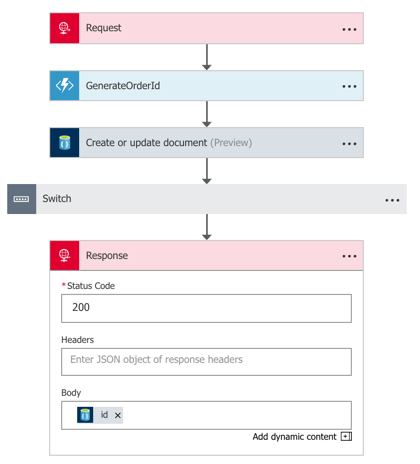
    Whew. Last step to do? Send an HTTP response back to the caller, containing the auto-generated order ID. Ok, my entire flow was finished. It took in a message, added it to DocumentDB, and based on a set of conditions, also shipped it over the Azure Service Bus.

    2017-02-22-logicapps-22

    Step 9 – Test this thing!

    I grabbed the URL for the Logic App from the topmost shape, and popped it into Postman. After sending in the JSON payload, I got back a GUID representing the generated order ID.

    2017-02-22-logicapps-23

    That’s great and all, but I needed to confirm everything worked! DocumentDB with a Function-generated ID? Check.

    2017-02-22-logicapps-24

    Service Bus message viewable via the Service Bus Explorer? Check.

    2017-02-22-logicapps-25

    The Logic Apps overview page on the Azure Portal also shows a “run history” and lets you inspect the success/failure of each step. This is new, and very useful.

    2017-02-22-logicapps-26

    Summary

    All in all, this was pretty straightfoward. The Azure Portal still has some UI quirks, but a decent Azure dev can crank out the above flow in 20 minutes. That’s pretty powerful. Keep an eye on Logic Apps, and consider taking it for a spin!

  • My New Pluralsight Course—Implementing DevOps in the Real World —is Now Live!

    My New Pluralsight Course—Implementing DevOps in the Real World —is Now Live!

    DevOps. It’s a thing. And it’s a thing that has serious business benefit. But for many, it’s still a confusing thing. Especially for those in large companies who struggle to map cloud-native, or startup, processes to their own. So, I’m trying to help.

    A couple years back I delivered a Pluralsight course that took a big-picture view of DevOps. It was time to build upon that with lots of practical info. I’ve been fortunate enough to spend my last 5 years in DevOps environments, and learned a few things. So, I took my own experience, mashed it up with that of experts, and voilà, a new course.

    Implementing DevOps in the Real World is a 3 hour look at the principles and practices employed by many leading DevOps practitioners. DevOps is far from “one size fits all” and there’s no magic blueprint for enterprises to follow. But, there are some tried-and-tested things that seem to work well. That’s what I cover, in an approachable “week in the life” framework.

    2017-01-30-ps-devops-01

    The course has six action-packed (not really) modules:

    • Module 1 – Who Cares About DevOps? Every course needs an intro. DON’T FIGHT ME ON THIS. Here we talk about the real business impact of DevOps. We also look at core values, why it’s hard for enterprises to become “software-driven”, how enterprise DevOps differs from “small” DevOps, and lots more.
    • Module 2 – Week of DevOps (Monday). On the first day of DevOps, my true love gave to me … wait. Wrong thing. On this day of DevOps, we talk about daily standups, on-call engineers, software sprint planning, triaging new features/bugs, and merging (and testing!) code.
    • Module 3 – Week of DevOps (Tuesday). In this module, we look at handing support requests, patching infrastructure that your team owns, cross-functional pairing, detecting service interruptions, and elevating progress to executive stakeholders.
    • Module 4 – Week of DevOps (Wednesday). Hump day. On this day, we look at important things like onboarding new engineers, having a month operations review, performing blameless postmortems, and playing nice with other teams.
    • Module 5 – Week of DevOps (Thursday). Continuous improvement matters! In this module, we replace a broken team process, democratize our documentation, add new things to the deployment pipeline, and re-balance our engineers across teams.
    • Module 6 – Week of DevOps (Friday). You’ve made it through the work week. On this day, we package up our application, ship it, hang out with our teammates, and do some cross-training.

    There you have it. Yes, a “week of DevOps” should include Saturday and Sunday because DevOps rests for no one. However, I didn’t want to build 8 modules, and I demand some level of creativity from Pluralsight viewers. It’ll be ok.

    I’m a believer in DevOps, or whatever we call this collaboration across teams that prioritizes customer-facing value and software quality. It’d be hard for you to convince me that it wouldn’t work at your company. Take this course, and then make your case! Seriously, I hope you enjoy it, and look forward to any feedback you have.

  • Using Azure API Management with Cloud Foundry

    Using Azure API Management with Cloud Foundry

    APIs, APIs everywhere. They power our mobile apps, connect our “things”, and improve supply chains. API management suites popped up to help companies secure, tune, version, and share their APIs effectively. I’ve watched these suites expand beyond the initial service virtualization and policy definition capabilities to, in some cases, replace the need for an ESB. One such suite is Azure API Management. I decided to take Azure API Management for a spin, and use it with a web service running in Cloud Foundry.

    Cloud Foundry is an ideal platform for running modern apps, and it recently added a capability (“Route Services“) that lets you inject another service into the request path. Why is this handy? I could use this feature to transparently introduce a caching service, a logging service, an authorization service, or … an API gateway. Thanks to Azure API Management, I can add all sorts of functionality to my API, without touching the code. Specifically, I’m going to try and add response caching, rate limiting, and IP address filtering to my API.

    2017-01-16-cf-azureapi-01

    Step 1 – Deploy the web service

    I put together a basic Node.js app that serves up “startup ideas.” If you send an HTTP GET request to the root URL, you get all the ideas back. If you GET a path (“/startupideas/1”) you get a specific idea. Nothing earth-shattering.

    Next up, deploying my app to Cloud Foundry. If your company cares about shipping software, you’re probably already running Pivotal Cloud Foundry somewhere. If not, no worries. Nobody’s perfect. You can try it out for free on Pivotal Web Services, or by downloading a fully-encapsulated VM.

    Note: For production scenarios, you’d want your API gateway right next to your web services. So if you want to use Cloud Foundry with Azure API Management, you’ll want to run apps in Pivotal Cloud Foundry on Azure!

    The Cloud Foundry CLI is a super-powerful tool, and makes it easy to deploy an app—Java, .NET, Node.js, whatever. So, I typed in “cf push” and watched Cloud Foundry do it’s magic.

    2017-01-16-cf-azureapi-02

    In a few seconds, my app was accessible. I sent in a request, and got back a JSON response along with a few standard HTTP headers.

    2017-01-16-cf-azureapi-03

    At this point, I had a fully working service deployed, but was in dire need of API management.

    Step 2 – Create an instance of Azure API Management

    Next up, I set up an instance of Azure API Management. From within the Azure Portal, I found it under the “Web + Mobile” category.

    2017-01-16-cf-azureapi-04

    After filling in all the required fields and clicking “create”, I waited about 15 minutes for my instance to come alive.

    2017-01-16-cf-azureapi-05

    Step 3 – Configure API in Azure API Management

    The Azure API Management product is meant to help companies create and manage their APIs. There’s a Publisher Portal experience for defining the API and managing user subscriptions, and a Developer Portal targeted at devs who consume APIs. Both portals are basic looking, but the Publisher Portal is fairly full-featured. That’s where I started.

    Within the Publisher Portal, I defined a new “Product.” A product holds one or more APIs and has settings that control who can view and subscribe to those APIs. By default, developers who want to use APIs have to provide a subscription token in their API calls. I don’t feel like requiring that, so I unchecked the “require subscription” box.

    2017-01-16-cf-azureapi-06

    With a product in place, I added an API record. I pointed to the URL of my service in Cloud Foundry, but honestly, it didn’t matter. I’ll be overwriting it later at runtime.

    2017-01-16-cf-azureapi-07

    In Azure API Management, you can call out each API operation (URL + HTTP verb) separately. For a given operation, you have the choice of specifying unique behaviors (e.g. caching). For a RESTful service, the operations could be represented by a mix of HTTP verbs and extension of the URL path. That is, one operation might be to GET “/customers” and another could GET “/customers/100/orders.”

    2017-01-16-cf-azureapi-08

    In the case of Route Services, the request is forwarded by Cloud Foundry to Azure API Management without any path information. It redirects all requests to the root URL in Azure API Management and puts the full destination URL in an HTTP header (“x-cf-forwarded-url”). What does that mean? It means that I need to define a single operation in Azure API Management, and use policies to add different behaviors for each operation represented by unique paths.

    Step 4 – Create API policy

    Now, the fun stuff! Azure API Management has a rich set of management policies that we use to define our API’s behavior. As mentioned earlier, I wanted to add three behaviors: caching, IP address filtering, and rate limited. And for fun, I also wanted to add an output HTTP header to prove that traffic flowed through the API gateway.

    You can create policies for the whole product, the API, or the individual operation. Or all three! The policy that Azure API Management ends up using for your API is a composite of all applicable policies. I started by defining my scope at the operation level.

    2017-01-16-cf-azureapi-09

    Below is my full policy. What should you pay attention to? On line 10, notice that I set the target URL to whatever Cloud Foundry put into the x-cf-forwarded-url header. On lines 15-18, I do IP filtering to keep a particular source IP from calling the service. See on line 23 that I’m rate limiting requests to the root URL (all ideas) only. Lines 25-28 spell out the request caching policy. Finally, on line 59 I define the cache expiration period.

    <policies>
      <!-- inbound steps apply to inbound requests -->
      <inbound>
        <!-- variable is "true" if request into Cloud Foundry includes /startupideas path -->
        <set-variable name="isStartUpIdea" value="@(context.Request.Headers["x-cf-forwarded-url"].Last().Contains("/startupideas"))" />
        <choose>
          <!-- make sure Cloud Foundry header exists -->
          <when condition="@(context.Request.Headers["x-cf-forwarded-url"] != null)">
            <!-- rewrite the target URL to whatever comes in from Cloud Foundry -->
            <set-backend-service base-url="@(context.Request.Headers["x-cf-forwarded-url"][0])" />
            <choose>
              <!-- applies if request is for /startupideas/[number] requests -->
              <when condition="@(context.Variables.GetValueOrDefault<bool>("isStartUpIdea"))">
                <!-- don't al low direct calls from a particular IP -->
                <ip-filter action="forbid">
    <address>63.234.174.122</address>
    
                </ip-filter>
              </when>
              <!-- applies if request is for the root, and returns all startup ideas -->
              <otherwise>
                <!-- limit callers by IP to 10 requests every sixty seconds -->
                <rate-limit-by-key calls="10" renewal-period="60" counter-key="@(context.Request.IpAddress)" />
                <!-- lookup requests from the cache and only call Cloud Foundry if nothing in cache -->
                <cache-lookup vary-by-developer="false" vary-by-developer-groups="false" downstream-caching-type="none" must-revalidate="false">
                  <vary-by-header>Accept</vary-by-header>
                  <vary-by-header>Accept-Charset</vary-by-header>
                </cache-lookup>
              </otherwise>
            </choose>
          </when>
        </choose>
      </inbound>
      <backend>
        <base />
      </backend>
      <!-- output steps apply to after Cloud Foundry reeturns a response -->
      <outbound>
        <!-- variables hold text to put into the custom outbound HTTP header -->
        <set-variable name="isroot" value="returning all results" />
        <set-variable name="isoneresult" value="returning one startup idea" />
        <choose>
          <when condition="@(context.Variables.GetValueOrDefault<bool>("isStartUpIdea"))">
            <set-header name="GatewayHeader" exists-action="override">
              <value>@(
            	   (string)context.Variables["isoneresult"]
            	  )
              </value>
            </set-header>
          </when>
          <otherwise>
            <set-header name="GatewayHeader" exists-action="override">
              <value>@(
                   (string)context.Variables["isroot"]
                  )
              </value>
            </set-header>
            <!-- set cache to expire after 10 minutes -->
            <cache-store duration="600" />
          </otherwise>
        </choose>
      </outbound>
      <on-error>
        <base />
      </on-error>
    </policies>
    

    Step 5 – Add Azure API Management to the Cloud Foundry route

    At this stage, I had my working Node.js service in Cloud Foundry, and a set of policies configured in Azure API Management. Next up, joining the two!

    The Cloud Foundry service marketplace makes it easy for devs to add all sorts of services to an app—databases, caches, queues, and much more. In this case, I wanted to add a user-provided service for Azure API Management to the catalog. It just took one command:

    cf create-user-provided-service azureapimgmt -r https://seroterpivotal.azure-api.net

    All that was left to do was bind my particular app’s route to this user-provided service. That also takes one command:

    cf bind-route-service cfapps.io azureapimgmt –hostname seroter-startupideas

    With this in place, Azure API Management was invisible to the API caller. The caller only sends requests to the Cloud Foundry URL, and the Route Service intercepts the request!

    Step 6 – Test the service

    Did it work?

    When I sent an HTTP GET request to https://seroter-startupideas.cfapps.io/startupideas/1 I saw a new HTTP header in the result.

    2017-01-16-cf-azureapi-10

    Ok, so it definitely went through Azure API Management. Next I tried the root URL that has policies for caching and rate limiting.

    On the first call to the root URL, I saw an log entry recorded in Cloud Foundry, and a JSON response with the latest timestamp.

    2017-01-16-cf-azureapi-11

    With each subsequent request, the timestamp didn’t change, and there was no entry in the Cloud Foundry logs. What did that mean? It meant that Azure API Management cached the initial response and didn’t send future requests back to Cloud Foundry. Rad!

    The last test was for rate limiting. It didn’t matter how many requests I sent to https://seroter-startupideas.cfapps.io/startupideas/1 I always got a result. No surprise, as there was no rate limiting for that operation. However, when I sent a flurry of requests to https://seroter-startupideas.cfapps.io I got back the following response:

    2017-01-16-cf-azureapi-12

    Very cool. With zero code changes, I added caching and rate-limiting to my Node.js service.

    Next Steps

    Azure API Management is pretty solid. There are lots of great tools in the API Gateway market, but if you’re running apps in Microsoft Azure, you should strongly consider this one. I only scratched the service of the capabilities here, and I plan to spend some more time investigating user subscription and authentication capabilities.

    Have you used Azure API Management? Do you like it?