We can all agree that DevOps is a “thing” now, right? It’s no longer something that only snazzy digital native companies do. I see all sorts of organizations evolving their IT departments to orient more around the customer and getting software to production faster.
“DevOps” is definitely not a noun or a product you can buy—looking at you, Microsoft—but rather, it’s all the wonderful activities that turn technology into an asset for a company, instead of a cost center. If you’re at the start of your DevOps journey, you might enjoy my brand new Pluralsight course. It’s part of the terrific “DevOps Foundations” learning path at Pluralsight, and called DevOps Foundations: Planning and Implementing a DevOps Strategy. It’s a mouthful, I know.
The course has three modules and runs about 90 minutes total. The first module helps you audit your current state so that you start your journey on the right foot. Here, we talk about questions to ask about your company’s readiness, existing skills, and value streams.
The second module is all about the pilot effort. It’s tempting to try and standardize on a bunch of stuff before starting your journey, but you need to resist that temptation! In this module, we talk about things you want to prove in your pilot, how to staff your first team, how to approach version control, automation that matters, and more.
The final module is all about scaling. How do you take what you learned in the pilot and expand that to the whole company? We talk about some of the challenges you’ll face, what things you might start standardizing on, why you’ll want to build a platform team, how to shift left on security, and much more.
This was a fun course to put together, and represents lots of things I’ve learned from others, and done myself. I hope you enjoy it!
A simple use case came to mind yesterday. How would I quickly find out if someone put a too-big file into a repository? In ancient times (let’s say, 2008), here’s what I would have done to solve that. First I’d have to find a file share or FTP location to work with. Then I’d write some custom code with a file system listener that reacted to new documents hitting that file location. After that, I’d look at the size and somehow trigger an alert if the file exceeded some pre-defined threshold. Of course, I’d have to find a server to host this little app on, and figure out how to deploy it. So, solving this might take a month or more. Today? Serverless, baby! I can address this use case in minutes.
I’m learning to program in Go, so ideally, I want a lightweight serverless function written in Go that reacts whenever a new file hits an object store. Is that easy to do in each major public cloud entirely with the console UIs? I just went on a journey to find out, without preparing ahead of time, and am sharing my findings in real time.
Disclaimer: I work at Google Cloud but I am a fairly regular user of other clouds, and was a 12-time Microsoft MVP, mostly focused on Azure. Any mistakes below can be attributed to my well-documented ignorance, and not about me trying to create FUD!
Google Cloud
First up, the folks paying my salary. How easily could I add a Cloud Function that responds to things getting uploaded to Cloud Storage?
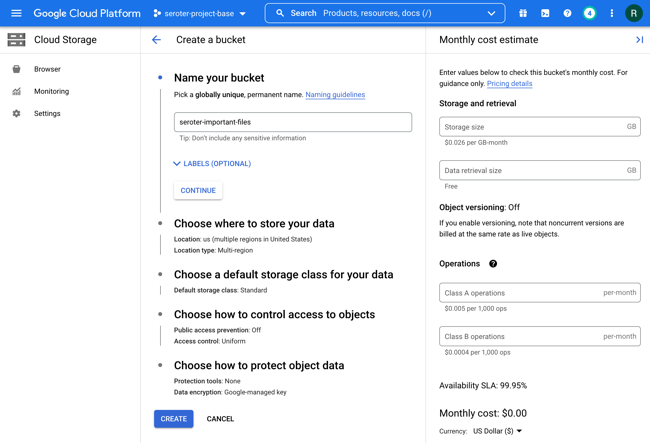
First, I created a new bucket. This takes a few seconds to do.
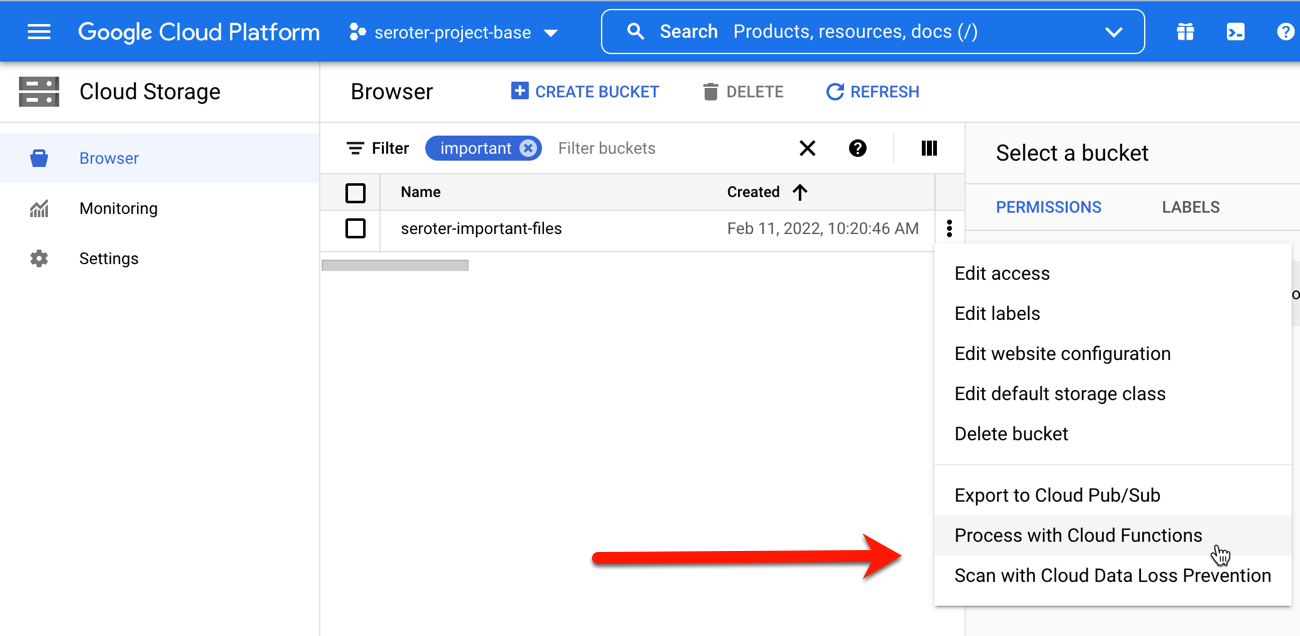
Hey, what’s this? From the bucket browser, I can actually choose to “process with Cloud Functions.” Let’s see what this does.
Whoa. I get an inline “create function” experience with my bucket-name pre-populated, and the ability to actually author the function code RIGHT HERE.
The Go code template was already populated with a “storage” object as input, and I extended it to include the “size” attribute. Then I added a quick type conversion, and check to see if the detected file was over 1MB.
// Package p contains a Google Cloud Storage Cloud Function.
package p

import (
	"context"
	"log"
	"strconv"
)

// GCSEvent is the payload of a GCS event. Please refer to the docs for
// additional information regarding GCS events.
type GCSEvent struct {
	Bucket string `json:"bucket"`
	Name   string `json:"name"`
	Size   string `json:"size"`
}

// HelloGCS prints a message when a file is changed in a Cloud Storage bucket.
func HelloGCS(ctx context.Context, e GCSEvent) error {
	log.Printf("Processing file: %s", e.Name)

	intSize, _ := strconv.Atoi(e.Size)

	if intSize > 1000000 {
		log.Printf("Big file detected, do something!")
	} else {
		log.Printf("Normal size file detected")
	}

	return nil
}
After deploying it, I want to test it. To do so, I just dropped two files—one that was 54 bytes and another that was over 1MB.
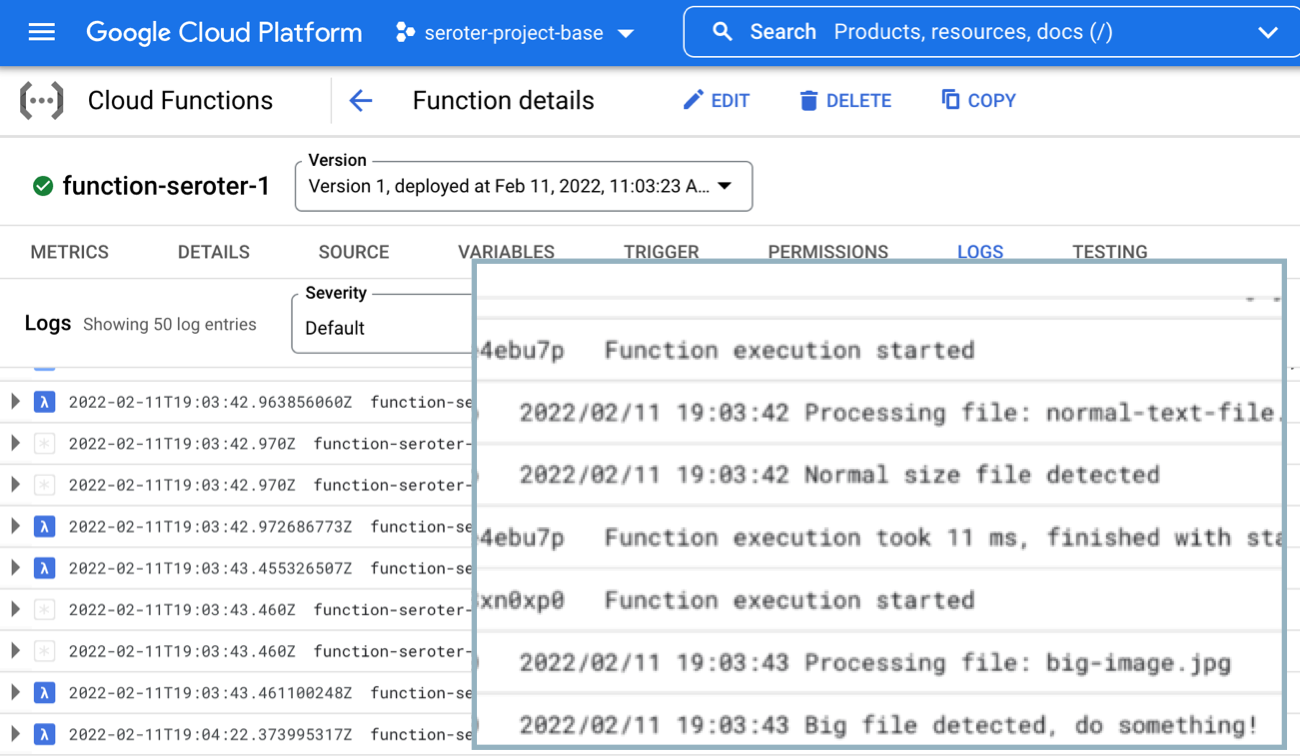
Now I’m heading over to the Cloud Functions dashboard and looking at the inline “Logs” tab. This shows me the system logs, as well as anything my function itself emitted. After just a moment, I see the logs my function wrote out, including the “normal size file” and “big file detected” messages.
Goodness that was easy. The same sort of in-experience trigger exists for Pub/Sub, making it easy to generate functions that respond to messaging events.
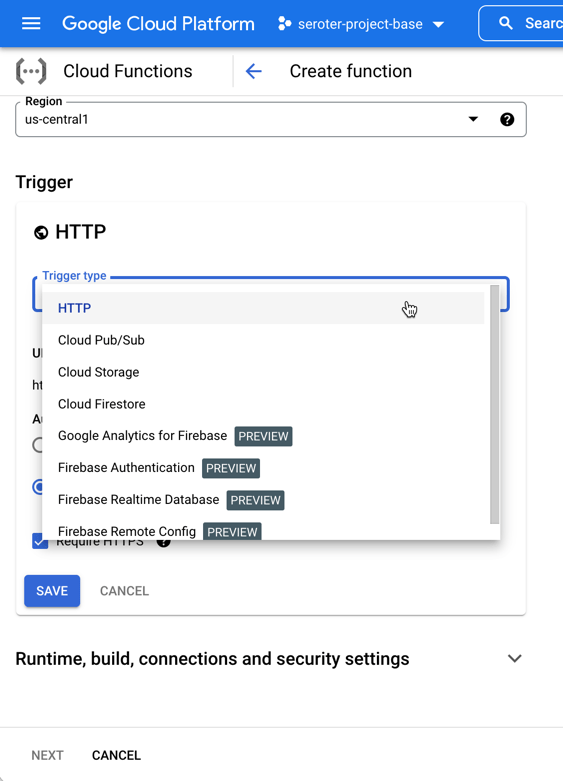
The other UI-driven way to do this. From the Cloud Functions experience, I chose to add a new function. You see here that I have a choice of “trigger.”
I chose “Cloud Storage” and then picked from a list of possible event types. Let’s also choose the right bucket to listen in on. Note that from this creation wizard, I can also do things like set the memory allocation and timeout period, define the minimum and maximum instance count, add environment variables, reference secrets, and define ingress and egress permissions.
Next, I have to add some source code. I can upload a zip file, reference a zip file in Cloud Storage, point to a source code repository, or add code inline. Let’s do that. What I love is that the code template recognizes my trigger type, and takes in the object representing the storage event. For each language. That’s a big time-saver, and helps new folks understand what the input object should look like. See here:
Here, I picked Go again, used the same code as before, and deployed my function. Once again, it cleanly processes any event related to new files getting added to Cloud Storage. Cloud Functions is underrated, and super easy to work with.
End to end, this solution should take 2-5 minutes tops to complete and deploy. That’s awesome. Past Richard would be crying for joy right now.
AWS
The grandaddy of serverless should be pretty good at this scenario too! From humble beginnings, AWS Lambda has seemingly becomes the preferred app platform in that ecosystem. Let’s use the AWS console experience to build a Lambda function that responds to new files landing in an S3 bucket.
First, I need an S3 bucket. Easy enough, and accepting all the default settings.
My bucket is now there, and I’m looking around, but don’t see any option to create a Lambda function from within this S3 interface. Maybe I’m missing it, but doesn’t seem so.
No problem. Off to the Lambda dashboard. I click the very obvious “create function” button and am presented with a screen that asks for my function name and runtime, and the source of code.
Let’s see what “from scratch” means, as I’d probably want some help via a template if it’s too bare bones. I click “create function” to move forward.
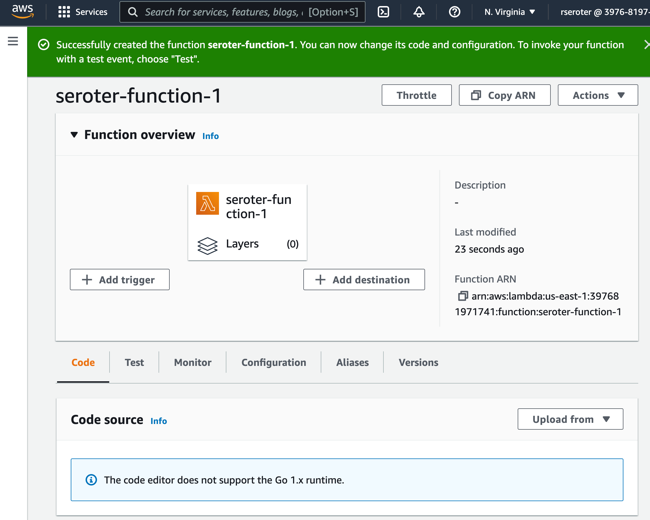
Ok, rats, I don’t get an inline code editor if I want to write code in Go. Would have been useful to know beforehand. I’ll delete this function and start over, this time, looking for a blueprint that might provide a Go template for reading from S3.
Doesn’t look like there’s anything for Go. If I want a blueprint, I’m choosing between Python and Node. Ok, I’ll drop by Go requirement, and crank out this Lambda function in JavaScript. I picked that s3-get-object template, and then provide a function name and a role that can access S3. I’m asked for details about my S3 trigger (bucket name, event type) and shown the (uneditable) blueprint code. I’d like to make changes, but I guess I wait until later, so I create the function.
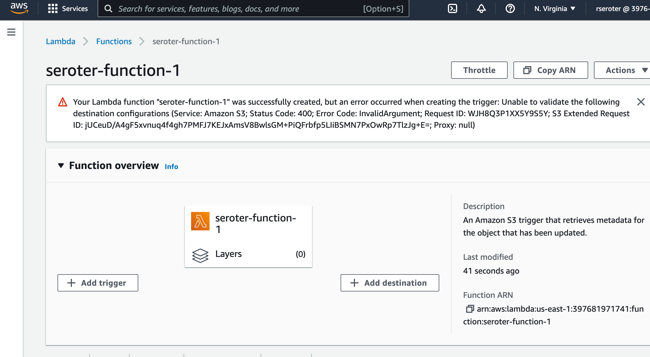
Shoot, I did something wrong. Got an error that, on the plus side, is completely opaque and unreadable.
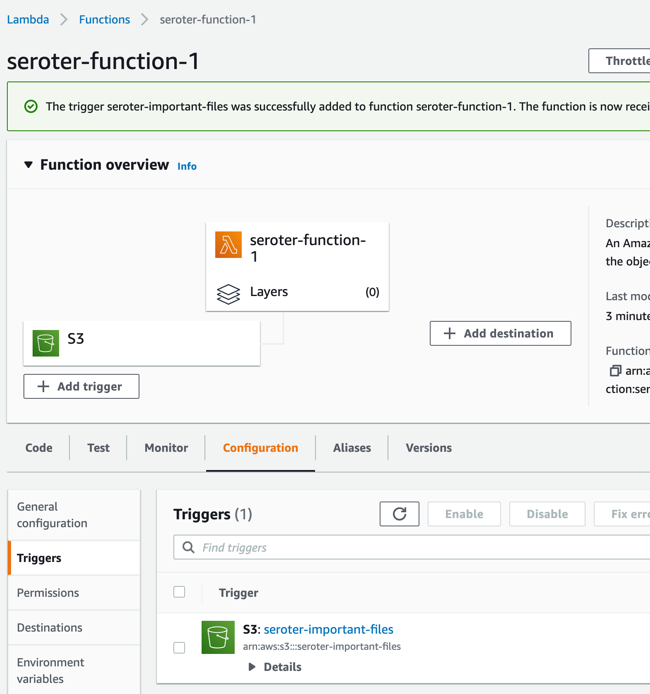
Not be stopped, I’ll try clicking “add trigger” here, which lets me choose among a variety of sources, including S3, and this configuration seems to work fine.
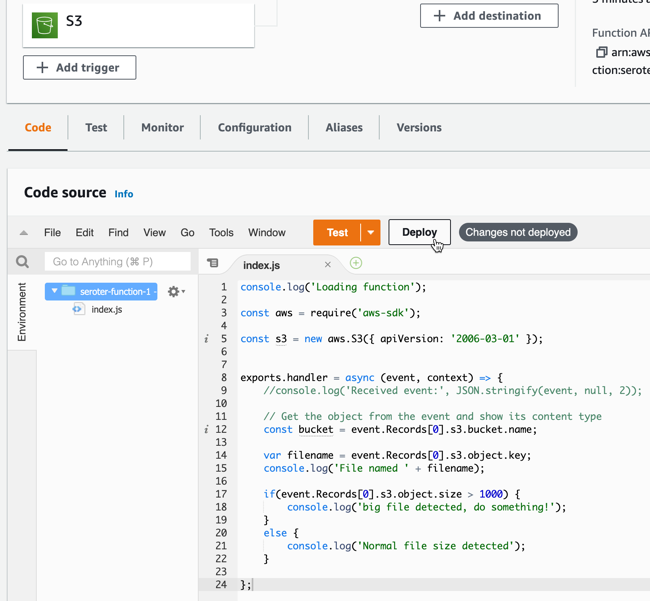
I want to update the source code of my function, so that it logs alerts for big files. I updated the Lambda code (after looking up the structure of the inbound event object) and clicked “deploy” to apply this new code.
Not too bad. Ok, let’s test this. In S3, I just dropped a handful of files into the bucket. Back in the Lambda console, I jump to the “Monitor” tab to see what’s up.
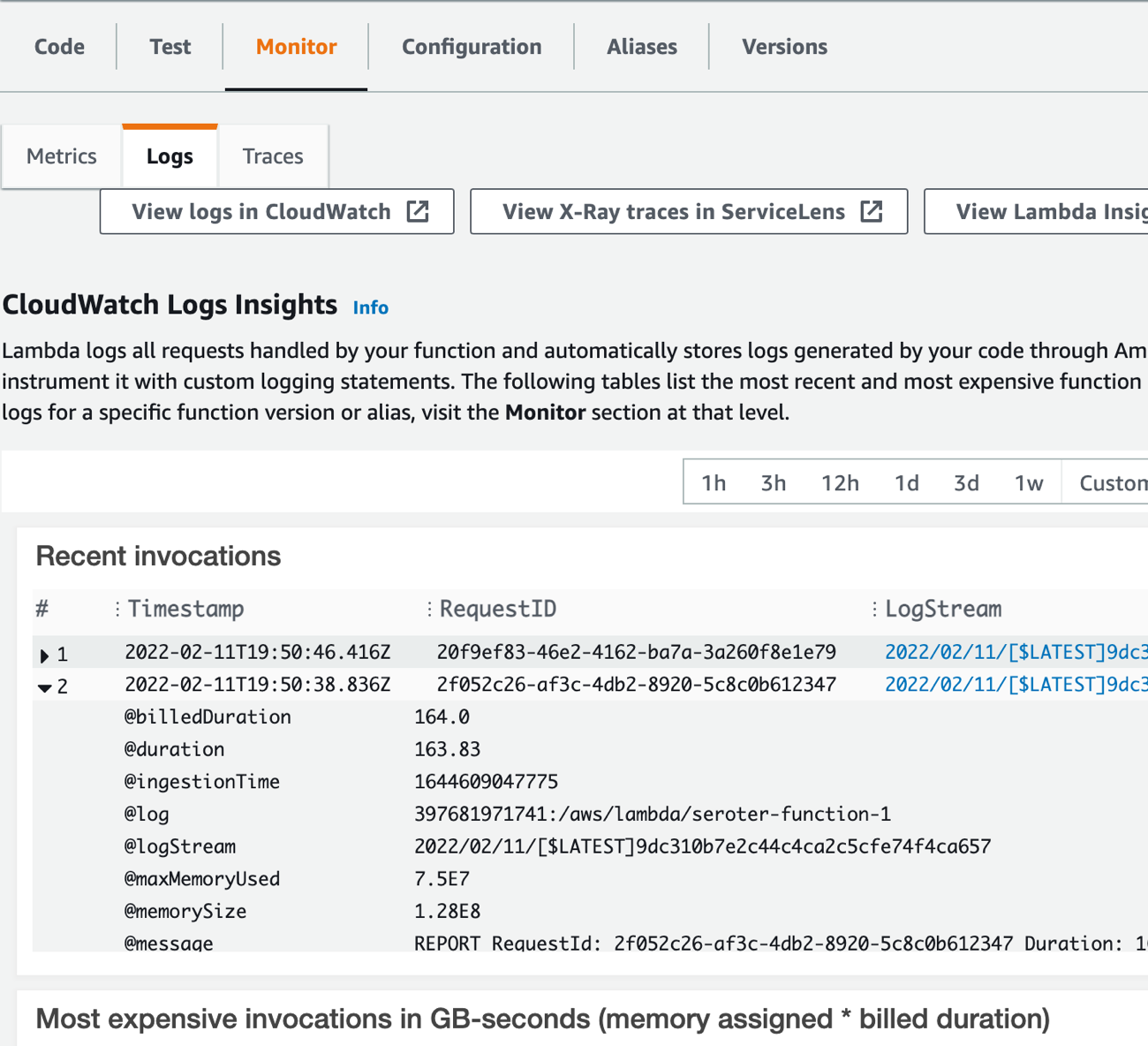
I’ve got the invocations listed here. I can’t see the logs directly, but looks like I need to click the LogStream links to view the invocation logs. Doing that takes me to a new window where I’m now in CloudWatch. I now see the logs for this particular set of invocations.
Solid experience. A few hiccups, but we’ll chalk some of that up to my incompetence, and the remainder to the fact that AWS UIs aren’t always the most intuitive.
Microsoft Azure
Azure, my old friend. Let’s see how I can use the Azure Portal to trigger an Azure Function whenever I add something to a storage bucket. Here we go.
Like with the walkthroughs above, I also need to setup some storage. From the home page, I click “create resource” and navigate on the left-hand side to “Storage.” And … don’t see Azure Storage. *Expletive*.
I can’t find what category it’s in, but just noticed it in the “Get started” section. It’s weird, but whatever. I pick an Azure subscription and resource group, try to set a name (and remember that it doesn’t accept anything but letters and numbers, no dashes), and proceed. It validates something (not sure I’ve ever seen this NOT pass) and then I can click “create.”
After thirty seconds, I have my storage account. Azure loves “things contained within things” so this storage account itself doesn’t hold objects. I create a “container” to hold my actual documents.
Like with Lambda, I don’t see a way from this service to create an event-driven function. [Updated 2-13-22: A reader pointed out that there is an “events” experience in Storage that lets you somewhat create a function (but not the Function App itself). While convenient, the wizard doesn’t recognize where you are, and asks what sort of Function (storage!) you want to build. But it’s definitely something.]
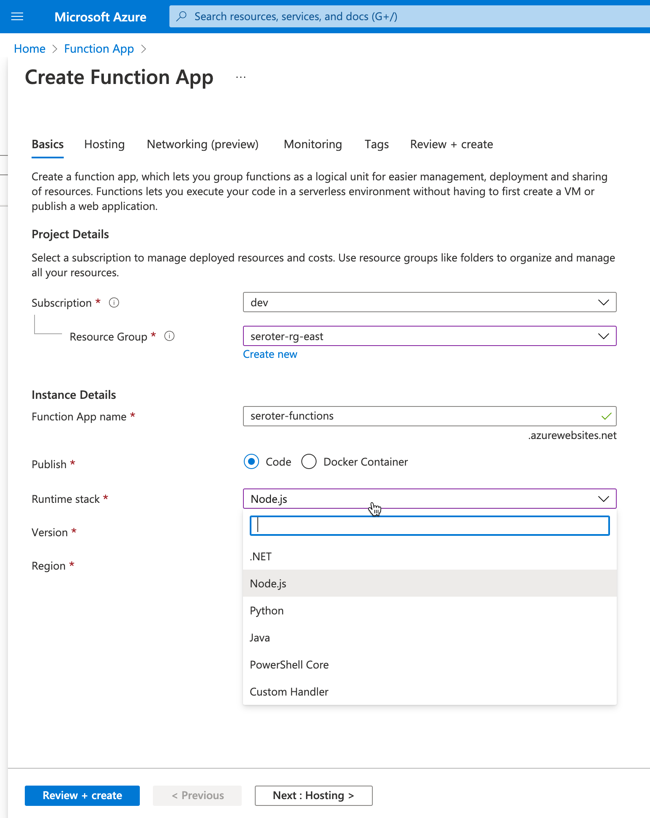
So, let’s go to the Azure Functions experience. I’m asked to create a “Function App.” There’s no option to choose Go as a managed language, so I’ll once again pick Node. YOU WIN AGAIN JAVASCRIPT.
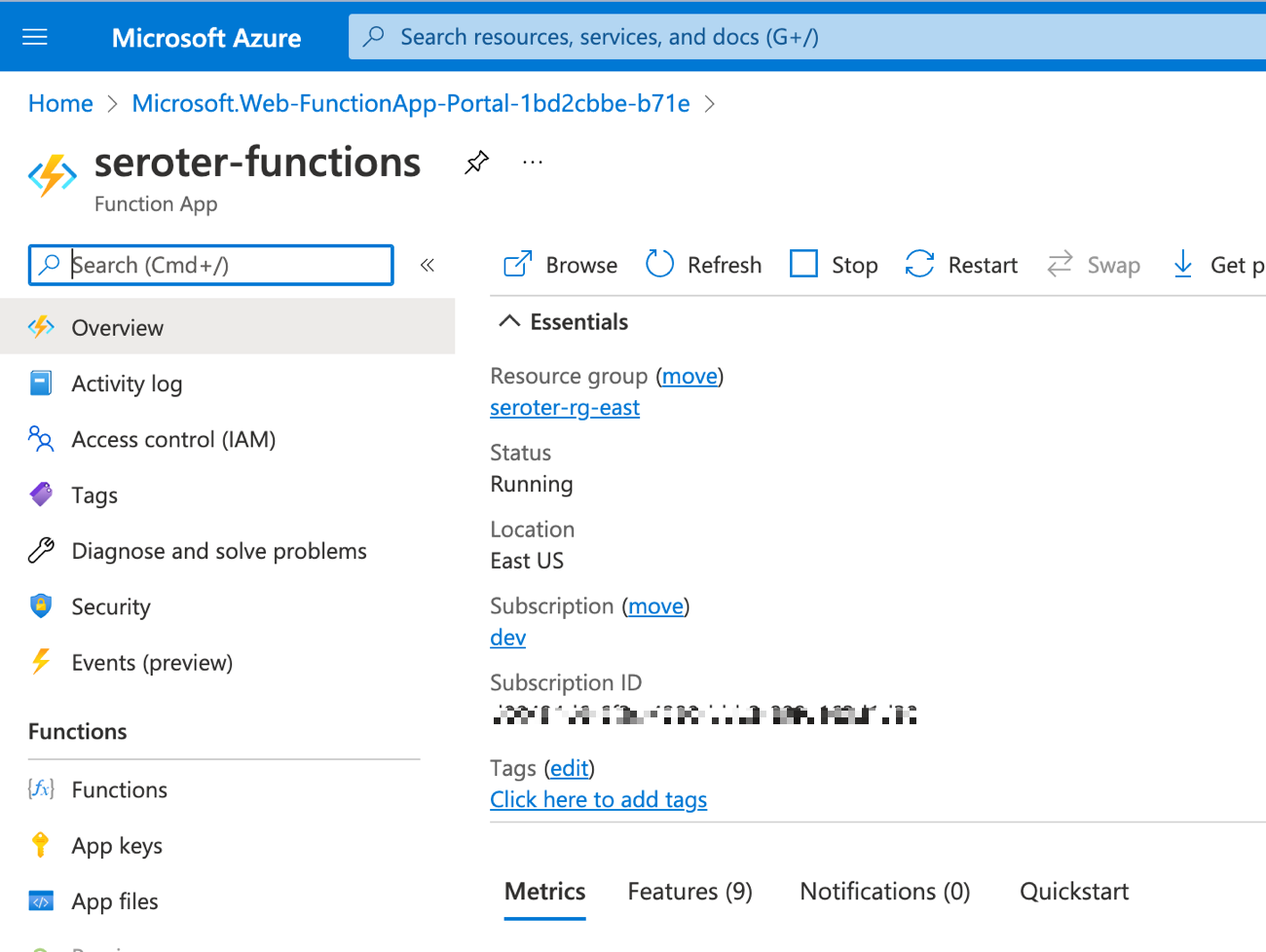
I move on to the next pane of the wizard where I’m asked about hosting stack. Since this is 2022, I chose Linux, even though Windows is somehow the recommended stack for Node functions. After a few moments, I have my Function app.
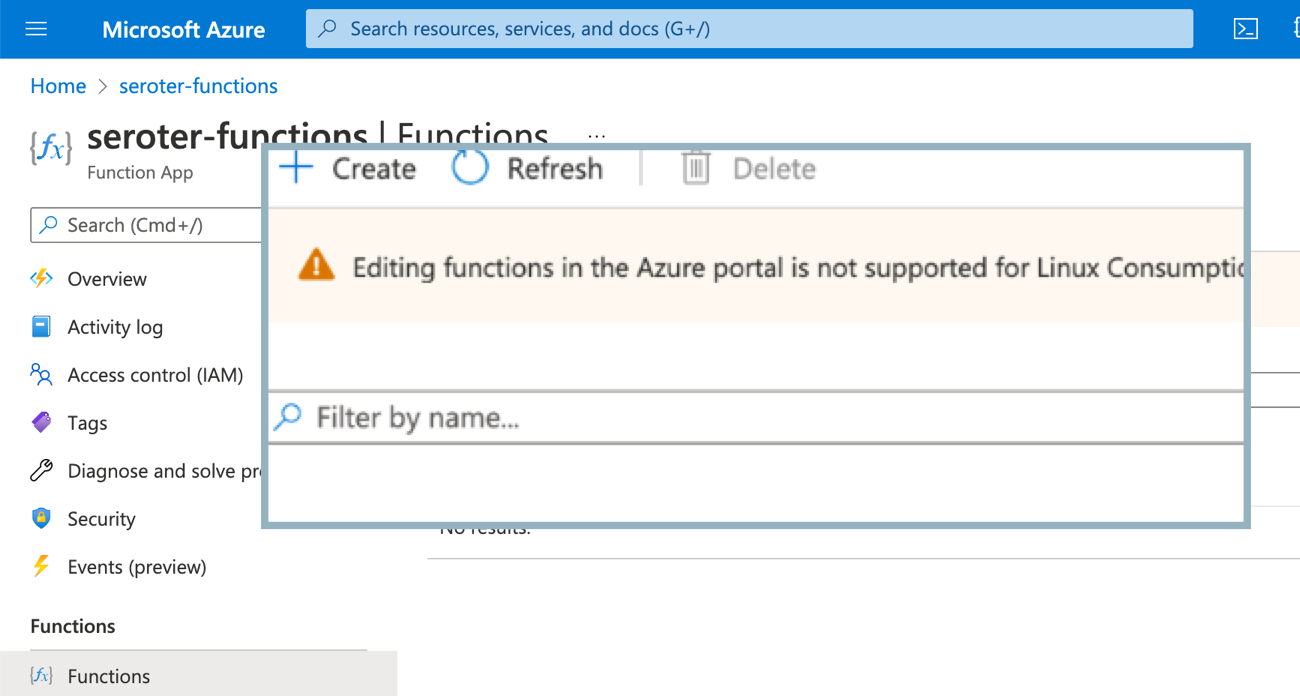
As with the storage scenario, this Function app isn’t actually the function. I need to add a function to the app. Ok, no problem. Wait, apparently you can’t use the inline editor for Linux-based functions because of reasons.
Sigh. I’ll create a new Function App, this time choosing Windows as the host. Now when I choose to add a function to this Function App, I see the option for “develop in portal”, and can choose a trigger. That’s good. I’ll choose the Storage Blob trigger, but I’m not clear on the parameter values I’m supposed to provide. Hmm, the “learn more” goes to a broken page. Found it by Googling directly. Looks like the “path” is the name of the container in the account, and {name} is a standard token.
The creation succeeded, and now I have a function. Sweet. Let’s throw some code in here. The “Code + Test” window looks like an inline editor. I updated the code to do a quick check of file size, and hope it works.
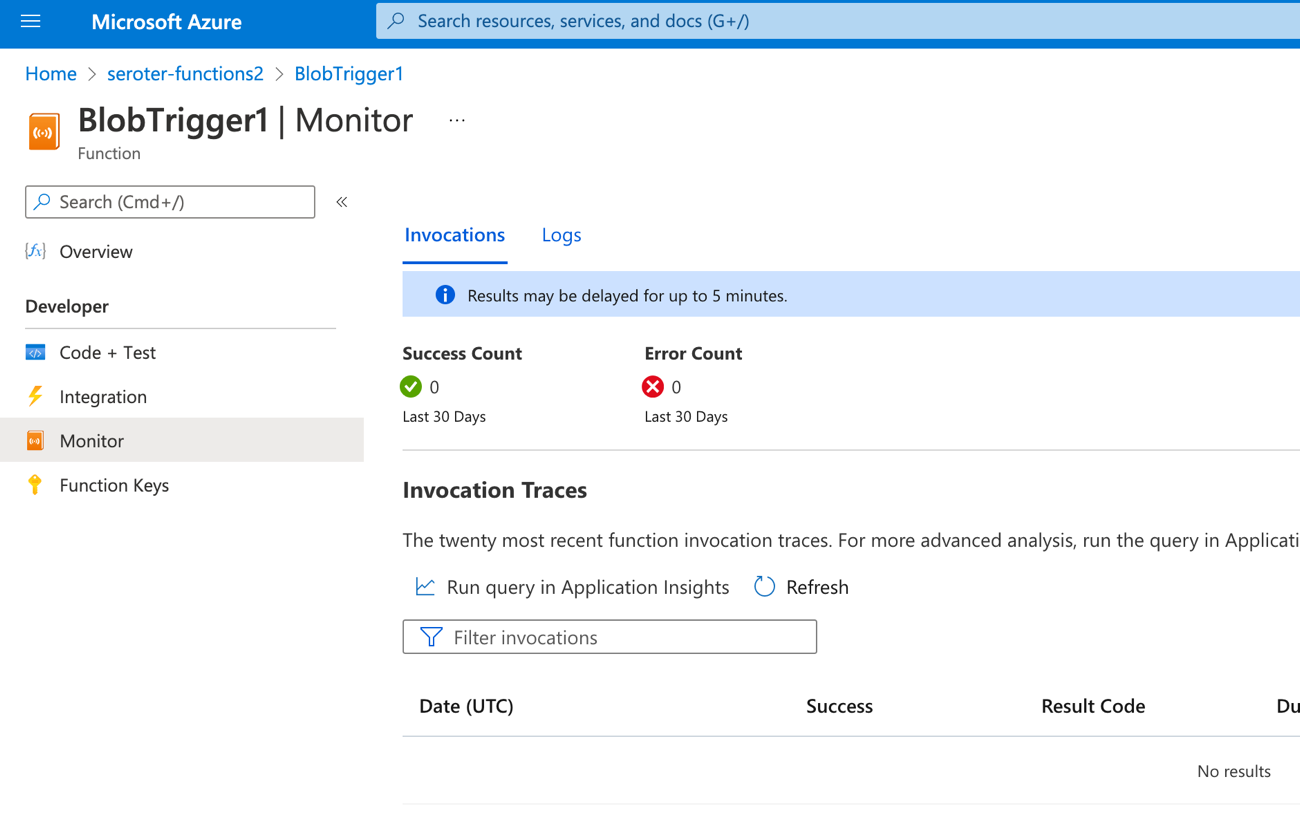
After saving it (I don’t see a concept of versioning), I can test it out. Like I did for Google Cloud and AWS, I dragged a couple of files onto the browser window pointing at the Storage Blob. Looks like the Azure Portal doesn’t support drag-and-drop. I’ll use the “upload files” wizard like an animal. After uploading, I switch back to the Azure Functions view which offers a “Monitor” view.
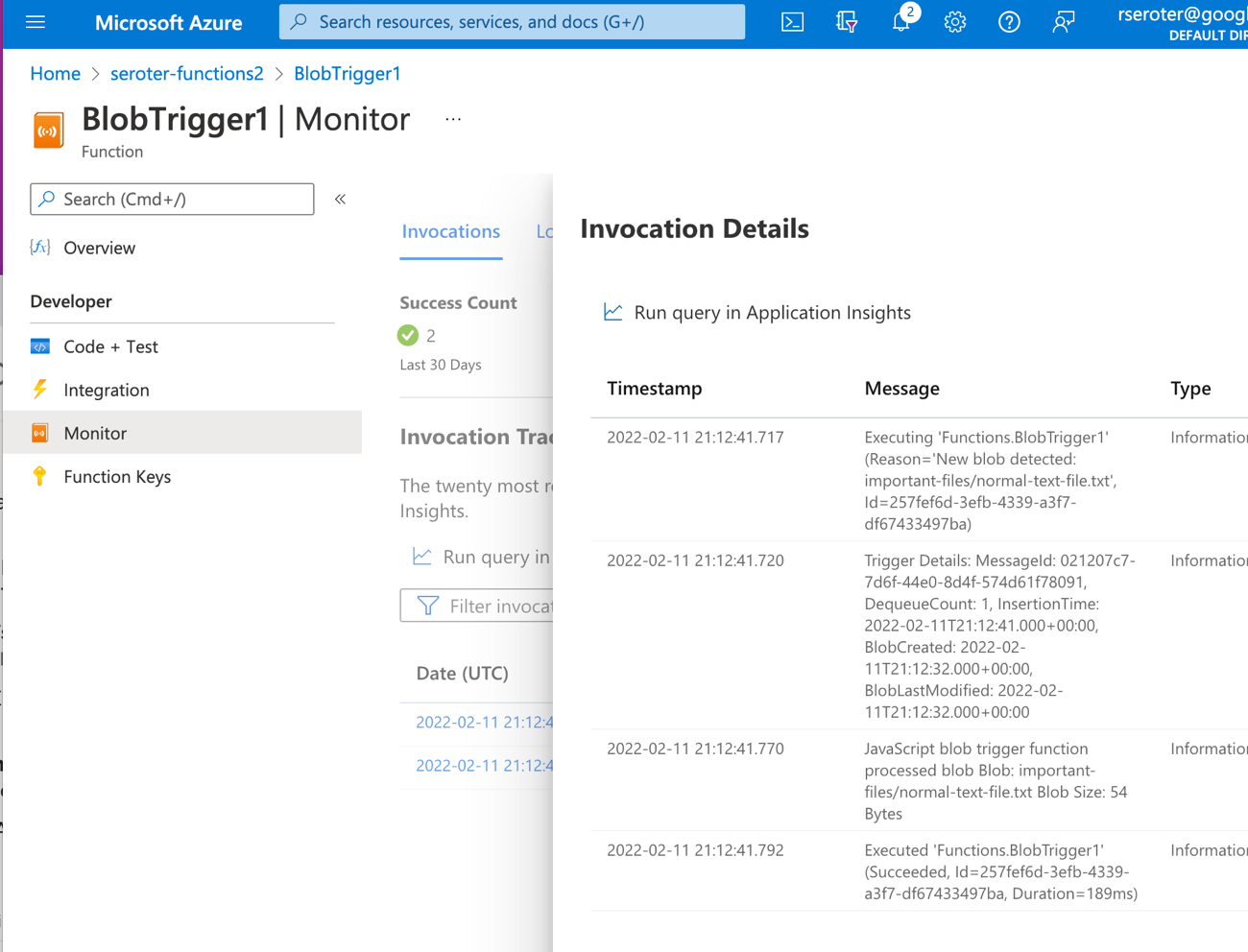
I don’t love that “results may be delayed for up to 5 minutes” as I’m really into instant gratification. The Function dashboard shows two executions right away, but the logs are still delayed for minutes after that. Eventually I see the invocations show up, and it shows execution history (not app logs).
I can’t seem to find the application logs, as the “logs” tab here seems to show a stream, but nothing appears here for me. Application Insights doesn’t seem to show the logs either. They could be lost to the universe, or more likely, I’m too bad at this to find them.
Regardless, it works! My Azure Function runs when objects land in my Storage account.
Wrap Up
As to the options considered here, it seemed obvious to me that Google Cloud has the best dev experience. The process of creating a function is simple (and even embedded in related services), the inline editor easily works for all languages, and the integrated log monitoring made my build-deploy-test loop faster. The AWS experience was fine overall, although inconsistent depending on your programming language. And the Azure experience, honestly, felt super clunky and the Windows-centricity feels dated. I’m sure they’ll catch up soon.
Overall, this was pretty fun. Managed services and serverless computing makes these quick solutions so simple to address. It’s such an improvement for how we had to do this before!
You’re familiar with twelve-factor apps? This relates to a set of principles shared by Heroku over a decade ago. The thinking goes, if your app adheres to these principles, it’s more likely to be scalable, resilient, and portable. While twelve-factor apps were introduced before Docker, serverless, or mainstream cloud adoption were a thing, I think these principles remain relevant in 2022. One of those principles relates to externalizing your configuration so that environment-related settings aren’t in code. Spring Cloud Config is a fun project that externalizes configurations for your (Java) app. It operates as a web server that serves up configurations sourced from a variety of places including git repos, databases, Vault, and more. A month ago, I saw a single-line mention in the Spring Cloud release notes that said Spring Cloud Config now integrates with Google Cloud Secret Manager. No documentation or explanation of how to use this feature? CHALLENGE ACCEPTED.
To be sure, a Spring Boot developer can easily talk to Google Cloud Secret Manager directly. We already have a nice integration here. Why add the Config Server as an intermediary? One key reason is to keep apps from caring where the configs come from. A (Spring Boot) app just needs to make an HTTP request or use the Config Client to pulls configs, even if they came from GitHub, a PostgreSQL database, Redis instance, or Google Cloud Secret Manager. Or any combination of those. Let’s see what you think once we’re through.
Setting up our config sources
Let’s pull configs from two different places. Maybe the general purpose configuration settings are stored in git, and the most sensitive values are stored in Secret Manager.
My GitHub repo has a flat set of configuration files. The Spring Cloud Config Server reads all sorts of text formats. In this case, I used YAML. My “app1” has different configs for the “dev” and “qa” environments, as determined by their file names.
Secret Manager configs work a bit differently than git-based ones. The Spring Cloud Config Server uses the file name in a git repo to determine the app name and profile (e.g. “app1-qa.yml”) and makes each key/value pair in that file available to Spring for binding to variables. So from the image above, those three properties are available to any instance of “app1” where the Spring profile is set to “qa.” Secret Manager itself is really a key/value store. So the secret name+value is what is available to Spring. The “app” and “profile” come from the labels attached to the secret. Since you can’t have two secrets with the same name, if you want one secret for “dev” and one for “qa”, you need to name them differently. So, using the Cloud Code extension for VS Code, I created three secrets.
Two of the secrets (connstring-dev, connstring-qa) hold connection strings for their respective environments, and the other secret (serviceaccountcert) only applies to QA, and has the corresponding label values.
Ok, so we have all our source configs. Now to create the server that swallows these up and flattens the results for clients.
Creating and testing our Spring Cloud Config Server
Creating a Spring Cloud Config Server is very easy. I started at the Spring Intializr site to bootstrap my application. In fact, you can click this link and get the same package I did. My dependencies are on the Actuator and Config Server.
The Google Cloud Secret Manager integration was added to the core Config Server project, so there’s config-specific dependency to add. It does appear you need to add a reference to the Secret Manager package to enable connectivity and such. I added this to my POM file.
There’s no new code required to get a Spring Cloud Config Server up and running. Seriously. You just add an annotation (@EnableConfigServer) to the primary class.
@EnableConfigServer
@SpringBootApplication
public class BootConfigServerGcpApplication {

	public static void main(String[] args) {
		SpringApplication.run(BootConfigServerGcpApplication.class, args);
	}
}
The final step is to add some settings. I created an application.yaml file that looks like this:
Let’s unpack this. First I set the port to whatever the environment provides, or 8080. I’m setting two active profiles here, so that I activate the Secret Manager and git environments. For the “gcp-secret-manager” block, you see I have the option to set the label values to designate the application and profile. If I wanted to have my secret with a label “appname:app1” then I’d set the application-label property here to “appname.” Make sense? I fumbled around with this for a while until I understood it. And notice that I’m pointing at the GitHub repo as well.
One big thing to be aware of on this Secret Manager integration with Config Server. Google Cloud has the concept of “projects.” It’s a key part of an account hierarchy. You need to provide the project ID when interacting with the Google Cloud API. Instead of accepting this as a setting, the creators of the Secret Manager integration look up the value using a metadata service that only works when the app is running in Google Cloud. It’s a curious design choice, and maybe I’ll submit an issue or pull request to make that optional. In the meantime, it means you can’t test locally; you need to deploy the app to Google Cloud.
Fortunately, Google Cloud Run, Secret Manager, and Artifact Registry (for container storage) are all part of our free tier. If you’re logged into the gcloud CLI, all you have to do is type gcloud run deploy and we take your source code, containerize it using buildpacks, add it to Artifact Registry, and deploy a Cloud Run instance. Pretty awesome.
After a few moments, I have a serverless container running Spring middleware. I can scale to zero, scale to 1, handle concurrent requests, and maybe pay zero dollars for it all.
Let’s test this out. We can query a Config Server via HTTP and see what a Spring Boot client app would get back. The URL contains the address of the server and path entries for the app name and profile. Here’s the query for app1 and the dev profile.
See that our config server found two property sources that matched a dev profile and app1. This gives a total of three properties for our app to use.
Let’s swap “dev” for “qa” in the path and get the configurations for the QA environment.
The config server used different sources, and returns a total of five properties that our app can use. Nice!
Creating and testing our config client
Consuming these configurations from a Spring Boot app is simple as well. I returned to the Spring Initializr site and created a new web application that depends on the Actuator, Web, and Config Client packages. You can download this starter project here.
My demo-quality code is basic. I annotated the main class as a @RestController, exposed a single endpoint at the root, and returned a couple of configuration values. Since the “dev” and “qa” connection strings have different configuration names—remember, I can’t have two Secrets with the same name—I do some clunky work to choose the right one.
@RestController
@SpringBootApplication
public class BootConfigClientGcpApplication {

	public static void main(String[] args) {
		SpringApplication.run(BootConfigClientGcpApplication.class, args);
	}

	@Value("${appversion}")
	String appVersion;

	@Value("${connstring-dev:#{null}}")
	String devConnString;

	@Value("${connstring-qa:#{null}}")
	String qaConnString;

	@GetMapping("/")
	public String getData() {
		String secret;
		secret = (devConnString != null) ? devConnString : qaConnString;
		return String.format("version is %s and secret is %s",appVersion, secret);
	}
}
The application.yaml file for this application has a few key properties. First, I set the spring.application.name, which tells the Config Client which configuration properties to retrieve. It’ll query for those assigned to “app1”. Also note that I set the profile to “dev”, which also impacts the query. And, I’m exposing the “env” endpoint of the actuator, which lets me peek at all the environment variables available to my application.
Ok, let’s run this. I can do it locally, since there’s nothing that requires this app to be running in any particular location.
Cool, so it returned the values associated with the “dev” profile. If I stop the app, switch the spring.profiles.active to “qa” and restart, I get different property values.
So the Config Client in my application is retrieving configuration properties from the Config Server, and my app gets whatever values make sense for a given environment with zero code changes. Nice!
If we want, we can also check out ALL the environment variables visible to the client app. Just send a request to the /actuator/env endpoint and observe.
Summary
I like Spring Cloud Config. It’s a useful project that helps devs incorporate the good practice of externalizing configuration. If you want a bigger deep-dive into the project, check out my new Pluralsight course that covers it.
Also, take a look at Google Cloud Run as a legit host for your Spring middleware and apps. Instead of over-provisioning VMs, container clusters, or specialized Spring runtimes, use a cloud service that scales automatically, offers concurrency, supports private traffic, and is pay-for-what-you-use.
I didn’t have much to complain about in 2021. My immediate family stayed healthy and happy, the kids went back to in-person learning at school, working at Google Cloud remained interesting, and I took a few short trips. Not too bad!
From a productivity perspective, I felt more balanced in 2021. After a decade or so writing and leading at InfoQ, I stepped back from my role there. I still wrote a dozen+ blog posts here and elsewhere, but wasn’t as prolific as years past. That said, I wasn’t a total slouch in 2021, as I created three Pluralsight courses, had fun creating a few long Twitter threads, spoke at a handful of (virtual) events, grew the size of my team at work, mentored five folks, and learned something about all the tech topics I wanted to learn about. While I read fewer books than last year—on purpose, as 67 was too many in 2020—I still finished 47 good books, many listed here. Below are some of the things I wrote (or said) in 2021, and 20-ish of the best books I read.
Things I Wrote or Said
I *almost* agreed to write another book in 2021, and glad I declined. It’s more fun for me to write short form (e.g. blog posts, tweets) instead. I shared many of my dubious opinions in both written and verbal form last year, and here were some highlights:
[videos] Multicloud conversations with Richard Seroter. Our Google Cloud social media team asked me to come up with an interesting way to talk about the idea of using multiple clouds. I figured that asking bright folks to share their perspective was a good idea. These short eight videos were well-received, watched by a few thousand folks, and educational for me.
[event] Google Cloud Next: Keynote Live Demo. I helped put together and deliver a 20 minute session at our flagship annual conference. It was a ton of work, and ton of fun.
[Google blog] Congrats, you bought Anthos! Now what? I guess that my schtick is helping people understand how to actually use the tech they’ve chosen. Here’s my guide for those who just bought Google’s Anthos product.
[podcast] The Future of Google Cloud with Richard Seroter. For some reason, Corey welcomed me back to his Screaming in the Cloud podcast, and we talked about cloudy things. Good times were had by all.
Things I Read
This past year, I read my usual mix of books on a wide range of topics. I started on a couple new fiction book series—including Ian Fleming’s James Bond series and the Longmire books from Craig Johnson—and read some terrific biographies. Here are 23 of the best I finished in 2021:
Rocket Boys by Homer Hickam (@realhomerhickam). Wonderful biography that explores Hickam’s life growing up in Coalwood, West Virginia and launching rockets. Probably my favorite book of the year.
The 50th Law by 50 Cent (@50cent) and Robert Greene (@RobertGreene). “The less you fear, the more power you will have and the more fully you will live.” That’s the heart of this super-engaging book by Fifty and Greene. The authors created a terrific mix of biographical info with historical examples of fearlessness.
Startup: A Silicon Valley Adventure by Jerry Kaplan (@Jerry_Kaplan). I learned more about startups from this book than participating in 3 of them. Excellent story about GO, a pioneer of pen-based computing and their frantic effort to survive long enough to make an impact. After reading this book, I can also understand why folks still harbor ill will towards Microsoft and IBM!
Hannibal by Patrick N. Hunt. I knew the name, and I now I know the man. Hannibal may be one of the greatest strategic thinkers and military leaders of all time. This biography takes you inside his bloody battles, unpredictable tactics, and eventual defeat.
Moonraker by Ian Fleming. In 2021, I started reading Fleming’s series of James Bond books. I’ve enjoyed every one. Great storytelling, and a different Bond than what we’ve seen in the movies. In addition to Moonraker, check out Diamonds are Forever,From Russia With Love, and Live and Let Die.
Genghis Khan and the Making of the Modern World by Jack Weatherford. Here’s another case where I knew the name (Genghis Khan), but nothing else. This outstanding book explains the rise of the Khans and the Mongols, their peak of conquering 30 countries (on the modern map) and changing the culture across Asia, the Middle East, and Europe, and their eventual decline.
Death Without Company: A Longmire Mystery by Craig Johnson (@ucrosspop25). I started this set of books, and also watched the entire television series. It almost made me want to move to Wyoming. Longmire is a sheriff there, and I love the character(s) and stories that Johnson created. Also check out The Dark Horse and Junkyard Dogs.
The Ideal Team Player: How to Recognize and Cultivate The Three Essential Virtues by Patrick Lencioni (@patricklencioni). I’ve hired great people by accident. At Google, I’m finally more methodical about what to look for when interviewing people, and Lencioni’s book gave me tools for figuring out who is a team player. This enjoyable tale follows business leaders as they discover that what they need on their team are those who are hungry, humble, and (people) smart.
Hope in Times of Fear: The Resurrection and the Meaning of Easter by Timothy Keller (@timkellernyc). I’ve noticed so much pessimism about the future, which may stem from folks being let down by whatever they’ve mistakenly put their hope in. Pastor Keller has a timely book for those of us who crave something more durable and eternal.
Colossus: Hoover Dam and the Making of the American Century by Michael Hiltzik (@hiltzikm). Who would’ve thought that a book about water rights could be so compelling? The Hoover Dam was the largest federal project of its kind, and transformed the American West Coast. I thoroughly enjoyed this story of how the Dam came to be, how it was built, and the generational implications of it.
The 33 Strategies of War by Robert Greene (@RobertGreene). Out of hundreds of books on my Kindle, this is the most “highlighted” one. It’s the book on strategy I’d been looking for. Greene anchors the book in the military sphere, but you can apply these lessons to business, (some) relationships, and your fantasy football league.
Moonwalking with Einstein: The Art and Science of Remembering Everything by Joshua Foer. I didn’t know what to expect from this book. While spinning a yarn about practicing for the US Memory Championship (yes, that’s a real thing), Foer explains all about memorization, and why memory palaces work. Great book.
Israel: A Concise History of a Nation Reborn by Daniel Gordis (@DanielGordis). A country that exists against all odds, Israel has a remarkable history. Gordis primarily looks at the last 140 years and walks us through the dramatic formation of the Jewish state, regional wars that challenged it, and how Israel has thrived since then.
The House of Gucci: A True Story of Murder, Madness, Glamour, and Greed by Sara Gay Forden (@saraforden). What a book. From humble beginnings to an international powerhouse, Gucci is compelling. The business success and multiple re-inventions are commendable, but the real story is the absurd family drama. Forden does a terrific job drawing you into the madness.
Edge: Turning Adversity into Advantage by Laura Huang (@LauraHuangLA). As someone who isn’t excellent at any particular thing, I’m drawn to research that claims unique experiences and skill combinations are actually an asset. Huang challenges us to know ourselves better, explains how to guide the perception of others, and encourages us to confidently embrace our particular path and edge.
America, 1908: The Dawn of Flight, the Race to the Pole, the Invention of the Model T and the Making of a Modern Nation by Jim Rasenberger. We all seem to get historical amnesia. By every measure, we’re better off than we were in 1908, even though we’re somehow less optimistic about the future. 1908 was indeed a pivotal year in American history, however. So many things happened that shaped society for decades to come. This book does a terrific job of stitching it all together.
The Blind Side: Evolution of a Game by Michael Lewis. You may know the movie, but the book is better. Follow the story of Michael Oher who was rescued from a tragic life, and discovered a natural talent to protect others on the football field.
How Google Works by Eric Schmidt (@ericschmidt) and Jonathan Rosenberg (@jjrosenberg). Maybe I should have read this book before I joined, but it certainly wouldn’t have changed my decision! Schmidt and Rosenberg lay out some modern thinking on management they learned while building Google into the company it is today. Tons of great tidbits in here.
I hope 2022 finds you in good health and a positive frame of mind. Thanks for engaging with me in 2021, and let me know if there’s anything I can do to help you on your journey.
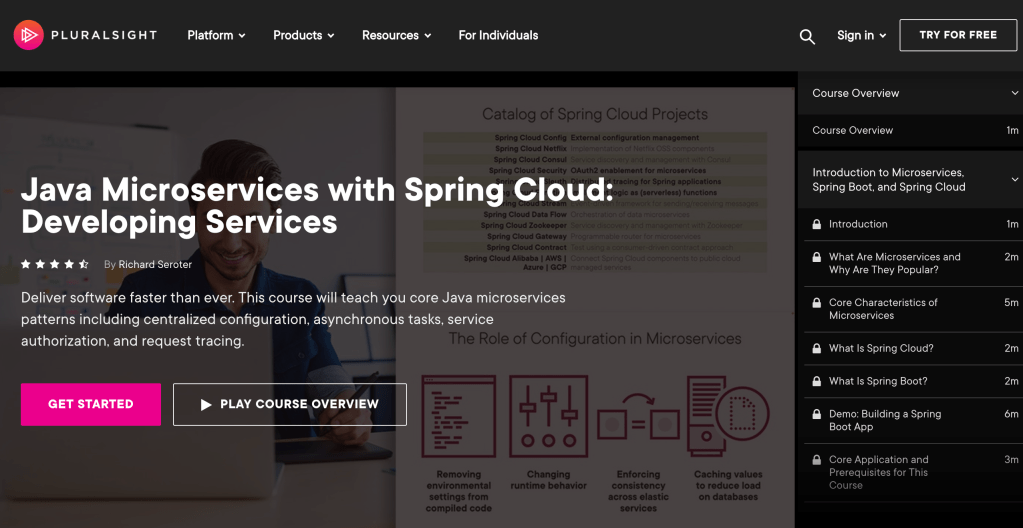
Java retains its stubborn hold near the top of everylanguageranking. Developers continue to depend on it for all sorts of application types. Back when I joined Pivotal in 2016, I figured the best way to learn their flagship Java framework, Spring, was to teach a course about it. I shipped a couple of Pluralsight courses that have done well over the years, but feel dated. Spring Boot and Spring Cloud keep evolving, as good frameworks do. So, I agreed to refresh both courses, which in reality, meant starting over. The result? Forty new demos, a deep dive into thirteen Spring (Cloud) projects, and seven hours of family-friendly content.
Spring Cloud is a set of Spring projects for developers who want to introduce distributed systems patterns into their apps. You can use these projects to build new microservices, or connect existing ones. Both of these areas are where I focused the courses.
Spring Cloud Config as a way to externalize configuration into a remote store. This is a pretty cool project that lets you stash and version config values in repositories like Git, Vault, databases, or public cloud secret stores. In my course, we use GitHub and show how Spring transparently caches and refreshes these values for your app to use.
Spring Cloud Function offers a great option for those developing event-driven, serverless-style apps. This is a new addition to the course, as it didn’t exist when I created the first version. But as serverless, and event-driven architectures, continue to take off, I thought it was important to add it. I throw in a bonus example of deploying one of these little fellas to a public cloud FaaS platform.
Spring Security. I have a confession. I don’t think I really understood how OAuth 2.0 worked until rebuilding this module of the course. The lightbulb finally went off as I set up and used Keycloak as an authorization server, and grokked what was really happening. If you’d like that same epiphany, watch this one!
Spring Cloud Sleuth. When building modern services, you can’t forget to build in some instrumentation. Sleuth does a pretty remarkable job of instrumenting most everything in your app, and offering export to something like Zipkin.
Spring Cloud Eureka. This rock-solid framework is still plugging away, almost a decade after Netflix created it. It offers a mature way to easily register and discover services in your architecture. It’s lightweight, and also uses local caching so that there’s no SPOF to freak out about.
Spring Cloud Circuit Breaker. This one is also new since my first run through the course. It replaced Hystrix, which is end of life. This project is an abstraction atop libraries like Resilience4j, Spring Retry, and Sentinel. Here, we spend time with Resilience4j and show how to configure services to fail fast, use sliding windows to determine whether to open a circuit, and more.
Spring Cloud LoadBalancer and Spring Cloud Gateway. Ribbon is also a deprecated projected, so instead, I introduced LoadBalancer. This components works great with service discovery to do client-side load balancing. And Spring Cloud Gateway is an intriguing project that gives you lightweight, modular API gateway functionality for your architecture. We have fun with both of those here.
Spring Cloud Stream. This is probably my favorite Spring Cloud project because I’m still a messaging geek at heart. With the new functional interface (replacing the annotation-based model in my earlier course), it’s stupid-easy to build functions that publish to message brokers or receive messages. Talking to Apache Kafka, RabbitMQ, or public cloud messaging engines has never been easier.
Spring Cloud Data Flow. Stitch a bunch of streaming (or batch-processing) apps into a data processing pipeline? That’s what Spring Cloud Data Flow is all about. Running atop modern platforms like Kubernetes, it’s a portable orchestration engine. Here we build pipelines, custom apps for our pipelines, and more.
It took me about 5 months to rebuild, record, and edit thesecourses, and I’m proud of the result. I think you’ll enjoy this look through an exciting, fun-to-use set of components made by my friends on the Spring team.
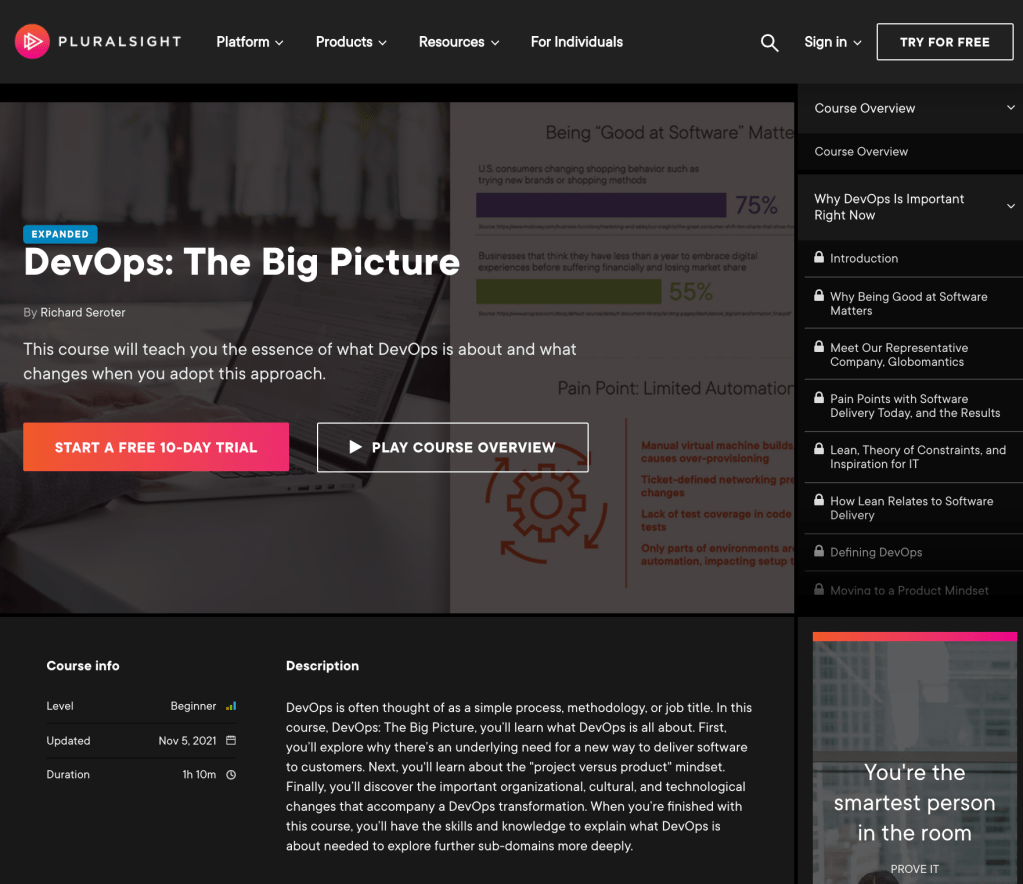
I’ve been teaching to empty classrooms for a decade now. It’s weird. I record a lecture and demos from my home office, edit it, give it to Pluralsight, and it shows up on the Internet. And then I hope somebody watches it. I’ve had some hits and misses with the twenty four Pluralsight courses I’ve created. One of those courses, DevOps: The Big Picture, clearly resonated. 169,642 people have watched it, which is bonkers.
When Pluralsight reached out to me and asked for a full refresh, I jumped at the chance to revisit the industry landscape and infuse this material with updated perspectives. And the updated course is now live.
This hour+ course covers a few things:
What’s hard about delivering software
Things we can learn from the Lean movement
How smart folks have “defined” DevOps
What DevOps is NOT
The cultural and organizational changes that come with DevOps
The technological changes that are part of DevOps
If you happened to watch this course in the past, give it another listen and tell me what you think! If you never consume v1 of a product, then your wait for v2 has paid off.
Are you tired on online events yet? No? You might be the only one. There are a few events popping up in person, but looks like we’re all stuck with “amazing digital experiences” for the next while. But at least the organizers are learning about what works and improving the events! Last year’s Google Cloud Next lasted for nine weeks, which was about eight weeks too long. Sorry about that. This year, our flagship cloud conference is a brisk three days, from October 12-14. And it’s free, which is cool.
Cloud Next matters because a lot of what Google Cloud shares becomes widely adopted by others later on. Might as well get it here first!
I flipped through the agenda to find the talks that interested me the most. Obviously my keynote/demo thing will be the most glorious session, but let’s put that aside. As I browsed the catalog, I identified a handful of themes. Here are fifteen talks I’m excited about, spread across my three made-up themes: familiar but better, migration ready, and optimized for scale.
Familiar but better
This is the story of Google Cloud. Things that resemble cloud services or products you’ve used before, but more full-featured, easier to use, and more reliable. Talks that stood out:
What’s new and what’s next with Google Cloud databases. People often choose Google Cloud upfront because of our great AI/ML and data story. Check out this session to see how our databases feel familiar, but offer more than you might expect.
What’s new in serverless? It’s great that some clouds got us all started with serverless computing, but come to this talk to hear what everyone will be doing next.
Enterprise-ready modern applications with Go. No, I’m not trolling you Java and .NET fans. Live your life. But if you want a modern language that’s popular for building meaningful systems, Go is pretty great. This’ll be a fun session.
Migration ready
It’s fun to build and modernize, but many folks are looking for a clean path to migrate to the cloud faster, while working with what they already have. There are a few talks about this:
Many are past the first cloud wave of using stuff in small pockets. Now it’s about running things effectively at scale from a cost, security, manageability perspective. Talks I like:
There’s lots of other terrific talks covering security, analytics, infrastructure, and more, so do check out the whole catalog. I hope to see you at Cloud Next, and drop into my presentation to heckle me or provide moral support.
When it comes to building and managing cloud resources—VMs, clusters, user roles, databases—most people seem to use a combination of tools. The recent JetBrains developer ecosystem survey highlighted that Terraform is popular for infrastructure provisioning, and Ansible is popular for keeping infrastructure in a desired state. Both are great tools, full stop. Recently, I’ve seen folks look at the Kubernetes API as a single option for both activities. Kubernetes is purpose-built to take a declared state of a resource, implement that state, and continuously reconcile to ensure the resource stay in that state. While we apply this Kubernetes Resource Model to containers today, it’s conceptually valid for most anything.
18 months ago, Google Cloud shipped a Config Connector that offered custom resource definitions (CRDs) for Google Cloud services, and controllers to provision and manage those services. Install this into a Kubernetes cluster, send resource definitions to that cluster, and watch your services hydrate. Stand up and manage 60-ish Google Cloud services as if they were Kubernetes resources. It’s super cool and useful. But maybe you don’t want 3rd party CRDs and controllers running in a shared cluster, and don’t want to manage a dedicated cluster just to host them. Reasonable. So we created a new managed service: Config Controller. In this post, I’ll look at manually configuring a GKE cluster, and then show you how to use the new Config Controller to provision and configure services via automation.And, if you’re a serverless fan or someone who doesn’t care at ALL about Kubernetes, you’ll see that you can still use this declarative model to build and manage cloud services you depend on.
But first off, let’s look at configuring clusters and extending the Kubernetes API to provision services. To start with, it’s easy to stand up a GKE cluster in Google Cloud. It can be one-click or fifty, depending on what you want. You can use the CLI, API, Google Cloud Console, Terraform modules, and more.
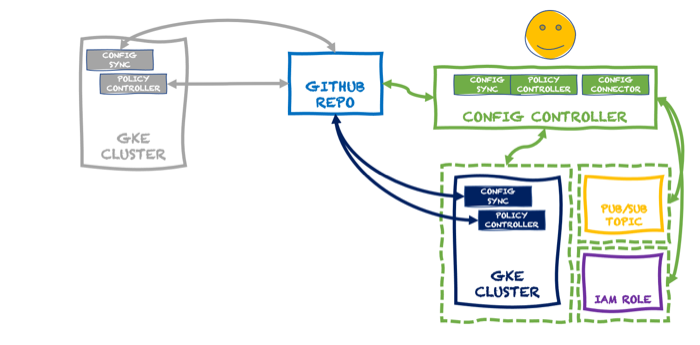
Building and managing one of something isn’t THAT hard. Dealing with fleets of things is harder. That’s why Google Anthos exists. It’s got a subsystem called Anthos Config Management (ACM). In addition to embedding the above-mentioned Config Connector, this system includes an ability to synchronize configurations across clusters (Config Sync), and apply policies to clusters based on Open Policy Agent Gatekeeper (Policy Controller). All these declarative configs and policies are stored in a git repo. We recently made it possible to use ACM as a standalone service for GKE clusters. So you might build up a cluster that looks like this:
What this looks like in real life is that there’s a “Config Management” tab on the GKE view in the Console. When you choose that, you register a cluster with a fleet. A fleet shares a configuration source, so all the registered clusters are identically configured.
Once I registered my GKE cluster, I chose a GitHub repo that held my default configurations and policies.
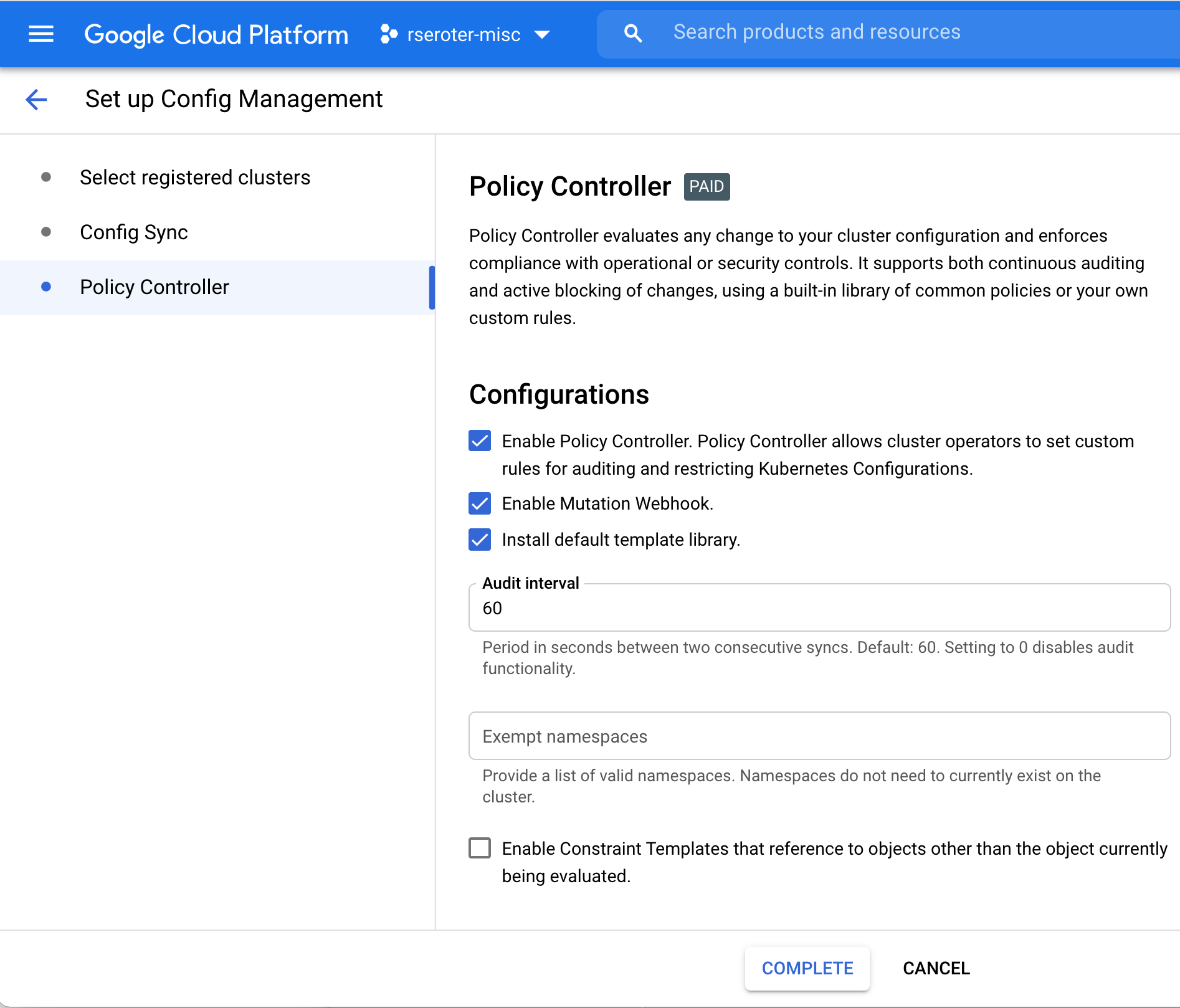
Finally, I configured Policy Controller on this GKE cluster. This comes with a few dozen Google-provided constraint templates you can use to apply cluster constraints. Or bring your own. My repo above includes a constraint that limits how much CPU and memory a pod can have in a specific namespace.
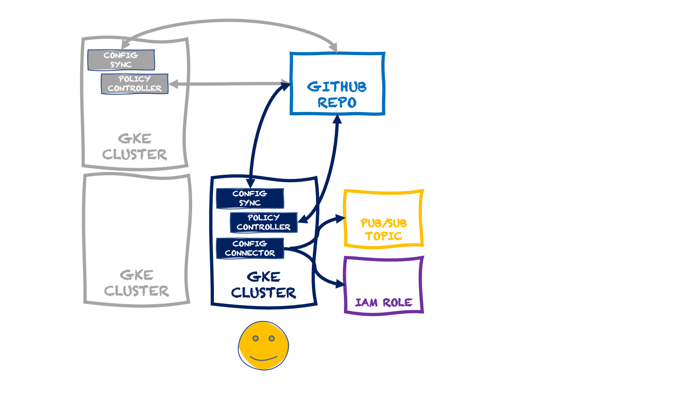
At this point, I have a single cluster with policy guardrails and applied configurations. I also have the option of adding the Config Connector to a cluster directly. In that scenario, a cluster might look like this:
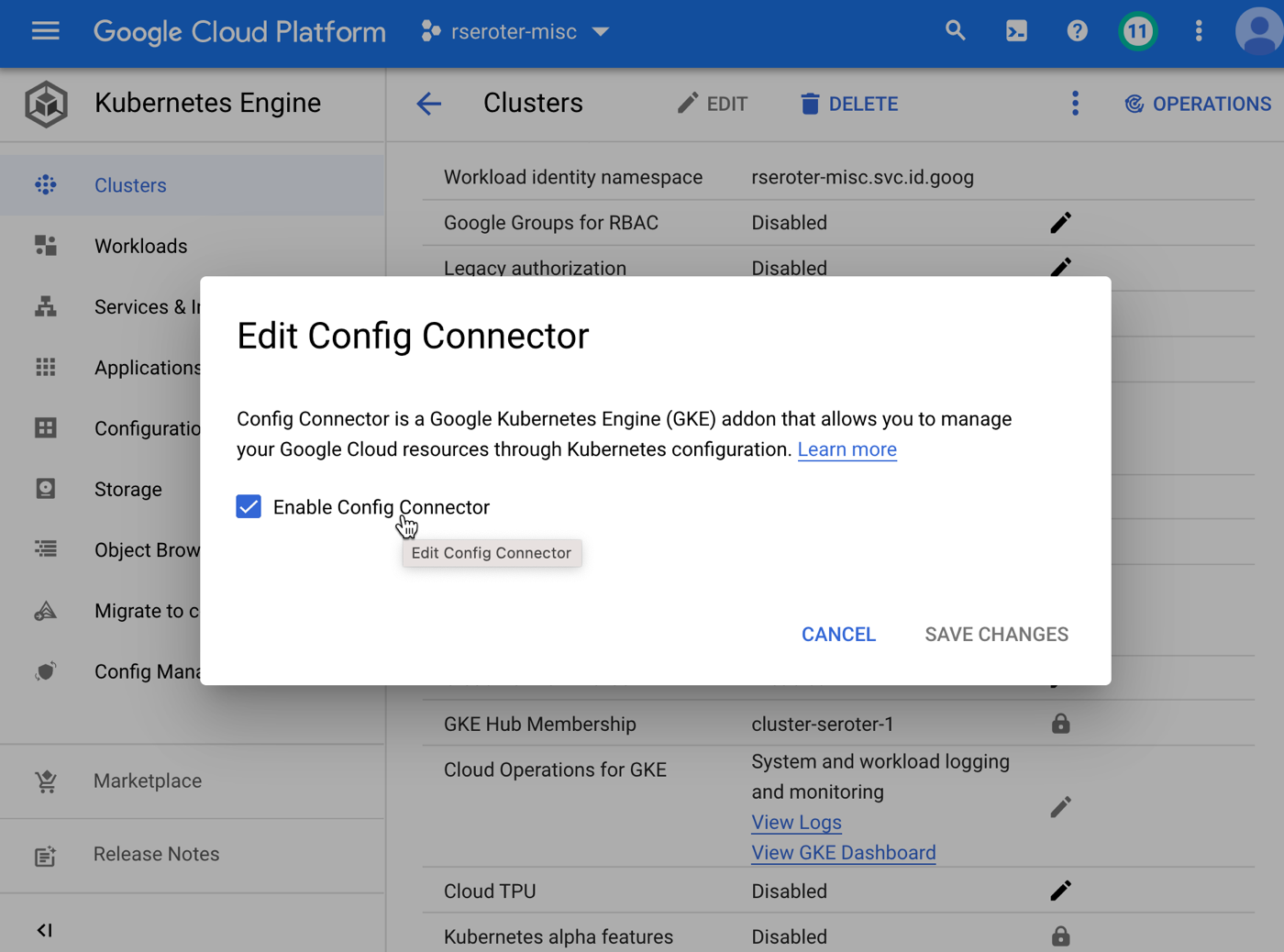
In that diagram, the GKE cluster not only has the GKE Config Management capabilities turned on (Config Sync and Policy Controller), but we’ve also added the Config Connector. You can add that feature during cluster provisioning, or after the fact, as I show below.
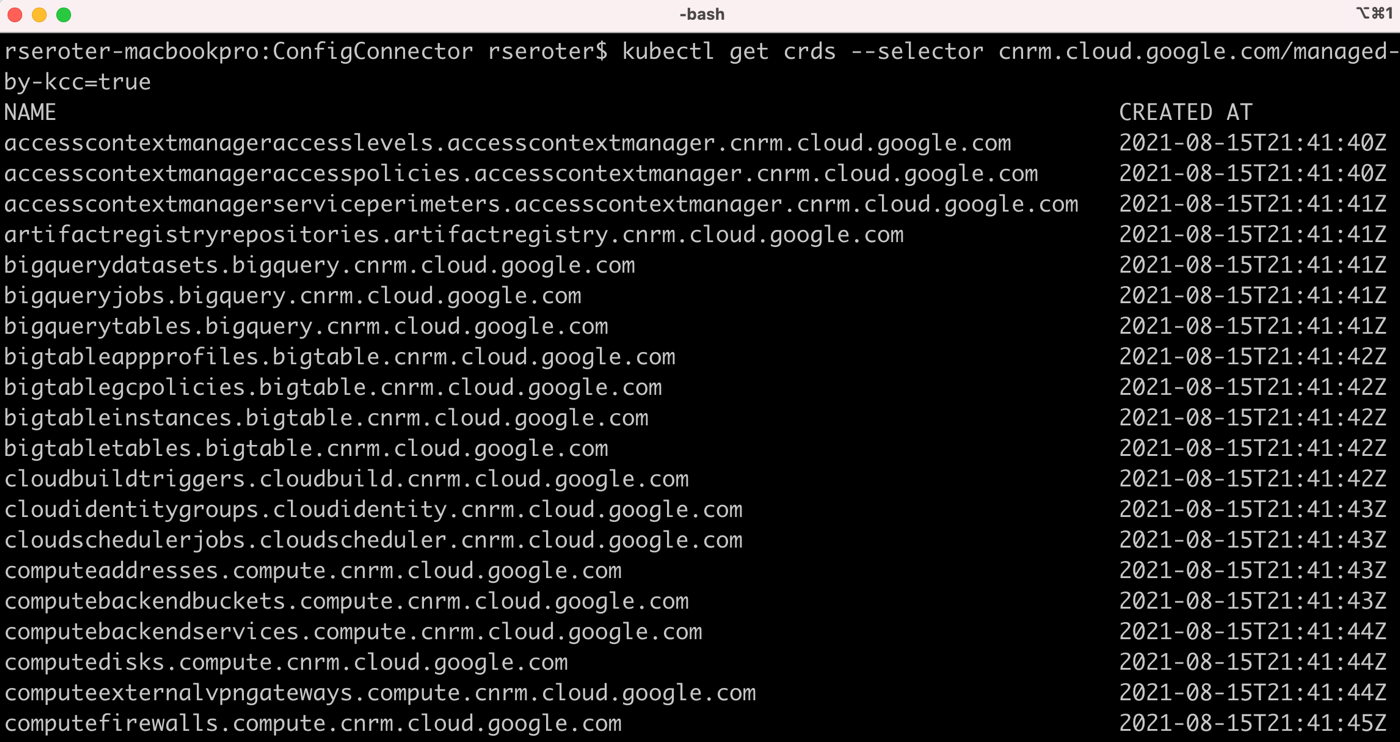
kubectl get crds --selector cnrm.cloud.google.com/managed-by-kcc=true
Now, I can create instances of all sorts of Google Cloud managed services—BigQuery jobs, VMs, networks, Dataflow jobs, IAM policies, Memorystore Redis instances, Spanner databases, and more. Whether your app uses containers or functions, this capability is super useful. To create the resource I want, I write a bit of YAML. I could export an existing cloud service instance to get its representative YAML, write it from scratch, or generate it from the Cloud Code tooling. I did the latter, and produced this YAML for a managed Redis instance via Memorystore:
When I query Kubernetes for “redisinstances” it knows what that means, and when I look to see if I really have one, I see it show up in the Google Cloud Console.
You could stop here. We have a fully-loaded cluster that synchronizes configurations and policies, and can create/manage Google Cloud services. But the last thing is different from the first two. Configs and policies create a secure and consistent cluster. The Config Connector is a feature that uses the Kubernetes control plane for other purposes. In reality, what you want is something like this:
Here, we have a dedicated KRM server thanks to the managed Config Controller. With this, I can spin up and manage cloud services, including GKE clusters themselves, without running a dedicated cluster or stashing extra bits inside an existing cluster. It takes just a single command to spin up this service (which creates a managed GKE instance):
Super cool. But wait, there’s more. This declarative model shouldn’t FORCE you to know about Kubernetes. What if I want to GitOps-ify my services so that anyone could create cloud services by checking a configuration into a git repo versus kubectl apply commands? This is what makes this interesting to any developer, whether they use Kubernetes or not. Let’s try it.
I have a GitHub repo with a flattened structure. The Config Sync component within the Config Controller service will read from this repo, and and work with the Config Connector to instantiate and manage any service instances I declare. To set this up, all I do is activate Config Sync and tell it about my repo. This is the file that I send to the Config Controller to do that:
# config-management.yaml

apiVersion: configmanagement.gke.io/v1
kind: ConfigManagement
metadata:
  name: config-management
spec:
  #you can find your server name in the GKE console
  clusterName: krmapihost-seroter-cc-instance
  #not using an ACM structure, but just a flat one
  sourceFormat: unstructured
  git:
    policyDir: /
    syncBranch: main
    #no service account needed since there's no read permissions required
    secretType: none
    syncRepo: https://github.com/rseroter/anthos-seroter-config-repo-cc
Note: this demo would have been easier if I had used Google Cloud’s Source Repositories instead of GitHub. But I figured most people would use GitHub, so I should too. The Config Controller is a private GKE cluster, which is safe and secure, but also doesn’t have outbound access. It can reach our Source Repos, but I had to add an outbound VPC firewall rule for 443, and then provision a NAT gateway so that the traffic could flow.
With all this in place, as soon as I check in a configuration, the Config Controller reads it and acts upon it. Devs just need to know YAML and git. They don’t have to know ANY Kubernetes to provision managed cloud services!
Here’s the definition for a custom IAM role.
apiVersion: iam.cnrm.cloud.google.com/v1beta1
kind: IAMCustomRole
metadata:
  name: iamcustomstoragerole
  namespace: config-control
spec:
  title: Storage Custom Role
  description: This role only contains two permissions - read and update
  permissions:
    - storage.buckets.list
    - storage.buckets.get
  stage: GA
When I add that to my repo, I almost immediately see a new role show up in my account. And if I mess with that role directly by removing or adding permissions, I see Config Controller detect that configuration drift and return the IAM role back to the desired state.
This concept gets even more powerful when you look at the blueprints we’re creating. Stamp out projects, landing zones, and GKE clusters with best practices applied. Imagine using the Config Controller to provision all your GKE clusters and prevent drift. If someone went into your cluster and removed Config Sync or turned off Workload Identity, you’d be confident knowing that Config Controller would reset those properties in short order. Useful!
In this brave new world, you can can keep Kubernetes clusters in sync and secured by storing configurations and policies in a git repo. And you can leverage that same git repo to store declarative definitions of cloud services, and ask the KRM-powered Config Controller to instantiate and manage those services. To me, this makes managing an at-scale cloud environment look much more straightforward.
When does your app enforce its data structure? If you’re using a relational database, you comply with a pre-defined data structure when you write data to its tables. The schema—made up of field names, data types, and foreign key constraints, for example—is enforced up front. Your app won’t successfully write data if it violates the schema. Many of us have been working with schema-on-write relational databases for a long time, and they make sense when you have relatively static data structures.
If you’d prefer to be more flexible with what data you store, and want data consumers to be responsible for enforcing structure, you’ll prefer a NoSQL database. Whether you’ve got a document-style database like Firestore or MongoDB, or key-value stores like Redis, you’re mostly leaving it up the client to retrieve the data and deserialize it into a structure it expects. These clients apply a schema when they read the data.
Both of these approaches are fine. It’s all about what you need for a given scenario. While this has been a choice for database folks for a while, today’s message queue services often apply a schema-on-read approach. Publish whatever, and subscribers retrieve the data and deserialize it into the object they expects. To be sure, there are some queues with concepts of message structure—ActiveMQ has something, and traditional ESB products like TIBCO EMS and BizTalk Server offer schemas—but modern cloud-based queue services are typically data-structure-neutral.
Amazon SQS is one of the oldest cloud services. It doesn’t look at any of the messages that pass through, and there’s no concept of a message schema. Same goes for Azure Service Bus, another robust queuing service that asks the consumer to apply a schema when a message is read. To be clear, there’s nothing is wrong with that. It’s a good pattern. Heck, it’s one that Google Cloud applies too with Pub/Sub. However, we’ve recently added schema support, and I figured we should take a look at this unique feature.
I wrote about Pub/Sub last year. It’s a fairly distinct cloud service. You can do traditional message queuing, of course. But it also supports things like message replay—which feels Kafka-esque—and push notifications. Instead of using 3+ cloud messaging services, maybe just use one?
The schema functionality in Pub/Sub is fairly straightforward. A schema defines a message structure, you apply it to one or many new Topics, and only messages that comply with that schema may be published to those Topics. You can continue using Topics without schemas and accept any input, while attaching schemas to Topics that require upfront validation.
Creating schemas
Schemas work with schemas encoded as JSON or in a binary format. And the schema itself is structured using either Apache Avro or the protocol buffer language. Both support basic primitive types, and complex structures (e.g. nested types, arrays, enumerations).
With Google Cloud Pub/Sub, you can create schemas independently and then attach to Topics, or you can create them at the same time as creating a Topic. Let’s do the former.
You can create schemas programmatically, as you’d expect, but let’s use the Google Cloud Console to do it here. I’M A VISUAL LEARNER.
On the schemas view of the Console, I see options to view, create, and delete schemas.
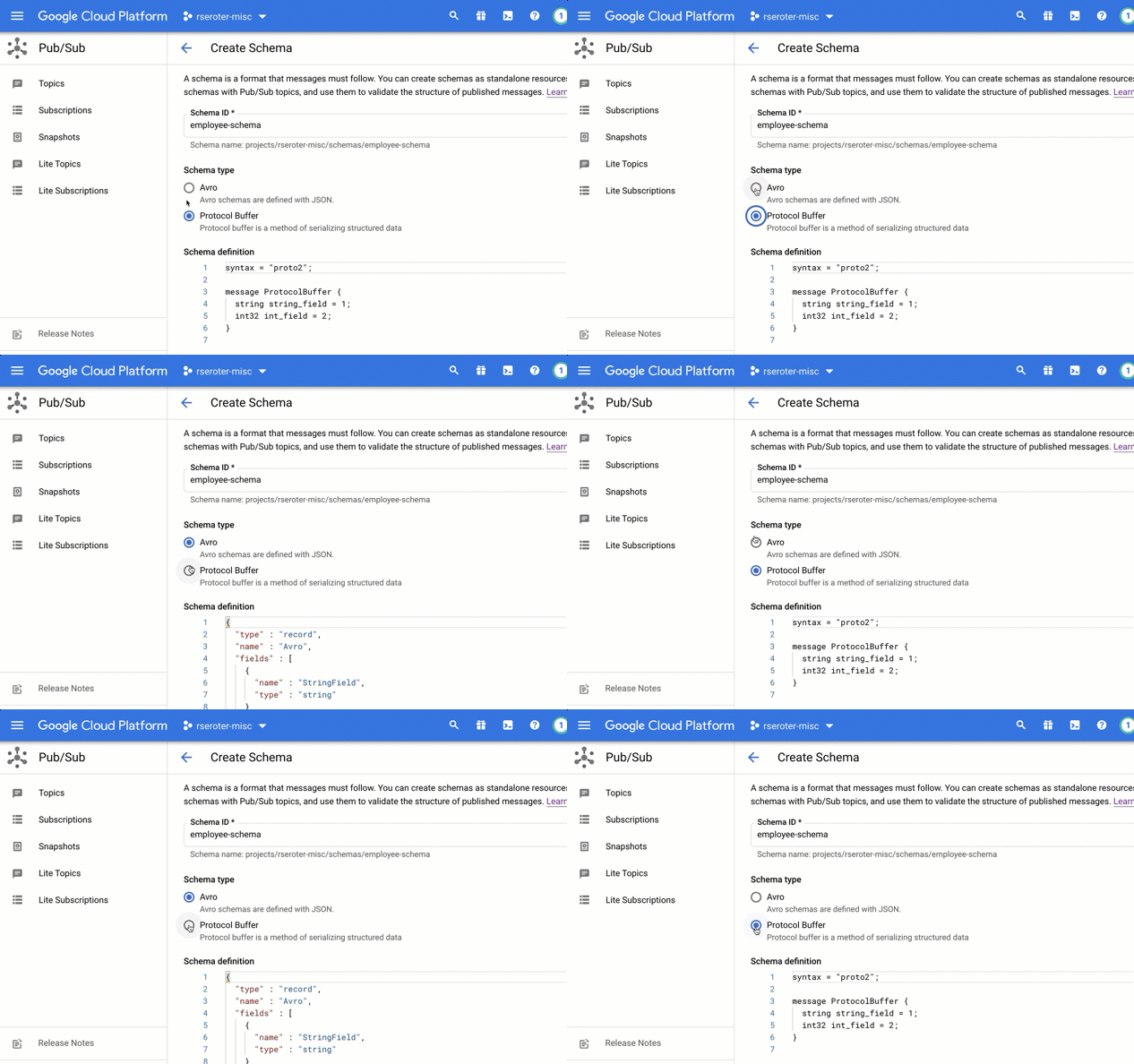
I chose to create a brand new schema. In this view, I’m asked to give the schema a name, and then choose if I’m using Avro or Protocol Buffers to define the structure.
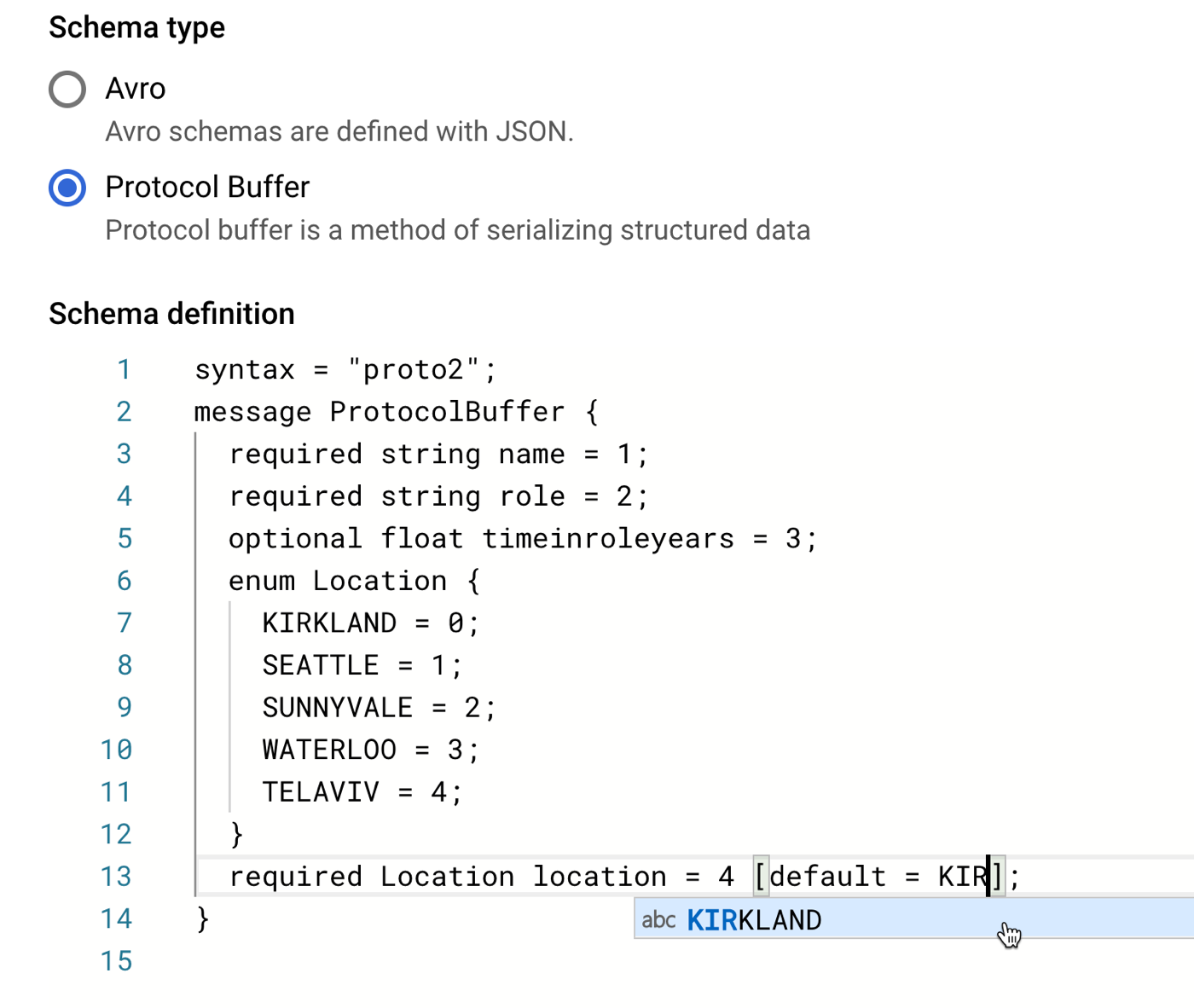
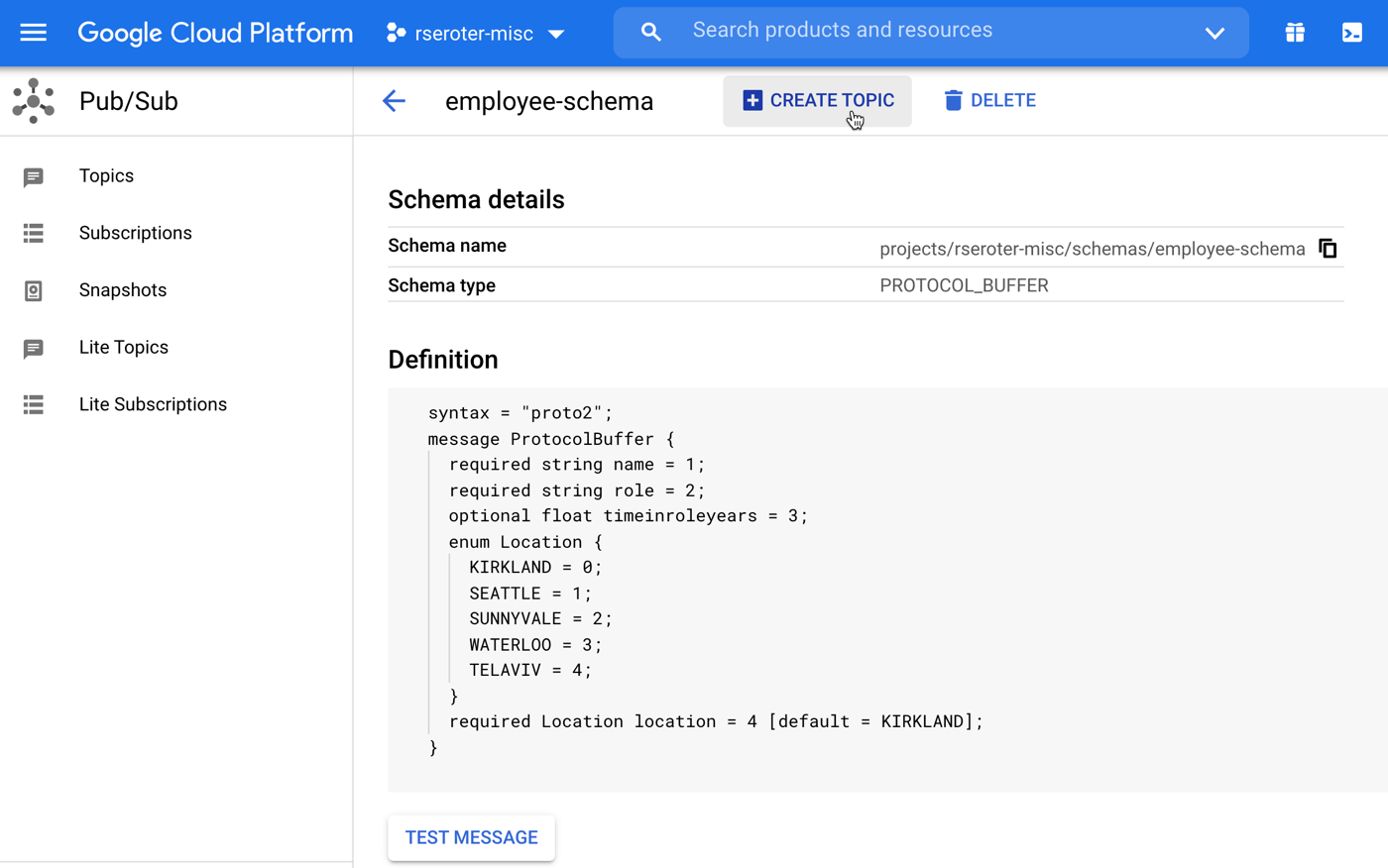
In that “schema definition” box, I get a nice little editor with type-ahead support. Here, I sketched out a basic schema for an “employee” message type.
No matter how basic, I’m still capable of typing things wrong. So, it’s handy that there’s a “validate schema” button at the bottom that shockingly confirmed that I got my structure correct.
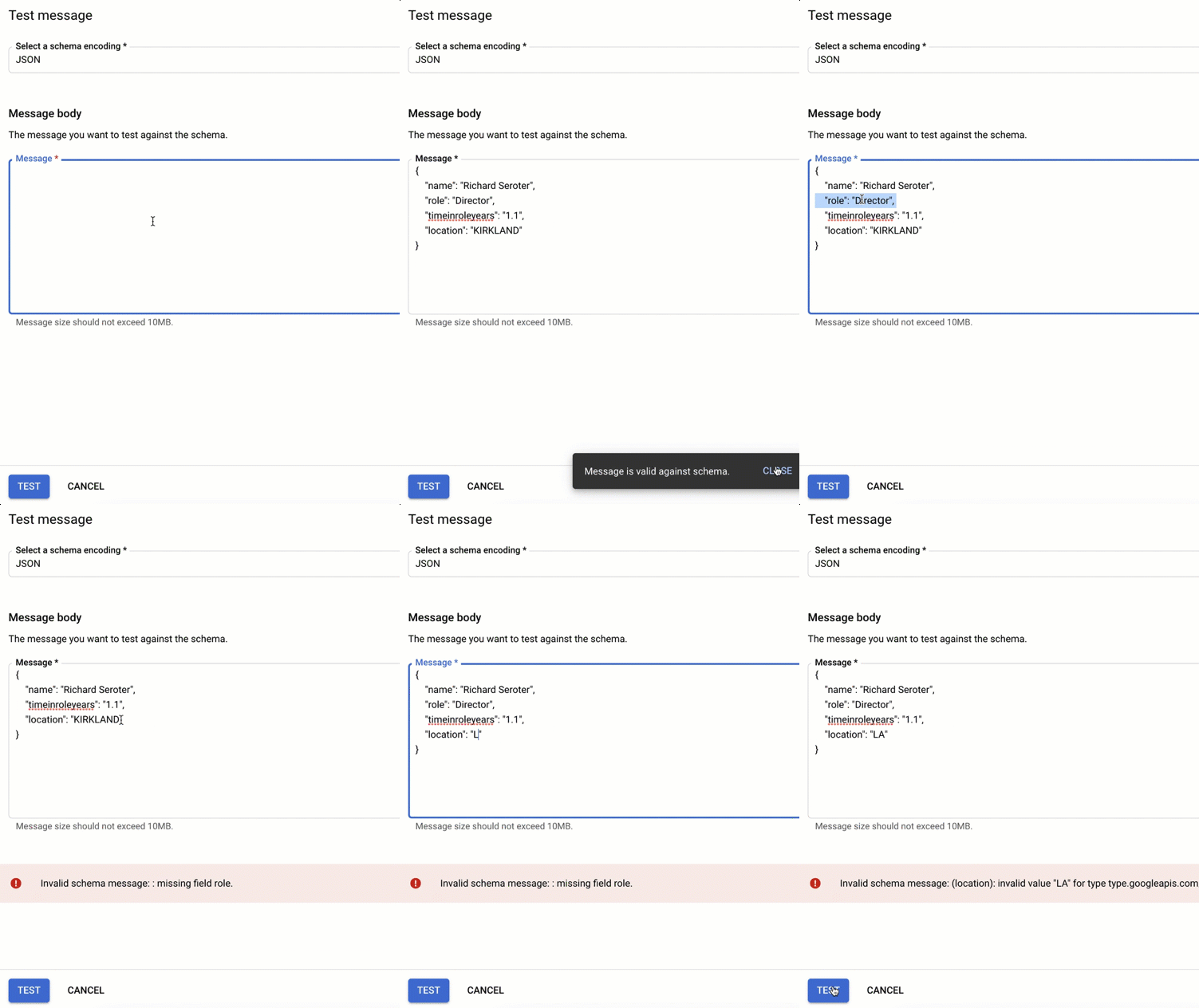
You’ll also notice a “test message” button. This is great. From here, I can validate input, and see what happens (below) if I skip a required field, or put the the wrong value into the enumeration.
Also note that the CLi lets you do this too. There are simple commands to test a message against a new schema, or one that already exists. For example:
Once I’m content with the structure, I save the schema. Then it shows up in my list of available schemas. Note that I cannot change a published schema. If my structure changes over time, that’s a new schema. This is a fairly light UX, so I assume you should maintain versions in a source code repo elsewhere.
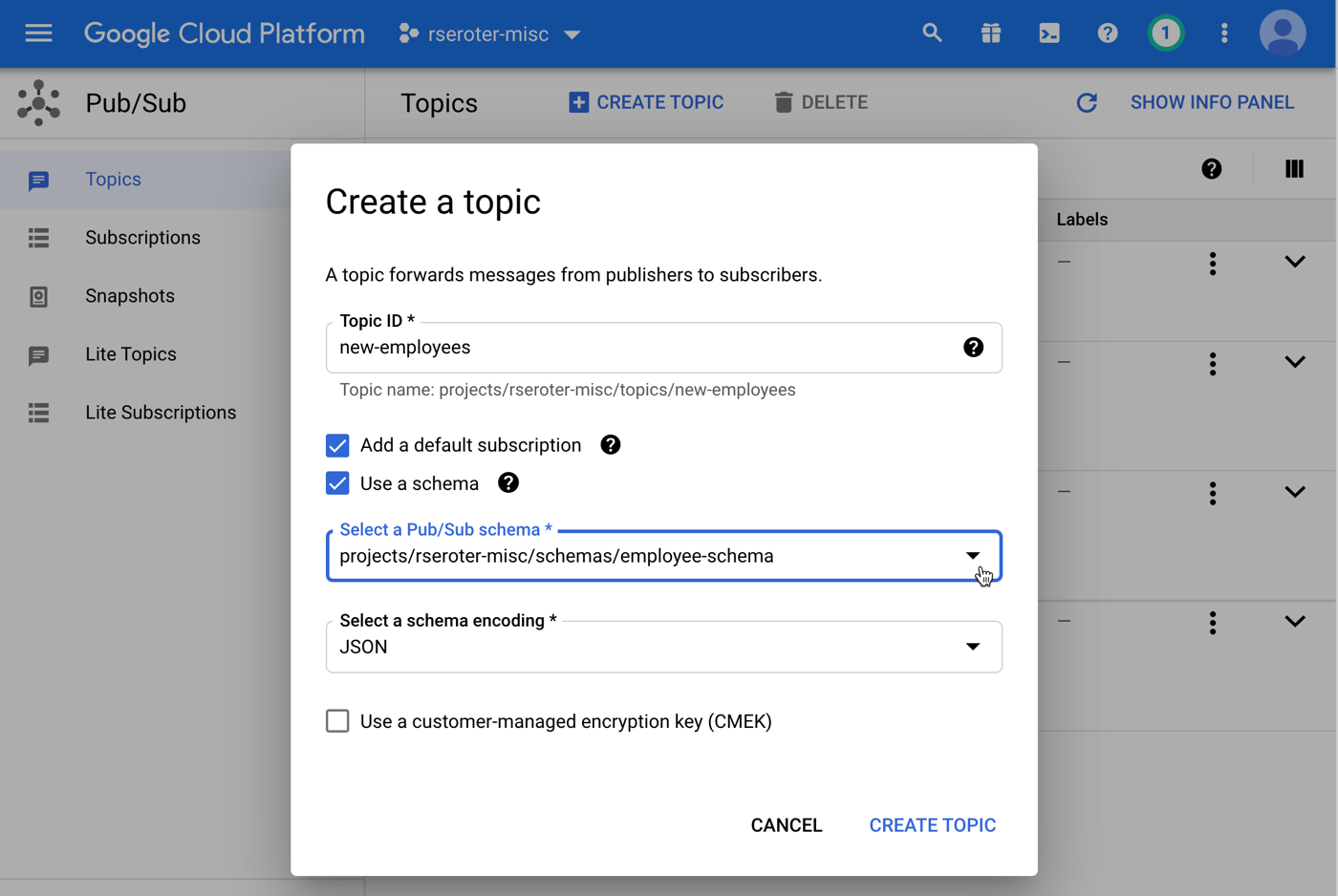
In that screenshot above, you see a button that says “create topic.” I can create a Topic from here, or, use the standard way of creating Topics and select a schema then. Let’s do that. When I go to the general “create Topic” view, you see I get a choice to use a schema and pick a message encoding. Be aware that you can ONLY attach schemas to new Topics, and once you attach a schema, you can’t remove it from that Topic. Make good choices.
How do I know that a Topic has schema attached? You have a few options.
First, the Google Cloud Console shows you! When I view the details of a given Topic, I notice that the encoding and schema get called out.
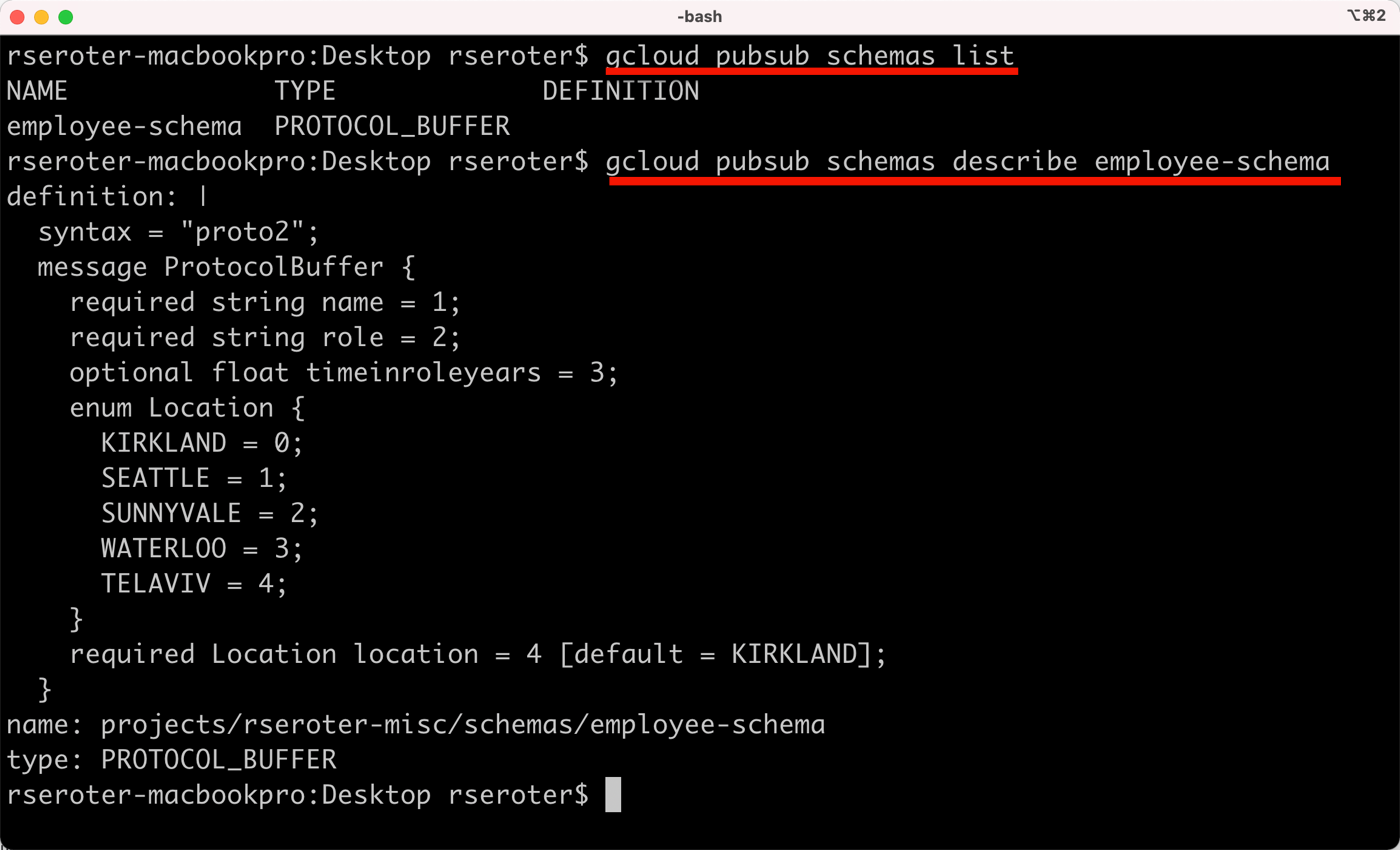
It’s not all about the portal UX, however. CLI fans need love too. Everything I did above, you can do in code or via CLi. That includes getting details about a given schema. Notice below that I can list all the schemas for my project, and get the details for any given one.
And also see that when I view my Topic, it shows that I have a schema applied.
Publishing messages
After ensuring that my Topic has a subscription or two—messages going to a Topic without a subscription are lost—I tried publishing some messages.
First, I did this from a C# application. It serializes a .NET object into a JSON object and sends it to my schema-enforcing Pub/Sub topic.
using System;
using Google.Cloud.PubSub.V1;
using Google.Protobuf;
using System.Text.Json;

namespace core_pubsub_schema
{
    class Program
    {
        static void Main(string[] args)
        {
            Console.WriteLine("Pub/Sub app started");

            PublishMessage();

            Console.WriteLine("App done!");
        }

        static void PublishMessage() {

            //define an employee object
            var employee = new Employee {
                name = "Jeff Reed",
                role = "VP",
                timeinroleyears = 0.5f,
                location = "SUNNYVALE"
            };
            //convert the .NET object to a JSON string
            string jsonString = JsonSerializer.Serialize(employee);

            //name of our topic
            string topicName ="projects/rseroter-misc/topics/new-employees";
            PublisherServiceApiClient publisher = PublisherServiceApiClient.Create();

            //create the message
            PubsubMessage message = new PubsubMessage
            {
                Data = ByteString.CopyFromUtf8(jsonString)
            };

            try {
                publisher.Publish(topicName, new[] { message });
                Console.WriteLine("Message published!");
            }
            catch (Exception ex) {
                Console.WriteLine(ex.ToString());
            }
        }
    }

    public class Employee {
        public string name {get; set; }
        public string role {get; set; }
        public float timeinroleyears {get; set;}
        public string location {get; set;}
    }
}
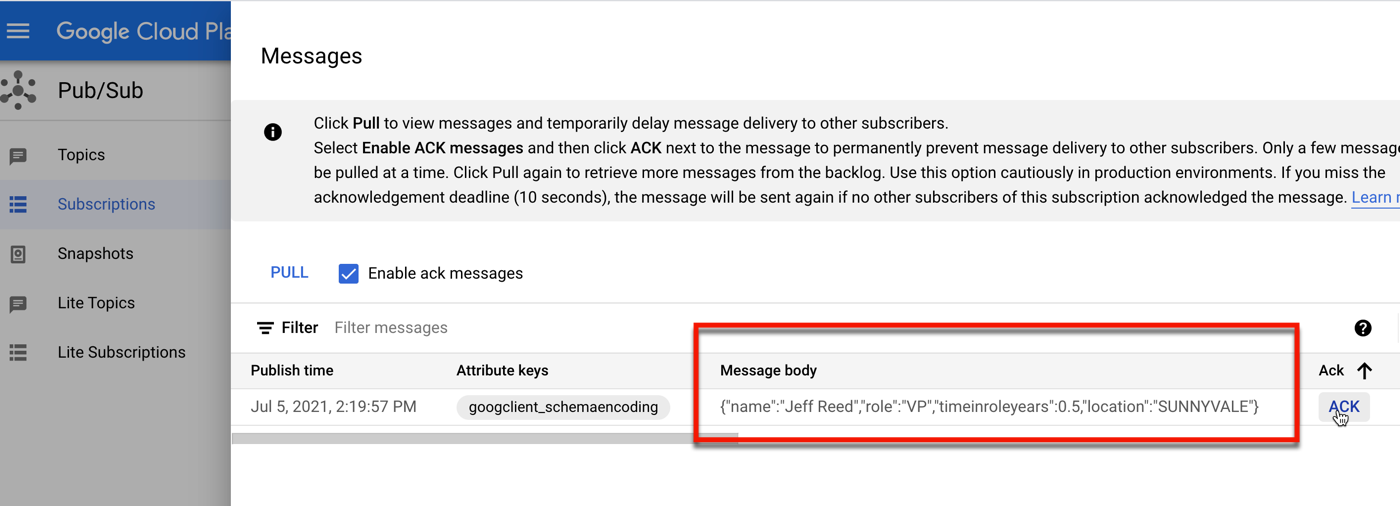
After running this app, I see that I successfully published a message to the Topic, and my lone subscription holds a copy for me to read.
For fun, I can also publish messages directly from the Google Cloud Console. I like that we’ve offered the ability to publish up to a hundred messages on an interval, which is great for testing purposes.
Below, I entered some JSON, and removed a required field (“role”) before publishing. You can see that I got an error before the message hit the Topic.
Dealing with schema changes
My first impression upon using this schema capability in Pub/Sub was that it’s cool, but I wish I could change schemas more easily, and detach schemas from Topics. But the more I thought about it, the more I understood the design decision.
If I’m attaching a schema to a Topic, then I’m serious about the data structure. And downstream consumers are expecting that specific data structure. Changing the schema means creating a new Topic, and establishing new subscribers.
What if your app can absorb schema changes, and you want to access new Subscriptions without redeploying your whole app? You might retrieve the subscription name from an external configuration (e.g. ConfigMap in Kubernetes) versus hard-coding it. Or use a proxy service/function/whatever in between publishers and Topics, or consumers and subscriptions. Changing that proxy might be simpler than changing your primary system. Regardless, once you sign up to use schemas, you’ll want to think through your strategy for handling changes.
I like this (optional) functionality in Google Cloud Pub/Sub. You can do the familiar schema-on-read approach, or now do a schema-on-write when needed. If you want to try this yourself, take advantage of our free tier for Pub/Sub (10GB of messages per month) and let me know if you come up with any cool use cases, or schema upgrade strategies!
When the executive recruiter pinged me about joining Google Cloud to lead an outbound product management team, my first question was: “um, what’s an outbound product management team?” After a year in the job, I now know. Sort of. I’ve saved a list of questions people have asked me, and figured I’d answer them here.
Here’s what I get asked fairly often about outbound product management.
Q: How are outbound product managers different than “regular” product managers?
Both types of PMs have foundational product management skills, technical expertise, and a focus on product success. Outbound product managers are product managers who are primarily focused on go-to-market activities and customer interactions. We don’t maintain a product backlog, partner with engineers to plot out a given release, or directly own the product strategy.
Instead of working with one product or subsystem, outbound PMs often work across a portfolio of products. We champion the portfolio and products to internal and external audiences, and spend a significant amount of time talking to customers, partners, industry analysts, and field personnel. Outbound PMs take what we learn and feed it back into our overall portfolio and product strategy.
Q: What’s the purpose of the team?
I describe the mission of our team as “increasing the adoption and fit of our products.” The “adoption” part is outbound focused and includes customer briefings, analyst updates, field training, partner enablement, content creation, and more. The “fit” part is how we take this broad set of things we learn about, and ensure we have a relevant, customer-focused strategy for every product in the portfolio. That means doing things like advocating for new products and features, owning and updating roadmaps, and helping construct cross-product strategies.
Q: Where did outbound product management come from?
I don’t know exactly. I think that our CEO Thomas Kurian had this at Oracle, and brought it to Google Cloud because it worked well. I’m told that other software companies had this practice, or a variation of it at different times in their history.
I’ve seen more and more people put outbound PM on their resumes, so I’m not sure if that’s because they had that actual title, or if they did related work and want to align more closely to my job description 🙂
Q: Isn’t this just a marketing team or an “office of the CTO” type team?
We do a bit of a lot of things. From what I’ve observed, the biggest difference between outbound product management and its sister teams (product marketing, office of the CTO, developer relations) is the direct alignment with product management. I sit in engineering reviews, talk daily to product managers, contribute to our product roadmap artifacts, and help create our product strategy. The related teams do wonderful work broadcasting information and engaging outbound with customers. We do parts of that, but also the inward-facing work that takes what we learn from being outbound, and make the products better.
Q: Where do you sit in the org chart?
Outbound product management sits in the product management org, and outbound PMs are just “PMs” in our job ladder. At times, I feel like I answer to a dozen different people, given that OPM sits at the center of so many things.
The person actually stuck managing me is a VP of Product Management. When performance review time arrives, we’re evaluated alongside the rest of the product managers. That said, we do different things that inbound PMs, and I’m working to ensure that it’s accounted for during perf and promo cycles!
Q: How is the team arranged?
I think I was the first outside hire for outbound product management at Google. Now, there are 40+ folks, spread across 8+ product areas (e.g. Storage, Networking, Compute, Analytics, AI, App Modernization). Teams range in size from 2-10 individuals.
Currently, my team is arranged by product area. We drive our developer tools (Cloud SDK, Cloud Code), serverless (Cloud Build, Cloud Run, Cloud Functions, Cloud Workflows, App Engine), and container services (GKE, and Anthos). Individual outbound PMs focus on a given product (e.g. GKE) or product area (e.g. CI/CD).
Everyone pitches in on cross-cutting efforts like analyst briefings, events, and joint messaging. Subsets of the team have expertise in different areas, and pair up to tackle those projects.
Q: What skills do you hire for?
It’s taken me a year to build out the team, so I’m not sure I’m a good person to ask. But basically, the best outbound PMs are continuous learners who are good communicators, customer-focused, and technically savvy. Ideally, candidates have meaningful product management experience, worked in the enterprise software space before, know the industry landscape, and have outstanding soft skills. That said, I’ve hired people who were new to cloud, people who hadn’t officially been a product manager before, and people who were in different roles within Google. We have a fun, diverse team of people with complementary skills who think strategically while learning constantly.
Q: What does your team do, day to day?
Let’s look at last week, shall we? Our team worked on the following things:
Delivered 20-ish talks to individual customers.
Helped a handful of customers onboard into private previews of new product features.
Updated product roadmap artifacts based on changes in priority for a couple of planned features.
Wrote announcement blog posts for multiple upcoming launches.
Hosted analyst inquiries with Gartner, Forrester, and Redmonk to learn about topics like software composition analysis, container management, and developer needs.
Filled out multiple analyst questionnaires and prepared for an upcoming hour-long presentation to Forrester for an upcoming “Wave” evaluation.
Created competitive overviews to summarize the container platform landscape. One is given to the field, the other is for an offsite with GKE product leadership.
Published video assets created for the Google social media team.
Did product roadmap reviews and Q&A sessions with our field teams and Certified Fellows community.
Drafted keynotes for upcoming public events.
Conducted multiple interviews of product management candidates.
Q: How do you measure success? What are your OKRs?
An inbound PM often has objectives and key results related to launching a given product and landing it in the market. For our outbound PM team, the four objectives we agreed on for 2021 include:
[Enablement] Educate and enable the field, partners, and customers for success on product portfolio
[Revenue] Engage with customers to meaningfully improve the adoption of product portfolio
[Positioning and Strategy] Unify the positioning and strategy of the product portfolio across internal teams, partners, customers and developer communities
[Team] Build an outbound PM organization that leads by example with expert people, repeatable systems, and inclusive culture.
Each of these has some very specific key results to track progress towards those objectives. And it’s all a work in progress, so who knows how this will evolve.
Q: Should every software company have an outbound product management team?
No? When I ran product management at a previous company, our product managers did both inbound and outbound activities. There wasn’t a separate function. This specific discipline might make sense for your org if you have VERY technical products and want help landing those in the market and ensuring fit. Or, add outbound PMs if you have a very broad portfolio of products and need to unify the market positioning while better integrating the internal strategy. Outbound PM might also make sense if you have PMs that need to be very focused on day-to-day prioritization and delivery, and want help getting constant customer feedback and educating internal teams (e.g. field staff, marketing) about product capabilities.
For some, outbound product management may be a temporary team, for others, it’ll be a durable part of how they plan and deliver products. It’ll be interesting to watch!
Q: Are you having fun as an outbound product manager?
I am. Honestly, I’ve enjoyed every job I’ve ever had. They each scratched a different itch. This one is unique, however. It requires the combination of every professional skill I’ve developed to this point, while still teaching me new ones. It’s a privilege to work here and lead this team, and I look forward to starting each day.