Category: Kubernetes

  • Think all Kubernetes look alike? Look for differences in these six areas.

    Think all Kubernetes look alike? Look for differences in these six areas.

    I feel silly admitting that I barely understand what happens in the climactic scene of the 80s movie Trading Places. It has something to do with short-selling commodities—in this case, concentrated orange juice. Let’s talk about commodities, which Investopedia defines as:

    a basic good used in commerce that is interchangeable with other goods of the same type. Commodities are most often used as inputs in the production of other goods or services. The quality of a given commodity may differ slightly, but it is essentially uniform across producers.

     Our industry has rushed to declare Kubernetes a commodity, but is it? It is now a basic good used as input to other goods and services. But is uniform across producers? It seems to me that the Kubernetes API is commoditized and consistent, but the platform experience isn’t. Your Kubernetes experience isn’t uniform across Google Kubernetes Engine (GKE), AWS Elastic Kubernetes Service (EKS), Azure Kubernetes Service (AKS), VMware PKS, Red Hat OpenShift, Minikube, and 130+ other options. No, there are real distinctions that can impact your team’s chance of success adopting it. As you’re choosing a Kubernetes product to use, pay upfront attention to provisioning, upgrades, scaling/repair, ingress, software deployment, and logging/monitoring. 

    I work for Google Cloud, so obviously I’ll have some biases. That said, I’ve used AWS for over a decade, was an Azure MVP for years, and can be mostly fair when comparing products and services.

    1. Provisioning

    Kubernetes is a complex distributed system with lots of moving parts. Multi-cluster has won out as a deployment strategy (versus one giant mega cluster segmented by namespace), which means you’ll provision Kubernetes clusters with some regularity.

    What do you have to do? How long does it take? What options are available? Those answers matter! 

    Kubernetes offerings don’t have identical answers to these questions:

    • Do you want clusters in a specific geography?
    • Should clusters get deployed in an HA fashion across zones?
    • Can you build a tiny cluster (small machine, single node) and a giant cluster?
    • Can you specify the redundancy of the master nodes? Is there redundancy?
    • Do you need to choose a specific Kubernetes version? 
    • Are worker nodes provisioned during cluster build, or do you build separately and attach to the cluster?
    • Will you want persistent storage for workloads?
    • Are there “special” computing needs, including large CPU/memory nodes, GPUs, or TPUs?
    • Are you running Windows containers in the cluster?

    As you can imagine, since GKE is the original managed Kubernetes, there’s lots of options for you when building clusters. Or, you can do a one-click install of a “starter” cluster, which is pretty great.

    2. Upgrades

    You got a cluster running? Cool! Day 2 is usually where the real action’s at. Let’s talk about upgrades, which are a fact of life for clusters. What gets upgraded? Namely the version of Kubernetes, and the configuration/OS of the nodes themselves. The level of cluster management amongst the various providers is not uniform.

    GKE supports automated upgrades of everything in the cluster, or you can trigger it manually. Either way, you don’t do any of the upgrade work yourself. Release channels are pretty cool, too. DigitalOcean looks somewhat similar to GKE, from an upgrade perspective. AKS offers manually triggered upgrades. AWS offers kinda automated or extremely manual (i.e. creating new node groups or using Cloud Formation), depending on whether you used managed or unmanaged worker nodes.

    3. Scaling / Repairs

    Given how many containers you can run on a good-sized cluster, you may not have to scale your cluster TOO often. But, you may also decide to act in a “cloudy” way, and purposely start small and scale up as needed.

    Like with most any infrastructure platform, you’ll expect to scale Kubernetes environments (minus local dev environments) both vertically and horizontally. Minimally, demand that your Kubernetes provider can scale clusters via manual commands. Increasingly, auto-scaling of the cluster is table-stakes. And don’t forget scaling of the pods (workloads) themselves. You won’t find it everywhere, but GKE does support horizontal pod autoscaling and vertical pod autoscaling too.

    Also, consider how your Kubernetes platform handles the act of scaling. It’s not just about scaling the nodes or pods. It’s how well the entire system swells to absorb the increasing demand. For instance, Bayer Crop Science worked with Google Cloud to run a 15,000 node cluster in GKE. For that to work, the control planes, load balancers, logging infrastructure, storage, and much more had to “just work.” Understand those points in your on-premises or cloud environment that will feel the strain.

    Finally, figure out what you want to happen when something goes wrong with the cluster. Does the system detect a down worker and repair/replace it? Most Kubernetes offerings support this pretty well, but do dig into it!

    4. Ingress

    I’m not a networking person. I get the gist, and can do stuff, but I quickly fall into the pit of despair. Kubernetes networking is powerful, but not simple. How do containers, pods, and clusters interact? What about user traffic in and out of the cluster? We could talk about service meshes and all that fun, but let’s zero in on ingress. Ingress is about exposing “HTTP and HTTPS routes from outside the cluster to services within the cluster.” Basically, it’s a Layer 7 front door for your Kubernetes services.

    If you’re using Kubernetes on-premises, you’ll have some sort of load balancer configuration setup available, maybe even to use with an ingress controller. Hopefully! In the public cloud, major providers offer up their load-balancer-as-a-service whenever you expose a service of type “LoadBalancer.” But, you get a distinct load balancer and IP for each service. When you use an ingress controller, you get a single route into the cluster (still load balanced, most likely) and the traffic is routed to the correct pod from there. Microsoft, Amazon, and Google all document their way to use ingress controllers with their managed Kubernetes.

    Make sure you investigate the network integrations and automation that comes with your Kubernetes product. There are super basic configurations (that you’ll often find in local dev tools) all the way to support for Istio meshes and ingress controllers.

    5. Software Deployment

    How do you get software into your Kubernetes environment? This is where the commoditization of the Kubernetes API comes in handy! Many software products know how to deploy containers to a Kubernetes environment.

    Two areas come to mind here. First, deploying packaged software.  You can use Helm to deploy software to most any Kubernetes environment. But let’s talk about marketplaces. Some self-managed software products deliver some form of a marketplace, and a few public clouds do. AWS has the AWS Marketplace for Containers. DigitalOcean has a nice little marketplace for Kubernetes apps. In the Google Cloud Marketplace, you can filter by Kubernetes apps, and see what you can deploy on GKE, or in Anthos environments. I didn’t notice a way in the Azure marketplace to find or deploy Kubernetes-targeted software.

    The second area of software deployment I think about relates to CI/CD systems for custom apps. Here, you have a choice of 3rd party best-of-breed tools, or whatever your Kubernetes provider bakes in. AWS CodePipeline or CodeDeploy can deploy apps to ECS (not EKS, it seems). Azure Pipelines looks like it deploys apps directly to AKS. Google Cloud Build makes it easy to deploy apps to GKE, App Engine, Functions, and more.

    When thinking about software deployment, you could also consider the app platforms that run atop a Kubernetes foundation, like Knative and in the future, Cloud Foundry. These technologies can shield you from some of the deployment and configuration muck that’s required to build a container, deploy it, and wire it up for routing.

    6. Logging/Monitoring

    Finally, take a look at what you need from a logging and monitoring perspective. Most any Kubernetes system will deliver some basic metrics about resource consumption—think CPU, memory, disk usage—and maybe some Kubernetes-specific metrics. From what I can tell, the big 3 public clouds integrate their Kubernetes services with their managed monitoring solutions. For example, you get visibility into all sorts of GKE metrics when clusters are configured to use Cloud Operations.

    Then there’s the question of logging. Do you need a lot of logs, or is it ok if logs rotate often? DigitalOcean rotates logs when they reach 10MB in size. What kind of logs get stored? Can you analyze logs from many clusters? As always, not every Kubernetes behaves the same!

    Plenty of other factors may come into play—things like pricing model, tenancy structure, 3rd party software integration, troubleshooting tools, and support community come to mind—when choosing a Kubernetes product to use, so don’t get lulled into a false sense of commoditization!
  • I’m looking forward these 4 sessions at Google Cloud Next ’20 OnAir (Weeks 1 & 2)

    Like every other tech vendor, Google’s grand conference plans for 2020 changed. Instead of an in-person mega-event for cloud aficionados, we’re doing a (free!) nine week digital event called Google Cloud Next OnAir. Each week, starting July 14th, you get on-demand breakout sessions about a given theme. And there are ongoing demo sessions, learning opportunities, and 1:1s with Google Experts. Every couple weeks, I’ll highlight a few talks I’m looking forward to.

    Before sharing my week one and week two picks, a few words on why you should care about this event. More than any other company, Google defines what’s “next” for customers and competitors alike. Don’t believe me? I researched a few of the tech inflection points of the last dozen years and Google’s fingerprints are all over them! If I’m wrong with any of this, don’t hesitate to correct me in the comments.
    In 2008, Google launched Google App Engine (GAE), the first mainstream platform-as-a-service offering that introduced a compute model that obfuscated infrastructure. GAE (and Heroku) sparked an explosion of other products like Azure Web Apps, Cloud Foundry, AWS Elastic Beanstalk and others. I’m also fairly certain that the ideas behind PaaS led to the serverless+FaaS movement as well.

    Google created Go and released the new language in 2009. It remains popular with developers, but has really taken off with platform builders. A wide range of open-source projects use Go, including Docker, Kubernetes, Terraform, Prometheus, Hugo, InfluxDB, Jaeger, CockroachDB, NATS, Cloud Foundry, etcd, and many more. It seems to be the language of distributed systems and the cloud.

    Today, we think of data processing and AI/ML when we think of cloud computing, but that wasn’t always the case. Google had the first cloud-based data warehouse (BigQuery, in 2010) and AI/ML as a service by a cloud provider (Translate API, in 2011). And don’t forget Spanner, the distributed SQL database unveiled by Google in 2012 that inspired a host of other database vendors. We take for granted that every major public cloud now offers data warehouses, AI/ML services, and planet-scale databases. Seems like Google set the pace.

    Keep going? Ok. The components emerging as the heart of the modern platform? Looks like container orchestration, service mesh, and serverless runtime. The CNCF 2019 survey shows that KubernetesIstio, and Knative play leading roles. All of those projects started at Google, and the industry picked up on each one. While, we were first to offer a managed Kubernetes service (GKE in 2015),  now you find everyone offering one. Istio and Knative are also popping up all over. And our successful effort to embed all those technologies into a software-driven managed platform (Anthos, in 2019) may turn out to be the preferred model vs. a hyperconverged stack of software plus infrastructure.

    Obviously, additional vendors and contributors have moved our industry forward over the past dozen years: Docker with approachable containerization, Amazon with AWS Lambda, social coding with GitHub, infrastructure-as-code from companies like HashiCorp, microservice and chaos engineering ideas from the likes of Netflix, and plenty of others. But I contend that no single vendor has contributed more value for the entire industry than Google. That’s why Next OnAir matters, as we’ll keep sharing tech that makes everything better.

    Ok, enough blather. The theme of week one is “industry insights.” There’s also the analyst summit and partner summit, both with great content for those audiences. The general sessions I definitely want to watch:

    Week two starts July 21, and has a theme of “productivity & collaboration.” A couple sessions stood out to me:

    Next OnAir has a tremendous list of speakers, including customers and Google engineers sharing their insight. It’s free to sign up, you can watch at your leisure, and maybe, get a glimpse of what’s next.

  • Google Cloud’s support for Java is more comprehensive than I thought

    Google Cloud’s support for Java is more comprehensive than I thought

    Earlier this year, I took a look at how Microsoft Azure supports  Java/Spring developers. With my change in circumstances, I figured it was a good time to dig deep into Google Cloud’s offerings for Java developers. What I found was a very impressive array of tools, services, and integrations. More than I thought I’d find, honestly. Let’s take a tour.

    Local developer environment

    What stuff goes on your machine to make it easier to build Java apps that end up on Google Cloud?

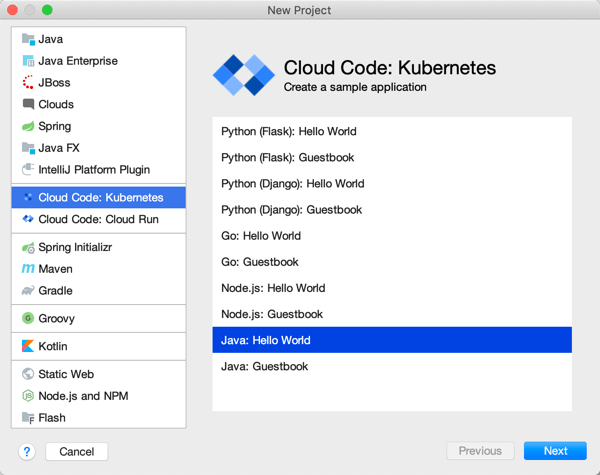
    Cloud Code extension for IntelliJ

    Cloud Code is a good place to start. Among other things, it delivers extensions to IntelliJ and Visual Studio Code. For IntelliJ IDEA users, you get starter templates for new projects, snippets for authoring relevant YAML files, tool windows for various Google Cloud services, app deployment commands, and more. Given that 72% of Java developers use IntelliJ IDEA, this extension helps many folks.

    Cloud Code in VS Code

    The Visual Studio Code extension is pretty great too. It’s got project starters and other command palette integrations, Activity Bar entries to manage Google Cloud services, deployment tools, and more. 4% of Java devs use Visual Studio Code, so, we’re looking out for you too. If you use Eclipse, take a look at the Cloud Tools for Eclipse.

    The other major thing you want locally is the Cloud SDK. Within this little gem you get client libraries for your favorite language, CLIs, and emulators. This means that as Java developers, we get a Java client library, command line tools for all-up Google Cloud (gcloud), Big Query (bq) and Storage (gsutil), and then local emulators for cloud services like Pub/Sub, Spanner, Firestore, and more. Powerful stuff.

    App development

    Our machine is set up. Now we need to do real work. As you’d expect, you can use all, some, or none of these things to build your Java apps. It’s an open model.

    Java devs have lots of APIs to work with in the Google Cloud Java client libraries, whether talking to databases or consuming world-class AI/ML services. If you’re using Spring Boot—and the JetBrains survey reveals that the majority of you are—then you’ll be happy to discover Spring Cloud GCP. This set of packages makes it super straightforward to interact with terrific managed services in Google Cloud. Use Spring Data with cloud databases (including Cloud Spanner and Cloud Firestore), Spring Cloud Stream with Cloud Pub/Sub, Spring Caching with Cloud Memorystore, Spring Security with Cloud IAP, Micrometer with Cloud Monitoring, and Spring Cloud Sleuth with Cloud Trace.  And you get the auto-configuration, dependency injection, and extensibility points that make Spring Boot fun to use. Google offers Spring Boot starterssamples, and more to get you going quickly. And it works great with Kotlin apps too.

    Emulators available via gcloud

    As you’re building Java apps, you might directly use the many managed services in Google Cloud Platform, or, work with the emulators mentioned above. It might make sense to work with local emulators for things like Cloud Pub/Sub or Cloud Spanner. Conversely, you may decide to spin up “real” instance of cloud services to build apps using Managed Service for Microsoft Active DirectorySecret Manager, or Cloud Data Fusion. I’m glad Java developers have so many options.

    Where are you going to store your Java source code? One choice is Cloud Source Repositories. This service offers highly available, private Git repos—use it directly or mirror source code code from GitHub or Bitbucket—with a nice source browser and first-party integration with many Google Cloud compute runtimes.

    Building and packaging code

    After you’ve written some Java code, you probably want to build the project, package it up, and prepare it for deployment.

    Artifact Registry

    Store your Java packages in Artifact Registry. Create private, secure artifact storage that supports Maven and Gradle, as well as Docker and npm. It’s the eventual replacement of Container Registry, which itself is a nice Docker registry (and more).

    Looking to build container images for your Java app? You can write your own Dockerfiles. Or, skip docker build|push by using our open source Jib as a Maven or Gradle plugin that builds Docker images. Jib separates the Java app into multiple layers, making rebuilds fast. A new project is Google Cloud Buildpacks which uses the CNCF spec to package and containerize Java 8|11 apps.

    Odds are, your build and containerization stages don’t happen in isolation; they happen as part of a build pipeline. Cloud Build is the highly-rated managed CI/CD service that uses declarative pipeline definitions. You can run builds locally with the open source local builder, or in the cloud service. Pull source from Cloud Source Repositories, GitHub and other spots. Use Buildpacks or Jib in the pipeline. Publish to artifact registries and push code to compute environments. 

    Application runtimes

    As you’d expect, Google Cloud Platform offers a variety of compute environments to run your Java apps. Choose among:

    • Compute Engine. Pick among a variety of machine types, and Windows or Linux OSes. Customize the vCPU and memory allocations, opt into auto-patching of the OS, and attach GPUs.
    • Bare Metal. Choose a physical machine to host your Java app. Choose from machine sizes with as few as 16 CPU cores, and as many as 112.
    • Google Kubernetes Engine. The first, and still the best, managed Kubernetes service. Get fully managed clusters that are auto scaled, auto patched, and auto repaired. Run stateless or stateful Java apps.
    • App Engine. One of the original PaaS offerings, App Engine lets you just deploy your Java code without worrying about any infrastructure management.
    • Cloud Functions. Run Java code in this function-as-a-service environment.
    • Cloud Run. Based on the open source Knative project, Cloud Run is a managed platform for scale-to-zero containers. You can run any web app that fits into a container, including Java apps. 
    • Google Cloud VMware Engine. If you’re hosting apps in vSphere today and want to lift-and-shift your app over, you can use a fully managed VMware environment in GCP.

    Running in production

    Regardless of the compute host you choose, you want management tools that make your Java apps better, and help you solve problems quickly. 

    You might stick an Apigee API gateway in front of your Java app to secure or monetize it. If you’re running Java apps in multiple clouds, you might choose Google Cloud Anthos for consistency purposes. Java apps running on GKE in Anthos automatically get observability, transport security, traffic management, and SLO definition with Anthos Service Mesh.

    Anthos Service Mesh

    But let’s talk about day-to-day operations of Java apps. Send Java app logs to Cloud Logging and dig into them. Analyze application health and handle alerts with Cloud Monitoring. Do production profiling of your Java apps using Cloud Profiler. Hunt for performance problems via distributed tracing with Cloud Trace. And if you need to, debug in production by analyzing the running Java code (in your IDE!) with Cloud Debugger.

    Modernizing existing apps

    You probably have lots of existing Java apps. Some are fairly new, others were written a decade ago. Google Cloud offers tooling to migrate many types of existing VM-based apps to container or cloud VM environments. There’s good reasons to do it, and Java apps see real benefits.

    Migrate for Anthos takes an existing Linux or Windows VM and creates artifacts (Dockerfiles, Kubernetes YAML, etc) to run that workload in GKE. Migrate for Compute Engine moves your Java-hosting VMs into Google Compute Engine.

    All-in-all, there’s a lot to like here if you’re a Java developer. You can mix-and-match these Google Cloud services and tools to build, deploy, run, and manage Java apps.

  • Take a fresh look at Cloud Foundry? In 20 minutes we’ll get Tanzu Application Service for Kubernetes running on your machine.

    Take a fresh look at Cloud Foundry? In 20 minutes we’ll get Tanzu Application Service for Kubernetes running on your machine.

    It’s been nine years since I first tried out Cloud Foundry, and it remains my favorite app platform. It runs all kinds of apps, has a nice dev UX for deploying and managing software, and doesn’t force me to muck with infrastructure. The VMware team keeps shipping releases (another today) of the most popular packaging of Cloud Foundry, Tanzu Application Service (TAS). One knock against Cloud Foundry has been its weight—in typically runs on dozens of VMs. Others have commented on its use of open-source, but not widely-used, components like BOSH, the Diego scheduler, and more. I think there are good justifications for its size and choice of plumbing components, but I’m not here to debate that. Rather, I want to look at what’s next. The new Tanzu Application Service (TAS) for Kubernetes (now in beta) eliminates those prior concerns with Cloud Foundry, and just maybe, leapfrogs other platforms by delivering the dev UX you like, with the underlying components—things like Kubernetes, Cluster API, Istio, Envoy, fluentd, and kpack—you want. Let me show you.

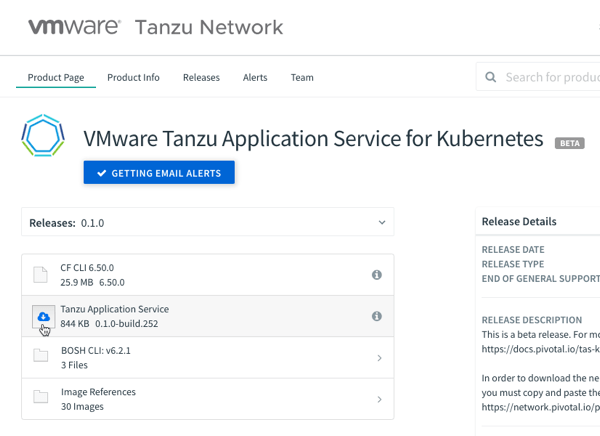
    TAS runs on any Kubernetes cluster: on-premises or in the cloud, VM-based or a managed service, VMware-provided or delivered by others. It’s based on the OSS Cloud Foundry for Kubernetes project, and available for beta download with a free (no strings attached) Tanzu Network account. You can follow along with me in this post, and in just a few minutes, have a fully working app platform that accepts containers or source code and wires it all up for you.

    Step 1 – Download and Start Stuff (5 minutes)

    Let’s get started. Some of these initial steps will go away post-beta as the install process gets polished up. But we’re brave explorers, and like trying things in their gritty, early stages, right?

    First, we need a Kubernetes. That’s the first big change for Cloud Foundry and TAS. Instead of pointing it at any empty IaaS and using BOSH to create VMs, Cloud Foundry now supports bring-your-own-Kubernetes. I’m going to use Minikube for this example. You can use KinD, or any other number of options.

    Install kubectl (to interact with the Kubernetes cluster), and then install Minikube. Ensure you have a recent version of Minikube, as we’re using the Docker driver for better performance. With Minikube installed, execute the following command to build out our single-node cluster. TAS for Kubernetes is happiest running on a generously-sized cluster.

    minikube start --cpus=4 --memory=8g --kubernetes-version=1.15.7 --driver=docker

    After a minute or two, you’ll have a hungry Kubernetes cluster running, just waiting for workloads.

    We also need a few command line tools to get TAS installed. These tools, all open source, do things like YAML templating, image building, and deploying things like Cloud Foundry as an “app” to Kubernetes. Install the lightweight kapp, klbd, and ytt tools using these simple instructions.

    You also need the Cloud Foundry command line tool. This is for interacting with the environment, deploying apps, etc. This same CLI works against a VM-based Cloud Foundry, or Kubernetes-based one. You can download the latest version via your favorite package manager or directly.

    Finally, you’ll want to install the BOSH CLI. Wait a second, you say, didn’t you say BOSH wasn’t part of this? Am I just a filthy liar? First off, no name calling, you bastards. Secondly, no, you don’t need to use BOSH, but the CLI itself helps generate some configuration values we’ll use in a moment. You can download the BOSH CLI via your favorite package manager, or grab it from the Tanzu Network. Install via the instructions here.

    With that, we’re done the environmental setup.

    Step 2 – Generate Stuff (2 minute)

    This is quick and easy. Download the 844KB TAS for Kubernetes bundle from the Tanzu Network.

    I downloaded the archive to my desktop, unpacked it, and renamed the folder “tanzu-application-service.” Create a sibling folder named “configuration-values.”

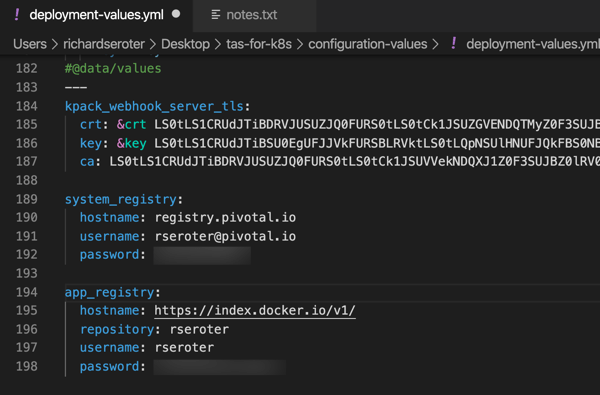
    Now we’re going to create the configuration file. Run the following command in your console, which should be pointed at the tanzu-application-service directory. The first quoted value is the domain. For my local instance, this value is vcap.me. When running this in a “real” environment, this value is the DNS name associated with your cluster and ingress point. The output of this command is a new file in the configuration-values folder.

    ./bin/generate-values.sh -d "vcap.me" > ../configuration-values/deployment-values.yml

    After a couple of seconds, we have an impressive-looking YAML file with passwords, certificates, and all sorts of delightful things.

    We’re nearly done. Our TAS environment won’t just run containers; it will also use kpack and Cloud Native Buildpacks to generate secure container images from source code. That means we need a registry for stashing generated images. You can use most any one you want. I’m going to use Docker Hub. Thus, the final configuration values we need are appended to the above file. First, we need the credentials to the Tanzu Network for retrieving platform images, and secondly, credentials for container registry.

    With our credentials in hand, add them to the very bottom of the file. Indentation matters, this is YAML after all, so ensure you’ve got it lined up right.

    The last thing? There’s a file that instructs the installation to create a cluster IP ingress point versus a Kubernetes load balancer resource. For Minikube (and in public cloud Kubernetes-as-a-Service environments) I want the load balancer. So, within the tanzu-application-service folder, move the replace-loadbalancer-with-clusterip.yaml file from the custom-overlays folder to the config-optional folder.

    Finally, to be safe, I created a copy of this remove-resource-requirements.yml file and put it in the custom-overlays folder. It relaxes some of the resource expectations for the cluster. You may not need it, but I saw CPU exhaustion issues pop up when I didn’t use it.

    All finished. Let’s deploy this rascal.

    Step 3 – Deploy Stuff (10 minutes)

    Deploying TAS to Kubernetes takes 5-9 minutes. With your console pointed at the tanzu-application-service directory, run this command:

    ./bin/install-tas.sh ../configuration-values

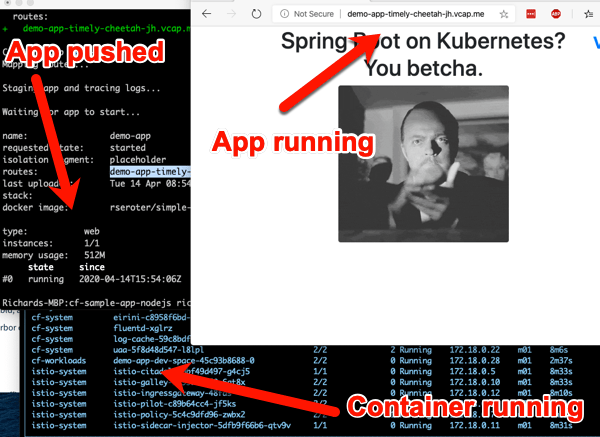
    There’s a live read-out of progress, and you can also keep checking the Kubernetes environment to see the pods inflate. Tools like k9s make it easy to keep an eye on what’s happening. Notice the Istio components, and some familiar Cloud Foundry pieces. Observe that the entire Cloud Foundry control plane is containerized here—no VMs anywhere to be seen.

    While this is still installing, let’s open up the Minikube tunnel to expose the LoadBalancer service our ingress gateway needs. Do this in a separate console window, as its a blocking call. Note that the installation can’t complete until you do it!

    minikube tunnel

    After a few minutes, we’re ready to deploy workloads.

    Step 4 – Test Stuff (3 minutes)

    We now have a full-featured Tanzu Application Service up and running. Neat. Let’s try a few things. First, we need to point the Cloud Foundry CLI at our environment.

    cf api --skip-ssl-validation https://api.vcap.me

    Great. Next, we log in, using generated cf_admin_password from the deployment-values.yaml file.

    cf auth admin <password>

    After that, we’ll enable containers in the environment.

    cf enable-feature-flag diego_docker

    Finally, we set up a tenant. Cloud Foundry natively supports isolation between tenants. Here, I set up an organization, and within that organization, a “space.” Finally, I tell the Cloud Foundry CLI that we’re working with apps in that particular org and space.

    cf create-org seroter-org
    cf create-space -o seroter-org dev-space
    cf target -o seroter-org -s dev-space

    Let’s do something easy, first. Push a previously-containerized app. Here’s one from my Docker Hub, but it can be anything you want.

    cf push demo-app -o rseroter/simple-k8s-app-kpack

    After you enter that command, 15 seconds later you have a hosted, routable app. The URL is presented in the Cloud Foundry CLI.

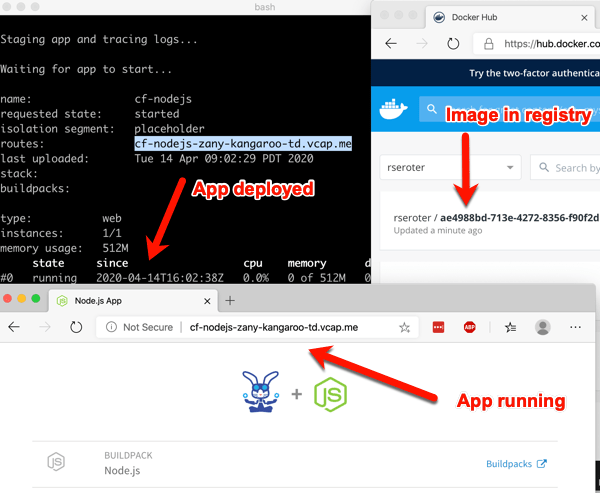
    How about something more interesting? TAS for Kubernetes supports a variety of buildpacks. These buildpacks detect the language of your app, and then assemble a container image for you. Right now, the platform builds Java, .NET Core, Go, and Node.js apps. To make life simple, clone this sample Node app to your machine. Navigate your console to that folder, and simple enter cf push.

    After a minute or so, you end up with a container image in whatever registry you specified (for me, Docker Hub), and a running app.

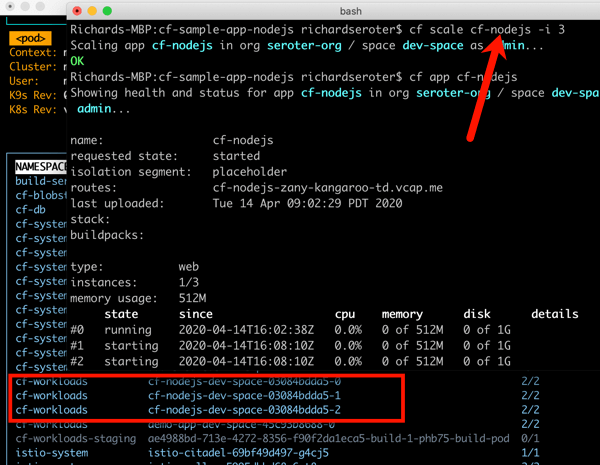
    This beta release of TAS for Kubernetes also supports commands around log streaming (e.g. cf logs cf-nodejs), connecting to backing services like databases, and more. And yes, even the simple, yet powerful, cf scale command works to expand and contract pod instances.

    It’s simple to uninstall the entire TAS environment from your Kubernetes cluster with a single command:

    kapp delete -a cf

    Thanks for trying this out with me! If you only read along, and want to try it yourself later, read the docs, download the bits, and let me know how it goes.

  • I’ve noticed three types of serverless compute platforms. Let’s deploy something to each.

    I’ve noticed three types of serverless compute platforms. Let’s deploy something to each.

    Are all serverless compute platforms—typically labeled Function-as-a-Service—the same? Sort of. They all offer scale-to-zero compute triggered by events and billed based on consumed resources. But I haven’t appreciated the nuances of these offerings, until now. Last week, Laurence Hecht did great work analyzing the latest CNCF survey data. It revealed which serverless (compute) offerings have the most usage. To be clear, this is about compute, not databases, API gateways, workflow services, queueing, or any other managed services.

    To me, the software in that list falls into one of three categories: connective compute, platform expanding, and full stack apps. Depending on what you want to accomplish, one may be better than the others. Let’s look at those three categories, see which platforms fall into each one, and see an example in action.

    Category 1: Connective Compute

    Trigger / DestinationSignaturePackagingDeployment
    Database, storage, message queue, API Gateway, CDN, Monitoring service Handlers with specific parametersZIP archive, containersWeb portal, CLI, CI/CD pipelines

    The best functions are small functions that fill the gaps between managed services. This category is filled with products like AWS Lambda, Microsoft Azure Functions, Google Cloud Functions, Alibaba Cloud Functions, and more. These functions are triggered when something happens in another managed service—think of database table changes, messages reaching a queue, specific log messages hitting the monitoring system, and files uploaded to storage. With this category of serveless compute, you stitch together managed services into apps, writing as little code as possible. Little-to-none of your existing codebase transfers over, as this caters to greenfield solutions based on a cloud-first approach.

    AWS Lambda is the grandaddy of them all, so let’s take a look at it.

    In my example, I want to read messages from a queue. Specifically, have an AWS Lambda function read from Amazon SQS. Sounds simple enough!

    You can write AWS Lambda functions in many ways. You can also deploy them in many ways. There are many frameworks that try to simplify the latter, as you would rarely deploy a single function as your “app.” Rather, a function is part of a broader collection of resources that make up your system. Those resources might be described via the AWS Serverless Application Model (SAM), where you can lay out all the functions, databases, APIs and more that should get deployed together. And you could use the AWS Serverless Application Repository to browse and deploy SAM templates created by you, or others. However you define it, you’ll deploy your function-based system via the AWS CLI, AWS console, AWS-provided CI/CD tooling, or 3rd party tools like CircleCI.

    For this simple demo, I’m going to build a C#-based function and deploy it via the AWS console.

    First up, I went to the AWS console and defined a new queue in SQS. I chose the “standard queue” type.

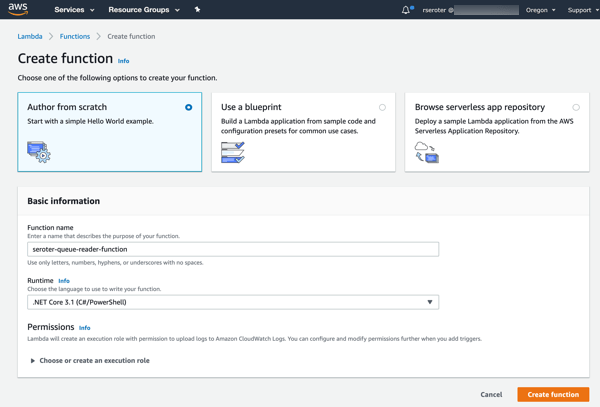
    Next up, creating a new AWS Lambda function. I gave it a name, chose .NET Core 3.1 as my runtime, and created a role with basic permissions.

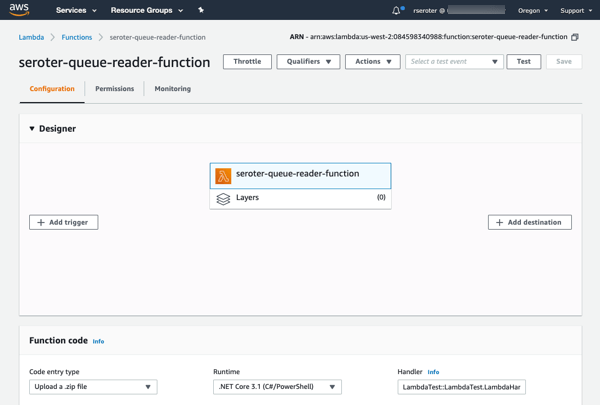
    After clicking “create function”, I get a overview screen that shows the “design” of my function and provides many configuration settings.

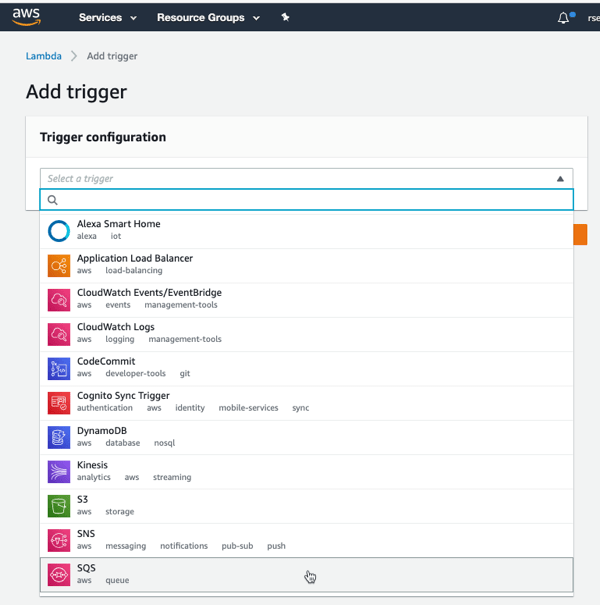
    I clicked “add trigger” to specify what event kicks off my function. I’ve got lots of options to choose from, which is the hallmark of a “connective compute” function platform. I chose SQS, selected my previously-created queue from the dropdown list, and clicked “Add.”

    Now all I have to do is the write the code that handles the queue message. I chose VS Code as my tool. At first, I tried using the AWS Toolkit for Visual Studio Code to generate a SAM-based project, but the only template was an API-based “hello world” one that forced me to retrofit a bunch of stuff after code generation. So, I decided to skip SAM for now, and code the AWS Lambda function directly, by itself.

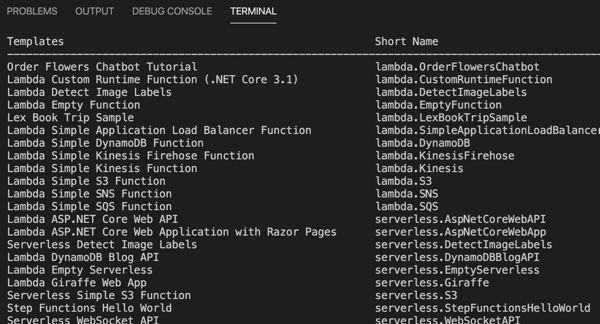
    The .NET team at AWS has done below-the-radar great work for years now, and their Lambda tooling is no exception. They offer a handful of handy templates you can use with the .NET CLI. One basic command installs them for you: dotnet new -i Amazon.Lambda.Templates

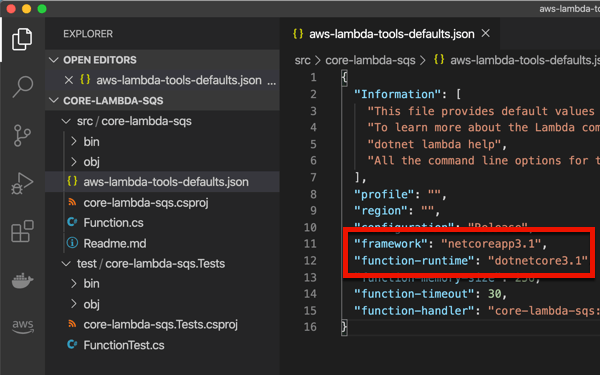
    I chose to create a new project by entering dotnet new lambda.sqs. This produced a pair of projects, one with the function source code, and one that has unit tests. The primary project also has a aws-lambda-tools-default.json file that includes command line options for deploying your function. I’m not sure if I need it given I’m deploying via CLI, but I updated references to .NET Core 3.1 anyway. Note that the “function-handler” value *is* important, as we’ll need that shortly. This tells Lambda which operation (in which class) to invoke.

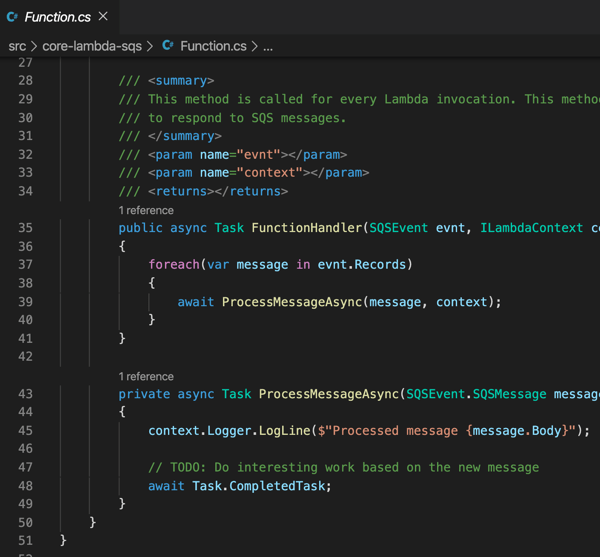
    I kept the generated function code, which simply prints out the contents of the message pulled from Amazon SQS.

    I successfully built the project, and then had to “publish” it to get the right assets for packaging. This publish command ensures that configuration files get bundled up as well:

    dotnet publish /p:GenerateRuntimeConfigurationFiles=true

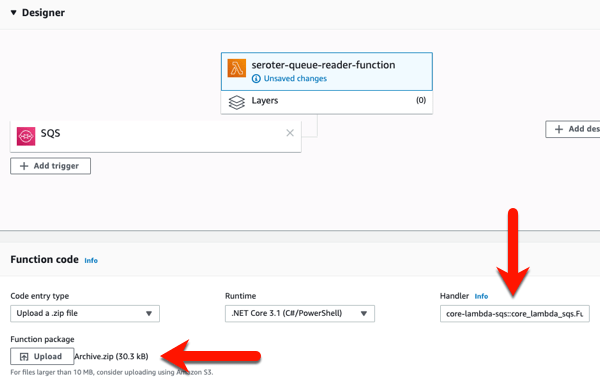
    Now, all I have to do is zip up the resulting files in the “publish” directory. With those DLLs and *.json files zipped up, I return to the AWS console to upload my code. In most cases, you’re going to stash the archive file in Amazon S3 (either manually, or as the result of a CI process). Here, I uploaded my ZIP file directly, AND, set the function handler value equal to the “function-handler” value from my configuration file.

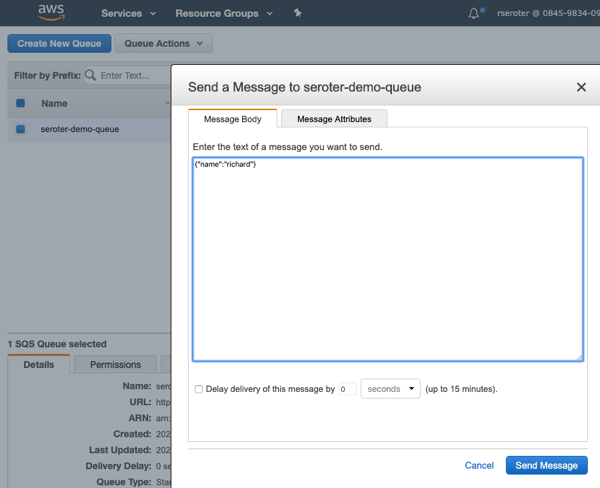
    After I click “save”, I get a notice that my function was updated. I went back to Amazon SQS, and sent a few messages to the queue, using the “send a message” option.

    After a moment, I saw entries in the “monitoring” view of the AWS Lambda console, and drilled into the CloudWatch logs and saw that my function wrote out the SQS payloads.

    I’m impressed at how far the AWS Lambda experience has come since I first tried it out. You’ll find similarly solid experiences from Microsoft, Google and others as you use their FaaS platforms as glue code to connect managed services.

    Category 2: Platform Expanding

    Trigger / DestinationSignaturePackagingDeployment
    HTTPHandlers with specific parameterscode packagesWeb portal, CLI

    There’s a category of FaaS that, to me, isn’t about connecting services together, as much as it’s about expanding or enriching the capabilities of a host platform. From the list above, I’d put offerings like Cloudflare Workers, Twilio Functions, and Zeit Serverless Functions into that bucket.

    Most, if not all, of these start with an HTTP request and only support specific programming languages. For Twilio, you can use their integrated FaaS to serve up tokens, call outbound APIs after receiving an SMS, or even change voice calls. Zeit is an impressive host for static sites, and their functions platform supports backend operations like authentication, form submissions, and more. And Cloudflare Workers is about adding cool functionality whenever someone sends a request to a Cloudfare-managed domain. Let’s actually mess around with Cloudflare Workers.

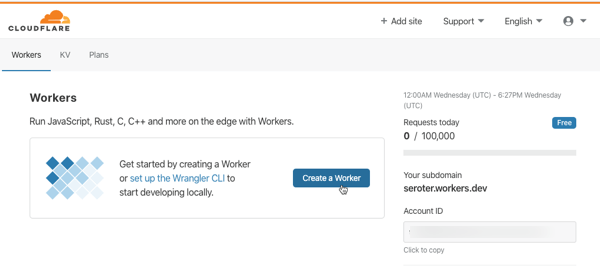
    I go to my (free) Cloudflare account to get started. You can create these running-at-the-edge functions entirely in the browser, or via the Wrangler CLI. Notice here that Workers support JavaScript, Rust, C, and C++.

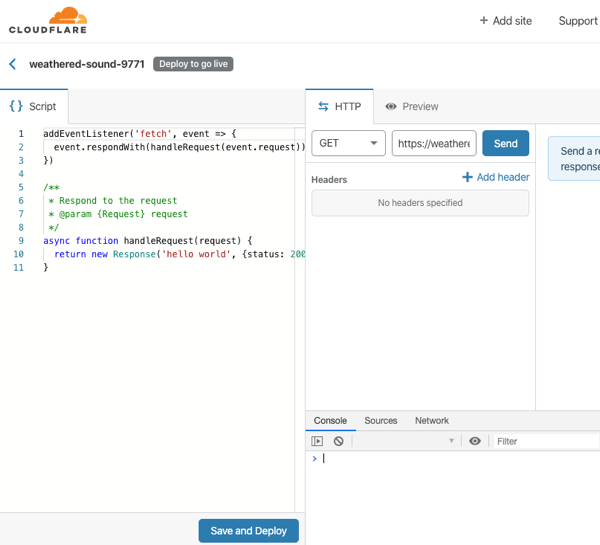
    After I click “create a Worker”, I’m immediately dropped into a web console where I can author, deploy, and test my function. And, I get some sample code that represents a fully-working Worker. All workers start by responding to a “fetch” event.

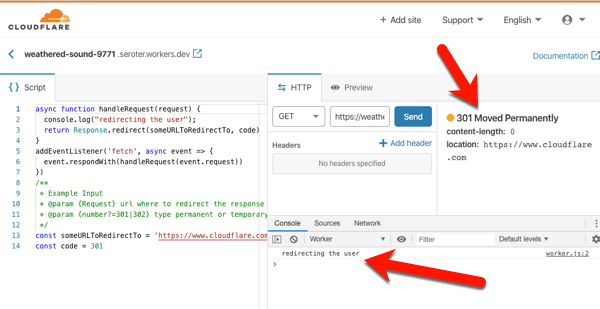
    I don’t think you’d use this to create generic APIs or standalone apps. No, you’d use this to make the Cloudflare experience better. They handily have a whole catalog of templates to inspire you, or do your work for you. Most of these show examples of legit Cloudflare use cases: inspect and purge sensitive data from responses, deny requests missing an authorization header, do A/B testing based on cookies, and more. I copied the code from the “redirect” template which redirects requests to a different URL. I changed a couple things, clicked “save and deploy” and called my function.

    On the left is my code. In the middle is the testing console, where I submitted a GET request, and got back a “301 Moved Permanently” HTTP response. I also see a log entry from my code. If you call my function in your browser, you’ll get redirected to cloudflare.com.

    That was super simple. The serverless compute products in this category have a constrained set of functionality, but I think that’s on purpose. They’re meant to expand the set of problems you can solve with their platform, versus creating standalone apps or services.

    Category 3: Full Stack Apps

    Trigger / DestinationSignaturePackagingDeployment
    HTTP, queue, timeNoneContainersWeb portal, CLI, CI/CD pipelines

    This category—which I can’t quite figure out the right label for—is about serverless computing for complete web apps. These aren’t functions, per-se, but run on a serverless stack that scales to zero and is billed based on usage. The unit of deployment is a container, which means you are providing more than code to the platform—you are also supplying a web server. This can make serverless purists squeamish since a key value prop of FaaS is the outsourcing of the server to the platform, and only focusing on your code. I get that. The downside of that pure FaaS model is that it’s an unforgiving host for any existing apps.

    What fits in this category? The only obvious one to me is Google Cloud Run, but AWS Fargate kinda fits here too. Google Cloud Run is based on the popular open source Knative project, and runs as a managed service in Google Cloud. Let’s try it out.

    First, install the Google Cloud SDK to get the gcloud command line tool. Once the CLI gets installed, you do a gcloud init in order to link up your Google Cloud credentials, and set some base properties.

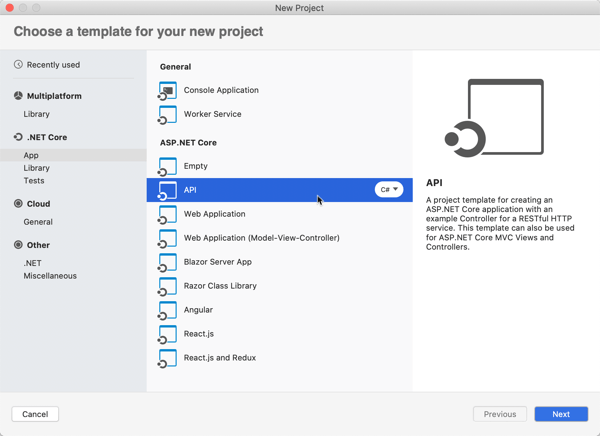
    Now, to build the app. What’s interesting here, is this is just an app. There’s no special format or method signature. The app just has to accept HTTP requests. You can write the app in any language, use any base image, and end up with a container of any size. The app should still follow some basic cloud-native patterns around fast startup and attached storage. This means—and Google promotes this—that you can migrate existing apps fairly easily. For my example, I’ll use Visual Studio for Mac to build a new ASP.NET Web API project with a couple RESTful endpoints.

    The default project generates a weather-related controller, so let’s stick with that. To show that Google Cloud Run handles more than one endpoint, I’m adding a second method. This one returns a forecast for Seattle, which has been wet and cold for months.

    namespace seroter_api_gcr.Controllers
    {
        [ApiController]
        [Route("[controller]")]
        public class WeatherForecastController : ControllerBase
        {
            private static readonly string[] Summaries = new[]
            {
                "Freezing", "Bracing", "Chilly", "Cool", "Mild", "Warm", "Balmy", "Hot", "Sweltering", "Scorching"
            };
    
            private readonly ILogger<WeatherForecastController> _logger;
    
            public WeatherForecastController(ILogger<WeatherForecastController> logger)
            {
                _logger = logger;
            }
    
            [HttpGet]
            public IEnumerable<WeatherForecast> Get()
            {
                var rng = new Random();
                return Enumerable.Range(1, 5).Select(index => new WeatherForecast
                {
                    Date = DateTime.Now.AddDays(index),
                    TemperatureC = rng.Next(-20, 55),
                    Summary = Summaries[rng.Next(Summaries.Length)]
                })
                .ToArray();
            }
    
            [HttpGet("seattle")]
            public WeatherForecast GetSeattleWeather()
            {
                return new WeatherForecast { Date = DateTime.Now, Summary = "Chilly", TemperatureC = 6 };
            }
        }
    }
    

    If I were doing this the right way, I’d also change my Program.cs file and read the port from a provided environment variable, as Google suggests. I’m NOT going to do that, and instead will act like I’m just shoveling an existing, unchanged API into the service.

    The app is complete and works fine when running locally. To work with Google Cloud Run, my app must be containerized. You can do this a variety of ways, including the most reasonable, which involves Google Cloud Build and continuous delivery. I don’t roll like that. WE’RE DOING IT BY HAND.

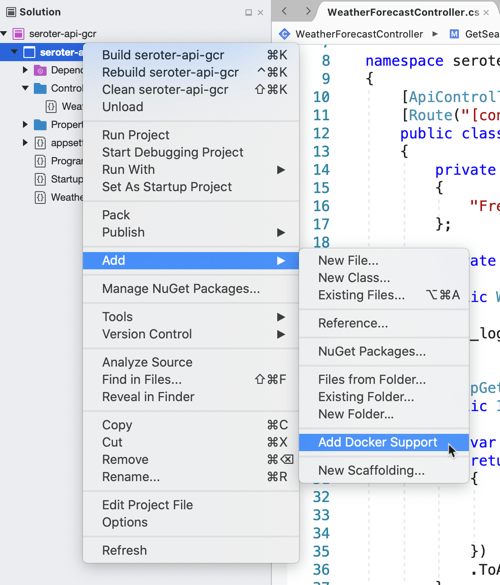
    I will cheat and have Visual Studio give me a valid Dockerfile. Right-click the project, and add Docker support. This creates a Docker Compose project, and throws a Dockerfile into my original project.

    Let’s make one small tweak. In the Dockerfile, I’m exposing port 5000 from my container, and setting an environment variable to tell my app to listen on that port.

    I opened my CLI, and navigated to the folder directly above this project. From there, I executed a Docker build command that pointed to the generated Dockerfile, and tagged the image for Google Container Registry (where Google Cloud Run looks for images).

    docker build --file ./seroter-api-gcr/Dockerfile . --tag gcr.io/seroter/seroter-api-gcr

    That finished, and I had a container image in my local registry. I need to get it up to Google Container Registry, so I ran a Docker push command.

    docker push gcr.io/seroter/seroter-api-gcr

    After a moment, I see that container in the Google Container Registry.

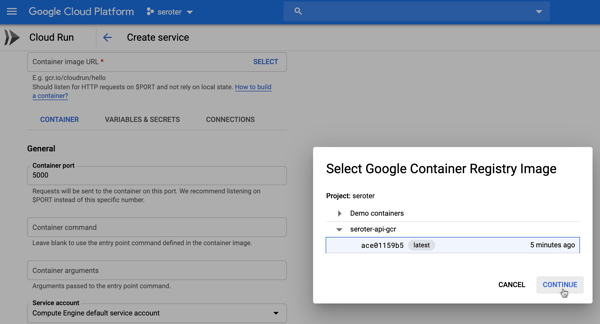
    Neat. All that’s left is to spin up Google Cloud Run. From the Google Cloud portal, I choose to create a new Google Cloud Run service. I choose a region and name for my service.

    Next up, I chose the container image to use, and set the container port to 5000. There are lots of other settings here too. I can create a connection to managed services like Cloud SQL, choose max requests per container, set the request timeout, specify the max number of container instances, and more.

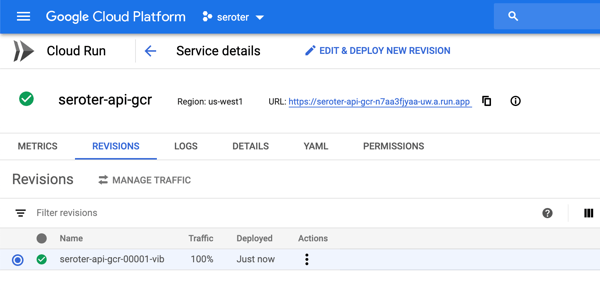
    After creating the service, I only need to wait a few seconds before my app is reachable.

    As expected, I can ping both API endpoints and get back a result. After a short duration, the service spins compute down to zero.

    Wrap up

    The landscape of serverless computing is broader than you may think. Depending on what you’re trying to do, it’s possible to make a sub-optimal choice. If you’re working with many different managed services and writing code to connect them, use the first category. If you’re enriching existing platforms with bits of compute functionality, use the second category. And if you’re migrating or modernizing existing apps, or have workloads that demand more platform flexibility, choose the third. Comments? Violent disagreement? Tell me below.

  • Let’s look at your options for local development with Kubernetes

    Let’s look at your options for local development with Kubernetes

    For a while, I’ve been saying that developers should build great software, and pick their host at the last responsible moment. Apps first, not infrastructure. But now, I don’t think that’s exactly right. It’s naive. As you’re writing code, there are at least three reasons you’ll want to know where you app will eventually run:

    1. It impacts your architecture. You likely need to know if you’re dealing with a function-as-a-service environment, Kubernetes, virtual machines, Cloud Foundry, or whatever. This changes how you lay out components, store state, etc.
    2. There are features your app may use. For each host, there are likely capabilities you want to tap into. Whether it’s input/output bindings in Azure Functions, ConfigMaps in Kubernetes, or something else, you probably can take advantage of what’s there.
    3. It changes your local testing setup. It makes sense that you want to test your code in a production-like environment before you get to production. That means you’ll invest in a local setup that mimics the eventual destination.

    If you’re using Kubernetes, you’ve got lots of options to address #3. I took four popular Kubernetes development options for a spin, and thought I’d share my findings. There are more than four options (e.g. k3dMicrok8sMicronetes), but I had to draw the line somewhere.

    For this post, I’m considering solutions that run on my local machine. Developers using Kubernetes may also spin up cloud clusters (and use features like Dev Spaces in Azure AKS), or sandboxes in something like Katacoda. But I suspect that most will be like me, and enjoy doing things locally. Let’s dig in.

    Option 1: Docker Desktop

    For many, this is the “easy” choice. You’re probably already running Docker Desktop on your PC or Mac.

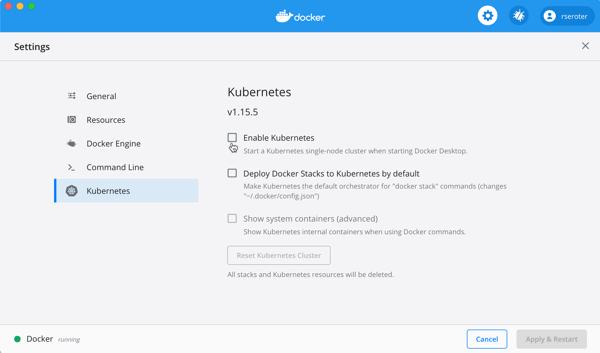
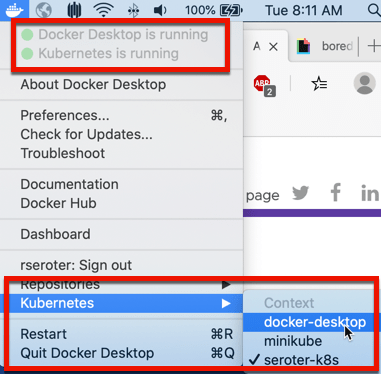
    By default, you have to explicitly enable it. The screen below is accessible via the “Preferences” menu. 

    After a few minutes, my cluster was running, and I could switch my Kubernetes context to Docker Desktop environment.

    I proved this by running a couple simple kubectl commands that show I’ve got a single node, local cluster.

    This cluster doesn’t have the Kubernetes Dashboard installed by default, so you can follow a short set of steps to add it. You can also, of course, use other dashboards, like Octant

    With my cluster running, I wanted to create a pod, and expose it via a service. 

    My corresponding YAML file is as such:

    ---
    apiVersion: apps/v1
    kind: Deployment
    metadata:
      name: simple-k8s-app
    spec:
      replicas: 1
      selector:
        matchLabels:
          app: simple-k8s-app
      template:
        metadata:
          labels:
            app: simple-k8s-app
        spec:
          containers:
          - name: simple-k8s-app
            image: rseroter/simple-k8s-app-kpack:latest
            ports:
            - containerPort: 8080
            env:
            - name: FLAG_VALUE
              value: "on"
    ---
    apiVersion: v1
    kind: Service
    metadata:
      name: simple-k8s-app
    spec:
      type: LoadBalancer
      ports:
      - port: 9001
        protocol: TCP
        targetPort: 8080
      selector:
        app: simple-k8s-app
    

    I used the “LoadBalancer” type, which I honestly didn’t expect to see work. Everything I’ve seen online says I need to explicitly set up ingress via NodePort. But, once I deployed, my container was running, and service was available on localhost:9001.

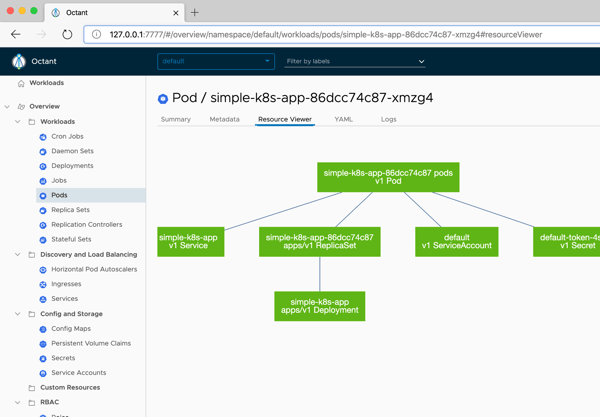
    Nice. Now that there was something in my cluster, I started up Octant, and saw my pods, containers, and more.

    Option 2: Minikube

    This has been my go-to for years. Seemingly, for many others as well. It’s featured prominently in the Kubernetes docs and gives you a complete (single node via VM) solution. If you’re on a Mac, it’s super easy to install with a simple “brew install minikube” command.

    To start up Kubernetes, I simply enter “minikube start” in my Terminal. I usually specify a Kubernetes version number, because it defaults to the latest, and some software that I install expects a specific version. 

    After a few minutes, I’m up and running. Minikube has some of its own commands, like one below that returns the status of the environment.

    There are other useful commands for setting Docker environment variables, mounting directories into minikube, tunneling access to containers, and serving up the Kubernetes dashboard.

    My deployment and service YAML definitions are virtually the same as the last time. The only difference? I’m using NodePort here, and it worked fine. 

    ---
    apiVersion: apps/v1
    kind: Deployment
    metadata:
      name: simple-k8s-app
    spec:
      replicas: 1
      selector:
        matchLabels:
          app: simple-k8s-app
      template:
        metadata:
          labels:
            app: simple-k8s-app
        spec:
          containers:
          - name: simple-k8s-app
            image: rseroter/simple-k8s-app-kpack:latest
            ports:
            - containerPort: 8080
            env:
            - name: FLAG_VALUE
              value: "on"
    ---
    apiVersion: v1
    kind: Service
    metadata:
      name: simple-k8s-app
    spec:
      type: NodePort
      ports:
      - port: 9001
        protocol: TCP
        targetPort: 8080
      selector:
        app: simple-k8s-app
    

    After applying this configuration, I could reach my container using the host IP (retrieved via “minikube ip”) and generated port number.

    Option 3: kind

    A handful of people have been pushing this on me, so I wanted to try it out as well. How’s it different from minikube? A few ways. First, it’s not virtual machine-based. The name stands for Kubernetes in Docker, as the cluster nodes are running in Docker containers. Since it’s all local Docker stuff, it’s easy to use your local registry without any extra hoops to jump through. What’s also nice is that you can create multiple worker nodes, so you can test more realistic scenarios. kind is meant to be used by those testing Kubernetes, but you can use it on your own as well.

    Installing is fairly straightforward. For those on Mac, a simple “brew install kind” gets you going. When creating clusters, you can simply do “kind create cluster”, or do that with a configuration file to customize the build. I created a simple config that created two control plane nodes, and two workers nodes.

    # a cluster with 2 control-plane nodes and 2 workers
    kind: Cluster
    apiVersion: kind.x-k8s.io/v1alpha4
    nodes:
    - role: control-plane
    - role: control-plane
    - role: worker
    - role: worker
    

    After creating the cluster with that YAML configuration, I had a nice little cluster running inside Docker containers.

    It doesn’t look like the UI Dashboard is built in, so again, you can either install it yourself, or point your favorite dashboard at the cluster. Here, Octant shows me the four nodes.

    This time, I deployed my pod without a corresponding service. It’s the same YAML as above, but no service definition. Why? Two reasons: (1) I wanted to try port forward in this environment, and (2) ingress in kind is a little trickier than in the above platforms.

    So, I got the name of my pod, and tunneled to it via this command:

    kubectl port-forward pod/simple-k8s-app-6dd8b59b97-qwsjb 9001:8080

    Once I did that, I pinged http://127.0.0.1:9001 and pulled my the app in the container. Nice!

    Option 4: Tilt

    This is a fairly new option. Tilt is positioned as “local Kubernetes development with no stress.” BOLD CLAIM. Instead of just being a vanilla Kubernetes cluster to deploy to, Tilt offers dev-friendly experiences for packaging code into containers, seeing live updates, troubleshooting, and more. So, you do have to bring your Kubernetes cluster to the table before using Tilt.

    So, I again started up Docker Desktop and got that Kubernetes environment ready to go. Then, I followed the Tilt installation instructions for my machine. After a bit, everything was installed, and typing “tilt” into my Terminal gave me a summary of what Tilt does, and available commands.

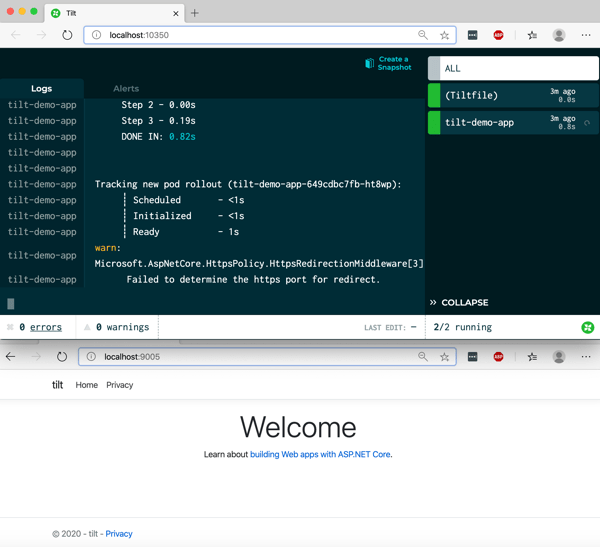
    I started by just typing “tilt up” and got a console and web UI. The web UI told me I needed a Tilefile, and I do what I’m told. My file just contained a reference to the YAML file I used for the above Docker Desktop demo.

    k8s_yaml('simple-k8s-app.yaml')

    As soon as I saved the file, things started happening. Tilt immediately applied my YAML file, and started the container up. In a separate window I checked the state of deployment via kubectl, and sure enough everything was up and running.

    But that’s not really the power of this thing. For devs, the fun comes from having the builds automated too. Not just a finished container image. So, I built a new ASP.NET Core app using Visual Studio Code, added a Dockerfile, a put it at the same directory level as the Tiltfile. Then, I updated my Tiltfile to reference the Dockerfile.

    k8s_yaml('simple-k8s-app.yaml')
    docker_build("tilt-demo-app", "./webapp", dockerfile="Dockerfile")

    After saving the files, Tilt got to work and built my image, added it to my local Docker registry, and deployed it to the Kubernetes cluster.

    The fun part, is now I could just change the code, save it, and seconds later Tilt rebuilt the container image and deployed the changes.

    If your future includes Kubernetes, and it looks like for most, it does, you’ll want a good developer workflow. That means using a decent local experience. You may also use clusters in the cloud to complement the one-premises ones. That’s cool. Also consider how you’ll manage all of them. Today, VMware shipped Tanzu Mission Control, which is a cool way to manage Kubernetes clusters created there, or attached from anywhere. For fun, I attached my existing Azure Kubernetes Services (AKS) cluster, and, the kind cluster we created here. Here’s the view of the kind clusters, with all its nodes visible and monitored.

    What else do you use for local Kubernetes development?