Category: Cloud

  • Interacting with Clouds From Visual Studio: Part 2 – Amazon Web Services

    In this series of blog posts, I’m looking at how well some leading cloud providers have embedded their management tools within the Microsoft Visual Studio IDE. In the first post of the series, I walked through the Windows Azure management capabilities in Visual Studio 2012.  This evaluation looks at the completeness of coverage for browsing, deploying, updating, and testing cloud services. In this post, I’ll assess the features of the Amazon Web Services (AWS) cloud plugin for Visual Studio.

    This table summarizes my overall assessment, and keep reading for my in-depth review.

    Category

    AWS

    Notes

    Browsing

    Web applications and files 3-4 You can browse a host of properties about your web applications, but cannot see the actual website files themselves.
    Databases

    4-4

    Excellent coverage of each AWS database; you can see properties and data for SimpleDB, DynamoDB, and RDS.
    Storage

    4-4

    Full view into the settings and content in S3 object storage.
    VM instances

    4-4

    Deep view into VM templates,  instances, policies.
    Messaging components

    4-4

    View all the queues, subscriptions and topics, as well as the properties for each.
    User accounts, permissions

    4-4

    Look through a complete set of IAM objects and settings.

    Deploying / Editing

    Web applications and files

    2-4

    Create CloudFormation stacks directly from the plugin. Elastic Beanstalk is triggered from the Solution Explorer for a given project.
    Databases

    4-4

    Easy to create databases, as well as change and delete them.
    Storage

    4-4

    Create and edit buckets, and even upload content to them.
    VM instances

    4-4

    Deploy new virtual machines, delete existing one with ease.
    Messaging components

    4-4

    Create SQS queues as well as SNS Topics and Subscriptions. Make changes as well.
    User accounts, permissions

    4-4

    Add or remove groups and users, and define both user and group-level permission policies.

    Testing

    Databases

    3-4

    Great query capability built in for SimpleDB and DynamoDB. Leverages Server Explorer for RDS.
    Messaging components

    2-4

    Send messages to queues, and send messages to topics. Cannot delete queue messages, or tap into subscriptions.

    Setting up the Visual Studio Plugin for AWS

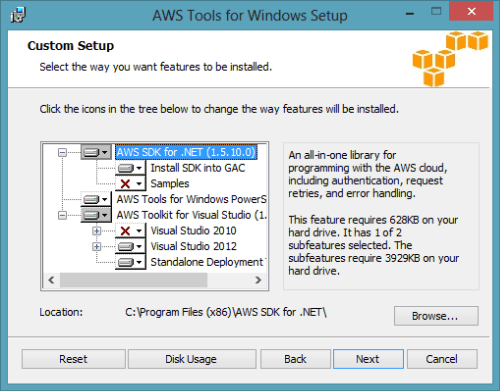
    Getting a full AWS experience from Visual Studio is easy. Amazon has bundled a few of the components together, so if you go install the AWS Toolkit for Visual Studio, you also get the AWS SDK for .NET included. The Toolkit works for Visual Studio 2010 and Visual Studio 2012 users. In the screenshot below, notice that you also get access to a set of PowerShell commands for AWS.
    2013.01.15vs01

    Once the Toolkit is installed, you can view the full-featured plugin in Visual Studio and get deep access to just about every single service that AWS has to offer. There’s no mention of the Simple Workflow Service (SWF) and a couple others, but most any service that makes sense to expose to developers is here in the plugin.

    2013.01.15vs02

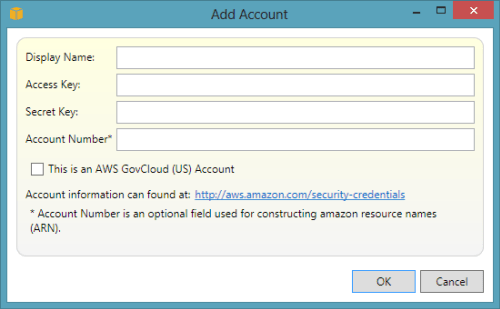
    To add your account details, simply click the “add” icon next to the “Account” drop down and plug in your credentials. Unlike the cloud plugin for Windows Azure which requires unique credentials for each major service, the AWS cloud uses a single set of credentials for all cloud services. This makes the plugin that much easier to use.
    2013.01.15vs03

    Browsing Cloud Resources

    First up, let’s see how easy it is to browse through the various cloud resources that are sitting in the AWS cloud. It’s important to note that your browsing is specific to the chosen data center. If you have US-East chosen as the active data center, then don’t expect to see servers or databases deployed to other data centers.

    2013.01.15vs04

    That’s not a huge deal, but something to keep in mind if you’re temporarily panicking about a “missing” server!

    Virtual Machines

    AWS is best known for its popular EC2 service where anyone can provision virtual machines in the cloud. From the Visual Studio, plugin, you can browse server templates called Amazon Machine Images (AMIs), server instances, security keys, firewall rules (called Security Groups), and persistent storage (called Volumes).

    2013.01.15vs05

    Unlike the Windows Azure plugin for Visual Studio that populates the plugin tree view with the records themselves, the AWS plugin assumes that you have a LOT of things deployed and opens a separate window for the actual user records. For instance, double-clicking the AMIs menu item launches a window that lets you browse the massive collection of server templates deployed by AWS or others.

    2013.01.15vs06

    The Instances node reveals all of the servers you have deployed within this data center. Notice that this view also pulls in any persistent disks that are used. Nice touch.

    2013.01.15vs07

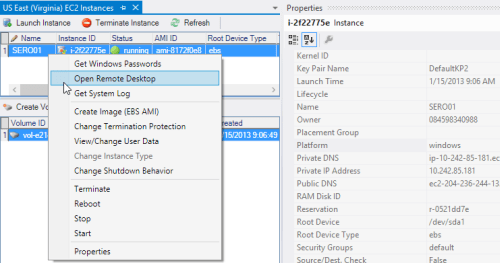
    In addition to a dense set of properties that you can view about your server, you can also browse the VM itself by triggering a Remote Desktop connection!
    2013.01.15vs08

    Finally, you can also browse Security Groups and see which firewall ports are opened for a particular Group.

    2013.01.15vs09

    Overall, this plugin does an exceptional job showing the properties and settings for virtual machines in the AWS cloud.

    Databases

    AWS offers multiple database options. You’ve got SimpleDB which is a basic NoSQL database, DynamoDB for high performing NoSQL data, and RDS for managed relational databases. The AWS plugin for Visual Studio lets you browse each one of these.

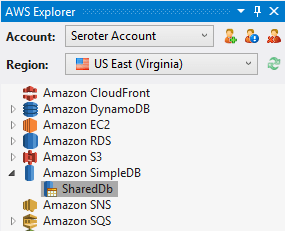
    For SimpleDB, the Visual Studio plugin shows all of the domain records in the tree itself.
    2013.01.15vs10

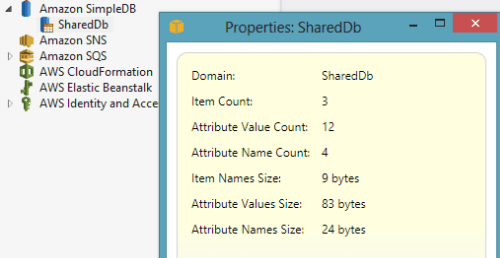
    Right-clicking a given domain and choosing Properties pulls up the number of records in the domain, and how many unique attributes (columns) there are.
    2013.01.15vs11

    Double-clicking on the domain name shows you the items (records) it contains.

    2013.01.15vs12

    Pretty good browsing story for SimpleDB, and about what you’d expect from a beta product that isn’t highly publicized by AWS themselves.

    Amazon RDS is a very cool managed database, not entirely unlike Microsoft Azure for SQL Databases. In this case, RDS lets you deploy managed MySQL, Oracle, and Microsoft SQL Server databases. From the Visual Studio plugin, you can browse all your managed instances and see the database security groups (firewall policies) set up.

    2013.01.15vs13

    Much like EC2, Amazon RDS has some great property information available from within Visual Studio. While the Properties window is expectedly rich, you can also right-click the database instance and Add to Server Explorer (so that you can browse the database like any other SQL Server database). This is how you would actually see the data within a given RDS instance. Very thoughtful feature.

    2013.01.15vs17

    Amazon DynamoDB is great for high-performing applications, and the Visual Studio plugin for AWS lets you easily browse your tables.

    2013.01.15vs14

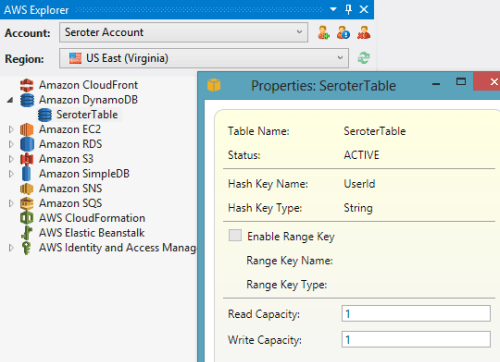
    If you right-click a given table, you can see various statistics pertaining to the hash key (critical for fast lookups) and the throughput that you’ve provisioned.
    2013.01.15vs15

    Finally, double-clicking a given table results in a view of all your records.

    2013.01.15vs16

    Good overall coverage of AWS databases from this plugin.

    Storage

    For storage, Amazon S3 is arguable the gold standard in the public cloud. With amazing redundancy, S3 offers a safe, easy way to storage binary content offsite. From the Visual Studio plugin, I can easily browse my list of S3 buckets.

    2013.01.15vs18

    Bucket properties are extensive, and the plugin does a great job surfacing them. Right-clicking on a particular bucket and viewing Properties turns up a set of categories that describe bucket permissions, logging behavior, website settings (if you want to run an entire static website out of S3), access policies, and content expiration policies.

    2013.01.15vs19

    As you might expect, you can also browse the contents of the bucket itself. Here I  can see not only my bucket item, but all the properties of it.
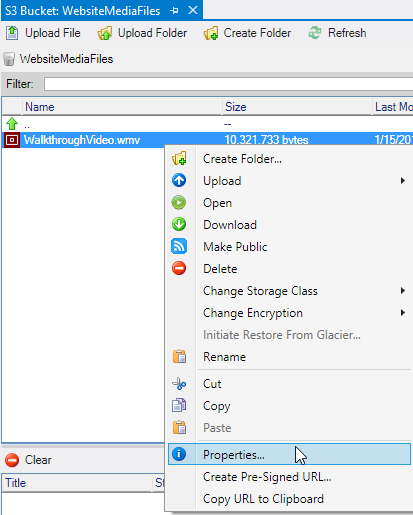
    2013.01.15vs20

    This plugin does a very nice job browsing the details and content of AWS S3 buckets.

    Messaging

    AWS offers a pair of messaging technologies for developers building solutions that share data across system boundaries. First, Amazon SNS is a service for push-based routing to one or more “subscribers” to a “topic.” Amazon SQS provides a durable queue for messages between systems. Both services are browsable from the AWS plugin for Visual Studio.

    2013.01.15vs21

    For a given SNS topic, you can view all of the subscriptions and their properties.

    2013.01.15vs22

    For SQS queues, you can not only see the queue properties, but also a sampling of messages currently in the queue.
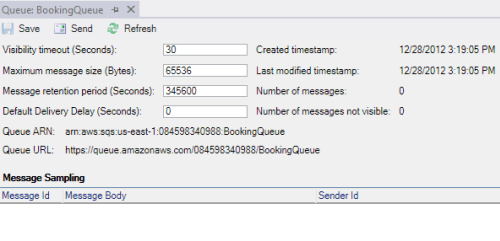
    2013.01.15vs23

    Messaging isn’t the sexiest part of a solution, but it’s nice to see that AWS developers get a great view into the queues and topics that make up their systems.

    Web Applications

    When most people think of AWS, I bet they think of compute and storage. While the term “platform as a service” means less and less every day, AWS has gone out and built a pretty damn nice platform for hosting web applications. .NET developers have two choices: CloudFormation and Elastic Beanstalk. Both of these are now nicely supported in the Visual Studio plugin for AWS. CloudFormation lets you build up sets of AWS services into a template that can be deployed over and over again. From the Visual Studio plugin, you can see all of the web application stacks that you’ve deployed via CloudFormation.

    2013.01.15vs24

    Double-clicking on a particular entry pulls up all the settings, resources used, custom metadata attributes, event log, and much more.

    2013.01.15vs25

    The Elastic Beanstalk is an even higher abstraction that makes it easy to deploy, scale, and load balance your web application. The Visual Studio plugin for AWS shows you all of your Elastic Beanstalk environments and applications.

    2013.01.15vs26

    The plugin shows you a ridiculous amount of details for a given application.

    2013.01.15vs27

    For developers looking at viable hosting destinations for their web applications, AWS offers a pair of very nice choices. The Visual Studio plugin also gives a first-class view into these web application environments.

    Identity Management

    Finally, let’s look at how the plugin supports Identity Management. AWS has their own solution for this called Identity and Access Management (IAM). Developers use IAM to secure resources, and even access to the AWS Management Console itself. From within Visual Studio, developers can create users and groups and view permission policies.

    2013.01.15vs28

    For a group, you can easily see the policies that control what resources and fine-grained actions users of that group have access to.
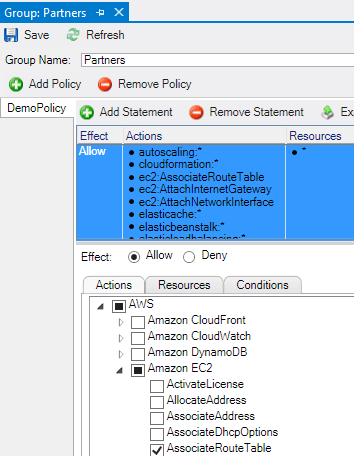
    2013.01.15vs29

    Likewise, for a given user, you can see what groups they are in, and what user-specific policies have been applied to them.

    2013.01.15vs30

    The browsing story for IAM is very complete and make it easy to include identity management considerations in cloud application design and development.

    Deploying and Updating Cloud Resources

    At this point, I’ve probably established that the AWS plugin for Visual Studio provides an extremely comprehensive browsing experience for the AWS cloud. Let’s look at a few changes you can make to cloud resources from within the confines of Visual Studio.

    Virtual Machines

    For EC2 virtual machines, you can pretty much do anything from Visual Studio that you could do from the AWS Management Console. This includes launching instances of servers, changing running instance metadata, terminating existing instances, adding/detaching storage volumes, and much more.

    2013.01.15vs31

    Heck, you can even modify firewall policies (security groups) used by EC2 servers.

    2013.01.15vs32

    Great story for actually interacting with EC2 instead of just working with a static view.

    Databases

    The database story is equally great.  Whether it’s SimpleDB, DynamoDB, or RDS, you can easily create databases, add rows of data, and change database properties. For instance, when you choose to create a new managed database in RDS, you get a great wizard that steps you through the critical input needed.

    2013.01.15vs33

    You can even modify a running RDS instance and change everything from the server size to the database platform version.

    2013.01.15vs35

    Want to increase the throughput for a DynamoDB table? Just view the Properties and dial up the capacity values.

    2013.01.15vs34

    The database management options in the AWS plugin for Visual Studio are comprehensive and give developers incredible  power to provision and maintain cloud-scale databases from within the comfort of their IDE.

    Storage

    The Amazon S3 functionality in the Visual Studio plugin is great. Developers can use the plugin to create buckets, add content to buckets, delete content, set server-side encryption, create permission policies, set expiration policies, and much more.

    2013.01.15vs36

    It’s very useful to be able to fully interact with your object storage service while building cloud apps.

    Messaging

    Developers building applications that use messaging components have lots of power when using the AWS plugin for Visual Studio. From within the IDE,  you can create SQS queues, add/edit/delete queue access policies, change timeout values, alter retention periods, and more.

    2013.01.15vs37

    Similarly for SNS users, the plugin supports creating Topics, adding and removing Subscriptions, and adding/editing/deleting Topic access policies.

    2013.01.15vs38

    Once again, most anything you can do from the AWS Management Console with messaging components, you can do in Visual Studio as well.

    Web Applications

    While the Visual Studio plugin doesn’t support creating new Elastic Beanstalk packages (although you can trigger the “create” wizard by right-clicking a project in the Visual Studio Solution Explorer), you still have a few changes that you can make to running applications. Developers can restart applications, rebuild environments, change EC2 security groups, modify load balancer settings, and set a whole host of parameter values for dependent services.
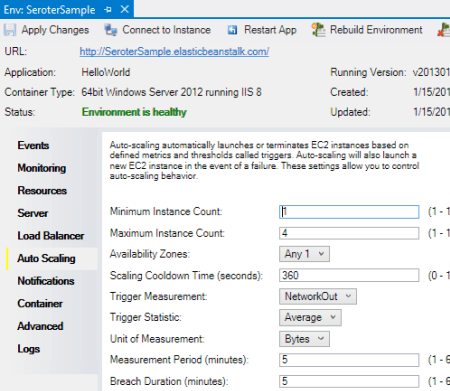
    2013.01.15vs39

    CloudFormation users can delete deployed stacks, or create entirely new ones. Use an AWS-provided CloudFormation template, or reference your own when walking through the “new stack” wizard.

    2013.01.15vs40

    I can imagine that it’s pretty useful to be able to deploy, modify, and tear down these cloud-scale apps all from within Visual Studio.

    Identity Management

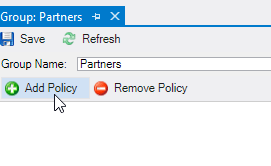
    Finally, the IAM components of the Visual Studio plugin have a high degree of interactivity as well. You can create groups, define or change group policies, create/edit/delete users, add users to groups, create/delete user-specific access keys, and more.
    2013.01.15vs41

    Testing Cloud Resources

    Here, we’ll look at a pair of areas where being able to test directly from Visual Studio is handy.

    Databases

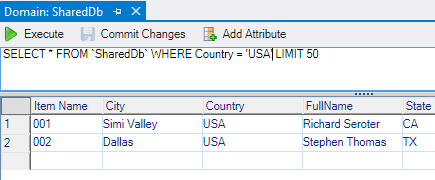
    All the AWS databases can be queried directly from Visual Studio. SimpleDB users can issue simple query statements against the items in a domain.
    2013.01.15vs42

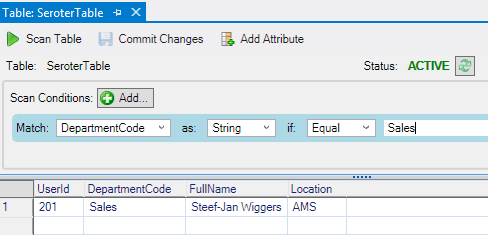
    For RDS, you cannot query directly from the AWS plugin, but when you choose the option to Add to Server Explorer, the plugin adds the database to the Visual Studio Server Explorer where you can dig deeper into the SQL Server instance. Finally, you can quickly scan through DynamoDB tables and match against any column that was added to the table.
    2013.01.15vs43

    Overall, developers who want to integrate with AWS databases from their Visual Studio projects have an easy way to test their database queries.

    Messaging

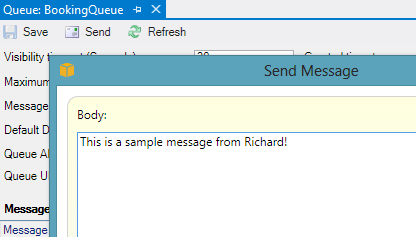
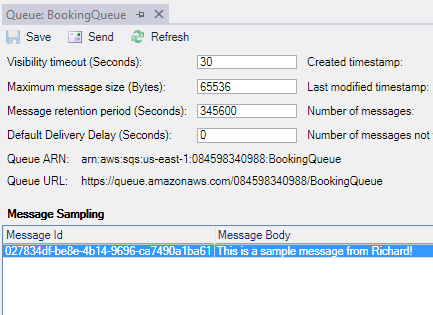
    Testing messaging solutions can be a cumbersome activity. You often have to create an application to act as a publisher, and then create another to act as the subscriber. The AWS plugin for Visual Studio does a pretty nice job simplifying this process. For SQS, it’s easy to create a sample message (containing whatever text you want) and send it to a queue.
    2013.01.15vs44

    Then, you can poll that queue from Visual Studio and see the message show up! You can’t delete messages from the queue, although you CAN do that from the AWS Management Console website.
    2013.01.15vs45

    As for SNS, the plugin makes it very easy to publish a new message to any Topic.

    2013.01.15vs46

    This will send a message to any Subscriber attached to the Topic. However, there’s no simulator here, so you’d actually have to set up a legitimate Subscriber and then go check that Subscriber for the test message you sent to the Topic. Not a huge deal, but something to be aware of.

    Summary

    Boy, that was a long post. However, I thought it would be helpful to get a deep dive into how AWS surfaces its services to Visual Studio developers. Needless to say, they do a spectacular job. Not only do they provide deep coverage for nearly every AWS service, but they also included countless little touches (e.g. clickable hyperlinks, right-click menus everywhere) that make this plugin a joy to use. If you’re a .NET developer who is looking for a first-class experience for building, deploying, and testing cloud-scale applications, you could do a lot worse than AWS.

  • January 2013 Trip to Europe to Speak on (Cloud) Integration, Identity Management

    In a couple weeks, I’m off to Amsterdam and Gothenburg to speak at a pair of events. First, on January 22nd I’ll be in Amsterdam at an event hosted by middleware service provider ESTREME. There will be a handful of speakers, and I’ll be presenting on the Patterns of Cloud Integration. It should be a fun chat about the challenges and techniques for applying application integration patterns in cloud settings.

    Next up, I’m heading to Gothenburg (Sweden) to speak at the annual Integration Days event hosted by Enfo Zystems. This two day event is held January 24th and 25th and features multiple tracks and a couple dozen sessions. My session on the 24th, called Cross Platform Security Done Right, focuses on identity management in distributed scenarios. I’ve got 7 demos lined up that take advantage of Windows Azure ACS, Active Directory Federation Services, Node.js, Salesforce.com and more. My session on the 25th, called Embracing the Emerging Integration Endpoints, looks at how existing integration tools can connect to up-and-coming technologies. Here I have another 7 demos that show off the ASP.NET Web API, SignalR, StreamInsight, Node.js, Amazon Web Services, Windows Azure Service Bus, Salesforce.com and the Informatica Cloud. Mikael Hakansson will be taking bets as to whether I’ll make it through all the demos in the allotted time.

    It should be a fun trip, and thanks to Steef-Jan Wiggers and Mikael for organizing my agenda. I hope to see some of you all in the audience!

  • 2012 Year in Review

    2012 was a fun year. I added 50+ blog posts, built Pluralsight courses about Force.com and Amazon Web Services, kept writing regularly for InfoQ.com, and got 2/3 of the way done my graduate degree in Engineering. It was a blast visiting Australia to talk about integration technologies, going to Microsoft Convergence to talk about CRM best practices, speaking about security at the Dreamforce conference, and attending the inaugural AWS re:Invent conference in Las Vegas. Besides all that, I changed employers, got married, sold my home and adopted some dogs.

    Below are some highlights of what I’ve written and books that I’ve read this past year.

    These are a handful of the blog posts that I enjoyed writing the most.

    I read a number of interesting books this year, and these were some of my favorites.

    A sincere thanks to all of you for continuing to read what I write, and I hope to keep throwing out posts that you find useful (or at least mildly amusing).

  • Interacting with Clouds From Visual Studio: Part 1 – Windows Azure

    Now that cloud providers are maturing and stabilizing their platforms, we’re seeing better and better dev tooling get released. Three major .NET-friendly cloud platforms (Windows Azure, AWS, and Iron Foundry) have management tools baked right into Visual Studio, and I thought it’d be fun to compare them with respect to completeness of functional coverage and overall usability. Specifically, I’m looking to see how well the Visual Studio plugins for each of these clouds account for browsing, deploying, updating, and testing services. To be sure, there are other tools that may help developers interact with their target cloud, but this series of posts is JUST looking at what is embedded within Visual Studio.

    Let’s start with the Windows Azure tooling for Visual Studio 2012. The table below summarizes my assessment. I’ll explain each rating in the sections that follow.

    Category

    Windows
    Azure

    Notes

    Browsing

    Web applications and files 1-4 Can view names and see instance counts, but that’s it. No lists of files, no properties of the application itself. Can initiate Remote Desktop command.
    Databases 4-4 No really part of the plugin (as its already in Server Explorer), but you get a rich view of Windows Azure SQL databases.
    Storage 1-4 No queues available, and no properties shown for tables and blobs.
    VM instances 2-4 Can see list of VMs and small set of properties. Also have the option to Remote Desktop into the server.
    Messaging components 3-4 Pretty complete story. Missing Service Bus relay component. Good view into Topics/Queues and informative set of properties.
    User accounts, permissions 0-4 No browsing of users or their permissions in Windows Azure.

    Deploying / Editing

    Web applications and files 0-4 No way to deploy new web application (instances) or update existing applications.
    Databases 4-4 Good story for adding new database artifacts and changing existing ones.
    Storage 0-4 No changes can be made to existing storage, and users can’t add new storage components.
    VM instances 0-4 Cannot alter existing VMs or deploy new ones.
    Messaging components 3-4 Nice ability to create and edit queues and topics. Cannot change existing topic subscriptions.
    User accounts, permissions 0-4 Cannot add or change user permissions.

    Testing

    Databases 4-4 Good testability through query execution.
    Messaging components 3-4 Nice ability to send and receive test messages, but lack of customization of message limits test cases.

    Setting up the Visual Studio Plugin for Windows Azure

    Before going to the functionality of the plugin interface, let’s first see how a developer sets up their workstation to use it. First, the developer must install the Windows Azure SDK for .NET. Among other things, this adds the ability to see and interact with a sub-set of Windows Azure from within Visual Studio’s existing Server Explorer window.

    2012.12.20vs01

    As you can see, it’s not a COMPLETE view of everything in the Windows Azure family (no Windows Azure Web Sites, Windows Azure SQL Database), but it’s got most of the biggies.

    Browsing Cloud Resources

    If the goal is to not only push apps to the cloud, but also manage them, then a decent browsing story is a must-have.  While Windows Azure offers a solid web portal – and programmatic interfaces ranging from PowerShell to a web service API – it’s nice to also be able to see your cloud components from within the same environment (Visual Studio) that you build them!

    What’s interesting to me is that each cloud function (Compute, Service Bus, Storage, VMs) requires a unique set of credentials to view the included resources. So no global “here’s my Windows Azure credentials … show me my stuff!” experience.

    Compute

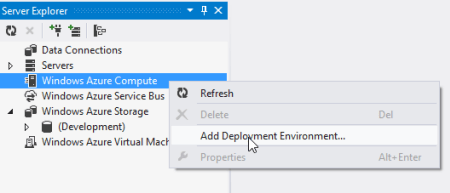
    For Compute, the very first time that I want to browse web applications, I need to add a Deployment Environment.

    2012.12.20vs02

    I’m then asked for which subscription to use, and if there are none listed, then I  am prompted to download a “publish settings” file from my Windows Azure account. Once I do that, I see my various subscriptions, and am asked to choose which one to show in the Visual Studio plugin.

    2012.12.20vs03

    Finally, I can see my deployed web applications.

    2012.12.20vs04

    Note however, that there are no “properties” displayed for any of the objects in this tree. So, I can’t browse the application settings or see how the web application was configured.

    Service Bus

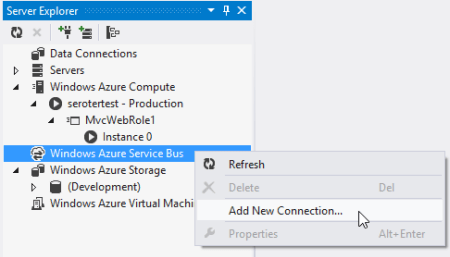
    To browse all the deployed bits for the Service Bus, I once again have to add a new connection.

    2012.12.20vs05

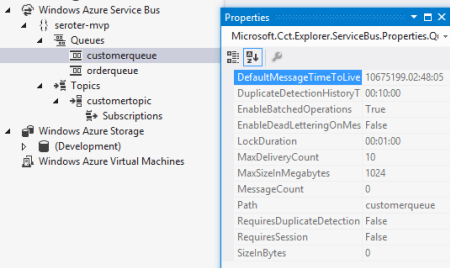
    After adding my Service Bus namespace, Issuer, and Key, I get all the Topics and Queues (not Relays, though) associated with this subscription.

    2012.12.20vs06

    Unlike the Compute tree nodes, all the Service Bus nodes reveal tidbits of information in the Properties window. For instance, clicking on the Service Bus subscription shows me the Issuer, Key, endpoints, and more. Clicking on an individual queue shows me a host of properties including message count, duplicate detection status, and more. Handy stuff.

    2012.12.20vs07

    Storage

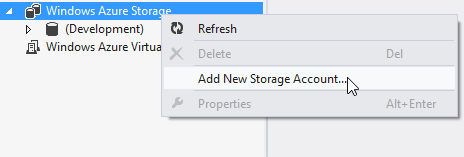
    To check out the storage (blob and table, no queues) artifacts in Windows Azure, I first have to add a connection to one of my storage accounts.

    2012.12.20vs08

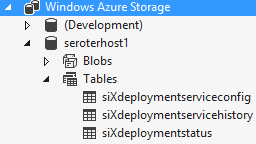
    After providing my account name and key, I’m shown everything that’s in this account.

    2012.12.20vs09

    Unfortunately, these seem to follow the same pattern as Compute and don’t present any values in the Properties window.

    Virtual Machines

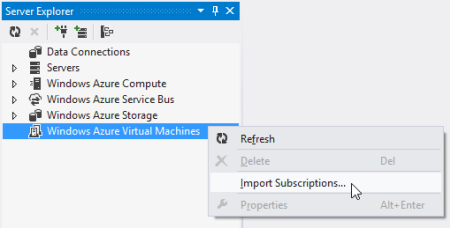
    How about the new, beta Windows Azure Virtual Machines? Like the other cloud resources exposed via this Visual Studio plugin, this one requires a one-time setup of a subscription.

    2012.12.20vs10

    After pointing it to my downloaded subscription file, I was shown a list of the VMs that I’ve deployed to Windows Azure.

    2012.12.20vs11

    When I click on a particular VM, the Visual Studio Properties window includes a few attributes such as VM size, status, and name. However, there’s no option to see networking settings or any other advanced VM environment settings.

    2012.12.20vs12

    Database

    While there’s not a specific entry for Windows Azure SQL Databases, I figured that I’d try and add it as a regular “data connection” within the Visual Studio plugin. After updating the Windows Azure portal to allow my IP address to access one of my Azure databases, and plugged in the address and credentials of my cloud database.

    2012.12.20vs13

    Once connected, I see all the artifacts in my Windows Azure SQL database.

    2012.12.20vs14

    Deploying and Updating Cloud Resources

    So what can you create or update directly from the plug-in? For the Windows Azure plugin, the answer is “not much.” The Compute node is for (limited) read only views and you cannot deploy new instances. The Storage node is read-only as well as users cannot created new tables/blobs. The Virtual Machines node is for browsing only as there is no way to initiate the VM-creation process or change existing VMs.

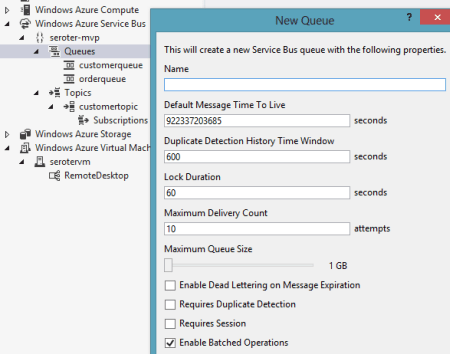
    There are some exceptions to this read-only world. The Service Bus portion of the plugin is pretty interactive. I can easily create brand new topics and queues.

    2012.12.20vs15

    However, I cannot change the properties of existing topics or queues. As for topic subscriptions, I am able to create both subscriptions and rules, but cannot change the rules after the fact.

    The options for Windows Azure SQL Databases are the most promising. Using the Visual Studio plugin, I can create new tables, stored procedures and the like, and can also add/change table data or update artifacts such as stored procedures.

    2012.12.20vs16

    Testing Cloud Resources

    As you might expect given the limited support for interacting with cloud resources, the Visual Studio plugin for Windows Azure only has a few testing-oriented capabilities. First, users of SQL databases can easily execute procedures and run queries from the plugin.

    2012.12.20vs17

    The Service Bus also has a decent testing story. From the plugin, I can send test messages to queues, and receive them.

    2012.12.20vs18

    However, it doesn’t appear that I can customize the message. Instead, a generic message is sent on my behalf. Similarly, when I choose to send a test message to a topic, I don’t have a chance to change it. However, it is nice to be able to easily send and receive messages.

    Summary

    Overall, the Visual Studio plugin for Windows Azure offers a decent, but incomplete experience. If it were only a read-only tool, I’d expect better metadata about the deployed artifacts. If it was an interactive tool that supported additions and changes, I’d expect many more exposed features. Clearly Microsoft expects developers to use a mix of the Windows Azure portal, and custom tools (like the awesome Service Bus Explorer), but I hope that future releases of this plugin have a more comprehensive coverage area.

    In the next post, I’ll look at what Amazon offers in their Visual Studio plugin.

  • Links to Recent Articles Written Elsewhere

    Besides this blog, I still write regularly for InfoQ.com as well in as a pair of blogs for my employer, Tier 3. It’s always a fun exercise for me to figure out what content should go where, but I do my best to spread it around. Anyway, in the past couple weeks, I’ve written a few different posts that may (or may not) be of interest to you:

    Lots of great things happening in the tech space, so there’s never a shortage of cool things to investigate and write about!

  • Trying Out the New Windows Azure Portal Support for Relay Services

    Scott Guthrie announced a handful of changes to the Windows Azure Portal, and among them, was the long-awaited migration of Service Bus resources from the old-and-busted Silverlight Portal to the new HTML hotness portal. You’ll find some really nice additions to the Service Bus Queues and Topics. In addition to creating new queues/topics, you can also monitor them pretty well. You still can’t submit test messages (ala Amazon Web Services and their Management Portal), but it’s going in the right direction.

    2012.10.08sb05

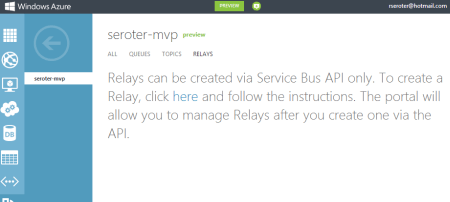
    One thing that caught my eye was the “Relays” portion of this. In the “add” wizard, you see that you can “quick create” a Service Bus relay.

    2012.10.08sb02

    However, all this does is create the namespace, not a relay service itself, as can be confirmed by viewing the message on the Relays portion of the Portal.

    2012.10.08sb03

    So, this portal is just for the *management* of relays. Fair enough. Let’s see what sort of management I get! I created a very simple REST service that listens to the Windows Azure Service Bus.  I pulled in the proper NuGet package so that I had all the Service Bus configuration values and assembly references. Then, I proceeded to configure this service using the webHttpRelayBinding.

    2012.10.08sb06

    I started up the service and invoked it a few times. I was hoping that I’d see performance metrics like those found with Service Bus Queues/Topics.

    2012.10.08sb07

    However, when I returned to the Windows Azure Portal, all I saw was the name of my Relay service and confirmation of a single listener. This is still an improvement from the old portal where you really couldn’t see what you had deployed. So, it’s progress!

    2012.10.08sb08

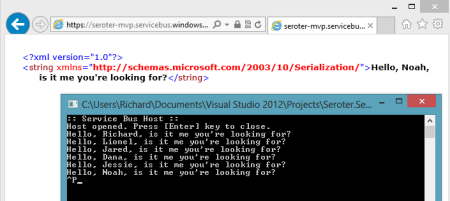
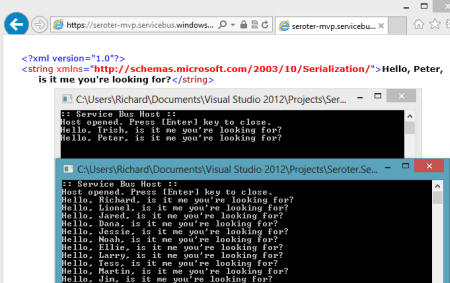
    You can see the Service Bus load balancing feature represented here. I started up a second instance of my “hello service” listener and pumped through a few more messages. I could see that messages were being sent to either of my two listeners.

    2012.10.08sb09

    Back in the Windows Azure Portal, I immediately saw that I now had two listeners.

    2012.10.08sb10

    Good stuff. I’d still like to see monitoring/throughput information added here for the Relay services. But, this is still  more useful than the last version of the Portal. And for those looking to use Topics/Queues, this is a significant upgrade in overall user experience.

  • Interview Series: Four Questions With … Hammad Rajjoub

    Greetings and welcome to the 43rd interview in my series of chats with thought leaders in the “connected technologies” domain. This month, I’m happy to have Hammad Rajjoub with us. Hammad is an Architect Advisor for Microsoft, former Microsoft MVP, blogger, published author, and  you can find him on Twitter at @HammadRajjoub.

    Let’s jump in.

    Q: You just published a book on Windows Server AppFabric (my book review here). What do you think is the least-appreciated capability that is provided by this product, and what should developers take a second look at?

    A: I think overall Windows Server AppFabric is an under-utilized technology. I see customers deploying WCF/WF services yet not utilizing AppFabric for hosting, monitoring and caching (note that Windows Server AppFabric is a free product). I will suggest all the developers to look at caching, hosting and monitoring capabilities provided by Windows Server AppFabric and use them appropriately in their ASP.Net, WCF and WF solutions.

    The use of distributed in-memory caching not only helps with performance, but also with scalability. If you cannot scale up then you have to scale out and that is exactly how distributed in-memory caching works for Windows Server AppFabric. Specifically, AppFabric Cache is feature rich and super easy to use. If you are using Windows Server and IIS to host your applications and services, I can’t see any reason why you wouldn’t want to utilize the power of AppFabric Cache.

    Q: As an Architect Advisor, you probably get an increasing number of questions about hybrid solutions that leverage both on-premises and cloud resources. While I would think that the goal of Microsoft (and other software vendors) is to make the communication between cloud and on-premises appear seamless, what considerations should architects explicitly plan for when trying to build solutions that span environments?

    A: Great question! Physical Architecture becomes so much more important. Solutions needs to be designed such that they are intrinsically Service Oriented and are very loosely coupled not only at the component level but at the physical level as well so that you can scale out on demand. Moving existing applications to the cloud is a fairly interesting exercise though. I will recommend architects to take a look at the Microsoft’s guide for building hybrid solutions for the cloud (at http://msdn.microsoft.com/en-us/library/hh871440.aspx).

    More specifically an Architect, working on a hybrid solution, should plan and consider following (non-exhaustive list of) aspects:-

    • data distribution and synchronization
    • protocols and payloads for cross-boundary communication
    • federated identify
    • message routing
    • Health and activity tracking as well as monitoring across hybrid environments

    From a vendor and solution perspective, I will highly recommend to pick a solution stack and technology provider that offers consistent design, development, deployment and monitoring tools across public, private and hybrid cloud environments.

    Q: A customer comes to you today and says that they need to build an internal solution for exchanging data between a few custom and packaged software applications. If we assume they are a Microsoft-friendly shop, how do you begin to identify whether this solution calls for WCF/WF/AppFabric, BizTalk, ASP.NET Web API, or one of the many open source / 3rd party messaging frameworks?

    A:  I think it depends a lot on the nature of the solution and 3rd party systems involved. Windows Server AppFabric are a great fit for solutions built using WCF/WF and ASP.NET technologies. BizTalk is a phenomenal technology for all things EAI with Adapters for SAP, Oracle, and Seibel etc. it’s a go to product for such scenarios. Honestly it depends on the situation. BizTalk is more geared towards EAI and ESB capabilities. WCF/WF and AppFabric are great at exposing LOB capabilities through web services. More often than not we see WCF/WF working side by side with BizTalk.

    Q [stupid question]: The popular business networking site LinkedIn recently launched an “endorsements” feature which lets individuals endorse the particular skills of another individual. This makes it easy for someone to endorse me for something like “Windows Azure” or “Enterprise Integration.” However, it’s also possible to endorse people for skills that are NOT currently in their LinkedIn skills profile. So, someone could theoretically endorse me for things like “firm handshakes”, “COM+”, or “making scrambled eggs.” Which LinkedIn endorsements would you like, and not like, on your profile?

    A: (This is totally new to me 🙂 ). I would like to explicitly opt-in and validate all the “endorsements” before they start appearing on my profile. [Editors Note: Because endorsements do not require validation, I propose that we all endorse Hammad for “.NET 1.0”]

    Thanks to Hammad for taking some time to chat with me!

  • Keeping Your Salesforce.com App From Becoming Another Siebel System

    Last week I was at Dreamforce (the Salesforce.com mega-conference) promoting my recently released Pluralsight course, Force.com for Developers. Salesforce.com made a HUGE effort to focus on developers this year and I had a blast working at the Pluralsight booth in the high-traffic “Dev Zone.” I would guess that nearly 75% of the questions I heard from people at our booth seeking training was how they could quickly create Apex developers. Apex is the programming language of Force.com, and after such a developer-focused week, Apex seemed to be on everyone’s mind. One nagging concern I had was that organizations seem to be aggressively moving towards the “customization” aspect of Salesforce.com and run the risk of creating the same sorts of hard-to-maintain apps that infest their on-premises data centers.

    To be sure, it’s hard (if not impossible) to bastardize a Salesforce.com app in the same way that organizations have done with Siebel and other on-premises line of business apps. I’ve seen Siebel systems that barely resemble their original form and because of “necessary updates” to screens, stored procedures, business logic and such, the system owners are terrified of trying to upgrade (or touch!) them. With Salesforce.com, the more you invest in programming logic, pages, triggers and the like, the more likely that you’ll have a brittle application that may survive platform upgrades, but is a bear to debug and maintain. Salesforce.com is really pushing this “develop custom apps!” angle with all sorts of new tools and ways to build rich, cool apps on the platform. It’s great, but I’ve seen firsthand how Salesforce.com customers get hyped up on customization and end up with failed projects or unrealized expectations.

    So, how can you avoid accidentally building a hard-to-maintain Salesforce.com system? A few suggestions:

    • (Apex) code is a last resort. Apex is cool. It may be the sole topic of my next Pluralsight course and you can do some great stuff with it. If you’ve written C# or Java, you’ll feel at home writing Apex. However, if you point a C# developer (and Salesforce.com rookie) at a business problem, their first impulse will be to sling some code. I saw this myself with developers working on a Microsoft Dynamics CRM system. They didn’t know the platform, but they knew the programming language (.NET), so they went and wrote tons of code for things that actually could be solved with a bit of configuration. Always use configuration first. Why write a workflow in code if you can use actual Force.com workflows? Why build a custom Apex web service if the out-of-box one solves almost all your needs? Make sure developers learn how to use the built-in validation rules, formula fields, Visualforce controls, and security controls before they go off and solve a problem the wrong way.
    • Embrace the constraints. Sometimes “standards” can be liberating. I actually like that PaaS platforms provide some limits that force you to work within their constraints. Instead of instantly thinking about how you could rework Outbound Messaging or make an UI look like an existing internal app, try to rework your processes or personal constraints and embrace the way the platform works. Maybe you’re thinking of doing daily data synchronizations to a local data warehouse because you want reports that are bit visually different than what Salesforce.com offers. However, maybe you can make due with the (somewhat limited) report formats that Salesforce.com offers and avoid a whole integration/synchronization effort. Don’t immediately think of how you’ll change Salesforce.com, but instead think about how you can change your own expectations.
    • Learn to say no to business users. This is a tough one. Just because you CAN do a bunch of stuff in Salesforce.com, doesn’t mean that you should. Yes, you can make it so that data that natively sits on three different forms will sit on a single, custom form. Or, you can add a custom control that kicks off a particular action from an unusual portion of the workflow. But what technical debt are you incurring by making these slight “tweaks” to satisfy the user’s demands? To be sure, usability is super important, but I’ve seen many users who just try to re-create their existing interfaces in new platforms. You need a strong IT leader who can explain how specific changes will increase their cost of support, and instead, to bullet point #2, help the end users change their expectations and embrace the Salesforce.com model. Build fast, see what works, and iterate. Don’t try and do monolithic projects that attempt to perfect the app before releasing it to the users.

    Maybe I’m getting worried for nothing, but one reason that so many organizations are looking at cloud software is to make delivery of apps happen faster and support of those apps easier. It’s one thing to build a custom app in an environment like Windows Azure or Cloud Foundry where it’s required that developers build and deploy custom web solutions (that use a set of environment-defined services). But for PaaS platforms like Salesforce.com or Dynamics CRM, the whole beauty of them is that they provide an extremely configurable platform of a wide range of foundation services (UI/reporting/data/security/integration) that encourages rapid delivery and no-mess upgrades by limiting the need for massive coding efforts. I wonder if we cause trouble by trying to blur the lines between those two types of PaaS solutions.

    Thoughts? Other tips for keeping PaaS apps “clean”? Or is this not really a problem?

  • Book Review: Cloudonomics–The Business Value of Cloud Computing

    Last week I read Cloudonomics by Joe Weinman and found it to be the most complete, well-told explanation of cloud computing’s value proposition that I’ve ever read. Besides the content itself, I was blown away by the depth of research and deft use of analogies that Weinman used to state his case.

    The majority of the book is focused on how cloud computing should be approached by organizations from an economic and strategic perspective. Weinman points out that while cloud is on the radar for most, only 7% consider it a critical area. He spends the whole second chapter just talking about whether the cloud matters and can be a competitive advantage. In a later chapter (#7), Weinman addresses a when you should – and shouldn’t – use the cloud. This chapter, like all of them, tackle the cloud from a business perspective. This is not a technical “how to” guide, but rather, it’s a detailed walkthrough  of the considerations, costs, benefits and pitfalls of the cloud. Weinman spends significant time analyzing usage variability and how to approach capacity planning with cost in mind. He goes into great depth demonstrating (mathematically) the cost of insufficient capacity, excess capacity, and how to maximize utilization. This is some heady stuff that is still very relatable and understandable.

    Throughout the book, Weinman relies on a wide variety of case studies and analogies to help bolster his point. For instance, in Chapter 21 he says:

    One key benefit of PaaS is inherent in the value of components and platforms. We might call this the peanut butter sandwich principle: It’s easier to make a peanut butter sandwich if you don’t have to grow and grind your own peanuts, grow your own wheat, and bake your own bread. Leveraging proven, tested, components that others have created can be faster than building them from scratch.

    Just a few pages later, Weinman explains how Starbucks made its fortune as a service provider but saw that others wanted a different delivery model. So, they started packaging their product and selling it in stores. Similarly, you see many cloud computing vendors chasing “private” or “on-premises” options that offer an alternate delivery mechanism than the traditional hosted cloud service. To be sure, this is not a “cloud is awesome; use it for everything or you’re a dolt” sort of book. It’s a very practical analysis of the cloud domain that tries to prove where and how cloud computing should fit in your IT portfolio. Whether you are a cloud skeptic or convert, there will be something here that makes you think.

    Overall, I was really impressed with the quality, content and delivery of the book’s message. If you’re a CEO, CFO, CIO, architect or anyone involved in re-thinking how your business delivers IT services, this is an exceptionally good book to read.

  • Interview Series: Four Questions With … Shan McArthur

    Welcome to the 42nd interview in my series of talks with thought leaders in the “connected systems” space. This month, we have Shan McArthur who is the Vice President of Technology for software company Adxstudio, a Microsoft MVP for Dynamics CRM, blogger and Windows Azure enthusiast. You can find him on Twitter as @Shan_McArthur.

    Q: Microsoft recently injected themselves into the Infrastructure-as-a-Service (IaaS) market with the new Windows Azure Virtual Machines. Do you think that this is Microsoft’s way of admitting that a PaaS-only approach is difficult at this time or was there another major incentive to offer this service?

    A: The Azure PaaS offering was only suitable for a small subset of workloads.  It really delivered on the ability to dynamically scale web and worker roles in your solution, but it did this at the cost of requiring developers to rewrite their applications or design them specifically for the Azure PaaS model.  The PaaS-only model did nothing for infrastructure migration, nor did it help the non-web/worker role workloads.  Most business systems today are made from a number of different application tiers and not all of those tiers are suited to a PaaS model.  I have been advocating for many years that Microsoft must also give us a strong virtual machine environment.  I just wish they gave it to us three years ago.

    As for incentives, I believe it is simple economics – there are significantly more people interested in moving many different workloads to Windows Azure Virtual Machines than developers that are building the next Facebook/twitter/yammer/foursquare website.  Enterprises want more agility in their infrastructure.  Medium sized businesses want to have a disaster recovery (DR) environment hosted in the cloud.  Developers want to innovate in the cloud (and outside of IT interference) before deploying apps to on-prem or making capital commitments.  There are many other workloads like SharePoint, CRM, build environments, and more that demand a strong virtual machine environment in Azure.  In the process of delivering a great virtual machine environment, Microsoft will have increased their overall Azure revenue as well as gaining relevant mindshare with customers.  If they had not given us virtual machines, they would not survive in the long run in the cloud market as all of their primary competitors have had virtual machines for quite some time and have been eating into Microsoft’s revenue opportunities.

    Q: Do you think that customers will take application originally targeted at the Windows Azure Cloud Services (PaaS) environment and deploy them to the Windows Azure Virtual Machines instead? What do you think are the core scenarios for customers who are evaluating this IaaS offering?

    A: I have done some of that myself, but only for some workloads that make sense.  An Azure virtual machine will give you higher density for websites and a mix of workloads.  For things like web roles that are already working fine on Azure and have a 2-plus instance requirement, I think those roles will stay right where they are – in PaaS.  For roles like back-end processes, databases, CRM, document management, email/SMS, and other workloads, these will be easier to add in a virtual machine than in the PaaS model and will naturally gravitate to that.  Most on-premise software today has a heavy dependency on Active Directory, and again, an Azure Virtual Machine is the easiest way to achieve that.   I think that in the long run, most ‘applications’ that are running in Windows Azure will have a mix of PaaS and virtual machines.  As the market matures and ISV software starts supporting claims with less dependency on Active Directory, and builds their applications for direct deployment into Windows Azure, then this may change a bit, but for the foreseeable future, infrastructure as a service is here to stay.

    That said, I see a lot of the traditional PaaS websites migrating to Windows Azure Web Sites.  Web sites have the higher density (and a better pricing model) that will enable customers to use Azure more efficiently (from a cost standpoint).  It will also increase the number of sites that are hosted in Azure as most small websites were financially infeasible to move to Windows Azure previously to the WaWs feature.  For me, I compare the 30-45 minutes it takes me to deploy an update to an existing Azure PaaS site to the 1-2 minutes it takes to deploy to WaWs.  When you are building a lot of sites, this time really makes a significant impact on developer productivity!  I can even now deploy to Windows Azure without even having the Azure SDK installed on my developer machine.

    As for myself, this spring wave of Azure features has really changed how I engage customers in pre-sales.  I now have a number of virtual disk images of my standard demo/engagement environments, and I can now stand up a complete presales demo environment in less than 10 minutes.  This compares to the day of effort I used to stand up similar environments using CRM Online and Azure cloud services.  And now I can turn them off after a meeting, dispose of them at will, or resurrect them as I need them again.  I never had this agility before and have become completely addicted to it.

    Q: Your company has significant expertise in the CRM space and specifically, the on-premises and cloud versions of Dynamics CRM. How do you help customers decided where to put their line-of-business applications, and what are your most effective ways for integrating applications that may be hosted by different providers?

    A: Microsoft did a great job of ensuring that CRM Online and on-premise had the same application functionality.  This allows me to advise my customers that they can choose the hosting environment that best meets their requirements or their values.  Some things that are considered are the effort of maintenance, bandwidth and performance, control of service maintenance windows, SLAs, data residency, and licensing models.  It basically boils down to CRM Online being a shared service – this is great for customers that would prefer low cost to guaranteed performance levels, that prefer someone else maintain and operate the service versus them picking their own maintenance windows and doing it themselves, ones that don’t have concerns about their data being outside of their network versus ones that need to audit their systems from top to bottom, and ones that would prefer to rent their software versus purchasing it.  The new Windows Azure Virtual Machines features now gives us the ability to install CRM in Windows Azure – running it in the cloud but on dedicated hardware.  This introduces some new options for customers to consider as this is a hybrid cloud/on-premise solution.

    As for integration, all integration with CRM is done through the web services and those services are consistent in all environments (online and on-premise).  This really has enabled us to integrate with any CRM environment, regardless of where it is hosted.  Integrating applications that are hosted between different application providers is still fairly difficult.  The most difficult part is to get those independent providers to agree on a single authentication model.  Claims and federation are making great strides, and REST and oAuth are growing quickly.  That said, it is still rather rare to see two ISVs building to the same model.  Where it is more prevalent is in the larger vendors like Facebook that publish an SDK that everyone builds towards.  This is going to be a temporary problem, as more vendors start to embrace REST and oAuth.  Once two applications have a common security model (at least an identity model), it is easy for them to build deep integrations between the two systems.  Take a good long hard look at where Office 2013 is going with their integration story…

    Q [stupid question]: I used to work with a fellow who hated peanut butter. I had trouble understanding this. I figured that everyone loved peanut butter. What foods do you think have the most even, and uneven, splits of people who love and hate it? I’d suspect that the most even love/hate splits are specific vegetables (sweet potatoes, yuck) and the most uneven splits are universally loved foods like strawberries. Thoughts?

    A: Chunky or smooth? I have always wondered if our personal tastes are influenced by the unique varieties of how each of our brains and sensors (eyes, hearing, smell, taste) are wired up.  Although I could never prove it, I would bet that I would sense the taste of peanut butter differently than someone else, and perhaps those differences in how they are perceived by the brain has a very significant impact on whether or not we like something.  But that said, I would assume that the people that have a deadly allergy to peanut butter would prefer to stay away from it no matter how they perceived the taste!  That said, for myself I have found that the way food is prepared has a significant impact on whether or not I like it.  I grew up eating a lot of tough meat that I really did not enjoy eating, but now I smoke my meat and prefer it more than my traditional favorites.

    Good stuff, Shan, thanks for the insight!