Category: Cloud

  • Using the Windows Azure Service Bus REST API to Send to Topic from Salesforce.com

    In the past, I’ve written and talked about integrating the Windows Azure Service Bus with non-Microsoft platforms like Salesforce.com. I enjoy showing how easy it is to use the Service Bus Relay to connect on-premises services with Salesforce.com. On multiple occasions, I’ve been asked how to do this with Service Bus brokered messaging options (i.e. Topics and Queues) as well. It can be a little tricky as it requires the use of the Windows Azure REST API and there aren’t a ton of public examples of how to do it! So in this blog post, I’ll show you how to send a message to a Service Bus Topic from Salesforce.com. Note that this sequence resembles how you’d do this on ANY platform that can’t use a Windows Azure SDK.

    Creating the Topic and Subscription

    First, I needed a Topic and Subscription to work with. Recall that Topics differ from Queues in that a Topic can have multiple subscribers. Each subscription (which may filter on message properties) has its own listener and gets their own copy of the message. In this fictitious scenario, I wanted users to submit IT support tickets from a page within the Salesforce.com site.

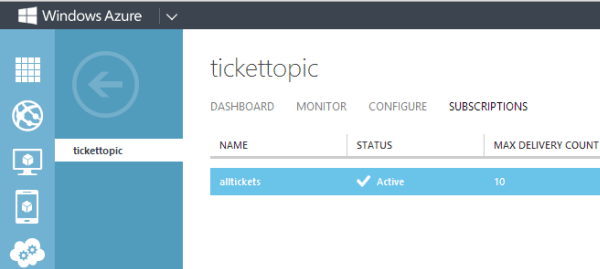
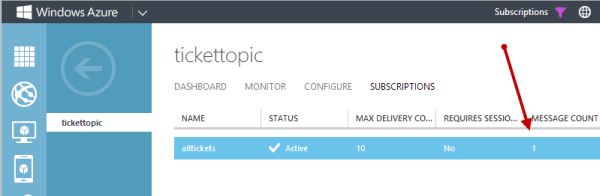
    I could create a Topic in a few ways. First, there’s the Windows Azure portal. Below you can see that I have a Topic called “TicketTopic” and a Subscription called “AllTickets”.

    2013.09.18topic01

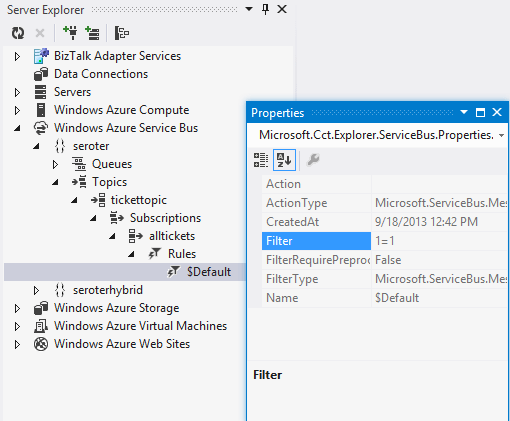
    If you’re a Visual Studio developer, you can also use the handy Windows Azure extensions to the Server Explorer window. Notice below that this tool ALSO shows me the filtering rules attached to each Subscription.

    2013.09.18topic02

    With a Topic and Subscription set up, I was ready to create a custom VisualForce page to publish to it.

    Code to Get an ACS Token

    Before I could send a message to a Topic, I needed to get an authentication token from the Windows Azure Access Control Service (ACS). This token goes into the request header and lets Windows Azure determine if I’m allowed to publish to a particular Topic.

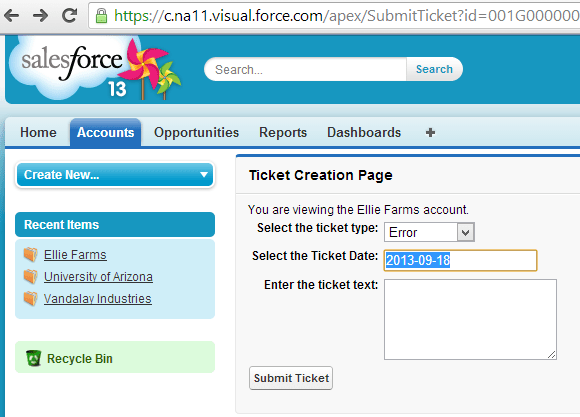
    In Salesforce.com, I built a custom VisualForce page with the markup necessary to submit a support ticket. The final page looks like this:

    2013.09.18topic03

    I also created a custom Controller that extended the native Accounts Controller and added an operation to respond to the “Submit Ticket” button event. The first bit of code is responsible for calling ACS and getting back a token that can be included in the subsequent request. Salesforce.com extensions are written in a language called Apex, but it should look familiar to any C# or Java developer.

           Http h= new Http();
           HttpRequest acReq = new HttpRequest();
           HttpRequest sbReq = new HttpRequest();
    
            // define endpoint and encode password
           String acUrl = 'https://seroter-sb.accesscontrol.windows.net/WRAPV0.9/';
           String encodedPW = EncodingUtil.urlEncode(sbUPassword, 'UTF-8');
    
           acReq.setEndpoint(acUrl);
           acReq.setMethod('POST');
           // choose the right credentials and scope
           acReq.setBody('wrap_name=demouser&wrap_password=' + encodedPW + '&wrap_scope=http://seroter.servicebus.windows.net/');
           acReq.setHeader('Content-Type','application/x-www-form-urlencoded');
    
           HttpResponse acRes = h.send(acReq);
           String acResult = acRes.getBody();
    
           // clean up result to get usable token
           String suffixRemoved = acResult.split('&')[0];
           String prefixRemoved = suffixRemoved.split('=')[1];
           String decodedToken = EncodingUtil.urlDecode(prefixRemoved, 'UTF-8');
           String finalToken = 'WRAP access_token=\"' + decodedToken + '\"';
    

    This code block makes an HTTP request to the ACS endpoint and manipulates the response into the token format I needed.

    Code to Send the Message to a Topic

    Now comes the fun stuff. Here’s how you actually send a valid message to a Topic through the REST API. Below is the complete code snippet, and I’ll explain it further in a moment.

          //set endpoint using this scheme: https://<namespace>.servicebus.windows.net/<topic name>/messages
           String sbUrl = 'https://seroter.servicebus.windows.net/demotopic/messages';
           sbReq.setEndpoint(sbUrl);
           sbReq.setMethod('POST');
           // sending a string, and content type doesn't seem to matter here
           sbReq.setHeader('Content-Type', 'text/plain');
           // add the token to the header
           sbReq.setHeader('Authorization', finalToken);
           // set the Brokered Message properties
           sbReq.setHeader('BrokerProperties', '{ \"MessageId\": \"{'+ guid +'}\", \"Label\":\"supportticket\"}');
           // add a custom property that can be used for routing
           sbReq.setHeader('Account', myAcct.Name);
           // add the body; here doing it as a JSON payload
           sbReq.setBody('{ \"Account\": \"'+ myAcct.Name +'\", \"TicketType\": \"'+ TicketType +'\", \"TicketDate\": \"'+ SubmitDate +'\", \"Description\": \"'+ TicketText +'\" }');
    
           HttpResponse sbResult = h.send(sbReq);
    

    So what’s happening here? First, I set the endpoint URL. In this case, I had to follow a particular structure that includes “/messages” at the end. Next, I added the ACS token to the HTTP Authorization header.

    After that, I set the brokered messaging header. This fills up a JSON-formatted BrokerProperties structure that includes any values you needed by the message consumer. Notice here that I included a GUID for the message ID and provided a “label” value that I could access later. Next, I defined a custom header called “Account”. These custom headers get added to the Brokered Message’s “Properties” collection and are used in Subscription filters. In this case, a subscriber could choose to only receive Topic messages related to a particular account.

    Finally, I set the body of the message. I could send any string value here, so I chose a lightweight JSON format that would be easy to convert to a typed object on the receiving end.

    With all that, I was ready to go.

    Receiving From Topic

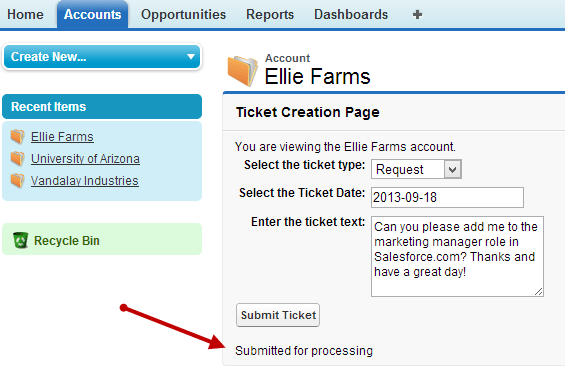
    To get a message into the Topic, I submitted a support ticket from the VisualForce page.

    2013.09.18topic04

    I immediately switched to the Windows Azure portal to see that a message was now queued up for the Subscription.

    2013.09.18topic05

    How can I retrieve this message? I could use the REST API again, but let’s show how we can mix and match techniques. In this case, I used the Windows Azure SDK for .NET to retrieve and delete a message from the Topic. I also referenced the excellent JSON.NET library to deserialize the JSON object to a .NET object. The tricky part was figuring out the right way to access the message body of the Brokered Message. I wasn’t able to simply pull it out a String value, so I went with a Stream instead. Here’s the complete code block:

               //pull Service Bus connection string from the config file
                string connectionString = ConfigurationManager.AppSettings["Microsoft.ServiceBus.ConnectionString"];
    
                //create a subscriptionclient for interacting with Topic
                SubscriptionClient client = SubscriptionClient.CreateFromConnectionString(connectionString, "tickettopic", "alltickets");
    
                //try and retrieve a message from the Subscription
                BrokeredMessage m = client.Receive();
    
                //if null, don't do anything interesting
                if (null == m)
                {
                    Console.WriteLine("empty");
                }
                else
                {
                    //retrieve and show the Label value of the BrokeredMessage
                    string label = m.Label;
                    Console.WriteLine("Label - " + label);
    
                    //retrieve and show the custom property of the BrokeredMessage
                    string acct = m.Properties["Account"].ToString();
                    Console.WriteLine("Account - " + acct);
    
                    Ticket t;
    
                    //yank the BrokeredMessage body as a Stream
                    using (Stream c = m.GetBody<Stream>())
                    {
                        using (StreamReader sr = new StreamReader(c))
                        {
                            //get a string representation of the stream content
                            string s = sr.ReadToEnd();
    
                            //convert JSON to a typed object (Ticket)
                            t = JsonConvert.DeserializeObject<Ticket>(s);
                            m.Complete();
                        }
                    }
    
                    //show the ticket description
                    Console.WriteLine("Ticket - " + t.Description);
                }
    

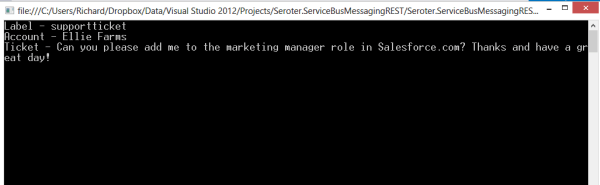
    Pretty simple. Receive the message, extract interesting values (like the “Label” and custom properties), and convert the BrokeredMessage body to a typed object that I could work with. When I ran this bit of code, I saw the values we set in Salesforce.com.

    2013.09.18topic06

    Summary

    The Windows Azure Service Bus brokered messaging services provide a great way to connect distributed systems. The store-and-forward capabilities are key when linking systems that span clouds or link the cloud to an on-premises system. While Microsoft provides a whole host of platform-specific SDKs for interacting with the Service Bus, there are platforms that have to use the REST API instead. Hopefully this post gave you some insight into how to use this API to successfully publish to Service Bus Topics from virtually ANY software platform.

  • New Pluralsight course released: “Optimizing and Managing Distributed Systems on AWS”

    My trilogy of AWS courses for Pluralsight is complete. I originally created AWS Developer Fundamentals, then added Architecting Highly Available Systems on AWS, and today released Optimizing and Managing Distributed Systems on AWS.

    This course picks up from where we left off with the last one. By the end of the Architecting Highly Available Systems on AWS course, we had built a fault tolerant ASP.NET-based cloud system that used relational databases, NoSQL databases, queues, load balancers, auto scaling, and more. Now, we’re looking at what it takes to monitor the system, deploy code, add CDNs, and introduce application caching. All of this helps us create a truly high performing, self-healing environment in the cloud. This course has a total of four modules, and each one covers the relevant AWS service, how to consume it, and what the best practices are.

    • Monitoring Cloud Systems with Amazon CloudWatch. Here we talk about the role of monitoring in distributed systems, and dig into CloudWatch. After inspecting the various metrics available to us, we test one and see how to send email-based alerts. We then jump into more complex scenarios and see how to configure Auto Scaling policies that alter the size of the cloud environment based on server CPU utilization.
    • Deploying Web Application Stacks. Deploying apps to cloud servers often requires a new way of thinking. AWS provides three useful deployment frameworks, and this module goes over each one. We discuss the AWS Elastic Beanstalk and see how to push our web application to cloud servers directly from Visual Studio. Then to see how easy it is to change an application – and demonstrate the fun of custom CloudWatch metrics – we deploy a new version of the application that captures unique business metrics. We then look at CloudFormation and how to use the CloudFormer tool to generate comprehensive templates that can deploy an entire system. Finally, we review the new OpsWorks framework and where it’s the right fit.
    • Placing Content Close to Users with CDNs. Content Delivery Networks are an awesome way to offload static content to edge locations that are closer to your users. This module talks about why CDNs matter in distributed systems and shows off Amazon CloudFront. We set up a CloudFront distribution, update our ASP.NET application to use it, and even try out the “invalidation” function to get rid of an old image.
    • Improving Application Performance with ElastiCache. Application caching is super handy and ElastiCache gives you a managed, Memcached-compliant solution. Here we talk about when and what to cache, how Memcached works, what ElastiCache is, how to create and scale clusters, and how to use the cache from .NET code. There’s a handful of demos sprinkled in, and you should get a good sense of how to configure and test a cache.

    It’s been fun crafting these two AWS courses over the summer and I hope you enjoy them!

  • Where the heck do I host my … .NET app?

    In this short series of posts, I’m looking at the various options for hosting different types of applications. I first looked at Node.js and its diverse ecosystem of providers, and now I’m looking at where to host your .NET application. Regardless of whether you think .NET is passé or not, the reality is that there are millions upon millions of .NET developers and it’s one of the standard platforms at enterprises worldwide. Obviously Microsoft’s own cloud will be an attractive place to run .NET web applications, but there may be more options than you think.

    I’m not listing a giant matrix of providers, but rather, I’m going briefly describe 6 different .NET PaaS-like providers and assess them against the following criteria:

    • Versions of the .NET framework supported.
    • Supported capabilities.
    • Commitment to the platform.
    • Complementary services offered.
    • Pricing plans.
    • Access to underlying hosting infrastructure.
    • API and tools available.
    • Support material offered.

    The providers below are NOT ranked. I made it alphabetical to ensure no perception of preference.

    Amazon Web Services

    AWS offers a few ways to host .NET applications, including running them raw on Windows EC2 instances, or via Elastic Beanstalk or CloudFormation for a more orchestrated experience. The AWS Toolkit for Visual Studio gives Windows developers an easy experience for provisioning and managing their .NET applications.

    Versions Capabilities Commitment Add’l Services
    Works with .NET 4.5 and below. Load balancing, health monitoring, versioning (w/ Elastic Beanstalk), environmental variables, Auto Scaling Early partner with Microsoft on licensing, and dedicated Windows and .NET Dev Center, and regularly updated SDKs. AWS has a vast array of complementary services including caching, relational and NoSQL databases, queuing, workflow, and more. Note that many are proprietary to AWS.


    Pricing Plans Infrastructure Access API and Tools Support
    There is no charge for the Elastic Beanstalk or CloudFormation for deployment, and you just pay for consumed compute, memory, storage, and bandwidth. While deployment frameworks like Elastic Beanstalk and CloudFormation wrap an application into a container, you can still RDP into the host Windows servers. AWS has both SOAP and REST APIs for the platform, and apps deployed via Elastic Beanstalk or Cloud Formation can be managed by API. SDK for .NET includes full set of typed objects and Visual Studio plugins. Pretty comprehensive documentation, active discussion forums for .NET, and the option of paid support plans.

    AppHarbor

    AppHarbor has been around for a while and offers a .NET only PaaS platform that actually runs on AWS servers.

    Versions Capabilities Commitment Add’l Services
    Supports .NET 4.5 and older versions. Push via Git/Mercurial/
    Subversion/TFS, unit test integration, load balancing, auto scaling, SSL, worker processes, logging, application management console
    Focused solely on .NET and regularly updated blog indicates active evangelism. Offers an add-ons repository where you can add databases, New Relic APM, queuing, search, email, caching, and more to a given app.


    Pricing Plans Infrastructure Access API and Tools Support
    Pricing page shows three different models ranging from a free tier to $199 per month for more compute capacity. No direct virtual machine access. Fairly comprehensive API for deploying and managing apps and environments. Management console for GUI interactions. Offer knowledge base, discussion forums. Also encourage use of StackOverflow.

    Apprenda

    While not a public PaaS provider, you’d be remiss to ignore this innovative, comprehensive private PaaS for .NET applications. Their SaaS-oriented history is evident in their product which excels at making internal .NET applications multi-tenant, metered, billable, and manageable.

    Versions Capabilities Commitment Add’l Services
    Supports .NET 4.5 and some earlier versions. Load balancing, scaling, versioning, failure recovery, authentication and authorization services, logging, metering, account management, worker processes, rich web UI. Very focused on private PaaS and .NET and recognized by Gartner as a leader in this space. Not going anywhere. Can integrate and manage databases, queuing systems.


    Pricing Plans Infrastructure Access API and Tools Support
    They do not publicly list pricing, but offer a free cloud sandbox, downloadable dev version, and a licensed, subscription based product. It manages existing server environments, and makes it simple to remote desktop into a server. Have REST-based management API, and an SDK for using Apprenda services from .NET application. Visual Studio extension for deploying apps. Offers forums, very thorough documentation, and assumingly some specific support plans for paid customers.

    Snapp

    Brand new product who offers an interesting-looking (beta) public PaaS for .NET applications. Launched by longtime .NET hosting provider DiscountASP.net.

    Versions Capabilities Commitment Add’l Services
    Support for .NET 4.5 Deploy via FTP/Git/web/TFS, staging environment baked in, exception management, versioning, reporting Obviously very new, but good backing and sole focus is .NET. None that I can tell.


    Pricing Plans Infrastructure Access API and Tools Support
    Free beta from now until Sept 2013 when pricing will be announced. None mentioned; using Microsoft Anteres (Web Sites for Windows Server) technology. No API or SDKs identified yet. Developer uses their web UI interface. No KB yet, but forums started.

    Tier 3

    Cloud IaaS provider who also offers a Cloud Foundry-based PaaS called Web Fabric that also supports .NET through the open-source Iron Foundry extensions. Anyone can also take Cloud Foundry + Iron Foundry and run their own multi-language private PaaS within their own data center. FULL DISCLOSURE: This is the company I work for!

    Versions Capabilities Commitment Add’l Services
    .NET 4.0 and previous versions. Scaling, logging, load balancing, per-customer isolated environments, multi-language (Ruby, Java, .NET, Node.js, PHP, Python), basic management from web UI. Strong. Founder and CTO of Tier 3 started Iron Foundry project. Comes with databases such as SQL Server, MySQL, Redis, MongoDB, PostgreSQL. Includes RabbitMQ service. New Relic integration included. Connect with IaaS instances.


    Pricing Plans Infrastructure Access API and Tools Support
    Currently costs $360 for software stack plus IaaS charges. No direct access to underlying VMs, but tunneling to database instances supported. Support for Cloud Foundry APIs. Use Cloud Foundry management tools or community ones like Thor. Knowledge base, ticketing system, phone support included.

    Windows Azure

    The big kahuna. The Microsoft cloud is clearly one to consider whenever evaluating destinations for a .NET application. Depending on the use case, applications can be deployed in virtual machines, Cloud Services, or Web Sites. For this assessment, I’m considering Windows Azure Web Sites.

    Versions Capabilities Commitment Add’l Services
    Support for .NET 4.5 and previous versions. Deploy via Git/TFS/Dropbox, load balancing, auto scaling, SSL, logging, multi-language support (.NET, Node.js, PHP, Python), strong management interface. Do I have to really answer this? Obviously very strong. Access to the wide array of Azure services including SQL Server databases, Service Bus (queues/relay/topics), IaaS services, mobile services and much more.


    Pricing Plans Infrastructure Access API and Tools Support
    Pay as you go, with features dependent on whether you’re using free, shared, or standard tier. None for Windows Azure Web Sites. Can switch to Cloud Services if you need VM-level access. Management via REST API, integrated with Visual Studio tools, PowerShell commandlets available, and SDKs available for different languages. Support forums, good documentation and samples, and paid support available.

    Summary

    The .NET cloud hosting ecosystem may be more diverse than you thought! It’s not as broad as with an open-source platform like Node.js, but that’s not really a surprise given the necessity of running .NET on Windows (ignoring Mono for this discussion). These providers run the gamut from straight up PaaS providers like AppHarbor, to ones with an infrastructure-bent like AWS. Apprenda does a nice job with the private space, and Microsoft clearly offers the widest range of options for hosting a .NET application. However, there are plenty of valid reasons to choose one of the other vendors, so keep your options open when assessing the marketplace!

  • Heading to the UK in September to speak on Windows Azure cloud integration

    On September 11th, I’ll be speaking in London at a one-day event hosted by the UK Connected Systems Group. This event focuses on hybrid integration strategies using Windows Azure and the Microsoft platform. I’ll be delivering two sessions: one on cloud integration patterns, and another on integrating with SaaS CRM systems. In both sessions, I’ll be digging into a wide range of technologies and reviewing practical ways to use them to connect various systems together.

    I’m really looking forward to hearing the other speakers at the event! The always-insightful Clemens Vasters will be there, as well as highly respected integration experts Sam Vanhoutte and Mike Stephenson.

    If you’re in the UK, I’d love to see you at the event. There are a fixed number of available tickets, so grab one today!

  • Pluralsight course on “Architecting Highly Available Systems on AWS” is live!

    This summer I’ve been busy putting together my seventh video-on-demand training course for Pluralsight. This one – called Architecting Highly Available Systems on AWS – is now online and ready for your viewing pleasure.

    Of all the courses that I’ve done for Pluralsight, my previous Amazon Web Services one (AWS Developer Fundamentals) remains my most popular. I wanted to stay with this industry-leading cloud platform but try something completely different. It’s one thing to do “how to” courses that just walk through various components independently, but it’s another thing entirely to show how to integrate, secure, and configure a real-life system with a given technology. Building and deploying cloud-scale systems requires thoughtful planning and it’s easy to make incorrect assumptions, so I developed a 4+ hour course that showcases the best practices for architecting and deploying fault tolerant, resilient systems on the AWS cloud.

    2013.07.31aws01

    This course has eight total modules that show you how to build up a bullet-proof cloud app, piece-by-piece. In each module, I explain the role of the technology, how to use it, and the best practices for using it effectively.

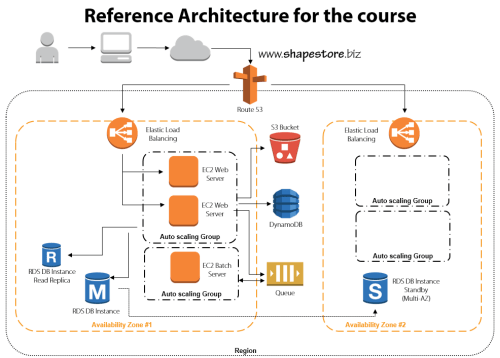
    • Module 1: Distributed Systems and AWS. This introductory session jumps right to it. We discuss the characteristics and fallacies of distributed systems, practices for making distributed systems highly available, look at the entire AWS portfolio, and walk through the reference architecture for the course.
    • Module 2: Provisioning Durable Storage with EBS and S3. Here we lay the foundation and choose the appropriate type of storage for our system. We discuss the use of EBS volumes and dig into Amazon S3. This module includes a walkthrough of adding objects to S3, making them public, and configuring a website hosted in S3.
    • Module 3: Setting Up Databases in RDS and DynamoDB. I had the most fun with this module. I do a deep review of Amazon RDS including setting up a MySQL instance, setting up multi-AZ replication for high availability, and read-replicas for better performance. We then test how RDS handles failure with automatic failover to the multi-AZ instance. Next we investigate DynamoDB and use it store ASP.NET session state thanks to the fantastic AWS SDK for .NET.
    • Module 4: Leveraging SQS for Scalable Processing. Queuing can be a key part of a successful distributed application, so we look at how to set up an Amazon SQS queue for sharing content between application tiers.
    • Module 5: Adding EC2 Virtual Machines. We’re finally ready to configure the actual application and web servers! This beefy module jumps into EC2 and how to use Identity and Access Management (IAM) and Security Groups to efficiently and securely provision servers. Then we deploy applications, create Amazon Machine Image (IAM) templates, deploy custom IAM instances, and configure Elastic IPs. Whew.
    • Module 6: Using ELB to Scale Applications. With a basic application running, now it’s time to enhance application availability further. Here we look at the Elastic Load Balancer and how to configure and test it.
    • Module 7: Enabling Auto Scale to Handle Spikes and Troughs. Ideally, (cloud) distributed systems are self-healing and self-regulating and Amazon Auto Scaling is a big part of this. This module shows you how to add Auto Scaling to a system and test it out.
    • Module 8: Configuring DNS with Route 53. The final module ties it all together by adding DNS services. Here you see where I register a domain name, and use Amazon Route 53 to manage the DNS entries and route traffic to the Elastic Load Balancers.

    I had a blast preparing this course, and the “part II” is in progress now. The sequel focuses on tuning and maintaining AWS cloud applications and will build upon everything shown here. If you’re not already a Pluralsight subscriber, now’s a great time to make an investment in yourself and learn all sorts of new things!

  • Where the heck do I host my … Node.js app?

    It’s a great time to be a developer. Also a confusing time. We are at a point where there are dozens of legit places that forward-thinking developers can run their apps in the cloud. I’ll be taking a look at a few different types of applications in a brief series of “where the heck do I host my …” blog posts. My goal with this series is to help developers wade through the sea of providers and choose the right one for their situation. In this first one, I’m looking at Node.js. It’s the darling of the startup set and is gaining awareness among a broad of developers. It also may be the single most supported platform in the cloud. Amazing for a technology that didn’t exist just a few years ago (although some saw the impending popularity explosion coming).

    Instead of visualizing the results in a giant matrix that would be impossible to read and suffer from data minimization, I’m going briefly describe 11 different Node providers and assess them against the following criteria:

    • Versions of Node.js supported.
    • Supported capabilities.
    • Commitment to the platform.
    • Complementary services offered.
    • Pricing plans.
    • Access to underlying hosting infrastructure.
    • API and tools available.
    • Support material offered.

    The providers below are NOT ranked. I made it alphabetical to ensure no perception of preference.

    Amazon Web Services

    AWS offers Node.js as part of its Elastic Beanstalk service. Elastic Beanstalk is a container system that makes it straightforward to package applications and push to AWS in a “PaaS-like” way. Developers and administrators can still access underlying virtual machines, but can still act on the application as a whole for actions like version management.

    Versions Capabilities Commitment Add’l Services
    Min version is 0.8.6, max version is 0.8.21 (reference) Load balancing, versioning, WebSockets, health monitoring, Nginx/ Apache support, global data centers Not a core focus, but seem committed to diverse platform support. Good SDK and reasonable documentation. Integration with RDS database, DNS services


    Pricing Plans Infrastructure Access API and Tools Support
    No cost for Beanstalk apps, just costs for consumed resources Can use API, GUI console, CLI, and direct SSH access to VM host. Fairly complete API, Git deploy tools  Active support forums, good documentation, AWS support plans for platform services

    AppFog

    AppFog runs a Cloud Foundry v1 cloud and was recently acquired by Savvis.

    Versions Capabilities Commitment Add’l Services
    Min version is 0.4.12, max version is 0.8.14 (reference) Load balancing, scale up/out, health monitoring, library of add-ons (through partners) Acquired Nodester (Node.js provider) a while back; unclear as to future direction with Savvis Add-ons offered by partners; DB services like MySQL, PostgreSQL, Redis; messaging with RabbitMQ


    Pricing Plans Infrastructure Access API and Tools Support
    Free tier for 2GB of memory and 100MB storage; Up to $720 per month for SSL, greater storage and RAM (reference) No direct infrastructure access, but tunneling supported for access to application services Appears that API is used through CLI only; web console for application management Support forums for all users, ticket-based or dedicated support for paid users

    CloudFoundry.com

    Cloud Foundry, from Pivotal, is an open-source PaaS that can run in the public cloud or on-premises. The open source version (cloudfoundry.org) serves as a baseline for numerous PaaS providers including AppFog, Tier 3, Stackato, and more.

    Versions Capabilities Commitment Add’l Services
    Default is 0.10.x Load balancing, scale up/out, health monitoring, management dashboard Part of many supported platforms, but regular attention paid to Node (e.g. auto-reconfig). DBs like PostgreSQL, MongoDB, Redis and MySQL; App services like RabbitMQ


    Pricing Plans Infrastructure Access API and Tools Support
    Developer edition has free trial, then $0.03/GB/hr for apps plus price per svc. No direct infrastructure access, but support for tunneling into app services.  Use CLI tool (cf), several IDEs, build tool integration, RESTful API Support documents, FAQs, source code links.services provided Pivotal

    dotCloud

    Billed as the first multi-language PaaS, dotCloud is a popular provider that has also open-sourced a majority of its framework.

    Versions Capabilities Commitment Add’l Services
    v0.4.x, v0.6.x, v0.8.x, and defaults to v.0.4.x. (reference) WebSockets, worker services support, troubleshooting logs, load balancing, vertical/horizontal scaling , SSL Not a lot of dedicated tutorials (compared to other languages), but great Node.js support across platform services. Databases like MySQL, MongoDB, and Redis; Solr for search, SMTP, custom service extentions


    Pricing Plans Infrastructure Access API and Tools Support
    No free tier, but pay per stack deployed No direct infrastructure access, but can SSH into services and do Nginx configurations CLI used to manage applications as the API doesn’t appear to be public; web dashboard provides monitoring and some configuration Documentation, Q&A on StackOverflow, and a support email address.

    EngineYard

    Longtime PaaS provider well known for Ruby on Rails support, but also hosts apps written in other languages. Runs on AWS infrastructure.

    Versions Capabilities Commitment Add’l Services
    0.8.11, 0.6.21 (reference) Git integration, WebSockets, access to environmental variables, background jobs, scalability Dedicated resource center for Node, and a fair number of Node-specific blog posts Chef support, dedicated environments, add-ons library, hosted databases for MySQL, Riak, and PostgreSQL.


    Pricing Plans Infrastructure Access API and Tools Support
    500 hours free on signup, then pay as you go. SSH access to instances, databases Offers rich CLI, web console, and API. Basic support through ticketing system (and docs/forums), and paid, premium tier.

    Heroku

    Owned by Salesforce.com, this platform has been around for a while and got started supporting Ruby, and has since added Java, Node.js, Python and others.

    Versions Capabilities Commitment Add’l Services
    From 0.4.7 through 0.10.15 (reference) Git support, application scaling, worker processes, long polling (no WebSockets), SSL Clearly not the top priority, but a decent set of capabilities and services. Heroku Postgres (database-as-a-service), big marketplace of add-ons


    Pricing Plans Infrastructure Access API and Tools Support
    Free starter account, then pay as you go. No raw infrastructure access. CLI tool (called toolbelt), platform API, web console Basic support for all customers via dev center, and paid support options.

    Joyent

    The official corporate sponsor of Node.js, Joyent is an IaaS provider that offers developers Node.js appliances for hosting applications.

    Versions Capabilities Commitment Add’l Services
    0.8.11 by default, but developers can install newer versions (reference). Admin dashboard shows that you can create Node images with 0.10.5, however. Server resizing, scale out, WebSockets Strong commitment to overall platform, less likely to become a managed PaaS provider Memcached support, access to IaaS infrastructure, Manta object storage, application stack templates


    Pricing Plans Infrastructure Access API and Tools Support
    Free trial, and pay as you go Native infrastructure access to servers running Node.js Restful API for accessing cloud servers, web console. Debugging and perf tools for Node.js apps. Self service support for anyone, paid support option

    Modulus.io

    A relative newcomer, these folks are focused solely on Node.js application hosting.

    Versions Capabilities Commitment Add’l Services
    0.2.0 to current release Persistent storage access, WebSockets, SSL, deep statistics, scale out, custom domains, session affinity, Git integration Strong, as this is the only platform the company is supporting. Offers a strong set of functional capabilities. Built in MongoDB integration


    Pricing Plans Infrastructure Access API and Tools Support
    Each scale unit costs $0.02 per hour, with separate costs for file storage and DB usage No direct infrastructure access Web portal or CLI Basic support options include email, Google group, Twitter

    Nodejitsu

    The leading pure-play Node.js hosting provider and a regular contributor of assets to the community.

    Versions Capabilities Commitment Add’l Services
    0.6.x, 0.8.x (reference) GitHub integration, WebSockets, load balancer, sticky sessions, versioning, SSL, custom domains, continuous deployment Extremely strong, and proven over years of existence Free (non high traffic) databases via CouchDB, MongoDB, Redis


    Pricing Plans Infrastructure Access API and Tools Support
    Free trial, free hosting of open source apps, otherwise pay per compute unit No direct infrastructure access Supports CLI, JSON API, web interface IRC, GitHub issues, or email

    OpenShift

    Open source platform-as-a-service from Red Hat that supports Node.js among a number of other platforms.

    Versions Capabilities Commitment Add’l Services
    Supports all available versions (Auto) scale out, Git integration, WebSockets, load balancing Dedicated attention to Node.js, but one of many supported platforms. Databases like MySQL, MongoDB, PostgreSQL; additional tools through partners


    Pricing Plans Infrastructure Access API and Tools Support
    Three free “gears” (scale units), and pay as you go after that SSH access available Offers CLI, web console Provides KB, forums, and a paid support plan

    Windows Azure

    Polyglot cloud offered by Microsoft that has made Node.js a first-class citizen on Windows Azure Web Sites. Can also deploy via Web Roles or on raw VMs.

    Versions Capabilities Commitment Add’l Services
    0.6.17, 0.6.20, and 0.8.4 (reference) Scale out, load balancing, health monitoring, Git/Dropbox integration, SSL, WebSockets Surprisingly robust Node.js development center, and SDK support Integration with Windows Azure SQL Database, Service Bus (messaging), Identity, Mobile Services


    Pricing Plans Infrastructure Access API and Tools Support
    Pay as you go, or 6-12 month plans None for apps deployed to Windows Azure Web Sites IDE integration, REST API,  CLI, PowerShell, web console, SDKs for other Azure services. Forums and knowledge base for general support, paid tier also available

    Summary

    This isn’t a complete list of providers, but hits upon the most popular ones. You’ve really got a choice between IaaS providers with Node.js-friendly features, pure-play Node.js cloud providers, and polyglot clouds who offer Node.js as part of a family of supported platforms. If you’re deploying a standalone Node.js app that doesn’t integrate with much besides a database, then the pure-play vendors like Nodejitsu are a fantastic choice. If you have more complex systems made up of components written in multiple languages, or requiring advanced services like messaging or identity, then some of the polyglot clouds like Windows Azure are a better choice. And if you are trying to compliment your existing cloud infrastructure environment by adding Node.js applications, then using something like AWS is probably your best bet.

    Thoughts? Any favorites out there?

  • 3 Rarely Discussed, But Valuable, Uses for Cloud Object Storage

    I’ve got object storage on the brain. I’m finishing up a new Pluralsight course on distributed systems in AWS that uses Amazon S3 in a few places, and my employer Tier 3 just shipped a new Object Storage service based on Riak CS Enterprise. While many of the most touted uses for cloud-based object storage focus on archived data, backups, media files and the like, there are actually 3 more really helpful uses for cloud-based object storage.

    1. Provided a Degraded “Emergency Mode” Website

    For a while, AWS has supported running static websites in S3. What this means is that customers can serve simple static HTML sites out of S3 buckets. Why might you want to do this? A cool blog post last week pointed out the benefits of having a “hot spare” website running in S3 for when the primary site is flooded with traffic. The corresponding discussion on Hacker News called out a bit more of the logistics. Basically, you can use the AWS Route 53 DNS service to mark the S3-hosted website as a failover that is only used when health checks are failing on the primary site. For cases when a website is overloaded because it gets linked from a high-profile social site, or gets flooded with orders from a popular discount promotion, it’s handy to use a scalable, rock solid object storage platform to host the degraded, simple version of a website.

    2013.07.15os01

    2. Partner file transfer

    Last year I wrote about using Amazon S3 or Windows Azure Blob Storage for managed file transfer. While these are no substitute for enterprise-class MFT products, they are also a heck of a lot cheaper. Why use cloud-based object storage to transfer files between business partners? Simplicity, accessibility, and cost. For plenty of companies, those three words do not describe their existing B2B services that rely on old FTP infrastructure. I’d bet that plenty of rogue/creative employees are leveraging services like Dropbox or Skydrive to transfer files that are too big for email and too urgent to wait for enterprise IT staff to configure FTP. Using something like Amazon S3, you have access to ultra-cheap storage that has extreme high availability and is (securely) accessible by anyone with an internet connection.

    I’ve spent time recently looking at the ecosystem of tools for Amazon S3, and it’s robust! You’ll find free, freemium, and paid software options that let you use a GUI tool (much like an FTP browser) or even mount S3 object storage as a virtual disk on your computer. Check out the really nice solutions from S3 Browser, Cloud Berry, DragonDisk, Bucket Explorer, Cross FTP, Cyberduck, ExpanDrive, and more. And because products like Riak CS support the S3 API, most of these tools “just work” with any S3-compliant service. For instance, I wrote up a Tier 3 knowledge base article on how to use S3 Browser and ExpanDrive with our own Tier 3 Object Storage service.

    3. Bootstrap server builds

    You have many choices when deciding how to deploy cloud servers. You could create templates (or “AMIs” in the AWS world) that have all the software and configurations built in, or you could build up the server on the fly with software and configuration scripts stored elsewhere.

    By using cloud-based object storage as a repository for software and scripts, you don’t have to embed them in the templates and have to maintain them. Instead, you can pass in arguments to the cloud server build process and pull the latest bits from a common repository. Given that you shouldn’t ever embed credentials in a cloud VM (because they can change, among other reasons), you can use this process (and built in identity management integration) to have a cloud server request sensitive content – such as ASP.NET web.config with database connection strings – from object storage and load it onto the machine. This could be part of the provisioning process itself (see example of doing it with AWS EMR clusters) or as a startup script that runs on the server. Either way,  consider using object storage as a centrally accessible source for cloud deployments and upgrades!

    Summary

    Cloud-based object storage has lots of uses besides just stashing database backups and giant video files. The easy access and low cost makes it a viable option for the reasons I’ve outlined here. Any other ways you can imagine using it?

  • Deploying a Cloud Foundry v2 Application to New Pivotal Cloud Environment

    Cloud Foundry v2 has been talked about for a while – and being an open-source project, it’s easy to follow along with the roadmaps, docs, and source code – and now it’s being released into the wild. Cloud Foundry is shepherded by Pivotal (spun off from VMware earlier this year) and they have launched a hosted version of Cloud Foundry v2. It has a free trial and a series of paid tiers (coming soon). Unlike most public PaaS platforms, Cloud Foundry can also be run privately and that’s where Pivotal is expected to focus.

    I’ve deployed a fair number of apps to Cloud Foundry environments over the past two years (including Tier 3’s Web Fabric that introduces .NET support) and wanted to take this new stuff for a spin. I built a Node.js v0.10.11 application (source code here) to check out the new deployment and management experience offered by Pivotal.

    This basic application uses the secret Google API to do currency conversion. The app ran fine on my local machine and was almost ready for the Pivotal cloud.

    2013.06.19cf01

    Deploying an application

    Instead of using the old vmc command for interacting with Cloud Foundry environments, we now have the cf command tool for targeting Cloud Foundry v2 environments. The first step was to install cf. Then I prepared my application for running in Cloud Foundry v2. Note that I had to make two changes that I never had to make when deploying to Cloud Foundry v1 environments. First, I had to explicitly set my Node version in the package.json file. The docs imply that this is optional, but my deployment failed when I didn’t have it there. Nonetheless, it doesn’t hurt anything. So, my package.json file looked like this:

    {
      "name": "serotercurrencyconverter",
      "version": "0.0.1",
      "private": true,
      "scripts": {
        "start": "node app.js"
      },
      "dependencies": {
        "express": "3.2.6",
        "jade": "*"
      },
       "engines": {
       "node": ">= 0.10.0"
      }
    }
    

    The second change I made involved setting the start command for my Node.js application. I can’t recall ever being forced to do that before, although once again, it’s not a bad thing. This YML file was generated for me during deployment, so we’ll get to that in a moment.

    I started a command prompt and navigated to the directory that held my Node app. In then used the cf target api.run.pivotal.io command to point the cf tool at the Pivotal cloud. Then I used cf login to provide my credentials and chose a “space”; in this case, my “development” space. The cf push command started the ball rolling on my deployment. I was asked for an application name, instance count, memory limit, domain, and associated services (e.g. database, messaging). Finally, I was asked if I want to save my configuration, and I said yes.

    2013.06.19cf02

    After a few moments, I get an error saying that I failed to provide a start command and therefore my application didn’t stage. No problem. I opened up the manifest.yml file that was automatically added to the project, and added an entry indicating how to start the application.

    ---
    applications:
    - name: serotercurrency
      memory: 64M
      instances: 1
      url: serotercurrency.cfapps.io
      path: .
      command: node app.js
    

    I did another cf push with a —reset flag to make sure it accepted the updated yml file. A few seconds, later, my app shows as running.

    2013.06.19cf03

    Sure enough, visiting the application URL pulls up the (working) page.

    2013.06.19cf06

    Interacting with the app from the console

    Congrats to me, I’ve got an app deployed! The new cf tool has a lot more functionality than the old vmc tool did. But you’ll still find all the important operations for managing and maintaining your applications. For instance, I can easily see all the applications that I’ve deployed using cf apps.

    2013.06.19cf04

    Scaling an application was simple. I simply ran cf scale and provided the application name, which dimension to scale (app instances, memory, storage) and the amount.

    2013.06.19cf05

    Interested in the utilization statistics of an application? Just run cf stats to see how much CPU, memory and disk is being consumed.

    2013.06.19cf07

    All very good stuff. Take a look at all the commands that cf has to offer. Next up, let’s see the fancy new portal for managing Pivotal-hosted Cloud Foundry v2 applications.

    Interacting with the app from the Pivotal management portal

    Up until now, most of my interactions with Cloud Foundry environments were through vmc. Many hosting vendors created GUI layers on top, but I honestly didn’t spend too much time with them. The new Cloud Foundry management experience that Pivotal offers is pretty slick. While not nearly as mature yet as other leading PaaS portals, it shows the start of a powerful interface. Note that this web-based interface will likely be Pivotal-specific and not checked in to the public source code repository. It represents a value-added feature for those who come to Pivotal for their commercial Cloud Foundry offering.

    2013.06.19cf08

    Cloud Foundry v2 has the concepts of organizations, spaces, and applications. I have an organization called “Seroter”, and default “spaces” for development, staging, and production. I can add and delete spaces as I see fit. This structure provides a way to segment access to applications so that companies can effectively control who has what type of access to various application containers. In my development space, you can see that I have a single application, and a single user.

    2013.06.19cf09

    I can invite more users to my space, and assign them one of a handful of pre-defined (and fixed) roles. There are broad organization-based roles (organization manager, billing manager, auditing manager), and three space-based roles (space manager, space developer, space auditor).

    2013.06.19cf10

    Drilling into an individual application shows me the health of the application, instance count, bound services, utilization statistics, uptime, and more.

    2013.06.19cf11

    It doesn’t appear that Pivotal is offering their own hosted services as before (databases like PostgreSQL and MongoDB; messaging services like RabbitMQ) and is leveraging a marketplace of cloud providers. If you choose to add a new service – or click the “marketplace” link on the top navigation – you’re taken to a view where a handful of providers offer a variety of application services.

    2013.06.19cf12

    Summary

    There’s lots to like about Cloud Foundry v2. It’s undergone some significant plumbing changes while retaining a familiar developer experience. The cf tool is a big upgrade from the previous tool, and the Pivotal management portal provides a very nice interface that flexes some of the structural changes (e.g. spaces) introduced in Cloud Foundry v2. For companies looking for a public or private PaaS that works well with multiple languages/frameworks, Cloud Foundry should absolutely be on your list.

  • TechEd North America Session Recap, Recording Link

    Last week I had the pleasure of visiting New Orleans to present at TechEd North America. My session, Patterns of Cloud Integration, was recorded and is now available on Channel9 for everyone to view.

    I made the bold (or “reckless”, depending on your perspective) decision to show off as many technology demos as possible so that attendees could get a broad view of the options available for integrating applications, data, identity, and networks. Being a Microsoft conference, many of my demonstrations highlighted aspects of the Microsoft product portfolio – including one of the first public demos of Windows Azure BizTalk Services – but I also snuck in a few other technologies as well. My demos included:

    1. [Application Integration] BizTalk Server 2013 calls REST-based Salesforce.com endpoint and authenticates with custom WCF behavior. Secondary demo also showed using SignalR to incrementally return the results of multiple calls to Salesforce.com.
    2. [Application Integration] ASP.NET application running in Windows Azure Web Sites using the Windows Azure Service Bus Relay Service to invoke a web service on my laptop.
    3. [Application Integration] App running in Windows Azure Web Sites sending message to Windows Azure BizTalk Services. Message then dropped to one of three queues that was polled by Node.js application running in CloudFoundry.com.
    4. [Application Integration] App running in Windows Azure Web Sites sending message to Windows Azure Service Bus Topic, and polled by both a Node.js application in CloudFoundry.com, and a BizTalk Server 2013 server on-premises.
    5. [Application/Data Integration] ASP.NET application that uses local SQL Server database but changes connection string (only) to instead point to shared database running in Windows Azure.
    6. [Data Integration] Windows Azure SQL Database replicated to on-premises SQL Server database through the use of Windows Azure SQL Data Sync.
    7. [Data Integration] Account list from Salesforce.com copied into on-premises SQL Server database by running ETL job through the Informatica Cloud.
    8. [Identity Integration] Using a single set of credentials to invoke an on-premises web service from a custom VisualForce page in Salesforce.com. Web service exposed via Windows Azure Service Bus Relay.
    9. [Identity Integration] ASP.NET application running in Windows Azure Web Sites that authenticates users stored in Windows Azure Active Directory.
    10. [Identity Integration] Node.js application running in CloudFoundry.com that authenticates users stored in an on-premises Active Directory that’s running Active Directory Federation Services (AD FS).
    11. [Identity Integration] ASP.NET application that authenticates users via trusted web identity providers (Google, Microsoft, Yahoo) through Windows Azure Access Control Service.
    12. [Network Integration] Using new Windows Azure point-to-site VPN to access Windows Azure Virtual Machines that aren’t exposed to the public internet.

    Against all odds, each of these demos worked fine during the presentation. And I somehow finished with 2 minutes to spare. I’m grateful to see that my speaker scores were in the top 10% of the 350+ breakouts, and hope you’ll take some time to watch it. Feedback welcome!

  • Networking with the Cloud is a Big Deal – Even if You Never Push Production Applications

    I’m flying to New Orleans to speak at TechEd North America, and reading a book called Everything is Obvious (* Once You Know the Answer) and it mentioned the difficulty of making macro-level assumptions based on characteristics applied to a sample population. For some reason my mind jumped to the challenge of truly testing applications using manufactured test cases that may not flex the scalability, availability, and inherent complexity of inter-connected apps. At the same time, I read a blog post from Scott Guthrie today that highlighted the ease by which companies can use Windows Azure to dev/test in the cloud and then run an application on premises, and vice versa. But to truly do dev/test in the cloud for an application that eventually runs on-premises, the development team either needs to entirely replicate the on-premises topology in the cloud, or, take advantage of virtual networking to link their dev/test cloud to the on-premises network.

    In my career, it’s been hard to acquire dev/test environments that were identical clones of production. It’s happened, but it often takes a while and making subsequent changes to resources is not trivial or without heartache. This is one reason why cloud infrastructure is so awesome. Need to add more capacity to server? Go for it. Want to triple the number of web servers to do a crazy load test for an hour? Have at it. But until recently, the cloud portion of the application was mostly distinct from on-premises resources. You weren’t using the same Active Directory, file system, shared databases, integration bus, or web services. You could clone them in the cloud, or simply stub them out, but then the cloud app wasn’t a realistic mimic of what was going to eventually run on-premises. Now, with all these advances in virtual networking in the cloud, you can actually build and test applications in the cloud and STILL take advantage of the rich system landscape sitting inside your firewall.

    One of my demos for TechEd shows off Windows Azure Virtual Networking and I was able to see first-hand how straightforward it was to use it. With Windows Azure Virtual Networking, I can do point-to-site connectivity (where I run a VPN on my machine and connect to an entire Windows Azure network of servers), or site-to-site connectivity where a persistent connection is established between an on-premises network and a cloud network. For even more advanced scenarios (not yet offered by Windows Azure, but offered by my company, Tier 3), you go a step further and do “direct connect” scenarios where physical cages are connected, or extensions are made to an existing WAN MPLS mesh. These options make it possible for a developer to run apps in the cloud (whether they are web apps or entire integration servers) and make them look more like apps that will eventually run in their datacenter. Regardless of what technology/provider you use – and whether or not you ever plan on pushing production apps to the cloud – it seems worthwhile to use cloud networking to give your developers a more realistic working environment. At TechEd in New Orleans at want to see this demonstrated in person? Come to my session on Wednesday! For those not here in person, you should be able to watch the session online soon!