Category: Cloud

  • Interview Series: Four Questions With … Shan McArthur

    Welcome to the 42nd interview in my series of talks with thought leaders in the “connected systems” space. This month, we have Shan McArthur who is the Vice President of Technology for software company Adxstudio, a Microsoft MVP for Dynamics CRM, blogger and Windows Azure enthusiast. You can find him on Twitter as @Shan_McArthur.

    Q: Microsoft recently injected themselves into the Infrastructure-as-a-Service (IaaS) market with the new Windows Azure Virtual Machines. Do you think that this is Microsoft’s way of admitting that a PaaS-only approach is difficult at this time or was there another major incentive to offer this service?

    A: The Azure PaaS offering was only suitable for a small subset of workloads.  It really delivered on the ability to dynamically scale web and worker roles in your solution, but it did this at the cost of requiring developers to rewrite their applications or design them specifically for the Azure PaaS model.  The PaaS-only model did nothing for infrastructure migration, nor did it help the non-web/worker role workloads.  Most business systems today are made from a number of different application tiers and not all of those tiers are suited to a PaaS model.  I have been advocating for many years that Microsoft must also give us a strong virtual machine environment.  I just wish they gave it to us three years ago.

    As for incentives, I believe it is simple economics – there are significantly more people interested in moving many different workloads to Windows Azure Virtual Machines than developers that are building the next Facebook/twitter/yammer/foursquare website.  Enterprises want more agility in their infrastructure.  Medium sized businesses want to have a disaster recovery (DR) environment hosted in the cloud.  Developers want to innovate in the cloud (and outside of IT interference) before deploying apps to on-prem or making capital commitments.  There are many other workloads like SharePoint, CRM, build environments, and more that demand a strong virtual machine environment in Azure.  In the process of delivering a great virtual machine environment, Microsoft will have increased their overall Azure revenue as well as gaining relevant mindshare with customers.  If they had not given us virtual machines, they would not survive in the long run in the cloud market as all of their primary competitors have had virtual machines for quite some time and have been eating into Microsoft’s revenue opportunities.

    Q: Do you think that customers will take application originally targeted at the Windows Azure Cloud Services (PaaS) environment and deploy them to the Windows Azure Virtual Machines instead? What do you think are the core scenarios for customers who are evaluating this IaaS offering?

    A: I have done some of that myself, but only for some workloads that make sense.  An Azure virtual machine will give you higher density for websites and a mix of workloads.  For things like web roles that are already working fine on Azure and have a 2-plus instance requirement, I think those roles will stay right where they are – in PaaS.  For roles like back-end processes, databases, CRM, document management, email/SMS, and other workloads, these will be easier to add in a virtual machine than in the PaaS model and will naturally gravitate to that.  Most on-premise software today has a heavy dependency on Active Directory, and again, an Azure Virtual Machine is the easiest way to achieve that.   I think that in the long run, most ‘applications’ that are running in Windows Azure will have a mix of PaaS and virtual machines.  As the market matures and ISV software starts supporting claims with less dependency on Active Directory, and builds their applications for direct deployment into Windows Azure, then this may change a bit, but for the foreseeable future, infrastructure as a service is here to stay.

    That said, I see a lot of the traditional PaaS websites migrating to Windows Azure Web Sites.  Web sites have the higher density (and a better pricing model) that will enable customers to use Azure more efficiently (from a cost standpoint).  It will also increase the number of sites that are hosted in Azure as most small websites were financially infeasible to move to Windows Azure previously to the WaWs feature.  For me, I compare the 30-45 minutes it takes me to deploy an update to an existing Azure PaaS site to the 1-2 minutes it takes to deploy to WaWs.  When you are building a lot of sites, this time really makes a significant impact on developer productivity!  I can even now deploy to Windows Azure without even having the Azure SDK installed on my developer machine.

    As for myself, this spring wave of Azure features has really changed how I engage customers in pre-sales.  I now have a number of virtual disk images of my standard demo/engagement environments, and I can now stand up a complete presales demo environment in less than 10 minutes.  This compares to the day of effort I used to stand up similar environments using CRM Online and Azure cloud services.  And now I can turn them off after a meeting, dispose of them at will, or resurrect them as I need them again.  I never had this agility before and have become completely addicted to it.

    Q: Your company has significant expertise in the CRM space and specifically, the on-premises and cloud versions of Dynamics CRM. How do you help customers decided where to put their line-of-business applications, and what are your most effective ways for integrating applications that may be hosted by different providers?

    A: Microsoft did a great job of ensuring that CRM Online and on-premise had the same application functionality.  This allows me to advise my customers that they can choose the hosting environment that best meets their requirements or their values.  Some things that are considered are the effort of maintenance, bandwidth and performance, control of service maintenance windows, SLAs, data residency, and licensing models.  It basically boils down to CRM Online being a shared service – this is great for customers that would prefer low cost to guaranteed performance levels, that prefer someone else maintain and operate the service versus them picking their own maintenance windows and doing it themselves, ones that don’t have concerns about their data being outside of their network versus ones that need to audit their systems from top to bottom, and ones that would prefer to rent their software versus purchasing it.  The new Windows Azure Virtual Machines features now gives us the ability to install CRM in Windows Azure – running it in the cloud but on dedicated hardware.  This introduces some new options for customers to consider as this is a hybrid cloud/on-premise solution.

    As for integration, all integration with CRM is done through the web services and those services are consistent in all environments (online and on-premise).  This really has enabled us to integrate with any CRM environment, regardless of where it is hosted.  Integrating applications that are hosted between different application providers is still fairly difficult.  The most difficult part is to get those independent providers to agree on a single authentication model.  Claims and federation are making great strides, and REST and oAuth are growing quickly.  That said, it is still rather rare to see two ISVs building to the same model.  Where it is more prevalent is in the larger vendors like Facebook that publish an SDK that everyone builds towards.  This is going to be a temporary problem, as more vendors start to embrace REST and oAuth.  Once two applications have a common security model (at least an identity model), it is easy for them to build deep integrations between the two systems.  Take a good long hard look at where Office 2013 is going with their integration story…

    Q [stupid question]: I used to work with a fellow who hated peanut butter. I had trouble understanding this. I figured that everyone loved peanut butter. What foods do you think have the most even, and uneven, splits of people who love and hate it? I’d suspect that the most even love/hate splits are specific vegetables (sweet potatoes, yuck) and the most uneven splits are universally loved foods like strawberries. Thoughts?

    A: Chunky or smooth? I have always wondered if our personal tastes are influenced by the unique varieties of how each of our brains and sensors (eyes, hearing, smell, taste) are wired up.  Although I could never prove it, I would bet that I would sense the taste of peanut butter differently than someone else, and perhaps those differences in how they are perceived by the brain has a very significant impact on whether or not we like something.  But that said, I would assume that the people that have a deadly allergy to peanut butter would prefer to stay away from it no matter how they perceived the taste!  That said, for myself I have found that the way food is prepared has a significant impact on whether or not I like it.  I grew up eating a lot of tough meat that I really did not enjoy eating, but now I smoke my meat and prefer it more than my traditional favorites.

    Good stuff, Shan, thanks for the insight!

  • Measuring Ecosystem Popularity Through Twitter Follower Count, Growth

    Donnie Berkholz of the analysis firm RedMonk recently posted an article about observing tech trends by monitoring book sales. He saw a resurgence of interest in Java, a slowdown of interest in Microsoft languages (except PowerShell), upward movement in Python, and declining interesting in SQL.

    While on Twitter the other day, I was looking at the account of a major cloud computing provider, and wondered if their “follower count” was high or low compared to their peers. Although follower count is hardly a definitive metric for influence or popularity, the growth in followers can tell us a bit about where developer mindshare is moving.

    So, here’s a coarse breakdown of some leading cloud platforms and programming languages/frameworks and both their total follower counts (in bold) and growth in 2012. These numbers are accurate as of July 17,  2012.

    Cloud Platforms

    1. Google App Engine64,463. The most followers of any platform, which was a tad surprising given the general grief that is directed here. They experienced a  27% growth in followers for 2012 so far.
    2. Windows Azure 44,662. I thought this number was fairly low given the high level of activity in the account. This account has experienced slow, steady follower growth of 21% since start of 2012.
    3. Cloud Foundry26,906. The hype around Cloud Foundry appears justified as developers have flocked to this platform. They’ve seen jagged, rapid follower growth of 283% in 2012.
    4. Amazon Web Services17,801. I figured that this number would be higher, but they are seeing a nice 58% growth in followers since the beginning of the year.
    5. Heroku16,162. They have slower overall follower growth than Force.com at 42%, but a much higher total count.
    6. Force.com9,746. Solid growth with a recent spike putting them at 75% growth since the start of the year.

    Programming Languages / Frameworks

    1. Java60,663. The most popular language to follow on Twitter, they experienced 35% follower growth in 2012.
    2. Ruby on Rails29,912. This account has seen consistent growth by 28% this year.
    3. Java (Spring)15,029. Moderate 30% growth this year.
    4. Node.js12,812. Not surprising that this has some of the largest growth in 2012 with 160% more followers this year.
    5. ASP.NET7,956. I couldn’t find good growth statistics for this account, but I was surprised at the small size of followers.

    Takeaways? The biggest growth in Twitter followers this year belongs to Cloud Foundry and Node.js. I actually expected many of these numbers to be higher given that many of them are relatively chatty accounts. Maybe developers don’t instinctively follow platforms/languages, but rather follow interesting people who happen to use those platforms.

    Thoughts? Any surprises there?

  • IaaS vs. PaaS: Deploying a Web Application

    My buddy and partner-in-crime, Adron Hall, built a web application that we at Tier 3 plan on using for our internal/external product catalog. He initially deployed the app (ASP.NET + SQL Server DB) to our IaaS fabric, but wanted to compare THAT experience with the steps to deploy to our PaaS (Web Fabric) instead. So, while Adron has written up his experience on the IaaS side, I thought I’d throw out my experience taking an existing web app and deploying it to our PaaS.

    Adron had the source control for the application in a private Github and I used the very nice Github for Windows to pull it.

    2012.07.06paas01

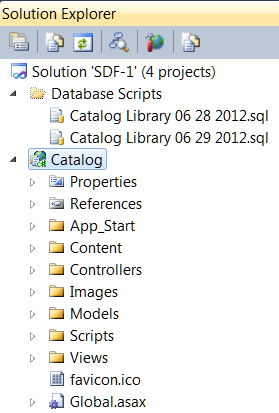
    After opening the solution in Visual Studio, I could see that Adron’s solution had four projects (and a set of database creation scripts, because he’s a nice guy).

    2012.07.06paas02

    The primary project, Catalog, was an ASP.NET MVC application that interacts with a SQL Server database for storing and returning details about our products. To successfully push this to the Tier 3 Web Fabric (or any PaaS, really), I needed to do three things:

    1. Deploy this application to the PaaS fabric.
    2. Create the database in a PaaS-accessible repository.
    3. Update (if necessary) the database connection string for the web application.

    That SHOULD be a lot simpler than building out a multi-node server environment, installing software, opening ports and all that infrastructure stuff that gets in the way of deploying cool software. It’s definitely necessary to have SOMEONE doing all that great infrastructure stuff, but preferably, not me. Let’s walk through the three steps I just outlined.

    1. Deploy this application to the PaaS fabric.

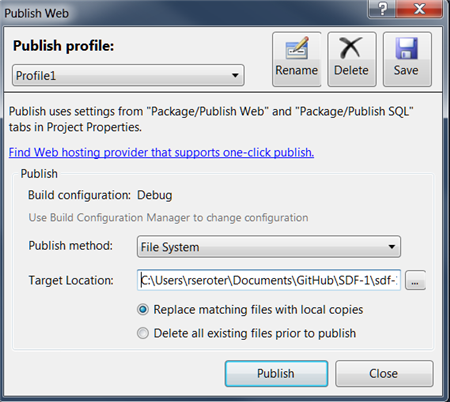
    The firs thing that I did was right-click the Catalog project in Visual Studio and select “Publish.” This built the project and gave me a deploy-ready version of the application on my file system.

    2012.07.06paas03

    Unlike other PaaS platforms that are completely multi-tenant, a Tier 3 Web Fabric environment is instantiated for each customer. Anybody can go into our Control Portal and provision themselves a dedicated PaaS that supports all sorts of frameworks/languages while being physically separated from other customers. In this case, Adron created a Web Fabric environment that this web application would get deployed to. I opened up the Cloud Foundry Explorer tool, added an entry (with credentials) for the Web Fabric environment, and chose to “Push” my application.

    2012.07.06paas04

    After choosing a name for my application and selecting the provisioning size, I was good to go.

    2012.07.06paas06

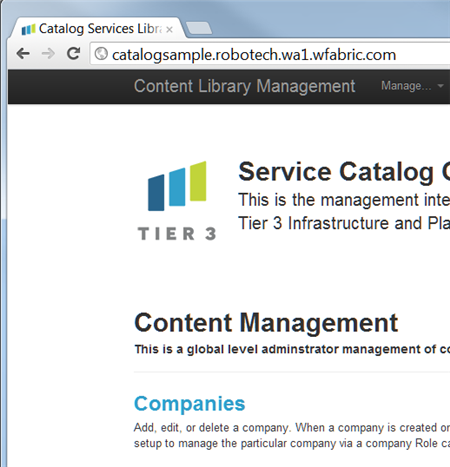
    In a few seconds, my application was running on Web Fabric. From start to finish, this first step (“deploy app to PaaS”) took less than three minutes.

    2012.07.06paas07

    2. Create the database in a PaaS-accessible repository

    Our application was up and running but clicking through it reveals the obvious: there’s no database yet! This next step required me to provision a database that my web application could access. Fortunately for me, “SQL Server databases” is one of the many Web Fabric services available to developers. From the Cloud Foundry Explorer, I added an instance of this database service.

    2012.07.06paas08

    With the service created, I bound it to my CatalogSample application. Binding a service to an application caused my application’s web.config to get updated with connection details for the (database) service.

    2012.07.06paas09

    I wanted to run Adron’s database scripts against the instance so that I could get the tables our application needed, so I took advantage of the Cloud Foundry Caldecott technology which lets you tunnel into a service and interact with it. In this case, it’s very easy to create a quick connection to my SQL Server service, and then use the SQL Management Studio against my database.

    2012.07.06paas10

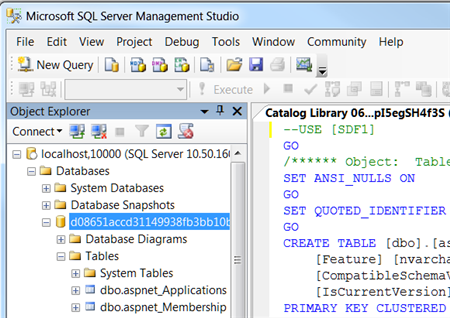
    With my tunnel up and running, and credentials returned, I could then open up SQL Management Studio and connect. After running Adron’s script, I then saw a multiple of tables in my database.

    2012.07.06paas11

    At this point, I had my application deployed and database provisioned. This particular step took about 3 minutes total. In the final step, I needed to update the connection strings in Adron’s web application so that they pointed to my Web Fabric database service.

    3. Update (if necessary) the database connection string for the web application.

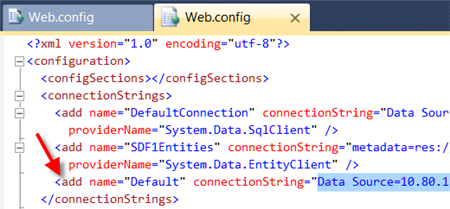
    As I mentioned earlier, when you bind a Web Fabric application service to an application, the application’s configuration file gets updated with connection details. What this means is that a new connection string named “Default” is added to the web.config. If you already have one named “Default”, then that connection string is overwritten with the details for the Web Fabric database. This is GREAT when you want to develop against a local DB, but be confident that the push to a public PaaS won’t require code/config changes.

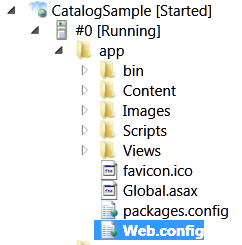
    So how did I get ahold of this new connection string? From the Cloud Foundry Explorer, I browsed to my application and opened the web.config file.

    2012.07.06paas12

    I could see the new, appended “Default” connection string in the Web Fabric application.

    2012.07.06paas13

    I simply took that connection string and replaced the values in Adron’s other two connection strings. Moving forward, I’ll harass Adron into using a single “Default” connection string that gets rewritten on deployment. After republishing my application, and doing another push to Web Fabric from the Cloud Foundry Explorer, our application was now fully operational. I could browse, create, edit and delete records in this data-driven product catalog application.

    2012.07.06paas14

    This final step took me a couple minutes to complete.

    Summary

    Not every application will cleanly migrate to the cloud, or offer the right cost savings to justify the effort (as Christian Reilly pointed out in a series of tweets with me and a corresponding link to his great post on the topic). But in this exercise, I took an existing, data-driven ASP.NET MVC application and moved the entire thing to the Tier 3 Web Fabric in about 10 minutes. Don’t forget to check out Adron’s post to see how he did this deployment to an IaaS environment.

    There are reasons to take an existing application and move it to an IaaS-like environment instead of a PaaS, but as you’ve seen here, it’s REALLY straightforward to use a PaaS and avoid the messiness of the underlying hosting infrastructure!

  • Interview Series: Four Questions With … Paolo Salvatori

    Welcome to the 41st interview in this longer-than-expected running series of chats with thought leaders in the “connected technology” space.  This month, I’m pleased to snag Paolo Salvatori who is Senior Program Manager on the Business Platform Division Customer Advisory Team (CAT) at Microsoft, an epic blogger, frequent conference speaker, and recognized expert in distributed solution design. You can also stalk him on Twitter at @babosbird.

    There’s been a lot happening in the Microsoft space lately, so let’s see how he holds up to my probing questions.

    Q: With Microsoft recently outlining the details of BizTalk Server 2010 R2, it seems that there WILL be a relatively strong feature-based update coming soon. Of the new capabilities included in this version, which are you most interested in, and why?

    A: First of all let me point out that Microsoft has a strong commitment to investing in BizTalk Server as an integration platform for cloud, on-premises and hybrid scenarios and taking customers and partners forward. Microsoft’s strategy in the integration and B2B landscape is to allow customers to preserve their investments and provide them an easy way to migrate or extend their solutions to the cloud. The new on-premises version will align with the platform update: BizTalk Server 2010 R2 will provide support for Visual Studio 2012, Windows 8 Server, SQL Server 2012, Office 15 and System Center 2012. In addition, it will offer B2B enhancements to support the latest standards natively, better performance and improvements of the messaging engine like the possibility to associate dynamic send port to specific host handlers. Also the MLLP adapter has been improved to provide better scalability and latency. The ESB Toolkit will be a core part of BizTalk setup and product and the BizTalk Administration Console will be extended to visualize artifact dependencies.

    That said, the new features which I’m most interested in are the possibility to host BizTalk Server in Windows Azure Virtual Machines in an IaaS context, and the new connectivity features, in particular the possibility to directly consume REST services using a new dedicated adapter and the possibility to natively integrate with ACS and the Windows Azure Service Bus relay services, topics and queues. In particular, BizTalk on Windows Azure Virtual Machines will enable customers to eliminate hardware procurement lead times and reduce time and cost to setup, configure and maintain BizTalk environments. It will allow developers and system administrators to move existing applications from on-premises to Windows Azure or back if necessary and to connect to corporate data centers and access local services and data via a Virtual Network. I’m also pretty excited about the new capabilities offered by Windows Azure Service Bus EAI & EDI, which you can think of as BizTalk capabilities on Windows Azure as PaaS. The EAI capabilities will help bridge integration needs within one’s boundaries. Using EDI capabilities one will be able to configure trading partners and agreements directly on Windows Azure so as to send/receive EDI messages. The Windows Azure EAI & EDI capabilities are already in preview mode in the LABS environment at https://portal.appfabriclabs.com. The new capabilities cover the full range of needs for building hybrid integration solutions: on-premises with BizTalk Server, IaaS with BizTalk Server on Windows Azure Virtual Machines, and PaaS with Windows Azure EAI & EDI.  Taken together these capabilities give customers a lot of choice and will greatly ease the development of a new class of hybrid solutions.

    Q: In your work with customers, how do you think that they will marry their onsite integration platforms with new cloud environments? Will products like the Windows Azure Service Bus play a key role, or do you foresee many companies relying on tried-and-true ETL operations between environments? What role do you think BizTalk will play in this cloudy world?

    A: In today’s IT landscape, it’s quite common that data and services used by a system are located in multiple application domains. In this context, resources may be stored in a corporate data center, while other resources may be located across the organizational boundaries, in the cloud or in the data centers of business partners or service providers. An Internet Service Bus can be used to connect a set of heterogeneous applications across multiple domains and across network topologies, such as NAT and firewall. A typical Internet Service Bus provides connectivity and queuing capabilities, a service registry, a claims-based security model, support for RESTful services and intermediary capabilities such as message validation, enrichment, transformation, routing. BizTalk Server 2010 R2 and the Windows Azure Service Bus together will provide this functionality. Microsoft BizTalk Server enables organizations to connect and extend heterogeneous systems across the enterprise and with trading partners. The Service Bus is part of Windows Azure and is designed to provide connectivity, queuing, and routing capabilities not only for cloud applications but also for on-premises applications. As a I explained in my article “How to Integrate a BizTalk Server Application with Service Bus Queues and Topics” on MSDN, using these two technologies together enables a significant number of hybrid solutions that span the cloud and on premises environments:

    1.     Exchange electronic documents with trading partners.

    2.     Expose services running on-premises behind firewalls to third parties.

    3.     Enable communication between spoke branches and a hub back office system.

    BizTalk Server on-premises, BizTalk Server on Windows Azure Virtual Machines as IaaS, and Windows Azure EAI & EDI services as PaaS, along with the Service Bus allow you to seamlessly connect with Windows Azure artifacts, build hybrid applications that span Windows Azure and on-premises, access local LOB systems from Windows Azure and easily migrate application artifacts from on-premises to cloud. This year I had the chance to work with a few partners that leveraged the Service Bus as the backbone of their messaging infrastructure. For example, Bedin Shop Systems realized a retail management solution called aKite where front-office and back-office applications running in a point of sale can exchange messages in a reliable, secure and scalable manner with headquarters via Service Bus topics and queues. In addition, as the author of the Service Bus Explorer, I had the chance to receive a significant number of positive feedbacks from customers and partners about this technology. At this regard, my team is working with the BizTalk and Service Bus product groups to turn these feedbacks into new capabilities in the next release of our Windows Azure services. My personal perception, as an architect, is that the usage of BizTalk Server and Service Bus as an integration and messaging platform for on-premise, cloud and hybrid scenarios is set to grow in the immediate future.

    Q: With the Windows Azure SDK v1.7, Microsoft finally introduced some more vigorous Visual Studio-based management tooling for the Windows Azure Service Bus. Much like your excellent Service Bus Explorer tool, the Azure SDK now provides the ability for developers to send and receive test messages from Service Bus queues/topics. I’ve always found it interesting that “testing tools” from Microsoft always seem to come very late in the game, if at all. We still have the just-ok WCF Test Client tool for testing WCF (SOAP) services, Fiddler for REST services, nothing really for BizTalk input testing, and nothing much for StreamInsight. When I was working with the Service Bus EAI CTP last month, the provided “test tool” was relatively rudimentary and I ended up building my own. Should Microsoft provide more comprehensive testing tools for its products (and earlier in their lifecycles), or is the reliance on the community and 3rd parties the right way to go?

    A: Thanks for the compliments Richard, much appreciated. 🙂 Providing a good tooling is extremely important not to say crucial to drive the adoption of any technologies as it allows to lower the learning curve and decrease the time necessary to develop and test applications. One year ago I decided to build my tool to facilitate the management, debugging, monitoring and testing of hybrid solutions that make use of the relayed and brokered messaging capabilities of the Windows Azure Service Bus. My intention is to keep updating the tool as I did recently, so expect new capabilities in the future. To answer your question, I’m sure that Microsoft will  continue to invest in management, debugging, testing and profiling tooling that made Visual Studio and our technologies a successful application platform. At the same time, I’ve to admit that sometimes Microsoft concentrates its efforts in delivering the core functionality of products or technologies and pays less attention in building tools. In this context, community and 3rd parties tools sometimes can be perceived as filling a functionality gap, but at the same time they are an incentive for Microsoft to build a better tooling around its products. In addition, I think that tools built by the community plays an important role because they can be extended and customized by developers based on their needs and because they usually anticipate and surface the need for missing capabilities.

    Q [stupid question]: During a recent double-date, my friend’s wife proclaimed that someone was the “Bill Gates of wedding planners.” My friend and I were baffled at this comparison, so I proceeded to throw out other “X is they Y” scenarios that made virtually no sense. Examples include “this is the Angelina Jolie of Maine lobsters” or “he’s the Steve Jobs of exterminators.” Give us some comparisons that might make sense for a moment, but don’t hold up to any critical thinking.

    A:I’m Italian, so for this game I will use some references from my country: Windows Azure is the Leonardo da Vinci of the cloud platforms, while BizTalk Server and Service Bus, together, are the Gladiator of the integration and messaging platforms. 😉

    Great stuff, Paolo. Thanks for participating!

  • Comparing Cloud Server Creation in Windows Azure and Tier 3 Cloud Platform

    Just because I work for Tier 3 now doesn’t mean that I’ll stop playing around with all sorts of technology and do nothing but write about my company’s products. Far from it. Microsoft has made a lot of recent updates to their stack, and I closely followed the just-concluded US TechEd conference which covered all the new Windows Azure stuff and also left time to breathe new life into BizTalk Server. I figured that it would be fun to end my first week at Tier 3 by looking at how to build a cloud-based machine in both the new Windows Azure Virtual Machines service and, in the Tier 3 Enterprise Cloud Platform.

    Creating a Windows Server using Windows Azure Virtual Machines

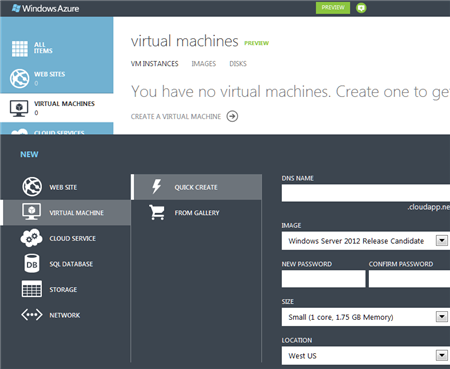
    First up, I went to the new http://manage.windowsazure.com portal where I could finally leave behind that old Silverlight portal experience. Because I already signed up for the preview of the new services, I could see the option to create a new virtual machine.

    2012.6.15azuretier3

    When I first selected the option, I got the option to quickly provision an instance without walking through a wizard. However, from here I only have the option of using one of three (Windows-based) templates.

    2012.6.15azuretier3-02

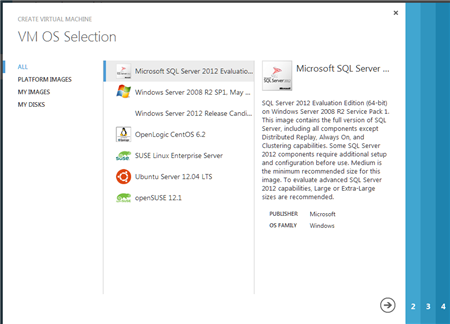
    I clicked the From Gallery option in the image above and was presented with a wizard for provisioning my VM. The first choice was which OS to select, and you can see the newfound love for Linux.

    2012.6.15azuretier3-03

    I chose the Windows Server 2008 R2 instance and on the next wizard page, gave the machine a name, password, and server size.

    2012.6.15azuretier3-04

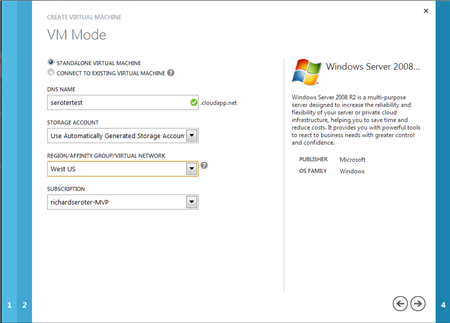
    On the next wizard, the VM Mode page, I selected the standalone VM  option (vs. linked VM for clustering scenarios), gave the server a DNS name, picked a location for my machine (US, Europe, Asia) and my Windows Azure subscription.

    2012.6.15azuretier3-05

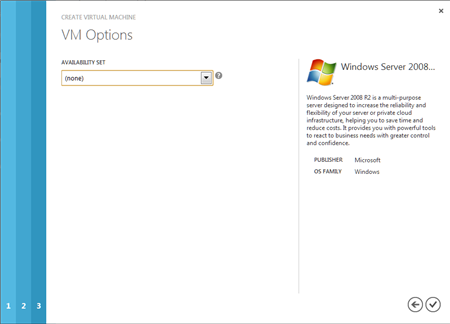
    On the final wizard page, I chose to not set up an Availability Set. Those are used for splitting the servers across racks in the data center.

    2012.6.15azuretier3-06

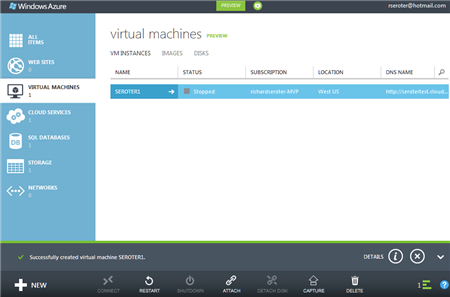
    Once I clicked the checkmark in the wizard, the machine started getting provisioned. I was a bit surprised I didn’t get a “summary” page and that it just jumped into the provisioning, but that’s cool. After a few minute, my machine appeared to be available.

    2012.6.15azuretier3-07

    Clicking on the arrow next to the VM name brought me to a page that showed statistics and details about this machine. From here I could open ports, scale up the machine to a different size, and observe its usage information.

    2012.6.15azuretier3-08

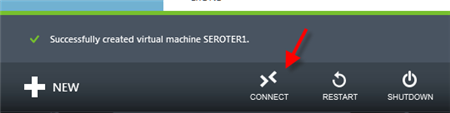
    At the bottom of each of these pages is a little navigation menu, and there’s an option here to Connect.

    2012.6.15azuretier3-09

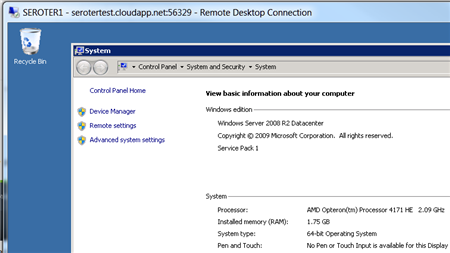
    Clicking this button caused an RDP connection file to get downloaded, and upon opening it up and providing my credentials, I quickly got into my new server.

    2012.6.15azuretier3-10

    That was pretty straightforward. As simple as you might hope it would be.

    Creating a Windows Server using the Tier 3 Enterprise Cloud Platform

    I spent a lot of time in this environment this week just familiarizing myself with how everything works. The Tier 3 Control Panel is well laid out and I was able to find most everything to be where I expected it.

    2012.6.15azuretier3-11

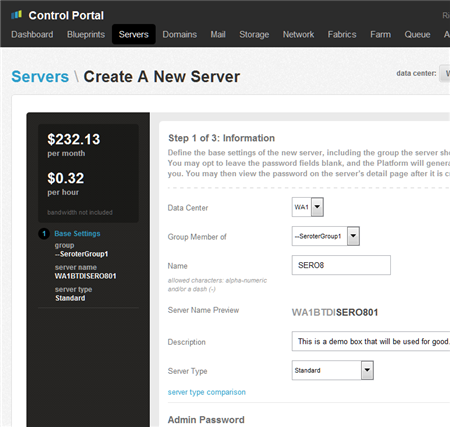
    First up, I chose to create a new server from the Servers menu at the top. This kicks off a simple wizard that keeps track of the estimated hourly charges of my configuration. From this page, I choose which data center to put my machine in, as well the server name and credentials. Also see that I choose a Group which is a super useful way to organize servers via (nestable) collections. On this page I also chose whether to use a Standard or Enterprise server. If I don’t need all the horsepower, durability and SLA of an enterprise-class machine, then I can go with the cheaper Standard option.

    2012.6.15azuretier3-12

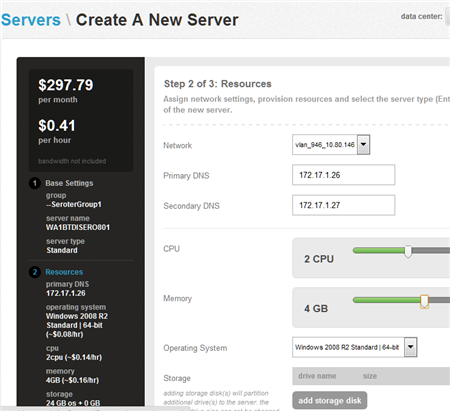
    On Step #2 of this process, I chose the network segment this machine would be part of, IP address, CPU, memory, OS and (optional) additional storage. We have a wide range of OS choices including multiple Linux distributions and Windows Server versions.

    2012.6.15azuretier3-13

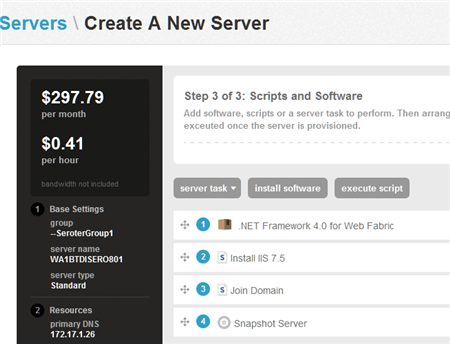
    Step #3 (Scripts and Software) is where things get wild. From here, I can define a sequence of steps that will be applied to the server after its built. The available Tasks include adding a public IP, rebooting the server and snapshotting the server. The existing pool of Software (and you can add your own) includes the .NET Framework, MS SQL Server, Cloud Foundry agents, and more. As for Scripts, you can install IIS 7.5, join a domain, or even install Active Directory. I love the fact that I don’t have to just end up with a VM, but one that gets fully loaded through a set of re-arrangable tasks. Below is an example sequence that I put together.

    2012.6.15azuretier3-14

    I finally clicked Create Server and was taken to a screen where I could see my machine’s build progress.

    2012.6.15azuretier3-15

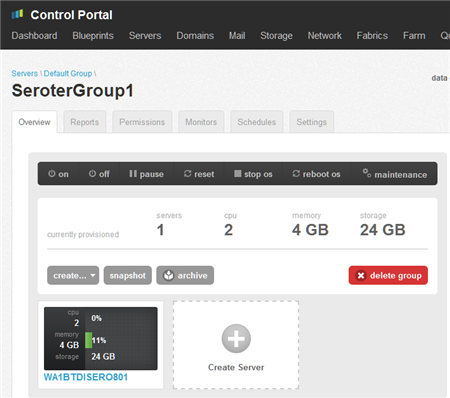
    Once that was done, I could go check out my management group and see my new server.

    2012.6.15azuretier3-16

    After selecting my new server, I have all sorts of options like creating monitoring thresholds, viewing usage reports, setting permissions, scheduling maintenance, increasing RAM/CPU/storage, creating a template from this server, and much more.

    2012.6.15azuretier3-17

    To log into the machine, Tier 3 recommends a VPN instead of using public-facing RDP, for security reasons. So, I used OpenVPN to tunnel into my new server. Within moments, I was connected to the VPN with my cloud environment and could RDP into the machine.

    Summary

    It’s fun to see so much innovation in this space, particularly around usability. Both Microsoft and Tier 3 put a high premium of straightforward user interfaces, and I think that’s evident when you take a look at their cloud platform. The Windows Azure Virtual Machines provisioning process was very clean and required no real prep work. The Tier 3 process was also very simple and I like the fact that we show the pricing throughout the process, allow you to group servers for manageability purposes (more on that in a later post), and let you run a rich set of post-processing activities on the new server.

    If you have questions about the Tier 3 platform, never hesitate to ask! In the meantime, I’ll continue looking at everyone’s cloud offerings and seeing how to mix and match them.

  • Adding Voice To Event Processing Applications Using Microsoft StreamInsight and Twilio

    I recently did an in-person demonstration of how to use the cool Twilio service to send voice messages when Microsoft StreamInsight detected a fraud condition. In this blog post, I’ll walk through how I built the StreamInsight adapter, Twilio handler service and plugged it all together.

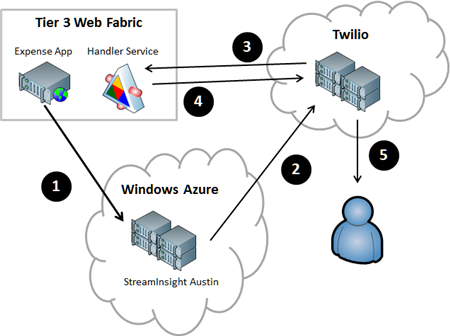
    Here is what I built, with each numbered activity explained below.

    2012.06.07twilio01

    1. Expense web application sends events to StreamInsight Austin. I built an ASP.NET web site that I deployed to the Iron Foundry environment that is provided by Tier 3’s Web Fabric offering. This web app takes in expense records from users and sends those events to the yet-to-be-released StreamInsight Austin platform. StreamInsight is Microsoft’s complex event processing engine that is capable of processing hundreds of thousands of events per second through a set of deployed queries. StreamInsight code-named Austin is the Windows Azure hosted version of StreamInsight that will be generally available in the near future. The events are sent by the Expense application to the HTTP endpoint provided by StreamInsight Austin.
    2. StreamInsight adapter triggers a call to the Twilio service. When a query pattern is matched in StreamInsight, the custom output adapter is called. This adapter uses the Twilio SDK for .NET to either initiate a phone call or send an SMS text message.
    3. Twilio service hits a URL that generates the call script. The Twilio VOIP technology works by calling a URL and getting back the Twilio Markup Language (TwiML) that describes what to say to the phone call recipient. Instead of providing a static TwiML (XML) file that instructs Twilio to say the same thing in each phone call, I built a simple WCF Handler Service that takes in URL parameters and returns a customized TwiML message.
    4. Return TwiML message to Twilio service. That TwiML that the WCF service produces is retrieved and parsed by Twilio.
    5. Place phone call to target. When StreamInsight invokes the Twilio service (step 2), it passes in the phone number of the call recipient. Now that Twilio has called the Handler Service and gotten back the TwiML instructions, it can ring the phone number and read the message.

    Sound interesting?  I’m going to tackle this in order of execution (from above), not necessary order of construction (where you’d realistically build them in this order: (1) Twilio Handler Service, (2) StreamInsight adapter, (3) StreamInsight application, (4) Expense web site). Let’s dive in.

    1. Sending events from the Expense web application to StreamInsight

    This site is a simple ASP.NET website that I’ve deployed up to Tier 3’s hosted Iron Foundry environment.

    2012.06.07twilio02

    Whenever you provision a StreamInsight Austin environment in the current “preview” mode, you get an HTTP endpoint for receiving events into the engine. This HTTP endpoint accepts JSON or XML messages. In my case, I’m throwing a JSON message at the endpoint. Right now the endpoint expects a generic event message, but in the future, we should see StreamInsight Austin be capable of taking in custom event formats.

    //pull Austin URL from configuration file
    string destination = ConfigurationManager.AppSettings["EventDestinationId"];
    //build JSON message consisting of required headers, and data payload
    string jsonPayload = "{\"DestinationID\":\"http:\\/\\/sample\\/\",\"Payload\":[{\"Key\":\"CustomerName\",\"Value\":\""+ txtRelatedParty.Text +"\"},{\"Key\":\"InteractionType\",\"Value\":\"Expense\"}],\"SourceID\":\"http:\\/\\/dummy\\/\",\"Version\":{\"_Build\":-1,\"_Major\":1,\"_Minor\":0,\"_Revision\":-1}}";
    
    //update URL with JSON flag
    string requestUrl = ConfigurationManager.AppSettings["AustinEndpoint"] + "json?batching=false";
    HttpWebRequest request = HttpWebRequest.Create(requestUrl) as HttpWebRequest;
    
    //set HTTP headers
    request.Method = "POST";
    request.ContentType = "application/json";
    
    using (Stream dataStream = request.GetRequestStream())
     {
         string postBody = jsonPayload;
    
         // Create POST data and convert it to a byte array.
         byte[] byteArray = Encoding.UTF8.GetBytes(postBody);
         dataStream.Write(byteArray, 0, byteArray.Length);
      }
    
    HttpWebResponse response = null;
    
    try
    {
        response = (HttpWebResponse)request.GetResponse();
     }
     catch (Exception ex)
     { }
    

    2. Building the StreamInsight application and Twilio adapter

    The Twilio adapter that I built is a “typed adapter” which means that it expects a specific payload. That “Fraud Alert Event” object that the adapter expects looks like this:

    public class FraudAlertEvent
        {
            public string CustomerName { get; set; }
            public string ExpenseDate { get; set; }
            public string AlertMessage { get; set; }
        }
    

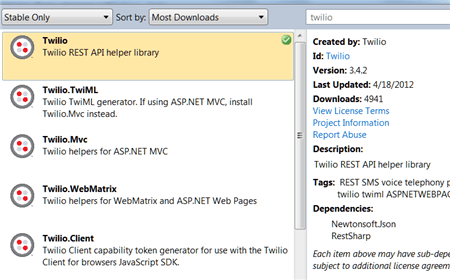
    Next, I built up the actual adapter. I used NuGet to discover and add the Twilio SDK to my Visual Studio project.
    2012.06.07twilio03

    Below is the code for my adapter, with comments inline. Basically, I dequeue events that matched the StreamInsight query I deployed, and then use the Twilio API to either initiate a phone call or send a text message.

    public class TwilioPointOutputAdapter : TypedPointOutputAdapter
        {
            //member variables
            string acctId = string.Empty;
            string acctToken = string.Empty;
            string url = string.Empty;
            string phoneNum = string.Empty;
            string phoneOrMsg = string.Empty;
            TwilioRestClient twilioProxy;
    
            public TwilioPointOutputAdapter(AdapterConfig config)
            {
                //set member variables using values from runtime config values
                this.acctId = config.AccountId;
                this.acctToken = config.AuthToken;
                this.phoneOrMsg = config.PhoneOrMessage;
                this.phoneNum = config.TargetPhoneNumber;
                this.url = config.HandlerUrl;
            }
    
            ///
    <summary> /// When the adapter is resumed by the engine, start dequeuing events again /// </summary>
            public override void  Resume()
            {
                DequeueEvent();
            }
    
            ///
    <summary> /// When the adapter is started up, begin dequeuing events /// </summary>
            public override void  Start()
            {
                DequeueEvent();
            }
    
            ///
    <summary> /// Function that pulls events from the engine and calls the Twilio service /// </summary>
            void DequeueEvent()
            {
    		var twilioProxy = new TwilioRestClient(this.acctId, this.acctToken);
    
                while (true)
                {
                    try
                    {
                        //if the SI engine has issued a command to stop the adapter
                        if (AdapterState.Stopping == AdapterState)
                        {
                            Stopped();
    
                            return;
                        }
    
                        //create an event
                        PointEvent currentEvent = default(PointEvent);
    
                        //dequeue the event from the engine
                        DequeueOperationResult result = Dequeue(out currentEvent);
    
                        //if there is nothing there, tell the engine we're ready for more
                        if (DequeueOperationResult.Empty == result)
                        {
                            Ready();
                            return;
                        }
    
                        //if we find an event to process ...
                        if (currentEvent.EventKind == EventKind.Insert)
                        {
                            //append event-specific values to the Twilio handler service URL
                            string urlparams = "?val=0&action=Please%20look%20at%20" + currentEvent.Payload.CustomerName + "%20expenses";
    
                            //create object that holds call criteria
                            CallOptions opts = new CallOptions();
                            opts.Method = "GET";
                            opts.To = phoneNum;
                            opts.From = "+14155992671";
                            opts.Url = this.url + urlparams;
    
                            //if a phone call ...
                            if (phoneOrMsg == "phone")
                            {
                                //make the call
                                var call = twilioProxy.InitiateOutboundCall(opts);
                            }
                            else
                            {
                                //send an SMS message
                                var msg = twilioProxy.SendSmsMessage(opts.From, opts.To, "Fraud has occurred with " + currentEvent.Payload.CustomerName);
                            }
                        }
                        //cleanup the event
                        ReleaseEvent(ref currentEvent);
                    }
                    catch (Exception ex)
                    {
                        throw ex;
                    }
                }
            }
        }
    

    Next, I created my StreamInsight Austin application. Instead of using the command line sample provided by the StreamInsight team, I created a little WinForm app that handles the provisioning of the environment, the deployment of the query, and the sending of test event messages.

    2012.06.07twilio04

    The code that deploys the “fraud detection” query takes care of creating the LINQ query, defining the StreamInsight query that uses the Twilio adapter, and starting up the query in the StreamInsight Austin environment. My Expense web application sends events that contain a CustomerName and InteractionType (e.g. “sale”, “complaint”, etc).

    private void CreateQueries()
    {
    		...
    
    		//put inbound events into 30-second windows
         var custQuery = from i in allStream
              group i by new { Name = i.CustomerName, iType = i.InteractionType } into CustomerGroups
              from win in CustomerGroups.TumblingWindow(TimeSpan.FromSeconds(30), HoppingWindowOutputPolicy.ClipToWindowEnd)
              select new { ct = win.Count(), Cust = CustomerGroups.Key.Name, Type = CustomerGroups.Key.iType };
    
         //if there are more than two expenses for the same company in the window, raise event
         var thresholdQuery = from c in custQuery
                       where c.ct > 2 && c.Type == "Expense"
                       select new FraudAlertEvent
                       {
                              CustomerName = c.Cust,
                              AlertMessage = "Too many expenses!",
                              ExpenseDate = DateTime.Now.ToString()
                        };
    
          //call DeployQuery which instantiates StreamInsight Query
          Query query5 = DeployQuery(thresholdQuery, "Threshold Query");
           query5.Start();
    		...
    }
    
    private Query DeployQuery(CepStream queryStream, string queryName)
    {
          //setup Twilio adapter configuration settings
          var outputConfig = new AdapterConfig
           {
                AccountId = ConfigurationManager.AppSettings["TwilioAcctID"],
                AuthToken = ConfigurationManager.AppSettings["TwilioAcctToken"],
                TargetPhoneNumber = "+1111-111-1111",
                PhoneOrMessage = "phone",
                HandlerUrl = "http://twiliohandlerservice.ironfoundry.me/Handler.svc/Alert/Expense%20Fraud"
           };
    
          //add logging message
          lbMessages.Items.Add(string.Format("Creating new query '{0}'...", queryName));
    
          //define StreamInsight query that uses this output adapter and configuration
          Query query = queryStream.ToQuery(
                queryName,
                "",
                typeof(TwilioAdapterOutputFactory),
                outputConfig,
                EventShape.Point,
                StreamEventOrder.FullyOrdered);
    
          //return query to caller
          return query;
    }
    

    3. Creating the Twilio Handler Service hosted in Tier 3’s Web Fabric environment

    If you’re an eagle-eyed reader, you may have noticed my “HandlerUrl” property in the adapter configuration above. That URL points to a public address that the Twilio service uses to retrieve the speaking instructions for a phone call. Since I wanted to create a contextual phone message, I decided to build a WCF service that returns valid TwiML generated on demand. My WCF contract returns an XMLElement and takes in values that help drive the type of content in the TwiML message.

    [ServiceContract]
        public interface IHandler
        {
            [OperationContract]
            [WebGet(
                BodyStyle = WebMessageBodyStyle.Bare,
                RequestFormat = WebMessageFormat.Xml,
                ResponseFormat = WebMessageFormat.Xml,
                UriTemplate = "Alert/{thresholdType}?val={thresholdValue}&action={action}"
                )]
            XmlElement GenerateHandler(string thresholdType, string thresholdValue, string action);
        }
    

    The implementation of this service contract isn’t super interesting, but, I’ll include it anyway. Basically, if you provide a “thresholdValue” of zero (e.g. it doesn’t matter what value was exceeded), then I create a TwiML message that uses a woman’s voice to tell the call recipient that a threshold was exceeded and some action is required. If the “thresholdValue” is not zero, then this pleasant woman tells the call recipient about the limit that was exceeded.

            public XmlElement GenerateHandler(string thresholdType, string thresholdValue, string action)
            {
                string xml = string.Empty;
    
                if (thresholdValue == "0")
                {
                    xml = "<!--?xml version='1.0' encoding='utf-8' ?-->" +
                "" +
                "" +
                    "The " + thresholdType + " alert was triggered. " + action + "." +
                    "" +
                "";
                }
                else
                {
                    xml = "<!--?xml version='1.0' encoding='utf-8' ?-->" +
                "" +
                "" +
                    "The " + thresholdType + " value is " + thresholdValue + " and has exceeded the threshold limit. " + action + "." +
                    "" +
                "";
                }
    
                XmlDocument d = new XmlDocument();
                d.LoadXml(xml);
    
                return d.DocumentElement;
            }
        }
    

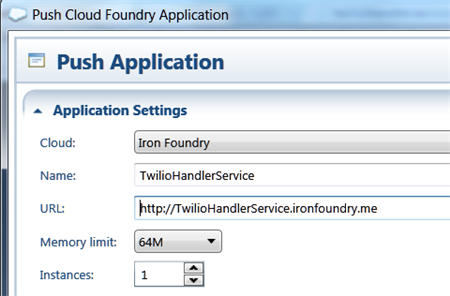
    I then did a quick push of this web service to my Web Fabric / Iron Foundry environment.

    2012.06.07twilio05

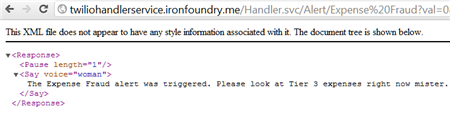
    I confirmed that my service was online (and you can too as I’ve left this service up) by hitting the URL and seeing valid TwiML returned.

    2012.06.07twilio06

    4. Test the solution and confirm the phone call

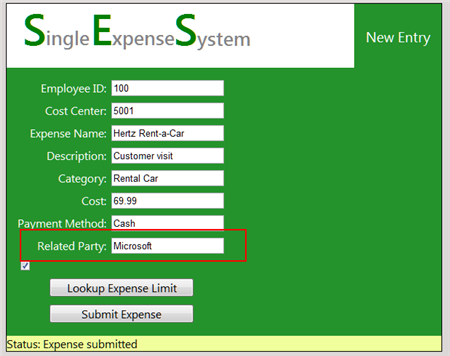
    Let’s commit some fraud on my website! I went to my Expense website, and according to my StreamInsight query, if I submitted more than 2 expenses for single client (in this case, “Microsoft”) within a 30 second window, a fraud event should be generated, and I should receive a phone call.

    2012.06.07twilio07

    After submitting a handful of events, I can monitor the Twilio dashboard and see when a phone call is being attempted and completed.
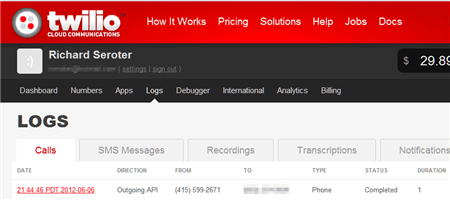
    2012.06.07twilio08

    Sure enough, I received a phone call. I captured the audio, which you can listen to here.

    Summary

    So what did we see? We saw that our Event Processing Engine in the cloud can receive events from public websites and trigger phone/text messages through the sweet Twilio service. One of the key benefits to StreamInsight Austin (vs. an onsite StreamInsight deployment) is the convenience of having an environment that can be easily reached by both on-premises and off-premises (web) applications. This can help you do true real-time monitoring vs. doing batch loads from off-premises apps into the on-premises Event Processing engine. And, the same adapter framework applies to either the onsite or cloud StreamInsight environment, so my Twilio adapter works fine, regardless of deployment model.

    The Twilio service provides a very simple way to inject voice into applications. While not appropriate for all cases, obviously, there are a host of interesting use cases that are enhanced by this service. Marrying StreamInsight and Twilio seems like a useful way to make very interactive CEP notifications possible!

  • New Job, Different Place

    Time to mix it up. I’ve been in enterprise IT for 5+ years, and while I’ve enjoyed it immensely and been fortunate to work at a great company, there are other things that I want to be able to do.

    So, I’ve decided to quit my job, and accept an offer with Tier 3. I’ll be a Product Manager and contribute to product strategy while writing/speaking about cloud computing and how to take advantage of IaaS and PaaS platforms. I’m excited to focus all my attention on cloud computing and get the opportunity work at a place that will compete and collaborate with some of the leading companies in this exploding space.

    Tier 3, included in Gartner’s recent Magic Quadrant for Public Cloud Infrastructure as a Service, has an excellent enterprise cloud infrastructure platform and a fascinating Cloud Foundry-based platform-as-a-service offering called Web Fabric. I’ve written about Iron Foundry (the open source technology beneath Web Fabric) a few times in the past, and really think that Tier 3 made a smart move bringing .NET developers into the popular Cloud Foundry ecosystem. Besides working with cool technology, I’m most excited about working with Adam, Jared, Wendy, Adron and all the supremely talented people at this up-and-coming company.

    I’ll stay in Southern California and travel up to Tier 3’s headquarters in Bellevue, WA every month or so. Tier 3 is completely supportive of my blogging, writing, InfoQ contribution, MS MVP activities, Pluralsight training, speaking engagements, and other random community activities. So, expect more of the same from me!
  • Is AWS or Windows Azure the Right Choice? It’s Not That Easy.

    I was thinking about this topic today, and as someone who built the AWS Developer Fundamentals course for Pluralsight, is a Microsoft MVP who plays with Windows Azure a lot, and has an unnatural affinity for PaaS platforms like Cloud Foundry / Iron Foundry and Force.com, I figured that I had some opinions on this topic.

    So why would a developer choose AWS over Windows Azure today? I don’t know all developers, so I’ll give you the reasons why I often lean towards AWS:

    • Pace of innovation. The AWS team is amazing when it comes to regularly releasing and updating products. The day my Pluralsight course came out, AWS released their Simple Workflow Service. My course couldn’t be accurate for 5 minutes before AWS screwed me over! Just this week, Amazon announced Microsoft SQL Server support in their robust RDS offering, and .NET support in their PaaS-like Elastic Beanstalk service. These guys release interesting software on a regular basis and that helps maintain constant momentum with the platform. Contrast that with the Windows Azure team that is a bit more sporadic with releases, and with seemingly less fanfare. There’s lots of good stuff that the Azure guys keep baking into their services, but not at the same rate as AWS.
    • Completeness of services. Whether the AWS folks think they offer a PaaS or not, their services cover a wide range of solution scenarios. Everything from foundational services like compute, storage, database and networking, to higher level offerings like messaging, identity management and content delivery. Sure, there’s no “true” application fabric like you’ll find in Windows Azure or Cloud Foundry, but tools like Cloud Formation and Elastic Beanstalk get you pretty close. This well-rounded offering means that developers can often find what they need to accomplish somewhere in this stack. Windows Azure actually has a very rich set of services, likely the most comprehensive of any PaaS vendor, but at this writing, they don’t have the same depth in infrastructure services. While PaaS may be the future of cloud (and I hope it is), IaaS is a critical component of today’s enterprise architecture.
    • It just works. AWS gets knocked from time to time on their reliability, but it seems like most agree that as far as clouds go, they’ve got a damn solid platform. Services spin up relatively quickly, stay up, and changes to service settings often cascade instantly. In this case, I wouldn’t say that Windows Azure doesn’t “just work”, but if AWS doesn’t fail me, I have little reason to leave.
    • Convenience. This may be one of the primary advantages of AWS at this point. Once a capability becomes a commodity (and cloud services are probably at that point), and if there is parity among competitors on functionality, price and stability, the only remaining differentiator is convenience. AWS shines in this area, for me. As a Microsoft Visual Studio user, there are at least four ways that I can consume (nearly) every AWS service: Visual Studio Explorer, API, .NET SDK or AWS Management Console. It’s just SO easy. The AWS experience in Visual Studio is actually better than the one Microsoft offers with Windows Azure! I can’t use a single UI to manage all the Azure services, but the AWS tooling provides a complete experience with just about every type of AWS service. In addition, speed of deployment matters. I recently compared the experience of deploying an ASP.NET application to Windows Azure, AWS and Iron Foundry. Windows Azure was both the slowest option, and the one that took the most steps. Not that those steps were difficult, mind you, but it introduced friction and just makes it less convenient. Finally, the AWS team is just so good at making sure that a new or updated product is instantly reflected across their websites, SDKs, and support docs. You can’t overstate how nice that is for people consuming those services.

    That said, the title of this post implies that this isn’t a black and white choice. Basing an entire cloud strategy on either platform isn’t a good idea. Ideally, a “cloud strategy” is nothing more than a strategy for meeting business needs with the right type of service. It’s not about choosing a single cloud and cramming all your use cases into it.

    A Microsoft shop that is looking to deploy public facing websites and reduce infrastructure maintenance can’t go wrong with Windows Azure. Lately, even non-Microsoft shops have a legitimate case for deploying apps written in Node.js or PHP to Windows Azure. Getting out of infrastructure maintenance is a great thing, and Windows Azure exposes you to much less infrastructure than AWS does.  Looking to use a SQL Server in the cloud? You have a very interesting choice to make now. Microsoft will do well if it creates (optional) value-added integrations between its offerings, while making sure each standalone product is as robust as possible. That will be its win in the “convenience” category.

    While I contend that the only truly differentiated offering that Windows Azure has is their Service Bus / Access Control / EAI product, the rest of the platform has undergone constant improvement and left behind many of its early inconvenient and unstable characteristics. With Scott Guthrie at the helm, and so many smart people spread across the Azure teams, I have absolutely no doubt that Windows Azure will be in the majority of discussions about “cloud leaders” and provide a legitimate landing point for all sorts of cloudy apps. At the same time though, AWS isn’t slowing their pace (quite the opposite), so this back-and-forth competition will end up improving both sets of services and leave us consumers with an awesome selection of choices.

    What do you think? Why would you (or do you) pick AWS over Azure, or vice versa?

  • Windows Azure Service Bus EAI Doesn’t Support Multicast Messaging. Should It?

    Lately, I’ve been playing around a lot with the Windows Azure Service Bus EAI components (currently in CTP). During my upcoming Australia trip (register now!) I’m going to be walking through a series of use cases for this technology.

    There are plenty of cool things about this software, and one of them is that you can visually model the routing of messages through the bus. For instance, I can define a routing scenario (using “Bridges” and destination endpoints) that takes in an “order” message, and routes it to an (onsite) database, Service Bus Queue or a public web service.

    2012.5.3multicast01

    Super cool! However, the key word in the previous sentence was “or.” I cannot send a message to ALL those endpoints because currently, the Service Bus EAI engine doesn’t support the multi-cast scenario. You can only route a message to a single destination. So the flow above is valid, IF I have routing rules (e.g. “OrderAmount > 100”) that help the engine decide which of the endpoints to send the message to. I asked about this in the product forums, and  had that (non) capability confirmed. If you need to do multi-cast messaging, then the suggestion is to use Service Bus Topics as an endpoint. Service Bus Topics (unlike Service Bus Queues) support multiple subscribers who can all receive a copy of a message.  The end result would be this:

    2012.5.3multicast03

    However, for me, one of the great things about the Bridges is the ability to use Mapping to transform message (format/content) before it goes to an endpoint. In the image below, note that I have a Transform that takes the initial “Order” message and transforms it to the format expected by my SQL Server database endpoint (from my first diagram).

    2012.5.3multicast02

    If I had to use Topics to send messages to a database and web service (via the second diagram), then I’d have to push the transformation responsibility down to the application that polls the Topic and communicates with the database or service. I’d also lose the ability to send directly to my endpoint and would require a Service Bus Topic to act as an intermediary. That may work for some scenarios, but I’d love the option to use all the nice destination options (instead of JUST Topics), perform the mapping in the EAI Bridges, and multi-cast to all the endpoints.

    What do you think? Should the Azure Service Bus EAI support multi-cast messaging, or do you think that scenario is unusual for you?

  • Richard Going to Oz to Deliver an Integration Workshop? This is Happening.

    At the most recent MS MVP Summit, Dean Robertson, founder of IT consultancy Mexia, approached me about visiting Australia for a speaking tour. Since I like both speaking and koalas, this seemed like a good match.

    As a result, we’ve organized sessions for which you can now register to attend. I’ll be in Brisbane, Melbourne and Sydney talking about the overall Microsoft integration stack, with special attention paid to recent additions to the Windows Azure integration toolset. As usual, there MCpromoshould be lots of practical demonstrations that help to show the “why”, “when” and “how” of each technology.

    If you’re in Australia, New Zealand or just needed an excuse to finally head down under, then come on over! It should be lots of fun.