Category: Cloud

  • Pluralsight course on “Architecting Highly Available Systems on AWS” is live!

    This summer I’ve been busy putting together my seventh video-on-demand training course for Pluralsight. This one – called Architecting Highly Available Systems on AWS – is now online and ready for your viewing pleasure.

    Of all the courses that I’ve done for Pluralsight, my previous Amazon Web Services one (AWS Developer Fundamentals) remains my most popular. I wanted to stay with this industry-leading cloud platform but try something completely different. It’s one thing to do “how to” courses that just walk through various components independently, but it’s another thing entirely to show how to integrate, secure, and configure a real-life system with a given technology. Building and deploying cloud-scale systems requires thoughtful planning and it’s easy to make incorrect assumptions, so I developed a 4+ hour course that showcases the best practices for architecting and deploying fault tolerant, resilient systems on the AWS cloud.

    2013.07.31aws01

    This course has eight total modules that show you how to build up a bullet-proof cloud app, piece-by-piece. In each module, I explain the role of the technology, how to use it, and the best practices for using it effectively.

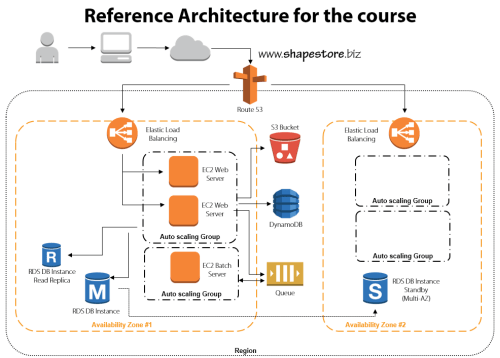
    • Module 1: Distributed Systems and AWS. This introductory session jumps right to it. We discuss the characteristics and fallacies of distributed systems, practices for making distributed systems highly available, look at the entire AWS portfolio, and walk through the reference architecture for the course.
    • Module 2: Provisioning Durable Storage with EBS and S3. Here we lay the foundation and choose the appropriate type of storage for our system. We discuss the use of EBS volumes and dig into Amazon S3. This module includes a walkthrough of adding objects to S3, making them public, and configuring a website hosted in S3.
    • Module 3: Setting Up Databases in RDS and DynamoDB. I had the most fun with this module. I do a deep review of Amazon RDS including setting up a MySQL instance, setting up multi-AZ replication for high availability, and read-replicas for better performance. We then test how RDS handles failure with automatic failover to the multi-AZ instance. Next we investigate DynamoDB and use it store ASP.NET session state thanks to the fantastic AWS SDK for .NET.
    • Module 4: Leveraging SQS for Scalable Processing. Queuing can be a key part of a successful distributed application, so we look at how to set up an Amazon SQS queue for sharing content between application tiers.
    • Module 5: Adding EC2 Virtual Machines. We’re finally ready to configure the actual application and web servers! This beefy module jumps into EC2 and how to use Identity and Access Management (IAM) and Security Groups to efficiently and securely provision servers. Then we deploy applications, create Amazon Machine Image (IAM) templates, deploy custom IAM instances, and configure Elastic IPs. Whew.
    • Module 6: Using ELB to Scale Applications. With a basic application running, now it’s time to enhance application availability further. Here we look at the Elastic Load Balancer and how to configure and test it.
    • Module 7: Enabling Auto Scale to Handle Spikes and Troughs. Ideally, (cloud) distributed systems are self-healing and self-regulating and Amazon Auto Scaling is a big part of this. This module shows you how to add Auto Scaling to a system and test it out.
    • Module 8: Configuring DNS with Route 53. The final module ties it all together by adding DNS services. Here you see where I register a domain name, and use Amazon Route 53 to manage the DNS entries and route traffic to the Elastic Load Balancers.

    I had a blast preparing this course, and the “part II” is in progress now. The sequel focuses on tuning and maintaining AWS cloud applications and will build upon everything shown here. If you’re not already a Pluralsight subscriber, now’s a great time to make an investment in yourself and learn all sorts of new things!

  • Where the heck do I host my … Node.js app?

    It’s a great time to be a developer. Also a confusing time. We are at a point where there are dozens of legit places that forward-thinking developers can run their apps in the cloud. I’ll be taking a look at a few different types of applications in a brief series of “where the heck do I host my …” blog posts. My goal with this series is to help developers wade through the sea of providers and choose the right one for their situation. In this first one, I’m looking at Node.js. It’s the darling of the startup set and is gaining awareness among a broad of developers. It also may be the single most supported platform in the cloud. Amazing for a technology that didn’t exist just a few years ago (although some saw the impending popularity explosion coming).

    Instead of visualizing the results in a giant matrix that would be impossible to read and suffer from data minimization, I’m going briefly describe 11 different Node providers and assess them against the following criteria:

    • Versions of Node.js supported.
    • Supported capabilities.
    • Commitment to the platform.
    • Complementary services offered.
    • Pricing plans.
    • Access to underlying hosting infrastructure.
    • API and tools available.
    • Support material offered.

    The providers below are NOT ranked. I made it alphabetical to ensure no perception of preference.

    Amazon Web Services

    AWS offers Node.js as part of its Elastic Beanstalk service. Elastic Beanstalk is a container system that makes it straightforward to package applications and push to AWS in a “PaaS-like” way. Developers and administrators can still access underlying virtual machines, but can still act on the application as a whole for actions like version management.

    Versions Capabilities Commitment Add’l Services
    Min version is 0.8.6, max version is 0.8.21 (reference) Load balancing, versioning, WebSockets, health monitoring, Nginx/ Apache support, global data centers Not a core focus, but seem committed to diverse platform support. Good SDK and reasonable documentation. Integration with RDS database, DNS services


    Pricing Plans Infrastructure Access API and Tools Support
    No cost for Beanstalk apps, just costs for consumed resources Can use API, GUI console, CLI, and direct SSH access to VM host. Fairly complete API, Git deploy tools  Active support forums, good documentation, AWS support plans for platform services

    AppFog

    AppFog runs a Cloud Foundry v1 cloud and was recently acquired by Savvis.

    Versions Capabilities Commitment Add’l Services
    Min version is 0.4.12, max version is 0.8.14 (reference) Load balancing, scale up/out, health monitoring, library of add-ons (through partners) Acquired Nodester (Node.js provider) a while back; unclear as to future direction with Savvis Add-ons offered by partners; DB services like MySQL, PostgreSQL, Redis; messaging with RabbitMQ


    Pricing Plans Infrastructure Access API and Tools Support
    Free tier for 2GB of memory and 100MB storage; Up to $720 per month for SSL, greater storage and RAM (reference) No direct infrastructure access, but tunneling supported for access to application services Appears that API is used through CLI only; web console for application management Support forums for all users, ticket-based or dedicated support for paid users

    CloudFoundry.com

    Cloud Foundry, from Pivotal, is an open-source PaaS that can run in the public cloud or on-premises. The open source version (cloudfoundry.org) serves as a baseline for numerous PaaS providers including AppFog, Tier 3, Stackato, and more.

    Versions Capabilities Commitment Add’l Services
    Default is 0.10.x Load balancing, scale up/out, health monitoring, management dashboard Part of many supported platforms, but regular attention paid to Node (e.g. auto-reconfig). DBs like PostgreSQL, MongoDB, Redis and MySQL; App services like RabbitMQ


    Pricing Plans Infrastructure Access API and Tools Support
    Developer edition has free trial, then $0.03/GB/hr for apps plus price per svc. No direct infrastructure access, but support for tunneling into app services.  Use CLI tool (cf), several IDEs, build tool integration, RESTful API Support documents, FAQs, source code links.services provided Pivotal

    dotCloud

    Billed as the first multi-language PaaS, dotCloud is a popular provider that has also open-sourced a majority of its framework.

    Versions Capabilities Commitment Add’l Services
    v0.4.x, v0.6.x, v0.8.x, and defaults to v.0.4.x. (reference) WebSockets, worker services support, troubleshooting logs, load balancing, vertical/horizontal scaling , SSL Not a lot of dedicated tutorials (compared to other languages), but great Node.js support across platform services. Databases like MySQL, MongoDB, and Redis; Solr for search, SMTP, custom service extentions


    Pricing Plans Infrastructure Access API and Tools Support
    No free tier, but pay per stack deployed No direct infrastructure access, but can SSH into services and do Nginx configurations CLI used to manage applications as the API doesn’t appear to be public; web dashboard provides monitoring and some configuration Documentation, Q&A on StackOverflow, and a support email address.

    EngineYard

    Longtime PaaS provider well known for Ruby on Rails support, but also hosts apps written in other languages. Runs on AWS infrastructure.

    Versions Capabilities Commitment Add’l Services
    0.8.11, 0.6.21 (reference) Git integration, WebSockets, access to environmental variables, background jobs, scalability Dedicated resource center for Node, and a fair number of Node-specific blog posts Chef support, dedicated environments, add-ons library, hosted databases for MySQL, Riak, and PostgreSQL.


    Pricing Plans Infrastructure Access API and Tools Support
    500 hours free on signup, then pay as you go. SSH access to instances, databases Offers rich CLI, web console, and API. Basic support through ticketing system (and docs/forums), and paid, premium tier.

    Heroku

    Owned by Salesforce.com, this platform has been around for a while and got started supporting Ruby, and has since added Java, Node.js, Python and others.

    Versions Capabilities Commitment Add’l Services
    From 0.4.7 through 0.10.15 (reference) Git support, application scaling, worker processes, long polling (no WebSockets), SSL Clearly not the top priority, but a decent set of capabilities and services. Heroku Postgres (database-as-a-service), big marketplace of add-ons


    Pricing Plans Infrastructure Access API and Tools Support
    Free starter account, then pay as you go. No raw infrastructure access. CLI tool (called toolbelt), platform API, web console Basic support for all customers via dev center, and paid support options.

    Joyent

    The official corporate sponsor of Node.js, Joyent is an IaaS provider that offers developers Node.js appliances for hosting applications.

    Versions Capabilities Commitment Add’l Services
    0.8.11 by default, but developers can install newer versions (reference). Admin dashboard shows that you can create Node images with 0.10.5, however. Server resizing, scale out, WebSockets Strong commitment to overall platform, less likely to become a managed PaaS provider Memcached support, access to IaaS infrastructure, Manta object storage, application stack templates


    Pricing Plans Infrastructure Access API and Tools Support
    Free trial, and pay as you go Native infrastructure access to servers running Node.js Restful API for accessing cloud servers, web console. Debugging and perf tools for Node.js apps. Self service support for anyone, paid support option

    Modulus.io

    A relative newcomer, these folks are focused solely on Node.js application hosting.

    Versions Capabilities Commitment Add’l Services
    0.2.0 to current release Persistent storage access, WebSockets, SSL, deep statistics, scale out, custom domains, session affinity, Git integration Strong, as this is the only platform the company is supporting. Offers a strong set of functional capabilities. Built in MongoDB integration


    Pricing Plans Infrastructure Access API and Tools Support
    Each scale unit costs $0.02 per hour, with separate costs for file storage and DB usage No direct infrastructure access Web portal or CLI Basic support options include email, Google group, Twitter

    Nodejitsu

    The leading pure-play Node.js hosting provider and a regular contributor of assets to the community.

    Versions Capabilities Commitment Add’l Services
    0.6.x, 0.8.x (reference) GitHub integration, WebSockets, load balancer, sticky sessions, versioning, SSL, custom domains, continuous deployment Extremely strong, and proven over years of existence Free (non high traffic) databases via CouchDB, MongoDB, Redis


    Pricing Plans Infrastructure Access API and Tools Support
    Free trial, free hosting of open source apps, otherwise pay per compute unit No direct infrastructure access Supports CLI, JSON API, web interface IRC, GitHub issues, or email

    OpenShift

    Open source platform-as-a-service from Red Hat that supports Node.js among a number of other platforms.

    Versions Capabilities Commitment Add’l Services
    Supports all available versions (Auto) scale out, Git integration, WebSockets, load balancing Dedicated attention to Node.js, but one of many supported platforms. Databases like MySQL, MongoDB, PostgreSQL; additional tools through partners


    Pricing Plans Infrastructure Access API and Tools Support
    Three free “gears” (scale units), and pay as you go after that SSH access available Offers CLI, web console Provides KB, forums, and a paid support plan

    Windows Azure

    Polyglot cloud offered by Microsoft that has made Node.js a first-class citizen on Windows Azure Web Sites. Can also deploy via Web Roles or on raw VMs.

    Versions Capabilities Commitment Add’l Services
    0.6.17, 0.6.20, and 0.8.4 (reference) Scale out, load balancing, health monitoring, Git/Dropbox integration, SSL, WebSockets Surprisingly robust Node.js development center, and SDK support Integration with Windows Azure SQL Database, Service Bus (messaging), Identity, Mobile Services


    Pricing Plans Infrastructure Access API and Tools Support
    Pay as you go, or 6-12 month plans None for apps deployed to Windows Azure Web Sites IDE integration, REST API,  CLI, PowerShell, web console, SDKs for other Azure services. Forums and knowledge base for general support, paid tier also available

    Summary

    This isn’t a complete list of providers, but hits upon the most popular ones. You’ve really got a choice between IaaS providers with Node.js-friendly features, pure-play Node.js cloud providers, and polyglot clouds who offer Node.js as part of a family of supported platforms. If you’re deploying a standalone Node.js app that doesn’t integrate with much besides a database, then the pure-play vendors like Nodejitsu are a fantastic choice. If you have more complex systems made up of components written in multiple languages, or requiring advanced services like messaging or identity, then some of the polyglot clouds like Windows Azure are a better choice. And if you are trying to compliment your existing cloud infrastructure environment by adding Node.js applications, then using something like AWS is probably your best bet.

    Thoughts? Any favorites out there?

  • 3 Rarely Discussed, But Valuable, Uses for Cloud Object Storage

    I’ve got object storage on the brain. I’m finishing up a new Pluralsight course on distributed systems in AWS that uses Amazon S3 in a few places, and my employer Tier 3 just shipped a new Object Storage service based on Riak CS Enterprise. While many of the most touted uses for cloud-based object storage focus on archived data, backups, media files and the like, there are actually 3 more really helpful uses for cloud-based object storage.

    1. Provided a Degraded “Emergency Mode” Website

    For a while, AWS has supported running static websites in S3. What this means is that customers can serve simple static HTML sites out of S3 buckets. Why might you want to do this? A cool blog post last week pointed out the benefits of having a “hot spare” website running in S3 for when the primary site is flooded with traffic. The corresponding discussion on Hacker News called out a bit more of the logistics. Basically, you can use the AWS Route 53 DNS service to mark the S3-hosted website as a failover that is only used when health checks are failing on the primary site. For cases when a website is overloaded because it gets linked from a high-profile social site, or gets flooded with orders from a popular discount promotion, it’s handy to use a scalable, rock solid object storage platform to host the degraded, simple version of a website.

    2013.07.15os01

    2. Partner file transfer

    Last year I wrote about using Amazon S3 or Windows Azure Blob Storage for managed file transfer. While these are no substitute for enterprise-class MFT products, they are also a heck of a lot cheaper. Why use cloud-based object storage to transfer files between business partners? Simplicity, accessibility, and cost. For plenty of companies, those three words do not describe their existing B2B services that rely on old FTP infrastructure. I’d bet that plenty of rogue/creative employees are leveraging services like Dropbox or Skydrive to transfer files that are too big for email and too urgent to wait for enterprise IT staff to configure FTP. Using something like Amazon S3, you have access to ultra-cheap storage that has extreme high availability and is (securely) accessible by anyone with an internet connection.

    I’ve spent time recently looking at the ecosystem of tools for Amazon S3, and it’s robust! You’ll find free, freemium, and paid software options that let you use a GUI tool (much like an FTP browser) or even mount S3 object storage as a virtual disk on your computer. Check out the really nice solutions from S3 Browser, Cloud Berry, DragonDisk, Bucket Explorer, Cross FTP, Cyberduck, ExpanDrive, and more. And because products like Riak CS support the S3 API, most of these tools “just work” with any S3-compliant service. For instance, I wrote up a Tier 3 knowledge base article on how to use S3 Browser and ExpanDrive with our own Tier 3 Object Storage service.

    3. Bootstrap server builds

    You have many choices when deciding how to deploy cloud servers. You could create templates (or “AMIs” in the AWS world) that have all the software and configurations built in, or you could build up the server on the fly with software and configuration scripts stored elsewhere.

    By using cloud-based object storage as a repository for software and scripts, you don’t have to embed them in the templates and have to maintain them. Instead, you can pass in arguments to the cloud server build process and pull the latest bits from a common repository. Given that you shouldn’t ever embed credentials in a cloud VM (because they can change, among other reasons), you can use this process (and built in identity management integration) to have a cloud server request sensitive content – such as ASP.NET web.config with database connection strings – from object storage and load it onto the machine. This could be part of the provisioning process itself (see example of doing it with AWS EMR clusters) or as a startup script that runs on the server. Either way,  consider using object storage as a centrally accessible source for cloud deployments and upgrades!

    Summary

    Cloud-based object storage has lots of uses besides just stashing database backups and giant video files. The easy access and low cost makes it a viable option for the reasons I’ve outlined here. Any other ways you can imagine using it?

  • Deploying a Cloud Foundry v2 Application to New Pivotal Cloud Environment

    Cloud Foundry v2 has been talked about for a while – and being an open-source project, it’s easy to follow along with the roadmaps, docs, and source code – and now it’s being released into the wild. Cloud Foundry is shepherded by Pivotal (spun off from VMware earlier this year) and they have launched a hosted version of Cloud Foundry v2. It has a free trial and a series of paid tiers (coming soon). Unlike most public PaaS platforms, Cloud Foundry can also be run privately and that’s where Pivotal is expected to focus.

    I’ve deployed a fair number of apps to Cloud Foundry environments over the past two years (including Tier 3’s Web Fabric that introduces .NET support) and wanted to take this new stuff for a spin. I built a Node.js v0.10.11 application (source code here) to check out the new deployment and management experience offered by Pivotal.

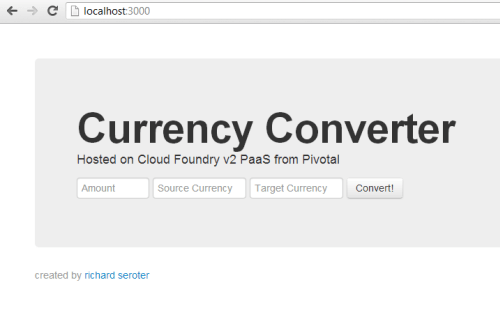
    This basic application uses the secret Google API to do currency conversion. The app ran fine on my local machine and was almost ready for the Pivotal cloud.

    2013.06.19cf01

    Deploying an application

    Instead of using the old vmc command for interacting with Cloud Foundry environments, we now have the cf command tool for targeting Cloud Foundry v2 environments. The first step was to install cf. Then I prepared my application for running in Cloud Foundry v2. Note that I had to make two changes that I never had to make when deploying to Cloud Foundry v1 environments. First, I had to explicitly set my Node version in the package.json file. The docs imply that this is optional, but my deployment failed when I didn’t have it there. Nonetheless, it doesn’t hurt anything. So, my package.json file looked like this:

    {
      "name": "serotercurrencyconverter",
      "version": "0.0.1",
      "private": true,
      "scripts": {
        "start": "node app.js"
      },
      "dependencies": {
        "express": "3.2.6",
        "jade": "*"
      },
       "engines": {
       "node": ">= 0.10.0"
      }
    }
    

    The second change I made involved setting the start command for my Node.js application. I can’t recall ever being forced to do that before, although once again, it’s not a bad thing. This YML file was generated for me during deployment, so we’ll get to that in a moment.

    I started a command prompt and navigated to the directory that held my Node app. In then used the cf target api.run.pivotal.io command to point the cf tool at the Pivotal cloud. Then I used cf login to provide my credentials and chose a “space”; in this case, my “development” space. The cf push command started the ball rolling on my deployment. I was asked for an application name, instance count, memory limit, domain, and associated services (e.g. database, messaging). Finally, I was asked if I want to save my configuration, and I said yes.

    2013.06.19cf02

    After a few moments, I get an error saying that I failed to provide a start command and therefore my application didn’t stage. No problem. I opened up the manifest.yml file that was automatically added to the project, and added an entry indicating how to start the application.

    ---
    applications:
    - name: serotercurrency
      memory: 64M
      instances: 1
      url: serotercurrency.cfapps.io
      path: .
      command: node app.js
    

    I did another cf push with a —reset flag to make sure it accepted the updated yml file. A few seconds, later, my app shows as running.

    2013.06.19cf03

    Sure enough, visiting the application URL pulls up the (working) page.

    2013.06.19cf06

    Interacting with the app from the console

    Congrats to me, I’ve got an app deployed! The new cf tool has a lot more functionality than the old vmc tool did. But you’ll still find all the important operations for managing and maintaining your applications. For instance, I can easily see all the applications that I’ve deployed using cf apps.

    2013.06.19cf04

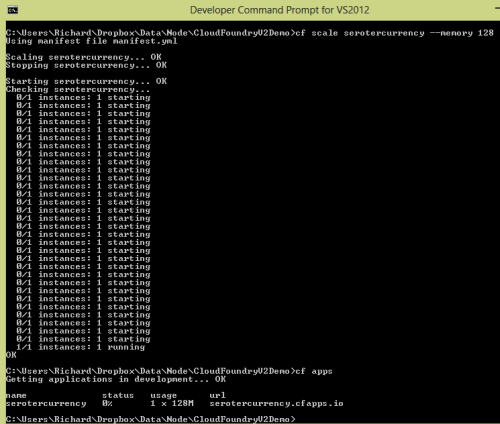
    Scaling an application was simple. I simply ran cf scale and provided the application name, which dimension to scale (app instances, memory, storage) and the amount.

    2013.06.19cf05

    Interested in the utilization statistics of an application? Just run cf stats to see how much CPU, memory and disk is being consumed.

    2013.06.19cf07

    All very good stuff. Take a look at all the commands that cf has to offer. Next up, let’s see the fancy new portal for managing Pivotal-hosted Cloud Foundry v2 applications.

    Interacting with the app from the Pivotal management portal

    Up until now, most of my interactions with Cloud Foundry environments were through vmc. Many hosting vendors created GUI layers on top, but I honestly didn’t spend too much time with them. The new Cloud Foundry management experience that Pivotal offers is pretty slick. While not nearly as mature yet as other leading PaaS portals, it shows the start of a powerful interface. Note that this web-based interface will likely be Pivotal-specific and not checked in to the public source code repository. It represents a value-added feature for those who come to Pivotal for their commercial Cloud Foundry offering.

    2013.06.19cf08

    Cloud Foundry v2 has the concepts of organizations, spaces, and applications. I have an organization called “Seroter”, and default “spaces” for development, staging, and production. I can add and delete spaces as I see fit. This structure provides a way to segment access to applications so that companies can effectively control who has what type of access to various application containers. In my development space, you can see that I have a single application, and a single user.

    2013.06.19cf09

    I can invite more users to my space, and assign them one of a handful of pre-defined (and fixed) roles. There are broad organization-based roles (organization manager, billing manager, auditing manager), and three space-based roles (space manager, space developer, space auditor).

    2013.06.19cf10

    Drilling into an individual application shows me the health of the application, instance count, bound services, utilization statistics, uptime, and more.

    2013.06.19cf11

    It doesn’t appear that Pivotal is offering their own hosted services as before (databases like PostgreSQL and MongoDB; messaging services like RabbitMQ) and is leveraging a marketplace of cloud providers. If you choose to add a new service – or click the “marketplace” link on the top navigation – you’re taken to a view where a handful of providers offer a variety of application services.

    2013.06.19cf12

    Summary

    There’s lots to like about Cloud Foundry v2. It’s undergone some significant plumbing changes while retaining a familiar developer experience. The cf tool is a big upgrade from the previous tool, and the Pivotal management portal provides a very nice interface that flexes some of the structural changes (e.g. spaces) introduced in Cloud Foundry v2. For companies looking for a public or private PaaS that works well with multiple languages/frameworks, Cloud Foundry should absolutely be on your list.

  • TechEd North America Session Recap, Recording Link

    Last week I had the pleasure of visiting New Orleans to present at TechEd North America. My session, Patterns of Cloud Integration, was recorded and is now available on Channel9 for everyone to view.

    I made the bold (or “reckless”, depending on your perspective) decision to show off as many technology demos as possible so that attendees could get a broad view of the options available for integrating applications, data, identity, and networks. Being a Microsoft conference, many of my demonstrations highlighted aspects of the Microsoft product portfolio – including one of the first public demos of Windows Azure BizTalk Services – but I also snuck in a few other technologies as well. My demos included:

    1. [Application Integration] BizTalk Server 2013 calls REST-based Salesforce.com endpoint and authenticates with custom WCF behavior. Secondary demo also showed using SignalR to incrementally return the results of multiple calls to Salesforce.com.
    2. [Application Integration] ASP.NET application running in Windows Azure Web Sites using the Windows Azure Service Bus Relay Service to invoke a web service on my laptop.
    3. [Application Integration] App running in Windows Azure Web Sites sending message to Windows Azure BizTalk Services. Message then dropped to one of three queues that was polled by Node.js application running in CloudFoundry.com.
    4. [Application Integration] App running in Windows Azure Web Sites sending message to Windows Azure Service Bus Topic, and polled by both a Node.js application in CloudFoundry.com, and a BizTalk Server 2013 server on-premises.
    5. [Application/Data Integration] ASP.NET application that uses local SQL Server database but changes connection string (only) to instead point to shared database running in Windows Azure.
    6. [Data Integration] Windows Azure SQL Database replicated to on-premises SQL Server database through the use of Windows Azure SQL Data Sync.
    7. [Data Integration] Account list from Salesforce.com copied into on-premises SQL Server database by running ETL job through the Informatica Cloud.
    8. [Identity Integration] Using a single set of credentials to invoke an on-premises web service from a custom VisualForce page in Salesforce.com. Web service exposed via Windows Azure Service Bus Relay.
    9. [Identity Integration] ASP.NET application running in Windows Azure Web Sites that authenticates users stored in Windows Azure Active Directory.
    10. [Identity Integration] Node.js application running in CloudFoundry.com that authenticates users stored in an on-premises Active Directory that’s running Active Directory Federation Services (AD FS).
    11. [Identity Integration] ASP.NET application that authenticates users via trusted web identity providers (Google, Microsoft, Yahoo) through Windows Azure Access Control Service.
    12. [Network Integration] Using new Windows Azure point-to-site VPN to access Windows Azure Virtual Machines that aren’t exposed to the public internet.

    Against all odds, each of these demos worked fine during the presentation. And I somehow finished with 2 minutes to spare. I’m grateful to see that my speaker scores were in the top 10% of the 350+ breakouts, and hope you’ll take some time to watch it. Feedback welcome!

  • Networking with the Cloud is a Big Deal – Even if You Never Push Production Applications

    I’m flying to New Orleans to speak at TechEd North America, and reading a book called Everything is Obvious (* Once You Know the Answer) and it mentioned the difficulty of making macro-level assumptions based on characteristics applied to a sample population. For some reason my mind jumped to the challenge of truly testing applications using manufactured test cases that may not flex the scalability, availability, and inherent complexity of inter-connected apps. At the same time, I read a blog post from Scott Guthrie today that highlighted the ease by which companies can use Windows Azure to dev/test in the cloud and then run an application on premises, and vice versa. But to truly do dev/test in the cloud for an application that eventually runs on-premises, the development team either needs to entirely replicate the on-premises topology in the cloud, or, take advantage of virtual networking to link their dev/test cloud to the on-premises network.

    In my career, it’s been hard to acquire dev/test environments that were identical clones of production. It’s happened, but it often takes a while and making subsequent changes to resources is not trivial or without heartache. This is one reason why cloud infrastructure is so awesome. Need to add more capacity to server? Go for it. Want to triple the number of web servers to do a crazy load test for an hour? Have at it. But until recently, the cloud portion of the application was mostly distinct from on-premises resources. You weren’t using the same Active Directory, file system, shared databases, integration bus, or web services. You could clone them in the cloud, or simply stub them out, but then the cloud app wasn’t a realistic mimic of what was going to eventually run on-premises. Now, with all these advances in virtual networking in the cloud, you can actually build and test applications in the cloud and STILL take advantage of the rich system landscape sitting inside your firewall.

    One of my demos for TechEd shows off Windows Azure Virtual Networking and I was able to see first-hand how straightforward it was to use it. With Windows Azure Virtual Networking, I can do point-to-site connectivity (where I run a VPN on my machine and connect to an entire Windows Azure network of servers), or site-to-site connectivity where a persistent connection is established between an on-premises network and a cloud network. For even more advanced scenarios (not yet offered by Windows Azure, but offered by my company, Tier 3), you go a step further and do “direct connect” scenarios where physical cages are connected, or extensions are made to an existing WAN MPLS mesh. These options make it possible for a developer to run apps in the cloud (whether they are web apps or entire integration servers) and make them look more like apps that will eventually run in their datacenter. Regardless of what technology/provider you use – and whether or not you ever plan on pushing production apps to the cloud – it seems worthwhile to use cloud networking to give your developers a more realistic working environment. At TechEd in New Orleans at want to see this demonstrated in person? Come to my session on Wednesday! For those not here in person, you should be able to watch the session online soon!

  • Walkthrough of New Windows Azure BizTalk Services

    The Windows Azure EAI Bridges are dead. Long live BizTalk Services! Initially released last year as a “lab” project, the Service Bus EAI Bridges were a technology for connecting cloud and on-premises endpoints through an Azure-hosted broker. This technology has been rebranded (“Windows Azure BizTalk Services”) and upgraded and is now available as a public preview. In this blog post, I’ll give you a quick tour around the developer experience.

    First off, what actually *is* Windows Azure BizTalk Services (WABS)? Is it BizTalk Server running in the cloud? Does it run on-premises? Check out the announcement blog posts from the Windows Azure and BizTalk teams, respectively, for more. But basically, it’s separate technology from BizTalk Server, but meant to be highly complementary. Even though It uses a few of the same types of artifacts such as schemas and maps, they aren’t interchangeable. For example, WABS maps don’t run in BizTalk Server, and vice versa. Also, there’s no concept of long-running workflow (i.e. orchestration), and none of the value-added services that BizTalk Server provides (e.g. Rules Engine, BAM). All that said, this is still an important technology as it makes it quick and easy to connect a variety of endpoints regardless of location. It’s a powerful way to expose line-of-business apps to cloud systems, and Windows Azure hosting model makes it possible to rapidly scale solutions. Check out the pricing FAQ page for more details on the scaling functionality, and the reasonable pricing.

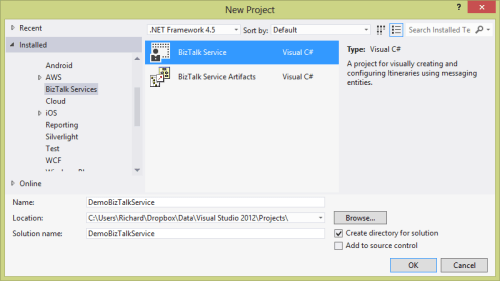
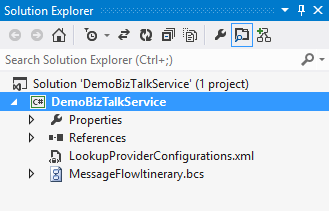
    Let’s get started. When you install the preview components, you’ll get a new project type in Visual Studio 2012.

    2013.06.03wabs01

    Each WABS project can contain a single “bridge configuration” file. This file defines the flow of data between source and destination endpoints. Once you have a WABS project, you can add XML schemas, flat-file schemas, and maps.

    2013.06.03wabs02

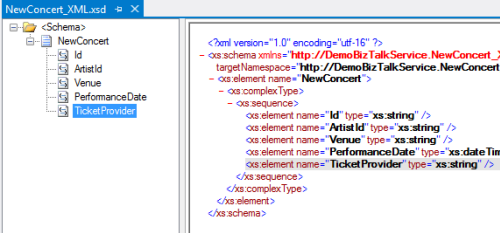
    The WABS Schema Editor looks identical to the BizTalk Server Schema Editor and lets you define XML or flat file message structures. While the right-click menu promises the ability to generate and validate file instances, my pre-preview version of the bits only let me validate messages, not generate sample ones.

    2013.06.03wabs03

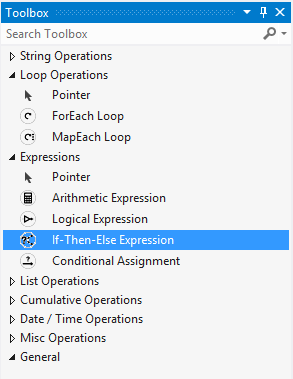
    The WABS schema mapper is very different from the BizTalk Mapper. And that’s a good thing. The UI has subtle alterations, but the more important change is in the palette of available “functoids” (components for manipulating data). First, you’ll see more sophisticated looping and logical expression handling. This include a ForEach Loop and finally, an If-Then-Else Expression option.

    2013.06.03wabs04

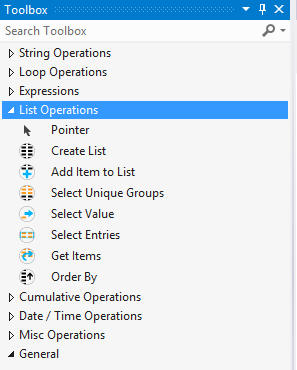
    The concept of “lists” are also entirely new. You can populate, persist, and query lists of data and create powerfully complex mappings between structures.

    2013.06.03wabs05

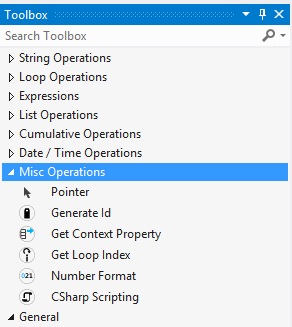
    Finally, there are some “miscellaneous” operations that introduce small – but helpful – capabilities. These functoids let you grab a property from the message’s context (metadata), generate a random ID, and even embed custom C# code into a map. I seem to recall that custom code was excluded from the EAI Bridges preview, and many folks expressed concern that this would limit the usefulness of these maps for tricky, real-world scenarios. Now, it looks like this is the most powerful data mapping tool that Microsoft has ever produced. I suspect that an entire book could be written about how to properly use this Mapper.

    2013.06.03wabs06

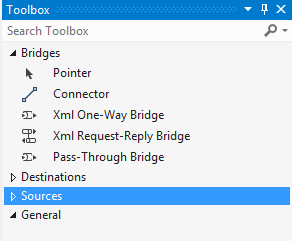
    Next up, let’s take a look at the bridge configuration and what source and destination endpoints are supported. The toolbox for the bridge configuration file shows three different types of bridges: XML One-Way Bridge, XML Request-Reply Bridge, and Pass-Through Bridge.

    2013.06.03wabs07

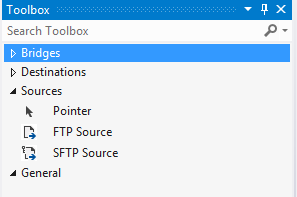
    You’d use each depending on whether you were doing synchronous or asynchronous XML messaging, or any flat file transmission. To get data into a bridge, today you can use HTTP, FTP, or SFTP. Notice that “HTTP” doesn’t show up in that list as each bridge automatically has a Windows Azure ACS-secured HTTP endpoint associated with it.

    2013.06.03wabs08

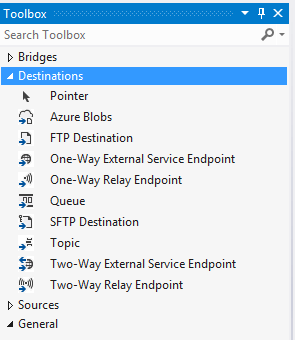
    While the currently available set of sources is a bit thin, the destination options are solid. You can consume web services, Service Bus Relay endpoints, Service Bus Queues / Topics, Windows Azure Blobs, FTP and SFTP endpoints.

    2013.06.03wabs09

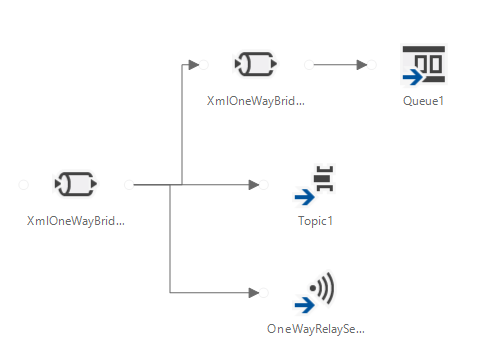
    A given bridge configuration file will often contain a mix of these endpoints. For instance, consider a case where you want to route a message to one of three different endpoints based on some value in the message itself. Also imagine wanting to do a special transformation heading to one endpoint, and not the others. In the configuration below, I’m chaining together XML bridges to route to the Service Bus Queue, and directly routing to either the Service Bus Topic or Relay Service based on the message content.

    2013.06.03wabs10

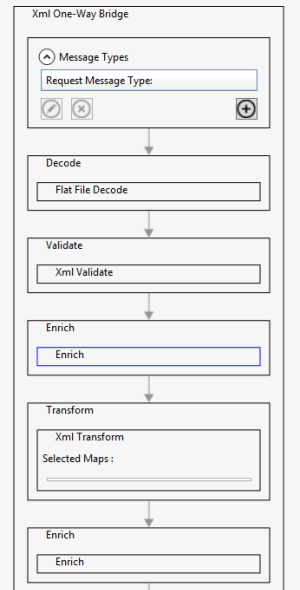
    An individual bridge has a number of stages that a message passes through. Double-clicking a bridge reveals steps for identifying, decoding, validating, enriching, encoding, and transforming messages.

    2013.06.03wabs11

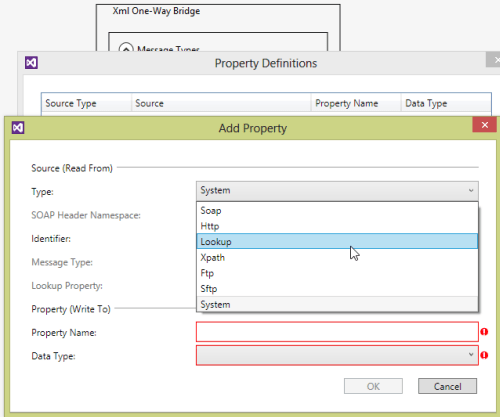
    An individual step exposes relevant configuration properties. For instance, the “Enrich” stage of a bridge lets you choose a way to populate data in the outbound message’s metadata (context) properties. Options include pulling values from the source message’s SOAP or HTTP headers, XPath against the source message body, lookup to a Windows Azure SQL database, and more.

    2013.06.03wabs12

    When a bridge configuration is completed and ready for deployment, simply right-click the Visual Studio project and choose Deploy and fill in valid credentials for the WABS preview.

    Wrap Up

    This is definitely preview software as there are a number of things we’ll likely see added before it’s ready for production use (e.g. enhanced management). However, it’s a good time to start poking around and getting a feel for when you might use this. On a broad scale, you COULD choose to use this instead of something like MuleSoft’s CloudHub to do pure cloud-to-cloud integration, but WABS is drastically less mature than what MuleSoft  has to offer. Moving forward, it’d be great to see a durable workflow component added, additional sources, and Microsoft really needs to start baking JSON support into more products from the get-go.

    What do you think? Plan on trying this out? Have ideas for where you could use it?

  • Going to Microsoft TechEd (North America) to Speak About Cloud Integration

    In a few weeks, I’ll be heading to New Orleans to speak at Microsoft TechEd for the first time. My topic – Patterns of Cloud Integration – is an extension of things I’ve talked about this year in Amsterdam, Gothenburg, and in my latest Pluralsight course. However, I’ll also be covering some entirely new ground and showcasing some brand new technologies.

    TechEd is a great conference with tons of interesting sessions, and I’m thrilled to be part of it. In my talk, I’ll spend 75 minutes discussing practical considerations for application, data, identity, and network integration with cloud systems. Expect lots of demonstrations of Microsoft (and non-Microsoft) technology that can help organizations cleanly link all IT assets, regardless of physical location. I’ll show off some of the best tools from Microsoft, Salesforce.com, AWS (assuming no one tackles me when I bring it up), Informatica, and more.

    Any of you plan on going to North America TechEd this year? If so, hope to see you there!

  • Creating a “Flat File” Shared Database with Amazon S3 and Node.js

    In my latest Pluralsight video training course – Patterns of Cloud Integration – I addressed application and data integration scenarios that involve cloud endpoints. In the “shared database” module of the course, I discussed integration options where parties relied on a common (cloud) data repository. One of my solutions was inspired by Amazon CTO Werner Vogels who briefly discussed this scenario during his keynote at last Fall’s AWS re:Invent conference. Vogels talked about the tight coupling that initially existed between Amazon.com and IMDB (the Internet Movie Database). Amazon.com pulls data from IMDB to supplement various pages, but they saw that they were forcing IMDB to scale whenever Amazon.com had a burst. Their solution was to decouple Amazon.com and IMDB by injecting a a shared database between them. What was that database? It was HTML snippets produced by IMDB and stored in the hyper-scalable Amazon S3 object storage. In this way, the source system (IMDB) could make scheduled or real-time updates to their HTML snippet library, and Amazon.com (and others) could pummel S3 as much as they wanted without impacting IMDB. You can also read a great Hacker News thread on this “flat file database” pattern as well. In this blog post, I’m going to show you how I created a flat file database in S3 and pulled the data into a Node.js application.

    Creating HTML Snippets

    This pattern relies on a process that takes data from a source, and converts it into ready to consume HTML. That source – whether a (relational) database or line of business system – may have data organized in a different way that what’s needed by the consumer. In this case, imagine combining data from multiple database tables into a single HTML representation. This particular demo addresses farm animals, so assume that I pulled data (pictures, record details) into one HTML file for each animal.

    2013.05.06-s301

    In my demo, I simply built these HTML files by hand, but in real-life, you’d use a scheduled service or trigger action to produce these HTML files. If the HTML files need to be closely in sync with the data source, then you’d probably look to establish an HTML build engine that ran whenever the source data changed. If you’re dealing with relatively static information, then a scheduled job is fine.

    Adding HTML Snippets to Amazon S3

    Amazon S3 has a useful portal and robust API. For my demonstration I loaded these snippets into a “bucket” via the AWS portal. In real life, you’d probably publish these objects to S3 via the API as the final stage of an HTML build pipeline.

    In this case, I created a bucket called “FarmSnippets” and uploaded four different HTML files.

    2013.05.06-s302

    My goal was to be able to list all the items in a bucket and see meaningful descriptions of each animal (and not the meaningless name of an HTML file). So, I renamed each object to something that described the animal. The S3 API (exposed through the Node.js module) doesn’t give you access to much metadata, so this was one way to share information about what was in each file.

    2013.05.06-s303

    At this point, I had a set of HTML files in an Amazon S3 bucket that other applications could access.

    Reading those HTML Snippets from a Node.js Application

    Next, I created a Node.js application that consumed the new AWS SDK for Node.js. Note that AWS also ships SDKs for Ruby, Python, .NET, Java and more, so this demo can work for most any development stack. In this case, I used JetBrains WebStorm and the Express framework  and Jade template engine to quickly crank out an application that listed everything in my S3 bucket showed individual items.

    In the Node.js router (controller) handling the default page of the web site, I loaded up the AWS SDK and issued a simple listObjects command.

    //reference the AWS SDK
    var aws = require('aws-sdk');
    
    exports.index = function(req, res){
    
        //load AWS credentials
        aws.config.loadFromPath('./credentials.json');
        //instantiate S3 manager
        var svc = new aws.S3;
    
        //set bucket query parameter
        var params = {
          Bucket: "FarmSnippets"
        };
    
        //list all the objects in a bucket
        svc.client.listObjects(params, function(err, data){
            if(err){
                console.log(err);
            } else {
                console.log(data);
                //yank out the contents
                var results = data.Contents;
                //send parameters to the page for rendering
                res.render('index', { title: 'Product List', objs: results });
            }
        });
    };
    

    Next, I built out the Jade template page that renders these results. Here I looped through each object in the collection and used the “Key” value to create a hyperlink and show the HTML file’s name.

    block content
        div.content
          h1 Seroter Farms - Animal Marketplace
          h2= title
          p Browse for animals that you'd like to purchase from our farm.
          b Cows
          p
              table.producttable
                tr
                    td.header Animal Details
                each obj in objs
                    tr
                        td.cell
                            a(href='/animal/#{obj.Key}') #{obj.Key}
    

    When the user clicks the hyperlink on this page, it should take them to a “details” page. The route (controller) for this page takes the object ID from the querystring and retrieves the individual HTML snippet from S3. It then reads the content of the HTML file and makes it available for the rendered page.

    //reference the AWS SDK
    var aws = require('aws-sdk');
    
    exports.list = function(req, res){
    
        //get the animal ID from the querystring
        var animalid = req.params.id;
    
        //load up AWS credentials
        aws.config.loadFromPath('./credentials.json');
        //instantiate S3 manager
        var svc = new aws.S3;
    
        //get object parameters
        var params = {
            Bucket: "FarmSnippets",
            Key: animalid
        };
    
        //get an individual object and return the string of HTML within it
        svc.client.getObject(params, function(err, data){
            if(err){
                console.log(err);
            } else {
                console.log(data.Body.toString());
                var snippet = data.Body.toString();
                res.render('animal', { title: 'Animal Details', details: snippet });
            }
        });
    };
    

    Finally, I built the Jade template that shows our selected animal. In this case, I used a Jade technique to unescaped HTML so that the tags in the HTML file (held in the “details” variable) were actually interpreted.

    block content
        div.content
            h1 Seroter Farms - Animal Marketplace
            h2= title
            p Good choice! Here are the details for the selected animal.
            | !{details}
    

    That’s all there was! Let’s test it out.

    Testing the Solution

    After starting up my Node.js project, I visited the URL.

    2013.05.06-s304

    You can see that it lists each object in the S3 bucket and shows the (friendly) name of the object. Clicking the hyperlink for a given object sends me to the details page which renders the HTML within the S3 object.

    2013.05.06-s305

    Sure enough, it rendered the exact HTML that was included in the snippet. If my source system changes and updates S3 with new or changed HTML snippets, the consuming application(s) will instantly see it. This “database” can easily be consumed by Node.js applications or any application that can talk to the Amazon S3 web API.

    Summary

    While it definitely makes sense in some cases to provide shared access to the source repository, the pattern shown here is a nice fit for loosely coupled scenarios where we don’t want – or need – consuming systems to bang on our source data systems.

    What do you think? Have you used this sort of pattern before? Do you have cases where providing pre-formatted content might be better than asking consumers to query and merge the data themselves?

    Want to see more about this pattern and others? Check out my Pluralsight course called Patterns of Cloud Integration.

  • Calling Salesforce.com REST and SOAP Endpoints from .NET Code

    A couple months back, the folks at Salesforce.com reached out to me and asked if I’d be interested in helping them beef up their .NET-oriented content. Given that I barely say “no” to anything – and this sounded fun – I took them up on the offer. I ended up contributing three articles that covered: consuming Force.com web services, using Force.com with the Windows Azure Service Bus, and using Force.com with BizTalk Server 2013.  The first article is now on the DeveloperForce wiki and is entitled Consuming Force.com SOAP and REST Web Services from .NET Applications.

    This article covers how to securely use the Enterprise API (strongly-typed, SOAP), Partner API (weakly-typed, SOAP), and REST API. It covers how to authenticate users of each API, and how to issue “query” and “create” commands against each. While I embedded a fair amount of code in the article, it’s always nice to see everything together in context. So, I’ve added my Visual Studio solution to GitHub so that anyone can browse and download the entire solution and quickly try out each scenario.

    Feedback welcome!