Author: Richard Seroter

  • Exploring REST Capabilities of BizTalk Server 2013 (Part 2: Consuming REST Endpoints)

    In my previous post, I looked at how the BizTalk Server 2013 beta supports the receipt of messages through REST endpoints. In this post, I’ll show off a couple of scenarios for sending BizTalk messages to REST service endpoints. Even though the BizTalk adapter is based on the WCF REST binding, all my demonstrations are with non-WCF services (just to prove everything works the same).

    Scenario #1 Consuming “GET” Service From an Orchestration

    In this first case, I planned on invoking a “GET” operation and processing the response in an orchestration. Specifically, I wanted to receive an invoice in one currency, and use a RESTful currency conversation service to flip the currency to US dollars.  There are two key quirks to this adapter that you should be aware of:

    • Consumed REST services cannot have an “&” symbol in the URL. This meant that I had to find a currency conversion service that did NOT use ampersands. You’d think that this would be easy, but many services use a syntax like “/currency?from=AUD&to=USD”, and the adapter doesn’t like that one bit. While “?” seems acceptable, ampersands most definitely are not.
    • The adapter throws an error on GET. Neither GET nor DELETE requests expect a message payload (as they are entirely URL driven), and the adapter throws an error if you send a GET request to an endpoint. This is a problem because you can’t natively send an empty message to an adapter endpoint. Below, I’ll show you one way to get around this. However, I consider this an unacceptable flaw that deserves to be fixed before BizTalk Server 2013 is released.

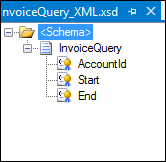
    For this demonstration, I used the adapter-friendly currency conversion service at Exchange Rate API. To get started, I created a new schema for “Invoice” and a property schema that held the values that needed to be passed to the send adapter.

    2012.11.19rest01

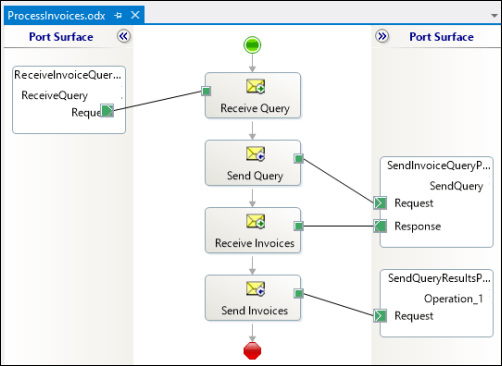
    Next, I built an orchestration that received this message from a (FILE) adapter, routed a GET request to the currency conversion service, and then multiplied the source currency by the returned conversion rate. In the orchestration, I routed the original Invoice message to the GET service, even though I knew I’d have to strip out the body before completing the request. Also, the Exchange Rate API service returns its result as text (not XML or JSON), so I set the response message type as XmlDocument. I then built a helper component that took in the service response message and returned a string.

    public static class Utilities
        {
            public static string ConvertMessageToString(XLANGMessage msg)
            {
                string retval = "0";
    
                using (StreamReader reader = new StreamReader((Stream)msg[0].RetrieveAs(typeof(Stream))))
                {
                    retval = reader.ReadToEnd();
                }
    
                return retval;
            }
        }
    

    Here’s the final orchestration.

    2012.11.19rest02

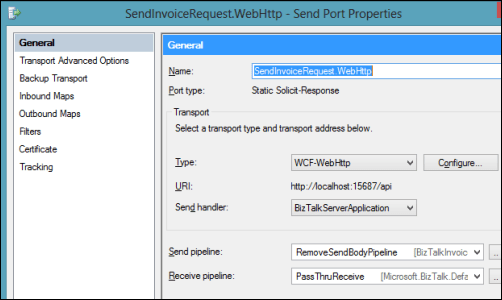
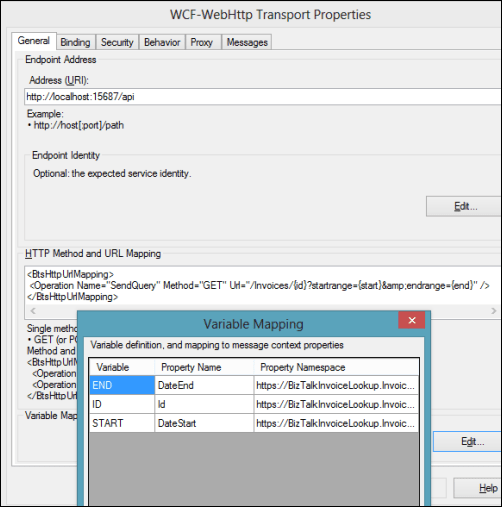
    After building and deploying this BizTalk project (with the two schemas and one orchestration), I created a FILE receive location to pull in the original invoice. I then configured a WCF-WebHttp send port. First, I set the base address to the Exchange Rate API URL, and then set an operation (which matched the name of the operation I set on the orchestration send port) that mapped to the GET verb with a parameterized URL.

    2012.11.19rest03

    I set those URL parameters by clicking the Edit button under Variable Mapping and choosing which property schema value mapped to each URL parameter.

    2012.11.19rest04

    This scenario was nearly done. All that was left was to strip out the body of message so that the GET wouldn’t fail. Fortunately, Saravana Kumar already built a simple pipeline component that erases the message body. I built the pipeline component, added it to a custom pipeline, and deployed the pipeline.

    2012.11.19rest05

    Finally, I made sure that my send port used this new pipeline.

    2012.11.19rest06

    With all my receive/send ports created and configured, and my orchestration enlisted, I dropped a sample file into a folder monitored by the FILE receive adapter. This sample invoice was for 100 Australian dollars, and I wanted the output invoice to translate that amount to U.S. dollars. Sure enough, the REST service was called, and I got back a modified invoice.
    <ns0:Invoice xmlns:ns0="http://Seroter.BizTalkRestDemo">
      <ID>100</ID>
      <CustomerID>10022</CustomerID>
      <OriginalInvoiceAmount>100</OriginalInvoiceAmount>
      <OriginalInvoiceCurrency>AUD</OriginalInvoiceCurrency>
      <ConvertedInvoiceAmount>103.935900</ConvertedInvoiceAmount>
      <ConvertedInvoiceCurrency>USD</ConvertedInvoiceCurrency>
    </ns0:Invoice>
    

    So we can see that GET works pretty well (and should prove to be VERY useful as more and more services switch to a RESTful model), but you have to be careful on both the URLs you access, and the body you (don’t) send.

    Scenario #2 Invoking a “DELETE” Command Via Messaging Only

    Let’s try a messaging-only solution that avoids orchestration and calls a service with a DELETE verb. For fun, I wanted to try using the WCF-WebHttp adapter with the “single operation format” instead of the XML format that lets you list multiple operations, verbs and URLs.

    In this case, I wrote an ASP.NET Web API service that defines an “Invoice” model, and has a controller with a single operation that responds to DELETE requests (and writes a trace statement).

    public class InvoiceController : ApiController
        {
            public HttpResponseMessage DeleteInvoice(string id)
            {
                System.Diagnostics.Debug.WriteLine("Deleting invoice ... " + id);
                return new HttpResponseMessage(HttpStatusCode.NoContent);
            }
        }
    

    With my REST service ready to go, I created a new send port that would subscribe directly on the input message and call this service. The structured of the “single operation format” isn’t really explained, so I surmised that all it included was the HTTP verb that would be executed against the adapter’s URL. So, the URL must be fixed, and cannot contain any dynamic parameter values. For instance:

    2012.11.19rest08

    To be sure, the scenario above make zero sense. You’d never  really hardcode a URL that pointed to a specific transaction resource. HOWEVER, there could be a reference data URL (think of lists of US states, or current currency value) that might be fixed and useful to embed in an adapter. Nonetheless, my demos aren’t always about making sense, but about flexing the technology. So, I went ahead and started this send port (WITHOUT changing it’s pipeline from “passthrough” to “remove body”) and dropped an invoice file to be picked up. Sure enough, the file was picked up, the service was called, and the output was visible in my Visual Studio 2012 output window.

    2012.11.19rest09

    Interestingly enough, the call to DELETE did NOT require me to suppress the message body. Seems that Microsoft doesn’t explicitly forbid this, even though payloads aren’t typically sent as part of DELETE requests.

    Summary

    In these two articles, we looked at REST support in the BizTalk Server 2013 (beta). Overall, I like what I see. SOAP services aren’t going anywhere anytime soon, but the trend is clear: more and more services use a RESTful API and a modern integration bus has to adapt. I’d like to see more JSON support, but admittedly haven’t tried those scenarios with these adapters.

    What do you think? Will the addition of REST adapters make your life easier for both exposing and consuming endpoints?

  • Exploring REST Capabilities of BizTalk Server 2013 (Part 1: Exposing REST Endpoints)

    The BizTalk Server 2013 beta is out there now and I thought I’d take a look at one of the key additions to the platform. In this current age of lightweight integration and IFTTT simplicity, one has to wonder where BizTalk will continue to play. That said, a clean support of RESTful services will go a long way to keeping BizTalk relevant for both on-premises and cloud-based integration scenarios. Some smart folks have messed around with getting previous version of BizTalk to behave RESTfully, but now there is REAL support for GET/POST/PUT/DELETE in the BizTalk engine.

    I decided to play with two aspects of REST services and BizTalk Server 2013: exposing REST endpoints and consuming REST endpoints. In this first post, I’ll take a look at exposing REST endpoints.

    Scenario #1: Exposing Synchronous REST Service with Orchestration

    In this scenario, I wanted to use the BizTalk-provided WCF Service Publishing Wizard to generate a REST endpoint. Let’s assume that I want to let modern web applications send new “account” records into our ESB for further processing. Since these accounts are associated with different websites, we want a REST service URL that identifies which website property they are part of. The simple schema of an account looked like this:

    2012.11.12rest01

    I also added a property schema that had fields for the website property ID and the account ID. The “property ID” node’s source was set to MessageContextPropertyBase because its value wouldn’t exist in the message itself, but rather, it would solely exists in the message context.

    2012.11.12rest02

    I could stop here and just deploy this, but let’s explore a bit further. Specifically, I want an orchestration that receives new account messages and sets the unique ID value before returning a message to the caller. This orchestration directly subscribes to the BizTalk MessageBox and looks for any messages with a target operation called “CreateAccount.”

    2012.11.12rest03

    After building and deploying the project, I then started up the WCF Service Publishing Wizard. Notice that we can now select WCF-WebHttp as a valid source adapter type. Recall that this is the WCF binding that supports RESTful services.

    2012.11.12rest04

    After choosing the new web service address, I located my new service in IIS and a new Receive Location in the BizTalk Engine.

    2012.11.12rest05

    The new Receive Location had a number of interesting REST-based settings. First, I could choose the URL and map the URL parameters to message property (schema) values. Notice here that I created a single operation called “CreateAccount” and associated with the HTTP POST verb.

    2012.11.12rest06

    How do I access that “{pid}” value (which holds the website property identifier) in the URL from within my BizTalk process? The Variable Mapping section of the adapter configuration lets me put these URL values into the message context.

    2012.11.12rest07

    With that done, I bound this receive port/location to the orchestration, started everything up, and fired up Fiddler. I used Fiddler to invoke the service because I wanted to ensure that there was no WCF-specific stuff visible from the service consumer’s perspective. Below, you can see that I crafted a URL that included a website property (“MSWeb”) and a message body that is missing an account ID.

    2012.11.12rest08

    After performing an HTTP POST to that address, I immediately got back an HTTP 200 code and a message containing the newly minted account ID.

    2012.11.12rest09

    There is a setting in the adapter to set outbound headers, but I haven’t seen a way yet to change the HTTP status code itself. Ideally, the scenario above would have returned an HTTP 202 code (“accepted”) vs. a 200. Either way, what an easy, quick way to generate interoperable REST endpoints!


    Scenario #2: Exposing Asynchronous REST Service for Messaging-Only Solution

    Let’s do a variation on our previous example so that we can investigate the messages a bit further. In this messaging-only solution (i.e. no orchestration in the middle), I wanted to receive either PUT or DELETE messages and asynchronously route them to a subsequent system. There are no new bits to deploy as I reused the schemas that were built earlier. However, I  did generate a new, one-way WCF REST service for getting these messages into the engine.

    In this receive location configuration, I added two operations (“UpdateAccount”, “DeleteAccount”) and set the corresponding HTTP verb and URI template.

    2012.11.12rest12

    I could list as many service operations as I wanted here, and notice  that I had TWO parameters (“pid”, “aid”) in the URI template. I was glad to see that I could build up complex addresses with multiple parameters. Each parameter was then mapping to a property schema entry.

    2012.11.12rest13

    After saving the receive location configuration, I configured a quick FILE send port. I left this port enlisted (but not started) so that I could see what the message looked like as it traveled through BizTalk. On the send port, I had a choice of new filter criteria that were related to the new WCF-WebHttp adapter. Notice that I could filter messages based on inbound HTTP method, headers, and more.

    2012.11.12rest14

    For this particular example, I filtered on the BTS.Operation which is set based on whatever URL is invoked.

    2012.11.12rest15

    I returned to Fiddler and changed the URL, switched my HTTP method from POST to PUT and submitted the request.

    2012.11.12rest16

    I got an HTTP 200 code back, and within BizTalk, I could see a single suspended message that was waiting for my Send Port to start. Opening that message revealed all the interesting context properties that were available. Notice that the operation name that I mapped to a URL in the receive adapter is there, along with various HTTP header and verbs. Also see that my two URL parameters were successfully promoted into context.

    2012.11.12rest17


    Summary

    That was a quick look at exposing REST endpoints. Hopefully that gives you a sense of the native aspect of this new capability. In the next post, I’ll show you how to consume REST services.

  • Links to Recent Articles Written Elsewhere

    Besides this blog, I still write regularly for InfoQ.com as well in as a pair of blogs for my employer, Tier 3. It’s always a fun exercise for me to figure out what content should go where, but I do my best to spread it around. Anyway, in the past couple weeks, I’ve written a few different posts that may (or may not) be of interest to you:

    Lots of great things happening in the tech space, so there’s never a shortage of cool things to investigate and write about!

  • Interview Series: Four Questions With … Jürgen Willis

    Greetings and welcome to the 44th interview in my series of talks with leaders in the “connected technology” space. This month, I reached out to Jürgen Willis who is Group Program Manager for the Windows Azure team at Microsoft with responsibility for Windows Workflow Foundation and the new Workflow Manager (on-prem and in Windows Azure). Jürgen frequently contributes blog posts to the Workflow Team blog, and is well known in the community for his participation in the development of BizTalk Server 2004 and Windows Communication Foundation.

    I’ve known Jürgen for years and he’s someone that I really admire for ability to explain technology to any audience. Let’s see how he puts up with my four questions.

    Q: Congrats on releasing the new Workflow Manager 1.0! It seems that after a quiet period, we’re back to have a wide range of Microsoft tools that can solve similar problems. Help me understand some of the cases when I’d use Windows Server AppFabric, and when I’d be bettering off pushing WF services to the Workflow Manager.

    A: Workflow Manager and AppFabric support somewhat different scenarios and have different design goals, much like WorkflowApplication and WorkflowServiceHost in .NET support different scenarios, while leveraging the same WF core.

    WorkflowServiceHost (WFSH) is focused on building workflows that consume WCF SOAP services and are addressable as WCF SOAP services.  The scenario focus is on standalone Enterprise apps/workflows that use service-based composition and integration.  AppFabric, in turn, focuses on adding management capabilities to IIS-hosted WFSH workflows.

    Workflow Manager 1.0 has as its key scenarios: multi-tenant ISVs and cloud scale (we are running the same technology as an Azure service behind Office 365).  From a messaging standpoint, we focused on REST and Service Bus support since that aligns with both our SharePoint integration story, as well as the predominant messaging models in new cloud-based applications.  We had to scope the capabilities in this release largely around the SharePoint scenarios, but we’ve already started planning the next set of capabilities/scenarios for Workflow Manager.

    If you’re using AppFabric and its meeting your needs, it makes sense to stick with that (and you should be sure to check out the new 4.5 investments we made in WFSH).  If you have a longer project timeline and have scenarios that require the multi-tenant and scaleout characteristics of Workflow Manager, are Azure-focused, require workflow/activity definition management or will primarily use REST and/or Service Bus based messaging, then you may want to evaluate Workflow Manager.

    Q: It seems that today’s software is increasingly built using an aggregation of frameworks/technologies as developers aren’t simply trying to use one technology to do everything. That said, what do you think is that sweet spot for Workflow Foundation in enterprise apps or public web applications? When should I realistically introduce WF into my applications instead of simply coding the (stateful) logic?

    A: I would consider WF in my application if I had one or more of these requirements:

    • Authors of the process logic are not full-time developers.  WF provides a great mechanism to provide application extensibility, which allows a broader set of people to extend/author process logic.  We have many examples of ISVs who have used WF to provide extensibility to their applications.  The rehostable WF designer, combined with custom activities specific to the organization/domain allow for a very tailored experience which provides great productivity to people who are domain experts, but perhaps not developers.  We have increasingly seen Enterprises doing similar things, where a central team builds an application that allows various departments to customize their use of the application via the WF tools.
    • The process flow is long running.  WF’s ability to automatically persist and reload workflow instances can remove the need to write a lot of tricky plumbing code for supporting long running process logic.
    • Coordination across multiple external systems/services is required.  WF makes it easier to write this coordination logic, including async messaging handling, parallel execution, correlation to workflow instances,  queued message support, and transactional coordination of inbound/outbound messages with process state.
    • Increased visibility to the process logic is desired.  This can be viewed in a couple of ways.  The graphical layout makes it much clearer what the process flow is – I’ve had many customers tell me about the value of a developer/implementer being able to review the workflow with the business owner to ensure that the requirements are being met.  The second aspect of this is that the workflow tracking data provides pretty thorough data about what’s happening in the process.  We have more we’d like to do in terms of surfacing this information via tools, but all the pieces are there for customers to build rich visualizations today.

    For those new to Workflow, we have a number of resources listed here.

    Q: You and I have spoken many times over the years about rules engines and the Microsoft products that love them. It seems that this is still a very fuzzy domain for Microsoft customers and I personally haven’t seen a mass demand for a more sophisticated rules engine from Microsoft. Is that really the case? Have you received a lot of requests for further investment in rules technology? If not, why do you think that is?

    A: We do get the question pretty regularly about further investments in rules engines, beyond our current BizTalk and WF rules engine technology.  However, rules engines are the kind of investment that is immensely valuable to a minority of our overall audience; to date, the overall priorities from our customers have been higher in other areas.  I do hope that the organization is able to make further investments in this area in the future; I believe there’s a lot of value that we could deliver.

    Q [stupid question]: Halloween is upon us, which means yet another round of trick-or-treating kids wearing tired outfits like princesses, pirates and superheroes. If a creative kid came to my door dressed as a beaver, historically-accurate King Henry VIII, or USB  stick, I’d probably throw an extra Snickers in their bag. What Halloween costume(s) would really impress you?

    A: It would be pretty impressive to see some kids doing a Chinese dragon dance 🙂

    Great answers, Jürgen. That’s some helpful insight into WF that I haven’t seen before.

  • Capabilities and Limitations of “Contract First” Feature in Microsoft Workflow Services 4.5

    I think we’ve moved well past the point of believing that “every service should be a workflow” and other things that I heard when Microsoft was first plugging their Workflow Foundation. However, there still seem to be many cases where executing a visually modeled workflow is useful. Specifically, they are very helpful when you have long running interactions that must retain state. When Microsoft revamped Workflow Services with the .NET 4.0 release, it became really simple to build workflows that were exposed as WCF services. But, despite all the “contract first” hoopla with WCF, Workflow Services were inexplicably left out of that. You couldn’t start the construction of a Workflow Service by designing a contract that described the operations and data payloads. That has all been rectified in .NET 4.5 as now developers can do true contract-first development with Workflow Services. In this blog post, I’ll show you how to build a contract-first Workflow Service, and, include a list of all the WCF contract properties that get respected by the workflow engine.

    First off, there is an MSDN article (How to: Create a workflow service that consumes an existing service contract) that touches on this, but there are no pictures and limited details, and my readers demand both, dammit.

    To begin with, I created a new Workflow Services project in Visual Studio 2012.

    2012.10.12wf01

    Then, I chose to add a new class directly to the Workflow Services project.

    2012.10.12wf02

    Within this new class filed, named IOrderService, I defined a new WCF service contract that included an operation that processes new orders. You can see below that I have one contract and two data payloads (“order” and “order confirmation”).

    namespace Seroter.ContractFirstWorkflow
    {
        [ServiceContract(
            Name="OrderService",
            Namespace="http://Seroter.Demos")]
        public interface IOrderService
        {
            [OperationContract(Name="SubmitOrder")]
            OrderConfirmation Submit(Order customerOrder);
        }
    
        [DataContract(Name="CustomerOrder")]
        public class Order
        {    
            [DataMember]
            public int ProductId { get; set; }
            [DataMember]
            public int CustomerId { get; set; }
            [DataMember]
            public int Quantity { get; set; }
            [DataMember]
            public string OrderDate { get; set; }
    
            public string ExtraField { get; set; }
        }
    
        [DataContract]
        public class OrderConfirmation
        {
            [DataMember]
            public int OrderId { get; set; }
            [DataMember]
            public string TrackingId { get; set; }
            [DataMember]
            public string Status { get; set; }
        }
    }
    

    Now which WCF service/operation/data/message/fault contract attributes are supported by the workflow engine? You can’t find that information from Microsoft at the moment, so I reached out to the product team, and they generously shared the content below. You can see that a good portion of the contract attributes are supported, but there are a number of key ones (e.g. callback and session) that won’t make it over. Also, from my own experimentation, you also can’t use the RESTful attributes like WebGet/WebInvoke.

    Attribute Property Name Supported Description
    Service Contract CallbackContract No Gets or sets the type of callback contract when the contract is a duplex contract.
    ConfigurationName No Gets or sets the name used to locate the service in an application configuration file.
    HasProtectionLevel Yes Gets a value that indicates whether the member has a protection level assigned.
    Name Yes Gets or sets the name for the <portType> element in Web Services Description Language (WSDL).
    Namespace Yes Gets or sets the namespace of the <portType> element in Web Services Description Language (WSDL).
    ProtectionLevel Yes Specifies whether the binding for the contract must support the value of the ProtectionLevel property.
    SessionMode No Gets or sets whether sessions are allowed, not allowed or required.
    TypeId No When implemented in a derived class, gets a unique identifier for this Attribute. (Inherited from Attribute.)
    Operation Contract Action Yes Gets or sets the WS-Addressing action of the request message.
    AsyncPattern No Indicates that an operation is implemented asynchronously using a Begin<methodName> and End<methodName> method pair in a service contract.
    HasProtectionLevel Yes Gets a value that indicates whether the messages for this operation must be encrypted, signed, or both.
    IsInitiating No Gets or sets a value that indicates whether the method implements an operation that can initiate a session on the server(if such a session exists).
    IsOneWay Yes Gets or sets a value that indicates whether an operation returns a reply message.
    IsTerminating No Gets or sets a value that indicates whether the service operation causes the server to close the session after the reply message, if any, is sent.
    Name Yes Gets or sets the name of the operation.
    ProtectionLevel Yes Gets or sets a value that specifies whether the messages of an operation must be encrypted, signed, or both.
    ReplyAction Yes Gets or sets the value of the SOAP action for the reply message of the operation.
    TypeId No When implemented in a derived class, gets a unique identifier for this Attribute. (Inherited from Attribute.)
    Message Contract HasProtectionLevel Yes Gets a value that indicates whether the message has a protection level.
    IsWrapped Yes Gets or sets a value that specifies whether the message body has a wrapper element.
    ProtectionLevel No Gets or sets a value that specified whether the message must be encrypted, signed, or both.
    TypeId Yes When implemented in a derived class, gets a unique identifier for this Attribute. (Inherited from Attribute.)
    WrapperName Yes Gets or sets the name of the wrapper element of the message body.
    WrapperNamespace No Gets or sets the namespace of the message body wrapper element.
    Data Contract IsReference No Gets or sets a value that indicates whether to preserve object reference data.
    Name Yes Gets or sets the name of the data contract for the type.
    Namespace Yes Gets or sets the namespace for the data contract for the type.
    TypeId No When implemented in a derived class, gets a unique identifier for this Attribute. (Inherited from Attribute.)
    Fault Contract Action Yes Gets or sets the action of the SOAP fault message that is specified as part of the operation contract.
    DetailType Yes Gets the type of a serializable object that contains error information.
    HasProtectionLevel No Gets a value that indicates whether the SOAP fault message has a protection level assigned.
    Name No Gets or sets the name of the fault message in Web Services Description Language (WSDL).
    Namespace No Gets or sets the namespace of the SOAP fault.
    ProtectionLevel No Specifies the level of protection the SOAP fault requires from the binding.
    TypeId No When implemented in a derived class, gets a unique identifier for this Attribute. (Inherited from Attribute.)

    With the contract in place, I could then right-click the workflow project and choose to Import Service Contract.

    2012.10.12wf03

    From here, I chose which interface to import. Notice that I can look inside my current project, or, browse any of the assemblies referenced in the project.

    2012.10.12wf04


    After the WCF contract was imported, I got a notice that I “will see the generated activities in the toolbox after you rebuild the project.” Since I don’t mind following instructions, I rebuilt my project and looked at the Visual Studio toolbox.

    2012.10.12wf05

    Nice! So now I could drag this shape onto my Workflow and check out how my WCF contract attributes got mapped over. First off, the “name” attribute of my contract operation (“SubmitOrder”) differed from the name of the operation itself (“Submit”). You can see here that the operation name of the Workflow Service correctly uses the attribute value, not the operation name.

    2012.10.12wf06

    What was interesting to me is that none of my DataContract attributes got recognized in the Workflow itself. If you recall from above, I set the “name” attribute of the DataContract for “Order” to “CustomerOrder” and excluded one of the fields, “ExtraField”, from the contract. However, the data type in my workflow is called “Order”, and I can still access the “ExtraField.”

    2012.10.12wf07

    So maybe these attribute values only get reflected in the external contract, not the internal data types. Let’s find out! After starting the Workflow Service and inspecting the WSDL, sure enough, the “type” of the inbound request corresponds to the data contract attribute (“CustomerOrder”).

    2012.10.12wf09

    In addition, the field (“ExtraField”) that I excluded from the data contract is also nowhere to be found in the type definition.

    2012.10.12wf10

    Finally, the name and namespace of the service should reflect the values I defined in the service contract. And indeed they do. The target namespace of the service is the value I set in the contract, and the port type reflects the overall name of the service.

    2012.10.12wf11

    2012.10.12wf12


    All that’s left to do is test the service, which I did in the WCF Test Client.

    2012.10.12wf13

    The service worked fine. That was easy. So if you have existing service contracts and want to use Workflow Services to model out the business logic, you can now do so.

  • Trying Out the New Windows Azure Portal Support for Relay Services

    Scott Guthrie announced a handful of changes to the Windows Azure Portal, and among them, was the long-awaited migration of Service Bus resources from the old-and-busted Silverlight Portal to the new HTML hotness portal. You’ll find some really nice additions to the Service Bus Queues and Topics. In addition to creating new queues/topics, you can also monitor them pretty well. You still can’t submit test messages (ala Amazon Web Services and their Management Portal), but it’s going in the right direction.

    2012.10.08sb05

    One thing that caught my eye was the “Relays” portion of this. In the “add” wizard, you see that you can “quick create” a Service Bus relay.

    2012.10.08sb02

    However, all this does is create the namespace, not a relay service itself, as can be confirmed by viewing the message on the Relays portion of the Portal.

    2012.10.08sb03

    So, this portal is just for the *management* of relays. Fair enough. Let’s see what sort of management I get! I created a very simple REST service that listens to the Windows Azure Service Bus.  I pulled in the proper NuGet package so that I had all the Service Bus configuration values and assembly references. Then, I proceeded to configure this service using the webHttpRelayBinding.

    2012.10.08sb06

    I started up the service and invoked it a few times. I was hoping that I’d see performance metrics like those found with Service Bus Queues/Topics.

    2012.10.08sb07

    However, when I returned to the Windows Azure Portal, all I saw was the name of my Relay service and confirmation of a single listener. This is still an improvement from the old portal where you really couldn’t see what you had deployed. So, it’s progress!

    2012.10.08sb08

    You can see the Service Bus load balancing feature represented here. I started up a second instance of my “hello service” listener and pumped through a few more messages. I could see that messages were being sent to either of my two listeners.

    2012.10.08sb09

    Back in the Windows Azure Portal, I immediately saw that I now had two listeners.

    2012.10.08sb10

    Good stuff. I’d still like to see monitoring/throughput information added here for the Relay services. But, this is still  more useful than the last version of the Portal. And for those looking to use Topics/Queues, this is a significant upgrade in overall user experience.

  • Interview Series: Four Questions With … Hammad Rajjoub

    Greetings and welcome to the 43rd interview in my series of chats with thought leaders in the “connected technologies” domain. This month, I’m happy to have Hammad Rajjoub with us. Hammad is an Architect Advisor for Microsoft, former Microsoft MVP, blogger, published author, and  you can find him on Twitter at @HammadRajjoub.

    Let’s jump in.

    Q: You just published a book on Windows Server AppFabric (my book review here). What do you think is the least-appreciated capability that is provided by this product, and what should developers take a second look at?

    A: I think overall Windows Server AppFabric is an under-utilized technology. I see customers deploying WCF/WF services yet not utilizing AppFabric for hosting, monitoring and caching (note that Windows Server AppFabric is a free product). I will suggest all the developers to look at caching, hosting and monitoring capabilities provided by Windows Server AppFabric and use them appropriately in their ASP.Net, WCF and WF solutions.

    The use of distributed in-memory caching not only helps with performance, but also with scalability. If you cannot scale up then you have to scale out and that is exactly how distributed in-memory caching works for Windows Server AppFabric. Specifically, AppFabric Cache is feature rich and super easy to use. If you are using Windows Server and IIS to host your applications and services, I can’t see any reason why you wouldn’t want to utilize the power of AppFabric Cache.

    Q: As an Architect Advisor, you probably get an increasing number of questions about hybrid solutions that leverage both on-premises and cloud resources. While I would think that the goal of Microsoft (and other software vendors) is to make the communication between cloud and on-premises appear seamless, what considerations should architects explicitly plan for when trying to build solutions that span environments?

    A: Great question! Physical Architecture becomes so much more important. Solutions needs to be designed such that they are intrinsically Service Oriented and are very loosely coupled not only at the component level but at the physical level as well so that you can scale out on demand. Moving existing applications to the cloud is a fairly interesting exercise though. I will recommend architects to take a look at the Microsoft’s guide for building hybrid solutions for the cloud (at http://msdn.microsoft.com/en-us/library/hh871440.aspx).

    More specifically an Architect, working on a hybrid solution, should plan and consider following (non-exhaustive list of) aspects:-

    • data distribution and synchronization
    • protocols and payloads for cross-boundary communication
    • federated identify
    • message routing
    • Health and activity tracking as well as monitoring across hybrid environments

    From a vendor and solution perspective, I will highly recommend to pick a solution stack and technology provider that offers consistent design, development, deployment and monitoring tools across public, private and hybrid cloud environments.

    Q: A customer comes to you today and says that they need to build an internal solution for exchanging data between a few custom and packaged software applications. If we assume they are a Microsoft-friendly shop, how do you begin to identify whether this solution calls for WCF/WF/AppFabric, BizTalk, ASP.NET Web API, or one of the many open source / 3rd party messaging frameworks?

    A:  I think it depends a lot on the nature of the solution and 3rd party systems involved. Windows Server AppFabric are a great fit for solutions built using WCF/WF and ASP.NET technologies. BizTalk is a phenomenal technology for all things EAI with Adapters for SAP, Oracle, and Seibel etc. it’s a go to product for such scenarios. Honestly it depends on the situation. BizTalk is more geared towards EAI and ESB capabilities. WCF/WF and AppFabric are great at exposing LOB capabilities through web services. More often than not we see WCF/WF working side by side with BizTalk.

    Q [stupid question]: The popular business networking site LinkedIn recently launched an “endorsements” feature which lets individuals endorse the particular skills of another individual. This makes it easy for someone to endorse me for something like “Windows Azure” or “Enterprise Integration.” However, it’s also possible to endorse people for skills that are NOT currently in their LinkedIn skills profile. So, someone could theoretically endorse me for things like “firm handshakes”, “COM+”, or “making scrambled eggs.” Which LinkedIn endorsements would you like, and not like, on your profile?

    A: (This is totally new to me 🙂 ). I would like to explicitly opt-in and validate all the “endorsements” before they start appearing on my profile. [Editors Note: Because endorsements do not require validation, I propose that we all endorse Hammad for “.NET 1.0”]

    Thanks to Hammad for taking some time to chat with me!

  • Keeping Your Salesforce.com App From Becoming Another Siebel System

    Last week I was at Dreamforce (the Salesforce.com mega-conference) promoting my recently released Pluralsight course, Force.com for Developers. Salesforce.com made a HUGE effort to focus on developers this year and I had a blast working at the Pluralsight booth in the high-traffic “Dev Zone.” I would guess that nearly 75% of the questions I heard from people at our booth seeking training was how they could quickly create Apex developers. Apex is the programming language of Force.com, and after such a developer-focused week, Apex seemed to be on everyone’s mind. One nagging concern I had was that organizations seem to be aggressively moving towards the “customization” aspect of Salesforce.com and run the risk of creating the same sorts of hard-to-maintain apps that infest their on-premises data centers.

    To be sure, it’s hard (if not impossible) to bastardize a Salesforce.com app in the same way that organizations have done with Siebel and other on-premises line of business apps. I’ve seen Siebel systems that barely resemble their original form and because of “necessary updates” to screens, stored procedures, business logic and such, the system owners are terrified of trying to upgrade (or touch!) them. With Salesforce.com, the more you invest in programming logic, pages, triggers and the like, the more likely that you’ll have a brittle application that may survive platform upgrades, but is a bear to debug and maintain. Salesforce.com is really pushing this “develop custom apps!” angle with all sorts of new tools and ways to build rich, cool apps on the platform. It’s great, but I’ve seen firsthand how Salesforce.com customers get hyped up on customization and end up with failed projects or unrealized expectations.

    So, how can you avoid accidentally building a hard-to-maintain Salesforce.com system? A few suggestions:

    • (Apex) code is a last resort. Apex is cool. It may be the sole topic of my next Pluralsight course and you can do some great stuff with it. If you’ve written C# or Java, you’ll feel at home writing Apex. However, if you point a C# developer (and Salesforce.com rookie) at a business problem, their first impulse will be to sling some code. I saw this myself with developers working on a Microsoft Dynamics CRM system. They didn’t know the platform, but they knew the programming language (.NET), so they went and wrote tons of code for things that actually could be solved with a bit of configuration. Always use configuration first. Why write a workflow in code if you can use actual Force.com workflows? Why build a custom Apex web service if the out-of-box one solves almost all your needs? Make sure developers learn how to use the built-in validation rules, formula fields, Visualforce controls, and security controls before they go off and solve a problem the wrong way.
    • Embrace the constraints. Sometimes “standards” can be liberating. I actually like that PaaS platforms provide some limits that force you to work within their constraints. Instead of instantly thinking about how you could rework Outbound Messaging or make an UI look like an existing internal app, try to rework your processes or personal constraints and embrace the way the platform works. Maybe you’re thinking of doing daily data synchronizations to a local data warehouse because you want reports that are bit visually different than what Salesforce.com offers. However, maybe you can make due with the (somewhat limited) report formats that Salesforce.com offers and avoid a whole integration/synchronization effort. Don’t immediately think of how you’ll change Salesforce.com, but instead think about how you can change your own expectations.
    • Learn to say no to business users. This is a tough one. Just because you CAN do a bunch of stuff in Salesforce.com, doesn’t mean that you should. Yes, you can make it so that data that natively sits on three different forms will sit on a single, custom form. Or, you can add a custom control that kicks off a particular action from an unusual portion of the workflow. But what technical debt are you incurring by making these slight “tweaks” to satisfy the user’s demands? To be sure, usability is super important, but I’ve seen many users who just try to re-create their existing interfaces in new platforms. You need a strong IT leader who can explain how specific changes will increase their cost of support, and instead, to bullet point #2, help the end users change their expectations and embrace the Salesforce.com model. Build fast, see what works, and iterate. Don’t try and do monolithic projects that attempt to perfect the app before releasing it to the users.

    Maybe I’m getting worried for nothing, but one reason that so many organizations are looking at cloud software is to make delivery of apps happen faster and support of those apps easier. It’s one thing to build a custom app in an environment like Windows Azure or Cloud Foundry where it’s required that developers build and deploy custom web solutions (that use a set of environment-defined services). But for PaaS platforms like Salesforce.com or Dynamics CRM, the whole beauty of them is that they provide an extremely configurable platform of a wide range of foundation services (UI/reporting/data/security/integration) that encourages rapid delivery and no-mess upgrades by limiting the need for massive coding efforts. I wonder if we cause trouble by trying to blur the lines between those two types of PaaS solutions.

    Thoughts? Other tips for keeping PaaS apps “clean”? Or is this not really a problem?

  • Versioning ASP.NET Web API Services Using HTTP Headers

    I’ve been doing some work with APIs lately and finally had the chance to dig into the ASP.NET Web API a bit more. While it’s technically brand new (released with .NET 4.5 and Visual Studio 2012), the Web API has been around in beta form for quite a bit now. For those of us who have done a fair amount of work with the WCF framework, the Web API is a welcome addition/replacement. Instead of monstrous configuration files and contract-first demands placed on us by WCF, we can now build RESTful web services using a very lightweight and HTTP-focused framework. As I work on designing a new API, one thing that I’m focused on right now is versioning. In this blog post, I’ll show you how to build HTTP-header-based versioning for ASP.NET Web API services.

    Service designers have a few choices when it comes to versioning their services. What seems like the default option for many is to simply replace the existing service with a new one and hope that no consumers get busted. However, that’s pretty rough and hopefully less frequent than it was in the early days of service design. In the must-read REST API Design Handbook (see my review),  author George Reese points out three main options:

    • HTTP Headers. Set the version number in a custom HTTP header for each request.
    • URI Component. This seems to be the most common one. Here, the version is part of the URI (e.g. /customerservice/v1/customers).
    • Query Parameter. In this case, a parameter is added to each incoming request (e.g. /customerservice/customers?version=1).

    George (now) likes the first option, and I tend to agree. It’s nice to not force new URIs on the user each time a service changes. George finds that a version in the header fit nicely with other content negotiations that show up in HTTP headers (e.g. “content-type”). So, does the ASP.NET Web API support this natively? The answer is: pretty much. While you could try and choose different controller operations based on the inbound request, it’s even better to be able to select entirely different controllers based on the API version. Let’s see how that works.

    First, in Visual Studio 2012, I created a new ASP.NET MVC4 project and chose the Web API template.

    2012.09.25webapi01

    Next, I wanted to add a new “model” that is the representation of my resource. In this example, my service works with an “Account” resource that has information about a particular service account owner.

    using System;
    using System.Collections.Generic;
    using System.Linq;
    using System.Web;
    using System.Runtime.Serialization;
    
    namespace Seroter.AspNetWebApi.VersionedSvc.Models
    {
        [DataContract(Name = "Account", Namespace = "")]
        public class Account
        {
            [DataMember]
            public int Id { get; set; }
            [DataMember]
            public string Name { get; set; }
            [DataMember]
            public string TimeZone { get; set; }
            [DataMember]
            public string OwnerName { get; set; }
        }
    }
    

    Note that I don’t HAVE to use the “[DataContract]” and “[DataMember]” attributes, but I wanted a little more control over the outbound naming, so I decided to decorate my model this way. Next up, I created a new controller to respond to HTTP requests.

    2012.09.25webapi02

    The controller does a few things here. It loads up a static list of accounts, responds to “get all” and “get one” requests, and accepts new accounts via HTTP POST. The “GetAllAccounts” operation is named in a way that the Web API will automatically use that operation when the user requests all accounts (/api/accounts). The “GetAccount” operation responds to requests for a specific account via HTTP GET. Finally, the “PostAccount” operation is also named in a way that it is automatically wired up to any POST requests, and it returns the URI of the new resource in the response header.

    public class AccountsController : ApiController
        {
            /// <summary>
            /// instantiate list of accounts
            /// </summary>
            Account[] accounts = new Account[]
            {
                new Account { Id = 100, Name = "Big Time Consulting", OwnerName = "Harry Simpson", TimeZone = "PST"},
                new Account { Id = 101, Name = "BTS Partners", OwnerName = "Bobby Thompson", TimeZone = "MST"},
                new Account { Id = 102, Name = "Westside Industries", OwnerName = "Ken Finley", TimeZone = "EST"},
                new Account { Id = 103, Name = "Cricket Toys", OwnerName = "Tim Headley", TimeZone = "PST"}
            };
    
            /// <summary>
            /// Returns all the accounts; happens automatically based on operation name
            /// </summary>
            /// <returns></returns>
            public IEnumerable<Account> GetAllAccounts()
            {
                return accounts;
            }
    
            /// <summary>
            /// Returns a single account and uses an explicit [HttpGet] attribute
            /// </summary>
            /// <param name="id"></param>
            /// <returns></returns>
            [HttpGet]
            public Account GetAccount(int id)
            {
                Account result = accounts.FirstOrDefault(acct => acct.Id == id);
    
                if (result == null)
                {
                    HttpResponseMessage err = new HttpResponseMessage(HttpStatusCode.NotFound)
                    {
                        ReasonPhrase = "No product found with that ID"
                    };
    
                    throw new HttpResponseException(err);
                }
    
                return result;
            }
    
            /// <summary>
            /// Creates a new account and returns HTTP code and URI of new resource representation
            /// </summary>
            /// <param name="a"></param>
            /// <returns></returns>
            public HttpResponseMessage PostAccount(Account a)
            {
                Random r = new Random(1);
    
                a.Id = r.Next();
                var resp = Request.CreateResponse<Account>(HttpStatusCode.Created, a);
    
                //get URI of new resource and send it back in the header
                string uri = Url.Link("DefaultApi", new { id = a.Id });
                resp.Headers.Location = new Uri(uri);
    
                return resp;
            }
        }
    

    At this point, I had a working service. Starting up the service and invoking it through Fiddler made it easy to interact with. For instance, a simple “get” targeted at http://localhost:6621/api/accounts returned the following JSON content:

    2012.09.25webapi03

    If I did an HTTP POST of some JSON to that same URI, I’d get back an HTTP 201 code and the location of my newly created resource.

    2012.09.25webapi04

    Neato. Now, something happened in our business and we need to change our API. Instead of just overwriting this one and breaking existing clients, we can easily add a new controller and leverage the very cool IHttpControllerSelector interface to select the right controller at runtime. First, I made a few updates to the Visual Studio project.

    • I added a new class (model) named AccountV2 which has additional data properties not found in the original model.
    • I changed the name of the original controller to AccountsControllerV1 and created a second controller named AccountsControllerV2. The second controller mimics the first, except for the fact that it works with the newer model and new data properties. In reality, it could also have entirely new operations or different plumbing behind existing ones.
    • For kicks and giggles, I also created a new model (Invoice) and controller (InvoicesControllerV1) just to show the flexibility of the controller selector.

    2012.09.25webapi05

    I created a class, HeaderVersionControllerSelector, that will be used at runtime to pick the right controller to respond to the request. Note that my example below is NOT efficiently written, but just meant to show the moving parts. After seeing what I do below, I strongly encourage you to read this great post and very nice accompanying Github code project that shows a clean way to build the selector.

    Basically, there are a few key parts here. First, I created a dictionary to hold the controller (descriptions) and load that within the constructor. These are all the controllers that the selector has to choose from. Second, I added a helper method (thanks to the previously mentioned blog post/code) called “GetControllerNameFromRequest” that yanks out the name of the controller (e.g. “accounts”) provided in the HTTP request. Third, I implemented the required “GetControllerMapping” operation which simply returns my dictionary of controller descriptions. Finally, I implemented the required “SelectController” operation which determines the API version from the HTTP header (“X-Api-Version”), gets the controller name (from the previously created helper function), and builds up the full name of the controller to pull from the dictionary.

     /// <summary>
        /// Selects which controller to serve up based on HTTP header value
        /// </summary>
        public class HeaderVersionControllerSelector : IHttpControllerSelector
        {
            //store config that gets passed on on startup
            private HttpConfiguration _config;
            //dictionary to hold the list of possible controllers
            private Dictionary<string, HttpControllerDescriptor> _controllers = new Dictionary<string, HttpControllerDescriptor>(StringComparer.OrdinalIgnoreCase);
    
            /// <summary>
            /// Constructor
            /// </summary>
            /// <param name="config"></param>
            public HeaderVersionControllerSelector(HttpConfiguration config)
            {
                //set member variable
                _config = config;
    
                //manually inflate controller dictionary
                HttpControllerDescriptor d1 = new HttpControllerDescriptor(_config, "AccountsControllerV1", typeof(AccountsControllerV1));
                HttpControllerDescriptor d2 = new HttpControllerDescriptor(_config, "AccountsControllerV2", typeof(AccountsControllerV2));
                HttpControllerDescriptor d3 = new HttpControllerDescriptor(_config, "InvoicesControllerV1", typeof(InvoicesControllerV1));
                _controllers.Add("AccountsControllerV1", d1);
                _controllers.Add("AccountsControllerV2", d2);
                _controllers.Add("InvoicesControllerV1", d3);
            }
    
            /// <summary>
            /// Implement required operation and return list of controllers
            /// </summary>
            /// <returns></returns>
            public IDictionary<string, HttpControllerDescriptor> GetControllerMapping()
            {
                return _controllers;
            }
    
            /// <summary>
            /// Implement required operation that returns controller based on version, URL path
            /// </summary>
            /// <param name="request"></param>
            /// <returns></returns>
            public HttpControllerDescriptor SelectController(System.Net.Http.HttpRequestMessage request)
            {
                //yank out version value from HTTP header
                IEnumerable<string> values;
                int? apiVersion = null;
                if (request.Headers.TryGetValues("X-Api-Version", out values))
                {
                    foreach (string value in values)
                    {
                        int version;
                        if (Int32.TryParse(value, out version))
                        {
                            apiVersion = version;
                            break;
                        }
                    }
                }
    
                //get the name of the route used to identify the controller
                string controllerRouteName = this.GetControllerNameFromRequest(request);
    
                //build up controller name from route and version #
                string controllerName = controllerRouteName + "ControllerV" + apiVersion;
    
                //yank controller type out of dictionary
                HttpControllerDescriptor controllerDescriptor;
                if (this._controllers.TryGetValue(controllerName, out controllerDescriptor))
                {
                    return controllerDescriptor;
                }
                else
                {
                    return null;
                }
            }
    
            /// <summary>
            /// Helper method that pulls the name of the controller from the route
            /// </summary>
            /// <param name="request"></param>
            /// <returns></returns>
            private string GetControllerNameFromRequest(HttpRequestMessage request)
            {
                IHttpRouteData routeData = request.GetRouteData();
    
                // Look up controller in route data
                object controllerName;
                routeData.Values.TryGetValue("controller", out controllerName);
    
                return controllerName.ToString();
            }
        }
    

    Nearly done. All that was left was to update the global.asax.cs file to ignore the default controller handling (where it looks for the controller name from the URI and appends “Controller” to it) and replace it with our new controller selector.

    public class WebApiApplication : System.Web.HttpApplication
        {
            protected void Application_Start()
            {
                AreaRegistration.RegisterAllAreas();
    
                WebApiConfig.Register(GlobalConfiguration.Configuration);
                FilterConfig.RegisterGlobalFilters(GlobalFilters.Filters);
                RouteConfig.RegisterRoutes(RouteTable.Routes);
                BundleConfig.RegisterBundles(BundleTable.Bundles);
    
                //added to support runtime controller selection
                GlobalConfiguration.Configuration.Services.Replace(typeof(IHttpControllerSelector),
                                                               new HeaderVersionControllerSelector(GlobalConfiguration.Configuration));
            }
        }
    

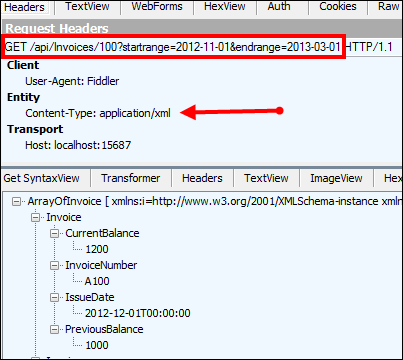
    That’s it! Let’s try this bad boy out. First, I tried retrieving an individual record using the “version 1” API. Notice that I added an HTTP header entry for X-Api-Version.

    2012.09.25webapi06

    Did you also see how easy it is to switch content formats? Just changing the” Content-Type” HTTP header to “application/xml” resulted in an XML response without me doing anything to my service. Next, I did a GET against the same URI, but set the X-Api-Version to 2.

    2012.09.25webapi07

    The second version of the API now returns the “sub accounts” for a given account, while not breaking the original consumers of the first version. Success!

    Summary

    The ASP.NET Web API clearly multiple versioning strategies, and I personally like this one the best. You saw how it was really easy to carve out entirely new controllers, and thus new client experiences, without negatively impacting existing service clients.

    What do you think? Are you a fan of version information in the URI, or are HTTP headers the way to go?

  • Book Review: Cloudonomics–The Business Value of Cloud Computing

    Last week I read Cloudonomics by Joe Weinman and found it to be the most complete, well-told explanation of cloud computing’s value proposition that I’ve ever read. Besides the content itself, I was blown away by the depth of research and deft use of analogies that Weinman used to state his case.

    The majority of the book is focused on how cloud computing should be approached by organizations from an economic and strategic perspective. Weinman points out that while cloud is on the radar for most, only 7% consider it a critical area. He spends the whole second chapter just talking about whether the cloud matters and can be a competitive advantage. In a later chapter (#7), Weinman addresses a when you should – and shouldn’t – use the cloud. This chapter, like all of them, tackle the cloud from a business perspective. This is not a technical “how to” guide, but rather, it’s a detailed walkthrough  of the considerations, costs, benefits and pitfalls of the cloud. Weinman spends significant time analyzing usage variability and how to approach capacity planning with cost in mind. He goes into great depth demonstrating (mathematically) the cost of insufficient capacity, excess capacity, and how to maximize utilization. This is some heady stuff that is still very relatable and understandable.

    Throughout the book, Weinman relies on a wide variety of case studies and analogies to help bolster his point. For instance, in Chapter 21 he says:

    One key benefit of PaaS is inherent in the value of components and platforms. We might call this the peanut butter sandwich principle: It’s easier to make a peanut butter sandwich if you don’t have to grow and grind your own peanuts, grow your own wheat, and bake your own bread. Leveraging proven, tested, components that others have created can be faster than building them from scratch.

    Just a few pages later, Weinman explains how Starbucks made its fortune as a service provider but saw that others wanted a different delivery model. So, they started packaging their product and selling it in stores. Similarly, you see many cloud computing vendors chasing “private” or “on-premises” options that offer an alternate delivery mechanism than the traditional hosted cloud service. To be sure, this is not a “cloud is awesome; use it for everything or you’re a dolt” sort of book. It’s a very practical analysis of the cloud domain that tries to prove where and how cloud computing should fit in your IT portfolio. Whether you are a cloud skeptic or convert, there will be something here that makes you think.

    Overall, I was really impressed with the quality, content and delivery of the book’s message. If you’re a CEO, CFO, CIO, architect or anyone involved in re-thinking how your business delivers IT services, this is an exceptionally good book to read.