Wade Wegner, a friend of the blog and an evangelist for Salesforce.com, just built a new .NET Toolkit for Salesforce developers. This Toolkit is open source and available on GitHub. Basically, it makes it much simpler to securely interact with the Salesforce.com REST API from .NET code. It takes care of “just working” on multiple Windows platforms (Win 7/8, WinPhone), async processing, and wrapping up all the authentication and HTTP stuff needed to call Salesforce.com endpoints. In this post, I’ll do a basic walkthrough of adding the Toolkit to a project and working with a Salesforce.com resource.
After creating a new .NET project (Console project, in my case) in Visual Studio, all you need to do is reference the NuGet packages that Wade created. Specifically, look for the DeveloperForce.Force package which pulls in the “common” package (that has baseline stuff) as well as the JSON.NET package.

First up, add a handful of using statements to reference the libraries we need to use the Toolkit, grab configuration values, and work with dynamic objects.
using System.Configuration;
using Salesforce.Common;
using Salesforce.Force;
using System.Dynamic;
The Toolkit is written using the async and await model for .NET, so calling this library requires some knowledge of this. To make life simple for this demo, define an operation like this that can be called from the Main entry point.
static void Main(string[] args)
{
        Do().Wait();
}

static async Task Do()
{
     ...
}
Let’s fill out the “Do” operation that uses the Toolkit. First, we need to capture our Force.com credentials. The Toolkit supports a handful of viable authentication flows. Let’s use the “username-password” flow. This means we need OAuth/API credentials from Salesforce.com. In the Salesforce.com Setup screens, go to Create, then Apps and create a new application. For a full walkthrough of getting credentials for REST calls, see my article on the DeveloperForce site.
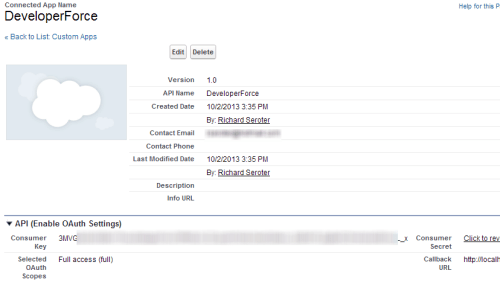
With the consumer key and consumer secret in hand, we can now authenticate using the Toolkit. In the code below, I yanked the credentials from the app.config accompanying the application.
//get credential values
string consumerkey = ConfigurationManager.AppSettings["consumerkey"];
string consumersecret = ConfigurationManager.AppSettings["consumersecret"];
string username = ConfigurationManager.AppSettings["username"];
string password = ConfigurationManager.AppSettings["password"];

//create auth client to retrieve token
var auth = new AuthenticationClient();

//get back URL and token
await auth.UsernamePassword(consumerkey, consumersecret, username, password);
When you call this, you’ll see that the AuthenticationClient now has populated properties for the instance URL and access token. Pull those values out, as we’re going to use them when interacting the the REST API.
var instanceUrl = auth.InstanceUrl;
var accessToken = auth.AccessToken;
var apiVersion = auth.ApiVersion;
Now we’re ready to query Salesforce.com with the Toolkit. In this first instance, create a class that represents the object we’re querying.
public class Contact
    {
        public string Id { get; set; }
        public string FirstName { get; set; }
        public string LastName { get; set; }
    }
Let’s instantiate the ForceClient object and issue a query. Notice that we pass in a SQL-like syntax when querying the Salesforce.com system. Also, see that the Toolkit handles all the serialization for us!
var client = new ForceClient(instanceUrl, accessToken, apiVersion);

//Toolkit handles all serialization
var contacts = await client.Query<Contact>("SELECT Id, LastName From Contact");

//loop through returned contacts
foreach (Contact c in contacts)
{
      Console.WriteLine("Contact - " + c.LastName);
}
My Salesforce.com app has the following three contacts in the system …

Calling the Toolkit using the code above results in this …

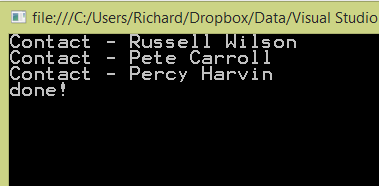
Easy! But does the Toolkit support dynamic objects too? Let’s assume you’re super lazy and don’t want to create classes that represent the Salesforce.com objects. No problem! I can use late binding through the dynamics keyword and get back an object that has whatever fields I requested. See here that I added the “FirstName” to the query and am not passing in a known class type.
var client = new ForceClient(instanceUrl, accessToken, apiVersion);

var contacts = await client.Query<dynamic>("SELECT Id, FirstName, LastName FROM Contact");

foreach (dynamic c in contacts)
{
      Console.WriteLine("Contact - " + c.FirstName + " " + c.LastName);
}
What happens when you run this? You should have all the queried values available as properties.
The Toolkit supports more than just “query” scenarios. It also works great for create/update/delete as well. Like before, these operations worked with strongly typed objects or dynamic ones. First, add the code below to create a contact using our known “contact” type.
Contact c = new Contact() { FirstName = "Golden", LastName = "Tate" };

string recordId = await client.Create("Contact", c);

Console.WriteLine(recordId);
That’s a really simple way to create Salesforce.com records. Want to see another way? You can use the dynamic ExpandoObject to build up an object on the fly and send it in here.
dynamic c = new ExpandoObject();//
c.FirstName = "Marshawn";
c.LastName = "Lynch";
c.Title = "Chief Beast Mode";

string recordId = await client.Create("Contact", c);

Console.WriteLine(recordId);
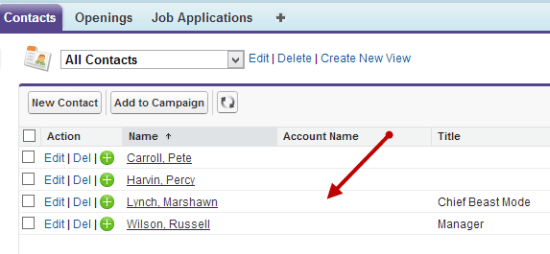
After running this, we can see this record in our Salesforce.com database.
Summary
This is super useful and a fantastic way to easily interact with Salesforce.com from .NET code. Wade’s looking for feedback and contributions as he builds this out further. Add issues if you encounter bugs, and issue a pull request if you want to add features like error handling or support for other operations.


 Richard Seroter's Architecture Musings
Leave a reply to Dale Cancel reply