Using the New Salesforce Toolkit for .NET

Wade Wegner, a friend of the blog and an evangelist for Salesforce.com, just built a new .NET Toolkit for Salesforce developers. This Toolkit is open source and available on GitHub. Basically, it makes it much simpler to securely interact with the Salesforce.com REST API from .NET code. It takes care of “just working” on multiple Windows platforms (Win 7/8, WinPhone), async processing, and wrapping up all the authentication and HTTP stuff needed to call Salesforce.com endpoints. In this post, I’ll do a basic walkthrough of adding the Toolkit to a project and working with a Salesforce.com resource.

After creating a new .NET project (Console project, in my case) in Visual Studio, all you need to do is reference the NuGet packages that Wade created. Specifically, look for the DeveloperForce.Force package which pulls in the “common” package (that has baseline stuff) as well as the JSON.NET package.

2014.01.16force01

First up, add a handful of using statements to reference the libraries we need to use the Toolkit, grab configuration values, and work with dynamic objects.

using System.Configuration;
using Salesforce.Common;
using Salesforce.Force;
using System.Dynamic;

The Toolkit is written using the async and await model for .NET, so calling this library requires some knowledge of this. To make life simple for this demo, define an operation like this that can be called from the Main entry point.

static void Main(string[] args)
{
        Do().Wait();
}

static async Task Do()
{
     ...
}

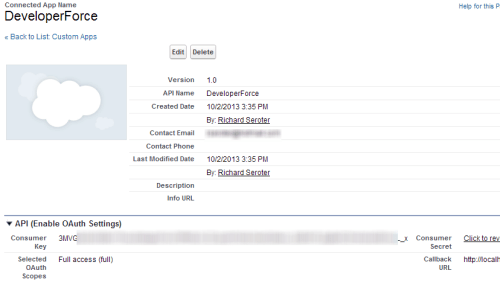
Let’s fill out the “Do” operation that uses the Toolkit. First, we need to capture our Force.com credentials. The Toolkit supports a handful of viable authentication flows. Let’s use the “username-password” flow. This means we need OAuth/API credentials from Salesforce.com. In the Salesforce.com Setup screens, go to Create, then Apps and create a new application. For a full walkthrough of getting credentials for REST calls, see my article on the DeveloperForce site.
2014.01.16force02

With the consumer key and consumer secret in hand, we can now authenticate using the Toolkit. In the code below, I yanked the credentials from the app.config accompanying the application.

//get credential values
string consumerkey = ConfigurationManager.AppSettings["consumerkey"];
string consumersecret = ConfigurationManager.AppSettings["consumersecret"];
string username = ConfigurationManager.AppSettings["username"];
string password = ConfigurationManager.AppSettings["password"];

//create auth client to retrieve token
var auth = new AuthenticationClient();

//get back URL and token
await auth.UsernamePassword(consumerkey, consumersecret, username, password);

When you call this, you’ll see that the AuthenticationClient now has populated properties for the instance URL and access token. Pull those values out, as we’re going to use them when interacting the the REST API.

var instanceUrl = auth.InstanceUrl;
var accessToken = auth.AccessToken;
var apiVersion = auth.ApiVersion;

Now we’re ready to query Salesforce.com with the Toolkit. In this first instance, create a class that represents the object we’re querying.

public class Contact
    {
        public string Id { get; set; }
        public string FirstName { get; set; }
        public string LastName { get; set; }
    }

Let’s instantiate the ForceClient object and issue a query. Notice that we pass in a SQL-like syntax when querying the Salesforce.com system. Also, see that the Toolkit handles all the serialization for us!

var client = new ForceClient(instanceUrl, accessToken, apiVersion);

//Toolkit handles all serialization
var contacts = await client.Query<Contact>("SELECT Id, LastName From Contact");

//loop through returned contacts
foreach (Contact c in contacts)
{
      Console.WriteLine("Contact - " + c.LastName);
}

My Salesforce.com app has the following three contacts in the system …

2014.01.16force03

Calling the Toolkit using the code above results in this …

2014.01.16force04

Easy! But does the Toolkit support dynamic objects too? Let’s assume you’re super lazy and don’t want to create classes that represent the Salesforce.com objects. No problem! I can use late binding through the dynamics keyword and get back an object that has whatever fields I requested. See here that I added the “FirstName” to the query and am not passing in a known class type.

var client = new ForceClient(instanceUrl, accessToken, apiVersion);

var contacts = await client.Query<dynamic>("SELECT Id, FirstName, LastName FROM Contact");

foreach (dynamic c in contacts)
{
      Console.WriteLine("Contact - " + c.FirstName + " " + c.LastName);
}

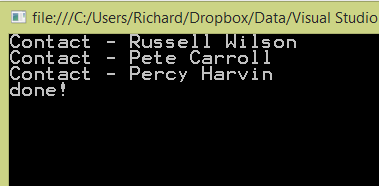
What happens when you run this? You should have all the queried values available as properties.
2014.01.16force05

The Toolkit supports more than just “query” scenarios. It also works great for create/update/delete as well. Like before, these operations worked with strongly typed objects or dynamic ones. First, add the code below to create a contact using our known “contact” type.

Contact c = new Contact() { FirstName = "Golden", LastName = "Tate" };

string recordId = await client.Create("Contact", c);

Console.WriteLine(recordId);

That’s a really simple way to create Salesforce.com records. Want to see another way? You can use the dynamic ExpandoObject to build up an object on the fly and send it in here.

dynamic c = new ExpandoObject();//
c.FirstName = "Marshawn";
c.LastName = "Lynch";
c.Title = "Chief Beast Mode";

string recordId = await client.Create("Contact", c);

Console.WriteLine(recordId);

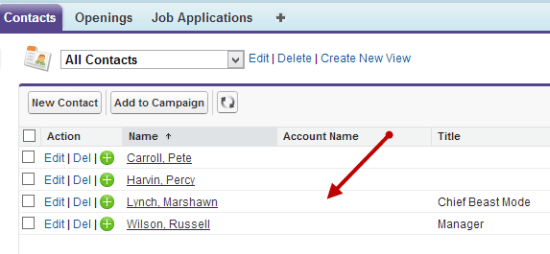
After running this, we can see this record in our Salesforce.com database.
2014.01.16force06

Summary

This is super useful and a fantastic way to easily interact with Salesforce.com from .NET code. Wade’s looking for feedback and contributions as he builds this out further. Add issues if you encounter bugs, and issue a pull request if you want to add features like error handling or support for other operations.

Comments

61 responses to “Using the New Salesforce Toolkit for .NET”

  1. […] Richard Seroter (@rseroter): Using the New Salesforce Toolkit for .NET […]

  2. Inderpal Singh Uppal Avatar
    Inderpal Singh Uppal

    Hi,

    Its fantastic way to connect to Salesforce.

    The above code is only working in console Application not on web Application. Could please shed some light on it.

    Thanks & Regards !!!
    Inderpal Singh Uppal

    1. Richard Seroter Avatar

      Hey there. Make sure you wire it up properly depending on your web framework. For instance, for ASP.NET Web Forms, make sure the page is marked as Async, and that you register the async method http://www.asp.net/web-forms/tutorials/aspnet-45/using-asynchronous-methods-in-aspnet-45

      1. Jennifer Pierson Avatar
        Jennifer Pierson

        Thank you so much for this! Saved me a lot of time.

  3. Inderpal Singh Uppal Avatar
    Inderpal Singh Uppal

    Could you please tell, how to access a custom app using this.

    1. Richard Seroter Avatar

      Not sure if that’s supported yet!

  4. Inderpal Singh Uppal Avatar
    Inderpal Singh Uppal

    I have tries a lot but it is not able to integrate it with it.

    Is there any other way of accessing the custom apps from salesforce to the .Net

  5. Thomas Avatar
    Thomas

    I’ve been trying this as well (from both VB.net and C#.net projects) but I cannot seem to connect to my SANDBOX environment. I keep this exception: “Salesforce.Common.ForceException: expired access/refresh token”.

    I have revoked/refreshed my personal security token, but it doesn’t seem to help.

    When I follow the older instructions (which use the old HTTPClient/Dictionary combo) I can successfully log in.

    Anybody else having that issue? Perhaps I am missing something in my setup.

    1. Thomas Avatar
      Thomas

      nevermind – I figured out my issue. I was not passing in the proper tokenRequestEndpointURL for a sandbox environment during the username/password authentication flow.

      1. Richard Seroter Avatar

        Glad you got it! Thanks for sharing the resolution.

      2. Shirish Avatar
        Shirish

        Hi Thomas,

        What did you use for the tokenRequestEndpointURL? I am getting the same error and am unable to resolve it.

  6. Thomas Avatar
    Thomas

    How do you query more than 2000 records using this toolkit?

    1. Richard Seroter Avatar

      I don’t think you can. I thought the API supported a paging token, but not sure if the toolkit returns this to you. Sounds like a good item for the Github issues list!

  7. Sriram Somasuntharam Avatar

    Can you do a similar sample for WebServerOAuthFlow? The GIThub sample (https://github.com/developerforce/Force.com-Toolkit-for-NET/tree/master/samples/WebServerOAuthFlow) for this doesn’t seem to work; I am not able to get the AccessToken.

  8. Paras Avatar

    When this line is called

    await authentication.UsernamePasswordAsync(“consumer_key”, “consumer_secret”, “username”, “password”);

    I get Salesforce.Common.ForceAuthException with message “authentication failure – Failed: API security token required”

    Any ideas why this is happening? How can this be fixed?

    1. Richard Seroter Avatar

      Hmm. Are you sure you’re passing in all the valid credentials? Have you set up an “application” in SFDC to get the consumer key and secret?

      1. Paras Avatar

        Yes, all credentials I am passing are correct. If I pass invalid credentials, it throws a different error saying something like “Invalid Credentials”

        I have a Connected App that I am using for this. Should I be using something else?

        1. Richard Seroter Avatar

          Is there also a possibility that the async code has moved on and is trying to call the REST endpoint BEFORE the auth token has returned?

          1. Paras Avatar

            No, I have breakpoints on every line in the code, it throws an error on the above mentioned line without getting to another line of code.

          2. Richard Seroter Avatar

            Wade’s suggestion is to make sure that your IP isn’t blocked, and to use the security token http://www.wadewegner.com/2013/11/forcecom-token-requests-with-python/

        2. Scott Avatar
          Scott

          Remember that the “password” must contain the password + token.

          1. Roberto Avatar
            Roberto

            Hi Scott,
            Is the password a user’s password in sales force? Also, what token are you referring to and how do we get a hold of that?

  9. Greg Foote Avatar

    What are you supposed to use as the tokenRequestEndpointUrl when you are connecting to a sandbox org ?

    I am currently getting a ForceAuthException stating expired access/refresh token no matter what I do..

    I have reset my security token twice with no effect…

    Thanks,
    Greg

    1. Richard Seroter Avatar

      Hmm. Not sure about that. Maybe create a Github issue (https://github.com/developerforce/Force.com-Toolkit-for-NET/issues) so that it can be addressed by the toolkit developers.

    2. iambdot Avatar
      iambdot

      when connecting to salesforce the tokenRequestEndpointUrl is https://login.salesforce.com/services/oauth2/token. When connecting to the salesforce sandbox it’s https://test.salesforce.com/services/oauth2/token. Your call to UsernamePasswordAsync() should look like this

      await auth.UsernamePasswordAsync(_consumerKey, _consumerSecret, _username, _password + _passwordSecurityToken, _userAgent, _tokenRequestEndpointUrl);

      the _userAgent string can be set to “common-libraries-dotnet”

      here’s a link to the AuthenticationClient.cs class
      http://www.symbolsource.org/Public/Metadata/NuGet/Project/developerforce.common/0.3.1/Release/Default/Salesforce.Common/Salesforce.Common/AuthenticationClient.cs?ImageName=Salesforce.Common

      1. George Harnwell Avatar

        Oh my sweet Jesus, thank you! A million thank you’s. You saved my bacon big time here!

  10. Elhanan Maayan Avatar

    is there a way to use dyanmic with queryById?

  11. Comparing the Force.com SOAP API to the New Salesforce Toolkit for .NET | Sara Has No Limits Avatar

    […] org and then reference the consumer secret and key it provides inside of your code. See this post by Richard Seroter for more on […]

  12. Sara Morgan Avatar

    Hi Richard,

    Great post. It helped me to do a benchmark test of the new toolkit compared to the old API. I am sure you will not be surprised to hear that the new method is much faster (duh). The results were published on my blog here: http://saramorgan.net/2014/04/22/comparing-the-force-com-soap-api-to-the-new-salesforce-toolkit-for-net/

    1. Richard Seroter Avatar

      I saw that! Great to prove something I was thinking but hadn’t tried.

  13. Benjamin Zavala Avatar
    Benjamin Zavala

    I’m trying to create a REST service that is used by this salesforce toolkit, but while debugging in visual studio works, when published on IIS I got an error message SalesforceRestService.Lead.d__3.MoveNext(),

    1. bzavala2014 Avatar

      The issue was fixed, this is a message generated by Net Framework not by the Salesforce Toolkits for .NET

  14. bzavala2014 Avatar

    Hi Richard
    I’m trying to create a REST service that is used by this salesforce toolkit, but while debugging in visual studio works, when published on IIS I got an error message SalesforceRestService.Lead.d__3.MoveNext(),

  15. acousticferg Avatar
    acousticferg

    Hi – I’m having an issue where when I call auth.UsernamePasswordAysnc…it just never comes back from that call – any ideas?

    1. Richard Seroter Avatar

      Any chance it’s an async issue where your code moves on and you don’t catch the callback?

      1. acousticferg Avatar
        acousticferg

        I don’t think so – the code works fine in a console app…as part of a web page or a webapi (my ultimate goal), no dice…

        1. Richard Seroter Avatar

          Remember that web apps need to be prepped for async by adding the Page attribute and registering your operation for async.

          1. acousticferg Avatar
            acousticferg

            Thank you for the response. I did that, and I still had the issue. Also, I’m ultimately more concerned with getting this working as part of a WebAPI, which is producing the same result.

    2. acousticferg Avatar
      acousticferg

      Upon further review – I do not have this issue with a console app…however I’m trying to create my own webapi app that utilizes the methods of this toolkit, and it seems that I run into issues when creating a class that uses these objects that is utilized by my webapi. I also created a simple web form, and I ran into the same issues.

      1. Karol Wódarczyk Avatar

        Hi, any luck ? I just tried the same, works great in console app but it does not in the web app, I have also made the following changes to make the it async: the page Async=”true” and RegisterAsyncTask(new PageAsyncTask(RunSample)); in the Page_Load but it just times out

  16. ponggod Avatar
    ponggod

    Hi, just tried to test this sample code and am running into a couple of issues. First, the ForceClient object doesn’t appear to have a Query method, but it has a QueryAsync method. So when I tried that, I get a compile error telling me that the contacts returned by this method “does not contain a public definition for ‘GetEnumerator’”.

    Any suggestions appreciated.

    1. ponggod Avatar
      ponggod

      Shortly after posting, I discovered the answer:

      foreach (Contact c in contacts.records)
      { … }

  17. paras Avatar

    My tutorial on accessing Salesforce data from .Net using a Windows Phone app was recently published on Wrox at http://blogs.wrox.com/article/accessing-salesforce-data-from-a-windows-phone-app/

  18. Sascha Avatar
    Sascha

    I cannot install the packes. I receive this error message. Can somebody help me with this?

    Install-Package : Unable to read package from path ‘Microsoft.Bcl.1.1.9.nupkg’.
    At line:1 char:16
    + Install-Package <<<< DeveloperForce.Force
    + CategoryInfo : NotSpecified: (:) [Install-Package], InvalidDataException
    + FullyQualifiedErrorId : NuGetCmdletUnhandledException,NuGet.PowerShell.Commands.InstallPackageCommand

  19. Ajay Avatar
    Ajay

    var contacts = await client.Query(“SELECT Id, LastName From Contact”);
    On this line i am getting following error:
    “The requested resource does not exist”

    1. sneha Avatar
      sneha

      Did you found any solution for this? even I am facing same error

  20. Venkat Avatar
    Venkat

    hi richard, the same code is working well and good for me. how to fetch records from the attachment object and create those attachments using this method? with attachment, it is not working for me.. Could you please advise me a code example. Thanks

  21. IM Avatar
    IM

    Is it possible to authentication with sessionId instead of ( without consumer key,consumerSecret / UserName, password)?

  22. Vilius Cicėnas Avatar

    Hello, Could you tell how to access entities metadata?

  23. Michael Reyeros Avatar
    Michael Reyeros

    Having trouble using this toolkit when deploying my app to IIS. Locally everything works perfectly but once deployed to our dev server I am getting the following error when querying salesforce:

    Could not load type ‘d__7`1’ from assembly ‘Salesforce.Common, Version=1.0.0.0, Culture=neutral, PublicKeyToken=9f7864e53fb79388’ due to value type mismatch.

    Any help would be greatly appreciated.

  24. Raghav Thakur Avatar

    Hi Richard,

    Can you please guide how we can use this SDK to convert lead into account

    Thanks
    Raghav

  25. Kaji Avatar
    Kaji

    Hi, I am new to Powershell and Salesforce, and I have been looking for ways to query Salesforce objects directly from within Powershell but with no luck so far, and this toolkit definitely offers a lot of what I have been looking for quite some time. Can anyone tell me if there is a way to use the Toolkit in Powershell? Thanks in advance.

  26. Amit Wadkar Avatar

    Hi Richard,

    I’m getting an Error “Task was cancelled” while fetching up to 75000 records.
    Could you Please Look into it.

    Any help would be greatly appreciated.

    1. Richard Seroter Avatar

      Hi Amit. It’d be good to add this to the GitHub project’s issue list (https://github.com/developerforce/Force.com-Toolkit-for-NET). That’s a lot of records for one request, so there’s a chance you’re bumping into natural SFDC API call limits. It might be good to batch up your requests.

      1. Amit Wadkar Avatar

        Thanks a ton!.
        🙂

  27. Luis Fernando Forero Avatar
    Luis Fernando Forero

    What message will return SF if token expires? var contacts = await client.Query(“SELECT Id, LastName From Contact”);

  28. Alex Avatar
    Alex

    You should update the article to comply with the new salesforce requirement to use
    ServicePointManager.SecurityProtocol = SecurityProtocolType.Tls12 | SecurityProtocolType.Tls11 | SecurityProtocolType.Tls; before making any call to salesforce. The library doesn’t do it so the call fail. It’s not huge but it took me quite some time to find out (and i think it should have been fixed in the library but they don’t seems to want to fix it)

  29. Jarek Avatar
    Jarek

    Hello, do you know why this solution does not work in .net web api project? In console application it works great, but in web api controller it hangs on that line:

    await auth.UsernamePasswordAsync(consumerkey, consumersecret, username, password, url);

  30. Dale Avatar
    Dale

    Super lazy? Bro there’s thousands of properties, who in their right mind would recreate all the classes/properties/relationships. Why aren’t they offering a library with all the DTOs in there?

  31. Tom Knowlton Avatar

    {“The requested resource does not exist”}

    Can you shed any light?

    This is when attempting to access the object “ServiceAppointment” which is part of Field Services Lighting package. So my client connects just fine and can select data from other objects, like Account, but when I try to do a select on “ServiceAppointment” – I get the error above.

Leave a reply to George Harnwell Cancel reply

This site uses Akismet to reduce spam. Learn how your comment data is processed.