Category: Windows Azure Service Bus

  • Introducing cloud-native integration (and why you should care!)

    Introducing cloud-native integration (and why you should care!)

    I’ve got three kids now. Trying to get anywhere on time involves heroics. My son is almost ten years old and he’s rarely the problem. The bottleneck is elsewhere. It doesn’t matter how much faster my son gets himself ready, it won’t improve my family’s overall speed at getting out the door. The Theory of Constraints says that you improve the throughput of your process by finding and managing the bottleneck, or constraint. Optimizing areas outside the constraint (e.g. my son getting ready even faster) don’t make much of a difference. Does this relate to software, and application integration specifically? You betcha.

    Software delivery goes through a pipeline. Getting from “idea” to “production” requires a series of steps. And then you repeat it over and over for each software update. How fast you get through that process dictates how responsive you can be to customers and business changes. Your development team may operate LIKE A MACHINE and crank out epic amounts of code. But if your dedicated ops team takes forever to deploy it, then it just doesn’t matter how fast your devs are. Inventory builds up, value is lost. My assertion is that the app integration stage of the pipeline is becoming a bottleneck. And without making changes to how you do integration, your cloud-native efforts are going to waste.

    What’s “cloud native” all about? At this month’s Integrate conference, I had the pleasure of talking about it. Cloud-native refers to how software is delivered, not where. Cloud-native systems are built for scale, built for continuous change, and built to tolerate failure. Traditional enterprises can become cloud natives, but only if they make serious adjustments to how they deliver software.

    Even if you’ve adjusted how you deliver code, I’d suspect that your data, security, and integration practices haven’t caught up. In my talk, I explained six characteristics of a cloud-native integration environment, and mixed in a few demos (highlighted below) to prove my points.

    #1 – Cloud-native integration is more composable

    By composable, I mean capable of assembling components into something greater. Contrast this to classic integration solutions where all the logic gets embedded into a single artifact. Think ETL workflows where ever step of the process is in one deployable piece. Need to change one component? Redeploy the whole thing. One step require a ton of CPU processing? Find a monster box to host the process in.

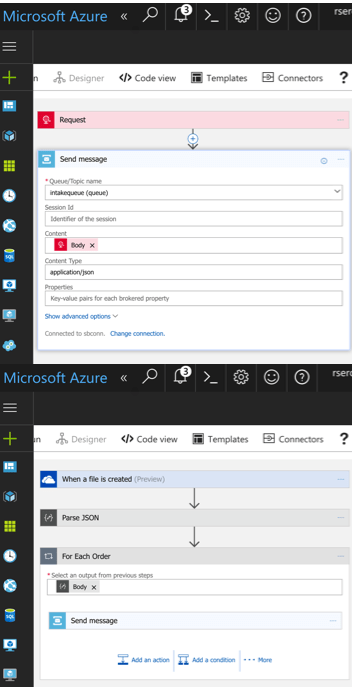
    A cloud-native integration gets built by assembling independent components. Upgrade and scale each piece independently. To demonstrate this, I built a series of Microsoft Logic Apps. Two of them take in data. The first takes in a batch file from Microsoft OneDrive, the other takes in real-time HTTP requests. Both drop the results to a queue for later processing.
    2017.07.10-integrate-01

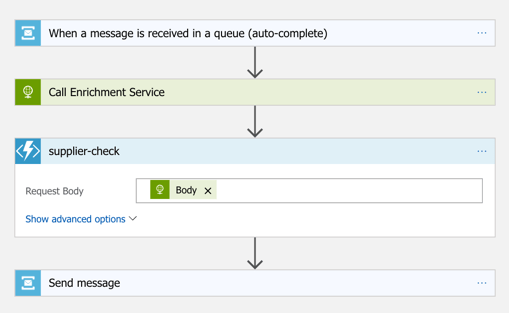
    The “main” Logic App takes in order entries, enriches the order via a REST service I have running in Azure App Service, calls an Azure Function to assign a fraud score, and finally dumps the results to a queue for others to grab.
    2017.07.10-integrate-02

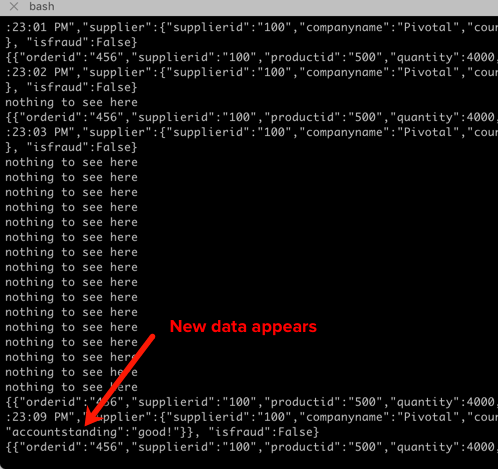
    My REST API sitting in Azure App Service is connected to a GitHub repo. This means that I should be able to upgrade that individual service, without touching the data pipeline sitting Logic Apps. So that’s what I did. I sent in a steady stream of requests, modified my API code, pushed the change to GitHub, and within a few seconds, the Logic App is emitting out a slightly different payload.
    2017.07.10-integrate-03

    #2 – Cloud-native integration is more “always on”

    One of the best things about early cloud platforms being less than 100% reliable was that it forced us to build for failure. Instead of assuming the infrastructure was magically infallible, we built systems that ASSUMED failure, and architected accordingly.

    For integration solutions, have we really done the same? Can we tolerate hardware failure, perform software upgrades, or absorb downstream dependency hiccups without stumbling? A cloud-native integration solution can handle a steady load of traffic while staying online under all circumstances.

    #3 – Cloud-native integration is built for scale

    Elasticity is a key attribute of cloud. Don’t build out infrastructure for peak usage; build for easy scale when demand dictates. I haven’t seen too many ESB or ETL solutions that transparently scale, on-demand with no special considerations. No, in most cases, scaling is a carefully designed part of an integration platform’s lifecycle. It shouldn’t be.

    If you want cloud-native integration, you’ll look to solutions that support rapid scale (in, or out), and let you scale individual pieces. Event ingestions unexpected and overwhelming? Scale that, and that alone. You’ll also want to avoid too much shared capacity, as that creates unexpected coupling and makes scaling the environment more difficult.

    #4 – Cloud-native integration is more self-service

    The future is clear: there will be more “citizen integrators” who don’t need specialized training to connect stuff. IFTTT is popular, as are a whole new set of iPaaS products that make it simple to connect apps. Sure, they aren’t crazy sophisticated integrations; there will always be a need for specialists there. But integration matters more than ever, and we need to democratize the ability to connect our stuff.

    One example I gave here was Pivotal Cloud Cache and Pivotal GemFire. Pivotal GemFire is an industry-leading in-memory data grid. Awesome tech, but not trivial to properly setup and use. So, Pivotal created an opinionated slice of GemFire with a subset of features, but an easier on-ramp. Pivotal Cloud Cache supports specific use cases, and an easy self-service provisioning experience. My challenge to the Integrate conference audience? Why couldn’t we create a simple facade for something powerful, but intimidating, like Microsoft BizTalk Server? What if you wanted a self-service way to let devs create simple integrations? I decided use the brand new Management REST API from BizTalk Server 2016 Feature Pack 1 to build one.

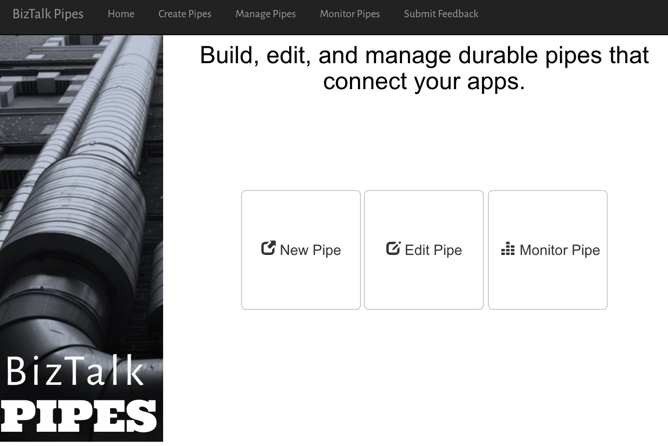
    I used the incomparable Spring Boot to build a Java app that consumed those REST APIs. This app makes it simple to create a “pipe” that uses BizTalk’s durable bus to link endpoints.
    2017.07.10-integrate-05

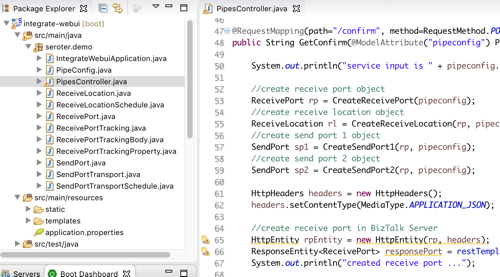
    I built a bunch of Java classes to represent BizTalk objects, and then created the required API payloads.
    2017.07.10-integrate-04

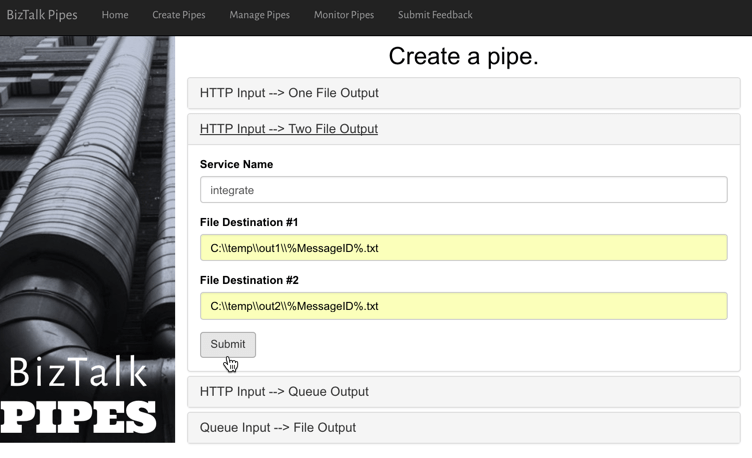
    The result? Devs can create a new pipe that takes in data via HTTP and drops the result to two file locations.
    2017.07.10-integrate-06

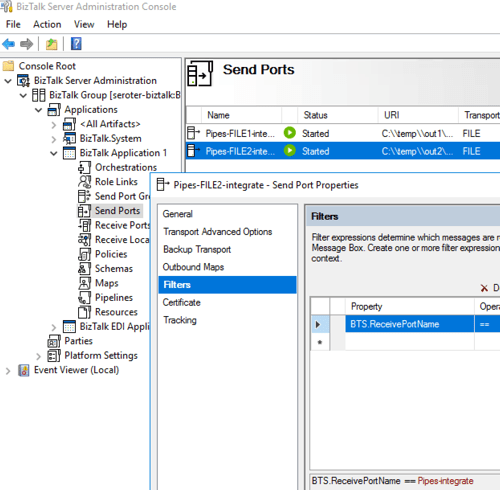
    When I click the button above, I use those REST APIs to create a new in-process HTTP receive location, two send ports, and the appropriate subscriptions.
    2017.07.10-integrate-07

    Fun stuff. This seems like one way you could unlock new value in your ESB, while giving it a more cloud-native UX.

    #5 – Cloud-native integration supports more endpoints

    There’s no turning back. Your hippest integration offered to enterprise devs CANNOT be SharePoint. Nope. Your teams want to creatively connect to Slack, PagerDuty, Salesforce, Workday, Jira, and yes, enterprisey things like SQL Server and IBM DB2.

    These endpoints may be punishing your integration platform with a constant data stream, or, process data irregularly, in bulk. Doing newish patterns like Event Sourcing? Your apps will talk to an integration platform that offers a distributed commit log. Are you ready? Be ready for new endpoints, with new data streams, consumed via new patterns.

    #6 – Cloud-native integration demands complete automation

    Are you lovingly creating hand-crafted production servers? Stop that. And devs should have complete replicas of production environments, on their desktop. That means packaging and automating the integration bus too. Cloud-natives love automation!

    Testing and deploying integration apps must be automated. Without automated tests, you’ll never achieve continuous delivery of your whole system. Additionally, if you have to log into one of your integration servers, you’re doing it wrong. All management (e.g. monitoring, deployments, upgrades) should be done via remote tools and scripts. Think fleets of servers, not long-lived named instances.

    To demonstrate this concept, I discussed automating the lifecycle of your integration dependency. Specifically, through the use of a service broker. Initially part of Cloud Foundry, the service broker API has caught on elsewhere. A broad set of companies are now rallying around a single API for advertising services, provisioning, de-provisioning, and more. Microsoft built a Cloud Foundry service broker, and it handles lots of good things. It handles lifecycle and credential sharing for services like Azure SQL Database, Azure Service Bus, Azure CosmosDB, and more. I installed this broker into my Pivotal Web Services account, and it advertised available services.
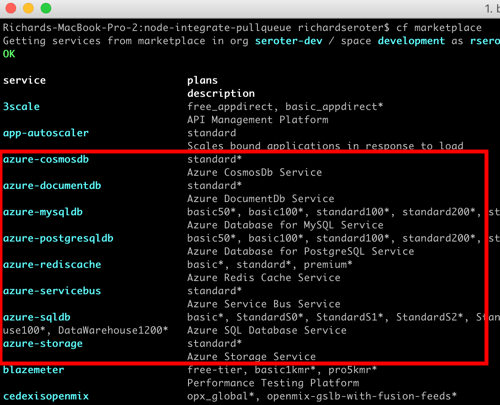
    2017.07.10-integrate-08

    Simply by typing in cf create-service azure-servicebus standard integratesb -c service-bus-config.json I kicked off a fast, automated process to generate an Azure Resource Group and create a Service Bus namespace.
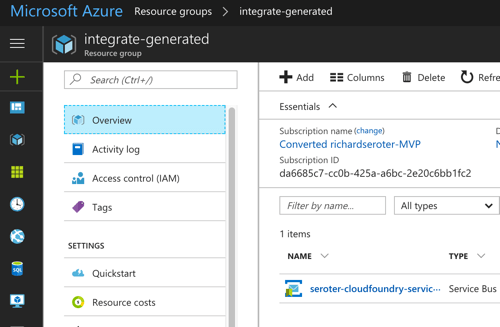
    2017.07.10-integrate-09

    Then, my app automatically gets access to environment variables that hold the credentials. No more embedding creds in code or config, no need to go to the Azure Portal. This makes integration easy, developer-friendly, and repeatable.
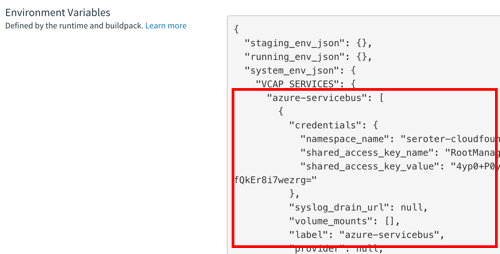
    2017.07.10-integrate-10

    Summary

    It’s such an exciting time to be a software developer. We’re solving new problems in new ways, and making life better for so many. The last thing we want is to be held back by a bottleneck in our process. Don’t let integration slow down your ambitions. The technology is there to help you build integration platforms that are more scalable, resilient, and friendly-to-change. Go for it!
  • Using Concourse to continuously deliver a Service Bus-powered Java app to Pivotal Cloud Foundry on Azure

    Using Concourse to continuously deliver a Service Bus-powered Java app to Pivotal Cloud Foundry on Azure

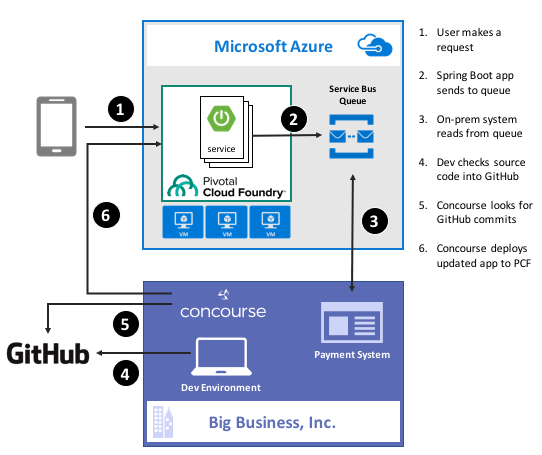
    Guess what? Deep down, cloud providers know you’re not moving your whole tech portfolio to their public cloud any time soon. Oh, your transition is probably underway, but you’ve got a whole stash of apps, data stores, and services that may not move for a while. That’s cool. There are more and more patterns and services available to squeeze value out of existing apps by extending them with more modern, scalable, cloudy tech. For instance, how might you take an existing payment transfer system that did B2B transactions and open it up to consumers without requiring your team to do a complete rewrite? One option might be to add a load-leveling queue in front of it, and take in requests via a scalable, cloud-based front-end app. In this post, I’ll show you how to implement that pattern by writing a Spring Boot app that uses Azure Service Bus Queues. Then, I’ll build a Concourse deployment pipeline to ship the app to Pivotal Cloud Foundry running atop Microsoft Azure.

    2016-11-28-azure-boot-01

    Ok, but why use a platform on top of Azure?

    That’s a fair question. Why not just use native Azure (or AWS, or Google Cloud Platform) services instead of putting a platform overlay like Pivotal Cloud Foundry atop it? Two reasons: app-centric workflow for developers, and “day 2” operations at scale.

    Most every cloud platform started off by automating infrastructure. That’s their view of the world, and it still seeps into most of their cloud app services. There’s no fundamental problem with that, except that many developers (“full stack” or otherwise) aren’t infrastructure pros. They want to build and ship great apps for customers. Everything else is a distraction. A platform such as Pivotal Cloud Foundry is entirely application-focused. Instead of the developer finding an app host, packaging the app, deploying the app, setting up a load balancer, configuring DNS, hooking up log collection, and configuring monitoring, the Cloud Foundry dev just cranks out an app and does a single action to get everything correctly configured in the cloud. And it’s an identical experience whether Pivotal Cloud Foundry is deployed to Azure, AWS, OpenStack, or whatever. The smartest companies realized that their developers should be exceptional at writing customer-facing software, not configuring firewall rules and container orchestration.

    Secondly, it’s about “day 2” operations. You know, all the stuff that happens to actually maintain apps in production. I have no doubt that any of you can build an app and quickly get it to cloud platforms like Azure Web Sites or Heroku with zero trouble. But what about when there are a dozen apps, or thousands? How about when it’s not just you, but a hundred of your fellow devs? Most existing app-centric platforms just aren’t set up to be org-wide, and you end up with costly inconsistencies between teams. With something like Pivotal Cloud Foundry, you have a resilient, distributed system that supports every major programing language, and provides a set of consistent patterns for app deployment, logging, scaling, monitoring, and more. Some of the biggest companies in the world deploy thousands of apps to their respective environments today, and we just proved that the platform can handle 250,000 containers with no problem. It’s about operations at scale.

    With that out of the way, let’s see what I built.

    Step 1 – Prerequisites

    Before building my app, I had to set up a few things.

    • Azure account. This is kind of important for a demo of things running on Azure. Microsoft provides a free trial, so take it for a spin if you haven’t already. I’ve had my account for quite a while, so all my things for this demo hang out there.
    • GitHub account. The Concourse continuous integration software knows how to talk to a few things, and git is one of them. So, I stored my app code in GitHub and had Concourse monitoring it for changes.
    • Amazon account. I know, I know, an Azure demo shouldn’t use AWS. But, Amazon S3 is a ubiquitous object store, and Concourse made it easy to drop my binaries there after running my continuous integration process.
    • Pivotal Cloud Foundry (PCF). You can find this in the Azure marketplace, and technically, this demo works with PCF running anywhere. I’ve got a full PCF on Azure environment available, and used that here.
    • Azure Service Broker. One fundamental concept in Cloud Foundry is a “service broker.” Service brokers advertise a catalog of services to app developers, and provide a consistent way to provision and de-provision the service. They also “bind” services to an app, which puts things like service credentials into that app’s environment variables for easy access. Microsoft built a service broker for Azure, and it works for DocumentDB, Azure Storage, Redis Cache, SQL Database, and the Service Bus. I installed this into my PCF-on-Azure environment, but you can technically run it on any PCF installation.

    Step 2 – Build Spring Boot App

    In my fictitious example, I wanted a Java front-end app that mobile clients interact with. That microservice drops messages into an Azure Service Bus Queue so that the existing on-premises app can pull messages from at their convenience, and thus avoid getting swamped by all this new internet traffic.

    Why Java? Java continues to be very popular in enterprises, and Spring Boot along with Spring Cloud (both maintained by Pivotal) have completely modernized the Java experience. Microsoft believes that PCF helps companies get a first-class Java experience on Azure.

    I used Spring Tool Suite to build a new Spring Boot MVC app with “web” and “thymeleaf” dependencies. Note that you can find all my code in GitHub if you’d like to reproduce this.

    To start with, I created a model class for the web app. This “web payment” class represents the data I connected from the user and passed on to the Service Bus Queue.

    package seroter.demo;
    
    public class WebPayment {
    	private String fromAccount;
    	private String toAccount;
    	private long transferAmount;
    
    	public String getFromAccount() {
    		return fromAccount;
    	}
    
    	public void setFromAccount(String fromAccount) {
    		this.fromAccount = fromAccount;
    	}
    
    	public String getToAccount() {
    		return toAccount;
    	}
    
    	public void setToAccount(String toAccount) {
    		this.toAccount = toAccount;
    	}
    
    	public long getTransferAmount() {
    		return transferAmount;
    	}
    
    	public void setTransferAmount(long transferAmount) {
    		this.transferAmount = transferAmount;
    	}
    }
    

    Next up, I built a bean that my web controller used to talk to the Azure Service Bus. Microsoft has an official Java SDK in the Maven repository, so I added this to my project.

    2016-11-28-azure-boot-03

    Within this object, I referred to the VCAP_SERVICES environment variable that I would soon get by binding my app to the Azure service. I used that environment variable to yank out the credentials for the Service Bus namespace, and then created the queue if it didn’t exist already.

    @Configuration
    public class SbConfig {
    
     @Bean
     ServiceBusContract serviceBusContract() {
    
       //grab env variable that comes from binding CF app to the Azure service
       String vcap = System.getenv("VCAP_SERVICES");
    
       //parse the JSON in the environment variable
       JsonParser jsonParser = JsonParserFactory.getJsonParser();
       Map<String, Object> jsonMap = jsonParser.parseMap(vcap);
    
       //create map of values for service bus creds
       Map<String,Object> creds = (Map<String,Object>)((List<Map<String, Object>>)jsonMap.get("seroter-azureservicebus")).get(0).get("credentials");
    
       //create service bus config object
       com.microsoft.windowsazure.Configuration config =
    	ServiceBusConfiguration.configureWithSASAuthentication(
    		creds.get("namespace_name").toString(),
    		creds.get("shared_access_key_name").toString(),
    		creds.get("shared_access_key_value").toString(),
    		".servicebus.windows.net");
    
       //create object used for interacting with service bus
       ServiceBusContract svc = ServiceBusService.create(config);
       System.out.println("created service bus contract ...");
    
       //check if queue exists
       try {
    	ListQueuesResult r = svc.listQueues();
    	List<QueueInfo> qi = r.getItems();
    	boolean hasQueue = false;
    
    	for (QueueInfo queueInfo : qi) {
              System.out.println("queue is " + queueInfo.getPath());
    
    	  //queue exist already?
    	  if(queueInfo.getPath().equals("demoqueue"))  {
    		System.out.println("Queue already exists");
    		hasQueue = true;
    		break;
    	   }
    	 }
    
    	if(!hasQueue) {
    	//create queue because we didn't find it
    	  try {
    	    QueueInfo q = new QueueInfo("demoqueue");
                CreateQueueResult result = svc.createQueue(q);
    	    System.out.println("queue created");
    	  }
    	  catch(ServiceException createException) {
    	    System.out.println("Error: " + createException.getMessage());
    	  }
            }
        }
        catch (ServiceException findException) {
           System.out.println("Error: " + findException.getMessage());
         }
        return svc;
       }
    }
    

    Cool. Now I could connect to the Service Bus. All that was left was my actual web controller that returned views, and sent messages to the Service Bus. One of my operations returned the data collection view, and the other handled form submissions and sent messages to the queue via the @autowired ServiceBusContract object.

    @SpringBootApplication
    @Controller
    public class SpringbootAzureConcourseApplication {
    
       public static void main(String[] args) {
         SpringApplication.run(SpringbootAzureConcourseApplication.class, args);
       }
    
       //pull in autowired bean with service bus connection
       @Autowired
       ServiceBusContract serviceBusContract;
    
       @GetMapping("/")
       public String showPaymentForm(Model m) {
    
          //add webpayment object to view
          m.addAttribute("webpayment", new WebPayment());
    
          //return view name
          return "webpayment";
       }
    
       @PostMapping("/")
       public String paymentSubmit(@ModelAttribute WebPayment webpayment) {
    
          try {
             //convert webpayment object to JSON to send to queue
    	 ObjectMapper om = new ObjectMapper();
    	 String jsonPayload = om.writeValueAsString(webpayment);
    
    	 //create brokered message wrapper used by service bus
    	 BrokeredMessage m = new BrokeredMessage(jsonPayload);
    	 //send to queue
    	 serviceBusContract.sendMessage("demoqueue", m);
    	 System.out.println("message sent");
    
          }
          catch (ServiceException e) {
    	 System.out.println("error sending to queue - " + e.getMessage());
          }
          catch (JsonProcessingException e) {
    	 System.out.println("error converting payload - " + e.getMessage());
          }
    
          return "paymentconfirm";
       }
    }
    

    With that, my microservice was done. Spring Boot makes it silly easy to crank out apps, and the Azure SDK was pretty straightforward to use.

    Step 3 – Deploy and Test App

    Developers use the “cf” command line interface to interact with Cloud Foundry environments. Running a “cf marketplace” command shows all the services advertised by registered service brokers. Since I added the Azure Service Broker to my environment, I instantiated an instance of the Service Bus service to my Cloud Foundry org. To tell the Azure Service Broker what to actually create, I built a simple JSON document that outlined the Azure resource group. region, and service.

    {
      "resource_group_name": "pivotaldemorg",
      "namespace_name": "seroter-boot",
      "location": "westus",
      "type": "Messaging",
      "messaging_tier": "Standard"
    }
    

    By using the Azure Service Broker, I didn’t have to go into the Azure Portal for any reason. I could automate the entire lifecycle of a native Azure service. The command below created a new Service Bus namespace, and made the credentials available to any app that binds to it.

    cf create-service seroter-azureservicebus default seroterservicebus -c sb.json
    

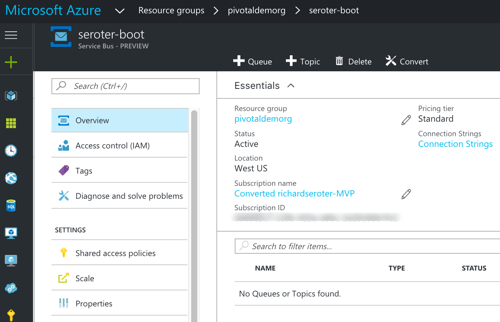
    After running this, my PCF environment had a service instance (seroterservicebus) ready to be bound to an app. I also confirmed that the Azure Portal showed a new namespace, and no queues (yet).

    2016-11-28-azure-boot-06

    Awesome. Next, I added a “manifest” that described my Cloud Foundry app. This manifest specified the app name, how many instances (containers) to spin up, where to get the binary (jar) to deploy, and which service instance (seroterservicebus) to bind to.

    ---
    applications:
    - name: seroter-boot-azure
      memory: 256M
      instances: 2
      path: target/springboot-azure-concourse-0.0.1-SNAPSHOT.jar
      buildpack: https://github.com/cloudfoundry/java-buildpack.git
      services:
        - seroterservicebus
    

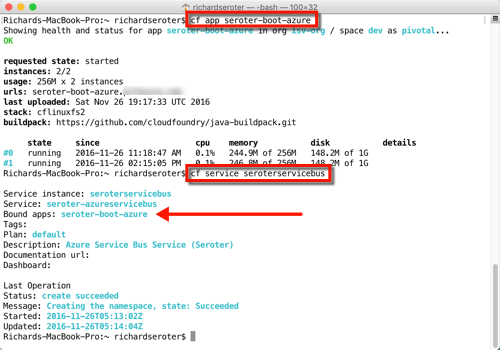
    By doing a “cf push” to my PCF-on-Azure environment, the platform took care of all the app packaging, container creation, firewall updates, DNS changes, log setup, and more. After a few seconds, I had a highly-available front end app bound to the Service Bus. Below that you can see I had an app started with two instances, and the service was bound to my new app.

    2016-11-28-azure-boot-07

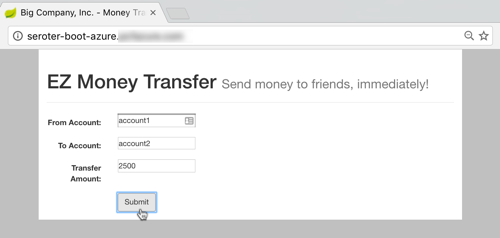
    All that was left was to test it. I fired up the app’s default view, and filled in a few values to initiate a money transfer.

    2016-11-28-azure-boot-08

    After submitting, I saw that there was a new message in my queue. I built another Spring Boot app (to simulate an extension of my legacy “payments” system) that pulled from the queue. This app ran on my desktop and logged the message from the Azure Service Bus.

    2016-11-28-azure-boot-09

    That’s great. I added a mature, highly-available queue in between my cloud-native Java web app, and my existing line-of-business system. With this pattern, I could accept all kinds of new traffic without overloading the backend system.

    Step 4 – Build Concourse Pipeline

    We’re not done yet! I promised continuous delivery, and I deliver on my promises, dammit.

    To build my deployment process, I used Concourse, a pipeline-oriented continuous integration and delivery tool that’s easy to use and amazingly portable. Instead of wizard-based tools that use fixed environments, Concourse uses pipelines defined in configuration files and executed in ephemeral containers. No conflicts with previous builds, no snowflake servers that are hard to recreate. And, it has a great UI that makes it obvious when there are build issues.

    I downloaded a Vagrant virtual machine image with Concourse pre-configured. Then I downloaded the lightweight command line interface (called Fly) for interacting with pipelines.

    My “build and deploy” process consisted of four files: bootpipeline.yml that contained the core pipeline, build.yml which set up the Java build process, build.sh which actually performs the build, and secure.yml which holds my credentials (and isn’t checked into GitHub).

    The build.sh file clones my GitHub repo (defined as a resource in the main pipeline) and does a maven install.

    #!/usr/bin/env bash
    
    set -e -x
    
    git clone resource-seroter-repo resource-app
    
    cd resource-app
    
    mvn clean
    
    mvn install
    

    The build.yml file showed that I’m using the Maven Docker image to build my code, and points to the build.sh file to actually build the app.

    ---
    platform: linux
    
    image_resource:
      type: docker-image
      source:
        repository: maven
        tag: latest
    
    inputs:
      - name: resource-seroter-repo
    
    outputs:
      - name: resource-app
    
    run:
      path: resource-seroter-repo/ci/build.sh
    

    Finally, let’s look at my build pipeline. Here, I defined a handful of “resources” that my pipeline interacts with. I’ve got my GitHub repo, an Amazon S3 bucket to store the JAR file, and my PCF-on-Azure environment. Then, I have two jobs: one that builds my code and puts the result into S3, and another that takes the JAR from S3 (and manifest from GitHub) and pushes to PCF on Azure.

    ---
    resources:
    # resource for my GitHub repo
    - name: resource-seroter-repo
      type: git
      source:
        uri: https://github.com/rseroter/springboot-azure-concourse.git
        branch: master
    #resource for my S3 bucket to store the binary
    - name: resource-s3
      type: s3
      source:
        bucket: spring-demo
        region_name: us-west-2
        regexp: springboot-azure-concourse-(.*).jar
        access_key_id: {{s3-key-id}}
        secret_access_key: {{s3-access-key}}
    # resource for my Cloud Foundry target
    - name: resource-azure
      type: cf
      source:
        api: {{cf-api}}
        username: {{cf-username}}
        password: {{cf-password}}
        organization: {{cf-org}}
        space: {{cf-space}}
    
    jobs:
    - name: build-binary
      plan:
        - get: resource-seroter-repo
          trigger: true
        - task: build-task
          privileged: true
          file: resource-seroter-repo/ci/build.yml
        - put: resource-s3
          params:
            file: resource-app/target/springboot-azure-concourse-0.0.1-SNAPSHOT.jar
    
    - name: deploy-to-prod
      plan:
        - get: resource-s3
          trigger: true
          passed: [build-binary]
        - get: resource-seroter-repo
        - put: resource-azure
          params:
            manifest: resource-seroter-repo/manifest-ci.yml
    

    I was now ready to deploy my pipeline and see the magic.

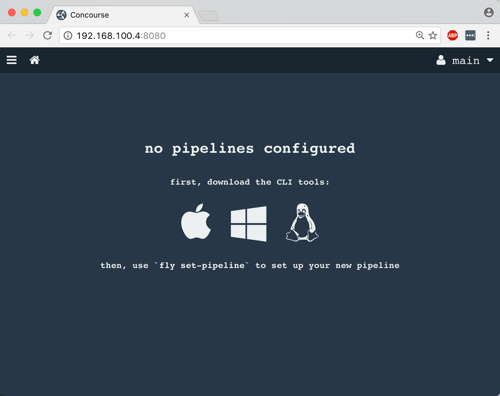
    After spinning up the Concourse Vagrant box, I hit the default URL and saw that I didn’t have any pipelines. NOT SURPRISING.

    2016-11-28-azure-boot-10

    From my Terminal, I used Fly CLI commands to deploy a pipeline. Note that I referred again to the “secure.yml” file containing credentials that get injected into the pipeline definition at deploy time.

    fly -t lite set-pipeline --pipeline azure-pipeline --config bootpipeline.yml --load-vars-from secure.yml
    

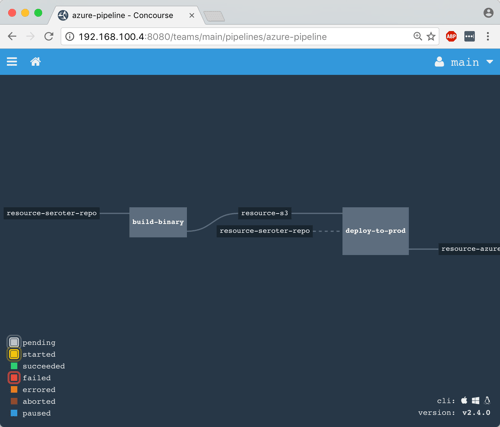
    In a second or two, a new (paused) pipeline popped up in Concourse. As you can see below, this tool is VERY visual. It’s easy to see how Concourse interpreted my pipeline definition and connected resources to jobs.

    2016-11-28-azure-boot-11

    I then un-paused the pipeline with this command:

    fly -t lite unpause-pipeline --pipeline azure-pipeline
    

    Immediately, the pipeline started up, retrieved my code from GitHub, built the app within a Docker container, dropped the result into S3, and deployed to PCF on Azure.

    2016-11-28-azure-boot-12

    After Concourse finished running the pipeline, I checked the PCF Application Manager UI and saw my new app up and running. Think about what just happened: I didn’t have to muck with any infrastructure or open any tickets to get an app from dev to production. Wonderful.

    2016-11-28-azure-boot-14

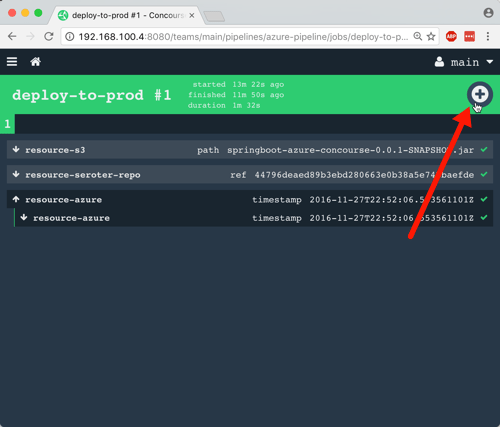
    The way I built this pipeline, I didn’t version the JAR when I built my app. In reality, you’d want to use the semantic versioning resource to bump the version on each build. Because of the way I designed this, the second job (“deploy to PCF”) won’t fire automatically after the first build, since there technically isn’t a new artifact in the S3 bucket. A cool side effect of this is that I could constantly do continuous integration, and then choose to manually deploy (clicking the “+” button below) when the company was ready for the new version to go to production. Continuous delivery, not deployment.

    2016-11-28-azure-boot-13

    Wrap Up

    Whew. That was a big demo. But in the scheme of things, it was pretty straightforward. I used some best-of-breed services from Azure within my Java app, and then pushed that app to Pivotal Cloud Foundry entirely through automation. Now, every time I check in a code change to GitHub, Concourse will automatically build the app. When I choose to, I take the latest build and tell Concourse to send it to production.

    magic

    A platform like PCF helps companies solve their #1 problem with becoming software-driven: improving their deployment pipeline. Try to keep your focus on apps not infrastructure, and make sure that whatever platform you use, you focus on sustainable operations at scale!


  • What Are All of Microsoft Azure’s Application Integration Services?

    As a Microsoft MVP for Integration – or however I’m categorized now – I keep a keen interest in where Microsoft is going with (app) integration technologies. Admittedly, I’ve had trouble keeping up with all the various changes, and thought it’d be useful to take a tour through the status of the Microsoft integration services. For each one, I’ll review its use case, recent updates, and how to consume it.

    What qualifies as an integration technology nowadays? For me, it’s anything that lets me connect services in a distributed system. That “system” may be comprised of components running entirely on-premises, between business partners, or across cloud environments. Microsoft doesn’t totally agree with that definition, if their website information architecture is any guide. They spread around the services in categories like “Hybrid Integration”, “Web and Mobile”, “Internet of Things”, and even “Analytics.”

    But, whatever. I’m considering the following Microsoft technologies as part of their cloud-enabled integration stack:

    • Service Bus
    • Event Hubs
    • Data Factory
    • Stream Analytics
    • BizTalk Services
    • Logic Apps
    • BizTalk Server on Cloud Virtual Machines

    I considered, but skipped, Notification Hubs, API Apps, and API Management. They all empower application integration scenarios in some fashion, but it’s more ancillary. If you disagree, tell me in the comments!

    Service Bus

    What is it?

    The Service Bus is a general purpose messaging engine released by Microsoft back in 2008. It’s made up of two key sets of services: the Service Bus Relay, and Service Bus Brokered Messaging.

    https://twitter.com/clemensv/status/648902203927855105

    The Service Bus Relay is a unique service that makes it possible to securely expose on-premises services to the Internet through a cloud-based relay. The service supports a variety of messaging patterns including request/reply, one-way asynchronous, and peer-to-peer.

    But what if the service client and server aren’t online at the same time? Service Bus Brokered Messaging offers a pair of asynchronous store-and-forward services. Queues provide first-in-first-out delivery to a single consumer. Data is stored in the queue until retrieved by the consumer. Topics are slightly different. They make it possible for multiple recipients to get a message from a producer. It offers a publish/subscribe engine with per-recipient filters.

    How does the Service Bus enable application integration? The Relay lets companies expose legacy apps through public-facing services, and makes cross-organization integration much simpler than setting up a web of VPN connections and FTP data exchanges. Brokered Messaging makes it possible to connect distributed apps in a loosely coupled fashion, regardless of where those apps reside.

    What’s new?

    This is a fairly mature service with a slow rate of change. The only thing added to the Service Bus in 2015 is Premium messaging. This feature gives customers the choice to run the Brokered Messaging components in a single-tenant environment. This gives users more predictable performance and pricing.

    From the sounds of it, Microsoft is also looking at finally freeing Service Bus Relay from the shackles of WCF. Here’s hoping.

    https://twitter.com/clemensv/status/639714878215835648

    How to use it?

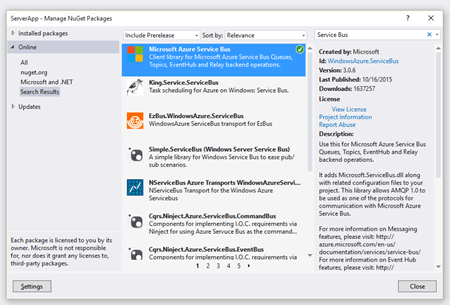
    Developers work with the Service Bus primarily by writing code. To host a Relay service, you must write a WCF service that uses one of the pre-defined Service Bus bindings. To make it easy, developers can add the Service Bus package to their projects via NuGet.

    2015.10.21integration01

    The only aspect that requires .NET is hosting Relay services. Developers can consume Relay-bound services, Queues, and Topic subscriptions from a host of other platforms, or even just raw REST APIs. The Microsoft SDKs for Java, PHP, Ruby, Python and Node.js all include the necessary libraries for talking to the Service Bus. AMQP support appears to be in a subset of the SDKs.

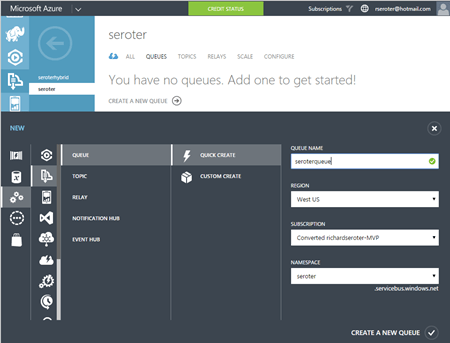
    It’s also possible to set up Service Bus Queues and Topics via the Azure Portal. From here, I can create new Queues, add Topics, and configure basic Subscriptions. I can also see any active Relay service endpoints.

    2015.10.21integration02

    Finally, you can interact with the Service Bus through the super powerful (and open source) Service Bus Explorer created by Micosoftie Paolo Salvatori. From here, you can configure and test virtually every aspect of the Service Bus.


    Event Hubs

    What is it?

    Azure Event Hubs is a scalable service for high-volume event intake. Stream in millions of events per second from applications or devices. It’s not an end-to-end messaging engine, but rather, focuses heavily on being a low latency “front door” that can reliably handle consistent or bursty event streams.

    Event Hubs works by putting an ordered sequence of events into something called a partition. Like Apache Kafka, an Event Hub partition acts like an append-only commit log. Senders – who communicate with Event Hubs via AMQP and HTTP – can specify a partition key when submitting events, or leave it out so that a round-robin approach decides which partition the event goes to. Partitions are accessed by readers through Consumer Groups. A consumer group is like a view of the event stream. There should only be a single partition reader at one time, and Event Hub users definitely have some responsibility for managing connections, tracking checkpoints, and the like.

    How do Event Hubs enable application integration? A core use case of Event Hubs is capturing high volume “data exhaust” thrown off by apps and devices. You may also use this to aggregate data from multiple sources, and have a consumer process pull data for further processing and sending to downstream systems.

    What’s new?

    In July of 2015, Microsoft added support for AMQP over web sockets. They also added the service to an addition region in the United States.

    How to use it?

    It looks like only the .NET SDK has native libraries for Event Hubs, but developers can still use either the REST API or AMQP libraries in their language of choice (e.g. Java).

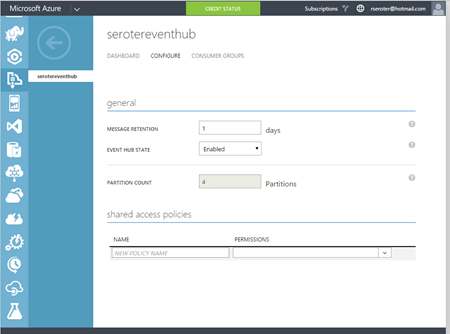
    The Azure Portal lets you create Event Hubs, and do some basic configuration.

    2015.10.21integration03

    Paolo also added support for Event Hubs in the Service Bus Explorer.


    Data Factory

    What is it?

    The Azure Data Factory is a cloud-based data integration service that does traditional extract-transform-load but with some modern twists. Data Factory can pull data from either on-premises or cloud endpoints. There’s an agent-based “data management gateway” for extracting data from on-premises file systems, SQL Servers, Oracle databases, Teradata databases, and more. Data transformation happens in Hadoop cluster or batch processing environment. All the various processing activities are collected into a pipeline that gets executed. Activities can have policies attached. A policy controls concurrency, retries, delay duration, and more.

    How does the Data Factory enable application integration? This could play a useful part in synchronizing data used by distributed systems. It’s designed for large data sets and is much more efficient than using messaging-based services to ship chunks of data between repositories.

    What’s new?

    This service just hit “general availability” in August, so the whole service is kinda new.

    How to use it?

    You have a few choices for interacting with the Data Factory service. As mentioned earlier, there are a whole bunch of supported database and file endpoints, but what about creating and managing the factories themselves? Your choices are Visual Studio, PowerShell, REST API, or the graphical designer in the Azure Preview Portal. Developers can download a package to add the appropriate project types to Visual Studio, and download the latest Azure PowerShell executable to get Data Factory extensions.

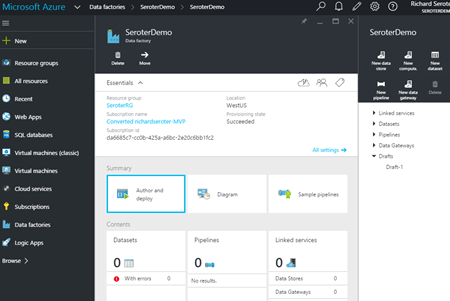
    To do any visual design, you need to jump into the (still) Preview Portal. Here you can create, manage, and monitor individual factories.

    2015.10.21integration04


    Stream Analytics

    What is it?

    Stream Analytics is a cloud-hosted event processing engine. Point it at an event source (real-time or historical) and run data over queries written in a SQL-like language. An event source could be a stream (like Event Hubs), or reference data (like Azure Blob storage). Queries can join streams, convert data types, match patterns, count unique values, look for changed values, find specific events in windows, detect absence of events, and more.

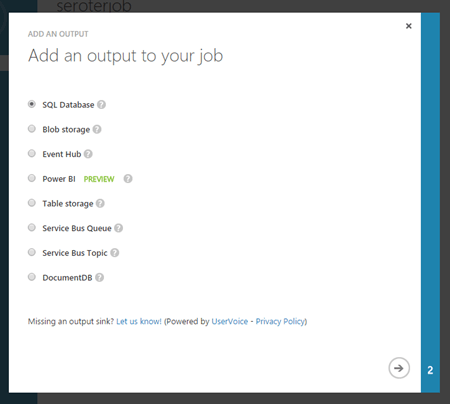
    Once the data has been processed, it goes to one of many possible destinations. These include Azure SQL Databases, Blob storage, Event Hubs, Service Bus Queues, Service Bus Topics, Power BI, or Azure Table Storage. The choice of consumer obviously depends on what you want to do with the data. If the stream results should go back through a streaming process, then Event Hubs is a good destination. If you want to stash the resulting data in a warehouse for later BI, go that way.

    How does Stream Analytics enable application integration? The output of a stream can go into the Service Bus for routing to other systems or triggering actions in applications hosted anywhere. One system could pump events through Stream Analytics to detect relevant business conditions and then send the output events to those systems via database or messaging.

    What’s new?

    This service became generally available in April 2015. In July, Microsoft added support for Service Bus Queues and Topics as output types. A few weeks ago, there was another update that added IoT-friendly capabilities like DocumentDB as an output, support for the IoT Hub service, and more.

    How to use it?

    Lots of different app services can connect to Stream Analytics (including Event Hubs, Power BI, Azure SQL Databases), but it looks like you’ve got limited choices today in setting up the stream processing jobs themselves. There’s the REST API, .NET SDK, or classic Portal UI.

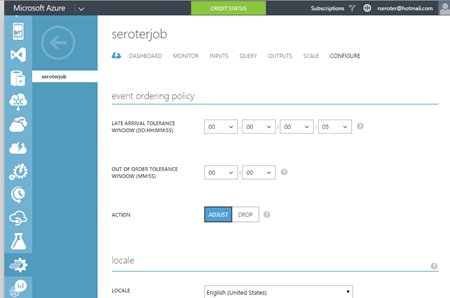
    The Portal UI lets you create jobs, configure inputs, write and test queries, configure outputs, scale streaming units up and down, and change job settings.

    2015.10.21integration05

    2015.10.21integration06


    BizTalk Services

    What is it?

    BizTalk Services targets EAI (enterprise application integration) and EDI (electronic data exchange) scenarios by offering tools and connectors that are designed to bridge protocol and data mismatches between systems. Developers send in XML or flat file data, and it can be validated, transformed, and routed via a “bridge” component. Message validation is done against an XSD schema, and XSLT transformations are created visually in a sophisticated mapping tool. Data comes into BizTalk Services via HTTP, S/FTP, Service Bus Queues, or Service Bus Topic subscription. Valid destinations for the output of a bridge include FTP, Azure Blob storage, one-way Service Bus Relay endpoints, Service Bus Queues, and more. Microsoft also added a BizTalk Adapter Service that lets you expose on-premises endpoints – options include SQL Server, Oracle databases, Oracle E-Business Suite, SAP, and Siebel – to cloud-hosted bridges.

    BizTalk Services also has some business-to-business capabilities. This includes support for a wide range of EDI and EDIFACT schemas, and a basic trading partner management portal.

    How does BizTalk Services enable application integration? BizTalk Services makes it possible for applications with different endpoints and data structures to play nice. Obviously this has potential to be a useful part of an application integration portfolio. Companies need to connect their assets, which are more distributed now more than ever.

    What’s new?

    BizTalk Services itself seems a bit stagnant (judging by the sparse release notes), but some of its services are now exposed in Logic and API apps (see below). Not sure where this particular service is heading, but its individual pieces will remain useful to teams that want access to transformation and connectivity services in their apps.

    How to use it?

    Working with BizTalk Services means using the REST API, PowerShell commandlets, or Visual Studio. There’s also a standalone management portal that hangs off the main Azure Portal.

    In Visual Studio, developers need to add the BizTalk Services SDK in order to get the necessary components. After installing, it’s easy enough to model out a bridge with all the necessary inputs, outputs, schemas, and maps.

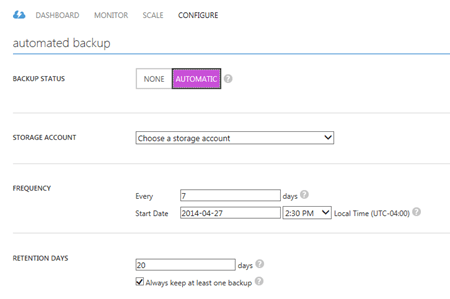
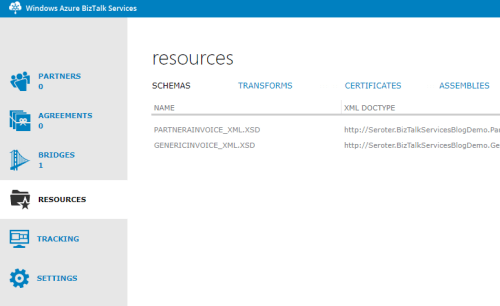
    In the standalone portal, you can search for and delete bridges, upload schemas and maps, add certificates, and track messages. Back in the standard Azure Portal, you configure things like backup policies and scaling settings.

    2015.10.21integration07


    Logic Apps

    What is it?

    Logic Apps let developers build and host workflows in the cloud. These visually-designed processes run a series of steps (called “actions”) and use “connectors” to access remote data and business logic. There are tons of connectors available so far, and it’s possible to create your own. Core connectors include Azure Service Bus, Salesforce Chatter, Box, HTTP, SharePoint, Slack, Twilio, and more. Enterprise connectors include an AS2 connector, BizTalk Transform Service, BizTalk Rules Service, DB2 connector, IBM WebSphere MQ Server, POP3, SAP, and much more.

    Triggers make a Logic App run, and developers can trigger manually, or off the action of a connector. You could start a Logic app with an HTTP call, a recurring schedule, or upon detection of a relevant Tweet in Twitter. Within the Logic App, you can specify repeating operations and some basic conditional logic. Developers can see and edit the underlying JSON that describes a Logic App. Features like shared parameters are ONLY available to those writing code (versus visually designing the workflow). The various BizTalk-branded API actions offer the ability to validate, transform, and encode data, or execute independently-maintained business rules.

    How do Logic Apps enable application integration? This service helps developers put together cloud-oriented application integration workflows that don’t need to run in an on-premises message bus. The various social and SaaS connectors help teams connect to more modern endpoints, while the on-premises connectors and classic BizTalk functionality addresses more enterprise-like use cases.

    What’s new?

    This is clearly an area of attention for Microsoft. Lots of updates since the server launched in March. Microsoft has added Visual Studio support for designing Logic Apps, future execution scheduling, connector search in the Preview Portal, do … until looping, improvements to triggers, and more.

    How to use it?

    This is still a preview service, so it’s not surprising that you only have a few ways to interact with it. There’s a REST API for management, and the user experience in the Azure Preview Portal.

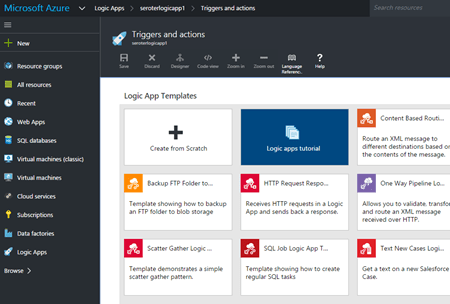
    Within the Preview Portal, developers can create and manage their Logic Apps. You can either start from scratch, or use one of the pre-built templates that reflect common patterns like content-based routing, scatter-gather, HTTP request/response, and more.

    2015.10.21integration08

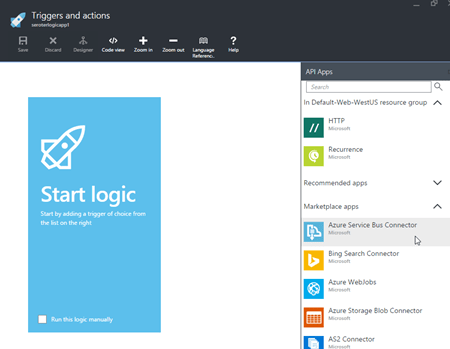
    If you want to build your own, you choose from any existing or custom-built API apps.

    2015.10.21integration09

    You then save your Logic App and can have it run either manually or based on a trigger.


    BizTalk Server (on Cloud Virtual Machines)

    What is it?

    Azure users can provision and manage their own BizTalk Server integration server in Azure Virtual Machines using prebuilt images. BizTalk Server is the mature, feature-rich integration bus used to connect enterprise apps. With it, customers get a stateful workflow engine, reliable pub/sub messaging engine, adapter framework, rules engine, trading partner management platform, and full design experience in Visual Studio. While not particularly cloud integrated (with the exception of a couple Service Bus adapters), it can be reasonably used to connect to integrate apps across environments.

    What’s new?

    BizTalk Server 2013 R2 was released in the middle of last year and included some incremental improvements like native JSON support, and updates to some built-in adapters. The next major release of the platform is expected in 2016, but without a publicly announced feature set.

    How to use it?

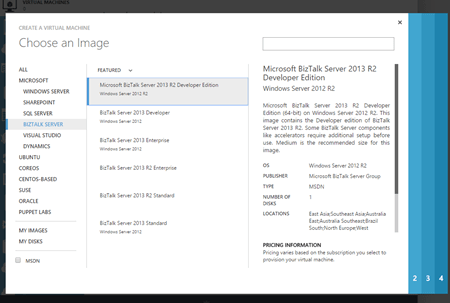
    Deploy the image from the template library if you want to run it in Azure, or do the same in any other infrastructure cloud.

    2015.10.21integration10


    Summary

    Whew. Those are a lot of options. Definitely some overlap, but Microsoft also seems to be focused on building these in a microservices fashion. Specifically, single purpose services that do one thing really well and don’t encroach into unnatural territory. For example, Stream Analytics does one thing, and relies on other services to handle other parts of the processing pipeline. I like this trend, as it gets away from a heavyweight monolithic integration service that has a bunch of things I don’t need, but have to deploy. It’s much cleaner (although potentially MORE complex) to assemble services as needed!

  • Window Azure BizTalk Services: How to Get Started and When to Use It

    The “integration as a service” space continues to heat up, and Microsoft officially entered the market with the General Availability of Windows Azure BizTalk Services (WABS) a few weeks ago.  I recently wrote up an InfoQ article that summarized the product and what it offered. I also figured that I should actually walk through the new installation and deployment process to see what’s changed. Finally, I’ll do a brief assessment of where I’d consider using this vs. the other cloud-based integration tools.

    Installation

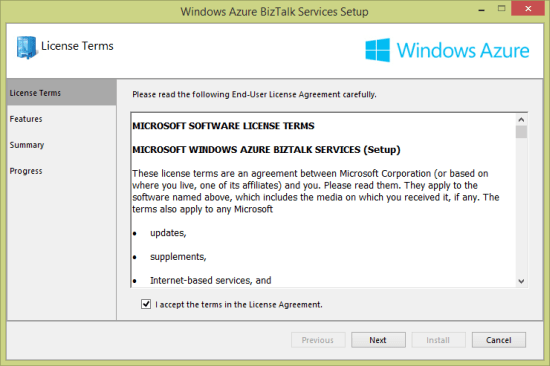
    Why am I installing something if this is a cloud service? Well, the development of integration apps still occurs on premises, so I need an SDK for the necessary bits. Grab the Windows Azure BizTalk Services SDK Setup and kick off the process. I noticed what seems to be a much cleaner installation wizard.

    2013.12.10biztalkservices01

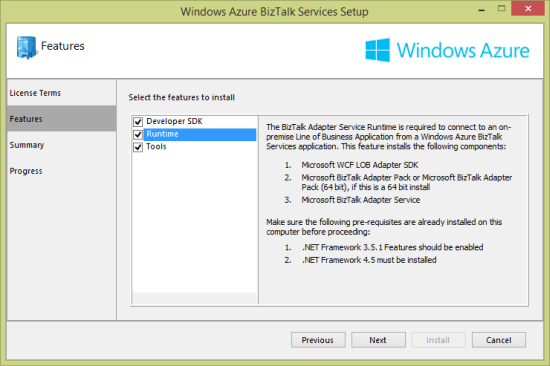
    After choosing the components that I wanted to install (including the runtime, developer tools, and developer SDK) …

    2013.12.10biztalkservices02

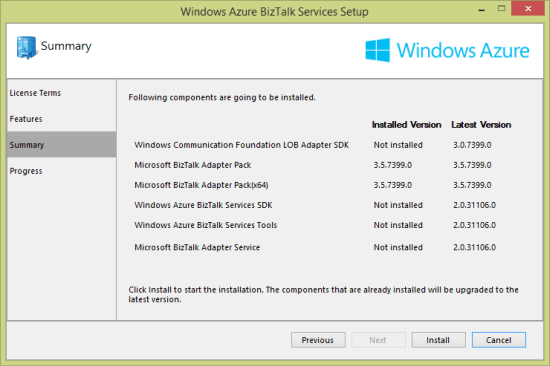
    … you are presented with a very nice view of the components that are needed, and which versions are already installed.

    2013.12.10biztalkservices03

    At this point, I have just about everything on my local developer machine that’s needed to deploy an integration application.

    Provisioning

    WABS applications run in the Windows Azure cloud. Developers provision and manage their WABS instances in the Windows Azure portal. To start with, choose App Services and then BizTalk Services before selecting Custom Create.

    2013.12.10biztalkservices04

    Next, I’m asked to pick an instance name, edition, geography, tracking database, and Windows Azure subscription. There are four editions: basic, developer, standard, and premium. As you move between editions (and pay more money), you have access to greater scalability, more integration applications, on-premises connectivity, archiving, and high availability.

    2013.12.10biztalkservices05

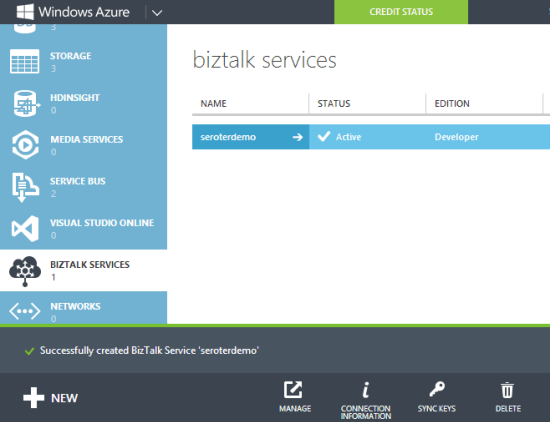
    I created a new database instance and storage account to ensure that there would be no conflicts with old (beta) WABS instances. Once the provisioning process was complete (maybe 15 minutes or so), I saw my new instance in the Windows Azure Portal.

    2013.12.10biztalkservices07

    Drilling into the WABS instance, I saw connection strings, IP addresses, certificate information, usage metrics, and more.

    2013.12.10biztalkservices08

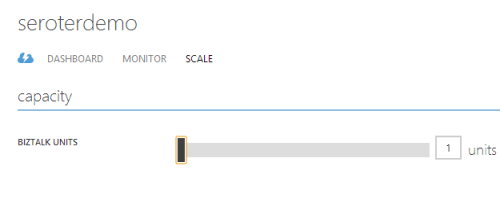
    The Scale tab showed me the option to add more “scale units” to a particular instance. Basic, standard and premium edition instances have “high availability” built in where multiple VMs are beneath a single scale unit. Adding scale units to an instance requires standard or premium editions.

    2013.12.10biztalkservices09

    In the technical preview and beta releases of WABS, the developer was forced to create a self-signed certificate to use when securing a deployment. Now, I can download a dev certificate from the Portal and install it into my personal certificate store and trusted root authority. When I’m ready for production, I can also upload an official certificate to my WABS instance.

    Developing

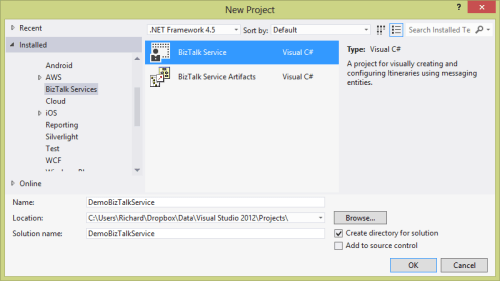
    WABS projects are built in Visual Studio 2012/2013. There’s an entirely new project type for WABS, and I could see it when creating a new project.

    2013.12.10biztalkservices10

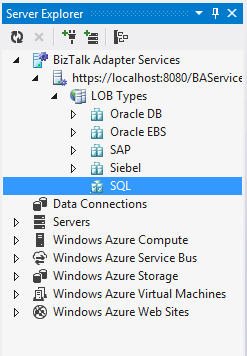
    Let’s look at what we have in Visual Studio to create WABS solutions. First, the Server Explorer includes a WABS component for creating cloud-accessible connections to line-of-business systems. I can create connections to Oracle/SAP/Siebel/SQL Server repositories on-premises and make them part of the “bridges” that define a cloud integration process.

    2013.12.10biztalkservices11

    Besides line-of-business endpoints, what else can you add to a Bridge? The final palette of activities in the Toolbox is shown below. There are a stack of destination endpoints that cover a wide range of choices. The source options are limited, but there are promises of new items to come. The Bridges themselves support one-way or request-response scenarios.

    2013.12.10biztalkservices12

    Bridges expect either XML or flat file messages. A message is defined by a schema. The schema editor is virtually identical to the visual tool that ships with the standard BizTalk Server product. Since source and destination message formats may differ, it’s often necessary to include a transformation component. Transformation is done via a very cool Mapper that includes a sophisticated set of canned operations for transforming the structure and content of a message. This isn’t the Mapper that comes with BizTalk Server, but a much better one.

    2013.12.10biztalkservices14


    A bridge configuration model includes a source, one or more bridges (which can be chained together), and one or more destinations. In the case below, I built a simple one-way model that routes to a Windows Azure Service Bus Queue.

    2013.12.10biztalkservices15

    Double-clicking a particular bridge shows me the bridge configuration. In this configuration, I specified an XML schema for the inbound message, and a transformation to a different format.

    2013.12.10biztalkservices16


    At this point, I have a ready-to-go integration solution.

    Deploying

    To deploy one of theses solutions, you’ll need a certificate installed (see earlier note), and the Windows Azure Access Control Service credentials shown in the Windows Azure Portal. With that info handy, I right-clicked the project in Visual Studio and chose Deploy. Within a few seconds, I was told that everything was up and running. To confirm, I clicked the Manage button on the WABS instance page was visited the WABS-specific Portal. This Portal shows my deployed components, and offers tracking services. Ideally, this would be baked into the Windows Azure Portal itself, but at least it somewhat resembles the standard Portal.

    2013.12.10biztalkservices17

    So it looks like I have everything I need to build a test.

    Testing

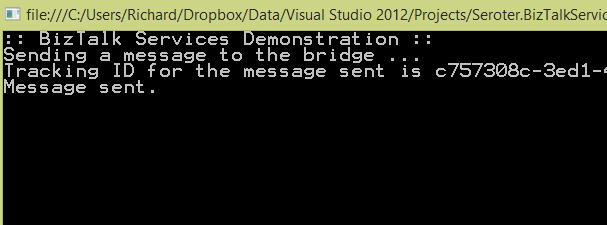
    I finally built a simple Console application in Visual Studio to submit a message to my Bridge. The basic app retrieved a valid ACS token and sent it along with my XML message to the bridge endpoint. After running the app, I got back the tracking ID for my message.

    2013.12.10biztalkservices19

    To actually see that this worked, I first looked in the WABS Portal to find the tracked instance. Sure enough, I saw a tracked message.

    2013.12.10biztalkservices18

    As a final confirmation, I opened up the powerful Service Bus Explorer tool and connected to my Windows Azure account. From here, I could actually peek into the Windows Azure Service Bus Queue that the WABS bridge published to. As you’d expect, I saw the transformed message in the queue.

    2013.12.10biztalkservices20

    Verdict

    There is a wide spectrum of products in the integration-as-a-service domain. There are batch-oriented tools like Informatica Cloud and Dell Boomi, and things like SnapLogic that handle both real-time and batch. Mulesoft sells the CloudHub which is a comprehensive platform for real-time integration. And of course, there are other integration solutions like AWS Simple Notification Services or the Windows Azure Service Bus.

    So where does WABS fit in? It’s clearly message-oriented, not batch-oriented. It’s more than a queuing solution, but less than an ESB. It seems like a good choice for simple connections between different organizations, or basic EDI processing. There are a decent number of source and destination endpoints available, and the line-of-business connectivity is handy. The built in high availability and optional scalability mean that it can actually be used in production right now, so that’s a plus.

    There’s still lots of room for improvement, but I guess that’s to be expected with a v1 product. I’d like to see a better entry-level pricing structure, more endpoint choices, more comprehensive bridge options (like broadcasting to multiple endpoints), built-in JSON support, and SDKs that support non-.NET languages.

    What do you think? See any use cases where you’d use this today, or are there specific features that you’ll be waiting for before jumping in?

  • Using the Windows Azure Service Bus REST API to Send to Topic from Salesforce.com

    In the past, I’ve written and talked about integrating the Windows Azure Service Bus with non-Microsoft platforms like Salesforce.com. I enjoy showing how easy it is to use the Service Bus Relay to connect on-premises services with Salesforce.com. On multiple occasions, I’ve been asked how to do this with Service Bus brokered messaging options (i.e. Topics and Queues) as well. It can be a little tricky as it requires the use of the Windows Azure REST API and there aren’t a ton of public examples of how to do it! So in this blog post, I’ll show you how to send a message to a Service Bus Topic from Salesforce.com. Note that this sequence resembles how you’d do this on ANY platform that can’t use a Windows Azure SDK.
    Creating the Topic and Subscription

    First, I needed a Topic and Subscription to work with. Recall that Topics differ from Queues in that a Topic can have multiple subscribers. Each subscription (which may filter on message properties) has its own listener and gets their own copy of the message. In this fictitious scenario, I wanted users to submit IT support tickets from a page within the Salesforce.com site.

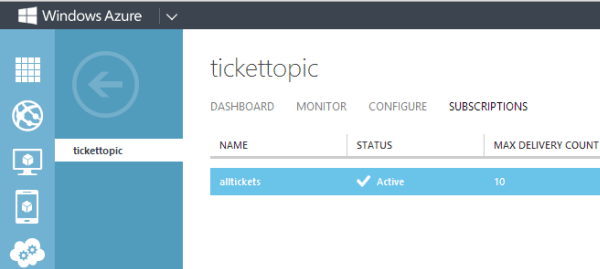
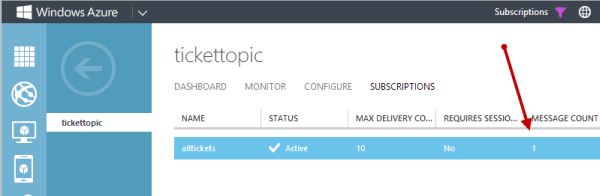
    I could create a Topic in a few ways. First, there’s the Windows Azure portal. Below you can see that I have a Topic called “TicketTopic” and a Subscription called “AllTickets”.

    2013.09.18topic01

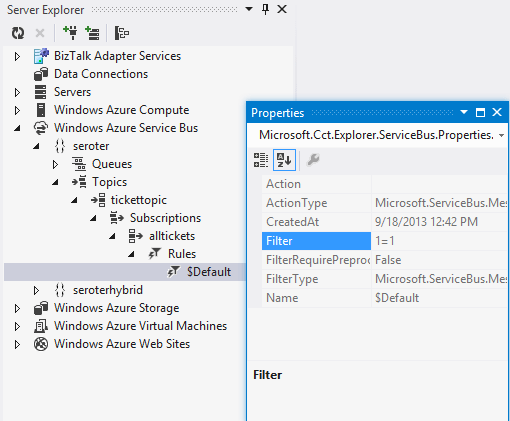
    If you’re a Visual Studio developer, you can also use the handy Windows Azure extensions to the Server Explorer window. Notice below that this tool ALSO shows me the filtering rules attached to each Subscription.

    2013.09.18topic02

    With a Topic and Subscription set up, I was ready to create a custom VisualForce page to publish to it.

    Code to Get an ACS Token

    Before I could send a message to a Topic, I needed to get an authentication token from the Windows Azure Access Control Service (ACS). This token goes into the request header and lets Windows Azure determine if I’m allowed to publish to a particular Topic.

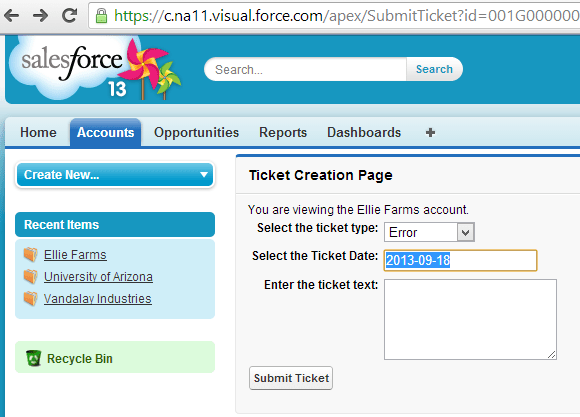
    In Salesforce.com, I built a custom VisualForce page with the markup necessary to submit a support ticket. The final page looks like this:

    2013.09.18topic03

    I also created a custom Controller that extended the native Accounts Controller and added an operation to respond to the “Submit Ticket” button event. The first bit of code is responsible for calling ACS and getting back a token that can be included in the subsequent request. Salesforce.com extensions are written in a language called Apex, but it should look familiar to any C# or Java developer.

           Http h= new Http();
           HttpRequest acReq = new HttpRequest();
           HttpRequest sbReq = new HttpRequest();
    
            // define endpoint and encode password
           String acUrl = 'https://seroter-sb.accesscontrol.windows.net/WRAPV0.9/';
           String encodedPW = EncodingUtil.urlEncode(sbUPassword, 'UTF-8');
    
           acReq.setEndpoint(acUrl);
           acReq.setMethod('POST');
           // choose the right credentials and scope
           acReq.setBody('wrap_name=demouser&amp;wrap_password=' + encodedPW + '&amp;wrap_scope=http://seroter.servicebus.windows.net/');
           acReq.setHeader('Content-Type','application/x-www-form-urlencoded');
    
           HttpResponse acRes = h.send(acReq);
           String acResult = acRes.getBody();
    
           // clean up result to get usable token
           String suffixRemoved = acResult.split('&amp;')[0];
           String prefixRemoved = suffixRemoved.split('=')[1];
           String decodedToken = EncodingUtil.urlDecode(prefixRemoved, 'UTF-8');
           String finalToken = 'WRAP access_token=\"' + decodedToken + '\"';
    

    This code block makes an HTTP request to the ACS endpoint and manipulates the response into the token format I needed.

    Code to Send the Message to a Topic

    Now comes the fun stuff. Here’s how you actually send a valid message to a Topic through the REST API. Below is the complete code snippet, and I’ll explain it further in a moment.

          //set endpoint using this scheme: https://&lt;namespace&gt;.servicebus.windows.net/&lt;topic name&gt;/messages
           String sbUrl = 'https://seroter.servicebus.windows.net/demotopic/messages';
           sbReq.setEndpoint(sbUrl);
           sbReq.setMethod('POST');
           // sending a string, and content type doesn't seem to matter here
           sbReq.setHeader('Content-Type', 'text/plain');
           // add the token to the header
           sbReq.setHeader('Authorization', finalToken);
           // set the Brokered Message properties
           sbReq.setHeader('BrokerProperties', '{ \"MessageId\": \"{'+ guid +'}\", \"Label\":\"supportticket\"}');
           // add a custom property that can be used for routing
           sbReq.setHeader('Account', myAcct.Name);
           // add the body; here doing it as a JSON payload
           sbReq.setBody('{ \"Account\": \"'+ myAcct.Name +'\", \"TicketType\": \"'+ TicketType +'\", \"TicketDate\": \"'+ SubmitDate +'\", \"Description\": \"'+ TicketText +'\" }');
    
           HttpResponse sbResult = h.send(sbReq);
    

    So what’s happening here? First, I set the endpoint URL. In this case, I had to follow a particular structure that includes “/messages” at the end. Next, I added the ACS token to the HTTP Authorization header.

    After that, I set the brokered messaging header. This fills up a JSON-formatted BrokerProperties structure that includes any values you needed by the message consumer. Notice here that I included a GUID for the message ID and provided a “label” value that I could access later. Next, I defined a custom header called “Account”. These custom headers get added to the Brokered Message’s “Properties” collection and are used in Subscription filters. In this case, a subscriber could choose to only receive Topic messages related to a particular account.

    Finally, I set the body of the message. I could send any string value here, so I chose a lightweight JSON format that would be easy to convert to a typed object on the receiving end.

    With all that, I was ready to go.

    Receiving From Topic

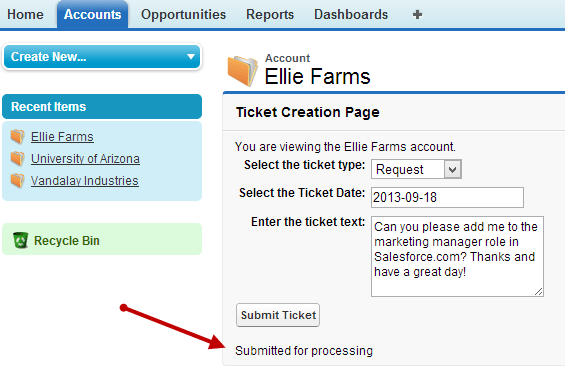
    To get a message into the Topic, I submitted a support ticket from the VisualForce page.

    2013.09.18topic04

    I immediately switched to the Windows Azure portal to see that a message was now queued up for the Subscription.

    2013.09.18topic05

    How can I retrieve this message? I could use the REST API again, but let’s show how we can mix and match techniques. In this case, I used the Windows Azure SDK for .NET to retrieve and delete a message from the Topic. I also referenced the excellent JSON.NET library to deserialize the JSON object to a .NET object. The tricky part was figuring out the right way to access the message body of the Brokered Message. I wasn’t able to simply pull it out a String value, so I went with a Stream instead. Here’s the complete code block:

               //pull Service Bus connection string from the config file
                string connectionString = ConfigurationManager.AppSettings["Microsoft.ServiceBus.ConnectionString"];
    
                //create a subscriptionclient for interacting with Topic
                SubscriptionClient client = SubscriptionClient.CreateFromConnectionString(connectionString, "tickettopic", "alltickets");
    
                //try and retrieve a message from the Subscription
                BrokeredMessage m = client.Receive();
    
                //if null, don't do anything interesting
                if (null == m)
                {
                    Console.WriteLine("empty");
                }
                else
                {
                    //retrieve and show the Label value of the BrokeredMessage
                    string label = m.Label;
                    Console.WriteLine("Label - " + label);
    
                    //retrieve and show the custom property of the BrokeredMessage
                    string acct = m.Properties["Account"].ToString();
                    Console.WriteLine("Account - " + acct);
    
                    Ticket t;
    
                    //yank the BrokeredMessage body as a Stream
                    using (Stream c = m.GetBody&lt;Stream&gt;())
                    {
                        using (StreamReader sr = new StreamReader(c))
                        {
                            //get a string representation of the stream content
                            string s = sr.ReadToEnd();
    
                            //convert JSON to a typed object (Ticket)
                            t = JsonConvert.DeserializeObject&lt;Ticket&gt;(s);
                            m.Complete();
                        }
                    }
    
                    //show the ticket description
                    Console.WriteLine("Ticket - " + t.Description);
                }
    

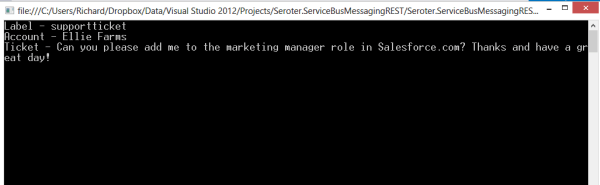
    Pretty simple. Receive the message, extract interesting values (like the “Label” and custom properties), and convert the BrokeredMessage body to a typed object that I could work with. When I ran this bit of code, I saw the values we set in Salesforce.com.

    2013.09.18topic06

    Summary

    The Windows Azure Service Bus brokered messaging services provide a great way to connect distributed systems. The store-and-forward capabilities are key when linking systems that span clouds or link the cloud to an on-premises system. While Microsoft provides a whole host of platform-specific SDKs for interacting with the Service Bus, there are platforms that have to use the REST API instead. Hopefully this post gave you some insight into how to use this API to successfully publish to Service Bus Topics from virtually ANY software platform.

  • TechEd North America Session Recap, Recording Link

    Last week I had the pleasure of visiting New Orleans to present at TechEd North America. My session, Patterns of Cloud Integration, was recorded and is now available on Channel9 for everyone to view.

    I made the bold (or “reckless”, depending on your perspective) decision to show off as many technology demos as possible so that attendees could get a broad view of the options available for integrating applications, data, identity, and networks. Being a Microsoft conference, many of my demonstrations highlighted aspects of the Microsoft product portfolio – including one of the first public demos of Windows Azure BizTalk Services – but I also snuck in a few other technologies as well. My demos included:

    1. [Application Integration] BizTalk Server 2013 calls REST-based Salesforce.com endpoint and authenticates with custom WCF behavior. Secondary demo also showed using SignalR to incrementally return the results of multiple calls to Salesforce.com.
    2. [Application Integration] ASP.NET application running in Windows Azure Web Sites using the Windows Azure Service Bus Relay Service to invoke a web service on my laptop.
    3. [Application Integration] App running in Windows Azure Web Sites sending message to Windows Azure BizTalk Services. Message then dropped to one of three queues that was polled by Node.js application running in CloudFoundry.com.
    4. [Application Integration] App running in Windows Azure Web Sites sending message to Windows Azure Service Bus Topic, and polled by both a Node.js application in CloudFoundry.com, and a BizTalk Server 2013 server on-premises.
    5. [Application/Data Integration] ASP.NET application that uses local SQL Server database but changes connection string (only) to instead point to shared database running in Windows Azure.
    6. [Data Integration] Windows Azure SQL Database replicated to on-premises SQL Server database through the use of Windows Azure SQL Data Sync.
    7. [Data Integration] Account list from Salesforce.com copied into on-premises SQL Server database by running ETL job through the Informatica Cloud.
    8. [Identity Integration] Using a single set of credentials to invoke an on-premises web service from a custom VisualForce page in Salesforce.com. Web service exposed via Windows Azure Service Bus Relay.
    9. [Identity Integration] ASP.NET application running in Windows Azure Web Sites that authenticates users stored in Windows Azure Active Directory.
    10. [Identity Integration] Node.js application running in CloudFoundry.com that authenticates users stored in an on-premises Active Directory that’s running Active Directory Federation Services (AD FS).
    11. [Identity Integration] ASP.NET application that authenticates users via trusted web identity providers (Google, Microsoft, Yahoo) through Windows Azure Access Control Service.
    12. [Network Integration] Using new Windows Azure point-to-site VPN to access Windows Azure Virtual Machines that aren’t exposed to the public internet.

    Against all odds, each of these demos worked fine during the presentation. And I somehow finished with 2 minutes to spare. I’m grateful to see that my speaker scores were in the top 10% of the 350+ breakouts, and hope you’ll take some time to watch it. Feedback welcome!
  • Walkthrough of New Windows Azure BizTalk Services

    The Windows Azure EAI Bridges are dead. Long live BizTalk Services! Initially released last year as a “lab” project, the Service Bus EAI Bridges were a technology for connecting cloud and on-premises endpoints through an Azure-hosted broker. This technology has been rebranded (“Windows Azure BizTalk Services”) and upgraded and is now available as a public preview. In this blog post, I’ll give you a quick tour around the developer experience.

    First off, what actually *is* Windows Azure BizTalk Services (WABS)? Is it BizTalk Server running in the cloud? Does it run on-premises? Check out the announcement blog posts from the Windows Azure and BizTalk teams, respectively, for more. But basically, it’s separate technology from BizTalk Server, but meant to be highly complementary. Even though It uses a few of the same types of artifacts such as schemas and maps, they aren’t interchangeable. For example, WABS maps don’t run in BizTalk Server, and vice versa. Also, there’s no concept of long-running workflow (i.e. orchestration), and none of the value-added services that BizTalk Server provides (e.g. Rules Engine, BAM). All that said, this is still an important technology as it makes it quick and easy to connect a variety of endpoints regardless of location. It’s a powerful way to expose line-of-business apps to cloud systems, and Windows Azure hosting model makes it possible to rapidly scale solutions. Check out the pricing FAQ page for more details on the scaling functionality, and the reasonable pricing.

    Let’s get started. When you install the preview components, you’ll get a new project type in Visual Studio 2012.

    2013.06.03wabs01

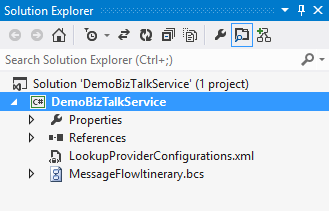
    Each WABS project can contain a single “bridge configuration” file. This file defines the flow of data between source and destination endpoints. Once you have a WABS project, you can add XML schemas, flat-file schemas, and maps.

    2013.06.03wabs02

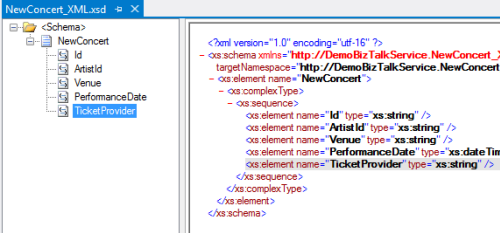
    The WABS Schema Editor looks identical to the BizTalk Server Schema Editor and lets you define XML or flat file message structures. While the right-click menu promises the ability to generate and validate file instances, my pre-preview version of the bits only let me validate messages, not generate sample ones.

    2013.06.03wabs03

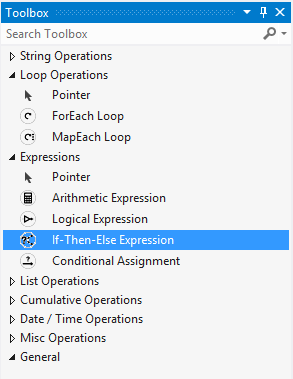
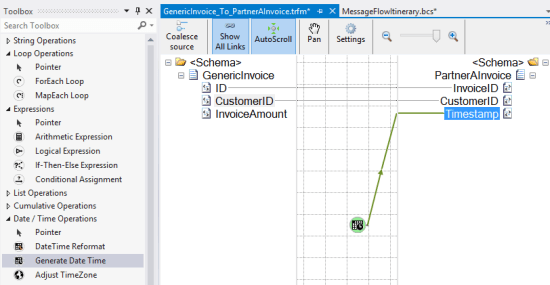
    The WABS schema mapper is very different from the BizTalk Mapper. And that’s a good thing. The UI has subtle alterations, but the more important change is in the palette of available “functoids” (components for manipulating data). First, you’ll see more sophisticated looping and logical expression handling. This include a ForEach Loop and finally, an If-Then-Else Expression option.

    2013.06.03wabs04

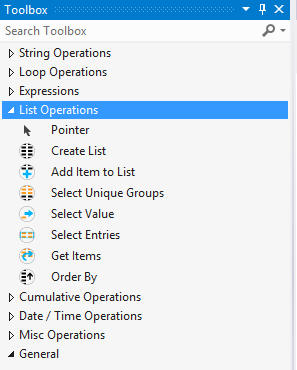
    The concept of “lists” are also entirely new. You can populate, persist, and query lists of data and create powerfully complex mappings between structures.

    2013.06.03wabs05

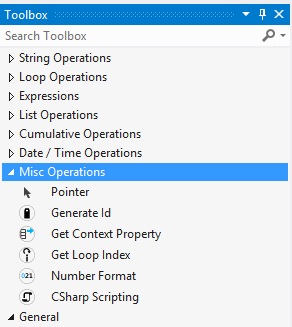
    Finally, there are some “miscellaneous” operations that introduce small – but helpful – capabilities. These functoids let you grab a property from the message’s context (metadata), generate a random ID, and even embed custom C# code into a map. I seem to recall that custom code was excluded from the EAI Bridges preview, and many folks expressed concern that this would limit the usefulness of these maps for tricky, real-world scenarios. Now, it looks like this is the most powerful data mapping tool that Microsoft has ever produced. I suspect that an entire book could be written about how to properly use this Mapper.

    2013.06.03wabs06

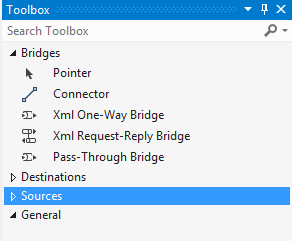
    Next up, let’s take a look at the bridge configuration and what source and destination endpoints are supported. The toolbox for the bridge configuration file shows three different types of bridges: XML One-Way Bridge, XML Request-Reply Bridge, and Pass-Through Bridge.

    2013.06.03wabs07

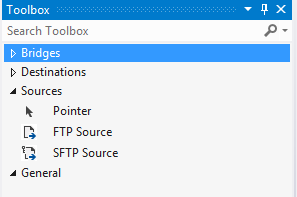
    You’d use each depending on whether you were doing synchronous or asynchronous XML messaging, or any flat file transmission. To get data into a bridge, today you can use HTTP, FTP, or SFTP. Notice that “HTTP” doesn’t show up in that list as each bridge automatically has a Windows Azure ACS-secured HTTP endpoint associated with it.

    2013.06.03wabs08

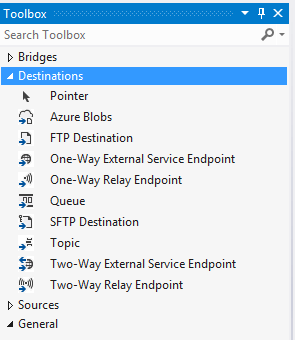
    While the currently available set of sources is a bit thin, the destination options are solid. You can consume web services, Service Bus Relay endpoints, Service Bus Queues / Topics, Windows Azure Blobs, FTP and SFTP endpoints.

    2013.06.03wabs09

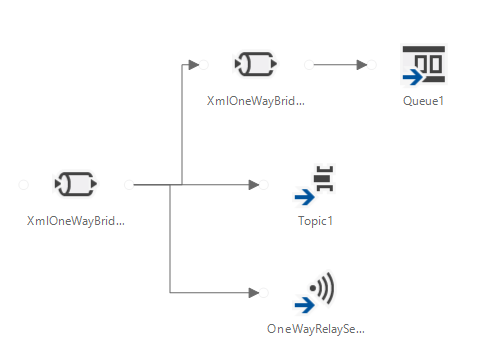
    A given bridge configuration file will often contain a mix of these endpoints. For instance, consider a case where you want to route a message to one of three different endpoints based on some value in the message itself. Also imagine wanting to do a special transformation heading to one endpoint, and not the others. In the configuration below, I’m chaining together XML bridges to route to the Service Bus Queue, and directly routing to either the Service Bus Topic or Relay Service based on the message content.

    2013.06.03wabs10

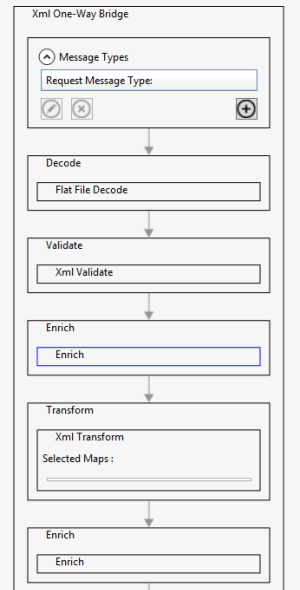
    An individual bridge has a number of stages that a message passes through. Double-clicking a bridge reveals steps for identifying, decoding, validating, enriching, encoding, and transforming messages.

    2013.06.03wabs11

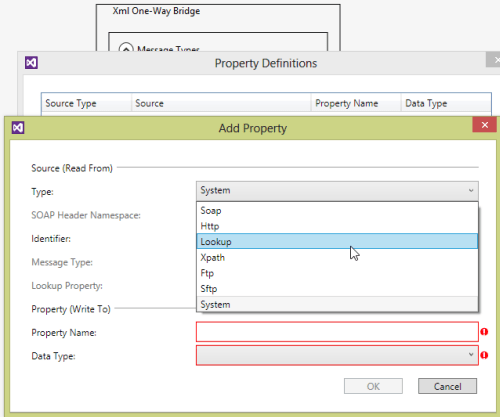
    An individual step exposes relevant configuration properties. For instance, the “Enrich” stage of a bridge lets you choose a way to populate data in the outbound message’s metadata (context) properties. Options include pulling values from the source message’s SOAP or HTTP headers, XPath against the source message body, lookup to a Windows Azure SQL database, and more.

    2013.06.03wabs12

    When a bridge configuration is completed and ready for deployment, simply right-click the Visual Studio project and choose Deploy and fill in valid credentials for the WABS preview.

    Wrap Up

    This is definitely preview software as there are a number of things we’ll likely see added before it’s ready for production use (e.g. enhanced management). However, it’s a good time to start poking around and getting a feel for when you might use this. On a broad scale, you COULD choose to use this instead of something like MuleSoft’s CloudHub to do pure cloud-to-cloud integration, but WABS is drastically less mature than what MuleSoft  has to offer. Moving forward, it’d be great to see a durable workflow component added, additional sources, and Microsoft really needs to start baking JSON support into more products from the get-go.

    What do you think? Plan on trying this out? Have ideas for where you could use it?

  • Going to Microsoft TechEd (North America) to Speak About Cloud Integration

    In a few weeks, I’ll be heading to New Orleans to speak at Microsoft TechEd for the first time. My topic – Patterns of Cloud Integration – is an extension of things I’ve talked about this year in Amsterdam, Gothenburg, and in my latest Pluralsight course. However, I’ll also be covering some entirely new ground and showcasing some brand new technologies.

    TechEd is a great conference with tons of interesting sessions, and I’m thrilled to be part of it. In my talk, I’ll spend 75 minutes discussing practical considerations for application, data, identity, and network integration with cloud systems. Expect lots of demonstrations of Microsoft (and non-Microsoft) technology that can help organizations cleanly link all IT assets, regardless of physical location. I’ll show off some of the best tools from Microsoft, Salesforce.com, AWS (assuming no one tackles me when I bring it up), Informatica, and more.

    Any of you plan on going to North America TechEd this year? If so, hope to see you there!

  • My New Pluralsight Course – Patterns of Cloud Integration – Is Now Live

    I’ve been hard at work on a new Pluralsight video course and it’s now live and available for viewing. This course, Patterns of Cloud Integration,  takes you through how application and data integration differ when adding cloud endpoints. The course highlights the 4 integration styles/patterns introduced in the excellent Enterprise Integration Patterns book and discusses the considerations, benefits, and challenges of using them with cloud systems. There are five core modules in the course:

    • Integration in the Cloud. An overview of the new challenges of integrating with cloud systems as well as a summary of each of the four integration patterns that are covered in the rest of the course.
    • Remote Procedure Call. Sometimes you need information or business logic stored in an independent system and RPC is still a valid way to get it. Doing this with a cloud system on one (or both!) ends can be a challenge and we cover the technologies and gotchas here.
    • Asynchronous Messaging. Messaging is a fantastic way to do loosely coupled system architecture, but there are still a number of things to consider when doing this with the cloud.
    • Shared Database. If every system has to be consistent at the same time, then using a shared database is the way to go. This can be a challenge at cloud scale, and we review some options.
    • File Transfer. Good old-fashioned file transfers still make sense in many cases. Here I show a new crop of tools that make ETL easy to use!

    Because “the cloud” consists of so many unique and interesting technologies, I was determined to not just focus on the products and services from any one vendor. So, I decided to show off a ton of different technologies including:

    Whew! This represents years of work as I’ve written about or spoken on this topic for a while. It was fun to collect all sorts of tidbits, talk to colleagues, and experiment with technologies in order to create a formal course on the topic. There’s a ton more to talk about besides just what’s in this 4 hour course, but I hope that it sparks discussion and helps us continue to get better at linking systems, regardless of their physical location.

  • January 2013 Trip to Europe to Speak on (Cloud) Integration, Identity Management

    In a couple weeks, I’m off to Amsterdam and Gothenburg to speak at a pair of events. First, on January 22nd I’ll be in Amsterdam at an event hosted by middleware service provider ESTREME. There will be a handful of speakers, and I’ll be presenting on the Patterns of Cloud Integration. It should be a fun chat about the challenges and techniques for applying application integration patterns in cloud settings.

    Next up, I’m heading to Gothenburg (Sweden) to speak at the annual Integration Days event hosted by Enfo Zystems. This two day event is held January 24th and 25th and features multiple tracks and a couple dozen sessions. My session on the 24th, called Cross Platform Security Done Right, focuses on identity management in distributed scenarios. I’ve got 7 demos lined up that take advantage of Windows Azure ACS, Active Directory Federation Services, Node.js, Salesforce.com and more. My session on the 25th, called Embracing the Emerging Integration Endpoints, looks at how existing integration tools can connect to up-and-coming technologies. Here I have another 7 demos that show off the ASP.NET Web API, SignalR, StreamInsight, Node.js, Amazon Web Services, Windows Azure Service Bus, Salesforce.com and the Informatica Cloud. Mikael Hakansson will be taking bets as to whether I’ll make it through all the demos in the allotted time.

    It should be a fun trip, and thanks to Steef-Jan Wiggers and Mikael for organizing my agenda. I hope to see some of you all in the audience!