Category: .NET

  • Integration in the Cloud: Part 4 – Asynchronous Messaging Pattern

    So far in this blog series we’ve been looking at how Enterprise Integration Patterns apply to cloud integration scenarios. We’ve seen that a Shared Database Pattern works well when you have common data (and schema) and multiple consumers who want consistent access.  The Remote Procedure Invocation Pattern is a good fit when one system desires synchronous access to data and functions sitting in other systems. In this final post in the series, I’ll walk through the Asynchronous Messaging Pattern and specifically demonstrate how to share data between clouds using this pattern.

    What Is It?

    While the remote procedure pattern provides looser coupling than the shared database pattern, it is still a blocking call and not particularly scalable.  Architects and developers use an asynchronous messaging pattern when they want to share data in the most scalable and responsive way possible.  Think of sending an email.  Your email client doesn’t sit and wait until the recipient has received and read the email message.  That would be atrocious. Instead, our email server does a multicast to recipients allows our email client to carry on. This is somewhat similar to publish/subscribe where the publisher does not dictate which specific receiver will get the message.

    So in theory, the sender of the message doesn’t need to know where the message will end up.  They also don’t need to know *when* a message is received or processed by another party.  This supports disconnected client scenarios where the subscriber is not online at the same time as the publisher.  It also supports the principle of replicable units where one receiver could be swapped out with no direct impact to the source of the message.  We see this pattern realized in Enterprise Service Bus or Integration Bus products (like BizTalk Server) which promote extreme loose coupling between systems.

    Challenges

    There are a few challenges when dealing with this pattern.

    • There is no real-time consistency. Because the message source asynchronously shares data that will be processed at the convenience of the receiver, there is a low likelihood that the systems involved are simultaneously consistent.  Instead, you end up with eventual consistency between the players in the messaging solution.
    • Reliability / durability is required in some cases. Without a persistence layer, it is possible to lose data.  Unlike the remote procedure invocation pattern (where exceptions are thrown by the target and both caught and handled by the caller), problems in transmission or target processing do not flow back to the publisher.  What happens if the recipient of a message is offline?  What if the recipient is under heavy load and rejecting new messages? A durable component in the messaging tier can protect against such cases by doing store-and-forward type implementation that doesn’t remove the message from the durable store until it has been successfully consumed.
    • A router may be useful when transmitting messages. Instead of, or in addition to a durable store, a routing component can help manage the central subscriptions for pub/sub transmissions, help with protocol bridging, data transformation and workflow (e.g. something like BizTalk Server). This may not be needed in distributed ESB solutions where the receiver is responsible for most of that.
    • There is limited support for this pattern in packaged software products.  I’ve seen few commercial products that expose asynchronous inbound channels, and even fewer that have easy-to-configure ways to publish outbound events asynchronously.  It’s not that difficult to put adapters in front of these systems, or mimic asynchronous publication by polling a data tier, but it’s not the same.

    Cloud Considerations

    What are things to consider when doing this pattern in a cloud scenario?

    • To do this between cloud and on-premises solutions, this requires creativity. I showed in the previous post how one can use Windows Azure AppFabric to expose on-premises endpoints to cloud applications. If we need to push data on-premises, and Azure AppFabric isn’t an option, then you’re looking at doing a VPN or internet-facing proxy service. Or, you could rely on aggressive polling of a shared queue (as I’ll show below).
    • Cloud provider limits and architecture will influence solution design. Some vendors, such as Salesforce.com, limit the frequency and amount of polling that it will do. This impacts the ability to poll a durable store used between cloud applications. The distributed nature of cloud services. and embrace of the eventual consistency model, can change how one retrieves data.  For example, Amazon’s Simple Queue Service may not be first-in-first out, and uses a sampling algorithm that COULD result in a query not returning all the messages in the logical queue.

    Solution Demonstration

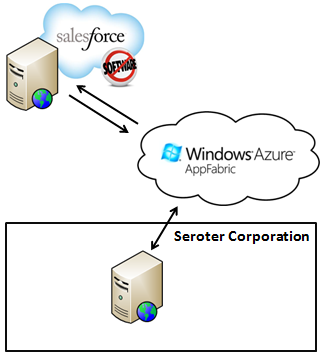
    Let’s say that the fictitious Seroter Corporation has a series of public websites and wants a consistent way to push customer inquiries from the websites to back end systems that process these inquiries.  Instead of pushing these inquiries directly into one or many CRM systems, or doing the low-tech email option, we’d rather put all the messages into a queue and let each interested party pull the ones they want.  Since these websites are cloud-hosted, we don’t want to explicitly push these messages into the internal network, but rather, asynchronously publish and poll messages from a shared queue hosted by Amazon Simple Queue Service (SQS). The polling applications could either be another cloud system (CRM system Salesforce.com) or an on-premises system, as shown below.

    2011.11.14int01

    So I’ll have a web page built using Ruby and hosted in Cloud Foundry, a SQS queue that holds inquiries submitted from that site, and both an on-premises .NET application and a SaaS Salesforce.com application that can poll that queue for messages.

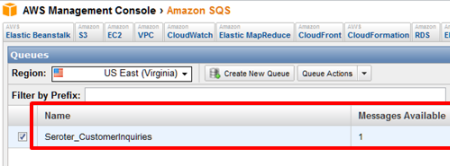
    Setting up a queue in SQS is so easy now, that I won’t even make it a sub-section in this post.  The AWS team recently added SQS operations to their Management Console, and they’ve made it very simple to create, delete, secure and monitor queues. I created a new queue named Seroter_CustomerInquiries.

    2011.11.14int02

    Sending Messages from Cloud Foundry to Amazon Simple Queue Service

    In my Ruby (Sinatra) application, I have a page where a user can ask a question.  When they click the submit button, I go into the following routine which builds up the SQS message (similar to the SimpleDB message from my previous post) and posts a message to the queue.

    post '/submitted/:uid' do	# method call, on submit of the request path, do the following
    
       #--get user details from the URL string
    	@userid = params[:uid]
    	@message = CGI.escape(params[:message])
        #-- build message that will be sent to the queue
    	@fmessage = @userid + "-" + @message.gsub("+", "%20")
    
    	#-- define timestamp variable and format
    	@timestamp = Time.now
    	@timestamp = @timestamp.strftime("%Y-%m-%dT%H:%M:%SZ")
    	@ftimestamp = CGI.escape(@timestamp)
    
    	#-- create signing string
    	@stringtosign = "GET\n" + "queue.amazonaws.com\n" + "/084598340988/Seroter_CustomerInquiries\n" + "AWSAccessKeyId=ACCESS_KEY" + "&Action=SendMessage" + "&MessageBody=" + @fmessage + "&SignatureMethod=HmacSHA1" + "&SignatureVersion=2" + "&Timestamp=" + @ftimestamp + "&Version=2009-02-01"
    
    	#-- create hashed signature
    	@esignature = CGI.escape(Base64.encode64(OpenSSL::HMAC.digest('sha1',@@awskey, @stringtosign)).chomp)
    
    	#-- create AWS SQS query URL
    	@sqsurl = "https://queue.amazonaws.com/084598340988/Seroter_CustomerInquiries?Action=SendMessage" + "&MessageBody=" + @fmessage + "&Version=2009-02-01" + "&Timestamp=" + @ftimestamp + "&Signature=" + @esignature + "&SignatureVersion=2" + "&SignatureMethod=HmacSHA1" + "&AWSAccessKeyId=ACCESS_KEY"
    
    	#-- load XML returned from query
    	@doc = Nokogiri::XML(open(@sqsurl))
    
       #-- build result message which is formatted string of the inquiry text
    	@resultmsg = @fmessage.gsub("%20", " ")
    
    	haml :SubmitResult
    end
    

    The hard part when building these demos was getting my signature string and hashing exactly right, so hopefully this helps someone out.

    After building and deploying the Ruby site to Cloud Foundry, I could see my page for inquiry submission.

    2011.11.14int03

    When the user hits the “Send Inquiry” button, the function above is called and assuming that I published successfully to the queue, I see the acknowledgement page.  Since this is an asynchronous communication, my web app only has to wait for publication to the queue, not invoking a function in a CRM system.

    2011.11.14int04

    To confirm that everything worked, I viewed my SQS queue and can clearly see that I have a single message waiting in the queue.
    2011.11.14int05

    .NET Application Pulling Messages from an SQS Queue

    With our message sitting safely in the queue, now we can go grab it.  The first consuming application is an on-premises .NET app.  In this very feature-rich application, I poll the queue and pull down any messages found.  When working with queues, you often have two distinct operations: read and delete (“peek” is also nice to have). I can read messages from a queue, but unless I delete them, they become available (after a timeout) to another consumer.  For this scenario, we’d realistically want to read all the messages, and ONLY process and delete the ones targeted for our CRM app.  Any others, we simply don’t delete, and they go back to waiting in the queue. I haven’t done that, for simplicity sake, but keep this in mind for actual implementations.

    In the example code below, I’m being a bit lame by only expecting a single message. In reality, when polling, you’d loop through each returned message, save its Handle value (which is required when calling the Delete operation) and do something with the message.  In my case, I only have one message, so I explicitly grab the “Body” and “Handle” values.  The code shows the “retrieve messages” button click operation which in turn calls “receive” operation and “delete” operation.

    private void RetrieveButton_Click(object sender, EventArgs e)
            {
                lbQueueMsgs.Items.Clear();
                lblStatus.Text = "Status:";
    
                string handle = ReceiveFromQueue();
                if(handle!=null)
                    DeleteFromQueue(handle);
    
            }
    
    private string ReceiveFromQueue()
            {
                //timestamp formatting for AWS
                string timestamp = Uri.EscapeUriString(string.Format("{0:s}", DateTime.UtcNow));
                timestamp = DateTime.Now.ToUniversalTime().ToString("yyyy-MM-ddTHH:mm:ss.fffZ");
                timestamp = HttpUtility.UrlEncode(timestamp).Replace("%3a", "%3A");
    
                //string for signing
                string stringToConvert = "GET\n" +
                "queue.amazonaws.com\n" +
                "/084598340988/Seroter_CustomerInquiries\n" +
                "AWSAccessKeyId=ACCESS_KEY" +
                "&Action=ReceiveMessage" +
                "&AttributeName=All" +
                "&MaxNumberOfMessages=5" +
                "&SignatureMethod=HmacSHA1" +
                "&SignatureVersion=2" +
                "&Timestamp=" + timestamp +
                "&Version=2009-02-01" +
                "&VisibilityTimeout=15";
    
                //hash the signature string
    			  string awsPrivateKey = "PRIVATE KEY";
                Encoding ae = new UTF8Encoding();
                HMACSHA1 signature = new HMACSHA1();
                signature.Key = ae.GetBytes(awsPrivateKey);
                byte[] bytes = ae.GetBytes(stringToConvert);
                byte[] moreBytes = signature.ComputeHash(bytes);
                string encodedCanonical = Convert.ToBase64String(moreBytes);
                string urlEncodedCanonical = HttpUtility.UrlEncode(encodedCanonical).Replace("%3d", "%3D");
    
                 //build up request string (URL)
                string sqsUrl = "https://queue.amazonaws.com/084598340988/Seroter_CustomerInquiries?Action=ReceiveMessage" +
                "&Version=2009-02-01" +
                "&AttributeName=All" +
                "&MaxNumberOfMessages=5" +
                "&VisibilityTimeout=15" +
                "&Timestamp=" + timestamp +
                "&Signature=" + urlEncodedCanonical +
                "&SignatureVersion=2" +
                "&SignatureMethod=HmacSHA1" +
                "&AWSAccessKeyId=ACCESS_KEY";
    
                //make web request to SQS using the URL we just built
                HttpWebRequest req = WebRequest.Create(sqsUrl) as HttpWebRequest;
                XmlDocument doc = new XmlDocument();
                using (HttpWebResponse resp = req.GetResponse() as HttpWebResponse)
                {
                    StreamReader reader = new StreamReader(resp.GetResponseStream());
                    string responseXml = reader.ReadToEnd();
                    doc.LoadXml(responseXml);
                }
    
    			 //do bad xpath and grab the body and handle
                XmlNode handle = doc.SelectSingleNode("//*[local-name()='ReceiptHandle']");
                XmlNode body = doc.SelectSingleNode("//*[local-name()='Body']");
    
                //if empty then nothing there; if not, then add to listbox on screen
                if (body != null)
                {
                    //write result
                    lbQueueMsgs.Items.Add(body.InnerText);
                    lblStatus.Text = "Status: Message read from queue";
                    //return handle to calling function so that we can pass it to "Delete" operation
                    return handle.InnerText;
                }
                else
                {
                    MessageBox.Show("Queue empty");
                    return null;
                }
            }
    
    private void DeleteItem(string itemId)
            {
                //timestamp formatting for AWS
                string timestamp = Uri.EscapeUriString(string.Format("{0:s}", DateTime.UtcNow));
                timestamp = DateTime.Now.ToUniversalTime().ToString("yyyy-MM-ddTHH:mm:ss.fffZ");
                timestamp = HttpUtility.UrlEncode(timestamp).Replace("%3a", "%3A");
    
                string stringToConvert = "GET\n" +
                "sdb.amazonaws.com\n" +
                "/\n" +
                "AWSAccessKeyId=ACCESS_KEY" +
                "&Action=DeleteAttributes" +
                "&DomainName=SeroterInteractions" +
                "&ItemName=" + itemId +
                "&SignatureMethod=HmacSHA1" +
                "&SignatureVersion=2" +
                "&Timestamp=" + timestamp +
                "&Version=2009-04-15";
    
                string awsPrivateKey = "PRIVATE KEY";
                Encoding ae = new UTF8Encoding();
                HMACSHA1 signature = new HMACSHA1();
                signature.Key = ae.GetBytes(awsPrivateKey);
                byte[] bytes = ae.GetBytes(stringToConvert);
                byte[] moreBytes = signature.ComputeHash(bytes);
                string encodedCanonical = Convert.ToBase64String(moreBytes);
                string urlEncodedCanonical = HttpUtility.UrlEncode(encodedCanonical).Replace("%3d", "%3D");
    
                //build up request string (URL)
                string simpleDbUrl = "https://sdb.amazonaws.com/?Action=DeleteAttributes" +
                "&DomainName=SeroterInteractions" +
                "&ItemName=" + itemId +
                "&Version=2009-04-15" +
                "&Timestamp=" + timestamp +
                "&Signature=" + urlEncodedCanonical +
                "&SignatureVersion=2" +
                "&SignatureMethod=HmacSHA1" +
                "&AWSAccessKeyId=ACCESS_KEY";
    
                HttpWebRequest req = WebRequest.Create(simpleDbUrl) as HttpWebRequest;
    
                using (HttpWebResponse resp = req.GetResponse() as HttpWebResponse)
                {
                    StreamReader reader = new StreamReader(resp.GetResponseStream());
    
                    string responseXml = reader.ReadToEnd();
                }
            }
    

    When the application runs and pulls the message that I sent to the queue earlier, it looks like this.

    2011.11.14int06

    Nothing too exciting on the user interface, but we’ve just seen the magic that’s happening underneath. After running this (which included reading and deleting the message), the SQS queue is predictably empty.

    Force.com Application Pulling from an SQS Queue

    I went ahead and sent another message from my Cloud Foundry app into the queue.

    2011.11.14int07

    This time, I want my cloud CRM users on Salesforce.com to pull these new inquiries and process them.  I’d like to automatically convert the inquiries to CRM Cases in the system.  A custom class in a Force.com application can be scheduled to execute every interval. To account for that (as the solution below supports both on-demand and scheduled retrieval from the queue), I’ve added a couple things to the code.  Specifically, notice that my “case lookup” class implements the Schedulable interface (which allows it be scheduled through the Force.com administrative tooling) and my “queue lookup” function uses the @future annotation (which allows asynchronous invocation).

    Much like the .NET application above, you’ll find operations below that retrieve content from the queue and then delete the messages it finds.  The solution differs from the one above in that it DOES handle multiple messages (not that it loops through retrieved results and calls “delete” for each) and also creates a Salesforce.com “case” for each result.

    //implement Schedulable to support scheduling
    global class doCaseLookup implements Schedulable
    {
    	//required operation for Schedulable interfaces
        global void execute(SchedulableContext ctx)
        {
            QueueLookup();
        }
    
        @future(callout=true)
        public static void QueueLookup()
        {
    	  //create HTTP objects and queue namespace
         Http httpProxy = new Http();
         HttpRequest sqsReq = new HttpRequest();
         String qns = 'http://queue.amazonaws.com/doc/2009-02-01/';
    
         //monkey with date format for SQS query
         Datetime currentTime = System.now();
         String formattedTime = currentTime.formatGmt('yyyy-MM-dd')+'T'+ currentTime.formatGmt('HH:mm:ss')+'.'+ currentTime.formatGmt('SSS')+'Z';
         formattedTime = EncodingUtil.urlEncode(formattedTime, 'UTF-8');
    
    	  //build signing string
         String stringToSign = 'GET\nqueue.amazonaws.com\n/084598340988/Seroter_CustomerInquiries\nAWSAccessKeyId=ACCESS_KEY&' +
    			'Action=ReceiveMessage&AttributeName=All&MaxNumberOfMessages=5&SignatureMethod=HmacSHA1&SignatureVersion=2&Timestamp=' +
    			formattedTime + '&Version=2009-02-01&VisibilityTimeout=15';
         String algorithmName = 'HMacSHA1';
         Blob mac = Crypto.generateMac(algorithmName, Blob.valueOf(stringToSign),Blob.valueOf(PRIVATE_KEY));
         String macUrl = EncodingUtil.urlEncode(EncodingUtil.base64Encode(mac), 'UTF-8');
    
    	  //build SQS URL that retrieves our messages
         String queueUrl = 'https://queue.amazonaws.com/084598340988/Seroter_CustomerInquiries?Action=ReceiveMessage&' +
    			'Version=2009-02-01&AttributeName=All&MaxNumberOfMessages=5&VisibilityTimeout=15&Timestamp=' +
    			formattedTime + '&Signature=' + macUrl + '&SignatureVersion=2&SignatureMethod=HmacSHA1&AWSAccessKeyId=ACCESS_KEY';
    
         sqsReq.setEndpoint(queueUrl);
         sqsReq.setMethod('GET');
    
         //invoke endpoint
         HttpResponse sqsResponse = httpProxy.send(sqsReq);
    
         Dom.Document responseDoc = sqsResponse.getBodyDocument();
         Dom.XMLNode receiveResponse = responseDoc.getRootElement();
         //receivemessageresult node which holds the responses
         Dom.XMLNode receiveResult = receiveResponse.getChildElements()[0];
    
         //for each Message node
         for(Dom.XMLNode itemNode: receiveResult.getChildElements())
         {
            String handle= itemNode.getChildElement('ReceiptHandle', qns).getText();
            String body = itemNode.getChildElement('Body', qns).getText();
    
            //pull out customer ID
            Integer indexSpot = body.indexOf('-');
            String customerId = '';
            if(indexSpot > 0)
            {
               customerId = body.substring(0, indexSpot);
            }
    
            //delete this message
            DeleteQueueMessage(handle);
    
    	     //create a new case
            Case c = new Case();
            c.Status = 'New';
            c.Origin = 'Web';
            c.Subject = 'Web request: ' + body;
            c.Description = body;
    
    		 //insert the case record into the system
            insert c;
         }
      }
    
      static void DeleteQueueMessage(string handle)
      {
    	 //create HTTP objects
         Http httpProxy = new Http();
         HttpRequest sqsReq = new HttpRequest();
    
         //encode handle value associated with queue message
         String encodedHandle = EncodingUtil.urlEncode(handle, 'UTF-8');
    
    	 //format the date
         Datetime currentTime = System.now();
         String formattedTime = currentTime.formatGmt('yyyy-MM-dd')+'T'+ currentTime.formatGmt('HH:mm:ss')+'.'+ currentTime.formatGmt('SSS')+'Z';
         formattedTime = EncodingUtil.urlEncode(formattedTime, 'UTF-8');
    
    		//create signing string
         String stringToSign = 'GET\nqueue.amazonaws.com\n/084598340988/Seroter_CustomerInquiries\nAWSAccessKeyId=ACCESS_KEY&' +
    					'Action=DeleteMessage&ReceiptHandle=' + encodedHandle + '&SignatureMethod=HmacSHA1&SignatureVersion=2&Timestamp=' +
    					formattedTime + '&Version=2009-02-01';
         String algorithmName = 'HMacSHA1';
         Blob mac = Crypto.generateMac(algorithmName, Blob.valueOf(stringToSign),Blob.valueOf(PRIVATE_KEY));
         String macUrl = EncodingUtil.urlEncode(EncodingUtil.base64Encode(mac), 'UTF-8');
    
    	  //create URL string for deleting a mesage
         String queueUrl = 'https://queue.amazonaws.com/084598340988/Seroter_CustomerInquiries?Action=DeleteMessage&' +
    					'Version=2009-02-01&ReceiptHandle=' + encodedHandle + '&Timestamp=' + formattedTime + '&Signature=' +
    					macUrl + '&SignatureVersion=2&SignatureMethod=HmacSHA1&AWSAccessKeyId=ACCESS_KEY';
    
         sqsReq.setEndpoint(queueUrl);
         sqsReq.setMethod('GET');
    
    	  //invoke endpoint
         HttpResponse sqsResponse = httpProxy.send(sqsReq);
    
         Dom.Document responseDoc = sqsResponse.getBodyDocument();
      }
    }
    

    When I view my custom APEX page which calls this function, I can see the button to query this queue.

    2011.11.14int08

    When I click the button, our function retrieves the message from the queue, deletes that message, and creates a Salesforce.com case.

    2011.11.14int09

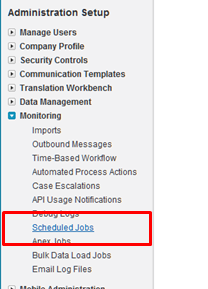
    Cool!  This still required me to actively click a button, but we can also make this function run every hour.  In the Salesforce.com configuration screens, we have the option to view Scheduled Jobs.
    2011.11.14int10

    To actually create the job itself, I had created an Apex class which schedules the job.

    global class CaseLookupJobScheduler
    {
        global void CaseLookupJobScheduler() {}
    
        public static void start()
        {
     		// takes in seconds, minutes, hours, day of month, month and day of week
    		//the statement below tries to schedule every 5 min, but SFDC only allows hourly
            System.schedule('Case Queue Lookup', '0 5 1-23 * * ?', new doCaseLookup());
        }
    }
    

    Note that I use the System.schedule operation. While my statement above says to schedules the doCaseLookup function to run every 5 minutes, in reality, it won’t.  Salesforce.com restricts these jobs from running too frequently and keeps jobs from running more than once per hour. One could technically game the system by using some of the ten allowable polling jobs to set of a series of jobs that start at different times of the hour. I’m not worrying about that here. To invoke this function and schedule the job, I first went to the System Log menu.

    2011.11.14int12

    From here, I can execute Apex code.  So, I can call my start() function, which should schedule the job.

    2011.11.14int13

    Now, if I view the Scheduled Jobs view from the Setup screens, I can see that my job is scheduled.

    2011.11.14int14

    This job is now scheduled to run every hour.  This means that each hour, the queue is polled and any found messages are added to Salesforce.com as cases.  You could use a mix of both solutions and manually poll if you want to (through a button) but allow true asynchronous processing on all ends.

    Summary

    Asynchronous messaging is a great way to build scalable, loosely coupled systems. A durable intermediary helps provide assurances of message delivery, but this patterns works without it as well.  The demonstrations in this post shows how two cloud solutions can asynchronously exchange data through the use of a shared queue that sits between them.  The publisher to the queue has no idea who will retrieve the message and the retrievers have no direct connection to those who publish messages.  This makes for a very maintainable solution.

    My goal with these posts was to demonstrate that classic Integration patterns work fine in cloudy environments. I think it’s important to not throw out existing patterns just because new technologies are introduced. I hope you enjoyed this series.
  • Integration in the Cloud: Part 3 – Remote Procedure Invocation Pattern

    This post continues a series where I revisit the classic Enterprise Integration Patterns with a cloud twist. So far, I’ve introduced the series and looked at the Shared Database pattern. In this post, we’ll look the second pattern: remote procedure invocation.

    What Is It?

    One uses this remote procedure call (RPC) pattern when they have multiple, independent applications and want to share data or orchestrate cross-application processes. Unlike ETL scenarios where you move data between applications at defined intervals, or the shared database pattern where everyone accesses the same source data, the RPC pattern accesses data/process where it resides. Data typically stays with the source, and the consumer interacts with the other system through defined (service) contracts.

    You often see Service Oriented Architecture (SOA) solutions built around the pattern.  That is, exposing reusable, interoperable, abstract interfaces for encapsulated services that interact with one or many systems.  This is a very familiar pattern for developers and good for mashup pages/services or any application that needs to know something (or do something) before it can proceed. You often do not need guaranteed delivery for these services since the caller is notified of any exceptions from the service and can simply retry the invocation.

    Challenges

    There are a few challenges when leveraging this pattern.

    • There is still some coupling involved. While a well-built service exposes an abstract interface that decouples the caller from the service’s underlying implementation, the caller is still bound the service exposed by the system. Changes to that system or unavailability of that system will affect the caller.
    • Distinct service and capability offerings by each service. Unlike the shared database pattern where everyone agrees on a data schema and central repository, a RPC model leverages many services that reside all across the organization (or internet). One service may want certificate authentication, another uses Kerberos, and another does some weird token-based security. One service may support WS-Attachment and another may not.  Transactions may or may not be supported between services. In an RPC world, you are at the mercy of each service provider’s capabilities and design.
    • RPC is a blocking call. When you call a service that sends a response, you pretty much have to sit around and wait until the response comes back. A caller can design around this a bit using AJAX on a web front end, or using a callback pattern in the middleware tier, but at root, you have a synchronous operation that holds a thread while waiting for a response.
    • Queried data may be transient. If an application calls a service, gets some data, and shows it to a user, that data MAY not be persisted in the calling application. It’s cleaner that way, but, this prevents you from using the data in reports or workflows.  So, you simply have to decide early on if your calls to external services should result in persisted data (that must then either by synchronized or checked on future calls) or transient data.
    • Package software platforms have mixed support. To be sure, most modern software platforms expose their data via web services. Some will let you query the database directly for information. But, there’s very little consistently. Some platforms expose every tiny function as a service (not very abstract) and some expose giant “DoSomething()” functions that take in a generic “object” (too abstract).

    Cloud Considerations

    As far as I can tell, you have three scenarios to support when introducing the cloud to this pattern:

    • Cloud to cloud. I have one SaaS or custom PaaS application and want to consume data from another SaaS or PaaS application. This should be relatively straightforward, but we’ll talk more in a moment about things to consider.
    • On-premises to cloud. There is an on-premises application or messaging engine that wants data from a cloud application. I’d suspect that this is the one that most architects and developers have already played with or built.
    • Cloud to on-premises. A cloud application wants to leverage data or processes that sit within an organization’s internal network. For me, this is the killer scenario. The integration strategy for many cloud vendors consists of “give us your data and move/duplicate your processes here.” But until an organization moves entire off-site (if that ever really happens for large enterprises), there is significant investment in the on-premises assets and we want to unlock those and avoid duplication where possible.

    So what are the  things to think about when doing RPC in a cloud scenario?

    • Security between clouds or to on-premises systems. If integrating two clouds, you need some sort of identity federation, or, you’ll use per-service credentials. That can get tough to manage over time, so it would be nice to leverage cloud providers that can share identity providers. When consuming on premises services from cloud-based applications, you have two clear choices:
      • Use a VPN. This works if you are doing integration with an IaaS-based application where you control the cloud environment a bit (e.g. Amazon Virtual Private Cloud). You can also pull this off a bit with things like the Google Secure Data Connector (for Google Apps for GAE) or Windows Azure Connect.
      • Leverage a reverse proxy and expose data/services to public internet. We can define a intermediary that sits in an internet-facing zone and forwards traffic behind the firewall to the actual services to invoke. Even if this is secured well, some organizations may be wary to expose key business functions or data to the internet.
    • There may be additional latency. For some application, especially based on location, there could be a longer delay when doing these blocking remote procedure calls.  But more likely, you’ll have additional latency due to security.  That is, many providers have a two step process where the first service call against the cloud platform is for getting a security token, and the second call is the actual function call (with the token in the payload).  You may be able to cache the token to avoid the double-hop each time, but this is still something to factor in.
    • Expect to only use HTTP. Few (if any) SaaS applications expose their underlying database. You may be used to doing quick calls against another system by querying it’s data store, but that’s likely a non-starter when working with cloud applications.

    The one option for cloud-to-on-premises that I left out here, and one that I’m convinced is a differentiating piece of Microsoft software, is the Azure AppFabric Service Bus.  Using this technology, I can securely expose on-premises services to the public internet WITHOUT the use of a VPN or reverse proxy. And, these services can be consumed by a wide variety of platforms.  In fact, that’s the basis for the upcoming demonstration.

    Solution Demonstration

    So what if I have a cloud-based SaaS/PaaS application, say Salesforce.com, and I want to leverage a business service that sits on site.  Specifically, the fictitious Seroter Corporation, a leader in fictitious manufacturing, has an algorithm that they’ve built to calculate the best discount that they can give a vendor. When they moved their CRM platform to Salesforce.com, their sales team still needed access to this calculation. Instead of duplicating the algorithm in their Force.com application, they wanted to access the existing service. Enter the Azure AppFabric Service Bus.

    2011.10.31int01

    Instead of exposing the business service via VPN or reverse proxy, they used the AppFabric Service Bus and the Force.com application simply invokes the service and shows the results.  Note that this pattern (and example) is very similar to the one that I demonstrated in my new book. The only difference is that I’m going directly at the service here instead of going through a BizTalk Server (as I did in the book).

    WCF Service Exposed Via Azure AppFabric Service Bus

    I built a simple Windows Console application to host my RESTful web service. Note that I did this with the 1.0 version of the AppFabric Service Bus SDK.  The contract for the “Discount Service” looks like this:

    [ServiceContract]
        public interface IDiscountService
        {
            [WebGet(UriTemplate = "/{accountId}/Discount")]
            [OperationContract]
            Discount GetDiscountDetails(string accountId);
        }
    
        [DataContract(Namespace = "http://CloudRealTime")]
        public class Discount
        {
            [DataMember]
            public string AccountId { get; set; }
            [DataMember]
            public string DateDelivered { get; set; }
            [DataMember]
            public float DiscountPercentage { get; set; }
            [DataMember]
            public bool IsBestRate { get; set; }
        }
    

    My implementation of this contract is shockingly robust.  If the customer’s ID is equal to 200, they get 10% off.  Otherwise, 5%.

    public class DiscountService: IDiscountService
        {
            public Discount GetDiscountDetails(string accountId)
            {
                Discount d = new Discount();
                d.DateDelivered = DateTime.Now.ToShortDateString();
                d.AccountId = accountId;
    
                if (accountId == "200")
                {
                    d.DiscountPercentage = .10F;
                    d.IsBestRate = true;
                }
                else
                {
                    d.DiscountPercentage = .05F;
                    d.IsBestRate = false;
                }
    
                return d;
    
            }
        }
    

    The secret sauce to any Azure AppFabric Service Bus connection lies in the configuration.  This is where we can tell the service to bind to the Microsoft cloud and provide the address and credentials to do so. My full configuration file looks like this:

    <configuration>
    <startup><supportedRuntime version="v4.0" sku=".NETFramework,Version=v4.0"/></startup><system.serviceModel>
            <behaviors>
                <endpointBehaviors>
                    <behavior name="CloudEndpointBehavior">
                        <webHttp />
                        <transportClientEndpointBehavior>
                            <clientCredentials>
                              <sharedSecret issuerName="ISSUER" issuerSecret="SECRET" />
                            </clientCredentials>
                        </transportClientEndpointBehavior>
                        <serviceRegistrySettings discoveryMode="Public" />
                    </behavior>
                </endpointBehaviors>
            </behaviors>
            <bindings>
                <webHttpRelayBinding>
                  <binding name="CloudBinding">
                    <security relayClientAuthenticationType="None" />
                  </binding>
                </webHttpRelayBinding>
            </bindings>
            <services>
                <service name="QCon.Demos.CloudRealTime.DiscountSvc.DiscountService">
                    <endpoint address="https://richardseroter.servicebus.windows.net/DiscountService"
                        behaviorConfiguration="CloudEndpointBehavior" binding="webHttpRelayBinding"
                        bindingConfiguration="CloudBinding" name="WebHttpRelayEndpoint"
                        contract="IDiscountService" />
                </service>
            </services>
        </system.serviceModel>
    </configuration>
    

    I built this demo both with and without client security turned on.  As you see above, my last version of the demonstration turned off client security.

    In the example above, if I send a request from my Force.com application to https://richardseroter.servicebus.windows.net/DiscountService, my request is relayed from the Microsoft cloud to my live on-premises service. When I test this out from the browser (which is why I earlier turned off client security), I can see that passing in a customer ID of 200 in the URL results in a discount of 10%.

    2011.10.31int02

    Calling the AppFabric Service Bus from Salesforce.com

    With an internet-accessible service ready to go, all that’s left is to invoke it from my custom Force.com page. My page has a button where the user can invoke the service and review the results.  The results may, or may not, get saved to the customer record.  It’s up to the user. The Force.com page uses a custom controller that has the operation which calls the Azure AppFabric endpoint. Note that I’ve had some freakiness lately with this where I get back certificate errors from Azure.  I don’t know what that’s about and am not sure if it’s an Azure problem or Force.com problem.  But, if I call it a few times, it works.  Hence, I had to add exception handling logic to my code!

    public class accountDiscountExtension{
    
        //account variable
        private final Account myAcct;
    
        //constructor which sets the reference to the account being viewed
        public accountDiscountExtension(ApexPages.StandardController controller) {
            this.myAcct = (Account)controller.getRecord();
        }
    
        public void GetDiscountDetails()
        {
            //define HTTP variables
            Http httpProxy = new Http();
            HttpRequest acReq = new HttpRequest();
            HttpRequest sbReq = new HttpRequest();
    
            // ** Getting Security Token from STS
           String acUrl = 'https://richardseroter-sb.accesscontrol.windows.net/WRAPV0.9/';
           String encodedPW = EncodingUtil.urlEncode(acsKey, 'UTF-8');
    
           acReq.setEndpoint(acUrl);
           acReq.setMethod('POST');
           acReq.setBody('wrap_name=ISSUER&wrap_password=' + encodedPW + '&wrap_scope=http://richardseroter.servicebus.windows.net/');
           acReq.setHeader('Content-Type','application/x-www-form-urlencoded');
    
           //** commented out since we turned off client security
           //HttpResponse acRes = httpProxy.send(acReq);
           //String acResult = acRes.getBody();
    
           // clean up result
           //String suffixRemoved = acResult.split('&')[0];
           //String prefixRemoved = suffixRemoved.split('=')[1];
           //String decodedToken = EncodingUtil.urlDecode(prefixRemoved, 'UTF-8');
           //String finalToken = 'WRAP access_token=\"' + decodedToken + '\"';
    
           // setup service bus call
           String sbUrl = 'https://richardseroter.servicebus.windows.net/DiscountService/' + myAcct.AccountNumber + '/Discount';
            sbReq.setEndpoint(sbUrl);
           sbReq.setMethod('GET');
           sbReq.setHeader('Content-Type', 'text/xml');
    
           //** commented out the piece that adds the security token to the header
           //sbReq.setHeader('Authorization', finalToken);
    
           try
           {
           // invoke Service Bus URL
           HttpResponse sbRes = httpProxy.send(sbReq);
           Dom.Document responseDoc = sbRes.getBodyDocument();
           Dom.XMLNode root = responseDoc.getRootElement();
    
           //grab response values
           Dom.XMLNode perNode = root.getChildElement('DiscountPercentage', 'http://CloudRealTime');
           Dom.XMLNode lastUpdatedNode = root.getChildElement('DateDelivered', 'http://CloudRealTime');
           Dom.XMLNode isBestPriceNode = root.getChildElement('IsBestRate', 'http://CloudRealTime');
    
           Decimal perValue;
           String lastUpdatedValue;
           Boolean isBestPriceValue;
    
           if(perNode == null)
           {
               perValue = 0;
           }
           else
           {
               perValue = Decimal.valueOf(perNode.getText());
           }
    
           if(lastUpdatedNode == null)
           {
               lastUpdatedValue = '';
           }
           else
           {
               lastUpdatedValue = lastUpdatedNode.getText();
           }
    
           if(isBestPriceNode == null)
           {
               isBestPriceValue = false;
           }
           else
           {
               isBestPriceValue = Boolean.valueOf(isBestPriceNode.getText());
           }
    
           //set account object values to service result values
           myAcct.DiscountPercentage__c = perValue;
           myAcct.DiscountLastUpdated__c = lastUpdatedValue;
           myAcct.DiscountBestPrice__c = isBestPriceValue;
    
           myAcct.Description = 'Successful query.';
           }
           catch(System.CalloutException e)
           {
              myAcct.Description = 'Oops.  Try again';
           }
        }
    

    Got all that? Just a pair of calls.  The first gets the token from the Access Control Service (and this code likely changes when I upgrade this to use ACS v2) and the second invokes the service.  Then there’s just a bit of housekeeping to handle empty values before finally setting the values that will show up on screen.

    When I invoke my service (using the “Get Discount” button, the controller is invoked and I make a remote call to my AppFabric Service Bus endpoint. The customer below has an account number equal to 200, and thus the returned discount percentage is 10%.2011.10.31int03


    Summary

    Using a remote procedure invocation is great when you need to request data or when you send data somewhere and absolutely have to wait for a response. Cloud applications introduce some wrinkles here as you try to architect secure, high performing queries that span clouds or bridge clouds to on-premises applications. In this example, I showed how one can quickly and easily expose internal services to public cloud applications by using the Windows Azure AppFabric Service Bus.  Regardless of the technology or implementation pattern, we all will be spending a lot of time in the foreseeable future building hybrid architectures so the more familiar we get with the options, the better!

    In the final post in this series, I’ll take a look at using asynchronous messaging between (cloud) systems.

  • Integration in the Cloud: Part 2 – Shared Database Pattern

    In the last post, I kicked off this series of blogs addressing how we can apply classic enterprise integration patterns to cloud scenarios.  Let’s look at the first pattern: shared database.

    What Is It?

    Sharing data via extract-transform-load (ETL) obviously isn’t timely.  So what if system need the absolute latest data available? I might need a shared database for reporting purposes, reference data, or even transactional data. You would use this pattern when you have common data (or a common data structure) but multiple different consuming interfaces.

    For transactional data, a multi-tenant cloud application typically uses a shared database for all customers (because a common data model is used), but the data itself is segmented by customer. In a reference data scenario, we may have both a common schema AND a shared set of data.  This gives everyone a single data definition and encourages consistency across applications as everyone leverages the shared data.

    Challenges

    We face a few different challenges when planning to use this pattern.

    • It can be tough to design.  Getting consensus on anything in IT isn’t easy, and common, reusable data schemas are no different.  It takes a concerted effort to define a shared format that everyone will leverage.
    • You may bump into contention problems. If you have multiple applications manipulating the same transactional data, they you can experience locks or attempts to overwrite new data with old data.
    • There may be performance issues if there are multiple heavy users of shared databases.  This is where concepts like sharding can come into play as a way to alleviate contention.
    • Packaged software products rarely (if ever) allow you to use a different primary data store. Some software does let you call out to shared databases for reference data, however.

    Cloud Considerations

    When doing “shared databases” in the cloud, you have to consider the following things:

    • Web-only access protocols.  While SQL Azure actually lets you use traditional database protocols, the vast majority of online databases have (RESTful) web APIs only.
    • Identity handling will likely be unique per database provider, unlike in an on-premises environment where you can leverage a shared user directory. You’ll have to see what identity providers are available for a given cloud database provider, and if you can do role-based, granular access controls.
    • Many providers use sharding techniques by default and separate data into distinct domains. You’ll have to factor this into how you define your data profile. How will you build a data model based on split data?
    • Using relational databases or schema-less databases. We have this same choice for on-premises databases, but something to consider when thinking about HOW your cloud database is being used. One style may make more sense than another based on the scenario.
    • Cloud providers may throttle usage.  A cloud database like AWS SimpleDB throttles the number of web service PUTs per second.  You could get around this by using multiple domains (since you are throttled per domain) or by batching commands and executing fewer commands.

    Solution Demonstration

    So here’s what I built.  The solution uses a shared AWS SimpleDB to store “interactions” with a given customer of a fictitious company (the wildly successful Seroter Corporation). A Salesforce.com user adds customer interactions from the sales team, and an on-site CRM system adds interactions with the customer from our on-site call center.  Customers want to see all the different interactions they have had with the company.  Seroter Corporation could build an application that virtually aggregates this data on the fly, or, they could always put all their interactions into a single database that everyone can reference.  In this case, I built a Ruby application in VMWare’s Cloud Foundry which views this shared database and lets customers view their history with the company.

    2011.10.27int02

    Let’s walk through each piece, and the tips/tricks that I can offer from making Salesforce.com, Ruby and .NET all use the same API to pull data from Amazon SimpleDB.

    SimpleDB

    First off, I created a SimpleDB domain to hold all the customer Interactions.  Right now, it has four rows in it. Note that I’m using the AWS Toolkit for Visual Studio to muck with the database.

    2011.10.27int03

    I leveraged the AWS Identity and Access Management to create a user account for all my applications to use.  This user has limited rights on this database and can only do read operations.

    2011.10.27int04

    That’s about it.  I’m ready to build my three consuming applications.

    .NET Client Calling AWS

    The basic steps of consuming most of the AWS platform services are: create timestamp, create signture string, hash the signature string, build query string, call service.  I decided to NOT use any SDKs and instead call the native SimpleDB REST API from all three consuming applications.  This way, I don’t learn one SDK just to have to start over again when I consume the database from a different client.

    First off, let’s build the timestamp string which must be in a specific formatNote that encoded values must be uppercase.  If you forget this, plan on losing a Sunday afternoon.

    //take current date time and format it as AWS expects
    timestamp = DateTime.Now.ToUniversalTime().ToString("yyyy-MM-ddTHH:mm:ss.fffZ");
    //switch the lowercase encoded value to uppercase to avoid Armageddon
    timestamp = HttpUtility.UrlEncode(timestamp).Replace("%3a", "%3A");
    

    Next, I built my querystring against the SimpleDB database.  Here, I’m getting back all interactions for a customer with a given ID.

    //define querystring
    string selectExpression = "select * from SeroterInteractions where CustomerId = '" + CustomerId + "'";
    //encode it, and uppercase the encoded values
    string fSelectExpression = HttpUtility.UrlPathEncode(selectExpression).Replace("*", "%2A").Replace("=", "%3D").Replace("'", "%27");
    

    Now I build the string that gets hashed as request signature.  The point here is that AWS compares the hashed string with the request it receives and verifies that the payload of the request wasn’t tampered with.  Note that all parameters after the AWSAccessKeyId field must be listed in alphabetical order.

    string stringToConvert2 = "GET\n" +
                "sdb.amazonaws.com\n" +
                "/\n" +
                "AWSAccessKeyId=ACCESS_KEY" +
                "&Action=Select" +
                "&SelectExpression=" + fSelectExpression +
                "&SignatureMethod=HmacSHA1" +
                "&SignatureVersion=2" +
                "&Timestamp=" + timestamp +
                "&Version=2009-04-15";
    

    Now, we encode the string.  I used the HMACSHA1 encoding algorithm.

    //private key tied to my AWS user account
    string awsPrivateKey = "PRIVATE KEY";
    Encoding ae = new UTF8Encoding();
    HMACSHA1 signature = new HMACSHA1();
    //set key of signature to byte array of private key
    signature.Key = ae.GetBytes(awsPrivateKey);
    //convert signature string
    byte[] bytes = ae.GetBytes(stringtoConvert2);
    //hash it
     byte[] moreBytes = signature.ComputeHash(bytes);
    //base64 encode the string
    string encodedCanonical = Convert.ToBase64String(moreBytes);
    //URL encode the string
     string urlEncodedCanonical = HttpUtility.UrlEncode(encodedCanonical).Replace("%3d", "%3D");
    

    We’re ready to build the actual RESTful request URL for SimpleDB.  This contains most of the values from the signature string plus the hashed value of the signature string itself. Note that failures to properly encode values, or order the attributes will result in maddening “signature does not match” exceptions from the AWS service.  Whenever I encountered that (which was often) it was because I had messed up encoding or ordering.

    string simpleDbUrl2 = "https://sdb.amazonaws.com/?Action=Select" +
                "&Version=2009-04-15" +
                "&Timestamp=" + timestamp +
                "&SelectExpression=" + fSelectExpression +
                "&Signature=" + urlEncodedCanonical +
                "&SignatureVersion=2" +
                "&SignatureMethod=HmacSHA1" +
                "&AWSAccessKeyId=ACCESS_KEY";
    

    Finally, I used the HttpWebRequest object to call the AWS endpoint using this URL and get the response.  What I didn’t show is that I parsed the response XML and loaded it into a DataGrid on my WinForm application.

    HttpWebRequest req = WebRequest.Create(simpleDbUrl2) as HttpWebRequest;
    
    using (HttpWebResponse resp = req.GetResponse() as HttpWebResponse)
     {
           StreamReader reader = new StreamReader(resp.GetResponseStream());
    
            string responseXml = reader.ReadToEnd();
             XmlDocument doc = new XmlDocument();
             doc.LoadXml(responseXml);
    
             //parse and load result into objects bound to data grid
      }
    

    The .NET client application looks like this after it retrieves the three SimpleDB domain rows tied to the customer ID provided.

    2011.10.27int05

    Ruby App in Cloud Foundry Calling AWS

    Let’s see how I built a Ruby application that talks to AWS SimpleDB. This won’t be a walkthrough of Ruby or Cloud Foundry, but rather, just the key parts of the web application that I built.

    My first decision was how to process the results of the AWS call.  I decided to use XSLT to parse the XML response.  I chose the Nokogiri gem for Ruby which lets me process XML content pretty easily. One wrinkle with this is because I’m working on a Windows machine, and using a Windows gem (which isn’t supported once deployed to Cloud Foundry), I need to do some tweaking with my Gemfile file. After building the web app (“bundle package”) but before deployment (“bundle install”), I have to open the Gemfile.lock file and remove all the “Windows stuff” from the “nokogiri” entry.

    That said, below is my Ruby code that starts with the libraries that I used.

    require 'sinatra' # includes the library
    require 'haml'
    require 'nokogiri'
    require 'date'
    require 'uri'
    require 'openssl'
    require 'base64'
    require 'open-uri'
    require 'cgi'
    

    Next, I have defined a “get” operation which responds when someone hits the “lookup” path and passes in a customer ID.  I’ll use this customer ID to query AWS. Then, I extract the path parameter into a local variable and then define the XSLT that will parse the AWS SimpleDB results. I don’t love my XPath on the template match, but it works.

    get '/lookup/:uid' do	# method call, on get of the lookup path, do the following
    
    	@userid = params[:uid]
    
    	#-- define stylesheet
    	xsl ="
    		<xsl:stylesheet version='1.0' xmlns:xsl='http://www.w3.org/1999/XSL/Transform' xmlns:aws='http://sdb.amazonaws.com/doc/2009-04-15/'>
      		<xsl:output method='xml' encoding='UTF-8' indent='yes'/>
      		<xsl:strip-space elements='*'/>
    		<xsl:template match='/'>
    			<table class='interactionTable' cellspacing='0' cellpadding='4'>
    				<tr>
    					<td class='iHeader'>Customer ID</td>
    					<td class='iHeader'>Date</td>
    					<td class='iHeader'>Inquiry Type</td>
    					<td class='iHeader'>Product</td>
    					<td class='iHeader'>Source</td>
    					<td class='iHeader'>Interaction ID</td>
    				</tr>
    				<xsl:apply-templates select='//aws:Item' />
    			</table>
    		</xsl:template>
      		<xsl:template match='aws:Item'>
    
    			<tr>
    				<td class='iRow'><xsl:value-of select='./aws:Attribute[1]/aws:Value' /></td>
    				<td class='iRow'><xsl:value-of select='./aws:Attribute[4]/aws:Value' /></td>
    				<td class='iRow'><xsl:value-of select='./aws:Attribute[3]/aws:Value' /></td>
    				<td class='iRow'><xsl:value-of select='./aws:Attribute[5]/aws:Value' /></td>
    				<td class='iRow'><xsl:value-of select='./aws:Attribute[2]/aws:Value' /></td>
    				<td class='iRow'><xsl:value-of select='./aws:Name' /></td>
    
    			</tr>
    
      		</xsl:template>
    		</xsl:stylesheet>
    		"
    
    	#-- load stylesheet
    	xsltdoc = Nokogiri::XSLT(xsl)
    

    Next is my AWS-specific code which creates a properly formatted/encoded timestamp, encoded query statement, signature string, and query string.  Then I call the URL and send the response through the XSLT which I end up displaying in a template file.

    #-- define timestamp variable and format
    	@timestamp = Time.now
    	@timestamp = @timestamp.strftime("%Y-%m-%dT%H:%M:%SZ")
    	@ftimestamp = CGI.escape(@timestamp)
    
    	#-- define query statement and encode correctly
    	#@querystatement = "select * from SeroterInteractions"
    	@fquerystatement = CGI.escape("select * from SeroterInteractions where CustomerId = '" + @userid + "'")
    	@fquerystatement = @fquerystatement.gsub("+", "%20")
    
    	#-- create signing string
    	@stringtosign = "GET\nsdb.amazonaws.com\n/\nAWSAccessKeyId=ACCESS_KEY&Action=Select&SelectExpression=" + @fquerystatement + "&SignatureMethod=HmacSHA1&SignatureVersion=2&Timestamp=" + @ftimestamp + "&Version=2009-04-15"
    
    	#-- create hashed signature using key variable defined elsewhere
    	@esignature = CGI.escape(Base64.encode64(OpenSSL::HMAC.digest('sha1',@@awskey, @stringtosign)).chomp)
    
    	#-- create AWS SimpleDb query URL
    	@dburl = "https://sdb.amazonaws.com/?Action=Select&Version=2009-04-15&Timestamp=" + @ftimestamp + "&SelectExpression=" + @fquerystatement + "&Signature=" + @esignature + "&SignatureVersion=2&SignatureMethod=HmacSHA1&AWSAccessKeyId=ACCESS_KEY"
    
    	#-- load XML returned from query
    	@doc = Nokogiri::XML(open(@dburl))
    
    	#-- transform result using XSLT
    	@var = xsltdoc.transform(@doc)
    

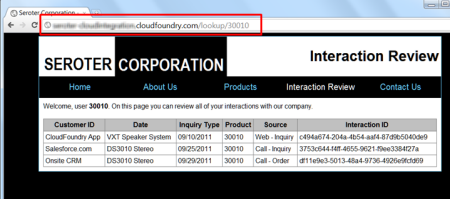
    When everything is in place, I hit my URL and the Ruby code calls the AWS service for the requested customer ID, passes the result through the XSLT, and emits a table of matching “customer interactions.”

    2011.10.27int06

    Neat.  So now I have two applications (my .NET client and Ruby app in Cloud Foundry) that have live looks into the same shared database.  One more to go!

    Force.com Application Calling AWS

    Making a (Sales)force.com application talk to AWS SimpleDB is pretty easy once you follow the same steps as I have in the previous two applications.  It’s just a matter of slightly different syntax. In this case, I’m going to present the results on a Force.com Apex page using a “data table” which means i need typed objects for each “customer interaction” that comes back from AWS. So, after creating a custom Apex object of type UserInteraction, I started my custom controller for my Apex page.

    public class interactionLookupExtension
    {
     private final Contact myContact;
    //create list array of UserInteractions
     private List<UserInteractions> interactionsList = new List<UserInteractions>();
    //define namespace used by SimpleDB
     private String ns = 'http://sdb.amazonaws.com/doc/2009-04-15/';
    
     public interactionLookupExtension(ApexPages.StandardController controller) {
           //get reference to Force.com contact used on the Apex page
    		this.myContact = (Contact)controller.getRecord();
        }
    

    Now comes the fun part: calling the service.  You may notice that the sequence is nearly identical to the other code we’ve built.

    public void GetInteractions()
     {
         //get customer ID for selected contact
         String inputId = myContact.Global_ID__c;
         interactionsList.Clear();
    
         //create objects for HTTP communication
         Http httpProxy = new Http();
         HttpRequest simpleDbReq = new HttpRequest();
    
    	  //format timestamp
         Datetime currentTime = System.now();
         String formattedTime = currentTime.formatGmt('yyyy-MM-dd')+'T'+ currentTime.formatGmt('HH:mm:ss')+'.'+ currentTime.formatGmt('SSS')+'Z';
         formattedTime = EncodingUtil.urlEncode(formattedTime, 'UTF-8');
    
     	  //create and encode query statement
         String selectExpression = EncodingUtil.urlEncode('select * from SeroterInteractions where CustomerId=\'' + inputId + '\'', 'UTF-8');
         selectExpression = selectExpression.replace('+','%20');
         selectExpression = selectExpression.replace('*', '%2A');
    
    	  //create signing string
         String stringToSign = 'GET\nsdb.amazonaws.com\n/\nAWSAccessKeyId=ACCESS_KEY&Action=Select&SelectExpression=' + selectExpression + '&SignatureMethod=HmacSHA1&SignatureVersion=2&Timestamp=' + formattedTime + '&Version=2009-04-15';
         String algorithmName = 'HMacSHA1';
         Blob mac = Crypto.generateMac(algorithmName, Blob.valueOf(stringToSign),Blob.valueOf(awsKey));
         String macUrl = EncodingUtil.urlEncode(EncodingUtil.base64Encode(mac), 'UTF-8');
    
    	  //build up AWS request URL
         String dbUrl = 'https://sdb.amazonaws.com/?Action=Select&Version=2009-04-15&Timestamp=' + formattedTime + '&SelectExpression=' + selectExpression + '&Signature=' + macUrl + '&SignatureVersion=2&SignatureMethod=HmacSHA1&AWSAccessKeyId=ACCESS_KEY';
    
    	  //set HTTP values
         simpleDbReq.setEndpoint(dbUrl);
         simpleDbReq.setMethod('GET');
         //call URL
         HttpResponse dbResponse = httpProxy.send(simpleDbReq);
         //Use XML DOM objects to load response
         Dom.Document responseDoc = dbResponse.getBodyDocument();
         Dom.XMLNode selectResponse = responseDoc.getRootElement();
         Dom.XMLNode selectResult = selectResponse.getChildElements()[0];
    
         //loop through each returned interaction and add it to array
         for(Dom.XMLNode itemNode: selectResult.getChildElements())
         {
            String interactionId = itemNode.getChildElements()[0].getText();
            String interactionType = itemNode.getChildElements()[2].getChildElement('Value', ns).getText();
            String customerId= itemNode.getChildElements()[5].getChildElement('Value', ns).getText();
            String interactionDate = itemNode.getChildElements()[3].getChildElement('Value', ns).getText();
            String interactionSource = itemNode.getChildElements()[2].getChildElement('Value', ns).getText();
            String interactionProduct = itemNode.getChildElements()[4].getChildElement('Value', ns).getText();
    
            UserInteractions i2 = new UserInteractions();
            i2.InteractionId = interactionId;
            i2.InteractionType = interactionType;
            i2.CustomerId = customerId;
            i2.InteractionDate = interactionDate;
            i2.InteractionSource = interactionSource;
            i2.InteractionProduct = interactionProduct;
    
            interactionsList.Add(i2);
         }
       }
    

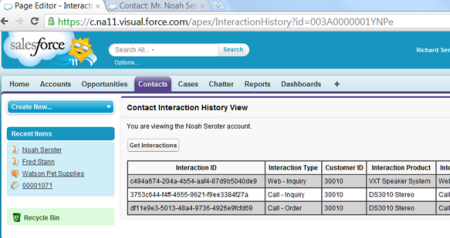
    Then, on my Apex page, I have a data table bound to the interactionList variable.  As a result, my final page looks like this:

    2011.10.27int07

    That’s all there is to it.  When I add a new row to my SimpleDB database, it is instantly shown in my on-site .NET app, my Cloud Foundry app and my Force.com app.  No file sharing, no synchronization needed.

    Summary

    The shared database pattern is a useful one when you need to have the same data instantly available to all consumers.  In my three examples here, both on-site and cloud applications shared a single cloud database.  This allowed them to all have a completely accurate view of whatever interactions a given customer had with a company.  This sort of pattern works well for reference data where you have limited points of possible contention.

    In the next post, I’ll walk through a way to do remote procedure invocation with cloud applications.

  • Integration in the Cloud: Part 1 – Introduction

    I recently delivered a session at QCon Hangzhou (China) on the topic of “integration in the cloud.” In this series of blog posts, I will walk through a number of demos I built that integrate a variety of technologies like Amazon Web Services (AWS) SimpleDB, Windows Azure AppFabric, Salesforce.com, and a custom Ruby (Sinatra) app on VMWare’s Cloud Foundry.

    Cloud computing is clearly growing in popularity, with Gartner finding that 95% of orgs expect to maintain or increase their 2011.10.27int01investment in software as a service. But how do we prevent new application silos from popping up?  We don’t want to treat SaaS apps as “off site” and thus only do the occasional bulk transfer to get data in/out of the application.  I’m going to take some tried-and-true integration patterns and show how they can apply to cloud integration as well as on-premises integration. Specifically, I’ll demonstrate how three patterns highlighted in the valuable book Enterprise Integration Patterns: Designing, Building and Deploying Messaging Solutions apply to cloud scenarios. These patterns include: shared database, remote procedure invocation and asynchronous messaging .

    In the next post, I’ll walk through the reasons to use a shared database, considerations when leveraging that model, and how to share a single “cloud database” among on premises apps and cloud apps alike.

    Series Links:

  • 2010 Year in Review

    I learned a lot this year and I thought I’d take a moment to share some of my favorite blog posts, books and newly discovered blogs.

    Besides continuing to play with BizTalk Server, I also dug deep into Windows Server AppFabric, Microsoft StreamInsight, Windows Azure, Salesforce.com, Amazon AWS, Microsoft Dynamics CRM and enterprise architecture.  I learned some of those technologies for my last book, some was for work, and some was for personal education.  This diversity was probably evident in the types of blog posts I wrote this year.  Some of my most popular, or favorite posts this year were:

    While I find that I use Twitter (@rseroter) instead of blog posts to share interesting links, I still consider blogs to be the best long-form source of information.  Here are a few that I either discovered or followed closer this year:

    I tried to keep up a decent pace of technical and non-technical book reading this year and liked these the most:

    I somehow had a popular year on this blog with 125k+ visits and really appreciate each of you taking the time to read my musings.  I hope we can continue to learn together in 2011.

  • My Co-Authors Interviewed on Microsoft endpoint.tv

    You want this book!

    -Ron Jacobs, Microsoft

    Ron Jacobs (blog, twitter) runs the Channel9 show called endpoint.tv and he just interviewed Ewan Fairweather and Rama Ramani who were co-authors on my book, Applied Architecture Patterns on the Microsoft Platform.  I’m thrilled that the book has gotten positive reviews and seems to fill a gap in the offerings of traditional technology books.

    Ron made a few key observations during this interview:

    • As people specialize, they lose perspective of other ways to solve similar problems, and this book helps developers and architects “fill the gaps.”
    • Ron found the dimensions our “Decision Framework” to be novel and of critical importance when evaluating technology choices.  Specifically, evaluating a candidate architecture against design, development, operational and organizational factors can lead you down a different path than you might have expected.  Ron specifically liked the “organizational direction” facet which can be overlooked but should play a key role in technology choice.
    • He found the technology primers and full examples of such a wide range of technologies (WCF, WF, Server AppFabric, Windows Azure, BizTalk, SQL Server, StreamInsight) to be among the unique aspects of the book.
    • Ron liked how we actually addressed candidate architectures instead of jumping directly into a demonstration of a “best fit” solution.

    Have you read the book yet?  If so, I’d love to hear your (good or bad) feedback.  If not, Christmas is right around the corner, and what better way to spend the holidays than curling up with a beefy technology book?

  • Book’s Sample Chapter, Articles and Press Release

    The book is now widely available and our publisher is starting up the promotion machine.  At the bottom of this post is the publisher’s press release.  Also, we now have one sample chapter online (Mike Sexton’s Debatching Bulk Data) as well as two articles representing some of the material from my Content Based Routing chapter (Part 1 – Content Based Routing on the Microsoft Platform, Part II – Building the Content Based Routing Solution on the Microsoft Platform).  This hopefully provides a good sneak peak into the book’s style.

    ## PRESS RELEASE ##

    Solve business problems on the Microsoft application platform using Packt’s new book

     Applied Architecture Patterns on the Microsoft Platform is a new book from Packt that offers an architectural methodology for choosing Microsoft application platform technologies. Written by a team of specialists in the Microsoft space, this book examines new technologies such as Windows Server AppFabric, StreamInsight, and Windows Azure Platform, and their application in real-world solutions.

     Filled with live examples on how to use the latest Microsoft technologies, this book guides developers through thirteen architectural patterns utilizing code samples for a wide variety of technologies including Windows Server AppFabric, Windows Azure Platform AppFabric, SQL Server (including Integration Services, Service Broker, and StreamInsight), BizTalk Server, Windows Communication Foundation (WCF), and Windows Workflow Foundation (WF).

     This book is broken down into 4 different sections. Part 1 starts with getting readers up to speed with various Microsoft technologies. Part 2 concentrates on messaging patterns and the inclusion of use cases highlighting content-based routing. Part 3 digs into bulk data processing, and multi-master synchronization. Finally the last part covers performance-related patterns including low latency, failover to the cloud, and reference data caching.

     Developers can learn about the core components of BizTalk Server 2010, with an emphasis on BizTalk Server versus Windows Workflow and BizTalk Server versus SQL Server. They will not only be in a position to develop their first Windows Azure Platform AppFabric, and SQL Azure applications but will also learn to master data management and data governance of SQL Server Integration Services, Microsoft Sync Framework, and SQL Server Service Broker.

     Architects, developers, and managers wanting to get up to speed on selecting the most appropriate platform for a particular problem will find this book to be a useful and beneficial read. This book is out now and is available from Packt. For more information, please visit the site.

    [Cross posted on Book’s dedicated website]

  • And … The New Book is Released

    Nearly 16 months after a book idea was born, the journey is now complete.  Today, you can find our book, Applied Architecture Patterns on the Microsoft Platform, in stock at Amazon.com and for purchase and download at the Packt Publishing site.

    I am currently in Stockholm along with co-authors Stephen Thomas and Ewan Fairweather delivering a 2 day workshop for the BizTalk User Group Sweden.  We’re providing overviews of the core Microsoft application platform technologies and then excerpting the book to show how we analyzed a particular use case, chose a technology and then implemented it.  It’s our first chance to see if this book was a crazy idea, or actually useful.  So far, the reaction has been positive.  Of course, the Swedes are such a nice bunch that they may just be humoring me.

    I have absolutely no idea how this book will be received by you all.  I hope you find it to be a unique tool for evaluating architecture and building solutions on Microsoft technology.  If you DON’T like it, then I’ll blame this book idea on Ewan.

  • Announcing My New Book: Applied Architecture Patterns on the Microsoft Platform

    So my new book is available for pre-order here and I’ve also published our companion website. This is not like any technical book you’ve read before.  Let me back up a bit.

    Last May (2009) I was chatting with Ewan Fairweather of Microsoft and we agreed that with so many different Microsoft platform technologies, it was hard for even the most ambitious architect/developer to know when to use which tool.  A book idea was born.

    Over the summer, Ewan and I started crafting a series of standard architecture patterns that we wanted to figure out which Microsoft tool solved best.  We also started the hunt for a set of co-authors to bring expertise in areas where we were less familiar.  At the end of the summer, Ewan and I had suckered in Stephen Thomas (of BizTalk fame), Mike Sexton (top DB architect at Avanade) and Rama Ramani (Microsoft guy on AppFabric Caching team).   All of us finally pared down our list of patterns to 13 and started off on this adventure.  Packt Publishing eagerly jumped at the book idea and started cracking the whip on the writing phase.

    So what did we write? Our book starts off by briefly explaining the core technologies in the Microsoft application platform including Windows Workflow Foundation, Windows Communication Foundation, BizTalk Server, SQL Server (SSIS and Service Broker), Windows Server AppFabric, Windows Azure Platform and StreamInsight.  After these “primer” chapters, we have a discussion about our Decision Framework that contains our organized approach to assessing technology fit to a given problem area.  We then jump into our Pattern chapters where we first give you a real world use case, discuss the pattern that would solve the problem, evaluate multiple candidate architectures based on different application technologies, and finally select a winner prior to actually building the “winning” solution.

    In this book you’ll find discussion and deep demonstration of all the key parts of the Microsoft application platform.  This book isn’t a tutorial on any one technology, but rather,  it’s intended to provide the busy architect/developer/manager/executive with an assessment of the current state of Microsoft’s solution offerings and how to choose the right one to solve your problem.

    This is a different kind of book. I haven’t seen anything like it.  Either you will love it or hate it.  I sincerely hope it’s the former, as we’ve spent over a year trying to write something interesting, had a lot of fun doing it, and hope that energy comes across to the reader.

    So go out there and pre-order, or check out the site that I set up specifically for the book: http://AppliedArchitecturePatterns.com.

    I’ll be sure to let you all know when the book ships!

  • Using the New BizTalk Mapper Shape in a Windows Workflow Service

    So hidden within the plethora of announcements about the BizTalk Server 2010 beta launch was a mention of AppFabric integration.  The best that I can tell, this has to do with some hooks between BizTalk and Windows Workflow.  One of them is pretty darn cool, and I’m going to show it off here.

    In my admittedly limited exposure thus far to Windows Workflow (WF), one thing that jumped out was the relatively clumsy way to copy data between objects.  Now, you get a new “BizTalk Mapper” shape in your Windows Workflow activity palette which lets you use the full power of the (new) BizTalk Mapper from within a WF.

    First off, I created a new .NET 4.0 Workflow Service.  This service accepts bookings into a Pet Hotel and returns a confirmation code.  I created a pair of objects to represent the request and response messages.

    namespace Seroter.Blog.WorkflowServiceXForm
    {
        public class PetBookingRequest
        {
            public string PetName { get; set; }
            public PetList PetType { get; set; }
            public DateTime CheckIn { get; set; }
            public DateTime CheckOut { get; set; }
            public string OwnerFirstName { get; set; }
            public string OwnerLastName {get; set; }
        }
    
        public class PetBookingConfirmation
        {
            public string ConfirmationCode { get; set; }
            public string OwnerName { get; set; }
            public string PetName { get; set; }
        }
    
        public enum PetList
        {
            Dog,
            Cat,
            Fish,
            Barracuda
        }
    }
    

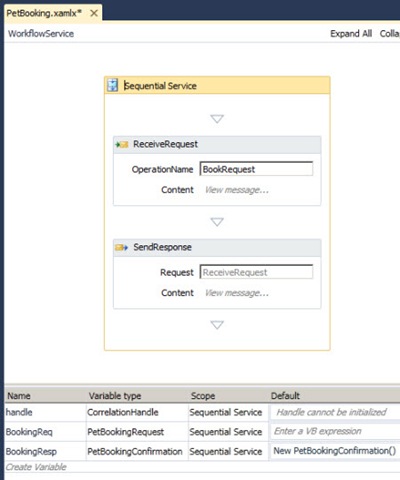
    Then I created WF variables for those objects and associated them with the request and response shapes of the Workflow Service.

    2010.5.24wfmap01

    To show the standard experience (or if you don’t have BizTalk 2010 installed), I’ve put an “Assignment” shape in my workflow to take the “PetName” value from the request message and stick it into the Response message.

    2010.5.24wfmap02

    After compiling and running the service, I invoked it from the WCF Test Client tool.  Sure enough, I can pass in a request object and get back the response with the “PetName” populated.

    2010.5.24wfmap03

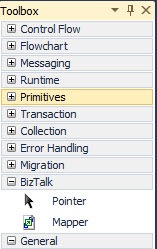
    Let’s return to our workflow.  When I installed the BizTalk 2010 beta, I saw a new shape pop up on the Windows Workflow activity palette.  It’s under a “BizTalk” tab name and called “Mapper.”

    2010.5.24wfmap04

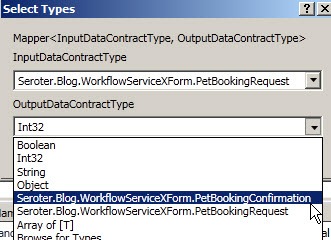
    Neato.  When I drag the shape onto my workflow, I’m prompted for the data types of my source and destination message.  I could choose primitive types, or custom types (like I have).

    2010.5.24wfmap05

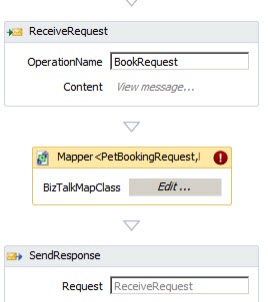
    After that, I see an unconfigured “Mapper” shape in my workflow. 

    2010.5.24wfmap06

    After setting the explicit names of my source and destination variables in the activity’s Property window, I clicked the “Edit” button of the shape.  I’m asked whether I want to create a new map, or leverage an existing one.

     2010.5.24wfmap07

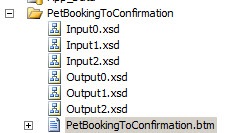
    This results in a series of files being generated, and a new *.btm file (BizTalk Map) appears.

    2010.5.24wfmap08

    In poking around those XSD files, I saw that two of them were just for base data type definitions, and one of them contained my actual message definition.  What also impressed me was that my code enumeration was properly transferred to an XSD enumeration.

    2010.5.24wfmap09

    Now let’s look at the Mapper itself.  As you’d expect, we get the shiny new Mapper interface included in BizTalk Server 2010.  I’ve got my source data type on the left and destination data type on the right.

    2010.5.24wfmap10

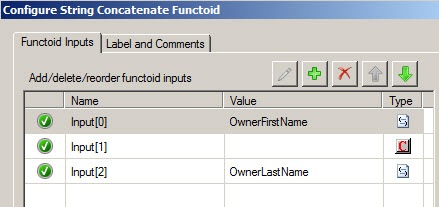
    What’s pretty cool is that besides getting the graphical mapper, I also get access to all the standard BizTalk functoids.  So, I dragged a “Concatenate” functoid onto the map and joined the OwnerLastName and OwnerFirstName and threw it into the OwnerName field.

    2010.5.24wfmap11

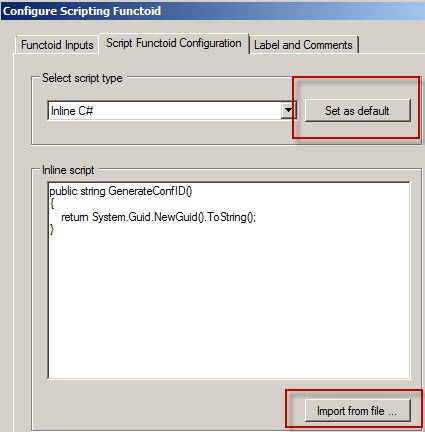
    Next, I want to create a confirmation code out of a GUID.  I dragged a “Scripting” functoid onto the map and double clicked.  It’s great that double-clicking now brings up ALL functoid configuration options.  Here, I’ve chosen to embed some C# code (vs. pointing to external assembly or writing custom XSLT) that generates a new GUID and returns it.  Also, notice that I can set “Inline C#” as a default option, AND, import from an external class file.  That’s fantastic since I can write and maintain code elsewhere and simply import it into this limited editor.

    2010.5.24wfmap13

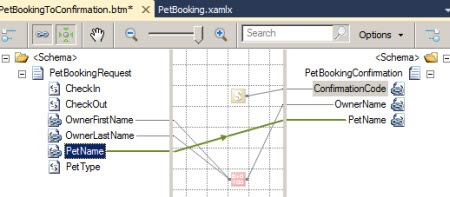
    Finally, I completed my map by connected the PetName nodes.

    2010.5.24wfmap12

    After once again building and running the Workflow Service, I can see that my values get mapped across, and a new GUID shows up as my confirmation value.

    2010.5.24wfmap14

    I gotta be honest, this was REALLY easy.  I’m super impressed with where Windows Workflow is and think that adding the power of the BizTalk Mapper is a killer feature.  What a great way to save time and even get reuse from BizTalk projects, or, aid in the migration of BizTalk solutions to WF ones.

    UPDATE: Apparently this WF activity gets installed when you install the WCF LOB Adpater SDK update for BizTalk Server 2010.  JUST installing BizTalk Server 2010 won’t provide you the activity.

    Share