Category: .NET

  • New Pluralsight course released: “Optimizing and Managing Distributed Systems on AWS”

    My trilogy of AWS courses for Pluralsight is complete. I originally created AWS Developer Fundamentals, then added Architecting Highly Available Systems on AWS, and today released Optimizing and Managing Distributed Systems on AWS.

    This course picks up from where we left off with the last one. By the end of the Architecting Highly Available Systems on AWS course, we had built a fault tolerant ASP.NET-based cloud system that used relational databases, NoSQL databases, queues, load balancers, auto scaling, and more. Now, we’re looking at what it takes to monitor the system, deploy code, add CDNs, and introduce application caching. All of this helps us create a truly high performing, self-healing environment in the cloud. This course has a total of four modules, and each one covers the relevant AWS service, how to consume it, and what the best practices are.

    • Monitoring Cloud Systems with Amazon CloudWatch. Here we talk about the role of monitoring in distributed systems, and dig into CloudWatch. After inspecting the various metrics available to us, we test one and see how to send email-based alerts. We then jump into more complex scenarios and see how to configure Auto Scaling policies that alter the size of the cloud environment based on server CPU utilization.
    • Deploying Web Application Stacks. Deploying apps to cloud servers often requires a new way of thinking. AWS provides three useful deployment frameworks, and this module goes over each one. We discuss the AWS Elastic Beanstalk and see how to push our web application to cloud servers directly from Visual Studio. Then to see how easy it is to change an application – and demonstrate the fun of custom CloudWatch metrics – we deploy a new version of the application that captures unique business metrics. We then look at CloudFormation and how to use the CloudFormer tool to generate comprehensive templates that can deploy an entire system. Finally, we review the new OpsWorks framework and where it’s the right fit.
    • Placing Content Close to Users with CDNs. Content Delivery Networks are an awesome way to offload static content to edge locations that are closer to your users. This module talks about why CDNs matter in distributed systems and shows off Amazon CloudFront. We set up a CloudFront distribution, update our ASP.NET application to use it, and even try out the “invalidation” function to get rid of an old image.
    • Improving Application Performance with ElastiCache. Application caching is super handy and ElastiCache gives you a managed, Memcached-compliant solution. Here we talk about when and what to cache, how Memcached works, what ElastiCache is, how to create and scale clusters, and how to use the cache from .NET code. There’s a handful of demos sprinkled in, and you should get a good sense of how to configure and test a cache.

    It’s been fun crafting these two AWS courses over the summer and I hope you enjoy them!

  • Where the heck do I host my … .NET app?

    In this short series of posts, I’m looking at the various options for hosting different types of applications. I first looked at Node.js and its diverse ecosystem of providers, and now I’m looking at where to host your .NET application. Regardless of whether you think .NET is passé or not, the reality is that there are millions upon millions of .NET developers and it’s one of the standard platforms at enterprises worldwide. Obviously Microsoft’s own cloud will be an attractive place to run .NET web applications, but there may be more options than you think.

    I’m not listing a giant matrix of providers, but rather, I’m going briefly describe 6 different .NET PaaS-like providers and assess them against the following criteria:

    • Versions of the .NET framework supported.
    • Supported capabilities.
    • Commitment to the platform.
    • Complementary services offered.
    • Pricing plans.
    • Access to underlying hosting infrastructure.
    • API and tools available.
    • Support material offered.

    The providers below are NOT ranked. I made it alphabetical to ensure no perception of preference.

    Amazon Web Services

    AWS offers a few ways to host .NET applications, including running them raw on Windows EC2 instances, or via Elastic Beanstalk or CloudFormation for a more orchestrated experience. The AWS Toolkit for Visual Studio gives Windows developers an easy experience for provisioning and managing their .NET applications.

    Versions Capabilities Commitment Add’l Services
    Works with .NET 4.5 and below. Load balancing, health monitoring, versioning (w/ Elastic Beanstalk), environmental variables, Auto Scaling Early partner with Microsoft on licensing, and dedicated Windows and .NET Dev Center, and regularly updated SDKs. AWS has a vast array of complementary services including caching, relational and NoSQL databases, queuing, workflow, and more. Note that many are proprietary to AWS.


    Pricing Plans Infrastructure Access API and Tools Support
    There is no charge for the Elastic Beanstalk or CloudFormation for deployment, and you just pay for consumed compute, memory, storage, and bandwidth. While deployment frameworks like Elastic Beanstalk and CloudFormation wrap an application into a container, you can still RDP into the host Windows servers. AWS has both SOAP and REST APIs for the platform, and apps deployed via Elastic Beanstalk or Cloud Formation can be managed by API. SDK for .NET includes full set of typed objects and Visual Studio plugins. Pretty comprehensive documentation, active discussion forums for .NET, and the option of paid support plans.

    AppHarbor

    AppHarbor has been around for a while and offers a .NET only PaaS platform that actually runs on AWS servers.

    Versions Capabilities Commitment Add’l Services
    Supports .NET 4.5 and older versions. Push via Git/Mercurial/
    Subversion/TFS, unit test integration, load balancing, auto scaling, SSL, worker processes, logging, application management console
    Focused solely on .NET and regularly updated blog indicates active evangelism. Offers an add-ons repository where you can add databases, New Relic APM, queuing, search, email, caching, and more to a given app.


    Pricing Plans Infrastructure Access API and Tools Support
    Pricing page shows three different models ranging from a free tier to $199 per month for more compute capacity. No direct virtual machine access. Fairly comprehensive API for deploying and managing apps and environments. Management console for GUI interactions. Offer knowledge base, discussion forums. Also encourage use of StackOverflow.

    Apprenda

    While not a public PaaS provider, you’d be remiss to ignore this innovative, comprehensive private PaaS for .NET applications. Their SaaS-oriented history is evident in their product which excels at making internal .NET applications multi-tenant, metered, billable, and manageable.

    Versions Capabilities Commitment Add’l Services
    Supports .NET 4.5 and some earlier versions. Load balancing, scaling, versioning, failure recovery, authentication and authorization services, logging, metering, account management, worker processes, rich web UI. Very focused on private PaaS and .NET and recognized by Gartner as a leader in this space. Not going anywhere. Can integrate and manage databases, queuing systems.


    Pricing Plans Infrastructure Access API and Tools Support
    They do not publicly list pricing, but offer a free cloud sandbox, downloadable dev version, and a licensed, subscription based product. It manages existing server environments, and makes it simple to remote desktop into a server. Have REST-based management API, and an SDK for using Apprenda services from .NET application. Visual Studio extension for deploying apps. Offers forums, very thorough documentation, and assumingly some specific support plans for paid customers.

    Snapp

    Brand new product who offers an interesting-looking (beta) public PaaS for .NET applications. Launched by longtime .NET hosting provider DiscountASP.net.

    Versions Capabilities Commitment Add’l Services
    Support for .NET 4.5 Deploy via FTP/Git/web/TFS, staging environment baked in, exception management, versioning, reporting Obviously very new, but good backing and sole focus is .NET. None that I can tell.


    Pricing Plans Infrastructure Access API and Tools Support
    Free beta from now until Sept 2013 when pricing will be announced. None mentioned; using Microsoft Anteres (Web Sites for Windows Server) technology. No API or SDKs identified yet. Developer uses their web UI interface. No KB yet, but forums started.

    Tier 3

    Cloud IaaS provider who also offers a Cloud Foundry-based PaaS called Web Fabric that also supports .NET through the open-source Iron Foundry extensions. Anyone can also take Cloud Foundry + Iron Foundry and run their own multi-language private PaaS within their own data center. FULL DISCLOSURE: This is the company I work for!

    Versions Capabilities Commitment Add’l Services
    .NET 4.0 and previous versions. Scaling, logging, load balancing, per-customer isolated environments, multi-language (Ruby, Java, .NET, Node.js, PHP, Python), basic management from web UI. Strong. Founder and CTO of Tier 3 started Iron Foundry project. Comes with databases such as SQL Server, MySQL, Redis, MongoDB, PostgreSQL. Includes RabbitMQ service. New Relic integration included. Connect with IaaS instances.


    Pricing Plans Infrastructure Access API and Tools Support
    Currently costs $360 for software stack plus IaaS charges. No direct access to underlying VMs, but tunneling to database instances supported. Support for Cloud Foundry APIs. Use Cloud Foundry management tools or community ones like Thor. Knowledge base, ticketing system, phone support included.

    Windows Azure

    The big kahuna. The Microsoft cloud is clearly one to consider whenever evaluating destinations for a .NET application. Depending on the use case, applications can be deployed in virtual machines, Cloud Services, or Web Sites. For this assessment, I’m considering Windows Azure Web Sites.

    Versions Capabilities Commitment Add’l Services
    Support for .NET 4.5 and previous versions. Deploy via Git/TFS/Dropbox, load balancing, auto scaling, SSL, logging, multi-language support (.NET, Node.js, PHP, Python), strong management interface. Do I have to really answer this? Obviously very strong. Access to the wide array of Azure services including SQL Server databases, Service Bus (queues/relay/topics), IaaS services, mobile services and much more.


    Pricing Plans Infrastructure Access API and Tools Support
    Pay as you go, with features dependent on whether you’re using free, shared, or standard tier. None for Windows Azure Web Sites. Can switch to Cloud Services if you need VM-level access. Management via REST API, integrated with Visual Studio tools, PowerShell commandlets available, and SDKs available for different languages. Support forums, good documentation and samples, and paid support available.

    Summary

    The .NET cloud hosting ecosystem may be more diverse than you thought! It’s not as broad as with an open-source platform like Node.js, but that’s not really a surprise given the necessity of running .NET on Windows (ignoring Mono for this discussion). These providers run the gamut from straight up PaaS providers like AppHarbor, to ones with an infrastructure-bent like AWS. Apprenda does a nice job with the private space, and Microsoft clearly offers the widest range of options for hosting a .NET application. However, there are plenty of valid reasons to choose one of the other vendors, so keep your options open when assessing the marketplace!

  • Pluralsight course on “Architecting Highly Available Systems on AWS” is live!

    This summer I’ve been busy putting together my seventh video-on-demand training course for Pluralsight. This one – called Architecting Highly Available Systems on AWS – is now online and ready for your viewing pleasure.

    Of all the courses that I’ve done for Pluralsight, my previous Amazon Web Services one (AWS Developer Fundamentals) remains my most popular. I wanted to stay with this industry-leading cloud platform but try something completely different. It’s one thing to do “how to” courses that just walk through various components independently, but it’s another thing entirely to show how to integrate, secure, and configure a real-life system with a given technology. Building and deploying cloud-scale systems requires thoughtful planning and it’s easy to make incorrect assumptions, so I developed a 4+ hour course that showcases the best practices for architecting and deploying fault tolerant, resilient systems on the AWS cloud.

    2013.07.31aws01

    This course has eight total modules that show you how to build up a bullet-proof cloud app, piece-by-piece. In each module, I explain the role of the technology, how to use it, and the best practices for using it effectively.

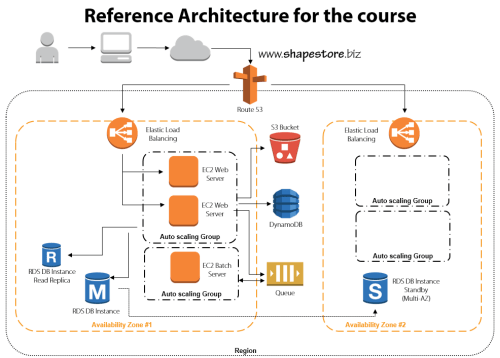
    • Module 1: Distributed Systems and AWS. This introductory session jumps right to it. We discuss the characteristics and fallacies of distributed systems, practices for making distributed systems highly available, look at the entire AWS portfolio, and walk through the reference architecture for the course.
    • Module 2: Provisioning Durable Storage with EBS and S3. Here we lay the foundation and choose the appropriate type of storage for our system. We discuss the use of EBS volumes and dig into Amazon S3. This module includes a walkthrough of adding objects to S3, making them public, and configuring a website hosted in S3.
    • Module 3: Setting Up Databases in RDS and DynamoDB. I had the most fun with this module. I do a deep review of Amazon RDS including setting up a MySQL instance, setting up multi-AZ replication for high availability, and read-replicas for better performance. We then test how RDS handles failure with automatic failover to the multi-AZ instance. Next we investigate DynamoDB and use it store ASP.NET session state thanks to the fantastic AWS SDK for .NET.
    • Module 4: Leveraging SQS for Scalable Processing. Queuing can be a key part of a successful distributed application, so we look at how to set up an Amazon SQS queue for sharing content between application tiers.
    • Module 5: Adding EC2 Virtual Machines. We’re finally ready to configure the actual application and web servers! This beefy module jumps into EC2 and how to use Identity and Access Management (IAM) and Security Groups to efficiently and securely provision servers. Then we deploy applications, create Amazon Machine Image (IAM) templates, deploy custom IAM instances, and configure Elastic IPs. Whew.
    • Module 6: Using ELB to Scale Applications. With a basic application running, now it’s time to enhance application availability further. Here we look at the Elastic Load Balancer and how to configure and test it.
    • Module 7: Enabling Auto Scale to Handle Spikes and Troughs. Ideally, (cloud) distributed systems are self-healing and self-regulating and Amazon Auto Scaling is a big part of this. This module shows you how to add Auto Scaling to a system and test it out.
    • Module 8: Configuring DNS with Route 53. The final module ties it all together by adding DNS services. Here you see where I register a domain name, and use Amazon Route 53 to manage the DNS entries and route traffic to the Elastic Load Balancers.

    I had a blast preparing this course, and the “part II” is in progress now. The sequel focuses on tuning and maintaining AWS cloud applications and will build upon everything shown here. If you’re not already a Pluralsight subscriber, now’s a great time to make an investment in yourself and learn all sorts of new things!

  • Going to Microsoft TechEd (North America) to Speak About Cloud Integration

    In a few weeks, I’ll be heading to New Orleans to speak at Microsoft TechEd for the first time. My topic – Patterns of Cloud Integration – is an extension of things I’ve talked about this year in Amsterdam, Gothenburg, and in my latest Pluralsight course. However, I’ll also be covering some entirely new ground and showcasing some brand new technologies.

    TechEd is a great conference with tons of interesting sessions, and I’m thrilled to be part of it. In my talk, I’ll spend 75 minutes discussing practical considerations for application, data, identity, and network integration with cloud systems. Expect lots of demonstrations of Microsoft (and non-Microsoft) technology that can help organizations cleanly link all IT assets, regardless of physical location. I’ll show off some of the best tools from Microsoft, Salesforce.com, AWS (assuming no one tackles me when I bring it up), Informatica, and more.

    Any of you plan on going to North America TechEd this year? If so, hope to see you there!

  • Calling Salesforce.com REST and SOAP Endpoints from .NET Code

    A couple months back, the folks at Salesforce.com reached out to me and asked if I’d be interested in helping them beef up their .NET-oriented content. Given that I barely say “no” to anything – and this sounded fun – I took them up on the offer. I ended up contributing three articles that covered: consuming Force.com web services, using Force.com with the Windows Azure Service Bus, and using Force.com with BizTalk Server 2013.  The first article is now on the DeveloperForce wiki and is entitled Consuming Force.com SOAP and REST Web Services from .NET Applications.

    This article covers how to securely use the Enterprise API (strongly-typed, SOAP), Partner API (weakly-typed, SOAP), and REST API. It covers how to authenticate users of each API, and how to issue “query” and “create” commands against each. While I embedded a fair amount of code in the article, it’s always nice to see everything together in context. So, I’ve added my Visual Studio solution to GitHub so that anyone can browse and download the entire solution and quickly try out each scenario.

    Feedback welcome!

  • My New Pluralsight Course – Patterns of Cloud Integration – Is Now Live

    I’ve been hard at work on a new Pluralsight video course and it’s now live and available for viewing. This course, Patterns of Cloud Integration,  takes you through how application and data integration differ when adding cloud endpoints. The course highlights the 4 integration styles/patterns introduced in the excellent Enterprise Integration Patterns book and discusses the considerations, benefits, and challenges of using them with cloud systems. There are five core modules in the course:

    • Integration in the Cloud. An overview of the new challenges of integrating with cloud systems as well as a summary of each of the four integration patterns that are covered in the rest of the course.
    • Remote Procedure Call. Sometimes you need information or business logic stored in an independent system and RPC is still a valid way to get it. Doing this with a cloud system on one (or both!) ends can be a challenge and we cover the technologies and gotchas here.
    • Asynchronous Messaging. Messaging is a fantastic way to do loosely coupled system architecture, but there are still a number of things to consider when doing this with the cloud.
    • Shared Database. If every system has to be consistent at the same time, then using a shared database is the way to go. This can be a challenge at cloud scale, and we review some options.
    • File Transfer. Good old-fashioned file transfers still make sense in many cases. Here I show a new crop of tools that make ETL easy to use!

    Because “the cloud” consists of so many unique and interesting technologies, I was determined to not just focus on the products and services from any one vendor. So, I decided to show off a ton of different technologies including:

    Whew! This represents years of work as I’ve written about or spoken on this topic for a while. It was fun to collect all sorts of tidbits, talk to colleagues, and experiment with technologies in order to create a formal course on the topic. There’s a ton more to talk about besides just what’s in this 4 hour course, but I hope that it sparks discussion and helps us continue to get better at linking systems, regardless of their physical location.

  • Publishing ASP.NET Web Sites to “Windows Azure Web Sites” Service

    Today, Microsoft made a number of nice updates to their Visual Studio tools and templates. On thing pointed out in Scott Hanselman’s blog post about it (and Scott Guthrie’s post as well), was the update that lets developers publish ASP.NET Web Site projects to WIndows Azure Web Sites. Given that I haven’t messed around with Windows Azure Web Sites, I figured that it’d be fun to try this out.

    After installing the new tooling and opening Visual Studio 2012, I created a new Web Site project.

    2013.02.18,websites01

    I then right-clicked my new project in Visual Studio and chose the “Publish Web Site” option.

    2013.02.18,websites02

    If you haven’t published to Windows Azure before, you’re told that you can do so if you download the necessary “publishing profile.”

    2013.02.18,websites03

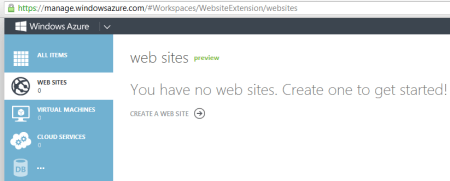
    When I clicked the “Download your publishing profile …” link, I was redirected to the Windows Azure Management Portal where I could see that there were no existing Web Sites provisioned yet.

    2013.02.18,websites04

    I quickly walked through the easy-to-use wizard to provision a new Web Site container.

    2013.02.18,websites05

    Within moments, I had a new Web Site ready to go.

    2013.02.18,websites06

    After drilling into this new Web Site’s dashboard, I saw the link to download my publishing profile.

    2013.02.18,websites07

    I downloaded the profile, and returned to Visual Studio. After importing this publishing profile into the “Publish Web” wizard, I was able to continue towards publishing this site to Windows Azure.

    2013.02.18,websites08

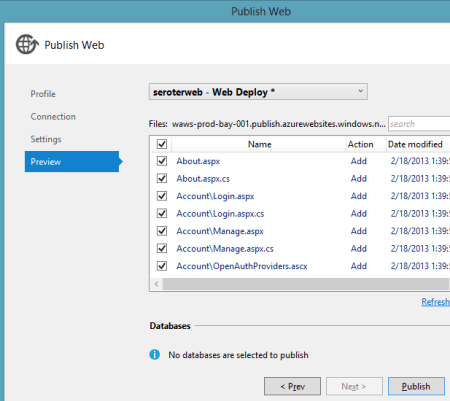
    The last page of this wizard (“Preview”) let me see all the files that I was about to upload and choose which ones to include in the deployment.

    2013.02.18,websites09

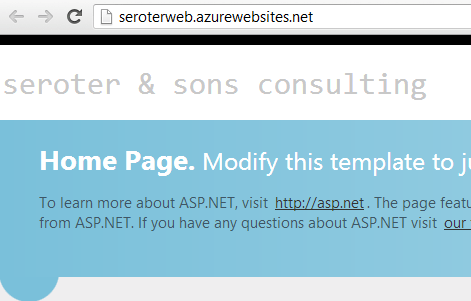
    Publishing only took a few seconds, and shortly afterwards I was able to hit my cloud web site.

    2013.02.18,websites10

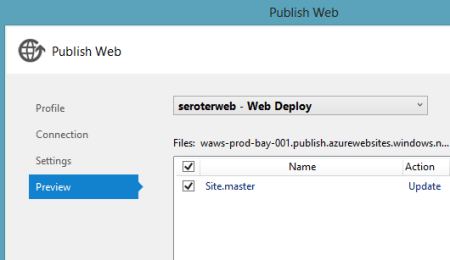
    As you’d hope, this flow also works fine for updating an existing deployment. I made a small change to the web site’s master page, and once again walked through the “Publish Web Site” wizard. This time I was immediately taken to the (final) “Preview” wizard page where it determined the changes between my local web site and the Azure Web Site.

    2013.02.18,websites11

    After a few seconds, I saw my updated Web Site with the new company name.

    2013.02.18,websites12

    Overall, very nice experience. I’m definitely more inclined to use Windows Azure Web Sites now given how simple, fast, and straightforward it is.

  • Interacting with Clouds From Visual Studio: Part 1 – Windows Azure

    Now that cloud providers are maturing and stabilizing their platforms, we’re seeing better and better dev tooling get released. Three major .NET-friendly cloud platforms (Windows Azure, AWS, and Iron Foundry) have management tools baked right into Visual Studio, and I thought it’d be fun to compare them with respect to completeness of functional coverage and overall usability. Specifically, I’m looking to see how well the Visual Studio plugins for each of these clouds account for browsing, deploying, updating, and testing services. To be sure, there are other tools that may help developers interact with their target cloud, but this series of posts is JUST looking at what is embedded within Visual Studio.

    Let’s start with the Windows Azure tooling for Visual Studio 2012. The table below summarizes my assessment. I’ll explain each rating in the sections that follow.

    Category

    Windows
    Azure

    Notes

    Browsing

    Web applications and files 1-4 Can view names and see instance counts, but that’s it. No lists of files, no properties of the application itself. Can initiate Remote Desktop command.
    Databases 4-4 No really part of the plugin (as its already in Server Explorer), but you get a rich view of Windows Azure SQL databases.
    Storage 1-4 No queues available, and no properties shown for tables and blobs.
    VM instances 2-4 Can see list of VMs and small set of properties. Also have the option to Remote Desktop into the server.
    Messaging components 3-4 Pretty complete story. Missing Service Bus relay component. Good view into Topics/Queues and informative set of properties.
    User accounts, permissions 0-4 No browsing of users or their permissions in Windows Azure.

    Deploying / Editing

    Web applications and files 0-4 No way to deploy new web application (instances) or update existing applications.
    Databases 4-4 Good story for adding new database artifacts and changing existing ones.
    Storage 0-4 No changes can be made to existing storage, and users can’t add new storage components.
    VM instances 0-4 Cannot alter existing VMs or deploy new ones.
    Messaging components 3-4 Nice ability to create and edit queues and topics. Cannot change existing topic subscriptions.
    User accounts, permissions 0-4 Cannot add or change user permissions.

    Testing

    Databases 4-4 Good testability through query execution.
    Messaging components 3-4 Nice ability to send and receive test messages, but lack of customization of message limits test cases.

    Setting up the Visual Studio Plugin for Windows Azure

    Before going to the functionality of the plugin interface, let’s first see how a developer sets up their workstation to use it. First, the developer must install the Windows Azure SDK for .NET. Among other things, this adds the ability to see and interact with a sub-set of Windows Azure from within Visual Studio’s existing Server Explorer window.

    2012.12.20vs01

    As you can see, it’s not a COMPLETE view of everything in the Windows Azure family (no Windows Azure Web Sites, Windows Azure SQL Database), but it’s got most of the biggies.

    Browsing Cloud Resources

    If the goal is to not only push apps to the cloud, but also manage them, then a decent browsing story is a must-have.  While Windows Azure offers a solid web portal – and programmatic interfaces ranging from PowerShell to a web service API – it’s nice to also be able to see your cloud components from within the same environment (Visual Studio) that you build them!

    What’s interesting to me is that each cloud function (Compute, Service Bus, Storage, VMs) requires a unique set of credentials to view the included resources. So no global “here’s my Windows Azure credentials … show me my stuff!” experience.

    Compute

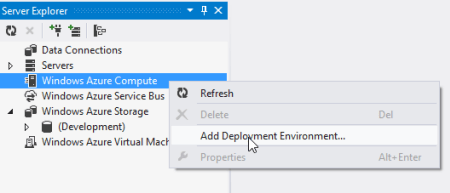
    For Compute, the very first time that I want to browse web applications, I need to add a Deployment Environment.
    2012.12.20vs02

    I’m then asked for which subscription to use, and if there are none listed, then I  am prompted to download a “publish settings” file from my Windows Azure account. Once I do that, I see my various subscriptions, and am asked to choose which one to show in the Visual Studio plugin.

    2012.12.20vs03

    Finally, I can see my deployed web applications.

    2012.12.20vs04

    Note however, that there are no “properties” displayed for any of the objects in this tree. So, I can’t browse the application settings or see how the web application was configured.

    Service Bus

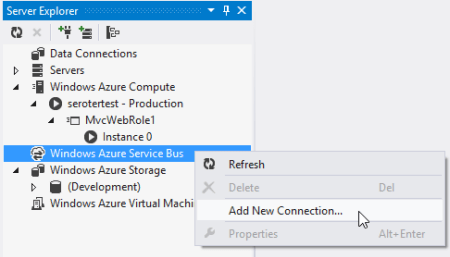
    To browse all the deployed bits for the Service Bus, I once again have to add a new connection.
    2012.12.20vs05

    After adding my Service Bus namespace, Issuer, and Key, I get all the Topics and Queues (not Relays, though) associated with this subscription.

    2012.12.20vs06

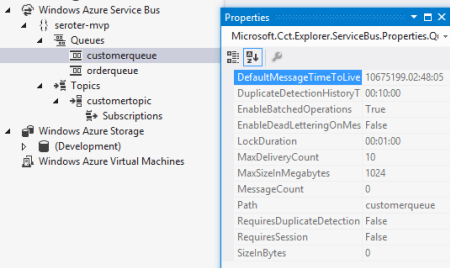
    Unlike the Compute tree nodes, all the Service Bus nodes reveal tidbits of information in the Properties window. For instance, clicking on the Service Bus subscription shows me the Issuer, Key, endpoints, and more. Clicking on an individual queue shows me a host of properties including message count, duplicate detection status, and more. Handy stuff.
    2012.12.20vs07

    Storage

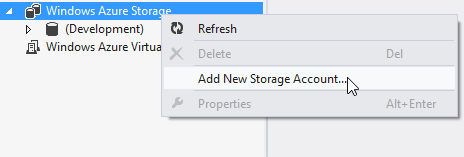
    To check out the storage (blob and table, no queues) artifacts in Windows Azure, I first have to add a connection to one of my storage accounts.
    2012.12.20vs08

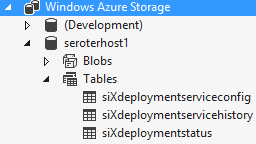
    After providing my account name and key, I’m shown everything that’s in this account.
    2012.12.20vs09

    Unfortunately, these seem to follow the same pattern as Compute and don’t present any values in the Properties window.

    Virtual Machines

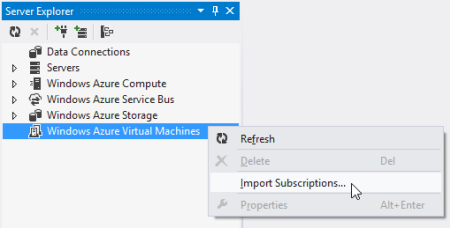
    How about the new, beta Windows Azure Virtual Machines? Like the other cloud resources exposed via this Visual Studio plugin, this one requires a one-time setup of a subscription.
    2012.12.20vs10

    After pointing it to my downloaded subscription file, I was shown a list of the VMs that I’ve deployed to Windows Azure.

    2012.12.20vs11

    When I click on a particular VM, the Visual Studio Properties window includes a few attributes such as VM size, status, and name. However, there’s no option to see networking settings or any other advanced VM environment settings.

    2012.12.20vs12

    Database

    While there’s not a specific entry for Windows Azure SQL Databases, I figured that I’d try and add it as a regular “data connection” within the Visual Studio plugin. After updating the Windows Azure portal to allow my IP address to access one of my Azure databases, and plugged in the address and credentials of my cloud database.

    2012.12.20vs13

    Once connected, I see all the artifacts in my Windows Azure SQL database.

    2012.12.20vs14

    Deploying and Updating Cloud Resources

    So what can you create or update directly from the plug-in? For the Windows Azure plugin, the answer is “not much.” The Compute node is for (limited) read only views and you cannot deploy new instances. The Storage node is read-only as well as users cannot created new tables/blobs. The Virtual Machines node is for browsing only as there is no way to initiate the VM-creation process or change existing VMs.

    There are some exceptions to this read-only world. The Service Bus portion of the plugin is pretty interactive. I can easily create brand new topics and queues.
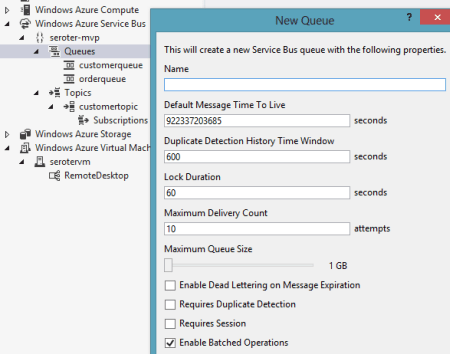
    2012.12.20vs15

    However, I cannot change the properties of existing topics or queues. As for topic subscriptions, I am able to create both subscriptions and rules, but cannot change the rules after the fact.

    The options for Windows Azure SQL Databases are the most promising. Using the Visual Studio plugin, I can create new tables, stored procedures and the like, and can also add/change table data or update artifacts such as stored procedures.

    2012.12.20vs16

    Testing Cloud Resources

    As you might expect given the limited support for interacting with cloud resources, the Visual Studio plugin for Windows Azure only has a few testing-oriented capabilities. First, users of SQL databases can easily execute procedures and run queries from the plugin.

    2012.12.20vs17

    The Service Bus also has a decent testing story. From the plugin, I can send test messages to queues, and receive them.

    2012.12.20vs18

    However, it doesn’t appear that I can customize the message. Instead, a generic message is sent on my behalf. Similarly, when I choose to send a test message to a topic, I don’t have a chance to change it. However, it is nice to be able to easily send and receive messages.

    Summary

    Overall, the Visual Studio plugin for Windows Azure offers a decent, but incomplete experience. If it were only a read-only tool, I’d expect better metadata about the deployed artifacts. If it was an interactive tool that supported additions and changes, I’d expect many more exposed features. Clearly Microsoft expects developers to use a mix of the Windows Azure portal, and custom tools (like the awesome Service Bus Explorer), but I hope that future releases of this plugin have a more comprehensive coverage area.

    In the next post, I’ll look at what Amazon offers in their Visual Studio plugin.
  • Capabilities and Limitations of “Contract First” Feature in Microsoft Workflow Services 4.5

    I think we’ve moved well past the point of believing that “every service should be a workflow” and other things that I heard when Microsoft was first plugging their Workflow Foundation. However, there still seem to be many cases where executing a visually modeled workflow is useful. Specifically, they are very helpful when you have long running interactions that must retain state. When Microsoft revamped Workflow Services with the .NET 4.0 release, it became really simple to build workflows that were exposed as WCF services. But, despite all the “contract first” hoopla with WCF, Workflow Services were inexplicably left out of that. You couldn’t start the construction of a Workflow Service by designing a contract that described the operations and data payloads. That has all been rectified in .NET 4.5 as now developers can do true contract-first development with Workflow Services. In this blog post, I’ll show you how to build a contract-first Workflow Service, and, include a list of all the WCF contract properties that get respected by the workflow engine.

    First off, there is an MSDN article (How to: Create a workflow service that consumes an existing service contract) that touches on this, but there are no pictures and limited details, and my readers demand both, dammit.

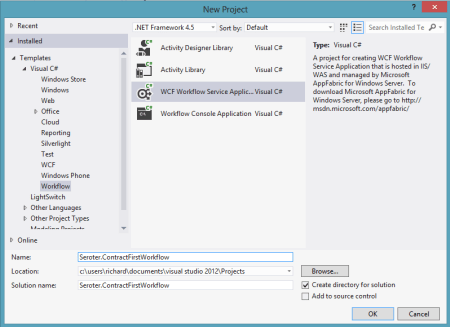
    To begin with, I created a new Workflow Services project in Visual Studio 2012.

    2012.10.12wf01

    Then, I chose to add a new class directly to the Workflow Services project.

    2012.10.12wf02

    Within this new class filed, named IOrderService, I defined a new WCF service contract that included an operation that processes new orders. You can see below that I have one contract and two data payloads (“order” and “order confirmation”).

    namespace Seroter.ContractFirstWorkflow
    {
        [ServiceContract(
            Name="OrderService",
            Namespace="http://Seroter.Demos")]
        public interface IOrderService
        {
            [OperationContract(Name="SubmitOrder")]
            OrderConfirmation Submit(Order customerOrder);
        }
    
        [DataContract(Name="CustomerOrder")]
        public class Order
        {    
            [DataMember]
            public int ProductId { get; set; }
            [DataMember]
            public int CustomerId { get; set; }
            [DataMember]
            public int Quantity { get; set; }
            [DataMember]
            public string OrderDate { get; set; }
    
            public string ExtraField { get; set; }
        }
    
        [DataContract]
        public class OrderConfirmation
        {
            [DataMember]
            public int OrderId { get; set; }
            [DataMember]
            public string TrackingId { get; set; }
            [DataMember]
            public string Status { get; set; }
        }
    }
    

    Now which WCF service/operation/data/message/fault contract attributes are supported by the workflow engine? You can’t find that information from Microsoft at the moment, so I reached out to the product team, and they generously shared the content below. You can see that a good portion of the contract attributes are supported, but there are a number of key ones (e.g. callback and session) that won’t make it over. Also, from my own experimentation, you also can’t use the RESTful attributes like WebGet/WebInvoke.

    Attribute Property Name Supported Description
    Service Contract CallbackContract No Gets or sets the type of callback contract when the contract is a duplex contract.
    ConfigurationName No Gets or sets the name used to locate the service in an application configuration file.
    HasProtectionLevel Yes Gets a value that indicates whether the member has a protection level assigned.
    Name Yes Gets or sets the name for the <portType> element in Web Services Description Language (WSDL).
    Namespace Yes Gets or sets the namespace of the <portType> element in Web Services Description Language (WSDL).
    ProtectionLevel Yes Specifies whether the binding for the contract must support the value of the ProtectionLevel property.
    SessionMode No Gets or sets whether sessions are allowed, not allowed or required.
    TypeId No When implemented in a derived class, gets a unique identifier for this Attribute. (Inherited from Attribute.)
    Operation Contract Action Yes Gets or sets the WS-Addressing action of the request message.
    AsyncPattern No Indicates that an operation is implemented asynchronously using a Begin<methodName> and End<methodName> method pair in a service contract.
    HasProtectionLevel Yes Gets a value that indicates whether the messages for this operation must be encrypted, signed, or both.
    IsInitiating No Gets or sets a value that indicates whether the method implements an operation that can initiate a session on the server(if such a session exists).
    IsOneWay Yes Gets or sets a value that indicates whether an operation returns a reply message.
    IsTerminating No Gets or sets a value that indicates whether the service operation causes the server to close the session after the reply message, if any, is sent.
    Name Yes Gets or sets the name of the operation.
    ProtectionLevel Yes Gets or sets a value that specifies whether the messages of an operation must be encrypted, signed, or both.
    ReplyAction Yes Gets or sets the value of the SOAP action for the reply message of the operation.
    TypeId No When implemented in a derived class, gets a unique identifier for this Attribute. (Inherited from Attribute.)
    Message Contract HasProtectionLevel Yes Gets a value that indicates whether the message has a protection level.
    IsWrapped Yes Gets or sets a value that specifies whether the message body has a wrapper element.
    ProtectionLevel No Gets or sets a value that specified whether the message must be encrypted, signed, or both.
    TypeId Yes When implemented in a derived class, gets a unique identifier for this Attribute. (Inherited from Attribute.)
    WrapperName Yes Gets or sets the name of the wrapper element of the message body.
    WrapperNamespace No Gets or sets the namespace of the message body wrapper element.
    Data Contract IsReference No Gets or sets a value that indicates whether to preserve object reference data.
    Name Yes Gets or sets the name of the data contract for the type.
    Namespace Yes Gets or sets the namespace for the data contract for the type.
    TypeId No When implemented in a derived class, gets a unique identifier for this Attribute. (Inherited from Attribute.)
    Fault Contract Action Yes Gets or sets the action of the SOAP fault message that is specified as part of the operation contract.
    DetailType Yes Gets the type of a serializable object that contains error information.
    HasProtectionLevel No Gets a value that indicates whether the SOAP fault message has a protection level assigned.
    Name No Gets or sets the name of the fault message in Web Services Description Language (WSDL).
    Namespace No Gets or sets the namespace of the SOAP fault.
    ProtectionLevel No Specifies the level of protection the SOAP fault requires from the binding.
    TypeId No When implemented in a derived class, gets a unique identifier for this Attribute. (Inherited from Attribute.)

    With the contract in place, I could then right-click the workflow project and choose to Import Service Contract.

    2012.10.12wf03

    From here, I chose which interface to import. Notice that I can look inside my current project, or, browse any of the assemblies referenced in the project.

    2012.10.12wf04


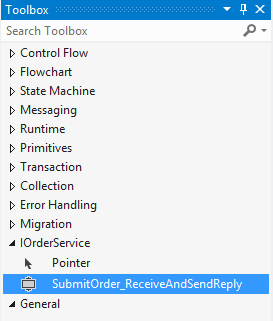
    After the WCF contract was imported, I got a notice that I “will see the generated activities in the toolbox after you rebuild the project.” Since I don’t mind following instructions, I rebuilt my project and looked at the Visual Studio toolbox.

    2012.10.12wf05

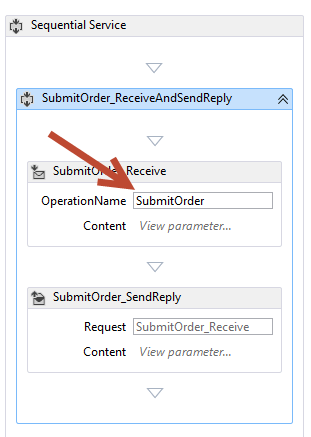
    Nice! So now I could drag this shape onto my Workflow and check out how my WCF contract attributes got mapped over. First off, the “name” attribute of my contract operation (“SubmitOrder”) differed from the name of the operation itself (“Submit”). You can see here that the operation name of the Workflow Service correctly uses the attribute value, not the operation name.

    2012.10.12wf06

    What was interesting to me is that none of my DataContract attributes got recognized in the Workflow itself. If you recall from above, I set the “name” attribute of the DataContract for “Order” to “CustomerOrder” and excluded one of the fields, “ExtraField”, from the contract. However, the data type in my workflow is called “Order”, and I can still access the “ExtraField.”

    2012.10.12wf07

    So maybe these attribute values only get reflected in the external contract, not the internal data types. Let’s find out! After starting the Workflow Service and inspecting the WSDL, sure enough, the “type” of the inbound request corresponds to the data contract attribute (“CustomerOrder”).

    2012.10.12wf09

    In addition, the field (“ExtraField”) that I excluded from the data contract is also nowhere to be found in the type definition.

    2012.10.12wf10

    Finally, the name and namespace of the service should reflect the values I defined in the service contract. And indeed they do. The target namespace of the service is the value I set in the contract, and the port type reflects the overall name of the service.

    2012.10.12wf11

    2012.10.12wf12


    All that’s left to do is test the service, which I did in the WCF Test Client.

    2012.10.12wf13

    The service worked fine. That was easy. So if you have existing service contracts and want to use Workflow Services to model out the business logic, you can now do so.

  • Trying Out the New Windows Azure Portal Support for Relay Services

    Scott Guthrie announced a handful of changes to the Windows Azure Portal, and among them, was the long-awaited migration of Service Bus resources from the old-and-busted Silverlight Portal to the new HTML hotness portal. You’ll find some really nice additions to the Service Bus Queues and Topics. In addition to creating new queues/topics, you can also monitor them pretty well. You still can’t submit test messages (ala Amazon Web Services and their Management Portal), but it’s going in the right direction.

    2012.10.08sb05

    One thing that caught my eye was the “Relays” portion of this. In the “add” wizard, you see that you can “quick create” a Service Bus relay.

    2012.10.08sb02

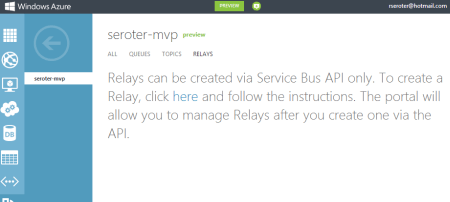
    However, all this does is create the namespace, not a relay service itself, as can be confirmed by viewing the message on the Relays portion of the Portal.

    2012.10.08sb03

    So, this portal is just for the *management* of relays. Fair enough. Let’s see what sort of management I get! I created a very simple REST service that listens to the Windows Azure Service Bus.  I pulled in the proper NuGet package so that I had all the Service Bus configuration values and assembly references. Then, I proceeded to configure this service using the webHttpRelayBinding.

    2012.10.08sb06

    I started up the service and invoked it a few times. I was hoping that I’d see performance metrics like those found with Service Bus Queues/Topics.

    2012.10.08sb07

    However, when I returned to the Windows Azure Portal, all I saw was the name of my Relay service and confirmation of a single listener. This is still an improvement from the old portal where you really couldn’t see what you had deployed. So, it’s progress!

    2012.10.08sb08

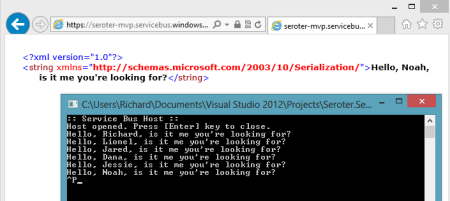
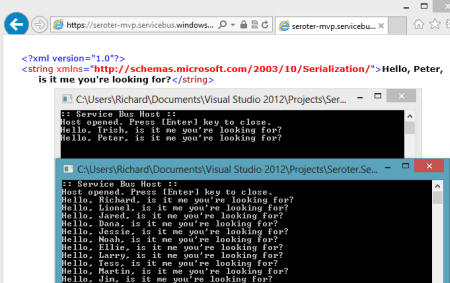
    You can see the Service Bus load balancing feature represented here. I started up a second instance of my “hello service” listener and pumped through a few more messages. I could see that messages were being sent to either of my two listeners.

    2012.10.08sb09

    Back in the Windows Azure Portal, I immediately saw that I now had two listeners.

    2012.10.08sb10

    Good stuff. I’d still like to see monitoring/throughput information added here for the Relay services. But, this is still  more useful than the last version of the Portal. And for those looking to use Topics/Queues, this is a significant upgrade in overall user experience.