Category: .NET

  • Can’t figure out which SpringOne Platform sessions to attend? I’ll help you out.

    Can’t figure out which SpringOne Platform sessions to attend? I’ll help you out.

    Next week is SpringOne Platform (S1P). This annual conference is where developers from around the world learn about about Spring, Cloud Foundry, and modern architecture. It’s got a great mix of tech talks, product demos, and transformational case studies. Hear from software engineers and leaders that work at companies like Pivotal, Boeing, Mastercard, Microsoft, Google, FedEx, HCSC, The Home Depot, Comcast, Accenture, and more.

    If you’re attending (and you are, RIGHT?!?), how do you pick sessions from the ten tracks over three days? I helped build the program, and thought I’d point out the best talks for each type of audience member.

    The “multi-cloud enthusiast”

    Your future involves multiple clouds. It’s inevitable. Learn all about the tech and strategies to make it more successful.

    The “bleeding-edge developer”

    The vast major of S1P attendees are developers who want to learn about the hottest technologies. Here are some highlights for them.

    The “enterprise change agent”

    I’m blown away by the number of real case studies at this show. If you’re trying to create a lasting change at your company, these are the talks that prep you for success.

    The “ambitious operations pro”

    Automation doesn’t spell the end of Ops. But it does change the nature of it. These are talks that forward-thinking operations folks want to attend to learn how to build and manage future tech.

    The “modern app architect”

    What a fun time to be an architect! We’re expected to deliver software with exceptional availability and scale. That requires a new set of patterns. You’ll learn them in these talks.

    The “curious data pro”

    How we collect, process, store, and retrieve data is changing. It has to. There’s more data, in more formats, with demands for faster access. These talks get you up to speed on modern data approaches.

    The “plugged-in manager”

    Any engineering lead, manager, or executive is going to spend considerable time optimizing the team, not building software. But that doesn’t mean you shouldn’t be up-to-date on what your team is working with. These talks will make you sound hip at the water cooler after the conference.

    Fortunately all these sessions will be recorded and posted online. But nothing beats the in-person experience. If you haven’t bought a ticket, it’s not too late!

  • Adding circuit breakers to your .NET applications

    Adding circuit breakers to your .NET applications

    Apps fail. Hardware fails. Networks fail. None of this should surprise you. As we build more distributed systems, these failures create unpredictability. Remote calls between components might experience latency, faults, unresponsiveness, or worse. How do you keep a failure in one component from creating a cascading failure across your whole environment?

    In his seminal book Release It!, Michael Nygard introduced the “circuit breaker” software pattern. Basically, you wrap calls to downstream services, and watch for failure. If there are too many failures, the circuit “trips” and the downstream services isn’t called any longer. Or at least for a period of time until the service heals itself.

    How do we use this pattern in our apps? Enter Hystrix from Netflix OSS. Released in 2012, this library executes each call on a separate thread, watches for failures in Java calls, invokes a fallback operation upon failure, trips a circuit if needed, and periodically checks to see if the downstream service is healthy. And it has a handy dashboard to visualize your circuits. It’s wicked. The Spring team worked with Netflix and created a easy-to-use version for Spring Boot developers. Spring Cloud Hystrix is the result. You can learn all about it in my most recent Pluralsight course.

    But why do Java developers get to have all the fun? Pivotal released an open-source library called Steeltoe last year. This library brings microservices patterns to .NET developers. It started out with things like a Git-backed configuration store, and service discovery. The brand new update offers management endpoints and … an implementation of Hystrix for .NET apps. Note that this is for .NET Framework OR .NET Core apps. Everybody gets in on the action.

    Let’s see how Steeltoe Hystrix works. I built an ASP.NET Core service, and than called it from a front-end app. I wrapped the calls to the service using Steeltoe Hystrix, which protects my app when failures occur.

    Dependency: the recommendation service

    This service returns recommended products to buy, based on your past purchasing history. In reality, it returns four products that I’ve hard-coded into a controller. LOWER YOUR EXPECTATIONS OF ME.

    This is an ASP.NET Core MVC Web API. The code is in GitHub, but here’s the controller for review:

    namespace core_hystrix_recommendation_service.Controllers
    {
        [Route("api/[controller]")]
        public class RecommendationsController : Controller
        {
            // GET api/recommendations
            [HttpGet]
            public IEnumerable<Recommendations> Get()
            {
                Recommendations r1 = new Recommendations();
                r1.ProductId = "10023";
                r1.ProductDescription = "Women's Triblend T-Shirt";
                r1.ProductImage = "https://cdn.shopify.com/s/files/1/0692/5669/products/charcoal_pivotal_grande_43987370-6045-4abf-b81c-b444e4c481bc_1024x1024.png?v=1503505687";
    
                Recommendations r2 = new Recommendations();
                r2.ProductId = "10040";
                r2.ProductDescription = "Men's Bring Back Your Weekend T-Shirt";
                r2.ProductImage = "https://cdn.shopify.com/s/files/1/0692/5669/products/m2_1024x1024.png?v=1503525900";
    
                Recommendations r3 = new Recommendations();
                r3.ProductId = "10057";
                r3.ProductDescription = "H2Go Force Water Bottle";
                r3.ProductImage = "https://cdn.shopify.com/s/files/1/0692/5669/products/Pivotal-Black-Water-Bottle_1024x1024.png?v=1442486197";
    
                Recommendations r4 = new Recommendations();
                r4.ProductId = "10059";
                r4.ProductDescription = "Migrating to Cloud Native Application Architectures by Matt Stine";
                r4.ProductImage = "https://cdn.shopify.com/s/files/1/0692/5669/products/migrating_1024x1024.png?v=1458083725";
    
                return new Recommendations[] { r1, r2, r3, r4 };
            }
        }
    }
    

    Note that the dependency service has no knowledge of Hystrix or how the caller invokes it.

    Caller: the recommendations UI

    The front-end app calls the recommendation service, but it shouldn’t tip over just because the service is unavailable. Rather, bad calls should fail quickly, and gracefully. We could return cached or static results, as an example. Be aware that a circuit breaker is much more than fancy exception handling. One big piece is that each call executes in its own thread. This implementation of the bulkhead patterns prevents runaway resource consumption, among other things. Besides that, circuit breakers are also machinery to watch failures over time, and allow the failing service to recover before allowing more requests.

    This ASP.NET Core app uses the mvc template. I’ve added the Steeltoe packages to the project. There are a few Nuget packages to choose from. If you’re running this in Pivotal Cloud Foundry, there’s a set of packages that make it easy to integrate with Hystrix dashboard embedded there. Here, let’s assume we’re running this app somewhere else. That means I need the base package “Steeltoe.CircuitBreaker.Hystrix” and “Steeltoe.CircuitBreaker.Hystrix.MetricsEvents” which gives me a stream of real-time data to analyze.

    <Project Sdk="Microsoft.NET.Sdk.Web">
      <PropertyGroup>
        <TargetFramework>netcoreapp2.0</TargetFramework>
      </PropertyGroup>
      <ItemGroup>
        <PackageReference Include="Microsoft.AspNet.WebApi.Client" Version="5.2.3" />
        <PackageReference Include="Microsoft.AspNetCore.All" Version="2.0.0" />
        <PackageReference Include="Microsoft.Extensions.Configuration" Version="2.0.0" />
        <PackageReference Include="Steeltoe.CircuitBreaker.Hystrix" Version="1.1.0" />
        <PackageReference Include="Steeltoe.CircuitBreaker.Hystrix.MetricsEvents" Version="1.1.0" />
      </ItemGroup>
      <ItemGroup>
        <DotNetCliToolReference Include="Microsoft.VisualStudio.Web.CodeGeneration.Tools" Version="2.0.0" />
      </ItemGroup>
    </Project>
    

    I built a class (“RecommendationService”) that calls the dependent service. This class inherits from HystrixCommand. There are a few ways to use these commands in calling code. I’m adding it to the ASP.NET Core service container, so my constructor takes in a IHystrixCommandOptions.

    //HystrixCommand means no result, HystrixCommand<string> means a string comes back
    public class RecommendationService: HystrixCommand<List<Recommendations>>
    {
      public RecommendationService(IHystrixCommandOptions options):base(options) {
         //nada
      }
    

    I’ve got inherited methods to use thanks to the base class. I call my dependent service by overriding Run (or RunAsync). If failure happens, the RunFallback (or RunFallbackAsync) is invoked and I just return some static data. Here’s the code:

    protected override List<Recommendations> Run()
    {
      var client = new HttpClient();
      var response = client.GetAsync("http://localhost:5000/api/recommendations").Result;
    
      var recommendations = response.Content.ReadAsAsync<List<Recommendations>>().Result;
    
      return recommendations;
    }
    
    protected override List<Recommendations> RunFallback()
    {
      Recommendations r1 = new Recommendations();
      r1.ProductId = "10007";
      r1.ProductDescription = "Black Hat";
      r1.ProductImage = "https://cdn.shopify.com/s/files/1/0692/5669/products/hatnew_1024x1024.png?v=1458082282";
    
      List<Recommendations> recommendations = new List<Recommendations>();
      recommendations.Add(r1);
    
      return recommendations;
    }
    

    My ASP.NET Core controller uses the RecommendationService class to call its dependency. Notice that I’ve got an object of that type coming into my constructor. Then I call the Execute method (that’s part of the base class) to trigger the Hystrix-protected call.

    public class HomeController : Controller
    {
      public HomeController(RecommendationService rs) {
      this.rs = rs;
      }
    
      RecommendationService rs;
    
      public IActionResult Index()
      {
        //call Hystrix-protected service
        List<Recommendations> recommendations = rs.Execute();
    
        //add results to property bag for view
        ViewData["Recommendations"] = recommendations;
    
        return View();
      }
    

    Last thing? Tying it all together. In the Startup.cs class, I added two things to the ConfigureServices operation. First, I added a HystrixCommand to the service container. Second, I added the Hystrix metrics stream.

    // This method gets called by the runtime. Use this method to add services to the container.
    public void ConfigureServices(IServiceCollection services)
    {
      services.AddMvc();
    
      //add QueryCommand to service container, and inject into controller so it gets config values
      services.AddHystrixCommand<RecommendationService>("RecommendationGroup", Configuration);
    
      //added to get Metrics stream
      services.AddHystrixMetricsStream(Configuration);
    }
    

    In the Configure method, I added couple pieces to the application pipeline.

    // This method gets called by the runtime. Use this method to configure the HTTP request pipeline.
    public void Configure(IApplicationBuilder app, IHostingEnvironment env)
    {
       if (env.IsDevelopment())
       {
         app.UseDeveloperExceptionPage();
       }
       else
       {
         app.UseExceptionHandler("/Home/Error");
       }
    
       app.UseStaticFiles();
    
       //added
       app.UseHystrixRequestContext();
    
       app.UseMvc(routes =>
       {
         routes.MapRoute(
           name: "default",
           template: "{controller=Home}/{action=Index}/{id?}");
       });
    
       //added
       app.UseHystrixMetricsStream();
    }
    

    That’s it. Notice that I took advantage of ASP.NET Core’s dependency injection, and known extensibility points. Nothing unnatural here.

    You can grab the source code for this from my GitHub repo.

    Testing the circuit

    Let’s test this out. First, I started up the recommendation service. Pinging the endpoint proved that I got back four recommended products.

    2017.09.21-steeltoe-01

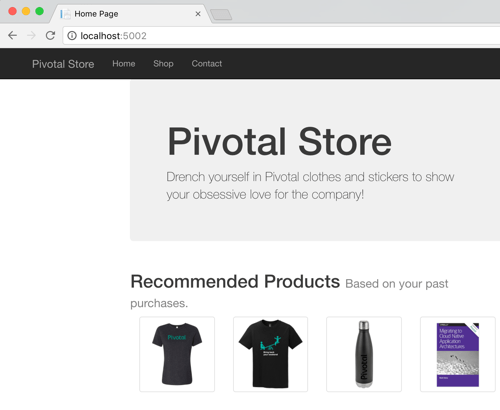
    Great. Next I started up the MVC app that acts as the front-end. Loading the page in the browser showed the four recommendations returned by the service.

    2017.09.21-steeltoe-02

    That works. No big deal. Now let’s turn off the downstream service. Maybe it’s down for maintenance, or just misbehaving. What happens?

    2017.09.21-steeltoe-03

    The Hystrix wrapper detected a failure, and invoked the fallback operation. That’s cool. Let’s see what Hystrix is tracking in the metrics stream. Just append /hystrix/hystrix.stream to the URL and you get a data stream that’s fully compatible with Spring Cloud Hystrix.

    2017.09.21-steeltoe-04

    Here, we see a whole bunch of data that Hystrix is tracking. It’s watching request count, error rate, and lots more. What if you want to change the behavior of Hystrix? Amazingly, the .NET version of Hystrix in Steeltoe has the same broad configuration surface that classic Hystrix does. By adding overrides to the appsettings.json file, you can tweak the behavior of commands, the thread pool, and more. In order to see the circuit actually open, I stretched the evaluation window (from 10 to 20 seconds), and reduced the error limit (from 20 to 3). Here’s what that looked like:

    {
    "hystrix": {
      "command": {
          "default": {
            "circuitBreaker": {
              "requestVolumeThreshold": 3
            },
            "metrics" : {
              "rollingStats": {
                "timeInMilliseconds" : 20000
              }
            }
          }
        }
      }
    }
    

    Restarting my service shows new threshold in the Hystrix stream. Super easy, and very powerful.

    2017.09.21-steeltoe-05

    BONUS: Using the Hystrix Dashboard

    Look, I like reading gobs of JSON in the browser as much as the next person with too much free time. However, normal people like dense visualizations that help them make decisions quickly. Fortunately, Hystrix comes with an extremely data-rich dashboard that makes it simple to see what’s going on.

    This is still a Java component, so I spun up a new project from start.spring.io and added a Hystrix Dashboard dependency to my Boot app. After adding a single annotation to my class, I spun up the project. The Hystrix dashboard asks for a metrics endpoint. Hey, I have one of those! After plugging in my stream URL, I can immediately see tons of info.
    2017.09.21-steeltoe-06.png

    As a service owner or operator, this is a goldmine. I see request volumes, circuit status, failure counts, number of hosts, latency, and much more. If you’ve got a couple services, or a couple hundred, visualizations like this are a life saver.

    Summary

    As someone who started out their career as a .NET developer, I’m tickled to see things like this surface. Steeltoe adds serious juice to your .NET apps and the addition of things like circuit breakers makes it a must-have. Circuit breakers are a proven way to deliver more resilient service environments, so download my sample apps and give this a spin right now!
  • Using speaking opportunities as learning opportunities

    Over this summer, I’ll be speaking at a handful of events. I sign myself up for these opportunities —in addition to teaching courses for Pluralsight —so that I commit time to learning new things. Nothing like a deadline to provide motivation!

    Do you find yourself complaining that you have a stale skill set, or your “brand” is unknown outside your company? You can fix that. Sign up for a local user group presentation. Create a short “course” on a new technology and deliver it to colleagues at lunch. Start a blog and share your musings and tech exploration. Pitch a talk to a few big conferences. Whatever you do, don’t wait for others to carve out time for you to uplevel your skills! For me, I’m using this summer to refresh a few of my own skill areas.

    In June, I’m once again speaking in London at Integrate. Application integration is arguably the most important/interesting part of Azure right now. Given Microsoft’s resurgence in this topic area, the conference matters more than ever. My particular session focuses on “cloud-native integration.” What is it all about? How do you do it? What are examples of it in action? I’ve spent a fair amount of time preparing for this, so hopefully it’s a fun talk. The conference is nearly sold out, but I know there are handful of tickets left. It’s one of my favorite events every year.

    Coming up in July, I’m signed up to speak at PerfGuild. It’s a first-time, online-only conference 100% focused on performance testing. My talk is all about distributed tracing and using it to uncover (and resolve) latency issues. The talk builds on a topic I covered in my Pluralsight course on Spring Cloud, with some extra coverage for .NET and other languages. As of this moment, you can add yourself to the conference waitlist.

    Finally, this August I’ll be hitting balmy Orlando, FL to speak at the Agile Alliance conference. This year’s “big Agile” conference has a track centered on foundational concepts. It introduces attendees to concepts like agile project delivery, product ownership, continuous delivery, and more. My talk, DevOps Explained, builds on things I’ve covered in recent Pluralsight courses, as well as new research.

    Speaking at conferences isn’t something you do to get wealthy. In fact, it’s somewhat expensive. But in exchange for incurring that cost, I get to allocate time for learning interesting things. I then take those things, and share them with others. The result? I feel like I’m investing in myself, and I get to hang out at conferences with smart people.

    If you’re just starting to get out there, use a blog or user groups to get your voice heard. Get to know people on the speaking circuit, and they can often help you get into the big shows! If we connect at any of the shows above, I’m happy to help you however I can.

  • How should you model your event-driven processes?

    How should you model your event-driven processes?

    During most workdays, I exist in a state of continuous partial attention. I bounce between (planned and unplanned) activities, and accept that I’m often interrupt-driven. While that’s not an ideal state for humans, it’s a great state for our technology systems. Event-driven applications act based on all sorts of triggers: time itself, user-driven actions, system state changes, and much more. Often, these batch-or-realtime, event-driven activities are asynchronous and coordinated in some way. What options do you have for modeling event-driven processes, and what trade-offs do you make with each option?

    Option #1 – Single, Deterministic Process

    In this scenario, the event handler is monolithic in nature, and any embedded components are purpose-built for the process at hand. Arguably, it’s just a visually modeled code class. While initiated via events, the transition between internal components is pre-determined. The process is typically deployed and updated as a single unit.

    What would you use to build it?

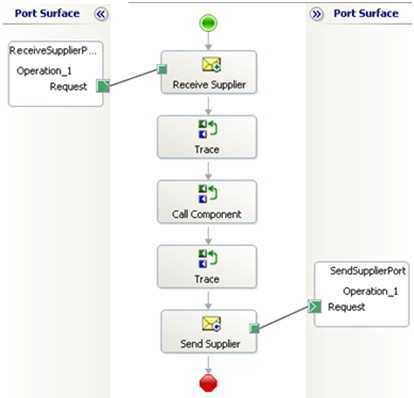
    You’ve seen (and built?) these before. A traditional ETL job fits the bill. Made up of components for each stage, it’s a single process executed as a linear flow. I’d also categorize some ESB workflows—like BizTalk orchestrations—in this category. Specifically, those with send/receive ports bound to the specific orchestration, embedded code, or external components built JUST to support that orchestration’s flow.

    2017.05.02-event-01

    In any of these cases, it’s hard (or impossible) to change part of the event handler without re-deploying the entire process.

    What are the benefits?

    Like with most monolithic things, there’s value in (perceived) simplicity and clarity. A few other benefits:

    • Clearer sense of what’s going on. When there’s a single artifact that explains how you handle a given event, it’s fairly simple to grok the flow. What happens when sensor data comes in? Here you go. It’s predictable.
    • Easier to zero-in on production issues. Did a step in the bulk data sync job fail? Look at the flow and see what bombed out. Clean up any side effects, and re-run. This doesn’t necessarily mean things are easy to fix—frankly, it could be harder—but you do know where things went wrong.
    • Changing and testing everything at once. If you’re worried about the side effects of changing a piece of a flow, that risk may lessen when you’re forced to test the whole thing when one tiny thing changes. One asset to version, one asset to track changes for.
    • Accommodates companies with teams of specialists. From what I can tell, many large companies still have centers-of-excellence for integration pros. That means most ETL and ESB workflows come out of here. If you like that org structure, then you’ll prefer more integrated event handlers.

    What are the risks?

    These processes are complicated, not complex. Other risks:

    • Cumbersome to change individual parts of the process. Nowadays, our industry prioritizes quick feedback loops and rapid adjustments to software. That’s difficult to do with monolithic event-driven processes. Is one piece broken? Better prioritize, upgrade, compile, test, and deploy the whole thing!
    • Non-trivial to extend the process to include more steps. When we think of event-driven activities, we often think of fairly dynamic behavior. But when all the event responses are tightly coordinated, it’s tough to add/adjust/remove steps.
    • Typically centralizes work within a single team. While your org may like siloed teams of experts, that mode of working doesn’t lend itself to agility or customer focus. If you build a monolithic event-driven process, expect delivery delays as the work queues up behind constrained developers.
    • Process scales as one single unit. Each stage of an event-driven workflow will have its own resource demands. Some will be CPU intensive. Others produce heavy disk I/O. If you have a single ETL or ESB workflow to handle events, expect to scale that entire thing when any one component gets constrained. That’s pretty inefficient and often leads to over-provisioning.

    Option #2 – Orchestrated Components

    In this scenario, you’ve got a fairly loose wrapper around independent services that respond to events. These are individual components, built and delivered on their own. While still somewhat deterministic—you are still modeling a flow—the events aren’t trapped within that flow.

    What would you use to build it?

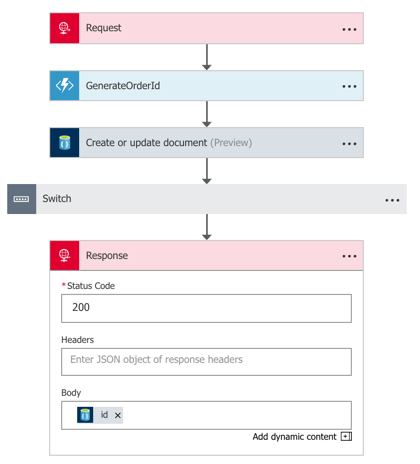
    Without a doubt, you can still use traditional ESB tools to construct this model. A BizTalk orchestration that listens to events and calls out to standalone services? That works. Most iPaaS products also fit the bill here. If you build something with Azure Logic Apps, you’re likely going to be orchestrating a set of services in response to an event. Those services could be REST-based APIs backed by API Management, Azure Functions, or a Service Bus queue that may trigger a whole other event-driven process!

    2017.05.02-event-02.png

    You could also use tools like Spring Cloud Data Flow to build orchestrated, event-driven processes. Here, you chain together standalone Spring Boot apps atop a messaging backbone. The services are independent, but with a wrapper that defines a flow.

    What are the benefits?

    The main benefits of this model stem from the decoupling and velocity that comes with it. Others are:

    • Distributed development. While you still have someone stitching the process together, develop the components independently. And hopefully, you get more people in the mix who don’t even need to know the “wrapper” technology. Or in the case of Spring Cloud Data Flow or Logic Apps, the wrapper technology is dev-oriented and easier to understand than traditional integration systems. Either way, this means more parallel development and faster turnaround of the entire workflow.
    • Composable processes. Configure or reconfigure event handlers based on what’s needed. Reuse each step of the event-driven process (e.g. source channel, generic transformation component) in other processes.
    • Loose grip on the event itself. There could be many parties interested in a given event. Your flow may be just one. While you could reuse the inbound channel to spawn each event-driven processes, you can also wiretap orchestrated processes.

    What are the risks?

    You’ve got some risks with a more complex event-driven flow. Those include:

    • Complexity and complicated-ness. Depending on how you build this, you might not only be complicated but also complex! Many moving parts, many distributed components. This might result in trickier troubleshooting and less certainty about how the system behaves.
    • Hidden dependencies. While the goal may be to loosely orchestrate services in an event-driven flow, it’s easy to have leaky abstractions. “Independent” services may share knowledge between each other, or depend on specific underlying infrastructure. This means that you need good documentation, and services that don’t assume that dependencies exist.
    • Breaking changes and backwards compatibility. Any time you have a looser federation of coordinated pieces, you increase the likelihood of one bad actor causing cascading problems. If you have a bunch of teams that build/run services on their own, and one team combines them into an event-driven workflow, it’s possible to end up with unpredictable behavior. Mitigation options? Strong continuous integration practices to catch breaking changes, and a runtime environment that catches and isolates errors to minimize impact.

    Option #3 – Choreographed Components

    In this scenario, your event-driven processes are extremely fluid. Instead of anything dictating the flow, services collaborate by publishing and subscribing to messages. It’s fully decentralized. Any given services has no idea who or what is upstream or downstream of it. They do their job, and any service that wants to do subsequent work, great.

    What would you use to build it?

    In these cases, you’re often working with low-level code, not high level abstractions. Makes sense. But there are frameworks out there that make it easier for you if you don’t crave writing to or reading from queues. For .NET developers, you have things like MassTransit or nServiceBus. Those provide helpful abstractions. If you’re a Java developer, you’ve got something like Spring Cloud Stream. I’ve really fallen in love with it. Stream provides an elegant abstraction atop RabbitMQ or Apache Kafka where the developer doesn’t have to know much of anything about the messaging subsystem.

    What are the benefits?

    Some of the biggest benefits come from the velocity and creativity that stem from non-deterministic event processing.

    • Encourages adaptable processes. With choreographed event processors, making changes is simple. Deploy another service, and have it listen for a particular event type.
    • Makes everyone an integration developer. Done right, this model lessens the need for a siloed team of experts. Instead, everyone builds apps that care about events. There’s not much explicit “integration” work.
    • Reflects changing business dynamics. Speed wins. But not speed for the sake of it. But speed of learning from customers and incorporating feedback into experiments. Scrutinize anything that adds friction to your learning process. Fixed workflows owned by a single team? Increasingly, that’s an anti-pattern for today’s software-driven, event-powered businesses. You want to be able to handle the influx of new data and events and quickly turn that into value.

    What are the risks?

    Clearly, there are risks to this sort of “controlled chaos” model of event processing. These include:

    • Loss of cross-step coordination. There’s value in event-driven workflows that manage state between stages, compensate for failed operations, and sequence key steps. Now, there’s nothing that says you can’t have some processes that depend on orchestration, and some on choreography. Don’t adopt an either-or mentality here!
    • Traceability is hairy. When an event can travel any number of possible paths, and those paths are subject to change on a regular basis, auditability can’t be taken for granted! If it takes a long time for an inbound event to reach a particular destination, you’ve got some forensics to do. What part was slow? Did something get dropped? How come this particular step didn’t get triggered? These aren’t impossible challenges, but you’ll want to invest in solid logging and correlation tools.

    You’ve got lots of options for modeling event-driven processes. In reality, you’ll probably use a mix of all three options above. And that’s fine! There’s a use case for each. But increasingly, favor options #2 and #3 to give you the flexibility you need.

    Did I miss any options? Are there benefits or risks I didn’t list? Tell me in the comments!

  • Yes, You Can Use a Single Service Registry for .NET and Java Microservices

    Years ago, I could recall lots of phone numbers from memory. Now? It’d be tough to come up with more than two. There’s so many ways to contact each person that I know (phone, email(s), Twitter, WhatsApp, etc) and I depend heavily on my address book. As you start using microservices in your architecture, you’ll discover that you also need a good address book to find services at runtime. But unlike classic solutions such as configuration management databases or UDDI registries, a modern “address book” is different. Why? As microservices get deployed, scaled, and updated, their “address” is fluid. To account for that, any modern address book cannot have stale references. Enter Eureka from Netflix. While baked into Spring Cloud for Java users, Eureka isn’t easily available to .NET microservices. That changed with the OSS Steeltoe library, and I thought I’d show that off here.

    Building a Eureka Server

    Thanks to Spring Cloud, it’s easy to set up a Eureka registry for your services to talk to.

    First, I used Spring Tool Suite to build a new Spring Boot app. In the app creation wizard, I chose the “Eureka Server” package dependency (spring-cloud-starter-eureka-server). If you aren’t using Spring Tool Suite, check out the awesome web-based Spring Intializr to generate project scaffolding to import into any Java IDE.

    2017.03.29-eureka-01

    Next up, there was a LOT of code to write to bring up a Eureka server.

    @EnableEurekaServer
    @SpringBootApplication
    public class PsPlaceholderEurekaServerApplication {
    
      public static void main(String[] args) {
        SpringApplication.run(PsPlaceholderEurekaServerApplication.class, args);
      }
    }
    

    Seriously, that’s it. Bonkers. All that remained was adding a few properties. I set a couple of cosmetic properties (“datacenter” and “environment”), and then told Eureka to NOT register itself with the server, and to NOT retrieve a copy of the registry.

    server.port=8761
    
    # value used for AWS, here can be anything
    eureka.datacenter=seattle
    eureka.environment=prod
    
    # no need to register the server with the server
    eureka.client.register-with-eureka=false
    
    # don't need a local copy of the registry
    eureka.client.fetch-registry=false
    

    I started up the app, navigated to the right URL, and saw the Eureka Server dashboard. There was a bunch of system status info, and an (empty) list of registered servers. Note that Eureka stores its registry in memory. The registry is a live look at the environment because services send a heartbeat to state that they’re online. No need to persist anything to disk.

    2017.03.29-eureka-02

    Building a Eureka Server (Alternative, No-Java Way)

    Now you might say “I don’t know Java and don’t want to learn it.” Fair enough. If you’re a Pivotal customer, than you’re in luck. Spring Cloud Services bundles up key Spring Cloud projects and runs them “as a service” in your Cloud Foundry environment. One such service is the Eureka Service Registry. You can try this out for free in Pivotal Web Services.

    2017.03.29-eureka-03

    After clicking a couple buttons, and waiting about 30 seconds, I had a registry! No Java required.

    2017.03.29-eureka-04

    Registering a Java Service

    Great, I had a registry. Now what? I wanted to add a Java and .NET service to my local registry.

    First up, Java. I created a new Spring Boot application, and chose the “Eureka Discovery” package dependency (spring-cloud-starter-eureka).

    I set up a super awesome REST service that says “hello from Spring Boot.” What about registering with Eureka? It took a single @EnableEurekaClient annotation in my code.

    @EnableEurekaClient
    @RestController
    @SpringBootApplication
    public class PsPlaceholderEurekaServiceApplication {
    
       public static void main(String[] args) {
    
          SpringApplication.run(PsPlaceholderEurekaServiceApplication.class, args);
       }
    
       @RequestMapping("/")
       public String SayHello() {
          return "hello from Spring Boot!";
       }
    }
    

    In the bootstrap.properties file, I set the “spring.application.name” property. This told Eureka what to label my service in the registry. In my application.properties file, I specified that I should register with Eureka, and to send health data along with my service’s heartbeat.

    eureka.client.register-with-eureka=true
    eureka.client.fetch-registry=false
    
    #can intentionally set the host name
    eureka.instance.hostname=localhost
    
    eureka.client.healthcheck.enabled=true
    

    With this in place, I started up my Java service, and sure enough, saw it in the Eureka registry. Cool!

    2017.03.29-eureka-05

    Registering a .NET Service

    .NET developers, rejoice! We can enjoy all kinds of microservices goodness by using libraries like Steeltoe. And it works with .NET Framework and .NET Core apps.

    In this example, I chose to use .NET Core. Here’s my sequence of commands in the wicked .NET Core CLI:

    dotnet new webapi
    dotnet add package Steeltoe.Discovery.Client -v 1.0.0-rc2
    dotnet restore
    dotnet build
    dotnet run

    Just running those commands gave me a Web API project with a dependency on Steeltoe’s discovery package. The latter two commands built and ran the app itself.

    The “webapi” project shell sets up a default REST controller, and for this demo, I just kept that. The only necessary code changes occurred in the Startup.cs class.

    Here, I added a using directive for “Steeltoe.Discovery.Client”, and updated the ConfigureServices and Configure operations to each include references to the discovery client.

    // This method gets called by the runtime. Use this method to add services to the container.
     public void ConfigureServices(IServiceCollection services)
            {
                // Add framework services.
                services.AddMvc();
                services.AddDiscoveryClient(Configuration);
            }
    
    // This method gets called by the runtime. Use this method to configure the HTTP request pipeline.
    public void Configure(IApplicationBuilder app, IHostingEnvironment env, ILoggerFactory loggerFactory)
            {
                loggerFactory.AddConsole(Configuration.GetSection("Logging"));
                loggerFactory.AddDebug();
    
                app.UseMvc();
                app.UseDiscoveryClient();
            }
    

    Finally, I added a few entries to the appsettings.json file. First I set a “spring.application.name” value, just like I did with my Spring Boot app. This tells the registry what to label my service. Then I have a block of Eureka settings including the registry URL, whether I should register with Eureka (yes!), pull a local copy of the registry (no!), and how to find my instance.

    {
      "Logging": {
        "IncludeScopes": false,
        "LogLevel": {
          "Default": "Warning",
          "System": "Information",
          "Microsoft": "Information"
        }
      },
      "spring": {
        "application": {
          "name":  "dotnet-demo-service"
        }
      },
      "eureka": {
        "client": {
          "serviceUrl": "http://localhost:8761/eureka/",
          "shouldRegisterWithEureka": true,
          "shouldFetchRegistry": false
        },
        "instance": {
          "hostname": "localhost",
          "port": 5000
        }
      }
    }
    

    When I ran the “dotnet build” and “dotnet run” commands, I saw my .NET service show up in the Eureka registry. BAM!

    2017.03.29-eureka-06

    Performing Discovery From a Java App

    It’s all nice and good to have an up-to-date address book, but it’s kinda worthless if nobody ever calls you!

    How would I yank service information from the registry for a Java app? It’s easy. First, I created a new Spring Boot project, and used the same “Eureka Discovery” package dependency (spring-cloud-starter-eureka) as before.

    In the application properties file, I specified that I *do* want a local copy of the registry, but do *not* need to register the client app as an available service. I’m just a client here, so no need to do register or give heartbeats.

    server.port=8081
    eureka.client.register-with-eureka=false
    eureka.client.fetch-registry=true
    eureka.client.healthcheck.enabled=false
    

    In my application code, I annotated my main class with @EnableDiscoveryClient, created a load balanced RestTemplate bean, autowired a variable to it, and then defined an operation that used it.

    @EnableDiscoveryClient
    @SpringBootApplication
    public class PsPlaceholderEurekaServiceConsumerApplication {
    
      public static void main(String[] args) {
        SpringApplication.run(PsPlaceholderEurekaServiceConsumerApplication.class, args);
      }
    
      @LoadBalanced
      @Bean
      public RestTemplate restTemplate(RestTemplateBuilder builder) {
         return builder.build();
      }
    }
    
    @RestController
    @Component
    class ConsumerController {
    
      //available now with load balanced bean
      @Autowired
      private RestTemplate restTemplate;
    
      @RequestMapping("/service-instancesrt")
      public String GetServiceInstancesRt() {
    
        String response = restTemplate.getForObject("http://dotnet-demo-service/api/values", String.class);
        return response;
      }
    }
    

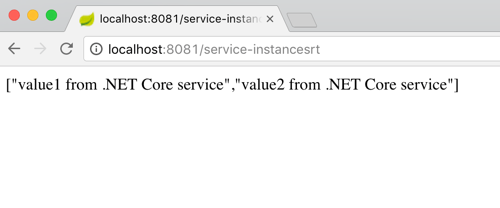
    What’s pretty cool is that RestTemplate object is injected with enough smarts to replace the service name from the registry (“dotnet-demo-service”) with the actual URL when it makes the API call. When I invoked my local endpoint, it passed through the request to the microservice it looked up in the registry, and returned the result.

    2017.03.29-eureka-07

    Performing Discovery From a .NET App

    Finally, let’s see how a .NET app would pull a reference from the Eureka registry and use it.

    I created a new project based on the ASP.NET Core MVC template. And then I added the Steeltoe package for service discovery.

    dotnet new mvc
    dotnet add package Steeltoe.Discovery.Client -v 1.0.0-rc2
    dotnet restore

    With this MVC template, I got some basic scaffolding for a sample website. I just extended this by adding a new view (called “Demo”) and controller method. No content in the method right away.

    Just like before, I updated the Startup.cs class by first adding a reference to “Steeltoe.Discovery.Client” and updating the “ConfigureServices” and “Configure” methods.

    ASP.NET Core offers some nice dependency injection stuff. So with the code update above, I now had a “DiscoveryClient” object available for any controller or service to use. So, back in the controller, I added a variable for DiscoveryHttpClientHandler. Then I instantiated that object in the controller constructor, and used it in the new controller method to call a Eureka-registered Java service. Note once again that I only needed the registered service name, and the client libraries flipped this to the address/port of my actual service.

    public class HomeController : Controller
    {
      //added for demonstration
      DiscoveryHttpClientHandler _handler;
    
      public HomeController(IDiscoveryClient client) {
          _handler = new DiscoveryHttpClientHandler(client);
      }
    
      public IActionResult Demo()
      {
          HttpClient c = new HttpClient(_handler, false);
          //call service using registered alias
          string s = c.GetStringAsync("http://boot-customer-service").Result;
    
          ViewData["Message"] = "Service result is: " + s;
    
          return View();
       }
    }
    

    Finally, I added a few things to my appsettings.json file so that the Steeltoe client library knew how to behave. I gave the application a name, and told it to *not* register itself with Eureka, but only to fetch the registry and cache it locally.

    {
      "Logging": {
        "IncludeScopes": false,
        "LogLevel": {
          "Default": "Warning"
        }
      },
      "spring": {
        "application": {
          "name":  "dotnet-demo-service-client"
        }
      },
      "eureka": {
        "client": {
          "serviceUrl": "http://localhost:8761/eureka/",
          "shouldRegisterWithEureka": false,
          "shouldFetchRegistry": true
        },
        "instance": {
          "hostname": "localhost",
          "port": 5001
        }
      }
    }
    

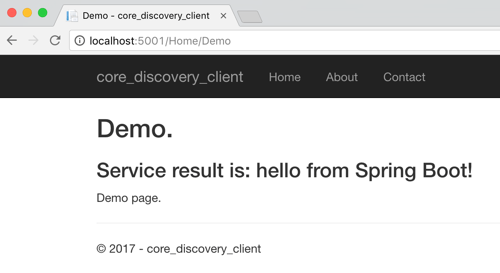
    After that, I started up by ASP.NET Core app, hit the webpage, and saw a result from my Spring Boot service.

    2017.03.29-eureka-08

    That was fun! Some sort of service registry is extremely helpful when adopting a microservices architecture. Instead of using hard-coding references or stale data stores, an always-accurate registry gives you the best chance of surviving in a fluid microservices environment. Now, thanks to Steeltoe, you can use the same registry for your Java, .NET (and even Node.js) services.

  • Using Steeltoe for ASP.NET 4.x apps that need a microservices-friendly config store

    Using Steeltoe for ASP.NET 4.x apps that need a microservices-friendly config store

    Nowadays, all the cool kids are doing microservices. Whether or not you care, there ARE some really nice distributed systems patterns that have emerged from this movement. Netflix and others have shared novel solutions for preventing cascading failures, discovering services at runtime, performing client-side load balancing, and storing configurations off-box. For Java developers, many of these patterns have been baked into turnkey components as part of Spring Cloud. But what about .NET devs who want access to all this goodness? Enter Steeltoe.

    Steeltoe is an open-source .NET project that gives .NET Framework and .NET Core developers easy access to Spring Cloud services like Spring Cloud Config (Git-backed config server) and Spring Cloud Eureka (service discovery from Netflix). In this blog post, I’ll show you how easy it is to create a config server, and then connect to it from an ASP.NET app using Steeltoe.

    Why should .NET devs care about a config server? We’ve historically thrown our (sometimes encrypted) config values into web.config files or a database. Kevin Hoffman says that’s now an anti-pattern because you end up with mutable build artifacts and don’t have an easy way to rotate encryption keys. With fast-changing (micro)services, and more host environments than ever, a strong config strategy is a must. Spring Cloud Config gives you a web-scale config server that supports Git-backed configurations,  symmetric or asymmetric encryption, access security, and no-restart client refreshes.

    Many Steeltoe demos I’ve seen use .NET Core as the runtime, but my non-scientific estimate is that 99.991% of all .NET apps out there are .NET 4.x and earlier, so let’s build a demo with a Windows stack.

    Before starting to build the app, I needed actual config files! Spring Cloud Config works with local files, or preferably, a Git repo. I created a handful of files in a GitHub repository that represent values for an “inventory service” app. I have one file for dev, QA, and production environments. These can be YAML files or property files.

    2016-10-18-steeltoe07

    Let’s code stuff. I went and built a simple Spring Cloud Config server using Spring Tool Suite. To say “built” is to overstate how silly easy it is to do. Whether using Spring Tool Suite or the fantastic Spring Initializr site, if it takes you more than six minutes to build a config server, you must be extremely drunk.

    2016-10-18-steeltoe01

    Next, I chose which dependencies to add to the project. I selected the Config Server, which is part of Spring Cloud.

    2016-10-18-steeltoe02

    With my app scaffolding done, I added a ton of code to serve up config server endpoints, define encryption/decryption logic, and enable auto-refresh of clients. Just kidding. It takes a single annotation on my main Java class:

    import org.springframework.boot.SpringApplication;
    import org.springframework.boot.autoconfigure.SpringBootApplication;
    import org.springframework.cloud.config.server.EnableConfigServer;
    
    @SpringBootApplication
    @EnableConfigServer
    public class BlogConfigserverApplication {
    
    	public static void main(String[] args) {
    		SpringApplication.run(BlogConfigserverApplication.class, args);
    	}
    }
    

    Ok, there’s got to be more than that, right? Yes, I’m not being entirely honest. I also had to throw this line into my application.properties file so that the config server knew where to pull my GitHub-based configuration files.

    spring.cloud.config.server.git.uri=https://github.com/rseroter/blog-configserver
    

    That’s it for a basic config server. Now, there are tons of other things you CAN configure around access security, multiple source repos, search paths, and more. But this is a good starting point. I quickly tested my config server using Postman and saw that by just changing the profile (dev/qa/default) in the URL, I’d pull up a different config file from GitHub. Spring Cloud Config makes it easy to use one or more repos to serve up configurations for different apps representing different environments. Sweet.

    2016-10-18-steeltoe03

    Ok, so I had a config server. Next up? Using Steeltoe so that my ASP.NET 4.6 app could easily retrieve config values from this server.

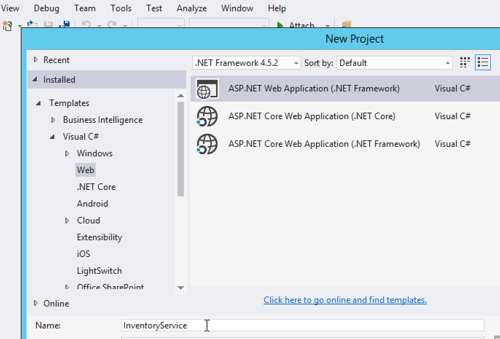
    I built a new ASP.NET MVC app in Visual Studio 2015.

    2016-10-18-steeltoe04

    Next, I searched NuGet for Steeltoe, and found the configuration server library.

    2016-10-18-steeltoe05

    Fortunately .NET has some extension points for plugging in an outside configuration source. First, I created a new appsettings.json file at the root of the project. This file describes a few settings that help map to the right config values on the server. Specifically, the name of the app and URL of the config server. FYI, the app name corresponds to the config file name in GitHub. What about whether we’re using dev, test, or prod? Hold on, I’m getting there dammit.

    {
        "spring": {
            "application": {
               "name": "inventoryservice"
             },
            "cloud": {
               "config": {
                 "uri": "[my ip address]:8080"
               }
            }
        }
    }
    

    Next up, I created the class in the “App_Start” project folder that holds the details of our configuration, and looks to the appsettings.json file for some pointers. I stole this class from the nice Steeltoe demos, so don’t give me credit for being smart.

    using System;
    using System.Collections.Generic;
    using System.Linq;
    using System.Web;
    
    //added by me
    using Microsoft.AspNetCore.Hosting;
    using System.IO;
    using Microsoft.Extensions.FileProviders;
    using Microsoft.Extensions.Configuration;
    using Steeltoe.Extensions.Configuration;
    
    namespace InventoryService
    {
        public class ConfigServerConfig
        {
            public static IConfigurationRoot Configuration { get; set; }
    
            public static void RegisterConfig(string environment)
            {
                var env = new HostingEnvironment(environment);
    
                // Set up configuration sources.
                var builder = new ConfigurationBuilder()
                    .SetBasePath(AppDomain.CurrentDomain.BaseDirectory)
                    .AddJsonFile("appsettings.json")
                    .AddConfigServer(env);
    
                Configuration = builder.Build();
            }
        }
        public class HostingEnvironment : IHostingEnvironment
        {
            public HostingEnvironment(string env)
            {
                EnvironmentName = env;
            }
    
            public string ApplicationName
            {
                get
                {
                    throw new NotImplementedException();
                }
    
                set
                {
                    throw new NotImplementedException();
                }
            }
    
            public IFileProvider ContentRootFileProvider
            {
                get
                {
                    throw new NotImplementedException();
                }
    
                set
                {
                    throw new NotImplementedException();
                }
            }
    
            public string ContentRootPath
            {
                get
                {
                    throw new NotImplementedException();
                }
    
                set
                {
                    throw new NotImplementedException();
                }
            }
    
            public string EnvironmentName { get; set; }
    
            public IFileProvider WebRootFileProvider { get; set; }
    
            public string WebRootPath { get; set; }
    
            IFileProvider IHostingEnvironment.WebRootFileProvider
            {
                get
                {
                    throw new NotImplementedException();
                }
    
                set
                {
                    throw new NotImplementedException();
                }
            }
        }
    }
    

    Nearly done! In the Global.asax.cs file, I needed to select which “environment” to use for my configurations. Here, I chose the “default” environment for my app. This means that the Config Server will return the default profile (configuration file) for my application.

    protected void Application_Start()
    {
      AreaRegistration.RegisterAllAreas();
      RouteConfig.RegisterRoutes(RouteTable.Routes);
    
      //add for config server, contains "profile" used
      ConfigServerConfig.RegisterConfig("default");
    }
    

    Ok, now to the regular ASP.NET MVC stuff. I added a new HomeController for the app, and looked into the configuration for my config value. If it was there, I added it to the ViewBag.

    public ActionResult Index()
    {
       var config = ConfigServerConfig.Configuration;
       if (null != config)
       {
           ViewBag.dbserver = config["dbserver"] ?? "server missing :(";
       }
    
       return View();
    }
    

    All that was left was to build a View to show the glorious result. I added a new Index.cshtml file and just printed out the value from the ViewBag. After starting up the app, I saw that the value printed out matches the value in the corresponding GitHub file:

    2016-10-18-steeltoe06

    If you’re a .NET dev like me, you’ll love Steeltoe. It’s easy to use and provides a much more robust, secure solution for app configurations. And while I think it’s best to run .NET apps in Pivotal Cloud Foundry, you can run these Steeltoe-powered .NET services anywhere you want.

    Steeltoe is still in a pre-release mode, so try it out, submit GitHub issues, and give the team feedback on what else you’d like to see in the library.

  • Trying out the “standard” and “enterprise” templates in Azure Logic Apps

    Is the Microsoft integration team “back”? It might be premature to say that Microsoft has finally figured out its app integration story, but the signs are very positive. There’s been a fresh influx of talent like Jon Fancey, Tord Glad Nordahl, and Jim Harrer, some welcome forethought into the overall Microsoft integration story, better community engagement, and a noticeable uptick in the amount of software released by these teams.

    One area that’s been getting tons of focus in Azure Logic Apps. Logic Apps are a potential successor to classic on-premises application integration tools, but with a cloud-first bent. Users can visually model flows made up of built-in, or custom, activities. The initial integrations supported by Logic Apps were focused on cloud endpoints, but with the recent beta release of the Enterprise Integration Pack, Microsoft is making its move to more traditional use cases. I haven’t messed around with Logic Apps for a few months, and lots of things have changed, so I tested out both the standard and enterprise templates.

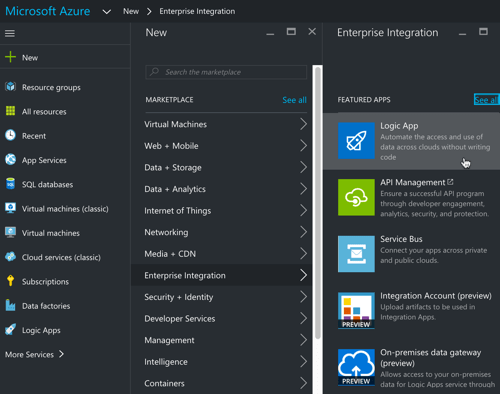
    One nice thing about things like Logic Apps is that anyone can get started with just a browser. If you’re building a standard workflow (read: doesn’t require extra services or the “enterprise integration” bits), then you don’t have to install a single thing. To start with, I went the Azure Portal (the new one, not the classic one), and created a new “Logic App.”

    2016-09-09-logic02

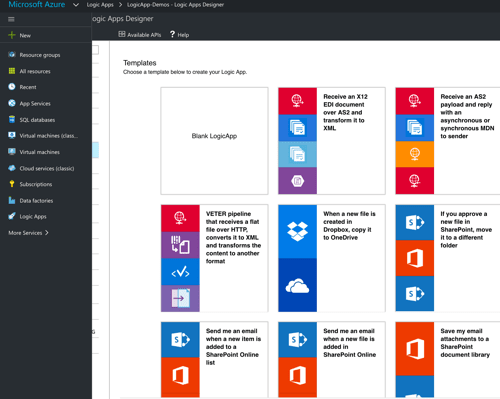
    I was then presented with a choice for how to populate the app itself. There’s the default “blank” template, or, I can start off with a few pre-canned options. Some of these are a bit contrived (“save my tweets to a SharePoint list” makes me sad), but they give you a good idea of what’s possible with the many built-in connectors.

    2016-09-09-logic01

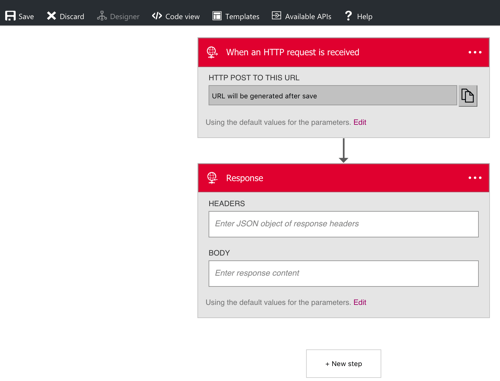
    I chose the HTTP Request-Response template since my goal was to build a simple synchronous web service. The portal showed me what this template does, and dropped me into the design canvas with the HTTP Request and HTTP Response activities in place.

    2016-09-09-logic03

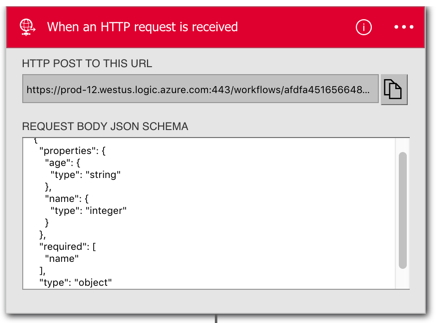
    I have a birthday coming and am feeling old, so I decided to build a simple service that would tell me if I was old or not. In order to easily use the fields of an inbound JSON message, I had to define a simple JSON schema inside the HTTP Request shape. This schema defines a string for the “name” and an integer for the “age.”

    2016-09-09-logic04

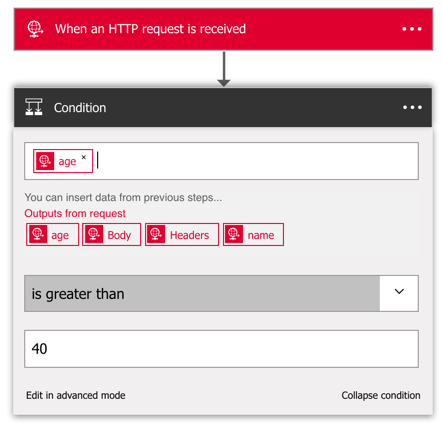
    Before sending a response, I want to actually do something! So, I added an if-then condition to the canvas. There are other conditionals available, such as for-each and do-until. I put this if-then shape in between the Request and Response elements, and was able to choose the “age” value for my conditional check.

    2016-09-09-logic06

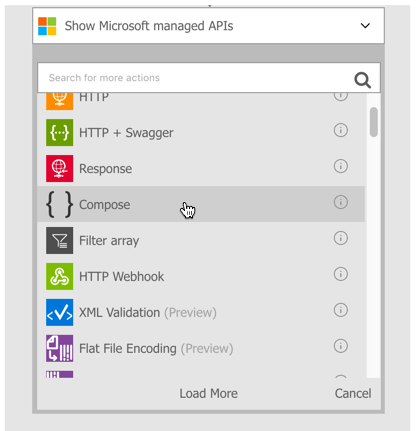
    Here, I checked to see if “age” is greater than 40. Notice that I also had access to the “name” field, as well as the whole request body or HTTP headers. Next, I wanted to send a different HTTP response for over-40, and under-40. The brand new “compose” activity is the answer. With this, I could create a new message to send back in the HTTP response.

    2016-09-09-logic07

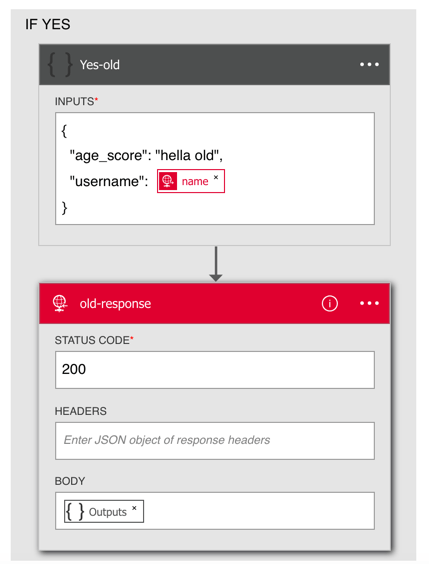
    I simply typed a new JSON message into the Compose activity, using the variable for the “name”, and adding some text to categorize the requestor’s age.

    2016-09-09-logic08

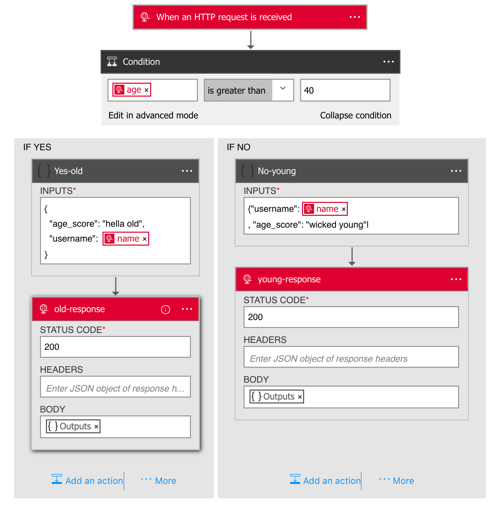
    I then did the same thing for the “no” path of the if-then and had a complete flow!

    2016.09.09.logic09.png

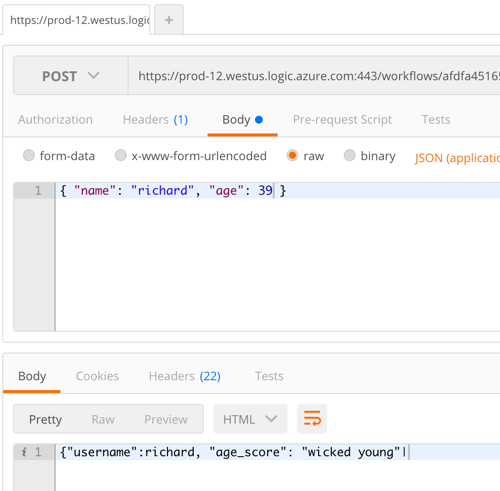
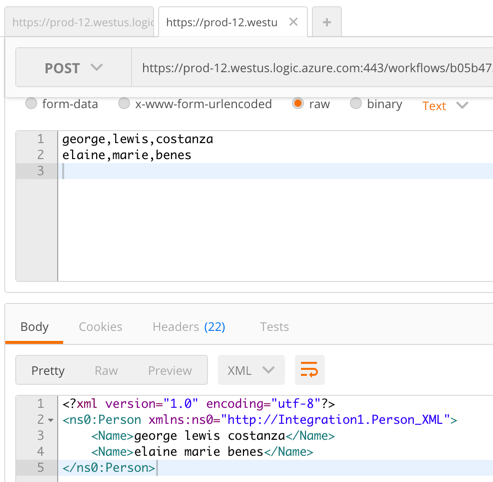
    Quick and easy! The topmost HTTP Receive activity has the URL for this particular Logic App, and since I didn’t apply any security policies, it was super simple to invoke. From within my favorite API testing tool, Postman, I submitted a JSON message to the endpoint. Sure enough, I got back a response that corresponded to the provided age.

    2016-09-09-logic10

    Great. But what about doing all the Enterprisey stuff? I built another new Logic App, and this time, wanted to send a comma separated payload to an HTTP endpoint and get back XML. There’s a Logic Apps template for that and when I selected it, I was told I needed an “integration account.”

    2016-09-09-logic11

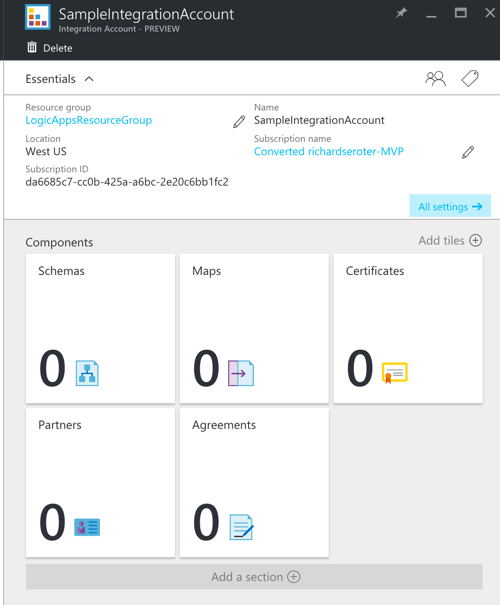
    So I got out of Logic Apps, and went off to create an Integration Account in the Portal. Integration Accounts are a preview service from Microsoft. These accounts hold all the integration artifacts used in enterprise integration scenarios: schemas, maps, certificates, partners, and trading agreements.

    2016-09-09-logic12

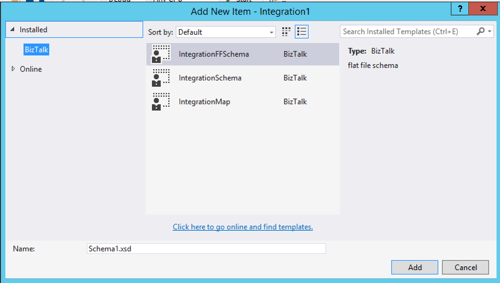
    How do I get these artifacts, you ask? This is where client-side development comes in. I downloaded the Enterprise Integration Tools–which is really just Visual Studio extensions that give you the BizTalk schema editor and mapper–and fired up Visual Studio. This adds an “integration” project type to Visual Studio, and also let me add XML schemas, flat file schemas, and maps to a project.

    2016-09-09-logic13

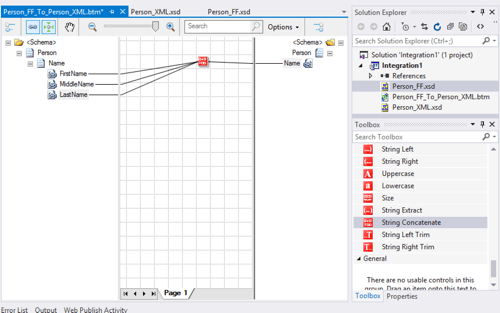
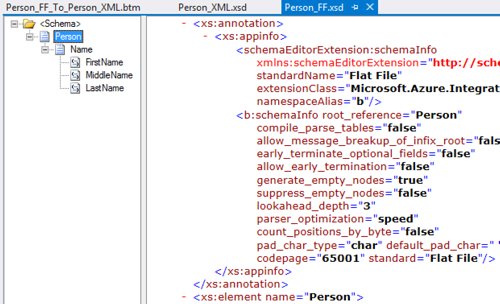
    I then set out to build some enterprise-class schemas defining a “person” (one flat file schema, one XML schema) and a map converting one format to another. I built the flat file schema using a sample comma-separated file and the provided Flat File Wizard. Hello, my old friend.

    2016-09-09-logic17

    The map is super simple. It just concatenates the inbound fields into a single outbound field in the XML schema. Note that the destination field has a “max occurs” of “*” to make sure that it adds one “name” element for each set of source elements. And yes, the mapper includes the Functoids for basic calculations, logical conditions, and string manipulation.

    2016-09-09-logic14

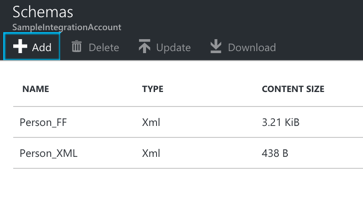
    The Azure Integration Account doesn’t take in DLLs, so I loaded in the raw XSD and map files. Note that you need to build the project to get the XSLT version of the map. The Azure portal doesn’t take the raw .btm map.

    2016-09-09-logic15

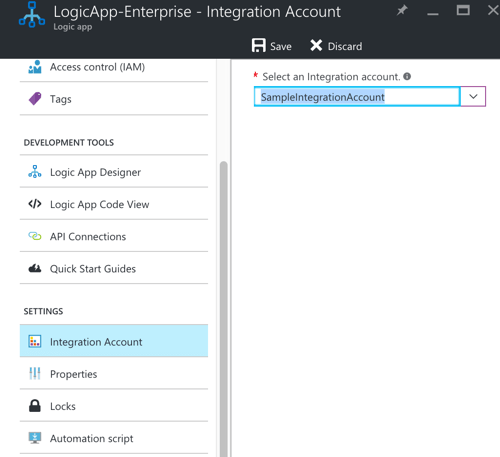
    Back in my Logic App, I found the Properties page for the app and made sure to set the “integration account” property so that it saw my schemas and maps.

    2016-09-09-logic16

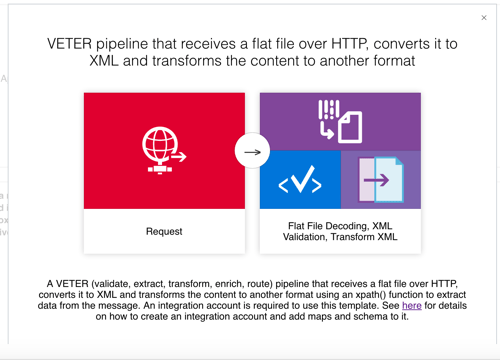
    I then went back and spun up the VETER Logic Apps template. Because there seemed to be a lot of places where things could go wrong, I removed all the other shapes from the design canvas and just started with the flat file decoding. Let’s get that working first! Since I associated my “Integration Account” with this Logic App, it was easy to select my schema from the drop-down list. With that, I tested.

    2016-09-09-logic19

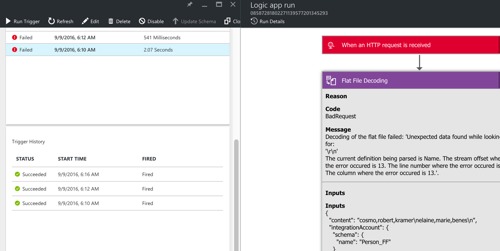
    Shoot. The first call failed. Fortunately, Logic Apps comes with a pretty sweet dashboard and tracing interface. I noticed that the flat file decoding failed, and it looked like it got angry with my schema defining a carriage-return-plus-line-feed delimiter for records, when all I sent it was a line feed (via my API testing tool). So, I went back to my schema, changed the record delimiter, updated my schema (and map) in the Integration Account, and tested again.

    2016-09-09-logic20

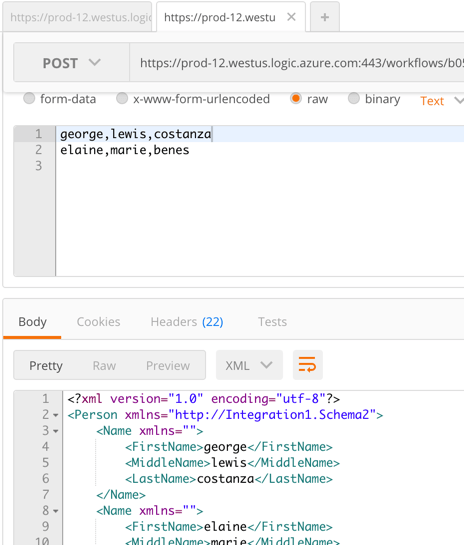
    Success! Notice that it turned my input flat file into an XML representation.

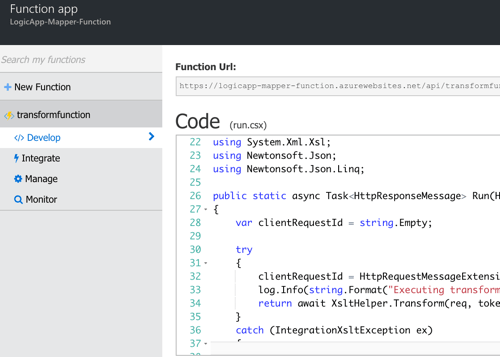
    Feeling irrationally confident, I went to the Logic Apps design surface, clicked the “templates” button at the top and re-selected the VETER template to get all the activities back that I needed. However, I forgot that the “mapping” activity requires that I have an Azure Functions container set up. Apparently the maps are executed inside Microsoft’s serverless framework, Azure Functions. Microsoft’s docs are pretty cryptic about what to do here, but if you follow the links in this KB (“create container”, “add function”), you get the default mapper template as an Azure Function.

    2016-09-09-logic21

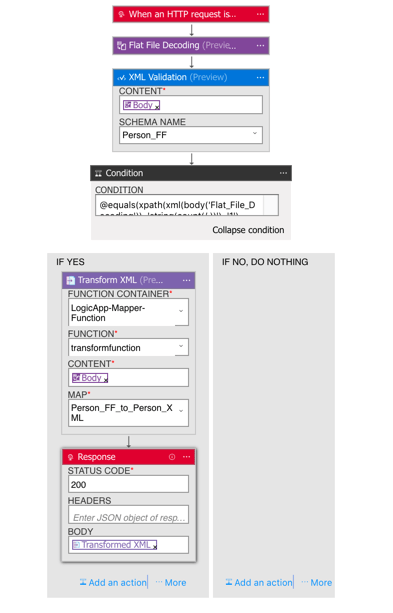
    Ok, now I was set. My final Logic App configuration looked like this.

    2016-09-09-logic23

    The app takes in a flat file, validates the flat file using the flat file (really, XML) schema, uses a built-in check to see that it’s a decoded flat file, executes my map within an Azure Function, and finally returns the result back. I then called the Logic App from Postman.

    2016-09-09-logic24

    BAM! It worked. That’s … awesome. While some of you may have fainted in horror at the idea of using flat files and XML in a shiny new Logic App, this does show that Microsoft is trying to cater to some of the existing constraints of their customers.

    Overall, I thought the Logic Apps experience was pretty darn good. The tooling has a few rough edges, but was fairly intuitive. The biggest gap is the documentation and number of public samples, but that’s to be expected with such new technology. I’d definitely recommend giving the Enterprise Integration Pack a try and see what sort of unholy flows you can come up with!

  • Integrating Microsoft Azure BizTalk Services with Salesforce.com

    BizTalk Services is far from the most mature cloud-based integration solution, but it’s viable one for certain scenarios. I haven’t seen a whole lot of demos that show how to send data to SaaS endpoints, so I thought I’d spend some of my weekend trying to make that happen. In this blog post, I’m going to walk through the steps necessary to make BizTalk Services send a message to a Salesforce REST endpoint.

    I had four major questions to answer before setting out on this adventure:

    1. How to authenticate? Salesforce uses an OAuth-based security model where the caller acquires a token and uses it in subsequent service calls.
    2. How to pass in credentials at runtime? I didn’t want to hardcode the Salesforce credentials in code.
    3. How to call the endpoint itself? I needed to figure out the proper endpoint binding configuration and the right way to pass in the headers.
    4. How to debug the damn thing. BizTalk Services – like most cloud hosted platforms without an on-premises equivalent – is a black box and decent testing tools are a must.

    The answers to first two is “write a custom component.” Fortunately, BizTalk Services has an extensibility point where developers can throw custom code into a Bridge. I added a class library project and added the following class which takes in a series of credential parameters from the Bridge design surface, calls the Salesforce login endpoint, and puts the security token into a message context property for later use. I also dumped a few other values into context to help with debugging. Note that this library references the great JSON.NET NuGet package.

    using System;
    using System.Collections.Generic;
    using System.Linq;
    using System.Text;
    using System.Threading.Tasks;
    
    using Microsoft.BizTalk.Services;
    
    using System.Net.Http;
    using System.Net.Http.Headers;
    using Newtonsoft.Json.Linq;
    
    namespace SeroterDemo
    {
        public class SetPropertiesInspector : IMessageInspector
        {
            [PipelinePropertyAttribute(Name = "SfdcUserName")]
            public string SfdcUserName_Value { get; set; }
    
            [PipelinePropertyAttribute(Name = "SfdcPassword")]
            public string SfdcPassword_Value { get; set; }
    
            [PipelinePropertyAttribute(Name = "SfdcToken")]
            public string SfdcToken_Value { get; set; }
    
            [PipelinePropertyAttribute(Name = "SfdcConsumerKey")]
            public string SfdcConsumerKey_Value { get; set; }
    
            [PipelinePropertyAttribute(Name = "SfdcConsumerSecret")]
            public string SfdcConsumerSecret_Value { get; set; }
    
            private string oauthToken = "ABCDEF";
    
            public Task Execute(IMessage message, IMessageInspectorContext context)
            {
                return Task.Factory.StartNew(() =>
                {
                    if (null != message)
                    {
                        HttpClient authClient = new HttpClient();
    
                        //create login password value
                        string loginPassword = SfdcPassword_Value + SfdcToken_Value;
    
                        //prepare payload
                        HttpContent content = new FormUrlEncodedContent(new Dictionary<string, string>
                            {
                                {"grant_type","password"},
                                {"client_id",SfdcConsumerKey_Value},
                                {"client_secret",SfdcConsumerSecret_Value},
                                {"username",SfdcUserName_Value},
                                {"password",loginPassword}
                            }
                            );
    
                        //post request and make sure to wait for response
                        var message2 = authClient.PostAsync("https://login.salesforce.com/services/oauth2/token", content).Result;
    
                        string responseString = message2.Content.ReadAsStringAsync().Result;
    
                        //extract token
                        JObject obj = JObject.Parse(responseString);
                        oauthToken = (string)obj["access_token"];
    
                        //throw values into context to prove they made it into the class OK
                        message.Promote("consumerkey", SfdcConsumerKey_Value);
                        message.Promote("consumersecret", SfdcConsumerSecret_Value);
                        message.Promote("response", responseString);
                        //put token itself into context
                        string propertyName = "OAuthToken";
                        message.Promote(propertyName, oauthToken);
                    }
                });
            }
        }
    }
    

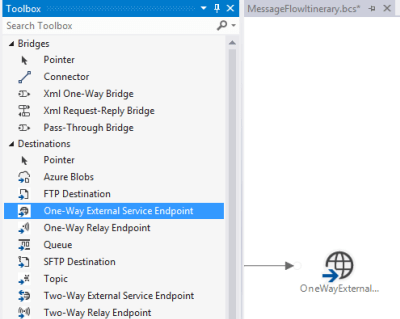
    With that code in place, I focused next on getting the write endpoint definition in place to call Salesforce. I used the One Way External Service Endpoint destination, which by default, uses the BasicHttp WCF binding.

    2014.07.14mabs01

    Now *ideally*, the REST endpoint is pulled from the authentication request and applied at runtime. However, I’m not exactly sure how to take the value from the authentication call and override a configured endpoint address. So, for this example, I called the Salesforce authentication endpoint from an outside application and pulled out the returned service endpoint manually. Not perfect, but good enough for this scenario. Below is the configuration file I created for this destination shape. Notice that I switched the binding to webHttp and set the security mode.

    <configuration>
      <system.serviceModel>
        <bindings>
          <webHttpBinding>
            <binding name="restBinding">
              <security mode="Transport" />
            </binding>
          </webHttpBinding>
        </bindings>
        <client>
          <clear />
          <endpoint address="https://na15.salesforce.com/services/data/v25.0/sobjects/Account"
            binding="webHttpBinding" bindingConfiguration="restBinding"
            contract="System.ServiceModel.Routing.ISimplexDatagramRouter"
            name="OneWayExternalServiceEndpointReference1" />
        </client>
      </system.serviceModel>
    </configuration>
    

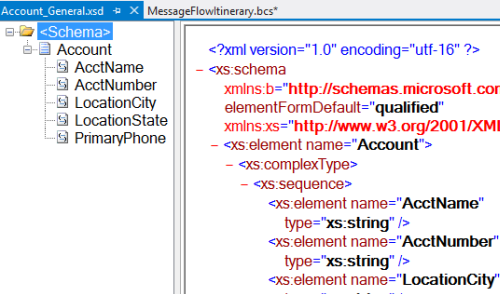
    With this in place, I created a pair of XML schemas and a map. The first schema represents a generic “account” definition.

    2014.07.14mabs02

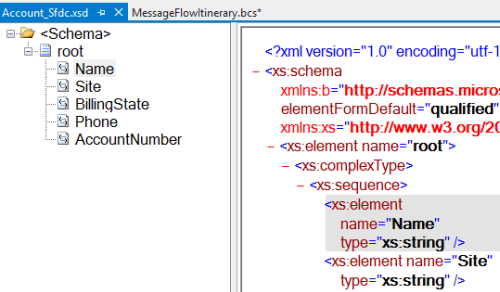
    My next schema defines the format expected by the Salesforce REST endpoint. It’s basically a root node called “root” (with no namespace) and elements named after the field names in Salesforce.

    2014.07.14mabs03

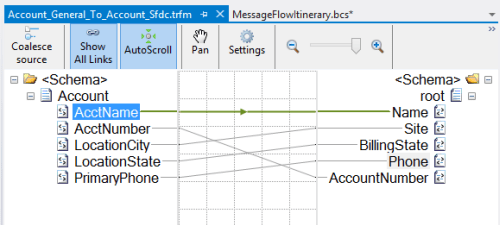
    As expected, my mapping between these two is super complicated. I’ll give you a moment to study its subtle beauty.

    2014.07.14mabs04

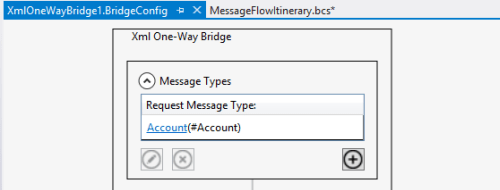
    With those in place, I was ready to build out my bridge.  I dragged an Xml One-Way Bridge shape to the message flow surface. There were two goals of my bridge: transform the message, and put the credentials into context. I started the bridge by defining the input message type. This is the first schema I created which describes the generic account message.

    2014.07.14mabs05

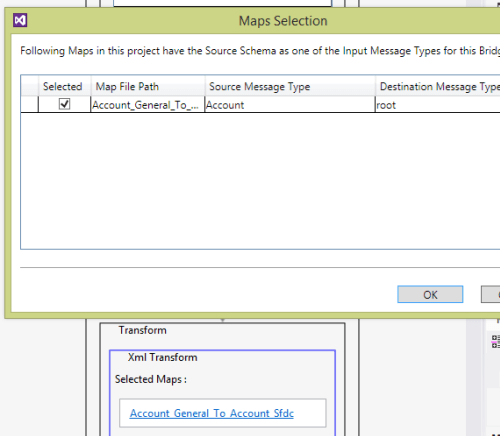
    Choosing a map is easy; just add the appropriate map to the collection property on the Transform stage.

    2014.07.14mabs06

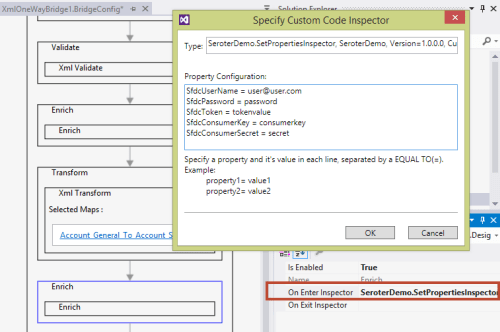
    With the message transformed, I had to then get the property bag configured with the right context properties. On the final Enrich stage of the pipeline, I chose the On Enter Inspector to select the code to run when this stage gets started. I entered the fully qualified name, and then on separate lines, put the values for each (authorization) property I defined in the class above. Note that you do NOT wrap these values in quotes. I wasted an hour trying to figure out why my values weren’t working correctly!

    2014.07.14mabs07

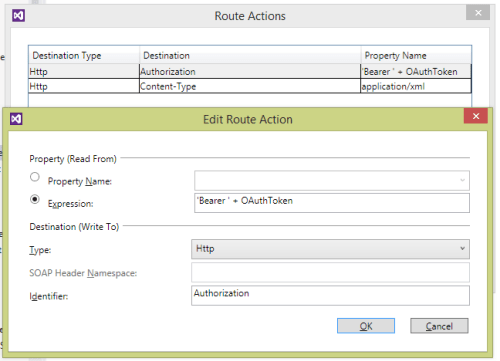
    The web service endpoint was already configured above, so all that was left was to configure the connector. The connector between the bridge and destination shapes was set to route all the messages to that single destination (“Filter condition: 1=1”). The most important configuration was the headers. Clicking the Route Actions property of the connector opens up a window to set any SOAP or HTTP headers on the outbound message. I defined a pair of headers. One sets the content-type so that Salesforce knows I’m sending it an XML message, and the second defines the authorization header as a combination of the word “Bearer” (in single quotes!) and the OAuthToken context value we created above.

    2014.07.14mabs08

    At this point, I had a finished message flow itinerary and deployed the project to a running instance of BizTalk Services. Now to test it. I first tested it by putting a Service Bus Queue at the beginning of the flow and pumping messages through. After the 20th vague error message, I decided to crack this nut open.  I installed the BizTalk Services Explorer extension from the Visual Studio Gallery. This tool promises to aid in debugging and management of BizTalk Services resources and is actually pretty handy. It’s also not documented at all, but documentation is for sissies anyway.

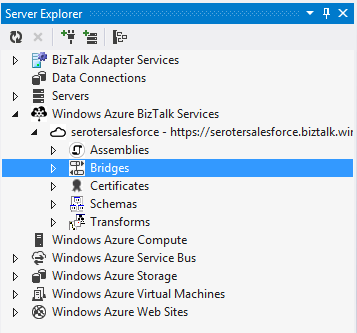
    Once installed, you get a nice little management interface inside the Server Explorer view in Visual Studio.

    2014.07.14mabs09

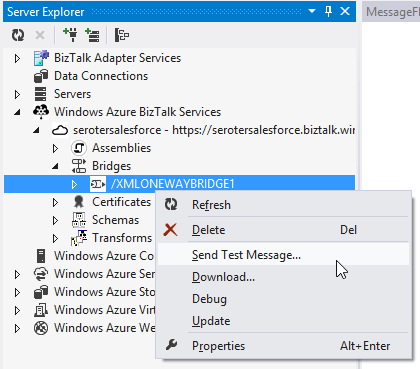
    I could just send a test message in (and specify the payload myself), but that’s pretty much the same as what I was doing from my own client application.

    2014.07.14mabs10

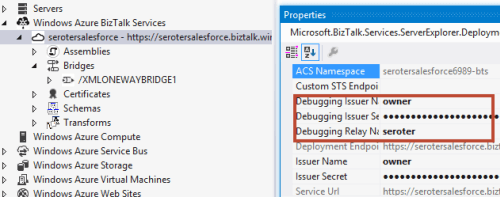
    No, I wanted to see inside the process a bit. First, I set up the appropriate credentials for calling the bridge endpoint. Do NOT try and use the debugging function if you have a Queue or Topic as your input channel! It only works with Relay input.

    2014.07.14mabs11

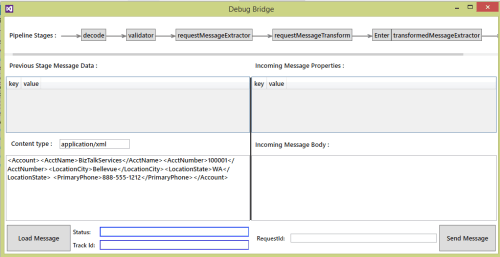
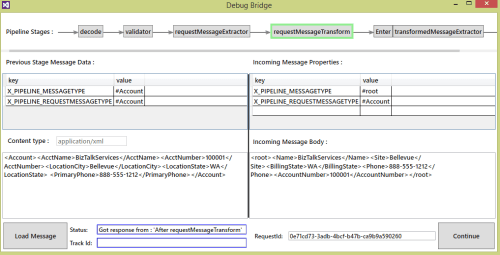
    I then right-clicked the bridge and chose “Debug.” After entering my source XML, I submitted the initial message into the bridge. This tool shows you each stage of the bridge as well as the corresponding payload and context properties.

    2014.07.14mabs12

    At the Transform stage, I could see that my message was being correctly mapped to the Salesforce-ready structure.

    2014.07.14mabs13

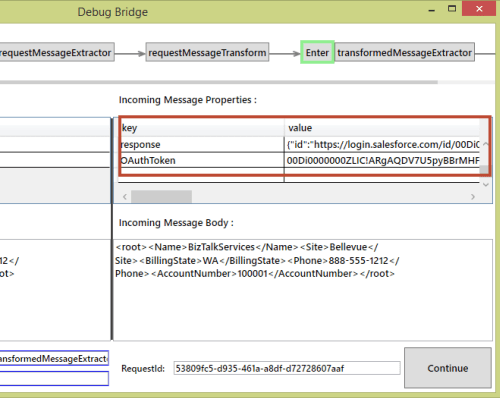
    After the Enrich stage – where we had our custom code callout – I saw my new context values, including the OAuth token.

    2014.07.14mabs14

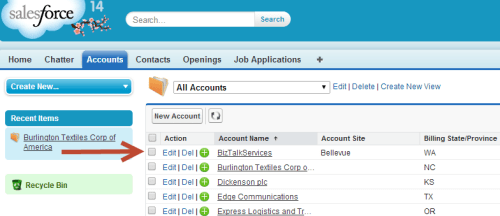
    The whole process completes with an error, only because Salesforce returns an XML response and I don’t handle it. Checking Salesforce showed that my new account definitely made it across.

    2014.07.14mabs15

    This took me longer than I thought, just given the general newness of the platform and lack of deep documentation. Also, my bridge occasionally flakes out because it seems to “forget” the authorization property configuration values that are part of the bridge definition. I had to redeploy my project to make it “remember” them again. I’m sure it’s a “me” problem, but there may be some best practices on custom code properties that I don’t know yet.

    Now that you’ve seen how to extend BizTalk Services, hopefully you can use this same flow when sending messages to all sorts of SaaS systems.

  • TechEd NA Videos Now Online

    I recently had the pleasure of speaking at Microsoft TechEd in Houston, TX, and the videos of those sessions are now online. A few thousand people have already watched them, but I thought it’d be good to share it here as well.

    The first one– Architecting Resilient (Cloud) Applications — went through a series of principles for high available application design, and then I showed how to build an ASP.NET that took advantage of Microsoft Azure’s resilience capabilities.

    The second session — Practical DevOps for Data Center Efficiency — covered some principles of DevOps, and the various tools that can complement the required change in organization culture.

    Some of my DevOps talk was taken from an InfoQ article I was writing, and that article is now online. Exploring the ENTIRE DevOps Toolchain for (Cloud) Teams walks through the DevOps tool set in more detail and explains how the various tools help you achieve your objectives.

    I’ve got some upcoming posts queued up for the blog, but wanted to share what I’ve been doing elsewhere for the past few weeks.

  • Deploying a “Hello World” App to the Free IronFoundry v2 Sandbox

    I’ve been affiliated in some way with Iron Foundry since 2011. Back then, I wrote up an InfoQ.com article about this quirky open source project that added .NET support to the nascent Cloud Foundry PaaS movement. Since then, I was hired by Tier 3 (now CenturyLink Cloud), Cloud Foundry has exploded in popularity and influence, and now Iron Foundry is once again making a splash.

    Last summer, Cloud Foundry – the open source platform as a service – did some major architectural changes in their “v2” release. Iron Foundry followed closely with a v2 update, but we didn’t update the free, public sandbox to run the new version. Yesterday, the Iron Foundry team took the wraps off an environment running the latest, optimized open source bits. Anyone can sign up for a free IronFoundry.me account and deploy 10 apps or 2 GB of RAM in this development-only sandbox. Deploy Java, Node.js, Ruby and .NET applications to a single Cloud Foundry fabric. Pretty cool way to mess around with the cloud and the leading OSS PaaS.

    In this blog post, I’ll show you how quick and easy it is to get an application deployed to this PaaS environment.

    Step 1: Get an IronFoundry.me Account

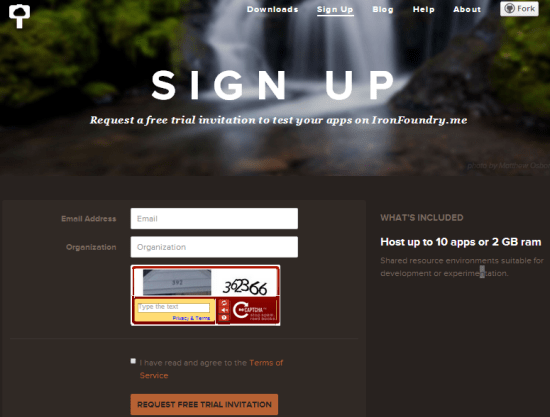
    This one’s easy. Go to the signup page, fill in two data fields, and wait a brief period for your invitation to arrive via email.

    2014.05.09ironfoundry01


    Step 2: Build an ASP.NET App

    You can run .NET 4.5 apps in IronFoundry.me, and add in both SQL Server and MongoDB services. For this example, I’m keeping this super simple. I have an ASP.NET Webforms project that included the Bootstrap NugGet package for some lightning-fast formatting.

    2014.05.09ironfoundry02

    I published this application to the file system in order to get the deploy-ready bits.

    2014.05.09ironfoundry03


    Step 3: Log into Iron Foundry Account

    To access the environment (and deploy/manage apps), you need the command line interface (CLI) tool for Cloud Foundry. The CLI is written in Go, and you can pull down a Windows installer that sets up everything you need. There’s a nice doc on the Iron Foundry site that explains some CLI basics.

    To log into my IronFoundry.me environment, I fired up a command prompt and entered the following command:

    cf api api.beta.ironfoundry.me

    This tells the CLI where it’s connecting to. At any point, I can issue a cf api command to see which environment I’m targeting.

    Next, I needed to log in. The cf login command results in a request for my credentials, and which “space” to work in. “Organizations” and “spaces” are ways to segment applications and users. The Iron Foundry team wrote a fantastic doc that explains how organizations/spaces work. By default, the IronFoundry.me site has three spaces: development, qa, production.

    2014.05.09ironfoundry04

    At this point, I’m ready to deploy my application.

    Step 4:  Push the App

    After setting the command line session to the folder with my published ASP.NET app, I was ready to go. Deploying to Cloud Foundry (and IronFoundry.me, but extension) is simple.

    The command is simply cf push but with a caveat. Cloud Foundry by default runs on Ubuntu. The .NET framework doesn’t (ignoring Mono, in this context). So, part of what Iron Foundry does is add Windows environments to the Cloud Foundry cluster. Fortunately the Cloud Foundry architecture is quite extensible, so the Iron Foundry team just had to define a new “stack” for Windows.

    When pushing apps to IronFoundry.me, I just have to explicitly tell the CLI to target the Windows stack.

    cf push helloworld –s windows2012

    After about 7 seconds of messages, I was done.

    2014.05.09ironfoundry05

    When I visited helloworld.beta.ironfoundry.me, I saw my site.

    2014.05.09ironfoundry06

    That, was easy.

    Step 5: Mess Around With App

    What are some things to try out?

    If you run cf marketplace, you can see that Iron Foundry supports MongoDB and SQL Server.

    2014.05.09ironfoundry07

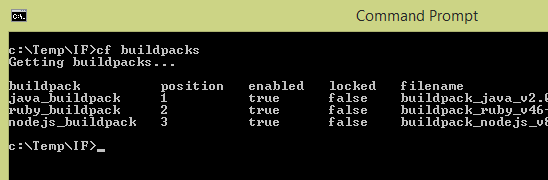
    The cf buildpacks command reveals which platforms are supported. This JUST returns the ones included in the base Cloud Foundry, not the .NET extension.

    2014.05.09ironfoundry08

    Check out the supported stacks by running cf stacks. Notice the fancy Windows addition.

    2014.05.09ironfoundry09

    I can see all my deployed applications by issuing a cf apps command.

    2014.05.09ironfoundry10

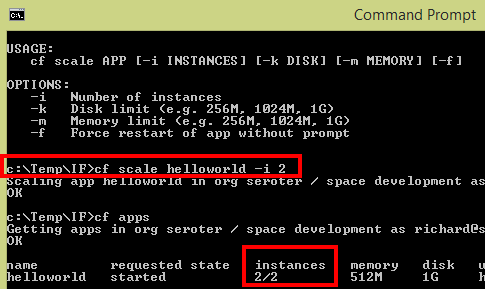
    Is it time to scale the application? I added a new instance to scale the application out.

    2014.05.09ironfoundry11

    The CLI supports tons of other operations including application update/stop/start/rename/delete, event viewer, log viewer, create/delete/bind/unbind app services, and all sorts of domain/user/account administration stuff.

    Summary

    You can use IronFoundry.me as a Node/Ruby/Java hosting environment and never touch Windows stuff, or, use it as a place to try out .NET code in a public open-source PaaS before standing up your own environment. Take it for a spin, read the help docs, issue pull requests for any open source improvements, and get on board with a cool platform.