It’s here. After six weeks of OTHER topics, we’re up to week seven of Google Cloud Next OnAir, which is all about my area: app modernization. The “app modernization” bucket in Google Cloud covers lots of cool stuff including Cloud Code, Cloud Build, Cloud Run, GKE, Anthos, Cloud Operations, and more. It basically addresses the end-to-end pipeline of modern apps. I recently sketched it out like this:
I think this the biggest week of Next, with over fifty breakout sessions. I like that most of the breakouts so far have been ~20 minutes, meaning you can log in, set playback speed to 1.5x, and chomp through lots of topic quickly.
Here are eight of the sessions I’m looking forward to most:
GKE Turns 5: What’s New? All Kubernetes aren’t the same. GKE stands apart, and the team continues solving customer problems in new ways. This should be a great look back, and look ahead.
Cloud Run: What’s New? To me, Cloud Run has the best characteristics of PaaS, combined with the the event-driven, scale-to-zero of serverless functions. This is the best place I know of to run custom-built apps in the Google Cloud (or anywhere, with Anthos).
Modernize Legacy Java Apps Using Anthos. Whoever figures out how to unlock value from existing (Java) apps faster, wins. Here’s what Google Cloud is doing to help customers improve their Java apps and run them on a great host.
I’m looking forward to this week. We’re sharing lots of fun progress, and demonstrating some fresh perspectives on what app modernization should look like. Enjoy watching!
Week five content is available on August 11, and week six material is binge-able on August 18. Week five is all about Data Analytics and the focus of week six is Data Management and Databases.
Data Modernization: McKesson Story. Modernize your infrastructure and apps, but please, don’t forget your databases! This looks like a good talk by a company that can’t afford to get it wrong.
It was hard to just pick a few talks! Check those out, and stay tuned for a final look at the last three weeks of this summer extravaganza.
I feel silly admitting that I barely understand what happens in the climactic scene of the 80s movie Trading Places. It has something to do with short-selling commodities—in this case, concentrated orange juice. Let’s talk about commodities, which Investopedia defines as:
a basic good used in commerce that is interchangeable with other goods of the same type. Commodities are most often used as inputs in the production of other goods or services. The quality of a given commodity may differ slightly, but it is essentially uniform across producers.
Our industry has rushed to declare Kubernetes a commodity, but is it? It is now a basic good used as input to other goods and services. But is uniform across producers? It seems to me that the Kubernetes API is commoditized and consistent, but the platform experience isn’t. Your Kubernetes experience isn’t uniform across Google Kubernetes Engine (GKE), AWS Elastic Kubernetes Service (EKS), Azure Kubernetes Service (AKS), VMware PKS, Red Hat OpenShift, Minikube, and 130+ other options. No, there are real distinctions that can impact your team’s chance of success adopting it. As you’re choosing a Kubernetes product to use, pay upfront attention to provisioning, upgrades, scaling/repair, ingress, software deployment, and logging/monitoring.
I work for Google Cloud, so obviously I’ll have some biases. That said, I’ve used AWS for over a decade, was an Azure MVP for years, and can be mostly fair when comparing products and services.
1. Provisioning
Kubernetes is a complex distributed system with lots of moving parts. Multi-cluster has won out as a deployment strategy (versus one giant mega cluster segmented by namespace), which means you’ll provision Kubernetes clusters with some regularity.
What do you have to do? How long does it take? What options are available? Those answers matter!
Kubernetes offerings don’t have identical answers to these questions:
Do you want clusters in a specific geography?
Should clusters get deployed in an HA fashion across zones?
Can you build a tiny cluster (small machine, single node) and a giant cluster?
Can you specify the redundancy of the master nodes? Is there redundancy?
Do you need to choose a specific Kubernetes version?
Are worker nodes provisioned during cluster build, or do you build separately and attach to the cluster?
Will you want persistent storage for workloads?
Are there “special” computing needs, including large CPU/memory nodes, GPUs, or TPUs?
Are you running Windows containers in the cluster?
As you can imagine, since GKE is the original managed Kubernetes, there’s lots of options for you when building clusters. Or, you can do a one-click install of a “starter” cluster, which is pretty great.
2. Upgrades
You got a cluster running? Cool! Day 2 is usually where the real action’s at. Let’s talk about upgrades, which are a fact of life for clusters. What gets upgraded? Namely the version of Kubernetes, and the configuration/OS of the nodes themselves. The level of cluster management amongst the various providers is not uniform.
GKE supports automated upgrades of everything in the cluster, or you can trigger it manually. Either way, you don’t do any of the upgrade work yourself. Release channels are pretty cool, too. DigitalOcean looks somewhat similar to GKE, from an upgrade perspective. AKS offers manually triggered upgrades. AWS offers kinda automated or extremely manual (i.e. creating new node groups or using Cloud Formation), depending on whether you used managed or unmanaged worker nodes.
3. Scaling / Repairs
Given how many containers you can run on a good-sized cluster, you may not have to scale your cluster TOO often. But, you may also decide to act in a “cloudy” way, and purposely start small and scale up as needed.
Like with most any infrastructure platform, you’ll expect to scale Kubernetes environments (minus local dev environments) both vertically and horizontally. Minimally, demand that your Kubernetes provider can scale clusters via manual commands. Increasingly, auto-scaling of the cluster is table-stakes. And don’t forget scaling of the pods (workloads) themselves. You won’t find it everywhere, but GKE does support horizontal pod autoscaling and vertical pod autoscaling too.
Also, consider how your Kubernetes platform handles the act of scaling. It’s not just about scaling the nodes or pods. It’s how well the entire system swells to absorb the increasing demand. For instance, Bayer Crop Science worked with Google Cloud to run a 15,000 node cluster in GKE. For that to work, the control planes, load balancers, logging infrastructure, storage, and much more had to “just work.” Understand those points in your on-premises or cloud environment that will feel the strain.
Finally, figure out what you want to happen when something goes wrong with the cluster. Does the system detect a down worker and repair/replace it? Most Kubernetes offerings support this pretty well, but do dig into it!
4. Ingress
I’m not a networking person. I get the gist, and can do stuff, but I quickly fall into the pit of despair. Kubernetes networking is powerful, but not simple. How do containers, pods, and clusters interact? What about user traffic in and out of the cluster? We could talk about service meshes and all that fun, but let’s zero in on ingress. Ingress is about exposing “HTTP and HTTPS routes from outside the cluster to services within the cluster.” Basically, it’s a Layer 7 front door for your Kubernetes services.
If you’re using Kubernetes on-premises, you’ll have some sort of load balancer configuration setup available, maybe even to use with an ingress controller. Hopefully! In the public cloud, major providers offer up their load-balancer-as-a-service whenever you expose a service of type “LoadBalancer.” But, you get a distinct load balancer and IP for each service. When you use an ingress controller, you get a single route into the cluster (still load balanced, most likely) and the traffic is routed to the correct pod from there. Microsoft, Amazon, and Google all document their way to use ingress controllers with their managed Kubernetes.
Make sure you investigate the network integrations and automation that comes with your Kubernetes product. There are super basic configurations (that you’ll often find in local dev tools) all the way to support for Istio meshes and ingress controllers.
5. Software Deployment
How do you get software into your Kubernetes environment? This is where the commoditization of the Kubernetes API comes in handy! Many software products know how to deploy containers to a Kubernetes environment.
Two areas come to mind here. First, deploying packaged software. You can use Helm to deploy software to most any Kubernetes environment. But let’s talk about marketplaces. Some self-managed software products deliver some form of a marketplace, and a few public clouds do. AWS has the AWS Marketplace for Containers. DigitalOcean has a nice little marketplace for Kubernetes apps. In the Google Cloud Marketplace, you can filter by Kubernetes apps, and see what you can deploy on GKE, or in Anthos environments. I didn’t notice a way in the Azure marketplace to find or deploy Kubernetes-targeted software.
The second area of software deployment I think about relates to CI/CD systems for custom apps. Here, you have a choice of 3rd party best-of-breed tools, or whatever your Kubernetes provider bakes in. AWS CodePipeline or CodeDeploy can deploy apps to ECS (not EKS, it seems). Azure Pipelines looks like it deploys apps directly to AKS. Google Cloud Build makes it easy to deploy apps to GKE, App Engine, Functions, and more.
When thinking about software deployment, you could also consider the app platforms that run atop a Kubernetes foundation, like Knative and in the future, Cloud Foundry. These technologies can shield you from some of the deployment and configuration muck that’s required to build a container, deploy it, and wire it up for routing.
6. Logging/Monitoring
Finally, take a look at what you need from a logging and monitoring perspective. Most any Kubernetes system will deliver some basic metrics about resource consumption—think CPU, memory, disk usage—and maybe some Kubernetes-specific metrics. From what I can tell, the big 3 public clouds integrate their Kubernetes services with their managed monitoring solutions. For example, you get visibility into all sorts of GKE metrics when clusters are configured to use Cloud Operations.
Then there’s the question of logging. Do you need a lot of logs, or is it ok if logs rotate often? DigitalOcean rotates logs when they reach 10MB in size. What kind of logs get stored? Can you analyze logs from many clusters? As always, not every Kubernetes behaves the same!
Plenty of other factors may come into play—things like pricing model, tenancy structure, 3rd party software integration, troubleshooting tools, and support community come to mind—when choosing a Kubernetes product to use, so don’t get lulled into a false sense of commoditization!
Google Cloud’s 9-week conference is underway. Already lots of fun announcements and useful sessions in this free event. I wrote a post about what I was looking forward to watching during weeks one and two, and I’m now thinking about the upcoming weeks three and four. The theme for week three is “infrastructure” and week four’s topic is “security.”
For week three (starting July 28), I’m looking forward to watching (besides the keynote):
Like every other tech vendor, Google’s grand conference plans for 2020 changed. Instead of an in-person mega-event for cloud aficionados, we’re doing a (free!) nine week digital event called Google Cloud Next OnAir. Each week, starting July 14th, you get on-demand breakout sessions about a given theme. And there are ongoing demo sessions, learning opportunities, and 1:1s with Google Experts. Every couple weeks, I’ll highlight a few talks I’m looking forward to.
Before sharing my week one and week two picks, a few words on why you should care about this event. More than any other company, Google defines what’s “next” for customers and competitors alike. Don’t believe me? I researched a few of the tech inflection points of the last dozen years and Google’s fingerprints are all over them! If I’m wrong with any of this, don’t hesitate to correct me in the comments.
In 2008, Google launched Google App Engine (GAE), the first mainstream platform-as-a-service offering that introduced a compute model that obfuscated infrastructure. GAE (and Heroku) sparked an explosion of other products like Azure Web Apps, Cloud Foundry, AWS Elastic Beanstalk and others. I’m also fairly certain that the ideas behind PaaS led to the serverless+FaaS movement as well.
Google created Go and released the new language in 2009. It remains popular with developers, but has really taken off with platform builders. A wide range of open-source projects use Go, including Docker, Kubernetes, Terraform, Prometheus, Hugo, InfluxDB, Jaeger, CockroachDB, NATS, Cloud Foundry, etcd, and many more. It seems to be the language of distributed systems and the cloud.
Today, we think of data processing and AI/ML when we think of cloud computing, but that wasn’t always the case. Google had the first cloud-based data warehouse (BigQuery, in 2010) and AI/ML as a service by a cloud provider (Translate API, in 2011). And don’t forget Spanner, the distributed SQL database unveiled by Google in 2012 that inspired a host of other database vendors. We take for granted that every major public cloud now offers data warehouses, AI/ML services, and planet-scale databases. Seems like Google set the pace.
Keep going? Ok. The components emerging as the heart of the modern platform? Looks like container orchestration, service mesh, and serverless runtime. The CNCF 2019 survey shows that Kubernetes, Istio, and Knative play leading roles. All of those projects started at Google, and the industry picked up on each one. While, we were first to offer a managed Kubernetes service (GKE in 2015), now you find everyone offering one. Istio and Knative are also popping up all over. And our successful effort to embed all those technologies into a software-driven managed platform (Anthos, in 2019) may turn out to be the preferred model vs. a hyperconverged stack of software plus infrastructure.
Obviously, additional vendors and contributors have moved our industry forward over the past dozen years: Docker with approachable containerization, Amazon with AWS Lambda, social coding with GitHub, infrastructure-as-code from companies like HashiCorp, microservice and chaos engineering ideas from the likes of Netflix, and plenty of others. But I contend that no single vendor has contributed more value for the entire industry than Google. That’s why Next OnAir matters, as we’ll keep sharing tech that makes everything better.
Ok, enough blather. The theme of week one is “industry insights.” There’s also the analyst summit and partner summit, both with great content for those audiences. The general sessions I definitely want to watch:
Opening Keynote. Let’s see Google Cloud CEO Thomas Kurian do his thing.
Planning for Retail’s New Priorities. Every industry has felt impact from the pandemic, especially retail. I’m interested in learning more about what we’re doing there to help.
Next OnAir has a tremendous list of speakers, including customers and Google engineers sharing their insight. It’s free to sign up, you can watch at your leisure, and maybe, get a glimpse of what’s next.
Even during a global pandemic, people are job-hopping. Me, for one. Now, I recognize that many folks don’t have a lot of choices when looking for work. Sometimes you take whatever’s available, or decide to stay in a subpar situation to ride out an uncertain economy. At the same time, many of you do have options right now, and if you’re like me, are conscious of making the best choice possible. I was fortunate to have an executive coach for a period of time who helped me with a lot of things, including career planning. Kathrin O’Sullivan is fantastic—if you or your team can get her time, do everything you can to get it—and she gave me three simple, but powerful, pieces of advice that directly impacted my decision to join Google. It’ll probably impact every career decision I make from this point forward, honestly.
Don’t leave just because things get difficult. When tough times arrive, it’s easy to run for the exit. Maybe you got a new boss who’s kinda terrible. Or you’re about to go through a team or company merger. Your employer might be facing an existential crisis about their product-market fit and planning to retool. Or the work just doesn’t feel fun any longer. Any number of things might cause you to dust off the ol’ resume. While it may be a smart decision to leave, it might be smarter to stay around and get some experience navigating difficult waters. You might discover that sticking it out resulted in professional growth, and good times on the other side.
Run towards something, not away from something. When you have decided to do something else (within your company, or outside the company), make sure you’re excited about the new thing, not just eager to leave the old thing. If your primary goal is to “get outta here” then you might choose something uninspiring. This could lead to instant regret at the new place, and yet another cycle of job hunting.
Take the job that won’t be there in six months. I love this idea. If you’re fortunate enough to have options, ask yourself whether that job (or something similar) will be there later. If you turn it down now, could you find something similar six months down the road? Or is this a role/opportunity that feels like right-place-right-time? Depending on where you are in your career, you might be hunting for positions that uniquely challenge you. Those don’t show up all the time, and are worth waiting for.
The interwebs are full of career advice. Kathrin’s guidance stood out to me, and I hope you tuck it away for when you’re considering your next career move.
Earlier this year, I took a look at how Microsoft Azure supports Java/Spring developers. With my change in circumstances, I figured it was a good time to dig deep into Google Cloud’s offerings for Java developers. What I found was a very impressive array of tools, services, and integrations. More than I thought I’d find, honestly. Let’s take a tour.
Local developer environment
What stuff goes on your machine to make it easier to build Java apps that end up on Google Cloud?
Cloud Code extension for IntelliJ
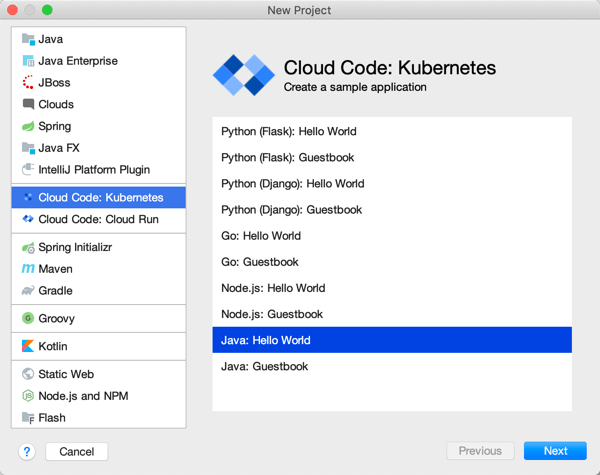
Cloud Code is a good place to start. Among other things, it delivers extensions to IntelliJ and Visual Studio Code. For IntelliJ IDEA users, you get starter templates for new projects, snippets for authoring relevant YAML files, tool windows for various Google Cloud services, app deployment commands, and more. Given that 72% of Java developers use IntelliJ IDEA, this extension helps many folks.
Cloud Code in VS Code
The Visual Studio Code extension is pretty great too. It’s got project starters and other command palette integrations, Activity Bar entries to manage Google Cloud services, deployment tools, and more. 4% of Java devs use Visual Studio Code, so, we’re looking out for you too. If you use Eclipse, take a look at the Cloud Tools for Eclipse.
The other major thing you want locally is the Cloud SDK. Within this little gem you get client libraries for your favorite language, CLIs, and emulators. This means that as Java developers, we get a Java client library, command line tools for all-up Google Cloud (gcloud), Big Query (bq) and Storage (gsutil), and then local emulators for cloud services like Pub/Sub, Spanner, Firestore, and more. Powerful stuff.
App development
Our machine is set up. Now we need to do real work. As you’d expect, you can use all, some, or none of these things to build your Java apps. It’s an open model.
Java devs have lots of APIs to work with in the Google Cloud Java client libraries, whether talking to databases or consuming world-class AI/ML services. If you’re using Spring Boot—and the JetBrains survey reveals that the majority of you are—then you’ll be happy to discover Spring Cloud GCP. This set of packages makes it super straightforward to interact with terrific managed services in Google Cloud. Use Spring Data with cloud databases (including Cloud Spanner and Cloud Firestore), Spring Cloud Stream with Cloud Pub/Sub, Spring Caching with Cloud Memorystore, Spring Security with Cloud IAP, Micrometer with Cloud Monitoring, and Spring Cloud Sleuth with Cloud Trace. And you get the auto-configuration, dependency injection, and extensibility points that make Spring Boot fun to use. Google offers Spring Boot starters, samples, and more to get you going quickly. And it works great with Kotlin apps too.
Emulators available via gcloud
As you’re building Java apps, you might directly use the many managed services in Google Cloud Platform, or, work with the emulators mentioned above. It might make sense to work with local emulators for things like Cloud Pub/Sub or Cloud Spanner. Conversely, you may decide to spin up “real” instance of cloud services to build apps using Managed Service for Microsoft Active Directory, Secret Manager, or Cloud Data Fusion. I’m glad Java developers have so many options.
Where are you going to store your Java source code? One choice is Cloud Source Repositories. This service offers highly available, private Git repos—use it directly or mirror source code code from GitHub or Bitbucket—with a nice source browser and first-party integration with many Google Cloud compute runtimes.
Building and packaging code
After you’ve written some Java code, you probably want to build the project, package it up, and prepare it for deployment.
Artifact Registry
Store your Java packages in Artifact Registry. Create private, secure artifact storage that supports Maven and Gradle, as well as Docker and npm. It’s the eventual replacement of Container Registry, which itself is a nice Docker registry (and more).
Looking to build container images for your Java app? You can write your own Dockerfiles. Or, skip docker build|push by using our open source Jib as a Maven or Gradle plugin that builds Docker images. Jib separates the Java app into multiple layers, making rebuilds fast. A new project is Google Cloud Buildpacks which uses the CNCF spec to package and containerize Java 8|11 apps.
Odds are, your build and containerization stages don’t happen in isolation; they happen as part of a build pipeline. Cloud Build is the highly-rated managed CI/CD service that uses declarative pipeline definitions. You can run builds locally with the open source local builder, or in the cloud service. Pull source from Cloud Source Repositories, GitHub and other spots. Use Buildpacks or Jib in the pipeline. Publish to artifact registries and push code to compute environments.
Application runtimes
As you’d expect, Google Cloud Platform offers a variety of compute environments to run your Java apps. Choose among:
Bare Metal. Choose a physical machine to host your Java app. Choose from machine sizes with as few as 16 CPU cores, and as many as 112.
Google Kubernetes Engine. The first, and still the best, managed Kubernetes service. Get fully managed clusters that are auto scaled, auto patched, and auto repaired. Run stateless or stateful Java apps.
App Engine. One of the original PaaS offerings, App Engine lets you just deploy your Java code without worrying about any infrastructure management.
Cloud Functions. Run Java code in this function-as-a-service environment.
Cloud Run. Based on the open source Knative project, Cloud Run is a managed platform for scale-to-zero containers. You can run any web app that fits into a container, including Java apps.
Google Cloud VMware Engine. If you’re hosting apps in vSphere today and want to lift-and-shift your app over, you can use a fully managed VMware environment in GCP.
Running in production
Regardless of the compute host you choose, you want management tools that make your Java apps better, and help you solve problems quickly.
You might stick an Apigee API gateway in front of your Java app to secure or monetize it. If you’re running Java apps in multiple clouds, you might choose Google Cloud Anthos for consistency purposes. Java apps running on GKE in Anthos automatically get observability, transport security, traffic management, and SLO definition with Anthos Service Mesh.
You probably have lots of existing Java apps. Some are fairly new, others were written a decade ago. Google Cloud offers tooling to migrate many types of existing VM-based apps to container or cloud VM environments. There’s good reasons to do it, and Java apps see real benefits.
Migrate for Anthos takes an existing Linux or Windows VM and creates artifacts (Dockerfiles, Kubernetes YAML, etc) to run that workload in GKE. Migrate for Compute Engine moves your Java-hosting VMs into Google Compute Engine.
All-in-all, there’s a lot to like here if you’re a Java developer. You can mix-and-match these Google Cloud services and tools to build, deploy, run, and manage Java apps.
I rarely enjoy the last mile of work. Sure, there’s pleasure in seeing something reach its conclusion, but when I’m close, I just want to be done! For instance, when I create a Pluralsight course—my new one, Cloud Foundry: The Big Picture just came out—I enjoy the building part, and dread the record+edit portion. Same with writing software. I like coding an app to solve a problem. Then, I want a fast deployment so that I can see how the app works, and wrap up. Ideally, each app I write doesn’t require a unique set of machinery or know-how. Thus, I wanted to see if I could create a *single* Google Cloud Build deployment pipeline that shipped any custom app to the serverless Google Cloud Run environment.
Cloud Build is Google Cloud’s continuous integration and delivery service. It reminds me of Concourse in that it’s declarative, container-based, and lightweight. It’s straightforward to build containers or non-container artifacts, and deploy to VMs, Kubernetes, and more. The fact that it’s a hosted service with a great free tier is a bonus. To run my app, I don’t want to deal with configuring any infrastructure, so I chose Google Cloud Run as my runtime. It just takes a container image and offers a fully-managed, scale-to-zero host. Before getting fancy with buildpacks, I wanted to learn how to use Build and Run to package up and deploy a Spring Boot application.
First, I generated a new Spring Boot app from start.spring.io. It’s going to be a basic REST API, so all I needed was the Web dependency.
I’m not splitting the atom with this Java code. It simply returns a greeting when you hit the root endpoint.
@RestController
@SpringBootApplication
public class HelloAppApplication {

	public static void main(String[] args) {
		SpringApplication.run(HelloAppApplication.class, args);
	}

	@GetMapping("/")
	public String SayHello() {
		return "Hi, Google Cloud Run!";
	}
}
Now, I wanted to create a pipeline that packaged up the Boot app into a JAR file, built a Docker image, and deployed that image to Cloud Run. Before crafting the pipeline file, I needed a Dockerfile. This file offers instructions on how to assemble the image. Here’s my basic one:
FROM openjdk:11-jdk
ARG JAR_FILE=target/hello-app-0.0.1-SNAPSHOT.jar
COPY ${JAR_FILE} app.jar
ENTRYPOINT ["java", "-Djava.security.edg=file:/dev/./urandom","-jar","/app.jar"]
On to the pipeline. A build configuration isn’t hard to understand. It consists of a series of sequential or parallel steps that produce an outcome. Each step runs in its own container image (specified in the name attribute), and if needed, there’s a simple way to transfer state between steps. My cloudbuild.yaml file for this Spring Boot app looked like this:
steps:
# build the Java app and package it into a jar
- name: maven:3-jdk-11
  entrypoint: mvn
  args: ["package", "-Dmaven.test.skip=true"]
# use the Dockerfile to create a container image
- name: gcr.io/cloud-builders/docker
  args: ["build", "-t", "gcr.io/$PROJECT_ID/hello-app", "--build-arg=JAR_FILE=target/hello-app-0.0.1-SNAPSHOT.jar", "."]
# push the container image to the Registry
- name: gcr.io/cloud-builders/docker
  args: ["push", "gcr.io/$PROJECT_ID/hello-app"]
#deploy to Google Cloud Run
- name: 'gcr.io/cloud-builders/gcloud'
  args: ['run', 'deploy', 'seroter-hello-app', '--image', 'gcr.io/$PROJECT_ID/hello-app', '--region', 'us-west1', '--platform', 'managed']
images: ["gcr.io/$PROJECT_ID/hello-app"]
You’ll notice four steps. The first uses the Maven image to package my application. The result of that is a JAR file. The second step uses a Docker image that’s capable of generating an image using the Dockerfile I created earlier. The third step pushes that image to the Container Registry. The final step deploys the container image to Google Cloud Run with an app name of seroter-hello-app. The final “images” property puts the image name in my Build results.
As you can imagine, I can configure triggers for this pipeline (based on code changes, etc), or execute it manually. I’ll do the latter, as I haven’t stored this code in a repository anywhere yet. Using the terrific gcloud CLI tool, I issued a single command to kick off the build.
gcloud builds submit --config cloudbuild.yaml .
After a minute or so, I have a container image in the Container Registry, an available endpoint in Cloud Run, and a full audit log in Cloud Build.
Container Registry:
Cloud Run (with indicator that app was deployed via Cloud Build:
Cloud Build:
I didn’t expose the app publicly, so to call it, I needed to authenticate myself. I used the “gcloud auth print-identity-token” command to get a Bearer token, and plugged that into the Authorization header in Postman. As you’d expect, it worked. And when traffic dies down, the app scales to zero and costs me nothing.
So this was great. I did all this without having to install build infrastructure, or set up an application host. But I wanted to go a step further. Could I eliminate the Dockerization portion? I have zero trust in myself to build a good image. This is where buildpacks come in. They generate well-crafted, secure container images from source code. Google created a handful of these using the CNCF spec, and we can use them here.
My new cloudbuild.yaml file looks like this. See that I’ve removed the steps to package the Java app, and build and push the Docker image, and replaced them with a single “pack” step.
steps:
# use Buildpacks to create a container image
- name: 'gcr.io/k8s-skaffold/pack'
  entrypoint: 'pack'
  args: ['build', '--builder=gcr.io/buildpacks/builder', '--publish', 'gcr.io/$PROJECT_ID/hello-app-bp:$COMMIT_SHA']
#deploy to Google Cloud Run
- name: 'gcr.io/cloud-builders/gcloud'
  args: ['run', 'deploy', 'seroter-hello-app-bp', '--image', 'gcr.io/$PROJECT_ID/hello-app-bp:latest', '--region', 'us-west1', '--platform', 'managed']
With the same gcloud command (gcloud builds submit --config cloudbuild.yaml .) I kicked off a new build. This time, the streaming logs showed me that the buildpack built the JAR file, pulled in a known-good base container image, and containerized the app. The result: a new image in the Registry (21% smaller in size, by the way), and a fresh service in Cloud Run.
I started out this blog post saying that I wanted a single cloudbuild.yaml file for *any* app. With Buildpacks, that seemed possible. The final step? Tokenizing the build configuration. Cloud Build supports “substitutions” which lets you offer run-time values for variables in the configuration. I changed my build configuration above to strip out the hard-coded names for the image, region, and app name.
steps:
# use Buildpacks to create a container image
- name: 'gcr.io/k8s-skaffold/pack'
  entrypoint: 'pack'
  args: ['build', '--builder=gcr.io/buildpacks/builder', '--publish', 'gcr.io/$PROJECT_ID/$_IMAGE_NAME:$COMMIT_SHA']
#deploy to Google Cloud Run
- name: 'gcr.io/cloud-builders/gcloud'
  args: ['run', 'deploy', '$_RUN_APPNAME', '--image', 'gcr.io/$PROJECT_ID/$_IMAGE_NAME:latest', '--region', '$_REGION', '--platform', 'managed']
Before trying this with a new app, I tried this once more with my Spring Boot app. For good measure, I changed the source code so that I could confirm that I was getting a fresh build. My gcloud command now passed in values for the variables:
After a minute, the deployment succeeded, and when I called the endpoint, I saw the updated API result.
For the grand finale, I want to take this exact file, and put it alongside a newly built ASP.NET Core app. I did a simple “dotnet new webapi” and dropped the cloudbuild.yaml file into the project folder.
After tweaking the Program.cs file to read the application port from the platform-provided environment variable, I ran the following command:
A few moments later, I had a container image built, and my ASP.NET Core app listening to requests in Cloud Run.
Calling that endpoint (with authentication) gave me the API results I expected.
Super cool. So to recap, that six line build configuration above works for your Java, .NET Core, Python, Node, and Go apps. It’ll create a secure container image that works anywhere. And if you use Cloud Build and Cloud Run, you can do all of this with no mess. I might actually start enjoying the last mile of app development with this setup.
This week I’m once again speaking at INTEGRATE, a terrific Microsoft-oriented conference focused on app integration. This may be the last year I’m invited, so before I did my talk, I wanted to ensure I was up-to-speed on Google Cloud’s integration-related services. One that I was aware of, but not super familiar with, was Google Cloud Pub/Sub. My first impression was that this was a standard messaging service like Amazon SQS or Azure Service Bus. Indeed, it is a messaging service, but it does more.
Here are three unique aspects to Pub/Sub that might give you a better way to solve integration problems.
#1 – Global control plane with multi-region topics
When creating a Pub/Sub topic—an object that accepts a feed of messages—you’re only asked one major question: what’s the ID?
In the other major cloud messaging services, you select a geographic region along with the topic name. While you can, of course, interact with those messaging instances from any other region via the API, you’ll pay the latency cost. Not so with Pub/Sub. From the documentation (bolding mine):
Cloud Pub/Sub offers global data access in that publisher and subscriber clients are not aware of the location of the servers to which they connect or how those services route the data.
…
Pub/Sub’s load balancing mechanisms direct publisher traffic to the nearest GCP data center where data storage is allowed, as defined in the ResourceLocation Restriction section of the IAM & admin console. This means that publishers in multiple regions may publish messages to a single topic with low latency. Any individual message is stored in a single region. However, a topic may have messages stored in many regions. When a subscriber client requests messages published to this topic, it connects to the nearest server which aggregates data from all messages published to the topic for delivery to the client.
That’s a fascinating architecture, and it means you get terrific publisher performance from anywhere.
#2 – Supports both pull and push subscriptions for a topic
Messaging queues typically store data until it’s retrieved by the subscriber. That’s ideal for transferring messages, or work, between systems. Let’s see an example with Pub/Sub.
I first used the Google Cloud Console to create a pull-based subscription for the topic. You can see a variety of other settings (with sensible defaults) around acknowledgement deadlines, message retention, and more.
I then created a pair of .NET Core applications. One pushes messages to the topic, another pulls messages from the corresponding subscription. Google created NuGet packages for each of the major Cloud services—which is better than one mega-package that talks to all services—that you can see listed here on GitHub. Here’s the Pub/Sub package that added to both projects.
using Google.Cloud.PubSub.V1;
using Google.Protobuf;

...

 public string PublishMessages()
 {
   PublisherServiceApiClient publisher = PublisherServiceApiClient.Create();

   //create messages
   PubsubMessage message1 = new PubsubMessage {Data = ByteString.CopyFromUtf8("Julie")};
   PubsubMessage message2 = new PubsubMessage {Data = ByteString.CopyFromUtf8("Hazel")};
   PubsubMessage message3 = new PubsubMessage {Data = ByteString.CopyFromUtf8("Frank")};

   //load into a collection
   IEnumerable<PubsubMessage> messages = new PubsubMessage[] {
      message1,
      message2,
      message3
    };

   //publish messages
   PublishResponse response = publisher.Publish("projects/seroter-anthos/topics/seroter-topic", messages);

   return "success";
 }
After I ran the publisher app, I switched to the web-based Console and saw that the subscription had three un-acknowledged messages. So, it worked.
The subscribing app? Equally straightforward. Here, I asked for up to ten messages associated with the subscription, and once I processed then, I sent “acknowledgements” back to Pub/Sub. This removes the messages from the queue so that I don’t see them again.
using Google.Cloud.PubSub.V1;
using Google.Protobuf;

...

  public IEnumerable<String> ReadMessages()
  {
     List<string> names = new List<string>();

     SubscriberServiceApiClient subscriber = SubscriberServiceApiClient.Create();
     SubscriptionName subscriptionName = new SubscriptionName("seroter-anthos", "sub1");

     PullResponse response = subscriber.Pull(subscriptionName, true, 10);
     foreach(ReceivedMessage msg in response.ReceivedMessages) {
         names.Add(msg.Message.Data.ToStringUtf8());
     }

     if(response.ReceivedMessages.Count > 0) {
         //ack the message so we don't receive it again
         subscriber.Acknowledge(subscriptionName, response.ReceivedMessages.Select(m => m.AckId));
     }

     return names;
 }
When I start up the subscriber app, it reads the three available messages in the queue. If I pull from the queue again, I get no results (as expected).
As an aside, the Google Cloud Console is really outstanding for interacting with managed services. I built .NET Core apps to test out Pub/Sub, but I could have done everything within the Console itself. I can publish messages:
And then retrieve those message, with an option to acknowledge them as well:
Great stuff.
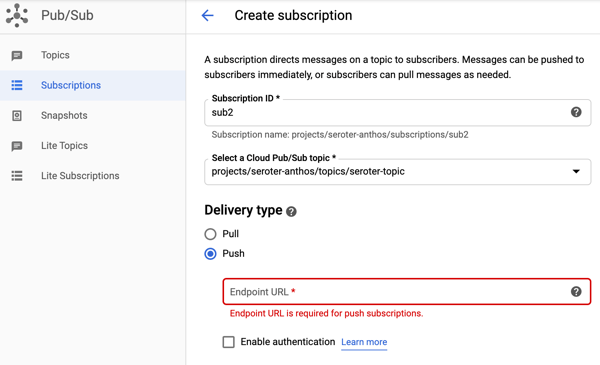
But back to the point of this section, I can use Pub/Sub to create pull subscriptions and push subscriptions. We’ve been conditioned by cloud vendors to expect distinct services for each variation in functionality. One example is with messaging services, where you see unique services for queuing, event streaming, notifications, and more. Here with Pub/Sub, I’m getting a notification service and queuing service together. A “push” subscription doesn’t wait for the subscriber to request work; it pushes the message to the designated (optionally, authenticated) endpoint. You might provide the URL of an application webhook, an API, a function, or whatever should respond immediately to your message.
I like this capability, and it simplifies your architecture.
#3 – Supports message replay within an existing subscription and for new subscriptions
One of the things I’ve found most attractive about event processing engines is the durability and replay-ability functionality. Unlike a traditional message queue, an event processor is based on a durable log where you can rewind and pull data from any point. That’s cool. Your event streaming engine isn’t a database or system of record, but a useful snapshot in time of an event stream. What if you could get the queuing semantics you want, with that durability you like from event streaming? Pub/Sub does that.
This again harkens back to point #2, where Pub/Sub absorbs functionality from other specialized services. Let me show you what I found.
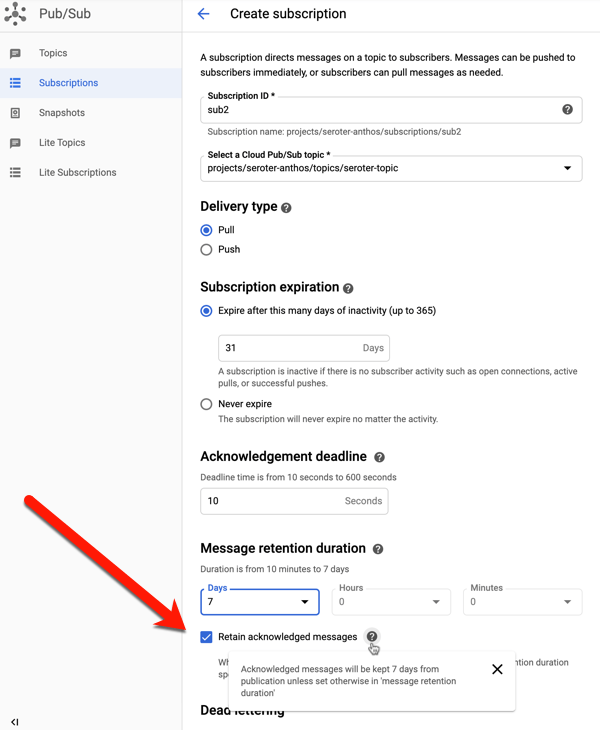
When creating a subscription (or editing an existing one), you have the option to retain acknowledged messages. This keeps these messages around for whatever the duration is for the subscription (up to seven days).
To try this out, I sent in four messages to the topic, with bodies of “test1”, “test2”, “test3”, and “test4.” I then viewed, and acknowledged, all of them.
If I do another “pull” there are no more messages. This is standard queuing behavior. An empty queue is a happy queue. But what if something went wrong downstream? You’d typically have to go back upstream and resubmit the message. Because I saved acknowledged messages, I can use the “seek” functionality to replay!
Hey now. That’s pretty wicked. When I pull from the subscription again, any message after the date/time specified shows up again.
And I get unlimited bites at this apple. I can choose to replay again, and again, and again. You can imagine all sorts of scenarios where this sort of protection can come in handy.
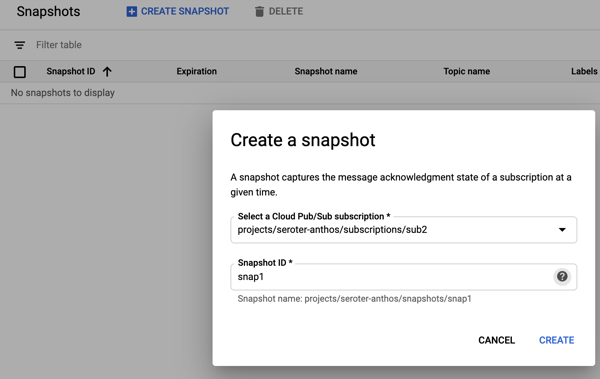
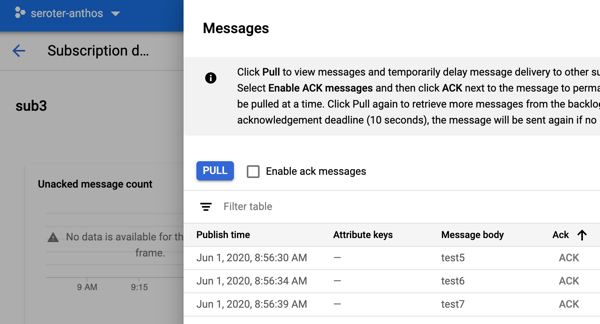
Ok, but what about new subscribers? What about a system that comes online and wants a batch of messages that went through the system yesterday? This is where snapshots are powerful. They store the state of any unacknowledged messages in the subscription, and any new messages published after the snapshot was taken. To demonstrate this, I sent in three more messages, with bodies of “test 5”, “test6” and “test7.” Then I took a snapshot on the subscription.
I read all the new messages from the subscription, and acknowledged them. Within this Pub/Sub subscription, I chose to “replay”, load the snapshot, and saw these messages again. That could be useful if I took a snapshot pre-deploy of code changes, something went wrong, and I wanted to process everything from that snapshot. But what if I want access to this past data from another subscription?
I created a new subscription called “sub3.” This might represent a new system that just came online, or even a tap that wants to analyze the last four days of data. Initially, this subscription has no associated messages. That makes sense; it only sees messages that arrived after the subscription was created. From this additional subscription, I chose to “replay” and selected the existing snapshot.
After that, I went to my subscription to view messages, and I saw the three messages from the other subscription’s snapshot.
Wow, that’s powerful. New subscribers don’t always have to start from scratch thanks to this feature.
It might be worth it for you to take an extended look at Google Cloud Pub/Sub. It’s got many of the features you expect from a scaled cloud service, with a few extra features that may delight you.
Didn’t see that coming, did you? Honestly, me neither. My past four years at Pivotal/VMware were life-altering, and I’m so proud of what we accomplished, and I’m amazed by the talent of the folks there. I wasn’t looking to leave, and you might have guessed ten other possible destinations. When the Google folks reached out about an intriguing leadership opportunity, I listened. And here we are. I couldn’t be more excited about it!
What will I be doing? Google Cloud is introducing an Outbound Product Management function, and I’ll build and lead the team for the Application Modernization product area. Wait, what’s outbound product management? This team acts as the voice of the product to the market, and the voice of the market back to the product. We’ll own the customer-facing roadmap, assist with go-to-market messaging and strategy, create impactful demonstrations, analyze the competitive landscape, build deep relationships with customers and analysts, and help people get the most out of the technology. These are all the things I love doing, and with a focus area that represents the present (Hybrid) and future (Edge) of cloud computing.
Why did I say “yes” to the job and why should you say “yes” as a customer? A few things stood out to me as I assessed Google’s opportunity in the market, and how they could uniquely help you do amazing things with technology.
The Engineering
Most of us choose to rely on Google products dozens of times per day. Often without even thinking about it. And it all “just works” from anywhere on the planet. How? Search, Maps, YouTube, Google Home, and GSuite run atop the most sophisticated and powerful infrastructure platform ever built. And you and I can take advantage of that platform in our own software applications by using Google Cloud. That’s awesome.
Besides being a world-class infrastructure company, Google has proven to be an incredible research organization. So much of that research finds its way into your hands, and into the open for others to use. There’s almost an embarrassing number of Google-originated open source projects that millions of you depend on: Apache Beam, Android, Angular, Dart, Flutter, Go, Kubernetes, Istio, Knative, Tensorflow, and so many more. Google doesn’t need to do marketing to convince you they’re an advocate for open source software; they just keep supporting and contributing OSS people actually use!
I’m a big believer that the long-term value of (public) cloud is managed services. A managed compute layer, database, load balancer, build service, analytics platform, or machine learning engine adds so much value by (1) removing day-to-day operational tasks and (2) giving you access to continuous innovation. With Google Cloud, you get our unparalleled engineering prowess powering world-class managed services. And there’s no ambiguity in our goal: get the most value by directly using the public cloud. We’re not protecting any existing product lines or trying to sell you an OS license. Even with the hybrid cloud story, we’re making sure you can take immediate advantage of the full cloud!
There’s a trope thrown around in tech circles that says “you’re not Google.” The somewhat condescending message is that you don’t have Google-scale problems, so don’t over-engineer your solutions to act like them. Hey, make smart choices, sure. But Google’s not you, either. How about we learn from each other, and solve hard problems together? Having Google’s innovators and engineers on your team seems like an advantage.
Perks of working on @GCPcloud: – Need feedback on a k8s-related dev experience proposal? @bgrant0607 is already reading your doc, – An issue with .Net? CC @jonskeet, – Node.js question? Hey @MylesBorins – Want to hear pain points? @kelseyhightower already sent you a DM, …
For better or worse, I’ve spent my entire 20+ year career focused on big companies, either as an employee of one, consultant, or vendor. Within the enterprise, it’s difficult to introduce sudden change, but there’s a hunger for improvement. Google Cloud strikes an ideal balance between familiarity and progress. We do that by upleveling your impression of what “good enough” looks like.
Often, public cloud vendors offer “good enough” services that feel like the bare minimum. Let’s give enterprises more than “ok” so that their decade-long bet on a platform generates a revolutionary leap for them. Google Cloud offers the best-in-class for modern office productivity with GSuite, the gold standard for Kubernetes with GKE, and the game-changing data warehouse in BigQuery. And so much more of Google Cloud feels familiar, but better:
Compute. Choose from VMs, single-tenant nodes, bare metal servers, serverless containers, and more. Including a fully managed VMware service.
Databases. Sure, you have managed NoSQL databases like Bigtable, Firestore, and Memorystore. But also get (familiar, but better) managed SQL Server, and the world-class Spanner database.
Data processing. I like that Google doesn’t offer 100 ways to do the same thing. In this space, there are discrete tools for workflow, data stream processing, and messaging. Most of it open source and portable.
Networking and security. This is critical to success, and to establishing a modern architecture. Over their own fiber network, you get unique options for routing, workload protection and isolation. Plus you get a usable identity management system and account hierarchy system. And a familiar, but better managed Active Directory.
Hybrid, edge, and multi-cloud. Here’s where I’ll spend my time. This story is unique and a big deal for enterprises. You want the best-in-class Kubernetes, everywhere? And centralized configuration, a modern app build system, serverless computing, and service mesh? All based on open source software? Meet Anthos. It’s a portable, software-driven platform that doesn’t require a hyperconverged infrastructure stack, or an epic financial commitment to use. It’s a secure managed platform that runs on-premises, in GCP, at the edge, or even in other public clouds. Anthos aims to help you modernize faster, shrink your ops costs, and make it easier to use the best of the cloud from anywhere. Sign me up.
It’s not just about building new stuff. It’s about supporting the existing portfolio too. I like Google’s innovation in how to manage systems. Their Site Reliability Engineering (SRE) practices are a legit step forward, and offering that to you with Customer Reliability Engineering is so valuable. Modernization is the name of the game today, and products like Migrate for Anthos are a generational shift in how you get current workloads into lower-cost, more manageable environments. Google’s still learning this “enterprise” thing, but I really like what’s there so far.
Google Cloud just feels … different. The management console doesn’t make me want to light myself on fire. It’s got a clean UI and is easy to use. The compute layer is top notch and my old Pivotal colleagues used it exclusively to build and run their software. It’s affordable, performant, and reliable. Services in the platform appear thoughtfully integrated and have sensible default settings. There aren’t dozens of ways to do the same thing. Everything feels fresh and innovative, and you don’t get the sense that you’re wrestling with legacy architectural decisions.
They’ve got a generous forever-free tier of usage for many products. The billing process isn’t hostile, and they were the first to offer things like sustained use discounts, and they make it easy to set account-wide budgets to prevent runaway costs. It’s like we want you to use the public cloud without a lot of drama!
I’m going to do my part to make sure that the enterprise experience with Google Cloud is exceptional. And I also want to make sure you’re not settling for “good enough” when you should expect more, and better.
As you can imagine, my “default” cloud changes from Microsoft Azure to Google Cloud Platform. After twelve years as a Microsoft MVP, I withdrew from the program. It was an honor to be a part of it, and I’ve made lifelong friends as a result. Switching communities will be a strange experience!
I plan to continue blogging with regularity, will continue my role at InfoQ, and have no plans to stop creating Pluralsight courses. I’ll keep comparing technologies and trying new things. That won’t change. But do expect me to be a full-throated advocate for GCP.
Thanks for joining me on the journey so far, and I hope you’ll stick with me as we learn new things together!







 Richard Seroter's Architecture Musings