Category: General Architecture

  • Integration in the Cloud: Part 4 – Asynchronous Messaging Pattern

    So far in this blog series we’ve been looking at how Enterprise Integration Patterns apply to cloud integration scenarios. We’ve seen that a Shared Database Pattern works well when you have common data (and schema) and multiple consumers who want consistent access.  The Remote Procedure Invocation Pattern is a good fit when one system desires synchronous access to data and functions sitting in other systems. In this final post in the series, I’ll walk through the Asynchronous Messaging Pattern and specifically demonstrate how to share data between clouds using this pattern.

    What Is It?

    While the remote procedure pattern provides looser coupling than the shared database pattern, it is still a blocking call and not particularly scalable.  Architects and developers use an asynchronous messaging pattern when they want to share data in the most scalable and responsive way possible.  Think of sending an email.  Your email client doesn’t sit and wait until the recipient has received and read the email message.  That would be atrocious. Instead, our email server does a multicast to recipients allows our email client to carry on. This is somewhat similar to publish/subscribe where the publisher does not dictate which specific receiver will get the message.

    So in theory, the sender of the message doesn’t need to know where the message will end up.  They also don’t need to know *when* a message is received or processed by another party.  This supports disconnected client scenarios where the subscriber is not online at the same time as the publisher.  It also supports the principle of replicable units where one receiver could be swapped out with no direct impact to the source of the message.  We see this pattern realized in Enterprise Service Bus or Integration Bus products (like BizTalk Server) which promote extreme loose coupling between systems.

    Challenges

    There are a few challenges when dealing with this pattern.

    • There is no real-time consistency. Because the message source asynchronously shares data that will be processed at the convenience of the receiver, there is a low likelihood that the systems involved are simultaneously consistent.  Instead, you end up with eventual consistency between the players in the messaging solution.
    • Reliability / durability is required in some cases. Without a persistence layer, it is possible to lose data.  Unlike the remote procedure invocation pattern (where exceptions are thrown by the target and both caught and handled by the caller), problems in transmission or target processing do not flow back to the publisher.  What happens if the recipient of a message is offline?  What if the recipient is under heavy load and rejecting new messages? A durable component in the messaging tier can protect against such cases by doing store-and-forward type implementation that doesn’t remove the message from the durable store until it has been successfully consumed.
    • A router may be useful when transmitting messages. Instead of, or in addition to a durable store, a routing component can help manage the central subscriptions for pub/sub transmissions, help with protocol bridging, data transformation and workflow (e.g. something like BizTalk Server). This may not be needed in distributed ESB solutions where the receiver is responsible for most of that.
    • There is limited support for this pattern in packaged software products.  I’ve seen few commercial products that expose asynchronous inbound channels, and even fewer that have easy-to-configure ways to publish outbound events asynchronously.  It’s not that difficult to put adapters in front of these systems, or mimic asynchronous publication by polling a data tier, but it’s not the same.

    Cloud Considerations

    What are things to consider when doing this pattern in a cloud scenario?

    • To do this between cloud and on-premises solutions, this requires creativity. I showed in the previous post how one can use Windows Azure AppFabric to expose on-premises endpoints to cloud applications. If we need to push data on-premises, and Azure AppFabric isn’t an option, then you’re looking at doing a VPN or internet-facing proxy service. Or, you could rely on aggressive polling of a shared queue (as I’ll show below).
    • Cloud provider limits and architecture will influence solution design. Some vendors, such as Salesforce.com, limit the frequency and amount of polling that it will do. This impacts the ability to poll a durable store used between cloud applications. The distributed nature of cloud services. and embrace of the eventual consistency model, can change how one retrieves data.  For example, Amazon’s Simple Queue Service may not be first-in-first out, and uses a sampling algorithm that COULD result in a query not returning all the messages in the logical queue.

    Solution Demonstration

    Let’s say that the fictitious Seroter Corporation has a series of public websites and wants a consistent way to push customer inquiries from the websites to back end systems that process these inquiries.  Instead of pushing these inquiries directly into one or many CRM systems, or doing the low-tech email option, we’d rather put all the messages into a queue and let each interested party pull the ones they want.  Since these websites are cloud-hosted, we don’t want to explicitly push these messages into the internal network, but rather, asynchronously publish and poll messages from a shared queue hosted by Amazon Simple Queue Service (SQS). The polling applications could either be another cloud system (CRM system Salesforce.com) or an on-premises system, as shown below.

    2011.11.14int01

    So I’ll have a web page built using Ruby and hosted in Cloud Foundry, a SQS queue that holds inquiries submitted from that site, and both an on-premises .NET application and a SaaS Salesforce.com application that can poll that queue for messages.

    Setting up a queue in SQS is so easy now, that I won’t even make it a sub-section in this post.  The AWS team recently added SQS operations to their Management Console, and they’ve made it very simple to create, delete, secure and monitor queues. I created a new queue named Seroter_CustomerInquiries.

    2011.11.14int02

    Sending Messages from Cloud Foundry to Amazon Simple Queue Service

    In my Ruby (Sinatra) application, I have a page where a user can ask a question.  When they click the submit button, I go into the following routine which builds up the SQS message (similar to the SimpleDB message from my previous post) and posts a message to the queue.

    post '/submitted/:uid' do	# method call, on submit of the request path, do the following
    
       #--get user details from the URL string
    	@userid = params[:uid]
    	@message = CGI.escape(params[:message])
        #-- build message that will be sent to the queue
    	@fmessage = @userid + "-" + @message.gsub("+", "%20")
    
    	#-- define timestamp variable and format
    	@timestamp = Time.now
    	@timestamp = @timestamp.strftime("%Y-%m-%dT%H:%M:%SZ")
    	@ftimestamp = CGI.escape(@timestamp)
    
    	#-- create signing string
    	@stringtosign = "GET\n" + "queue.amazonaws.com\n" + "/084598340988/Seroter_CustomerInquiries\n" + "AWSAccessKeyId=ACCESS_KEY" + "&Action=SendMessage" + "&MessageBody=" + @fmessage + "&SignatureMethod=HmacSHA1" + "&SignatureVersion=2" + "&Timestamp=" + @ftimestamp + "&Version=2009-02-01"
    
    	#-- create hashed signature
    	@esignature = CGI.escape(Base64.encode64(OpenSSL::HMAC.digest('sha1',@@awskey, @stringtosign)).chomp)
    
    	#-- create AWS SQS query URL
    	@sqsurl = "https://queue.amazonaws.com/084598340988/Seroter_CustomerInquiries?Action=SendMessage" + "&MessageBody=" + @fmessage + "&Version=2009-02-01" + "&Timestamp=" + @ftimestamp + "&Signature=" + @esignature + "&SignatureVersion=2" + "&SignatureMethod=HmacSHA1" + "&AWSAccessKeyId=ACCESS_KEY"
    
    	#-- load XML returned from query
    	@doc = Nokogiri::XML(open(@sqsurl))
    
       #-- build result message which is formatted string of the inquiry text
    	@resultmsg = @fmessage.gsub("%20", " ")
    
    	haml :SubmitResult
    end
    

    The hard part when building these demos was getting my signature string and hashing exactly right, so hopefully this helps someone out.

    After building and deploying the Ruby site to Cloud Foundry, I could see my page for inquiry submission.

    2011.11.14int03

    When the user hits the “Send Inquiry” button, the function above is called and assuming that I published successfully to the queue, I see the acknowledgement page.  Since this is an asynchronous communication, my web app only has to wait for publication to the queue, not invoking a function in a CRM system.

    2011.11.14int04

    To confirm that everything worked, I viewed my SQS queue and can clearly see that I have a single message waiting in the queue.
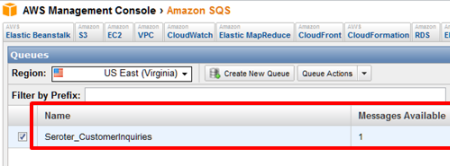
    2011.11.14int05

    .NET Application Pulling Messages from an SQS Queue

    With our message sitting safely in the queue, now we can go grab it.  The first consuming application is an on-premises .NET app.  In this very feature-rich application, I poll the queue and pull down any messages found.  When working with queues, you often have two distinct operations: read and delete (“peek” is also nice to have). I can read messages from a queue, but unless I delete them, they become available (after a timeout) to another consumer.  For this scenario, we’d realistically want to read all the messages, and ONLY process and delete the ones targeted for our CRM app.  Any others, we simply don’t delete, and they go back to waiting in the queue. I haven’t done that, for simplicity sake, but keep this in mind for actual implementations.

    In the example code below, I’m being a bit lame by only expecting a single message. In reality, when polling, you’d loop through each returned message, save its Handle value (which is required when calling the Delete operation) and do something with the message.  In my case, I only have one message, so I explicitly grab the “Body” and “Handle” values.  The code shows the “retrieve messages” button click operation which in turn calls “receive” operation and “delete” operation.

    private void RetrieveButton_Click(object sender, EventArgs e)
            {
                lbQueueMsgs.Items.Clear();
                lblStatus.Text = "Status:";
    
                string handle = ReceiveFromQueue();
                if(handle!=null)
                    DeleteFromQueue(handle);
    
            }
    
    private string ReceiveFromQueue()
            {
                //timestamp formatting for AWS
                string timestamp = Uri.EscapeUriString(string.Format("{0:s}", DateTime.UtcNow));
                timestamp = DateTime.Now.ToUniversalTime().ToString("yyyy-MM-ddTHH:mm:ss.fffZ");
                timestamp = HttpUtility.UrlEncode(timestamp).Replace("%3a", "%3A");
    
                //string for signing
                string stringToConvert = "GET\n" +
                "queue.amazonaws.com\n" +
                "/084598340988/Seroter_CustomerInquiries\n" +
                "AWSAccessKeyId=ACCESS_KEY" +
                "&Action=ReceiveMessage" +
                "&AttributeName=All" +
                "&MaxNumberOfMessages=5" +
                "&SignatureMethod=HmacSHA1" +
                "&SignatureVersion=2" +
                "&Timestamp=" + timestamp +
                "&Version=2009-02-01" +
                "&VisibilityTimeout=15";
    
                //hash the signature string
    			  string awsPrivateKey = "PRIVATE KEY";
                Encoding ae = new UTF8Encoding();
                HMACSHA1 signature = new HMACSHA1();
                signature.Key = ae.GetBytes(awsPrivateKey);
                byte[] bytes = ae.GetBytes(stringToConvert);
                byte[] moreBytes = signature.ComputeHash(bytes);
                string encodedCanonical = Convert.ToBase64String(moreBytes);
                string urlEncodedCanonical = HttpUtility.UrlEncode(encodedCanonical).Replace("%3d", "%3D");
    
                 //build up request string (URL)
                string sqsUrl = "https://queue.amazonaws.com/084598340988/Seroter_CustomerInquiries?Action=ReceiveMessage" +
                "&Version=2009-02-01" +
                "&AttributeName=All" +
                "&MaxNumberOfMessages=5" +
                "&VisibilityTimeout=15" +
                "&Timestamp=" + timestamp +
                "&Signature=" + urlEncodedCanonical +
                "&SignatureVersion=2" +
                "&SignatureMethod=HmacSHA1" +
                "&AWSAccessKeyId=ACCESS_KEY";
    
                //make web request to SQS using the URL we just built
                HttpWebRequest req = WebRequest.Create(sqsUrl) as HttpWebRequest;
                XmlDocument doc = new XmlDocument();
                using (HttpWebResponse resp = req.GetResponse() as HttpWebResponse)
                {
                    StreamReader reader = new StreamReader(resp.GetResponseStream());
                    string responseXml = reader.ReadToEnd();
                    doc.LoadXml(responseXml);
                }
    
    			 //do bad xpath and grab the body and handle
                XmlNode handle = doc.SelectSingleNode("//*[local-name()='ReceiptHandle']");
                XmlNode body = doc.SelectSingleNode("//*[local-name()='Body']");
    
                //if empty then nothing there; if not, then add to listbox on screen
                if (body != null)
                {
                    //write result
                    lbQueueMsgs.Items.Add(body.InnerText);
                    lblStatus.Text = "Status: Message read from queue";
                    //return handle to calling function so that we can pass it to "Delete" operation
                    return handle.InnerText;
                }
                else
                {
                    MessageBox.Show("Queue empty");
                    return null;
                }
            }
    
    private void DeleteItem(string itemId)
            {
                //timestamp formatting for AWS
                string timestamp = Uri.EscapeUriString(string.Format("{0:s}", DateTime.UtcNow));
                timestamp = DateTime.Now.ToUniversalTime().ToString("yyyy-MM-ddTHH:mm:ss.fffZ");
                timestamp = HttpUtility.UrlEncode(timestamp).Replace("%3a", "%3A");
    
                string stringToConvert = "GET\n" +
                "sdb.amazonaws.com\n" +
                "/\n" +
                "AWSAccessKeyId=ACCESS_KEY" +
                "&Action=DeleteAttributes" +
                "&DomainName=SeroterInteractions" +
                "&ItemName=" + itemId +
                "&SignatureMethod=HmacSHA1" +
                "&SignatureVersion=2" +
                "&Timestamp=" + timestamp +
                "&Version=2009-04-15";
    
                string awsPrivateKey = "PRIVATE KEY";
                Encoding ae = new UTF8Encoding();
                HMACSHA1 signature = new HMACSHA1();
                signature.Key = ae.GetBytes(awsPrivateKey);
                byte[] bytes = ae.GetBytes(stringToConvert);
                byte[] moreBytes = signature.ComputeHash(bytes);
                string encodedCanonical = Convert.ToBase64String(moreBytes);
                string urlEncodedCanonical = HttpUtility.UrlEncode(encodedCanonical).Replace("%3d", "%3D");
    
                //build up request string (URL)
                string simpleDbUrl = "https://sdb.amazonaws.com/?Action=DeleteAttributes" +
                "&DomainName=SeroterInteractions" +
                "&ItemName=" + itemId +
                "&Version=2009-04-15" +
                "&Timestamp=" + timestamp +
                "&Signature=" + urlEncodedCanonical +
                "&SignatureVersion=2" +
                "&SignatureMethod=HmacSHA1" +
                "&AWSAccessKeyId=ACCESS_KEY";
    
                HttpWebRequest req = WebRequest.Create(simpleDbUrl) as HttpWebRequest;
    
                using (HttpWebResponse resp = req.GetResponse() as HttpWebResponse)
                {
                    StreamReader reader = new StreamReader(resp.GetResponseStream());
    
                    string responseXml = reader.ReadToEnd();
                }
            }
    

    When the application runs and pulls the message that I sent to the queue earlier, it looks like this.

    2011.11.14int06

    Nothing too exciting on the user interface, but we’ve just seen the magic that’s happening underneath. After running this (which included reading and deleting the message), the SQS queue is predictably empty.

    Force.com Application Pulling from an SQS Queue

    I went ahead and sent another message from my Cloud Foundry app into the queue.

    2011.11.14int07

    This time, I want my cloud CRM users on Salesforce.com to pull these new inquiries and process them.  I’d like to automatically convert the inquiries to CRM Cases in the system.  A custom class in a Force.com application can be scheduled to execute every interval. To account for that (as the solution below supports both on-demand and scheduled retrieval from the queue), I’ve added a couple things to the code.  Specifically, notice that my “case lookup” class implements the Schedulable interface (which allows it be scheduled through the Force.com administrative tooling) and my “queue lookup” function uses the @future annotation (which allows asynchronous invocation).

    Much like the .NET application above, you’ll find operations below that retrieve content from the queue and then delete the messages it finds.  The solution differs from the one above in that it DOES handle multiple messages (not that it loops through retrieved results and calls “delete” for each) and also creates a Salesforce.com “case” for each result.

    //implement Schedulable to support scheduling
    global class doCaseLookup implements Schedulable
    {
    	//required operation for Schedulable interfaces
        global void execute(SchedulableContext ctx)
        {
            QueueLookup();
        }
    
        @future(callout=true)
        public static void QueueLookup()
        {
    	  //create HTTP objects and queue namespace
         Http httpProxy = new Http();
         HttpRequest sqsReq = new HttpRequest();
         String qns = 'http://queue.amazonaws.com/doc/2009-02-01/';
    
         //monkey with date format for SQS query
         Datetime currentTime = System.now();
         String formattedTime = currentTime.formatGmt('yyyy-MM-dd')+'T'+ currentTime.formatGmt('HH:mm:ss')+'.'+ currentTime.formatGmt('SSS')+'Z';
         formattedTime = EncodingUtil.urlEncode(formattedTime, 'UTF-8');
    
    	  //build signing string
         String stringToSign = 'GET\nqueue.amazonaws.com\n/084598340988/Seroter_CustomerInquiries\nAWSAccessKeyId=ACCESS_KEY&' +
    			'Action=ReceiveMessage&AttributeName=All&MaxNumberOfMessages=5&SignatureMethod=HmacSHA1&SignatureVersion=2&Timestamp=' +
    			formattedTime + '&Version=2009-02-01&VisibilityTimeout=15';
         String algorithmName = 'HMacSHA1';
         Blob mac = Crypto.generateMac(algorithmName, Blob.valueOf(stringToSign),Blob.valueOf(PRIVATE_KEY));
         String macUrl = EncodingUtil.urlEncode(EncodingUtil.base64Encode(mac), 'UTF-8');
    
    	  //build SQS URL that retrieves our messages
         String queueUrl = 'https://queue.amazonaws.com/084598340988/Seroter_CustomerInquiries?Action=ReceiveMessage&' +
    			'Version=2009-02-01&AttributeName=All&MaxNumberOfMessages=5&VisibilityTimeout=15&Timestamp=' +
    			formattedTime + '&Signature=' + macUrl + '&SignatureVersion=2&SignatureMethod=HmacSHA1&AWSAccessKeyId=ACCESS_KEY';
    
         sqsReq.setEndpoint(queueUrl);
         sqsReq.setMethod('GET');
    
         //invoke endpoint
         HttpResponse sqsResponse = httpProxy.send(sqsReq);
    
         Dom.Document responseDoc = sqsResponse.getBodyDocument();
         Dom.XMLNode receiveResponse = responseDoc.getRootElement();
         //receivemessageresult node which holds the responses
         Dom.XMLNode receiveResult = receiveResponse.getChildElements()[0];
    
         //for each Message node
         for(Dom.XMLNode itemNode: receiveResult.getChildElements())
         {
            String handle= itemNode.getChildElement('ReceiptHandle', qns).getText();
            String body = itemNode.getChildElement('Body', qns).getText();
    
            //pull out customer ID
            Integer indexSpot = body.indexOf('-');
            String customerId = '';
            if(indexSpot > 0)
            {
               customerId = body.substring(0, indexSpot);
            }
    
            //delete this message
            DeleteQueueMessage(handle);
    
    	     //create a new case
            Case c = new Case();
            c.Status = 'New';
            c.Origin = 'Web';
            c.Subject = 'Web request: ' + body;
            c.Description = body;
    
    		 //insert the case record into the system
            insert c;
         }
      }
    
      static void DeleteQueueMessage(string handle)
      {
    	 //create HTTP objects
         Http httpProxy = new Http();
         HttpRequest sqsReq = new HttpRequest();
    
         //encode handle value associated with queue message
         String encodedHandle = EncodingUtil.urlEncode(handle, 'UTF-8');
    
    	 //format the date
         Datetime currentTime = System.now();
         String formattedTime = currentTime.formatGmt('yyyy-MM-dd')+'T'+ currentTime.formatGmt('HH:mm:ss')+'.'+ currentTime.formatGmt('SSS')+'Z';
         formattedTime = EncodingUtil.urlEncode(formattedTime, 'UTF-8');
    
    		//create signing string
         String stringToSign = 'GET\nqueue.amazonaws.com\n/084598340988/Seroter_CustomerInquiries\nAWSAccessKeyId=ACCESS_KEY&' +
    					'Action=DeleteMessage&ReceiptHandle=' + encodedHandle + '&SignatureMethod=HmacSHA1&SignatureVersion=2&Timestamp=' +
    					formattedTime + '&Version=2009-02-01';
         String algorithmName = 'HMacSHA1';
         Blob mac = Crypto.generateMac(algorithmName, Blob.valueOf(stringToSign),Blob.valueOf(PRIVATE_KEY));
         String macUrl = EncodingUtil.urlEncode(EncodingUtil.base64Encode(mac), 'UTF-8');
    
    	  //create URL string for deleting a mesage
         String queueUrl = 'https://queue.amazonaws.com/084598340988/Seroter_CustomerInquiries?Action=DeleteMessage&' +
    					'Version=2009-02-01&ReceiptHandle=' + encodedHandle + '&Timestamp=' + formattedTime + '&Signature=' +
    					macUrl + '&SignatureVersion=2&SignatureMethod=HmacSHA1&AWSAccessKeyId=ACCESS_KEY';
    
         sqsReq.setEndpoint(queueUrl);
         sqsReq.setMethod('GET');
    
    	  //invoke endpoint
         HttpResponse sqsResponse = httpProxy.send(sqsReq);
    
         Dom.Document responseDoc = sqsResponse.getBodyDocument();
      }
    }
    

    When I view my custom APEX page which calls this function, I can see the button to query this queue.

    2011.11.14int08

    When I click the button, our function retrieves the message from the queue, deletes that message, and creates a Salesforce.com case.

    2011.11.14int09

    Cool!  This still required me to actively click a button, but we can also make this function run every hour.  In the Salesforce.com configuration screens, we have the option to view Scheduled Jobs.
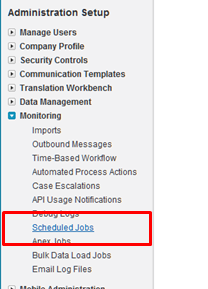
    2011.11.14int10

    To actually create the job itself, I had created an Apex class which schedules the job.

    global class CaseLookupJobScheduler
    {
        global void CaseLookupJobScheduler() {}
    
        public static void start()
        {
     		// takes in seconds, minutes, hours, day of month, month and day of week
    		//the statement below tries to schedule every 5 min, but SFDC only allows hourly
            System.schedule('Case Queue Lookup', '0 5 1-23 * * ?', new doCaseLookup());
        }
    }
    

    Note that I use the System.schedule operation. While my statement above says to schedules the doCaseLookup function to run every 5 minutes, in reality, it won’t.  Salesforce.com restricts these jobs from running too frequently and keeps jobs from running more than once per hour. One could technically game the system by using some of the ten allowable polling jobs to set of a series of jobs that start at different times of the hour. I’m not worrying about that here. To invoke this function and schedule the job, I first went to the System Log menu.

    2011.11.14int12

    From here, I can execute Apex code.  So, I can call my start() function, which should schedule the job.

    2011.11.14int13

    Now, if I view the Scheduled Jobs view from the Setup screens, I can see that my job is scheduled.

    2011.11.14int14

    This job is now scheduled to run every hour.  This means that each hour, the queue is polled and any found messages are added to Salesforce.com as cases.  You could use a mix of both solutions and manually poll if you want to (through a button) but allow true asynchronous processing on all ends.

    Summary

    Asynchronous messaging is a great way to build scalable, loosely coupled systems. A durable intermediary helps provide assurances of message delivery, but this patterns works without it as well.  The demonstrations in this post shows how two cloud solutions can asynchronously exchange data through the use of a shared queue that sits between them.  The publisher to the queue has no idea who will retrieve the message and the retrievers have no direct connection to those who publish messages.  This makes for a very maintainable solution.

    My goal with these posts was to demonstrate that classic Integration patterns work fine in cloudy environments. I think it’s important to not throw out existing patterns just because new technologies are introduced. I hope you enjoyed this series.

  • When to use SDKs and when to go “Go Native”

    I’m going to China next week to speak at QCon and have spent the last few weeks building up some (hopefully interesting) demos.  One of my talks is on “cloud integration patterns” and my corresponding demos involve Windows Azure, a .NET client application, Salesforce.com, Amazon Web Services (AWS) and Cloud Foundry. Much of the integration that I show uses AWS storage and I had to decide whether I should try and use their SDKs or go straight at their web service interface.  More and more, that seems to be a tough choice.

    Everyone loves a good SDK. AWS has SDKs for Java, .NET, Ruby and PHP. Microsoft provides an SDK for .NET, Java, PHP and Ruby as well. However, I often come across two issues when using SDKs:

    1. Lack of SDK for every platform. While many vendors do a decent job of providing toolkits and SDKs for key languages, you never see one for everything.  So, even if you the SDK for one app, you may not have it for another.  In my case, I could have used the AWS SDK for .NET for my “on-premises” application, but would have still likely needed to figure out the native API for the Salesforce.com and Cloud Foundry apps.
    2. Abstraction of API details. It’s interesting that we continue to see layers of abstraction added to technology stacks.  The difference between using the native, RESTful API for the Azure AppFabric Service Bus (think using HttpWebRequest) is pretty different than using the SDK objects. However, there’s something to be said for understanding what’s actually happening when consuming a service.  SDKs frequently hide so much detail that the developer has no idea what’s really going on.  Sometimes that’s fine, but to point #1, the information about using an SDK is rarely portable to environments where no SDK exists.

    I’ll write up the details of my QCon demos in a series of blog posts, but needless to say, using the AWS REST API is much different than going through the SDK.  The SDK makes it very simple to query or update SimpleDB for example, but the native API requires some knowledge about formatting the timestamp, creating a hashed signature string and parsing the response.  I decided early on to go at the REST API instead of the .NET SDK for AWS, and while it took longer to get my .NET-based integration working, it was relatively easy to take the same code (language changes notwithstanding) and load it into Cloud Foundry (via Ruby) and Salesforce.com (via Apex). Also, I now really understand how to securely interact with AWS storage services, regardless of platform.  I wouldn’t know this if I only used the SDK.

    I thought of this issue again when reading a great post on using the new Azure Service Bus Queues. The post clearly explains how to use the Azure AppFabric SDK to send and receive messages from Queues.  But when I finished, I also realized that I haven’t seen many examples of how to do any of the new Service Bus things in non-.NET environments.  I personally think that Microsoft can tell an amazing cloud integration story if they just make it clearer how to use their Service Bus resources on any platform.  Would we be better off seeing more examples of leveraging the Service Bus from a diverse set of technologies?

    So what do you think?  Do SDKs make us lazy developers, or are we smarter for not concerning ourselves with plumbing if a vendor has reliably abstracted it for us?  Or should developers first work with the native APIs, and then decide if their production-ready code should use an SDK instead?

  • Interview Series: Four Questions With … Scott Seely

    Autumn is upon us, but the Four Questions continue.  Welcome to the 35th interview in my ongoing series of chats with “connected technology” thought leaders.  This month, we’ve wrangled Scott Seely (@sseely) who is a consultant, Microsoft MVP, Microsoft Regional Director, noted author, and Pluralsight trainer. Scott is a smart fellow on topics like distributed computing and building big apps that work!

    Let’s jump in.

    Q: You have a Pluralsight course named “WCF for Architects.” In a nutshell, what are the core aspects of WCF that an architect should know, even if they won’t ever dig into the framework or build a service themselves?

    A: Architects should know that WCF has all the facilities and hooks one might need to build a robust messaging system. Architects should spend time thinking about how their WCF services will interact with other consumers and what technologies the consumers use. This knowledge will assist in picking appropriate versioning policies, message formats, and security for any services their applications expose. For example, if I know that my clients will primarily be PHP and Ruby, I will make different choices than for a .NET or Java based client.

    Q: As we continue to build bigger systems that span applications and organizations, where does one even begin to start troubleshooting performance and functional problems?  How does one architect a solution to make it easier to analyze later on?  Or, if you get stuck taking on a system that is behaving badly, where do you begin?

    A: What I’ve seen is that really big interdependencies in a system creates a brittle system. One should take advantage of the fact that we can build discrete, interconnected systems. These systems can be composed of many special purpose, simple, standalone processes. Each system should provide a special service (send email, process payments, manage customers) and do that one thing well. Other systems then consume those endpoints as services. It then becomes simpler to manage and debug the systems that are unresponsive or behaving badly. You do need to spend a lot of time thinking about application manageability at this level: logging, health monitoring, and so on are important design items along with the business processes that are being automated. For each system, what you will do is ask and answer these questions:

    • How can I tell that this feature is healthy?
    • What should happen when the feature becomes unhealthy?
    • How can I log this?
    • When should a human be notified via email, telephone, etc.?

    If you are analyzing a system that is behaving badly, you need to start with basic “is it plugged in?” type testing. This is exactly what it sounds like: analyze the components in the system and make sure that each connection is functioning correctly. All too often, this is what is actually wrong. It might be a changed password, and downed database, or something else. The connections frequently point to the exact problem. After that, look for the logging that was implemented. This might be the Windows Event Log, log4net files, or something else. You need to figure out which system or systems actually has an issue, then begin fixing there. It helps to know what “normal” is for the system as well.

    Q: Although you are a Pluralsight instructor and possibly biased, what do you think is the preferred way for developers/architects today to learn new technologies?  Are books passé, in favor of articles/blogs/videos/podcasts?  Over the past 6 months, which educational medium have you employed to learn something new?

    A: I think that written materials have never been the preferred way for humans to learn. We are social animals and we tend to learn best through storytelling, demonstration, and experimentation. To learn new to you technologies, the best way seems to be to find a project and a mentor that can help you over any bumps in the road. Pluralsight is a great proxy for an actual mentor because we can tell the stories and demonstrate how to use the technology. Over the last 6 months, I’ve been using personal projects and mentors to learn new (to me) technology.

    Q [stupid question]: I recently got into a big Facebook debate with some friends over my claim that the movie The Fifth Element is the most rewatchable sci-fi movie of the last 15 years. I made this declaration based on the fact that it seems that whenever I catch that movie on TV, I almost always have to stop and watch it through.  What television show or movie sucks you in, regardless of how many times you have seen it?

    A: The movie that continues to do this for me is Rudy. Yeah, it’s a football movie, but it is also one of the best tales of how real people actually achieve their dreams. Real people who succeed look at where they want to be and then figure out what that path looks like. They enlist mentors to help figure out what the path looks like, adjust the path and the goal as they receive new information, and keep moving forward. While I’ve never been confused with an athlete, I have been confused with someone who had natural talent! There are a few moments in that movie that make me cry with joy every time I see it. When Rudy gets accepted to Notre Dame, when he gets onto the team, and when he gets to play on the field, I get so emotional because I’m reminded how exhilarating it is when years of planning and executing pay off. That realization happens in an instant and unleashes a wave a relief that all that work did have a purpose. For me, these moments happened upon receiving a final copy of my first book; my first day at Microsoft; my first day working on Indigo (aka WCF); and later teaching for companies like Wintellect and Pluralsight. Getting to that stage isn’t instantaneous. To the best of my knowledge, Rudy is the best portrayal of what that journey looks like and feels like.

    Thanks Scott! I will admit that the last scene in Rudy, where he sacks the quarterback and gets carried off the field, absolutely destroys me every time.

  • New Job, Same Place

    I’m a bit of a restless employee who is always looking for new things to work on and new challenges to tackle.  So, this recent change should hold me for a while.

    I’ve accepted a role as the lead functional architect for the Research and Development division of my biotechnology employer.  What this means is that I’m responsible for overseeing the technology direction of the R&D project portfolio and will be contributing to the division’s strategic plans. I have a small team of excellent architects who will be working for me as we figure out how to help our scientific teams use technology in ways that make drug discovery and development more efficient and cost-effective.

    While I’m no longer being paid to develop software or be a full-time project architect, I consider technology exploration a critical part of my job and have no intentions of giving that up! So, I hope that you’ll see more of the same on this blog.  I plan on keeping up my steady posting schedule and will continue to investigate technologies, discuss lessons learned and do my best to share interesting stuff.

    Just figured I’d share this so that if my blog topics veer all over, you have an idea why!

  • Now Online: My New Pluralsight Course on UML Modeling in Visual Studio 2010

    My second on-demand course for Pluralsight is now online. This course, Solution Modeling with UML in Visual Studio 2010, has three major components: how to build models, how to manage models and why to build models.

    First, I show how to create both behavioral diagrams (Use Case Diagrams, Activity Diagrams, Sequence Diagrams) and structural diagrams (Class Diagrams, Component Diagrams).  This focuses on the various UML shapes available for each diagram and how to put together a meaningful visualization.

    Next, I cover how to manage the model.  This includes using the UML Model Explorer to create, modify and reuse elements that go into UML model diagrams.  After that I show how to extend Visual Studio’s UML support by creating a custom stereotype that can be applied to model elements.  Finally, I demonstrate how you can take a UML model built in Sparx Enterprise Architect and import it into Visual Studio 2010.

    The last module of the course walks through WHY you’d build a particular UML model.  This includes the what (is the model type), why (create them), and who (builds and uses them).

    I’ve had fun doing courses for Pluralsight.  If you haven’t seen my first one, it’s about Integrating BizTalk Server with Windows Azure AppFabric.  Hopefully I can keep cranking out interesting material.  If you don’t have a Pluralsight subscription, I’d recommend taking a look.  In this day and age, it seems we all have less patience for books and frequently learn through targeted, high-impact training like Pluralsight On Demand.

  • WCF Routing Service Deep Dive: Part I–Comparing to BizTalk Server

    One common complaint about BizTalk Server is that it’s not particular lightweight (many moving parts) and isn’t easy for an expert .NET developer to pick up immediately. I suspect this is one reason why we’ve seen multiple other .NET service buses (e.g. nServiceBus) pop up as viable alternatives.

    So, when it was announced that WCF 4.0 would include a built-in “Routing Service”, this piqued my interest. To be clear, the Routing Service does NOT claim to be a service bus, nor should it, but, for many real-time message routing scenarios, it is actually a nice fit. I wrote about the Routing Service in my Applied Architecture Patterns book and you can read an excerpt of that chapter on the Packt Publishing site.  In a nutshell, the WCF Routing Service is a SOAP service broker that uses a variety of filters to steer traffic to specific endpoints. If you know how to build WCF services and deploy them to IIS, then you can very quickly learn how to leverage the Routing Service.

    But how does the Routing Service compare to BizTalk Server? Let’s line them up against a few key dimensions and see if this helps us choose the right tool for a given situation.  If an “X” is gray in color, then I’m indicating that a capability is supported, but isn’t implemented as robustly as the compared technology.

    Capability BTS WCF Comments
    Transport and Content
    Receive message via one protocol and route message through another X X Both technologies can translate transports.
    Multiple input transport channels X X BizTalk has more options, of course, since it supports LOB system adapters, and protocols such as FTP and POP3.
    Process multiple file formats X – The Routing Service only handles XML whereas BizTalk handles multiple other encodings.
    Accepts multiple message types through single endpoint X X This is the default behavior for the Routing Service.  BizTalk can do this with some adapters easier than others.
    Supports RESTful services – – Surprisingly, neither do.  Hopefully this comes in the next version of both technologies.
    Routing Rules
    Route based on body of the message X X BizTalk requires you to “promote” nodes to enable routing while Routing Service allows you to use XPath and route based on any node.  Difficult to leverage repeating nodes in BizTalk or easily add new routable ones.
    Route on both message metadata and endpoint metadata X X For the Routing Service, this includes the endpoint address, endpoint name and SOAP action
    Routing criteria can be aggregated. X X BizTalk allows a complex mix of criteria that can be combined with both “and” and “or” statements.  The Routing Service lets you “and” two distinct filters.
    Multiple recipients can receive the same message. X X Both technologies support multi-cast for async operations.
    Quality of Service
    Reliable delivery through retries on exception X X BizTalk allows you configure both the number of retries and interval between attempts while the Routing Service does some automatic retries for specific types of errors (e.g. timeouts).
    Reliable delivery through backup delivery endpoints X X Both technologies let you define a service (or endpoint) to route to if the primary transport fails.
    Reliable delivery through durable messaging X – BizTalk uses a “store and forward” pattern that ensures either delivery or persistence.  The Routing Service has no underlying backing store.
    Operations
    Configuration stored centrally in a database X – BizTalk configuration is stored in a central database while Routing Service relies on its XML configuration file.  In some cases, the agility of a file-based configuration may be preferred.

    While there are clearly a great number of reasons to leverage BizTalk for enterprise messaging (adapters, pub/sub engine, strong developer tooling, high availability, etc), for straightforward content-based routing scenarios, the WCF Routing Service is a great fit.

    This is the first blog post in a short series that explains some details of the WCF Routing Service including filter configuration, error handling and more.  Hope you stick around.

  • My Co-Authors Interviewed on Microsoft endpoint.tv

    You want this book!

    -Ron Jacobs, Microsoft

    Ron Jacobs (blog, twitter) runs the Channel9 show called endpoint.tv and he just interviewed Ewan Fairweather and Rama Ramani who were co-authors on my book, Applied Architecture Patterns on the Microsoft Platform.  I’m thrilled that the book has gotten positive reviews and seems to fill a gap in the offerings of traditional technology books.

    Ron made a few key observations during this interview:

    • As people specialize, they lose perspective of other ways to solve similar problems, and this book helps developers and architects “fill the gaps.”
    • Ron found the dimensions our “Decision Framework” to be novel and of critical importance when evaluating technology choices.  Specifically, evaluating a candidate architecture against design, development, operational and organizational factors can lead you down a different path than you might have expected.  Ron specifically liked the “organizational direction” facet which can be overlooked but should play a key role in technology choice.
    • He found the technology primers and full examples of such a wide range of technologies (WCF, WF, Server AppFabric, Windows Azure, BizTalk, SQL Server, StreamInsight) to be among the unique aspects of the book.
    • Ron liked how we actually addressed candidate architectures instead of jumping directly into a demonstration of a “best fit” solution.

    Have you read the book yet?  If so, I’d love to hear your (good or bad) feedback.  If not, Christmas is right around the corner, and what better way to spend the holidays than curling up with a beefy technology book?

  • Error with One-Way WSDL Operations and BizTalk Receive Locations

    Do you ever do WSDL-first web service development?  Regardless of the reason that you do this (e.g. you’re an architectural-purist, your mother didn’t hold you enough), this style of service design typically works fine with BizTalk Server solutions.  However, if you decide to build a one-way input service, you’ll encounter an annoying, but understandable error.

    Let’s play this scenario out.  I’ve hand-built a WSDL that takes in an “employee update” message through a one-way service.  That is, no response is needed by the party that invokes the service.

    The topmost WSDL node defines some default namespace values and then has a type declaration which describes our schema.

    <wsdl:definitions name="EmployeeUpdateService"
    targetNamespace="http://Seroter.OneWayWsdlTest.EmployeeProcessing"
    xmlns:wsdl="http://schemas.xmlsoap.org/wsdl/"
    xmlns:soap="http://schemas.xmlsoap.org/wsdl/soap/"
    xmlns:tns="http://Seroter.OneWayWsdlTest.EmployeeProcessing">
      <!-- declare types-->
      <wsdl:types>
        <xs:schema xmlns="http://Seroter.OneWayWsdlTest.EmployeeProcessing" xmlns:b="http://schemas.microsoft.com/BizTalk/2003" targetNamespace="http://Seroter.OneWayWsdlTest.EmployeeProcessing" xmlns:xs="http://www.w3.org/2001/XMLSchema">
          <xs:element name="EmployeeUpdate">
            <xs:complexType>
              <xs:sequence>
                <xs:element name="EmpId" type="xs:string" />
                <xs:element name="UpdateType" type="xs:string" />
                <xs:element name="DateUpdated" type="xs:string" />
              </xs:sequence>
            </xs:complexType>
          </xs:element>
        </xs:schema>
      </wsdl:types>
    

    Next, I defined my input message, port type with an operation that accepts that message, and then a binding that uses that port type.

    <!-- declare messages-->
      <wsdl:message name="Request">
        <wsdl:part name="part" element="tns:EmployeeUpdate" />
      </wsdl:message>
      <!-- decare port types-->
      <wsdl:portType name="EmployeeUpdate_PortType">
        <wsdl:operation name="PublishEmployeeRequest">
          <wsdl:input message="tns:Request" />
        </wsdl:operation>
      </wsdl:portType>
      <!-- declare binding-->
      <wsdl:binding name="EmployeeUpdate_Binding" type="tns:EmployeeUpdate_PortType">
        <soap:binding transport="http://schemas.xmlsoap.org/soap/http"/>
        <wsdl:operation name="PublishEmployeeRequest">
          <soap:operation soapAction="PublishEmployeeRequest"
          style="document"/>
          <wsdl:input>
            <soap:body use ="literal"/>
          </wsdl:input>
        </wsdl:operation>
      </wsdl:binding>
    

    Finally, I created a service declaration that has an endpoint URL selected.

    <!-- declare service-->
      <wsdl:service name="EmployeeUpdateService">
        <wsdl:port binding="tns:EmployeeUpdate_Binding" name="EmployeeUpdatePort">
          <soap:address location="http://localhost:8087/EmployeeUpdateService/Service.svc"/>
        </wsdl:port>
      </wsdl:service>
    </wsdl:definitions>
    

    I copied this WSDL to the root of my web server that so that it has a URL that can be referenced later.

    Let’s jump into a BizTalk project now.  Note that if you design a service this way (WSDL-first), you CAN use the BizTalk WCF Service Consuming Wizard to generate the schemas and orchestration messaging ports for a RECEIVE scenario.  We typically use this wizard to build artifacts to consume a service, but this actually works pretty well for building services as well.  Anyway, I’m going to take the schema definition from my WSDL and manually create a new XSD file.

    2010.12.05oneway01

    This is the only artifact I need to develop.  I deployed the BizTalk project and switched to the BizTalk Administration Console where I will build a receive port/location that hosts a WCF endpoint.   First though, I created a one-way Send Port which subscribes to my message’s type property and emits the file to disk.

    2010.12.05oneway02

    Next I added a new one-way receive port that will host the service.  It uses the WCF-Custom adapter so that I can host the service in-process instead of forcing me to physically build a service to reside in IIS.

    2010.12.05oneway03

    On the General tab I set the address to the value from the WSDL (http://localhost:8087/EmployeeUpdateService/Service.svc).  On the Binding tab I chose the basicHttpBinding.  Finally, on the Behavior tab, I added a Service Behavior and selected the serviceMetadata behavior from the list.  I set the externalMetadataLocation to the URL of my custom WSDL and flipped the httpGetEnabled value to True.

    2010.12.05oneway04

    If everything is configured correctly, the receive location is started, and the BizTalk host is started (and thus, the WCF service host is opened), I can hit the URL of my BizTalk endpoint and see the metadata page.

    2010.12.05oneway05

    All that’s left to do is consume this service.  Instead of building a custom application that calls this service, I can leverage the WCF Test Client that ships with the .NET Framework.  After adding a reference to my BizTalk-hosted service, and invoking the service, two things happened.  First, the message is successfully processed by BizTalk and a file is dropped to disk (via my Send Port).  But secondly, and most important, my service call resulted in an error:

    The one-way operation returned a non-null message with Action=”.

    Yowza.  While I could technically catch that error in code and just ignore it (since BizTalk processed everything just fine), that’d be pretty lazy.  We want to know why this happened!  I got this error because a“one way” BizTalk receive location still sends a message back to the caller and my service client wasn’t expecting it.  A WSDL file with a true one-way operation results in a WCF client that expects an IsOneWay=true interaction pattern.  However, BizTalk doesn’t support true one-way interactions.  It supports operations that return no data (e.g. “void”) only.  So, by putting a hand-built WSDL that demanded an asynchronous service on a BizTalk receive location that cannot support it, we end up with a mismatch.

    How do I fix this?  Actually, it’s fairly simple.  I returned to my hand-built WSDL and added a new, empty message declaration.

    <!-- declare messages-->
      <wsdl:message name="Request">
        <wsdl:part name="part" element="tns:EmployeeUpdate" />
      </wsdl:message>
      <wsdl:message name="Response" />
    

    I then made that message the output value of my operation in both my port type and binding.

    <!-- decare port types-->
      <wsdl:portType name="EmployeeUpdate_PortType">
        <wsdl:operation name="PublishEmployeeRequest">
          <wsdl:input message="tns:Request" />
          <wsdl:output message="tns:Response" />
        </wsdl:operation>
      </wsdl:portType>
      <!-- declare binding-->
      <wsdl:binding name="EmployeeUpdate_Binding" type="tns:EmployeeUpdate_PortType">
        <soap:binding transport="http://schemas.xmlsoap.org/soap/http"/>
        <wsdl:operation name="PublishEmployeeRequest">
          <soap:operation soapAction="PublishEmployeeRequest"
          style="document"/>
          <wsdl:input>
            <soap:body use ="literal"/>
          </wsdl:input>
          <wsdl:output>
            <soap:body use ="literal"/>
          </wsdl:output>
        </wsdl:operation>
      </wsdl:binding>
    

    After copying the WSDL back to IIS (so that my service’s metadata was up to date), I refreshed the service in the WCF Test Client.  I called the service again, and this time, got no error while the file was once again successfully written to disk by the send port.

    2010.12.05oneway06

    BizTalk Server, and the .NET Framework in general, have decent, but not great support for WSDL-first development.  Therefore, it’s wise to be aware of any gotchas or quirks when going this route.

  • Book’s Sample Chapter, Articles and Press Release

    The book is now widely available and our publisher is starting up the promotion machine.  At the bottom of this post is the publisher’s press release.  Also, we now have one sample chapter online (Mike Sexton’s Debatching Bulk Data) as well as two articles representing some of the material from my Content Based Routing chapter (Part 1 – Content Based Routing on the Microsoft Platform, Part II – Building the Content Based Routing Solution on the Microsoft Platform).  This hopefully provides a good sneak peak into the book’s style.

    ## PRESS RELEASE ##

    Solve business problems on the Microsoft application platform using Packt’s new book

     Applied Architecture Patterns on the Microsoft Platform is a new book from Packt that offers an architectural methodology for choosing Microsoft application platform technologies. Written by a team of specialists in the Microsoft space, this book examines new technologies such as Windows Server AppFabric, StreamInsight, and Windows Azure Platform, and their application in real-world solutions.

     Filled with live examples on how to use the latest Microsoft technologies, this book guides developers through thirteen architectural patterns utilizing code samples for a wide variety of technologies including Windows Server AppFabric, Windows Azure Platform AppFabric, SQL Server (including Integration Services, Service Broker, and StreamInsight), BizTalk Server, Windows Communication Foundation (WCF), and Windows Workflow Foundation (WF).

     This book is broken down into 4 different sections. Part 1 starts with getting readers up to speed with various Microsoft technologies. Part 2 concentrates on messaging patterns and the inclusion of use cases highlighting content-based routing. Part 3 digs into bulk data processing, and multi-master synchronization. Finally the last part covers performance-related patterns including low latency, failover to the cloud, and reference data caching.

     Developers can learn about the core components of BizTalk Server 2010, with an emphasis on BizTalk Server versus Windows Workflow and BizTalk Server versus SQL Server. They will not only be in a position to develop their first Windows Azure Platform AppFabric, and SQL Azure applications but will also learn to master data management and data governance of SQL Server Integration Services, Microsoft Sync Framework, and SQL Server Service Broker.

     Architects, developers, and managers wanting to get up to speed on selecting the most appropriate platform for a particular problem will find this book to be a useful and beneficial read. This book is out now and is available from Packt. For more information, please visit the site.

    [Cross posted on Book’s dedicated website]

  • And … The New Book is Released

    Nearly 16 months after a book idea was born, the journey is now complete.  Today, you can find our book, Applied Architecture Patterns on the Microsoft Platform, in stock at Amazon.com and for purchase and download at the Packt Publishing site.

    I am currently in Stockholm along with co-authors Stephen Thomas and Ewan Fairweather delivering a 2 day workshop for the BizTalk User Group Sweden.  We’re providing overviews of the core Microsoft application platform technologies and then excerpting the book to show how we analyzed a particular use case, chose a technology and then implemented it.  It’s our first chance to see if this book was a crazy idea, or actually useful.  So far, the reaction has been positive.  Of course, the Swedes are such a nice bunch that they may just be humoring me.

    I have absolutely no idea how this book will be received by you all.  I hope you find it to be a unique tool for evaluating architecture and building solutions on Microsoft technology.  If you DON’T like it, then I’ll blame this book idea on Ewan.