Category: General Architecture

  • Book Review: The New Kingmakers

    I just finished reading the fascinating new mini-eBook “The New Kingmakers” from Redmonk co-founder Stephen O’Grady. This book represents a more in-depth analysis of a premise put forth by O’Grady a couple years back: developers are the single most important constituency in technology. O’Grady doubles-down on that claim here, and while I think he proves aspects of this, I wasn’t completely won over to that point of view.

    O’Grady starts off explaining that

    “If IT decision makers aren’t making the decisions any longer, who is calling the shots? The answer is developers. Developers are the most-important constituency in technology. They have the power to make or break businesses, whether by their preferences, their passions, or their own products.”

    He goes on to describe the extent to which organizations crave developer talent and how more and more acquisitions are about acquiring talent, not software. Because, as he states, EVERY company is in part a technology company, the value of competent coders has never been higher.

    His discussion of “how we got here” was powerful and called out the disruptions that have given developers unprecedented freedom to explore, create, and deploy software to the masses. Driven by open source software, cloud infrastructure, internet self promotion, and the new sources of seed money, developers are empowered as never before. O’Grady did an excellent job proving these points. At this stage of the eBook, my thought was “so you’ve proved that developers are valuable and now have amazing freedom, but I haven’t yet heard an argument that developers are truly driving the fortunes of established businesses.” Luckily, the next section was titled “The Evidence” so I hoped to hear more.

    O’Grady points out what a developer-centric world would look like, and proposes that we now exist in such a world. In this developer-driven world, we’d see greater technology diversity (which is counter to corporate objectives), growth in open source, lack of adoption of commercially-oriented technology standards, and vendors openly courting developers. Hard to disagree that all of those aren’t true today! O’Grady provides compelling proof points for each of these. However, in passing he says that “as developers have become more involved in the technology decision-making process, it has been no surprise to see the number of different technologies employed within a given business skyrocket.” I wish he had provided some additional case studies for the point that developers play an increasing role in technology decision-making, as that’s not something I’ve seen a ton of. Certainly developers are introducing more technology to the corporate portfolio, but at which companies are developers part of company-wide groups that assess and adopt technology?

    Next up, O’Grady reviews set of companies that have had a major impact on developers. He analyzes the positive contribution of Apple (in distributing the work of developers via apps), AWS (in making compute capacity readily accessible), Google (openly courting and rewarding developers), Microsoft (embracing open source), and Netflix (in asking developers to help with algorithms and consuming APIs). Finally, O’Grady outlines a series of suggestions for companies looking to successfully use developers as a strategic asset. I thought each of these suggestions were spot on, and I’ll encourage everyone at my company to read this eBook and absorb these points.

    So where was I left wanting? First, if O’Grady’s main point is that companies that treat developers as a strategic asset and constituency will experience greater success, then I’m 100% on board. Couldn’t agree more. But if that point is stretched further to say that developers are possibly the most important assets that ANY company has, then I didn’t see enough proof of that. I would have liked to see more evidence that developers are playing a greater role in corporate technology decisions, or heard about developers at Fortune 100 companies who fundamentally altered the company’s direction. It’s great that developers are influencing new media companies and startups, but what about case studies from boring old industries like government, healthcare, retail, utilities, and construction? Obviously each of those industries use a ton of technology, and often to great competitive advantage, but I would have liked to hear more stories from those businesses vs. the “easy” Netflix/Reddit/Spotify/Zynga tales.

    My second wish for this book (or follow up work) was to hear more about the responsibility of developers in this new reality. Developers (and I speak as someone who pretends to be one) aren’t known for their humility, and works like this should be balanced by reminders of the duties that developers have. For instance, it’s great that developers are more inclined to bring all sorts of technologies into a company, but will they be the ones responsible for maintaining 18 NoSQL database products? What about when they leave the company and no one else knows how to fix an application written in a cool language like Go? How about the tendency for developers to choose the latest and greatest technology while ignoring the proven technology that may have been a better fit for the situation? Or making decisions that optimize one part of a broader system at the expense of the greater architectural vision? If developers are the new Kingmakers, then I’d love to read O’Grady’s thoughts on how developers can lead this revolution in a way that promotes long term success for companies that depend on them. Maybe this book isn’t FOR developers as much as it’s ABOUT them, but I’m selfish like that!

    If you have a leadership role in ANY type of organization, you should read this book. It’s a fantastic look at the current state of technology and how developers can make or break a company. O’Grady also does a wonderful job proving that there’s never been a better time to be developing software. Hopefully he and the other smart fellows at Redmonk will continue to develop this thesis further and highlight both the successes and failures of developers in this new reality.

  • Book Review: Microsoft Windows Server AppFabric Cookbook

    It’s hard to write technical books nowadays. First off, technology changes so fast that there’s nearly a 100% chance that by the time a book is published, its subject has undergone some sort of update. Secondly, there is so much technical content available online that it makes books themselves feel downright stodgy and out-dated. So to succeed, it seems that a technical book must do one of two things: bring forth and entirely different perspective, or address a topic in a format that is easier to digest than what one would find online. This book, the Microsoft Windows Server AppFabric Cookbook by Packt Publishing, does the latter.

    I’ve worked with Windows Server AppFabric (or “Dublin” and “Velocity” as its components were once called) for a while, but I still eagerly accepted a review copy of this book to read. The authors, Rick Garibay and Hammad Rajjoub, are well-respected technologists, and more importantly, I was going on vacation and needed a good book to read on the flights! I’ll get into some details below, but in a nutshell, this is a well-written, easy to read book that covered new ground on a little-understood part of Microsoft’s application platform.

    AppFabric Caching is not something I’ve spent much hands-on time with, and it received strong treatment in this book. You’ll find good details on how and when to use it, and then a broad series of “recipes” for how to do things like install it, configure it, invoke it, secure it, manage it, and much more. I learned a number of things about using cache tags, regions, expiration and notifications, as well as how to use AppFabric cache with ASP.NET apps.

    The AppFabric Hosting chapters go into great depth on using AppFabric for WCF and WF services. I learned a bit more about using AppFabric for hosting REST services, and got a better understanding of some of those management knobs and switches that I used but never truly investigated myself. You’ll find good content on using it with WF services including recipes for persisting workflows, querying workflows, building custom tracking profiles and more. Where this book really excelled was in its discussion of management and scale-out. I got the sense that both authors have used this product in production scenarios and were revealing tidbits about lessons learned from years of experience. There were lots of recipes and tips about (automatically) deploying applications, building multi-node environments, using PowerShell for scripting activities, and securing all aspects of the product.

    I read this book on my Amazon Kindle, and minus a few inconsequential typos and formatting snafus, it was a pleasant experience. Despite having two authors, at no point did I detect a difference in style, voice or authority between the chapters. The authors made generous use of screenshots and code snippets and I can easily say that I learned a lot of new things about this product. Windows Server AppFabric SHOULD BE a no-brainer technology for any organization using WCF and WF. It’s a free and easy way to add better management and functionality to WCF/WF services. Even though its product roadmap is a bit unclear, there’s not a whole lot of lock-in that it involves (minus the caching) , so the risk of adoption is low. If you are using Windows Server AppFabric today, or even evaluating it, I’d strong suggest that you pick up a copy of this book so that you can better understand the use cases and capabilities of this underrated product.

  • Building a Node.js App to Generate Release Notes from Trello Cards

    One of the things that I volunteered for in my job as Product Manager at Tier 3 was the creation of release notes for our regular cloud software updates. It helps me stay up to date by seeing exactly what we’re pushing out. Lately we’ve been using Trello, the sweet project collaboration from Fog Creek software, to manage our product backlog and assign activities. To construct the August 1st release notes, I spent a couple hours scrolling through Trello “cards” (the individual items that are created for each “list” of activities) and formatting an HTML output. I figured that there was a more efficient way to build this HTML output, so I quickly built a Node.js application that leverages the Trello API to generate a scaffolding of software release notes.

    I initially started building this application as a C# WinForm as that’s been my default behavior for quick-and-dirty utility apps. However, after I was halfway through that exercise, I realized that I wanted a cleaner way to merge a dataset with an HTML template, and my WinForm app didn’t feel like the right solution. So, given that I had Node.js on my mind, I thought that its efficient use of templates would make for a more reusable solution. Here are the steps that I took to produce the application. You can grab the source code in my Github.

    First, I created an example Trello board (this is not real data) that I could try this against.

    2012.08.13notes01

    With that Trello board full of lists and cards, I created a new Node app that used the Express framework. Trello has a reasonably well documented API, and fortunately, there is also a Node module for Trello available. After creating an empty Express project and installing the Node module for Trello, I set out creating the views and controller necessary to collect input data and produce the desired HTML output.

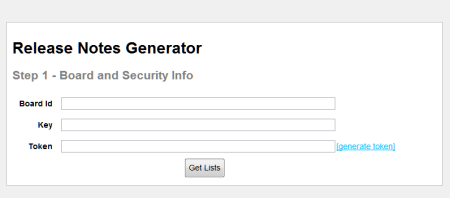
    To call the Trello API, you need access to the board ID, application key, and a security token. The board ID can be acquired from the browser URL. You can generate the application key by logging into Trello and visiting this URL on the Trello site. A token is acquired by crafting and then visiting a special URL and having the board owner approve the application that wants to access the board. Instead of asking the user to figure out the token part, I added a “token acquisition” helper function. The first view of the application (home.jade) collects the board ID, key and token from the user.

    2012.08.13notes02

    If the user clicks the “generate token” hyperlink, they are presented with a Trello page that asks them to authorize the application.

    2012.08.13notes03

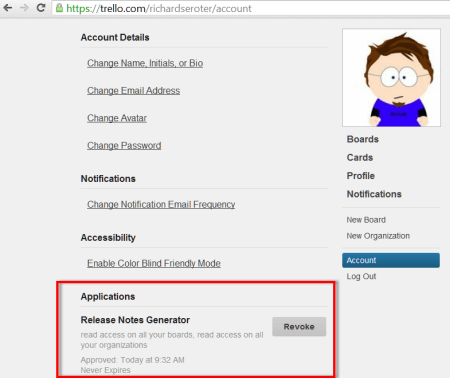
    If access is allowed, then the user is given a lengthy token value to provide in the API requests. I could confirm that this application had access to my account by viewing my Trello account details page.

    2012.08.13notes04

    After taking the generated token value and plugging it into the textbox on the first page of my Node application, I clicked the Get Lists button which posts the form to the corresponding route and controller function. In the chooselist function of the controller, I take the values provided by the user and craft the Trello URL that gets me all the lists for the chosen Trello board. I then render the list view and pass in a set of parameters that are used to draw the page.

    2012.08.13notes05

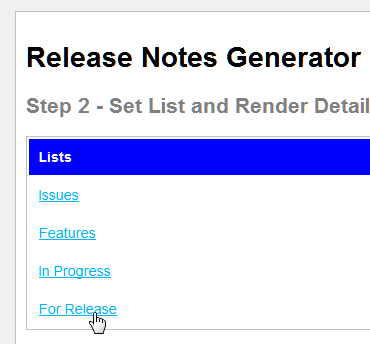
    I render all of the board’s lists at the top. When the user selects the list that has the cards to include in the Release Notes, I set a hidden form field to the chosen list’s ID (a long GUID value) and switch the color of the “Lists” section to blue.

    2012.08.13notes06

    At the bottom of the form, I give the user the opportunity to either group the cards (“New Features”, “Fixes”) or create a flat list by not grouping the cards. Trello cards can have labels/colors assigned to them, so you can set which color signifies bug fixes and which color is used for new features. In my example board (see above), the color red is used for bugs and the color green represents new features.

    2012.08.13notes07

    When the Create Release Notes button is clicked, the form is posted and the destination route is handled by the controller. In the controller’s generatenotes function, I used the Trello module for Node to retrieve all the cards from the selected list, and then either (a) loop through the results (if card grouping was chosen) and return distinct objects for each group, or (b) return an object containing all the cards if the “non grouping” option was chosen. In the subsequent notes page (releasenotes.jade), which you could replace to fit your own formatting style, the cards are put into a bulleted list. In this example, since I chose to group the results, I see two sections of bulleted items and item counts for each.

    2012.08.13notes08

    Now all I have to do is save this HTML file and pop in descriptions of each item. This should save me lots of time! I don’t claim to have written wonderful Javascript here, and I could probably use jQuery to put the first two forms on the same page, but hey, it’s a start. If you want to, fork the repo, make some improvements and issue a pull request. I’m happy to improve this based on feedback.

  • Installing and Testing the New Service Bus for Windows

    Yesterday, Microsoft kicked out the first public beta of the Service Bus for Windows software. You can use this to install and maintain Service Bus queues and topics in your own data center (or laptop!). See my InfoQ article for a bit more info. I thought I’d take a stab at installing this software on a demo machine and trying out a scenario or two.

    To run the Service Bus for Windows,  you need a Windows Server 2008 R2 (or later) box, SQL Server 2008 R2 (or later), IIS 7.5, PowerShell 3.0, .NET 4.5, and a pony. Ok, not a pony, but I wasn’t sure if you’d read the whole list. The first thing I did was spin up a server with SQL Server and IIS.

    2012.07.17sb03

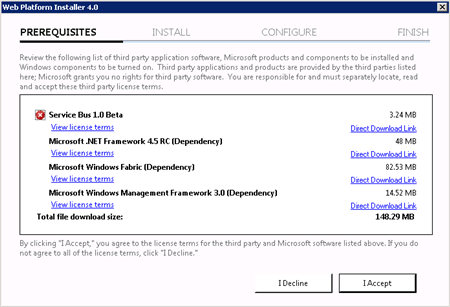
    Then I made sure that I installed SQL Server 2008 R2 SPI. Next, I downloaded the Service Bus for Windows executable from the Microsoft site. Fortunately, this kicks off the Web Platform Installer, so you do NOT have to manually go hunt down all the other software prerequisites.

    2012.07.17sb01

    The Web Platform Installer checked my new server and saw that I was missing a few dependencies, so it nicely went out and got them.

    2012.07.17sb02

    After the obligatory server reboots, I had everything successfully installed.

    2012.07.17sb04

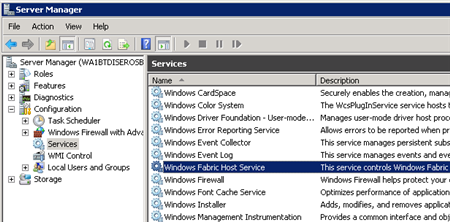
    I wanted to see what this bad boy installed on my machine, so I first checked the Windows Services and saw the new Windows Fabric Host Service.

    2012.07.17sb05

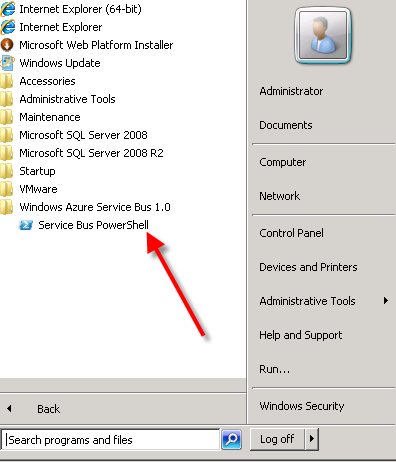
    I didn’t have any databases installed in SQL Server yet, no sites in IIS, but did have a new Windows permissions Group (WindowsFabricAllowedUsers) and a Service Bus-flavored PowerShell command prompt in my Start Menu.

    2012.07.17sb06

    Following the configuration steps outlined in the Help documents, I executed a series of PowerShell commands to set up a new Service Bus farm. The first command which actually got things rolling was New-SBFarm:

    $SBCertAutoGenerationKey = ConvertTo-SecureString -AsPlainText -Force -String [new password used for cert]
    
    New-SBFarm -FarmMgmtDBConnectionString 'Data Source=.;Initial Catalog=SbManagementDB;Integrated Security=True' -PortRangeStart 9000 -TcpPort 9354 -RunAsName 'WA1BTDISEROSB01\sbuser' -AdminGroup 'BUILTIN\Administrators' -GatewayDBConnectionString 'Data Source=.;Initial Catalog=SbGatewayDatabase;Integrated Security=True' -CertAutoGenerationKey $SBCertAutoGenerationKey -ContainerDBConnectionString 'Data Source=.;Initial Catalog=ServiceBusDefaultContainer;Integrated Security=True';
    

    When this finished running, I saw the confirmation in the PowerShell window:

    2012.07.17sb07

    But more importantly, I now had databases in SQL Server 2008 R2.

    2012.07.17sb08

    Next up, I needed to actually create a Service Bus host. According to the docs about the Add-SBHost command, the Service Bus farm isn’t considered running, and can’t offer any services, until a host is added. So, I executed the necessary PowerShell command to inflate a host.

    $SBCertAutoGenerationKey = ConvertTo-SecureString -AsPlainText -Force -String [new password used for cert]
    
    $SBRunAsPassword = ConvertTo-SecureString -AsPlainText -Force -String [password for sbuser account];
    
    Add-SBHost -FarmMgmtDBConnectionString 'Data Source=.;Initial Catalog=SbManagementDB;Integrated Security=True' -RunAsPassword $SBRunAsPassword -CertAutoGenerationKey $SBCertAutoGenerationKey;
    

    A bunch of stuff started happening in PowerShell …

    2012.07.17sb09

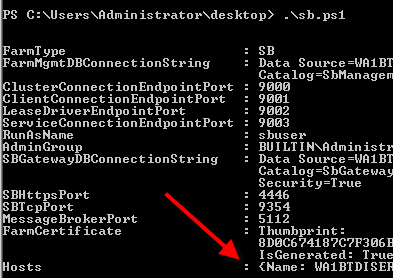
    … and then I got the acknowledgement that everything had completed, and I now had one host registered on the server.

    2012.07.17sb10

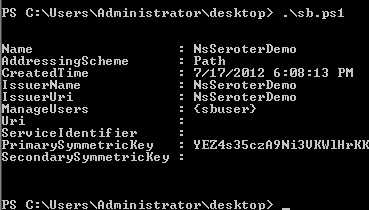
    I also noticed that the Windows Service (Windows Fabric Host Service) that was disabled before, was now in a Started state. Next I required a new namespace for my Service Bus host. The New-SBNamespace command generates the namespace that provides segmentation between applications. The documentation said that “ManageUser” wasn’t required, but my script wouldn’t work without it, So, I added the user that I created just for this demo.

    New-SBNamespace -Name 'NsSeroterDemo' -ManageUser 'sbuser';
    

    2012.07.17sb11

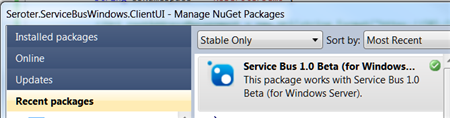
    To confirm that everything was working, I ran the Get-SbMessageContainer and saw an active database server returned. At this point, I was ready to try and build an application. I opened Visual Studio and went to NuGet to add the package for the Service Bus. The name of the SDK package mentioned in the docs seems wrong, and I found the entry under Service Bus 1.0 Beta .

    2012.07.17sb13

    In my first chunk of code, I created a new queue if one didn’t exist.

    //define variables
    string servername = "WA1BTDISEROSB01";
    int httpPort = 4446;
    int tcpPort = 9354;
    string sbNamespace = "NsSeroterDemo";
    
    //create SB uris
    Uri rootAddressManagement = ServiceBusEnvironment.CreatePathBasedServiceUri("sb", sbNamespace, string.Format("{0}:{1}", servername, httpPort));
    Uri rootAddressRuntime = ServiceBusEnvironment.CreatePathBasedServiceUri("sb", sbNamespace, string.Format("{0}:{1}", servername, tcpPort));
    
    //create NS manager
    NamespaceManagerSettings nmSettings = new NamespaceManagerSettings();
    nmSettings.TokenProvider = TokenProvider.CreateWindowsTokenProvider(new List() { rootAddressManagement });
    NamespaceManager namespaceManager = new NamespaceManager(rootAddressManagement, nmSettings);
    
    //create factory
    MessagingFactorySettings mfSettings = new MessagingFactorySettings();
    mfSettings.TokenProvider = TokenProvider.CreateWindowsTokenProvider(new List() { rootAddressManagement });
    MessagingFactory factory = MessagingFactory.Create(rootAddressRuntime, mfSettings);
    
    //check to see if topic already exists
    if (!namespaceManager.QueueExists("OrderQueue"))
    {
         MessageBox.Show("queue is NOT there ... creating queue");
    
         //create the queue
         namespaceManager.CreateQueue("OrderQueue");
     }
    else
     {
          MessageBox.Show("queue already there!");
     }
    

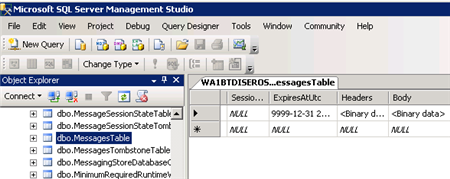
    After running this (directly on the Windows Server that had the Service Bus installed since my local laptop wasn’t part of the same domain as my Windows Server, and credentials would be messy), as my “sbuser” account, I successfully created a new queue. I confirmed this by looking at the relevant SQL Server database tables.

    2012.07.17sb14

    Next I added code that sends a message to the queue.

    //write message to queue
     MessageSender msgSender = factory.CreateMessageSender("OrderQueue");
    BrokeredMessage msg = new BrokeredMessage("This is a new order");
    msgSender.Send(msg);
    
     MessageBox.Show("Message sent!");
    

    Executing this code results in a message getting added to the corresponding database table.

    2012.07.17sb15

    Sweet. Finally, I wrote the code that pulls (and deletes) a message from the queue.

    //receive message from queue
    MessageReceiver msgReceiver = factory.CreateMessageReceiver("OrderQueue");
    BrokeredMessage rcvMsg = new BrokeredMessage();
    string order = string.Empty;
    rcvMsg = msgReceiver.Receive();
    
    if(rcvMsg != null)
    {
         order = rcvMsg.GetBody();
         //call complete to remove from queue
         rcvMsg.Complete();
     }
    
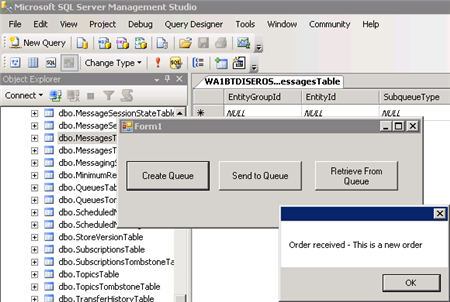
    MessageBox.Show("Order received - " + order);
    

    When this block ran, the application showed me the contents of the message, and upon looking at the MessagesTable again, I saw that it was empty (because the message had been processed).

    2012.07.17sb16

    So that’s it. From installation to development in a few easy steps. Having the option to run the Service Bus on any Windows machine will introduce some great scenarios for cloud providers and organizations that want to manage their own message broker.

  • Book Review: The REST API Design Handbook

    I’ve read a handful of books about REST, API design, and RESTful API design, but I’ve honestly never read a great book that effectively balanced the theory and practice. That changed when I finished reading enstratus CTO George Reese’s new ebook, The REST API Design Handbook.

    I liked this book. A lot. Not quite a whitepaper, not exactly a full-length book, this eBook from Reese is a succinct look at the factors that go into RESTful API design. Reese’s deep background in this space lent instant credibility to this work and he freely admits his successes and failures in his pursuit to build a useful API for his customers.

    I found the book to be quite practical. Reese isn’t a religious fanatic about one technology or the other and openly claims that SOAP is the fastest technology for building distributed applications and that XML can often be a valid choice for a situation (e.g. streaming data). However, Reese correctly points out that one of the main problems with SOAP is its hidden complexity and he frames the REST vs. SOAP  argument as one of “simplicity vs. complexity.” He spent just enough time on the “why REST?” question to influence my own thinking on the reasons that REST makes good sense for APIs.

    That said, Reese points out the various places where a RESTful API can go horribly wrong. He highlighted cases of not applying the uniform interface (and just doing HTTP+XML and calling it REST), unnecessarily coupling the API resource model to the underlying implementation (e.g. using objects that are direct instantiations of database tables), and doing ineffective or inefficient authentication. Reese says that authentication is the hardest thing to do in a RESTful API, and he spends considerable time evaluating the options and conveying his preferences.

    Reese deviated a bit when discussing API polling which he calls “the most common legitimate (but generally pointless) use of an API.” Here he goes into the steps necessary to build an (asynchronous) event notification system that reduces the need for wasteful polling. This topic didn’t directly address RESTful API design, but I appreciated this brief discussion as it is an oft-neglected part of management APIs.

    Overall, to do RESTful APIs right, Reese reiterates the importance of sticking to the uniform interface, not creating your own failure codes, not ever deprecating and breaking client code (regardless of the messiness that this results in), and building a foundation that will cleanly scale in a straightforward way. I really enjoyed the practical tips that were strewn about the book and will definitely use the various design checklists when I’m working on interfaces for Tier 3.

    Definitely consider picking up this affordable ebook that will likely impact how you build your next service API.

  • Should Enterprise IT Offer a “Dollar Menu”?

    It seems that there is still so much friction in the request and fulfillment of IT services. Need a quick task tracking website? That’ll take a change request, project manager, pair of business analysts, a few 3rd party developers and a test team. Want a report to replace your Excel workbook pivot charts? Let’s ramp up a project to analyze the domain and scope out a big BI program. Should enterprise IT departments offer a “dollar menu” instead of selling all their service as expensive hamburgers?

    To be sure, there are MANY times when you need the rigor that IT departments seem to relish. Introducing large systems or deploying a master data management strategy both require significant forethought and oversight to ensure success. There are even those small projects that have broader impacts and require the ceremony of a full IT team. But wouldn’t enterprise IT teams be better off if they had offered some quick-value services delivered by a SWAT team of highly trained resources?

    My company recently piloted a “walk up” IT services center where anyone can walk in and have simple IT requests fulfilled. Need a new mouse? Here you go. Having problems with your laptop OS? We’ll take a look. It’s awesome. No friction, and dramatically faster than opening a ticket with a help desk and waiting 3 days to hear something back. It’s the dollar menu (simple services, no frills) vs. the expensive burger (help desk support).

    Why shouldn’t other IT (software) services work this way? Need a basic website that does simple data collection? We can offer up to 32 man hours to do the work. Need to securely exchange data with a partner? Here’s the accelerated channel through a managed file transfer product. So what would it require to do this? Obviously full support from IT leaders, but also, you probably need a strong public/private Platform-as-a-Service environment, a good set of existing (web) services, and a mature level of IT automation. You’d also likely need a well documented reference architecture so that you don’t constantly reinvent the wheel on topics like identity management, data access, and the like.

    Am I crazy? Is everyone else already doing this? Do you think that there should be a class of services on the “menu” that people can order knowing full well that the service is delivered in a fast,  but basic fashion? What else would be on that list?

  • Interview Series: Four Questions With … Dean Robertson

    I took a brief hiatus from my series of interviews with “connected systems” thought leaders, but we’re back with my 39th edition. This month, we’re chatting with Dean Robertson who is a longtime integration architect, BizTalk SME, organizer of the Azure User Group in Brisbane, and both the founder and Technology Director of Australian consulting firm Mexia. I’ll be hanging out in person with Dean and his team in a few weeks when I visit Australia to deliver some presentations on building hybrid cloud applications.

    Let’s see what Dean has to say.

    Q: In the past year, we’ve seen a number of well known BizTalk-oriented developers embrace the new Windows Azure integration services. How do you think BizTalk developers should view these cloud services from Microsoft? What should they look at first, assuming these developers want to explore further?

    A: I’ve heard on the grapevine that a number of local BizTalk guys down here in Australia are complaining that Azure is going to take away our jobs and force us all to re-train in the new technologies, but in my opinion nothing could be further from the truth.

    BizTalk as a product is extremely mature and very well understood by both the developer & customer communities, and the business problems that a BizTalk-based EAI/SOA/ESB solution solves are not going to be replaced by another Microsoft product anytime soon.  Further, BizTalk integrates beautifully with the Azure Service Bus through the WCF netMessagingBinding, which makes creating hybrid integration solutions (that span on-premises & cloud) a piece of cake.  Finally the Azure Service Bus is conceptually one big cloud-scale BizTalk messaging engine anyway, with secure pub-sub capabilities, durable message persistence, message transformation, content-based routing and more!  So once you see the new Azure integration capabilities for what they are, a whole new world of ‘federated bus’ integration architectures reveal themselves to you.  So I think ‘BizTalk guys’ should see the Azure Service Bus bits as simply more tools in their toolbox, and trust that their learning investments will pay off when the technology circles back to on-premises solutions in the future.

    As for learning these new technologies, Pluralsight has some terrific videos by Scott Seely and Richard Seroter that help get the Azure Service Bus concepts across quickly.  I also think that nothing beats downloading the latest bits from MS and running the demo’s first hand, then building their own “Hello Cloud” integration demo that includes BizTalk.  Finally, they should come along to industry events (<plug>like Mexia’s Integration Masterclass with Richard Seroter</plug> 🙂 ) and their local Azure user groups to meet like-minded people love to talk about integration!

    Q: What integration problem do you think will get harder when hybrid clouds become the norm?

    A: I think Business Activity Monitoring (BAM) will be the hardest thing to consolidate because you’ll have integration processes running across on-premises BizTalk, Azure Service Bus queues & topics, Azure web & worker roles, and client devices.  Without a mechanism to automatically collect & aggregate those business activity data points & milestones, organisations will have no way to know whether their distributed business processes are executing completely and successfully.  So unless Microsoft bring out an Azure-based BAM capability of their own, I think there is a huge opportunity opening up in the ISV marketplace for a vendor to provide a consolidated BAM capture & reporting service.  I can assure you Mexia is working on our offering as we speak 🙂

    Q: Do you see any trends in the types of applications that you are integrating with? More off-premise systems? More partner systems? Web service-based applications?

    A: Whilst a lot of our day-to-day work is traditional on-premises SOA/EAI/ESB, Mexia has also become quite good at building hybrid integration platforms for retail clients by using a combination of BizTalk Server running on-premises at Head Office, Azure Service Bus queues and topics running in the cloud (secured via ACS), and Windows Service agents installed at store locations.  With these infrastructure pieces in place we can move lots of different types of business messages (such as sales, stock requests, online orders, shipping notifications etc) securely around world with ease, and at an infinitesimally low cost per message.

    As the world embraces cloud computing and all of the benefits that it brings (such as elastic IT capacity & secure cloud scale messaging) we believe there will be an ever-increasing demand for hybrid integration platforms that can provide the seamless ‘connective tissue’ between an organisations’ on-premises IT assets and their external suppliers, branch offices, trading partners and customers.

    Q [stupid question]: Here in the States, many suburbs have people on the street corners who swing big signs that advertise things like “homes for sales!’ and “furniture – this way!” I really dislike this advertising model because they don’t broadcast traditional impulse buys. Who drives down the street, sees one of these clowns and says “Screw it, I’m going to go pick up a new mattress right now.” Nobody. For you, what are your true impulse purchases where you won’t think twice before acting on an urge, and plopping down some money.

    A: This is a completely boring answer, but I cannot help myself on www.amazon.com.  If I see something cool that I really want to read about, I’ll take full advantage of the ‘1-click ordering’ feature before my cognitive dissonance has had a chance to catch up.  However when the book arrives either in hard-copy or on my Kindle, I’ll invariably be time poor for a myriad of reasons (running Mexia, having three small kids, client commitments etc) so I’ll only have time to scan through it before I put it on my shelf with a promise to myself to come back and read it properly one day.  But at least I have an impressive bookshelf!

    Thanks Dean, and see you soon!

  • Doing a Multi-Cloud Deployment of an ASP.NET Web Application

    The recent Azure outage once again highlighted the value in being able to run an application in multiple clouds so that a failure in one place doesn’t completely cripple you. While you may not run an application in multiple clouds simultaneously, it can be helpful to have a standby ready to go. That standby could already be deployed to backup environment, or, could be rapidly deployed from a build server out to a cloud environment.

    https://twitter.com/#!/jamesurquhart/status/174919593788309504

    So, I thought I’d take a quick look at how to take the same ASP.NET web application and deploy it to three different .NET-friendly public clouds: Amazon Web Services (AWS), Iron Foundry, and Windows Azure. Just for fun, I’m keeping my database (AWS SimpleDB) separate from the primary hosting environment (Windows Azure) so that my database could be available if my primary, or backup (Iron Foundry) environments were down.

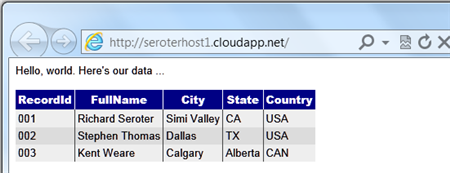
    My application is very simple: it’s a Web Form that pulls data from AWS SimpleDB and displays the results in a grid. Ideally, this works as-is in any of the below three cloud environments. Let’s find out.

    Deploying the Application to Windows Azure

    Windows Azure is a reasonable destination for many .NET web applications that can run offsite. So, let’s see what it takes to push an existing web application into the Windows Azure application fabric.

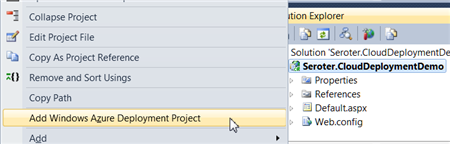
    First, after confirming that I had installed the Azure SDK 1.6, I right-clicked my ASP.NET web application and added a new Azure Deployment project.

    2012.03.05cloud01

    After choosing this command, I ended up with a new project in this Visual Studio solution.

    2012.03.05cloud02

    While I can view configuration properties (how many web roles to provision, etc), I jumped right into Publishing without changing any settings. While there was a setting to add an Azure storage account (vs. using local storage), but I didn’t think I had a need for Azure storage.

    The first step in the Publishing process required me to supply authentication in the form of a certificate. I created a new certificate, uploaded it to the Windows Azure portal, took my Azure account’s subscription identifier, and gave this set of credentials a friendly name.

    2012.03.05cloud03

    I didn’t have any “hosted services” in this account, so I was prompted to create one.

    2012.03.05cloud04

    With a host created, I then left the other settings as they were, with the hope of deploying this app to production.

    2012.03.05cloud05

    After publishing, Visual Studio 2010 showed me the status of the deployment that took about 6-7 minutes.

    2012.03.05cloud06

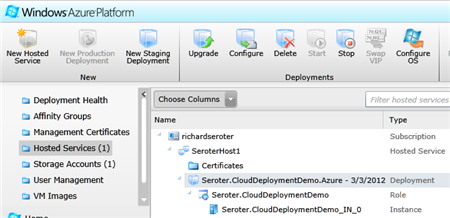
    An Azure hosted service and single instance were provisioned. A storage account was also added automatically.

    2012.03.05cloud07

    I had an error and updated my configuration file to show the error, and that update took another 5 minutes (upon replacing the original). The error was that the app couldn’t load the AWS SDK component that was referenced. So, I switched the AWS SDK dll to “copy local” in the ASP.NET application project and once again redeployed my application. This time it worked fine, and I was able to see my SimpleDB data from my Azure-hosted ASP.NET website.

    2012.03.05cloud08

    Not too bad. Definitely a bit of upfront work to do, but subsequent projects can reuse the authentication-related activities that I completed earlier. The sluggish deployment times really stunt momentum, but realistically, you can do some decent testing locally so that what gets deployed is pretty solid.

    Deploying the Application to Iron Foundry

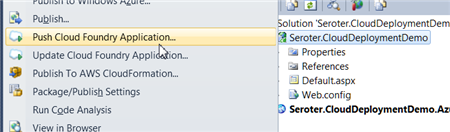
    Tier3’s Iron Foundry is the .NET-flavored version of VMware’s popular Cloud Foundry platform. Given that you can use Iron Foundry in your own data center, or in the cloud, it’s something that developers should keep a close eye on. I decided to use the Cloud Foundry Explorer that sits within Visual Studio 2010. You can download it from the Iron Foundry site. With that installed, I can right-click my ASP.NET application and choose to Push Cloud Foundry Application.

    2012.03.05cloud09

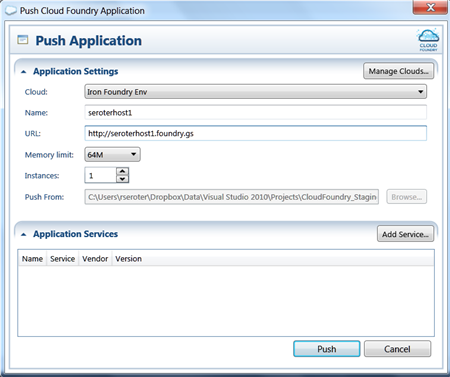
    Next, if I hadn’t previously configured access to the Iron Foundry cloud, I’d need to create a connection with the target API and my valid credentials. With the connection in place, I set the name of my cloud application and clicked Push.

    2012.03.05cloud18

    In under 60 seconds, my application was deployed and ready to look at.

    2012.03.05cloud19

    What if a change to the application is needed? I updated the HTML, right clicked my project and chose to Update Cloud Foundry Application. Once again, in a few seconds, my application was updated and I could see the changes. Taking an existing ASP.NET and moving to Iron Foundry doesn’t require any modifications to the application itself.

    If you’re looking for a multi-language, on-or-off premises PaaS, that is easy to work with, then I strongly encourage you to try Iron Foundry out.

    Deploying the Application to AWS via CloudFormation

    While AWS does not have a PaaS, per se, they do make it easy to deploy apps in a PaaS-like way via CloudFormation. Via CloudFormation, I can deploy a set of related resources and manage them as one deployment unit.

    From within Visual Studio 2010, I right-clicked my ASP.NET web application and chose Publish to AWS CloudFormation.

    2012.03.05cloud11

    When the wizard launches, I was asked to choose one of two deployment templates (single instance or multiple, load balanced instances).

    2012.03.05cloud12

    After selecting the single instance template, I kept the default values in the next wizard page. These settings include the size of the host machine, security group and name of this stack.

    2012.03.05cloud13

    On the next wizard pages, I kept the default settings (e.g. .NET version) and chose to deploy my application. Immediately, I saw a window in Visual Studio that showed the progress of my deployment.

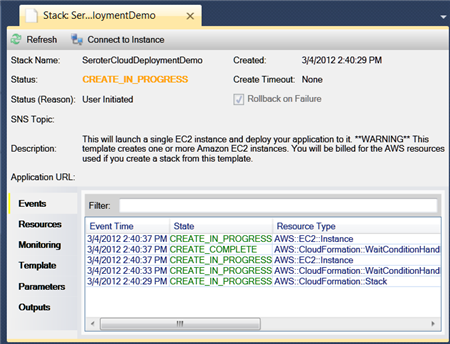
    2012.03.05cloud14

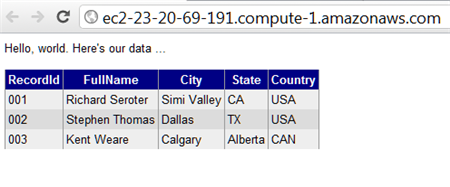
    In about 7 minutes, I had a finished deployment and a URL to my application was provided. Sure enough, upon clicking that link, I was sent to my web application running successfully in AWS.

    2012.03.05cloud15

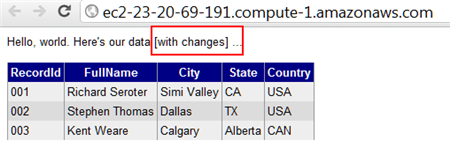
    Just to compare to previous scenarios, I went ahead and made a small change to the HTML of the web application and once again chose Publish to AWS CloudFormation from the right-click menu.

    2012.03.05cloud16

    As you can see, it saw my previous template, and as I walked through the wizard, it retrieved any existing settings and allowed me to make any changes where possible. When I clicked Deploy again, I saw that my package was being uploaded, and in less than a minute, I saw the changes in my hosted web application.

    2012.03.05cloud17

    So while I’m still leveraging the AWS infrastructure-as-a-service environment, the use of CloudFormation makes this seem a bit more like an application fabric. The deployments were very straightforward and smooth, arguably the smoothest of all three options shown in this post.

    Summary

    I was able to fairly easily take the same ASP.NET website and from Visual Studio 2010, deploy to three distinct clouds.  Each cloud has their own steps and processes, but each are fairly straightforward. Because Iron Foundry doesn’t require new VMs to be spun up, it’s consistently the faster deployment scenario. That can make a big difference during development and prototyping and should be something you factor into your cloud platform selection. Windows Azure has a nice set of additional services (like queuing, storage, integration), and Amazon gives you some best-of-breed hosting and monitoring. Tier 3’s Iron Foundry lets you use one of the most popular open source, multi-environment PaaS platforms for .NET apps. There are factors that would lead you to each of these clouds.

    This is hopefully a good bit of information to know when panic sets in over the downtime of a particular cloud. However, as you build your application with more and more services that are specific to a given environment, this multi-cloud strategy becomes less straightforward. For instance, if an ASP.NET application leverages SQL Azure for database storage, then you are still in pretty good shape when an application has to move to other environments. ASP.NET talks to SQL Server using the same ports and API, regardless of whether it’s using SQL Azure or a SQL instance deployed on an Amazon instance. But, if I’m using Azure Queues (or Amazon SQS for that matter), then it’s more difficult to instantly replace that component in another cloud environment.

    Keep all these portability concerns in mind when building your cloud-friendly applications!

  • Comparing AWS/Box/Azure for Managed File Transfer Provider

    As organizations continue to form fluid partnerships and seek more secure solutions than “give the partner VPN access to our network”, cloud-based managed file transfer (MFT) solutions seem like an important area to investigate. If your company wants to share data with another organization, how do you go about doing it today? Do you leverage existing (aging?) FTP infrastructure? Do you have an internet-facing extranet? Have you used email communication for data transfer?

    All of those previous options will work, but an offsite (cloud-based) storage strategy is attractive for many reasons. Business partners never gain direct access to your systems/environment, the storage in cloud environments is quite elastic to meet growing needs, and cloud providers offer web-friendly APIs that can be used to easily integrate with existing applications. There are downsides related to loss of physical control over data, but there are ways to mitigate this risk through server-side encryption.

    That said, I took a quick look at three possible options. There are other options besides these, but I’ve got some familiarity with all of these, so it made my life easier to stick to these three. Specifically, I compared the Amazon Web Services S3 service, Box.com (formerly Box.net), and Windows Azure Blob Storage.

    Comparison

    The criteria along the left of the table are primarily from the Wikipedia definition of MFT capabilities, along with a few additional capabilities that I added.

    Feature

    Amazon S3

    Box.com

    Azure Storage

    Multiple file transfer protocols HTTP/S (REST, SOAP) HTTP/S (REST, SOAP) HTTP/S (REST)
    Secure transfer over encrypted protocols HTTPS HTTPS HTTPS
    Securely storage of files AES-256 provided AES-256 provided (for enterprise users) No out-of-box; up to developer
    Authenticate users against central factors AWS Identity & Access Management Uses Box.com identities, SSO via SAML and ADFS Through Windows Azure Active Directory (and federation standards like OAuth, SAML)
    Integrate to existing apps with documented API Rich API Rich API Rich API
    Generate reports based on user and file transfer activities Can set up data access logs Comprehensive controls Apparently custom; none found.
    Individual file size limit 5 TB 2 GB (for business and enterprise users) 200GB for block blob, 1TB for page blob
    Total storage limits Unlimited Unlimited (for enterprise users) 5 PB
    Pricing scheme Pay monthly for storage, transfer out, requests Per user Pay monthly for storage, transfer out, requests
    SLA Offered 99.999999999% durability and 99.99% availability of objects ? 99.9% availability
    Other Key Features Content expiration policies, versioning, structured storage options Polished UI tools or users and administrators; integration with apps like Salesforce.com Access to other Azure services for storage, compute, integration

    Summary

    Overall, there are some nice options out there. Amazon S3 is great for pay-as-you go storage with a very mature foundation and enormous size limits. Windows Azure is new at this, but they provide good identity federation options and good pricing and storage limits. Box.com is clearly the most end-user-friendly option and a serious player in this space. All have good-looking APIs that developers should find easy to work with.

    Have any of you used these platforms for data transfer between organizations?

  • Interview Series: Four Questions With … Clemens Vasters

    Greetings and welcome to the 36th interview in my monthly series of chat with thought leaders in connected technologies. This month we have the pleasure of talking to Clemens Vasters who is Principal Technical Lead on Microsoft’s Windows Azure AppFabric team, blogger, speaker, Tweeter, and all around interesting fellow.  He is probably best known for writing the blockbuster book, BizTalk Server 2000: A Beginner’s Guide. Just kidding.  He’s probably best known as a very public face of Microsoft’s Azure team and someone who is instrumental in shaping Microsoft’s cloud and integration platform.

    Let’s see how he stands up to the rigor of Four Questions.

    Q: What principles of distributed systems do you think play an elevated role in cloud-driven software solutions? Where does “integrating with the cloud” introduce differences from “integrating within my data center”?

    A: I believe we need to first differentiate “the cloud” a bit to figure out what elevated concerns are. In a pure IaaS scenario where the customer is effectively renting VM space, the architectural differences between a self-contained  solution in the cloud and on-premises are commonly relatively small. That also explains why IaaS is doing pretty well right now – the workloads don’t have to change radically. That also means that if the app doesn’t scale in your own datacenter it also won’t scale in someone else’s; there’s no magic Pixie dust in the cloud. From an ops perspective, IaaS should be a seamless move if the customer is already running proper datacenter operations today. With that I mean that they are running their systems largely hands-off with nobody having to walk up to the physical box except for dealing with hardware failures.

    The term “self-contained solution” that I mentioned earlier is key here since that’s clearly not always the case. We’ve been preaching EAI for quite a while now and not all workloads will move into cloud environments at once – there will always be a need to bridge between cloud-based workloads and workloads that remain on-premises or workloads that are simply location-bound because that’s where the action is – think of an ATM or a cashier’s register in a restaurant or a check-in terminal at an airport. All these are parts of a system and if you move the respective backend workloads into the cloud your ways of wiring it all together will change somewhat since you now have the public Internet between your assets and the backend. That’s a challenge, but also a tremendous opportunity and that’s what I work on here at Microsoft.

    In PaaS scenarios that are explicitly taking advantage of cloud elasticity, availability, and reach – in which I include “bring your own PaaS” frameworks that are popping up here and there – the architectural differences are more pronounced. Some of these solutions deal with data or connections at very significant scale and that’s where you’re starting to hit the limits of quite a few enterprise infrastructure components. Large enterprises have some 100,000 employees (or more), which obviously first seems like a lot; looking deeper, an individual business solution in that enterprise is used by some fraction of that work-force, but the result is still a number that makes the eyes of salespeople shine. What’s easy to overlook is that that isn’t the interesting set of numbers for an enterprise that leverages IT as a competitive asset  – the more interesting one is how they can deeply engage with the 10+ million consumer customers they have. Once you’re building solutions for an audience of 10+ million people that you want to engage deeply, you’re starting to look differently at how you deal with data and whether you’re willing to hold that all in a single store or to subject records in that data store to a lock held by a transaction coordinator.  You also find that you can no longer take a comfy weekend to upgrade your systems – you run and you upgrade while you run and you don’t lose data while doing it. That’s quite a bit of a difference.

    Q: When building the Azure AppFabric Service Bus, what were some of the trickiest things to work out, from a technical perspective?

    A: There are a few really tricky bits and those are common across many cloud solutions: How do I optimize the use of system resources so that I can run a given target workload on a minimal set of machines to drive down cost? How do I make the system so robust that it self-heals from intermittent error conditions such as a downstream dependency going down? How do I manage shared state in the system? These are the three key questions. The latter is the eternal classic in architecture and the one you hear most noise about. The whole SQL/NoSQL debate is about where and how to hold shared state. Do you partition, do you hold it in a single place, do you shred it across machines, do you flush to disk or keep in memory, what do you cache and for how long, etc, etc. We’re employing a mix of approaches since there’s no single answer across all use-cases. Sometimes you need a query processor right by the data, sometimes you can do without. Sometimes you must have a single authoritative place for a bit of data and sometimes it’s ok to have multiple and even somewhat stale copies.

    I think what I learned most about while working on this here were the first two questions, though. Writing apps while being conscious about what it costs to run them is quite interesting and forces quite a bit of discipline. I/O code that isn’t fully asynchronous doesn’t pass code-review around here anymore. We made a cleanup pass right after shipping the first version of the service and subsequently dropped 33% of the VMs from each deployment with the next rollout while maintaining capacity. That gain was from eliminating all remaining cases of blocking I/O. The self-healing capabilities are probably the most interesting from an architectural perspective. I published a blog article about one of the patterns a while back [here]. The greatest insight here is that failures are just as much part of running the system as successes are and that there’s very little that your app cannot anticipate. If your backend database goes away you log that fact as an alert and probably prevent your system from hitting the database for a minute until the next retry, but your system stays up. Yes, you’ll fail transactions and you may fail (nicely) even back to the end-user, but you stay up. If you put a queue between the user and the database you can even contain that particular problem – albeit you then still need to be resilient against the queue not working.

    Q: The majority of documentation and evangelism of the AppFabric Service Bus has been targeted at developers and application architects. But for mature, risk-averse enterprises, there are other stakeholders like Operations and Information Security who have a big say in the introduction of a technology like this.  Can you give us a brief “Service Bus for Operations” and “Service Bus for Security Professionals” summary that addresses the salient points for those audiences?

    A: The Service Bus is squarely targeted at developers and architects at this time; that’s mostly a function of where we are in the cycle of building out the capabilities. For now we’re an “implementation detail” of apps that want to bet on the technology more than something that an IT Professional would take into their hands and wire something up without writing code or at least craft some config that requires white-box knowledge of the app. I expect that to change quite a bit over time and I expect that you’ll see some of that showing up in the next 12 months. When building apps you need to expect our components to fail just like any other, especially because there’s also quite a bit of stuff that can go wrong on the way. You may have no connectivity to Service Bus, for instance. What the app needs to have in its operational guidance documents is how to interpret these failures, what failure threshold triggers an alert (it’s rarely “1), and where to go (call Microsoft support with this number and with this data) when the failures indicate something entirely unexpected.
    From the security folks we see most concerns about us allowing connectivity into the datacenter with the Relay; for which we’re not doing anything that some other app couldn’t do, we’re just providing it as a capability to build on. If you allow outbound traffic out of a machine you are allowing responses to get back in. That traffic is scoped to the originating app holding the socket. If that app were to choose to leak out information it’d probably be overkill to use Service Bus – it’s much easier to do that by throwing documents on some obscure web site via HTTPS.  Service Bus traffic can be explicitly blocked and we use a dedicated TCP port range to make that simple and we also have headers on our HTTP tunneling traffic that are easy to spot and we won’t ever hide tunneling over HTTPS, so we designed this with such concerns in mind. If an enterprise wants to block Service Bus traffic completely that’s just a matter of telling the network edge systems.

    However, what we’re seeing more of is excitement in IT departments that ‘get it’ and understand that Service Bus can act as an external DMZ for them. We have a number of customers who are pulling internal services to the public network edge using Service Bus, which turns out to be a lot easier than doing that in their own infrastructure, even with full IT support. What helps there is our integration with the Access Control service that provides a security gate at the edge even for services that haven’t been built for public consumption, at all.

    Q [stupid question]: I’m of the opinion that cold scrambled eggs, or cold mashed potatoes are terrible.  Don’t get me started on room-temperature french fries. Similarly, I really enjoy a crisp, cold salad and find warm salads unappealing.  What foods or drinks have to be a certain temperature for you to truly enjoy them?

    A: I’m German. The only possible answer here is “beer”. There are some breweries here in the US that are trying to sell their terrible product by apparently successfully convincing consumers to drink their so called “beer” at a temperature that conveniently numbs down the consumer’s sense of taste first. It’s as super-cold as the Rockies and then also tastes like you’re licking a rock. In odd contrast with this, there are rumors about the structural lack of appropriate beer cooling on certain islands on the other side of the Atlantic…

    Thanks Clemens for participating! Great perspectives.