Category: General Architecture

  • Join Me at Microsoft TechEd to Talk DevOps, Cloud Application Architecture

    In a couple weeks, I’ll be invading Houston, TX to deliver a pair of sessions at Microsoft TechEd. This conference – one of the largest annual Microsoft events – focuses on technology available today for developers and IT professionals. I made a pair of proposals to this conference back in January (hoping to increase my odds), and inexplicably, they chose both. So, I accidentally doubled my work.

    The first session, titled Architecting Resilient (Cloud) Applications looks at the principles, patterns, and technology you can use to build highly available cloud applications. For fun, I retooled the highly available web application that I built for my pair of Pluralsight courses, Architecting Highly Available Systems on AWS and Optimizing and Managing Distributed Systems on AWS. This application now takes advantage of Azure Web Sites, Virtual Machines, Traffic Manager, Cache, Service Bus, SQL Database, Storage, and CDN. While I’ll be demonstrating a variety of Microsoft Azure services (because it’s a Microsoft conference), all of the principles/patterns apply to virtually any quality cloud platform.

    My second session is called Practical DevOps for Data Center Efficiency. In reality, this is a talk about “DevOps for Windows people.” I’ll cover what DevOps is, what the full set of technologies are that support a DevOps culture, and then show off a set of Windows-friendly demos of Vagrant, Puppet, and Visual Studio Online. The best DevOps tools have been late-arriving to Windows, but now some of the best capabilities are available across OS platforms and I’m excited to share this with the TechEd crowd.

    If you’re attending TechEd, don’t hesitate to stop by and say hi. If you think either of these talks are interesting for other conferences, let me know that too!

  • Using SnapLogic to Link (Cloud) Apps

    I like being exposed to new technologies, so I reached out to the folks at SnapLogic and asked to take their platform for a spin. SnapLogic is part of this new class of “integration platform as a service” providers that take a modern approach to application/data integration. In this first blog post (of a few where I poke around the platform), I’ll give you a sense of what SnapLogic is, how it works, and show a simple solution.

    What Is It?

    With more and more SaaS applications in use, a company needs to rethink how they integrate their application portfolio. SnapLogic offers a scalable, AWS-hosted platform that streams data between endpoints that exist in the cloud or on-premises. Integration jobs can be invoked programmatically, via the web interface, or on a schedule. The platform supports more than traditional ETL operations. Instead, I can use SnapLogic to do BOTH batch and real-time integration. It runs as a multi-tenant cloud service and has tools for building, managing, and monitoring integration flows.

    The platform offers a modern, mobile-friendly interface, and offers many of the capabilities you expect from a traditional integration stack: audit trails, bulk data support, guaranteed delivery, and security controls. However, it differs from classic stacks in that it offers geo-redundancy, self-updating software, support for hierarchical/relational data, and elastic scale. That’s pretty compelling stuff if you’re faced with trying to integrate with new cloud apps from legacy integration tools.

    How Does It Work?

    The agent that runs SnapLogic workflows is called a Snaplex. While the SnapLogic cloud itself is multi-tenant, each customer gets their own elastic Snaplex. What if you have data behind the corporate firewall that a cloud-hosted Snaplex can’t access? Fortunately, SnapLogic lets you deploy an on-premises Snaplex that can talk to local systems. This helps you design integration solutions that secure span environments.

    SnapLogic workflows are called pipelines and the tasks within a pipeline are called snaps. With over 160+ snaps available (and an SDK to add more), integration developers can put together a pipeline pretty quickly. Pipelines are built in a web-based design surface where snaps are connected to form simple or complex workflows.

    2014.03.23snaplogic03

    It’s easy to drag snaps to the pipeline designer, set properties, and connect snaps together.

    2014.03.23snaplogic04


    The platform offers a dashboard view where you can see the health of your environment, pipeline run history, and details about what’s running in the Snaplex.

    2014.03.23snaplogic01

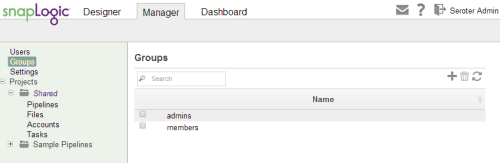
    The “manager” screens let you do things like create users, add groups, browse pipelines, and more.

    2014.03.23snaplogic02


    Show Me An Example!

    Ok, let’s try something out. In this basic scenario, I’m going to do a file transfer/translation process. I want to take in a JSON file, and output a CSV file. The source JSON contains some sample device reads:

    2014.03.23snaplogic05

    I sketched out a flow that reads a JSON file that I uploaded to the SnapLogic file system, parses it, and then splits it into individual documents for processing. There are lots of nice usability touches, such as interpreting my JSON format and helping me choose a place to split the array up.

    2014.03.23snaplogic06

    Then I used a CSV Formatter snap to export each record to a CSV file. Finally, I wrote the results to a file. I could have also used the File Writer snap to publish the results to Amazon S3, FTP, S/FTP, FTP/S, HTTP, or HDFS.

    2014.03.23snaplogic07

    It’s easy to run a pipeline within this interface. That’s the most manual way of kicking off a pipeline, but it’s handy for debugging or irregular execution intervals.

    2014.03.23snaplogic08

    The result? A nicely formatted CSV file that some existing system can easily consume.

    2014.03.23snaplogic09

    Do you want to run this on a schedule? Imagine pulling data from a source every night and updating a related system. It’s pretty easy with SnapLogic as all you have to do is define a task and point to which pipeline to execute.

    2014.03.23snaplogic10

    Notice in that image above that you can also set the “Run With” value to “Triggered” which gives you a URL for external invocation. If I pulled the last snap off my pipeline, then the CSV results would get returned to the HTTP caller. If I pulled the first snap off my pipeline, then I could send an HTTP POST request and send a JSON message into the pipeline. Pretty cool!

    Summary

    It’s good to be aware of what technologies are out there, and SnapLogic is definitely one to keep an eye on. It provides a very cloud-native integration suite that can satisfy both ETL and ESB scenarios in an easy-to-use way. I’ll do another post or two that shows how to connect cloud endpoints together, so watch out for that.

    What do you think? Have you used SnapLogic before or think that this sort of integration platform is the future?

  • Upcoming Speaking Engagements in London and Seattle

    In a few weeks, I’ll kick off a run of conference presentations that I’m really looking forward to.

    First, I’ll be in London for the BizTalk Summit 2014 event put on by the BizTalk360 team. In my talk “When To Use What: A Look at Choosing Integration Technology”, I take a fresh look at the topic of my book from a few years ago. I’ll walk through each integration-related technology from Microsoft and use a “buy, hold, or sell” rating to indicate my opinion on its suitability for a project today. Then I’ll discuss a decision framework for choosing among this wide variety of technologies, before closing with an example solution. The speaker list for this event is fantastic, and apparently there are only a handful of tickets remaining.

    The month after this, I’ll be in Seattle speaking at the ALM Forum. This well-respected event for agile software practitioners is held annually and I’m very excited to be part of the program. I am clearly the least distinguished speaker in the group, and I’m totally ok with that. I’m speaking in the Practices of DevOps track and my topic is “How Any Organization Can Transition to DevOps – 10 Practical Strategies Gleaned from a Cloud Startup.” Here I’ll drill into a practical set of tips I learned by witnessing (and participating in) a DevOps transformation at Tier 3 (now CenturyLink Cloud). I’m amped for this event as it’s fun to do case studies and share advice that can help others.

    If you’re able to attend either of those events, look me up!

  • Pluralsight course on “Architecting Highly Available Systems on AWS” is live!

    This summer I’ve been busy putting together my seventh video-on-demand training course for Pluralsight. This one – called Architecting Highly Available Systems on AWS – is now online and ready for your viewing pleasure.

    Of all the courses that I’ve done for Pluralsight, my previous Amazon Web Services one (AWS Developer Fundamentals) remains my most popular. I wanted to stay with this industry-leading cloud platform but try something completely different. It’s one thing to do “how to” courses that just walk through various components independently, but it’s another thing entirely to show how to integrate, secure, and configure a real-life system with a given technology. Building and deploying cloud-scale systems requires thoughtful planning and it’s easy to make incorrect assumptions, so I developed a 4+ hour course that showcases the best practices for architecting and deploying fault tolerant, resilient systems on the AWS cloud.

    2013.07.31aws01

    This course has eight total modules that show you how to build up a bullet-proof cloud app, piece-by-piece. In each module, I explain the role of the technology, how to use it, and the best practices for using it effectively.

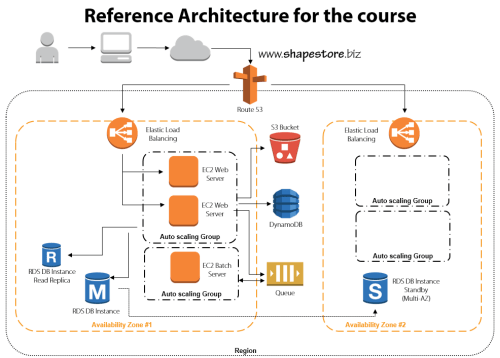
    • Module 1: Distributed Systems and AWS. This introductory session jumps right to it. We discuss the characteristics and fallacies of distributed systems, practices for making distributed systems highly available, look at the entire AWS portfolio, and walk through the reference architecture for the course.
    • Module 2: Provisioning Durable Storage with EBS and S3. Here we lay the foundation and choose the appropriate type of storage for our system. We discuss the use of EBS volumes and dig into Amazon S3. This module includes a walkthrough of adding objects to S3, making them public, and configuring a website hosted in S3.
    • Module 3: Setting Up Databases in RDS and DynamoDB. I had the most fun with this module. I do a deep review of Amazon RDS including setting up a MySQL instance, setting up multi-AZ replication for high availability, and read-replicas for better performance. We then test how RDS handles failure with automatic failover to the multi-AZ instance. Next we investigate DynamoDB and use it store ASP.NET session state thanks to the fantastic AWS SDK for .NET.
    • Module 4: Leveraging SQS for Scalable Processing. Queuing can be a key part of a successful distributed application, so we look at how to set up an Amazon SQS queue for sharing content between application tiers.
    • Module 5: Adding EC2 Virtual Machines. We’re finally ready to configure the actual application and web servers! This beefy module jumps into EC2 and how to use Identity and Access Management (IAM) and Security Groups to efficiently and securely provision servers. Then we deploy applications, create Amazon Machine Image (IAM) templates, deploy custom IAM instances, and configure Elastic IPs. Whew.
    • Module 6: Using ELB to Scale Applications. With a basic application running, now it’s time to enhance application availability further. Here we look at the Elastic Load Balancer and how to configure and test it.
    • Module 7: Enabling Auto Scale to Handle Spikes and Troughs. Ideally, (cloud) distributed systems are self-healing and self-regulating and Amazon Auto Scaling is a big part of this. This module shows you how to add Auto Scaling to a system and test it out.
    • Module 8: Configuring DNS with Route 53. The final module ties it all together by adding DNS services. Here you see where I register a domain name, and use Amazon Route 53 to manage the DNS entries and route traffic to the Elastic Load Balancers.

    I had a blast preparing this course, and the “part II” is in progress now. The sequel focuses on tuning and maintaining AWS cloud applications and will build upon everything shown here. If you’re not already a Pluralsight subscriber, now’s a great time to make an investment in yourself and learn all sorts of new things!

  • TechEd North America Session Recap, Recording Link

    Last week I had the pleasure of visiting New Orleans to present at TechEd North America. My session, Patterns of Cloud Integration, was recorded and is now available on Channel9 for everyone to view.

    I made the bold (or “reckless”, depending on your perspective) decision to show off as many technology demos as possible so that attendees could get a broad view of the options available for integrating applications, data, identity, and networks. Being a Microsoft conference, many of my demonstrations highlighted aspects of the Microsoft product portfolio – including one of the first public demos of Windows Azure BizTalk Services – but I also snuck in a few other technologies as well. My demos included:

    1. [Application Integration] BizTalk Server 2013 calls REST-based Salesforce.com endpoint and authenticates with custom WCF behavior. Secondary demo also showed using SignalR to incrementally return the results of multiple calls to Salesforce.com.
    2. [Application Integration] ASP.NET application running in Windows Azure Web Sites using the Windows Azure Service Bus Relay Service to invoke a web service on my laptop.
    3. [Application Integration] App running in Windows Azure Web Sites sending message to Windows Azure BizTalk Services. Message then dropped to one of three queues that was polled by Node.js application running in CloudFoundry.com.
    4. [Application Integration] App running in Windows Azure Web Sites sending message to Windows Azure Service Bus Topic, and polled by both a Node.js application in CloudFoundry.com, and a BizTalk Server 2013 server on-premises.
    5. [Application/Data Integration] ASP.NET application that uses local SQL Server database but changes connection string (only) to instead point to shared database running in Windows Azure.
    6. [Data Integration] Windows Azure SQL Database replicated to on-premises SQL Server database through the use of Windows Azure SQL Data Sync.
    7. [Data Integration] Account list from Salesforce.com copied into on-premises SQL Server database by running ETL job through the Informatica Cloud.
    8. [Identity Integration] Using a single set of credentials to invoke an on-premises web service from a custom VisualForce page in Salesforce.com. Web service exposed via Windows Azure Service Bus Relay.
    9. [Identity Integration] ASP.NET application running in Windows Azure Web Sites that authenticates users stored in Windows Azure Active Directory.
    10. [Identity Integration] Node.js application running in CloudFoundry.com that authenticates users stored in an on-premises Active Directory that’s running Active Directory Federation Services (AD FS).
    11. [Identity Integration] ASP.NET application that authenticates users via trusted web identity providers (Google, Microsoft, Yahoo) through Windows Azure Access Control Service.
    12. [Network Integration] Using new Windows Azure point-to-site VPN to access Windows Azure Virtual Machines that aren’t exposed to the public internet.

    Against all odds, each of these demos worked fine during the presentation. And I somehow finished with 2 minutes to spare. I’m grateful to see that my speaker scores were in the top 10% of the 350+ breakouts, and hope you’ll take some time to watch it. Feedback welcome!

  • Going to Microsoft TechEd (North America) to Speak About Cloud Integration

    In a few weeks, I’ll be heading to New Orleans to speak at Microsoft TechEd for the first time. My topic – Patterns of Cloud Integration – is an extension of things I’ve talked about this year in Amsterdam, Gothenburg, and in my latest Pluralsight course. However, I’ll also be covering some entirely new ground and showcasing some brand new technologies.

    TechEd is a great conference with tons of interesting sessions, and I’m thrilled to be part of it. In my talk, I’ll spend 75 minutes discussing practical considerations for application, data, identity, and network integration with cloud systems. Expect lots of demonstrations of Microsoft (and non-Microsoft) technology that can help organizations cleanly link all IT assets, regardless of physical location. I’ll show off some of the best tools from Microsoft, Salesforce.com, AWS (assuming no one tackles me when I bring it up), Informatica, and more.

    Any of you plan on going to North America TechEd this year? If so, hope to see you there!

  • Creating a “Flat File” Shared Database with Amazon S3 and Node.js

    In my latest Pluralsight video training course – Patterns of Cloud Integration – I addressed application and data integration scenarios that involve cloud endpoints. In the “shared database” module of the course, I discussed integration options where parties relied on a common (cloud) data repository. One of my solutions was inspired by Amazon CTO Werner Vogels who briefly discussed this scenario during his keynote at last Fall’s AWS re:Invent conference. Vogels talked about the tight coupling that initially existed between Amazon.com and IMDB (the Internet Movie Database). Amazon.com pulls data from IMDB to supplement various pages, but they saw that they were forcing IMDB to scale whenever Amazon.com had a burst. Their solution was to decouple Amazon.com and IMDB by injecting a a shared database between them. What was that database? It was HTML snippets produced by IMDB and stored in the hyper-scalable Amazon S3 object storage. In this way, the source system (IMDB) could make scheduled or real-time updates to their HTML snippet library, and Amazon.com (and others) could pummel S3 as much as they wanted without impacting IMDB. You can also read a great Hacker News thread on this “flat file database” pattern as well. In this blog post, I’m going to show you how I created a flat file database in S3 and pulled the data into a Node.js application.

    Creating HTML Snippets

    This pattern relies on a process that takes data from a source, and converts it into ready to consume HTML. That source – whether a (relational) database or line of business system – may have data organized in a different way that what’s needed by the consumer. In this case, imagine combining data from multiple database tables into a single HTML representation. This particular demo addresses farm animals, so assume that I pulled data (pictures, record details) into one HTML file for each animal.

    2013.05.06-s301

    In my demo, I simply built these HTML files by hand, but in real-life, you’d use a scheduled service or trigger action to produce these HTML files. If the HTML files need to be closely in sync with the data source, then you’d probably look to establish an HTML build engine that ran whenever the source data changed. If you’re dealing with relatively static information, then a scheduled job is fine.

    Adding HTML Snippets to Amazon S3

    Amazon S3 has a useful portal and robust API. For my demonstration I loaded these snippets into a “bucket” via the AWS portal. In real life, you’d probably publish these objects to S3 via the API as the final stage of an HTML build pipeline.

    In this case, I created a bucket called “FarmSnippets” and uploaded four different HTML files.

    2013.05.06-s302

    My goal was to be able to list all the items in a bucket and see meaningful descriptions of each animal (and not the meaningless name of an HTML file). So, I renamed each object to something that described the animal. The S3 API (exposed through the Node.js module) doesn’t give you access to much metadata, so this was one way to share information about what was in each file.

    2013.05.06-s303

    At this point, I had a set of HTML files in an Amazon S3 bucket that other applications could access.

    Reading those HTML Snippets from a Node.js Application

    Next, I created a Node.js application that consumed the new AWS SDK for Node.js. Note that AWS also ships SDKs for Ruby, Python, .NET, Java and more, so this demo can work for most any development stack. In this case, I used JetBrains WebStorm and the Express framework  and Jade template engine to quickly crank out an application that listed everything in my S3 bucket showed individual items.

    In the Node.js router (controller) handling the default page of the web site, I loaded up the AWS SDK and issued a simple listObjects command.

    //reference the AWS SDK
    var aws = require('aws-sdk');
    
    exports.index = function(req, res){
    
        //load AWS credentials
        aws.config.loadFromPath('./credentials.json');
        //instantiate S3 manager
        var svc = new aws.S3;
    
        //set bucket query parameter
        var params = {
          Bucket: "FarmSnippets"
        };
    
        //list all the objects in a bucket
        svc.client.listObjects(params, function(err, data){
            if(err){
                console.log(err);
            } else {
                console.log(data);
                //yank out the contents
                var results = data.Contents;
                //send parameters to the page for rendering
                res.render('index', { title: 'Product List', objs: results });
            }
        });
    };
    

    Next, I built out the Jade template page that renders these results. Here I looped through each object in the collection and used the “Key” value to create a hyperlink and show the HTML file’s name.

    block content
        div.content
          h1 Seroter Farms - Animal Marketplace
          h2= title
          p Browse for animals that you'd like to purchase from our farm.
          b Cows
          p
              table.producttable
                tr
                    td.header Animal Details
                each obj in objs
                    tr
                        td.cell
                            a(href='/animal/#{obj.Key}') #{obj.Key}
    

    When the user clicks the hyperlink on this page, it should take them to a “details” page. The route (controller) for this page takes the object ID from the querystring and retrieves the individual HTML snippet from S3. It then reads the content of the HTML file and makes it available for the rendered page.

    //reference the AWS SDK
    var aws = require('aws-sdk');
    
    exports.list = function(req, res){
    
        //get the animal ID from the querystring
        var animalid = req.params.id;
    
        //load up AWS credentials
        aws.config.loadFromPath('./credentials.json');
        //instantiate S3 manager
        var svc = new aws.S3;
    
        //get object parameters
        var params = {
            Bucket: "FarmSnippets",
            Key: animalid
        };
    
        //get an individual object and return the string of HTML within it
        svc.client.getObject(params, function(err, data){
            if(err){
                console.log(err);
            } else {
                console.log(data.Body.toString());
                var snippet = data.Body.toString();
                res.render('animal', { title: 'Animal Details', details: snippet });
            }
        });
    };
    

    Finally, I built the Jade template that shows our selected animal. In this case, I used a Jade technique to unescaped HTML so that the tags in the HTML file (held in the “details” variable) were actually interpreted.

    block content
        div.content
            h1 Seroter Farms - Animal Marketplace
            h2= title
            p Good choice! Here are the details for the selected animal.
            | !{details}
    

    That’s all there was! Let’s test it out.

    Testing the Solution

    After starting up my Node.js project, I visited the URL.

    2013.05.06-s304

    You can see that it lists each object in the S3 bucket and shows the (friendly) name of the object. Clicking the hyperlink for a given object sends me to the details page which renders the HTML within the S3 object.

    2013.05.06-s305

    Sure enough, it rendered the exact HTML that was included in the snippet. If my source system changes and updates S3 with new or changed HTML snippets, the consuming application(s) will instantly see it. This “database” can easily be consumed by Node.js applications or any application that can talk to the Amazon S3 web API.

    Summary

    While it definitely makes sense in some cases to provide shared access to the source repository, the pattern shown here is a nice fit for loosely coupled scenarios where we don’t want – or need – consuming systems to bang on our source data systems.

    What do you think? Have you used this sort of pattern before? Do you have cases where providing pre-formatted content might be better than asking consumers to query and merge the data themselves?

    Want to see more about this pattern and others? Check out my Pluralsight course called Patterns of Cloud Integration.

  • My New Pluralsight Course – Patterns of Cloud Integration – Is Now Live

    I’ve been hard at work on a new Pluralsight video course and it’s now live and available for viewing. This course, Patterns of Cloud Integration,  takes you through how application and data integration differ when adding cloud endpoints. The course highlights the 4 integration styles/patterns introduced in the excellent Enterprise Integration Patterns book and discusses the considerations, benefits, and challenges of using them with cloud systems. There are five core modules in the course:

    • Integration in the Cloud. An overview of the new challenges of integrating with cloud systems as well as a summary of each of the four integration patterns that are covered in the rest of the course.
    • Remote Procedure Call. Sometimes you need information or business logic stored in an independent system and RPC is still a valid way to get it. Doing this with a cloud system on one (or both!) ends can be a challenge and we cover the technologies and gotchas here.
    • Asynchronous Messaging. Messaging is a fantastic way to do loosely coupled system architecture, but there are still a number of things to consider when doing this with the cloud.
    • Shared Database. If every system has to be consistent at the same time, then using a shared database is the way to go. This can be a challenge at cloud scale, and we review some options.
    • File Transfer. Good old-fashioned file transfers still make sense in many cases. Here I show a new crop of tools that make ETL easy to use!

    Because “the cloud” consists of so many unique and interesting technologies, I was determined to not just focus on the products and services from any one vendor. So, I decided to show off a ton of different technologies including:

    Whew! This represents years of work as I’ve written about or spoken on this topic for a while. It was fun to collect all sorts of tidbits, talk to colleagues, and experiment with technologies in order to create a formal course on the topic. There’s a ton more to talk about besides just what’s in this 4 hour course, but I hope that it sparks discussion and helps us continue to get better at linking systems, regardless of their physical location.

  • Using ASP.NET SignalR to Publish Incremental Responses from Scatter-Gather BizTalk Workflow

    While in Europe last week presenting at the Integration Days event, I showed off some demonstration of cool new technologies working with existing integration tools. One of those demos combined SignalR and BizTalk Server in a novel way.

    One of the use cases for an integration bus like BizTalk Server is to aggregate data from multiple back end systems and return a composite message (also known as a Scatter-Gather pattern). In some cases, it may make sense to do this as part of a synchronous endpoint where a web service caller makes a request, and BizTalk returns an aggregated response. However, we all know that BizTalk Server’s durable messaging architecture introduces latency into the communication flow, and trying to do this sort of operation may not scale well when the number of callers goes way up. So how can we deliver a high-performing, scalable solution that will accommodate today’s highly interactive web applications? In this solution that I build, I used ASP.NET and SignalR to send incremental messages from BizTalk back to the calling web application.
    2013.02.01signalr01

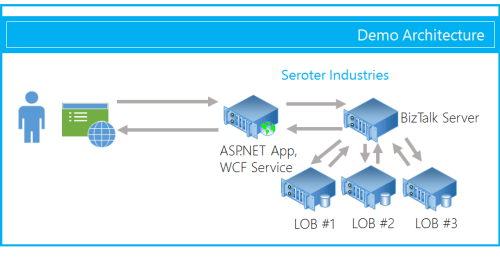
    The end user wants to search for product inventory that may be recorded in multiple systems. We don’t want our web application to have to query these systems individually, and would rather put an aggregator in the middle. Instead of exposing the scatter-gather BizTalk orchestration in a request-response fashion, I’ve chosen to expose an asynchronous inbound channel, and will then send messages back to the ASP.NET web application as soon as each inventory system respond.

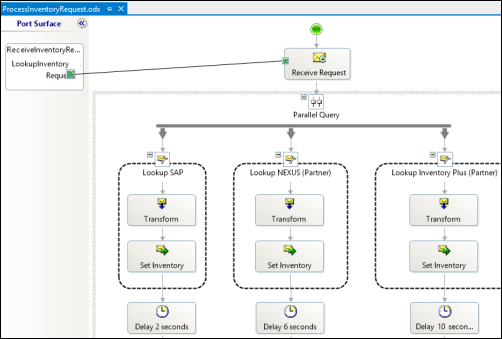
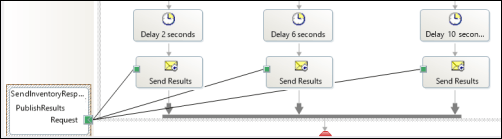
    First off, I have a BizTalk orchestration. It takes in the inventory lookup request and makes a parallel query to three different inventory systems. In this demonstration, I don’t actually query back-end systems, but simulate the activity by introducing a delay into each parallel branch.
    2013.02.01signalr02

    As each branch concludes, I send the response immediately to a one-way send port. This is in contrast to the “standard” scatter-gather pattern where we’d wait for all parallel branches to complete and then aggregate all the responses into a single message. This way, we are providing incremental feedback, a more responsive application, and protection against a poor-performing inventory system.
    2013.02.01signalr03

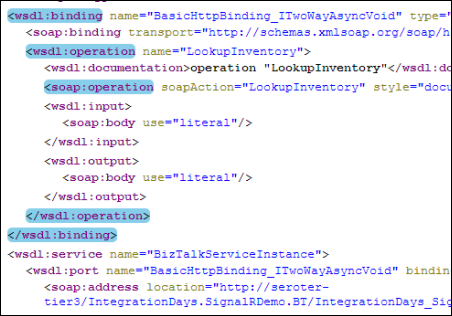
    After building and deploying this solution, I walked through the WCF Service Publishing Wizard in order to create the web service on-ramp into the BizTalk orchestration.
    2013.02.01signalr04

    I couldn’t yet create the BizTalk send port as I didn’t have an endpoint to send the inventory responses to. Next up, I built the ASP.NET web application that also had a WCF service for accepting the inventory messages. First, in a new ASP.NET project in Visual Studio, I added a service reference to my BizTalk-generated service. I then added the NuGet package for SignalR, and a new class to act as my SignalR “hub.” The Hub represents the code that the client browser will invoke on the server. In this case, the client code needs to invoke a “lookup inventory” action which will forwards a request to BizTalk Server. It’s important to notice that I’m acquiring and transmitting the unique connection ID associated with the particular browser client.

    public class NotifyHub : Hub
        {
            /// <summary>
            /// Operation called by client code to lookup inventory for a given item #
            /// </summary>
            /// <param name="itemId"></param>
            public void LookupInventory(string itemId)
            {
                //get this caller's unique browser connection ID
                string clientId = Context.ConnectionId;
    
                LookupService.IntegrationDays_SignalRDemo_BT_ProcessInventoryRequest_ReceiveInventoryRequestPortClient c =
                    new LookupService.IntegrationDays_SignalRDemo_BT_ProcessInventoryRequest_ReceiveInventoryRequestPortClient();
    
                LookupService.InventoryLookupRequest req = new LookupService.InventoryLookupRequest();
                req.ClientId = clientId;
                req.ItemId = itemId;
    
                //invoke async service
                c.LookupInventory(req);
            }
        }
    

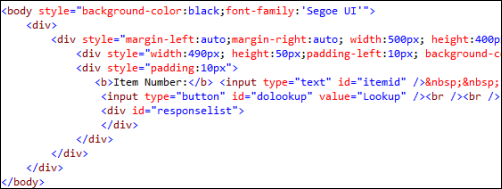
    Next, I added a single Web Form to this ASP.NET project. There’s nothing in the code-behind file as we’re dealing entirely with jQuery and client-side fun. The HTML markup of the page is pretty simple and contains a single textbox that accepts a inventory part number, and a button that triggers a lookup. You’ll also notice a DIV with an ID of “responselist” which will hold all the responses sent back from BizTalk Server.
    2013.02.01signalr07

    The real magic of the page (and SignalR) happens in the head of the HTML page. Here I referenced all the necessary JavaScript libraries for SignalR and jQuery. Then I established a reference to the server-side SignalR Hub. Then you’ll notice that I create a function that the *server* can call when it has data for me. So the *server* will call the “addLookupResponse” operation on my page. Awesome. Finally, I start up the connection and define the click function that the button on the page triggers.

    <head runat="server">
        <title>Inventory Lookup</title>
        <!--Script references. -->
        <!--Reference the jQuery library. -->
        <script src="Scripts/jquery-1.6.4.min.js" ></script>
        <!--Reference the SignalR library. -->
        <script src="Scripts/jquery.signalR-1.0.0-rc1.js"></script>
        <!--Reference the autogenerated SignalR hub script. -->
        <script src="<%= ResolveUrl("~/signalr/hubs") %>"></script>
        <!--Add script to update the page--> 
        <script type="text/javascript">
            $(function () {
                // Declare a proxy to reference the hub. 
                var notify = $.connection.notifyHub;
    
                // Create a function that the hub can call to broadcast messages.
                notify.client.addLookupResponse = function (providerId, stockAmount) {
                    $('#responselist').append('<div>Provider <b>' + providerId + '</b> has <b>' + stockAmount + '</b> units in stock.</div>');
                };
    
                // Start the connection.
                $.connection.hub.start().done(function () {
                    $('#dolookup').click(function () {
                        notify.server.lookupInventory($('#itemid').val());
                        $('#responselist').append('<div>Checking global inventory ...</div>');
                    });
                });
            });
        </script>
    </head>
    

    Nearly done! All that’s left is to open up a channel for BizTalk to send messages to the target browser connection. I added a WCF service to this existing ASP.NET project. The WCF contract has a single operation for BizTalk to call.

    [ServiceContract]
        public interface IInventoryResponseService
        {
            [OperationContract]
            void PublishResults(string clientId, string providerId, string itemId, int stockAmount);
        }
    

    Notice that BizTalk is sending back the client (connection) ID corresponding to whoever made this inventory request. SignalR makes it possible to send messages to ALL connected clients, a group of clients, or even individual clients. In this case, I only want to transmit a message to the browser client that made this specific request.

    public class InventoryResponseService : IInventoryResponseService
        {
            /// <summary>
            /// Send message to single connected client
            /// </summary>
            /// <param name="clientId"></param>
            /// <param name="providerId"></param>
            /// <param name="itemId"></param>
            /// <param name="stockAmount"></param>
            public void PublishResults(string clientId, string providerId, string itemId, int stockAmount)
            {
                var context = GlobalHost.ConnectionManager.GetHubContext<NotifyHub>();
    
    			 //send the inventory stock amount to an individual client
                context.Clients.Client(clientId).addLookupResponse(providerId, stockAmount);
            }
        }
    

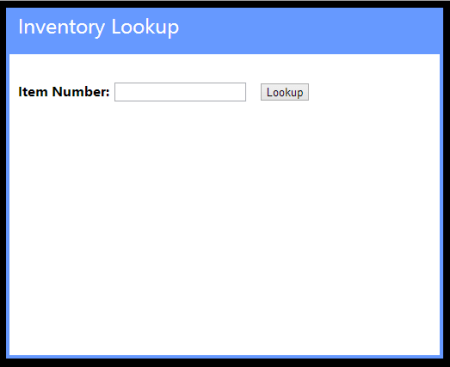
    After adding the rest of the necessary WCF service details to the web.config file of the project, I added a new BizTalk send port targeting the service. Once the entire BizTalk project was started up (receive location for the on-ramp WCF service, orchestration that calls inventory systems, send port that sends responses to the web application), I browsed to my ASP.NET site.
    2013.02.01signalr05

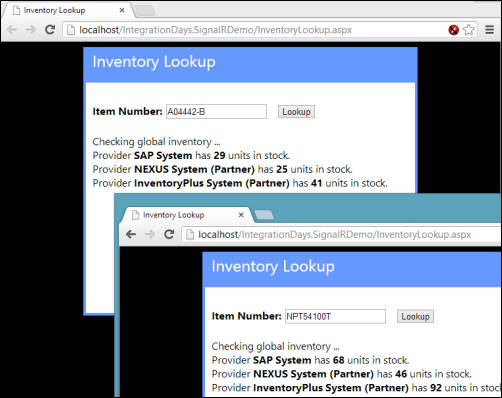
    For this demonstration, I opened a couple browser instances to prove that each one was getting unique results based on whatever inventory part was queried. Sure enough, a few seconds after entering in a random part identifier, data starting trickling back. On each browser client, results were returned in a staggered fashion as each back-end system returned data.
    2013.02.01signalr06

    I’m biased of course, but I think that this is a pretty cool query pattern. You can have the best of BizTalk (e.g. visually modeled workflow for scatter-gather, broad application adapter choice) while not sacrificing interactivity and performance.

    In the spirit of sharing, I’ve made the source code available on GitHub. Feel free to browse it, pull it, and try this on your own. Let me know what you think!
  • Book Review: The New Kingmakers

    I just finished reading the fascinating new mini-eBook “The New Kingmakers” from Redmonk co-founder Stephen O’Grady. This book represents a more in-depth analysis of a premise put forth by O’Grady a couple years back: developers are the single most important constituency in technology. O’Grady doubles-down on that claim here, and while I think he proves aspects of this, I wasn’t completely won over to that point of view.

    O’Grady starts off explaining that

    “If IT decision makers aren’t making the decisions any longer, who is calling the shots? The answer is developers. Developers are the most-important constituency in technology. They have the power to make or break businesses, whether by their preferences, their passions, or their own products.”

    He goes on to describe the extent to which organizations crave developer talent and how more and more acquisitions are about acquiring talent, not software. Because, as he states, EVERY company is in part a technology company, the value of competent coders has never been higher.

    His discussion of “how we got here” was powerful and called out the disruptions that have given developers unprecedented freedom to explore, create, and deploy software to the masses. Driven by open source software, cloud infrastructure, internet self promotion, and the new sources of seed money, developers are empowered as never before. O’Grady did an excellent job proving these points. At this stage of the eBook, my thought was “so you’ve proved that developers are valuable and now have amazing freedom, but I haven’t yet heard an argument that developers are truly driving the fortunes of established businesses.” Luckily, the next section was titled “The Evidence” so I hoped to hear more.

    O’Grady points out what a developer-centric world would look like, and proposes that we now exist in such a world. In this developer-driven world, we’d see greater technology diversity (which is counter to corporate objectives), growth in open source, lack of adoption of commercially-oriented technology standards, and vendors openly courting developers. Hard to disagree that all of those aren’t true today! O’Grady provides compelling proof points for each of these. However, in passing he says that “as developers have become more involved in the technology decision-making process, it has been no surprise to see the number of different technologies employed within a given business skyrocket.” I wish he had provided some additional case studies for the point that developers play an increasing role in technology decision-making, as that’s not something I’ve seen a ton of. Certainly developers are introducing more technology to the corporate portfolio, but at which companies are developers part of company-wide groups that assess and adopt technology?

    Next up, O’Grady reviews set of companies that have had a major impact on developers. He analyzes the positive contribution of Apple (in distributing the work of developers via apps), AWS (in making compute capacity readily accessible), Google (openly courting and rewarding developers), Microsoft (embracing open source), and Netflix (in asking developers to help with algorithms and consuming APIs). Finally, O’Grady outlines a series of suggestions for companies looking to successfully use developers as a strategic asset. I thought each of these suggestions were spot on, and I’ll encourage everyone at my company to read this eBook and absorb these points.

    So where was I left wanting? First, if O’Grady’s main point is that companies that treat developers as a strategic asset and constituency will experience greater success, then I’m 100% on board. Couldn’t agree more. But if that point is stretched further to say that developers are possibly the most important assets that ANY company has, then I didn’t see enough proof of that. I would have liked to see more evidence that developers are playing a greater role in corporate technology decisions, or heard about developers at Fortune 100 companies who fundamentally altered the company’s direction. It’s great that developers are influencing new media companies and startups, but what about case studies from boring old industries like government, healthcare, retail, utilities, and construction? Obviously each of those industries use a ton of technology, and often to great competitive advantage, but I would have liked to hear more stories from those businesses vs. the “easy” Netflix/Reddit/Spotify/Zynga tales.

    My second wish for this book (or follow up work) was to hear more about the responsibility of developers in this new reality. Developers (and I speak as someone who pretends to be one) aren’t known for their humility, and works like this should be balanced by reminders of the duties that developers have. For instance, it’s great that developers are more inclined to bring all sorts of technologies into a company, but will they be the ones responsible for maintaining 18 NoSQL database products? What about when they leave the company and no one else knows how to fix an application written in a cool language like Go? How about the tendency for developers to choose the latest and greatest technology while ignoring the proven technology that may have been a better fit for the situation? Or making decisions that optimize one part of a broader system at the expense of the greater architectural vision? If developers are the new Kingmakers, then I’d love to read O’Grady’s thoughts on how developers can lead this revolution in a way that promotes long term success for companies that depend on them. Maybe this book isn’t FOR developers as much as it’s ABOUT them, but I’m selfish like that!

    If you have a leadership role in ANY type of organization, you should read this book. It’s a fantastic look at the current state of technology and how developers can make or break a company. O’Grady also does a wonderful job proving that there’s never been a better time to be developing software. Hopefully he and the other smart fellows at Redmonk will continue to develop this thesis further and highlight both the successes and failures of developers in this new reality.