Category: Cloud

  • I’m Joining Pivotal

    Danny (George Clooney): Saul makes ten. Ten oughta do it, don’t you think?

    2016.04.04.oceans01Rusty (Brad Pitt): …

    Danny: Do you think we need one more?

    Rusty: …

    Danny: You think we need one more.

    Rusty: …

    Danny: Alright. We’ll get one more.

    That’s one of my favorite scenes from the movie Ocean’s Eleven. It was also the analogy used by Pivotal when we started talking about me coming aboard; they’re known for occasionally recruiting folks they want, even if there’s no pre-existing job posting (“we’ll get one more”). After some phone discussions and in-person get-togethers, we all agreed that it would be a great fit. So, I’m happy to announce that I’ve joined Pivotal as a Senior Director of Product, based in Seattle. I’ll be helping frame Pivotal’s all-up platform story, engaging with customers, and working with the team to improve our products and spread the cloud-native message.

    I accepted Pivotal’s offer for three reasons: the people, the purpose, and the products.

    The People

    I’m spoiled. After spending the last four years with a ridiculously talented cloud group at Tier3/CenturyLink, I place a premium on working with exceptional teams. What’s impressed me time and time again with Pivotal is that the talent goes both deep and wide. While you may know many of their more public-facing experts on app dev, distributed systems, and cloud — such as James Watters, Andrew Clay Shafer, Josh McKenty, Ian Andrews, Ben Black, Cotè, Bridget Kromhout, Josh Long, Matt Stine, Casey West, and James Bayer — there seem to be countless, exceptional Pivots across the engineering and Labs groups. My career goal is to always work with people smarter than me, but this is almost excessive! I’m excited to work alongside people at the top of their game (and we’re hiring tons more!), and doing my part to help our customers succeed.

    The Purpose

    I need to feel connected to the mission of the company that I work for. Pivotal makes that easy: Transform how the world builds software. Yes, please. Pivotal is committed to providing products and coaching that help companies of all sizes use technology to innovate faster. If you haven’t watched Pivotal VP of Engineering Onsi Fakhouri’s recent presentation that drives home this message in an inspirational way, you should. What’s great is that besides having 40+ fantastic product engineering teams, Pivotal also has a strong coaching and consulting arm in Pivotal Labs.

    Look at how we’ve traditionally designed, developed, packaged, deployed and managed systems.Everything’s changing and Pivotal is at the forefront of this transformation. But it’s not about changing your technology or methodology just for the sake of it; the core goal is to improve business performance through better software! Pivotal is all about helping companies make a meaningful transformation, and I love it. And this approach is clearly resonating with the largest companies in the world.

    https://twitter.com/wattersjames/status/715040771829841922

    The Products

    Our flagship product is Pivotal Cloud Foundry (PCF), a commercial distribution of Cloud Foundry — the industry-leading, open source cloud-native app platform. PCF is more than just a wrapping of vendor support around something you can get for free. Rather, it represents a complete platform for (1) installing and updating Cloud Foundry software and services on a variety of (cloud) hosts, (2) cataloging and consuming a wide variety of application services, (3) creating, packaging, and deploying custom apps,  and (4) managing the app lifecycle.

    Many people actually know Pivotal because of Pivotal Tracker. It’s one of the first agile planning tools, and remains extremely popular. Pivotal also has an exceptional Big Data Suite where customers can make sense of data faster, and use that new insight to make better business decisions and design more relevant software.

    In addition to building commercial products, Pivotal invests heavily in open source. Did you know that Pivotal puts a significant number of engineers not just on the Cloud Foundry OSS effort, but on projects like RabbitMQ , Concourse CI, and Spring? The adoption of Spring and Spring Cloud  during the past year has been insane as companies embrace the patterns and technology pioneered by industry leaders like Netflix. Pivotal makes a serious commitment to both commercial and open source products, and that makes for a very exciting place to work.

    Pivotal’s people, purpose, and products are hard to match, and it’s made me very eager to show up to the office today.

  • My new Pluralsight course on the Salesforce.com integration APIs is now live!

    Salesforce continues to eat the world (3 billion transactions today!) as teams want to quickly get data-driven applications up and running with minimal effort. However, for most apps to be truly useful, they need to be connected to other sources of data or business logic. 2016.03.10ps01Salesforce has a super broad set of integration APIs ranging from traditional SOAP all the way to real-time streaming. How do you choose the right one? What are the best use cases for each? Last Fall I did a presentation on this particular topic for a local Salesforce User Group in Utah. I’ve spent the past few months taking that one hour presentation and turning that into a full-fledged Pluralsight training course. Yesterday, the result was released by Pluralsight.

    The course – Using Force.com Integration APIs to Connect Your Applications – is five delightful hours of information about all the core Force.com APIs.

    In addition to messing around with raw Force.com APIs, you also get to muck around with a custom set of Node.js apps that help you see a realistic scenario in action. This “Voter Trax” app calls the REST API, receives real-time Outbound Messages, and other apps help you learn about the Streaming API and Apex callouts.

    I’ve put together seven modules for this course …

    1. Touring the Force.com Integration APIs. Here I explain the value of integrating Salesforce with other systems, help you set up your free developer account, discuss the core Force.com integration patterns, and give an overview of each integration API.
    2. Using the Force.com SOAP APIs to Integrate with Enterprise Apps. While the thought of using SOAP APIs may give you night terrors, the reality is that it’s still popular with plenty of enterprise developers. In this module, we take a look at authenticating users, making SOAP calls, handling faults, using SOAP headers, building custom SOAP services in Force.com, and how to monitor your services. All the demos in this module use Postman to call the SOAP APIs directly.
    3. Creating Lightweight Integrations with the Force.com REST API. Given the choice, many developer now prefer RESTful services over SOAP. Force.com has a comprehensive set of REST APIs that are secured via OAuth. This module shows you how to switch between XML and JSON payloads, how to call the API, making composite calls (that let you batch up requests), and how to build custom REST services. Here we use both Postman and a custom Node.js application to consume the REST endpoints.
    4. Interacting with Bulk Data in Force.com. Not everything requires real-time integration. The Force.com Bulk API is good for inserting lots of records or retrieving large data sets. Here we walk through the Bulk API and see how to create and manage jobs, work with XML or CSV payloads, deal with failures, and how to transform source data to fit the Salesforce schema.
    5. Using Force.com Outbound Messaging for Real-time Push Integrations. Outbound Messaging is one of the most interesting Force.com integration APIs, and would remind you of the many modern apps that use webhooks to send out messages when events occur. Here we see how to create Outbound Messages, how to build compatible listeners, and options for tracking (failed) messages. This module has one of my favorite demos where data changes from Salesforce are sent to a custom Node.js app and plotted on a Google map widget.
    6. Doing Push Integration Anywhere with the Force.com Streaming API. You may love real-time notifications, but can’t put your listeners on the public Internet, as required by Outbound Messaging. The Streaming API uses CometD to push (in reality, pull via long polling) messages to any subscriber to a channel. This module walks through authenticating users, creating PushTopics (the object that holds the query that Salesforce monitors), creating client apps, and building general purpose streaming solutions with Force.com Generic Streaming.
    7. Consuming External Services with Force.com Apex Callouts. Salesforce isn’t just a system that others pull data from. Salesforce itself needs to be able to dip into other systems to retrieve data or execute business logic. In this module, we see how to call out to various external endpoints and consume the XML/JSON that comes back. We use Named Credentials to separate the credentials from the code itself, and even mess around with long-running callouts and asynchronous responses.

    If your company uses Salesforce, you’ll be able to add a lot of value by understanding how to connect Salesforce to your other systems. If you take my new course, I’d love to hear from you!

  • Where to host your integration bus

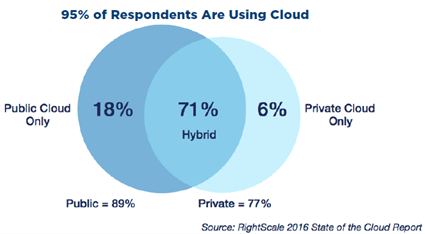
    2016.03.08integrate01RightScale recently announced the results of their annual “State of the Cloud” survey. You can find the report here, and my InfoQ.com story here. A lot of people participated in the survey, and the results showed that a majority of companies are growing their public cloud usage, but continuing to invest heavily in on-premises “cloud” environments. When I was reading this report, I was thinking about the implications on a company’s application integration strategy. As workloads continue to move to cloudy hosts and companies start to get addicted to the benefits of cloud (from the survey: “faster access to infrastructure”, “greater scalability”, “geographic reach”, “higher performance”), does that change what they think about running integration services? What are the options for a company wondering where to host their application/data integration engine, and what benefits and risks are associated with each choice?

    The options below should apply whether you’re doing real-time or batch integration, high throughput messaging or complex orchestration, synchronous or asynchronous communication.

    Option #1 – Use an Integration-as-a-Service engine in the public cloud

    It may make sense to use public cloud integration services to connect your apps. Or, introduce these as edge intake services that still funnel data to another bus further downstream.

    Benefits

    • Easy to scale up or down. One of the biggest perks of a cloud-based service is that you don’t have to do significant capacity planning up front. For messaging services like Amazon SQS or the Azure Service Bus, there’s very little you have to consider. For an integration service like SnapLogic, there are limits, but you can size up and down as needed. The key is that you can respond to bursts (or troughs) in usage by cutting your costs. No more over-provisioning just in case you might need it.
    • Multiple patterns available. You won’t see a glut of traditional ESB-like cloud integration services. Instead, you’ll find many high-throughput messaging (e.g. Google Pub/Sub) or stream processing services (e.g. Azure Stream Analytics) that take advantage of the elasticity of the cloud. However, if you’re doing bulk data movement, there are multiple viable services available (e.g. Talend Integration Cloud), if you’re doing stateful integration there are also services for that (e.g. Azure Logic Apps).
    • No upgrade projects. From my experience, IT never likes funding projects that upgrade foundational infrastructure. That’s why you have servers still running Windows Server 2003, or Oracle databases that are 14 versions behind. You always tell yourself that “NEXT year we’ll get that done!” One of the seductive aspects of cloud-based services is that you don’t deal with that any longer. There are no upgrades; new capabilities just show up. And for all these cloud integration services, that means always getting the latest and greatest as soon as it’s available.
    • Regular access to new innovations. Is there anything in tech more depressing than seeing all these flashy new features in a product that you use, and knowing that you are YEARS away from deploying it? Blech. The industry is changing so fast, that waiting 4 years for a refresh cycle is an eternity. If you’re using a cloud integration service, then you’re able to get new endpoint adapters, query semantics, storage enhancements and the like as soon as possible.
    • Connectivity to cloud hosted systems, partners. One of the key reasons you’d choose a cloud-based integration service is so that you’re closer to your cloudy workloads. Running your web log ingest process, partner supply chain, or master-data management jobs all right next to your cloud-hosted databases and web apps gives you better performance and simpler connectivity. Instead of navigating the 12 layers of firewall hell to expose your on-premises integration service to Internet endpoints, you’re right next door.
    • Distributed intake and consumption. Event and data sources are all over the place. Instead of trying to ship all that information to a centralized bus somewhere, it can make sense to do some intake at the edge. Cloud-based services let you spin up multiple endpoints in various geographies with ease, which may give you much more flexibility when taking in Internet-of-Things beacon data, orders from partners, or returning data from time-sensitive request/reply calls.
    • Lower operational cost. You MAY end up paying less, but of course you could also end up paying more. Depends on your throughput, storage, etc. But ideally, if you’re using a cloud integration service, you’re not paying the same type of software licensing and hardware costs as you would for an on-premises system.

    Risks

    • High latency with on-premises systems. Unless your company was formed within the last 18 months, I’d be surprised if you didn’t have SOME key systems sitting in a local facility. While latency may not matter for some asynchronous workloads, if you’re taking in telemetry data from devices and making real-time adjustments to applications, every millisecond counts. Depending on where your home office is, there could be a bit of distance between your cloud-based integration engine and the key systems it talks to.
    • Limited connectivity to on-premises systems (bi-directional). It’s usually not too challenging to get on-premises systems to reach out to the Internet (and push data to an endpoint), but it’s another matter to allow data to come *into* your on-premises systems from the Internet. Some integration services have solved this by putting agents on the local environment to facilitate secure communication, but realistically, it’ll be on you to extract data from cloud-based engines versus expecting them to push data into your data centers.
    • Experience data leakage if data security isn’t properly factored in. If the data never leaves your private network, it can be easy to be lazy about security. Encrypt in transit? Ok. Encrypt the data as well? Nah. If that casual approach to security isn’t tightened up when you start passing data through cloud integration services, you could find yourself in trouble. While your data may be protected from others accidentally seeing it, you may have made it easy for others within your own organization to extract or tap into data they didn’t have access to before.
    • Services are not as mature as software-based products, and focused mostly on messaging. It’s true that cloud-based solutions haven’t been around as long as the Tibcos, BizTalk Servers, and such. And, many cloud-based solutions focus less on traditional integration techniques (FTP! CSV files!) and more on Internet-scale data distribution.
    • Opaque operational interfaces make troubleshooting more difficult. We’re talking about as-a-Service products here, so by definition, you’re not running this yourself. That means you can’t check out the server logs, add tracing logic, or view the memory consumption of a particular service. Instead, you only have the interfaces exposed by the vendor. If troubleshooting data is limited, you have no other recourse.
    • Limited portability of the configuration between providers. Depending on the service you choose, there’s a level of lock-in that you have to accept. Your integration logic from one service can’t be imported into another. Frankly, the same goes for on-premises integration engines. Either way, your application/data integration platform is probably a key lock-in point regardless of where you host it.
    • Unpredictable availability and uptime. A key value proposition of cloud is high availability, but you have to take the provider’s word for it that they’ve architected as such. If your cloud integration bus is offline, so are you. There’s no one to yell at to get it back up and running. Likewise, any maintenance to the platforms happens at a time that works for the vendor, not for you. Ideally you never see downtime, but you absolutely have less control over it.
    • Unpredictable pricing on cost dimensions you may not have tracked before (throughput, storage). I’d doubt that most IT shops know their true cost of operations, but nonetheless, it’s possible to get sticker shock when you start paying based on consumption. Once you’ve sunk cost into an on-premises service, you may not care about message throughput or how much data you’re storing. You will care about things like that when using a pay-as-you-go cloud service.


    Option #2 – Run your integration engine in a public cloud environment

    If adopting an entirely managed public service isn’t for you, then you still may want the elastic foundation of cloud while running your preferred integration engine.

    Benefits

    • Run the engine of your choice. Like using Mule, BizTalk Server, or Apache Kafka and don’t want to give it up? Take that software and run it on public cloud Infrastructure-as-a-Service. No need to give up your preferred engine just because you want a more flexible host.
    • Configuration is portable from on-premises solution (if migrating versus setting this up brand new). If you’re “upgrading” from fixed virtual machines or bare metal boxes to an elastic cloud, the software stays the same. In many cases, you don’t have to rewrite much (besides some endpoint addresses) in order to slide into an environment where you can resize the infrastructure up and down much easier.
    • Scale up and down compute and storage. Probably the number one reason to move. Stop worrying about boxes that are too small (or large!) and running out of disk space. By moving from fixed on-premises environments to self-service cloud infrastructure, you can set an initial sizing and continue to right-size on a regular basis. About to beat the hell out of your RabbitMQ environment for a few days? Max out the capacity so that you can handle the load. Elasticity is possibly the most important reason to adopt cloud.
    • Stay close to cloud hosted systems. Your systems are probably becoming more distributed, not more centralized. If you’re seeing a clear trend towards moving to cloud applications, then it may make sense to relocate your integration bus to be closer to them. And if you’re worried about latency, you could choose to run smaller edge instances of your integration bus that feed data to a centralized one. You have much more flexibility to introduce such an architecture when capacity is available anywhere, on-demand.
    • Keep existing tools and skillsets around that engine. One challenge that you may have when adopting an integration-as-a-service product is the switching costs. Not only are you rebuilding your integration scenarios in a new product, but you’re also training up staff on an entirely new toolset. If you keep your preferred engine but move it to the public cloud, there are no new training costs.
    • Low level troubleshooting available. If problems pop up – and of course they will – you have access to all the local logs, services, and configurations that you did before. Integration solutions are notoriously tricky to debug given the myriad locations where something could have gone amiss. The more data, the better.
    • Experience easier integration scenarios with partners. You may love using BizTalk’s Trading Partner Management capabilities, but don’t like wrangling with network and security engineers to expose the right endpoints from your on-premises environment. If you’re running the same technology in the public cloud, you’ll have a simpler time securely exposing select endpoints and ports to key partners.

    Risks

    • Long distance from integrated systems. Like the risk in the section above, there’s concern that shifting your integration engine to the public cloud will mean taking it away from where all the apps are. Does the enhanced elasticity make up for the fact that your business data now has to leave on-premises systems and travel to a bus sitting miles away?
    • Connectivity to on-premises systems. If your cloud virtual machines can’t reach your on-premises systems, you’re going to have some awkward integration scenarios. This is where Infrastructure-as-a-Service can be a little more flexible than cloud integration services because it’s fairly easy to set up a persistent, secure tunnel between cloud IaaS networks and on-premises networks. Not so easy to do with cloud messaging services.
    • There’s a larger attack surface if engine has public IP connectivity. You may LIKE that your on-premises integration bus is hard to reach! Would-be attackers must breach multiple zones in order to attack this central nervous system of your company. By moving your integration engine to the cloud and opening up ports for inbound access, you’re creating a tempting target for those wishing to tap into this information-rich environment.
    • Not getting any of the operation benefits that as-a-service products possess. One of the major downsides of this option is that you haven’t actually simplified much; you’re just hosting your software elsewhere. Instead of eliminating infrastructure headaches and focusing on connecting your systems, you’re still standing up (virtual) infrastructure, configuring networks, installing software, managing software updates, building highly available setups, and so on. You may be more elastic, but you haven’t reduced your operational burden.
    • Few built in connectivity to cloudy endpoints. If you’re using an integration service that comes with pre-built endpoint adapters, you may find that traditional software providers aren’t keeping up with “cloud born” providers. SnapLogic will always have more cloud connectivity than BizTalk Server, for example. You may not care about this if you’re dealing with messaging engines that require you to write producer/consumer code. But for those that like having pre-built connectors to systems (e.g. IFTTT), you may be disappointed with your existing software provider.
    • Availability and uptime, especially if the integration engine isn’t cloud-native. If you move your integration engine to cloud IaaS, it’s completely on you to ensure that you’ve got a highly available setup. Running ZeroMQ on a single cloud virtual machine isn’t going to magically provide a resilient back end. If you’re taking a traditional ESB product and running it in cloud VMs, you still likely can’t scale out as well as cloud-friendly distributed engines like Kafka or NATS.


    Option #3 – Run your integration engine on-premises

    Running an integration engine in the cloud may not be for you. Even if your applications are slowly (quickly?) moving to the cloud, you might want to keep your integration bus put.

    Benefits

    • Run the engine of your choice. No one can tell you what to do in your own house! Pick the ESB, messaging engine, or ETL tool that works for you.
    • Control the change and maintenance lifecycle. This applies to option #2 to some extent, but when you control the software to the metal, you can schedule maintenance at optimal times and upgrade the software on your own timetable. If you’ve got a sensitive Big Data pipeline and want to reboot Spark ONLY when things are quiet, then you can do that.
    • Close to all on-premises systems. Plenty of workloads are moving to public cloud, but it’s sure as heck not all of them. Or at least right now. You may be seeing commodity services like CRM or HR quickly going to cloud services, but lots of mission critical apps still sit within your data centers. Depending on what your data sources are, you may have a few years before you’re motivated to give your integration engine a new address.
    • You can still reach out to Internet endpoints, while keeping inbound ports closed. If you’re running something like BizTalk Server, you can send data to cloud endpoints, and even receive data in (through the Service Bus) without exposing the service to the Internet. And if you’re using messaging engines where you write the endpoints, it may not really matter if the engine is on-site.
    • Can get some elasticity through private clouds. Don’t forget about private clouds! While some may think private clouds are dumb (because they don’t achieve the operational benefits or elasticity of a public cloud), the reality is that many companies have doubled down on them. If you take your preferred integration engine and slide it over to your private cloud, you may get some of the elasticity and self-service benefits that public cloud customers get.

    Risks

    • Difficult to keep up to date with latest versions. As the pace of innovation and disruption picks up, you may find it hard to keep your backbone infrastructure up to date. By continuing to own the lifecycle of your integration software, you run the risk of falling behind. That may not matter if you like the version of the software that you are on – or if you have gotten great at building out new instances of your engines and swapping consumers over to them – but it’s still something that can cause problems.
    • Subject to capacity limitations and slow scale up/out. Private clouds rarely have the same amount of hardware capacity that public clouds do. So even if you love dropping RabbitMQ into your private cloud, there may not be the storage or compute available when you need to quickly expand.
    • Few native connectors to cloudy endpoints. Sticking with traditional software may mean that you stay stuck on a legacy foundation instead of adopting a technology that’s more suited to connecting cloud endpoints or high-throughput producers.


    There’s no right or wrong answer here. Each company will have different reasons to choose an option above (or one that I didn’t even come up with!). If you’re interested in learning more about the latest advances in the messaging space, join me at the Integrate 2016 event (pre-registration here) in London on May 12-13. I’ll be doing a presentation on what’s new in the open source messaging space, and how increasingly popular integration patterns have changed our expectations of what an integration engine should be able to do.

  • Do Apps Based on Packaged Software Belong in the Cloud? Five Options to Consider …

    Has your company been in business for more than a couple years? If so, it’s likely that you’ve installed and use packaged software, also know as commercial off-the-shelf (COTS) software. For some, the days of installing software via CD/DVD (or now, downloads) is drawing to a close as SaaS providers rapidly take the place of installing and running software on your own. But, what do you do about all those existing apps that probably run mission critical workloads and host your most strategic business logic and data? In this post, I’m playing around with ideas for what companies can do with their apps based on packaged software, and offering five options.

    What types of packaged software are we talking about here? The possibilities are seemingly endless. Client-server products, web applications, middleware, databases, infrastructure services (like email, directory services). Your business likely runs on things like Microsoft Dynamics CRM, JD Edwards Enterprise One, Siebel systems, learning management systems, inventory apps,  laboratory information management systems, messaging engines like BizTalk Server, databases like SQL Server, and so on. The challenge is that the cloud is different from traditional server environments. The value of the cloud is agility and elasticity. Few, if any, packaged software products are defined with 12-factor concepts in mind. They can’t automatically take advantage of the rapid deployment, instant scaling, or distributed services that are inherent in the cloud. Worse, these software packages aren’t friendly to the ephemeral nature of cloud resources and respond poorly to servers or services that come and go without warning. 12 factor apps cater to custom built solutions where you can own startup routines, state management, logging, and service discovery. Apps like THAT can truly take off in cloudy environments!

    So where should your apps run? That’s a loaded question with no single answer. It depends on your isolation needs and what’s available to you. From a location perspective, they can run today on dedicated servers onsite, hosted servers elsewhere, on-premises virtualization environments, public clouds, or private clouds. You’ve probably got a mix of all that today (if surveys are to be believed). From the perspective of cloudy delivery models, your apps might run on raw servers (IaaS), platform abstractions, or with a SaaS provider. As an aside, I haven’t seen many PaaS-like environments that work cleanly with packaged software, but it’s theoretically possible. Either way, I’ve met very few companies where “we’re great at running apps!” is a core competency that generates revenue for that business. Ideally, applications run in the place that offers the most accessibility, least intervention, and the greatest ability to redirect talented staff to high priority activities.

    I see five options for you to consider when figuring out what to do with your packaged software:

    Option #1 – Leave it the hell alone.

    If it ain’t broke, don’t fix it, amiright? That’s a terrible saying that’s wrong for so many reasons, but there are definitely cases where it’s not worth it to change something.

    Why do it?

    The packaged software might be hyper-specialized to your industry, and operate perfectly fine wherever it’s running. There’s no way to SaaS-ify it, and you see no real benefit in hosting it offsite. There could be a small team that keeps it up and running, and therefore it’s supportable in an adequate fashion. There’s no longer a licensing cost, and it’s fairly self-sufficient. Or the app is only used by a limited set of people, and therefore it’s difficult to justify the cost of migrating it.

    Why don’t do it?

    In my experience, there are tons of apps squirreled away in your organization, many of which have long outlived their usefulness or necessity and aren’t nearly as “self-sufficient” as people think. Rather than take my colleague Jim Newkirk’s extreme advice – he says to turn off all the apps once a year, and only turn apps back on once someone asks for it – I do see a lot of benefit to openly evaluating your portfolio and asking yourself why that app is running, and if the current host the right one. Leaving an app alone because it’s “not important enough” or “it works fine” might be ignoring hidden costs associated with infrastructure, software licensing, or 3rd party support. The total cost of ownership may be higher than you think. If you do nothing else, at least consider option #2 for more elastic development/test environments!


    Option #2 – Lift-and-shift to IaaS

    Unfortunately, picking up an app as-is and moving it to a cloud environment is is seen by many as the end-state for a “journey to the cloud.” It ignores the fundamental architectural and business model shifts that cloud introduces. But, it’s a start.

    Why do it?

    A move to cloud IaaS (private/public/whatever) gets you out of underutilized environments and into more dynamic, feature-rich sandboxes. Even if all you’re doing is taking that packaged app and running it in an infrastructure cloud, you’ll likely see SOME benefits. You’ll likely have access to more powerful hardware, enjoy the ability to right-size the infrastructure on demand, get easier access to that software by making it Internet-accessible, and have access to more API-centric tools for managing the app environment.

    Why don’t do it?

    Check out my cloud migration checklist for some of the things you really need to consider before doing a lift-and-shift migration. I could make an argument that apps that require users or services to know a server by name shouldn’t go to the cloud. But unless you rebuild your app in a server-less, DNS-friendly, service-discovery driven, 12-factor fashion, that’s not realistic. And, you may be missing out on some usefulness that the cloud can offer. However, your public/private IaaS or PaaS environment has all sorts of cloudy capabilities like auto-scaling, usage APIs, subscription APIs, security policy management, service catalogs and more that are tough to use with closed-source, packaged software. A lift-and-shift approach can give you the quick-win of adopting cloud, but will likely leave you disappointed with all the things you can’t magically take advantage of just because the app is running “in the cloud.” Elasticity is so powerful, and a lift-and-shift approach only gets you part of the way there. It also doesn’t force you to assess the business impact of adopting cloud as a whole.


    Option #3 – Migrate to SaaS version of same product

    Most large software vendors have seen the writing on the wall and are offering cloud-like versions of their traditionally boxed software. Companies from Adobe to Oracle are offering as-a-Service flavors of their flagship products.

    Why do it?

    If – and that’s a big “if” – your packaged software vendor offers a SaaS version of their software, then this likely provides the smoothest transition to the cloud.  Assuming the cloud version isn’t a complete re-write of the packaged version, then your configurations and data should move without issue. For instance, if you use Microsoft Dynamics CRM, then shifting to Microsoft CRM Online isn’t a major deal. Moving your packaged app to the cloud version means that you don’t deal with software upgrades any longer, you switch to a subscription-based consumption model versus Capex+Opex model, and you can scale capacity to meet your usage.

    Why don’t do it?

    Some packaged software products allow you do make some substantial customizations. If you’ve built custom adapters, reports directly against the database, JavaScript in the UI, or integrations with your messaging engine, then it may be difficult to keep most of that in place in the SaaS version. In some cases, it becomes an entirely new app when switching to cloud, and it may be time to revisit your technology choices. There’s another reason to question this option: you’ll find some cases where the “cloud” option provided by the vendor is nothing more than hosting. On the surface, that’s not a huge problem. But, it becomes one when you think you’re getting elasticity, a different licensing model, and full self-service control. What you actually get is a ticket-based or constrained environment that simply runs somewhere else.


    Option #4 – Re-platform to an equivalent SaaS product

    “Adopting cloud” may mean transitioning from one product to another. In this option, you drop your packaged software product for a similar one that’s entirely cloud-based.

    Why do it?

    Sometimes a clean break is what’s needed to change a company’s status quo. All of the above options are “more of the same,” to some extent. A full embrace of the cloud means understanding that the services you deliver, who you deliver them to, and how you deliver them, can fundamentally change for the better. Determine whether your existing software vendor’s “cloud” offering is simply a vehicle to protect revenue and prevent customer defections, or whether it’s truly an innovative way to offer the service. If the former, then take a fresh look at the landscape and see if there’s a more cloud-native service that offers the capabilities to you need (and didn’t even KNOW you needed!). If you hyper-customized the software and can’t do option #3 above, then it may actually be simpler to start over, define a minimum viable release, and pare down to the capabilities that REALLY matter. Don’t make the mistake of just copying everything (logic, UX, data) from the legacy packaged software to the SaaS product.

    Why don’t do it?

    Cloud-based modernization may not be worth it, especially if you’re dealing with packaged software that doesn’t have a clear SaaS equivalent. While areas like CRM, ERP, creative suites, educational tools, and travel are well represented with SaaS products, there are packaged software products that cater to specific industries and aren’t available as-a-Service. While you could take a multi-purpose data-driven platform like Force.com and build it, I’m not sure it adds enough value to make up for the development cost and new maintenance burden. It might be better to lift and shift the working software to a cloud IaaS platform, or accept a non best-of-breed SaaS offering from the same vendor instead.


    Option #5 – Rebuild as cloud-native application

    The “build versus buy” discussion has been around for ages. With a smart engineering team, you might gain significant value from developing new cloud-native systems to replace legacy packaged software. However, you run a clear risk of introducing complexity where none is required.

    Why do it?

    If your team looks at the current and available solutions and none of them do what your business needs, then you need to consider building it. That packaged software that you bought in 2006 may have been awesome at generating pre-approvals for home loans, but now you probably need something API-enabled, Internet-accessible, highly available, and mobile friendly. If you don’t see a SaaS product that does what’s necessary, then it’s never been easier to compose solutions out of established libraries and cloud services. You could use something like Spring Cloud to build wicked cloud-native apps where all the messaging, configuration management, and discovery is simple, and you can focus your attention on building relevant microservices, user interfaces and data repositories. You can build apps today based on cloud-based database, mobile, messaging, and analytics systems, thus making your work more composition-driven versus building tons of raw infrastructure services. In some cases, building an app to replace packaged software will give you the flexibility and agility you’re truly after.

    Why don’t do it?

    While a seductive option, this one carries plenty of risk. Regardless of how many frameworks are available – and there are a borderline ridiculous number of app development and container-based frameworks today – it’s not trivial to build a modern application that replaces a comprehensive commercial software solution. Without very clear MVP criteria and iterative development, you can get caught in a development quagmire where “cool technology” bogs down your progress. And even if you successfully build a replacement app, there’s still the issue of maintaining it. If you’ve developed your own “platform” and then defined tons of microservices all connected through distributed messaging … well, you don’t necessarily have the most intuitive system to manage. Keep the full lifecycle in mind before embarking on such an effort.


    Summary

    The best thing to put in the cloud is new apps designed with the cloud in mind. However, there is real value in migrating or modernizing some of your existing software. Start with the value you’re trying to add with this software. What problem is it solving? Who uses this “service”? What process(es) is it part of? Never undertake any effort to change the user’s experience without answering questions like that. Once  you know the goal,  consider the options above when assessing where to run those packaged apps.

  • Deploying a Go App to Cloud Foundry using Visual Studio Code

    Deploying a Go App to Cloud Foundry using Visual Studio Code

    Do you ever look at a new technology and ask yourself: “I wonder if it could do THAT?” I had that moment last week when reading up on the latest release of Visual Studio Code, the free, lightweight, cross-platform IDE from Microsoft. I noticed that it had extensibility points for code and frameworks, as well as executing automated tasks. So, I wondered if it was possible to develop and push an app to AppFog (a Cloud Foundry-based PaaS), all from within the Visual Studio Code shell. TL;DR; It’s totally possible.

    All I wanted to try out was a simple “hello world” scenario. It would have been too easy to just use Node.js (which is where I do most casual development nowadays), so I decided to use Go instead. Go is so hot right now, and I’m trying to get back into it. I went over to the Go site and downloaded the binary release for my local machine.

    After installing Go, I created a typical Go project structure in my workspace. It’s a best practice to put all your projects into a single workspace, but I set up one just for this project.

    2015.12.07vscode01

    Next up, I downloaded the latest version of Visual Studio Code (VS Code). Whether you’re running Windows, Linux, or OSX, there’s a free copy for you to grab.

    2015.12.07vscode02

    From within VS Code, I opened the workspace I created on my file system. VS Code doesn’t natively support Go out of the box, but you can use an extension to add support for multiple other languages, including Go. The Visual Studio Marketplace lists all the extensions. The Go extension adds colorization, formatting, build support, and more. Once I confirmed which Go extension I wanted to use, I went back into VS Code hit CTL+Shift+P to open the command window, typed Install Extensions, and found the Go extension I wanted.

    2015.12.07vscode3

    I then created a handful of Go files. First I created the main program in an app.go file. It’s super basic; just starting up a web server on whatever port Cloud Foundry gives me, and returning a “hello, world” message upon HTTP request.

    package main
    
    import (
        "fmt"
        "log"
        "net/http"
        "os"
    )
    
    func main() {
        http.HandleFunc("/", hello)
        err := http.ListenAndServe(":"+os.Getenv("PORT"), nil)
        if err != nil {
            log.Fatal("ListenAndServe:", err)
        }
    }
    
    func hello(w http.ResponseWriter, req *http.Request) {
        fmt.Fprintln(w, "hello, world!")
    }
    

    I added a Procfile that’s used to declare the command that’s executed to start the app. In my case, the Procfile just contains “web: app” (where app is the package I created). I didn’t have any dependencies in this app, so I didn’t go through the effort to set up godep (which is the only Cloud Foundry-supported Go package manager) on my machine. Instead, I used the deprecated .godir file that simply includes the name of my binary (app). If I actually had dependencies, Cloud Foundry wouldn’t like that I did this, but I decided to live dangerously. Finally, I wanted a Cloud Foundry YAML manifest that described my app deployment.

    ---
    applications:
      - name: hellogo
        memory: 64M
        instances: 1
        host: hellogo
    

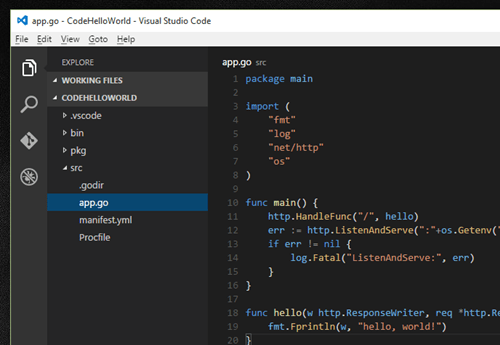
    My workspace now looked like this:

    2015.12.07vscode04

    Now, I *could* have stopped here. By hitting the CTL-Shift+C keyboard sequence, I can open a command prompt that points at the current directory. I could kick off the simple Cloud Foundry deployment process from that outside command window, but I wanted it all within VS Code. Fortunately, VS Code supports automation tasks that run built-in or custom commands. To create a file for the Cloud Foundry “push” task, I entered the command window within VS Code (CTL+Shift+P) and selected Tasks: Configure Task Runner. This generated a tasks.json stub.

    The tasks file contains single command. You could choose to augment that command with (optional) “tasks” that represent calls against that base command. For instance, in this case I’m using the “cf” command, and individual tasks for logging in, and pushing an app. Below is my complete tasks.json file. The isShellCommand means that VS Code executes the command itself, and I want to see the output in the command window (showOutput equals “always”). For each declared task, I set a friendly name, suppressed it from being used in the command, and passed in an array of command line parameters. The commands are executing in a sub-directory that’s not holding my source code, so I set the necessary path to my source code and YAML manifest. I’m targeting AppFog, so you can see the target endpoint called out in my login request.

    {
        "version": "0.1.0",
        "command": "cf",
        "isShellCommand": true,
        "showOutput": "always",
        "args": [],
    	"tasks": [
             {
                "taskName": "login",
                "suppressTaskName": true,
                "args": ["login", "-a", "https://api.uswest.appfog.ctl.io", "-o", "ORG", "-u", "USER", "-p", "PASSWORD", "-s", "SPACE"]
     	     },
             {
                "taskName": "push",
                "suppressTaskName": true,
                "args": ["push", "-p", ".\\src\\", "-f", ".\\src\\manifest.yml"]
             }
        ]
    
    }
    

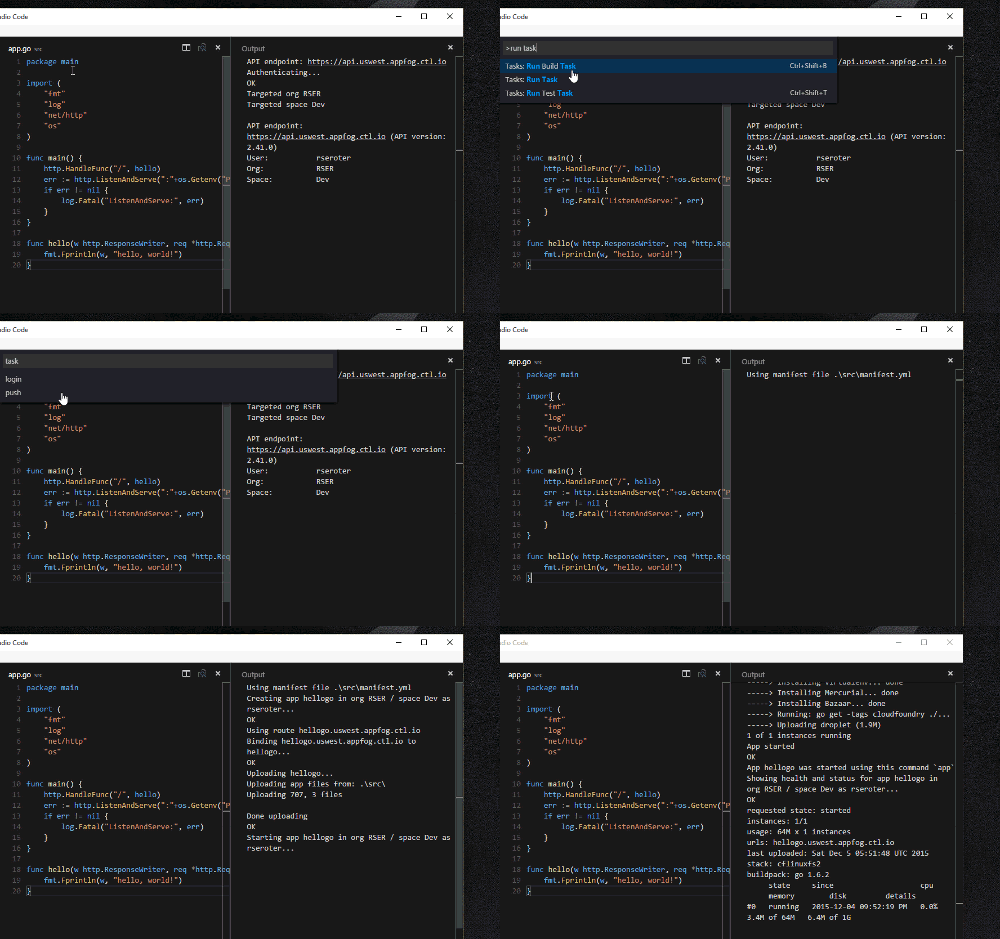
    I opened my app.go file, and spun up the VS Code command window. After choosing Tasks: Run Task, I’m asked to choose a task. If I choose my “push” command before logging in, I get the expected error (“not authenticated”). If I run the “login” task, and then the “push” task, you can see that my app runs through the Cloud Foundry deployment process.

    2015.12.07vscode05

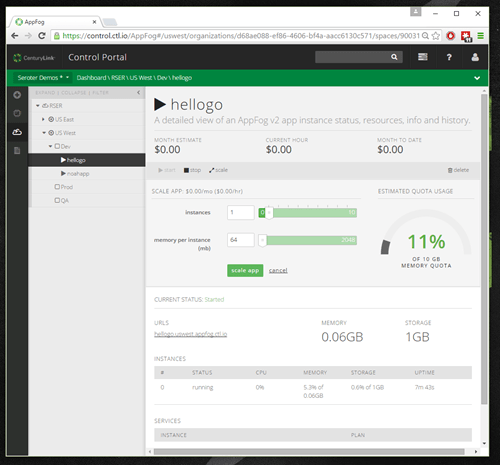
    Sweet! My app deployed – with a warning that I was using a deprecated package manager – and I could see app configuration in the AppFog console (below). I then tested my app by browsing the application URL.

    2015.12.07vscode06

    VS Code looks like a pretty handy, extensible IDE for those doing development in .NET, Node, Go, or other languages. The automated tasks capability isn’t perfect, but hey, I got it working with the Cloud Foundry deployment tools in a few minutes, so that’s not too shabby!

    Are you looking at using VS Code for any development?

  • What’s hot in tech? Reviewing the latest ThoughtWorks Radar

    I don’t know how you all keep up with technology nowadays. Has there ever been such a rapid rate of change in fundamental areas? To stay current, one can attend the occasional conference, stay glued to Twitter, or voraciously follow tech sites like The New Stack, InfoQ, and ReadWrite. If you’re overwhelmed with all that’s happening and don’t know what to do, you should check out the twice-yearly ThoughtWorks RadarIn this post, I’ll take a quick walk through some of the highlights.

    2015.11.22radar01

    The Radar looks at trends in Technologies, Platforms, Tools, and Languages/Frameworks. For each focus area, they categorize things as “adopt”  (use it now), “trial” (try it and make sure it’s a fit for your org), “assess” (explore to understand the impact), and “hold” (don’t touch with a ten foot pole – just kidding).

    ThoughtWorks has a pretty good track record of trend spotting, but like anyone, they have some misses. It’s fun to look at their first Radar back in 2010 and see them call Google Wave a “promising platform.” But in the same Radar, they point out things that we now consider standard in any modern organization: continuous deployment, distributed version control systems, and non-relational databases. Not bad!

    They summarize the November 2015 Radar with the following trends: Docker incites container ecosystem explosion, microservices and related tools grow in popularity, JavaScript tooling settles down, and security processes get baked into the SDLC. Let’s look at some highlights.

    For Techniques, they push for the adoption of items that reflect the new reality of high-performing teams in fast-changing environments. Teams should be generating infrastructure diagrams on demand (versus meticulously crafting schematics that are instantly out of date), treating code deployments different than end-user-facing releases, creating integration contract tests for microservices, and focusing on products over projects. Companies should trial things like creating different backend APIs for each frontend client, using Docker for builds, using idempotency filters to check for duplicates, and doing QA in production. They also push for teams to strongly consider Phoenix environments and stop wasting so much time trying to keep existing environments up to date.ThoughtWorks encourages us to assess the idea of using bug bounties to uncover issues, data lakes for immutable raw data, hosted IDEs (like Codenvy and Cloud9), and reactive architectures. Teams should hold the envy: don’t create microservices or web-scale architectures just because “everyone else is doing it.” ThoughtWorks also tells us to stop adding lots of complex commands to our CI/CD tools, and stop creating standalone DevOps teams.

    What Platforms should you know about? Only a single thing ThoughtWorks says to adopt: time-based one-time passwords as two-factor authentication. You’re probably noticing that implemented on more and more popular websites. Lots of things you should trial. These include data-related platforms like CDN-provider Fastly, SQL-on-Hadoop with Cloudera Impala, real-time data processing with Apache Spark and developer-friendly predictive analytics with H2O.  Teams should also take a look at Apache Mesos for container scheduling (among other things) and Amazon Lambda for running short-lived, stateless services. You’ll find some container lovin’ in the assess category. Here you’ll find Amazon’s container service ECS, Deis for a Heroku-like PaaS that can run anywhere, and both Kubernetes and Rancher for container management. From a storage perspective, take a look at time-series databases and Ceph for object storage. Some interesting items to hold on. ThoughtWorks says to favor embedded (web) servers over heavyweight application servers, avoid get roped into overly ambitious API gateway products, and stay away from superficial private clouds that just offer a thin veneer on top of a virtualization platform.

    Let’s look at Tools. They, like me, love Postman and think you should adopt it for testing REST (and even SOAP) services. ThoughtWorks suggests a handful of items to trial. Take a deep look at the Docker toolbox for getting Docker up and running on your local machine, Consul for service discovery and health, Git tools for visualizing commands and scanning for sensitive content, and Sensu for a new way of monitoring services based on their role. Teams should assess the messaging tool Kafka, ConcourseCI for CI/CD, Gauge for test automation, Prometheus for monitoring and alerting, RAML as an alternative to Swagger, and the free Visual Studio Code.ThoughtWorks says to cut it out (hold) on Citrix remote desktops for development. Just use cloud IDEs or some other sandboxed environment!

    Finally, Languages & Frameworks has a few things to highlight. ThoughtWorks says to adopt ECMAScript 6 for modern JavaScript development, Nancy for HTTP services in .NET, and Swift for Apple development. Teams should trial React.js for JavaScript UI/view development, SignalR for server-to-client (websocket) apps in .NET environments, and Spring Boot for getting powerful Java apps up and running. You should assess tools for helping JavaScript, Haskell, Java and Ruby developers.

    Pick a few things from the Radar and dig into them further! Choose things that you’re entirely unfamiliar with, and break into some new, uncomfortable areas. It’s never been a more exciting time for using technology to solve real business problems, and tools like the ThoughtWorks Radar help keep you from falling behind on relevant trends.

  • What Are All of Microsoft Azure’s Application Integration Services?

    As a Microsoft MVP for Integration – or however I’m categorized now – I keep a keen interest in where Microsoft is going with (app) integration technologies. Admittedly, I’ve had trouble keeping up with all the various changes, and thought it’d be useful to take a tour through the status of the Microsoft integration services. For each one, I’ll review its use case, recent updates, and how to consume it.

    What qualifies as an integration technology nowadays? For me, it’s anything that lets me connect services in a distributed system. That “system” may be comprised of components running entirely on-premises, between business partners, or across cloud environments. Microsoft doesn’t totally agree with that definition, if their website information architecture is any guide. They spread around the services in categories like “Hybrid Integration”, “Web and Mobile”, “Internet of Things”, and even “Analytics.”

    But, whatever. I’m considering the following Microsoft technologies as part of their cloud-enabled integration stack:

    • Service Bus
    • Event Hubs
    • Data Factory
    • Stream Analytics
    • BizTalk Services
    • Logic Apps
    • BizTalk Server on Cloud Virtual Machines

    I considered, but skipped, Notification Hubs, API Apps, and API Management. They all empower application integration scenarios in some fashion, but it’s more ancillary. If you disagree, tell me in the comments!

    Service Bus

    What is it?

    The Service Bus is a general purpose messaging engine released by Microsoft back in 2008. It’s made up of two key sets of services: the Service Bus Relay, and Service Bus Brokered Messaging.

    https://twitter.com/clemensv/status/648902203927855105

    The Service Bus Relay is a unique service that makes it possible to securely expose on-premises services to the Internet through a cloud-based relay. The service supports a variety of messaging patterns including request/reply, one-way asynchronous, and peer-to-peer.

    But what if the service client and server aren’t online at the same time? Service Bus Brokered Messaging offers a pair of asynchronous store-and-forward services. Queues provide first-in-first-out delivery to a single consumer. Data is stored in the queue until retrieved by the consumer. Topics are slightly different. They make it possible for multiple recipients to get a message from a producer. It offers a publish/subscribe engine with per-recipient filters.

    How does the Service Bus enable application integration? The Relay lets companies expose legacy apps through public-facing services, and makes cross-organization integration much simpler than setting up a web of VPN connections and FTP data exchanges. Brokered Messaging makes it possible to connect distributed apps in a loosely coupled fashion, regardless of where those apps reside.

    What’s new?

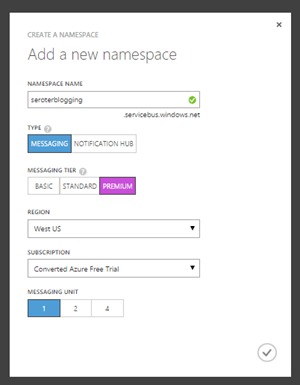
    This is a fairly mature service with a slow rate of change. The only thing added to the Service Bus in 2015 is Premium messaging. This feature gives customers the choice to run the Brokered Messaging components in a single-tenant environment. This gives users more predictable performance and pricing.

    From the sounds of it, Microsoft is also looking at finally freeing Service Bus Relay from the shackles of WCF. Here’s hoping.

    https://twitter.com/clemensv/status/639714878215835648

    How to use it?

    Developers work with the Service Bus primarily by writing code. To host a Relay service, you must write a WCF service that uses one of the pre-defined Service Bus bindings. To make it easy, developers can add the Service Bus package to their projects via NuGet.
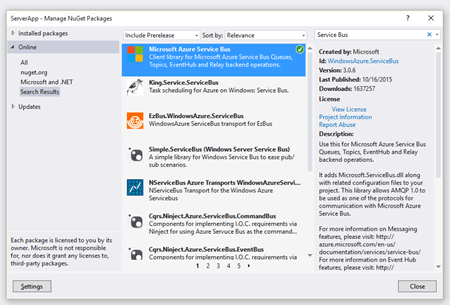
    2015.10.21integration01

    The only aspect that requires .NET is hosting Relay services. Developers can consume Relay-bound services, Queues, and Topic subscriptions from a host of other platforms, or even just raw REST APIs. The Microsoft SDKs for Java, PHP, Ruby, Python and Node.js all include the necessary libraries for talking to the Service Bus. AMQP support appears to be in a subset of the SDKs.

    It’s also possible to set up Service Bus Queues and Topics via the Azure Portal. From here, I can create new Queues, add Topics, and configure basic Subscriptions. I can also see any active Relay service endpoints.
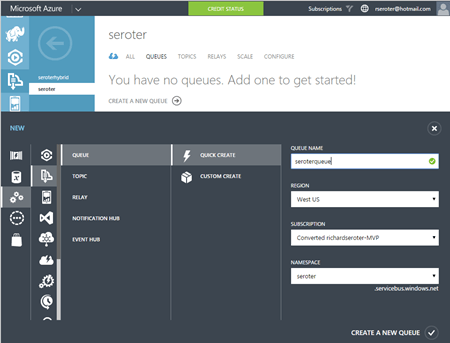
    2015.10.21integration02

    Finally, you can interact with the Service Bus through the super powerful (and open source) Service Bus Explorer created by Micosoftie Paolo Salvatori. From here, you can configure and test virtually every aspect of the Service Bus.


    Event Hubs

    What is it?

    Azure Event Hubs is a scalable service for high-volume event intake. Stream in millions of events per second from applications or devices. It’s not an end-to-end messaging engine, but rather, focuses heavily on being a low latency “front door” that can reliably handle consistent or bursty event streams.

    Event Hubs works by putting an ordered sequence of events into something called a partition. Like Apache Kafka, an Event Hub partition acts like an append-only commit log. Senders – who communicate with Event Hubs via AMQP and HTTP – can specify a partition key when submitting events, or leave it out so that a round-robin approach decides which partition the event goes to. Partitions are accessed by readers through Consumer Groups. A consumer group is like a view of the event stream. There should only be a single partition reader at one time, and Event Hub users definitely have some responsibility for managing connections, tracking checkpoints, and the like.

    How do Event Hubs enable application integration? A core use case of Event Hubs is capturing high volume “data exhaust” thrown off by apps and devices. You may also use this to aggregate data from multiple sources, and have a consumer process pull data for further processing and sending to downstream systems.

    What’s new?

    In July of 2015, Microsoft added support for AMQP over web sockets. They also added the service to an addition region in the United States.

    How to use it?

    It looks like only the .NET SDK has native libraries for Event Hubs, but developers can still use either the REST API or AMQP libraries in their language of choice (e.g. Java).

    The Azure Portal lets you create Event Hubs, and do some basic configuration.
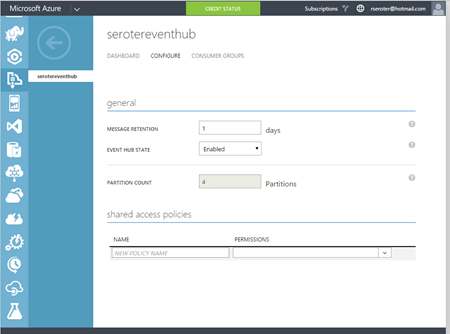
    2015.10.21integration03

    Paolo also added support for Event Hubs in the Service Bus Explorer.


    Data Factory

    What is it?

    The Azure Data Factory is a cloud-based data integration service that does traditional extract-transform-load but with some modern twists. Data Factory can pull data from either on-premises or cloud endpoints. There’s an agent-based “data management gateway” for extracting data from on-premises file systems, SQL Servers, Oracle databases, Teradata databases, and more. Data transformation happens in Hadoop cluster or batch processing environment. All the various processing activities are collected into a pipeline that gets executed. Activities can have policies attached. A policy controls concurrency, retries, delay duration, and more.

    How does the Data Factory enable application integration? This could play a useful part in synchronizing data used by distributed systems. It’s designed for large data sets and is much more efficient than using messaging-based services to ship chunks of data between repositories.

    What’s new?

    This service just hit “general availability” in August, so the whole service is kinda new.

    How to use it?

    You have a few choices for interacting with the Data Factory service. As mentioned earlier, there are a whole bunch of supported database and file endpoints, but what about creating and managing the factories themselves? Your choices are Visual Studio, PowerShell, REST API, or the graphical designer in the Azure Preview Portal. Developers can download a package to add the appropriate project types to Visual Studio, and download the latest Azure PowerShell executable to get Data Factory extensions.

    To do any visual design, you need to jump into the (still) Preview Portal. Here you can create, manage, and monitor individual factories.
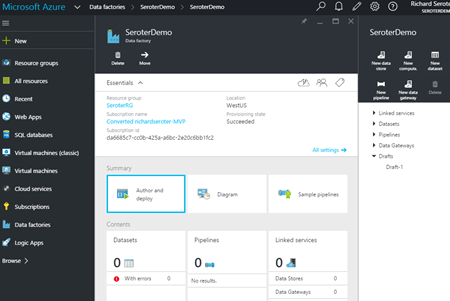
    2015.10.21integration04


    Stream Analytics

    What is it?

    Stream Analytics is a cloud-hosted event processing engine. Point it at an event source (real-time or historical) and run data over queries written in a SQL-like language. An event source could be a stream (like Event Hubs), or reference data (like Azure Blob storage). Queries can join streams, convert data types, match patterns, count unique values, look for changed values, find specific events in windows, detect absence of events, and more.

    Once the data has been processed, it goes to one of many possible destinations. These include Azure SQL Databases, Blob storage, Event Hubs, Service Bus Queues, Service Bus Topics, Power BI, or Azure Table Storage. The choice of consumer obviously depends on what you want to do with the data. If the stream results should go back through a streaming process, then Event Hubs is a good destination. If you want to stash the resulting data in a warehouse for later BI, go that way.

    How does Stream Analytics enable application integration? The output of a stream can go into the Service Bus for routing to other systems or triggering actions in applications hosted anywhere. One system could pump events through Stream Analytics to detect relevant business conditions and then send the output events to those systems via database or messaging.

    What’s new?

    This service became generally available in April 2015. In July, Microsoft added support for Service Bus Queues and Topics as output types. A few weeks ago, there was another update that added IoT-friendly capabilities like DocumentDB as an output, support for the IoT Hub service, and more.

    How to use it?

    Lots of different app services can connect to Stream Analytics (including Event Hubs, Power BI, Azure SQL Databases), but it looks like you’ve got limited choices today in setting up the stream processing jobs themselves. There’s the REST API, .NET SDK, or classic Portal UI.

    The Portal UI lets you create jobs, configure inputs, write and test queries, configure outputs, scale streaming units up and down, and change job settings.
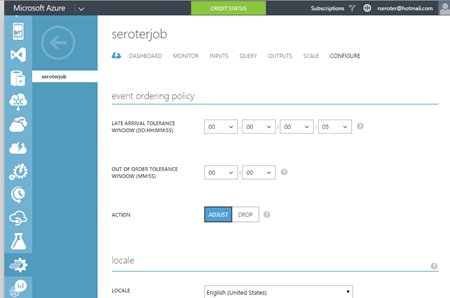
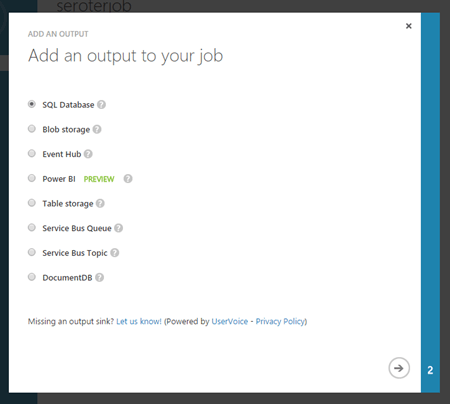
    2015.10.21integration05

    2015.10.21integration06


    BizTalk Services

    What is it?

    BizTalk Services targets EAI (enterprise application integration) and EDI (electronic data exchange) scenarios by offering tools and connectors that are designed to bridge protocol and data mismatches between systems. Developers send in XML or flat file data, and it can be validated, transformed, and routed via a “bridge” component. Message validation is done against an XSD schema, and XSLT transformations are created visually in a sophisticated mapping tool. Data comes into BizTalk Services via HTTP, S/FTP, Service Bus Queues, or Service Bus Topic subscription. Valid destinations for the output of a bridge include FTP, Azure Blob storage, one-way Service Bus Relay endpoints, Service Bus Queues, and more. Microsoft also added a BizTalk Adapter Service that lets you expose on-premises endpoints – options include SQL Server, Oracle databases, Oracle E-Business Suite, SAP, and Siebel – to cloud-hosted bridges.

    BizTalk Services also has some business-to-business capabilities. This includes support for a wide range of EDI and EDIFACT schemas, and a basic trading partner management portal.

    How does BizTalk Services enable application integration? BizTalk Services makes it possible for applications with different endpoints and data structures to play nice. Obviously this has potential to be a useful part of an application integration portfolio. Companies need to connect their assets, which are more distributed now more than ever.

    What’s new?

    BizTalk Services itself seems a bit stagnant (judging by the sparse release notes), but some of its services are now exposed in Logic and API apps (see below). Not sure where this particular service is heading, but its individual pieces will remain useful to teams that want access to transformation and connectivity services in their apps.

    How to use it?

    Working with BizTalk Services means using the REST API, PowerShell commandlets, or Visual Studio. There’s also a standalone management portal that hangs off the main Azure Portal.

    In Visual Studio, developers need to add the BizTalk Services SDK in order to get the necessary components. After installing, it’s easy enough to model out a bridge with all the necessary inputs, outputs, schemas, and maps.
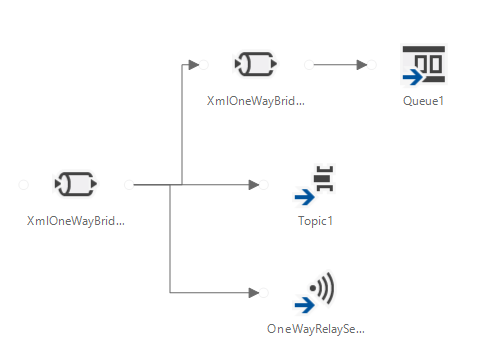
    In the standalone portal, you can search for and delete bridges, upload schemas and maps, add certificates, and track messages. Back in the standard Azure Portal, you configure things like backup policies and scaling settings.
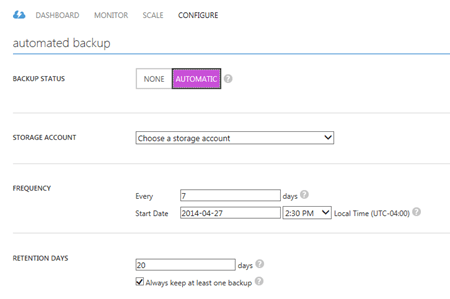
    2015.10.21integration07


    Logic Apps

    What is it?

    Logic Apps let developers build and host workflows in the cloud. These visually-designed processes run a series of steps (called “actions”) and use “connectors” to access remote data and business logic. There are tons of connectors available so far, and it’s possible to create your own. Core connectors include Azure Service Bus, Salesforce Chatter, Box, HTTP, SharePoint, Slack, Twilio, and more. Enterprise connectors include an AS2 connector, BizTalk Transform Service, BizTalk Rules Service, DB2 connector, IBM WebSphere MQ Server, POP3, SAP, and much more.

    Triggers make a Logic App run, and developers can trigger manually, or off the action of a connector. You could start a Logic app with an HTTP call, a recurring schedule, or upon detection of a relevant Tweet in Twitter. Within the Logic App, you can specify repeating operations and some basic conditional logic. Developers can see and edit the underlying JSON that describes a Logic App. Features like shared parameters are ONLY available to those writing code (versus visually designing the workflow). The various BizTalk-branded API actions offer the ability to validate, transform, and encode data, or execute independently-maintained business rules.

    How do Logic Apps enable application integration? This service helps developers put together cloud-oriented application integration workflows that don’t need to run in an on-premises message bus. The various social and SaaS connectors help teams connect to more modern endpoints, while the on-premises connectors and classic BizTalk functionality addresses more enterprise-like use cases.

    What’s new?

    This is clearly an area of attention for Microsoft. Lots of updates since the server launched in March. Microsoft has added Visual Studio support for designing Logic Apps, future execution scheduling, connector search in the Preview Portal, do … until looping, improvements to triggers, and more.

    How to use it?

    This is still a preview service, so it’s not surprising that you only have a few ways to interact with it. There’s a REST API for management, and the user experience in the Azure Preview Portal.

    Within the Preview Portal, developers can create and manage their Logic Apps. You can either start from scratch, or use one of the pre-built templates that reflect common patterns like content-based routing, scatter-gather, HTTP request/response, and more.
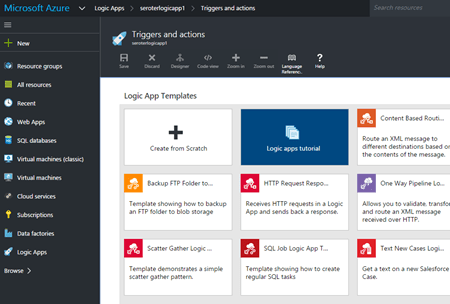
    2015.10.21integration08

    If you want to build your own, you choose from any existing or custom-built API apps.
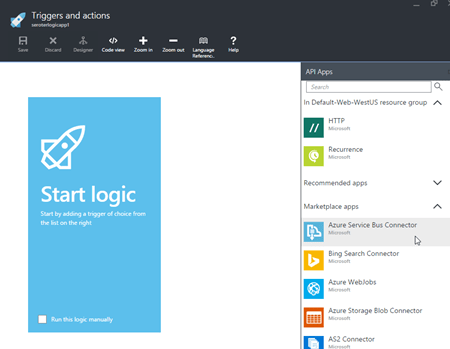
    2015.10.21integration09

    You then save your Logic App and can have it run either manually or based on a trigger.


    BizTalk Server (on Cloud Virtual Machines)

    What is it?

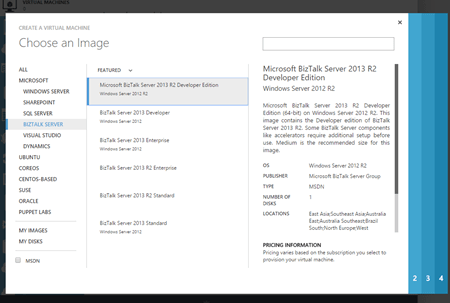
    Azure users can provision and manage their own BizTalk Server integration server in Azure Virtual Machines using prebuilt images. BizTalk Server is the mature, feature-rich integration bus used to connect enterprise apps. With it, customers get a stateful workflow engine, reliable pub/sub messaging engine, adapter framework, rules engine, trading partner management platform, and full design experience in Visual Studio. While not particularly cloud integrated (with the exception of a couple Service Bus adapters), it can be reasonably used to connect to integrate apps across environments.

    What’s new?

    BizTalk Server 2013 R2 was released in the middle of last year and included some incremental improvements like native JSON support, and updates to some built-in adapters. The next major release of the platform is expected in 2016, but without a publicly announced feature set.

    How to use it?

    Deploy the image from the template library if you want to run it in Azure, or do the same in any other infrastructure cloud.
    2015.10.21integration10


    Summary

    Whew. Those are a lot of options. Definitely some overlap, but Microsoft also seems to be focused on building these in a microservices fashion. Specifically, single purpose services that do one thing really well and don’t encroach into unnatural territory. For example, Stream Analytics does one thing, and relies on other services to handle other parts of the processing pipeline. I like this trend, as it gets away from a heavyweight monolithic integration service that has a bunch of things I don’t need, but have to deploy. It’s much cleaner (although potentially MORE complex) to assemble services as needed!

  • You don’t need a private cloud, you need isolation options (and maybe more control!)

    Private cloud is definitely still a “thing.” Survey after survey shows that companies are running apps in (on-premises) private clouds and cautiously embracing public cloud. But, it often seems that companies see this as a binary choice: wild-west public cloud, or fully dedicated private cloud. I just wrote up a report on Heroku Private Spaces, and this reinforces my belief that the future of IT is about offering increasingly sophisticated public cloud isolation options, NOT running infrastructure on-premises.

    Why do companies choose to run things in a multi-tenant public cloud like Azure, AWS, Heroku, or CenturyLink? Because they want to offload responsibility for things that aren’t their core competencies, want elasticity to consume apps infrastructure on their timelines and in any geography, they like the constant access to new features and functionality, and it gives their development teams more tools to get revenue-generating products to market quickly.

    How come everything doesn’t run in public clouds? Legit concerns exist about supportability for existing topologies and lack of controls that are “required” by audits. I put required in quotes because in many cases, the spirit of the control can be accomplished, even if the company-defined policies and procedures aren’t a perfect match. For many companies, the solution to these real or perceived concerns is often a private cloud.

    However, “private cloud” is often a misnomer. It’s at best a hyper-converged stack that provides an on-demand infrastructure service, but more often it’s a virtualization environment with some elementary self-service capabilities, no charge-back options, no PaaS-like runtimes, and single-location deployments. When companies say they want private clouds, what they OFTEN need is a range of isolation options. By isolation, I mean fewer and fewer dependencies on shared infrastructure. Why isolation? There’s a need to survive an audit that includes detailed network traffic reports, user access logs, and proof of limited access by service provider staff. Or, you have an application topology that doesn’t fit in the “vanilla” public cloud setup. Think complex networking routes or IP spaces, or even application performance requirements.

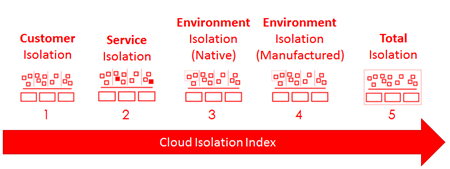
    To be sure, any public cloud today is already delivering isolation. Either your app (in the case of PaaS), or virtual infrastructure (in the case of IaaS) is walled off from other customers, even if they share a control plane. What is the isolation spectrum, and what’s in-between vanilla public cloud and on-premises hardware? I’ve made up a term (“Cloud Isolation Index”) and describe it below.

    2015.09.17cii05


    Customer Isolation

    What is it?

    This is the default isolation that comes with public clouds today.  Each customer has their own carved-out place in a multi-tenant environment. Customers typically share a control plane, underlying physical infrastructure, and in some cases, even the virtual infrastructure. Virtual infrastructure may be shared when you’re considering application services like database-as-a-service, messaging services, identity services, and more.

    How is it accomplished?

    This is often accomplished through a mix of hardware and software. The base hardware being used by a cloud provider may offer some inherent multi-tenancy, but most likely, the provider is relying on a software tier that isolates tenants. It’s often the software layer that orchestrates an isolated sandbox across physical compute, networking, storage, and customer metadata.

    What are the benefits and downsides?

    There are lots of reasons that this default isolation level is attractive. Getting started in these environments takes seconds. You have base assurances that you’re not co-mingling your business critical information in a risky way. It’s easier to manage your account or get support because there’s nothing funky going on.

    Downsides? You may not be able to satisfy all your audit and complexity concerns because your vanilla isolation doesn’t support customizations that could break other tenants. Public cloud also limits you to the locations that it’s running, so if you need a geography that’s not available from that provider, you’re out of luck.

    Service Isolation

    What is it?

    Take an service and wall it off from other users within a customer account. You may share a control plane, account management, and underlying physical infrastructure. 2015.09.17cii07You’re seeing a new crop of solutions here, and I like this trend. Heroku Private Spaces gives you apps and data in a network isolated area of your account, Microsoft Azure Service Bus Premium Messaging delivers resource isolation for your messaging workloads. “Reserved instances” in cloud infrastructure environments serve a similar role. It’s about taking services or set of services and isolating them for security or performance reasons.

    How is it accomplished?

    It looks like Heroku Private Spaces works by using AWS VPC (see “environment isolation” below) and creating a private network for one or many apps targeted at a Space. Azure likely uses dedicated compute instances to run a messaging unit just for you. Dedicated or reserved services depend on network and (occasionally) compute isolation.

    What are the benefits and downsides?

    The benefits are clear. Instead of doing a coarse exercise (e.g. setting up dedicated private “cloud” infrastructure somewhere) because one component requires elevated isolation, carve up that app or set of services into a private area. By sharing a control plane with the “public” cloud components, you don’t increase your operational burden.

    Environment Isolation (Native)

    What is it?

    Use vendor-provided cloud features to carve up isolation domains within your customer account. Instead of “Customer Isolation” where everything gets dumped into the vanilla account and everyone has access, here you thoughtfully design an environment and place apps in the right place. Most public clouds offer features to isolation workloads within a given account.

    How is it accomplished?

    Lots of ways to address this. In the CenturyLink Cloud, we offer things like account hierarchies where customers set up different accounts with unique permissions, network boundaries. 2015.09.17cii06Also, our customers use Bare Metal servers for dedicated workloads, role-based access controls to limit permissions, distinct network spaces with carefully crafted firewall policies, and more.

    Amazon offer services like Virtual Private Cloud (VPC) that creates a private part of AWS with Internet access. Customers use access groups to control network traffic in and out of a VPC. Many clouds offer granular security permissions so that you can isolate permission and in some cases, access to specific workloads. You’ll also find cloud options for data encryption and other native data security features.

    Select private cloud environments also fit into this category. CenturyLink sells a Private Cloud which is fully federated with the public cloud, but on a completely dedicated hardware stack in any of 50+ locations around the world. Here, you have native isolation in a self-service environment, but it still requires a capital outlay.

    This is all typically accomplished using features that many clouds provide you out-of-the-box.

    What are the benefits and downsides?

    One huge benefit is that you can get many aspects of “private cloud” without actually making extensive commitments to dedicated infrastructure. Customers are seeking control and ways to wall-off sensitive workloads. By using inherent features of a global public cloud, you get greater assurances of protection without dramatically increasing your complexity/cost.

    Environment Isolation (Manufactured)

    What is it?

    Sometimes the native capabilities of a public cloud are insufficient for the isolation level that you need. But, one of the great aspects of cloud is the extensibility and in some cases, customization. You’re likely still sharing a control plane and some underlying physical infrastructure.

    How is it accomplished?

    You can often create an isolated environment through additional software, “hybrid” infrastructure, and even hack-y work-arounds.

    2015.09.17cii08Most clouds offer a vast ecosystem of 3rd party open source and commercial appliances. Create isolated networks with an overlay solution, encrypt workloads at the host level, stand up self-managed database solutions, and much more. Look at something like Pivotal Cloud Foundry. Don’t want the built-in isolation provided by a public PaaS provider? Run a dedicated PaaS in your account and create the level of isolation that your apps demand.

    You also have choices to weave environments together into a hybrid cloud. If you can’t place something directly in the cloud data center, then you can use things like Azure ExpressRoute or AWS Direct Connect to privately link to assets in remote data centers. Since CenturyLink is the 2nd largest colocation provider in the world, we often see customers put parts of their security stack or entirely different environments into our data center and do a direct connect to their cloud environment. In this way, you manufacture the isolation you need by connecting different components that reside in different isolation domains.

    Another area that comes up with regards to isolation is vendor access. It’s one thing to secure workloads to prevent others within your company from accessing them. It’s another to also prevent the service provider themselves from accessing them! You make this happen by using encryption (that you own the keys for), additional network overlays, or even changing the passwords on servers to something that the cloud management platform doesn’t know.

    What are the benefits and downsides?

    If public cloud vendors *didn’t* offer the option to manufacture your desired isolation level, you’d see a limit to what ended up going there. The benefit of this level is that you can target more sensitive or complex workloads at the public cloud and still have a level of assurance that you’ve got an advanced isolation level.

    The downside? You could end up with a very complicated configuration. If your cloud account no longer resembles its original state, you’ll find that your operational costs go up, and it might be more difficult to take advantage of new features being natively added to the cloud.

    Total Isolation

    What is it?

    This is the extreme end of the spectrum. Stand up an on-premises or hosted private cloud that doesn’t share a control plane or any infrastructure with another tenant.

    How is it accomplished?

    You accomplish this level of isolation by buying stuff. You typically make a significant commit to infrastructure for the privilege of running it yourself, or paying someone else to run it on your behalf. You spend time working with consultants to size and install an environment.

    What are the benefits and downsides?

    The benefits? You have complete control of an infrastructure environment and can use the hardware vendors you want, and likely create any sort of configuration you need to support your existing topologies. The downside? You’re probably not getting anywhere near the benefit that your competitors are who are using the public cloud to scale faster, and in more places than you’ll ever be with owned infrastructure.

    I’m not sure I feel the same way as Cloud Opinion, but the point is well taken.

    Summary

    Isolation should be a feature, not a capital project.

    This isolation concept is still a work in progress for me, and probably needs refinement. Am I missing parts of the spectrum? Have I undersold fully dedicated private infrastructure? It seems that if we talked more about isolation levels, and less about public vs. private, we’d be having smarter conversations. Agree?

  • Comparing Clouds: API Capabilities

    API access is quickly becoming the most important aspect of any cloud platform. How easily can you automate activities using programmatic interfaces? What hooks do you have to connect on-premises apps to cloud environments? So far in this long-running blog series, I’ve taken a look at how to provision, scale, and manage the cloud environments of five leading cloud providers. In this post, I’ll explore the virtual-machine-based API offerings of the same providers. Specifically, I’m assessing:

    • Login mechanism. How do you access the API? Is it easy for developers to quickly authenticate and start calling operations?
    • Request and response shape. Does the API use SOAP or REST? Are payloads XML, JSON, or both? Does a result set provide links to follow to additional resources?
    • Breadth of services. How comprehensive is the API? Does it include most of the capabilities of the overall cloud platform?
    • SDKs, tools, and documentation. What developer SDKs are available, and is there ample documentation for developers to leverage?
    • Unique attributes. What stands out about the API? Does it have any special capabilities or characteristics that make it stand apart?

    As an aside, there’s no “standard cloud API.” Each vendor has unique things they offer, and there’s no base interface that everyone conforms to. While that makes it more challenge to port configurations from one provider to the next, it highlights the value of using configuration management tools (and to a lesser extent, SDKs) to provide abstraction over a cloud endpoint.

    Let’s get moving, in alphabetical order.

    DISCLAIMER: I’m the VP of Product for CenturyLink’s cloud platform. Obviously my perspective is colored by that. However, I’ve taught four well-received courses on AWS, use Microsoft Azure often as part of my Microsoft MVP status, and spend my day studying the cloud market and playing with cloud technology. While I’m not unbiased, I’m also realistic and can recognize strengths and weaknesses of many vendors in the space.

    Amazon Web Services

    Amazon EC2 is among the original cloud infrastructure providers, and has a mature API.

    Login mechanism

    For AWS, you don’t really “log in.” Every API request includes an HTTP header made up of the hashed request parameters signed with your private key. This signature is verified by AWS before executing the requested operation.

    A valid request to the API endpoint might look like this (notice the Authorization header):

    Content-Type: application/x-www-form-urlencoded; charset=UTF-8
    X-Amz-Date: 20150501T130210Z
    Host: ec2.amazonaws.com
    Authorization: AWS4-HMAC-SHA256 Credential=KEY/20150501/us-east-1/ec2/aws4_request, SignedHeaders=content-type;host;x-amz-date, Signature=ced6826de92d2bdeed8f846f0bf508e8559e98e4b0194b84example54174deb456c
    
    [request payload]
    

    Request and response shape

    Amazon still supports a deprecated SOAP endpoint, but steers everyone to it’s HTTP services. To be clear, it’s not REST; while the API does use GET and POST, it typically throws a command and all the parameters into the URL. For instance, to retrieve a list of instances in your account, you’d issue a request to:

    https://ec2.amazonaws.com/?Action=DescribeInstances&AUTHPARAMS

    For cases where lots of parameters are required – for instance, to create a new EC2 instance – all the parameters are signed in the Authorization header and added to the URL.

    https://ec2.amazonaws.com/?Action=RunInstances
    &ImageId=ami-60a54009
    &MaxCount=3
    &MinCount=1
    &KeyName=my-key-pair
    &Placement.AvailabilityZone=us-east-1d
    &AUTHPARAMS
    

    Amazon APIs return XML. Developers get back a basic XML payload such as:

    <DescribeInstancesResponse xmlns="http://ec2.amazonaws.com/doc/2014-10-01/">
      <requestId>fdcdcab1-ae5c-489e-9c33-4637c5dda355</requestId>
        <reservationSet>
          <item>
            <reservationId>;r-1a2b3c4d</reservationId>
            <ownerId>123456789012</ownerId>
            <groupSet>
              <item>
                <groupId>sg-1a2b3c4d</groupId>
                <groupName>my-security-group</groupName>
              </item>
            </groupSet>
            <instancesSet>
              <item>
                <instanceId>i-1a2b3c4d</instanceId>
                <imageId>ami-1a2b3c4d</imageId>
    

    Breadth of services

    Each AWS service exposes an impressive array of operations. EC2 is no exception with well over 100. The API spans server provisioning and configuration, as well as network and storage setup.

    2015.07.30api01

    I’m hard pressed to find anything in the EC2 management UI that isn’t available in the API set.

    SDKs, tools, and documentation

    AWS is known for its comprehensive documentation that stays up-to-date. The EC2 API documentation includes a list of operations, a basic walkthrough of creating API requests, parameter descriptions, and information about permissions.

    SDKs give developers a quicker way to get going with an API, and AWS provides SDKs for Java, .NET, Node.js. PHP, Python and Ruby. Developers can find these SDKs in package management systems like npm (Node.js) and NuGet (.NET).

    As you may expect, there are gobs of 3rd party tools that integrate with AWS. Whether it’s configuration management plugins for Chef or Ansible, or build automation tools like Terraform, you can expect to find AWS plugins.

    Unique attributes

    The AWS API is comprehensive with fine-grained operations. It also has a relatively unique security process (signature hashing) that may steer you towards the SDKs that shield you from the trickiness of correctly signing your request. Also, because EC2 is one of the first AWS services ever released, it’s using an older XML scheme. Newer services like DynamoDB or Kinesis offer a JSON syntax.

    Amazon offers push-based notification through CloudWatch + SNS, so developers can get an HTTP push message when things like Autoscale events fire, or a performance alarm gets triggered.

    CenturyLink Cloud

    Global telecommunications and technology company CenturyLink offers a public cloud in regions around the world. The API has evolved from a SOAP/HTTP model (v1) to a fully RESTful one (v2).

    Login mechanism

    To use the CenturyLink Cloud API, developers send their platform credentials to a “login” endpoint and get back a reusable bearer token if the credentials are valid. That token is required for any subsequent API calls.

    A request for token may look like:

    POST https://api.ctl.io/v2/authentication/login HTTP/1.1
    Host: api.ctl.io
    Content-Type: application/json
    Content-Length: 54
    
    {
      "username": "[username]",
      "password": "[password]"
    }

    A token (and role list) comes back with the API response, and developers use that token in the “Authorization” HTTP header for each subsequent API call.

    GET https://api.ctl.io/v2/datacenters/RLS1/WA1 HTTP/1.1
    Host: api.ctl.io
    Content-Type: application/json
    Content-Length: 0
    Authorization: Bearer [LONG TOKEN VALUE]
    

    Request and response shape

    The v2 API uses JSON for the request and response format. The legacy API uses XML or JSON with either SOAP or HTTP (don’t call it REST) endpoints.

    To retrieve a single server in the v2 API, the developer sends a request to:

    GET https://api.ctl.io/v2/servers/{accountAlias}/{serverId}

    The responding JSON for most any service is verbose, and includes a number of links to related resources. For instance, in the example response payload below, notice that the caller can follow links to the specific alert policies attached to a server, billing estimates, and more.

    {
      "id": "WA1ALIASWB01",
      "name": "WA1ALIASWB01",
      "description": "My web server",
      "groupId": "2a5c0b9662cf4fc8bf6180f139facdc0",
      "isTemplate": false,
      "locationId": "WA1",
      "osType": "Windows 2008 64-bit",
      "status": "active",
      "details": {
        "ipAddresses": [
          {
            "internal": "10.82.131.44"
          }
        ],
        "alertPolicies": [
          {
            "id": "15836e6219e84ac736d01d4e571bb950",
            "name": "Production Web Servers - RAM",
            "links": [
              {
                "rel": "self",
                "href": "/v2/alertPolicies/alias/15836e6219e84ac736d01d4e571bb950"
              },
              {
                "rel": "alertPolicyMap",
                "href": "/v2/servers/alias/WA1ALIASWB01/alertPolicies/15836e6219e84ac736d01d4e571bb950",
                "verbs": [
                  "DELETE"
                ]
              }
            ]
         ],
        "cpu": 2,
        "diskCount": 1,
        "hostName": "WA1ALIASWB01.customdomain.com",
        "inMaintenanceMode": false,
        "memoryMB": 4096,
        "powerState": "started",
        "storageGB": 60,
        "disks":[
          {
            "id":"0:0",
            "sizeGB":60,
            "partitionPaths":[]
          }
        ],
        "partitions":[
          {
            "sizeGB":59.654,
            "path":"C:\\"
          }
        ],
        "snapshots": [
          {
            "name": "2014-05-16.23:45:52",
            "links": [
              {
                "rel": "self",
                "href": "/v2/servers/alias/WA1ALIASWB01/snapshots/40"
              },
              {
                "rel": "delete",
                "href": "/v2/servers/alias/WA1ALIASWB01/snapshots/40"
              },
              {
                "rel": "restore",
                "href": "/v2/servers/alias/WA1ALIASWB01/snapshots/40/restore"
              }
            ]
          }
        ],
    },
      "type": "standard",
      "storageType": "standard",
      "changeInfo": {
        "createdDate": "2012-12-17T01:17:17Z",
        "createdBy": "user@domain.com",
        "modifiedDate": "2014-05-16T23:49:25Z",
        "modifiedBy": "user@domain.com"
      },
      "links": [
        {
          "rel": "self",
          "href": "/v2/servers/alias/WA1ALIASWB01",
          "id": "WA1ALIASWB01",
          "verbs": [
            "GET",
            "PATCH",
            "DELETE"
          ]
        },
        …{
          "rel": "group",
          "href": "/v2/groups/alias/2a5c0b9662cf4fc8bf6180f139facdc0",
          "id": "2a5c0b9662cf4fc8bf6180f139facdc0"
        },
        {
          "rel": "account",
          "href": "/v2/accounts/alias",
          "id": "alias"
        },
        {
          "rel": "billing",
          "href": "/v2/billing/alias/estimate-server/WA1ALIASWB01"
        },
        {
          "rel": "statistics",
          "href": "/v2/servers/alias/WA1ALIASWB01/statistics"
        },
        {
          "rel": "scheduledActivities",
          "href": "/v2/servers/alias/WA1ALIASWB01/scheduledActivities"
        },
        {
          "rel": "alertPolicyMappings",
          "href": "/v2/servers/alias/WA1ALIASWB01/alertPolicies",
          "verbs": [
            "POST"
          ]
        },  {
          "rel": "credentials",
          "href": "/v2/servers/alias/WA1ALIASWB01/credentials"
        },
    
      ]
    }

    Breadth of services

    CenturyLink provides APIs for a majority of the capabilities exposed in the management UI. Developers can create and manage servers, networks, firewall policies, load balancer pools, server policies, and more.

    2015.07.30api02

    SDKs, tools, and documentation

    CenturyLink recently launched a Developer Center to collect all the developer content in one place. It points to the Knowledge Base of articles, API documentation, and developer-centric blog. The API documentation is fairly detailed with descriptions of operations, payloads, and sample calls. Users can also watch brief video walkthroughs of major platform capabilities.

    There are open source SDKs for Java, .NET, Python, and PHP.  CenturyLink also offers an Ansible module, and integrates with multi-cloud manager tool vRealize from VMware.

    Unique attributes

    The CenturyLink API provides a few unique things. The platform has the concept of “grouping” servers together. Via the API, you can retrieve the servers in a groups, or get the projected cost of a group,  among other things. Also, collections of servers can be passed into operations, so a developer can reboot a set of boxes, or run a script against many boxes at once.

    Somewhat similar to AWS, CenturyLink offers push-based notifications via webhooks. Developers get a near real-time HTTP notification when servers, users, or accounts are created/changed/deleted, and also when monitoring alarms fire.

    DigitalOcean

    DigitalOcean heavily targets developers, so you’d expect a strong focus on their API. They have a v1 API (that’s deprecated and will shut down in November 2015), and a v2 API.

    Login mechanism

    DigitalOcean authenticates users via OAuth. In the management UI, developers create OAuth tokens that can be for read, or read/write. These token values are only shown a single time (for security reasons), so developers must make sure to save it in a secure place.

    2015.07.30api03

    Once you have this token, you can either send the bearer token in the HTTP header, or, (and it’s not recommended) use it in an HTTP basic authentication scenario. A typical curl request looks like:

    curl -X $HTTP_METHOD -H "Authorization: Bearer $TOKEN" "https://api.digitalocean.com/v2/$OBJECT"

    Request and response shape

    The DigitalOcean API is RESTful with JSON payloads. Developers throw typical HTTP verbs (GET/DELETE/PUT/POST/HEAD) against the endpoints. Let’s say that I wanted to retrieve a specific droplet –  a “droplet” in DigitalOcean is equivalent to a virtual machine – via the API. I’d send a request to:

    https://api.digitalocean.com/v2/droplets/[dropletid]

    The response from such a request comes back as verbose JSON.

    {
      "droplet": {
        "id": 3164494,
        "name": "example.com",
        "memory": 512,
        "vcpus": 1,
        "disk": 20,
        "locked": false,
        "status": "active",
        "kernel": {
          "id": 2233,
          "name": "Ubuntu 14.04 x64 vmlinuz-3.13.0-37-generic",
          "version": "3.13.0-37-generic"
        },
        "created_at": "2014-11-14T16:36:31Z",
        "features": [
          "ipv6",
          "virtio"
        ],
        "backup_ids": [
    
        ],
        "snapshot_ids": [
          7938206
        ],
        "image": {
          "id": 6918990,
          "name": "14.04 x64",
          "distribution": "Ubuntu",
          "slug": "ubuntu-14-04-x64",
          "public": true,
          "regions": [
            "nyc1",
            "ams1",
            "sfo1",
            "nyc2",
            "ams2",
            "sgp1",
            "lon1",
            "nyc3",
            "ams3",
            "nyc3"
          ],
          "created_at": "2014-10-17T20:24:33Z",
          "type": "snapshot",
          "min_disk_size": 20
        },
        "size": {
        },
        "size_slug": "512mb",
        "networks": {
          "v4": [
            {
              "ip_address": "104.131.186.241",
              "netmask": "255.255.240.0",
              "gateway": "104.131.176.1",
              "type": "public"
            }
          ],
          "v6": [
            {
              "ip_address": "2604:A880:0800:0010:0000:0000:031D:2001",
              "netmask": 64,
              "gateway": "2604:A880:0800:0010:0000:0000:0000:0001",
              "type": "public"
            }
          ]
        },
        "region": {
          "name": "New York 3",
          "slug": "nyc3",
          "sizes": [
            "32gb",
            "16gb",
            "2gb",
            "1gb",
            "4gb",
            "8gb",
            "512mb",
            "64gb",
            "48gb"
          ],
          "features": [
            "virtio",
            "private_networking",
            "backups",
            "ipv6",
            "metadata"
          ],
          "available": true
        }
      }
    }
    

    Breadth of services

    DigitalOcean says that “all of the functionality that you are familiar with in the DigitalOcean control panel is also available through the API,” and that looks to be pretty accurate. DigitalOcean is known for their no-frills user experience, and with the exception of account management features, the API gives you control over most everything. Create droplets, create snapshots, move snapshots between regions, manage SSH keys, manage DNS records, and more.

    2015.07.30api04

    SDKs, tools, and documentation

    Developers can find lots of open source projects from DigitalOcean that favor Go and Ruby. There are a couple of official SDK libraries, and a whole host of other community supported ones. You’ll find ones for Ruby, Go, Python, .NET, Java, Node, and more.

    DigitalOcean does a great job at documentation (with samples included), and also has a vibrant set of community contributions that apply to virtual any (cloud) environment. The contributed list of tutorials is fantastic.

    Being so developer-centric, DigitalOcean can be found as a supported module in many 3rd party toolkits. You’ll find friendly extensions for Vagrant, Juju, SaltStack and much more.

    Unique attributes

    What stands out for me regarding DigitalOcean is the quality of their documentation, and complete developer focus. The API itself is fairly standard, but it’s presented in a way that’s easy to grok, the the ecosystem around the service is excellent.

    Google Compute Engine

    Google has lots of API-enabled services, and GCE is no exception.

    Login mechanism

    Google uses OAuth 2.0 and access tokens. Developers register their apps, define a scope, and request a short-lived access token. There are different flows depending on if you’re working with web applications (with interactive user login) versus  service accounts (consent not required).

    If you go the service account way, then you’ve got to generate a JSON Web Token (JWT) through a series of encoding and signing steps. The payload to GCE for getting a valid access token looks like:

    POST /oauth2/v3/token HTTP/1.1
    Host: www.googleapis.com
    Content-Type: application/x-www-form-urlencoded
    
    grant_type=urn%3Aietf%3Aparams%3Aoauth%3Agrant-type%3Ajwt-bearer&amp;assertion=eyJhbGciOiJSUzI1NiIsInR5cCI6IkpXVCJ9.eyJpc3MiOiI3NjEzMjY3O…
    

    Request and response shape

    The Google API is RESTful and passes JSON messages back and forth. Operations map to HTTP verbs, and URIs reflect logical resources paths (as much as the term “methods” made me shudder). If you want a list of virtual machine instances, you’d send a request to:

    https://www.googleapis.com/compute/v1/projects/<var>project</var>/global/images

    The response comes back as JSON:

    {
      "kind": "compute#imageList",
      "selfLink": <var>string</var>,
      "id": <var>string</var>,
      "items": [</pre>
    
     {
      "kind": "compute#image",
      "selfLink": <var>string</var>,
      "id": <var>unsigned long</var>,
      "creationTimestamp": <var>string</var>,
      "name": <var>string</var>,
      "description": <var>string</var>,
      "sourceType": <var>string</var>,
      "rawDisk": {
        "source": <var>string</var>,
        "sha1Checksum": <var>string</var>,
        "containerType": <var>string</var>
      },
      "deprecated": {
        "state": <var>string</var>,
        "replacement": <var>string</var>,
        "deprecated": <var>string</var>,
        "obsolete": <var>string</var>,
        "deleted": <var>string</var>
      },
      "status": <var>string</var>,
      "archiveSizeBytes": <var>long</var>,
      "diskSizeGb": <var>long</var>,
      "sourceDisk": <var>string</var>,
      "sourceDiskId": <var>string</var>,
      "licenses": [
        <var>string</var>
      ]
    }],
      "nextPageToken": <var>string</var>
    }
    

    Breadth of services

    The GCE API spans a lot of different capabilities that closely match what they offer in their management UI. There’s the base Compute API – this includes operations against servers, images, snapshots, disks, network, VPNs, and more – as well as beta APIs for Autoscalers and instance groups. There’s also an alpha API for user and account management.

    2015.07.30api05

    SDKs, tools, and documentation

    Google offers a serious set of client libraries. You’ll find libraries and dedicated documentation for Java, .NET, Go, Ruby, Objective C, Python and more.

    The documentation for GCE is solid. Not only will you find detailed API specifications, but also a set of useful tutorials for setting up platforms (e.g. LAMP stack) or workflows (e.g. Jenkins + Packer + Kubernetes) on GCE.

    Google lists out a lot of tools that natively integrate with the cloud service. The primary focus here is configuration management tools, with specific callouts for Chef, Puppet, Ansible, and SaltStack.

    Unique attributes

    GCE has a good user management API. They also have a useful batching capability where you can bundle together multiple related or unrelated calls into a single HTTP request. I’m also impressed by Google’s tools for trying out API calls ahead of time. There’s the Google-wide OAuth 2.0 playground where you can authorize and try out calls. Even better, for any API operation in the documentation, there’s a “try it” section at the bottom where you can call the endpoint and see it in action.

    2015.07.30api06

    Microsoft Azure

    Microsoft added virtual machines to its cloud portfolio a couple years ago, and has API-enabled most of their cloud services.

    Login mechanism

    One option for managing Azure components programmatically is via the Azure Resource Manager. Any action you perform on a resource requires the call to be authenticated with Azure Active Directory. To do this, you have to add your app to an Azure Active Directory tenant, set permissions for the app, and get a token used for authenticating requests.

    The documentation says that you can set up this the Azure CLI or PowerShell commands (or the management UI). The same docs show a C# example of getting the JWT token back from the management endpoint.

    public static string GetAToken()
    {
      var authenticationContext = new AuthenticationContext("https://login.windows.net/{tenantId or tenant name}");
      var credential = new ClientCredential(clientId: "{application id}", clientSecret: {application password}");
      var result = authenticationContext.AcquireToken(resource: "https://management.core.windows.net/", clientCredential:credential);
    
      if (result == null) {
        throw new InvalidOperationException("Failed to obtain the JWT token");
      }
    
      string token = result.AccessToken;
    
      return token;
    }
    

    Microsoft also offers a direct Service Management API for interacting with most Azure items. Here you can authenticate using Azure Active Directory or X.509 certificates.

    Request and response shape

    The Resource Manager API appears RESTful and works with JSON messages. In order to retrieve the details about a specific virtual machine, you send a request to:

    http://maagement.azure.com/subscriptions/{subscription-id}/resourceGroups/{resource-group-name}/providers/Microsoft.Compute/virtualMachines/{vm-name}?api-version={api-version

    The response JSON is fairly basic, and doesn’t tell you much about related services (e.g. networks or load balancers).

    {
       "id":"/subscriptions/########-####-####-####-############/resourceGroups/{resourceGroupName}/providers/Microsoft.Compute/virtualMachines/{virtualMachineName}",
       "name":"virtualMachineName”,
      "   type":"Microsoft.Compute/virtualMachines",
       "location":"westus",
       "tags":{
          "department":"finance"
       },
       "properties":{
          "availabilitySet":{
             "id":"/subscriptions/########-####-####-####-############/resourceGroups/{resourceGroupName}/providers/Microsoft.Compute/availabilitySets/{availabilitySetName}"
          },
          "hardwareProfile":{
             "vmSize":"Standard_A0"
          },
          "storageProfile":{
             "imageReference":{
                "publisher":"MicrosoftWindowsServerEssentials",
                "offer":"WindowsServerEssentials",
                "sku":"WindowsServerEssentials",
                "version":"1.0.131018"
             },
             "osDisk":{
                "osType":"Windows",
                "name":"osName-osDisk",
                "vhd":{
                   "uri":"http://storageAccount.blob.core.windows.net/vhds/osDisk.vhd"
                },
                "caching":"ReadWrite",
                "createOption":"FromImage"
             },
             "dataDisks":[
    
             ]
          },
          "osProfile":{
             "computerName":"virtualMachineName",
             "adminUsername":"username",
             "adminPassword":"password",
             "customData":"",
             "windowsConfiguration":{
                "provisionVMAgent":true,
                "winRM": {
                   "listeners":[{
                   "protocol": "https",
                   "certificateUrl": "[parameters('certificateUrl')]"
                   }]
                },
                “additionalUnattendContent”:[
                   {
                      “pass”:“oobesystem”,
                      “component”:“Microsoft-Windows-Shell-Setup”,
                      “settingName”:“FirstLogonCommands|AutoLogon”,
                      “content”:“<XML unattend content>”
                   }               "enableAutomaticUpdates":true
                },
                "secrets":[
    
                ]
             },
             "networkProfile":{
                "networkInterfaces":[
                   {
                      "id":"/subscriptions/########-####-####-####-############/resourceGroups/CloudDep/providers/Microsoft.Network/networkInterfaces/myNic"
                   }
                ]
             },
             "provisioningState":"succeeded"
          }
       }
    

    The Service Management API is a bit different. It’s also RESTful, but works with XML messages (although some of the other services like Autoscale seem to work with JSON). If you wanted to create a VM deployment, you’d send an HTTP POST request to:

    https://management.core.windows.net/<subscription-id>/services/hostedservices/<cloudservice-name>/deployments

    The result is an extremely verbose XML payload.

    Breadth of services

    In addition to an API for virtual machine management, Microsoft has REST APIs for virtual networks, load balancers, Traffic Manager, DNS, and more. The Service Management API appears to have a lot more functionality than the Resource Manager API.

    Microsoft is stuck with a two portal user environment where the officially supported one (at https://manage.windowsazure.com) has different features and functions than the beta one (https://portal.azure.com). It’s been like this for quite a while, and hopefully they cut over to the new one soon.

    2015.07.30api07

    2015.07.30api08

    SDKs, tools, and documentation

    Microsoft provides lots of options on their SDK page. Developers can interact with the Azure API using .NET, Java, Node.js, PHP, Python, Ruby, and Mobile (iOS, Android, Windows Phone), and it appears that each one uses the Service Management APIs to interact with virtual machines. Frankly, the documentation around this is a bit confusing. The documentation about the virtual machines service is ok, and provides a handful of walkthroughs to get you started.

    The core API documentation exists for both the Service Management API, and the Azure Resource Manager API. For each set of documentation, you can view details of each API call. I’m not a fan of the the navigation in Microsoft API docs. It’s not easy to see the breadth of API operations as the focus is on a single service at a time.

    Microsoft has a lot of support for virtual machines in the ecosystem, and touts integration with Chef, Ansible, and Docker,

    Unique attributes

    Besides being a little confusing (which APIs to use), the Azure API is pretty comprehensive (on the Service Management side). Somewhat uniquely, the Resource Manager API has a (beta) billing API with data about consumption and pricing.  While I’ve complained a bit here about Resource Manager and conflicting APIs, it’s actually a pretty useful thing. Developers can use the resource manager concept (and APIs) to group related resources and deliver access control and templating.

    Also, Microsoft bakes in support for Azure virtual machines in products like Azure Site Recovery.

    Summary

    The common thing you see across most cloud APIs is that they provide solid coverage of the features the user can do in the vendor’s graphical UI. We also saw that more and more attention is being paid to SDKs and documentation to help developers get up and running. AWS has been in the market the longest, so you see maturity and breadth in their API, but also a heavier interface (authentication, XML payloads). CenturyLink and Google have good account management APIs, and Azure’s billing API is a welcome addition to their portfolio. Amazon, CenturyLink, and Google have fairly verbose API responses, and CenturyLink is the only one with a hypermedia approach of linking to related resources. Microsoft has a messier API story than I would have expected, and developers will be better off using SDKs!

    What do you think? Do you use the native APIs of cloud providers, or prefer to go through SDKs or brokers?

  • New Pluralsight Course – Amazon Web Services Databases in Depth – Now Live!

    Today, Pluralsight released my 12th course. I’ve spent the last few months putting together a fun deep dive into three major database technologies from AWS: Amazon RDS (relational database), DynamoDB (NoSQL database), and Redshift (data warehouse). This 5+ hour course — Amazon Web Services Databases in Depth — explains when to use each, how to provision, how to configure for resilience and performance, and how to interact with each from applications and client tools. The modules include:

    • Getting Started. Here, we talk about the AWS database universe, how databases are priced, and what our (Node.js) sample application looks like.
    • Amazon RDS – Creating Instances, Loading Data. RDS supports SQL Server, PostgreSQL, Oracle, and MySQL, and this module explains the native capabilities and how to set up the service. We dig through the various storage options, how to secure access to the database, and how to create and load tables.
    • Amazon RDS – Lifecycle Activities. What do you do once your database is up and running? In this module we look at doing backup and restore, scaling databases up, setting up read-only database replicas, and setting up synchronous nodes in alternate availability zones.
    • Amazon DynamoDB – Creating and Querying. In this module, we talk about the various types of NoSQL databases, DynamoDB’s native capabilities, and how to set up a table. I dig into DynamoDB’s data model, automatic partitioning scheme, and critical considerations for designing tables (and primary keys). Then, we add and query some data.
    • Amazon DynamoDB – Tuning and Scaling. While DynamoDB takes care of a lot of things automatically, there are still operational items. In this module we talk about securing tables, the role of indexes, how to create and query global secondary indexes, and how to scale and monitor tables.
    • Amazon Redshift – Creating Clusters and Databases. Here we discuss the role of data warehouses, how Redshift is architected, how to create new clusters, how encryption works, and more. We go hands on with creating clusters and adding new database tables.
    • Amazon Redshift – Data Loading and Managing. A data warehouse is only useful if it has data in it! This module takes a look at the process for data loading, querying data, working with snapshots, resizing clusters, and using monitoring data.

    Of course, you may ask why someone who works for CenturyLink – a competitor of AWS – would prepare a course on their product set. I’ve always enjoyed playing with a wide range of technologies from a diverse set of vendors. While satisfying my own technology curiosity, teaching courses like this also helps me position CenturyLink’s own products and have deep, meaningful conversations with our customers. Everybody wins.

    I’m not sure what course will be next, but I welcome your feedback on this one, and hope you enjoy it!