Category: Cloud

  • Wait, THAT runs on Pivotal Cloud Foundry? Part 4 – Data pipelines

    Wait, THAT runs on Pivotal Cloud Foundry? Part 4 – Data pipelines

    Streaming is all the rage! No, not binge-watching Arrested Development on Netflix. Rather, I mean data stream processing: ingesting and handling infinite datasets. Instead of chewing through a nightly or weekly batch of records, you’re doing near real-time processing. Done correctly, this helps you improve data quality and make faster decisions. But how do you arrange the sequence of steps to process that data? Data pipelines! In this post, I’ll show you that this is yet another unexpected workload that runs pretty darn well on Pivotal Cloud Foundry (PCF).

    So far in this series, we’ve looked at other workloads ranging from Docker images to batch jobs.

    Let’s build a pipeline that processes a stream of shipment data that flows out of a relational database, gets enriched with additional info, and finally gets written to a log.

    Spinning up Spring Cloud Data Flow on PCF

    You could do streaming a few ways in PCF. You could manually deploy a PCF-managed instance of RabbitMQ, Solace PubSub+, or Apache Kafka. Or connect to a cloud-based broker like Azure Service Bus or Google Pub/Sub through a Service Broker. Any of those options give you a messaging backbone, but a data pipeline often involves a sequence of orchestrated steps. One turnkey solution that combines lightweight messaging with smart orchestration is Spring Cloud Data Flow (SCDF).

    While it’s not that challenging to install SCDF yourself, PCF bundles it all up into a single package. All it takes is deploying the “Data Flow Server” from the PCF marketplace.

    After BOSH built and deployed the Spring Cloud Data Flow server and dependent services (database, Redis cache, RabbitMQ instance), I also provisioned an instance of PostgreSQL from Crunchy Data. This is the source to my data stream.

    That was easy.  From this screen on PCF Apps Manager, I could click through and log into the SCDF dashboard. From here, I loaded all the Spring Cloud Stream App Starters. These are “just” Spring Boot apps, but we can use these to build data streams. We can build our own apps to, but it’s great to pre-load these starters. Note that everything I’m doing with this dashboard you can also do with a CLI.
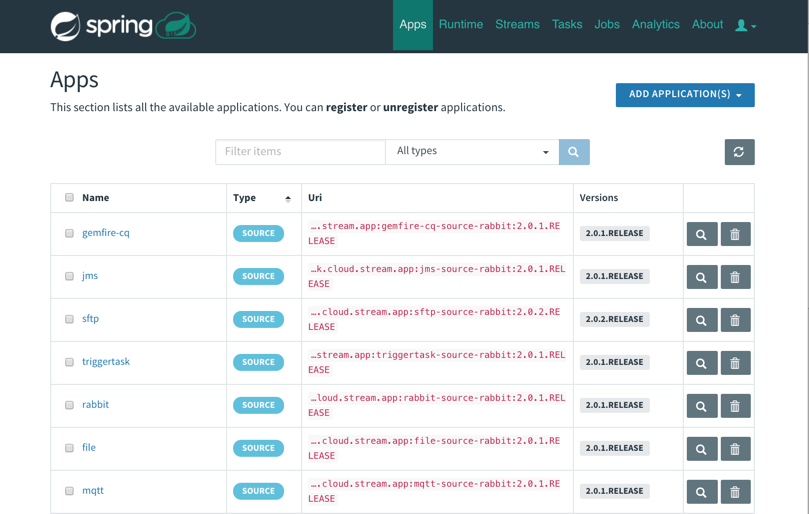
    With that, I had everything I needed to build out my data pipeline. 

    Building and deploying a data pipeline

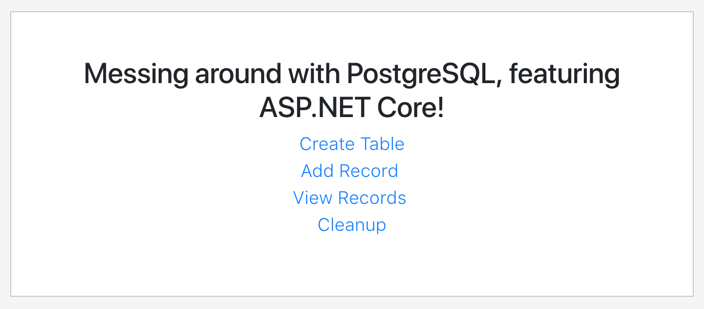
    Before building my pipeline, I wanted to prep my PostgreSQL database. To do this, I built a simple ASP.NET Core app that created a data table and added records. I deployed this to PCF, bound it to the Crunchy Data instance, and now had a way to instantiate my relational database and add rows.
    I wanted to enrich data as part of my data pipeline. When a “shipment” record comes out of PostgreSQL, it has an identifier for which warehouse it came from. I wanted to use that ID to look up the US state associated with the warehouse. I could try and use an out-of-the-box App Starter to do it, or just build my own. I chose the latter. What’s wicked is these are just Spring Cloud Stream apps. I created a new app from start.spring.io, created a POJO that represents a “warehouse shipment”, added an annotation and a method, and assembled the jar file. No other configurations needed! 

    @EnableBinding(Processor.class)
    @SpringBootApplication
    public class DemoPipelineEnricherApplication {
    
      public static void main(String[] args) {
         SpringApplication.run(DemoPipelineEnricherApplication.class, 
      args);
      }
    
      @StreamListener(Processor.INPUT)
      @SendTo(Processor.OUTPUT)
      public shipment EnrichShipment(shipment s) {
        switch(s.warehouse_id) {
        case 400:
            s.warehouse_location="CA";
            break;
        case 401:
            s.warehouse_location="WA";
            break;
        case 402:
            s.warehouse_location="TX";
            break;
        case 403:
            s.warehouse_location="FL";
            break;
        }
        return s;
      }
    }

    To make this app available to my new data pipeline, I needed to register it with the SCDF server. That means the jar file needed to be visible to the server. I uploaded the jar file to GitHub (better choices include the Maven repo, or another legit artifact repository) and registered it:

    It’s pipeline time! I designed a pipeline that started with a JDBC source, sent the individual rows to my “enricher” app, and then routed the results to the application log. For fun, I also tapped that result stream to count how many messages came in for each US state.

    The pipeline definition is something you can add to source control and version like any other deployment artifact. My pipeline looks like:

    warehouse-stream=jdbc
    --spring.datasource.username='[username]'
    --spring.datasource.url='jdbc:postgresql://[url]:5432/shipments'
    --jdbc.max-rows-per-poll=5 --jdbc.query='SELECT * FROM WarehouseShipments WHERE
    is_read=FALSE' --jdbc.update='UPDATE WarehouseShipments SET is_read=TRUE WHERE
    is_read=FALSE;' --spring.datasource.password='[password]' |
    demo-enricher | log 

    What’s cool is that after creating the stream, I had all sorts of deployment options for each app in the pipeline. That means that each app could have its own instance count and resource allocation. Much better than coarsely scaling the whole pipeline when just one component needs to scale! 
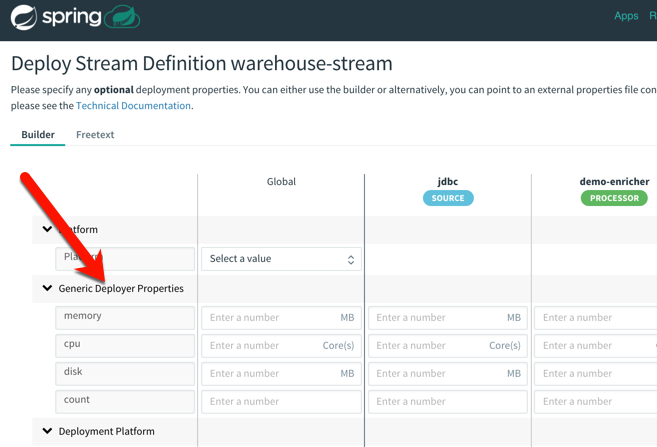
    After deploying the streams, I saw the underlying Spring Boot apps deployed to my PCF environment. SCDF is pretty sophisticated but still an easy-to-use platform!
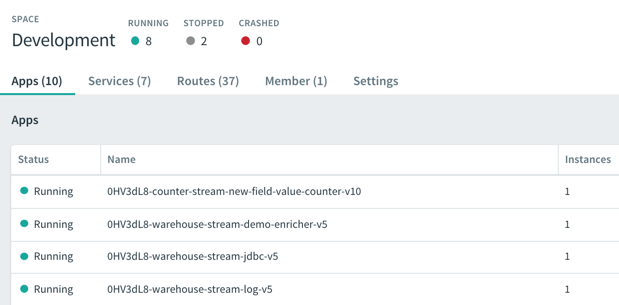
    I continually added records to my PostgreSQL database, and saw them immediately stream through SCDF on PCF. Each individual message got enriched with additional details before printing out to the log.

    In this post, we saw that data pipelines have a natural home in PCF. Spring Cloud Data Flow is an ideal replacement for heavyweight ESB products in certain scenarios, and a replacement for ETL in others. Give it a try on PCF, Kubernetes, or other runtimes.

  • Wait, THAT runs on Pivotal Cloud Foundry? Part 3 – Background, batch, and scheduled jobs

    Wait, THAT runs on Pivotal Cloud Foundry? Part 3 – Background, batch, and scheduled jobs

    So far in this series of posts, we’ve seen that Pivotal Cloud Foundry (PCF) runs a lot more than just web applications. Not every app has a user-facing front-end component. Some of your systems run in the background or on a schedule and perform a variety of important tasks. In this post, I’ll take a look at how to deploy background workers, on-demand batch tasks, and scheduled jobs.

    This is the third in a five part series of posts:

    Deploying and running background workers

    Pivotal Cloud Foundry makes it easy to run workers that don’t have a routable address. These background jobs might listen to a database and respond to data changes, or respond to messages in a work queue. Let’s demonstrate the latter. 

    I built a .NET Core console app that’s responsible for pulling “loan” records from RabbitMQ and processing them. You can built these background jobs is any programming language supported by Cloud Foundry.

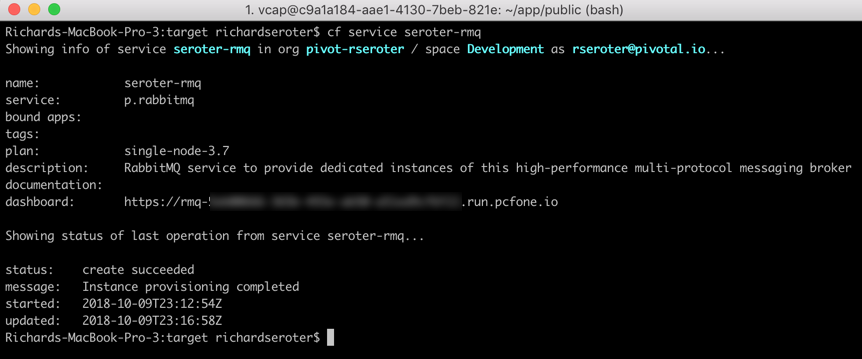
    What’s nice is that background jobs have access to all the useful PCF capabilities that web apps do. One such capability? Service Brokers! Devs love using Service Brokers to provision and access backing services. My background job needs access to RabbitMQ and I don’t want to hard-code any connection details. No big deal. I first spun up an on-demand RabbitMQ instance via the PCF Service Broker.

    My .NET Core app uses the Steeltoe Service Connector (and the RabbitMQ .NET Client) to load service broker connection info and talk to my instance.

    static void Main(string[] args){            
    //pull service broker configuration
    var builder = new ConfigurationBuilder()
    .AddEnvironmentVariables()
    .AddCloudFoundry();

    var configuration = builder.Build();
    //get our fully loaded service
    var services = new ServiceCollection();
    services.AddRabbitMQConnection(configuration);
    var provider = services.BuildServiceProvider();
    ConnectionFactory f = provider.GetService<ConnectionFactory>();

    //connect to RMQ
    using (var connection = f.CreateConnection())
    using (var channel = connection.CreateModel())
    {
    channel.QueueDeclare(queue: "loans", durable: true, exclusive: false, autoDelete: false, arguments: null);
    var consumer = new EventingBasicConsumer(channel);

    //fire up when a new message comes in
    consumer.Received += (model, ea) => {
    var body = ea.Body;
    var message = Encoding.UTF8.GetString(body);
    Console.WriteLine("[x] Received loan data: {0}", message);
    };
    channel.BasicConsume(queue: "loans", autoAck: true, consumer: consumer);
    Console.ReadLine();
    }
    }

    Apps deployed to Cloud Foundry are typically accompanied by a YAML manifest. You can provide the parameters on the CLI, but versioned, source-controlled manifests are a better way to go. For these background jobs, the manifests are simple. Note two key things: the no-route parameter is “true” so that we don’t get a route assigned, and the health-check-type is set to “process” so that the orchestrator monitors process availability and doesn’t try to ping a non-existent web endpoint. Also notice that I bound my app to the previously-created RabbitMQ service instance.

    ---  
    applications:
    - name: core-demo-background
    memory: 256M
    no-route: true
    health-check-type: process
    services:
    - seroter-rmq

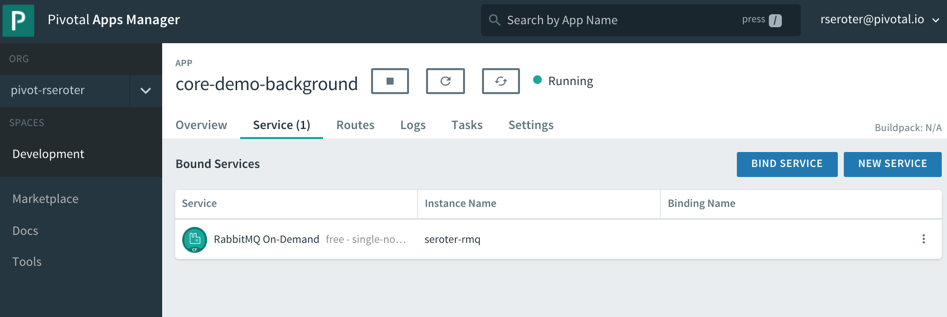
    After a quick cf push, my background app was running, and bound to the RabbitMQ instance.

    This job quietly sits and waits for work to do. What’s neat is this can also take advantage of PCF’s autoscale capability, and scale by monitoring RabbitMQ queue depth, for example. For now, one instance is plenty. I logged into RabbitMQ and sent in a couple sample “loan” messages.

    Sure enough, when I viewed the aggregated application logs for my background job, I saw the content of each read message printed out. 

    These sorts of workers are a useful part of most systems, and PCF offers a resilient, manageable place to run them.

    Deploying and running on-demand batch tasks

    How many useful, random scripts do your system administrators have sitting around? You know, the ones that create users, reset demo environments, or purge FTP shares. Instead of having those scripts buried on administrator desktops, you can run these one-off batch jobs in PCF.

    I created another .NET Core console application. This one pretends to sweep expired files from a shared folder. I deployed this application to PCF with a –no-start command since I want to trigger it on demand.

    cf push --no-start

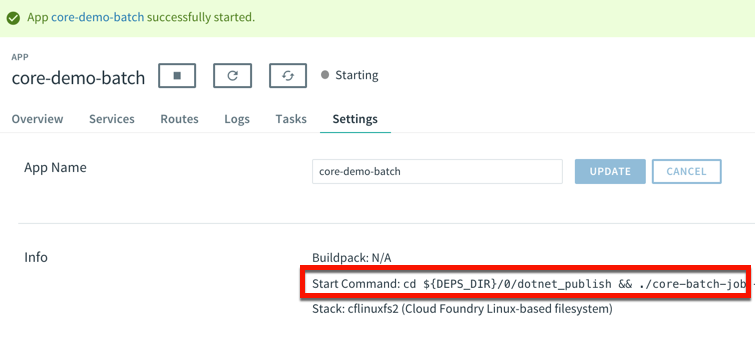
    Now, to trigger the job, I need to know the start command. This depends on how you deployed it. Since I used the .NET Core buildpack, I want to start up the app one time to discover how PCF starts up the app.

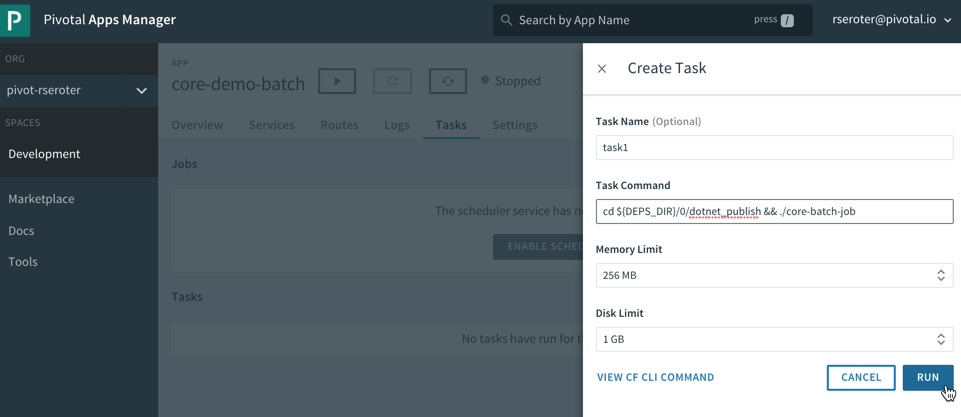
    That command showed me where the .NET Core executable lives in the container. I stopped the app again, and switched over the “Tasks” view in the PCF Apps Manager interface. I can do all these things via the CLI as well, but I’m a sucker for a nice UX. There’s a “run task” button that lets me define a one-off task definition.

    Here I gave the task a name, pasted the start command I found above, and that was it! When I hit, “run”, PCF instantiated a new container instance and shut down the container when the task was complete. And that’s what I saw. There was a log entry indicating a successful job run, and the application logs showed the output of the task. Nice!

    This is a great option for one-off jobs and scripts. Consolidate them in PCF, and get all the availability and auditing you need.

    Deploying and running scheduled jobs

    Finally, some of those one-off jobs may not be as one-off as you thought! Instead of asking your admin to trigger a task once a day to purge expired files, how about you schedule the job to run on a schedule? 

    PCF also offers a scheduling component to trigger tasks (or API calls!) on a recurring basis. On the same “tasks” tab of the PCF Apps Manager UX, there’s a “jobs” section for scheduled tasks. Besides giving the job a name and a command (the same as the task command above), you enter a Cron expression for the schedule itself. The expression is in a MIN HOUR DAY-OF-MONTH MONTH DAY-OF-WEEK format. For example “15 * ? * * *” means you should run the job every 15 minutes, and “30 10 * * 5” means you should run the job at 10:30am every Friday. My job below is set to run every minute.

    We’re all building lots of web apps nowadays, but you have lots of need for event-driven or scheduled background work. PCF may surprise you as an entirely suitable platform for those workloads.

  • Wait, THAT runs on Pivotal Cloud Foundry? Part 2 – TCP-routable services

    Wait, THAT runs on Pivotal Cloud Foundry? Part 2 – TCP-routable services

    Platform-as-a-Service products typically run web apps. That is, apps that accept HTTP traffic and listen on ports 80, 8080 or 443. As you survey the landscape today, you’ll find that’s still the case in the most popular public cloud application runtimes. That’s not a bad thing, but sometimes you have workloads with different routing needs. In this post, I’m going to demonstrate TCP Routing in Pivotal Cloud Foundry (PCF), and show Redis running directly in the platform.

    As a reminder, this is the 2nd post in a series about “unexpected” workloads running on PCF.

    About TCP Routing in PCF

    TCP Routing has been part of Cloud Foundry for two years now. Basically, TCP Routing lets your app handle traffic over non-HTTP TCP protocols. This is valuable for custom-built apps or packaged software that communicate with binary payloads or specialized transports.

    By default, custom-built apps are set to always listen on port 8080 in Cloud Foundry. The buildpack process (mentioned in part 1 of the series) configures that, although you can change this behavior. Even if your app does listen on port 8080, TCP Routing makes it easy to expose a non-HTTP port to the outside world via network address translation.

    Source: https://docs.cloudfoundry.org/adminguide/enabling-tcp-routing.html

    Assuming your Cloud Foundry admins configured TCP Routing in your environment(s), you can set up this type of per-app routing entirely via self-service.

    Deploying a TCP routable workload

    Instead of demonstrating with an app I wrote myself, I thought it’d be more fun to deploy a well-known software product. Enter Redis! Redis is a wildly-popular key-value store, and there are many ways to install it. One of the easiest options is the Docker image. Note that Redis typically exposes access over port 6379. When deploying Docker images to Cloud Foundry, the port defined in the EXPOSE directive is what’s actually exposed by Cloud Foundry app container. I didn’t know that until this week!

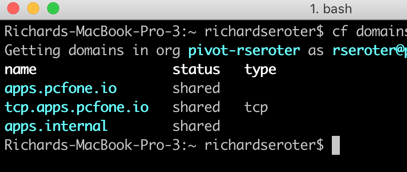
    After logging into my PCF environment, I ran the cf domains command to see what routable domains were available to me.

    I’ve got the “standard” domain for my regular web apps (here, apps.pcfone.io), a domain for TCP routing (tcp.apps.pcfone.io) and one for private traffic (apps.internal) that we’ll mess with shortly.

    I started by pushing a Redis image to PCF. I’m purposely using the –no-route command to ensure it doesn’t get a default web route in the apps.pcfone.io domain.

    cf push redisdocker --docker-image redis -i 1 -m 256M --no-route -u process

    After about ten seconds, the container is up and running. Notice however, that it’s currently not routable.

    Let’s change that. Now, because all apps sit behind the same edge router and TCP routes don’t have a path component, I can’t have two apps listening on the same TCP port. So, there’s a good chance that the default Redis port fo 6379 is already in use somewhere. That’s cool; we can tell PCF to assign a random port at the edge route that forwards traffic to port 6379 on the app container.

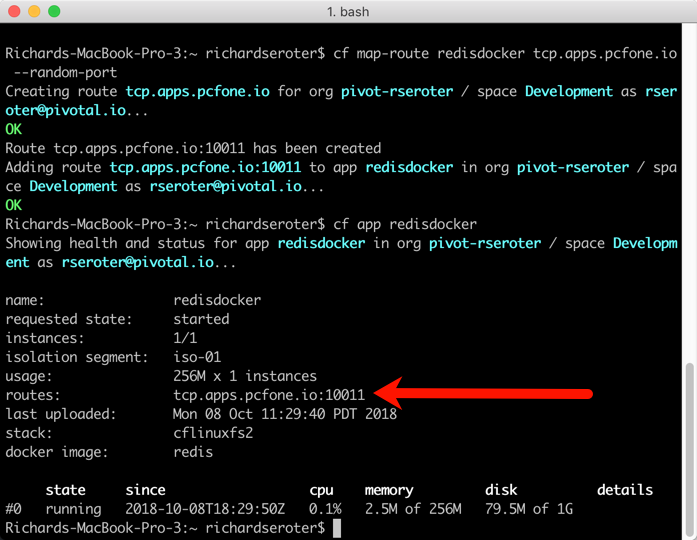
    cf map-route redisdocker tcp.apps.pcfone.io --random-port

    The result? I get a TCP route assigned on port 10011.

    Again, note that the app container is still listening on 6379, because that’s what was set by the Docker image at deploy time. But through network address translation, the external facing port is a different value. Let’s prove that Redis is actually running and addressable.

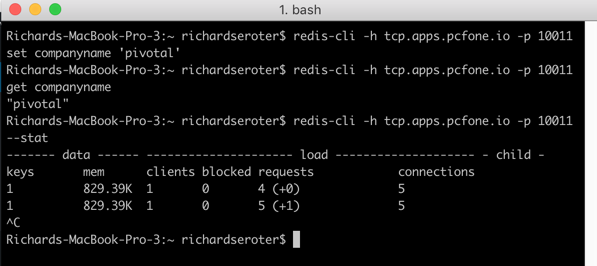
    I spun up the redis-cli and issued a command.

    Ok, clearly it’s reachable via the public Internet over a non-HTTP connection. That’s neat. I did a LITTLE more with Redis than that, by also adding and retrieving a key.

    With this pattern, my apps running in PCF (or anywhere) can send requests to PCF-hosted software that handles all kinds of payloads and protocols. But what if you don’t want these workloads to be Internet accessible?

    Setting up private TCP routing

    The above demo is cool, but you might not like having your cache, MQTT bus, or whatever, exposed to public traffic. This is where the relatively-new container-to-container networking is pretty darn neat.

    By default, app instances in Cloud Foundry talk to each other through the shared router. That’s not awful, but for performance reasons, or to access private services, you may want to communicate directly with another app container. With polyglot service discovery now part of PCF, it’s easy to do this via DNS, versus hard-coded container addresses. Let me show you.

    First, I removed the publicly-accessible TCP route from my Redis instance.

    Now, you can no longer reach it. Next up, I wanted to map my Redis instance to the apps.internal domain that’s ONLY accessible within a Cloud Foundry.

    cf map-route redisdocker apps.internal --hostname redisdocker

    Because we’re not dealing with any extra NAT action, I can directly hit Redis on port 6379. I built a Node.js app that connects to Redis, adds a key, and reads a key. I set the connection details to the internal domain and standard port.

    var options = {  host: "redisdocker.apps.internal",  port: 6379}
    var redis = require("redis"), client = redis.createClient(options);

    Then I pushed this app to PCF with a –no-start command so that I could set up connectivity between my app and Redis. Apps can’t automatically reach other apps on the apps.internal domain unless we give permission. It’s easy to do.  Via the Cloud Foundry CLI, I can create, delete, and list network policies. A network policy determines which apps can directly talk to each other (without going through the router), over which port and protocol.

    cf add-network-policy demo-app --destination-app redisdocker --protocol tcp --port 6379

    Notice that in that command, all I said was that one app (demo-app) could talk to another app (redisdocker). I didn’t have to map IP addresses, or anything like that. As app instances scale in and out, there’s no need to change the policies to reflect that. That’s a considerate UX.

    After executing the above command, my Node.js app (demo-app) could “see” the redisdocker app instance. And notice that I’ve allowed traffic to the default Redis port, 6379.

    With that policy in place, I loaded the Node.js app, and it directly routed requests over port 6379 to my Redis instance.

    Unlike most PaaS-like products, PCF offers TCP routing over non-HTTP channels. While you may still (wisely) choose to run certain workloads—clustered services, apps that need multiple IPs exposed per container, or workloads with complex persistence needs—in an environment outside of PCF, it’s useful to know that you can leverage PCF to host and orchestrate a wide variety of publicly or privately routable workloads. Keep an eye out tomorrow for the next post, where we investigate batch jobs.

  • Wait, THAT runs on Pivotal Cloud Foundry? Part 1 – Docker images

    Wait, THAT runs on Pivotal Cloud Foundry? Part 1 – Docker images

    When I say “PaaS” what comes to mind? If you’re like most people I talk to, you think of public cloud platforms for modern web apps. So I’ll forgive you if you didn’t realize that things are different now!

    The first generation of PaaS products had a few things in common. They were public cloud only. You had to build apps with the runtime constraints in mind. They only ran statelesss web apps. Linux was the only runtime. When Cloud Foundry first came out, it checked most of those boxes. But over the years, Pivotal Cloud Foundry (PCF) evolved to do much more.

    Many people still think of those first-generation PaaS constraints when considering PCF, and specifically, the Pivotal Application Service (PAS). So, I thought it’d be fun to look at non-traditional workloads. In this brief five-part series, I’m going to show off the following scenarios:

    Deploying and running Docker images

    Most Cloud Foundry users depend on buildpacks. Developers push source code, and the buildpack pulls in dependencies, frameworks, and runtimes, then builds a tarball that’s deployed as an OCI-compatible container in Cloud Foundry.  One major benefit of the buildpacks model is that the platform brings the root file system to your app. You’re not responsible for finding secure base images or maintaining that “layer” of the stack. But all that said, some folks like using Docker images as their packaging unit whether manually created (don’t do that) or as the output from a continuous integration pipeline.

    It doesn’t matter if Cloud Foundry builds the container or you send in a Docker image, it’s all treated the same by the platform. At runtime, the orchestrator executes all containers using runC, the same spec used by Docker and Kubernetes. Let’s see this in action.

    You can try this for free on Pivotal Web Services if you don’t have a Cloud Foundry available. I’m using a different environment, but they all behave the same. That’s the point! After you cf login to Cloud Foundry, it’s time to push a container.

    How about we start with a Node.js web app. Here’s an Express app built by the folks at Bitnami. We can actually push this to Cloud Foundry with a single command.

    cf push nodedocker --docker-image bitnami/node-example:0.0.1 -i 2 -m 128M

    In that command, notice a couple things. First, I’m using the –docker-image flag. Since I’m hitting a public image in the public Docker Hub, no credentials or anything are needed. PCF also works with private images, and private registries. Otherwise, it’s a standard command that asks for a single instance, and 128M of memory for each instance. Within ten seconds, you’ll have two routable instances ready to process traffic.

    Seriously. That’s amazing. And PCF doesn’t “mess with” the image. Whatever layers are in your Docker image are what run in Cloud Foundry. One thing PCF *does* do is volume mount a directory that contains a unique certificate for the container. This regularly-rotated credential (up to hourly!) is used for things like mTLS. You can see it by SSH-ing into the container and doing printenv or browsing the file system. Yes, you can actually SSH into containers whether built by the platform or via Docker images. No black boxes here.

    Deploying an app’s only half the story. Does PCF treat the running app the same way if it was packaged as a Docker image? Yup. Jumping to the PCF Apps Manager UX, you see our running app.

    If you look closely, you see that we indicate the app type, in this case, that it’s from a Docker image.

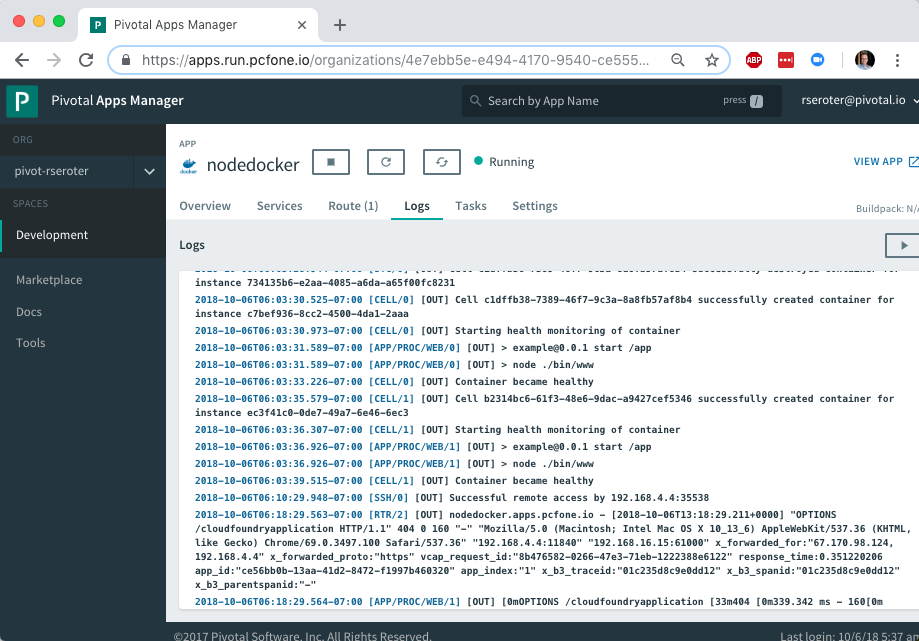
    More importantly, the platform bestows all the operational goodness on this app as any other. For example, all the logs from each app instance are collected and aggregated.

    You can add environment variables. Configure auto-scaling. Monitor app and container health metrics. Bind to marketplace services. All the things that make PCF a great runtime for apps make it a great runtime for apps packaged as Docker images.

    So try it out yourself. If you’re building custom apps, PCF is a great destination regardless of how you want to ship code. Stay tuned tomorrow for fun network routing demonstration.

  • My new Pluralsight course—Cloud-native Architecture: The Big Picture—is now available!

    I’ll be honest with you, I don’t know much about horses. I mean, I know some things and can answer basic questions from my kids. But I’m mostly winging it and relying on what I remember from watching Seabiscuit. Sometimes you need just enough knowledge to be dangerous. With that in mind, do you really know what “cloud-native” is all about? You should, and if you want the foundational ideas, my new on-demand Pluralsight class is just for you.

    Clocking in at a tight 51 minutes, my course “Cloud-native Architecture: The Big Picture” introduces you to the principles, patterns, and technologies related to cloud-native software. The first module digs into why cloud-native practices matter, how to define cloud-native, what “good” looks like, and more.

    The second module calls out cloud-native patterns around application architecture, application deployment, application infrastructure, and teams. The third and final module explains the technologies that help you realize those cloud-native patterns.

    This was fun to put together, and I’ve purposely made the course brief so that you could quickly get the key points. This was my 18th Pluralsight course, and there’s no reason to stop now. Let me know what topic you’d like to see next!

  • Four Spring Cloud Projects That You Should Be Using

    Since I’ve moved up to the Seattle-area three years ago, there’s been a hole in my life. No longer. The Habit just opened up around the corner from me. I missed that place! While most of the attention (including my own) is on the Charburger, they actually have a pretty deep menu. I thought about that this week when looking at the latest Spring Cloud portfolio. While it’s used millions of times per month by Java developers —and usage grew 137% over the past year alone—Spring Cloud is best known for its Config Server and packaging of NetflixOSS tech. You know, things for service discovery, load balancing, circuit breakers, etc. THEY DESERVE THE GLORY. But there are four other interesting packages that you shouldn’t overlook.

    Spring Cloud Stream

    It’s no secret that I’m a big fan of this library. It abstracts away all the complexity of dealing with message brokers like RabbitMQ and Apache Kafka. Spring Cloud Stream has a straightforward programming model that makes it simple to do complex things. Content-based routing? Dead letter queuing? Content-type conversions? Partitioned processing, even on brokers that don’t natively support it? You get all that.

    I’ve seen more and more companies move away from the heavy, centralized ESB and towards a federated messaging model. With Stream, you can use your choice of message broker, but make it a late-binding decision for developers. And if you’re doing event processing and want to chain a series of action together, Spring Cloud Stream works great with Spring Cloud Data Flow.

    If you want to dig in, check out my Pluralsight course that has a whole module on Spring Cloud Stream. Or just go build something!

    Spring Cloud Contract

    Consumer-driven contracts are a fresh take on testing APIs. You know the classic way we share API info: create an API and expose operations and payloads for teams to model and test against. With consumer-driven contracts, the API creator builds and tests their service against a set of consumer expectations. But this has traditionally been a bit difficult to pull off. Enter Spring Cloud Contract.

    It’s described in the docs as moving “TDD to the level of software architecture.” It does this by “covering a range of options for writing tests, publishing them as assets, and asserting that a contract is kept by producers and consumers.”

    You write contracts in Groovy or YAML, and testing stubs get generated and used by both producers and consumers. This enables fast feedback for both side. What’s cool about these generated testing stubs (and the associated “stub runner”) is that you can mock complex distributed systems with a few code annotations. This includes the messaging layer as well. Powerful stuff, and a big deal for today’s software developers.

    Read this insightful interview with Spring Cloud Contract’s creator, Marcin Grzejszczak. And check out the docs for all the gory details.

    Spring Cloud Gateway

    This one’s pretty new, so I’ll excuse you if you haven’t heard of it. BUT ONLY THIS ONCE! Spring Cloud Gateway gives you a powerful API gateway based on Spring components.

    Use (built-in or custom) route predicates to determine how requests are handled. Built-in ones include datetime (before, after, or between), cookies, headers, host, method, path, query, and more. Combine them to get whatever behavior you need. You can also modify incoming or outgoing traffic. Add headers, integrate with Hystrix for circuit breaker behavior, check a rate limiter, do directors, among other things. As you’d expect, this is quite extensible and scalable.

    API gateways form an important part of your architecture, and having a bunch of mini-gateways deployed (instead of a single, monolithic one) might give you extra flexibility. Check out the docs and try it out.

    Spring Cloud Function

    Unless you’ve awoken from a three-year slumber, you’re probably familiar with “serverless” tech. Spring Cloud Function is a pretty wicked (generally available) framework that does a few things you might not expect.

    It’s not just about making Spring Boot friendly to function platforms like AWS Lambda or Azure Functions. That’s there (see AWS and Azure adapter guidance). But besides providing a consistent programming model across clouds, it also has stuff you need to run it standalone.

    Decorate your code with annotations that result in HTTP or stream-processing endpoints getting attached to your function. Your function can take part in messaging as a source, processor (takes data in, publishes data out), or sink. Or it can get be a standalone web app that gets activated upon HTTP request. Neato. Read the docs and see how easy it is to get started.

    Spring Cloud is a pretty unique collection of projects, and the Spring team is constantly upgrading and improving them. The whole point is to make it simple to incorporate proven distributed systems pattern in your apps. From what I can tell, it’s achieving that mission.

  • Creating a continuous integration pipeline in Concourse for a test-infused ASP.NET Core app

    Creating a continuous integration pipeline in Concourse for a test-infused ASP.NET Core app

    Trying to significantly improve your company’s ability to build and run good software? Forget Docker, public cloud, Kubernetes, service meshes, Cloud Foundry, serverless, and the rest of it. Over the years, I’ve learned the most important place you should start: continuous integration and delivery pipelines. Arguably, “apps on pipeline” is the most important “transformation” metric to track. Not “deploys per day” or “number of microservices.” It’s about how many apps you’ve lit up for repeatable, automated deployment. That’s a legit measure of how serious you are about being responsive and secure.

    All this means I needed to get smarter with Concourse, one of my favorite tools for CI (and a little CD). I decided to build an ASP.NET Core app, and continuously integrate and deliver it to a Cloud Foundry environment running in AWS. Let’s go!

    First off, I needed an app. I spun up a new ASP.NET Core Web API project with a couple REST endpoints. You can grab the source code here. Most of my code demos don’t include tests because I’m in marketing now, so YOLO, but a trustworthy pipeline needs testable code. If you’re a .NET dev, xUnit is your friend. It’s maintained by my friend Brad, so I basically chose it because of peer pressure. My .csproj file included a few references to bring xUnit into my project:

    • “Microsoft.NET.Test.Sdk” Version=”15.7.0″
    • “xunit” Version=”2.3.1″
    • “xunit.runner.visualstudio” Version=”2.3.1″

    Then, I created a class to hold the tests for my web controller. I included one test with a basic assertion, and another “theory” with an input data set. These are comically simple, but prove the point!

       public class TestClass {
            private ValuesController _vc;
    public TestClass() {
                _vc = new ValuesController();
            }
    
            [Fact]
            public void Test1(){
                Assert.Equal("pivotal", _vc.Get(1));
            }
    
            [Theory]
            [InlineData(1)]
            [InlineData(3)]
            [InlineData(20)]
            public void Test2(int value) {
                Assert.Equal("public", _vc.GetPublicStatus(value));
            }
        }
    

    When I ran dotnet test against the above app, I got an expected error because the third inline data source led to a test failure, since my controller only returns “public” companies when the input value is between 1 and 10. Commenting the offending inline data source led to a successful test run.

    2018.06.06-concourse-02

    Ok, the app was done. Now, to put it on a pipeline. If you’ve ever used shameful swear words when wrangling your CI server, maybe it’s worth joining all the folks who switched to Concourse. It’s a pretty straightforward OSS tool that uses a declarative model and containers for defining and running pipelines, respectively. Getting started is super simple. If you’re running Docker on your desktop, that’s your easiest route. Just grab this Docker Compose file from the Concourse GitHub repo. I renamed mine to docker-compose.yml, jumped into a Terminal session, switched to the folder holding this YAML file, and ran docker-compose up -d. After a second or two, I had a PostgreSQL server (for state) and a Concourse server. PROVE IT, you say. Hit localhost:8080, and you’ll see the Concourse dashboard.

    2018.06.06-concourse-01

    Besides this UX, we interface with Concourse via a CLI tool called fly. I downloaded it from here. I then used fly to add my local environment as a “target” to manage. Instead of plugging in the whole URL every time I interacted with Concourse, I created an alias (“rs”) using fly -t rs login -c http://localhost:8080. If you get a warning to sync your version of fly with your version of Concourse, just enter fly -t rs sync and it gets updated. Neato.

    Next up? The pipeline. Pipelines are defined in YAML and are made up of resources and jobs. One of the great things about a declarative model, is that I can run my CI tests against any Concourse by just passing in this (source-controlled) pipeline definition. No point-and-ciick configurations, no prerequisite components to install. Love it. First up, I defined a couple resources. One was my GitHub repo, the second was my target Cloud Foundry environment. In the real world, you’d externalize the Cloud Foundry credentials, and call out to files to build the app, etc. For your benefit, I compressed to a single YAML file.

    resources:
    - name: seroter-source
      type: git
      source:
        uri: https://github.com/rseroter/xunit-tested-dotnetcore
        branch: master
    - name: pcf-on-aws
      type: cf
      source:
        api: https://api.run.pivotal.io
        skip_cert_check: false
        username: XXXXX
        password: XXXXX
        organization: seroter-dev
        space: development
    

    Those resources tell Concourse where to get the stuff it needs to run the jobs. The first job used the GitHub resource to grab the source code. Then it used the Microsoft-provided Docker image to run the dotnet test command.

    jobs:
    - name: aspnetcore-unit-tests
      plan:
        - get: seroter-source
          trigger: true
        - task: run-tests
          privileged: true
          config:
            platform: linux
            inputs:
            - name: seroter-source
            image_resource:
                type: docker-image
                source:
                  repository: microsoft/aspnetcore-build
            run:
                path: sh
                args:
                - -exc
                - |
                    cd ./seroter-source
                    dotnet restore
                    dotnet test
    

    Concourse isn’t really a CD tool, but it does a nice basic job of getting code to a defined destination. The second job deploys the code to Cloud Foundry. It also uses the source code resource and only fires if the test job succeeds. This ensures that only fully-tested code makes its way to the hosting environment. If I were being more responsible, I’d take the results of the test job, drop it into an artifact repo, and then use that artifact for deployment. But hey, you get the idea!

    jobs:
    - name: aspnetcore-unit-tests
      [...]
    - name: deploy-to-prod
      plan:
        - get: seroter-source
          trigger: true
          passed: [aspnetcore-unit-tests]
        - put: pcf-on-aws
          params:
            manifest: seroter-source/manifest.yml
    

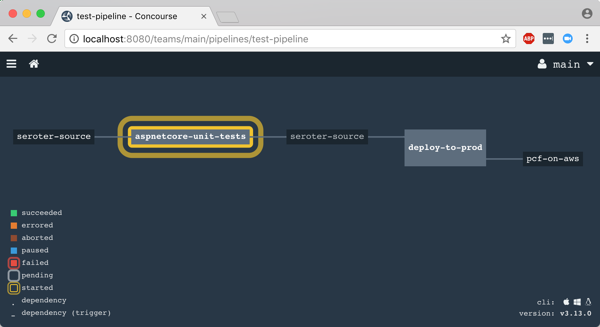
    That was it! I was ready to deploy the pipeline (pipeline.yml) to Concourse. From the Terminal, I executed fly -t rs set-pipeline -p test-pipeline -c pipeline.yml. Immediately, I saw my pipeline show up in the Concourse Dashboard.

    2018.06.06-concourse-03

    After I unpaused my pipeline, it fired up automatically.

    2018.06.06-concourse-05

    Remember, my job specified a Microsoft-provided container for building the app. Concourse started this job by downloading the Docker image.

    2018.06.06-concourse-04

    After downloading the image, the job kicked off the dotnet test command and confirmed that all my tests passed.

    2018.06.06-concourse-06

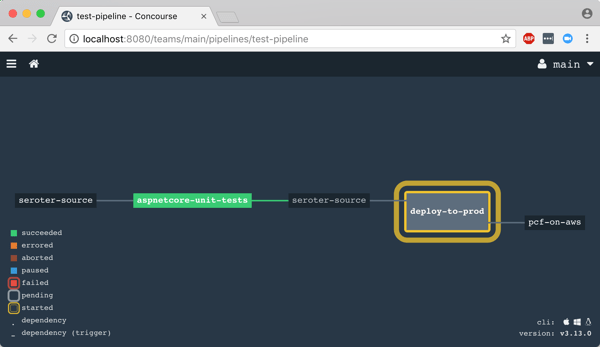
    Terrific. Since my next job was set to trigger when the first one succeeded, I immediately saw the “deploy” job spin up.

    2018.06.06-concourse-07

    This job knew how to publish content to Cloud Foundry, and used the provided parameters to deploy the app in a few seconds. Note that there are other resource types if you’re not a Cloud Foundry user. Nobody’s perfect!

    2018.06.06-concourse-08

    The pipeline run was finished, and I confirmed that the app was actually deployed.

    2018.06.06-concourse-09

    Finished? Yes, but I wanted to see a failure in my pipeline! So, I changed my xUnit tests and defined inline data that wouldn’t pass. After committing code to GitHub, my pipeline kicked off automatically. Once again it was tested in the pipeline, and this time, failed. Because it failed, the next step (deployment) didn’t happen. Perfect.

    2018.06.06-concourse-10

    If you’re looking for a CI tool that people actually like using, check out Concourse. Regardless of what you use, focus your energy on getting (all?) apps on pipelines. You don’t do it because you have to ship software every hour, as most apps don’t need it. It’s about shipping whenever you need to, with no drama. Whether you’re adding features or patching vulnerabilities, having pipelines for your apps means you’re actually becoming a customer-centric, software-driven company.

  • Here’s where you’ll find me over the Summer

    I mean, you’ll mainly find me in Seattle, where I actually live. But, I’m also speaking on a variety of topics at a few shows over the next few months, and thought I’d point those out.

    Architecting Highly Available Cloud Integrations” at Integrate 2018 (June 4-6, London)

    If the thing that connects your other things together isn’t resilient, you’re in trouble. In this talk, I’ll take a look at some core availability patterns for application/data integration, and then review how to configure Azure’s integration services for high availability. This is always a terrific show with compelling speakers, and the hosts at BizTalk360 always do a bang-up job putting it on.

    Product Ownership, Explained” at Agile 2018 (August 6-10, San Diego)

    I know a few things about product ownership, such as how to be a good product owner, and a bad one. Primarily because I’ve been both. In this talk at the “big Agile” show, I’ll look at the role and what a product owner should do. I’m starting to work on this presentation now, and will likely list 10+ things that you should do, and a few things to avoid. This will be my second time speaking at this conference, and I enjoy hearing from so many folks focused on software teams and getting code to production.

    What NASA’s Voyager Mission Teaches Us About Building Distributed Systems” at Pluralsight LIVE (August 28-30, Salt Lake City)

    I’ve been geeking out on space exploration books and movies lately, and thought it’d be fun to translate the lessons from an iconic NASA mission to the everyday challenges faced by software engineers. Here, I’ll show how some of the key ideas applied by NASA engineers reinforce some of the best practices when designing complex software systems. I didn’t attend the inaugural edition of this conference last year, but I’m jazzed to be part of it this time around.

    I hope I’ll see you at some of these! If you’ll be at any one of them (or all three, if you’re my stalker!), do let me know.


  • How to use the Kafka interface of Azure Event Hubs with Spring Cloud Stream

    How to use the Kafka interface of Azure Event Hubs with Spring Cloud Stream

    When I think of the word “imposter” my mind goes to movies where the criminal is revealed after their disguise is removed. But imposters don’t have to be evil geniuses. Sometimes imposters are good. You may buy generic types of pharmaceuticals or swap out beef for a meat-less hamburger. The goal is to get the experience of what you’re after, but through secondary means. In that sense, Azure Event Hubs is a fantastic imposter.

    Now to be sure, Azure Event Hubs is a terrific standalone cloud service. If you need to reliably ingest tons of events in a scalable way, there aren’t many (any?) better options.

    Microsoft’s gotten into the habit of putting facades onto their cloud services to turn them into credible imposters. For instance, Azure Cosmos DB has its own native interface, but also ones that mimic MongoDB and Apache Cassandra. Azure Event Hubs got into the action by recently adding an Apache Kafka interface. If you have apps or tools that use those interfaces, it’s much easier to adopt the Azure “equivalents” now. Azure isn’t actually offering MongoDB, Cassandra, or Kafka, but their first party services resemble them enough that you don’t have to change code to get the benefits of Azure’s global scale. Good strategy.

    Java developers everywhere use Spring Cloud Stream to talk to popular message brokers like RabbitMQ and Apache Kafka. I thought it’d be fun to see if Spring Cloud Stream “just works” with the new Event Hubs interface. LET’S SEE WHAT HAPPENS.

    Creating our Azure Event Hub

    I started in the Microsoft Azure portal. From there, I chose to add a new Event Hubs namespace which holds all my actual Event Hubs. For kicks, I chose the “basic” pricing tier which allows a single consumer group and a hundred connections. I set the “enable Kafka” flag and configured three throughput units (each Event Hubs partition scales to a maximum of one throughput unit).

    2018.05.29-kafka-01

    Once I had an Event Hubs namespace, I added an Event Hub to it. I gave the Event Hub a name, and three partitions to spread the data. If I had chosen a plan besides “basic”, I would have also been able to set the message retention period beyond one day.

    2018.05.29-kafka-02

    That’s it. Might be the simplest possible way to create a Kafka-like service!

    Spring Boot project setup

    The whole point of Spring Boot is to eliminate boilerplate code and make it easier to focus on building robust apps. For example, you don’t want to mess with all that broker-specific logic when you want to pass messages or events around. Spring Boot and Spring Cloud Stream make it straightforward.

    To get going, I went to start.spring.io. Devs create over 800,000 projects per month from here, so I added two more to the mix. My first project (source code here) added Spring Cloud Stream and Web dependencies. This is my message producer. Then I created a second project (source code here) with the Spring Cloud Stream dependency. This one acts as my message consumer.

    2018.05.29-kafka-03

    This is a Maven project, so I added one more dependency directly to the pom.xml file. This one tells my project to activate the Kafka-specific objects upon application startup.

    
      org.springframework.cloud
      spring-cloud-stream-binder-kafka


    Configuring the producer

    With my projects created, it was time to configure them. First up, the producer.

    I made this one simple for demo purposes. First, I added Spring Boot annotations on the primary class. The @RestController one exposes annotated operations as HTTP endpoints. The second annotation was @EnableBinding(Source.class) which set this up as a Spring Cloud Stream object that used channels identified in the default “Source” class.

    Next, I autowired a Source object that gets autoconfigured by the Spring Boot process at startup. Finally, I defined a method that responds to HTTP POST requests and sends a message to the “output” channel. This is where the message is sent to Event Hubs, but notice that my code is completely unaware of that fact.

    @EnableBinding(Source.class)
    @RestController
    @SpringBootApplication
    public class EventHubsKafkaApplication {
    
      public static void main(String[] args) {
    	SpringApplication.run(EventHubsKafkaApplication.class, args);
      }
    
      @Autowired
      Source mySource;
    
      @RequestMapping(method=RequestMethod.POST, path="/")
      public String PublishMessage(@RequestBody String company) {
        mySource.output().send(MessageBuilder.withPayload(company).build());
    
        return "success";
      }
    }
    

    That’s all the code I needed to test this out. All that was left for my producer was to configure the application.properties file. This lets me set some of the properties needed to connect to my message broker. Before setting them, I went back to the Microsoft Azure portal and grabbed the connection string for my Event Hub.

    2018.05.29-kafka-04
    With that connection string in hand, I set up my application.properties file. First, I defined my brokers. In this case, it’s the fully qualified domain name of my Event Hubs namespace. Next I set the channel destination, in this case, the Event Hub named “eh1.” Finally, I configured my security settings, which includes the connection string.

    spring.cloud.stream.kafka.binder.brokers=rseroter-eventhubs-tu1-cg1.servicebus.windows.net:9093
    spring.cloud.stream.bindings.output.destination=eh1
    
    spring.cloud.stream.kafka.binder.configuration.sasl.jaas.config=org.apache.kafka.common.security.plain.PlainLoginModule required username="$ConnectionString" password="Endpoint=sb://rseroter-eventhubs-tu1-cg1.servicebus.windows.net/;SharedAccessKeyName=RootManageSharedAccessKey;SharedAccessKey=";
    spring.cloud.stream.kafka.binder.configuration.sasl.mechanism=PLAIN
    spring.cloud.stream.kafka.binder.configuration.security.protocol=SASL_SSL
    

    With that, the producer app was done.

    Configuring the consumer

    The consumer app is even simpler! Its main class also has an @EnableBinding annotation, and this one binds to the channels in the default Sink class. Then, it makes use of the very handy @StreamListener which grabs data from the sink and handles content negotiation.

    @EnableBinding(Sink.class)
    @SpringBootApplication
    public class EventHubsKafkaConsumerApplication {
    
      public static void main(String[] args) {
        SpringApplication.run(EventHubsKafkaConsumerApplication.class, args);
      }
    
      @StreamListener(target=Sink.INPUT)
      public void logMessages(String msg) {
        System.out.println("message is: " + msg);
    }
    

    This was all the code needed to talk to a message broker or event stream processor and do something when a message arrives. Amazing.

    The application properties for the consumer are virtually identical to the producer. The only difference is the second property that refers to the input channel, versus the producer that refers to the output channel.

    spring.cloud.stream.kafka.binder.brokers=rseroter-eventhubs-tu1-cg1.servicebus.windows.net:9093
    spring.cloud.stream.bindings.input.destination=eh1
    
    spring.cloud.stream.kafka.binder.configuration.sasl.jaas.config=org.apache.kafka.common.security.plain.PlainLoginModule required username="$ConnectionString" password="Endpoint=sb://rseroter-eventhubs-tu1-cg1.servicebus.windows.net/;SharedAccessKeyName=RootManageSharedAccessKey;SharedAccessKey=";
    spring.cloud.stream.kafka.binder.configuration.sasl.mechanism=PLAIN
    spring.cloud.stream.kafka.binder.configuration.security.protocol=SASL_SSL
    

    With that, I had two working apps.

    Testing everything

    I first ran a simple test. This involved starting up both the producer and the consumer apps. The producer noticed that I had three partitions, and handled accordingly. The consumer recognized the three partitions as well, and joined an anonymous consumer group (as we didn’t specify one).

    2018.05.29-kafka-05

    I kicked up Postman and posted a JSON message to the REST endpoint exposed by my app. I sent in messages with company names of company-1, company-2, and company-3. You can see here that they show up in my consumer app!

    2018.05.29-kafka-08

    To make sure this wasn’t some other witchcraft going on, I checked the Microsoft Azure portal, and sure enough, see the connections and messages counted.

    2018.05.29-kafka-07

    Simple, right?

    BONUS: Messing with Kafka Consumer Groups

    I wanted to try something else, too. Kafka offers “consumer groups” where a single consumer instance within the group gets the message. This lets you load balance by having multiple instances of your consumer app, without each one getting a copy of the message. Every consumer group gets the message, so the same message may get read many times by different consumer groups. Azure Event Hubs has the same concept, and it behaves the same way. Spring Cloud Stream also offers this abstraction, even when the underlying broker (e.g. RabbitMQ) doesn’t offer it.

    I could set the consumer group property directly in the application.properties file. Just add “spring.cloud.stream.bindings.input.group=app1” to it. But I wanted to pass this in at application startup so that I could start up multiple instances of the app with different consumer group values.

    I started up an instance of my consumer (java -jar event-hubs-kafka-consumer-0.0.1-SNAPSHOT.jar –spring.cloud.stream.bindings.input.group=app1) and passed in that property. Notice that it read the full log (because this is the first time the consumer group saw it), and the consumer group is indicated in the log.

    2018.05.29-kafka-09

    Interestingly, when I started a second instance, it didn’t grab what was already read by the consumer group (expected), but when I sent in three more events, BOTH instances got a copy (not expected). Saw some other weirdness when I set the “partitioned=true” on the consumer, and provided an “instanceIndex” number for each consumer app instance.

    2018.05.29-kafka-10

    What’s ALSO interesting is that even though I set up an Event Hubs namespace for a single consumer group, I can apparently create as many as I want with the Kafka interface. Here, I started up another instance of my consumer, but with a different consumer group ID (java -jar event-hubs-kafka-consumer-0.0.1-SNAPSHOT.jar –spring.cloud.stream.bindings.input.group=app2), and it also read the full log, as you’d expect from a new consumer group. In fact, I created two new ones (app2, app3) and both worked.

    2018.05.29-kafka-11

    So, it seems like the consumer group limits aren’t applying here. I checked the consumer groups in Azure to see if these were being created behind the scenes, but using the Azure API, I still only saw the $Default one there. I have no idea where the Kafka consumer groups show up but they’re clearly in place. Otherwise, I wouldn’t have seen the correct behavior as each new consumer group came online!

    2018.05.29-kafka-12

    I’ll chalk it up to one of two possible things: (1) I’m a mediocre programmer so I probably screwed something up, or (2) it’s an alpha product and everything might not be wired up just yet. Or both!

    Regardless, it’s VERY simple to try out a Kafka-compatible interface on a cloud-hosted service thanks to Azure Event Hubs and Spring Cloud Stream. Kafka users should keep an eye on Azure Event Hubs as a legit option for a cloud-hosted event stream processor.

  • My latest Pluralsight course—Architecting for High Availability in Microsoft Azure—is out!

    Imagine that someone asks you to build a cloud-hosted app. So far so good. And that app should be resilient against any glitches within the data center. Um, ok. And the app should stay online even if a whole region goes offline. Wait, what? While public clouds make it easier to build highly available systems, it’s not automatic. How do you set it up? What’s your responsibility, and what does the cloud provider do for you? I answer this, and more, in my new Pluralsight course: Architecting for High Availability in Microsoft Azure.

    This course is a four hour tour through the core Azure services, and how to configure each for high availability. Along the way, we discuss general resilience patterns. To prove how things work, we also build out a reference app that shows how everything works. At the end of the course, you’ll have a good idea of how to use Azure, and configure it effectively.

    2018-05-18-pluralsight

    The six course modules are:

    Patterns for High Availability in the Cloud. Here we discuss some core ideas around highly available distributed systems, and patterns you should know.

    Provisioning Durable Azure Storage. In this module, we check out Azure Storage and how Blob, File, and Disk storage works.

    Configuring Resilient Azure Databases. Databases can be a vulnerable part of your architecture, so you need to pay special attention here. We’ll look at Azure SQL Database, Cosmos DB, Redis Cache, and more.

    Deploying Redundant Azure Compute. This is arguably what cloud was first famous for, and here we’ll play around with Azure Virtual Machines, Azure App Service, and Azure Functions.

    Scale Processing via Azure Integration Capabilities. Messaging is so hot right now! A bulletproof integration tier is critical, so we’ll dig into how to set up Azure Service Bus, Azure Event Hubs, and Azure Logic Apps for resilience.

    Configuring Uninterrupted Traffic with Azure Networking. If your assets aren’t routable, it doesn’t matter how resilient they are! In this module, we explore Azure networking services like Virtual Networks, Load Balancing, App Gateway, and Traffic Manager.

    I hope you watch this course and enjoy it. It took me months to put together, but the final result should be worth it!