Category: Cloud Foundry

  • Using Concourse to continuously deliver a Service Bus-powered Java app to Pivotal Cloud Foundry on Azure

    Using Concourse to continuously deliver a Service Bus-powered Java app to Pivotal Cloud Foundry on Azure

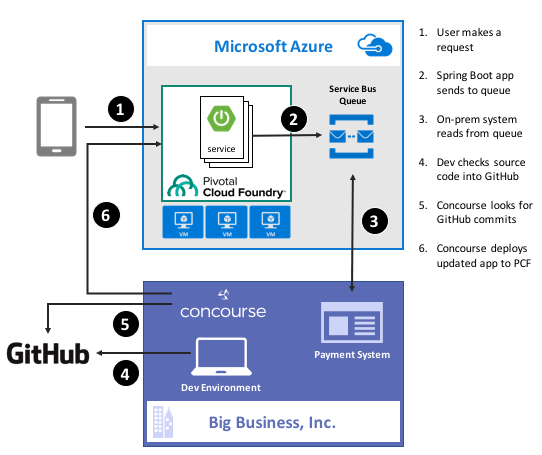
    Guess what? Deep down, cloud providers know you’re not moving your whole tech portfolio to their public cloud any time soon. Oh, your transition is probably underway, but you’ve got a whole stash of apps, data stores, and services that may not move for a while. That’s cool. There are more and more patterns and services available to squeeze value out of existing apps by extending them with more modern, scalable, cloudy tech. For instance, how might you take an existing payment transfer system that did B2B transactions and open it up to consumers without requiring your team to do a complete rewrite? One option might be to add a load-leveling queue in front of it, and take in requests via a scalable, cloud-based front-end app. In this post, I’ll show you how to implement that pattern by writing a Spring Boot app that uses Azure Service Bus Queues. Then, I’ll build a Concourse deployment pipeline to ship the app to Pivotal Cloud Foundry running atop Microsoft Azure.

    2016-11-28-azure-boot-01

    Ok, but why use a platform on top of Azure?

    That’s a fair question. Why not just use native Azure (or AWS, or Google Cloud Platform) services instead of putting a platform overlay like Pivotal Cloud Foundry atop it? Two reasons: app-centric workflow for developers, and “day 2” operations at scale.

    Most every cloud platform started off by automating infrastructure. That’s their view of the world, and it still seeps into most of their cloud app services. There’s no fundamental problem with that, except that many developers (“full stack” or otherwise) aren’t infrastructure pros. They want to build and ship great apps for customers. Everything else is a distraction. A platform such as Pivotal Cloud Foundry is entirely application-focused. Instead of the developer finding an app host, packaging the app, deploying the app, setting up a load balancer, configuring DNS, hooking up log collection, and configuring monitoring, the Cloud Foundry dev just cranks out an app and does a single action to get everything correctly configured in the cloud. And it’s an identical experience whether Pivotal Cloud Foundry is deployed to Azure, AWS, OpenStack, or whatever. The smartest companies realized that their developers should be exceptional at writing customer-facing software, not configuring firewall rules and container orchestration.

    Secondly, it’s about “day 2” operations. You know, all the stuff that happens to actually maintain apps in production. I have no doubt that any of you can build an app and quickly get it to cloud platforms like Azure Web Sites or Heroku with zero trouble. But what about when there are a dozen apps, or thousands? How about when it’s not just you, but a hundred of your fellow devs? Most existing app-centric platforms just aren’t set up to be org-wide, and you end up with costly inconsistencies between teams. With something like Pivotal Cloud Foundry, you have a resilient, distributed system that supports every major programing language, and provides a set of consistent patterns for app deployment, logging, scaling, monitoring, and more. Some of the biggest companies in the world deploy thousands of apps to their respective environments today, and we just proved that the platform can handle 250,000 containers with no problem. It’s about operations at scale.

    With that out of the way, let’s see what I built.

    Step 1 – Prerequisites

    Before building my app, I had to set up a few things.

    • Azure account. This is kind of important for a demo of things running on Azure. Microsoft provides a free trial, so take it for a spin if you haven’t already. I’ve had my account for quite a while, so all my things for this demo hang out there.
    • GitHub account. The Concourse continuous integration software knows how to talk to a few things, and git is one of them. So, I stored my app code in GitHub and had Concourse monitoring it for changes.
    • Amazon account. I know, I know, an Azure demo shouldn’t use AWS. But, Amazon S3 is a ubiquitous object store, and Concourse made it easy to drop my binaries there after running my continuous integration process.
    • Pivotal Cloud Foundry (PCF). You can find this in the Azure marketplace, and technically, this demo works with PCF running anywhere. I’ve got a full PCF on Azure environment available, and used that here.
    • Azure Service Broker. One fundamental concept in Cloud Foundry is a “service broker.” Service brokers advertise a catalog of services to app developers, and provide a consistent way to provision and de-provision the service. They also “bind” services to an app, which puts things like service credentials into that app’s environment variables for easy access. Microsoft built a service broker for Azure, and it works for DocumentDB, Azure Storage, Redis Cache, SQL Database, and the Service Bus. I installed this into my PCF-on-Azure environment, but you can technically run it on any PCF installation.

    Step 2 – Build Spring Boot App

    In my fictitious example, I wanted a Java front-end app that mobile clients interact with. That microservice drops messages into an Azure Service Bus Queue so that the existing on-premises app can pull messages from at their convenience, and thus avoid getting swamped by all this new internet traffic.

    Why Java? Java continues to be very popular in enterprises, and Spring Boot along with Spring Cloud (both maintained by Pivotal) have completely modernized the Java experience. Microsoft believes that PCF helps companies get a first-class Java experience on Azure.

    I used Spring Tool Suite to build a new Spring Boot MVC app with “web” and “thymeleaf” dependencies. Note that you can find all my code in GitHub if you’d like to reproduce this.

    To start with, I created a model class for the web app. This “web payment” class represents the data I connected from the user and passed on to the Service Bus Queue.

    package seroter.demo;
    
    public class WebPayment {
    	private String fromAccount;
    	private String toAccount;
    	private long transferAmount;
    
    	public String getFromAccount() {
    		return fromAccount;
    	}
    
    	public void setFromAccount(String fromAccount) {
    		this.fromAccount = fromAccount;
    	}
    
    	public String getToAccount() {
    		return toAccount;
    	}
    
    	public void setToAccount(String toAccount) {
    		this.toAccount = toAccount;
    	}
    
    	public long getTransferAmount() {
    		return transferAmount;
    	}
    
    	public void setTransferAmount(long transferAmount) {
    		this.transferAmount = transferAmount;
    	}
    }
    

    Next up, I built a bean that my web controller used to talk to the Azure Service Bus. Microsoft has an official Java SDK in the Maven repository, so I added this to my project.

    2016-11-28-azure-boot-03

    Within this object, I referred to the VCAP_SERVICES environment variable that I would soon get by binding my app to the Azure service. I used that environment variable to yank out the credentials for the Service Bus namespace, and then created the queue if it didn’t exist already.

    @Configuration
    public class SbConfig {
    
     @Bean
     ServiceBusContract serviceBusContract() {
    
       //grab env variable that comes from binding CF app to the Azure service
       String vcap = System.getenv("VCAP_SERVICES");
    
       //parse the JSON in the environment variable
       JsonParser jsonParser = JsonParserFactory.getJsonParser();
       Map<String, Object> jsonMap = jsonParser.parseMap(vcap);
    
       //create map of values for service bus creds
       Map<String,Object> creds = (Map<String,Object>)((List<Map<String, Object>>)jsonMap.get("seroter-azureservicebus")).get(0).get("credentials");
    
       //create service bus config object
       com.microsoft.windowsazure.Configuration config =
    	ServiceBusConfiguration.configureWithSASAuthentication(
    		creds.get("namespace_name").toString(),
    		creds.get("shared_access_key_name").toString(),
    		creds.get("shared_access_key_value").toString(),
    		".servicebus.windows.net");
    
       //create object used for interacting with service bus
       ServiceBusContract svc = ServiceBusService.create(config);
       System.out.println("created service bus contract ...");
    
       //check if queue exists
       try {
    	ListQueuesResult r = svc.listQueues();
    	List<QueueInfo> qi = r.getItems();
    	boolean hasQueue = false;
    
    	for (QueueInfo queueInfo : qi) {
              System.out.println("queue is " + queueInfo.getPath());
    
    	  //queue exist already?
    	  if(queueInfo.getPath().equals("demoqueue"))  {
    		System.out.println("Queue already exists");
    		hasQueue = true;
    		break;
    	   }
    	 }
    
    	if(!hasQueue) {
    	//create queue because we didn't find it
    	  try {
    	    QueueInfo q = new QueueInfo("demoqueue");
                CreateQueueResult result = svc.createQueue(q);
    	    System.out.println("queue created");
    	  }
    	  catch(ServiceException createException) {
    	    System.out.println("Error: " + createException.getMessage());
    	  }
            }
        }
        catch (ServiceException findException) {
           System.out.println("Error: " + findException.getMessage());
         }
        return svc;
       }
    }
    

    Cool. Now I could connect to the Service Bus. All that was left was my actual web controller that returned views, and sent messages to the Service Bus. One of my operations returned the data collection view, and the other handled form submissions and sent messages to the queue via the @autowired ServiceBusContract object.

    @SpringBootApplication
    @Controller
    public class SpringbootAzureConcourseApplication {
    
       public static void main(String[] args) {
         SpringApplication.run(SpringbootAzureConcourseApplication.class, args);
       }
    
       //pull in autowired bean with service bus connection
       @Autowired
       ServiceBusContract serviceBusContract;
    
       @GetMapping("/")
       public String showPaymentForm(Model m) {
    
          //add webpayment object to view
          m.addAttribute("webpayment", new WebPayment());
    
          //return view name
          return "webpayment";
       }
    
       @PostMapping("/")
       public String paymentSubmit(@ModelAttribute WebPayment webpayment) {
    
          try {
             //convert webpayment object to JSON to send to queue
    	 ObjectMapper om = new ObjectMapper();
    	 String jsonPayload = om.writeValueAsString(webpayment);
    
    	 //create brokered message wrapper used by service bus
    	 BrokeredMessage m = new BrokeredMessage(jsonPayload);
    	 //send to queue
    	 serviceBusContract.sendMessage("demoqueue", m);
    	 System.out.println("message sent");
    
          }
          catch (ServiceException e) {
    	 System.out.println("error sending to queue - " + e.getMessage());
          }
          catch (JsonProcessingException e) {
    	 System.out.println("error converting payload - " + e.getMessage());
          }
    
          return "paymentconfirm";
       }
    }
    

    With that, my microservice was done. Spring Boot makes it silly easy to crank out apps, and the Azure SDK was pretty straightforward to use.

    Step 3 – Deploy and Test App

    Developers use the “cf” command line interface to interact with Cloud Foundry environments. Running a “cf marketplace” command shows all the services advertised by registered service brokers. Since I added the Azure Service Broker to my environment, I instantiated an instance of the Service Bus service to my Cloud Foundry org. To tell the Azure Service Broker what to actually create, I built a simple JSON document that outlined the Azure resource group. region, and service.

    {
      "resource_group_name": "pivotaldemorg",
      "namespace_name": "seroter-boot",
      "location": "westus",
      "type": "Messaging",
      "messaging_tier": "Standard"
    }
    

    By using the Azure Service Broker, I didn’t have to go into the Azure Portal for any reason. I could automate the entire lifecycle of a native Azure service. The command below created a new Service Bus namespace, and made the credentials available to any app that binds to it.

    cf create-service seroter-azureservicebus default seroterservicebus -c sb.json
    

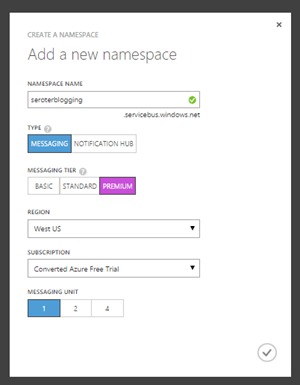
    After running this, my PCF environment had a service instance (seroterservicebus) ready to be bound to an app. I also confirmed that the Azure Portal showed a new namespace, and no queues (yet).
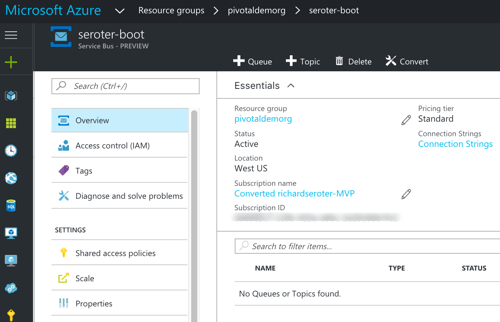
    2016-11-28-azure-boot-06

    Awesome. Next, I added a “manifest” that described my Cloud Foundry app. This manifest specified the app name, how many instances (containers) to spin up, where to get the binary (jar) to deploy, and which service instance (seroterservicebus) to bind to.

    ---
    applications:
    - name: seroter-boot-azure
      memory: 256M
      instances: 2
      path: target/springboot-azure-concourse-0.0.1-SNAPSHOT.jar
      buildpack: https://github.com/cloudfoundry/java-buildpack.git
      services:
        - seroterservicebus
    

    By doing a “cf push” to my PCF-on-Azure environment, the platform took care of all the app packaging, container creation, firewall updates, DNS changes, log setup, and more. After a few seconds, I had a highly-available front end app bound to the Service Bus. Below that you can see I had an app started with two instances, and the service was bound to my new app.
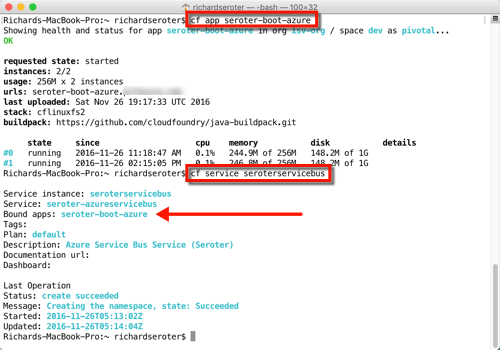
    2016-11-28-azure-boot-07

    All that was left was to test it. I fired up the app’s default view, and filled in a few values to initiate a money transfer.
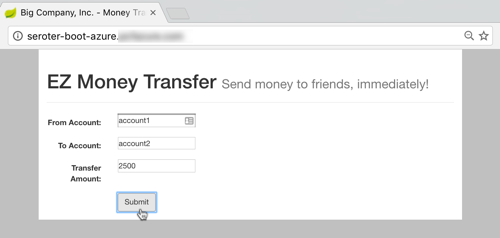
    2016-11-28-azure-boot-08

    After submitting, I saw that there was a new message in my queue. I built another Spring Boot app (to simulate an extension of my legacy “payments” system) that pulled from the queue. This app ran on my desktop and logged the message from the Azure Service Bus.

    2016-11-28-azure-boot-09

    That’s great. I added a mature, highly-available queue in between my cloud-native Java web app, and my existing line-of-business system. With this pattern, I could accept all kinds of new traffic without overloading the backend system.

    Step 4 – Build Concourse Pipeline

    We’re not done yet! I promised continuous delivery, and I deliver on my promises, dammit.

    To build my deployment process, I used Concourse, a pipeline-oriented continuous integration and delivery tool that’s easy to use and amazingly portable. Instead of wizard-based tools that use fixed environments, Concourse uses pipelines defined in configuration files and executed in ephemeral containers. No conflicts with previous builds, no snowflake servers that are hard to recreate. And, it has a great UI that makes it obvious when there are build issues.

    I downloaded a Vagrant virtual machine image with Concourse pre-configured. Then I downloaded the lightweight command line interface (called Fly) for interacting with pipelines.

    My “build and deploy” process consisted of four files: bootpipeline.yml that contained the core pipeline, build.yml which set up the Java build process, build.sh which actually performs the build, and secure.yml which holds my credentials (and isn’t checked into GitHub).

    The build.sh file clones my GitHub repo (defined as a resource in the main pipeline) and does a maven install.

    #!/usr/bin/env bash
    
    set -e -x
    
    git clone resource-seroter-repo resource-app
    
    cd resource-app
    
    mvn clean
    
    mvn install
    

    The build.yml file showed that I’m using the Maven Docker image to build my code, and points to the build.sh file to actually build the app.

    ---
    platform: linux
    
    image_resource:
      type: docker-image
      source:
        repository: maven
        tag: latest
    
    inputs:
      - name: resource-seroter-repo
    
    outputs:
      - name: resource-app
    
    run:
      path: resource-seroter-repo/ci/build.sh
    

    Finally, let’s look at my build pipeline. Here, I defined a handful of “resources” that my pipeline interacts with. I’ve got my GitHub repo, an Amazon S3 bucket to store the JAR file, and my PCF-on-Azure environment. Then, I have two jobs: one that builds my code and puts the result into S3, and another that takes the JAR from S3 (and manifest from GitHub) and pushes to PCF on Azure.

    ---
    resources:
    # resource for my GitHub repo
    - name: resource-seroter-repo
      type: git
      source:
        uri: https://github.com/rseroter/springboot-azure-concourse.git
        branch: master
    #resource for my S3 bucket to store the binary
    - name: resource-s3
      type: s3
      source:
        bucket: spring-demo
        region_name: us-west-2
        regexp: springboot-azure-concourse-(.*).jar
        access_key_id: {{s3-key-id}}
        secret_access_key: {{s3-access-key}}
    # resource for my Cloud Foundry target
    - name: resource-azure
      type: cf
      source:
        api: {{cf-api}}
        username: {{cf-username}}
        password: {{cf-password}}
        organization: {{cf-org}}
        space: {{cf-space}}
    
    jobs:
    - name: build-binary
      plan:
        - get: resource-seroter-repo
          trigger: true
        - task: build-task
          privileged: true
          file: resource-seroter-repo/ci/build.yml
        - put: resource-s3
          params:
            file: resource-app/target/springboot-azure-concourse-0.0.1-SNAPSHOT.jar
    
    - name: deploy-to-prod
      plan:
        - get: resource-s3
          trigger: true
          passed: [build-binary]
        - get: resource-seroter-repo
        - put: resource-azure
          params:
            manifest: resource-seroter-repo/manifest-ci.yml
    

    I was now ready to deploy my pipeline and see the magic.

    After spinning up the Concourse Vagrant box, I hit the default URL and saw that I didn’t have any pipelines. NOT SURPRISING.
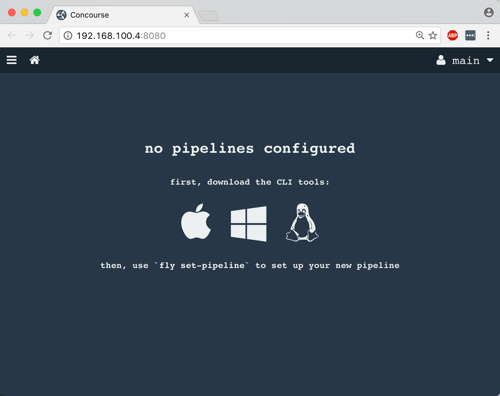
    2016-11-28-azure-boot-10

    From my Terminal, I used Fly CLI commands to deploy a pipeline. Note that I referred again to the “secure.yml” file containing credentials that get injected into the pipeline definition at deploy time.

    fly -t lite set-pipeline --pipeline azure-pipeline --config bootpipeline.yml --load-vars-from secure.yml
    

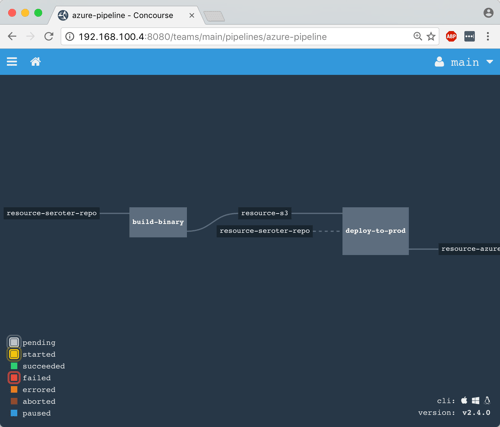
    In a second or two, a new (paused) pipeline popped up in Concourse. As you can see below, this tool is VERY visual. It’s easy to see how Concourse interpreted my pipeline definition and connected resources to jobs.
    2016-11-28-azure-boot-11

    I then un-paused the pipeline with this command:

    fly -t lite unpause-pipeline --pipeline azure-pipeline
    

    Immediately, the pipeline started up, retrieved my code from GitHub, built the app within a Docker container, dropped the result into S3, and deployed to PCF on Azure.

    2016-11-28-azure-boot-12

    After Concourse finished running the pipeline, I checked the PCF Application Manager UI and saw my new app up and running. Think about what just happened: I didn’t have to muck with any infrastructure or open any tickets to get an app from dev to production. Wonderful.

    2016-11-28-azure-boot-14

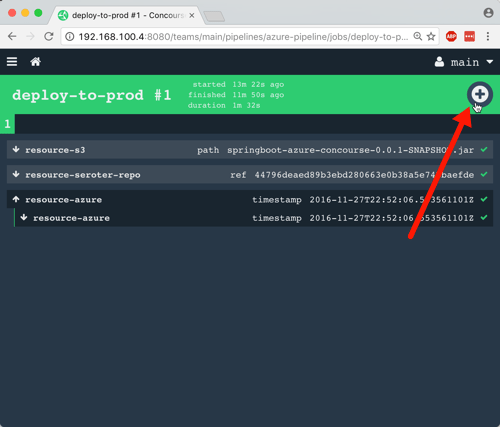
    The way I built this pipeline, I didn’t version the JAR when I built my app. In reality, you’d want to use the semantic versioning resource to bump the version on each build. Because of the way I designed this, the second job (“deploy to PCF”) won’t fire automatically after the first build, since there technically isn’t a new artifact in the S3 bucket. A cool side effect of this is that I could constantly do continuous integration, and then choose to manually deploy (clicking the “+” button below) when the company was ready for the new version to go to production. Continuous delivery, not deployment.
    2016-11-28-azure-boot-13

    Wrap Up

    Whew. That was a big demo. But in the scheme of things, it was pretty straightforward. I used some best-of-breed services from Azure within my Java app, and then pushed that app to Pivotal Cloud Foundry entirely through automation. Now, every time I check in a code change to GitHub, Concourse will automatically build the app. When I choose to, I take the latest build and tell Concourse to send it to production.

    magic

    A platform like PCF helps companies solve their #1 problem with becoming software-driven: improving their deployment pipeline. Try to keep your focus on apps not infrastructure, and make sure that whatever platform you use, you focus on sustainable operations at scale!
     

  • My new Pluralsight course—Developing Java microservices with Spring Cloud—is now available

    Java is back. To be sure, it never really left, but it did appear to take a backseat during the past decade. While new, lightweight, mobile-friendly languages rose to prominence, Java—saddled with cumbersome frameworks and an uncertain future—seemed destined to be used only by the most traditional of enterprises.

    But that didn’t happen. It wasn’t just enterprises that depended on Java, but innovative startups. And heavyweight Java frameworks evolved into more approachable, simple-to-use tools. Case in point: the open-source Spring dependency injection framework. Spring’s been a mainstay of Java development for years, but its XML-heavy configuration model made it increasingly unwieldy. Enter Spring Boot in 2014. Spring Boot introduced an opinionated, convention-over-configuration model to Spring and instantly improved developer productivity. And now, companies large and small are using it at an astonishing rate.

    Spring Cloud followed in 2015. This open-source project included a host of capabilities—including a number of projects from Netflix engineering—for teams building modern web apps and distributed systems. It’s now downloaded hundreds of thousands of times per month.

    Behind all this Spring goodness is Pivotal, the company I work for. We’re the primary sponsor of Spring and after joining Pivotal in April, I thought it’d be fun to teach a course on these technologies. There’s just so much going on in Spring Cloud, that I’m doing a two-partner. First up: Java Microservices with Spring Cloud: Developing Services.

    In this five-hour course, we look at some of the Spring Cloud projects that help you build modern microservices. In the second part of the course (which I’m starting on soon), we’ll dig into the Spring Cloud projects that help you coordinate interactions between microservices (think load balancing, circuit breakers, messaging). So what’s in this current course? It’s got five action-packed modules:

    1. Introduction to Microservices, Spring Boot, and Spring Cloud. Here we talk about the core characteristics of microservices, describe Spring Boot, build a quick sample app using Spring Boot, walk through the Spring Cloud projects, and review the apps we’ll build throughout the course.
    2. Simplifying Environment Managed with Centralized Config. Spring Cloud Config makes it super easy to stand up and consume a Git-backed configuration store. In this module we see how to create a Config Server, review all the ways to query configs, see how to setup secure access, work to configure encryption, and more. What’s cool is that the Config Server is HTTP accessible, so while it’s simple to consume in Spring Boot apps with annotated variables, it’s almost just as easy to consume from ANY other type of app.
    3. Offloading Async Activities with Lightweight, Short-Lived Tasks. Modern software teams don’t just build web apps. No, more and more microservices are being built as short-lived, serverless activities. Here, we look at Spring Cloud Task explore how to build event-driven services that get instantiated, do their work, and gracefully shut down. We see how to build Tasks, store their execution history in a MySQL database, and even build a Task that gets instantiated by an HTTP-initiated message to RabbitMQ.
    4. Securing Your Microservices with a Declarative Model. As an industry, we keep SAYING that security is important in our apps, but it still seems to be an area of neglect. Spring Cloud Security is for teams that recognize the challenge of applying traditional security approaches to microservices, and want an authorization scheme that scales. In this module we talk about OAuth 2.0, see how to perform Authorization Code flows, build our own resource server and flow tokens between services, and even build a custom authorization server. Through it all, we see how to add annotations to code that secure our services with minimal fuss.
    5. Chasing Down Performance Issues Using Distributed Tracing. One of the underrated challenges of building microservices is recognizing the impact of latency on a distributed architecture. Where are there problems? Did we create service interactions that are suboptimal? Here, we look at Spring Cloud Sleuth for automatic instrumentation of virtually EVERY communication path. Then we see how Zipkin surfaces latency issues and lets you instantly visualize the bottlenecks.

    This course was a labor of love for the last 6 months. I learned a ton, and I think I’ve documented and explained things that are difficult to find elsewhere in one place. If you’re a Java dev or looking to add some cloud-native patterns to your microservices, I hope you’ll jet over to Pluralsight and check this course out!

  • Enterprises fighting back, Spring Boot is the best, and other SpringOne Platform takeaways

    Last week I was in Las Vegas for SpringOne Platform. This conference had one of the greatest session lists I’ve ever seen, and brought together nearly 2,000 people interested in microservices, Java Spring, DevOps, agile, Cloud Foundry, and cloud-native development. With sponsors like Google, Microsoft, HortonWorks, Accenture, and AWS, and over 400 different companies represented by attendees, the conference had a unique blend of characters. I spent some time reflecting on the content and vibe of SpringOne Platform, and noticed that I kept coming back to the following themes.

    #1 – Enterprises are fighting back.

    Finally! Large, established companies are tired of operating slow-moving, decrepit I.T. departments where nothing interesting happens. At SpringOne Platform, I saw company after company talking about how they are creating change, and then showing the results. Watch this insightful keynote from Citi where they outline pain points, and how they’ve changed their team structure, culture, and technology:

    You don’t have to work at Uber, Etsy, Netflix or AWS to work on cutting-edge technology. Enterprises have woken up to the fact that outsourcing their strategic technology skills was a dumb decision. What are they doing to recover?

    1. Newfound focus on hiring and expanding technology talent. In just about every enterprise-led session I attended, the presentation closed with a “we’re hiring!” notice. Netflix has been ending their blog posts with this call-to-action for YEARS. Enterprises are starting to sponsor conferences and go where developers hang out. Additionally, because you can’t just hire hundreds of devs that know cloud-native patterns, I’m seeing enterprises make a greater investment in their existing people. That’s one reason Pluralsight continues to explode in popularity as enterprises purchase subscriptions for all their tech teams.
    2. Upgrading and investing in technology. Give the devs what they want! Enterprises have started to realize that classic enterprise technology doesn’t attract talented people to work on it. Gartner predicts that by the year 2020, 75% of the apps supporting digital business will be built, not bought. That means that your dev teams need the tools and tech that let them crank out customer-centric, resilient apps. And they need support for using modern approaches to delivering software. If you invest in technology, you’ll attract the talent to work with it.


    #2 – Spring Boot is the best application bootstrapping experience, period.

    For 17+ years I’ve either coded in .NET or Node.js (with a little experimentation in Go, Ruby, and Java). After joining Pivotal, I decided that I should learn Spring, since that’s our jam.

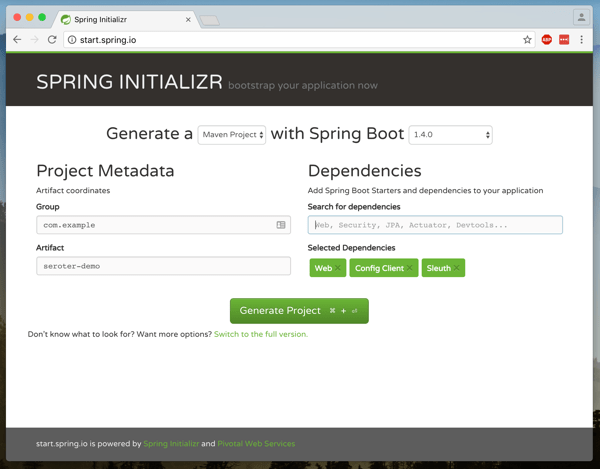
    I’ve never seen anything better than Spring Boot for getting developers rolling. Instead of spending hours (days?) setting up boilerplate code, and finding the right mix of dependencies for your project, Spring Boot takes care of all that. Give me 4 minutes, and I can build and deploy a git-backed Configuration Server. In a few moments I can flip on OAuth2 security or distributed tracing. And this isn’t hello-world quality stuff; this is the productization of Netflix OSS and other battle tested technology that you can use with simple code annotations. That’s amazing, and you can use the Spring Initializer to get started today.

    2016.08.10.s1p01

    Smart companies realize that devs shouldn’t be building infrastructure, app scaffolding or wrangling dependencies; they should be creating user experiences and business logic. Whereas Node.js has a billion packages and I spend plenty of time selecting ones that don’t have Guy Fieri images embedded, Spring Boot gives devs a curated, integrated set of packages. And it’s saving companies like Comcast, millions of dollars.

    Presenter after presenter at SpringOne Platform were able to quickly demonstrate complex distributed systems concepts by using Spring Boot apps. Java innovation happens in Spring.

    #3 A wave of realism has swept over the industry.

    I’m probably being optimistic, but it seems like some of the hype is settling down, and we’re actually getting to work on transformation. The SpringOne Platform talks (both in sessions, and hallway/lunch conversations) weren’t about visions of the future, but actual in-progress efforts. Transformation is hard and there aren’t shortcuts. Simply containerizing won’t make a difference, for example.

    Talk after talk, conducted by analysts or customers, highlighted the value of assessing your existing app portfolio, and identifying where refactoring or replatforming can add value. Just lifting and shifting to a container orchestration platform doesn’t actually improve things. At best, you’ve optimized the infrastructure, while ignoring the real challenge: improving the delivery pipeline. Same goes for configuration management, and other technologies that don’t establish meaningful change. It takes a mix of cultural overhaul, management buy-in, and yes, technology. I didn’t see anyone at the conference promising silver bullets. But at the same time, there were some concrete next steps for teams looking for accelerate their efforts.

    #4 The cloud wars have officially moved above IaaS.

    IaaS is definitely not a commodity (although pricing has stabilized), but you’re seeing the major three clouds working hard to own the services layer above the raw infrastructure. Gartner’s just-released IaaS Magic Quadrant shows clear leadership by AWS, Microsoft, and Google, and not accidentally, all three sponsored SpringOne Platform. Google brought over 20 people to the conference, and still couldn’t handle the swarms of people at their booth trying out Spring Boot! An integrated platform on top of leading clouds gives the best of all worlds.

    Great infrastructure matters, but native services in the cloud are becoming the key differentiator for one over another. Want services to bridge on-premises and cloud apps? Azure is a strong choice. Need high performing data storage services? AWS is fantastic. Looking at next generation machine learning and data processing? Google is bleeding edge. At SpringOne Platform, I heard established companies—including Home Depot, the GAP, Merrill Corp—explain why the loved Pivotal Cloud Foundry, especially when it integrated with native services in their cloud of choice. The power of platforms, baby.

    #5 Data microservices is the next frontier.

    I love, love that we’re talking about the role of data in a microservices world. It’s one thing to design and deliver stateless web apps, and scale the heck out of them. We’ve got lots of patterns for that. But what about the data? Are there ways to deploy and manage data platforms with extreme automation? How about scaling real-time and batch data processing? There were tons of sessions about data at SpringOne Platform, and Pivotal’s Data team wrote up some awesome summaries throughout the week:

    It’s almost always about data, and I think it’s great that we had PACKED sessions full of people working through these emerging ideas.

    #6 Pivotal is making a difference.

    I’m very proud of what our customers are doing with the help of Pivotal people and technologies. While we tried to make sure we didn’t beat people over the head with “Pivotal is GREAT” stuff, it became clear that the “Pivotal Way” is working and transforming the how the largest companies in the world build software.

    The Gap talked about going from weeks to deploy code changes, to mere minutes. That has a material impact on how they interact with their customers. And for many, this isn’t about net new applications. Almost everyone who presented talked about how to approach existing investments and find new value. It’s fun to be on this journey to simplify the future.

    Want to help make a difference at Pivotal and drive the future of software? We’re always hiring.

  • Integration trends you should care about

    Everyone’s doing integration nowadays. It’s not just the grizzled vet who reminisces about EDI or the seasoned DBA who can design snowflake schemas for a data warehouse in their sleep. No, now we have data scientists mashing up data sources, developers processing streams and connecting things via APIs, and “citizen integrators” (non-technical users) building event-driven actions on their own. It’s wild.

    Here, I’ll take a look at a few things to keep an eye on, and the implications for you.

    iPaaS

    Research company Gartner coined the term Integration Platform-as-a-Service (iPaaS) to represent services that offer application integration capabilities in the cloud. Gartner delivers an annual assessment of these vendors in the form of a Magic Quadrant, and released the 2016 version back in March. While revenue in this space is still relatively small, the market is growing by 50%, and Gartner predicts that by 2019, iPaaS will be the preferred option for new projects. Kent Weare recently conducted an excellent InfoQ virtual panel about iPaaS with representatives from SnapLogic, Microsoft, and Mulesoft. I found a number of useful tidbits in there, and drew a few conclusions:

    • The vendors are pushing their own endpoint connectors, but all seem to (somewhat grudgingly) recognize the value of consume “raw” APIs without a forced abstraction.
    • An iPaaS model won’t take off unless it’s seen as viable for existing, on-premises systems. Latency and security matter, and it still seems like there’s work to be done here to ensure that iPaaS products can handle all the speed and connectivity requirements.
    • Elasticity is an increasingly important value proposition of iPaaS. Instead of trying to build out a complete integration stack themselves that handle peak traffic, companies want something that dynamically scales. This is especially true given that Internet-of-Things is seem as a huge driver of iPaaS in the years ahead.
    • User experience is more important than ever, and these vendors are paying special attention to the graphical UI. At the same time, they’ll need to keep working on the technical interface for things like automated testing. They seemed well positioned, however, to work with new types of transient microservices and short-lived containers.

    There’s some cool stuff in the iPaaS space. It’s definitely worth your time to read Kent’s panel and explore some of these technologies more closely.

    Microservices-driven integration

    Have you heard of “microservices”? Of course you have, unless you’ve been asleep for the past eighteen months. This model of single-purpose, independently deployable services has taken off as groups rebel against the monolithic apps (and teams!) they’re saddled with today.

    You’ll often hear microservices proponents question the usefulness of an Enterprise Service Bus. Why? They point out that ESBs are typically managed in organization silos, centralize too much of the processing, and offer much more functionality than most teams need. If you look at your application components arranged as a graph instead of a stack, then you realize a different integration toolset is needed.

    Back in May, I was at Integrate 2016 where I delivered a talk on the Open Source Messaging Landscape (video now online). Lightweight messaging is BACK, baby! I’m seeing more and more teams looking to (open source) distributed messaging solutions when connecting their disparate services. This means software like Kafka, RabbitMQ, ZeroMQ, and NATS are going to continue to increase in relevance in the months and years ahead.

    How are you supposed to orchestrate all these microservices integrations? That’s not an easy answer. One technology that’s trying to address this is Spring Cloud Data Flow. I saw a demo a couple week back, and walked away very impressed.

    Spring Cloud Data Flow is software that helps you create and run pipelines of data microservices. These microservices are loosely coupled but linked through a shared messaging layer and sit atop a variety of runtimes including Kubernetes, Apache Mesos, and Cloud Foundry. This gives you a very cool way to design and run modern system integration.

    Serverless and “citizen integrators”

    Microservices is a hot trend, but “serverless” is probably even hotter! A more accurate name is “function as a service” and engineer Mike Roberts wrote a great piece that covers criteria and use cases. Basically, it’s about running short-lived, often asynchronous, single operations without any knowledge about the underlying infrastructure.

    This matters for integration people not just because you’ll see more and more messaging-oriented scenarios interacting with serverless engines, but because it’s opened up the door for many citizen developers to build event-driven integrations. These integration services meet the definition of “serverless” with their pay-pay-use, short-lived actions that abstract the infrastructure.

    Look at the crazy popularity of IFTTT. “Regular” people can design pretty darn powerful integrations that start with an external trigger and end with an action. This stuff isn’t just for making automatic updates to Pinterest. Have you investigated Zapier? Their directory of connectors contains an impressive array of leading CRM, Finance, and Support systems that anyone can use. Microsoft’s in the game now with Flow for simple cloud-based workflows. Developers can take advantage of serverless products like AWS Lambda and Webtask (from Auth0) when custom code is needed.

    Implications

    What does all this mean to you? First and foremost, integration is hot again! I’m willing to bet that you’d benefit from investing some time in learning new and emerging tech. If you haven’t learned anything new in the integration space over the past two years, you’ve missed a lot. Take a course, pick up a book, or just hack around.

    Recognize the growth of microservices and think about how it impacts your team. What tools will developers use to connect their services? What needs to be upgraded? What does this type of distributed integration do to your tracing and troubleshooting procedures? How can you break down the organizational silos and keep the “integration team” from being a bottleneck? Take a look at messaging software that can complement existing ESB software.

    Finally, don’t miss out on this “citizen integrator” trend. How can you help your less technical colleagues connect their systems in novel ways? The world will always need integration specialists, but it’s important to support the growing needs of those who shouldn’t have to queue up for help from the experts.

    What do you think? Any integration trends that stand out to you?

  • I’m Joining Pivotal

    Danny (George Clooney): Saul makes ten. Ten oughta do it, don’t you think?

    2016.04.04.oceans01Rusty (Brad Pitt): …

    Danny: Do you think we need one more?

    Rusty: …

    Danny: You think we need one more.

    Rusty: …

    Danny: Alright. We’ll get one more.

    That’s one of my favorite scenes from the movie Ocean’s Eleven. It was also the analogy used by Pivotal when we started talking about me coming aboard; they’re known for occasionally recruiting folks they want, even if there’s no pre-existing job posting (“we’ll get one more”). After some phone discussions and in-person get-togethers, we all agreed that it would be a great fit. So, I’m happy to announce that I’ve joined Pivotal as a Senior Director of Product, based in Seattle. I’ll be helping frame Pivotal’s all-up platform story, engaging with customers, and working with the team to improve our products and spread the cloud-native message.

    I accepted Pivotal’s offer for three reasons: the people, the purpose, and the products.

    The People

    I’m spoiled. After spending the last four years with a ridiculously talented cloud group at Tier3/CenturyLink, I place a premium on working with exceptional teams. What’s impressed me time and time again with Pivotal is that the talent goes both deep and wide. While you may know many of their more public-facing experts on app dev, distributed systems, and cloud — such as James Watters, Andrew Clay Shafer, Josh McKenty, Ian Andrews, Ben Black, Cotè, Bridget Kromhout, Josh Long, Matt Stine, Casey West, and James Bayer — there seem to be countless, exceptional Pivots across the engineering and Labs groups. My career goal is to always work with people smarter than me, but this is almost excessive! I’m excited to work alongside people at the top of their game (and we’re hiring tons more!), and doing my part to help our customers succeed.

    The Purpose

    I need to feel connected to the mission of the company that I work for. Pivotal makes that easy: Transform how the world builds software. Yes, please. Pivotal is committed to providing products and coaching that help companies of all sizes use technology to innovate faster. If you haven’t watched Pivotal VP of Engineering Onsi Fakhouri’s recent presentation that drives home this message in an inspirational way, you should. What’s great is that besides having 40+ fantastic product engineering teams, Pivotal also has a strong coaching and consulting arm in Pivotal Labs.

    Look at how we’ve traditionally designed, developed, packaged, deployed and managed systems.Everything’s changing and Pivotal is at the forefront of this transformation. But it’s not about changing your technology or methodology just for the sake of it; the core goal is to improve business performance through better software! Pivotal is all about helping companies make a meaningful transformation, and I love it. And this approach is clearly resonating with the largest companies in the world.

    https://twitter.com/wattersjames/status/715040771829841922

    The Products

    Our flagship product is Pivotal Cloud Foundry (PCF), a commercial distribution of Cloud Foundry — the industry-leading, open source cloud-native app platform. PCF is more than just a wrapping of vendor support around something you can get for free. Rather, it represents a complete platform for (1) installing and updating Cloud Foundry software and services on a variety of (cloud) hosts, (2) cataloging and consuming a wide variety of application services, (3) creating, packaging, and deploying custom apps,  and (4) managing the app lifecycle.

    Many people actually know Pivotal because of Pivotal Tracker. It’s one of the first agile planning tools, and remains extremely popular. Pivotal also has an exceptional Big Data Suite where customers can make sense of data faster, and use that new insight to make better business decisions and design more relevant software.

    In addition to building commercial products, Pivotal invests heavily in open source. Did you know that Pivotal puts a significant number of engineers not just on the Cloud Foundry OSS effort, but on projects like RabbitMQ , Concourse CI, and Spring? The adoption of Spring and Spring Cloud  during the past year has been insane as companies embrace the patterns and technology pioneered by industry leaders like Netflix. Pivotal makes a serious commitment to both commercial and open source products, and that makes for a very exciting place to work.

    Pivotal’s people, purpose, and products are hard to match, and it’s made me very eager to show up to the office today.

  • Deploying a Go App to Cloud Foundry using Visual Studio Code

    Deploying a Go App to Cloud Foundry using Visual Studio Code

    Do you ever look at a new technology and ask yourself: “I wonder if it could do THAT?” I had that moment last week when reading up on the latest release of Visual Studio Code, the free, lightweight, cross-platform IDE from Microsoft. I noticed that it had extensibility points for code and frameworks, as well as executing automated tasks. So, I wondered if it was possible to develop and push an app to AppFog (a Cloud Foundry-based PaaS), all from within the Visual Studio Code shell. TL;DR; It’s totally possible.

    All I wanted to try out was a simple “hello world” scenario. It would have been too easy to just use Node.js (which is where I do most casual development nowadays), so I decided to use Go instead. Go is so hot right now, and I’m trying to get back into it. I went over to the Go site and downloaded the binary release for my local machine.

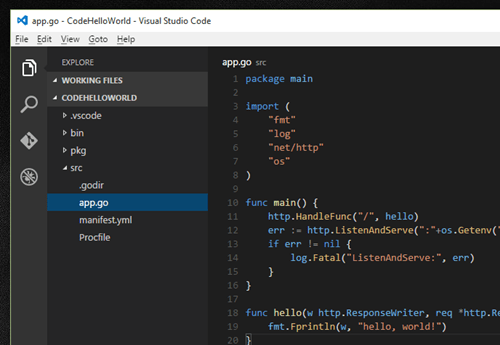
    After installing Go, I created a typical Go project structure in my workspace. It’s a best practice to put all your projects into a single workspace, but I set up one just for this project.

    2015.12.07vscode01

    Next up, I downloaded the latest version of Visual Studio Code (VS Code). Whether you’re running Windows, Linux, or OSX, there’s a free copy for you to grab.

    2015.12.07vscode02

    From within VS Code, I opened the workspace I created on my file system. VS Code doesn’t natively support Go out of the box, but you can use an extension to add support for multiple other languages, including Go. The Visual Studio Marketplace lists all the extensions. The Go extension adds colorization, formatting, build support, and more. Once I confirmed which Go extension I wanted to use, I went back into VS Code hit CTL+Shift+P to open the command window, typed Install Extensions, and found the Go extension I wanted.

    2015.12.07vscode3

    I then created a handful of Go files. First I created the main program in an app.go file. It’s super basic; just starting up a web server on whatever port Cloud Foundry gives me, and returning a “hello, world” message upon HTTP request.

    package main
    
    import (
        "fmt"
        "log"
        "net/http"
        "os"
    )
    
    func main() {
        http.HandleFunc("/", hello)
        err := http.ListenAndServe(":"+os.Getenv("PORT"), nil)
        if err != nil {
            log.Fatal("ListenAndServe:", err)
        }
    }
    
    func hello(w http.ResponseWriter, req *http.Request) {
        fmt.Fprintln(w, "hello, world!")
    }
    

    I added a Procfile that’s used to declare the command that’s executed to start the app. In my case, the Procfile just contains “web: app” (where app is the package I created). I didn’t have any dependencies in this app, so I didn’t go through the effort to set up godep (which is the only Cloud Foundry-supported Go package manager) on my machine. Instead, I used the deprecated .godir file that simply includes the name of my binary (app). If I actually had dependencies, Cloud Foundry wouldn’t like that I did this, but I decided to live dangerously. Finally, I wanted a Cloud Foundry YAML manifest that described my app deployment.

    ---
    applications:
      - name: hellogo
        memory: 64M
        instances: 1
        host: hellogo
    

    My workspace now looked like this:

    2015.12.07vscode04

    Now, I *could* have stopped here. By hitting the CTL-Shift+C keyboard sequence, I can open a command prompt that points at the current directory. I could kick off the simple Cloud Foundry deployment process from that outside command window, but I wanted it all within VS Code. Fortunately, VS Code supports automation tasks that run built-in or custom commands. To create a file for the Cloud Foundry “push” task, I entered the command window within VS Code (CTL+Shift+P) and selected Tasks: Configure Task Runner. This generated a tasks.json stub.

    The tasks file contains single command. You could choose to augment that command with (optional) “tasks” that represent calls against that base command. For instance, in this case I’m using the “cf” command, and individual tasks for logging in, and pushing an app. Below is my complete tasks.json file. The isShellCommand means that VS Code executes the command itself, and I want to see the output in the command window (showOutput equals “always”). For each declared task, I set a friendly name, suppressed it from being used in the command, and passed in an array of command line parameters. The commands are executing in a sub-directory that’s not holding my source code, so I set the necessary path to my source code and YAML manifest. I’m targeting AppFog, so you can see the target endpoint called out in my login request.

    {
        "version": "0.1.0",
        "command": "cf",
        "isShellCommand": true,
        "showOutput": "always",
        "args": [],
    	"tasks": [
             {
                "taskName": "login",
                "suppressTaskName": true,
                "args": ["login", "-a", "https://api.uswest.appfog.ctl.io", "-o", "ORG", "-u", "USER", "-p", "PASSWORD", "-s", "SPACE"]
     	     },
             {
                "taskName": "push",
                "suppressTaskName": true,
                "args": ["push", "-p", ".\\src\\", "-f", ".\\src\\manifest.yml"]
             }
        ]
    
    }
    

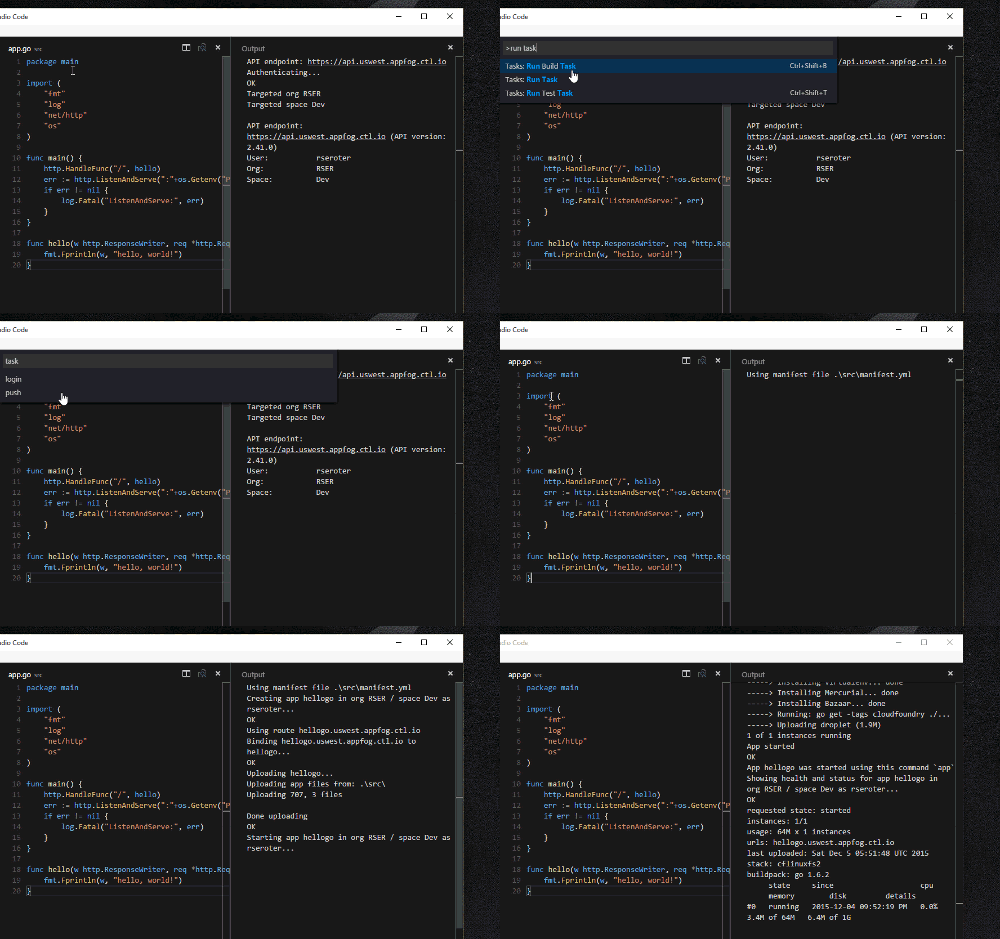
    I opened my app.go file, and spun up the VS Code command window. After choosing Tasks: Run Task, I’m asked to choose a task. If I choose my “push” command before logging in, I get the expected error (“not authenticated”). If I run the “login” task, and then the “push” task, you can see that my app runs through the Cloud Foundry deployment process.

    2015.12.07vscode05

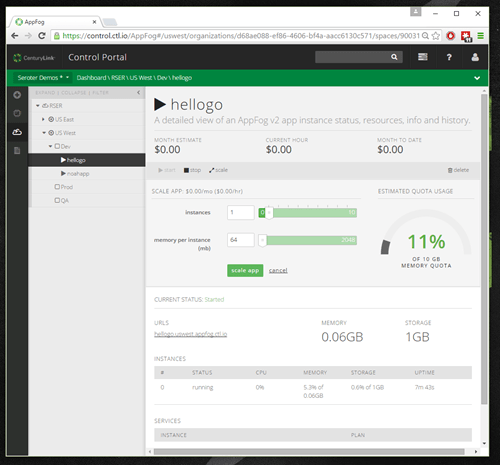
    Sweet! My app deployed – with a warning that I was using a deprecated package manager – and I could see app configuration in the AppFog console (below). I then tested my app by browsing the application URL.

    2015.12.07vscode06

    VS Code looks like a pretty handy, extensible IDE for those doing development in .NET, Node, Go, or other languages. The automated tasks capability isn’t perfect, but hey, I got it working with the Cloud Foundry deployment tools in a few minutes, so that’s not too shabby!

    Are you looking at using VS Code for any development?

  • You don’t need a private cloud, you need isolation options (and maybe more control!)

    Private cloud is definitely still a “thing.” Survey after survey shows that companies are running apps in (on-premises) private clouds and cautiously embracing public cloud. But, it often seems that companies see this as a binary choice: wild-west public cloud, or fully dedicated private cloud. I just wrote up a report on Heroku Private Spaces, and this reinforces my belief that the future of IT is about offering increasingly sophisticated public cloud isolation options, NOT running infrastructure on-premises.

    Why do companies choose to run things in a multi-tenant public cloud like Azure, AWS, Heroku, or CenturyLink? Because they want to offload responsibility for things that aren’t their core competencies, want elasticity to consume apps infrastructure on their timelines and in any geography, they like the constant access to new features and functionality, and it gives their development teams more tools to get revenue-generating products to market quickly.

    How come everything doesn’t run in public clouds? Legit concerns exist about supportability for existing topologies and lack of controls that are “required” by audits. I put required in quotes because in many cases, the spirit of the control can be accomplished, even if the company-defined policies and procedures aren’t a perfect match. For many companies, the solution to these real or perceived concerns is often a private cloud.

    However, “private cloud” is often a misnomer. It’s at best a hyper-converged stack that provides an on-demand infrastructure service, but more often it’s a virtualization environment with some elementary self-service capabilities, no charge-back options, no PaaS-like runtimes, and single-location deployments. When companies say they want private clouds, what they OFTEN need is a range of isolation options. By isolation, I mean fewer and fewer dependencies on shared infrastructure. Why isolation? There’s a need to survive an audit that includes detailed network traffic reports, user access logs, and proof of limited access by service provider staff. Or, you have an application topology that doesn’t fit in the “vanilla” public cloud setup. Think complex networking routes or IP spaces, or even application performance requirements.

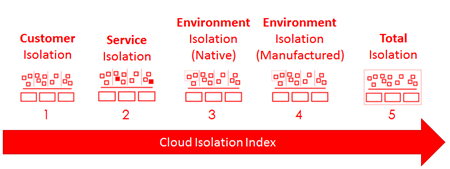
    To be sure, any public cloud today is already delivering isolation. Either your app (in the case of PaaS), or virtual infrastructure (in the case of IaaS) is walled off from other customers, even if they share a control plane. What is the isolation spectrum, and what’s in-between vanilla public cloud and on-premises hardware? I’ve made up a term (“Cloud Isolation Index”) and describe it below.

    2015.09.17cii05


    Customer Isolation

    What is it?

    This is the default isolation that comes with public clouds today.  Each customer has their own carved-out place in a multi-tenant environment. Customers typically share a control plane, underlying physical infrastructure, and in some cases, even the virtual infrastructure. Virtual infrastructure may be shared when you’re considering application services like database-as-a-service, messaging services, identity services, and more.

    How is it accomplished?

    This is often accomplished through a mix of hardware and software. The base hardware being used by a cloud provider may offer some inherent multi-tenancy, but most likely, the provider is relying on a software tier that isolates tenants. It’s often the software layer that orchestrates an isolated sandbox across physical compute, networking, storage, and customer metadata.

    What are the benefits and downsides?

    There are lots of reasons that this default isolation level is attractive. Getting started in these environments takes seconds. You have base assurances that you’re not co-mingling your business critical information in a risky way. It’s easier to manage your account or get support because there’s nothing funky going on.

    Downsides? You may not be able to satisfy all your audit and complexity concerns because your vanilla isolation doesn’t support customizations that could break other tenants. Public cloud also limits you to the locations that it’s running, so if you need a geography that’s not available from that provider, you’re out of luck.

    Service Isolation

    What is it?

    Take an service and wall it off from other users within a customer account. You may share a control plane, account management, and underlying physical infrastructure. 2015.09.17cii07You’re seeing a new crop of solutions here, and I like this trend. Heroku Private Spaces gives you apps and data in a network isolated area of your account, Microsoft Azure Service Bus Premium Messaging delivers resource isolation for your messaging workloads. “Reserved instances” in cloud infrastructure environments serve a similar role. It’s about taking services or set of services and isolating them for security or performance reasons.

    How is it accomplished?

    It looks like Heroku Private Spaces works by using AWS VPC (see “environment isolation” below) and creating a private network for one or many apps targeted at a Space. Azure likely uses dedicated compute instances to run a messaging unit just for you. Dedicated or reserved services depend on network and (occasionally) compute isolation.

    What are the benefits and downsides?

    The benefits are clear. Instead of doing a coarse exercise (e.g. setting up dedicated private “cloud” infrastructure somewhere) because one component requires elevated isolation, carve up that app or set of services into a private area. By sharing a control plane with the “public” cloud components, you don’t increase your operational burden.

    Environment Isolation (Native)

    What is it?

    Use vendor-provided cloud features to carve up isolation domains within your customer account. Instead of “Customer Isolation” where everything gets dumped into the vanilla account and everyone has access, here you thoughtfully design an environment and place apps in the right place. Most public clouds offer features to isolation workloads within a given account.

    How is it accomplished?

    Lots of ways to address this. In the CenturyLink Cloud, we offer things like account hierarchies where customers set up different accounts with unique permissions, network boundaries. 2015.09.17cii06Also, our customers use Bare Metal servers for dedicated workloads, role-based access controls to limit permissions, distinct network spaces with carefully crafted firewall policies, and more.

    Amazon offer services like Virtual Private Cloud (VPC) that creates a private part of AWS with Internet access. Customers use access groups to control network traffic in and out of a VPC. Many clouds offer granular security permissions so that you can isolate permission and in some cases, access to specific workloads. You’ll also find cloud options for data encryption and other native data security features.

    Select private cloud environments also fit into this category. CenturyLink sells a Private Cloud which is fully federated with the public cloud, but on a completely dedicated hardware stack in any of 50+ locations around the world. Here, you have native isolation in a self-service environment, but it still requires a capital outlay.

    This is all typically accomplished using features that many clouds provide you out-of-the-box.

    What are the benefits and downsides?

    One huge benefit is that you can get many aspects of “private cloud” without actually making extensive commitments to dedicated infrastructure. Customers are seeking control and ways to wall-off sensitive workloads. By using inherent features of a global public cloud, you get greater assurances of protection without dramatically increasing your complexity/cost.

    Environment Isolation (Manufactured)

    What is it?

    Sometimes the native capabilities of a public cloud are insufficient for the isolation level that you need. But, one of the great aspects of cloud is the extensibility and in some cases, customization. You’re likely still sharing a control plane and some underlying physical infrastructure.

    How is it accomplished?

    You can often create an isolated environment through additional software, “hybrid” infrastructure, and even hack-y work-arounds.

    2015.09.17cii08Most clouds offer a vast ecosystem of 3rd party open source and commercial appliances. Create isolated networks with an overlay solution, encrypt workloads at the host level, stand up self-managed database solutions, and much more. Look at something like Pivotal Cloud Foundry. Don’t want the built-in isolation provided by a public PaaS provider? Run a dedicated PaaS in your account and create the level of isolation that your apps demand.

    You also have choices to weave environments together into a hybrid cloud. If you can’t place something directly in the cloud data center, then you can use things like Azure ExpressRoute or AWS Direct Connect to privately link to assets in remote data centers. Since CenturyLink is the 2nd largest colocation provider in the world, we often see customers put parts of their security stack or entirely different environments into our data center and do a direct connect to their cloud environment. In this way, you manufacture the isolation you need by connecting different components that reside in different isolation domains.

    Another area that comes up with regards to isolation is vendor access. It’s one thing to secure workloads to prevent others within your company from accessing them. It’s another to also prevent the service provider themselves from accessing them! You make this happen by using encryption (that you own the keys for), additional network overlays, or even changing the passwords on servers to something that the cloud management platform doesn’t know.

    What are the benefits and downsides?

    If public cloud vendors *didn’t* offer the option to manufacture your desired isolation level, you’d see a limit to what ended up going there. The benefit of this level is that you can target more sensitive or complex workloads at the public cloud and still have a level of assurance that you’ve got an advanced isolation level.

    The downside? You could end up with a very complicated configuration. If your cloud account no longer resembles its original state, you’ll find that your operational costs go up, and it might be more difficult to take advantage of new features being natively added to the cloud.

    Total Isolation

    What is it?

    This is the extreme end of the spectrum. Stand up an on-premises or hosted private cloud that doesn’t share a control plane or any infrastructure with another tenant.

    How is it accomplished?

    You accomplish this level of isolation by buying stuff. You typically make a significant commit to infrastructure for the privilege of running it yourself, or paying someone else to run it on your behalf. You spend time working with consultants to size and install an environment.

    What are the benefits and downsides?

    The benefits? You have complete control of an infrastructure environment and can use the hardware vendors you want, and likely create any sort of configuration you need to support your existing topologies. The downside? You’re probably not getting anywhere near the benefit that your competitors are who are using the public cloud to scale faster, and in more places than you’ll ever be with owned infrastructure.

    I’m not sure I feel the same way as Cloud Opinion, but the point is well taken.

    Summary

    Isolation should be a feature, not a capital project.

    This isolation concept is still a work in progress for me, and probably needs refinement. Am I missing parts of the spectrum? Have I undersold fully dedicated private infrastructure? It seems that if we talked more about isolation levels, and less about public vs. private, we’d be having smarter conversations. Agree?

  • Recent Presentations (With Video!): Transitioning to PaaS and DevOps

    I just finished up speaking at a  run of conferences (Cloud Foundry Summit, ALM Forum, and the OpenStack Summit) and the recorded presentations are all online.

    The Cloud Foundry Summit was excellent and you can find all the conference videos on the Cloud Foundry Youtube channel. I encourage you to watch some of the (brief) presentations by customers to hear now real people use application platforms to solve problems. My presentation (slides here) was about the enterprise transition to PaaS, and what large companies need to think about when introducing PaaS to their environment.

    At the ALM Forum and OpenStack Summit, I talked about the journey to a DevOps organization and used CenturyLink as a case study. I went through our core values, logistics (org chart, office layout, tool set), and then a week-in-the-life that highlighted the various meetings and activities we do.

    Companies making either journey will realize significant benefits, but not without proper planning. PaaS can be supremely disruptive to how applications are being delivered today, and DevOps may represent a fundamental shift in how technology services are positioned and prioritized at your company. While not directly related, PaaS and DevOps both address the emerging desire to treat I.T. as a competitive advantage.

    Enjoy!

  • Node.js and Visual Studio: From Zero to a Cloud Foundry Deployment in 2 Minutes

    Node.js and Visual Studio: From Zero to a Cloud Foundry Deployment in 2 Minutes

    Microsoft just released the 1.0 version of their Node.js Tools for Visual Studio. This gives Windows developers a pretty great environment for building clean, feature rich Node.js applications. It’s easy to take an application built in Visual Studio and deploy to Microsoft’s own cloud, so how about pushing apps elsewhere? In this post, I’ll show you how quick and easy it is to set up a Node.js application in Visual Studio, and push to a Cloud Foundry endpoint.

    As a prerequisite, take 30 seconds to download and install the Cloud Foundry CLI, and sign up for a friendly Cloud Foundry provider. And, install the new Node.js Tools for Visual Studio.

    Creating and Deploying an Express Application

    Let’s start with the lightning round, and then I’ll go back and show off some of the features of this toolkit.

    Step 1 – Open Visual Studio and create the Node.js Express project (25 seconds)

    The Node.js Tools for Visual Studio add a few things to the Visual Studio experience. One of those is the option to select Node project types. This makes it super easy to spin up an example Express application.

    2015.03.27node01

    The sample project selected above includes a package.json file with all the dependencies. Visual Studio goes out and reconciles them all by downloading the packages via npm.

    2015.03.27node02

    The project loads up quickly, and you can see a standard Express skeleton project. Note that Visual Studio doesn’t throw any useless cruft into the solution. It’s all just basic Node stuff. That’s nice.

    2015.03.27node03


    Step 2 – Open Command Prompt and target the AppFog v2 environment (30 seconds)

    This Express app is boring, but technically a complete, deployable project. Let’s do that. I didn’t see an obvious way to get my Cloud Foundry-aware command line within the Visual Studio shell itself, but it’s crazy easy to open one that’s pointed at our project directory. Right-clicking the Visual Studio project gives the option to open a command prompt at the root of the project.

    2015.03.27node04

    Before deploying, I made sure I had the credentials and target API for my Cloud Foundry endpoint. In this case, I’m using the not-yet-released AppFog v2 from CenturyLink. “Sneak peek alert!”

    2015.03.27node05

    After logging into my endpoint via the Cloud Foundry CLI, I was ready to push the app.


    Step 3 – Push application (81 seconds)

    With a simple “cf push” command, I was off and running. App deployment times vary based on project size and complexity. If I had deleted (or excluded) all the local packages, then Cloud Foundry would have simply downloaded them all server-side, thus accelerating the upload. I was lazy, and just sent all my files up to the platform fabric directly.

    2015.03.27node11

    After a short time, my app is staged, deployed, and started.


    Step 4 – Verify!

    The best part of any demo: seeing the results!

    2015.03.27node06

    You don’t really need to know anything about Node (or Cloud Foundry!) to test this out. It’s never been easier to sample new technology.

    Exploring Additional Node Capabilities in Visual Studio

    Let’s retrace our steps a bit and see what else these Node tools put into Visual Studio. First, you’ll see a host of options when creating a new Visual Studio project. There are empty Node.js projects (that pretty much just include a package.json and app.js file), Express applications, and even Azure-flavored ones.

    2015.03.27node13

    The toolkit includes some Intellisense for Node.js developers which is nice. In the case below, it knows what methods are available on common object types.

    2015.03.27node10

    For installing packages, there are two main options. First, you can use the Node.js Interactive Window to issue commands. One such command is .npm and I can install anything from the global directory. Such as the awesome socket.io package.

    2015.03.27node11

    One downside of using this mechanism is that the package.json file isn’t automatically updated. However, Visual Studio helpfully reminds you of that.

    2015.03.27node12

    The “preferred” way to install packages seems to be the GUI where you can easily browse and select your chosen package. There’s options here to choose a version, pick a dependency type, and add to the package.json file. Pretty handy.

    2015.03.27node08

    The Toolkit also makes it easy to quickly spin up and debug an app. Press F5 starts up the Node server and opens a browser window that points at that server and relevant port.

    2015.03.27node09

    Summary

    I’ve used a few different Node.js development environments on Windows, and Visual Studio is quickly becoming a top-tier choice. If you’re just starting out with Node, or a seasoned developer, Visual Studio seems to have the nice mix of helpful capabilities while not getting in the way too much.

  • New Pluralsight Course – Cloud Foundry for Developers – is Live!

    Cloud Foundry is a fast-growing open source Platform-as-a-Service (PaaS). It has an impressive array of Foundation members/contributors including Pivotal, Intel, SAP, IBM, Hortonworks, Docker, and many more. I’ve spent the past few months building a new Pluralsight course that explores this powerful service and gives developers all the information they need to start building, deploying, and managing web applications in public or private Cloud Foundry environments. I started playing with Cloud Foundry almost 4 years ago, and have continued to watch with interest as the product matured. I thought it’d be fun to craft a training course around it, and Pluralsight eagerly accepted a proposal for my 11th (!!) overall course.

    Cloud Foundry for Developers is a 3 hour course where we discuss PaaS, deploy a Ruby/Node/Mongo app, and run through management operations. While we primarily use the general purpose command line interface (CLI) that works across ANY Cloud Foundry environment, I also spend a little time in the Pivotal Web Services administration portal.

    Module 1 – PaaS and Cloud Foundry Introduction

    What is PaaS and why does it matter? In this module, I discuss PaaS in general, the details of twelve factor apps, how Cloud Foundry works, and the web application we’ll be working with. I wanted course viewers to get an immediate taste for Cloud Foundry, so within the first ten minutes of the course, we deploy our first app. INSTANT GRATIFICATION.

    2015.01.09pluralsight01

    Module 2 – Deploying and Managing Applications (Part 1)

    Developers love PaaS because it simplifies the assembly, deployment, and management of modern web apps. No more hunting for available web servers, configuring network settings, or begging an Ops person for more capacity. In this module, we set up the local (testing) environment and remote PaaS environment. We explore user roles, see how to create and attach 3rd party services to our apps, and define application manifests.

    2015.01.09pluralsight02

    Module 3 – Deploying and Managing Applications (Part II)

    Here we get to the meat of deployment and runtime management in Cloud Foundry. After deploying all the components of our system, we scale both horizontally and vertically, and update a running app. While you may write perfect code, it’s inevitable that you experience an exception at SOME point. When working with a layer of abstraction like PaaS, it’s critical to understand the troubleshooting tools. We spend a bit of time talking about common types of errors, and how to use the Cloud Foundry logging system to narrow down the problem.

    Module 4 – Cloud Foundry Advanced Topics

    There are a LOT of topics to cover with Cloud Foundry! In this module I look at a few advanced capabilities of the platform that every developer should be familiar with. Here I show you how to use environment variables correctly, how to build, deploy, and run background (worker) applications, and doing no-downtime (blue/green) deployments. The final exercise is my favorite. Cloud Foundry has an amazing capability to bring application instances back online after a crash. Here I got to do what I do best in code: cause unexpected crashes! It’s compelling to see an application quickly “self heal” without the user even knowing it.

    2015.01.09pluralsight03

    I have lots of ideas for follow up Cloud Foundry topics (e.g. continuous integration/deployment, BOSH, microservices), but I hope you enjoy THIS course about using Cloud Foundry to deliver modern applications faster and more consistently.