Category: AWS

  • My New Pluralsight Course – Patterns of Cloud Integration – Is Now Live

    I’ve been hard at work on a new Pluralsight video course and it’s now live and available for viewing. This course, Patterns of Cloud Integration,  takes you through how application and data integration differ when adding cloud endpoints. The course highlights the 4 integration styles/patterns introduced in the excellent Enterprise Integration Patterns book and discusses the considerations, benefits, and challenges of using them with cloud systems. There are five core modules in the course:

    • Integration in the Cloud. An overview of the new challenges of integrating with cloud systems as well as a summary of each of the four integration patterns that are covered in the rest of the course.
    • Remote Procedure Call. Sometimes you need information or business logic stored in an independent system and RPC is still a valid way to get it. Doing this with a cloud system on one (or both!) ends can be a challenge and we cover the technologies and gotchas here.
    • Asynchronous Messaging. Messaging is a fantastic way to do loosely coupled system architecture, but there are still a number of things to consider when doing this with the cloud.
    • Shared Database. If every system has to be consistent at the same time, then using a shared database is the way to go. This can be a challenge at cloud scale, and we review some options.
    • File Transfer. Good old-fashioned file transfers still make sense in many cases. Here I show a new crop of tools that make ETL easy to use!

    Because “the cloud” consists of so many unique and interesting technologies, I was determined to not just focus on the products and services from any one vendor. So, I decided to show off a ton of different technologies including:

    Whew! This represents years of work as I’ve written about or spoken on this topic for a while. It was fun to collect all sorts of tidbits, talk to colleagues, and experiment with technologies in order to create a formal course on the topic. There’s a ton more to talk about besides just what’s in this 4 hour course, but I hope that it sparks discussion and helps us continue to get better at linking systems, regardless of their physical location.

  • Interacting with Clouds From Visual Studio: Part 2 – Amazon Web Services

    In this series of blog posts, I’m looking at how well some leading cloud providers have embedded their management tools within the Microsoft Visual Studio IDE. In the first post of the series, I walked through the Windows Azure management capabilities in Visual Studio 2012.  This evaluation looks at the completeness of coverage for browsing, deploying, updating, and testing cloud services. In this post, I’ll assess the features of the Amazon Web Services (AWS) cloud plugin for Visual Studio.

    This table summarizes my overall assessment, and keep reading for my in-depth review.

    Category

    AWS

    Notes

    Browsing

    Web applications and files 3-4 You can browse a host of properties about your web applications, but cannot see the actual website files themselves.
    Databases

    4-4

    Excellent coverage of each AWS database; you can see properties and data for SimpleDB, DynamoDB, and RDS.
    Storage

    4-4

    Full view into the settings and content in S3 object storage.
    VM instances

    4-4

    Deep view into VM templates,  instances, policies.
    Messaging components

    4-4

    View all the queues, subscriptions and topics, as well as the properties for each.
    User accounts, permissions

    4-4

    Look through a complete set of IAM objects and settings.

    Deploying / Editing

    Web applications and files

    2-4

    Create CloudFormation stacks directly from the plugin. Elastic Beanstalk is triggered from the Solution Explorer for a given project.
    Databases

    4-4

    Easy to create databases, as well as change and delete them.
    Storage

    4-4

    Create and edit buckets, and even upload content to them.
    VM instances

    4-4

    Deploy new virtual machines, delete existing one with ease.
    Messaging components

    4-4

    Create SQS queues as well as SNS Topics and Subscriptions. Make changes as well.
    User accounts, permissions

    4-4

    Add or remove groups and users, and define both user and group-level permission policies.

    Testing

    Databases

    3-4

    Great query capability built in for SimpleDB and DynamoDB. Leverages Server Explorer for RDS.
    Messaging components

    2-4

    Send messages to queues, and send messages to topics. Cannot delete queue messages, or tap into subscriptions.

    Setting up the Visual Studio Plugin for AWS

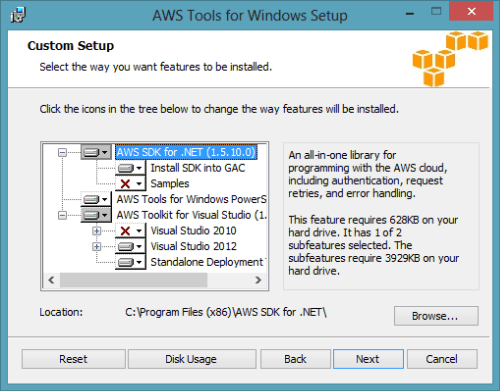
    Getting a full AWS experience from Visual Studio is easy. Amazon has bundled a few of the components together, so if you go install the AWS Toolkit for Visual Studio, you also get the AWS SDK for .NET included. The Toolkit works for Visual Studio 2010 and Visual Studio 2012 users. In the screenshot below, notice that you also get access to a set of PowerShell commands for AWS.
    2013.01.15vs01

    Once the Toolkit is installed, you can view the full-featured plugin in Visual Studio and get deep access to just about every single service that AWS has to offer. There’s no mention of the Simple Workflow Service (SWF) and a couple others, but most any service that makes sense to expose to developers is here in the plugin.

    2013.01.15vs02

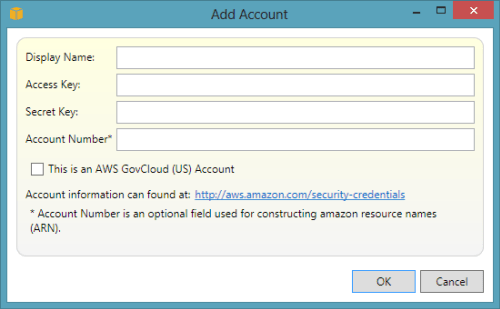
    To add your account details, simply click the “add” icon next to the “Account” drop down and plug in your credentials. Unlike the cloud plugin for Windows Azure which requires unique credentials for each major service, the AWS cloud uses a single set of credentials for all cloud services. This makes the plugin that much easier to use.
    2013.01.15vs03

    Browsing Cloud Resources

    First up, let’s see how easy it is to browse through the various cloud resources that are sitting in the AWS cloud. It’s important to note that your browsing is specific to the chosen data center. If you have US-East chosen as the active data center, then don’t expect to see servers or databases deployed to other data centers.

    2013.01.15vs04

    That’s not a huge deal, but something to keep in mind if you’re temporarily panicking about a “missing” server!

    Virtual Machines

    AWS is best known for its popular EC2 service where anyone can provision virtual machines in the cloud. From the Visual Studio, plugin, you can browse server templates called Amazon Machine Images (AMIs), server instances, security keys, firewall rules (called Security Groups), and persistent storage (called Volumes).

    2013.01.15vs05

    Unlike the Windows Azure plugin for Visual Studio that populates the plugin tree view with the records themselves, the AWS plugin assumes that you have a LOT of things deployed and opens a separate window for the actual user records. For instance, double-clicking the AMIs menu item launches a window that lets you browse the massive collection of server templates deployed by AWS or others.

    2013.01.15vs06

    The Instances node reveals all of the servers you have deployed within this data center. Notice that this view also pulls in any persistent disks that are used. Nice touch.

    2013.01.15vs07

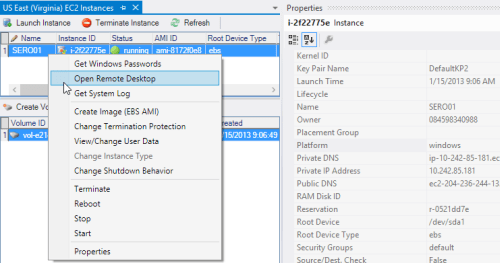
    In addition to a dense set of properties that you can view about your server, you can also browse the VM itself by triggering a Remote Desktop connection!
    2013.01.15vs08

    Finally, you can also browse Security Groups and see which firewall ports are opened for a particular Group.

    2013.01.15vs09

    Overall, this plugin does an exceptional job showing the properties and settings for virtual machines in the AWS cloud.

    Databases

    AWS offers multiple database options. You’ve got SimpleDB which is a basic NoSQL database, DynamoDB for high performing NoSQL data, and RDS for managed relational databases. The AWS plugin for Visual Studio lets you browse each one of these.

    For SimpleDB, the Visual Studio plugin shows all of the domain records in the tree itself.
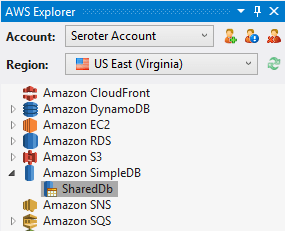
    2013.01.15vs10

    Right-clicking a given domain and choosing Properties pulls up the number of records in the domain, and how many unique attributes (columns) there are.
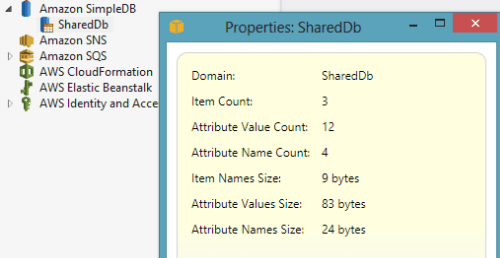
    2013.01.15vs11

    Double-clicking on the domain name shows you the items (records) it contains.

    2013.01.15vs12

    Pretty good browsing story for SimpleDB, and about what you’d expect from a beta product that isn’t highly publicized by AWS themselves.

    Amazon RDS is a very cool managed database, not entirely unlike Microsoft Azure for SQL Databases. In this case, RDS lets you deploy managed MySQL, Oracle, and Microsoft SQL Server databases. From the Visual Studio plugin, you can browse all your managed instances and see the database security groups (firewall policies) set up.

    2013.01.15vs13

    Much like EC2, Amazon RDS has some great property information available from within Visual Studio. While the Properties window is expectedly rich, you can also right-click the database instance and Add to Server Explorer (so that you can browse the database like any other SQL Server database). This is how you would actually see the data within a given RDS instance. Very thoughtful feature.

    2013.01.15vs17

    Amazon DynamoDB is great for high-performing applications, and the Visual Studio plugin for AWS lets you easily browse your tables.

    2013.01.15vs14

    If you right-click a given table, you can see various statistics pertaining to the hash key (critical for fast lookups) and the throughput that you’ve provisioned.
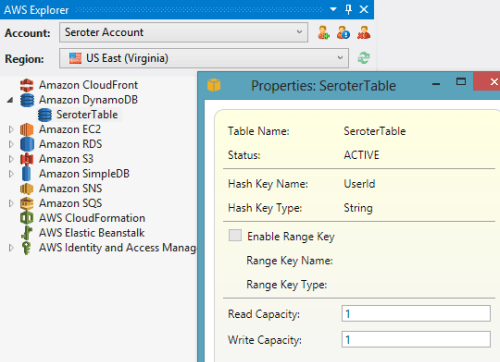
    2013.01.15vs15

    Finally, double-clicking a given table results in a view of all your records.

    2013.01.15vs16

    Good overall coverage of AWS databases from this plugin.

    Storage

    For storage, Amazon S3 is arguable the gold standard in the public cloud. With amazing redundancy, S3 offers a safe, easy way to storage binary content offsite. From the Visual Studio plugin, I can easily browse my list of S3 buckets.

    2013.01.15vs18

    Bucket properties are extensive, and the plugin does a great job surfacing them. Right-clicking on a particular bucket and viewing Properties turns up a set of categories that describe bucket permissions, logging behavior, website settings (if you want to run an entire static website out of S3), access policies, and content expiration policies.

    2013.01.15vs19

    As you might expect, you can also browse the contents of the bucket itself. Here I  can see not only my bucket item, but all the properties of it.
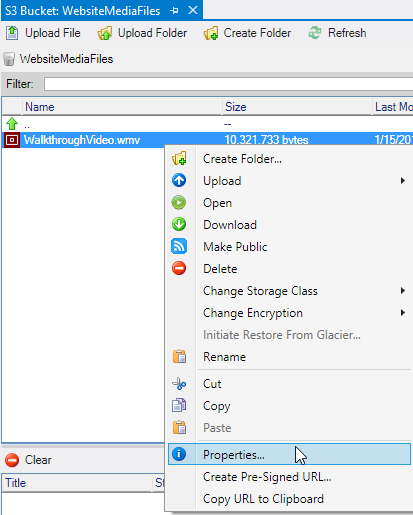
    2013.01.15vs20

    This plugin does a very nice job browsing the details and content of AWS S3 buckets.

    Messaging

    AWS offers a pair of messaging technologies for developers building solutions that share data across system boundaries. First, Amazon SNS is a service for push-based routing to one or more “subscribers” to a “topic.” Amazon SQS provides a durable queue for messages between systems. Both services are browsable from the AWS plugin for Visual Studio.

    2013.01.15vs21

    For a given SNS topic, you can view all of the subscriptions and their properties.

    2013.01.15vs22

    For SQS queues, you can not only see the queue properties, but also a sampling of messages currently in the queue.
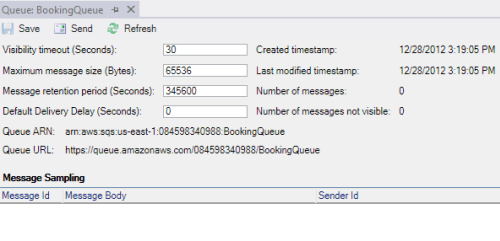
    2013.01.15vs23

    Messaging isn’t the sexiest part of a solution, but it’s nice to see that AWS developers get a great view into the queues and topics that make up their systems.

    Web Applications

    When most people think of AWS, I bet they think of compute and storage. While the term “platform as a service” means less and less every day, AWS has gone out and built a pretty damn nice platform for hosting web applications. .NET developers have two choices: CloudFormation and Elastic Beanstalk. Both of these are now nicely supported in the Visual Studio plugin for AWS. CloudFormation lets you build up sets of AWS services into a template that can be deployed over and over again. From the Visual Studio plugin, you can see all of the web application stacks that you’ve deployed via CloudFormation.

    2013.01.15vs24

    Double-clicking on a particular entry pulls up all the settings, resources used, custom metadata attributes, event log, and much more.

    2013.01.15vs25

    The Elastic Beanstalk is an even higher abstraction that makes it easy to deploy, scale, and load balance your web application. The Visual Studio plugin for AWS shows you all of your Elastic Beanstalk environments and applications.

    2013.01.15vs26

    The plugin shows you a ridiculous amount of details for a given application.

    2013.01.15vs27

    For developers looking at viable hosting destinations for their web applications, AWS offers a pair of very nice choices. The Visual Studio plugin also gives a first-class view into these web application environments.

    Identity Management

    Finally, let’s look at how the plugin supports Identity Management. AWS has their own solution for this called Identity and Access Management (IAM). Developers use IAM to secure resources, and even access to the AWS Management Console itself. From within Visual Studio, developers can create users and groups and view permission policies.

    2013.01.15vs28

    For a group, you can easily see the policies that control what resources and fine-grained actions users of that group have access to.
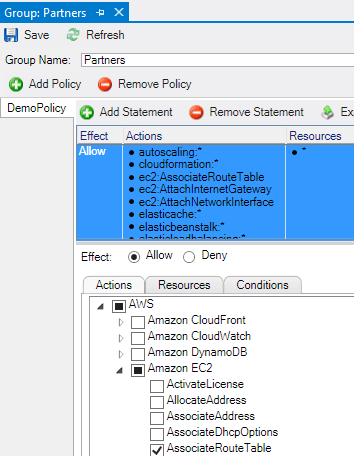
    2013.01.15vs29

    Likewise, for a given user, you can see what groups they are in, and what user-specific policies have been applied to them.

    2013.01.15vs30

    The browsing story for IAM is very complete and make it easy to include identity management considerations in cloud application design and development.

    Deploying and Updating Cloud Resources

    At this point, I’ve probably established that the AWS plugin for Visual Studio provides an extremely comprehensive browsing experience for the AWS cloud. Let’s look at a few changes you can make to cloud resources from within the confines of Visual Studio.

    Virtual Machines

    For EC2 virtual machines, you can pretty much do anything from Visual Studio that you could do from the AWS Management Console. This includes launching instances of servers, changing running instance metadata, terminating existing instances, adding/detaching storage volumes, and much more.

    2013.01.15vs31

    Heck, you can even modify firewall policies (security groups) used by EC2 servers.

    2013.01.15vs32

    Great story for actually interacting with EC2 instead of just working with a static view.

    Databases

    The database story is equally great.  Whether it’s SimpleDB, DynamoDB, or RDS, you can easily create databases, add rows of data, and change database properties. For instance, when you choose to create a new managed database in RDS, you get a great wizard that steps you through the critical input needed.

    2013.01.15vs33

    You can even modify a running RDS instance and change everything from the server size to the database platform version.

    2013.01.15vs35

    Want to increase the throughput for a DynamoDB table? Just view the Properties and dial up the capacity values.

    2013.01.15vs34

    The database management options in the AWS plugin for Visual Studio are comprehensive and give developers incredible  power to provision and maintain cloud-scale databases from within the comfort of their IDE.

    Storage

    The Amazon S3 functionality in the Visual Studio plugin is great. Developers can use the plugin to create buckets, add content to buckets, delete content, set server-side encryption, create permission policies, set expiration policies, and much more.

    2013.01.15vs36

    It’s very useful to be able to fully interact with your object storage service while building cloud apps.

    Messaging

    Developers building applications that use messaging components have lots of power when using the AWS plugin for Visual Studio. From within the IDE,  you can create SQS queues, add/edit/delete queue access policies, change timeout values, alter retention periods, and more.

    2013.01.15vs37

    Similarly for SNS users, the plugin supports creating Topics, adding and removing Subscriptions, and adding/editing/deleting Topic access policies.

    2013.01.15vs38

    Once again, most anything you can do from the AWS Management Console with messaging components, you can do in Visual Studio as well.

    Web Applications

    While the Visual Studio plugin doesn’t support creating new Elastic Beanstalk packages (although you can trigger the “create” wizard by right-clicking a project in the Visual Studio Solution Explorer), you still have a few changes that you can make to running applications. Developers can restart applications, rebuild environments, change EC2 security groups, modify load balancer settings, and set a whole host of parameter values for dependent services.
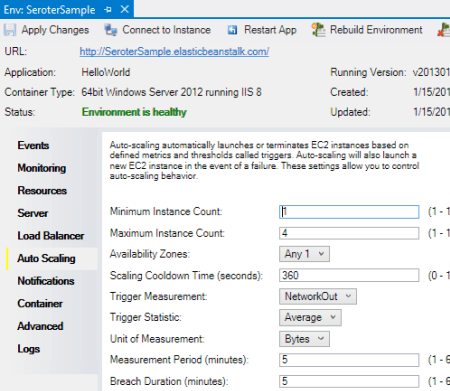
    2013.01.15vs39

    CloudFormation users can delete deployed stacks, or create entirely new ones. Use an AWS-provided CloudFormation template, or reference your own when walking through the “new stack” wizard.

    2013.01.15vs40

    I can imagine that it’s pretty useful to be able to deploy, modify, and tear down these cloud-scale apps all from within Visual Studio.

    Identity Management

    Finally, the IAM components of the Visual Studio plugin have a high degree of interactivity as well. You can create groups, define or change group policies, create/edit/delete users, add users to groups, create/delete user-specific access keys, and more.
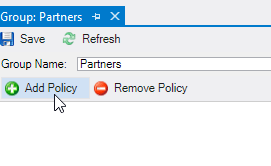
    2013.01.15vs41

    Testing Cloud Resources

    Here, we’ll look at a pair of areas where being able to test directly from Visual Studio is handy.

    Databases

    All the AWS databases can be queried directly from Visual Studio. SimpleDB users can issue simple query statements against the items in a domain.
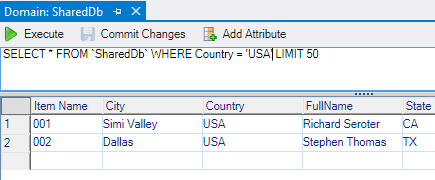
    2013.01.15vs42

    For RDS, you cannot query directly from the AWS plugin, but when you choose the option to Add to Server Explorer, the plugin adds the database to the Visual Studio Server Explorer where you can dig deeper into the SQL Server instance. Finally, you can quickly scan through DynamoDB tables and match against any column that was added to the table.
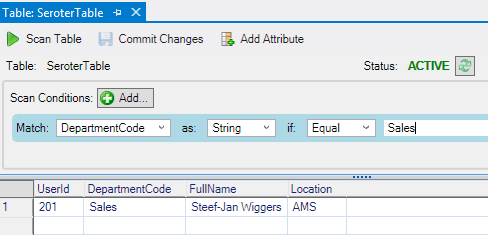
    2013.01.15vs43

    Overall, developers who want to integrate with AWS databases from their Visual Studio projects have an easy way to test their database queries.

    Messaging

    Testing messaging solutions can be a cumbersome activity. You often have to create an application to act as a publisher, and then create another to act as the subscriber. The AWS plugin for Visual Studio does a pretty nice job simplifying this process. For SQS, it’s easy to create a sample message (containing whatever text you want) and send it to a queue.
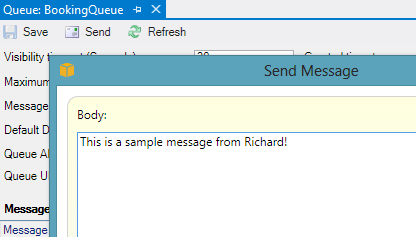
    2013.01.15vs44

    Then, you can poll that queue from Visual Studio and see the message show up! You can’t delete messages from the queue, although you CAN do that from the AWS Management Console website.
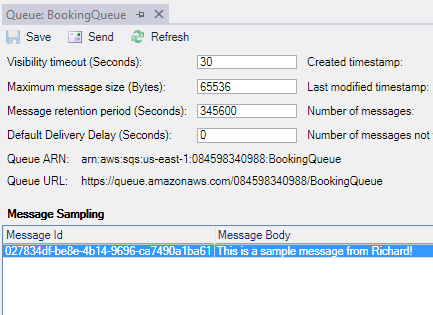
    2013.01.15vs45

    As for SNS, the plugin makes it very easy to publish a new message to any Topic.

    2013.01.15vs46

    This will send a message to any Subscriber attached to the Topic. However, there’s no simulator here, so you’d actually have to set up a legitimate Subscriber and then go check that Subscriber for the test message you sent to the Topic. Not a huge deal, but something to be aware of.

    Summary

    Boy, that was a long post. However, I thought it would be helpful to get a deep dive into how AWS surfaces its services to Visual Studio developers. Needless to say, they do a spectacular job. Not only do they provide deep coverage for nearly every AWS service, but they also included countless little touches (e.g. clickable hyperlinks, right-click menus everywhere) that make this plugin a joy to use. If you’re a .NET developer who is looking for a first-class experience for building, deploying, and testing cloud-scale applications, you could do a lot worse than AWS.
  • January 2013 Trip to Europe to Speak on (Cloud) Integration, Identity Management

    In a couple weeks, I’m off to Amsterdam and Gothenburg to speak at a pair of events. First, on January 22nd I’ll be in Amsterdam at an event hosted by middleware service provider ESTREME. There will be a handful of speakers, and I’ll be presenting on the Patterns of Cloud Integration. It should be a fun chat about the challenges and techniques for applying application integration patterns in cloud settings.

    Next up, I’m heading to Gothenburg (Sweden) to speak at the annual Integration Days event hosted by Enfo Zystems. This two day event is held January 24th and 25th and features multiple tracks and a couple dozen sessions. My session on the 24th, called Cross Platform Security Done Right, focuses on identity management in distributed scenarios. I’ve got 7 demos lined up that take advantage of Windows Azure ACS, Active Directory Federation Services, Node.js, Salesforce.com and more. My session on the 25th, called Embracing the Emerging Integration Endpoints, looks at how existing integration tools can connect to up-and-coming technologies. Here I have another 7 demos that show off the ASP.NET Web API, SignalR, StreamInsight, Node.js, Amazon Web Services, Windows Azure Service Bus, Salesforce.com and the Informatica Cloud. Mikael Hakansson will be taking bets as to whether I’ll make it through all the demos in the allotted time.

    It should be a fun trip, and thanks to Steef-Jan Wiggers and Mikael for organizing my agenda. I hope to see some of you all in the audience!

  • 2012 Year in Review

    2012 was a fun year. I added 50+ blog posts, built Pluralsight courses about Force.com and Amazon Web Services, kept writing regularly for InfoQ.com, and got 2/3 of the way done my graduate degree in Engineering. It was a blast visiting Australia to talk about integration technologies, going to Microsoft Convergence to talk about CRM best practices, speaking about security at the Dreamforce conference, and attending the inaugural AWS re:Invent conference in Las Vegas. Besides all that, I changed employers, got married, sold my home and adopted some dogs.

    Below are some highlights of what I’ve written and books that I’ve read this past year.

    These are a handful of the blog posts that I enjoyed writing the most.

    I read a number of interesting books this year, and these were some of my favorites.

    A sincere thanks to all of you for continuing to read what I write, and I hope to keep throwing out posts that you find useful (or at least mildly amusing).

  • Links to Recent Articles Written Elsewhere

    Besides this blog, I still write regularly for InfoQ.com as well in as a pair of blogs for my employer, Tier 3. It’s always a fun exercise for me to figure out what content should go where, but I do my best to spread it around. Anyway, in the past couple weeks, I’ve written a few different posts that may (or may not) be of interest to you:

    Lots of great things happening in the tech space, so there’s never a shortage of cool things to investigate and write about!

  • Measuring Ecosystem Popularity Through Twitter Follower Count, Growth

    Donnie Berkholz of the analysis firm RedMonk recently posted an article about observing tech trends by monitoring book sales. He saw a resurgence of interest in Java, a slowdown of interest in Microsoft languages (except PowerShell), upward movement in Python, and declining interesting in SQL.

    While on Twitter the other day, I was looking at the account of a major cloud computing provider, and wondered if their “follower count” was high or low compared to their peers. Although follower count is hardly a definitive metric for influence or popularity, the growth in followers can tell us a bit about where developer mindshare is moving.

    So, here’s a coarse breakdown of some leading cloud platforms and programming languages/frameworks and both their total follower counts (in bold) and growth in 2012. These numbers are accurate as of July 17,  2012.

    Cloud Platforms

    1. Google App Engine64,463. The most followers of any platform, which was a tad surprising given the general grief that is directed here. They experienced a  27% growth in followers for 2012 so far.
    2. Windows Azure 44,662. I thought this number was fairly low given the high level of activity in the account. This account has experienced slow, steady follower growth of 21% since start of 2012.
    3. Cloud Foundry26,906. The hype around Cloud Foundry appears justified as developers have flocked to this platform. They’ve seen jagged, rapid follower growth of 283% in 2012.
    4. Amazon Web Services17,801. I figured that this number would be higher, but they are seeing a nice 58% growth in followers since the beginning of the year.
    5. Heroku16,162. They have slower overall follower growth than Force.com at 42%, but a much higher total count.
    6. Force.com9,746. Solid growth with a recent spike putting them at 75% growth since the start of the year.

    Programming Languages / Frameworks

    1. Java60,663. The most popular language to follow on Twitter, they experienced 35% follower growth in 2012.
    2. Ruby on Rails29,912. This account has seen consistent growth by 28% this year.
    3. Java (Spring)15,029. Moderate 30% growth this year.
    4. Node.js12,812. Not surprising that this has some of the largest growth in 2012 with 160% more followers this year.
    5. ASP.NET7,956. I couldn’t find good growth statistics for this account, but I was surprised at the small size of followers.

    Takeaways? The biggest growth in Twitter followers this year belongs to Cloud Foundry and Node.js. I actually expected many of these numbers to be higher given that many of them are relatively chatty accounts. Maybe developers don’t instinctively follow platforms/languages, but rather follow interesting people who happen to use those platforms.

    Thoughts? Any surprises there?

  • Is AWS or Windows Azure the Right Choice? It’s Not That Easy.

    I was thinking about this topic today, and as someone who built the AWS Developer Fundamentals course for Pluralsight, is a Microsoft MVP who plays with Windows Azure a lot, and has an unnatural affinity for PaaS platforms like Cloud Foundry / Iron Foundry and Force.com, I figured that I had some opinions on this topic.

    So why would a developer choose AWS over Windows Azure today? I don’t know all developers, so I’ll give you the reasons why I often lean towards AWS:

    • Pace of innovation. The AWS team is amazing when it comes to regularly releasing and updating products. The day my Pluralsight course came out, AWS released their Simple Workflow Service. My course couldn’t be accurate for 5 minutes before AWS screwed me over! Just this week, Amazon announced Microsoft SQL Server support in their robust RDS offering, and .NET support in their PaaS-like Elastic Beanstalk service. These guys release interesting software on a regular basis and that helps maintain constant momentum with the platform. Contrast that with the Windows Azure team that is a bit more sporadic with releases, and with seemingly less fanfare. There’s lots of good stuff that the Azure guys keep baking into their services, but not at the same rate as AWS.
    • Completeness of services. Whether the AWS folks think they offer a PaaS or not, their services cover a wide range of solution scenarios. Everything from foundational services like compute, storage, database and networking, to higher level offerings like messaging, identity management and content delivery. Sure, there’s no “true” application fabric like you’ll find in Windows Azure or Cloud Foundry, but tools like Cloud Formation and Elastic Beanstalk get you pretty close. This well-rounded offering means that developers can often find what they need to accomplish somewhere in this stack. Windows Azure actually has a very rich set of services, likely the most comprehensive of any PaaS vendor, but at this writing, they don’t have the same depth in infrastructure services. While PaaS may be the future of cloud (and I hope it is), IaaS is a critical component of today’s enterprise architecture.
    • It just works. AWS gets knocked from time to time on their reliability, but it seems like most agree that as far as clouds go, they’ve got a damn solid platform. Services spin up relatively quickly, stay up, and changes to service settings often cascade instantly. In this case, I wouldn’t say that Windows Azure doesn’t “just work”, but if AWS doesn’t fail me, I have little reason to leave.
    • Convenience. This may be one of the primary advantages of AWS at this point. Once a capability becomes a commodity (and cloud services are probably at that point), and if there is parity among competitors on functionality, price and stability, the only remaining differentiator is convenience. AWS shines in this area, for me. As a Microsoft Visual Studio user, there are at least four ways that I can consume (nearly) every AWS service: Visual Studio Explorer, API, .NET SDK or AWS Management Console. It’s just SO easy. The AWS experience in Visual Studio is actually better than the one Microsoft offers with Windows Azure! I can’t use a single UI to manage all the Azure services, but the AWS tooling provides a complete experience with just about every type of AWS service. In addition, speed of deployment matters. I recently compared the experience of deploying an ASP.NET application to Windows Azure, AWS and Iron Foundry. Windows Azure was both the slowest option, and the one that took the most steps. Not that those steps were difficult, mind you, but it introduced friction and just makes it less convenient. Finally, the AWS team is just so good at making sure that a new or updated product is instantly reflected across their websites, SDKs, and support docs. You can’t overstate how nice that is for people consuming those services.

    That said, the title of this post implies that this isn’t a black and white choice. Basing an entire cloud strategy on either platform isn’t a good idea. Ideally, a “cloud strategy” is nothing more than a strategy for meeting business needs with the right type of service. It’s not about choosing a single cloud and cramming all your use cases into it.

    A Microsoft shop that is looking to deploy public facing websites and reduce infrastructure maintenance can’t go wrong with Windows Azure. Lately, even non-Microsoft shops have a legitimate case for deploying apps written in Node.js or PHP to Windows Azure. Getting out of infrastructure maintenance is a great thing, and Windows Azure exposes you to much less infrastructure than AWS does.  Looking to use a SQL Server in the cloud? You have a very interesting choice to make now. Microsoft will do well if it creates (optional) value-added integrations between its offerings, while making sure each standalone product is as robust as possible. That will be its win in the “convenience” category.

    While I contend that the only truly differentiated offering that Windows Azure has is their Service Bus / Access Control / EAI product, the rest of the platform has undergone constant improvement and left behind many of its early inconvenient and unstable characteristics. With Scott Guthrie at the helm, and so many smart people spread across the Azure teams, I have absolutely no doubt that Windows Azure will be in the majority of discussions about “cloud leaders” and provide a legitimate landing point for all sorts of cloudy apps. At the same time though, AWS isn’t slowing their pace (quite the opposite), so this back-and-forth competition will end up improving both sets of services and leave us consumers with an awesome selection of choices.

    What do you think? Why would you (or do you) pick AWS over Azure, or vice versa?

  • Doing a Multi-Cloud Deployment of an ASP.NET Web Application

    The recent Azure outage once again highlighted the value in being able to run an application in multiple clouds so that a failure in one place doesn’t completely cripple you. While you may not run an application in multiple clouds simultaneously, it can be helpful to have a standby ready to go. That standby could already be deployed to backup environment, or, could be rapidly deployed from a build server out to a cloud environment.

    https://twitter.com/#!/jamesurquhart/status/174919593788309504

    So, I thought I’d take a quick look at how to take the same ASP.NET web application and deploy it to three different .NET-friendly public clouds: Amazon Web Services (AWS), Iron Foundry, and Windows Azure. Just for fun, I’m keeping my database (AWS SimpleDB) separate from the primary hosting environment (Windows Azure) so that my database could be available if my primary, or backup (Iron Foundry) environments were down.

    My application is very simple: it’s a Web Form that pulls data from AWS SimpleDB and displays the results in a grid. Ideally, this works as-is in any of the below three cloud environments. Let’s find out.

    Deploying the Application to Windows Azure

    Windows Azure is a reasonable destination for many .NET web applications that can run offsite. So, let’s see what it takes to push an existing web application into the Windows Azure application fabric.

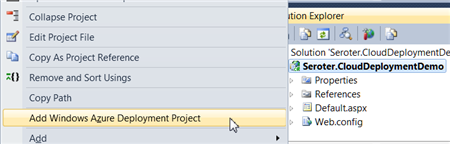
    First, after confirming that I had installed the Azure SDK 1.6, I right-clicked my ASP.NET web application and added a new Azure Deployment project.

    2012.03.05cloud01

    After choosing this command, I ended up with a new project in this Visual Studio solution.

    2012.03.05cloud02

    While I can view configuration properties (how many web roles to provision, etc), I jumped right into Publishing without changing any settings. While there was a setting to add an Azure storage account (vs. using local storage), but I didn’t think I had a need for Azure storage.

    The first step in the Publishing process required me to supply authentication in the form of a certificate. I created a new certificate, uploaded it to the Windows Azure portal, took my Azure account’s subscription identifier, and gave this set of credentials a friendly name.

    2012.03.05cloud03

    I didn’t have any “hosted services” in this account, so I was prompted to create one.

    2012.03.05cloud04

    With a host created, I then left the other settings as they were, with the hope of deploying this app to production.

    2012.03.05cloud05

    After publishing, Visual Studio 2010 showed me the status of the deployment that took about 6-7 minutes.

    2012.03.05cloud06

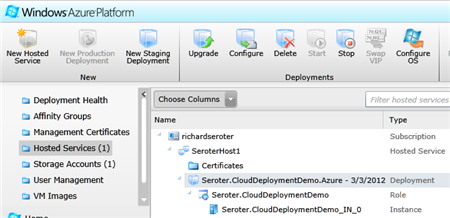
    An Azure hosted service and single instance were provisioned. A storage account was also added automatically.

    2012.03.05cloud07

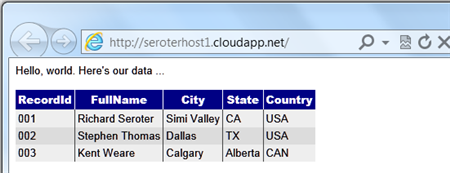
    I had an error and updated my configuration file to show the error, and that update took another 5 minutes (upon replacing the original). The error was that the app couldn’t load the AWS SDK component that was referenced. So, I switched the AWS SDK dll to “copy local” in the ASP.NET application project and once again redeployed my application. This time it worked fine, and I was able to see my SimpleDB data from my Azure-hosted ASP.NET website.

    2012.03.05cloud08

    Not too bad. Definitely a bit of upfront work to do, but subsequent projects can reuse the authentication-related activities that I completed earlier. The sluggish deployment times really stunt momentum, but realistically, you can do some decent testing locally so that what gets deployed is pretty solid.

    Deploying the Application to Iron Foundry

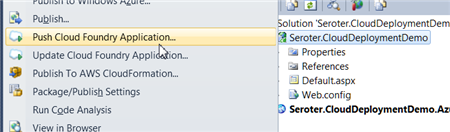
    Tier3’s Iron Foundry is the .NET-flavored version of VMware’s popular Cloud Foundry platform. Given that you can use Iron Foundry in your own data center, or in the cloud, it’s something that developers should keep a close eye on. I decided to use the Cloud Foundry Explorer that sits within Visual Studio 2010. You can download it from the Iron Foundry site. With that installed, I can right-click my ASP.NET application and choose to Push Cloud Foundry Application.

    2012.03.05cloud09

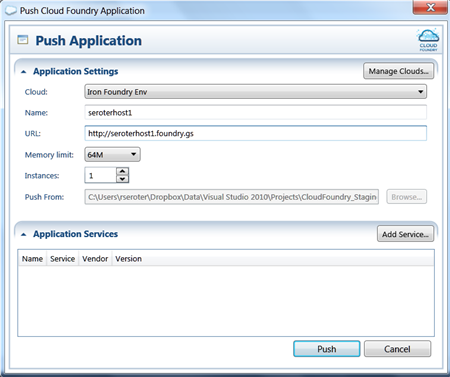
    Next, if I hadn’t previously configured access to the Iron Foundry cloud, I’d need to create a connection with the target API and my valid credentials. With the connection in place, I set the name of my cloud application and clicked Push.

    2012.03.05cloud18

    In under 60 seconds, my application was deployed and ready to look at.

    2012.03.05cloud19

    What if a change to the application is needed? I updated the HTML, right clicked my project and chose to Update Cloud Foundry Application. Once again, in a few seconds, my application was updated and I could see the changes. Taking an existing ASP.NET and moving to Iron Foundry doesn’t require any modifications to the application itself.

    If you’re looking for a multi-language, on-or-off premises PaaS, that is easy to work with, then I strongly encourage you to try Iron Foundry out.

    Deploying the Application to AWS via CloudFormation

    While AWS does not have a PaaS, per se, they do make it easy to deploy apps in a PaaS-like way via CloudFormation. Via CloudFormation, I can deploy a set of related resources and manage them as one deployment unit.

    From within Visual Studio 2010, I right-clicked my ASP.NET web application and chose Publish to AWS CloudFormation.

    2012.03.05cloud11

    When the wizard launches, I was asked to choose one of two deployment templates (single instance or multiple, load balanced instances).

    2012.03.05cloud12

    After selecting the single instance template, I kept the default values in the next wizard page. These settings include the size of the host machine, security group and name of this stack.

    2012.03.05cloud13

    On the next wizard pages, I kept the default settings (e.g. .NET version) and chose to deploy my application. Immediately, I saw a window in Visual Studio that showed the progress of my deployment.

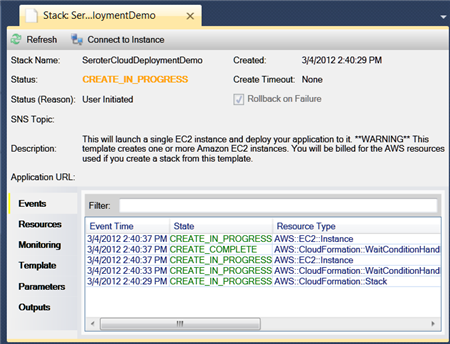
    2012.03.05cloud14

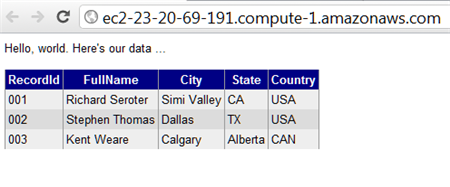
    In about 7 minutes, I had a finished deployment and a URL to my application was provided. Sure enough, upon clicking that link, I was sent to my web application running successfully in AWS.

    2012.03.05cloud15

    Just to compare to previous scenarios, I went ahead and made a small change to the HTML of the web application and once again chose Publish to AWS CloudFormation from the right-click menu.

    2012.03.05cloud16

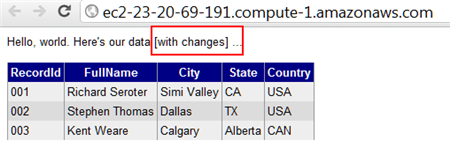
    As you can see, it saw my previous template, and as I walked through the wizard, it retrieved any existing settings and allowed me to make any changes where possible. When I clicked Deploy again, I saw that my package was being uploaded, and in less than a minute, I saw the changes in my hosted web application.

    2012.03.05cloud17

    So while I’m still leveraging the AWS infrastructure-as-a-service environment, the use of CloudFormation makes this seem a bit more like an application fabric. The deployments were very straightforward and smooth, arguably the smoothest of all three options shown in this post.

    Summary

    I was able to fairly easily take the same ASP.NET website and from Visual Studio 2010, deploy to three distinct clouds.  Each cloud has their own steps and processes, but each are fairly straightforward. Because Iron Foundry doesn’t require new VMs to be spun up, it’s consistently the faster deployment scenario. That can make a big difference during development and prototyping and should be something you factor into your cloud platform selection. Windows Azure has a nice set of additional services (like queuing, storage, integration), and Amazon gives you some best-of-breed hosting and monitoring. Tier 3’s Iron Foundry lets you use one of the most popular open source, multi-environment PaaS platforms for .NET apps. There are factors that would lead you to each of these clouds.

    This is hopefully a good bit of information to know when panic sets in over the downtime of a particular cloud. However, as you build your application with more and more services that are specific to a given environment, this multi-cloud strategy becomes less straightforward. For instance, if an ASP.NET application leverages SQL Azure for database storage, then you are still in pretty good shape when an application has to move to other environments. ASP.NET talks to SQL Server using the same ports and API, regardless of whether it’s using SQL Azure or a SQL instance deployed on an Amazon instance. But, if I’m using Azure Queues (or Amazon SQS for that matter), then it’s more difficult to instantly replace that component in another cloud environment.

    Keep all these portability concerns in mind when building your cloud-friendly applications!

  • My New Pluralsight Course, “AWS Developer Fundamentals”, Is Now Available

    I just finished designing, building and recording a new course for Pluralsight. I’ve been working with Amazon Web Services (AWS) products for a few years now, and I jumped at the chance to build a course that looked at the AWS services that have significant value for developers. That course is AWS Developer Fundamentals, and it is now online and available for Pluralsight subscribers.

    In this course, I  and cover the following areas, and

    • Compute Services. A walkthrough of EC2 and how to provision and interact with running instances.
    • Storage Services. Here we look at EBS and see examples of adding volumes, creating snapshots, and attaching volumes made from snapshots. We also cover S3 and how to interact with buckets and objects.
    • Database Services. This module covers the Relational Database Service (RDS) with some MySQL demos, SimpleDB and the new DynamoDB.
    • Messaging Services. Here we look at the Simple Queue Service (SQS) and Simple Notification Service (SNS).
    • Management and Deployment. This module covers the administrative components and includes a walkthrough of the Identity and Access Management (IAM) capabilities.

    Each module is chock full of exercises that should help you better understand how AWS services work. Instead of JUST showing you how to interact with services via an SDK, I decided that each set of demos should show how to perform functions using the Management Console, the raw (REST/Query) API, and also the .NET SDK. I think that this gives the student a good sense of all the viable ways to execute AWS commands. Not every application platform has an SDK available for AWS, so seeing the native API in action can be enlightening.

    I hope you take the time to watch it, and if you’re not a Pluralsight subscriber, now’s the time to jump in!

  • Integration in the Cloud: Part 4 – Asynchronous Messaging Pattern

    So far in this blog series we’ve been looking at how Enterprise Integration Patterns apply to cloud integration scenarios. We’ve seen that a Shared Database Pattern works well when you have common data (and schema) and multiple consumers who want consistent access.  The Remote Procedure Invocation Pattern is a good fit when one system desires synchronous access to data and functions sitting in other systems. In this final post in the series, I’ll walk through the Asynchronous Messaging Pattern and specifically demonstrate how to share data between clouds using this pattern.

    What Is It?

    While the remote procedure pattern provides looser coupling than the shared database pattern, it is still a blocking call and not particularly scalable.  Architects and developers use an asynchronous messaging pattern when they want to share data in the most scalable and responsive way possible.  Think of sending an email.  Your email client doesn’t sit and wait until the recipient has received and read the email message.  That would be atrocious. Instead, our email server does a multicast to recipients allows our email client to carry on. This is somewhat similar to publish/subscribe where the publisher does not dictate which specific receiver will get the message.

    So in theory, the sender of the message doesn’t need to know where the message will end up.  They also don’t need to know *when* a message is received or processed by another party.  This supports disconnected client scenarios where the subscriber is not online at the same time as the publisher.  It also supports the principle of replicable units where one receiver could be swapped out with no direct impact to the source of the message.  We see this pattern realized in Enterprise Service Bus or Integration Bus products (like BizTalk Server) which promote extreme loose coupling between systems.

    Challenges

    There are a few challenges when dealing with this pattern.

    • There is no real-time consistency. Because the message source asynchronously shares data that will be processed at the convenience of the receiver, there is a low likelihood that the systems involved are simultaneously consistent.  Instead, you end up with eventual consistency between the players in the messaging solution.
    • Reliability / durability is required in some cases. Without a persistence layer, it is possible to lose data.  Unlike the remote procedure invocation pattern (where exceptions are thrown by the target and both caught and handled by the caller), problems in transmission or target processing do not flow back to the publisher.  What happens if the recipient of a message is offline?  What if the recipient is under heavy load and rejecting new messages? A durable component in the messaging tier can protect against such cases by doing store-and-forward type implementation that doesn’t remove the message from the durable store until it has been successfully consumed.
    • A router may be useful when transmitting messages. Instead of, or in addition to a durable store, a routing component can help manage the central subscriptions for pub/sub transmissions, help with protocol bridging, data transformation and workflow (e.g. something like BizTalk Server). This may not be needed in distributed ESB solutions where the receiver is responsible for most of that.
    • There is limited support for this pattern in packaged software products.  I’ve seen few commercial products that expose asynchronous inbound channels, and even fewer that have easy-to-configure ways to publish outbound events asynchronously.  It’s not that difficult to put adapters in front of these systems, or mimic asynchronous publication by polling a data tier, but it’s not the same.

    Cloud Considerations

    What are things to consider when doing this pattern in a cloud scenario?

    • To do this between cloud and on-premises solutions, this requires creativity. I showed in the previous post how one can use Windows Azure AppFabric to expose on-premises endpoints to cloud applications. If we need to push data on-premises, and Azure AppFabric isn’t an option, then you’re looking at doing a VPN or internet-facing proxy service. Or, you could rely on aggressive polling of a shared queue (as I’ll show below).
    • Cloud provider limits and architecture will influence solution design. Some vendors, such as Salesforce.com, limit the frequency and amount of polling that it will do. This impacts the ability to poll a durable store used between cloud applications. The distributed nature of cloud services. and embrace of the eventual consistency model, can change how one retrieves data.  For example, Amazon’s Simple Queue Service may not be first-in-first out, and uses a sampling algorithm that COULD result in a query not returning all the messages in the logical queue.

    Solution Demonstration

    Let’s say that the fictitious Seroter Corporation has a series of public websites and wants a consistent way to push customer inquiries from the websites to back end systems that process these inquiries.  Instead of pushing these inquiries directly into one or many CRM systems, or doing the low-tech email option, we’d rather put all the messages into a queue and let each interested party pull the ones they want.  Since these websites are cloud-hosted, we don’t want to explicitly push these messages into the internal network, but rather, asynchronously publish and poll messages from a shared queue hosted by Amazon Simple Queue Service (SQS). The polling applications could either be another cloud system (CRM system Salesforce.com) or an on-premises system, as shown below.

    2011.11.14int01

    So I’ll have a web page built using Ruby and hosted in Cloud Foundry, a SQS queue that holds inquiries submitted from that site, and both an on-premises .NET application and a SaaS Salesforce.com application that can poll that queue for messages.

    Setting up a queue in SQS is so easy now, that I won’t even make it a sub-section in this post.  The AWS team recently added SQS operations to their Management Console, and they’ve made it very simple to create, delete, secure and monitor queues. I created a new queue named Seroter_CustomerInquiries.

    2011.11.14int02

    Sending Messages from Cloud Foundry to Amazon Simple Queue Service

    In my Ruby (Sinatra) application, I have a page where a user can ask a question.  When they click the submit button, I go into the following routine which builds up the SQS message (similar to the SimpleDB message from my previous post) and posts a message to the queue.

    post '/submitted/:uid' do	# method call, on submit of the request path, do the following
    
       #--get user details from the URL string
    	@userid = params[:uid]
    	@message = CGI.escape(params[:message])
        #-- build message that will be sent to the queue
    	@fmessage = @userid + "-" + @message.gsub("+", "%20")
    
    	#-- define timestamp variable and format
    	@timestamp = Time.now
    	@timestamp = @timestamp.strftime("%Y-%m-%dT%H:%M:%SZ")
    	@ftimestamp = CGI.escape(@timestamp)
    
    	#-- create signing string
    	@stringtosign = "GET\n" + "queue.amazonaws.com\n" + "/084598340988/Seroter_CustomerInquiries\n" + "AWSAccessKeyId=ACCESS_KEY" + "&Action=SendMessage" + "&MessageBody=" + @fmessage + "&SignatureMethod=HmacSHA1" + "&SignatureVersion=2" + "&Timestamp=" + @ftimestamp + "&Version=2009-02-01"
    
    	#-- create hashed signature
    	@esignature = CGI.escape(Base64.encode64(OpenSSL::HMAC.digest('sha1',@@awskey, @stringtosign)).chomp)
    
    	#-- create AWS SQS query URL
    	@sqsurl = "https://queue.amazonaws.com/084598340988/Seroter_CustomerInquiries?Action=SendMessage" + "&MessageBody=" + @fmessage + "&Version=2009-02-01" + "&Timestamp=" + @ftimestamp + "&Signature=" + @esignature + "&SignatureVersion=2" + "&SignatureMethod=HmacSHA1" + "&AWSAccessKeyId=ACCESS_KEY"
    
    	#-- load XML returned from query
    	@doc = Nokogiri::XML(open(@sqsurl))
    
       #-- build result message which is formatted string of the inquiry text
    	@resultmsg = @fmessage.gsub("%20", " ")
    
    	haml :SubmitResult
    end
    

    The hard part when building these demos was getting my signature string and hashing exactly right, so hopefully this helps someone out.

    After building and deploying the Ruby site to Cloud Foundry, I could see my page for inquiry submission.

    2011.11.14int03

    When the user hits the “Send Inquiry” button, the function above is called and assuming that I published successfully to the queue, I see the acknowledgement page.  Since this is an asynchronous communication, my web app only has to wait for publication to the queue, not invoking a function in a CRM system.

    2011.11.14int04

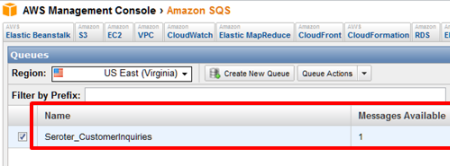
    To confirm that everything worked, I viewed my SQS queue and can clearly see that I have a single message waiting in the queue.

    2011.11.14int05

    .NET Application Pulling Messages from an SQS Queue

    With our message sitting safely in the queue, now we can go grab it.  The first consuming application is an on-premises .NET app.  In this very feature-rich application, I poll the queue and pull down any messages found.  When working with queues, you often have two distinct operations: read and delete (“peek” is also nice to have). I can read messages from a queue, but unless I delete them, they become available (after a timeout) to another consumer.  For this scenario, we’d realistically want to read all the messages, and ONLY process and delete the ones targeted for our CRM app.  Any others, we simply don’t delete, and they go back to waiting in the queue. I haven’t done that, for simplicity sake, but keep this in mind for actual implementations.

    In the example code below, I’m being a bit lame by only expecting a single message. In reality, when polling, you’d loop through each returned message, save its Handle value (which is required when calling the Delete operation) and do something with the message.  In my case, I only have one message, so I explicitly grab the “Body” and “Handle” values.  The code shows the “retrieve messages” button click operation which in turn calls “receive” operation and “delete” operation.

    private void RetrieveButton_Click(object sender, EventArgs e)
            {
                lbQueueMsgs.Items.Clear();
                lblStatus.Text = "Status:";
    
                string handle = ReceiveFromQueue();
                if(handle!=null)
                    DeleteFromQueue(handle);
    
            }
    
    private string ReceiveFromQueue()
            {
                //timestamp formatting for AWS
                string timestamp = Uri.EscapeUriString(string.Format("{0:s}", DateTime.UtcNow));
                timestamp = DateTime.Now.ToUniversalTime().ToString("yyyy-MM-ddTHH:mm:ss.fffZ");
                timestamp = HttpUtility.UrlEncode(timestamp).Replace("%3a", "%3A");
    
                //string for signing
                string stringToConvert = "GET\n" +
                "queue.amazonaws.com\n" +
                "/084598340988/Seroter_CustomerInquiries\n" +
                "AWSAccessKeyId=ACCESS_KEY" +
                "&Action=ReceiveMessage" +
                "&AttributeName=All" +
                "&MaxNumberOfMessages=5" +
                "&SignatureMethod=HmacSHA1" +
                "&SignatureVersion=2" +
                "&Timestamp=" + timestamp +
                "&Version=2009-02-01" +
                "&VisibilityTimeout=15";
    
                //hash the signature string
    			  string awsPrivateKey = "PRIVATE KEY";
                Encoding ae = new UTF8Encoding();
                HMACSHA1 signature = new HMACSHA1();
                signature.Key = ae.GetBytes(awsPrivateKey);
                byte[] bytes = ae.GetBytes(stringToConvert);
                byte[] moreBytes = signature.ComputeHash(bytes);
                string encodedCanonical = Convert.ToBase64String(moreBytes);
                string urlEncodedCanonical = HttpUtility.UrlEncode(encodedCanonical).Replace("%3d", "%3D");
    
                 //build up request string (URL)
                string sqsUrl = "https://queue.amazonaws.com/084598340988/Seroter_CustomerInquiries?Action=ReceiveMessage" +
                "&Version=2009-02-01" +
                "&AttributeName=All" +
                "&MaxNumberOfMessages=5" +
                "&VisibilityTimeout=15" +
                "&Timestamp=" + timestamp +
                "&Signature=" + urlEncodedCanonical +
                "&SignatureVersion=2" +
                "&SignatureMethod=HmacSHA1" +
                "&AWSAccessKeyId=ACCESS_KEY";
    
                //make web request to SQS using the URL we just built
                HttpWebRequest req = WebRequest.Create(sqsUrl) as HttpWebRequest;
                XmlDocument doc = new XmlDocument();
                using (HttpWebResponse resp = req.GetResponse() as HttpWebResponse)
                {
                    StreamReader reader = new StreamReader(resp.GetResponseStream());
                    string responseXml = reader.ReadToEnd();
                    doc.LoadXml(responseXml);
                }
    
    			 //do bad xpath and grab the body and handle
                XmlNode handle = doc.SelectSingleNode("//*[local-name()='ReceiptHandle']");
                XmlNode body = doc.SelectSingleNode("//*[local-name()='Body']");
    
                //if empty then nothing there; if not, then add to listbox on screen
                if (body != null)
                {
                    //write result
                    lbQueueMsgs.Items.Add(body.InnerText);
                    lblStatus.Text = "Status: Message read from queue";
                    //return handle to calling function so that we can pass it to "Delete" operation
                    return handle.InnerText;
                }
                else
                {
                    MessageBox.Show("Queue empty");
                    return null;
                }
            }
    
    private void DeleteItem(string itemId)
            {
                //timestamp formatting for AWS
                string timestamp = Uri.EscapeUriString(string.Format("{0:s}", DateTime.UtcNow));
                timestamp = DateTime.Now.ToUniversalTime().ToString("yyyy-MM-ddTHH:mm:ss.fffZ");
                timestamp = HttpUtility.UrlEncode(timestamp).Replace("%3a", "%3A");
    
                string stringToConvert = "GET\n" +
                "sdb.amazonaws.com\n" +
                "/\n" +
                "AWSAccessKeyId=ACCESS_KEY" +
                "&Action=DeleteAttributes" +
                "&DomainName=SeroterInteractions" +
                "&ItemName=" + itemId +
                "&SignatureMethod=HmacSHA1" +
                "&SignatureVersion=2" +
                "&Timestamp=" + timestamp +
                "&Version=2009-04-15";
    
                string awsPrivateKey = "PRIVATE KEY";
                Encoding ae = new UTF8Encoding();
                HMACSHA1 signature = new HMACSHA1();
                signature.Key = ae.GetBytes(awsPrivateKey);
                byte[] bytes = ae.GetBytes(stringToConvert);
                byte[] moreBytes = signature.ComputeHash(bytes);
                string encodedCanonical = Convert.ToBase64String(moreBytes);
                string urlEncodedCanonical = HttpUtility.UrlEncode(encodedCanonical).Replace("%3d", "%3D");
    
                //build up request string (URL)
                string simpleDbUrl = "https://sdb.amazonaws.com/?Action=DeleteAttributes" +
                "&DomainName=SeroterInteractions" +
                "&ItemName=" + itemId +
                "&Version=2009-04-15" +
                "&Timestamp=" + timestamp +
                "&Signature=" + urlEncodedCanonical +
                "&SignatureVersion=2" +
                "&SignatureMethod=HmacSHA1" +
                "&AWSAccessKeyId=ACCESS_KEY";
    
                HttpWebRequest req = WebRequest.Create(simpleDbUrl) as HttpWebRequest;
    
                using (HttpWebResponse resp = req.GetResponse() as HttpWebResponse)
                {
                    StreamReader reader = new StreamReader(resp.GetResponseStream());
    
                    string responseXml = reader.ReadToEnd();
                }
            }
    

    When the application runs and pulls the message that I sent to the queue earlier, it looks like this.

    2011.11.14int06

    Nothing too exciting on the user interface, but we’ve just seen the magic that’s happening underneath. After running this (which included reading and deleting the message), the SQS queue is predictably empty.

    Force.com Application Pulling from an SQS Queue

    I went ahead and sent another message from my Cloud Foundry app into the queue.

    2011.11.14int07

    This time, I want my cloud CRM users on Salesforce.com to pull these new inquiries and process them.  I’d like to automatically convert the inquiries to CRM Cases in the system.  A custom class in a Force.com application can be scheduled to execute every interval. To account for that (as the solution below supports both on-demand and scheduled retrieval from the queue), I’ve added a couple things to the code.  Specifically, notice that my “case lookup” class implements the Schedulable interface (which allows it be scheduled through the Force.com administrative tooling) and my “queue lookup” function uses the @future annotation (which allows asynchronous invocation).

    Much like the .NET application above, you’ll find operations below that retrieve content from the queue and then delete the messages it finds.  The solution differs from the one above in that it DOES handle multiple messages (not that it loops through retrieved results and calls “delete” for each) and also creates a Salesforce.com “case” for each result.

    //implement Schedulable to support scheduling
    global class doCaseLookup implements Schedulable
    {
    	//required operation for Schedulable interfaces
        global void execute(SchedulableContext ctx)
        {
            QueueLookup();
        }
    
        @future(callout=true)
        public static void QueueLookup()
        {
    	  //create HTTP objects and queue namespace
         Http httpProxy = new Http();
         HttpRequest sqsReq = new HttpRequest();
         String qns = 'http://queue.amazonaws.com/doc/2009-02-01/';
    
         //monkey with date format for SQS query
         Datetime currentTime = System.now();
         String formattedTime = currentTime.formatGmt('yyyy-MM-dd')+'T'+ currentTime.formatGmt('HH:mm:ss')+'.'+ currentTime.formatGmt('SSS')+'Z';
         formattedTime = EncodingUtil.urlEncode(formattedTime, 'UTF-8');
    
    	  //build signing string
         String stringToSign = 'GET\nqueue.amazonaws.com\n/084598340988/Seroter_CustomerInquiries\nAWSAccessKeyId=ACCESS_KEY&' +
    			'Action=ReceiveMessage&AttributeName=All&MaxNumberOfMessages=5&SignatureMethod=HmacSHA1&SignatureVersion=2&Timestamp=' +
    			formattedTime + '&Version=2009-02-01&VisibilityTimeout=15';
         String algorithmName = 'HMacSHA1';
         Blob mac = Crypto.generateMac(algorithmName, Blob.valueOf(stringToSign),Blob.valueOf(PRIVATE_KEY));
         String macUrl = EncodingUtil.urlEncode(EncodingUtil.base64Encode(mac), 'UTF-8');
    
    	  //build SQS URL that retrieves our messages
         String queueUrl = 'https://queue.amazonaws.com/084598340988/Seroter_CustomerInquiries?Action=ReceiveMessage&' +
    			'Version=2009-02-01&AttributeName=All&MaxNumberOfMessages=5&VisibilityTimeout=15&Timestamp=' +
    			formattedTime + '&Signature=' + macUrl + '&SignatureVersion=2&SignatureMethod=HmacSHA1&AWSAccessKeyId=ACCESS_KEY';
    
         sqsReq.setEndpoint(queueUrl);
         sqsReq.setMethod('GET');
    
         //invoke endpoint
         HttpResponse sqsResponse = httpProxy.send(sqsReq);
    
         Dom.Document responseDoc = sqsResponse.getBodyDocument();
         Dom.XMLNode receiveResponse = responseDoc.getRootElement();
         //receivemessageresult node which holds the responses
         Dom.XMLNode receiveResult = receiveResponse.getChildElements()[0];
    
         //for each Message node
         for(Dom.XMLNode itemNode: receiveResult.getChildElements())
         {
            String handle= itemNode.getChildElement('ReceiptHandle', qns).getText();
            String body = itemNode.getChildElement('Body', qns).getText();
    
            //pull out customer ID
            Integer indexSpot = body.indexOf('-');
            String customerId = '';
            if(indexSpot > 0)
            {
               customerId = body.substring(0, indexSpot);
            }
    
            //delete this message
            DeleteQueueMessage(handle);
    
    	     //create a new case
            Case c = new Case();
            c.Status = 'New';
            c.Origin = 'Web';
            c.Subject = 'Web request: ' + body;
            c.Description = body;
    
    		 //insert the case record into the system
            insert c;
         }
      }
    
      static void DeleteQueueMessage(string handle)
      {
    	 //create HTTP objects
         Http httpProxy = new Http();
         HttpRequest sqsReq = new HttpRequest();
    
         //encode handle value associated with queue message
         String encodedHandle = EncodingUtil.urlEncode(handle, 'UTF-8');
    
    	 //format the date
         Datetime currentTime = System.now();
         String formattedTime = currentTime.formatGmt('yyyy-MM-dd')+'T'+ currentTime.formatGmt('HH:mm:ss')+'.'+ currentTime.formatGmt('SSS')+'Z';
         formattedTime = EncodingUtil.urlEncode(formattedTime, 'UTF-8');
    
    		//create signing string
         String stringToSign = 'GET\nqueue.amazonaws.com\n/084598340988/Seroter_CustomerInquiries\nAWSAccessKeyId=ACCESS_KEY&' +
    					'Action=DeleteMessage&ReceiptHandle=' + encodedHandle + '&SignatureMethod=HmacSHA1&SignatureVersion=2&Timestamp=' +
    					formattedTime + '&Version=2009-02-01';
         String algorithmName = 'HMacSHA1';
         Blob mac = Crypto.generateMac(algorithmName, Blob.valueOf(stringToSign),Blob.valueOf(PRIVATE_KEY));
         String macUrl = EncodingUtil.urlEncode(EncodingUtil.base64Encode(mac), 'UTF-8');
    
    	  //create URL string for deleting a mesage
         String queueUrl = 'https://queue.amazonaws.com/084598340988/Seroter_CustomerInquiries?Action=DeleteMessage&' +
    					'Version=2009-02-01&ReceiptHandle=' + encodedHandle + '&Timestamp=' + formattedTime + '&Signature=' +
    					macUrl + '&SignatureVersion=2&SignatureMethod=HmacSHA1&AWSAccessKeyId=ACCESS_KEY';
    
         sqsReq.setEndpoint(queueUrl);
         sqsReq.setMethod('GET');
    
    	  //invoke endpoint
         HttpResponse sqsResponse = httpProxy.send(sqsReq);
    
         Dom.Document responseDoc = sqsResponse.getBodyDocument();
      }
    }
    

    When I view my custom APEX page which calls this function, I can see the button to query this queue.

    2011.11.14int08

    When I click the button, our function retrieves the message from the queue, deletes that message, and creates a Salesforce.com case.

    2011.11.14int09

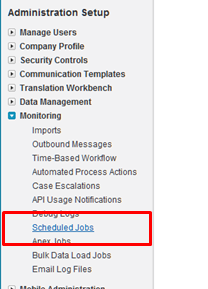
    Cool!  This still required me to actively click a button, but we can also make this function run every hour.  In the Salesforce.com configuration screens, we have the option to view Scheduled Jobs.

    2011.11.14int10

    To actually create the job itself, I had created an Apex class which schedules the job.

    global class CaseLookupJobScheduler
    {
        global void CaseLookupJobScheduler() {}
    
        public static void start()
        {
     		// takes in seconds, minutes, hours, day of month, month and day of week
    		//the statement below tries to schedule every 5 min, but SFDC only allows hourly
            System.schedule('Case Queue Lookup', '0 5 1-23 * * ?', new doCaseLookup());
        }
    }
    

    Note that I use the System.schedule operation. While my statement above says to schedules the doCaseLookup function to run every 5 minutes, in reality, it won’t.  Salesforce.com restricts these jobs from running too frequently and keeps jobs from running more than once per hour. One could technically game the system by using some of the ten allowable polling jobs to set of a series of jobs that start at different times of the hour. I’m not worrying about that here. To invoke this function and schedule the job, I first went to the System Log menu.

    2011.11.14int12

    From here, I can execute Apex code.  So, I can call my start() function, which should schedule the job.

    2011.11.14int13

    Now, if I view the Scheduled Jobs view from the Setup screens, I can see that my job is scheduled.

    2011.11.14int14

    This job is now scheduled to run every hour.  This means that each hour, the queue is polled and any found messages are added to Salesforce.com as cases.  You could use a mix of both solutions and manually poll if you want to (through a button) but allow true asynchronous processing on all ends.

    Summary

    Asynchronous messaging is a great way to build scalable, loosely coupled systems. A durable intermediary helps provide assurances of message delivery, but this patterns works without it as well.  The demonstrations in this post shows how two cloud solutions can asynchronously exchange data through the use of a shared queue that sits between them.  The publisher to the queue has no idea who will retrieve the message and the retrievers have no direct connection to those who publish messages.  This makes for a very maintainable solution.

    My goal with these posts was to demonstrate that classic Integration patterns work fine in cloudy environments. I think it’s important to not throw out existing patterns just because new technologies are introduced. I hope you enjoyed this series.