Autonomous agents are cool and all, but we all know there are plenty of circumstances where we want human review. Your custom built agent might have instructions to stop and get input, but that doesn’t guarantee it happens. The Agent Development Kit recently added a human-in-the-loop feature, and I decided to try it out.
Let’s build an agent that generates product tutorials on-demand. The agent takes in a request, and uses tools to ground its output. Before it publishes a tutorial, it requires explicit approval from outside its own workflow. ADK now offers both a simple boolean approval, and a more sophisticated option. I’ll test out both, using the built-in web UI and the raw REST API. FYI, all my source code is here.
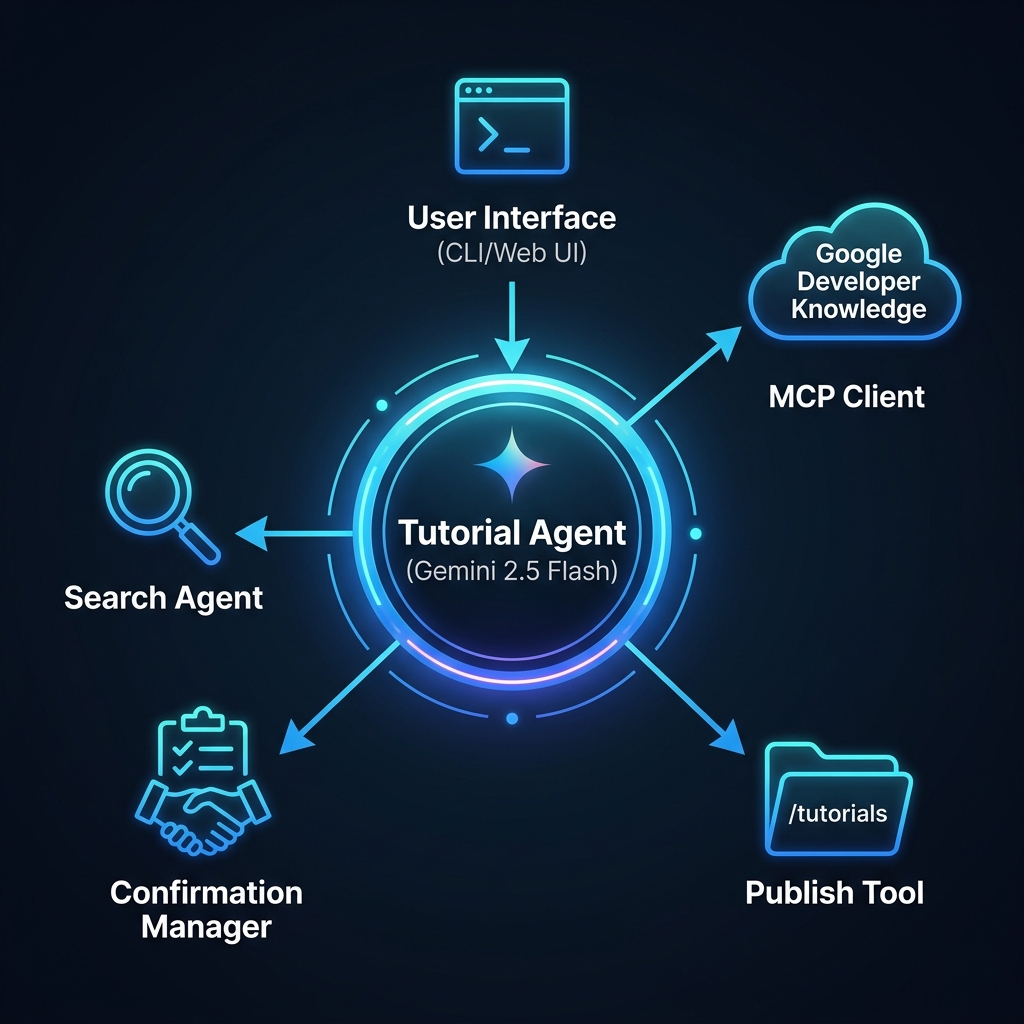
First, here’s the architecture:
Simple Tutorial Agent
First, there’s a basic tutorial agent that uses the simple action confirmation.
Below is the core agent code. The agent definition (at the bottom) has instructions, a model, and some tools. I’m using the Google Search tool and our Developer Knowledge API MCP server tools. The former grounds results in Google Search results, and the latter points to Google’s core documentation.
func createTutorialAgent(ctx context.Context, llmModel model.LLM) (agent.Agent, error) {
	transport, err := mcpTransport(ctx)
	if err != nil {
		return nil, err
	}
	mcpToolSet, _ := mcptoolset.New(mcptoolset.Config{Transport: transport})

	publishTool, _ := functiontool.New(functiontool.Config{
		Name:                "publish_tutorial",
		Description:         "Publish the tutorial. Requires user confirmation.",
		RequireConfirmation: true,
	}, publishTutorial)

	searchAgent, _ := llmagent.New(llmagent.Config{
		Name:        "search_agent",
		Model:       llmModel,
		Tools:       []tool.Tool{geminitool.GoogleSearch{}},
		Instruction: "Search the web.",
	})

	return llmagent.New(llmagent.Config{
		Name:        "tutorial_agent",
		Model:       llmModel,
		Description: "Simple tutorial agent.",
		Instruction: `You are a technical writer. Draft a Google Cloud tutorial based on user requests.
Once the draft is complete, show it to the user and ask them if they would like to start the publishing process. The 'publish_tutorial' tool will then handle the review and approval.`,
		Tools:    []tool.Tool{agenttool.New(searchAgent, nil), publishTool},
		Toolsets: []tool.Toolset{mcpToolSet},
	})
}
Notice that the publish_tutorial tool has a RequireConfirmation attribute. The corresponding publishTutorial function only gets called for a true result.
To start the agent (after setting environment variables for Google Cloud project and any credentials) for the built-in web UI, I used this command:
ADK_AGENT=tutorial go run . web api webui
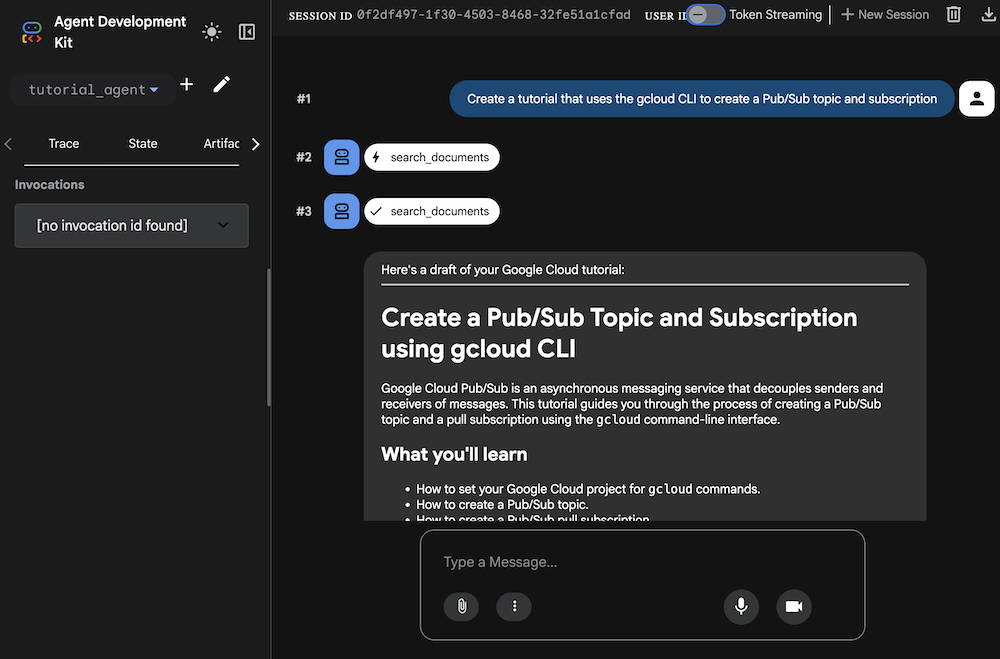
This provides me a localhost web UI to explore my agent. I asked for a tutorial and saw it use the right tools to generate a response.
I then ask to start the publishing process, and the confirmation flow kicks in. Notice the small free text box asking for my response.
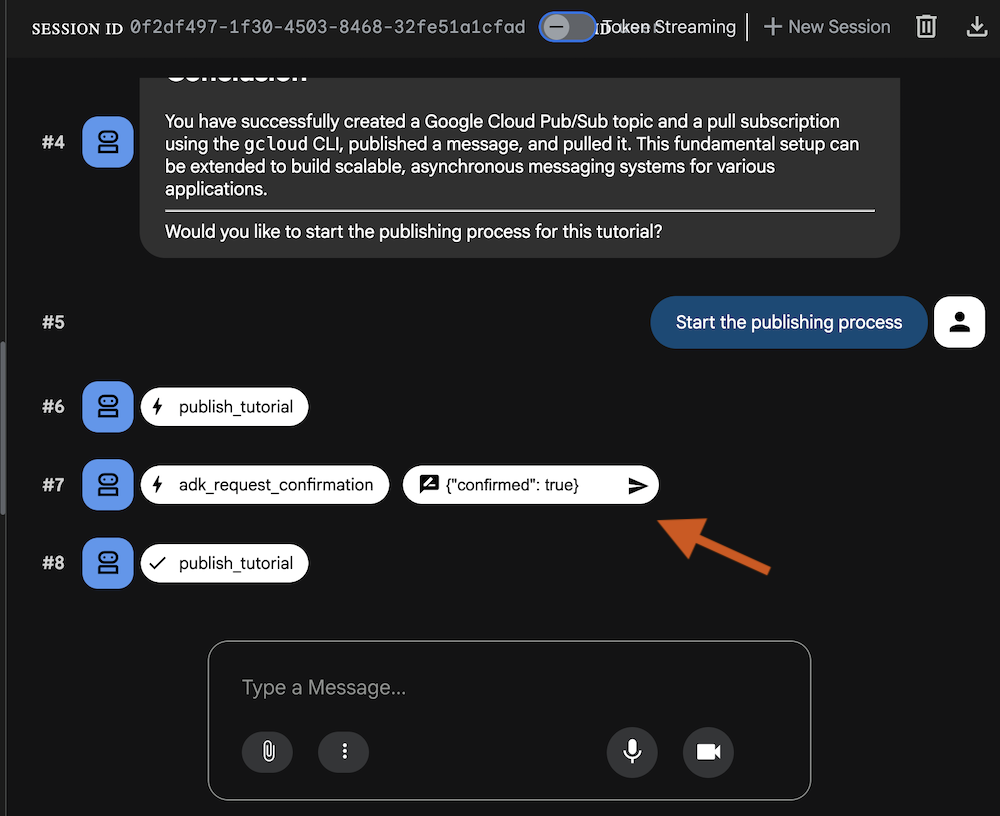
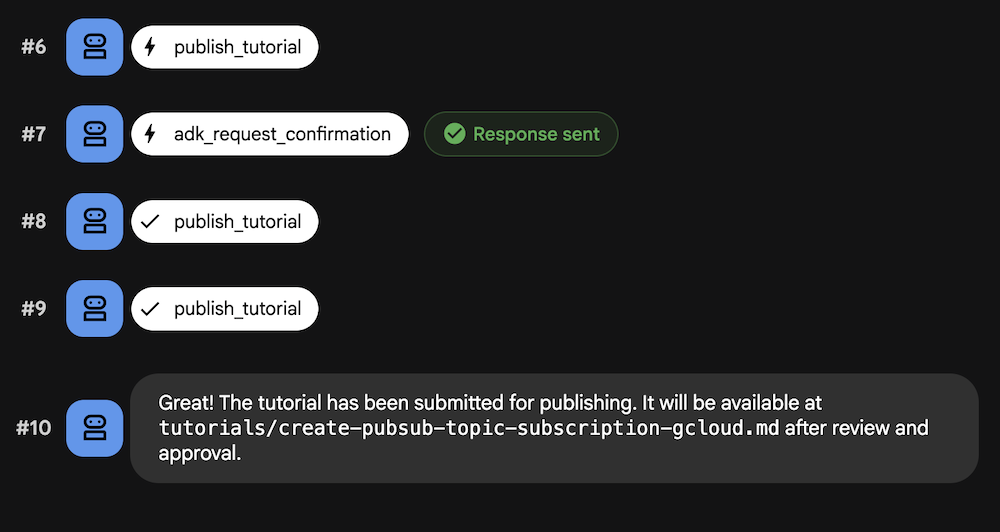
The accepts a JSON payload of {"confirmed": true} only. When I provide that value, the control returns to the agent and it publishes the Markdown tutorial to the local folder.
Let’s do the same workflow with the REST API.
This time, I started up the agent with this command to get the API endpoint only:
ADK_AGENT=tutorial go run . web api
The http://localhost:8080/api/list-apps endpoint shows that I have one “app” named tutorial_agent. To start, I need to create a session with my agent. I’ll set the username and (optionally) the session ID. If I just post to the session endpoint, I get back a random session ID.
curl -X POST http://localhost:8080/api/apps/tutorial_agent/users/u_123/sessions/s_123 \
  -H "Content-Type: application/json"
Now I can send in a prompt to my agent. Notice that I’m passing in the user ID and session ID from above.
curl -X POST http://localhost:8080/api/run \
-H "Content-Type: application/json" \
-d '{
"appName": "tutorial_agent",
"userId": "u_123",
"sessionId": "s_123",
"newMessage": {
    "role": "user",
    "parts": [{
    "text": "create a tutorial for deploying a container to an existing GKE Autopilot cluster. use the cli."
    }]
}
}'
I get back a pile of JSON that includes the tutorial itself. Like with the web UI experience, I’m asked if I want to kickstart the publishing process. I send in a follow-on message like this:
curl -X POST http://localhost:8080/api/run \
-H "Content-Type: application/json" \
-d '{
"appName": "tutorial_agent",
"userId": "u_123",
"sessionId": "s_123",
"newMessage": {
    "role": "user",
    "parts": [{
    "text": "yes, start the process to publish the tutorial"
    }]
}
}'
There’s another pile of JSON to parse through, and I need to find the ID tied to the adk_request_confirmation object.
[ ... "content":{"role":"model","parts":[{"functionCall":{"id":"adk-e6d32a67-c1d4-46b8-87f6-6922a3af3d98","name":"adk_request_confirmation","args":{"originalFunctionCall":{"id":"adk-0e6c0394-a22b-4d5f-9af6-e27284bc175f","args":{"content":"# Deploy a Container to an Existing GKE Autopilot Cluster using the gcloud CLI and kubectl\n\nThis tutorial guides you through" ...]
The next REST API call includes the ID from above and the familiar “confirmed” property.
curl -X POST http://localhost:8080/api/run \
-H "Content-Type: application/json" \
-d '{
 "appName": "tutorial_agent",
 "userId": "u_123",
 "sessionId": "s_123",
    "newMessage": {
        "role": "user",
        "parts": [
            {
                "functionResponse": {
                    "name": "adk_request_confirmation",
                    "id": "adk-e6d32a67-c1d4-46b8-87f6-6922a3af3d98",
                    "response": {
                        "confirmed": true
                    }
                }
            }
        ]
    }
}'
After this call, I see the Markdown tutorial written to disk.
Advanced Tutorial Agent
This agent itself looks nearly the same as the prior one, but has a more sophisticated toolset. Here’s the agent code, with the confirmation behavior in the downstream function, not the function tool.
func publishTutorialAdvanced(ctx tool.Context, args PublishTutorialArgs) (map[string]any, error) {
	confirmation := ctx.ToolConfirmation()
	if confirmation == nil {
		ctx.RequestConfirmation(
			"Reviewer approval required to publish.",
			map[string]any{
				"status": "approved", // approved, rejected, update
				"notes":  "",
			},
		)
		return map[string]any{"status": "Pending reviewer approval."}, nil
	}

	payload := confirmation.Payload.(map[string]any)
	status, _ := payload["status"].(string)
	notes, _ := payload["notes"].(string)

	if strings.ToLower(status) == "approved" {
		if !strings.HasSuffix(args.Filename, ".md") {
			args.Filename += ".md"
		}

		if err := os.MkdirAll("tutorials", 0755); err != nil {
			return nil, fmt.Errorf("failed to create tutorials directory: %w", err)
		}

		fullPath := filepath.Join("tutorials", filepath.Base(args.Filename))
		if err := os.WriteFile(fullPath, []byte(args.Content), 0644); err != nil {
			return nil, fmt.Errorf("failed to save tutorial: %w", err)
		}
		return map[string]any{"status": "published", "path": fullPath}, nil
	}

	return map[string]any{"status": status, "notes": notes}, nil
}

func createAdvancedTutorialAgent(ctx context.Context, llmModel model.LLM) (agent.Agent, error) {
	transport, err := mcpTransport(ctx)
	if err != nil {
		return nil, err
	}

	mcpToolSet, err := mcptoolset.New(mcptoolset.Config{Transport: transport})
	if err != nil {
		return nil, err
	}

	publishTool, err := functiontool.New(functiontool.Config{
		Name:        "publish_tutorial_advanced",
		Description: "Publishes the tutorial. Requires status and notes from a reviewer.",
	}, publishTutorialAdvanced)
	if err != nil {
		return nil, err
	}

	searchAgent, _ := llmagent.New(llmagent.Config{
		Name:        "search_agent",
		Model:       llmModel,
		Description: "Web search agent.",
		Instruction: "Search the web for info.",
		Tools:       []tool.Tool{geminitool.GoogleSearch{}},
	})

	return llmagent.New(llmagent.Config{
		Name:        "advanced_tutorial_agent",
		Model:       llmModel,
		Description: "Tutorial agent with advanced confirmation.",
		Instruction: `You are a technical writer. Draft a Google Cloud tutorial based on user requests.
Once the draft is complete, show it to the user and ask them if they would like to start the publishing process.
The 'publish_tutorial_advanced' tool will then handle the multi-stage review and approval.
If the reviewer provides feedback (status 'update' or 'rejected'), revise the draft and try again.`,
		Tools:    []tool.Tool{agenttool.New(searchAgent, nil), publishTool},
		Toolsets: []tool.Toolset{mcpToolSet},
	})
}
Notice the RequestConfirmation command in the publishTutorialAdvanced function. Here, we have more control over sending notifications or doing whatever to solicit the confirmation approval.
Note that I tried to get this agent to work with the built-in web UI but couldn’t get it. The same text box pops up for approval confirmation, but no values seem to get the agent to proceed. The only way I got this to work was with a bunch of custom handling in the agent.
So let’s go straight to the REST API. I started the agent using this command:
ADK_AGENT=advanced go run . web api
When I check the list-apps endpoint, I see that my agent app is called advanced_tutorial_agent. So just like above, we start by creating a session with the correct agent name.
curl -X POST http://localhost:8080/api/apps/advanced_tutorial_agent/users/u_123/sessions/s_123 \
  -H "Content-Type: application/json"
Now I can prompt the agent with a tutorial request.
curl -X POST http://localhost:8080/api/run \
-H "Content-Type: application/json" \
-d '{
"appName": "advanced_tutorial_agent",
"userId": "u_123",
"sessionId": "s_123",
"newMessage": {
    "role": "user",
    "parts": [{
    "text": "create a cli tutorial for creating a pub/sub topic."
    }]
}
}'
My custom tutorial comes back in a second, and I can kick off the publishing process.
curl -X POST http://localhost:8080/api/run \
-H "Content-Type: application/json" \
-d '{
"appName": "advanced_tutorial_agent",
"userId": "u_123",
"sessionId": "s_123",
"newMessage": {
    "role": "user",
    "parts": [{
    "text": "yes start the publishing process"
    }]
}
}'
After parsing the JSON response, I again find the adk_request_confirmation object and snag the ID.
[ ... "content":{"role":"model","parts":[{"functionCall":{"id":"adk-7744ece0-a82d-4796-96b7-f376d96bf925","name":"adk_request_confirmation","args":{"originalFunctionCall":{"id":"adk-30c04217-3c0b-4519-a866-b914e9357872","args":{"content":"## Creating a Pub/Sub Topic with the `gcloud` CLI\n\nThis tutorial guides you through creating a Google Cloud Pub/Sub topic using the" ...]
In the next REST call, see that I can now send a richer payload back to the agent and react accordingly.
curl -X POST http://localhost:8080/api/run \
-H "Content-Type: application/json" \
-d '{
 "appName": "advanced_tutorial_agent",
 "userId": "u_123",
 "sessionId": "s_123",
    "newMessage": {
        "role": "user",
        "parts": [
            {
                "functionResponse": {
                    "name": "adk_request_confirmation",
                    "id": "adk-7744ece0-a82d-4796-96b7-f376d96bf925",
                    "response": {
                        "confirmed": true,
                        "payload": {
                            "status": "approved",
                            "notes": "Tutorial looks great, proceed with publishing"
                        }
                    }
                }
            }
        ]
    }
}'
And once again, I get a Markdown file saved to disk.
After this initial demo, I may play with putting an A2UI interface on top of the agent, or even building it again using Genkit Go. But either way, make sure you give yourself some discrete moments where your agent stops and asks for input!


Leave a Reply