
How many chatbots do we really need? While chatbots are a terrific example app for generative AI use cases, I’ve been thinking about how developers may roll generative AI into existing “boring” apps and make them better.
As I finished all my Christmas shopping—much of it online—I thought about all the digital storefronts and how they provide recommended items based on my buying patterns, but serve up the same static item descriptions, regardless of who I am. We see the same situation with real estate listings, online restaurant menus, travel packages, or most any catalog of items! What if generative AI could create a personalized story for each item instead? Wouldn’t that create such a different shopping experience?
Maybe this is actually a terrible idea, but during the Christmas break, I wanted to code an app from scratch using nothing but Google Cloud’s Duet AI while trying out our terrific Gemini LLM, and this seemed like a fun use case.
The final app (and codebase)
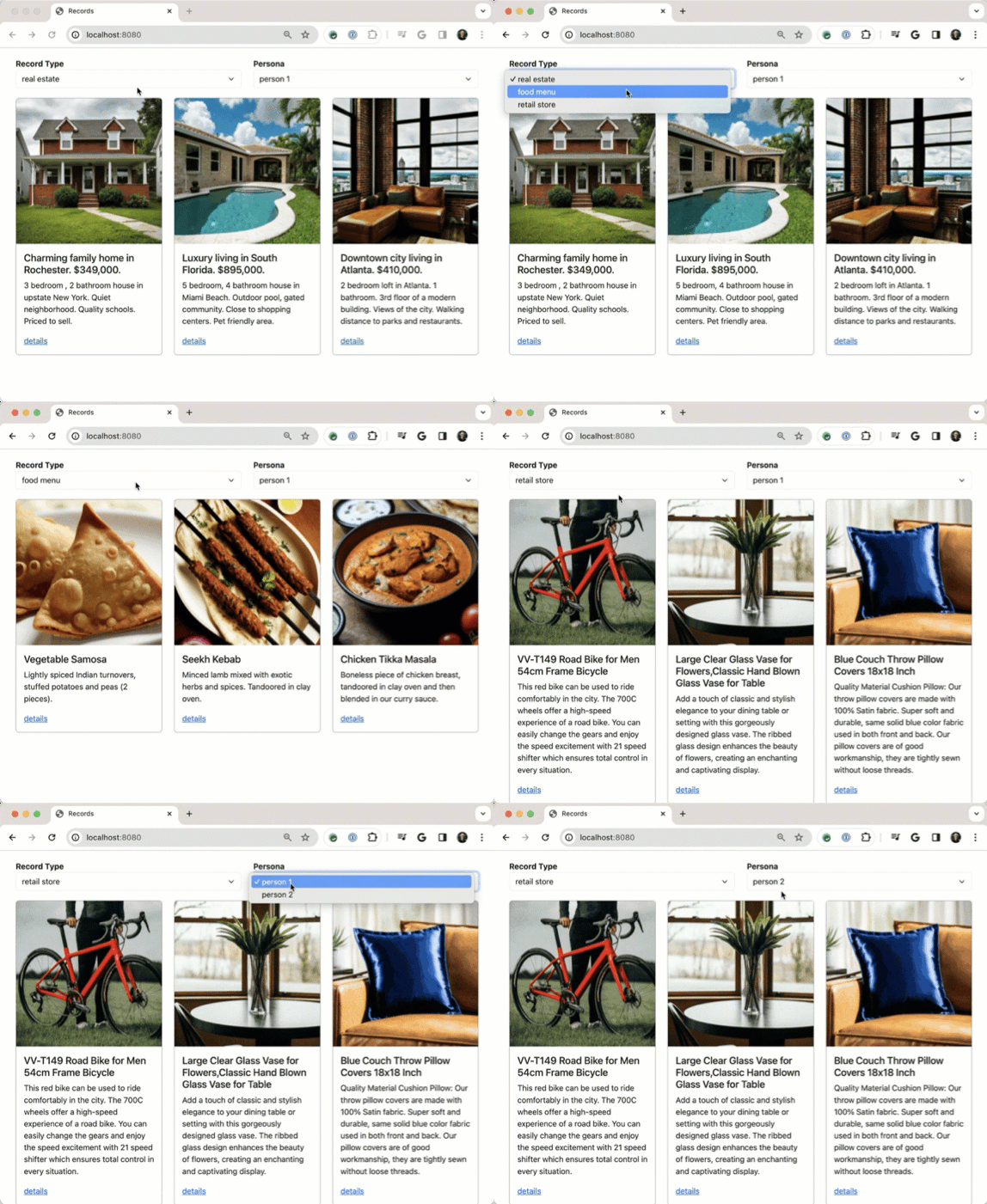
The app shows three types of catalogs and offers two different personas with different interests. Everything here is written in Go and uses local files for “databases” so that it’s completely self-contained. And all the images are AI-generated from Google’s Imagen2 model.
When the user clicks on a particular catalog entry, the go to a “details” page where the generic product summary from the overview page is sent along with a description of the user’s preferences to the Google Gemini model to get a personalized, AI-powered product summary.
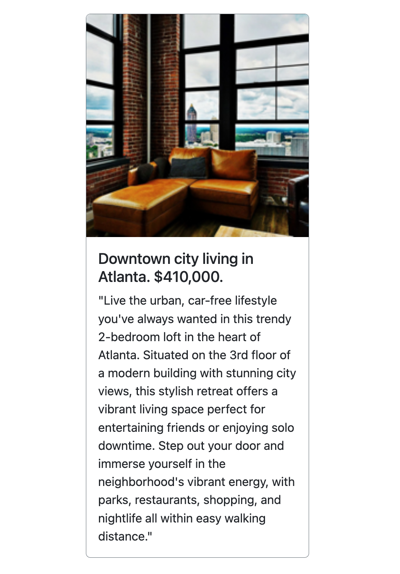
That’s all there is to it, but I think it demonstrates the idea.
How it works
Let’s look at what we’ve got here. Here’s the basic flow of the AI-augmented catalog request.

How did I build the app itself (GitHub repo here)? My goal was to only use LLM-based guidance either within the IDE using Duet AI in Google Cloud, or burst out to Bard where needed. No internet searches, no docs allowed.
I started at the very beginning with a basic prompt.
What are the CLI commands to create a new Go project locally?
The answer offered the correct steps for getting the project rolling.

The next commands are where AI assistance made a huge difference for me. With this series of natural language prompts in the Duet AI chat within VS Code, I got the foundation of this app set up in about five minutes. This would have easily taken me 5 or 10x longer if I did it manually.
Give me a main.go file that responds to a GET request by reading records from a local JSON file called property.json and passes the results to an existing html/template named home.html. The record should be defined in a struct with fields for ID, Name, Description, and ImageUrl.
Create an html/template for my Go app that uses Bootstrap for styling, and loops through records. For each loop, create a box with a thin border, an image at the top, and text below that. The first piece of text is "title" and is a header. Below that is a short description of the item. Ensure that there's room for four boxes in a single row.
Give me an example data.json that works with this struct
Add a second function to the class that responds to HTML requests for details for a given record. Accept a record id in the querystring and retrieve just that record from the array before sending to a different html/template
With these few prompts, I had 75% of my app completed. Wild! I took this baseline, and extended it. The final result has folders for data, personas, images, a couple HTML files, and a single main.go file.
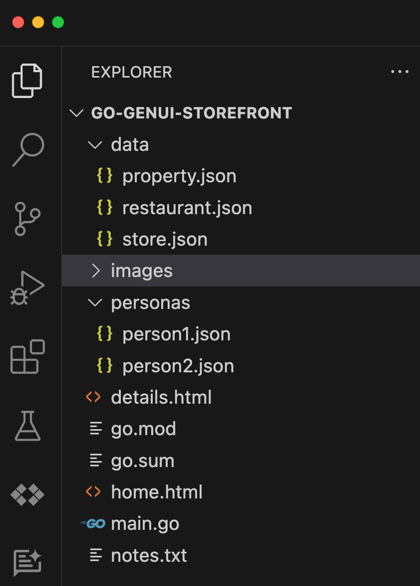
Let’s look at the main.go file, and I’ll highlight a handful of noteworthy bits.
package main

import (
	"context"
	"encoding/json"
	"fmt"
	"html/template"
	"log"
	"net/http"
	"os"
	"strconv"

	"github.com/google/generative-ai-go/genai"
	"google.golang.org/api/option"
)

// Define a struct to hold the data from your JSON file
type Record struct {
	ID          int
	Name        string
	Description string
	ImageURL    string
}

type UserPref struct {
	Name        string
	Preferences string
}

func main() {

	// Parse the HTML templates
	tmpl := template.Must(template.ParseFiles("home.html", "details.html"))

	//return the home page
	http.HandleFunc("/", func(w http.ResponseWriter, r *http.Request) {

		var recordType string
		var recordDataFile string
		var personId string

		//if a post-back from a change in record type or persona
		if r.Method == "POST" {
			// Handle POST request:
			err := r.ParseForm()
			if err != nil {
				http.Error(w, "Error parsing form data", http.StatusInternalServerError)
				return
			}

			// Extract values from POST data
			recordType = r.FormValue("recordtype")
			recordDataFile = "data/" + recordType + ".json"
			personId = r.FormValue("person")

		} else {
			// Handle GET request (or other methods):
			// Load default values
			recordType = "property"
			recordDataFile = "data/property.json"
			personId = "person1" // Or any other default person
		}

		// Parse the JSON file
		data, err := os.ReadFile(recordDataFile)
		if err != nil {
			fmt.Println("Error reading JSON file:", err)
			return
		}

		var records []Record
		err = json.Unmarshal(data, &records)
		if err != nil {
			fmt.Println("Error unmarshaling JSON:", err)
			return
		}

		// Execute the template and send the results to the browser
		err = tmpl.ExecuteTemplate(w, "home.html", struct {
			RecordType string
			Records    []Record
			Person     string
		}{
			RecordType: recordType,
			Records:    records,
			Person:     personId,
		})
		if err != nil {
			fmt.Println("Error executing template:", err)
		}
	})

	//returns the details page using AI assistance
	http.HandleFunc("/details", func(w http.ResponseWriter, r *http.Request) {

		id, err := strconv.Atoi(r.URL.Query().Get("id"))
		if err != nil {
			fmt.Println("Error parsing ID:", err)
			// Handle the error appropriately (e.g., redirect to error page)
			return
		}

		// Extract values from querystring data
		recordType := r.URL.Query().Get("recordtype")
		recordDataFile := "data/" + recordType + ".json"

		//declare recordtype map and extract selected entry
		typeMap := make(map[string]string)
		typeMap["property"] = "Create an improved home listing description that's seven sentences long and oriented towards a a person with these preferences:"
		typeMap["store"] = "Create an updated paragraph-long summary of this store item that's colored by these preferences:"
		typeMap["restaurant"] = "Create a two sentence summary for this menu item that factors in one or two of these preferences:"
		//get the preamble for the chosen record type
		aiPremble := typeMap[recordType]

		// Parse the JSON file
		data, err := os.ReadFile(recordDataFile)
		if err != nil {
			fmt.Println("Error reading JSON file:", err)
			return
		}

		var records []Record
		err = json.Unmarshal(data, &records)
		if err != nil {
			fmt.Println("Error unmarshaling JSON:", err)
			return
		}

		// Find the record with the matching ID
		var record Record
		for _, rec := range records {
			if rec.ID == id { // Assuming your struct has an "ID" field
				record = rec
				break
			}
		}

		if record.ID == 0 { // Record not found
			// Handle the error appropriately (e.g., redirect to error page)
			return
		}

		//get a reference to the persona
		person := "personas/" + (r.URL.Query().Get("person") + ".json")

		//retrieve preference data from file name matching person variable value
		preferenceData, err := os.ReadFile(person)
		if err != nil {
			fmt.Println("Error reading JSON file:", err)
			return
		}
		//unmarshal the preferenceData response into an UserPref struct
		var userpref UserPref
		err = json.Unmarshal(preferenceData, &userpref)
		if err != nil {
			fmt.Println("Error unmarshaling JSON:", err)
			return
		}

		//improve the message using Gemini
		ctx := context.Background()
		// Access your API key as an environment variable (see "Set up your API key" above)
		client, err := genai.NewClient(ctx, option.WithAPIKey(os.Getenv("GEMINI_API_KEY")))
		if err != nil {
			log.Fatal(err)
		}
		defer client.Close()

		// For text-only input, use the gemini-pro model
		model := client.GenerativeModel("gemini-pro")
		resp, err := model.GenerateContent(ctx, genai.Text(aiPremble+" "+userpref.Preferences+". "+record.Description))
		if err != nil {
			log.Fatal(err)
		}

		//parse the response from Gemini
		bs, _ := json.Marshal(resp.Candidates[0].Content.Parts[0])
		record.Description = string(bs)

		//execute the template, and pass in the record
		err = tmpl.ExecuteTemplate(w, "details.html", record)
		if err != nil {
			fmt.Println("Error executing template:", err)
		}
	})

	fmt.Println("Server listening on port 8080")
	fs := http.FileServer(http.Dir("./images"))
	http.Handle("/images/", http.StripPrefix("/images/", fs))
	http.ListenAndServe(":8080", nil)
}
I do not write great Go code, but it compiles, which is good enough for me!
On line 13, see that I refer to the Go package for interacting with the Gemini model. All you need is an API key, and we have a generous free tier.
On line 53, notice that I’m loading the data file based on the type of record picked on the HTML template.
On line 79, I’m executing the HTML template and sending the type of record (e.g. property, restaurant, store), the records themselves, and the persona.
On lines 108-113, I’m storing a map of prompt values to use for each type of record. These aren’t terrific, and could be written better to get smarter results, but it’ll do.
Notice on line 147 that I’m grabbing the user preferences we use for customization.
On line 163, I create a Gemini client so that I can interact with the LLM.
On line 171, see that I’m generating AI content based on the record-specific preamble, the record details, and the user preference data.
On line 177, notice that I’m extracting the payload from Gemini’s response.
Finally, on line 181 I’m executing the “details” template and passing in the AI-augmented record.
None of this is rocket science, and you can check out the whole project on GitHub.
What an “enterprise” version might look like
What I have here is a local example app. How would I make this more production grade?
- Store catalog images in an object storage service. All my product images shouldn’t be local, of course. They belong in something like Google Cloud Storage.
- Add catalog items and user preferences to a database. Likewise, JSON files aren’t a great database. The various items should all be in a relational database.
- Write better prompts for the LLM. My prompts into Gemini are meh. You can run this yourself and see that I get some silly responses, like personalizing the message for a pillow by mentioning sporting events. In reality, I’d write smarter prompts that ensured the responding personalized item summary was entirely relevant.
- Use Vertex AI APIs for accessing Gemini. Google AI Studio is terrific. For production scenarios, I’d use the Gemini models hosted in full-fledged MLOps platform like Vertex AI.
- Run app in a proper cloud service. If I were really building this app, I’d host it in something like Google Cloud Run, or maybe GKE if it was part of a more complex set of components.
- Explore whether pre-generating AI-augmented results and caching them would be more performant. It’s probably not realistic to call LLM endpoints on each “details” page. Maybe I’d pre-warm certain responses, or come up with other ways to not do everything on the fly.
This exercise helped me see the value of AI-assisted developer tooling firsthand. And, it feels like there’s something useful about LLM summarization being applied to a variety of “boring” app scenarios. What do you think?

 Richard Seroter's Architecture Musings
Leave a reply to Vik Chaudhary Cancel reply