Yesterday I was checking out the MSDN Architecture Center and noticed a reader application for the Architecture Journal.
This interface makes the Journal easy to read, and demonstrates a few nice UI concepts.
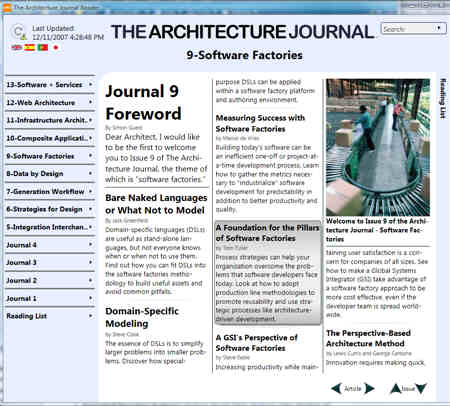
This tool is auto-updating, so it should automatically pull down the latest versions of the Journal. You can add interesting articles to a “reading list” for later reference. For each particular article, you have the option of saving it to the desktop, emailing it, or copying the summary to the Windows clipboard.

Another nice feature is the ability to add notes to each article. Once a note is added to a particular passage or section, that area is highlighted with a different color. I was hoping that my notes would show up in the search results, but alas, I’d have to remember where I had added notes vs. finding them later via broad search.

I find this more interesting as a UI design then for actually reading the Journal. There probably aren’t enough issues to justify reading list and search functionality (I’d like to see this tool for MSDN Magazine!), but, it does offer a few interesting ideas about an internet-updated thick client.
Technorati Tags: architecture, SOA

 Richard Seroter's Architecture Musings
Leave a reply to Dan Becker Cancel reply