Did you know that BizTalk Server has a hidden pipeline component that can add namespaces to inbound documents?
Often, you’ll find that you’re retrieving XML data from a system where no namespace has been provided. This can cause issues for BizTalk Server given that namespace#root is the global unique identifier for messages. If you had installed the BizTalk Adapters for Enterprise Applications, you’d find a Visual Studio.NET project located at:
C:\Program Files\Microsoft BizTalk Adapters for Enterprise Applications\Pipeline Component
This is a custom pipeline component which adds namespaces to messages. For instance, let’s say I have the following XML input coming in …
<InputSchema>
<Node1>Node1_0</Node1>
<Node2>Node2_0</Node2>
</InputSchema>
I can create a receive pipeline with my new SetNSForMsg custom pipeline component.
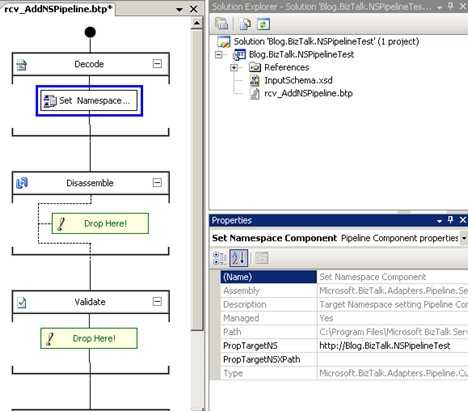
Notice that I can type in a namespace that will be applied to the message. After deploying this pipeline and running the above message through, I get an output XML message looking like this:
<InputSchema targetNamespace=”http://Blog.BizTalk.NSPipelineTest”>
<Node1>Node1_0</Node1>
<Node2>Node2_0</Node2>
</InputSchema>
I stared at that for a few moments and something didn’t look right. I added an XML Disassembler pipeline to my receive pipeline and redeployed. Now when I processed the original message, it got suspended with a notice that an unrecognized format was received. I realized that the component is setting the targetNamespace value vs. setting up the xmlns value the message needed. So, I went into the provided custom pipeline component’s Execute method and changed the line message.DocumentElement.SetAttribute(“targetNamespace“, targetNS); to message.DocumentElement.SetAttribute(“xmlns“, targetNS);. So my current receive pipeline looks like this:
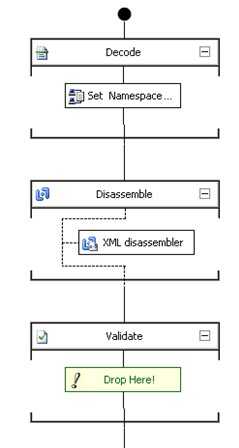
My output messages now look like this:
<InputSchema xmlns=”http://Blog.BizTalk.NSPipelineTest”>
<Node1>Node1_0</Node1>
<Node2>Node2_0</Node2>
</InputSchema>
Now THAT’S what I’m looking for. Just to be sure that the disassembling actually succeeded, I stopped the send port, thus suspending the outbound message. Inspecting that message shows me that the Message Type was indeed set:
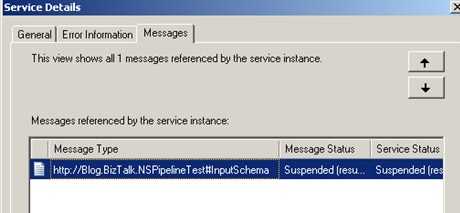
Sweet. One final cool thing. Now that I have this pipeline, I can use the BizTalk Server 2006 feature to modify pipeline configuration settings for EACH receive location that uses it. You can reuse this pipeline over and over, and just modify the namespace value and document schema.
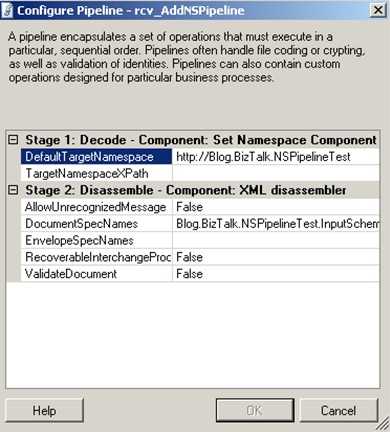
While on the topic of pipelines, don’t forget to download Tomas’ fancy new PipelineTesting library for running unit tests on your pipeline components.
Technorati Tags: BizTalk


 Richard Seroter's Architecture Musings
Leave a reply to chuck duffy Cancel reply