Add Namespace to Inbound BizTalk Messages

Did you know that BizTalk Server has a hidden pipeline component that can add namespaces to inbound documents?

Often, you’ll find that you’re retrieving XML data from a system where no namespace has been provided. This can cause issues for BizTalk Server given that namespace#root is the global unique identifier for messages. If you had installed the BizTalk Adapters for Enterprise Applications, you’d find a Visual Studio.NET project located at:
C:\Program Files\Microsoft BizTalk Adapters for Enterprise Applications\Pipeline Component

This is a custom pipeline component which adds namespaces to messages. For instance, let’s say I have the following XML input coming in …


<InputSchema>
<Node1>Node1_0</Node1>
<Node2>Node2_0</Node2>
</InputSchema>

I can create a receive pipeline with my new SetNSForMsg custom pipeline component.
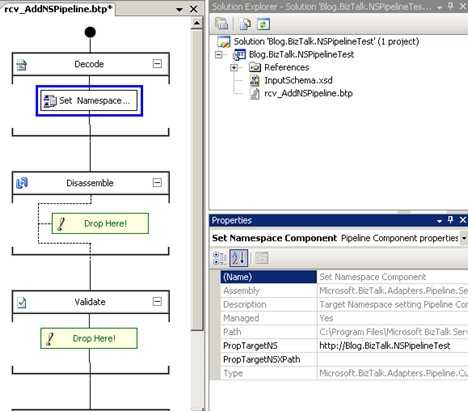
Notice that I can type in a namespace that will be applied to the message. After deploying this pipeline and running the above message through, I get an output XML message looking like this:


<InputSchema targetNamespace=”http://Blog.BizTalk.NSPipelineTest”&gt;
<Node1>Node1_0</Node1>
<Node2>Node2_0</Node2>
</InputSchema>

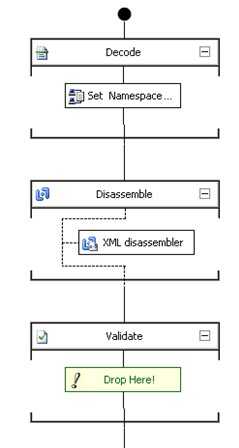
I stared at that for a few moments and something didn’t look right. I added an XML Disassembler pipeline to my receive pipeline and redeployed. Now when I processed the original message, it got suspended with a notice that an unrecognized format was received. I realized that the component is setting the targetNamespace value vs. setting up the xmlns value the message needed. So, I went into the provided custom pipeline component’s Execute method and changed the line message.DocumentElement.SetAttribute(“targetNamespace“, targetNS); to message.DocumentElement.SetAttribute(“xmlns“, targetNS);. So my current receive pipeline looks like this:
My output messages now look like this:


<InputSchema xmlns=”http://Blog.BizTalk.NSPipelineTest”&gt;
<Node1>Node1_0</Node1>
<Node2>Node2_0</Node2>
</InputSchema>

Now THAT’S what I’m looking for. Just to be sure that the disassembling actually succeeded, I stopped the send port, thus suspending the outbound message. Inspecting that message shows me that the Message Type was indeed set:
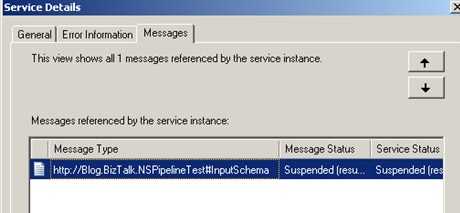
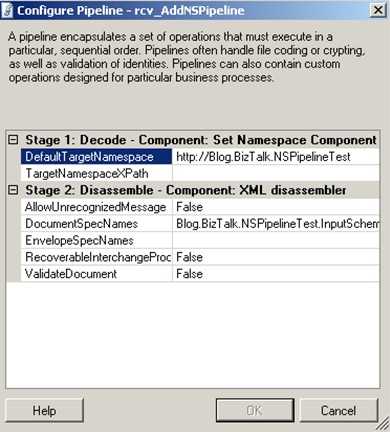
Sweet. One final cool thing. Now that I have this pipeline, I can use the BizTalk Server 2006 feature to modify pipeline configuration settings for EACH receive location that uses it. You can reuse this pipeline over and over, and just modify the namespace value and document schema.
While on the topic of pipelines, don’t forget to download Tomas’ fancy new PipelineTesting library for running unit tests on your pipeline components.

Technorati Tags:

Comments

26 responses to “Add Namespace to Inbound BizTalk Messages”

  1. Saravana Avatar

    Richard
    Very Good article and it will be usefull to all the biztalk guys who struggle with name spaces often.Was looking for this kind of article for while when trying to process xml messages with no name spaces
    Thanks
    Saravana Ramkumar

  2. chuck duffy Avatar

    Excellent! I am amazed how many namespaceless XML specifications I have encountered…

    Chuck

    1. Larker1 Avatar
      Larker1

      Why does BT require namespaces in the first place. Namespaces just muck up the xml format and take something that is designed to be super easy to read (xml) and make it cumbersome and stupid to read. Besides, namespaces give you almost zero benefit. Why all the hassle!!!??? Who in their right mind uses them?

      1. plykkegaard Avatar

        Why use strongtype versus sloopy typing
        An xml document is ment to be read by a machine/program not by the human eye, You need the strong type in order to identify and the validate the message automatically otherwise it’s garbage in – garbage out

  3. Andrew Veresov Avatar
    Andrew Veresov

    Thank you very much Richard for such helpful article!

  4. Steef-Jan Wiggers Avatar

    Hi Richard,

    I came across a similar situation today and found your post. It is very helpfull.

    Thanks,

    Steef-Jan

  5. Magnus M Avatar
    Magnus M

    Darn, I wrote my own and now I discovered this. But I needed an validation of the message anyway which I added as a property for the decode component.

  6. Gopal Avatar
    Gopal

    …..

    Thank you very much Richard, I came across a similar situation today and found your post. It is very helpfull.

    Thanks
    Gopal

  7. […] I used Richard Serotes post on how to change the SetNSForMsg component to add a XML namespace. That’s the second […]

  8. george Avatar
    george

    Hi Richard,
    Thanks for this good info, I am also experiencing the same problem I tried what u said but I could not get the result. I have tried with Biztalk 2006 Enterprise server. Am i missing any pre-requisite for testing this.

  9. Richard Seroter Avatar

    George, have you installed the Enterprise Adapters, which provide this pipeline component?

  10. Frank Avatar
    Frank

    Where can I find a download of the adapter pack for enterprise applications?

  11. Richard Seroter Avatar

    Hi Frank,

    The full download is available via MSDN subscriber download, or, on your BizTalk 2006 media. There isn’t a public-facing download that I’m aware of.

  12. Kelvin Tse Avatar
    Kelvin Tse

    Hi Richard, one more article from you that saves me hours of work. THANK YOU !!

  13. Richard Seroter Avatar

    Always nice to hear. Thanks Kelvin.

  14. Martin Bring Avatar
    Martin Bring

    Any problem with empty element?

    After introducing this component in my pipeline I get carriage return + line feed in elements that are empty.

    This affects mapping to outgoing flat file in a bad way.

    Any one experience this?

  15. Martin Bring Avatar
    Martin Bring

    Solved – “Any problem with empty element?”

    I added a XmlWriter before writing to stream, then it corrects the problem with CR LF in empty elements.

    Regards
    Martin Bring

    ———————-

    //message.DocumentElement.SetAttribute(“targetNamespace”, targetNS);
    message.DocumentElement.SetAttribute(“xmlns”, targetNS);

    MemoryStream outStream = new MemoryStream();
    XmlWriter writer = new XmlTextWriter(outStream, Encoding.UTF8);

    //message.Save(outStream);
    message.Save(writer);

  16. Richard Seroter Avatar

    Thanks for the tip, Martin.

  17. Srini Avatar
    Srini

    Can anybody provide code for this!!

  18. Andreas Moehlenbrock Avatar
    Andreas Moehlenbrock

    Thank you very much for this article, very helpful. I was looking kind of long time, from where I can install “BizTalk Adapters for Enterprise Applications”. Finally I found them on the BizTalk DVD in the folder D:\English\BizTalkServer2006R2\LineofBusinessAdaptersDeveloperEdition\setup.exe

    Cheers

    Andreas

  19. Andreas Moehlenbrock Avatar
    Andreas Moehlenbrock

    I just figured out, Microsoft has already his own component to add and remove namespace. Just “choose items” from the toolbox inside Visual Studio and select “BizTalk Pipeline Components” and “ESB Add Namespace”
    The msdn arcticle is also talking about removing namespace:
    http://msdn.microsoft.com/en-us/library/cc789137.aspx

    Regards

    Andreas

  20. Anders Ekman Avatar
    Anders Ekman

    When I first glanced at your articel I thought, this is the solution I need but then my eyes fell on the words “If you had installed..”. We have not so I guess our problems have to be solved in some other way. But thanks anyway

  21. Saulias Avatar
    Saulias

    Hi,

    If root tag has an attribute, then when adding namespace it removes the attribute.
    I have XML with …. When this XML goes through pipeline i get , the attributes get cut off.
    Have anyone had this issue?
    I would appreciate your help!

    BR,
    Saule

  22. […] of components and methods out there for adding a namespace to an inbound messages, see here and here.  I ended up re-using a sample I found on […]

  23. Eduard Avatar
    Eduard

    Many thanks for this article. Solved one of my big problems.

  24. Barry Avatar
    Barry

    Thanks for the article, however, when I changed the code as suggested to be “xmlns”, and deployed into the pipelines folder in VS I get this error: “You have selected an invalid pipeline component assembly. Please check security settings for the assembly if you are loading it from an UNC path.” Any ideas?

Leave a reply to Martin Bring Cancel reply

This site uses Akismet to reduce spam. Learn how your comment data is processed.