Category: Windows Azure

  • Window Azure BizTalk Services: How to Get Started and When to Use It

    The “integration as a service” space continues to heat up, and Microsoft officially entered the market with the General Availability of Windows Azure BizTalk Services (WABS) a few weeks ago.  I recently wrote up an InfoQ article that summarized the product and what it offered. I also figured that I should actually walk through the new installation and deployment process to see what’s changed. Finally, I’ll do a brief assessment of where I’d consider using this vs. the other cloud-based integration tools.

    Installation

    Why am I installing something if this is a cloud service? Well, the development of integration apps still occurs on premises, so I need an SDK for the necessary bits. Grab the Windows Azure BizTalk Services SDK Setup and kick off the process. I noticed what seems to be a much cleaner installation wizard.
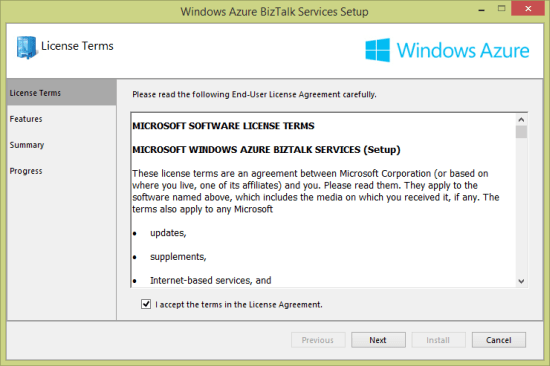
    2013.12.10biztalkservices01

    After choosing the components that I wanted to install (including the runtime, developer tools, and developer SDK) …
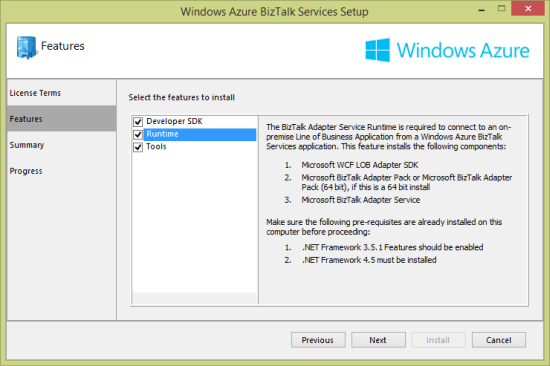
    2013.12.10biztalkservices02

    … you are presented with a very nice view of the components that are needed, and which versions are already installed.
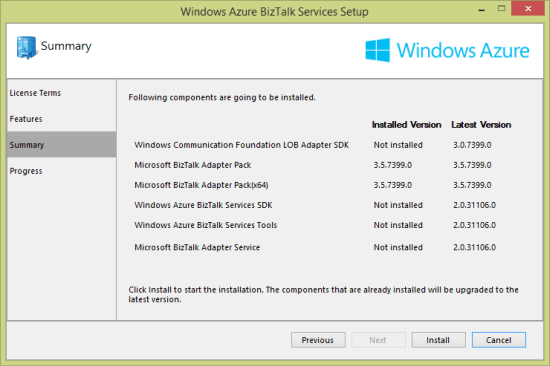
    2013.12.10biztalkservices03

    At this point, I have just about everything on my local developer machine that’s needed to deploy an integration application.

    Provisioning

    WABS applications run in the Windows Azure cloud. Developers provision and manage their WABS instances in the Windows Azure portal. To start with, choose App Services and then BizTalk Services before selecting Custom Create.

    2013.12.10biztalkservices04

    Next, I’m asked to pick an instance name, edition, geography, tracking database, and Windows Azure subscription. There are four editions: basic, developer, standard, and premium. As you move between editions (and pay more money), you have access to greater scalability, more integration applications, on-premises connectivity, archiving, and high availability.

    2013.12.10biztalkservices05

    I created a new database instance and storage account to ensure that there would be no conflicts with old (beta) WABS instances. Once the provisioning process was complete (maybe 15 minutes or so), I saw my new instance in the Windows Azure Portal.
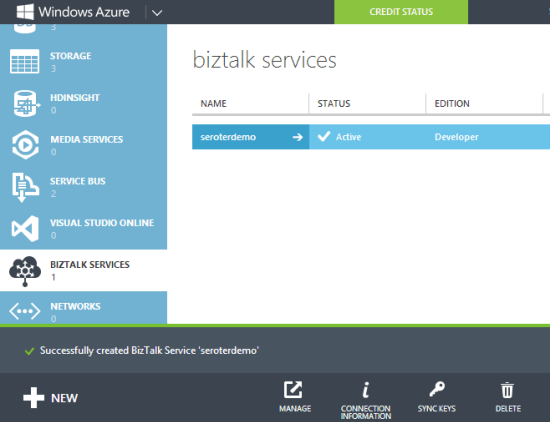
    2013.12.10biztalkservices07

    Drilling into the WABS instance, I saw connection strings, IP addresses, certificate information, usage metrics, and more.

    2013.12.10biztalkservices08

    The Scale tab showed me the option to add more “scale units” to a particular instance. Basic, standard and premium edition instances have “high availability” built in where multiple VMs are beneath a single scale unit. Adding scale units to an instance requires standard or premium editions.
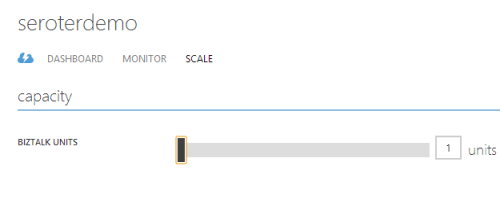
    2013.12.10biztalkservices09

    In the technical preview and beta releases of WABS, the developer was forced to create a self-signed certificate to use when securing a deployment. Now, I can download a dev certificate from the Portal and install it into my personal certificate store and trusted root authority. When I’m ready for production, I can also upload an official certificate to my WABS instance.

    Developing

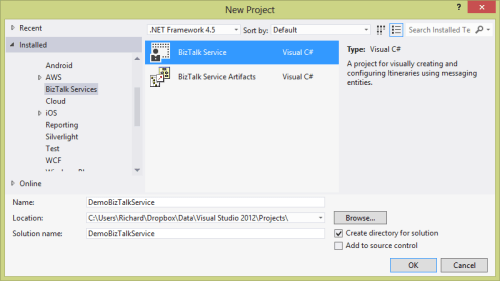
    WABS projects are built in Visual Studio 2012/2013. There’s an entirely new project type for WABS, and I could see it when creating a new project.

    2013.12.10biztalkservices10

    Let’s look at what we have in Visual Studio to create WABS solutions. First, the Server Explorer includes a WABS component for creating cloud-accessible connections to line-of-business systems. I can create connections to Oracle/SAP/Siebel/SQL Server repositories on-premises and make them part of the “bridges” that define a cloud integration process.
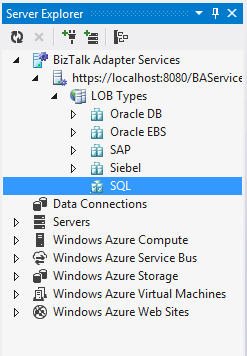
    2013.12.10biztalkservices11

    Besides line-of-business endpoints, what else can you add to a Bridge? The final palette of activities in the Toolbox is shown below. There are a stack of destination endpoints that cover a wide range of choices. The source options are limited, but there are promises of new items to come. The Bridges themselves support one-way or request-response scenarios.

    2013.12.10biztalkservices12

    Bridges expect either XML or flat file messages. A message is defined by a schema. The schema editor is virtually identical to the visual tool that ships with the standard BizTalk Server product. Since source and destination message formats may differ, it’s often necessary to include a transformation component. Transformation is done via a very cool Mapper that includes a sophisticated set of canned operations for transforming the structure and content of a message. This isn’t the Mapper that comes with BizTalk Server, but a much better one.
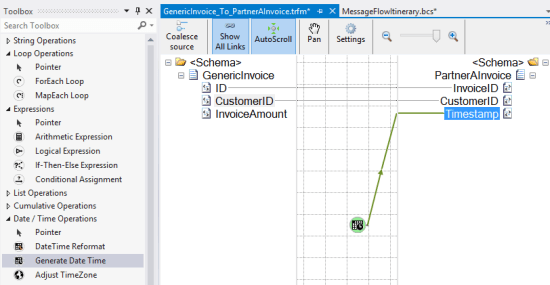
    2013.12.10biztalkservices14


    A bridge configuration model includes a source, one or more bridges (which can be chained together), and one or more destinations. In the case below, I built a simple one-way model that routes to a Windows Azure Service Bus Queue.

    2013.12.10biztalkservices15

    Double-clicking a particular bridge shows me the bridge configuration. In this configuration, I specified an XML schema for the inbound message, and a transformation to a different format.

    2013.12.10biztalkservices16


    At this point, I have a ready-to-go integration solution.

    Deploying

    To deploy one of theses solutions, you’ll need a certificate installed (see earlier note), and the Windows Azure Access Control Service credentials shown in the Windows Azure Portal. With that info handy, I right-clicked the project in Visual Studio and chose Deploy. Within a few seconds, I was told that everything was up and running. To confirm, I clicked the Manage button on the WABS instance page was visited the WABS-specific Portal. This Portal shows my deployed components, and offers tracking services. Ideally, this would be baked into the Windows Azure Portal itself, but at least it somewhat resembles the standard Portal.
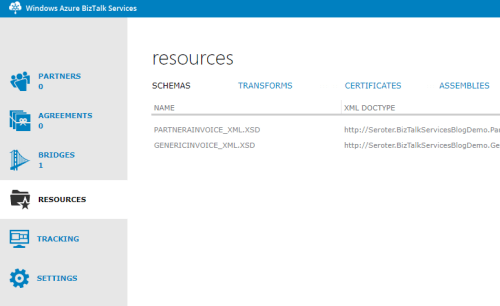
    2013.12.10biztalkservices17

    So it looks like I have everything I need to build a test.

    Testing

    I finally built a simple Console application in Visual Studio to submit a message to my Bridge. The basic app retrieved a valid ACS token and sent it along with my XML message to the bridge endpoint. After running the app, I got back the tracking ID for my message.
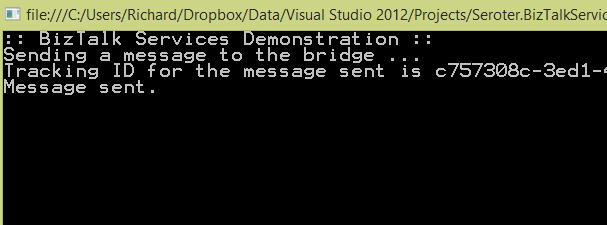
    2013.12.10biztalkservices19

    To actually see that this worked, I first looked in the WABS Portal to find the tracked instance. Sure enough, I saw a tracked message.

    2013.12.10biztalkservices18

    As a final confirmation, I opened up the powerful Service Bus Explorer tool and connected to my Windows Azure account. From here, I could actually peek into the Windows Azure Service Bus Queue that the WABS bridge published to. As you’d expect, I saw the transformed message in the queue.

    2013.12.10biztalkservices20

    Verdict

    There is a wide spectrum of products in the integration-as-a-service domain. There are batch-oriented tools like Informatica Cloud and Dell Boomi, and things like SnapLogic that handle both real-time and batch. Mulesoft sells the CloudHub which is a comprehensive platform for real-time integration. And of course, there are other integration solutions like AWS Simple Notification Services or the Windows Azure Service Bus.

    So where does WABS fit in? It’s clearly message-oriented, not batch-oriented. It’s more than a queuing solution, but less than an ESB. It seems like a good choice for simple connections between different organizations, or basic EDI processing. There are a decent number of source and destination endpoints available, and the line-of-business connectivity is handy. The built in high availability and optional scalability mean that it can actually be used in production right now, so that’s a plus.

    There’s still lots of room for improvement, but I guess that’s to be expected with a v1 product. I’d like to see a better entry-level pricing structure, more endpoint choices, more comprehensive bridge options (like broadcasting to multiple endpoints), built-in JSON support, and SDKs that support non-.NET languages.

    What do you think? See any use cases where you’d use this today, or are there specific features that you’ll be waiting for before jumping in?
  • Where the heck do I host my … cloud database?

    So far, I’ve looked at options for hosting .NET and Node.js applications in the cloud. But what about the  services that web applications rely on? It’s unlikely that your cloud application will use many on-premises services, so you’ll need things like databases nearby. There are a LOT of relational and NoSQL cloud databases out there. While it’s a perfectly reasonable choice to install and operate a database yourself on someone’s cloud VMs, this assessment looks at “managed” cloud databases. A managed cloud database typically takes care of underlying VM management as well as database tasks like backups.

    I’ve picked out 8 diverse choices (although MANY other interesting services exist), and evaluated them using the following criteria:

    • Type of offering (RDBMS, NoSQL)
    • Technology and versions supported
    • Scalability story
    • High availability options
    • Imposed constraints
    • Pricing plans
    • Administrative access
    • Support material offered

    There are other important factors to consider before actually selecting one of the services below. Make sure to look deeply at the feature set (and lack thereof), SLAs, and data privacy policies.

    Once again, I’m putting these in alphabetical order, which means that Amazon Web Services shows up first, and Windows Azure last. Just like that crafty Jeff Bezos wants.

    Amazon Web Services

    AWS has a variety of database services that offer excellent scale and innovative features.

    Type of Offering Tech and Versions Scalability High Availability
    Relational, NoSQL, and warehouse RDS uses MySQL (5.6.13 and lower), SQL Server (2012, 2008 R2), and Oracle (11.2)DynamoDB is proprietary NoSQL database.

    Redshift is a proprietary data warehouse platform.

    Manually scale RDS instances up and down with minimal downtime.DynamoDB scaling is done by increasing or decreasing the “provisioned throughput”  with impacting availability.

    Redshift scaling occurs by adding or removing nodes in the cluster.

    RDS instances scale up, but do support high availability through “Multi-AZ Deployments” for MySQL or Oracle.DynamoDB is built for high availability by default. Its data is spread across AZs in a region and can withstand server or AZ failure.

    Redshift replicates data across nodes in a (single AZ) cluster and constantly backs up to S3.


    Constraints Pricing Admin Access Support
    For RDS, MySQL or Oracle databases can be up to 3TB in size with 30k IOPS. SQL Server databases can be 1TB in size with up to 10k IOPS.DynamoDB supports up to 10k read/write capacity units (unless you receive special permission). Items can only be 64kb in size, but there is no size limit on an entire table.

    Redshift supports 16 XL nodes (2TB apiece) or 16 8XL nodes (16 TB apiece) per cluster.

    RDS pricing includes an hourly charge for the instance, primary storage, Multi-AZ storage, backup storage, and data transfer out.The pricing in DynamoDB is pretty simple. Pay for provisioned throughput units, storage, and data transfer out.

    For Redshift, you pay for capacity per hour, backup storage, and in some cases, data transfer.

    RDS users can create firewall policies that let them use standard client tools for connecting to DB instances.Few admin tasks exist for DynamoDB, but can use AWS Console and API.

    Access Redshift via API, and database/BI tools.

    For RDS, lots of documentation, some tutorials, support forums, and paid support.DynamoDB has documentation, forums, and paid support.

    Redshift is new, but you’ll find good documentation, forums, and paid support.

    Cloudant

    Cool provider of a distributed, cloud-scale JSON document database. Good when you need a high-performing, CouchDB-friendly environment.

    Type of Offering Tech and Versions Scalability High Availability
    NoSQL (document DB) Cloudant developed BigCouch which is a fork of CouchDB. Scaled horizontally by Cloudant. Run as shared (AWS, Azure, Joyent, Rackspace, SoftLayer) or dedicated (AWS, Rackspace, SoftLayer). Supports cross-data center, multiple writable masters.


    Constraints Pricing Admin Access Support
    No apparent limits on DB size. For shared hosting, pay for data volume and HTTP requests. Compatible with CouchDB API so admins can use other CouchDB-friendly tools. Most of the admin activities are performed by Cloudant. Some documentation, and 24×7 support.

    Engine Yard

    Long-time PaaS provider offers a handful of different managed databases. One of the rare Riak hosters online so far, Engine Yard is good bet for DB hosting if your app is running in their cloud.

    Type of Offering Tech and Versions Scalability High Availability
    Relational and NoSQL. Relational options include PostgreSQL (9.2.x) and MySQL (5.0.x).For NoSQL, EngineYard offers hosted Riak and supports all possible Riak storage backends.

    EngineYard databases run in AWS.

    Can scale PostgreSQL and MySQL servers up to larger server sizes.Riak is setup in a cluster, and it appears that clusters can be resized. PostgreSQL and MySQL can be set up with read replicas, and replication, but those appear to be only HA options.Riak cluster is set up in an AWS region, and balanced between AZs.


    Constraints Pricing Admin Access Support
    PostgreSQL and MySQL databases can be up to 1TB in size (EBS backed).Riak service appears to support up to 1TB per node. Hourly pricing (based on server size), with no extra charge for the database software. Also pay for backups and bandwidth. Access databases from the outside using SSH tunnels and then your preferred management tool. Offer knowledge base, ticketing system, and paid support plans.

    Google

    Google offers a couple different databases for cloud developers. The options differ in maturity, but both offer viable repositories.

    Type of Offering Tech and Versions Scalability High Availability
    Relational and NoSQL. Google Cloud SQL in based on MySQL (5.5).The Google Cloud Datastore is a preview service and came from the Google App Engine High Replication Datastore (BigTable). For Cloud SQL, users can switch between instance sizes to adjust capacity.Cloud Datastore writes scales automatically. Cloud SQL supports either sync or async replication to multiple geographic locations.Cloud Datastore is replicated (in real time) across data centers.


    Constraints Pricing Admin Access Support
    For Google Cloud SQL, Maximum request/response size is 16MB. Databases can be up to 100GB in size.The Cloud Datastore has no maximum amount of stored data, up to 200 indexes, and no limit on reads/writes. Google Cloud SQL can be paid for in package (per day) or per-use (hourly) billing plans. Per-use plans include additional per-hour charge for storage. Both plans requirement payment for outbound traffic.For the Cloud Datastore, you pay an hourly per-GB charge, plus a cost per 100k API operations. Use client tools that support a JDBC connection and Google Cloud SQL driver. Also supports a command line tool.Developers use a tool from Google (gcd) to manage the Cloud Datastore. For Google Cloud SQL, you’ll find documentation, discussion forums, and paid support.Support for the Cloud Datastore can be found in communities, documentation, and a free/paid ticketing system.

    NuoDB

    Offers a “newSQL” product which is an object-oriented, peer-to-peer, transactional database. Powerful choice for on-premises or cloud data storage.

    Type of Offering Tech and Versions Scalability High Availability
    Relational. Proprietary, patented technology base. Supports manual scale out of more hosts and can also apparently add capacity to existing hosts. Journaling ensures that writes are committed to disk, and they offer multiple ways to configure the hosts in a highly available (geo-distributed, multi-master) way.


    Constraints Pricing Admin Access Support
    Amazon-hosted version has 1TB of storage, although seemingly you could add more.They also list a handful of SQL-related limits for the platform. NuoDB has three editions. The developer edition is free, the Pro version is “pay as you scale”, and the cloud version is based on usage in AWS. See here for a comparison of each. Offer a handful of CLI tools, visual consoles, and integration with 3rd party management tools. NuoDB offers documentation, GitHub samples, and support forums.

    Rackspace

    This leading cloud provider sells their own managed cloud database, and recently acquired another. Good choice for apps running in the Rackspace cloud, or if you need a well-engineering MongoDB environment.

    Type of Offering Tech and Versions Scalability High Availability
    Relational and NoSQL (document) Cloud Databases run MySQL (5.1).ObjectRocket is based on MongoDB. Cloud Databases can be scaled up, but not out.ObjectRocket scales out to more sharded instances. Can happen automatically or manually. The Cloud Database relies on SAN-level replication of data, and not MySQL replication (unsupported).The ObjectRocket “pod” architecture makes it possible to replicate data easily. load balancers are in place, geo-redundancy is available, and backups are built in.


    Constraints Pricing Admin Access Support
    Looks like most Cloud Database interactions are through the API, and rate limits are applied. You are also able to have up to 25 instances, at 150GB each.CloudRocket offers unlimited data storage if you have defined shard keys. Contact them if you need more than 200k operations/second. Cloud Databases are charged per hour. Storage is charged at $0.75 per month.ObjectRocket has four different plans where you pay monthly, per-shard. Some Cloud Database admin functions are exposed through their Control Panel (e.g. provision, resize) and others through API (e.e. backup) or client tools (e.g. import). See more on how to access the DB instance itself. Rackspace provides lots of support options for Cloud Databases, including a ticketing system, community, help desk, and managed services.ObjectRocket support is done via email/chat/phone.

    Salesforce.com (Database.com)

    Recently made a standalone product after providing the backend to Salesforce.com for years, Database.com offers a feature-rich, metadata-driven database for cloud apps.

    Type of Offering Tech and Versions Scalability High Availability
    Relational Oracle underneath, but no exposure of direct capabilities. interact solely with Database.com interface. Pod architecture designed to scale up and out automatically based on demand. Geographically distinct data centers and near real-time replication between them.


    Constraints Pricing Admin Access Support
    No upper limit on storage. Does impose API limits. Free for 3 users, 100k records, 50k transactions. Pay for users, records, and transactions above that. Manage Database.com via web console, Workbench, SOAP/REST API, and platform SDKs. Offer a dev center, discussion boards, support tickets, and paid support plans.

    Windows Azure

    Microsoft has a set of database options that are similar in scope to what AWS offers. Great fit for shared databases between partners or as a companion to a web app running in Windows Azure.

    Type of Offering Tech and Versions Scalability High Availability
    Relational and NoSQL Windows Azure SQL Database runs SQL Server (2012).Windows Azure Table Storage provides a custom, schema-less repository. SQL Database servers can be scaled up. Can also scale usage out through Federations to shard data.Azure Table data is sharded according to a partition key and can support up to 20k transactions per second. For SQL Databases, backups are taken regularly. At least 3 replicas exist for each database.Azure Tables are replicated three times within a given data center.


    Constraints Pricing Admin Access Support
    SQL Databases can be up to 150GB in size. SQL Databases don’t support the full feature set of SQL Server 2012.Azure Table entities can be up to 1MB in size, and tables/accounts can store up to 200TB of data. Pay as you go for SQL Database instances. Different price for reserved capacity. Also pay for bandwidth consumption.Azure Table pricing is rolled up into “Storage” where you pay per GB/hr, and for bandwidth. SQL Databases via REST API, web Management Console, or client tools.Azure Tables can be accessed via REST API (OData) and platform SDKs. Whitepapers, documentation, community forums all free. Also offer paid support plans.

    Summary

    Clearly, there are a ton of choices when considering where to run a database in the cloud. You could choose to run a database yourself on a virtual machine (as all IaaS vendors promote), or move to a managed service where you give up some control, but get back time from offloading management tasks. Most of these services have straightforward web APIs, but do note that migration between each of them isn’t a one-click experience.

    Are there other cloud databases that you like? Add them to the comments below!

  • Using the Windows Azure Service Bus REST API to Send to Topic from Salesforce.com

    In the past, I’ve written and talked about integrating the Windows Azure Service Bus with non-Microsoft platforms like Salesforce.com. I enjoy showing how easy it is to use the Service Bus Relay to connect on-premises services with Salesforce.com. On multiple occasions, I’ve been asked how to do this with Service Bus brokered messaging options (i.e. Topics and Queues) as well. It can be a little tricky as it requires the use of the Windows Azure REST API and there aren’t a ton of public examples of how to do it! So in this blog post, I’ll show you how to send a message to a Service Bus Topic from Salesforce.com. Note that this sequence resembles how you’d do this on ANY platform that can’t use a Windows Azure SDK.

    Creating the Topic and Subscription

    First, I needed a Topic and Subscription to work with. Recall that Topics differ from Queues in that a Topic can have multiple subscribers. Each subscription (which may filter on message properties) has its own listener and gets their own copy of the message. In this fictitious scenario, I wanted users to submit IT support tickets from a page within the Salesforce.com site.

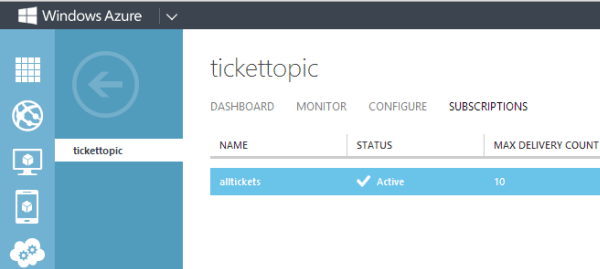
    I could create a Topic in a few ways. First, there’s the Windows Azure portal. Below you can see that I have a Topic called “TicketTopic” and a Subscription called “AllTickets”.

    2013.09.18topic01

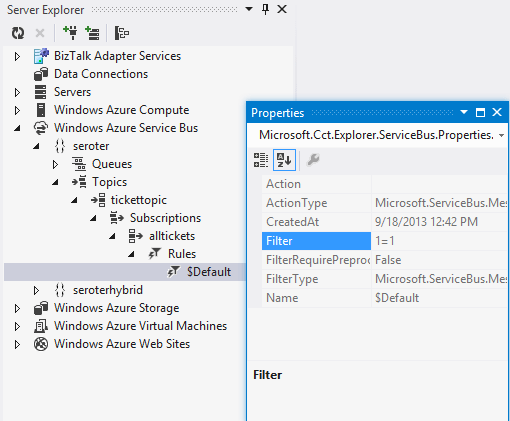
    If you’re a Visual Studio developer, you can also use the handy Windows Azure extensions to the Server Explorer window. Notice below that this tool ALSO shows me the filtering rules attached to each Subscription.

    2013.09.18topic02

    With a Topic and Subscription set up, I was ready to create a custom VisualForce page to publish to it.

    Code to Get an ACS Token

    Before I could send a message to a Topic, I needed to get an authentication token from the Windows Azure Access Control Service (ACS). This token goes into the request header and lets Windows Azure determine if I’m allowed to publish to a particular Topic.

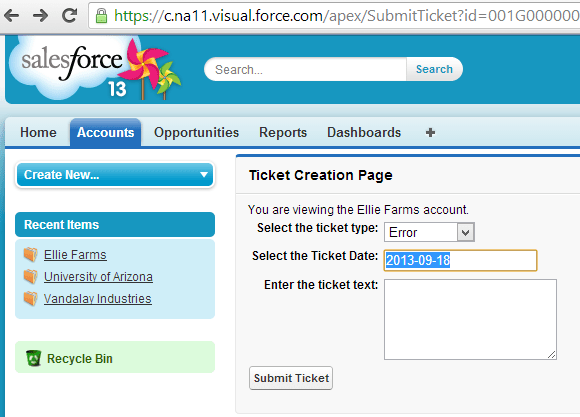
    In Salesforce.com, I built a custom VisualForce page with the markup necessary to submit a support ticket. The final page looks like this:

    2013.09.18topic03

    I also created a custom Controller that extended the native Accounts Controller and added an operation to respond to the “Submit Ticket” button event. The first bit of code is responsible for calling ACS and getting back a token that can be included in the subsequent request. Salesforce.com extensions are written in a language called Apex, but it should look familiar to any C# or Java developer.

           Http h= new Http();
           HttpRequest acReq = new HttpRequest();
           HttpRequest sbReq = new HttpRequest();
    
            // define endpoint and encode password
           String acUrl = 'https://seroter-sb.accesscontrol.windows.net/WRAPV0.9/';
           String encodedPW = EncodingUtil.urlEncode(sbUPassword, 'UTF-8');
    
           acReq.setEndpoint(acUrl);
           acReq.setMethod('POST');
           // choose the right credentials and scope
           acReq.setBody('wrap_name=demouser&wrap_password=' + encodedPW + '&wrap_scope=http://seroter.servicebus.windows.net/');
           acReq.setHeader('Content-Type','application/x-www-form-urlencoded');
    
           HttpResponse acRes = h.send(acReq);
           String acResult = acRes.getBody();
    
           // clean up result to get usable token
           String suffixRemoved = acResult.split('&')[0];
           String prefixRemoved = suffixRemoved.split('=')[1];
           String decodedToken = EncodingUtil.urlDecode(prefixRemoved, 'UTF-8');
           String finalToken = 'WRAP access_token=\"' + decodedToken + '\"';
    

    This code block makes an HTTP request to the ACS endpoint and manipulates the response into the token format I needed.

    Code to Send the Message to a Topic

    Now comes the fun stuff. Here’s how you actually send a valid message to a Topic through the REST API. Below is the complete code snippet, and I’ll explain it further in a moment.

          //set endpoint using this scheme: https://<namespace>.servicebus.windows.net/<topic name>/messages
           String sbUrl = 'https://seroter.servicebus.windows.net/demotopic/messages';
           sbReq.setEndpoint(sbUrl);
           sbReq.setMethod('POST');
           // sending a string, and content type doesn't seem to matter here
           sbReq.setHeader('Content-Type', 'text/plain');
           // add the token to the header
           sbReq.setHeader('Authorization', finalToken);
           // set the Brokered Message properties
           sbReq.setHeader('BrokerProperties', '{ \"MessageId\": \"{'+ guid +'}\", \"Label\":\"supportticket\"}');
           // add a custom property that can be used for routing
           sbReq.setHeader('Account', myAcct.Name);
           // add the body; here doing it as a JSON payload
           sbReq.setBody('{ \"Account\": \"'+ myAcct.Name +'\", \"TicketType\": \"'+ TicketType +'\", \"TicketDate\": \"'+ SubmitDate +'\", \"Description\": \"'+ TicketText +'\" }');
    
           HttpResponse sbResult = h.send(sbReq);
    

    So what’s happening here? First, I set the endpoint URL. In this case, I had to follow a particular structure that includes “/messages” at the end. Next, I added the ACS token to the HTTP Authorization header.

    After that, I set the brokered messaging header. This fills up a JSON-formatted BrokerProperties structure that includes any values you needed by the message consumer. Notice here that I included a GUID for the message ID and provided a “label” value that I could access later. Next, I defined a custom header called “Account”. These custom headers get added to the Brokered Message’s “Properties” collection and are used in Subscription filters. In this case, a subscriber could choose to only receive Topic messages related to a particular account.

    Finally, I set the body of the message. I could send any string value here, so I chose a lightweight JSON format that would be easy to convert to a typed object on the receiving end.

    With all that, I was ready to go.

    Receiving From Topic

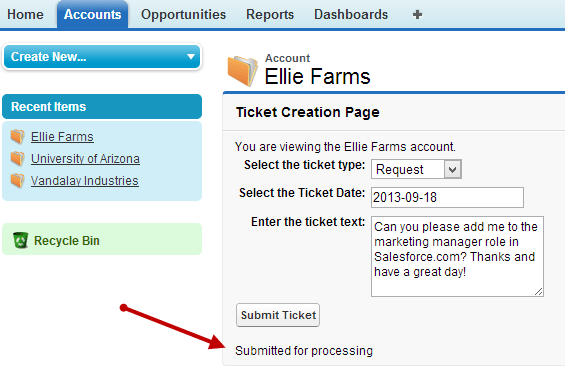
    To get a message into the Topic, I submitted a support ticket from the VisualForce page.

    2013.09.18topic04

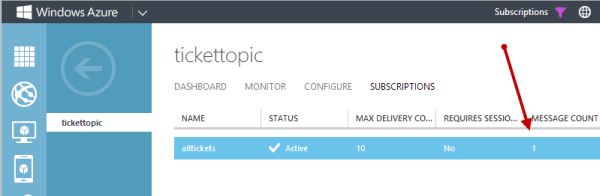
    I immediately switched to the Windows Azure portal to see that a message was now queued up for the Subscription.

    2013.09.18topic05

    How can I retrieve this message? I could use the REST API again, but let’s show how we can mix and match techniques. In this case, I used the Windows Azure SDK for .NET to retrieve and delete a message from the Topic. I also referenced the excellent JSON.NET library to deserialize the JSON object to a .NET object. The tricky part was figuring out the right way to access the message body of the Brokered Message. I wasn’t able to simply pull it out a String value, so I went with a Stream instead. Here’s the complete code block:

               //pull Service Bus connection string from the config file
                string connectionString = ConfigurationManager.AppSettings["Microsoft.ServiceBus.ConnectionString"];
    
                //create a subscriptionclient for interacting with Topic
                SubscriptionClient client = SubscriptionClient.CreateFromConnectionString(connectionString, "tickettopic", "alltickets");
    
                //try and retrieve a message from the Subscription
                BrokeredMessage m = client.Receive();
    
                //if null, don't do anything interesting
                if (null == m)
                {
                    Console.WriteLine("empty");
                }
                else
                {
                    //retrieve and show the Label value of the BrokeredMessage
                    string label = m.Label;
                    Console.WriteLine("Label - " + label);
    
                    //retrieve and show the custom property of the BrokeredMessage
                    string acct = m.Properties["Account"].ToString();
                    Console.WriteLine("Account - " + acct);
    
                    Ticket t;
    
                    //yank the BrokeredMessage body as a Stream
                    using (Stream c = m.GetBody<Stream>())
                    {
                        using (StreamReader sr = new StreamReader(c))
                        {
                            //get a string representation of the stream content
                            string s = sr.ReadToEnd();
    
                            //convert JSON to a typed object (Ticket)
                            t = JsonConvert.DeserializeObject<Ticket>(s);
                            m.Complete();
                        }
                    }
    
                    //show the ticket description
                    Console.WriteLine("Ticket - " + t.Description);
                }
    

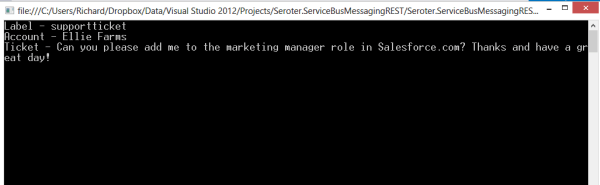
    Pretty simple. Receive the message, extract interesting values (like the “Label” and custom properties), and convert the BrokeredMessage body to a typed object that I could work with. When I ran this bit of code, I saw the values we set in Salesforce.com.

    2013.09.18topic06

    Summary

    The Windows Azure Service Bus brokered messaging services provide a great way to connect distributed systems. The store-and-forward capabilities are key when linking systems that span clouds or link the cloud to an on-premises system. While Microsoft provides a whole host of platform-specific SDKs for interacting with the Service Bus, there are platforms that have to use the REST API instead. Hopefully this post gave you some insight into how to use this API to successfully publish to Service Bus Topics from virtually ANY software platform.

  • Where the heck do I host my … .NET app?

    In this short series of posts, I’m looking at the various options for hosting different types of applications. I first looked at Node.js and its diverse ecosystem of providers, and now I’m looking at where to host your .NET application. Regardless of whether you think .NET is passé or not, the reality is that there are millions upon millions of .NET developers and it’s one of the standard platforms at enterprises worldwide. Obviously Microsoft’s own cloud will be an attractive place to run .NET web applications, but there may be more options than you think.

    I’m not listing a giant matrix of providers, but rather, I’m going briefly describe 6 different .NET PaaS-like providers and assess them against the following criteria:

    • Versions of the .NET framework supported.
    • Supported capabilities.
    • Commitment to the platform.
    • Complementary services offered.
    • Pricing plans.
    • Access to underlying hosting infrastructure.
    • API and tools available.
    • Support material offered.

    The providers below are NOT ranked. I made it alphabetical to ensure no perception of preference.

    Amazon Web Services

    AWS offers a few ways to host .NET applications, including running them raw on Windows EC2 instances, or via Elastic Beanstalk or CloudFormation for a more orchestrated experience. The AWS Toolkit for Visual Studio gives Windows developers an easy experience for provisioning and managing their .NET applications.

    Versions Capabilities Commitment Add’l Services
    Works with .NET 4.5 and below. Load balancing, health monitoring, versioning (w/ Elastic Beanstalk), environmental variables, Auto Scaling Early partner with Microsoft on licensing, and dedicated Windows and .NET Dev Center, and regularly updated SDKs. AWS has a vast array of complementary services including caching, relational and NoSQL databases, queuing, workflow, and more. Note that many are proprietary to AWS.


    Pricing Plans Infrastructure Access API and Tools Support
    There is no charge for the Elastic Beanstalk or CloudFormation for deployment, and you just pay for consumed compute, memory, storage, and bandwidth. While deployment frameworks like Elastic Beanstalk and CloudFormation wrap an application into a container, you can still RDP into the host Windows servers. AWS has both SOAP and REST APIs for the platform, and apps deployed via Elastic Beanstalk or Cloud Formation can be managed by API. SDK for .NET includes full set of typed objects and Visual Studio plugins. Pretty comprehensive documentation, active discussion forums for .NET, and the option of paid support plans.

    AppHarbor

    AppHarbor has been around for a while and offers a .NET only PaaS platform that actually runs on AWS servers.

    Versions Capabilities Commitment Add’l Services
    Supports .NET 4.5 and older versions. Push via Git/Mercurial/
    Subversion/TFS, unit test integration, load balancing, auto scaling, SSL, worker processes, logging, application management console
    Focused solely on .NET and regularly updated blog indicates active evangelism. Offers an add-ons repository where you can add databases, New Relic APM, queuing, search, email, caching, and more to a given app.


    Pricing Plans Infrastructure Access API and Tools Support
    Pricing page shows three different models ranging from a free tier to $199 per month for more compute capacity. No direct virtual machine access. Fairly comprehensive API for deploying and managing apps and environments. Management console for GUI interactions. Offer knowledge base, discussion forums. Also encourage use of StackOverflow.

    Apprenda

    While not a public PaaS provider, you’d be remiss to ignore this innovative, comprehensive private PaaS for .NET applications. Their SaaS-oriented history is evident in their product which excels at making internal .NET applications multi-tenant, metered, billable, and manageable.

    Versions Capabilities Commitment Add’l Services
    Supports .NET 4.5 and some earlier versions. Load balancing, scaling, versioning, failure recovery, authentication and authorization services, logging, metering, account management, worker processes, rich web UI. Very focused on private PaaS and .NET and recognized by Gartner as a leader in this space. Not going anywhere. Can integrate and manage databases, queuing systems.


    Pricing Plans Infrastructure Access API and Tools Support
    They do not publicly list pricing, but offer a free cloud sandbox, downloadable dev version, and a licensed, subscription based product. It manages existing server environments, and makes it simple to remote desktop into a server. Have REST-based management API, and an SDK for using Apprenda services from .NET application. Visual Studio extension for deploying apps. Offers forums, very thorough documentation, and assumingly some specific support plans for paid customers.

    Snapp

    Brand new product who offers an interesting-looking (beta) public PaaS for .NET applications. Launched by longtime .NET hosting provider DiscountASP.net.

    Versions Capabilities Commitment Add’l Services
    Support for .NET 4.5 Deploy via FTP/Git/web/TFS, staging environment baked in, exception management, versioning, reporting Obviously very new, but good backing and sole focus is .NET. None that I can tell.


    Pricing Plans Infrastructure Access API and Tools Support
    Free beta from now until Sept 2013 when pricing will be announced. None mentioned; using Microsoft Anteres (Web Sites for Windows Server) technology. No API or SDKs identified yet. Developer uses their web UI interface. No KB yet, but forums started.

    Tier 3

    Cloud IaaS provider who also offers a Cloud Foundry-based PaaS called Web Fabric that also supports .NET through the open-source Iron Foundry extensions. Anyone can also take Cloud Foundry + Iron Foundry and run their own multi-language private PaaS within their own data center. FULL DISCLOSURE: This is the company I work for!

    Versions Capabilities Commitment Add’l Services
    .NET 4.0 and previous versions. Scaling, logging, load balancing, per-customer isolated environments, multi-language (Ruby, Java, .NET, Node.js, PHP, Python), basic management from web UI. Strong. Founder and CTO of Tier 3 started Iron Foundry project. Comes with databases such as SQL Server, MySQL, Redis, MongoDB, PostgreSQL. Includes RabbitMQ service. New Relic integration included. Connect with IaaS instances.


    Pricing Plans Infrastructure Access API and Tools Support
    Currently costs $360 for software stack plus IaaS charges. No direct access to underlying VMs, but tunneling to database instances supported. Support for Cloud Foundry APIs. Use Cloud Foundry management tools or community ones like Thor. Knowledge base, ticketing system, phone support included.

    Windows Azure

    The big kahuna. The Microsoft cloud is clearly one to consider whenever evaluating destinations for a .NET application. Depending on the use case, applications can be deployed in virtual machines, Cloud Services, or Web Sites. For this assessment, I’m considering Windows Azure Web Sites.

    Versions Capabilities Commitment Add’l Services
    Support for .NET 4.5 and previous versions. Deploy via Git/TFS/Dropbox, load balancing, auto scaling, SSL, logging, multi-language support (.NET, Node.js, PHP, Python), strong management interface. Do I have to really answer this? Obviously very strong. Access to the wide array of Azure services including SQL Server databases, Service Bus (queues/relay/topics), IaaS services, mobile services and much more.


    Pricing Plans Infrastructure Access API and Tools Support
    Pay as you go, with features dependent on whether you’re using free, shared, or standard tier. None for Windows Azure Web Sites. Can switch to Cloud Services if you need VM-level access. Management via REST API, integrated with Visual Studio tools, PowerShell commandlets available, and SDKs available for different languages. Support forums, good documentation and samples, and paid support available.

    Summary

    The .NET cloud hosting ecosystem may be more diverse than you thought! It’s not as broad as with an open-source platform like Node.js, but that’s not really a surprise given the necessity of running .NET on Windows (ignoring Mono for this discussion). These providers run the gamut from straight up PaaS providers like AppHarbor, to ones with an infrastructure-bent like AWS. Apprenda does a nice job with the private space, and Microsoft clearly offers the widest range of options for hosting a .NET application. However, there are plenty of valid reasons to choose one of the other vendors, so keep your options open when assessing the marketplace!

  • Heading to the UK in September to speak on Windows Azure cloud integration

    On September 11th, I’ll be speaking in London at a one-day event hosted by the UK Connected Systems Group. This event focuses on hybrid integration strategies using Windows Azure and the Microsoft platform. I’ll be delivering two sessions: one on cloud integration patterns, and another on integrating with SaaS CRM systems. In both sessions, I’ll be digging into a wide range of technologies and reviewing practical ways to use them to connect various systems together.

    I’m really looking forward to hearing the other speakers at the event! The always-insightful Clemens Vasters will be there, as well as highly respected integration experts Sam Vanhoutte and Mike Stephenson.

    If you’re in the UK, I’d love to see you at the event. There are a fixed number of available tickets, so grab one today!

  • Where the heck do I host my … Node.js app?

    It’s a great time to be a developer. Also a confusing time. We are at a point where there are dozens of legit places that forward-thinking developers can run their apps in the cloud. I’ll be taking a look at a few different types of applications in a brief series of “where the heck do I host my …” blog posts. My goal with this series is to help developers wade through the sea of providers and choose the right one for their situation. In this first one, I’m looking at Node.js. It’s the darling of the startup set and is gaining awareness among a broad of developers. It also may be the single most supported platform in the cloud. Amazing for a technology that didn’t exist just a few years ago (although some saw the impending popularity explosion coming).

    Instead of visualizing the results in a giant matrix that would be impossible to read and suffer from data minimization, I’m going briefly describe 11 different Node providers and assess them against the following criteria:

    • Versions of Node.js supported.
    • Supported capabilities.
    • Commitment to the platform.
    • Complementary services offered.
    • Pricing plans.
    • Access to underlying hosting infrastructure.
    • API and tools available.
    • Support material offered.

    The providers below are NOT ranked. I made it alphabetical to ensure no perception of preference.

    Amazon Web Services

    AWS offers Node.js as part of its Elastic Beanstalk service. Elastic Beanstalk is a container system that makes it straightforward to package applications and push to AWS in a “PaaS-like” way. Developers and administrators can still access underlying virtual machines, but can still act on the application as a whole for actions like version management.

    Versions Capabilities Commitment Add’l Services
    Min version is 0.8.6, max version is 0.8.21 (reference) Load balancing, versioning, WebSockets, health monitoring, Nginx/ Apache support, global data centers Not a core focus, but seem committed to diverse platform support. Good SDK and reasonable documentation. Integration with RDS database, DNS services


    Pricing Plans Infrastructure Access API and Tools Support
    No cost for Beanstalk apps, just costs for consumed resources Can use API, GUI console, CLI, and direct SSH access to VM host. Fairly complete API, Git deploy tools  Active support forums, good documentation, AWS support plans for platform services

    AppFog

    AppFog runs a Cloud Foundry v1 cloud and was recently acquired by Savvis.

    Versions Capabilities Commitment Add’l Services
    Min version is 0.4.12, max version is 0.8.14 (reference) Load balancing, scale up/out, health monitoring, library of add-ons (through partners) Acquired Nodester (Node.js provider) a while back; unclear as to future direction with Savvis Add-ons offered by partners; DB services like MySQL, PostgreSQL, Redis; messaging with RabbitMQ


    Pricing Plans Infrastructure Access API and Tools Support
    Free tier for 2GB of memory and 100MB storage; Up to $720 per month for SSL, greater storage and RAM (reference) No direct infrastructure access, but tunneling supported for access to application services Appears that API is used through CLI only; web console for application management Support forums for all users, ticket-based or dedicated support for paid users

    CloudFoundry.com

    Cloud Foundry, from Pivotal, is an open-source PaaS that can run in the public cloud or on-premises. The open source version (cloudfoundry.org) serves as a baseline for numerous PaaS providers including AppFog, Tier 3, Stackato, and more.

    Versions Capabilities Commitment Add’l Services
    Default is 0.10.x Load balancing, scale up/out, health monitoring, management dashboard Part of many supported platforms, but regular attention paid to Node (e.g. auto-reconfig). DBs like PostgreSQL, MongoDB, Redis and MySQL; App services like RabbitMQ


    Pricing Plans Infrastructure Access API and Tools Support
    Developer edition has free trial, then $0.03/GB/hr for apps plus price per svc. No direct infrastructure access, but support for tunneling into app services.  Use CLI tool (cf), several IDEs, build tool integration, RESTful API Support documents, FAQs, source code links.services provided Pivotal

    dotCloud

    Billed as the first multi-language PaaS, dotCloud is a popular provider that has also open-sourced a majority of its framework.

    Versions Capabilities Commitment Add’l Services
    v0.4.x, v0.6.x, v0.8.x, and defaults to v.0.4.x. (reference) WebSockets, worker services support, troubleshooting logs, load balancing, vertical/horizontal scaling , SSL Not a lot of dedicated tutorials (compared to other languages), but great Node.js support across platform services. Databases like MySQL, MongoDB, and Redis; Solr for search, SMTP, custom service extentions


    Pricing Plans Infrastructure Access API and Tools Support
    No free tier, but pay per stack deployed No direct infrastructure access, but can SSH into services and do Nginx configurations CLI used to manage applications as the API doesn’t appear to be public; web dashboard provides monitoring and some configuration Documentation, Q&A on StackOverflow, and a support email address.

    EngineYard

    Longtime PaaS provider well known for Ruby on Rails support, but also hosts apps written in other languages. Runs on AWS infrastructure.

    Versions Capabilities Commitment Add’l Services
    0.8.11, 0.6.21 (reference) Git integration, WebSockets, access to environmental variables, background jobs, scalability Dedicated resource center for Node, and a fair number of Node-specific blog posts Chef support, dedicated environments, add-ons library, hosted databases for MySQL, Riak, and PostgreSQL.


    Pricing Plans Infrastructure Access API and Tools Support
    500 hours free on signup, then pay as you go. SSH access to instances, databases Offers rich CLI, web console, and API. Basic support through ticketing system (and docs/forums), and paid, premium tier.

    Heroku

    Owned by Salesforce.com, this platform has been around for a while and got started supporting Ruby, and has since added Java, Node.js, Python and others.

    Versions Capabilities Commitment Add’l Services
    From 0.4.7 through 0.10.15 (reference) Git support, application scaling, worker processes, long polling (no WebSockets), SSL Clearly not the top priority, but a decent set of capabilities and services. Heroku Postgres (database-as-a-service), big marketplace of add-ons


    Pricing Plans Infrastructure Access API and Tools Support
    Free starter account, then pay as you go. No raw infrastructure access. CLI tool (called toolbelt), platform API, web console Basic support for all customers via dev center, and paid support options.

    Joyent

    The official corporate sponsor of Node.js, Joyent is an IaaS provider that offers developers Node.js appliances for hosting applications.

    Versions Capabilities Commitment Add’l Services
    0.8.11 by default, but developers can install newer versions (reference). Admin dashboard shows that you can create Node images with 0.10.5, however. Server resizing, scale out, WebSockets Strong commitment to overall platform, less likely to become a managed PaaS provider Memcached support, access to IaaS infrastructure, Manta object storage, application stack templates


    Pricing Plans Infrastructure Access API and Tools Support
    Free trial, and pay as you go Native infrastructure access to servers running Node.js Restful API for accessing cloud servers, web console. Debugging and perf tools for Node.js apps. Self service support for anyone, paid support option

    Modulus.io

    A relative newcomer, these folks are focused solely on Node.js application hosting.

    Versions Capabilities Commitment Add’l Services
    0.2.0 to current release Persistent storage access, WebSockets, SSL, deep statistics, scale out, custom domains, session affinity, Git integration Strong, as this is the only platform the company is supporting. Offers a strong set of functional capabilities. Built in MongoDB integration


    Pricing Plans Infrastructure Access API and Tools Support
    Each scale unit costs $0.02 per hour, with separate costs for file storage and DB usage No direct infrastructure access Web portal or CLI Basic support options include email, Google group, Twitter

    Nodejitsu

    The leading pure-play Node.js hosting provider and a regular contributor of assets to the community.

    Versions Capabilities Commitment Add’l Services
    0.6.x, 0.8.x (reference) GitHub integration, WebSockets, load balancer, sticky sessions, versioning, SSL, custom domains, continuous deployment Extremely strong, and proven over years of existence Free (non high traffic) databases via CouchDB, MongoDB, Redis


    Pricing Plans Infrastructure Access API and Tools Support
    Free trial, free hosting of open source apps, otherwise pay per compute unit No direct infrastructure access Supports CLI, JSON API, web interface IRC, GitHub issues, or email

    OpenShift

    Open source platform-as-a-service from Red Hat that supports Node.js among a number of other platforms.

    Versions Capabilities Commitment Add’l Services
    Supports all available versions (Auto) scale out, Git integration, WebSockets, load balancing Dedicated attention to Node.js, but one of many supported platforms. Databases like MySQL, MongoDB, PostgreSQL; additional tools through partners


    Pricing Plans Infrastructure Access API and Tools Support
    Three free “gears” (scale units), and pay as you go after that SSH access available Offers CLI, web console Provides KB, forums, and a paid support plan

    Windows Azure

    Polyglot cloud offered by Microsoft that has made Node.js a first-class citizen on Windows Azure Web Sites. Can also deploy via Web Roles or on raw VMs.

    Versions Capabilities Commitment Add’l Services
    0.6.17, 0.6.20, and 0.8.4 (reference) Scale out, load balancing, health monitoring, Git/Dropbox integration, SSL, WebSockets Surprisingly robust Node.js development center, and SDK support Integration with Windows Azure SQL Database, Service Bus (messaging), Identity, Mobile Services


    Pricing Plans Infrastructure Access API and Tools Support
    Pay as you go, or 6-12 month plans None for apps deployed to Windows Azure Web Sites IDE integration, REST API,  CLI, PowerShell, web console, SDKs for other Azure services. Forums and knowledge base for general support, paid tier also available

    Summary

    This isn’t a complete list of providers, but hits upon the most popular ones. You’ve really got a choice between IaaS providers with Node.js-friendly features, pure-play Node.js cloud providers, and polyglot clouds who offer Node.js as part of a family of supported platforms. If you’re deploying a standalone Node.js app that doesn’t integrate with much besides a database, then the pure-play vendors like Nodejitsu are a fantastic choice. If you have more complex systems made up of components written in multiple languages, or requiring advanced services like messaging or identity, then some of the polyglot clouds like Windows Azure are a better choice. And if you are trying to compliment your existing cloud infrastructure environment by adding Node.js applications, then using something like AWS is probably your best bet.

    Thoughts? Any favorites out there?

  • 3 Rarely Discussed, But Valuable, Uses for Cloud Object Storage

    I’ve got object storage on the brain. I’m finishing up a new Pluralsight course on distributed systems in AWS that uses Amazon S3 in a few places, and my employer Tier 3 just shipped a new Object Storage service based on Riak CS Enterprise. While many of the most touted uses for cloud-based object storage focus on archived data, backups, media files and the like, there are actually 3 more really helpful uses for cloud-based object storage.

    1. Provided a Degraded “Emergency Mode” Website

    For a while, AWS has supported running static websites in S3. What this means is that customers can serve simple static HTML sites out of S3 buckets. Why might you want to do this? A cool blog post last week pointed out the benefits of having a “hot spare” website running in S3 for when the primary site is flooded with traffic. The corresponding discussion on Hacker News called out a bit more of the logistics. Basically, you can use the AWS Route 53 DNS service to mark the S3-hosted website as a failover that is only used when health checks are failing on the primary site. For cases when a website is overloaded because it gets linked from a high-profile social site, or gets flooded with orders from a popular discount promotion, it’s handy to use a scalable, rock solid object storage platform to host the degraded, simple version of a website.

    2013.07.15os01

    2. Partner file transfer

    Last year I wrote about using Amazon S3 or Windows Azure Blob Storage for managed file transfer. While these are no substitute for enterprise-class MFT products, they are also a heck of a lot cheaper. Why use cloud-based object storage to transfer files between business partners? Simplicity, accessibility, and cost. For plenty of companies, those three words do not describe their existing B2B services that rely on old FTP infrastructure. I’d bet that plenty of rogue/creative employees are leveraging services like Dropbox or Skydrive to transfer files that are too big for email and too urgent to wait for enterprise IT staff to configure FTP. Using something like Amazon S3, you have access to ultra-cheap storage that has extreme high availability and is (securely) accessible by anyone with an internet connection.

    I’ve spent time recently looking at the ecosystem of tools for Amazon S3, and it’s robust! You’ll find free, freemium, and paid software options that let you use a GUI tool (much like an FTP browser) or even mount S3 object storage as a virtual disk on your computer. Check out the really nice solutions from S3 Browser, Cloud Berry, DragonDisk, Bucket Explorer, Cross FTP, Cyberduck, ExpanDrive, and more. And because products like Riak CS support the S3 API, most of these tools “just work” with any S3-compliant service. For instance, I wrote up a Tier 3 knowledge base article on how to use S3 Browser and ExpanDrive with our own Tier 3 Object Storage service.

    3. Bootstrap server builds

    You have many choices when deciding how to deploy cloud servers. You could create templates (or “AMIs” in the AWS world) that have all the software and configurations built in, or you could build up the server on the fly with software and configuration scripts stored elsewhere.

    By using cloud-based object storage as a repository for software and scripts, you don’t have to embed them in the templates and have to maintain them. Instead, you can pass in arguments to the cloud server build process and pull the latest bits from a common repository. Given that you shouldn’t ever embed credentials in a cloud VM (because they can change, among other reasons), you can use this process (and built in identity management integration) to have a cloud server request sensitive content – such as ASP.NET web.config with database connection strings – from object storage and load it onto the machine. This could be part of the provisioning process itself (see example of doing it with AWS EMR clusters) or as a startup script that runs on the server. Either way,  consider using object storage as a centrally accessible source for cloud deployments and upgrades!

    Summary

    Cloud-based object storage has lots of uses besides just stashing database backups and giant video files. The easy access and low cost makes it a viable option for the reasons I’ve outlined here. Any other ways you can imagine using it?

  • TechEd North America Session Recap, Recording Link

    Last week I had the pleasure of visiting New Orleans to present at TechEd North America. My session, Patterns of Cloud Integration, was recorded and is now available on Channel9 for everyone to view.

    I made the bold (or “reckless”, depending on your perspective) decision to show off as many technology demos as possible so that attendees could get a broad view of the options available for integrating applications, data, identity, and networks. Being a Microsoft conference, many of my demonstrations highlighted aspects of the Microsoft product portfolio – including one of the first public demos of Windows Azure BizTalk Services – but I also snuck in a few other technologies as well. My demos included:

    1. [Application Integration] BizTalk Server 2013 calls REST-based Salesforce.com endpoint and authenticates with custom WCF behavior. Secondary demo also showed using SignalR to incrementally return the results of multiple calls to Salesforce.com.
    2. [Application Integration] ASP.NET application running in Windows Azure Web Sites using the Windows Azure Service Bus Relay Service to invoke a web service on my laptop.
    3. [Application Integration] App running in Windows Azure Web Sites sending message to Windows Azure BizTalk Services. Message then dropped to one of three queues that was polled by Node.js application running in CloudFoundry.com.
    4. [Application Integration] App running in Windows Azure Web Sites sending message to Windows Azure Service Bus Topic, and polled by both a Node.js application in CloudFoundry.com, and a BizTalk Server 2013 server on-premises.
    5. [Application/Data Integration] ASP.NET application that uses local SQL Server database but changes connection string (only) to instead point to shared database running in Windows Azure.
    6. [Data Integration] Windows Azure SQL Database replicated to on-premises SQL Server database through the use of Windows Azure SQL Data Sync.
    7. [Data Integration] Account list from Salesforce.com copied into on-premises SQL Server database by running ETL job through the Informatica Cloud.
    8. [Identity Integration] Using a single set of credentials to invoke an on-premises web service from a custom VisualForce page in Salesforce.com. Web service exposed via Windows Azure Service Bus Relay.
    9. [Identity Integration] ASP.NET application running in Windows Azure Web Sites that authenticates users stored in Windows Azure Active Directory.
    10. [Identity Integration] Node.js application running in CloudFoundry.com that authenticates users stored in an on-premises Active Directory that’s running Active Directory Federation Services (AD FS).
    11. [Identity Integration] ASP.NET application that authenticates users via trusted web identity providers (Google, Microsoft, Yahoo) through Windows Azure Access Control Service.
    12. [Network Integration] Using new Windows Azure point-to-site VPN to access Windows Azure Virtual Machines that aren’t exposed to the public internet.

    Against all odds, each of these demos worked fine during the presentation. And I somehow finished with 2 minutes to spare. I’m grateful to see that my speaker scores were in the top 10% of the 350+ breakouts, and hope you’ll take some time to watch it. Feedback welcome!

  • Networking with the Cloud is a Big Deal – Even if You Never Push Production Applications

    I’m flying to New Orleans to speak at TechEd North America, and reading a book called Everything is Obvious (* Once You Know the Answer) and it mentioned the difficulty of making macro-level assumptions based on characteristics applied to a sample population. For some reason my mind jumped to the challenge of truly testing applications using manufactured test cases that may not flex the scalability, availability, and inherent complexity of inter-connected apps. At the same time, I read a blog post from Scott Guthrie today that highlighted the ease by which companies can use Windows Azure to dev/test in the cloud and then run an application on premises, and vice versa. But to truly do dev/test in the cloud for an application that eventually runs on-premises, the development team either needs to entirely replicate the on-premises topology in the cloud, or, take advantage of virtual networking to link their dev/test cloud to the on-premises network.

    In my career, it’s been hard to acquire dev/test environments that were identical clones of production. It’s happened, but it often takes a while and making subsequent changes to resources is not trivial or without heartache. This is one reason why cloud infrastructure is so awesome. Need to add more capacity to server? Go for it. Want to triple the number of web servers to do a crazy load test for an hour? Have at it. But until recently, the cloud portion of the application was mostly distinct from on-premises resources. You weren’t using the same Active Directory, file system, shared databases, integration bus, or web services. You could clone them in the cloud, or simply stub them out, but then the cloud app wasn’t a realistic mimic of what was going to eventually run on-premises. Now, with all these advances in virtual networking in the cloud, you can actually build and test applications in the cloud and STILL take advantage of the rich system landscape sitting inside your firewall.

    One of my demos for TechEd shows off Windows Azure Virtual Networking and I was able to see first-hand how straightforward it was to use it. With Windows Azure Virtual Networking, I can do point-to-site connectivity (where I run a VPN on my machine and connect to an entire Windows Azure network of servers), or site-to-site connectivity where a persistent connection is established between an on-premises network and a cloud network. For even more advanced scenarios (not yet offered by Windows Azure, but offered by my company, Tier 3), you go a step further and do “direct connect” scenarios where physical cages are connected, or extensions are made to an existing WAN MPLS mesh. These options make it possible for a developer to run apps in the cloud (whether they are web apps or entire integration servers) and make them look more like apps that will eventually run in their datacenter. Regardless of what technology/provider you use – and whether or not you ever plan on pushing production apps to the cloud – it seems worthwhile to use cloud networking to give your developers a more realistic working environment. At TechEd in New Orleans at want to see this demonstrated in person? Come to my session on Wednesday! For those not here in person, you should be able to watch the session online soon!

  • Walkthrough of New Windows Azure BizTalk Services

    The Windows Azure EAI Bridges are dead. Long live BizTalk Services! Initially released last year as a “lab” project, the Service Bus EAI Bridges were a technology for connecting cloud and on-premises endpoints through an Azure-hosted broker. This technology has been rebranded (“Windows Azure BizTalk Services”) and upgraded and is now available as a public preview. In this blog post, I’ll give you a quick tour around the developer experience.

    First off, what actually *is* Windows Azure BizTalk Services (WABS)? Is it BizTalk Server running in the cloud? Does it run on-premises? Check out the announcement blog posts from the Windows Azure and BizTalk teams, respectively, for more. But basically, it’s separate technology from BizTalk Server, but meant to be highly complementary. Even though It uses a few of the same types of artifacts such as schemas and maps, they aren’t interchangeable. For example, WABS maps don’t run in BizTalk Server, and vice versa. Also, there’s no concept of long-running workflow (i.e. orchestration), and none of the value-added services that BizTalk Server provides (e.g. Rules Engine, BAM). All that said, this is still an important technology as it makes it quick and easy to connect a variety of endpoints regardless of location. It’s a powerful way to expose line-of-business apps to cloud systems, and Windows Azure hosting model makes it possible to rapidly scale solutions. Check out the pricing FAQ page for more details on the scaling functionality, and the reasonable pricing.

    Let’s get started. When you install the preview components, you’ll get a new project type in Visual Studio 2012.

    2013.06.03wabs01

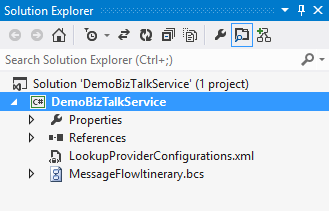
    Each WABS project can contain a single “bridge configuration” file. This file defines the flow of data between source and destination endpoints. Once you have a WABS project, you can add XML schemas, flat-file schemas, and maps.

    2013.06.03wabs02

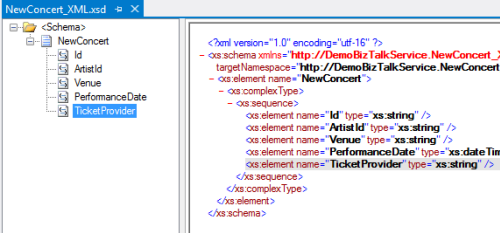
    The WABS Schema Editor looks identical to the BizTalk Server Schema Editor and lets you define XML or flat file message structures. While the right-click menu promises the ability to generate and validate file instances, my pre-preview version of the bits only let me validate messages, not generate sample ones.

    2013.06.03wabs03

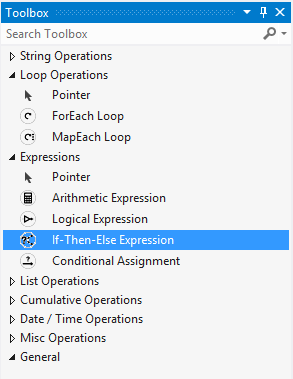
    The WABS schema mapper is very different from the BizTalk Mapper. And that’s a good thing. The UI has subtle alterations, but the more important change is in the palette of available “functoids” (components for manipulating data). First, you’ll see more sophisticated looping and logical expression handling. This include a ForEach Loop and finally, an If-Then-Else Expression option.

    2013.06.03wabs04

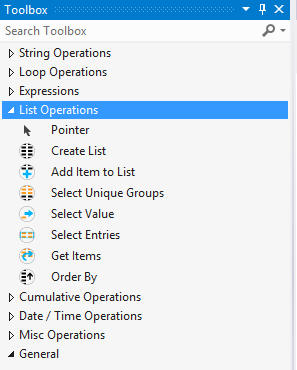
    The concept of “lists” are also entirely new. You can populate, persist, and query lists of data and create powerfully complex mappings between structures.

    2013.06.03wabs05

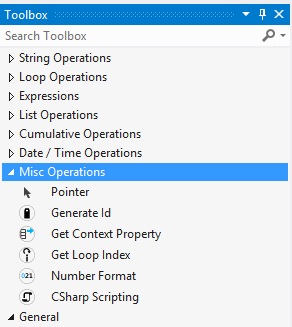
    Finally, there are some “miscellaneous” operations that introduce small – but helpful – capabilities. These functoids let you grab a property from the message’s context (metadata), generate a random ID, and even embed custom C# code into a map. I seem to recall that custom code was excluded from the EAI Bridges preview, and many folks expressed concern that this would limit the usefulness of these maps for tricky, real-world scenarios. Now, it looks like this is the most powerful data mapping tool that Microsoft has ever produced. I suspect that an entire book could be written about how to properly use this Mapper.

    2013.06.03wabs06

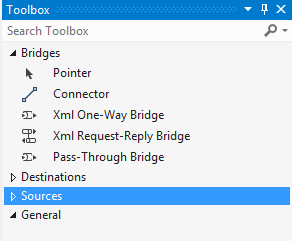
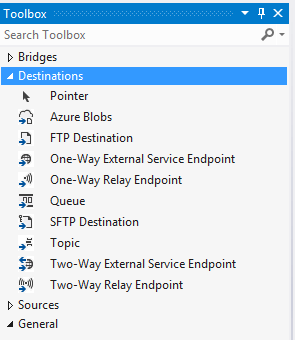
    Next up, let’s take a look at the bridge configuration and what source and destination endpoints are supported. The toolbox for the bridge configuration file shows three different types of bridges: XML One-Way Bridge, XML Request-Reply Bridge, and Pass-Through Bridge.

    2013.06.03wabs07

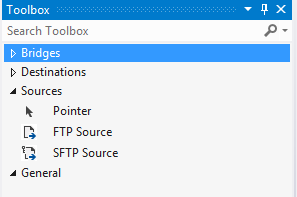
    You’d use each depending on whether you were doing synchronous or asynchronous XML messaging, or any flat file transmission. To get data into a bridge, today you can use HTTP, FTP, or SFTP. Notice that “HTTP” doesn’t show up in that list as each bridge automatically has a Windows Azure ACS-secured HTTP endpoint associated with it.

    2013.06.03wabs08

    While the currently available set of sources is a bit thin, the destination options are solid. You can consume web services, Service Bus Relay endpoints, Service Bus Queues / Topics, Windows Azure Blobs, FTP and SFTP endpoints.

    2013.06.03wabs09

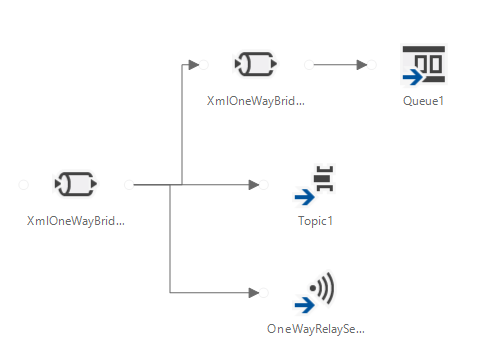
    A given bridge configuration file will often contain a mix of these endpoints. For instance, consider a case where you want to route a message to one of three different endpoints based on some value in the message itself. Also imagine wanting to do a special transformation heading to one endpoint, and not the others. In the configuration below, I’m chaining together XML bridges to route to the Service Bus Queue, and directly routing to either the Service Bus Topic or Relay Service based on the message content.

    2013.06.03wabs10

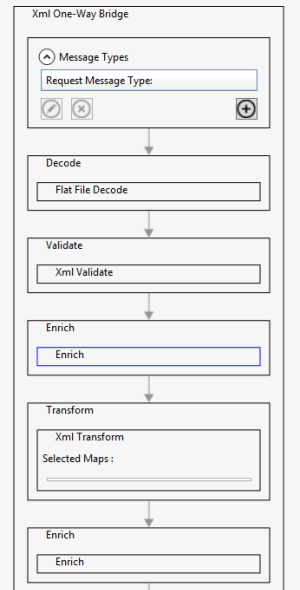
    An individual bridge has a number of stages that a message passes through. Double-clicking a bridge reveals steps for identifying, decoding, validating, enriching, encoding, and transforming messages.

    2013.06.03wabs11

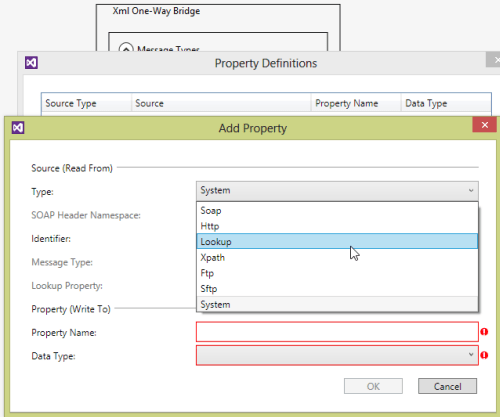
    An individual step exposes relevant configuration properties. For instance, the “Enrich” stage of a bridge lets you choose a way to populate data in the outbound message’s metadata (context) properties. Options include pulling values from the source message’s SOAP or HTTP headers, XPath against the source message body, lookup to a Windows Azure SQL database, and more.

    2013.06.03wabs12

    When a bridge configuration is completed and ready for deployment, simply right-click the Visual Studio project and choose Deploy and fill in valid credentials for the WABS preview.

    Wrap Up

    This is definitely preview software as there are a number of things we’ll likely see added before it’s ready for production use (e.g. enhanced management). However, it’s a good time to start poking around and getting a feel for when you might use this. On a broad scale, you COULD choose to use this instead of something like MuleSoft’s CloudHub to do pure cloud-to-cloud integration, but WABS is drastically less mature than what MuleSoft  has to offer. Moving forward, it’d be great to see a durable workflow component added, additional sources, and Microsoft really needs to start baking JSON support into more products from the get-go.

    What do you think? Plan on trying this out? Have ideas for where you could use it?