Category: WCF/WF

  • Interview Series: Four Questions With … Udi Dahan

    Welcome to the 19th interview in my series of chats with thought leaders in the “connected technologies” space.  This month we have the pleasure of chatting with Udi Dahan.  Udi is a well-known consultant, blogger, Microsoft MVP, author, trainer and lead developer of the nServiceBus product.  You’ll find Udi’s articles all over the web in places such as MSDN Magazine, Microsoft Architecture Journal, InfoQ, and Ladies Home Journal.  Ok, I made up the last one.

    Let’s see what Udi has to say.

    Q: Tell us a bit about why started the nServiceBus project, what gaps that it fills for architects/developers, and where you see it going in the future.

    A: Back in the early 2000s I was working on large-scale distributed .NET projects and had learned the hard way that synchronous request/response web services don’t work well in that context. After seeing how these kinds of systems were built on other platforms, I started looking at queues – specifically MSMQ, which was available on all versions of Windows. After using MSMQ on one project and seeing how well that worked, I started reusing my MSMQ libraries on more projects, cleaning them up, making them more generic. By 2004 all of the difficult transaction, threading, and fault-tolerance capabilities were in place. Around that time, the API started to change to be more framework-like – it called your code, rather than your code calling a library. By 2005, most of my clients were using it. In 2006 I finally got the authorization I needed to make it fully open source.

    In short, I built it because I needed it and there wasn’t a good alternative available at the time.

    The gap that NServiceBus fill for developers and architects is most prominently its support for publish/subscribe communication – which to this day isn’t available in WCF, SQL Server Service Broker, or BizTalk. Although BizTalk does have distribution list capabilities, it doesn’t allow for transparent addition of new subscribers – a very important feature when looking at version 2, 3, and onward of a system.

    Another important property of NServiceBus that isn’t available with WCF/WF Durable Services is its “fault-tolerance by default” behaviors. When designing a WF workflow, it is critical to remember to perform all Receive activities within a transaction, and that all other activities processing that message stay within that scope – especially send activities, otherwise one partner may receive a call from our service but others may not – resulting in global inconsistency. If a developer accidentally drags an activity out of the surrounding scope, everything continues to compile and run, even though the system is no longer fault tolerant. With NServiceBus, you can’t make those kinds of mistakes because of how the transactions are handled by the infrastructure and that all messaging is enlisted into the same transaction.

    There are many other smaller features in NServiceBus which make it much more pleasurable to work with than the alternatives as well as a custom unit-testing API that makes testing service layers and long-running processes a breeze.

    Going forward, NServiceBus will continue to simplify enterprise development and take that model to the cloud by providing Azure implementations of its underlying components. Developers will then have a unified development model both for on-premise and cloud systems.

    Q: From your experiences doing training, consulting and speaking, what industries have you found to be the most forward-thinking on technology (e.g. embracing new technologies, using paradigms like EDA), and which industries are the most conservative?  What do you think the reasons for this are?

    A: I’ve found that it’s not about industries but people. I’ve met forward-thinking people in conservative oil and gas companies and very conservative people in internet startups, and of course, vice-versa. The higher-up these forward-thinking people are in their organization, the more able they are to effect change. At that point, it becomes all personalities and politics and my job becomes more about organizational psychology than technology.

    Q: Where do you see the value (if any) in modeling during the application lifecycle?  Did you buy into the initial Microsoft Oslo vision of the “model” being central to the envisioning, design, build and operations of an application?  What’s your preferential tool for building models (e.g. UML, PowerPoint, paper napkin)?

    A: For this, allow me to quote George E. P. Box: “Essentially, all models are wrong, but some are useful.”

    My position on models is similar to Eisenhower’s position on plans – while I wouldn’t go so far as to say “models are useless but modeling is indispensable”, I would put much more weight on the modeling activity (and many of its social aspects) than on the resulting model. The success of many projects hinges on building that shared vocabulary – not only within the development group, but across groups like business, dev, test, operations, and others; what is known in DDD terms as the “ubiquitous language”.

    I’m not a fan of “executable pictures” and am more in the “UML as a sketch” camp so I can’t say that I found the initial Microsoft Oslo vision very compelling.

    Personally, I like Sparx Systems tool – Enterprise Architect. I find that it gives me the right balance of freedom and formality in working with technical people.

    That being said, when I need to communicate important aspects of the various models to people not involved in the modeling effort, I switch to PowerPoint where I find its animation capabilities very useful.

    Q [stupid question]: April Fool’s Day is upon us.  This gives us techies a chance to mess with our colleagues in relatively non-destructive ways.  I’m a fan of pranks like:

    Tell us Udi, what sort of geek pranks you’d find funny on April Fool’s Day.

    A: This reminds me why I always lock my machine when I’m not at my desk 🙂

    I hadn’t heard of switching the handle of the refrigerator before so, for sheer applicability to non-geeks as well, I’d vote for that one.

    The first lesson I learned as a consultant was to lock my laptop when I left it alone.  Not because of data theft, but because my co-workers were monkeys.  All it took to teach me this point was coming back to my desk one day and finding that my browser home page was reset and displaying MenWhoLookLikeKennyRogers.com.  Live and learn.

    Thanks Udi for your insight.

    Share

  • Microsoft’s Strategy of “Framework First”, “Host Second”

    I’ll say up front that this post is more of just thoughts in my head vs. any deep insight. 
    It hit me on Friday (as a result of a discussion list I’m on) that many of the recent additions to Microsoft’s application platform portfolio are first released as frameworks, and only later are afforded a proper hosting environment.

    We saw this a few years ago with Windows Workflow, and to a lesser extent, Windows Communication Foundation.  In both cases, nearly all demonstration showed a form of self-hosting, primarily because that was the most flexible development choice you had.  However, it was also the most work and least enterprise-ready choice you had.  With WCF, you could host in IIS, but it hardly provided any rich configuration or management of services.

    Here in 2010, we finally get a legitimate host for both WCF and WF in the form of the Windows Server AppFabric (“Dublin”) environment.  This should make the story for WF and WCF significantly more compelling. But we’re in the midst of two new platform technologies from Microsoft that also have less than stellar “host” providers.  With the Windows Azure AppFabric Service Bus, you can host on-premise endpoints and enable a secure, cloud-based relay for external consumers.  Really great stuff.  But, so far, there is no fantastic story for hosting these Service Bus endpoints on-premise.  It’s my understanding that the IIS story is incomplete, so you either self-host it (Windows Service, etc) or even use something like BizTalk to host it. 

    We also have StreamInsight about to come out.  This is Microsoft’s first foray into the Complex Event Processing space, and StreamInsight looks promising.  But in reality, you’re getting a toolkit and engine.  There’s no story (yet) around a centrally managed, load balanced, highly available enterprise server to host the engine and its queries.  Or at least I haven’t seen it.  Maybe I missed it.

    I wonder what this will do to adoption of these two new technologies.  Most anyone will admit that uptake of WCF and WF has been slow (but steady), and that can’t be entirely attributed to the hosting story, but I’m sure in WF’s case, it didn’t help.

    I can partially understand the Microsoft strategy here.  If the underlying technology isn’t fully baked, having a kick-ass host doesn’t help much.  But, you could also stagger the release of capabilities in exchange for having day-1 access to an enterprise-ready container.

    Do you think that you’d be less likely to deploy StreamInsight or Azure Service Bus endpoints without a fully-functional vendor-provided hosting environment?

    Share

  • SIMPLER Way of Hosting the WCF 4.0 Routing Service in IIS7

    A few months back I was screwing around with the WCF Routing Service and trying something besides the “Hello World” demos that always used self-hosted versions of this new .NET 4.0 WCF capability. In my earlier post, I showed how to get the Routing Service hosted in IIS.  However, I did it in a round-about way since that was only way I could get it working.  Well, I have since learned how to do this the EASY way, and figured that I’d share that. As a quick refresher, the WCF Routing Service is a new feature that provides a very simple front end service broker which accepts inbound messages and distributes them to particular endpoints based on specific filter criteria.  It leverages your standard content-based routing pattern, and is not a pub/sub mechanism.  Rather, it should be used when you want to send an inbound message to one of many possible destination endpoints. I’ll walk through a full solution scenario here.  We start with a standard WCF contract that will be shared across the services sitting behind the Router service.  Now you don’t HAVE to use the same contract for your services, but if not, you’ll need to transform the content into the format expected by each downstream service, or, simply accept untyped content into the service.  Your choice.  For this scenario, I’m using the Routing Service to accept ticket orders, and based on the type of event that the ticket applies to, routes it to the right ticket reservation system.  My common contract looks like this:

    [ServiceContract]
        public interface ITicket
        {
            [OperationContract]
            string BuyTicket(TicketOrder order);
        }
    
        [DataContract]
        public class TicketOrder
        {
            [DataMember]
            public string EventId { get; set; }
            [DataMember]
            public string EventType { get; set; }
            [DataMember]
            public int CustomerId { get; set; }
            [DataMember]
            public string PaymentMethod { get; set; }
            [DataMember]
            public int Quantity { get; set; }
            [DataMember]
            public decimal Discount { get; set; }
        }
    

    I then added two WCF Service web projects to my solution.  They each reference the library holding the previously defined contract, and implement the logic associated with their particular ticket type.  Nothing earth-rattling here:

    public string BuyTicket(TicketOrder order)
        {
            return "Sports - " + System.Guid.NewGuid().ToString();
        }
    

    I did not touch the web.config files of either service and am leveraging the WCF 4.0 capability to have simplified configuration. This means that if you don’t add anything to your web.config, some default behaviors and bindings are used. I then deployed each service to my IIS 7 environment and tested each one using the handy WCF Test Client tool.  As I would hope for, calling my service yields the expected result: 2010.3.9router01 Ok, so now I have two distinct services which add orders for a particular type of event.  Now, I want to expose a single external endpoint by which systems can place orders.  I don’t want my service consumers to have to know my back end order processing system URLs, and would rather they have a single abstract endpoint which acts as a broker and routes messages around to their appropriate target. So, I created a new WCF Service web application.  At this point, just for reference I have four projects in my solution. 2010.3.9router02 Alrighty then.  First off, I removed the interface and service implementation files that automatically get added as part of this project type.  We don’t need them.  We are going to reference the existing service type (Routing Service) provided by WCF 4.0.  Next, I went into the .svc file and changed the directive to point to the FULLY QUALIFIED path of the Routing Service.  I didn’t capitalize those words in the last sentence just because I wanted to be annoying, but rather, because this is what threw me off when I first tried this back in December.

    <%@ ServiceHost Language="C#" Debug="true" Service="System.ServiceModel.Routing.RoutingService,System.ServiceModel.Routing, version=4.0.0.0, Culture=neutral,PublicKeyToken=31bf3856ad364e35"  %>
    

    Now all that’s left is the web.config file.  The configuration file needs a reference to our service, a particular behavior, and the Router specific settings. I first added my client endpoints:


    Then I added the new “routing” configuration section.  Here I created a namespace alias and then set each Xpath filter based on the “EventType” node in the inbound message.  Finally, I linked the filter to the appropriate endpoint that will be called based on a matched filter.


    After that, I added a new WCF behavior which leverages the “routing” behavior and points to our new filter table.


    Finally, I’ve got my service entry which uses the above behavior and defines which contract we wish to use.  In my case, I have request/reply operations, so I leveraged the corresponding contract in the Routing service.


    After deploying the routing service project to IIS, we’re ready to test.  What’s the easiest way to test this bad boy?  Well, we can take our previous WCF Test Client entry, and edit it’s WCF configuration.  This way, we get the strong typing on the data entry, but ACTUALLY point to the Routing service URL. 2010.3.9router03 After the change is made, we can view the Configuration file associated with the WCF Test Client and see that our endpoint now refers to the Routing service. 2010.3.9router04 Coolio.  Now, we can test.  So I invoked the BuyTickets operation and first entered a “Sports” type ticket. 2010.3.9router05 Then, ALL I did was switch the EventType from “Sports” to “Concert” and the Routing service should now call the service which fronts the concert reservation service. 2010.3.9router06 There you have it.  What’s nice here, is that if I added a new type of ticket to order, I could simply add a new back end service, update my Routing service filter table, and my service consumers don’t have to make a single change.  Ah, the power of loose coupling. You all put up with these types of posts from me even though I almost never share my source code.  Well, your patience has paid off.  You can grab the full source of the project here.  Knock yourselves out. Share

  • Building WCF Workflow Services and Hosting in AppFabric

    Yesterday I showed how to deploy the new WCF 4.0 Routing Service within IIS 7.  Today, I’m looking at how to take one of those underlying services we built and consume it from a WCF Workflow Service hosted in AppFabric.

    2009.12.17fwf08

    In the previous post, I created a simple WCF service called “HelloServiceMan” which takes a name and spits back a greeting.  In this post, I will use this service completely illogically and only to prove a point.  Yes, I’m too lazy right now to create a new service which creates a more realistic scenario.  What I DO want is to call into my workflow, immediately send a response back, and then go about calling my existing web service.  I’m doing this to show that if my downstream service was down, my workflow (hosted with AppFabric) can be suspended, and then resume once my downstream service comes back online.  Got it?  Cool.

    First, we need a WCF Workflow Service app.  In VS 2010, I pick this from the “Workflow” section.

    2009.12.17fwf01

    I then added a single class file to this project which holds data contracts for the input and output message of the workflow service.

    [DataContract(Namespace="https://seroter.com/Contracts")]
       public class NewOrderRequest
       {
           [DataMember]
           public string ProductId { get; set; }
           [DataMember]
           public string CustomerName { get; set; }
       }
    
       [DataContract(Namespace = "https://seroter.com/Contracts")]
       public class OrderAckResponse
       {
           [DataMember]
           public string OrderId { get; set; }
       }
    

    Next I added a Service Reference to my existing WCF service.  This is the one that I plan to call from within the workflow service.  Once I have my reference defined, and build my project, a custom Workflow Activity should get added to my Toolbox.

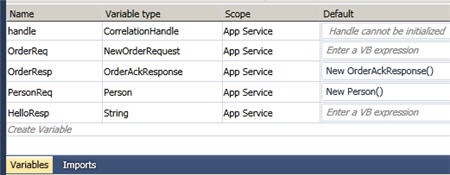
    If you’re familiar with building BizTalk orchestrations, then working with the Windows Workflow design interface is fairly intuitive.  Much like an orchestration, the first thing I do here is define my variables.  This includes the default “correlation handle” object which was already there, and then variables representing the input/output of my workflow service, and the request/response messages of my service reference.

    2009.12.17fwf02

    Notice that for variables which aren’t explicitly instantiated by receiving messages into the workflow (i.e. initial received message, response from service call) have explicit instantiation in the “Default” column.

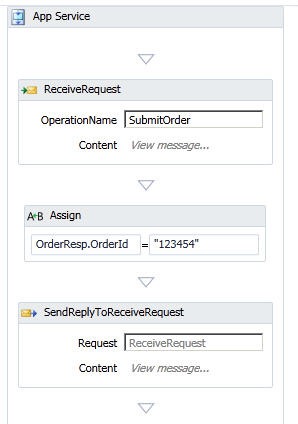
    Next I sketched out the first part of the workflow which receives the inbound “order request” (defined in the above data contract), sets a tracking number and returns that value to the caller.  Think of when you order a package from an online merchant and they immediately ship you a tracking code while starting their order processing behind the scenes.

    2009.12.17fwf03

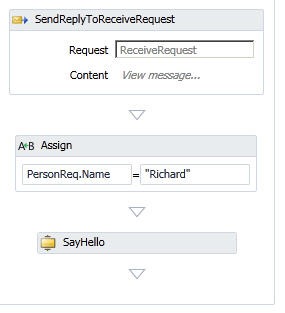
    Next I call my referenced service by first setting the input variable attribute value, and then using the custom Workflow Activity shape which encapsulates the service request and response (once again, realize that this content of this solution makes no sense, but the principles do).

    2009.12.17fwf04

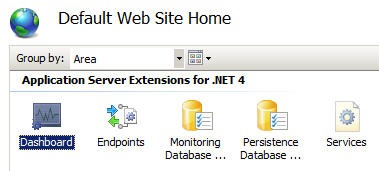
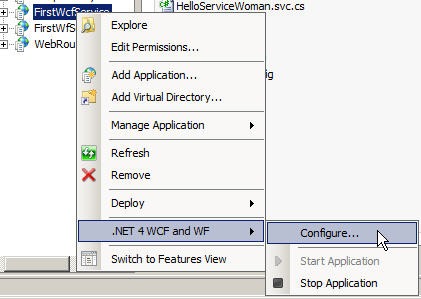
    After building the solution successfully, we can get this deployed to IIS 7 and running in the AppFabric.  After creating an IIS web application which points to this solution, we can right click our new application and choose .NET 4 WCF and WF and then Configure.

    2009.12.17fwf05

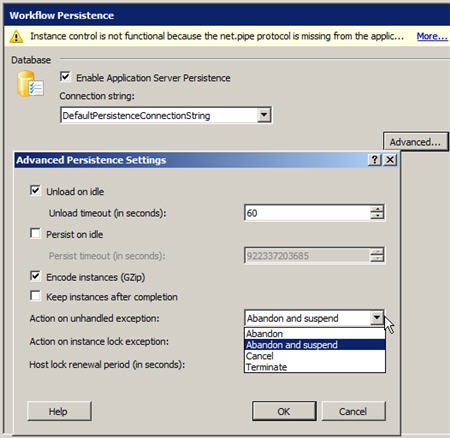
    On the Workflow Persistence tab, I clicked the Advanced button and made sure that on unhandled errors that I abandon and suspended.

    2009.12.17fwf06

    If you are particularly astute, you may notice at the top of the previous image that there’s an error complaining about the net.pipe protocol missing from my Enabled Protocols.  HOWEVER, there is a bug/feature in this current release where you should ignore this and ONLY add net.pipe to the Enabled Protocols at the root web site.  If you put it down at the application level, you get bad things.

    So, now I can browse to my workflow service and see a valid service endpoint.

    2009.12.17fwf07

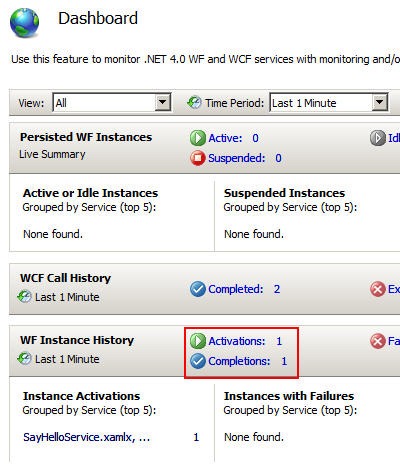
    I can call this service from the WCF Test Client, and hopefully I not only get back the immediate response, but also see a successfully completed workflow in the AppFabric console. Note that if you don’t see things showing up in your AppFabric console, check your list of Windows Services and make the sure the Application Server Event Collector is started.

    2009.12.17fwf09

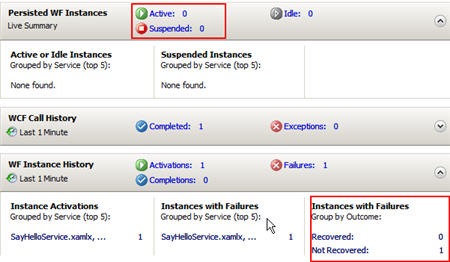
    Now, let’s turn off the WCF service application so that our workflow service can’t complete successfully.  After calling the service again, I should still get an immediate response back from my workflow since the response to the caller happens BEFORE the call to the downstream service.  If I check the AppFabric console now, I see this:

    2009.12.17fwf11

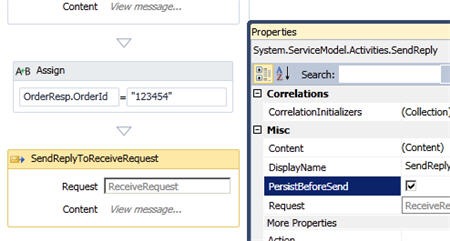
    What the what??  The workflow didn’t suspend, and it’s in a non-recoverable state.  That’s not good for anybody.  What’s missing is that I never injected a persistence point into my workflow, so it doesn’t have a place to pick up and resume.  The quickest way to fix this is to go back to my workflow, and on the response to the initial request, set the PersistBeforeSend flag so that the workflow forces a persistence point.

    2009.12.17fwf12

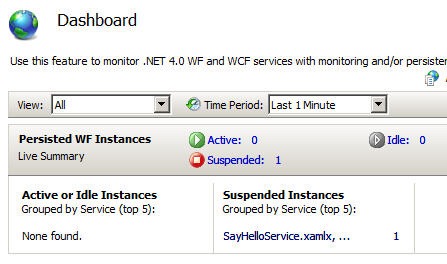
    After rebuilding the service, and once again shutting down the downstream service, I called my workflow service and got this in my AppFabric console:

    2009.12.17fwf13

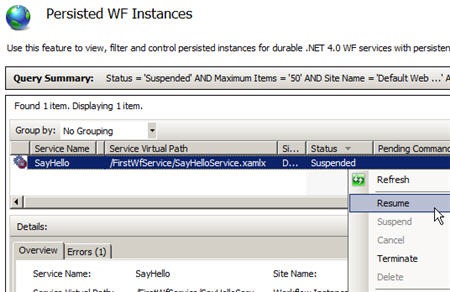
    Score!  I now have a suspended instance.  After starting my downstream service back up, I can select my suspended instance and resume it.

    2009.12.17fwf14

    After resuming the instance, it disappears and goes under the “Completed Instances” bucket.

    There you go.  For some reason, I just couldn’t find many examples at all of someone building/hosting/suspending WF 4.0 workflow services.  I know it’s new stuff, but I would have thought there was more out there.  Either way, I learned a few things and now that I’ve done it, it seems simple.  A few days ago, not so much.

  • Hosting the WCF 4.0 Routing Service in IIS 7

    I recently had occasion to explore the new WCF 4.0 Routing Service and thought I’d share how I set up a simple solution that demonstrated its capabilities and highlights how to host it within IIS.

    [UPDATE: I’ve got a simpler way to do this in a later post that you can find here.]

    This new built-in service allows us to put a simple broker in front of our services and route inbound messages based on content, headers, and more.  Problem for me was that every demo I’ve seen of this thing (from PDC, and other places) show simple console hosts for the service and not a more realistic web server host.  This is where I come in.

    First off, I need to construct the services that will be fronted by the Routing Service.  In this simple case, I have two services that implement the same contract.  In essence, these services take a name and gender, and spit back the appropriate “hello.”  The service and data contracts look like this:

    [ServiceContract]
        public interface IHelloService
        {
            [OperationContract]
            string SayHello(Person p);
        }
    
        [DataContract]
        public class Person
        {
            private string name;
            private string gender;
    
            [DataMember]
            public string Name
            {
                get { return name; }
                set { name = value; }
            }
    
            [DataMember]
            public string Gender
            {
                get { return gender; }
                set { gender = value; }
            }
        }
    

    I then have a “HelloServiceMan” service and “HelloServiceWoman” service which implement this contract.

    public class HelloServiceMan : IHelloService
        {
    
            public string SayHello(Person p)
            {
                return "Hey Mr. " + p.Name;
            }
        }
    

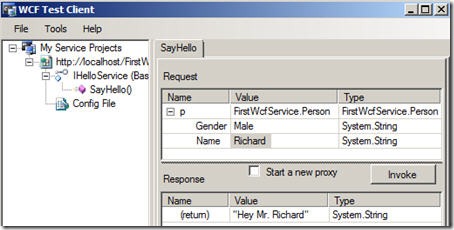
    I’ve leveraged the new default binding capabilities in WCF 4.0 and left my web.config file virtually empty.  After deploying these services to IIS 7.0, I can use the WCF Test Client to prove that the service performs as expected.

    2009.12.16router01

    Nice.  So now I can add the Routing Service.  Now, what initially perplexed me is that since the Routing Service is self contained, you don’t really have a *.svc file, but then I didn’t know how to build a web project that could host the service.  Thanks to Stephen Thomas (who got code from the great Christian Weyer) I got things working.

    You need three total components to get this going.  First, I created a new, Empty ASP.NET Web Application project and added a .NET class file.  This class defines a new ServiceHostFactory class that the Routing Service will use.  That class looks like this:

    class CustomServiceHostFactory : ServiceHostFactory
    {
        protected override System.ServiceModel.ServiceHost CreateServiceHost(System.Type serviceType, System.Uri[] baseAddresses)
        {
            var host = base.CreateServiceHost(serviceType, baseAddresses);
    
            var aspnet = host.Description.Behaviors.Find<AspNetCompatibilityRequirementsAttribute>();
    
            if (aspnet == null)
            {
                aspnet = new AspNetCompatibilityRequirementsAttribute();
                host.Description.Behaviors.Add(aspnet);
            }
    
            aspnet.RequirementsMode = AspNetCompatibilityRequirementsMode.Allowed;
    
            return host;
        }
    }
    

    Here comes the tricky, but totally logical part.  How do you get the WCF Routing Service instantiated?  Add a global.asax file to the project and add the following code to the Application_Start method:

    using System.ServiceModel.Activation;
    using System.ServiceModel.Routing;
    using System.Web.Routing;
    
    namespace WebRoutingService
    {
        public class Global : System.Web.HttpApplication
        {
    
            protected void Application_Start(object sender, EventArgs e)
            {
                RouteTable.Routes.Add(
                   new ServiceRoute("router", new CustomServiceHostFactory(),
                       typeof(RoutingService)));
            }
    

    Here we stand up the Routing Service with a “router” URL extension.  Nice.  The final piece is the web.config file.  Here is where you actually define the Routing Service relationships and filters.  Within the system.serviceModel tags, I defined my client endpoints that the router can call.

    <client>
          <endpoint address="http://localhost/FirstWcfService/HelloServiceMan.svc"
              binding="basicHttpBinding" bindingConfiguration="" contract="*"
              name="HelloMan" />
          <endpoint address="http://localhost/FirstWcfService/HelloServiceWoman.svc"
              binding="basicHttpBinding" bindingConfiguration="" contract="*"
              name="HelloWoman" />
        </client>
    

    The Routing Service ASP.NET project does NOT have any references to the actual endpoint services, and you can see here that I ignore the implementation contract.  The router knows as little as possible about the actual endpoints besides the binding and address.

    Next we have the brand new “routing” configuration type which identifies the filters used to route the service messages.

    <routing>
          <namespaceTable>
            <add prefix="custom" namespace="http://schemas.datacontract.org/2004/07/FirstWcfService"/>
          </namespaceTable>
          <filters>
            <filter name="ManFilter" filterType="XPath" filterData="//custom:Gender = 'Male'"/>
            <filter name="WomanFilter" filterType="XPath" filterData="//custom:Gender = 'Female'"/>
          </filters>
          <filterTables>
            <filterTable name="filterTable1">
              <add filterName="ManFilter" endpointName="HelloMan" priority="0"/>
              <add filterName="WomanFilter" endpointName="HelloWoman" priority="0"/>
            </filterTable>
          </filterTables>
        </routing>
    

    I first added a namespace prefix table, then have a filter collection which, in this case, uses XPath against the inbound message to determine the gender value within the request.  Note that if you want to use a comparison operation such as “<” or “>”, you’ll have to escape it in this string to “&gt;” or “&lt;”.  Finally, I have a filter table which maps a particular filter to which endpoint should be applied.

    Finally, I have the service definition and behavior definition.  These both leverage objects and configuration items new to WCF 4.0.  Notice that I’m using the “IRequestReplyRouter” contract since I have a request/reply service being fronted by the Routing Service.

    <services>
          <service behaviorConfiguration="RoutingBehavior" name="System.ServiceModel.Routing.RoutingService">
            <endpoint address="" binding="basicHttpBinding" bindingConfiguration=""
              name="RouterEndpoint1" contract="System.ServiceModel.Routing.IRequestReplyRouter" />
          </service>
        </services>
        <behaviors>
          <serviceBehaviors>
            <behavior name="RoutingBehavior">
              <routing routeOnHeadersOnly="false" filterTableName="filterTable1" />
              <serviceDebug includeExceptionDetailInFaults="true"/>
              <serviceMetadata httpGetEnabled="true" />
            </behavior>
          </serviceBehaviors>
        </behaviors>
    

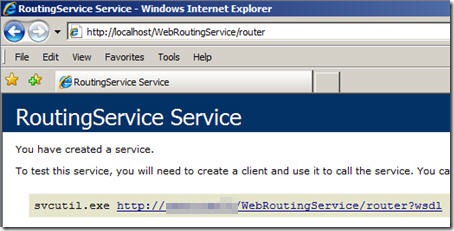
    Once we build and deploy the service to IIS 7, we can browse it.  Recall that in our global.asax file we defined a URL suffix named “router.”  So, to hit the service, we load our web application and append “router.”

    2009.12.16router02

    As you’d expect, this WSDL tells us virtually nothing about what data this service accepts.  What you can do from this point is build a service client which points at one of the actual services (e.g. “HelloServiceMan”), but then switch the URL address in the application’s configuration file.  This way, you can still import all the necessary contract definitions, while then switching to leverage the content-based routing service.

    So, the Routing Service is pretty cool.  It does a light-weight version of what BizTalk does for routing.  I haven’t played with composite filters and don’t even know if it’s possible to have multiple filter criteria (like you can with a BizTalk Server subscription).  Either way, it’s good to know how to actually deploy this new capability in an enterprise web server instead of a console host.

    Anyone else have lessons learned with the Routing Service?

    Share

  • My Presentation from Sweden on BizTalk/SOA/Cloud is on Channel9

    So my buddy Mikael informs me (actually all of us), that my presentation on “BizTalk, SOA and Leveraging the Cloud” from my visit to the Sweden User Group is finally available for viewing on Microsoft’s Channel9.

    In Part 1 of the presentation, I lay the groundwork for doing SOA with BizTalk, and, try to warm up the crowd with stupid American humor.  Then, in Part II I explain how to leverage the Google, Salesforce.com, Azure and Amazon clouds in a BizTalk solution.  Also, either out of sympathy or because my material was improving, you may hear a few more audible chuckles.  I take it where I can get it.

    I had lots of fun over there, and will start openly petitioning for a return visit in 6 months or so.  Consider yourself warned, Mikael.

    Share

  • Interview Series: Four Questions With … Lars Wilhelmsen

    Welcome to the 14th edition of my interview series with thought leaders in the “connected technology” space.  This month, we are chatting with Lars Wilhelmsen, development lead for his employer KrediNor (Norway), blogger, and Connected Systems MVP.  In case you don’t know, Connected Systems is the younger, sexier sister of the BizTalk MVP, but we still like those cats.  Let’s see how Lars holds up to my questions below.

    Q: You recently started a new job where you have the opportunity to use a host of the “Connected System” technologies within your architecture.  When looking across the Microsoft application platform stack, how do you begin to align which capabilities belong in which bucket, and lay out a logical architecture that will make sense for you in the long term?

    A: I’m Development Lead. Not a Lead Developer, Solution Architect or Develop  Manager, but a mix of all those three, plus that I put on a variety of other “hats” during a normal day at work. I work close with both the Enterprise Architect and the development team. The dev team consists of “normal” developers, a project manager, a functional architect, an information architect, an tester, a designer and a “man-in-the-middle” whose only task is to “break down” the design into XAML.

    We’re on a multi-year mission to turn the business around to meet new legislative challenges & new markets. The current IT system is largely centered around a mainframe-based system, that (at least as we like to think today, in 2009) has too many responsibilities. We seek to use “Components of the Shelf” where we can, but we’ve identified a good set of subsystems that needs to be built from scratch. The strategy defined by the top-level management states that we should seek to use primarily Microsoft technology to implement our new IT platform, but we’re definitely trying to be pragmatic about it. Right now, a lot of the ALT.NET projects gains a lot of usage and support, so even though Microsoft brushes up bits like Entity Framework and Workflow Foundation, we haven’t ruled out the possibility to use non-Microsoft components where we need to. A concrete example is in a new Silverlight –based application we’re developing right now; we evaluated some third party control suites, and in the end we landed on RadControls from Telerik.

    Back to the question, I think over time, we will see a lot of the current offerings from Microsoft, either it targets developers, IT Pro’s or the rest of the company in general (Accounting, CRM etc. systems) implemented in our organization, if we find the ROI acceptable. Some of the technologies used by the current development projects include; Silverlight 3, WCF, SQL Server 2008 (DB, SSIS, SSAS) and BizTalk. As we move forward, we will definitely be looking into the next-generation Windows Application Server / IIS 7.5 / “Dublin”, as well as WCF/WF 4.0 (one of the tasks we’ve defined in the near future is a light-weight service bus), and codename “Velocity”.

    So,the capabilities we’ve applied so far (and planned) in our enterprise architecture is a mix of both thoroughly tested and bleeding edge technology.

    Q: WCF offers a wide range of transport bindings that developers can leverage.  What are you criteria for choosing an appropriate binding, and which ones do you think are the most over-used and under-used?

    A: Well, I normally follow a simple set of “Rules of thumbs”;

    • Inter-process: NetNamedPipeBinding
    • Homogenous intranet communication: NetTcpBinding
    • Heterogeneous intranet communication: WSHttpBinding BasicHttpBinding
    • Extranet/Internet communication: WSHttpBinding or BasicHttpBinding

    Now, one of the nice thing with WCF is that is possible to expose the same service with multiple endpoints, enabling multi-binding support that is often needed to get all types of consumers to work. But, not all types of binding are orthogonal; the design is often leaky (and the service contract often need to reflect some design issues), like when you need to design a queued service that you’d eventually want to expose with an NetMsmqBinding-enabled endpoint.

    Often it boils down to how much effort you’re willing to put in the initial design, and as we all (hopefully) know by now; architectures evolves and new requirements emerge daily.

    My first advice to teams that tries to adapt WCF as a technology and service-orientation, is to follow KISS – Keep It Simple, Stupid. There’s often room to improve things later, but if you do it the other way around, you’ll end up with unfinished projects that will be closed down by management.

    When it comes to what bindings that are most over- and under-used, it depends. I’ve seen someone that has exposed everything with BasicHttpBinding and no security, in places where they clearly should have at least turned on some kind of encryption and signing.

    I’ve also seen highly optimized custom bindings based on WSHttpBinding, with every small little knob adjusted. These services tends to be very hard to consume from other platforms and technologies.

    But, the root cause of many problems related to WCF services is not bindings; it is poorly designed services (e.g. service, message, data and fault contracts). Ideally, people should probably do contract-first (WSDL/XSD), but being pragmatic I tend to advice people to design their WCF contracts right (if in fact, they’re using WCF). One of the worst thing I see, is service operations that accepts more than one input parameter. People should follow the “At most one message in – at most one message out” pattern. From a versioning perspective, multiple input arguments are the #1 show stopper. If people use message & data contracts correctly and implements the IExtensibleDataObject, it is much easier in the future to actually version the services.

    Q: It looks like you’ll be coming to Los Angeles for the Microsoft Professional Developers Conference this year.  Which topics are you most keen to hear about and what information do you hope to return to Norway with?

    A: It shouldn’t come as a surprise, but as a Connected Systems MVP, I’m most excited about the technologies from that department (Well, they’ve merged now with the Data Platform people, but I still refer to that part of MSFT as Connected Systems Div.). WCF/WF 4.0 will definitely get a large part of my attention, as well as Codename “Dublin” and Codename “Oslo”. I will also try to watch the ADFSv2 [Formerly known as Codename “Geneva”] sessions. Apart from that, I hope to use a lot of time talking to other people. MSFTies, MVPs and other people. To “fill up” the schedule, I will probably try to attend some of the (for me) more exoteric sessions about Axum, Rx framework, parallelization etc.

    Workflow 3.0/3.5 was (in my book) a more or less a complete failure, and I’m excited that it seems like Microsoft has taken the hint from the market again. Hopefully WF 4.0, or WF 3.0 as it really should be called (Microsoft product seems to reach maturity first at version 3.0), will hopefully be a useful technology that we’ll be able to utilize in some of our projects. Some processes are state machines, some places do we need to call out in parallel to multiple services – and be able to compensate if something goes wrong, and other places do we need a rule engine.

    Another thing we’d like to investigate more thorough, is the possibility to implement claims-based security in many of our services, so (for example) can federate with our large partners. This will enable “self service” of their own users that access our Line of Business applications via the Internet.

    A more long term goal (of mine, so far) is definitely to use the different part of codename “Oslo” – the modeling capabilities, the repository and MGrammar – to create custom DSLs in our business. We try to be early adopters of a lot of the new Microsoft technologies, but we’re not about to try to push things into production without a “Go-Live” license.

    Q [stupid question]: This past year you received your first Microsoft MVP designation for your work in Connected Systems.  There are a surprising number of technologies that have MVPs, but they could always use a few more such as a Notepad MVP, Vista Start Menu MVP or Microsoft Word “About Box” MVP.  Give me a few obscure/silly MVP possibilities that Microsoft could add to the fold.

    A: Well, I’ve seen a lot of middle-aged++ people during my career that could easily fit into a “Solitaire MVP” category 🙂 Fun aside, I’m a bit curious why Microsoft have Zune & XBox MVP titles. Last time I checked, the P was for “Professional” I can hardly imagine anyone who gets paid for listening to their Zune or playing on their XBox. Now, I don’t mean  to offend the Zune & XBox MVPs, because I know they’re brilliant at what they do, but Microsoft should probably have a different badge to award people that are great at leisure activities, that’s all.

    Thanks Lars for a good chat.

  • Sweden UG Visit Wrap Up

    Last week I had the privilege of speaking at the BizTalk User Group Sweden.  Stockholm pretty much matched all my assumptions: clean, beautiful and full of an embarrassingly high percentage of good looking people.  As you can imagine, I hated every minute of it.

    While there, I first did a presentation for Logica on the topic of cloud computing.  My second presentation was for the User Group and was entitled BizTalk, SOA, and Leveraging the Cloud.  In it, I took the first half to cover tips and demonstrations for using BizTalk in a service-oriented way.  We looked at how to do contract-first development, asynchronous callbacks using the WCF wsdualHttpBinding, and using messaging itineraries in the ESB Toolkit.

    During the second half the User Group presentation, I looked at how to take service oriented patterns and apply them to BizTalk integration with the cloud.  I showed how BizTalk can consume cloud services through the Azure .NET Service Bus and how BizTalk could expose its own endpoints through the Azure .NET Service Bus.  I then showed off a demo that I spent a couple months putting together which showed how BizTalk could orchestrate cloud services.  The final solution looked like this:

    What I have here is (a) a POX web service written in Python hosted in the Google App Engine, (b) a Force.com application with a custom web service defined and exposed, (c) a BizTalk Server which orchestrates calls to Google, Force.com and an internal system and aggregates a single “customer” object, (d) an endpoint hosted in the .NET Service Bus which exposes my ESB to the cloud and (e) a custom web application hosted in an Amazon.com EC2 instance which requests a specific “customer” through the .NET Service Bus to BizTalk Server.  Shockingly, this all works pretty well.  It’s neat to see so many independent components woven together to solve a common goal.

    I’m debating whether or not to do a short blog series showing how I built each component of this cloud orchestration solution.  We’ll see.

    The user group presentation should be up on Channel 9 in a couple weeks if you care to take a look.  If you get the chance to visit this user group as an attendee or speaker, don’t hesitate to do so.  Mikael and company are a great bunch of people and there’s probably no higher quality concentration of BizTalk folks in the world.


    Share

  • Sending Messages From Azure Service Bus to BizTalk Server 2009

    In my last post, I looked at how BizTalk Server 2009 could send messages to the Azure .NET Services Service Bus.  It’s only logical that I would also try and demonstrate integration in the other direction: can I send a message to a BizTalk receive location through the cloud service bus?

    Let’s get started.  First, I need to define the XSD schema which reflects the message I want routed through BizTalk Server.  This is a painfully simple “customer” schema.

    Next, I want to build a custom WSDL which outlines the message and operation that BizTalk will receive.  I could walk through the wizards and the like, but all I really want is the WSDL file since I’ll pass this off to my service client later on.  My WSDL references the previously built schema, and uses a single message, single port and single service.

    <?xml version="1.0" encoding="utf-8"?>
    <wsdl:definitions name="CustomerService"
                 targetNamespace="http://Seroter.Blog.BusSubscriber"
                 xmlns:wsdl="http://schemas.xmlsoap.org/wsdl/"
                 xmlns:soap="http://schemas.xmlsoap.org/wsdl/soap/"
                 xmlns:tns="http://Seroter.Blog.BusSubscriber"
                 xmlns:xsd="http://www.w3.org/2001/XMLSchema">
      <!-- declare types-->
      <wsdl:types>
        <xsd:schema targetNamespace="http://Seroter.Blog.BusSubscriber">
          <xsd:import
    	schemaLocation="http://rseroter08:80/Customer_XML.xsd"
    	namespace="http://Seroter.Blog.BusSubscriber" />
        </xsd:schema>
      </wsdl:types>
      <!-- declare messages-->
      <wsdl:message name="CustomerMessage">
        <wsdl:part name="part" element="tns:Customer" />
      </wsdl:message>
      <wsdl:message name="EmptyResponse" />
      <!-- decare port types-->
      <wsdl:portType name="PublishCustomer_PortType">
        <wsdl:operation name="PublishCustomer">
          <wsdl:input message="tns:CustomerMessage" />
          <wsdl:output message="tns:EmptyResponse" />
        </wsdl:operation>
      </wsdl:portType>
      <!-- declare binding-->
      <wsdl:binding
    	name="PublishCustomer_Binding"
    	type="tns:PublishCustomer_PortType">
        <soap:binding transport="http://schemas.xmlsoap.org/soap/http"/>
        <wsdl:operation name="PublishCustomer">
          <soap:operation soapAction="PublishCustomer" style="document"/>
          <wsdl:input>
            <soap:body use ="literal"/>
          </wsdl:input>
          <wsdl:output>
            <soap:body use ="literal"/>
          </wsdl:output>
        </wsdl:operation>
      </wsdl:binding>
      <!-- declare service-->
      <wsdl:service name="PublishCustomerService">
        <wsdl:port
    	binding="PublishCustomer_Binding"
    	name="PublishCustomerPort">
          <soap:address
    	location="http://localhost/Seroter.Blog.BusSubscriber"/>
        </wsdl:port>
      </wsdl:service>
    </wsdl:definitions>

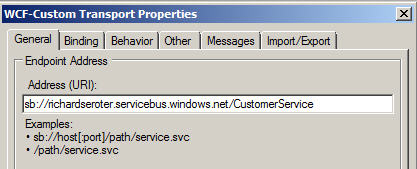
    Note that the URL in the service address above doesn’t matter.  We’ll be replacing this with our service bus address.  Next (after deploying our BizTalk schema), we should configure the service-bus-connected receive location.  We can take advantage of the WCF-Custom adapter here.

    First, we set the Azure cloud address we wish to establish.

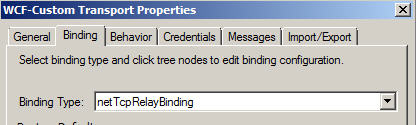
    Next we set the binding, which in our case is the NetTcpRelayBinding.  I’ve also explicitly set it up to use Transport security.

    In order to authenticate with our Azure cloud service endpoint, we have to define our security scheme.  I added an TransportClientEndpointBehavior and set it to use UserNamePassword credentials.  Then, don’t forget to click the UserNamePassword node and enter your actual service bus credentials.

    After creating a send port that subscribes on messages to this port and emits them to disk, we’re done with BizTalk.  For good measure, you should start the receive location and monitor the event log to ensure that a successful connection is established.

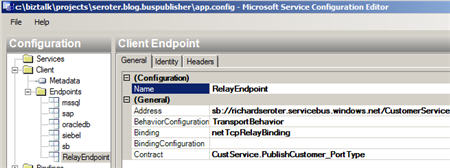
    Now let’s turn our attention to the service client.  I added a service reference to our hand-crafted WSDL and got the proxy classes and serializable types I was after.  I didn’t get much added to my application configuration, so I went and added a new service bus endpoint whose address matches the cloud address I set in the BizTalk receive location.

    You can see that I’ve also chosen a matching binding and was able to browse the contract by interrogating the client executable.  In order to handle security to the cloud, I added the same TransportClientEndpointBehavior to this configuration file and associated it with my service.

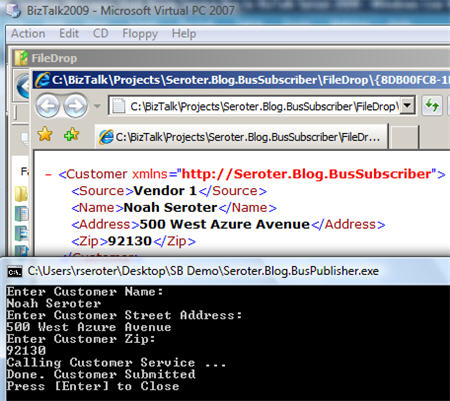
    All that’s left is to test it.  To better simulate the cloud experience, I gone ahead and copied the service client to my desktop computer and left my BizTalk Server running in its own virtual machine.  If all works right, my service client should successfully connect to the cloud, transmit a message, and the .NET Service Bus will redirect (relay) that message, securely, to the BizTalk Server running in my virtual machine.  I can see here that my console app has produced a message in the file folder connected to BizTalk.

    And opening the message shows the same values entered in the service client’s console application.

    Sweet.  I honestly thought connecting BizTalk bi-directionally to Azure services was going to be more difficult.  But the WCF adapters in BizTalk are pretty darn extensible and easily consume these new bindings.  More importantly, we are beginning to see a new set of patterns emerge for integrating on-premises applications through the cloud.  BizTalk may play a key role in receive from, sending to, and orchestrating cloud services in this new paradigm.

    Technorati Tags: , , ,

    Share

  • Securely Calling Azure Service Bus From BizTalk Server 2009

    I just installed the July 2009 .NET Services SDK and after reviewing it for changes, I started wondering how I might call a cloud service from BizTalk using the out-of-the-box BizTalk adapters.  While I showed in a previous blog how to call .NET Services service anonymously, that isn’t practical for most scenarios.  I want to SECURELY call an Azure cloud service from BizTalk.

    If you’re familiar with the “Echo” sample for the .NET Service Bus, then you know that the service host authenticates with the bus via inline code like this:

    // create the credentials object for the endpoint
    TransportClientEndpointBehavior userNamePasswordServiceBusCredential =
       new TransportClientEndpointBehavior();
    userNamePasswordServiceBusCredential.CredentialType =
        TransportClientCredentialType.UserNamePassword;
    userNamePasswordServiceBusCredential.Credentials.UserName.UserName =
        solutionName;
    userNamePasswordServiceBusCredential.Credentials.UserName.Password =
        solutionPassword;

    While that’s ok for the service host, BizTalk would never go for that (without a custom adapter). I need my client to use configuration-based credentials instead.  To test this out, try removing the Echo client’s inline credential code and adding a new endpoint behavior to the configuration file:

    <endpointBehaviors>
      <behavior name="SbEndpointBehavior">
        <transportClientEndpointBehavior credentialType="UserNamePassword">
           <clientCredentials>
              <userNamePassword userName="xxxxx" password="xxxx" />
           </clientCredentials>
         </transportClientEndpointBehavior>
       </behavior>
    </endpointBehaviors>

    Works fine. Nice.  So that proves that we can definitely take care of credentials outside of code, and thus have an offering that BizTalk stands a chance of calling securely.

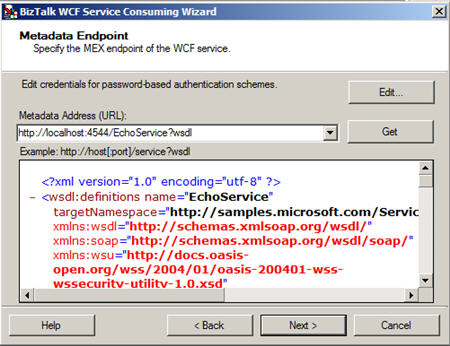
    With that out of the way, let’s see how to actually get BizTalk to call a cloud service.  First, I need my metadata to call the service (schemas, bindings).  While I could craft these by hand, it’s convenient to auto-generate them.  Now, to make life easier (and not have to wrestle with code generation wizards trying to authenticate with the cloud), I’ve rebuilt my Echo service to run locally (basicHttpBinding).  I did this by switching the binding, adding a base URI, adding a metadata behavior, and commenting out any cloud-specific code from the service.  Now my BizTalk project can use the Consume Adapter Service wizard to generate metadata.

    I end up with a number of artifacts (schemas, bindings, orchestration with ports) including the schema which describes the input and output of the .NET Services Echo sample service.

    After flipping my Echo service back to the Cloud-friendly configuration (including the netTcpRelayBinding), I deployed the BizTalk solution.  Then, I imported the (custom) binding into my BizTalk application.  Sure enough, I get a send port added to my application.

    First thing I do is switch the address of my service to the valid .NET Services Bus URI.

    Next, on the Bindings tab, I switch to the netTcpRelayBinding.

    I made sure my security mode was set to “Transport” and used the RelayAccessToken for its RelayClientAuthenticationType.

    Now, much my like my updated client configuration above, I need to add an endpoint behavior to my BizTalk send port configuration so that I can provide valid credentials to the service bus.  Now the WCF Configuration Editor within Visual Studio didn’t seem to provide me a way to add those username and password values; I had to edit the XML configuration manually.  So, I expected that the BizTalk adapter configuration would be equally deficient and I’d have to create a custom binding and hope that BizTalk accepted it.  However, imagine my surprise when I saw that BizTalk DID expose those credential fields to me!

    I first had to add a new endpoint behavior of type transportClientEndpointBehavior.  Then, set its credentialType attribute to UserNamePassword.

    Then, click the ClientCredential type we’re interested in (UserNamePassword) and key in the data valid to the .NET Services authentication service.

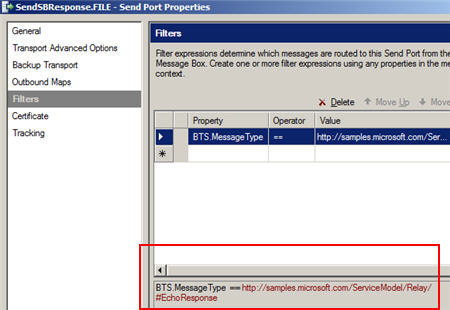
    After that, I added a subscription and saved the send port. Next I created a new send port that would process the Echo response.  I subscribed on the message type of the cloud service result.

    Now we’re ready to test this masterpiece.  First, I fired up the Echo service and ensured that it was bound to the cloud.  The image below shows that my service host is running locally, and the public service bus has my local service in its registry.  Neato.

    Now for magic time.  Here’s the message I’ll send in:

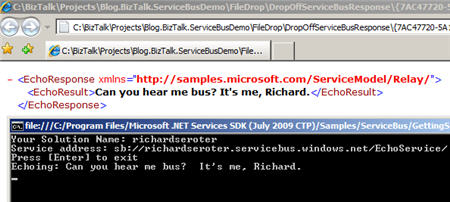
    If this works, I should see a message printed on my service host’s console, AND, I should get a message sent to disk.  What happens?


    I have to admit that I didn’t think this would work.  But, you would have never read my blog again if I had strung you along this far and showed you a broken demo.   Disaster averted.

    So there you have it.  I can use BizTalk Server 2009 to SECURELY call the Service Bus from the Azure .NET Services offering which means that I am seamlessly doing integration between on-premises offerings via the cloud.  Lots and lots of use cases (and more demos from me) on this topic.

    Technorati Tags: , , ,

    Share