Category: Spring

  • Introducing cloud-native integration (and why you should care!)

    Introducing cloud-native integration (and why you should care!)

    I’ve got three kids now. Trying to get anywhere on time involves heroics. My son is almost ten years old and he’s rarely the problem. The bottleneck is elsewhere. It doesn’t matter how much faster my son gets himself ready, it won’t improve my family’s overall speed at getting out the door. The Theory of Constraints says that you improve the throughput of your process by finding and managing the bottleneck, or constraint. Optimizing areas outside the constraint (e.g. my son getting ready even faster) don’t make much of a difference. Does this relate to software, and application integration specifically? You betcha.

    Software delivery goes through a pipeline. Getting from “idea” to “production” requires a series of steps. And then you repeat it over and over for each software update. How fast you get through that process dictates how responsive you can be to customers and business changes. Your development team may operate LIKE A MACHINE and crank out epic amounts of code. But if your dedicated ops team takes forever to deploy it, then it just doesn’t matter how fast your devs are. Inventory builds up, value is lost. My assertion is that the app integration stage of the pipeline is becoming a bottleneck. And without making changes to how you do integration, your cloud-native efforts are going to waste.

    What’s “cloud native” all about? At this month’s Integrate conference, I had the pleasure of talking about it. Cloud-native refers to how software is delivered, not where. Cloud-native systems are built for scale, built for continuous change, and built to tolerate failure. Traditional enterprises can become cloud natives, but only if they make serious adjustments to how they deliver software.

    Even if you’ve adjusted how you deliver code, I’d suspect that your data, security, and integration practices haven’t caught up. In my talk, I explained six characteristics of a cloud-native integration environment, and mixed in a few demos (highlighted below) to prove my points.

    #1 – Cloud-native integration is more composable

    By composable, I mean capable of assembling components into something greater. Contrast this to classic integration solutions where all the logic gets embedded into a single artifact. Think ETL workflows where ever step of the process is in one deployable piece. Need to change one component? Redeploy the whole thing. One step require a ton of CPU processing? Find a monster box to host the process in.

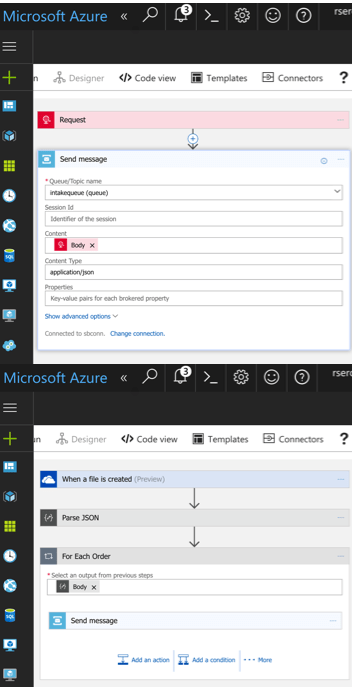
    A cloud-native integration gets built by assembling independent components. Upgrade and scale each piece independently. To demonstrate this, I built a series of Microsoft Logic Apps. Two of them take in data. The first takes in a batch file from Microsoft OneDrive, the other takes in real-time HTTP requests. Both drop the results to a queue for later processing.
    2017.07.10-integrate-01

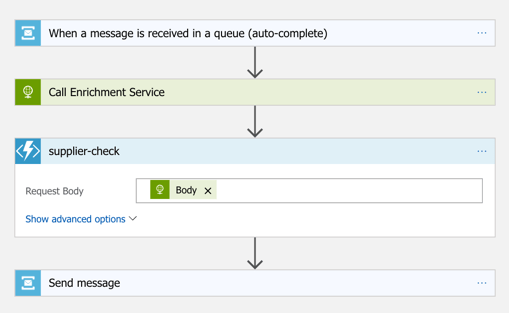
    The “main” Logic App takes in order entries, enriches the order via a REST service I have running in Azure App Service, calls an Azure Function to assign a fraud score, and finally dumps the results to a queue for others to grab.
    2017.07.10-integrate-02

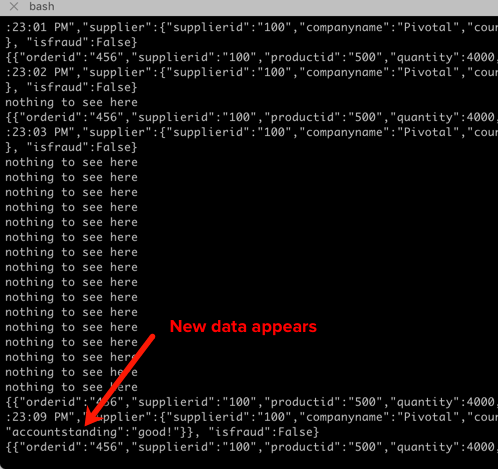
    My REST API sitting in Azure App Service is connected to a GitHub repo. This means that I should be able to upgrade that individual service, without touching the data pipeline sitting Logic Apps. So that’s what I did. I sent in a steady stream of requests, modified my API code, pushed the change to GitHub, and within a few seconds, the Logic App is emitting out a slightly different payload.
    2017.07.10-integrate-03

    #2 – Cloud-native integration is more “always on”

    One of the best things about early cloud platforms being less than 100% reliable was that it forced us to build for failure. Instead of assuming the infrastructure was magically infallible, we built systems that ASSUMED failure, and architected accordingly.

    For integration solutions, have we really done the same? Can we tolerate hardware failure, perform software upgrades, or absorb downstream dependency hiccups without stumbling? A cloud-native integration solution can handle a steady load of traffic while staying online under all circumstances.

    #3 – Cloud-native integration is built for scale

    Elasticity is a key attribute of cloud. Don’t build out infrastructure for peak usage; build for easy scale when demand dictates. I haven’t seen too many ESB or ETL solutions that transparently scale, on-demand with no special considerations. No, in most cases, scaling is a carefully designed part of an integration platform’s lifecycle. It shouldn’t be.

    If you want cloud-native integration, you’ll look to solutions that support rapid scale (in, or out), and let you scale individual pieces. Event ingestions unexpected and overwhelming? Scale that, and that alone. You’ll also want to avoid too much shared capacity, as that creates unexpected coupling and makes scaling the environment more difficult.

    #4 – Cloud-native integration is more self-service

    The future is clear: there will be more “citizen integrators” who don’t need specialized training to connect stuff. IFTTT is popular, as are a whole new set of iPaaS products that make it simple to connect apps. Sure, they aren’t crazy sophisticated integrations; there will always be a need for specialists there. But integration matters more than ever, and we need to democratize the ability to connect our stuff.

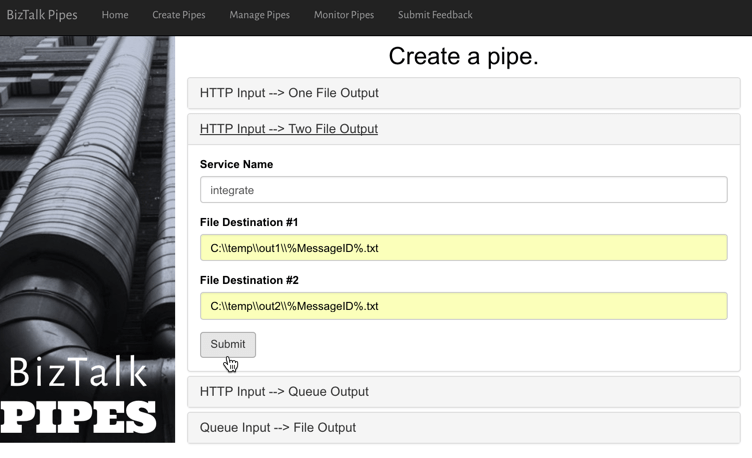
    One example I gave here was Pivotal Cloud Cache and Pivotal GemFire. Pivotal GemFire is an industry-leading in-memory data grid. Awesome tech, but not trivial to properly setup and use. So, Pivotal created an opinionated slice of GemFire with a subset of features, but an easier on-ramp. Pivotal Cloud Cache supports specific use cases, and an easy self-service provisioning experience. My challenge to the Integrate conference audience? Why couldn’t we create a simple facade for something powerful, but intimidating, like Microsoft BizTalk Server? What if you wanted a self-service way to let devs create simple integrations? I decided use the brand new Management REST API from BizTalk Server 2016 Feature Pack 1 to build one.

    I used the incomparable Spring Boot to build a Java app that consumed those REST APIs. This app makes it simple to create a “pipe” that uses BizTalk’s durable bus to link endpoints.
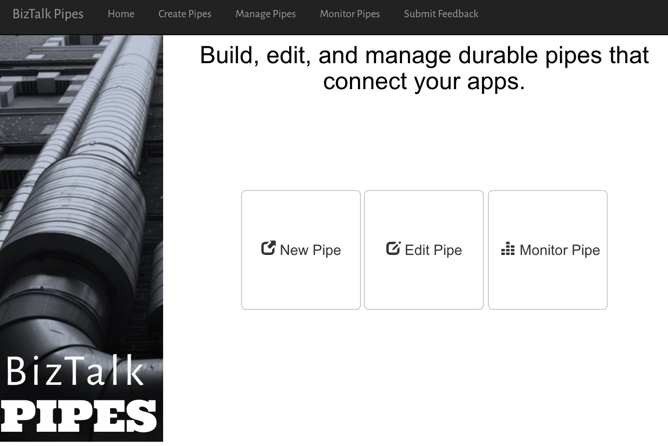
    2017.07.10-integrate-05

    I built a bunch of Java classes to represent BizTalk objects, and then created the required API payloads.
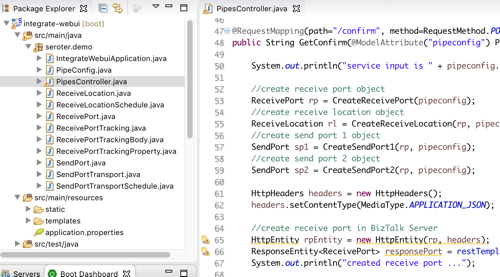
    2017.07.10-integrate-04

    The result? Devs can create a new pipe that takes in data via HTTP and drops the result to two file locations.
    2017.07.10-integrate-06

    When I click the button above, I use those REST APIs to create a new in-process HTTP receive location, two send ports, and the appropriate subscriptions.
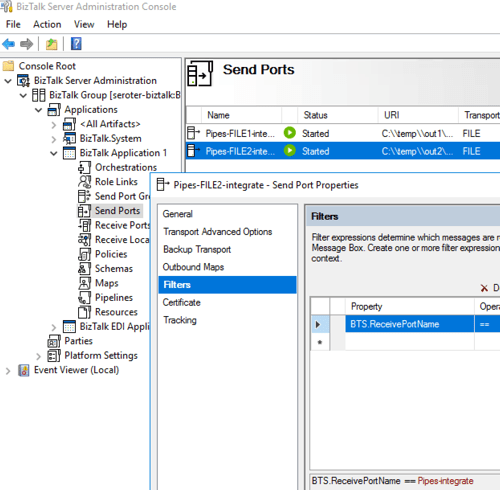
    2017.07.10-integrate-07

    Fun stuff. This seems like one way you could unlock new value in your ESB, while giving it a more cloud-native UX.

    #5 – Cloud-native integration supports more endpoints

    There’s no turning back. Your hippest integration offered to enterprise devs CANNOT be SharePoint. Nope. Your teams want to creatively connect to Slack, PagerDuty, Salesforce, Workday, Jira, and yes, enterprisey things like SQL Server and IBM DB2.

    These endpoints may be punishing your integration platform with a constant data stream, or, process data irregularly, in bulk. Doing newish patterns like Event Sourcing? Your apps will talk to an integration platform that offers a distributed commit log. Are you ready? Be ready for new endpoints, with new data streams, consumed via new patterns.

    #6 – Cloud-native integration demands complete automation

    Are you lovingly creating hand-crafted production servers? Stop that. And devs should have complete replicas of production environments, on their desktop. That means packaging and automating the integration bus too. Cloud-natives love automation!

    Testing and deploying integration apps must be automated. Without automated tests, you’ll never achieve continuous delivery of your whole system. Additionally, if you have to log into one of your integration servers, you’re doing it wrong. All management (e.g. monitoring, deployments, upgrades) should be done via remote tools and scripts. Think fleets of servers, not long-lived named instances.

    To demonstrate this concept, I discussed automating the lifecycle of your integration dependency. Specifically, through the use of a service broker. Initially part of Cloud Foundry, the service broker API has caught on elsewhere. A broad set of companies are now rallying around a single API for advertising services, provisioning, de-provisioning, and more. Microsoft built a Cloud Foundry service broker, and it handles lots of good things. It handles lifecycle and credential sharing for services like Azure SQL Database, Azure Service Bus, Azure CosmosDB, and more. I installed this broker into my Pivotal Web Services account, and it advertised available services.
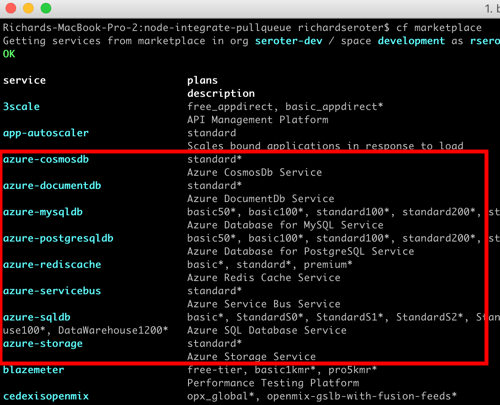
    2017.07.10-integrate-08

    Simply by typing in cf create-service azure-servicebus standard integratesb -c service-bus-config.json I kicked off a fast, automated process to generate an Azure Resource Group and create a Service Bus namespace.
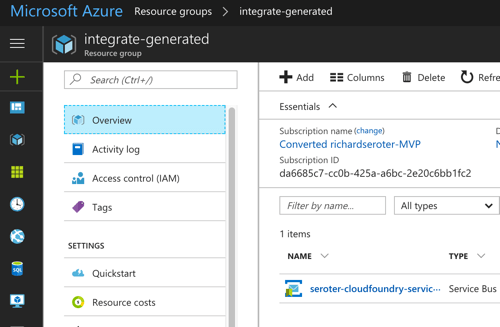
    2017.07.10-integrate-09

    Then, my app automatically gets access to environment variables that hold the credentials. No more embedding creds in code or config, no need to go to the Azure Portal. This makes integration easy, developer-friendly, and repeatable.
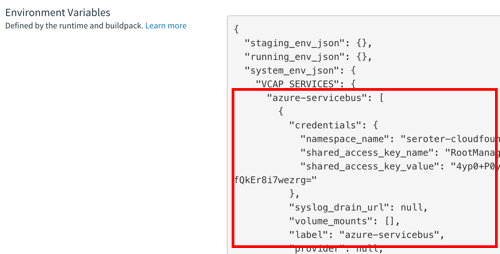
    2017.07.10-integrate-10

    Summary

    It’s such an exciting time to be a software developer. We’re solving new problems in new ways, and making life better for so many. The last thing we want is to be held back by a bottleneck in our process. Don’t let integration slow down your ambitions. The technology is there to help you build integration platforms that are more scalable, resilient, and friendly-to-change. Go for it!
  • Using speaking opportunities as learning opportunities

    Over this summer, I’ll be speaking at a handful of events. I sign myself up for these opportunities —in addition to teaching courses for Pluralsight —so that I commit time to learning new things. Nothing like a deadline to provide motivation!

    Do you find yourself complaining that you have a stale skill set, or your “brand” is unknown outside your company? You can fix that. Sign up for a local user group presentation. Create a short “course” on a new technology and deliver it to colleagues at lunch. Start a blog and share your musings and tech exploration. Pitch a talk to a few big conferences. Whatever you do, don’t wait for others to carve out time for you to uplevel your skills! For me, I’m using this summer to refresh a few of my own skill areas.

    In June, I’m once again speaking in London at Integrate. Application integration is arguably the most important/interesting part of Azure right now. Given Microsoft’s resurgence in this topic area, the conference matters more than ever. My particular session focuses on “cloud-native integration.” What is it all about? How do you do it? What are examples of it in action? I’ve spent a fair amount of time preparing for this, so hopefully it’s a fun talk. The conference is nearly sold out, but I know there are handful of tickets left. It’s one of my favorite events every year.

    Coming up in July, I’m signed up to speak at PerfGuild. It’s a first-time, online-only conference 100% focused on performance testing. My talk is all about distributed tracing and using it to uncover (and resolve) latency issues. The talk builds on a topic I covered in my Pluralsight course on Spring Cloud, with some extra coverage for .NET and other languages. As of this moment, you can add yourself to the conference waitlist.

    Finally, this August I’ll be hitting balmy Orlando, FL to speak at the Agile Alliance conference. This year’s “big Agile” conference has a track centered on foundational concepts. It introduces attendees to concepts like agile project delivery, product ownership, continuous delivery, and more. My talk, DevOps Explained, builds on things I’ve covered in recent Pluralsight courses, as well as new research.

    Speaking at conferences isn’t something you do to get wealthy. In fact, it’s somewhat expensive. But in exchange for incurring that cost, I get to allocate time for learning interesting things. I then take those things, and share them with others. The result? I feel like I’m investing in myself, and I get to hang out at conferences with smart people.

    If you’re just starting to get out there, use a blog or user groups to get your voice heard. Get to know people on the speaking circuit, and they can often help you get into the big shows! If we connect at any of the shows above, I’m happy to help you however I can.

  • How should you model your event-driven processes?

    How should you model your event-driven processes?

    During most workdays, I exist in a state of continuous partial attention. I bounce between (planned and unplanned) activities, and accept that I’m often interrupt-driven. While that’s not an ideal state for humans, it’s a great state for our technology systems. Event-driven applications act based on all sorts of triggers: time itself, user-driven actions, system state changes, and much more. Often, these batch-or-realtime, event-driven activities are asynchronous and coordinated in some way. What options do you have for modeling event-driven processes, and what trade-offs do you make with each option?

    Option #1 – Single, Deterministic Process

    In this scenario, the event handler is monolithic in nature, and any embedded components are purpose-built for the process at hand. Arguably, it’s just a visually modeled code class. While initiated via events, the transition between internal components is pre-determined. The process is typically deployed and updated as a single unit.

    What would you use to build it?

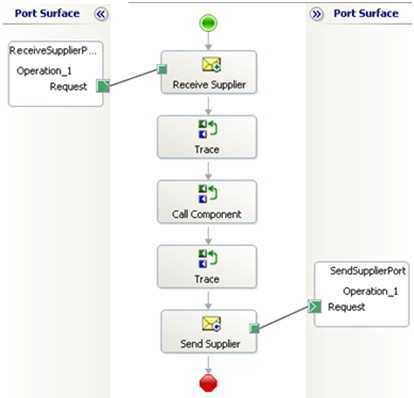
    You’ve seen (and built?) these before. A traditional ETL job fits the bill. Made up of components for each stage, it’s a single process executed as a linear flow. I’d also categorize some ESB workflows—like BizTalk orchestrations—in this category. Specifically, those with send/receive ports bound to the specific orchestration, embedded code, or external components built JUST to support that orchestration’s flow.

    2017.05.02-event-01

    In any of these cases, it’s hard (or impossible) to change part of the event handler without re-deploying the entire process.

    What are the benefits?

    Like with most monolithic things, there’s value in (perceived) simplicity and clarity. A few other benefits:

    • Clearer sense of what’s going on. When there’s a single artifact that explains how you handle a given event, it’s fairly simple to grok the flow. What happens when sensor data comes in? Here you go. It’s predictable.
    • Easier to zero-in on production issues. Did a step in the bulk data sync job fail? Look at the flow and see what bombed out. Clean up any side effects, and re-run. This doesn’t necessarily mean things are easy to fix—frankly, it could be harder—but you do know where things went wrong.
    • Changing and testing everything at once. If you’re worried about the side effects of changing a piece of a flow, that risk may lessen when you’re forced to test the whole thing when one tiny thing changes. One asset to version, one asset to track changes for.
    • Accommodates companies with teams of specialists. From what I can tell, many large companies still have centers-of-excellence for integration pros. That means most ETL and ESB workflows come out of here. If you like that org structure, then you’ll prefer more integrated event handlers.

    What are the risks?

    These processes are complicated, not complex. Other risks:

    • Cumbersome to change individual parts of the process. Nowadays, our industry prioritizes quick feedback loops and rapid adjustments to software. That’s difficult to do with monolithic event-driven processes. Is one piece broken? Better prioritize, upgrade, compile, test, and deploy the whole thing!
    • Non-trivial to extend the process to include more steps. When we think of event-driven activities, we often think of fairly dynamic behavior. But when all the event responses are tightly coordinated, it’s tough to add/adjust/remove steps.
    • Typically centralizes work within a single team. While your org may like siloed teams of experts, that mode of working doesn’t lend itself to agility or customer focus. If you build a monolithic event-driven process, expect delivery delays as the work queues up behind constrained developers.
    • Process scales as one single unit. Each stage of an event-driven workflow will have its own resource demands. Some will be CPU intensive. Others produce heavy disk I/O. If you have a single ETL or ESB workflow to handle events, expect to scale that entire thing when any one component gets constrained. That’s pretty inefficient and often leads to over-provisioning.

    Option #2 – Orchestrated Components

    In this scenario, you’ve got a fairly loose wrapper around independent services that respond to events. These are individual components, built and delivered on their own. While still somewhat deterministic—you are still modeling a flow—the events aren’t trapped within that flow.

    What would you use to build it?

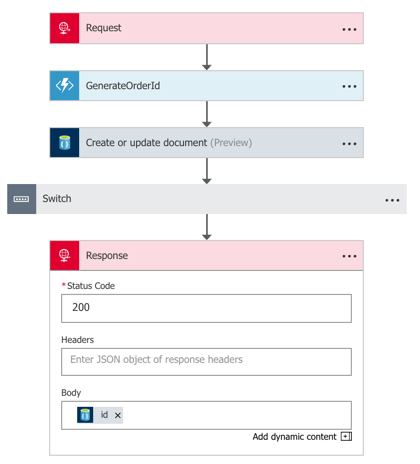
    Without a doubt, you can still use traditional ESB tools to construct this model. A BizTalk orchestration that listens to events and calls out to standalone services? That works. Most iPaaS products also fit the bill here. If you build something with Azure Logic Apps, you’re likely going to be orchestrating a set of services in response to an event. Those services could be REST-based APIs backed by API Management, Azure Functions, or a Service Bus queue that may trigger a whole other event-driven process!

    2017.05.02-event-02.png

    You could also use tools like Spring Cloud Data Flow to build orchestrated, event-driven processes. Here, you chain together standalone Spring Boot apps atop a messaging backbone. The services are independent, but with a wrapper that defines a flow.

    What are the benefits?

    The main benefits of this model stem from the decoupling and velocity that comes with it. Others are:

    • Distributed development. While you still have someone stitching the process together, develop the components independently. And hopefully, you get more people in the mix who don’t even need to know the “wrapper” technology. Or in the case of Spring Cloud Data Flow or Logic Apps, the wrapper technology is dev-oriented and easier to understand than traditional integration systems. Either way, this means more parallel development and faster turnaround of the entire workflow.
    • Composable processes. Configure or reconfigure event handlers based on what’s needed. Reuse each step of the event-driven process (e.g. source channel, generic transformation component) in other processes.
    • Loose grip on the event itself. There could be many parties interested in a given event. Your flow may be just one. While you could reuse the inbound channel to spawn each event-driven processes, you can also wiretap orchestrated processes.

    What are the risks?

    You’ve got some risks with a more complex event-driven flow. Those include:

    • Complexity and complicated-ness. Depending on how you build this, you might not only be complicated but also complex! Many moving parts, many distributed components. This might result in trickier troubleshooting and less certainty about how the system behaves.
    • Hidden dependencies. While the goal may be to loosely orchestrate services in an event-driven flow, it’s easy to have leaky abstractions. “Independent” services may share knowledge between each other, or depend on specific underlying infrastructure. This means that you need good documentation, and services that don’t assume that dependencies exist.
    • Breaking changes and backwards compatibility. Any time you have a looser federation of coordinated pieces, you increase the likelihood of one bad actor causing cascading problems. If you have a bunch of teams that build/run services on their own, and one team combines them into an event-driven workflow, it’s possible to end up with unpredictable behavior. Mitigation options? Strong continuous integration practices to catch breaking changes, and a runtime environment that catches and isolates errors to minimize impact.

    Option #3 – Choreographed Components

    In this scenario, your event-driven processes are extremely fluid. Instead of anything dictating the flow, services collaborate by publishing and subscribing to messages. It’s fully decentralized. Any given services has no idea who or what is upstream or downstream of it. They do their job, and any service that wants to do subsequent work, great.

    What would you use to build it?

    In these cases, you’re often working with low-level code, not high level abstractions. Makes sense. But there are frameworks out there that make it easier for you if you don’t crave writing to or reading from queues. For .NET developers, you have things like MassTransit or nServiceBus. Those provide helpful abstractions. If you’re a Java developer, you’ve got something like Spring Cloud Stream. I’ve really fallen in love with it. Stream provides an elegant abstraction atop RabbitMQ or Apache Kafka where the developer doesn’t have to know much of anything about the messaging subsystem.

    What are the benefits?

    Some of the biggest benefits come from the velocity and creativity that stem from non-deterministic event processing.

    • Encourages adaptable processes. With choreographed event processors, making changes is simple. Deploy another service, and have it listen for a particular event type.
    • Makes everyone an integration developer. Done right, this model lessens the need for a siloed team of experts. Instead, everyone builds apps that care about events. There’s not much explicit “integration” work.
    • Reflects changing business dynamics. Speed wins. But not speed for the sake of it. But speed of learning from customers and incorporating feedback into experiments. Scrutinize anything that adds friction to your learning process. Fixed workflows owned by a single team? Increasingly, that’s an anti-pattern for today’s software-driven, event-powered businesses. You want to be able to handle the influx of new data and events and quickly turn that into value.

    What are the risks?

    Clearly, there are risks to this sort of “controlled chaos” model of event processing. These include:

    • Loss of cross-step coordination. There’s value in event-driven workflows that manage state between stages, compensate for failed operations, and sequence key steps. Now, there’s nothing that says you can’t have some processes that depend on orchestration, and some on choreography. Don’t adopt an either-or mentality here!
    • Traceability is hairy. When an event can travel any number of possible paths, and those paths are subject to change on a regular basis, auditability can’t be taken for granted! If it takes a long time for an inbound event to reach a particular destination, you’ve got some forensics to do. What part was slow? Did something get dropped? How come this particular step didn’t get triggered? These aren’t impossible challenges, but you’ll want to invest in solid logging and correlation tools.

    You’ve got lots of options for modeling event-driven processes. In reality, you’ll probably use a mix of all three options above. And that’s fine! There’s a use case for each. But increasingly, favor options #2 and #3 to give you the flexibility you need.

    Did I miss any options? Are there benefits or risks I didn’t list? Tell me in the comments!