Category: SOA

  • Interview Series: Four Questions With … Hammad Rajjoub

    Greetings and welcome to the 43rd interview in my series of chats with thought leaders in the “connected technologies” domain. This month, I’m happy to have Hammad Rajjoub with us. Hammad is an Architect Advisor for Microsoft, former Microsoft MVP, blogger, published author, and  you can find him on Twitter at @HammadRajjoub.

    Let’s jump in.

    Q: You just published a book on Windows Server AppFabric (my book review here). What do you think is the least-appreciated capability that is provided by this product, and what should developers take a second look at?

    A: I think overall Windows Server AppFabric is an under-utilized technology. I see customers deploying WCF/WF services yet not utilizing AppFabric for hosting, monitoring and caching (note that Windows Server AppFabric is a free product). I will suggest all the developers to look at caching, hosting and monitoring capabilities provided by Windows Server AppFabric and use them appropriately in their ASP.Net, WCF and WF solutions.

    The use of distributed in-memory caching not only helps with performance, but also with scalability. If you cannot scale up then you have to scale out and that is exactly how distributed in-memory caching works for Windows Server AppFabric. Specifically, AppFabric Cache is feature rich and super easy to use. If you are using Windows Server and IIS to host your applications and services, I can’t see any reason why you wouldn’t want to utilize the power of AppFabric Cache.

    Q: As an Architect Advisor, you probably get an increasing number of questions about hybrid solutions that leverage both on-premises and cloud resources. While I would think that the goal of Microsoft (and other software vendors) is to make the communication between cloud and on-premises appear seamless, what considerations should architects explicitly plan for when trying to build solutions that span environments?

    A: Great question! Physical Architecture becomes so much more important. Solutions needs to be designed such that they are intrinsically Service Oriented and are very loosely coupled not only at the component level but at the physical level as well so that you can scale out on demand. Moving existing applications to the cloud is a fairly interesting exercise though. I will recommend architects to take a look at the Microsoft’s guide for building hybrid solutions for the cloud (at http://msdn.microsoft.com/en-us/library/hh871440.aspx).

    More specifically an Architect, working on a hybrid solution, should plan and consider following (non-exhaustive list of) aspects:-

    • data distribution and synchronization
    • protocols and payloads for cross-boundary communication
    • federated identify
    • message routing
    • Health and activity tracking as well as monitoring across hybrid environments

    From a vendor and solution perspective, I will highly recommend to pick a solution stack and technology provider that offers consistent design, development, deployment and monitoring tools across public, private and hybrid cloud environments.

    Q: A customer comes to you today and says that they need to build an internal solution for exchanging data between a few custom and packaged software applications. If we assume they are a Microsoft-friendly shop, how do you begin to identify whether this solution calls for WCF/WF/AppFabric, BizTalk, ASP.NET Web API, or one of the many open source / 3rd party messaging frameworks?

    A:  I think it depends a lot on the nature of the solution and 3rd party systems involved. Windows Server AppFabric are a great fit for solutions built using WCF/WF and ASP.NET technologies. BizTalk is a phenomenal technology for all things EAI with Adapters for SAP, Oracle, and Seibel etc. it’s a go to product for such scenarios. Honestly it depends on the situation. BizTalk is more geared towards EAI and ESB capabilities. WCF/WF and AppFabric are great at exposing LOB capabilities through web services. More often than not we see WCF/WF working side by side with BizTalk.

    Q [stupid question]: The popular business networking site LinkedIn recently launched an “endorsements” feature which lets individuals endorse the particular skills of another individual. This makes it easy for someone to endorse me for something like “Windows Azure” or “Enterprise Integration.” However, it’s also possible to endorse people for skills that are NOT currently in their LinkedIn skills profile. So, someone could theoretically endorse me for things like “firm handshakes”, “COM+”, or “making scrambled eggs.” Which LinkedIn endorsements would you like, and not like, on your profile?

    A: (This is totally new to me 🙂 ). I would like to explicitly opt-in and validate all the “endorsements” before they start appearing on my profile. [Editors Note: Because endorsements do not require validation, I propose that we all endorse Hammad for “.NET 1.0”]

    Thanks to Hammad for taking some time to chat with me!

  • Versioning ASP.NET Web API Services Using HTTP Headers

    I’ve been doing some work with APIs lately and finally had the chance to dig into the ASP.NET Web API a bit more. While it’s technically brand new (released with .NET 4.5 and Visual Studio 2012), the Web API has been around in beta form for quite a bit now. For those of us who have done a fair amount of work with the WCF framework, the Web API is a welcome addition/replacement. Instead of monstrous configuration files and contract-first demands placed on us by WCF, we can now build RESTful web services using a very lightweight and HTTP-focused framework. As I work on designing a new API, one thing that I’m focused on right now is versioning. In this blog post, I’ll show you how to build HTTP-header-based versioning for ASP.NET Web API services.

    Service designers have a few choices when it comes to versioning their services. What seems like the default option for many is to simply replace the existing service with a new one and hope that no consumers get busted. However, that’s pretty rough and hopefully less frequent than it was in the early days of service design. In the must-read REST API Design Handbook (see my review),  author George Reese points out three main options:

    • HTTP Headers. Set the version number in a custom HTTP header for each request.
    • URI Component. This seems to be the most common one. Here, the version is part of the URI (e.g. /customerservice/v1/customers).
    • Query Parameter. In this case, a parameter is added to each incoming request (e.g. /customerservice/customers?version=1).

    George (now) likes the first option, and I tend to agree. It’s nice to not force new URIs on the user each time a service changes. George finds that a version in the header fit nicely with other content negotiations that show up in HTTP headers (e.g. “content-type”). So, does the ASP.NET Web API support this natively? The answer is: pretty much. While you could try and choose different controller operations based on the inbound request, it’s even better to be able to select entirely different controllers based on the API version. Let’s see how that works.

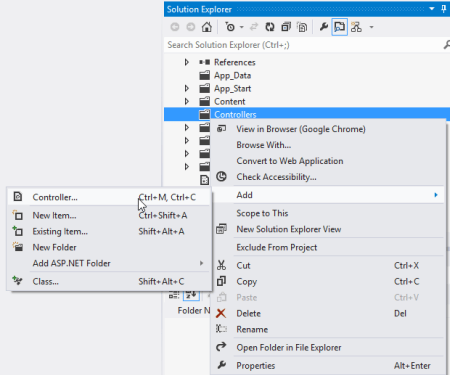
    First, in Visual Studio 2012, I created a new ASP.NET MVC4 project and chose the Web API template.

    2012.09.25webapi01

    Next, I wanted to add a new “model” that is the representation of my resource. In this example, my service works with an “Account” resource that has information about a particular service account owner.

    using System;
    using System.Collections.Generic;
    using System.Linq;
    using System.Web;
    using System.Runtime.Serialization;
    
    namespace Seroter.AspNetWebApi.VersionedSvc.Models
    {
        [DataContract(Name = "Account", Namespace = "")]
        public class Account
        {
            [DataMember]
            public int Id { get; set; }
            [DataMember]
            public string Name { get; set; }
            [DataMember]
            public string TimeZone { get; set; }
            [DataMember]
            public string OwnerName { get; set; }
        }
    }
    

    Note that I don’t HAVE to use the “[DataContract]” and “[DataMember]” attributes, but I wanted a little more control over the outbound naming, so I decided to decorate my model this way. Next up, I created a new controller to respond to HTTP requests.

    2012.09.25webapi02

    The controller does a few things here. It loads up a static list of accounts, responds to “get all” and “get one” requests, and accepts new accounts via HTTP POST. The “GetAllAccounts” operation is named in a way that the Web API will automatically use that operation when the user requests all accounts (/api/accounts). The “GetAccount” operation responds to requests for a specific account via HTTP GET. Finally, the “PostAccount” operation is also named in a way that it is automatically wired up to any POST requests, and it returns the URI of the new resource in the response header.

    public class AccountsController : ApiController
        {
            /// <summary>
            /// instantiate list of accounts
            /// </summary>
            Account[] accounts = new Account[]
            {
                new Account { Id = 100, Name = "Big Time Consulting", OwnerName = "Harry Simpson", TimeZone = "PST"},
                new Account { Id = 101, Name = "BTS Partners", OwnerName = "Bobby Thompson", TimeZone = "MST"},
                new Account { Id = 102, Name = "Westside Industries", OwnerName = "Ken Finley", TimeZone = "EST"},
                new Account { Id = 103, Name = "Cricket Toys", OwnerName = "Tim Headley", TimeZone = "PST"}
            };
    
            /// <summary>
            /// Returns all the accounts; happens automatically based on operation name
            /// </summary>
            /// <returns></returns>
            public IEnumerable<Account> GetAllAccounts()
            {
                return accounts;
            }
    
            /// <summary>
            /// Returns a single account and uses an explicit [HttpGet] attribute
            /// </summary>
            /// <param name="id"></param>
            /// <returns></returns>
            [HttpGet]
            public Account GetAccount(int id)
            {
                Account result = accounts.FirstOrDefault(acct => acct.Id == id);
    
                if (result == null)
                {
                    HttpResponseMessage err = new HttpResponseMessage(HttpStatusCode.NotFound)
                    {
                        ReasonPhrase = "No product found with that ID"
                    };
    
                    throw new HttpResponseException(err);
                }
    
                return result;
            }
    
            /// <summary>
            /// Creates a new account and returns HTTP code and URI of new resource representation
            /// </summary>
            /// <param name="a"></param>
            /// <returns></returns>
            public HttpResponseMessage PostAccount(Account a)
            {
                Random r = new Random(1);
    
                a.Id = r.Next();
                var resp = Request.CreateResponse<Account>(HttpStatusCode.Created, a);
    
                //get URI of new resource and send it back in the header
                string uri = Url.Link("DefaultApi", new { id = a.Id });
                resp.Headers.Location = new Uri(uri);
    
                return resp;
            }
        }
    

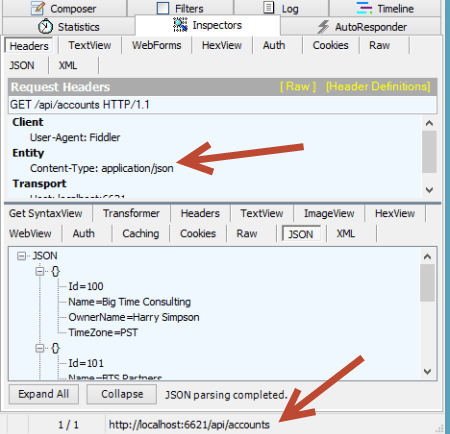
    At this point, I had a working service. Starting up the service and invoking it through Fiddler made it easy to interact with. For instance, a simple “get” targeted at http://localhost:6621/api/accounts returned the following JSON content:

    2012.09.25webapi03

    If I did an HTTP POST of some JSON to that same URI, I’d get back an HTTP 201 code and the location of my newly created resource.

    2012.09.25webapi04

    Neato. Now, something happened in our business and we need to change our API. Instead of just overwriting this one and breaking existing clients, we can easily add a new controller and leverage the very cool IHttpControllerSelector interface to select the right controller at runtime. First, I made a few updates to the Visual Studio project.

    • I added a new class (model) named AccountV2 which has additional data properties not found in the original model.
    • I changed the name of the original controller to AccountsControllerV1 and created a second controller named AccountsControllerV2. The second controller mimics the first, except for the fact that it works with the newer model and new data properties. In reality, it could also have entirely new operations or different plumbing behind existing ones.
    • For kicks and giggles, I also created a new model (Invoice) and controller (InvoicesControllerV1) just to show the flexibility of the controller selector.

    2012.09.25webapi05

    I created a class, HeaderVersionControllerSelector, that will be used at runtime to pick the right controller to respond to the request. Note that my example below is NOT efficiently written, but just meant to show the moving parts. After seeing what I do below, I strongly encourage you to read this great post and very nice accompanying Github code project that shows a clean way to build the selector.

    Basically, there are a few key parts here. First, I created a dictionary to hold the controller (descriptions) and load that within the constructor. These are all the controllers that the selector has to choose from. Second, I added a helper method (thanks to the previously mentioned blog post/code) called “GetControllerNameFromRequest” that yanks out the name of the controller (e.g. “accounts”) provided in the HTTP request. Third, I implemented the required “GetControllerMapping” operation which simply returns my dictionary of controller descriptions. Finally, I implemented the required “SelectController” operation which determines the API version from the HTTP header (“X-Api-Version”), gets the controller name (from the previously created helper function), and builds up the full name of the controller to pull from the dictionary.

     /// <summary>
        /// Selects which controller to serve up based on HTTP header value
        /// </summary>
        public class HeaderVersionControllerSelector : IHttpControllerSelector
        {
            //store config that gets passed on on startup
            private HttpConfiguration _config;
            //dictionary to hold the list of possible controllers
            private Dictionary<string, HttpControllerDescriptor> _controllers = new Dictionary<string, HttpControllerDescriptor>(StringComparer.OrdinalIgnoreCase);
    
            /// <summary>
            /// Constructor
            /// </summary>
            /// <param name="config"></param>
            public HeaderVersionControllerSelector(HttpConfiguration config)
            {
                //set member variable
                _config = config;
    
                //manually inflate controller dictionary
                HttpControllerDescriptor d1 = new HttpControllerDescriptor(_config, "AccountsControllerV1", typeof(AccountsControllerV1));
                HttpControllerDescriptor d2 = new HttpControllerDescriptor(_config, "AccountsControllerV2", typeof(AccountsControllerV2));
                HttpControllerDescriptor d3 = new HttpControllerDescriptor(_config, "InvoicesControllerV1", typeof(InvoicesControllerV1));
                _controllers.Add("AccountsControllerV1", d1);
                _controllers.Add("AccountsControllerV2", d2);
                _controllers.Add("InvoicesControllerV1", d3);
            }
    
            /// <summary>
            /// Implement required operation and return list of controllers
            /// </summary>
            /// <returns></returns>
            public IDictionary<string, HttpControllerDescriptor> GetControllerMapping()
            {
                return _controllers;
            }
    
            /// <summary>
            /// Implement required operation that returns controller based on version, URL path
            /// </summary>
            /// <param name="request"></param>
            /// <returns></returns>
            public HttpControllerDescriptor SelectController(System.Net.Http.HttpRequestMessage request)
            {
                //yank out version value from HTTP header
                IEnumerable<string> values;
                int? apiVersion = null;
                if (request.Headers.TryGetValues("X-Api-Version", out values))
                {
                    foreach (string value in values)
                    {
                        int version;
                        if (Int32.TryParse(value, out version))
                        {
                            apiVersion = version;
                            break;
                        }
                    }
                }
    
                //get the name of the route used to identify the controller
                string controllerRouteName = this.GetControllerNameFromRequest(request);
    
                //build up controller name from route and version #
                string controllerName = controllerRouteName + "ControllerV" + apiVersion;
    
                //yank controller type out of dictionary
                HttpControllerDescriptor controllerDescriptor;
                if (this._controllers.TryGetValue(controllerName, out controllerDescriptor))
                {
                    return controllerDescriptor;
                }
                else
                {
                    return null;
                }
            }
    
            /// <summary>
            /// Helper method that pulls the name of the controller from the route
            /// </summary>
            /// <param name="request"></param>
            /// <returns></returns>
            private string GetControllerNameFromRequest(HttpRequestMessage request)
            {
                IHttpRouteData routeData = request.GetRouteData();
    
                // Look up controller in route data
                object controllerName;
                routeData.Values.TryGetValue("controller", out controllerName);
    
                return controllerName.ToString();
            }
        }
    

    Nearly done. All that was left was to update the global.asax.cs file to ignore the default controller handling (where it looks for the controller name from the URI and appends “Controller” to it) and replace it with our new controller selector.

    public class WebApiApplication : System.Web.HttpApplication
        {
            protected void Application_Start()
            {
                AreaRegistration.RegisterAllAreas();
    
                WebApiConfig.Register(GlobalConfiguration.Configuration);
                FilterConfig.RegisterGlobalFilters(GlobalFilters.Filters);
                RouteConfig.RegisterRoutes(RouteTable.Routes);
                BundleConfig.RegisterBundles(BundleTable.Bundles);
    
                //added to support runtime controller selection
                GlobalConfiguration.Configuration.Services.Replace(typeof(IHttpControllerSelector),
                                                               new HeaderVersionControllerSelector(GlobalConfiguration.Configuration));
            }
        }
    

    That’s it! Let’s try this bad boy out. First, I tried retrieving an individual record using the “version 1” API. Notice that I added an HTTP header entry for X-Api-Version.
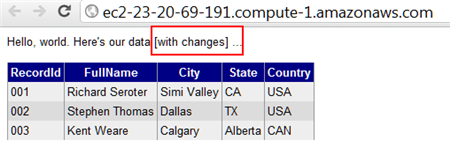
    2012.09.25webapi06

    Did you also see how easy it is to switch content formats? Just changing the” Content-Type” HTTP header to “application/xml” resulted in an XML response without me doing anything to my service. Next, I did a GET against the same URI, but set the X-Api-Version to 2.

    2012.09.25webapi07

    The second version of the API now returns the “sub accounts” for a given account, while not breaking the original consumers of the first version. Success!

    Summary

    The ASP.NET Web API clearly multiple versioning strategies, and I personally like this one the best. You saw how it was really easy to carve out entirely new controllers, and thus new client experiences, without negatively impacting existing service clients.

    What do you think? Are you a fan of version information in the URI, or are HTTP headers the way to go?

  • Book Review: Microsoft Windows Server AppFabric Cookbook

    It’s hard to write technical books nowadays. First off, technology changes so fast that there’s nearly a 100% chance that by the time a book is published, its subject has undergone some sort of update. Secondly, there is so much technical content available online that it makes books themselves feel downright stodgy and out-dated. So to succeed, it seems that a technical book must do one of two things: bring forth and entirely different perspective, or address a topic in a format that is easier to digest than what one would find online. This book, the Microsoft Windows Server AppFabric Cookbook by Packt Publishing, does the latter.

    I’ve worked with Windows Server AppFabric (or “Dublin” and “Velocity” as its components were once called) for a while, but I still eagerly accepted a review copy of this book to read. The authors, Rick Garibay and Hammad Rajjoub, are well-respected technologists, and more importantly, I was going on vacation and needed a good book to read on the flights! I’ll get into some details below, but in a nutshell, this is a well-written, easy to read book that covered new ground on a little-understood part of Microsoft’s application platform.

    AppFabric Caching is not something I’ve spent much hands-on time with, and it received strong treatment in this book. You’ll find good details on how and when to use it, and then a broad series of “recipes” for how to do things like install it, configure it, invoke it, secure it, manage it, and much more. I learned a number of things about using cache tags, regions, expiration and notifications, as well as how to use AppFabric cache with ASP.NET apps.

    The AppFabric Hosting chapters go into great depth on using AppFabric for WCF and WF services. I learned a bit more about using AppFabric for hosting REST services, and got a better understanding of some of those management knobs and switches that I used but never truly investigated myself. You’ll find good content on using it with WF services including recipes for persisting workflows, querying workflows, building custom tracking profiles and more. Where this book really excelled was in its discussion of management and scale-out. I got the sense that both authors have used this product in production scenarios and were revealing tidbits about lessons learned from years of experience. There were lots of recipes and tips about (automatically) deploying applications, building multi-node environments, using PowerShell for scripting activities, and securing all aspects of the product.

    I read this book on my Amazon Kindle, and minus a few inconsequential typos and formatting snafus, it was a pleasant experience. Despite having two authors, at no point did I detect a difference in style, voice or authority between the chapters. The authors made generous use of screenshots and code snippets and I can easily say that I learned a lot of new things about this product. Windows Server AppFabric SHOULD BE a no-brainer technology for any organization using WCF and WF. It’s a free and easy way to add better management and functionality to WCF/WF services. Even though its product roadmap is a bit unclear, there’s not a whole lot of lock-in that it involves (minus the caching) , so the risk of adoption is low. If you are using Windows Server AppFabric today, or even evaluating it, I’d strong suggest that you pick up a copy of this book so that you can better understand the use cases and capabilities of this underrated product.

  • Combining Clouds: Accessing Azure Storage from Node.js Application in Cloud Foundry

    I recently did a presentation (link here) on the topic of platform-as-a-service (PaaS) for my previous employer and thought that I’d share the application I built for the demonstration. While I’ve played with Node.js a bit before, I thought I’d keep digging in and see why @adron won’t shut up about it. I also figured that it’d be fun to put my application’s data in an entirely different cloud than my web application. So, let’s use Windows Azure for data storage and Cloud Foundry for application hosting. This simple application is a registry (i.e. CMDB) that an organization could use to track their active systems. This app (code) borrows heavily from the well-written tutorial on the Windows Azure Node.js Dev Center.

    First, I made sure that I had a Windows Azure storage account ready to go.

    2012.08.09paas01

    Then it was time to build my Node.js application. After confirming that I had the latest version of Node (for Windows) and npm installed, I went ahead and installed the Express module with the following command:

    2012.08.09paas02

    This retrieved the necessary libraries, but I now wanted to create the web application scaffolding that Express provides.

    2012.08.09paas03

    I then updated the package.json file added references to the helpful azure module that makes it easy for Node apps to interact with many parts of the Azure platform.

    {
    "name": "application-name",
      "version": "0.0.1",
      "private": true,
      "scripts":
    	{
        "start": "node app"
      },
        "dependencies":{
    		    "express": "3.0.0rc2"	,
             "jade": "*"	,
             "azure": ">= 0.5.3",
             "node-uuid": ">= 1.3.3",
             "async": ">= 0.1.18"
    	}
    }
    

    Then, simply issuing an npm install command will fetch those modules and make them available.

    2012.08.09paas04

    Express works in an MVC fashion, so I next created a “models” directory to define my “system” object. Within this directory I added a system.js file that had both a constructor and pair of prototypes for finding and adding items to Azure storage.

    var azure = require('azure'), uuid = require('node-uuid')
    
    module.exports = System;
    
    function System(storageClient, tableName, partitionKey) {
    	this.storageClient = storageClient;
    	this.tableName = tableName;
    	this.partitionKey = partitionKey;
    
    	this.storageClient.createTableIfNotExists(tableName,
    		function tableCreated(err){
    			if(err) {
    				throw error;
    			}
    		});
    };
    
    System.prototype = {
    	find: function(query, callback) {
    		self = this;
    		self.storageClient.queryEntities(query,
    			function entitiesQueried(err, entities) {
    				if(err) {
    					callback(err);
    				} else {
    					callback(null, entities);
    				}
    			});
    	},
    	addItem: function(item, callback) {
    		self = this;
    		item.RowKey = uuid();
    		item.PartitionKey = self.partitionKey;
    		self.storageClient.insertEntity(self.tableName, item,
    			function entityInserted(error) {
    				if(error) {
    					callback(error);
    				} else {
    					callback(null);
    				}
    			});
    	}
    }
    

    I next added a controller named systemlist.js to the Routes directory within the Express project. This controller used the model to query for systems that match the required criteria, or added entirely new records.

    var azure = require('azure')
      , async = require('async');
    
    module.exports = SystemList;
    
    function SystemList(system) {
      this.system = system;
    }
    
    SystemList.prototype = {
      showSystems: function(req, res) {
        self = this;
        var query = azure.TableQuery
          .select()
          .from(self.system.tableName)
          .where('active eq ?', 'Yes');
        self.system.find(query, function itemsFound(err, items) {
          res.render('index',{title: 'Active Enterprise Systems ', systems: items});
        });
      },
    
       addSystem: function(req,res) {
        var self = this
        var item = req.body.item;
        self.system.addItem(item, function itemAdded(err) {
          if(err) {
            throw err;
          }
          res.redirect('/');
        });
      }
    }
    

    I then went and updated the app.js which is the main (startup) file for the application. This is what starts the Node web server and gets it ready to process requests. There are variables that hold the Windows Azure Storage credentials, and references to my custom model and controller.

    
    /**
     * Module dependencies.
     */
    
    var azure = require('azure');
    var tableName = 'systems'
      , partitionKey = 'partition'
      , accountName = 'ACCOUNT'
      , accountKey = 'KEY';
    
    var express = require('express')
      , routes = require('./routes')
      , http = require('http')
      , path = require('path');
    
    var app = express();
    
    app.configure(function(){
      app.set('port', process.env.PORT || 3000);
      app.set('views', __dirname + '/views');
      app.set('view engine', 'jade');
      app.use(express.favicon());
      app.use(express.logger('dev'));
      app.use(express.bodyParser());
      app.use(express.methodOverride());
      app.use(app.router);
      app.use(express.static(path.join(__dirname, 'public')));
    });
    
    app.configure('development', function(){
      app.use(express.errorHandler());
    });
    
    var SystemList = require('./routes/systemlist');
    var System = require('./models/system.js');
    var system = new System(
        azure.createTableService(accountName, accountKey)
        , tableName
        , partitionKey);
    var systemList = new SystemList(system);
    
    app.get('/', systemList.showSystems.bind(systemList));
        app.post('/addsystem', systemList.addSystem.bind(systemList));
    
    app.listen(process.env.port || 1337);
    

    To make sure the application didn’t look like a complete train wreck, I styled the index.jade file (which uses the Jade module and framework) and corresponding CSS. When I executed node app.js in the command prompt, the web server started up and I could then browse the application.

    2012.08.09paas05

    I added a new system record, and it immediately showed up in the UI.

    2012.08.09paas06

    I confirmed that this record was added to my Windows Azure Storage table by using the handy Azure Storage Explorer tool. Sure enough, the table was created (since it didn’t exist before) and a single row was entered.

    2012.08.09paas07

    Now this app is ready for the cloud. I had a little bit of a challenge deploying this app to a Cloud Foundry environment until Glenn Block helpfully pointed out that the Azure module for Node required a relatively recent version of Node. So, I made sure to explicitly choose the Node version upon deployment. But I’m getting ahead of myself. First, I had to make a tiny change to my Node app to make sure that it would run correctly. Specifically, I changed the app.js file so that the “listen” command used a Cloud Foundry environment variable (VCAP_APP_PORT) for the server port.

    app.listen(process.env.VCAP_APP_PORT || 3000);
    

    To deploy the application, I used vmc to target the CloudFoundry.com environment. Note that vmc works for any Cloud Foundry environment, including my company’s instance, called Web Fabric.

    2012.08.09paas08

    After targeting this environment, I authenticated using the vmc login command. After logging in, I confirmed that Cloud Foundry supported Node.

    2012.08.09paas09

    I also wanted to see which versions of Node were supported. The vmc runtimes command confirmed that CloudFoundry.com is running a recent Node version.

    2012.08.09paas10

    To push my app, all I had to do was execute the vmc push command from the directory holding the Node app.  I kept all the default options (e.g. single instance, 64 MB of RAM) and named my app SeroterNode. Within 15 seconds, I had my app deployed and publicly available.

    2012.08.09paas11

    With that, I had a Node.js app running in Cloud Foundry but getting its data from a Windows Azure storage table.

    2012.08.09paas12

    And because it’s Cloud Foundry, changing the resource profile of a given app is simple. With one command, I added a new instance of this application and the system took care of any load balancing, etc.

    2012.08.09paas13

    Node has an amazing ecosystem and its many modules make application mashups easy. I could choose to use the robust storage options of something AWS or Windows Azure while getting the powerful application hosting and portability offered by Cloud Foundry. Combining application services is a great way to build cool apps and Node makes that a pretty easy to do.

  • Book Review: The REST API Design Handbook

    I’ve read a handful of books about REST, API design, and RESTful API design, but I’ve honestly never read a great book that effectively balanced the theory and practice. That changed when I finished reading enstratus CTO George Reese’s new ebook, The REST API Design Handbook.

    I liked this book. A lot. Not quite a whitepaper, not exactly a full-length book, this eBook from Reese is a succinct look at the factors that go into RESTful API design. Reese’s deep background in this space lent instant credibility to this work and he freely admits his successes and failures in his pursuit to build a useful API for his customers.

    I found the book to be quite practical. Reese isn’t a religious fanatic about one technology or the other and openly claims that SOAP is the fastest technology for building distributed applications and that XML can often be a valid choice for a situation (e.g. streaming data). However, Reese correctly points out that one of the main problems with SOAP is its hidden complexity and he frames the REST vs. SOAP  argument as one of “simplicity vs. complexity.” He spent just enough time on the “why REST?” question to influence my own thinking on the reasons that REST makes good sense for APIs.

    That said, Reese points out the various places where a RESTful API can go horribly wrong. He highlighted cases of not applying the uniform interface (and just doing HTTP+XML and calling it REST), unnecessarily coupling the API resource model to the underlying implementation (e.g. using objects that are direct instantiations of database tables), and doing ineffective or inefficient authentication. Reese says that authentication is the hardest thing to do in a RESTful API, and he spends considerable time evaluating the options and conveying his preferences.

    Reese deviated a bit when discussing API polling which he calls “the most common legitimate (but generally pointless) use of an API.” Here he goes into the steps necessary to build an (asynchronous) event notification system that reduces the need for wasteful polling. This topic didn’t directly address RESTful API design, but I appreciated this brief discussion as it is an oft-neglected part of management APIs.

    Overall, to do RESTful APIs right, Reese reiterates the importance of sticking to the uniform interface, not creating your own failure codes, not ever deprecating and breaking client code (regardless of the messiness that this results in), and building a foundation that will cleanly scale in a straightforward way. I really enjoyed the practical tips that were strewn about the book and will definitely use the various design checklists when I’m working on interfaces for Tier 3.

    Definitely consider picking up this affordable ebook that will likely impact how you build your next service API.

  • Richard Going to Oz to Deliver an Integration Workshop? This is Happening.

    At the most recent MS MVP Summit, Dean Robertson, founder of IT consultancy Mexia, approached me about visiting Australia for a speaking tour. Since I like both speaking and koalas, this seemed like a good match.

    As a result, we’ve organized sessions for which you can now register to attend. I’ll be in Brisbane, Melbourne and Sydney talking about the overall Microsoft integration stack, with special attention paid to recent additions to the Windows Azure integration toolset. As usual, there MCpromoshould be lots of practical demonstrations that help to show the “why”, “when” and “how” of each technology.

    If you’re in Australia, New Zealand or just needed an excuse to finally head down under, then come on over! It should be lots of fun.

  • Three Software Updates to be Aware Of

    In the past few days, there have been three sizable product announcements that should be of interest to the cloud/integration community. Specifically, there are noticeable improvements to Microsoft’s CEP engine StreamInsight, Windows Azure’s integration services, and Tier 3’s Iron Foundry PaaS.

    First off, the Microsoft StreamInsight team recently outlined changes that are coming in their StreamInsight 2.1 release. This is actually a pretty major update with some fundamental modification to the programmatic object model. I can attest to the fact that it can be challenge to build up the necessary host/query/adapter plumbing necessary to get a solution rolling, and the StreamInsight team has acknowledged this. The new object model will be a bit more straightforward. Also, we’ll see IEnumerable and IObservable become more first-class citizens in the platform. Developers are going to be encouraged to use IEnumerable/IObservable in lieu of adapters in both embedded AND server-based deployment scenarios. In addition to changes to the object model, we’ll also see improved checkpointing (failure recovery) support. If you want to learn more about StreamInsight, and are a Pluralsight subscriber, you can watch my course on this product.

    Next up, Microsoft released the latest CTP for its Windows Azure Service Bus EAI and EDI components. As a refresher, these are “BizTalk in the cloud”-like services that improve connectivity, message processing and partner collaboration for hybrid situations. I summarized this product in an InfoQ article written in December 2011. So what’s new? Microsoft issued a description of the core changes, but in a nutshell, the components are maturing. The tooling is improving, the message processing engine can handle flat files or XML, the mapping and schema designers have enhanced functionality, and the EDI offering is more complete. You can download this release from the Microsoft site.

    Finally, those cats at Tier 3 have unleashed a substantial update to their open-source Iron Foundry (public or private) .NET PaaS offering. The big takeaway is that Iron Foundry is now feature-competitive with its parent project, the wildly popular Cloud Foundry. Iron Foundry now supports a full suite of languages (.NET as well as Ruby, Java, PHP, Python, Node.js), multiple backend databases (SQL Server, Postgres, MySQL, Redis, MongoDB), and queuing support through Rabbit MQ. In addition, they’ve turned on the ability to tunnel into backend services (like SQL Server) so you don’t necessarily need to apply the monkey business that I employed a few months back. Tier 3 has also beefed up the hosting environment so that people who try out their hosted version of Iron Foundry can have a stable, reliable experience. A multi-language, private PaaS with nearly all the services that I need to build apps? Yes, please.

    Each of the above releases is interesting in its own way and to me, they have relationships with one another. The Azure services enable a whole new set of integration scenarios, Iron Foundry makes it simple to move web applications between environments, and StreamInsight helps me quickly make sense of the data being generated by my applications. It’s a fun time to be an architect or developer!

  • Doing a Multi-Cloud Deployment of an ASP.NET Web Application

    The recent Azure outage once again highlighted the value in being able to run an application in multiple clouds so that a failure in one place doesn’t completely cripple you. While you may not run an application in multiple clouds simultaneously, it can be helpful to have a standby ready to go. That standby could already be deployed to backup environment, or, could be rapidly deployed from a build server out to a cloud environment.

    https://twitter.com/#!/jamesurquhart/status/174919593788309504

    So, I thought I’d take a quick look at how to take the same ASP.NET web application and deploy it to three different .NET-friendly public clouds: Amazon Web Services (AWS), Iron Foundry, and Windows Azure. Just for fun, I’m keeping my database (AWS SimpleDB) separate from the primary hosting environment (Windows Azure) so that my database could be available if my primary, or backup (Iron Foundry) environments were down.

    My application is very simple: it’s a Web Form that pulls data from AWS SimpleDB and displays the results in a grid. Ideally, this works as-is in any of the below three cloud environments. Let’s find out.

    Deploying the Application to Windows Azure

    Windows Azure is a reasonable destination for many .NET web applications that can run offsite. So, let’s see what it takes to push an existing web application into the Windows Azure application fabric.

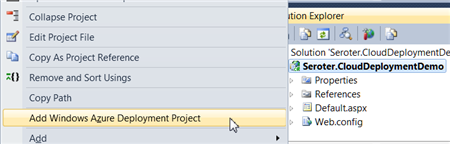
    First, after confirming that I had installed the Azure SDK 1.6, I right-clicked my ASP.NET web application and added a new Azure Deployment project.

    2012.03.05cloud01

    After choosing this command, I ended up with a new project in this Visual Studio solution.

    2012.03.05cloud02

    While I can view configuration properties (how many web roles to provision, etc), I jumped right into Publishing without changing any settings. While there was a setting to add an Azure storage account (vs. using local storage), but I didn’t think I had a need for Azure storage.

    The first step in the Publishing process required me to supply authentication in the form of a certificate. I created a new certificate, uploaded it to the Windows Azure portal, took my Azure account’s subscription identifier, and gave this set of credentials a friendly name.

    2012.03.05cloud03

    I didn’t have any “hosted services” in this account, so I was prompted to create one.

    2012.03.05cloud04

    With a host created, I then left the other settings as they were, with the hope of deploying this app to production.

    2012.03.05cloud05

    After publishing, Visual Studio 2010 showed me the status of the deployment that took about 6-7 minutes.

    2012.03.05cloud06

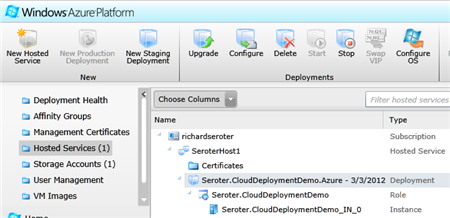
    An Azure hosted service and single instance were provisioned. A storage account was also added automatically.

    2012.03.05cloud07

    I had an error and updated my configuration file to show the error, and that update took another 5 minutes (upon replacing the original). The error was that the app couldn’t load the AWS SDK component that was referenced. So, I switched the AWS SDK dll to “copy local” in the ASP.NET application project and once again redeployed my application. This time it worked fine, and I was able to see my SimpleDB data from my Azure-hosted ASP.NET website.

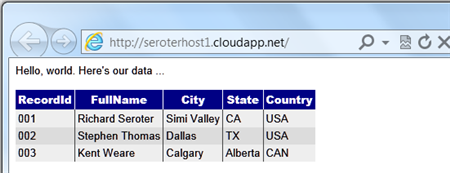
    2012.03.05cloud08

    Not too bad. Definitely a bit of upfront work to do, but subsequent projects can reuse the authentication-related activities that I completed earlier. The sluggish deployment times really stunt momentum, but realistically, you can do some decent testing locally so that what gets deployed is pretty solid.

    Deploying the Application to Iron Foundry

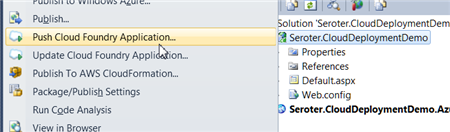
    Tier3’s Iron Foundry is the .NET-flavored version of VMware’s popular Cloud Foundry platform. Given that you can use Iron Foundry in your own data center, or in the cloud, it’s something that developers should keep a close eye on. I decided to use the Cloud Foundry Explorer that sits within Visual Studio 2010. You can download it from the Iron Foundry site. With that installed, I can right-click my ASP.NET application and choose to Push Cloud Foundry Application.

    2012.03.05cloud09

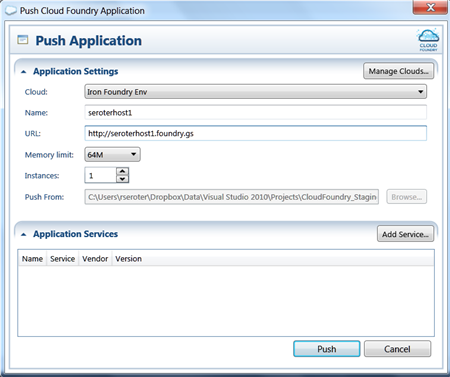
    Next, if I hadn’t previously configured access to the Iron Foundry cloud, I’d need to create a connection with the target API and my valid credentials. With the connection in place, I set the name of my cloud application and clicked Push.

    2012.03.05cloud18

    In under 60 seconds, my application was deployed and ready to look at.

    2012.03.05cloud19

    What if a change to the application is needed? I updated the HTML, right clicked my project and chose to Update Cloud Foundry Application. Once again, in a few seconds, my application was updated and I could see the changes. Taking an existing ASP.NET and moving to Iron Foundry doesn’t require any modifications to the application itself.

    If you’re looking for a multi-language, on-or-off premises PaaS, that is easy to work with, then I strongly encourage you to try Iron Foundry out.

    Deploying the Application to AWS via CloudFormation

    While AWS does not have a PaaS, per se, they do make it easy to deploy apps in a PaaS-like way via CloudFormation. Via CloudFormation, I can deploy a set of related resources and manage them as one deployment unit.

    From within Visual Studio 2010, I right-clicked my ASP.NET web application and chose Publish to AWS CloudFormation.

    2012.03.05cloud11

    When the wizard launches, I was asked to choose one of two deployment templates (single instance or multiple, load balanced instances).

    2012.03.05cloud12

    After selecting the single instance template, I kept the default values in the next wizard page. These settings include the size of the host machine, security group and name of this stack.

    2012.03.05cloud13

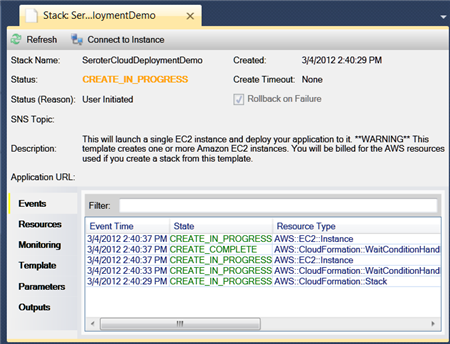
    On the next wizard pages, I kept the default settings (e.g. .NET version) and chose to deploy my application. Immediately, I saw a window in Visual Studio that showed the progress of my deployment.

    2012.03.05cloud14

    In about 7 minutes, I had a finished deployment and a URL to my application was provided. Sure enough, upon clicking that link, I was sent to my web application running successfully in AWS.

    2012.03.05cloud15

    Just to compare to previous scenarios, I went ahead and made a small change to the HTML of the web application and once again chose Publish to AWS CloudFormation from the right-click menu.

    2012.03.05cloud16

    As you can see, it saw my previous template, and as I walked through the wizard, it retrieved any existing settings and allowed me to make any changes where possible. When I clicked Deploy again, I saw that my package was being uploaded, and in less than a minute, I saw the changes in my hosted web application.

    2012.03.05cloud17

    So while I’m still leveraging the AWS infrastructure-as-a-service environment, the use of CloudFormation makes this seem a bit more like an application fabric. The deployments were very straightforward and smooth, arguably the smoothest of all three options shown in this post.

    Summary

    I was able to fairly easily take the same ASP.NET website and from Visual Studio 2010, deploy to three distinct clouds.  Each cloud has their own steps and processes, but each are fairly straightforward. Because Iron Foundry doesn’t require new VMs to be spun up, it’s consistently the faster deployment scenario. That can make a big difference during development and prototyping and should be something you factor into your cloud platform selection. Windows Azure has a nice set of additional services (like queuing, storage, integration), and Amazon gives you some best-of-breed hosting and monitoring. Tier 3’s Iron Foundry lets you use one of the most popular open source, multi-environment PaaS platforms for .NET apps. There are factors that would lead you to each of these clouds.

    This is hopefully a good bit of information to know when panic sets in over the downtime of a particular cloud. However, as you build your application with more and more services that are specific to a given environment, this multi-cloud strategy becomes less straightforward. For instance, if an ASP.NET application leverages SQL Azure for database storage, then you are still in pretty good shape when an application has to move to other environments. ASP.NET talks to SQL Server using the same ports and API, regardless of whether it’s using SQL Azure or a SQL instance deployed on an Amazon instance. But, if I’m using Azure Queues (or Amazon SQS for that matter), then it’s more difficult to instantly replace that component in another cloud environment.

    Keep all these portability concerns in mind when building your cloud-friendly applications!

  • Using SignalR To Push StreamInsight Events to Client Browsers

    I’ve spent some time recently working with the asynchronous web event messaging engine SignalR. This framework uses JavaScript (with jQuery) on the client and ASP.NET on the server to enable very interactive communication patterns. The coolest part is being able to have the server-side application call a JavaScript function on each connected browser client. While many SignalR demos you see have focused on scenarios like chat applications, I was thinking  of how to use SignalR to notify business users of interesting events within an enterprise. Wouldn’t it be fascinating if business events (e.g. “Project X requirements document updated”, “Big customer added in US West region”, “Production Mail Server offline”, “FAQ web page visits up 78% today”) were published from source applications and pushed to a live dashboard-type web application available to users? If I want to process these fast moving events and perform rich aggregations over windows of events, then Microsoft StreamInsight is a great addition to a SignalR-based solution. In this blog post, I’m going to walk through a demonstration of using SignalR to push business events through StreamInsight and into a Tweetdeck-like browser client.

    Solution Overview

    So what are we building? To make sure that we keep an eye on the whole picture while building the individual components, I’ve summarized the solution here.

    2012.03.01signalr05

    Basically, the browser client will first (through jQuery) call a server operation that adds that client to a message group (e.g. “security events”). Events are then sent from source applications to StreamInsight where they are processed. StreamInsight then calls a WCF service that is part of the ASP.NET web application. Finally, the WCF Service uses the SignalR framework to invoke the “addEventMsg()” function on each connected browser client. Sound like fun? Good. Let’s jump in.

    Setting up the SignalR application

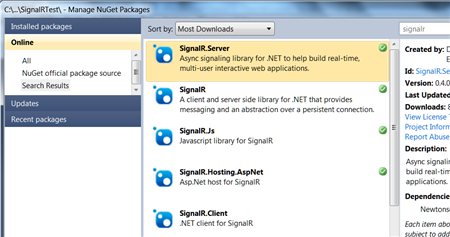
    I started out by creating a new ASP.NET web application. I then used the NuGet extension to locate the SignalR libraries that I wanted to use.

    2012.03.01signalr01

    Once the packages were chosen from NuGet, they got automatically added to my ASP.NET app.

    2012.03.01signalr02

    The next thing to do was add the appropriate JavaScript references at the top of the page. Note the last one. It is a virtual JavaScript location (you won’t find it in the design-time application) that is generated by the SignalR framework. This script, which you can view in the browser at runtime, holds all the JavaScript code that corresponds to the server/browser methods defined in my ASP.NET application.

    2012.03.01signalr04

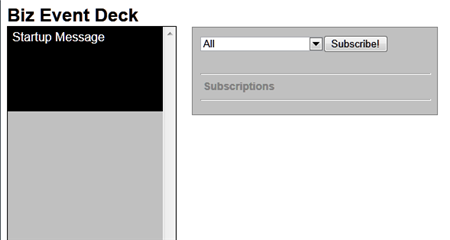
    After this, I added the HTML and ASP.NET controls necessary to visualize my Tweetdeck-like event viewer. Besides a column where each event shows up, I also added a listbox that holds all the types of events that someone might subscribe to. Maybe one set of users just want security-oriented events, or another wants events related to a given IT project.

    2012.03.01signalr03

    With my look-and-feel in place, I then moved on to adding some server-side components. I first created a new class (BizEventController.cs) that uses the SignalR “Hubs” connection model. This class holds a single operation that gets called by the JavaScript in the browser and adds the client to a given messaging group. Later, I can target a SignalR message to a given group.

    using System;
    using System.Collections.Generic;
    using System.Linq;
    using System.Web;
    
    //added reference to SignalR
    using SignalR.Hubs;
    
    ///
    <summary> /// Summary description for BizEventController /// </summary>
    
    public class BizEventController : Hub
    {
        public void AddSubscription(string eventType)
        {
            AddToGroup(eventType);
        }
    }
    

    I then switched back to the ASP.NET page and added the JavaScript guts of my SignalR application. Specifically, the code below (1) defines an operation on my client-side hub (that gets called by the server) and (2) calls the server side controller that adds clients to a given message group.

    $(function () {
                //create arrays for use in showing formatted date string
                var days = ['Sun', 'Mon', 'Tues', 'Wed', 'Thur', 'Fri', 'Sat'];
                var months = ['Jan', 'Feb', 'Mar', 'Apr', 'May', 'June', 'July', 'Aug', 'Sept', 'Oct', 'Nov', 'Dec'];
    
                // create proxy that uses in dynamic signalr/hubs file
                var bizEDeck = $.connection.bizEventController;
    
                // Declare a function on the chat hub so the server can invoke it
                bizEDeck.addEventMsg = function (message) {
                    //format date
                    var receiptDate = new Date();
                    var formattedDt = days[receiptDate.getDay()] + ' ' + months[receiptDate.getMonth()] + ' ' + receiptDate.getDate() + ' ' + receiptDate.getHours() + ':' + receiptDate.getMinutes();
                    //add new "message" to deck column
                    $('#deck').prepend('</pre>
    <div>' + message + '' + formattedDt + ' via StreamInsight</div>
    <pre>
    ');
                };
    
                //act on "subscribe" button
                $("#groupadd").click(function () {
                    //call subscription function in server code
                    bizEDeck.addSubscription($('#group').val());
                    //add entry in "subscriptions" section
                    $('#subs').append($('#group').val() + '</pre>
    
    <hr />
    
    <pre>');
                });
    
                // Start the connection
                $.connection.hub.start();
            });
    

    Building the web service that StreamInsight will call to update browsers

    The UI piece was now complete. Next, I wanted a web service that StreamInsight could call and pass in business events that would get pushed to each browser client. I’m leveraging a previously-built StreamInsight WCF adapter that can be used to receive web service request and call web service endpoints. I built a WCF service and in the underlying class, I pull the list of all connected clients and invoke the JavaScript function.

    using System;
    using System.Collections.Generic;
    using System.Linq;
    using System.Runtime.Serialization;
    using System.ServiceModel;
    using System.Text;
    
    using SignalR;
    using SignalR.Infrastructure;
    using SignalR.Hosting.AspNet;
    using StreamInsight.Samples.Adapters.Wcf;
    using Seroter.SI.AzureAppFabricAdapter;
    
    public class NotificationService : IPointEventReceiver
    {
    	//implement the operation included in interface definition
    	public ResultCode PublishEvent(WcfPointEvent result)
    	{
    		//get category from key/value payload
    		string cat = result.Payload["Category"].ToString();
    		//get message from key/value payload
    		string msg = result.Payload["EventMessage"].ToString();
    
    		//get SignalR connection manager
    		IConnectionManager mgr = AspNetHost.DependencyResolver.Resolve();
    		//retrieve list of all connected clients
    		dynamic clients = mgr.GetClients();
    
    		//send message to all clients for given category
    		clients[cat].addEventMsg(msg);
    		//also send message to anyone subscribed to all events
    		clients["All"].addEventMsg(msg);
    
    		return ResultCode.Success;
    	}
    }
    

    Preparing StreamInsight to receive, aggregate and forward events

    The website is ready, the service is exposed, and all that’s left is to get events and process them. Specifically, I used a WCF adapter to create an endpoint and listen for events from sources, wrote a few queries, and then sent the output to the WCF service created above.

    The StreamInsight application is below. It includes the creation of the embedded server and all other sorts of fun stuff.

    using System;
    using System.Collections.Generic;
    using System.Linq;
    using System.Text;
    
    using Microsoft.ComplexEventProcessing;
    using Microsoft.ComplexEventProcessing.Linq;
    using Seroter.SI.AzureAppFabricAdapter;
    using StreamInsight.Samples.Adapters.Wcf;
    
    namespace SignalRTest.StreamInsightHost
    {
        class Program
        {
            static void Main(string[] args)
            {
                Console.WriteLine(":: Starting embedded StreamInsight server ::");
    
                //create SI server
                using(Server server = Server.Create("RSEROTERv12"))
                {
                    //create SI application
                    Application app = server.CreateApplication("SeroterSignalR");
    
                    //create input adapter configuration
                    WcfAdapterConfig inConfig = new WcfAdapterConfig()
                    {
                        Password = "",
                        RequireAccessToken = false,
                        Username  = "",
                        ServiceAddress = "http://localhost:80/StreamInsightv12/RSEROTER/InputAdapter"
                    };
    
                    //create output adapter configuration
                    WcfAdapterConfig outConfig = new WcfAdapterConfig()
                    {
                        Password = "",
                        RequireAccessToken = false,
                        Username = "",
                        ServiceAddress = "http://localhost:6412/SignalRTest/NotificationService.svc"
                    };
    
                    //create event stream from the source adapter
                    CepStream input = CepStream.Create("BizEventStream", typeof(WcfInputAdapterFactory), inConfig, EventShape.Point);
                    //build initial LINQ query that is a simple passthrough
                    var eventQuery = from i in input
                                     select i;
    
                    //create unbounded SI query that doesn't emit to specific adapter
                    var query0 = eventQuery.ToQuery(app, "BizQueryRaw", string.Empty, EventShape.Point, StreamEventOrder.FullyOrdered);
                    query0.Start();
    
                    //create another query that latches onto previous query
                    //filters out all individual web hits used in later agg query
                    var eventQuery1 = from i in query0.ToStream()
                                      where i.Category != "Web"
                                      select i;
    
                    //another query that groups events by type; used here for web site hits
                    var eventQuery2 = from i in query0.ToStream()
                                      group i by i.Category into EventGroup
                                      from win in EventGroup.TumblingWindow(TimeSpan.FromSeconds(10))
                                      select new BizEvent
                                      {
                                          Category = EventGroup.Key,
                                          EventMessage = win.Count().ToString() + " web visits in the past 10 seconds"
                                      };
                    //new query that takes result of previous and just emits web groups
                    var eventQuery3 = from i in eventQuery2
                                      where i.Category == "Web"
                                      select i;
    
                    //create new SI queries bound to WCF output adapter
                    var query1 = eventQuery1.ToQuery(app, "BizQuery1", string.Empty, typeof(WcfOutputAdapterFactory), outConfig, EventShape.Point, StreamEventOrder.FullyOrdered);
                    var query2 = eventQuery3.ToQuery(app, "BizQuery2", string.Empty, typeof(WcfOutputAdapterFactory), outConfig, EventShape.Point, StreamEventOrder.FullyOrdered);
    
                    //start queries
                    query1.Start();
                    query2.Start();
                    Console.WriteLine("Query started. Press [Enter] to stop.");
    
                    Console.ReadLine();
                    //stop all queries
                    query1.Stop();
                    query2.Stop();
                    query0.Stop();
                    Console.Write("Query stopped.");
                    Console.ReadLine();
    
                }
            }
    
            private class BizEvent
            {
                public string Category { get; set; }
                public string EventMessage { get; set; }
            }
        }
    }
    

    Everything is now complete. Let’s move on to testing with a simple event generator that I created.

    Testing the solution

    I built a simple WinForm application that generates business events or a user-defined number of simulated website visits. The business events are passed through StreamInsight, and the website hits are aggregated so that StreamInsight can emit the count of hits every ten seconds.

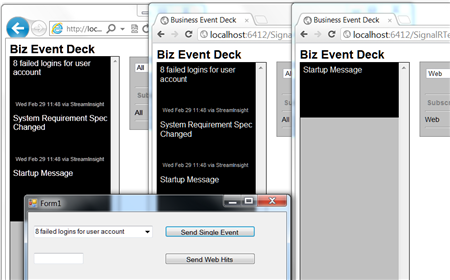
    To highlight the SignalR experience, I launched three browser instances with two different group subscriptions. The first two subscribe to all events, and the third one subscribes just to website-based events. For the latter, the client JavaScript function won’t get invoked by the server unless the events are in the “Web” category.

    The screenshot below shows the three browser instances launched (one in IE, two in Chrome).

    2012.03.01signalr06

    Next, I launched my event-generator app and StreamInsight host. I sent in a couple of business (not web) events and hoped to see them show up in two of the browser instances.

    2012.03.01signalr07

    As expected, two of the browser clients were instantly updated with these events, and the other subscriber was not. Next, I sent in a handful of simulated website hit events and observed the results.

    2012.03.01signalr08

    Cool! So all three browser instances were instantly updated with ten-second-counts of website events that were received.

    Summary

    SignalR is an awesome framework for providing real-time, interactive, bi-directional communication between clients and servers. I think there’s a lot of value of using SignalR for dashboards, widgets and event monitoring interfaces. In this post we saw a simple “business event monitor” application that enterprise users could leverage to keep up to date on what’s happening within enterprise systems. I used StreamInsight here, but you could use BizTalk Server or any application that can send events to web services.

    What do you think? Where do you see value for SignalR?

    UPDATE:I’ve made the source code for this project available and you can retrieve it from here.
  • Sending Messages to Azure AppFabric Service Bus Topics From Iron Foundry

    I recently took a look at Iron Foundry and liked what I found.  Let’s take a bit of a deeper look into how to deploy Iron Foundry .NET solutions that reference additional components.  Specifically, I’ll show you how to use the new Windows Azure AppFabric brokered messaging to reliably send messages from Iron Foundry to an on-premises application.

    The Azure AppFabric v1.5 release contains useful Service Bus capabilities for durable messaging communication through the use of Queues and Topics. The Service Bus still has the Relay Service which is great for invoking services through a cloud relay, but the asynchronous communication through the Relay Service isn’t durable.  Queues and Topics now let you send messages to one or many subscribers and have stronger guarantees of delivery.

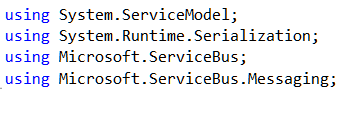
    An Iron Foundry application is just a standard .NET web application.  So, I’ll start with a blank ASP.NET web application and use old-school Web Forms instead of MVC. We need a reference to the Microsoft.ServiceBus.dll that comes with Azure AppFabric v1.5.  With that reference added, I added a new Web Form and included the necessary “using” statements.

    2011.12.23ironfoundry01

    I then built a very simple UI on the Web Form that takes in a handful of values that will be sent to the on-premises subscriber(s) through the Service Bus. Before creating the code that sends a message to a Topic, I defined an “Order” object that represents the data being sent to the topic. This object sits in a shared assembly used by this application that sends the message, and another application that receives a message.

    [DataContract]
        public class Order
        {
            [DataMember]
            public string Id { get; set; }
            [DataMember]
            public string ProdId { get; set; }
            [DataMember]
            public string Quantity { get; set; }
            [DataMember]
            public string Category { get; set; }
            [DataMember]
            public string CustomerId { get; set; }
        }
    

    The “submit” button on the Web Form triggers a click event that contains a flurry of activities.  At the beginning of that click handler, I defined some variables that will be used throughout.

    //define my personal namespace
    string sbNamespace = "richardseroter";
    //issuer name and key
    string issuer = "MY ISSUER";
    string key = "MY PRIVATE KEY";
    
    //set the name of the Topic to post to
    string topicName = "OrderTopic";
    //define a variable that holds messages for the user
    string outputMessage = "result: ";
    

    Next I defined a TokenProvider (to authenticate to my Topic) and a NamespaceManager (which drives most of the activities with the Service Bus).

    //create namespace manager
    TokenProvider tp = TokenProvider.CreateSharedSecretTokenProvider(issuer, key);
    Uri sbUri = ServiceBusEnvironment.CreateServiceUri("sb", sbNamespace, string.Empty);
    NamespaceManager nsm = new NamespaceManager(sbUri, tp);
    

    Now we’re ready to either create a Topic or reference an existing one. If the Topic does NOT exist, then I went ahead and created it, along with two subscriptions.

    //create or retrieve topic
    bool doesExist = nsm.TopicExists(topicName);
    
    if (doesExist == false)
       {
          //topic doesn't exist yet, so create it
          nsm.CreateTopic(topicName);
    
          //create two subscriptions
    
          //create subscription for just messages for Electronics
          SqlFilter eFilter = new SqlFilter("ProductCategory = 'Electronics'");
          nsm.CreateSubscription(topicName, "ElecFilter", eFilter);
    
          //create subscription for just messages for Clothing
          SqlFilter eFilter2 = new SqlFilter("ProductCategory = 'Clothing'");
          nsm.CreateSubscription(topicName, "ClothingFilter", eFilter2);
    
          outputMessage += "Topic/subscription does not exist and was created; ";
        }
    

    At this point we either know that a topic exists, or we created one.  Next, I created a MessageSender which will actually send a message to the Topic.

    //create objects needed to send message to topic
     MessagingFactory factory = MessagingFactory.Create(sbUri, tp);
     MessageSender orderSender = factory.CreateMessageSender(topicName);
    

    We’re now ready to create the actual data object that we send to the Topic.  Here I referenced the Order object we created earlier.  Then I wrapped that Order in the BrokeredMessage object.  This object has a property bag that is used for routing.  I’ve added a property called “ProductCategory” that our Topic subscription uses to make decisions on whether to deliver the message to the subscriber or not.

    //create order
    Order o = new Order();
    o.Id = txtOrderId.Text;
    o.ProdId = txtProdId.Text;
    o.CustomerId = txtCustomerId.Text;
    o.Category = txtCategory.Text;
    o.Quantity = txtQuantity.Text;
    
    //create brokered message object
    BrokeredMessage msg = new BrokeredMessage(o);
    //add properties used for routing
    msg.Properties["ProductCategory"] = o.Category;
    

    Finally, I send the message and write out the data to the screen for the user.

    //send it
    orderSender.Send(msg);
    
    outputMessage += "Message sent; ";
    lblOutput.Text = outputMessage;
    

    I decided to use the command line (Ruby-based) vmc tool to deploy this app to Iron Foundry.  So, I first published my website to a directory on the file system.  Then, I manually copied the Microsoft.ServiceBus.dll to the bin directory of the published site.  Let’s deploy! After logging into my production Iron Foundry account by targeting the api.gofoundry.net management endpoint, I executed a push command and instantly saw my web application move up to the cloud. It takes like 8 seconds from start to finish.

    2011.12.23ironfoundry02

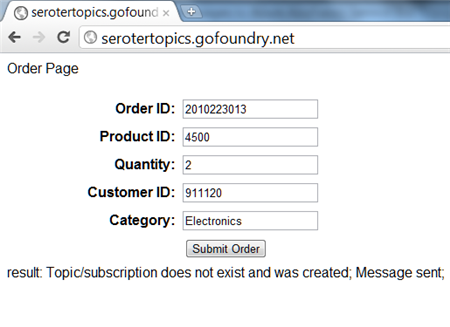
    My site is now online and I can visit it and submit a new order [note that this site isn’t online now, so don’t try and flood my machine with messages!].  When I click the submit button, I can see that a new Topic was created by this application and a message was sent.

    2011.12.23ironfoundry03

    Let’s confirm that we really have a new Topic with subscriptions. I can first confirm this through the Windows Azure Management Console.

    2011.12.23ironfoundry04

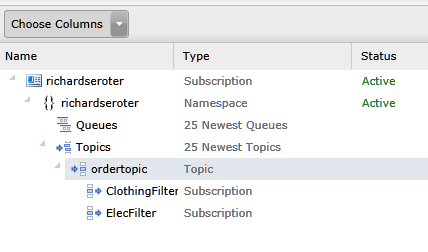
    To see more details, I can use the Service Bus Explorer tool which allows us to browse our Service Bus configuration.  When I launch it, I can see that I have a Topic with a pair of subscriptions and even what Filter I applied.

    2011.12.23ironfoundry05

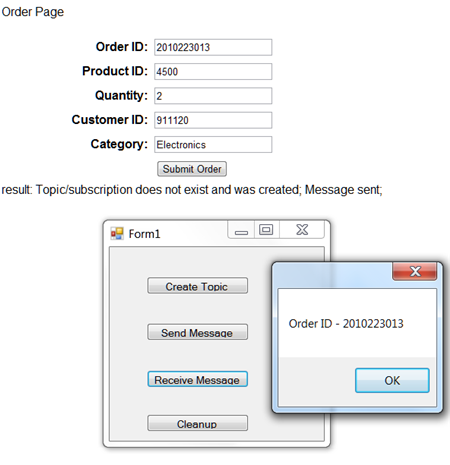
    I previously built a WinForm application that pulls data from an Azure AppFabric Service Bus Topic. When I click the “Receive Message” button, I pull a message from the Topic and we can see that it has the same Order ID as the message submitted from the website.

    2011.12.23ironfoundry06

    If I submit another message from the website, I see a different message because my Topic already exists and I’m simply reusing it.

    2011.12.23ironfoundry07

    Summary

    So what did we see here?  First, I proved that an ASP.NET web application that you want to deploy to the Iron Foundry (onsite or offsite) cloud looks just like any other ASP.NET web application.  I didn’t have to build it differently or do anything special. Secondly, we saw that I can easily use the Windows Azure AppFabric Service Bus to reliably share data between a cloud-hosted application and an on-premises application.