Category: SOA

  • My new Pluralsight course on the Salesforce.com integration APIs is now live!

    Salesforce continues to eat the world (3 billion transactions today!) as teams want to quickly get data-driven applications up and running with minimal effort. However, for most apps to be truly useful, they need to be connected to other sources of data or business logic. 2016.03.10ps01Salesforce has a super broad set of integration APIs ranging from traditional SOAP all the way to real-time streaming. How do you choose the right one? What are the best use cases for each? Last Fall I did a presentation on this particular topic for a local Salesforce User Group in Utah. I’ve spent the past few months taking that one hour presentation and turning that into a full-fledged Pluralsight training course. Yesterday, the result was released by Pluralsight.

    The course – Using Force.com Integration APIs to Connect Your Applications – is five delightful hours of information about all the core Force.com APIs.

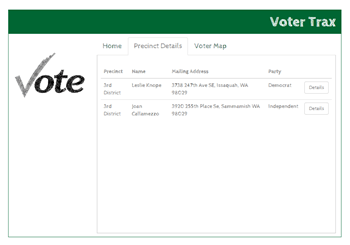
    In addition to messing around with raw Force.com APIs, you also get to muck around with a custom set of Node.js apps that help you see a realistic scenario in action. This “Voter Trax” app calls the REST API, receives real-time Outbound Messages, and other apps help you learn about the Streaming API and Apex callouts.

    I’ve put together seven modules for this course …

    1. Touring the Force.com Integration APIs. Here I explain the value of integrating Salesforce with other systems, help you set up your free developer account, discuss the core Force.com integration patterns, and give an overview of each integration API.
    2. Using the Force.com SOAP APIs to Integrate with Enterprise Apps. While the thought of using SOAP APIs may give you night terrors, the reality is that it’s still popular with plenty of enterprise developers. In this module, we take a look at authenticating users, making SOAP calls, handling faults, using SOAP headers, building custom SOAP services in Force.com, and how to monitor your services. All the demos in this module use Postman to call the SOAP APIs directly.
    3. Creating Lightweight Integrations with the Force.com REST API. Given the choice, many developer now prefer RESTful services over SOAP. Force.com has a comprehensive set of REST APIs that are secured via OAuth. This module shows you how to switch between XML and JSON payloads, how to call the API, making composite calls (that let you batch up requests), and how to build custom REST services. Here we use both Postman and a custom Node.js application to consume the REST endpoints.
    4. Interacting with Bulk Data in Force.com. Not everything requires real-time integration. The Force.com Bulk API is good for inserting lots of records or retrieving large data sets. Here we walk through the Bulk API and see how to create and manage jobs, work with XML or CSV payloads, deal with failures, and how to transform source data to fit the Salesforce schema.
    5. Using Force.com Outbound Messaging for Real-time Push Integrations. Outbound Messaging is one of the most interesting Force.com integration APIs, and would remind you of the many modern apps that use webhooks to send out messages when events occur. Here we see how to create Outbound Messages, how to build compatible listeners, and options for tracking (failed) messages. This module has one of my favorite demos where data changes from Salesforce are sent to a custom Node.js app and plotted on a Google map widget.
    6. Doing Push Integration Anywhere with the Force.com Streaming API. You may love real-time notifications, but can’t put your listeners on the public Internet, as required by Outbound Messaging. The Streaming API uses CometD to push (in reality, pull via long polling) messages to any subscriber to a channel. This module walks through authenticating users, creating PushTopics (the object that holds the query that Salesforce monitors), creating client apps, and building general purpose streaming solutions with Force.com Generic Streaming.
    7. Consuming External Services with Force.com Apex Callouts. Salesforce isn’t just a system that others pull data from. Salesforce itself needs to be able to dip into other systems to retrieve data or execute business logic. In this module, we see how to call out to various external endpoints and consume the XML/JSON that comes back. We use Named Credentials to separate the credentials from the code itself, and even mess around with long-running callouts and asynchronous responses.

    If your company uses Salesforce, you’ll be able to add a lot of value by understanding how to connect Salesforce to your other systems. If you take my new course, I’d love to hear from you!

  • What Are All of Microsoft Azure’s Application Integration Services?

    As a Microsoft MVP for Integration – or however I’m categorized now – I keep a keen interest in where Microsoft is going with (app) integration technologies. Admittedly, I’ve had trouble keeping up with all the various changes, and thought it’d be useful to take a tour through the status of the Microsoft integration services. For each one, I’ll review its use case, recent updates, and how to consume it.

    What qualifies as an integration technology nowadays? For me, it’s anything that lets me connect services in a distributed system. That “system” may be comprised of components running entirely on-premises, between business partners, or across cloud environments. Microsoft doesn’t totally agree with that definition, if their website information architecture is any guide. They spread around the services in categories like “Hybrid Integration”, “Web and Mobile”, “Internet of Things”, and even “Analytics.”

    But, whatever. I’m considering the following Microsoft technologies as part of their cloud-enabled integration stack:

    • Service Bus
    • Event Hubs
    • Data Factory
    • Stream Analytics
    • BizTalk Services
    • Logic Apps
    • BizTalk Server on Cloud Virtual Machines

    I considered, but skipped, Notification Hubs, API Apps, and API Management. They all empower application integration scenarios in some fashion, but it’s more ancillary. If you disagree, tell me in the comments!

    Service Bus

    What is it?

    The Service Bus is a general purpose messaging engine released by Microsoft back in 2008. It’s made up of two key sets of services: the Service Bus Relay, and Service Bus Brokered Messaging.

    https://twitter.com/clemensv/status/648902203927855105

    The Service Bus Relay is a unique service that makes it possible to securely expose on-premises services to the Internet through a cloud-based relay. The service supports a variety of messaging patterns including request/reply, one-way asynchronous, and peer-to-peer.

    But what if the service client and server aren’t online at the same time? Service Bus Brokered Messaging offers a pair of asynchronous store-and-forward services. Queues provide first-in-first-out delivery to a single consumer. Data is stored in the queue until retrieved by the consumer. Topics are slightly different. They make it possible for multiple recipients to get a message from a producer. It offers a publish/subscribe engine with per-recipient filters.

    How does the Service Bus enable application integration? The Relay lets companies expose legacy apps through public-facing services, and makes cross-organization integration much simpler than setting up a web of VPN connections and FTP data exchanges. Brokered Messaging makes it possible to connect distributed apps in a loosely coupled fashion, regardless of where those apps reside.

    What’s new?

    This is a fairly mature service with a slow rate of change. The only thing added to the Service Bus in 2015 is Premium messaging. This feature gives customers the choice to run the Brokered Messaging components in a single-tenant environment. This gives users more predictable performance and pricing.

    From the sounds of it, Microsoft is also looking at finally freeing Service Bus Relay from the shackles of WCF. Here’s hoping.

    https://twitter.com/clemensv/status/639714878215835648

    How to use it?

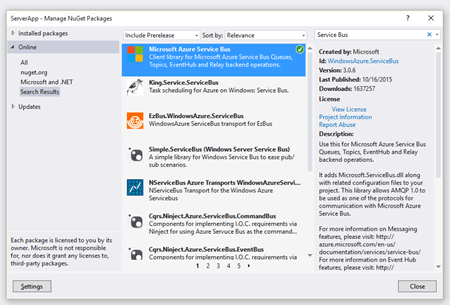
    Developers work with the Service Bus primarily by writing code. To host a Relay service, you must write a WCF service that uses one of the pre-defined Service Bus bindings. To make it easy, developers can add the Service Bus package to their projects via NuGet.
    2015.10.21integration01

    The only aspect that requires .NET is hosting Relay services. Developers can consume Relay-bound services, Queues, and Topic subscriptions from a host of other platforms, or even just raw REST APIs. The Microsoft SDKs for Java, PHP, Ruby, Python and Node.js all include the necessary libraries for talking to the Service Bus. AMQP support appears to be in a subset of the SDKs.

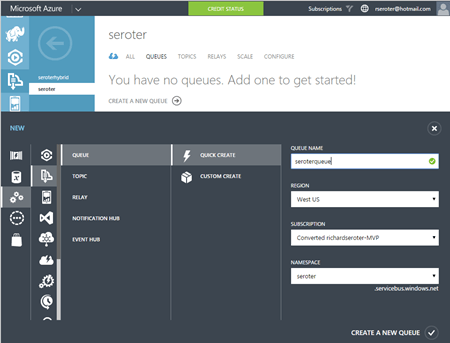
    It’s also possible to set up Service Bus Queues and Topics via the Azure Portal. From here, I can create new Queues, add Topics, and configure basic Subscriptions. I can also see any active Relay service endpoints.
    2015.10.21integration02

    Finally, you can interact with the Service Bus through the super powerful (and open source) Service Bus Explorer created by Micosoftie Paolo Salvatori. From here, you can configure and test virtually every aspect of the Service Bus.


    Event Hubs

    What is it?

    Azure Event Hubs is a scalable service for high-volume event intake. Stream in millions of events per second from applications or devices. It’s not an end-to-end messaging engine, but rather, focuses heavily on being a low latency “front door” that can reliably handle consistent or bursty event streams.

    Event Hubs works by putting an ordered sequence of events into something called a partition. Like Apache Kafka, an Event Hub partition acts like an append-only commit log. Senders – who communicate with Event Hubs via AMQP and HTTP – can specify a partition key when submitting events, or leave it out so that a round-robin approach decides which partition the event goes to. Partitions are accessed by readers through Consumer Groups. A consumer group is like a view of the event stream. There should only be a single partition reader at one time, and Event Hub users definitely have some responsibility for managing connections, tracking checkpoints, and the like.

    How do Event Hubs enable application integration? A core use case of Event Hubs is capturing high volume “data exhaust” thrown off by apps and devices. You may also use this to aggregate data from multiple sources, and have a consumer process pull data for further processing and sending to downstream systems.

    What’s new?

    In July of 2015, Microsoft added support for AMQP over web sockets. They also added the service to an addition region in the United States.

    How to use it?

    It looks like only the .NET SDK has native libraries for Event Hubs, but developers can still use either the REST API or AMQP libraries in their language of choice (e.g. Java).

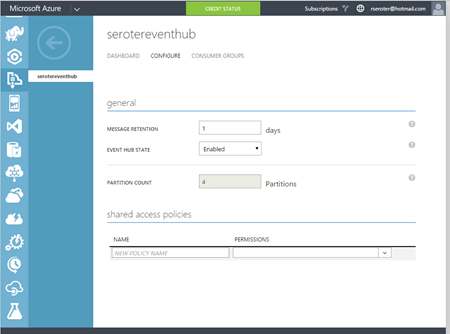
    The Azure Portal lets you create Event Hubs, and do some basic configuration.
    2015.10.21integration03

    Paolo also added support for Event Hubs in the Service Bus Explorer.


    Data Factory

    What is it?

    The Azure Data Factory is a cloud-based data integration service that does traditional extract-transform-load but with some modern twists. Data Factory can pull data from either on-premises or cloud endpoints. There’s an agent-based “data management gateway” for extracting data from on-premises file systems, SQL Servers, Oracle databases, Teradata databases, and more. Data transformation happens in Hadoop cluster or batch processing environment. All the various processing activities are collected into a pipeline that gets executed. Activities can have policies attached. A policy controls concurrency, retries, delay duration, and more.

    How does the Data Factory enable application integration? This could play a useful part in synchronizing data used by distributed systems. It’s designed for large data sets and is much more efficient than using messaging-based services to ship chunks of data between repositories.

    What’s new?

    This service just hit “general availability” in August, so the whole service is kinda new.

    How to use it?

    You have a few choices for interacting with the Data Factory service. As mentioned earlier, there are a whole bunch of supported database and file endpoints, but what about creating and managing the factories themselves? Your choices are Visual Studio, PowerShell, REST API, or the graphical designer in the Azure Preview Portal. Developers can download a package to add the appropriate project types to Visual Studio, and download the latest Azure PowerShell executable to get Data Factory extensions.

    To do any visual design, you need to jump into the (still) Preview Portal. Here you can create, manage, and monitor individual factories.
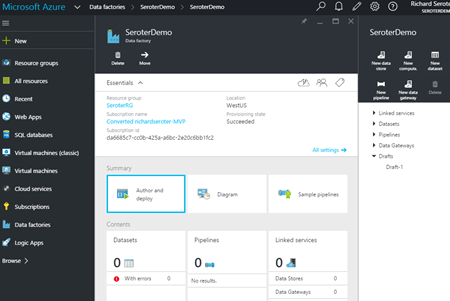
    2015.10.21integration04


    Stream Analytics

    What is it?

    Stream Analytics is a cloud-hosted event processing engine. Point it at an event source (real-time or historical) and run data over queries written in a SQL-like language. An event source could be a stream (like Event Hubs), or reference data (like Azure Blob storage). Queries can join streams, convert data types, match patterns, count unique values, look for changed values, find specific events in windows, detect absence of events, and more.

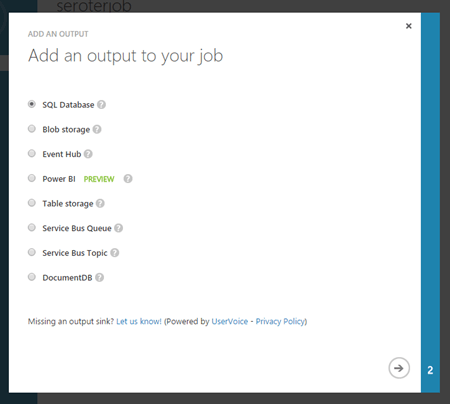
    Once the data has been processed, it goes to one of many possible destinations. These include Azure SQL Databases, Blob storage, Event Hubs, Service Bus Queues, Service Bus Topics, Power BI, or Azure Table Storage. The choice of consumer obviously depends on what you want to do with the data. If the stream results should go back through a streaming process, then Event Hubs is a good destination. If you want to stash the resulting data in a warehouse for later BI, go that way.

    How does Stream Analytics enable application integration? The output of a stream can go into the Service Bus for routing to other systems or triggering actions in applications hosted anywhere. One system could pump events through Stream Analytics to detect relevant business conditions and then send the output events to those systems via database or messaging.

    What’s new?

    This service became generally available in April 2015. In July, Microsoft added support for Service Bus Queues and Topics as output types. A few weeks ago, there was another update that added IoT-friendly capabilities like DocumentDB as an output, support for the IoT Hub service, and more.

    How to use it?

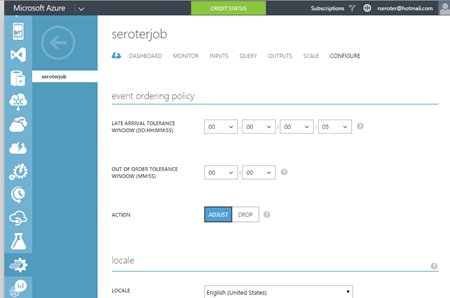
    Lots of different app services can connect to Stream Analytics (including Event Hubs, Power BI, Azure SQL Databases), but it looks like you’ve got limited choices today in setting up the stream processing jobs themselves. There’s the REST API, .NET SDK, or classic Portal UI.

    The Portal UI lets you create jobs, configure inputs, write and test queries, configure outputs, scale streaming units up and down, and change job settings.
    2015.10.21integration05

    2015.10.21integration06


    BizTalk Services

    What is it?

    BizTalk Services targets EAI (enterprise application integration) and EDI (electronic data exchange) scenarios by offering tools and connectors that are designed to bridge protocol and data mismatches between systems. Developers send in XML or flat file data, and it can be validated, transformed, and routed via a “bridge” component. Message validation is done against an XSD schema, and XSLT transformations are created visually in a sophisticated mapping tool. Data comes into BizTalk Services via HTTP, S/FTP, Service Bus Queues, or Service Bus Topic subscription. Valid destinations for the output of a bridge include FTP, Azure Blob storage, one-way Service Bus Relay endpoints, Service Bus Queues, and more. Microsoft also added a BizTalk Adapter Service that lets you expose on-premises endpoints – options include SQL Server, Oracle databases, Oracle E-Business Suite, SAP, and Siebel – to cloud-hosted bridges.

    BizTalk Services also has some business-to-business capabilities. This includes support for a wide range of EDI and EDIFACT schemas, and a basic trading partner management portal.

    How does BizTalk Services enable application integration? BizTalk Services makes it possible for applications with different endpoints and data structures to play nice. Obviously this has potential to be a useful part of an application integration portfolio. Companies need to connect their assets, which are more distributed now more than ever.

    What’s new?

    BizTalk Services itself seems a bit stagnant (judging by the sparse release notes), but some of its services are now exposed in Logic and API apps (see below). Not sure where this particular service is heading, but its individual pieces will remain useful to teams that want access to transformation and connectivity services in their apps.

    How to use it?

    Working with BizTalk Services means using the REST API, PowerShell commandlets, or Visual Studio. There’s also a standalone management portal that hangs off the main Azure Portal.

    In Visual Studio, developers need to add the BizTalk Services SDK in order to get the necessary components. After installing, it’s easy enough to model out a bridge with all the necessary inputs, outputs, schemas, and maps.
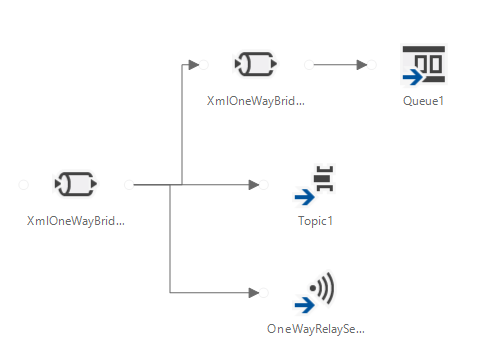
    In the standalone portal, you can search for and delete bridges, upload schemas and maps, add certificates, and track messages. Back in the standard Azure Portal, you configure things like backup policies and scaling settings.
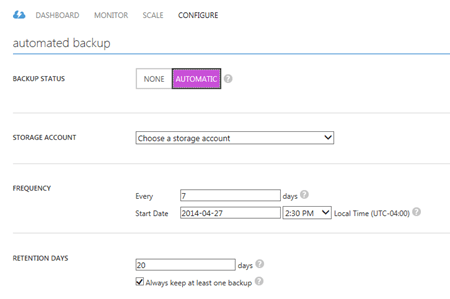
    2015.10.21integration07


    Logic Apps

    What is it?

    Logic Apps let developers build and host workflows in the cloud. These visually-designed processes run a series of steps (called “actions”) and use “connectors” to access remote data and business logic. There are tons of connectors available so far, and it’s possible to create your own. Core connectors include Azure Service Bus, Salesforce Chatter, Box, HTTP, SharePoint, Slack, Twilio, and more. Enterprise connectors include an AS2 connector, BizTalk Transform Service, BizTalk Rules Service, DB2 connector, IBM WebSphere MQ Server, POP3, SAP, and much more.

    Triggers make a Logic App run, and developers can trigger manually, or off the action of a connector. You could start a Logic app with an HTTP call, a recurring schedule, or upon detection of a relevant Tweet in Twitter. Within the Logic App, you can specify repeating operations and some basic conditional logic. Developers can see and edit the underlying JSON that describes a Logic App. Features like shared parameters are ONLY available to those writing code (versus visually designing the workflow). The various BizTalk-branded API actions offer the ability to validate, transform, and encode data, or execute independently-maintained business rules.

    How do Logic Apps enable application integration? This service helps developers put together cloud-oriented application integration workflows that don’t need to run in an on-premises message bus. The various social and SaaS connectors help teams connect to more modern endpoints, while the on-premises connectors and classic BizTalk functionality addresses more enterprise-like use cases.

    What’s new?

    This is clearly an area of attention for Microsoft. Lots of updates since the server launched in March. Microsoft has added Visual Studio support for designing Logic Apps, future execution scheduling, connector search in the Preview Portal, do … until looping, improvements to triggers, and more.

    How to use it?

    This is still a preview service, so it’s not surprising that you only have a few ways to interact with it. There’s a REST API for management, and the user experience in the Azure Preview Portal.

    Within the Preview Portal, developers can create and manage their Logic Apps. You can either start from scratch, or use one of the pre-built templates that reflect common patterns like content-based routing, scatter-gather, HTTP request/response, and more.
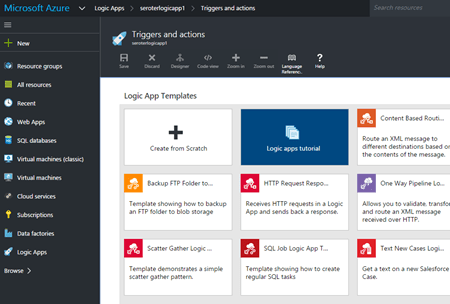
    2015.10.21integration08

    If you want to build your own, you choose from any existing or custom-built API apps.
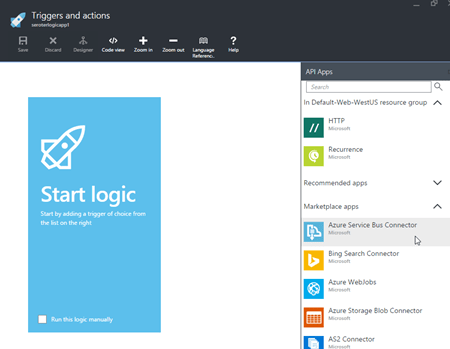
    2015.10.21integration09

    You then save your Logic App and can have it run either manually or based on a trigger.


    BizTalk Server (on Cloud Virtual Machines)

    What is it?

    Azure users can provision and manage their own BizTalk Server integration server in Azure Virtual Machines using prebuilt images. BizTalk Server is the mature, feature-rich integration bus used to connect enterprise apps. With it, customers get a stateful workflow engine, reliable pub/sub messaging engine, adapter framework, rules engine, trading partner management platform, and full design experience in Visual Studio. While not particularly cloud integrated (with the exception of a couple Service Bus adapters), it can be reasonably used to connect to integrate apps across environments.

    What’s new?

    BizTalk Server 2013 R2 was released in the middle of last year and included some incremental improvements like native JSON support, and updates to some built-in adapters. The next major release of the platform is expected in 2016, but without a publicly announced feature set.

    How to use it?

    Deploy the image from the template library if you want to run it in Azure, or do the same in any other infrastructure cloud.
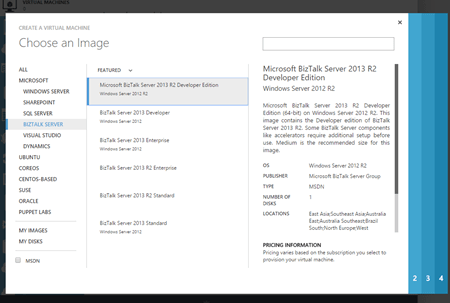
    2015.10.21integration10


    Summary

    Whew. Those are a lot of options. Definitely some overlap, but Microsoft also seems to be focused on building these in a microservices fashion. Specifically, single purpose services that do one thing really well and don’t encroach into unnatural territory. For example, Stream Analytics does one thing, and relies on other services to handle other parts of the processing pipeline. I like this trend, as it gets away from a heavyweight monolithic integration service that has a bunch of things I don’t need, but have to deploy. It’s much cleaner (although potentially MORE complex) to assemble services as needed!
  • Join Me at Microsoft TechEd to Talk DevOps, Cloud Application Architecture

    In a couple weeks, I’ll be invading Houston, TX to deliver a pair of sessions at Microsoft TechEd. This conference – one of the largest annual Microsoft events – focuses on technology available today for developers and IT professionals. I made a pair of proposals to this conference back in January (hoping to increase my odds), and inexplicably, they chose both. So, I accidentally doubled my work.

    The first session, titled Architecting Resilient (Cloud) Applications looks at the principles, patterns, and technology you can use to build highly available cloud applications. For fun, I retooled the highly available web application that I built for my pair of Pluralsight courses, Architecting Highly Available Systems on AWS and Optimizing and Managing Distributed Systems on AWS. This application now takes advantage of Azure Web Sites, Virtual Machines, Traffic Manager, Cache, Service Bus, SQL Database, Storage, and CDN. While I’ll be demonstrating a variety of Microsoft Azure services (because it’s a Microsoft conference), all of the principles/patterns apply to virtually any quality cloud platform.

    My second session is called Practical DevOps for Data Center Efficiency. In reality, this is a talk about “DevOps for Windows people.” I’ll cover what DevOps is, what the full set of technologies are that support a DevOps culture, and then show off a set of Windows-friendly demos of Vagrant, Puppet, and Visual Studio Online. The best DevOps tools have been late-arriving to Windows, but now some of the best capabilities are available across OS platforms and I’m excited to share this with the TechEd crowd.

    If you’re attending TechEd, don’t hesitate to stop by and say hi. If you think either of these talks are interesting for other conferences, let me know that too!

  • Data Stream Processing with Amazon Kinesis and .NET Applications

    Amazon Kinesis is a new data stream processing service from AWS that makes it possible to ingest and read high volumes of data in real-time. That description may sound vaguely familiar to those who followed Microsoft’s attempts to put their CEP engine StreamInsight into the Windows Azure cloud as part of “Project Austin.” Two major differences between the two: Kinesis doesn’t have the stream query aspects of StreamInsight, and Amazon actually SHIPPED their product.
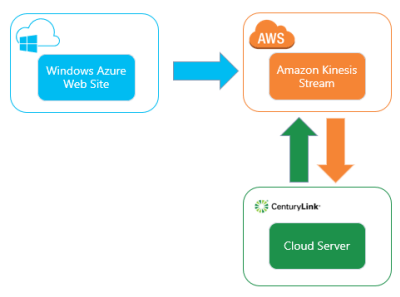
    Kinesis looks pretty cool, and I wanted to try out a scenario where I have (1) a Windows Azure Web Site that generates data, (2) Amazon Kinesis processing data, and (3) an application in the CenturyLink Cloud which is reading the data stream.
    2014.01.08kinesis05

    What is Amazon Kinesis?

    Kinesis provides a managed service that handles the intake, storage, and transportation of real-time streams of data. Each stream can handle nearly unlimited data volumes. Users set up shards which are the means for scaling up (and down) the capacity of the stream. All the data that comes into the a Kinesis stream is replicated across AWS availability zones within a region. This provides a great high availability story. Additionally, multiple sources can write to a stream, and a stream can be read by multiple applications.

    Data is available in the stream for up to 24 hours, meaning that applications (readers) can pull shard records based on multiple schemes: given sequence number, oldest record, latest record. Kinesis uses DynamoDB to store application state (like checkpoints). You can interact with Kinesis via the provided REST API or via platform SDKs.

    What DOESN’T Kinesis do? It doesn’t have any sort of adapter model, so it’s up to the developer to build producers (writers) and applications (readers). There is a nice client library for Java that has a lot of built in logic for application load balancing and such. But for the most part, this is still a developer-oriented solution for building big data processing solutions.

    Setting up Amazon Kinesis

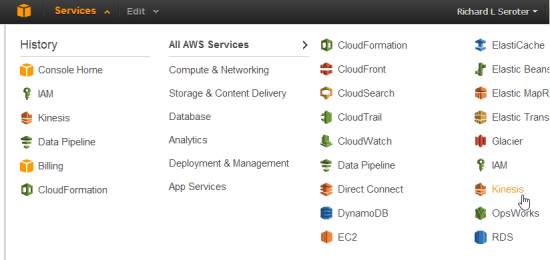
    First off, I logged into the AWS console and located Kinesis in the navigation menu.

    2014.01.08kinesis01

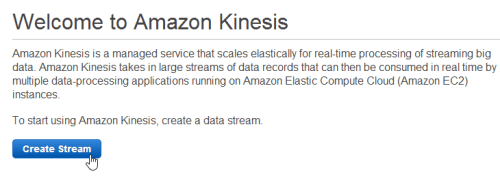
    I’m then given the choice to create a new stream.

    2014.01.08kinesis02

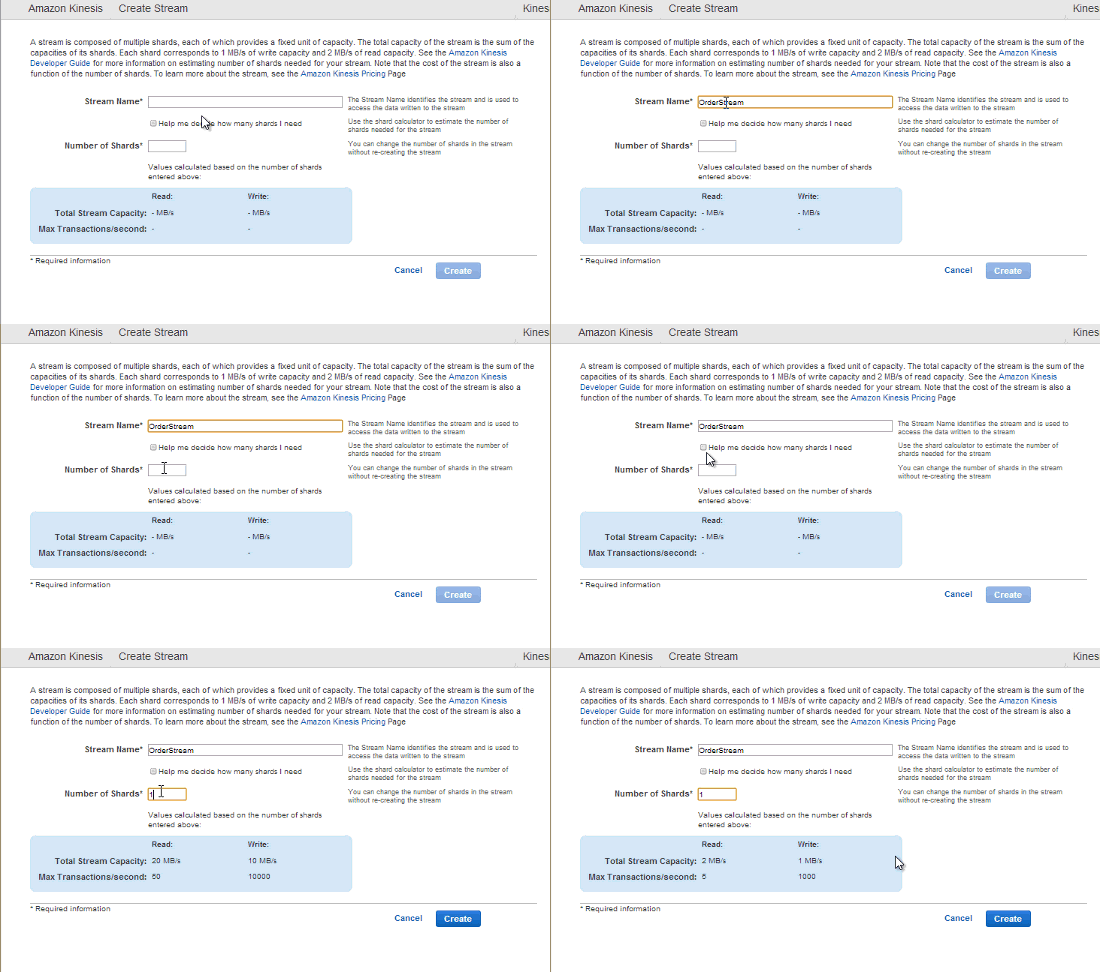
    Next, I need to choose the initial number of shards for the stream. I can either put in the number myself, or use a calculator that helps me estimate how many shards I’ll need based on my data volume.

    2014.01.08kinesis03

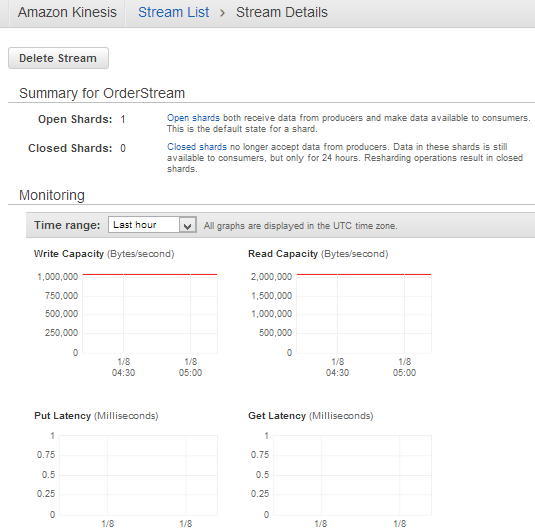
    After a few seconds, my managed Kinesis stream is ready to use. For a given stream, I can see available shards, and some CloudWatch metrics related to capacity, latency, and requests.

    2014.01.08kinesis04

    I now have an environment for use!

    Creating a data producer

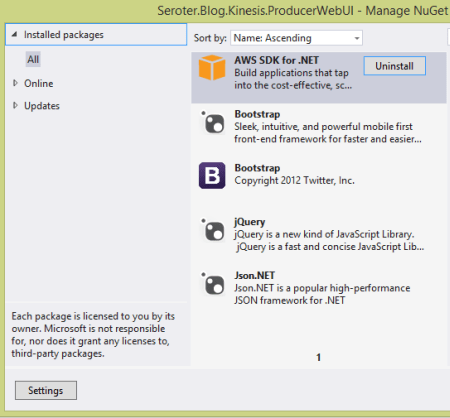
    Now I was ready to build an ASP.NET web site that publishes data to the Kinesis endpoint. The AWS SDK for .NET already Kinesis objects, so no reason to make this more complicated than it has to be. My ASP.NET site has NuGet packages that reference JSON.NET (for JSON serialization), AWS SDK, jQuery, and Bootstrap.

    2014.01.08kinesis06

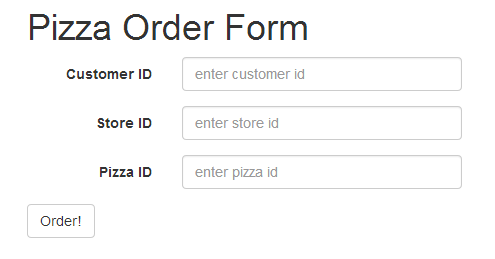
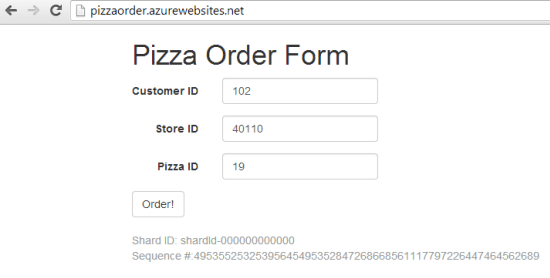
    The web application is fairly basic. It’s for ordering pizza from a global chain. Imagine sending order info to Kinesis and seeing real-time reactions to marketing campaigns, weather trends, and more. Kinesis isn’t a messaging engine per se, but it’s for collecting and analyzing data. Here, I’m collecting some simplistic data in a form.

    2014.01.08kinesis07

    When clicking the “order” button, I build up the request and send it to a particular Kinesis stream. First, I added the following “using” statements:

    using Newtonsoft.Json;
    using Amazon.Kinesis;
    using Amazon.Kinesis.Model;
    using System.IO;
    using System.Text;
    

    The button click event has the following (documented) code.  Notice a few things. My AWS credentials are stored in the web.config file, and I pass in an AmazonKinesisConfig to the client constructor. Why? I need to tell the client library which AWS region my Kinesis stream is in so that it can build the proper request URL. See that I added a few properties to the actual put request object. First, I set the stream name. Second, I added a partition key which is used to place the record in a given shard. It’s a way of putting “like” records in a particular shard.

    protected void btnOrder_Click(object sender, EventArgs e)
        {
            //generate unique order id
            string orderId = System.Guid.NewGuid().ToString();
    
            //build up the CLR order object
            Order o = new Order() { Id = orderId, Source = "web", StoreId = storeid.Text, PizzaId = pizzaid.Text, Timestamp = DateTime.Now.ToString() };
    
            //convert to byte array in prep for adding to stream
            byte[] oByte = Encoding.UTF8.GetBytes(JsonConvert.SerializeObject(o));
    
            //create stream object to add to Kinesis request
            using (MemoryStream ms = new MemoryStream(oByte))
            {
                //create config that points to AWS region
                AmazonKinesisConfig config = new AmazonKinesisConfig();
                config.RegionEndpoint = Amazon.RegionEndpoint.USEast1;
    
                //create client that pulls creds from web.config and takes in Kinesis config
                AmazonKinesisClient client = new AmazonKinesisClient(config);
    
                //create put request
                PutRecordRequest requestRecord = new PutRecordRequest();
                //list name of Kinesis stream
                requestRecord.StreamName = "OrderStream";
                //give partition key that is used to place record in particular shard
                requestRecord.PartitionKey = "weborder";
                //add record as memorystream
                requestRecord.Data = ms;
    
                //PUT the record to Kinesis
                PutRecordResponse responseRecord = client.PutRecord(requestRecord);
    
                //show shard ID and sequence number to user
                lblShardId.Text = "Shard ID: " + responseRecord.ShardId;
                lblSequence.Text = "Sequence #:" + responseRecord.SequenceNumber;
            }
        }
    

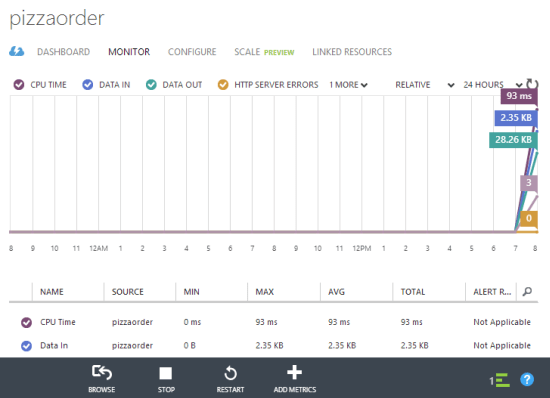
    With the web application done, I published it to a Windows Azure Web Site. This is super easy to do with Visual Studio 2013, and within a few seconds my application was there.

    2014.01.08kinesis08

    Finally, I submitted a bunch of records to Kinesis by adding pizza orders. Notice the shard ID and sequence number that Kinesis returns from each PUT request.

    2014.01.08kinesis09

    Creating a Kinesis application (record consumer)

    To realistically read data from a Kinesis stream, there are three steps. First, you need to describe the stream in order to find out the shards. If I want a fleet of servers to run this application and read the stream, I’d need a way for each application to claim a shard to work on. The second step is to retrieve a “shard iterator” for a given shard. The iterator points to a place in the shard where I want to start reading data. Recall from above that I can start with the latest unread records, oldest records, or at a specific point in the shard. The third and final step is to get the records from a particular iterator. Part of the result set of this operation is a “next iterator” value. In my code, if I find another iterator value, I once again call the “get records” operation to pull any records from that iterator position.

    Here’s the total code block, documented for your benefit.

    private static void ReadFromKinesis()
    {
        //create config that points to Kinesis region
        AmazonKinesisConfig config = new AmazonKinesisConfig();
        config.RegionEndpoint = Amazon.RegionEndpoint.USEast1;
    
       //create new client object
       AmazonKinesisClient client = new AmazonKinesisClient(config);
    
       //Step #1 - describe stream to find out the shards it contains
       DescribeStreamRequest describeRequest = new DescribeStreamRequest();
       describeRequest.StreamName = "OrderStream";
    
       DescribeStreamResponse describeResponse = client.DescribeStream(describeRequest);
       List<Shard> shards = describeResponse.StreamDescription.Shards;
       foreach(Shard s in shards)
       {
           Console.WriteLine("shard: " + s.ShardId);
       }
    
       //grab the only shard ID in this stream
       string primaryShardId = shards[0].ShardId;
    
       //Step #2 - get iterator for this shard
       GetShardIteratorRequest iteratorRequest = new GetShardIteratorRequest();
       iteratorRequest.StreamName = "OrderStream";
       iteratorRequest.ShardId = primaryShardId;
       iteratorRequest.ShardIteratorType = ShardIteratorType.TRIM_HORIZON;
    
       GetShardIteratorResponse iteratorResponse = client.GetShardIterator(iteratorRequest);
       string iterator = iteratorResponse.ShardIterator;
    
       Console.WriteLine("Iterator: " + iterator);
    
       //Step #3 - get records in this iterator
       GetShardRecords(client, iterator);
    
       Console.WriteLine("All records read.");
       Console.ReadLine();
    }
    
    private static void GetShardRecords(AmazonKinesisClient client, string iteratorId)
    {
       //create reqest
       GetRecordsRequest getRequest = new GetRecordsRequest();
       getRequest.Limit = 100;
       getRequest.ShardIterator = iteratorId;
    
       //call "get" operation and get everything in this shard range
       GetRecordsResponse getResponse = client.GetRecords(getRequest);
       //get reference to next iterator for this shard
       string nextIterator = getResponse.NextShardIterator;
       //retrieve records
       List<Record> records = getResponse.Records;
    
       //print out each record's data value
       foreach (Record r in records)
       {
           //pull out (JSON) data in this record
           string s = Encoding.UTF8.GetString(r.Data.ToArray());
           Console.WriteLine("Record: " + s);
           Console.WriteLine("Partition Key: " + r.PartitionKey);
       }
    
       if(null != nextIterator)
       {
           //if there's another iterator, call operation again
           GetShardRecords(client, nextIterator);
       }
    }
    

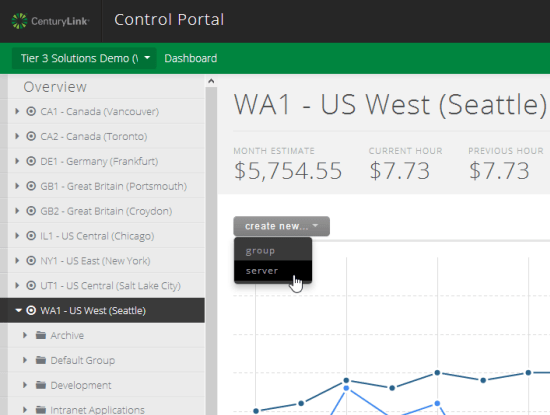
    Now I had a working Kinesis application that can run anywhere. Clearly it’s easy to run this on AWS EC2 servers (and the SDK does a nice job with retrieving temporary credentials for apps running within EC2), but there’s a good chance that cloud users have a diverse portfolio of providers. Let’s say I love the application services from AWS, but like the server performance and management capabilities from CenturyLink. In this case, I built a Windows Server to run my Kinesis application.

    2014.01.08kinesis10

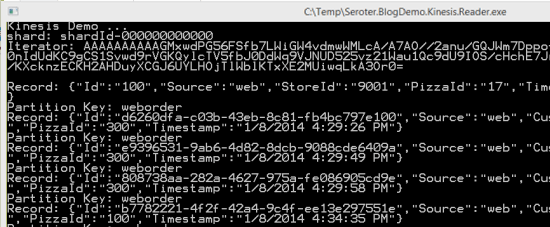
    With my server ready, I ran the application and saw my shards, my iterators, and my data records.

    2014.01.08kinesis11

    Very cool and pretty simple. Don’t forget that each data consumer has some work to do to parse the stream, find the (partition) data they want, and perform queries on it. You can imagine loading this into an Observable and using LINQ queries on it to aggregate data. Regardless, it’s very nice to have a durable stream processing service that supports replays and multiple readers.

    Summary

    The “internet of things” is here, and companies that can quickly gather and analyze data will have a major advantage. Amazon Kinesis is an important service to that end, but don’t think of it as something that ONLY works with other applications in the AWS cloud. We saw here that you could have all sorts of data producers running on devices, on-premises, or in other clouds. The Kinesis applications that consume data can also run virtually anywhere. The modern architect recognizes that composite applications are the way to go, and hopefully this helped you understand another services that’s available to you!

  • How Do BizTalk Services Work? I Asked the Product Team to Find Out

    Windows Azure BizTalk Services was recently released by Microsoft, and you can find a fair bit about this cloud service online. I wrote up a simple walkthrough, Sam Vanhoutte did a nice comparison of features between BizTalk Server and BizTalk Services,  the Neudesic folks have an extensive series of blog posts about it, and the product documentation isn’t half bad.

    However, I wanted to learn more about how the service itself works, so I reached out to Karthik Bharathy who is a senior PM on the BizTalk team and part of the team that shipped BizTalk Services. I threw a handful of technical questions at him, and I got back some fantastic answers. Hopefully you learn something new;  I sure did!

    Richard: Explain what happens after I deploy an app. Do you store the package in my storage account and add it to a new VM that’s in a BizTalk Unit?

    Karthik: Let’s start with some background information – the app that you are referring today is the VS project with a combination of the bridge configuration and artifacts like maps, schemas and DLLs. When you deploy the project, each of the artifacts and the bridge configuration are uploaded into one by one. The same notion also applies through the BizTalk Portal when you are deploying an agreement and uploading artifacts to the resources.

    The bridge configuration represents the flow of the message in the pipeline in XML format. Every time you build BizTalk Services project in Visual Studio, an <entityName>.Pipeline.atom is generated in the project bins folder. This atom file is the XML representation of the pipeline configuration. For example, under the <pipelines> section you can see the bridges configured along with the route information. You can also get a similar listing by issuing a GET operation on the bridge endpoint with the right ACS credentials.

    Now let’s say the bridge is configured with Runtime URL <deploymentURL>/myBridge1. After you click deploy, the pipeline configuration gets published in the repository of the <deploymentURL> for handling /myBridge1. For every message sent to the <deploymentURL>, the role looks at the complete path including /myBridge1 and load the pipeline configuration from the repository. Once the pipeline configuration is loaded, the message is processed per the configuration. If the configuration does not exist, then an error is returned to the caller.

    Richard: What about scaling an integration application? How does that work?

    Karthik: Messages are processed by integration roles in the deployment. When the customer initiates a scale operation, we update the service configuration to add/remove instances based on the ask. The BizTalk Services deployment updates its state during scaling operation and new messages to the deployment is handled by one of the instances of the role. This is similar to how Web or Worker roles are scaled up/down in Azure today.

    Richard: Is there any durability in the bridge? What if a downstream endpoint is offline?

    Karthik: The concept of a bridge is close to a messaging channel if we may borrow the phrase from Enterprise Integration Patterns. It helps in bridging the impedance between two messaging systems. As such the bridge is a stateless system and does not have persistence built into it. Therefore bridges need to report any processing errors back to the sender. In the case where the downstream endpoint is offline, the bridge propagates the error back to the sender – the semantics are slightly different a) based on the bridge and b) based on the source from where the message has been picked up.

    For EAI, bridges with HTTP the error code is sent back to the sender while with the same bridge using an FTP head, the system tries to pickup and process the message again from the source at regular intervals (and errors out eventually). In both cases you can see relevant track records in the portal.

    For B2B, our customers rarely intend to send an HTTP error back to their partners. When the message cannot be sent to a downstream (success) endpoint, the message is routed to the suspend endpoint. You might argue that the suspend endpoint could be down as well – while this is generally a bad idea to put in a flaky target in success or suspend endpoints, we don’t rule out this possibility. In the worst case we deliver the error code back to the sender.

    Richard: Bridges resemble BizTalk Server ESB Toolkit itineraries. Did you ever consider re-using that model?

    Karthik: ESB is an architectural pattern and you should look at the concept of bridge as being part of the ESB model for BizTalk Services on Azure. The sources and destinations are similar to the on-ramp, off-ramp model and the core processing is part of the bridge. Of course, additional capabilities like exception management, governance, alerts will need to added to bring it closer to the ESB Toolkit.

    Richard: How exactly does the high availability option work?

    Karthik: Let’s revisit the scaling flow we talked about earlier. If we had a scale >=2, you essentially have a system that can process messages even when one of the machines can down in your configuration. If one of the machines are down, the load balancer in our system routes the message to the running instances. For example, this is taken care of during “refresh” when customers can restart their deployment after updating a user DLL. This ensures message processing is not impacted.

    Richard: It looks like backup and restore is for the BizTalk Services configuration, not tracking data. What’s the recommended way to save/store an audit trail for messages?

    Karthik: The purpose of backup and restore is for the deployment configuration including schemas, maps, bridges, agreements. The tracking data comes from the Azure SQL database provided by the customer. The customer can add the standard backup/restore tools directly on that storage. To save/store an audit of messages, you have couple of options at the moment – with B2B you can turn archiving on either AS2 or X12 processing and with EAI you can plug-in an IMessageInspector extension that can read the IMessage data and save it to an external store.

    Richard: What part of the platform are you most excited about?

    Karthik: Various aspects of the platform are exciting – we started off building capabilities with ‘AppFabric Connect’ to enable server customers leverage existing investments with the cloud. Today, we have built a richer set of functionality with BizTalk Adapter services to connect popular LOBs with Bridges. In the case of B2B, BizTalk Server traditionally exposed functionality for IT Operators to manage trading partner relationships using the Admin Console. Today, we have a rich TPM functionality in the BizTalk Portal and also have the OM API public for the developer community. In EAI we allow extending message processing using custom code  If I should call out one I like, it has to be custom code enablement. The dedicated deployment model managed by Microsoft makes this possible. It is always a challenge to enable user DLL to execute without providing some sort of sandboxing. Then there are also requirements around performance guarantees. BizTalk Services dedicated deployment takes care of all these – if the code behaves in an unexpected way, only that deployment is affected. As the resources are isolated, there are also better guarantees about the performance. In a configuration driven experience this makes integration a whole lot simpler.

    Thanks Karthik for an informative chat!

  • Window Azure BizTalk Services: How to Get Started and When to Use It

    The “integration as a service” space continues to heat up, and Microsoft officially entered the market with the General Availability of Windows Azure BizTalk Services (WABS) a few weeks ago.  I recently wrote up an InfoQ article that summarized the product and what it offered. I also figured that I should actually walk through the new installation and deployment process to see what’s changed. Finally, I’ll do a brief assessment of where I’d consider using this vs. the other cloud-based integration tools.

    Installation

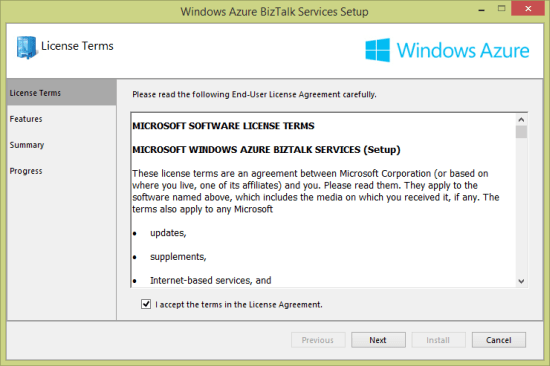
    Why am I installing something if this is a cloud service? Well, the development of integration apps still occurs on premises, so I need an SDK for the necessary bits. Grab the Windows Azure BizTalk Services SDK Setup and kick off the process. I noticed what seems to be a much cleaner installation wizard.

    2013.12.10biztalkservices01

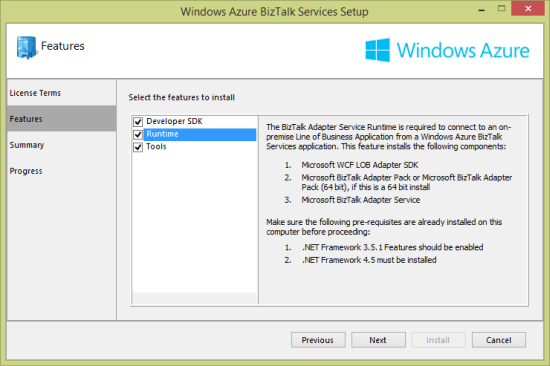
    After choosing the components that I wanted to install (including the runtime, developer tools, and developer SDK) …

    2013.12.10biztalkservices02

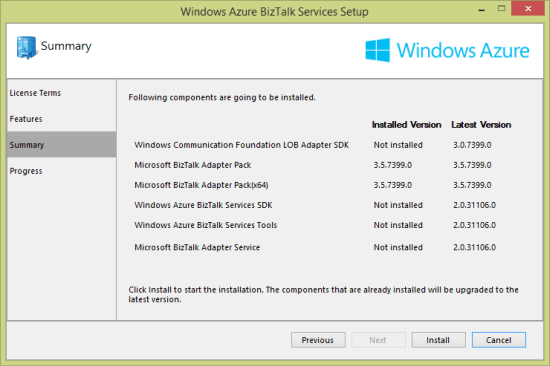
    … you are presented with a very nice view of the components that are needed, and which versions are already installed.

    2013.12.10biztalkservices03

    At this point, I have just about everything on my local developer machine that’s needed to deploy an integration application.

    Provisioning

    WABS applications run in the Windows Azure cloud. Developers provision and manage their WABS instances in the Windows Azure portal. To start with, choose App Services and then BizTalk Services before selecting Custom Create.

    2013.12.10biztalkservices04

    Next, I’m asked to pick an instance name, edition, geography, tracking database, and Windows Azure subscription. There are four editions: basic, developer, standard, and premium. As you move between editions (and pay more money), you have access to greater scalability, more integration applications, on-premises connectivity, archiving, and high availability.

    2013.12.10biztalkservices05

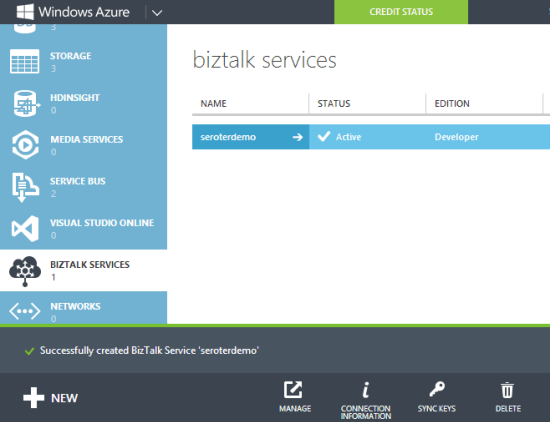
    I created a new database instance and storage account to ensure that there would be no conflicts with old (beta) WABS instances. Once the provisioning process was complete (maybe 15 minutes or so), I saw my new instance in the Windows Azure Portal.

    2013.12.10biztalkservices07

    Drilling into the WABS instance, I saw connection strings, IP addresses, certificate information, usage metrics, and more.

    2013.12.10biztalkservices08

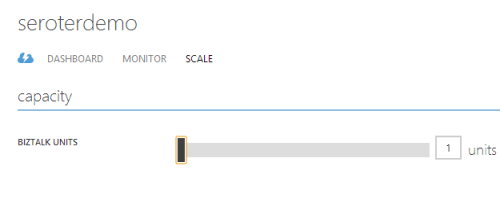
    The Scale tab showed me the option to add more “scale units” to a particular instance. Basic, standard and premium edition instances have “high availability” built in where multiple VMs are beneath a single scale unit. Adding scale units to an instance requires standard or premium editions.

    2013.12.10biztalkservices09

    In the technical preview and beta releases of WABS, the developer was forced to create a self-signed certificate to use when securing a deployment. Now, I can download a dev certificate from the Portal and install it into my personal certificate store and trusted root authority. When I’m ready for production, I can also upload an official certificate to my WABS instance.

    Developing

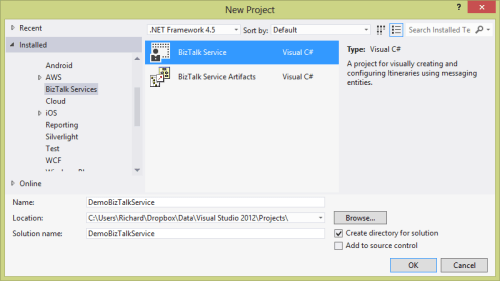
    WABS projects are built in Visual Studio 2012/2013. There’s an entirely new project type for WABS, and I could see it when creating a new project.

    2013.12.10biztalkservices10

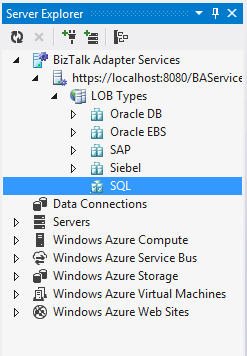
    Let’s look at what we have in Visual Studio to create WABS solutions. First, the Server Explorer includes a WABS component for creating cloud-accessible connections to line-of-business systems. I can create connections to Oracle/SAP/Siebel/SQL Server repositories on-premises and make them part of the “bridges” that define a cloud integration process.

    2013.12.10biztalkservices11

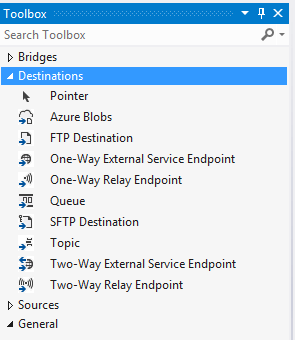
    Besides line-of-business endpoints, what else can you add to a Bridge? The final palette of activities in the Toolbox is shown below. There are a stack of destination endpoints that cover a wide range of choices. The source options are limited, but there are promises of new items to come. The Bridges themselves support one-way or request-response scenarios.

    2013.12.10biztalkservices12

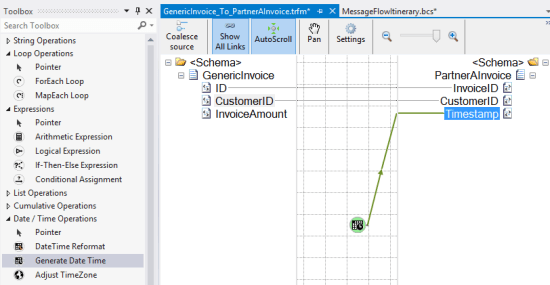
    Bridges expect either XML or flat file messages. A message is defined by a schema. The schema editor is virtually identical to the visual tool that ships with the standard BizTalk Server product. Since source and destination message formats may differ, it’s often necessary to include a transformation component. Transformation is done via a very cool Mapper that includes a sophisticated set of canned operations for transforming the structure and content of a message. This isn’t the Mapper that comes with BizTalk Server, but a much better one.

    2013.12.10biztalkservices14


    A bridge configuration model includes a source, one or more bridges (which can be chained together), and one or more destinations. In the case below, I built a simple one-way model that routes to a Windows Azure Service Bus Queue.

    2013.12.10biztalkservices15

    Double-clicking a particular bridge shows me the bridge configuration. In this configuration, I specified an XML schema for the inbound message, and a transformation to a different format.

    2013.12.10biztalkservices16


    At this point, I have a ready-to-go integration solution.

    Deploying

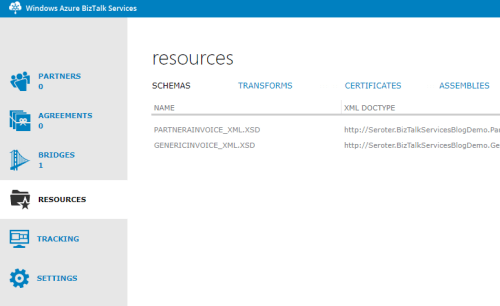
    To deploy one of theses solutions, you’ll need a certificate installed (see earlier note), and the Windows Azure Access Control Service credentials shown in the Windows Azure Portal. With that info handy, I right-clicked the project in Visual Studio and chose Deploy. Within a few seconds, I was told that everything was up and running. To confirm, I clicked the Manage button on the WABS instance page was visited the WABS-specific Portal. This Portal shows my deployed components, and offers tracking services. Ideally, this would be baked into the Windows Azure Portal itself, but at least it somewhat resembles the standard Portal.

    2013.12.10biztalkservices17

    So it looks like I have everything I need to build a test.

    Testing

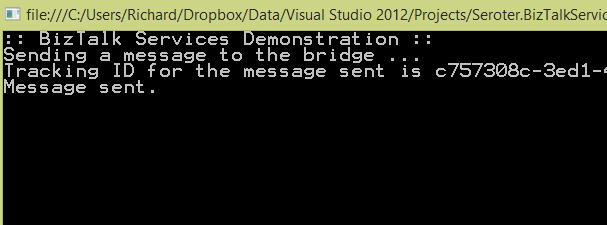
    I finally built a simple Console application in Visual Studio to submit a message to my Bridge. The basic app retrieved a valid ACS token and sent it along with my XML message to the bridge endpoint. After running the app, I got back the tracking ID for my message.

    2013.12.10biztalkservices19

    To actually see that this worked, I first looked in the WABS Portal to find the tracked instance. Sure enough, I saw a tracked message.

    2013.12.10biztalkservices18

    As a final confirmation, I opened up the powerful Service Bus Explorer tool and connected to my Windows Azure account. From here, I could actually peek into the Windows Azure Service Bus Queue that the WABS bridge published to. As you’d expect, I saw the transformed message in the queue.

    2013.12.10biztalkservices20

    Verdict

    There is a wide spectrum of products in the integration-as-a-service domain. There are batch-oriented tools like Informatica Cloud and Dell Boomi, and things like SnapLogic that handle both real-time and batch. Mulesoft sells the CloudHub which is a comprehensive platform for real-time integration. And of course, there are other integration solutions like AWS Simple Notification Services or the Windows Azure Service Bus.

    So where does WABS fit in? It’s clearly message-oriented, not batch-oriented. It’s more than a queuing solution, but less than an ESB. It seems like a good choice for simple connections between different organizations, or basic EDI processing. There are a decent number of source and destination endpoints available, and the line-of-business connectivity is handy. The built in high availability and optional scalability mean that it can actually be used in production right now, so that’s a plus.

    There’s still lots of room for improvement, but I guess that’s to be expected with a v1 product. I’d like to see a better entry-level pricing structure, more endpoint choices, more comprehensive bridge options (like broadcasting to multiple endpoints), built-in JSON support, and SDKs that support non-.NET languages.

    What do you think? See any use cases where you’d use this today, or are there specific features that you’ll be waiting for before jumping in?

  • New Pluralsight course released: “Optimizing and Managing Distributed Systems on AWS”

    My trilogy of AWS courses for Pluralsight is complete. I originally created AWS Developer Fundamentals, then added Architecting Highly Available Systems on AWS, and today released Optimizing and Managing Distributed Systems on AWS.

    This course picks up from where we left off with the last one. By the end of the Architecting Highly Available Systems on AWS course, we had built a fault tolerant ASP.NET-based cloud system that used relational databases, NoSQL databases, queues, load balancers, auto scaling, and more. Now, we’re looking at what it takes to monitor the system, deploy code, add CDNs, and introduce application caching. All of this helps us create a truly high performing, self-healing environment in the cloud. This course has a total of four modules, and each one covers the relevant AWS service, how to consume it, and what the best practices are.

    • Monitoring Cloud Systems with Amazon CloudWatch. Here we talk about the role of monitoring in distributed systems, and dig into CloudWatch. After inspecting the various metrics available to us, we test one and see how to send email-based alerts. We then jump into more complex scenarios and see how to configure Auto Scaling policies that alter the size of the cloud environment based on server CPU utilization.
    • Deploying Web Application Stacks. Deploying apps to cloud servers often requires a new way of thinking. AWS provides three useful deployment frameworks, and this module goes over each one. We discuss the AWS Elastic Beanstalk and see how to push our web application to cloud servers directly from Visual Studio. Then to see how easy it is to change an application – and demonstrate the fun of custom CloudWatch metrics – we deploy a new version of the application that captures unique business metrics. We then look at CloudFormation and how to use the CloudFormer tool to generate comprehensive templates that can deploy an entire system. Finally, we review the new OpsWorks framework and where it’s the right fit.
    • Placing Content Close to Users with CDNs. Content Delivery Networks are an awesome way to offload static content to edge locations that are closer to your users. This module talks about why CDNs matter in distributed systems and shows off Amazon CloudFront. We set up a CloudFront distribution, update our ASP.NET application to use it, and even try out the “invalidation” function to get rid of an old image.
    • Improving Application Performance with ElastiCache. Application caching is super handy and ElastiCache gives you a managed, Memcached-compliant solution. Here we talk about when and what to cache, how Memcached works, what ElastiCache is, how to create and scale clusters, and how to use the cache from .NET code. There’s a handful of demos sprinkled in, and you should get a good sense of how to configure and test a cache.

    It’s been fun crafting these two AWS courses over the summer and I hope you enjoy them!

  • TechEd North America Session Recap, Recording Link

    Last week I had the pleasure of visiting New Orleans to present at TechEd North America. My session, Patterns of Cloud Integration, was recorded and is now available on Channel9 for everyone to view.

    I made the bold (or “reckless”, depending on your perspective) decision to show off as many technology demos as possible so that attendees could get a broad view of the options available for integrating applications, data, identity, and networks. Being a Microsoft conference, many of my demonstrations highlighted aspects of the Microsoft product portfolio – including one of the first public demos of Windows Azure BizTalk Services – but I also snuck in a few other technologies as well. My demos included:

    1. [Application Integration] BizTalk Server 2013 calls REST-based Salesforce.com endpoint and authenticates with custom WCF behavior. Secondary demo also showed using SignalR to incrementally return the results of multiple calls to Salesforce.com.
    2. [Application Integration] ASP.NET application running in Windows Azure Web Sites using the Windows Azure Service Bus Relay Service to invoke a web service on my laptop.
    3. [Application Integration] App running in Windows Azure Web Sites sending message to Windows Azure BizTalk Services. Message then dropped to one of three queues that was polled by Node.js application running in CloudFoundry.com.
    4. [Application Integration] App running in Windows Azure Web Sites sending message to Windows Azure Service Bus Topic, and polled by both a Node.js application in CloudFoundry.com, and a BizTalk Server 2013 server on-premises.
    5. [Application/Data Integration] ASP.NET application that uses local SQL Server database but changes connection string (only) to instead point to shared database running in Windows Azure.
    6. [Data Integration] Windows Azure SQL Database replicated to on-premises SQL Server database through the use of Windows Azure SQL Data Sync.
    7. [Data Integration] Account list from Salesforce.com copied into on-premises SQL Server database by running ETL job through the Informatica Cloud.
    8. [Identity Integration] Using a single set of credentials to invoke an on-premises web service from a custom VisualForce page in Salesforce.com. Web service exposed via Windows Azure Service Bus Relay.
    9. [Identity Integration] ASP.NET application running in Windows Azure Web Sites that authenticates users stored in Windows Azure Active Directory.
    10. [Identity Integration] Node.js application running in CloudFoundry.com that authenticates users stored in an on-premises Active Directory that’s running Active Directory Federation Services (AD FS).
    11. [Identity Integration] ASP.NET application that authenticates users via trusted web identity providers (Google, Microsoft, Yahoo) through Windows Azure Access Control Service.
    12. [Network Integration] Using new Windows Azure point-to-site VPN to access Windows Azure Virtual Machines that aren’t exposed to the public internet.

    Against all odds, each of these demos worked fine during the presentation. And I somehow finished with 2 minutes to spare. I’m grateful to see that my speaker scores were in the top 10% of the 350+ breakouts, and hope you’ll take some time to watch it. Feedback welcome!

  • Walkthrough of New Windows Azure BizTalk Services

    The Windows Azure EAI Bridges are dead. Long live BizTalk Services! Initially released last year as a “lab” project, the Service Bus EAI Bridges were a technology for connecting cloud and on-premises endpoints through an Azure-hosted broker. This technology has been rebranded (“Windows Azure BizTalk Services”) and upgraded and is now available as a public preview. In this blog post, I’ll give you a quick tour around the developer experience.

    First off, what actually *is* Windows Azure BizTalk Services (WABS)? Is it BizTalk Server running in the cloud? Does it run on-premises? Check out the announcement blog posts from the Windows Azure and BizTalk teams, respectively, for more. But basically, it’s separate technology from BizTalk Server, but meant to be highly complementary. Even though It uses a few of the same types of artifacts such as schemas and maps, they aren’t interchangeable. For example, WABS maps don’t run in BizTalk Server, and vice versa. Also, there’s no concept of long-running workflow (i.e. orchestration), and none of the value-added services that BizTalk Server provides (e.g. Rules Engine, BAM). All that said, this is still an important technology as it makes it quick and easy to connect a variety of endpoints regardless of location. It’s a powerful way to expose line-of-business apps to cloud systems, and Windows Azure hosting model makes it possible to rapidly scale solutions. Check out the pricing FAQ page for more details on the scaling functionality, and the reasonable pricing.

    Let’s get started. When you install the preview components, you’ll get a new project type in Visual Studio 2012.

    2013.06.03wabs01

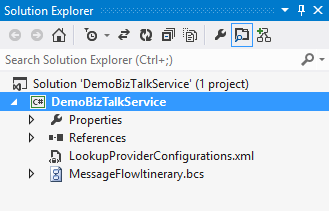
    Each WABS project can contain a single “bridge configuration” file. This file defines the flow of data between source and destination endpoints. Once you have a WABS project, you can add XML schemas, flat-file schemas, and maps.

    2013.06.03wabs02

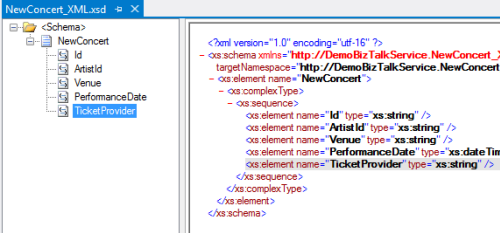
    The WABS Schema Editor looks identical to the BizTalk Server Schema Editor and lets you define XML or flat file message structures. While the right-click menu promises the ability to generate and validate file instances, my pre-preview version of the bits only let me validate messages, not generate sample ones.

    2013.06.03wabs03

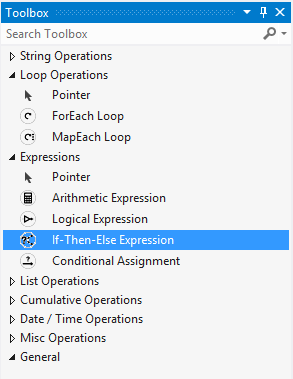
    The WABS schema mapper is very different from the BizTalk Mapper. And that’s a good thing. The UI has subtle alterations, but the more important change is in the palette of available “functoids” (components for manipulating data). First, you’ll see more sophisticated looping and logical expression handling. This include a ForEach Loop and finally, an If-Then-Else Expression option.

    2013.06.03wabs04

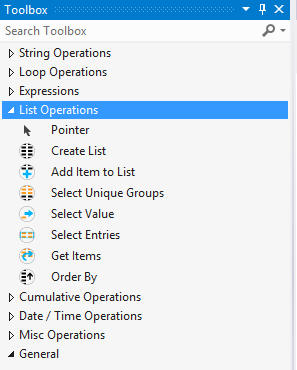
    The concept of “lists” are also entirely new. You can populate, persist, and query lists of data and create powerfully complex mappings between structures.

    2013.06.03wabs05

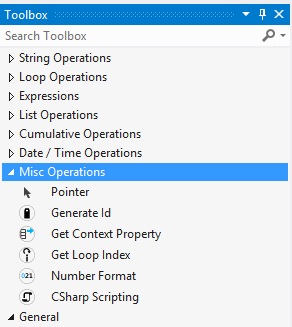
    Finally, there are some “miscellaneous” operations that introduce small – but helpful – capabilities. These functoids let you grab a property from the message’s context (metadata), generate a random ID, and even embed custom C# code into a map. I seem to recall that custom code was excluded from the EAI Bridges preview, and many folks expressed concern that this would limit the usefulness of these maps for tricky, real-world scenarios. Now, it looks like this is the most powerful data mapping tool that Microsoft has ever produced. I suspect that an entire book could be written about how to properly use this Mapper.

    2013.06.03wabs06

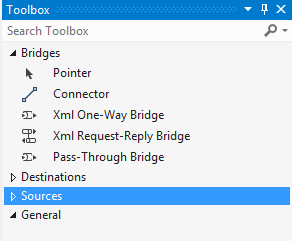
    Next up, let’s take a look at the bridge configuration and what source and destination endpoints are supported. The toolbox for the bridge configuration file shows three different types of bridges: XML One-Way Bridge, XML Request-Reply Bridge, and Pass-Through Bridge.

    2013.06.03wabs07

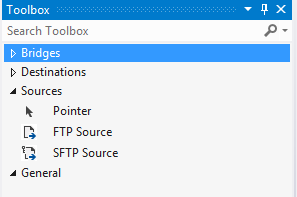
    You’d use each depending on whether you were doing synchronous or asynchronous XML messaging, or any flat file transmission. To get data into a bridge, today you can use HTTP, FTP, or SFTP. Notice that “HTTP” doesn’t show up in that list as each bridge automatically has a Windows Azure ACS-secured HTTP endpoint associated with it.

    2013.06.03wabs08

    While the currently available set of sources is a bit thin, the destination options are solid. You can consume web services, Service Bus Relay endpoints, Service Bus Queues / Topics, Windows Azure Blobs, FTP and SFTP endpoints.

    2013.06.03wabs09

    A given bridge configuration file will often contain a mix of these endpoints. For instance, consider a case where you want to route a message to one of three different endpoints based on some value in the message itself. Also imagine wanting to do a special transformation heading to one endpoint, and not the others. In the configuration below, I’m chaining together XML bridges to route to the Service Bus Queue, and directly routing to either the Service Bus Topic or Relay Service based on the message content.

    2013.06.03wabs10

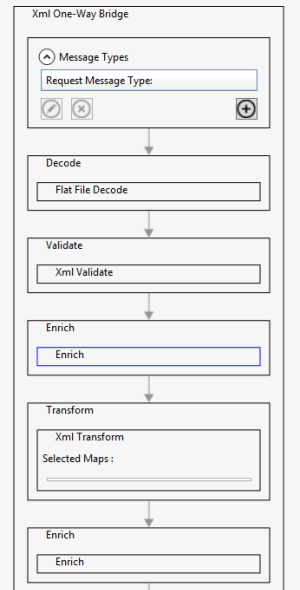
    An individual bridge has a number of stages that a message passes through. Double-clicking a bridge reveals steps for identifying, decoding, validating, enriching, encoding, and transforming messages.

    2013.06.03wabs11

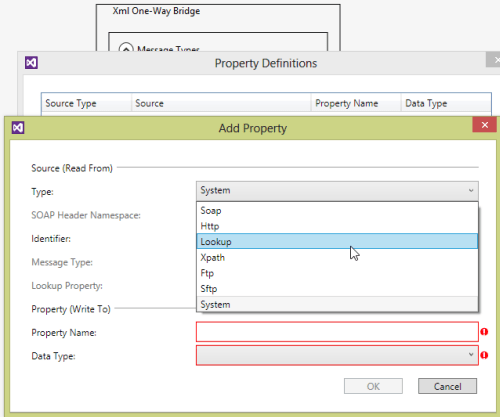
    An individual step exposes relevant configuration properties. For instance, the “Enrich” stage of a bridge lets you choose a way to populate data in the outbound message’s metadata (context) properties. Options include pulling values from the source message’s SOAP or HTTP headers, XPath against the source message body, lookup to a Windows Azure SQL database, and more.

    2013.06.03wabs12

    When a bridge configuration is completed and ready for deployment, simply right-click the Visual Studio project and choose Deploy and fill in valid credentials for the WABS preview.

    Wrap Up

    This is definitely preview software as there are a number of things we’ll likely see added before it’s ready for production use (e.g. enhanced management). However, it’s a good time to start poking around and getting a feel for when you might use this. On a broad scale, you COULD choose to use this instead of something like MuleSoft’s CloudHub to do pure cloud-to-cloud integration, but WABS is drastically less mature than what MuleSoft  has to offer. Moving forward, it’d be great to see a durable workflow component added, additional sources, and Microsoft really needs to start baking JSON support into more products from the get-go.

    What do you think? Plan on trying this out? Have ideas for where you could use it?

  • Going to Microsoft TechEd (North America) to Speak About Cloud Integration

    In a few weeks, I’ll be heading to New Orleans to speak at Microsoft TechEd for the first time. My topic – Patterns of Cloud Integration – is an extension of things I’ve talked about this year in Amsterdam, Gothenburg, and in my latest Pluralsight course. However, I’ll also be covering some entirely new ground and showcasing some brand new technologies.

    TechEd is a great conference with tons of interesting sessions, and I’m thrilled to be part of it. In my talk, I’ll spend 75 minutes discussing practical considerations for application, data, identity, and network integration with cloud systems. Expect lots of demonstrations of Microsoft (and non-Microsoft) technology that can help organizations cleanly link all IT assets, regardless of physical location. I’ll show off some of the best tools from Microsoft, Salesforce.com, AWS (assuming no one tackles me when I bring it up), Informatica, and more.

    Any of you plan on going to North America TechEd this year? If so, hope to see you there!