Category: .NET

  • Interview Series: Four Questions With … Shan McArthur

    Welcome to the 42nd interview in my series of talks with thought leaders in the “connected systems” space. This month, we have Shan McArthur who is the Vice President of Technology for software company Adxstudio, a Microsoft MVP for Dynamics CRM, blogger and Windows Azure enthusiast. You can find him on Twitter as @Shan_McArthur.

    Q: Microsoft recently injected themselves into the Infrastructure-as-a-Service (IaaS) market with the new Windows Azure Virtual Machines. Do you think that this is Microsoft’s way of admitting that a PaaS-only approach is difficult at this time or was there another major incentive to offer this service?

    A: The Azure PaaS offering was only suitable for a small subset of workloads.  It really delivered on the ability to dynamically scale web and worker roles in your solution, but it did this at the cost of requiring developers to rewrite their applications or design them specifically for the Azure PaaS model.  The PaaS-only model did nothing for infrastructure migration, nor did it help the non-web/worker role workloads.  Most business systems today are made from a number of different application tiers and not all of those tiers are suited to a PaaS model.  I have been advocating for many years that Microsoft must also give us a strong virtual machine environment.  I just wish they gave it to us three years ago.

    As for incentives, I believe it is simple economics – there are significantly more people interested in moving many different workloads to Windows Azure Virtual Machines than developers that are building the next Facebook/twitter/yammer/foursquare website.  Enterprises want more agility in their infrastructure.  Medium sized businesses want to have a disaster recovery (DR) environment hosted in the cloud.  Developers want to innovate in the cloud (and outside of IT interference) before deploying apps to on-prem or making capital commitments.  There are many other workloads like SharePoint, CRM, build environments, and more that demand a strong virtual machine environment in Azure.  In the process of delivering a great virtual machine environment, Microsoft will have increased their overall Azure revenue as well as gaining relevant mindshare with customers.  If they had not given us virtual machines, they would not survive in the long run in the cloud market as all of their primary competitors have had virtual machines for quite some time and have been eating into Microsoft’s revenue opportunities.

    Q: Do you think that customers will take application originally targeted at the Windows Azure Cloud Services (PaaS) environment and deploy them to the Windows Azure Virtual Machines instead? What do you think are the core scenarios for customers who are evaluating this IaaS offering?

    A: I have done some of that myself, but only for some workloads that make sense.  An Azure virtual machine will give you higher density for websites and a mix of workloads.  For things like web roles that are already working fine on Azure and have a 2-plus instance requirement, I think those roles will stay right where they are – in PaaS.  For roles like back-end processes, databases, CRM, document management, email/SMS, and other workloads, these will be easier to add in a virtual machine than in the PaaS model and will naturally gravitate to that.  Most on-premise software today has a heavy dependency on Active Directory, and again, an Azure Virtual Machine is the easiest way to achieve that.   I think that in the long run, most ‘applications’ that are running in Windows Azure will have a mix of PaaS and virtual machines.  As the market matures and ISV software starts supporting claims with less dependency on Active Directory, and builds their applications for direct deployment into Windows Azure, then this may change a bit, but for the foreseeable future, infrastructure as a service is here to stay.

    That said, I see a lot of the traditional PaaS websites migrating to Windows Azure Web Sites.  Web sites have the higher density (and a better pricing model) that will enable customers to use Azure more efficiently (from a cost standpoint).  It will also increase the number of sites that are hosted in Azure as most small websites were financially infeasible to move to Windows Azure previously to the WaWs feature.  For me, I compare the 30-45 minutes it takes me to deploy an update to an existing Azure PaaS site to the 1-2 minutes it takes to deploy to WaWs.  When you are building a lot of sites, this time really makes a significant impact on developer productivity!  I can even now deploy to Windows Azure without even having the Azure SDK installed on my developer machine.

    As for myself, this spring wave of Azure features has really changed how I engage customers in pre-sales.  I now have a number of virtual disk images of my standard demo/engagement environments, and I can now stand up a complete presales demo environment in less than 10 minutes.  This compares to the day of effort I used to stand up similar environments using CRM Online and Azure cloud services.  And now I can turn them off after a meeting, dispose of them at will, or resurrect them as I need them again.  I never had this agility before and have become completely addicted to it.

    Q: Your company has significant expertise in the CRM space and specifically, the on-premises and cloud versions of Dynamics CRM. How do you help customers decided where to put their line-of-business applications, and what are your most effective ways for integrating applications that may be hosted by different providers?

    A: Microsoft did a great job of ensuring that CRM Online and on-premise had the same application functionality.  This allows me to advise my customers that they can choose the hosting environment that best meets their requirements or their values.  Some things that are considered are the effort of maintenance, bandwidth and performance, control of service maintenance windows, SLAs, data residency, and licensing models.  It basically boils down to CRM Online being a shared service – this is great for customers that would prefer low cost to guaranteed performance levels, that prefer someone else maintain and operate the service versus them picking their own maintenance windows and doing it themselves, ones that don’t have concerns about their data being outside of their network versus ones that need to audit their systems from top to bottom, and ones that would prefer to rent their software versus purchasing it.  The new Windows Azure Virtual Machines features now gives us the ability to install CRM in Windows Azure – running it in the cloud but on dedicated hardware.  This introduces some new options for customers to consider as this is a hybrid cloud/on-premise solution.

    As for integration, all integration with CRM is done through the web services and those services are consistent in all environments (online and on-premise).  This really has enabled us to integrate with any CRM environment, regardless of where it is hosted.  Integrating applications that are hosted between different application providers is still fairly difficult.  The most difficult part is to get those independent providers to agree on a single authentication model.  Claims and federation are making great strides, and REST and oAuth are growing quickly.  That said, it is still rather rare to see two ISVs building to the same model.  Where it is more prevalent is in the larger vendors like Facebook that publish an SDK that everyone builds towards.  This is going to be a temporary problem, as more vendors start to embrace REST and oAuth.  Once two applications have a common security model (at least an identity model), it is easy for them to build deep integrations between the two systems.  Take a good long hard look at where Office 2013 is going with their integration story…

    Q [stupid question]: I used to work with a fellow who hated peanut butter. I had trouble understanding this. I figured that everyone loved peanut butter. What foods do you think have the most even, and uneven, splits of people who love and hate it? I’d suspect that the most even love/hate splits are specific vegetables (sweet potatoes, yuck) and the most uneven splits are universally loved foods like strawberries. Thoughts?

    A: Chunky or smooth? I have always wondered if our personal tastes are influenced by the unique varieties of how each of our brains and sensors (eyes, hearing, smell, taste) are wired up.  Although I could never prove it, I would bet that I would sense the taste of peanut butter differently than someone else, and perhaps those differences in how they are perceived by the brain has a very significant impact on whether or not we like something.  But that said, I would assume that the people that have a deadly allergy to peanut butter would prefer to stay away from it no matter how they perceived the taste!  That said, for myself I have found that the way food is prepared has a significant impact on whether or not I like it.  I grew up eating a lot of tough meat that I really did not enjoy eating, but now I smoke my meat and prefer it more than my traditional favorites.

    Good stuff, Shan, thanks for the insight!

  • Measuring Ecosystem Popularity Through Twitter Follower Count, Growth

    Donnie Berkholz of the analysis firm RedMonk recently posted an article about observing tech trends by monitoring book sales. He saw a resurgence of interest in Java, a slowdown of interest in Microsoft languages (except PowerShell), upward movement in Python, and declining interesting in SQL.

    While on Twitter the other day, I was looking at the account of a major cloud computing provider, and wondered if their “follower count” was high or low compared to their peers. Although follower count is hardly a definitive metric for influence or popularity, the growth in followers can tell us a bit about where developer mindshare is moving.

    So, here’s a coarse breakdown of some leading cloud platforms and programming languages/frameworks and both their total follower counts (in bold) and growth in 2012. These numbers are accurate as of July 17,  2012.

    Cloud Platforms

    1. Google App Engine64,463. The most followers of any platform, which was a tad surprising given the general grief that is directed here. They experienced a  27% growth in followers for 2012 so far.
    2. Windows Azure 44,662. I thought this number was fairly low given the high level of activity in the account. This account has experienced slow, steady follower growth of 21% since start of 2012.
    3. Cloud Foundry26,906. The hype around Cloud Foundry appears justified as developers have flocked to this platform. They’ve seen jagged, rapid follower growth of 283% in 2012.
    4. Amazon Web Services17,801. I figured that this number would be higher, but they are seeing a nice 58% growth in followers since the beginning of the year.
    5. Heroku16,162. They have slower overall follower growth than Force.com at 42%, but a much higher total count.
    6. Force.com9,746. Solid growth with a recent spike putting them at 75% growth since the start of the year.

    Programming Languages / Frameworks

    1. Java60,663. The most popular language to follow on Twitter, they experienced 35% follower growth in 2012.
    2. Ruby on Rails29,912. This account has seen consistent growth by 28% this year.
    3. Java (Spring)15,029. Moderate 30% growth this year.
    4. Node.js12,812. Not surprising that this has some of the largest growth in 2012 with 160% more followers this year.
    5. ASP.NET7,956. I couldn’t find good growth statistics for this account, but I was surprised at the small size of followers.

    Takeaways? The biggest growth in Twitter followers this year belongs to Cloud Foundry and Node.js. I actually expected many of these numbers to be higher given that many of them are relatively chatty accounts. Maybe developers don’t instinctively follow platforms/languages, but rather follow interesting people who happen to use those platforms.

    Thoughts? Any surprises there?

  • Installing and Testing the New Service Bus for Windows

    Yesterday, Microsoft kicked out the first public beta of the Service Bus for Windows software. You can use this to install and maintain Service Bus queues and topics in your own data center (or laptop!). See my InfoQ article for a bit more info. I thought I’d take a stab at installing this software on a demo machine and trying out a scenario or two.

    To run the Service Bus for Windows,  you need a Windows Server 2008 R2 (or later) box, SQL Server 2008 R2 (or later), IIS 7.5, PowerShell 3.0, .NET 4.5, and a pony. Ok, not a pony, but I wasn’t sure if you’d read the whole list. The first thing I did was spin up a server with SQL Server and IIS.

    2012.07.17sb03

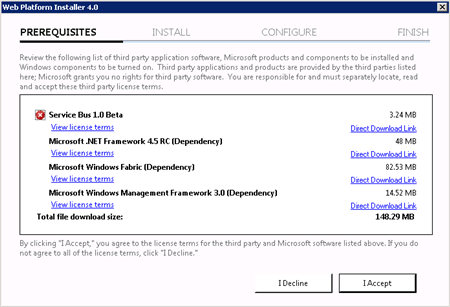
    Then I made sure that I installed SQL Server 2008 R2 SPI. Next, I downloaded the Service Bus for Windows executable from the Microsoft site. Fortunately, this kicks off the Web Platform Installer, so you do NOT have to manually go hunt down all the other software prerequisites.

    2012.07.17sb01

    The Web Platform Installer checked my new server and saw that I was missing a few dependencies, so it nicely went out and got them.

    2012.07.17sb02

    After the obligatory server reboots, I had everything successfully installed.

    2012.07.17sb04

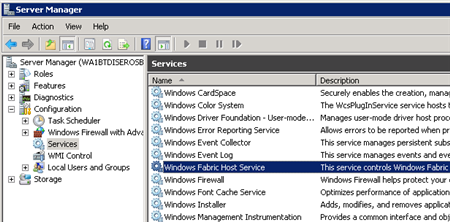
    I wanted to see what this bad boy installed on my machine, so I first checked the Windows Services and saw the new Windows Fabric Host Service.

    2012.07.17sb05

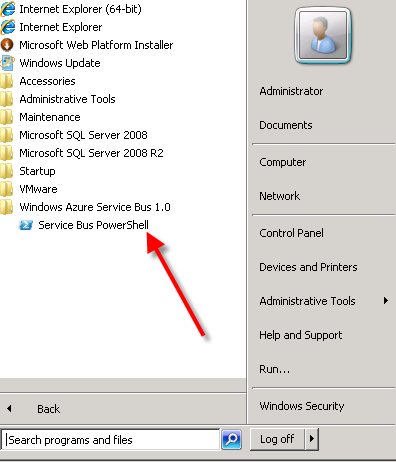
    I didn’t have any databases installed in SQL Server yet, no sites in IIS, but did have a new Windows permissions Group (WindowsFabricAllowedUsers) and a Service Bus-flavored PowerShell command prompt in my Start Menu.

    2012.07.17sb06

    Following the configuration steps outlined in the Help documents, I executed a series of PowerShell commands to set up a new Service Bus farm. The first command which actually got things rolling was New-SBFarm:

    $SBCertAutoGenerationKey = ConvertTo-SecureString -AsPlainText -Force -String [new password used for cert]
    
    New-SBFarm -FarmMgmtDBConnectionString 'Data Source=.;Initial Catalog=SbManagementDB;Integrated Security=True' -PortRangeStart 9000 -TcpPort 9354 -RunAsName 'WA1BTDISEROSB01\sbuser' -AdminGroup 'BUILTIN\Administrators' -GatewayDBConnectionString 'Data Source=.;Initial Catalog=SbGatewayDatabase;Integrated Security=True' -CertAutoGenerationKey $SBCertAutoGenerationKey -ContainerDBConnectionString 'Data Source=.;Initial Catalog=ServiceBusDefaultContainer;Integrated Security=True';
    

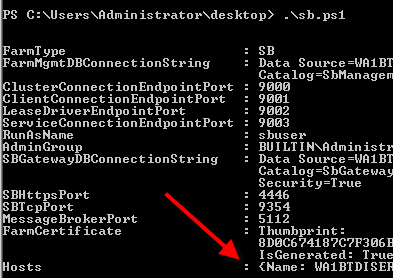
    When this finished running, I saw the confirmation in the PowerShell window:

    2012.07.17sb07

    But more importantly, I now had databases in SQL Server 2008 R2.

    2012.07.17sb08

    Next up, I needed to actually create a Service Bus host. According to the docs about the Add-SBHost command, the Service Bus farm isn’t considered running, and can’t offer any services, until a host is added. So, I executed the necessary PowerShell command to inflate a host.

    $SBCertAutoGenerationKey = ConvertTo-SecureString -AsPlainText -Force -String [new password used for cert]
    
    $SBRunAsPassword = ConvertTo-SecureString -AsPlainText -Force -String [password for sbuser account];
    
    Add-SBHost -FarmMgmtDBConnectionString 'Data Source=.;Initial Catalog=SbManagementDB;Integrated Security=True' -RunAsPassword $SBRunAsPassword -CertAutoGenerationKey $SBCertAutoGenerationKey;
    

    A bunch of stuff started happening in PowerShell …

    2012.07.17sb09

    … and then I got the acknowledgement that everything had completed, and I now had one host registered on the server.

    2012.07.17sb10

    I also noticed that the Windows Service (Windows Fabric Host Service) that was disabled before, was now in a Started state. Next I required a new namespace for my Service Bus host. The New-SBNamespace command generates the namespace that provides segmentation between applications. The documentation said that “ManageUser” wasn’t required, but my script wouldn’t work without it, So, I added the user that I created just for this demo.

    New-SBNamespace -Name 'NsSeroterDemo' -ManageUser 'sbuser';
    

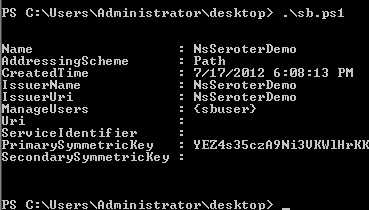
    2012.07.17sb11

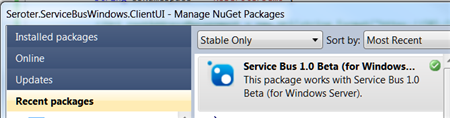
    To confirm that everything was working, I ran the Get-SbMessageContainer and saw an active database server returned. At this point, I was ready to try and build an application. I opened Visual Studio and went to NuGet to add the package for the Service Bus. The name of the SDK package mentioned in the docs seems wrong, and I found the entry under Service Bus 1.0 Beta .

    2012.07.17sb13

    In my first chunk of code, I created a new queue if one didn’t exist.

    //define variables
    string servername = "WA1BTDISEROSB01";
    int httpPort = 4446;
    int tcpPort = 9354;
    string sbNamespace = "NsSeroterDemo";
    
    //create SB uris
    Uri rootAddressManagement = ServiceBusEnvironment.CreatePathBasedServiceUri("sb", sbNamespace, string.Format("{0}:{1}", servername, httpPort));
    Uri rootAddressRuntime = ServiceBusEnvironment.CreatePathBasedServiceUri("sb", sbNamespace, string.Format("{0}:{1}", servername, tcpPort));
    
    //create NS manager
    NamespaceManagerSettings nmSettings = new NamespaceManagerSettings();
    nmSettings.TokenProvider = TokenProvider.CreateWindowsTokenProvider(new List() { rootAddressManagement });
    NamespaceManager namespaceManager = new NamespaceManager(rootAddressManagement, nmSettings);
    
    //create factory
    MessagingFactorySettings mfSettings = new MessagingFactorySettings();
    mfSettings.TokenProvider = TokenProvider.CreateWindowsTokenProvider(new List() { rootAddressManagement });
    MessagingFactory factory = MessagingFactory.Create(rootAddressRuntime, mfSettings);
    
    //check to see if topic already exists
    if (!namespaceManager.QueueExists("OrderQueue"))
    {
         MessageBox.Show("queue is NOT there ... creating queue");
    
         //create the queue
         namespaceManager.CreateQueue("OrderQueue");
     }
    else
     {
          MessageBox.Show("queue already there!");
     }
    

    After running this (directly on the Windows Server that had the Service Bus installed since my local laptop wasn’t part of the same domain as my Windows Server, and credentials would be messy), as my “sbuser” account, I successfully created a new queue. I confirmed this by looking at the relevant SQL Server database tables.

    2012.07.17sb14

    Next I added code that sends a message to the queue.

    //write message to queue
     MessageSender msgSender = factory.CreateMessageSender("OrderQueue");
    BrokeredMessage msg = new BrokeredMessage("This is a new order");
    msgSender.Send(msg);
    
     MessageBox.Show("Message sent!");
    

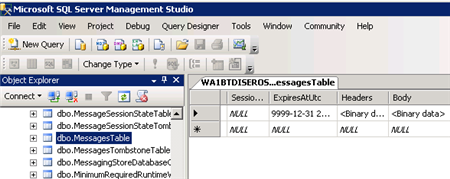
    Executing this code results in a message getting added to the corresponding database table.

    2012.07.17sb15

    Sweet. Finally, I wrote the code that pulls (and deletes) a message from the queue.

    //receive message from queue
    MessageReceiver msgReceiver = factory.CreateMessageReceiver("OrderQueue");
    BrokeredMessage rcvMsg = new BrokeredMessage();
    string order = string.Empty;
    rcvMsg = msgReceiver.Receive();
    
    if(rcvMsg != null)
    {
         order = rcvMsg.GetBody();
         //call complete to remove from queue
         rcvMsg.Complete();
     }
    
    MessageBox.Show("Order received - " + order);
    

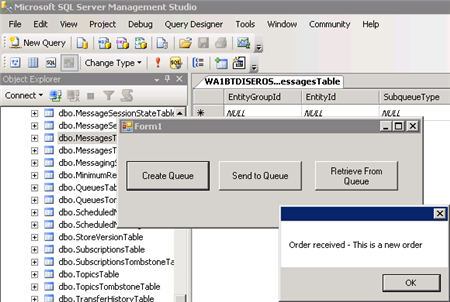
    When this block ran, the application showed me the contents of the message, and upon looking at the MessagesTable again, I saw that it was empty (because the message had been processed).

    2012.07.17sb16

    So that’s it. From installation to development in a few easy steps. Having the option to run the Service Bus on any Windows machine will introduce some great scenarios for cloud providers and organizations that want to manage their own message broker.

  • Is AWS or Windows Azure the Right Choice? It’s Not That Easy.

    I was thinking about this topic today, and as someone who built the AWS Developer Fundamentals course for Pluralsight, is a Microsoft MVP who plays with Windows Azure a lot, and has an unnatural affinity for PaaS platforms like Cloud Foundry / Iron Foundry and Force.com, I figured that I had some opinions on this topic.

    So why would a developer choose AWS over Windows Azure today? I don’t know all developers, so I’ll give you the reasons why I often lean towards AWS:

    • Pace of innovation. The AWS team is amazing when it comes to regularly releasing and updating products. The day my Pluralsight course came out, AWS released their Simple Workflow Service. My course couldn’t be accurate for 5 minutes before AWS screwed me over! Just this week, Amazon announced Microsoft SQL Server support in their robust RDS offering, and .NET support in their PaaS-like Elastic Beanstalk service. These guys release interesting software on a regular basis and that helps maintain constant momentum with the platform. Contrast that with the Windows Azure team that is a bit more sporadic with releases, and with seemingly less fanfare. There’s lots of good stuff that the Azure guys keep baking into their services, but not at the same rate as AWS.
    • Completeness of services. Whether the AWS folks think they offer a PaaS or not, their services cover a wide range of solution scenarios. Everything from foundational services like compute, storage, database and networking, to higher level offerings like messaging, identity management and content delivery. Sure, there’s no “true” application fabric like you’ll find in Windows Azure or Cloud Foundry, but tools like Cloud Formation and Elastic Beanstalk get you pretty close. This well-rounded offering means that developers can often find what they need to accomplish somewhere in this stack. Windows Azure actually has a very rich set of services, likely the most comprehensive of any PaaS vendor, but at this writing, they don’t have the same depth in infrastructure services. While PaaS may be the future of cloud (and I hope it is), IaaS is a critical component of today’s enterprise architecture.
    • It just works. AWS gets knocked from time to time on their reliability, but it seems like most agree that as far as clouds go, they’ve got a damn solid platform. Services spin up relatively quickly, stay up, and changes to service settings often cascade instantly. In this case, I wouldn’t say that Windows Azure doesn’t “just work”, but if AWS doesn’t fail me, I have little reason to leave.
    • Convenience. This may be one of the primary advantages of AWS at this point. Once a capability becomes a commodity (and cloud services are probably at that point), and if there is parity among competitors on functionality, price and stability, the only remaining differentiator is convenience. AWS shines in this area, for me. As a Microsoft Visual Studio user, there are at least four ways that I can consume (nearly) every AWS service: Visual Studio Explorer, API, .NET SDK or AWS Management Console. It’s just SO easy. The AWS experience in Visual Studio is actually better than the one Microsoft offers with Windows Azure! I can’t use a single UI to manage all the Azure services, but the AWS tooling provides a complete experience with just about every type of AWS service. In addition, speed of deployment matters. I recently compared the experience of deploying an ASP.NET application to Windows Azure, AWS and Iron Foundry. Windows Azure was both the slowest option, and the one that took the most steps. Not that those steps were difficult, mind you, but it introduced friction and just makes it less convenient. Finally, the AWS team is just so good at making sure that a new or updated product is instantly reflected across their websites, SDKs, and support docs. You can’t overstate how nice that is for people consuming those services.

    That said, the title of this post implies that this isn’t a black and white choice. Basing an entire cloud strategy on either platform isn’t a good idea. Ideally, a “cloud strategy” is nothing more than a strategy for meeting business needs with the right type of service. It’s not about choosing a single cloud and cramming all your use cases into it.

    A Microsoft shop that is looking to deploy public facing websites and reduce infrastructure maintenance can’t go wrong with Windows Azure. Lately, even non-Microsoft shops have a legitimate case for deploying apps written in Node.js or PHP to Windows Azure. Getting out of infrastructure maintenance is a great thing, and Windows Azure exposes you to much less infrastructure than AWS does.  Looking to use a SQL Server in the cloud? You have a very interesting choice to make now. Microsoft will do well if it creates (optional) value-added integrations between its offerings, while making sure each standalone product is as robust as possible. That will be its win in the “convenience” category.

    While I contend that the only truly differentiated offering that Windows Azure has is their Service Bus / Access Control / EAI product, the rest of the platform has undergone constant improvement and left behind many of its early inconvenient and unstable characteristics. With Scott Guthrie at the helm, and so many smart people spread across the Azure teams, I have absolutely no doubt that Windows Azure will be in the majority of discussions about “cloud leaders” and provide a legitimate landing point for all sorts of cloudy apps. At the same time though, AWS isn’t slowing their pace (quite the opposite), so this back-and-forth competition will end up improving both sets of services and leave us consumers with an awesome selection of choices.

    What do you think? Why would you (or do you) pick AWS over Azure, or vice versa?

  • Richard Going to Oz to Deliver an Integration Workshop? This is Happening.

    At the most recent MS MVP Summit, Dean Robertson, founder of IT consultancy Mexia, approached me about visiting Australia for a speaking tour. Since I like both speaking and koalas, this seemed like a good match.

    As a result, we’ve organized sessions for which you can now register to attend. I’ll be in Brisbane, Melbourne and Sydney talking about the overall Microsoft integration stack, with special attention paid to recent additions to the Windows Azure integration toolset. As usual, there MCpromoshould be lots of practical demonstrations that help to show the “why”, “when” and “how” of each technology.

    If you’re in Australia, New Zealand or just needed an excuse to finally head down under, then come on over! It should be lots of fun.

  • Three Software Updates to be Aware Of

    In the past few days, there have been three sizable product announcements that should be of interest to the cloud/integration community. Specifically, there are noticeable improvements to Microsoft’s CEP engine StreamInsight, Windows Azure’s integration services, and Tier 3’s Iron Foundry PaaS.

    First off, the Microsoft StreamInsight team recently outlined changes that are coming in their StreamInsight 2.1 release. This is actually a pretty major update with some fundamental modification to the programmatic object model. I can attest to the fact that it can be challenge to build up the necessary host/query/adapter plumbing necessary to get a solution rolling, and the StreamInsight team has acknowledged this. The new object model will be a bit more straightforward. Also, we’ll see IEnumerable and IObservable become more first-class citizens in the platform. Developers are going to be encouraged to use IEnumerable/IObservable in lieu of adapters in both embedded AND server-based deployment scenarios. In addition to changes to the object model, we’ll also see improved checkpointing (failure recovery) support. If you want to learn more about StreamInsight, and are a Pluralsight subscriber, you can watch my course on this product.

    Next up, Microsoft released the latest CTP for its Windows Azure Service Bus EAI and EDI components. As a refresher, these are “BizTalk in the cloud”-like services that improve connectivity, message processing and partner collaboration for hybrid situations. I summarized this product in an InfoQ article written in December 2011. So what’s new? Microsoft issued a description of the core changes, but in a nutshell, the components are maturing. The tooling is improving, the message processing engine can handle flat files or XML, the mapping and schema designers have enhanced functionality, and the EDI offering is more complete. You can download this release from the Microsoft site.

    Finally, those cats at Tier 3 have unleashed a substantial update to their open-source Iron Foundry (public or private) .NET PaaS offering. The big takeaway is that Iron Foundry is now feature-competitive with its parent project, the wildly popular Cloud Foundry. Iron Foundry now supports a full suite of languages (.NET as well as Ruby, Java, PHP, Python, Node.js), multiple backend databases (SQL Server, Postgres, MySQL, Redis, MongoDB), and queuing support through Rabbit MQ. In addition, they’ve turned on the ability to tunnel into backend services (like SQL Server) so you don’t necessarily need to apply the monkey business that I employed a few months back. Tier 3 has also beefed up the hosting environment so that people who try out their hosted version of Iron Foundry can have a stable, reliable experience. A multi-language, private PaaS with nearly all the services that I need to build apps? Yes, please.

    Each of the above releases is interesting in its own way and to me, they have relationships with one another. The Azure services enable a whole new set of integration scenarios, Iron Foundry makes it simple to move web applications between environments, and StreamInsight helps me quickly make sense of the data being generated by my applications. It’s a fun time to be an architect or developer!

  • Using SignalR To Push StreamInsight Events to Client Browsers

    I’ve spent some time recently working with the asynchronous web event messaging engine SignalR. This framework uses JavaScript (with jQuery) on the client and ASP.NET on the server to enable very interactive communication patterns. The coolest part is being able to have the server-side application call a JavaScript function on each connected browser client. While many SignalR demos you see have focused on scenarios like chat applications, I was thinking  of how to use SignalR to notify business users of interesting events within an enterprise. Wouldn’t it be fascinating if business events (e.g. “Project X requirements document updated”, “Big customer added in US West region”, “Production Mail Server offline”, “FAQ web page visits up 78% today”) were published from source applications and pushed to a live dashboard-type web application available to users? If I want to process these fast moving events and perform rich aggregations over windows of events, then Microsoft StreamInsight is a great addition to a SignalR-based solution. In this blog post, I’m going to walk through a demonstration of using SignalR to push business events through StreamInsight and into a Tweetdeck-like browser client.

    Solution Overview

    So what are we building? To make sure that we keep an eye on the whole picture while building the individual components, I’ve summarized the solution here.

    2012.03.01signalr05

    Basically, the browser client will first (through jQuery) call a server operation that adds that client to a message group (e.g. “security events”). Events are then sent from source applications to StreamInsight where they are processed. StreamInsight then calls a WCF service that is part of the ASP.NET web application. Finally, the WCF Service uses the SignalR framework to invoke the “addEventMsg()” function on each connected browser client. Sound like fun? Good. Let’s jump in.

    Setting up the SignalR application

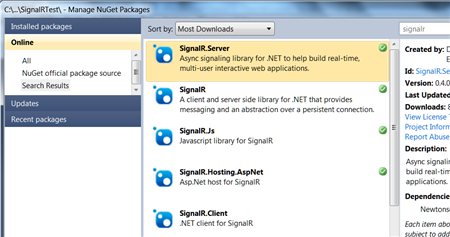
    I started out by creating a new ASP.NET web application. I then used the NuGet extension to locate the SignalR libraries that I wanted to use.

    2012.03.01signalr01

    Once the packages were chosen from NuGet, they got automatically added to my ASP.NET app.

    2012.03.01signalr02

    The next thing to do was add the appropriate JavaScript references at the top of the page. Note the last one. It is a virtual JavaScript location (you won’t find it in the design-time application) that is generated by the SignalR framework. This script, which you can view in the browser at runtime, holds all the JavaScript code that corresponds to the server/browser methods defined in my ASP.NET application.

    2012.03.01signalr04

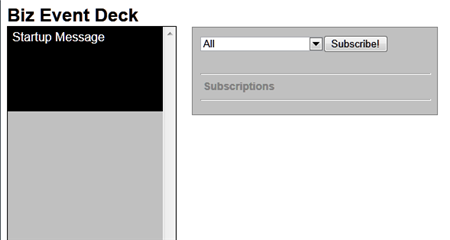
    After this, I added the HTML and ASP.NET controls necessary to visualize my Tweetdeck-like event viewer. Besides a column where each event shows up, I also added a listbox that holds all the types of events that someone might subscribe to. Maybe one set of users just want security-oriented events, or another wants events related to a given IT project.

    2012.03.01signalr03

    With my look-and-feel in place, I then moved on to adding some server-side components. I first created a new class (BizEventController.cs) that uses the SignalR “Hubs” connection model. This class holds a single operation that gets called by the JavaScript in the browser and adds the client to a given messaging group. Later, I can target a SignalR message to a given group.

    using System;
    using System.Collections.Generic;
    using System.Linq;
    using System.Web;
    
    //added reference to SignalR
    using SignalR.Hubs;
    
    ///
    <summary> /// Summary description for BizEventController /// </summary>
    
    public class BizEventController : Hub
    {
        public void AddSubscription(string eventType)
        {
            AddToGroup(eventType);
        }
    }
    

    I then switched back to the ASP.NET page and added the JavaScript guts of my SignalR application. Specifically, the code below (1) defines an operation on my client-side hub (that gets called by the server) and (2) calls the server side controller that adds clients to a given message group.

    $(function () {
                //create arrays for use in showing formatted date string
                var days = ['Sun', 'Mon', 'Tues', 'Wed', 'Thur', 'Fri', 'Sat'];
                var months = ['Jan', 'Feb', 'Mar', 'Apr', 'May', 'June', 'July', 'Aug', 'Sept', 'Oct', 'Nov', 'Dec'];
    
                // create proxy that uses in dynamic signalr/hubs file
                var bizEDeck = $.connection.bizEventController;
    
                // Declare a function on the chat hub so the server can invoke it
                bizEDeck.addEventMsg = function (message) {
                    //format date
                    var receiptDate = new Date();
                    var formattedDt = days[receiptDate.getDay()] + ' ' + months[receiptDate.getMonth()] + ' ' + receiptDate.getDate() + ' ' + receiptDate.getHours() + ':' + receiptDate.getMinutes();
                    //add new "message" to deck column
                    $('#deck').prepend('</pre>
    <div>' + message + '' + formattedDt + ' via StreamInsight</div>
    <pre>
    ');
                };
    
                //act on "subscribe" button
                $("#groupadd").click(function () {
                    //call subscription function in server code
                    bizEDeck.addSubscription($('#group').val());
                    //add entry in "subscriptions" section
                    $('#subs').append($('#group').val() + '</pre>
    
    <hr />
    
    <pre>');
                });
    
                // Start the connection
                $.connection.hub.start();
            });
    

    Building the web service that StreamInsight will call to update browsers

    The UI piece was now complete. Next, I wanted a web service that StreamInsight could call and pass in business events that would get pushed to each browser client. I’m leveraging a previously-built StreamInsight WCF adapter that can be used to receive web service request and call web service endpoints. I built a WCF service and in the underlying class, I pull the list of all connected clients and invoke the JavaScript function.

    using System;
    using System.Collections.Generic;
    using System.Linq;
    using System.Runtime.Serialization;
    using System.ServiceModel;
    using System.Text;
    
    using SignalR;
    using SignalR.Infrastructure;
    using SignalR.Hosting.AspNet;
    using StreamInsight.Samples.Adapters.Wcf;
    using Seroter.SI.AzureAppFabricAdapter;
    
    public class NotificationService : IPointEventReceiver
    {
    	//implement the operation included in interface definition
    	public ResultCode PublishEvent(WcfPointEvent result)
    	{
    		//get category from key/value payload
    		string cat = result.Payload["Category"].ToString();
    		//get message from key/value payload
    		string msg = result.Payload["EventMessage"].ToString();
    
    		//get SignalR connection manager
    		IConnectionManager mgr = AspNetHost.DependencyResolver.Resolve();
    		//retrieve list of all connected clients
    		dynamic clients = mgr.GetClients();
    
    		//send message to all clients for given category
    		clients[cat].addEventMsg(msg);
    		//also send message to anyone subscribed to all events
    		clients["All"].addEventMsg(msg);
    
    		return ResultCode.Success;
    	}
    }
    

    Preparing StreamInsight to receive, aggregate and forward events

    The website is ready, the service is exposed, and all that’s left is to get events and process them. Specifically, I used a WCF adapter to create an endpoint and listen for events from sources, wrote a few queries, and then sent the output to the WCF service created above.

    The StreamInsight application is below. It includes the creation of the embedded server and all other sorts of fun stuff.

    using System;
    using System.Collections.Generic;
    using System.Linq;
    using System.Text;
    
    using Microsoft.ComplexEventProcessing;
    using Microsoft.ComplexEventProcessing.Linq;
    using Seroter.SI.AzureAppFabricAdapter;
    using StreamInsight.Samples.Adapters.Wcf;
    
    namespace SignalRTest.StreamInsightHost
    {
        class Program
        {
            static void Main(string[] args)
            {
                Console.WriteLine(":: Starting embedded StreamInsight server ::");
    
                //create SI server
                using(Server server = Server.Create("RSEROTERv12"))
                {
                    //create SI application
                    Application app = server.CreateApplication("SeroterSignalR");
    
                    //create input adapter configuration
                    WcfAdapterConfig inConfig = new WcfAdapterConfig()
                    {
                        Password = "",
                        RequireAccessToken = false,
                        Username  = "",
                        ServiceAddress = "http://localhost:80/StreamInsightv12/RSEROTER/InputAdapter"
                    };
    
                    //create output adapter configuration
                    WcfAdapterConfig outConfig = new WcfAdapterConfig()
                    {
                        Password = "",
                        RequireAccessToken = false,
                        Username = "",
                        ServiceAddress = "http://localhost:6412/SignalRTest/NotificationService.svc"
                    };
    
                    //create event stream from the source adapter
                    CepStream input = CepStream.Create("BizEventStream", typeof(WcfInputAdapterFactory), inConfig, EventShape.Point);
                    //build initial LINQ query that is a simple passthrough
                    var eventQuery = from i in input
                                     select i;
    
                    //create unbounded SI query that doesn't emit to specific adapter
                    var query0 = eventQuery.ToQuery(app, "BizQueryRaw", string.Empty, EventShape.Point, StreamEventOrder.FullyOrdered);
                    query0.Start();
    
                    //create another query that latches onto previous query
                    //filters out all individual web hits used in later agg query
                    var eventQuery1 = from i in query0.ToStream()
                                      where i.Category != "Web"
                                      select i;
    
                    //another query that groups events by type; used here for web site hits
                    var eventQuery2 = from i in query0.ToStream()
                                      group i by i.Category into EventGroup
                                      from win in EventGroup.TumblingWindow(TimeSpan.FromSeconds(10))
                                      select new BizEvent
                                      {
                                          Category = EventGroup.Key,
                                          EventMessage = win.Count().ToString() + " web visits in the past 10 seconds"
                                      };
                    //new query that takes result of previous and just emits web groups
                    var eventQuery3 = from i in eventQuery2
                                      where i.Category == "Web"
                                      select i;
    
                    //create new SI queries bound to WCF output adapter
                    var query1 = eventQuery1.ToQuery(app, "BizQuery1", string.Empty, typeof(WcfOutputAdapterFactory), outConfig, EventShape.Point, StreamEventOrder.FullyOrdered);
                    var query2 = eventQuery3.ToQuery(app, "BizQuery2", string.Empty, typeof(WcfOutputAdapterFactory), outConfig, EventShape.Point, StreamEventOrder.FullyOrdered);
    
                    //start queries
                    query1.Start();
                    query2.Start();
                    Console.WriteLine("Query started. Press [Enter] to stop.");
    
                    Console.ReadLine();
                    //stop all queries
                    query1.Stop();
                    query2.Stop();
                    query0.Stop();
                    Console.Write("Query stopped.");
                    Console.ReadLine();
    
                }
            }
    
            private class BizEvent
            {
                public string Category { get; set; }
                public string EventMessage { get; set; }
            }
        }
    }
    

    Everything is now complete. Let’s move on to testing with a simple event generator that I created.

    Testing the solution

    I built a simple WinForm application that generates business events or a user-defined number of simulated website visits. The business events are passed through StreamInsight, and the website hits are aggregated so that StreamInsight can emit the count of hits every ten seconds.

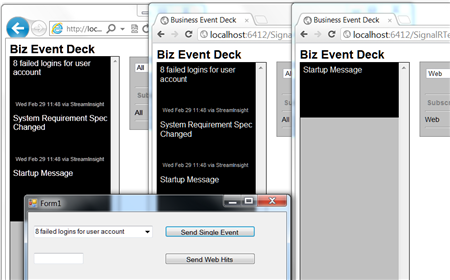
    To highlight the SignalR experience, I launched three browser instances with two different group subscriptions. The first two subscribe to all events, and the third one subscribes just to website-based events. For the latter, the client JavaScript function won’t get invoked by the server unless the events are in the “Web” category.

    The screenshot below shows the three browser instances launched (one in IE, two in Chrome).

    2012.03.01signalr06

    Next, I launched my event-generator app and StreamInsight host. I sent in a couple of business (not web) events and hoped to see them show up in two of the browser instances.

    2012.03.01signalr07

    As expected, two of the browser clients were instantly updated with these events, and the other subscriber was not. Next, I sent in a handful of simulated website hit events and observed the results.

    2012.03.01signalr08

    Cool! So all three browser instances were instantly updated with ten-second-counts of website events that were received.

    Summary

    SignalR is an awesome framework for providing real-time, interactive, bi-directional communication between clients and servers. I think there’s a lot of value of using SignalR for dashboards, widgets and event monitoring interfaces. In this post we saw a simple “business event monitor” application that enterprise users could leverage to keep up to date on what’s happening within enterprise systems. I used StreamInsight here, but you could use BizTalk Server or any application that can send events to web services.

    What do you think? Where do you see value for SignalR?

    UPDATE:I’ve made the source code for this project available and you can retrieve it from here.
  • My New Pluralsight Course, “AWS Developer Fundamentals”, Is Now Available

    I just finished designing, building and recording a new course for Pluralsight. I’ve been working with Amazon Web Services (AWS) products for a few years now, and I jumped at the chance to build a course that looked at the AWS services that have significant value for developers. That course is AWS Developer Fundamentals, and it is now online and available for Pluralsight subscribers.

    In this course, I  and cover the following areas, and

    • Compute Services. A walkthrough of EC2 and how to provision and interact with running instances.
    • Storage Services. Here we look at EBS and see examples of adding volumes, creating snapshots, and attaching volumes made from snapshots. We also cover S3 and how to interact with buckets and objects.
    • Database Services. This module covers the Relational Database Service (RDS) with some MySQL demos, SimpleDB and the new DynamoDB.
    • Messaging Services. Here we look at the Simple Queue Service (SQS) and Simple Notification Service (SNS).
    • Management and Deployment. This module covers the administrative components and includes a walkthrough of the Identity and Access Management (IAM) capabilities.

    Each module is chock full of exercises that should help you better understand how AWS services work. Instead of JUST showing you how to interact with services via an SDK, I decided that each set of demos should show how to perform functions using the Management Console, the raw (REST/Query) API, and also the .NET SDK. I think that this gives the student a good sense of all the viable ways to execute AWS commands. Not every application platform has an SDK available for AWS, so seeing the native API in action can be enlightening.

    I hope you take the time to watch it, and if you’re not a Pluralsight subscriber, now’s the time to jump in!

  • My StreamInsight Course for Pluralsight is Now Available

    I’ve been working for the past number of months on a comprehensive Pluralsight training course on Microsoft StreamInsight. I was hoping that I could bang out the course in a short amount of time, but I quickly learned that I needed to get much deeper into the product before I was comfortable producing credible training material.

    The first seven modules of the course are now online at Pluralsight under the title StreamInsight Fundamentals.  The final (yet to be finished) module will be on building resilient applications and leveraging the new checkpointing feature.  This is a complex topic, and I am building a full end to end demo from scratch, and didn’t want that holding up the primary modules of the course.

    So what did I build? Seven modules totaling about 4 1/2 hours of content.  Each module is very demo-heavy with a focus on realistic scenarios and none of the “let’s assume you have an object of type A with a property called Foo” stuff.

    • Module 1 – Introducing StreamInsight. This module is a brief introduction into event driven architecture, complex event processing and the basics of the StreamInsight product.
    • Module 2 – Developing StreamInsight Queries. Lots of content here cover filtering, projection, event windows, grouping, aggregation, TopK, join, union and a host of timestamp modification examples. This is the longest module because it’s arguably the most important topic (but still watch the other ones!).
    • Module 3 – Extending StreamInsight LINQ Queries. When out-of-the-box operators won’t do, build your own!  This module looks at all the supported ways to add extensions to StreamInsight LINQ.
    • Module 4 – StreamInsight Event Sources: IObservable and IEnumerable. Here I walk through how to use both IObservable and IEnumerable objects as either the source or sink in a StreamInsight application.  The IObservable stuff was fun to build, but also took the longest for me to fully understand.
    • Module 5 – StreamInsight Event Sources: Developing Adapters. This module covers the strategies and techniques for building both input and output adapters. Together we’ll build a typed MSMQ input adapter and an untyped MSMQ output adapter.  Good times will be had by all.
    • Module 6 – Hosting StreamInsight Applications.  In this module, I show how to host StreamInsight within an application or by leveraging the standalone service.  I also go through a series of examples on how you chain queries (and streams) together and leverage their reusable nature.
    • Module 7 – Monitoring and Troubleshooting StreamInsight Applications. Here I show all the ways to collect diagnostic data on StreamInsight applications and then go through event flow analysis using the Event Flow Debugger.

    All in all, it was fun thinking up the structure, preparing the material, building the demos, and producing the training videos.  There hasn’t been a whole lot of StreamInsight material out there, so hopefully this helps developers and architects who are trying to get up to speed on this very cool and powerful technology.

  • First Look: Deploying .NET Web Apps to Cloud Foundry via Iron Foundry

    It’s been a good week for .NET developers who like the cloud.  First, Microsoft makes a huge update to Windows Azure that improves everything from billing to support for lots of non-Microsoft platforms like memcached and Node.js. Second, there was a significant announcement today from Tier 3 regarding support for .NET in a Cloud Foundry environment.

    I’ve written a bit about Cloud Foundry in the past, and have watched it become one of the most popular platforms for cloud developers.  While Cloud Foundry supports a diverse set of platforms like Java, Ruby and Node.js, .NET has been conspicuous absent from that list.  That’s where Tier 3 jumped in.  They’ve forked the Cloud Foundry offering and made a .NET version (called Iron Foundry) that can run by an online hosted provider, or, in your own data center. Your own private, open source .NET PaaS.  That’s a big deal.

    I’ve been working a bit with their team for the past few weeks, and if you’d like to read more from their technical team, check out the article that I wrote for InfoQ.com today.  Let’s jump in and try and deploy a very simple RESTful WCF service to Iron Foundry using the tools they’ve made available.

    Demo

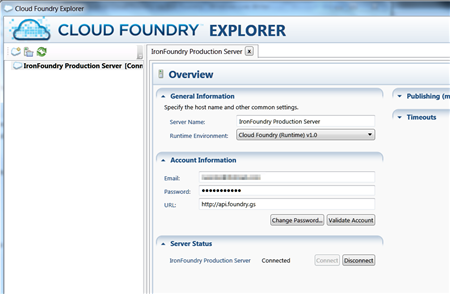
    First off, I pulled the source code from their GitHub library.  After building that, I made sure that I could open up their standalone Cloud Foundry Explorer tool and log into my account. This tool also plugs into Visual Studio 2010, and I’ll show that soon [12/22 update: note that Iron Foundry’s production URL has changed from the value used in the screenshot below].

    2011.12.13ironfoundry01

    It’s a nice little tool that shows me any apps I have running, and lets me interact with them.  But, I have no apps deployed here, so let’s change that!  How about we go with a very simple WCF contract that returns a customer object when the caller hits a specific URI.  Here’s the WCF contract:

    [ServiceContract]
        public interface ICustomer
        {
            [OperationContract]
            [WebGet(UriTemplate = "/{id}")]
            Customer GetCustomer(string id);
        }
    
        [DataContract]
        public class Customer
        {
            [DataMember]
            public string Id { get; set; }
            [DataMember]
            public string FullName { get; set; }
            [DataMember]
            public string Country { get; set; }
            [DataMember]
            public DateTime DateRegistered { get; set; }
        }
    

    The implementation of this service is extremely simple.  Based on the input ID, I return one of a few different customer records.

    public class CustomerService : ICustomer
        {
            public Customer GetCustomer(string id)
            {
                Customer c = new Customer();
                c.Id = id;
    
                switch (id)
                {
                    case "100":
                        c.FullName = "Richard Seroter";
                        c.Country = "USA";
                        c.DateRegistered = DateTime.Parse("2011-08-24");
                        break;
                    case "200":
                        c.FullName = "Jared Wray";
                        c.Country = "USA";
                        c.DateRegistered = DateTime.Parse("2011-06-05");
                        break;
                    default:
                        c.FullName = "Shantu Roy";
                        c.Country = "USA";
                        c.DateRegistered = DateTime.Parse("2011-05-11");
                        break;
                }
    
                return c;
            }
    

    My WCF service configuration is also pretty straightforward.  However, note that I do NOT specify a full service address. When I asked one of the Iron Foundry developers about this he said:

    When an application is deployed, the cloud controller picks a server out of our farm of servers to which to deploy the application. On that server, a random high port number is chosen and a dedicated web site and app pool is configured to use that port. The router service then uses that URL (http://server:49367) when requests come in to http://<application&gt;.gofoundry.net

    <configuration>
    <system.web>
    <compilation debug="true" targetFramework="4.0" />
    </system.web>
    <system.serviceModel>
    <bindings>
    <webHttpBinding>
    <binding name="WebBinding" />
    </webHttpBinding>
    </bindings>
    <services>
    <service name="Seroter.IronFoundry.WcfRestServiceDemo.CustomerService">
    <endpoint address="CustomerService" behaviorConfiguration="RestBehavior"
    binding="webHttpBinding" bindingConfiguration="WebBinding" contract="Seroter.IronFoundry.WcfRestServiceDemo.ICustomer" />
    </service>
    </services>
    <behaviors>
    <endpointBehaviors>
    <behavior name="RestBehavior">
    <webHttp helpEnabled="true" />
    </behavior>
    </endpointBehaviors>
    <serviceBehaviors>
    <behavior name="">
    <serviceMetadata httpGetEnabled="true" />
    <serviceDebug includeExceptionDetailInFaults="true" />
    </behavior>
    </serviceBehaviors>
    </behaviors>
    <serviceHostingEnvironment multipleSiteBindingsEnabled="true" />
    </system.serviceModel>
    <system.webServer>
    <modules runAllManagedModulesForAllRequests="true"/>
    </system.webServer>
    <connectionStrings></connectionStrings>
    </configuration>
    

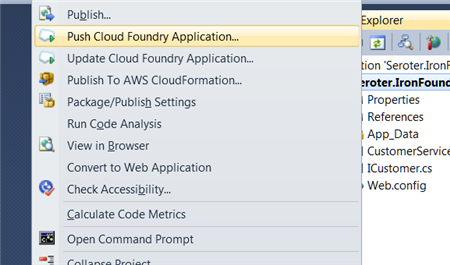
    I’m not ready to deploy this application. While  I could use the standalone Cloud Foundry Explorer that I showed you before, or even the vmc command line, the easiest one is the Visual Studio plug in.  By right-clicking my project, I can choose Push Cloud Foundry Application which launches the Cloud Foundry Explorer.

    2011.12.13ironfoundry02

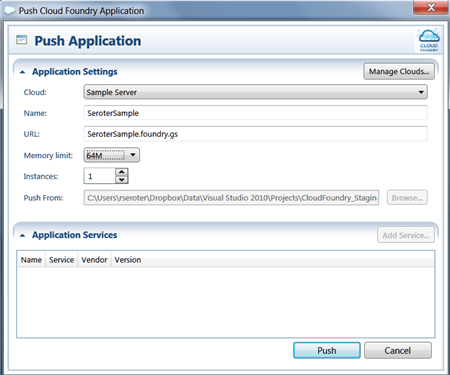
    Now I can select my existing Iron Foundry configuration named Sample Server (which points to the Iron Foundry endpoint and includes my account credentials), select a name for my application, choose a URL, and pick both the memory size (64MB up to 2048MB) and application instance count [12/22 update: note that Iron Foundry’s production URL has changed from the value used in the screenshot below].

    2011.12.13ironfoundry03

    The application is then pushed to the cloud. What’s awesome is that the application is instantly available after publishing.  No waits, no delays.  Want to see the app in action?  Based on the values I entered during deployment, you can hit the URL at http://serotersample6.gofoundry.net/CustomerService.svc/CustomerService/100. [12/22 update: note that Iron Foundry’s production URL has changed, so the working URL above doesn’t match the values I showed in the screenshots]

    2011.12.13ironfoundry04

    Sweet.  Now let’s check out some diagnostic info, shall we?  I can fire up the standalone Cloud Foundry Explorer and see my application running.

    2011.12.13ironfoundry05

    What can I do now?  On the right side of the screen, I have options to change/add URLs that map to my service, increase my allocated memory, or modify the number of application instances.

    2011.12.13ironfoundry06

    On the bottom left of the this screen, I can find out details of the instances that I’m running on.  Here, I’m on a single instance and my app has been running for 5 minutes.

    2011.12.13ironfoundry07

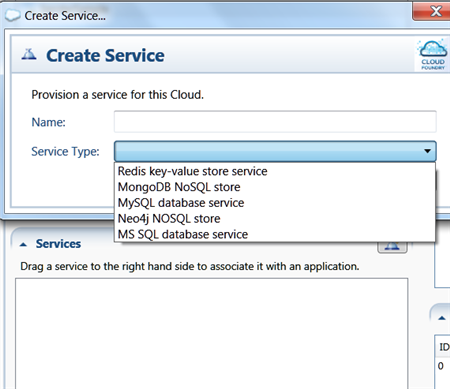
    Finally,  I can provision application services associated with my web application.

    2011.12.13ironfoundry08

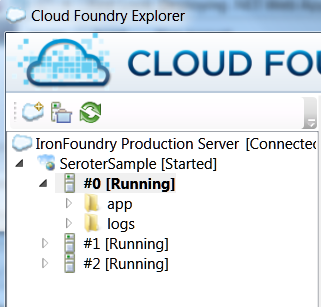
    Let’s change my instance count.  I was blown away when I simply “upticked” the Instances value and instantly I saw another instance provisioned.  I don’t think Azure is anywhere near as fast.

    2011.12.13ironfoundry11

    2011.12.13ironfoundry12

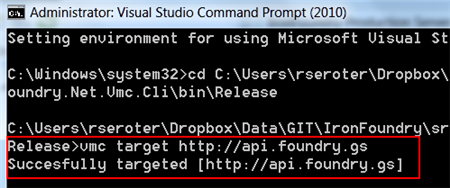
    What if I like using the vmc command line tool to administer my Iron Foundry application?  Let’s try that out. I went to the .NET version of the vmc tool that came with the Iron Foundry code download, and targeted the API just like you would in “regular” Cloud Foundry.[12/22 update: note that Iron Foundry’s production URL has changed from the value used in the screenshot below].

    2011.12.13ironfoundry09

    It’s awesome (and I guess, expected) that all the vmc commands work the same and I can prove that by issuing the “vmc apps” command which should show me my running applications.

    2011.12.13ironfoundry10

    Not everything was supported yet on my build, so if I want to increase the instance count or memory, I’d jump back to the Cloud Foundry Explorer tool.

    Summary

    What a great offering. Imagine deploying this within your company as a way to have a private PaaS. Or using it as a public PaaS and have the same deployment experience for .NET, Java, Ruby and Node applications.  I’m definitely going to troll through the source code since I know what a smart bunch build the “original” Cloud Foundry and I want to see how the cool underpinnings of that (internal pub/sub, cloud controller, router, etc) translated to .NET.

    I encourage you to take a look.  I like Windows Azure, but more choice is a good thing and I congratulate the Tier 3 team on open sourcing their offering and doing such a cool service for the community.