Category: .NET Services

  • My Presentation from Sweden on BizTalk/SOA/Cloud is on Channel9

    So my buddy Mikael informs me (actually all of us), that my presentation on “BizTalk, SOA and Leveraging the Cloud” from my visit to the Sweden User Group is finally available for viewing on Microsoft’s Channel9.

    In Part 1 of the presentation, I lay the groundwork for doing SOA with BizTalk, and, try to warm up the crowd with stupid American humor.  Then, in Part II I explain how to leverage the Google, Salesforce.com, Azure and Amazon clouds in a BizTalk solution.  Also, either out of sympathy or because my material was improving, you may hear a few more audible chuckles.  I take it where I can get it.

    I had lots of fun over there, and will start openly petitioning for a return visit in 6 months or so.  Consider yourself warned, Mikael.

    Share

  • Orchestrating the Cloud : Part I – Creating and Consuming A Google App Engine Service From BizTalk Server

    I recently wrote about my trip to Stockholm where I demonstrated some scenarios showing how I could leverage my onsite ESB in a cloud-focused solution.  The first scenario I demonstrated was using BizTalk Server 2009 to call a series of cloud services and return the result of that orchestrated execution back to a web application hosted in the Amazon.com EC2 cloud.  This series of blog posts will show how I put each piece of this particular demonstration together.

    2009_09_21cloud01

    In this first post, I’ll show how I created a Python web application in the Google App Engine which allows me to both add/delete data via a web UI and provides a POX web service for querying data.  I’ll then call this application from BizTalk Server to extract relevant data.

    As you’d expect, the initial step was to build the Google App Engine web app.  First, you need to sign up for a (free) Google App Engine account.  Then, if you’re like me and building a Python app (vs. Java) you can go here and yank all the necessary SDKs.  You get a local version of the development sandbox so that you can fully test your application before deploying it to the Google cloud.

    Let’s walk through the code I built.  As a disclaimer, I learned Python solely for this exercise, and I’m sure that my code reflects the language maturity of a fetus.  Whatever, it works.  Don’t judge me.  But either way, note that there are probably better ways to do what I’ve done, but I couldn’t find them.

    First off, I have some import statements to libraries I’ll use within my code.

    import cgi
    from google.appengine.ext import webapp
    from google.appengine.ext.webapp.util import run_wsgi_app
    from google.appengine.ext import db
    from xml.dom import minidom
    from xml.sax.saxutils import unescape

    Next I defined a “customer” object which represents the data I wish to stash in the Datastore.

    #customer object definition
    class Customer(db.Model):
        userid = db.StringProperty()
        firstname = db.StringProperty()
        lastname = db.StringProperty()
        currentbeta = db.StringProperty()
        betastatus = db.StringProperty()
        dateregistered = db.StringProperty()

    At this point, I’m ready for the primary class which is responsible for drawing the HTML page where I can add/delete new records to my application. First I define the class and write out the header of the page.

    #main class
    class MainPage(webapp.RequestHandler):
        def get(self):
            #header HTML
            self.response.out.write('<html><head><title>Vandelay Industries Beta Signup Application</title>')
            self.response.out.write('<link type=\"text/css\" rel=\"stylesheet\" href=\"stylesheets/appengine.css\" /></head>')
    
            self.response.out.write('<body>')
            self.response.out.write('<table class=\"masterTable\">')
    
            self.response.out.write('<tr><td rowspan=2><img src=\"images/vandsmall.png\"></td>')
    
            self.response.out.write('<td class=\"appTitle\">Beta Technology Sign Up Application</td></tr>')
    
            self.response.out.write('<tr><td class=\"poweredBy\">Powered by Google App Engine<img src=\"images/appengine_small.gif\"></td></tr>')
    

    Now I want to show any existing customers stored in my system.  Before I do my Data Store query, I write the table header.

    #show existing customer section
            self.response.out.write('<tr><td colspan=2>')
            self.response.out.write('<hr width=\"75%\" align=\"left\">')
    
            self.response.out.write('<span class=\"sectionHeader\">Customer List</span>')
    
            self.response.out.write('<hr width=\"75%\" align=\"left\">')
    
            self.response.out.write('<table class=\"customerListTable\">')
    
            self.response.out.write('<tr>')
            self.response.out.write('<td class=\"customerListHeader\">ID</td>')
    
            self.response.out.write('<td class=\"customerListHeader\">First Name</td>')
    
            self.response.out.write('<td class=\"customerListHeader\">Last Name</td>')
    
            self.response.out.write('<td class=\"customerListHeader\">Current Beta</td>')
    
            self.response.out.write('<td class=\"customerListHeader\">Beta Status</td>')
    
            self.response.out.write('<td class=\"customerListHeader\">Date Registered</td>')
    
            self.response.out.write('</tr>')

    Here’s the good stuff.  Relatively.  I query the Datastore using a SQL-like syntax called GQL and then loop through the results and print each returned record.

    #query customers from database
           customers = db.GqlQuery('SELECT * FROM Customer')
           #add each customer to page
           for customer in customers:
               self.response.out.write('<tr>')
               self.response.out.write('<td class=\"customerListCell\">%s</td>' % customer.userid)
    
               self.response.out.write('<td class=\"customerListCell\">%s</td>' % customer.firstname)
    
               self.response.out.write('<td class=\"customerListCell\">%s</td>' % customer.lastname)
    
               self.response.out.write('<td class=\"customerListCell\">%s</td>' % customer.currentbeta)
    
               self.response.out.write('<td class=\"customerListCell\">%s</td>' % customer.betastatus)
    
               self.response.out.write('<td class=\"customerListCell\">%s</td>' % customer.dateregistered)
    
               self.response.out.write('</tr>')
           self.response.out.write('</table><br/><br />')
           self.response.out.write('</td></tr>')

    I then need a way to add new records to the application, so here’s a block that defines the HTML form and input fields that capture a new customer.  Note that my form’s “action” is is set to “/Add”.

    #add customer entry section
            self.response.out.write('<tr><td colspan=2>')
            self.response.out.write('<hr width=\"75%\" align=\"left\">')
    
            self.response.out.write('<span class=\"sectionHeader\">Add New Customer</span>')
    
            self.response.out.write('<hr width=\"75%\" align=\"left\">')
    
            self.response.out.write('<form action="/Add" method="post">')
            self.response.out.write('<table class=\"customerAddTable\">')
    
            self.response.out.write('<tr><td class=\"customerAddHeader\">ID:</td>')
    
            self.response.out.write('<td class=\"customerListCell\"><input type="text" name="userid"></td></tr>')
    
            self.response.out.write('<tr><td class=\"customerAddHeader\">First Name:</td>')
    
            self.response.out.write('<td class=\"customerListCell\"><input type="text" name="firstname"></td></tr>')
    
            self.response.out.write('<tr><td class=\"customerAddHeader\">Last Name:</td>')
    
            self.response.out.write('<td class=\"customerListCell\"><input type="text" name="lastname"></td></tr>')
    
            self.response.out.write('<tr><td class=\"customerAddHeader\">Current Beta:</td>')
    
            self.response.out.write('<td class=\"customerListCell\"><input type="text" name="currentbeta"></td></tr>')
    
            self.response.out.write('<tr><td class=\"customerAddHeader\">Beta Status:</td>')
    
            self.response.out.write('<td class=\"customerListCell\"><input type="text" name="betastatus"></td></tr>')
    
            self.response.out.write('<tr><td class=\"customerAddHeader\">Date Registered:</td>')
    
            self.response.out.write('<td class=\"customerListCell\"><input type="text" name="dateregistered"></td></tr>')
    
            self.response.out.write('</table>')
            self.response.out.write('<input type="submit" value="Add Customer">')
            self.response.out.write('</form><br/>')
            self.response.out.write('</td></tr>')

    Finally, I have an HTML form for a delete behavior which has an action of “/Delete.”

    #delete all section
            self.response.out.write('<tr><td colspan=2>')
            self.response.out.write('<hr width=\"75%\" align=\"left\">')
    
            self.response.out.write('<span class=\"sectionHeader\">Delete All Customer</span>')
    
            self.response.out.write('<hr width=\"75%\" align=\"left\">')
    
            self.response.out.write('<form action="/Delete" method="post"><div><input type="submit" value="Delete All Customers"></div></form>')
            self.response.out.write('</td></tr>')
            self.response.out.write('</table>')
            #self.response.out.write('')
            #write footer
            self.response.out.write('</body></html>')

    The bottom of my “.py” file has the necessary setup declarations to fire up my default class and register behaviors.

    #setup
    application = webapp.WSGIApplication([('/', MainPage)],debug=True)
    def main():
        run_wsgi_app(application)
    if __name__ == "__main__":
        main()

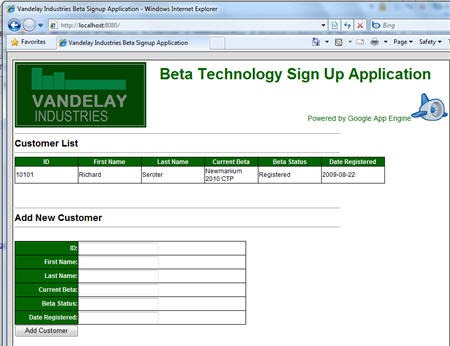
    If I open a DOS prompt, navigate to the parent folder of my solution (and assuming I have a valid app.yaml file that points at my .py file), I can run the dev_appserver.py serotercustomer/ command and see a local, running instance of my web app.

    2009.10.01gae01

    Cool.  Of course I still need to wire the events up for adding, deleting and getting a customer.  For the “Add” operation, I create a new “customer” object, and populate it with values from the form submitted on the default page.  After calling the “put” operation on the object (which adds it to the Datastore), I jump back to the default HTML page.

    #add customer action class
    class AddCustomer(webapp.RequestHandler):
        def post(self):
            customer = Customer()
            customer.firstname = self.request.get('firstname')
            customer.lastname = self.request.get('lastname')
            customer.userid = self.request.get('userid')
            customer.currentbeta = self.request.get('currentbeta')
            customer.betastatus = self.request.get('betastatus')
            customer.dateregistered = self.request.get('dateregistered')
            #store customer
            customer.put()
            self.redirect('/')

    My “Delete” is pretty coarse as all it does is delete every customer object from the Datastore.

    #delete customer action class
    class DeleteCustomer(webapp.RequestHandler):
        def post(self):
            customers = db.GqlQuery('SELECT * FROM Customer')
            for customer in customers:
                customer.delete()
            self.redirect('/')

    The “Get” operation is where I earn my paycheck.  This “Get” is called via a system (i.e. not the user interface) so it needs to accept XML in, and return XML back.  So what I do is take the XML I received into the HTTP POST command, unescape it, load it into an XML DOM, and pull out the “customer ID” node value.  I then execute some GQL using that customer ID and retrieve the corresponding record from the Datastore.  I inflate an XML string, load it back into a DOM object, and return that to the caller.

    #get customer action class
    class GetCustomer(webapp.RequestHandler):
        def post(self):
            #read inbound xml
            xmlstring = self.request.body
            #unescape to XML
            xmlstring2 = unescape(xmlstring)
            #load into XML DOM
            xmldoc = minidom.parseString(xmlstring)
            #yank out value
            idnode = xmldoc.getElementsByTagName("userid")
            userid = idnode[0].firstChild.nodeValue
            #find customer
            customers = db.GqlQuery('SELECT * FROM Customer WHERE userid=:1', userid)
            customer = customers.get()
            lastname = customer.lastname
            firstname = customer.firstname
            currentbeta = customer.currentbeta
            betastatus = customer.betastatus
            dateregistered = customer.dateregistered
            #build result
            responsestring = """"" % (userid, firstname, lastname, currentbeta, betastatus, dateregistered)
            <CustomerDetails>
                <ID>%s</ID>
                <FirstName>%s</FirstName>
                <LastName>%s</LastName>
                <CurrentBeta>%s</CurrentBeta>
                <BetaStatus>%s</BetaStatus>
                <DateRegistered>%s</DateRegistered>
            </CustomerDetails>
            "
    
            #parse result
            xmlresponse = minidom.parseString(responsestring)
            self.response.headers['Content-type'] = 'text/xml'
            #return result
            self.response.out.write(xmlresponse.toxml())

    Before running the solution again, I need to update my “setup” statement to register the new commands (“/Add”, “/Delete”, “/Get”).

    #setup
    application = webapp.WSGIApplication([('/', MainPage),
                                          ('/Add', AddCustomer),
                                          ('/Delete', DeleteCustomer),
                                          ('/Get', GetCustomer)],
                                         debug=True)

    Coolio.  If I run my web application now, I can add and delete records and any records in the store show up in the page.  Now I can deploy my app to the Google cloud using the the console or the new deployment application.  I then added a few sample records that I could use BizTalk to lookup later.

    2009.10.01gae05

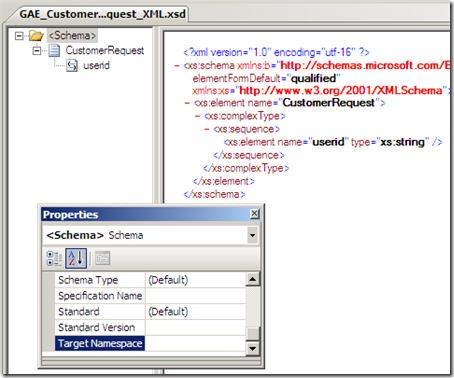
    The final thing to do is have BizTalk call my POX web service.  In my new BizTalk project, I built a schema for the service request.  Remember that all it needs to contain is a customer ID.  Also note that my Google App Engine XML is simplistic and contains no namespaces.  That’s no problem for a BizTalk schema.  Neither of my hand-built Google App Engine XSDs have namespaces defined.  Here is my service request schema:
    2009.10.01gae02

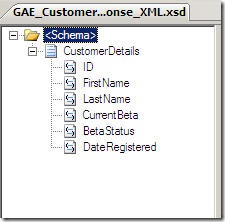
    The POX service response schema reflects the XML structure that my service returns.
    2009.10.01gae03

    Now that I have this, I decided to use a solicit-response BizTalk HTTP adapter to invoke my service.  The URL of my service was: http://<my app name>.appspot.com/Get which leverages the “Get” operation that will accepts the HTTP post request.

    Since I don’t have an orchestration yet, I can just use a messaging scenario and have a FILE send port that subscribes on the response from the solicit-response HTTP port.  When I send in a file with a valid customer ID, I end up with a full response back from my POX web service.

    2009.10.01gae04

    So there you go.  Creating a POX web service in the Google App Engine and using BizTalk Server to call it.  Next up, using BizTalk to extract data from a SalesForce.com instance.

    Share

  • Sweden UG Visit Wrap Up

    Last week I had the privilege of speaking at the BizTalk User Group Sweden.  Stockholm pretty much matched all my assumptions: clean, beautiful and full of an embarrassingly high percentage of good looking people.  As you can imagine, I hated every minute of it.

    While there, I first did a presentation for Logica on the topic of cloud computing.  My second presentation was for the User Group and was entitled BizTalk, SOA, and Leveraging the Cloud.  In it, I took the first half to cover tips and demonstrations for using BizTalk in a service-oriented way.  We looked at how to do contract-first development, asynchronous callbacks using the WCF wsdualHttpBinding, and using messaging itineraries in the ESB Toolkit.

    During the second half the User Group presentation, I looked at how to take service oriented patterns and apply them to BizTalk integration with the cloud.  I showed how BizTalk can consume cloud services through the Azure .NET Service Bus and how BizTalk could expose its own endpoints through the Azure .NET Service Bus.  I then showed off a demo that I spent a couple months putting together which showed how BizTalk could orchestrate cloud services.  The final solution looked like this:

    What I have here is (a) a POX web service written in Python hosted in the Google App Engine, (b) a Force.com application with a custom web service defined and exposed, (c) a BizTalk Server which orchestrates calls to Google, Force.com and an internal system and aggregates a single “customer” object, (d) an endpoint hosted in the .NET Service Bus which exposes my ESB to the cloud and (e) a custom web application hosted in an Amazon.com EC2 instance which requests a specific “customer” through the .NET Service Bus to BizTalk Server.  Shockingly, this all works pretty well.  It’s neat to see so many independent components woven together to solve a common goal.

    I’m debating whether or not to do a short blog series showing how I built each component of this cloud orchestration solution.  We’ll see.

    The user group presentation should be up on Channel 9 in a couple weeks if you care to take a look.  If you get the chance to visit this user group as an attendee or speaker, don’t hesitate to do so.  Mikael and company are a great bunch of people and there’s probably no higher quality concentration of BizTalk folks in the world.


    Share

  • BizTalk Azure Adapters on CodePlex

    Back at TechEd, the Microsoft guys showed off a prototype of an Azure adapter for BizTalk.  Sure enough, now you can find the BizTalk Azure Adapter SDK up on CodePlex.

    What’s there?  I have to dig in a bit, but looks like you’re getting both Live Framework integration and .NET Services.  This means both push and pull of Mesh objects, and both publish/subscribe with the .NET Service bus.

    Given my recent forays into this arena, I am now forced to check this out further and see what sort of configuration options are exposed.  Very cool for these guys to share their work.

    Stay tuned.

    Technorati Tags:

    Share

  • Sending Messages From Azure Service Bus to BizTalk Server 2009

    In my last post, I looked at how BizTalk Server 2009 could send messages to the Azure .NET Services Service Bus.  It’s only logical that I would also try and demonstrate integration in the other direction: can I send a message to a BizTalk receive location through the cloud service bus?

    Let’s get started.  First, I need to define the XSD schema which reflects the message I want routed through BizTalk Server.  This is a painfully simple “customer” schema.

    Next, I want to build a custom WSDL which outlines the message and operation that BizTalk will receive.  I could walk through the wizards and the like, but all I really want is the WSDL file since I’ll pass this off to my service client later on.  My WSDL references the previously built schema, and uses a single message, single port and single service.

    <?xml version="1.0" encoding="utf-8"?>
    <wsdl:definitions name="CustomerService"
                 targetNamespace="http://Seroter.Blog.BusSubscriber"
                 xmlns:wsdl="http://schemas.xmlsoap.org/wsdl/"
                 xmlns:soap="http://schemas.xmlsoap.org/wsdl/soap/"
                 xmlns:tns="http://Seroter.Blog.BusSubscriber"
                 xmlns:xsd="http://www.w3.org/2001/XMLSchema">
      <!-- declare types-->
      <wsdl:types>
        <xsd:schema targetNamespace="http://Seroter.Blog.BusSubscriber">
          <xsd:import
    	schemaLocation="http://rseroter08:80/Customer_XML.xsd"
    	namespace="http://Seroter.Blog.BusSubscriber" />
        </xsd:schema>
      </wsdl:types>
      <!-- declare messages-->
      <wsdl:message name="CustomerMessage">
        <wsdl:part name="part" element="tns:Customer" />
      </wsdl:message>
      <wsdl:message name="EmptyResponse" />
      <!-- decare port types-->
      <wsdl:portType name="PublishCustomer_PortType">
        <wsdl:operation name="PublishCustomer">
          <wsdl:input message="tns:CustomerMessage" />
          <wsdl:output message="tns:EmptyResponse" />
        </wsdl:operation>
      </wsdl:portType>
      <!-- declare binding-->
      <wsdl:binding
    	name="PublishCustomer_Binding"
    	type="tns:PublishCustomer_PortType">
        <soap:binding transport="http://schemas.xmlsoap.org/soap/http"/>
        <wsdl:operation name="PublishCustomer">
          <soap:operation soapAction="PublishCustomer" style="document"/>
          <wsdl:input>
            <soap:body use ="literal"/>
          </wsdl:input>
          <wsdl:output>
            <soap:body use ="literal"/>
          </wsdl:output>
        </wsdl:operation>
      </wsdl:binding>
      <!-- declare service-->
      <wsdl:service name="PublishCustomerService">
        <wsdl:port
    	binding="PublishCustomer_Binding"
    	name="PublishCustomerPort">
          <soap:address
    	location="http://localhost/Seroter.Blog.BusSubscriber"/>
        </wsdl:port>
      </wsdl:service>
    </wsdl:definitions>

    Note that the URL in the service address above doesn’t matter.  We’ll be replacing this with our service bus address.  Next (after deploying our BizTalk schema), we should configure the service-bus-connected receive location.  We can take advantage of the WCF-Custom adapter here.

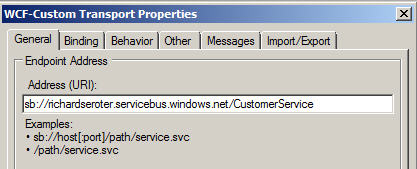
    First, we set the Azure cloud address we wish to establish.

    Next we set the binding, which in our case is the NetTcpRelayBinding.  I’ve also explicitly set it up to use Transport security.

    In order to authenticate with our Azure cloud service endpoint, we have to define our security scheme.  I added an TransportClientEndpointBehavior and set it to use UserNamePassword credentials.  Then, don’t forget to click the UserNamePassword node and enter your actual service bus credentials.

    After creating a send port that subscribes on messages to this port and emits them to disk, we’re done with BizTalk.  For good measure, you should start the receive location and monitor the event log to ensure that a successful connection is established.

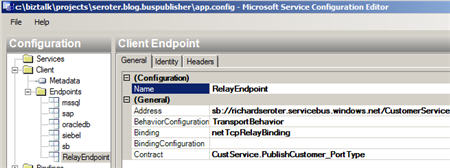
    Now let’s turn our attention to the service client.  I added a service reference to our hand-crafted WSDL and got the proxy classes and serializable types I was after.  I didn’t get much added to my application configuration, so I went and added a new service bus endpoint whose address matches the cloud address I set in the BizTalk receive location.

    You can see that I’ve also chosen a matching binding and was able to browse the contract by interrogating the client executable.  In order to handle security to the cloud, I added the same TransportClientEndpointBehavior to this configuration file and associated it with my service.

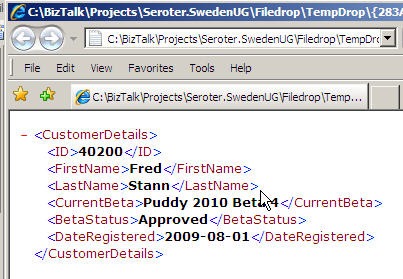
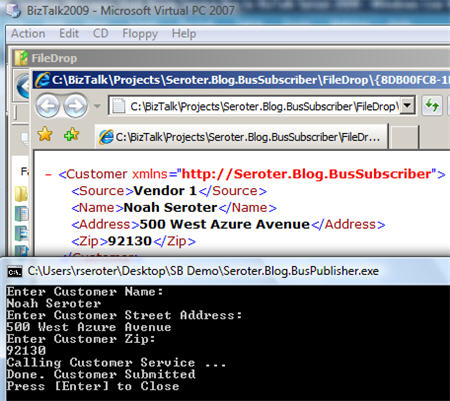
    All that’s left is to test it.  To better simulate the cloud experience, I gone ahead and copied the service client to my desktop computer and left my BizTalk Server running in its own virtual machine.  If all works right, my service client should successfully connect to the cloud, transmit a message, and the .NET Service Bus will redirect (relay) that message, securely, to the BizTalk Server running in my virtual machine.  I can see here that my console app has produced a message in the file folder connected to BizTalk.

    And opening the message shows the same values entered in the service client’s console application.

    Sweet.  I honestly thought connecting BizTalk bi-directionally to Azure services was going to be more difficult.  But the WCF adapters in BizTalk are pretty darn extensible and easily consume these new bindings.  More importantly, we are beginning to see a new set of patterns emerge for integrating on-premises applications through the cloud.  BizTalk may play a key role in receive from, sending to, and orchestrating cloud services in this new paradigm.

    Technorati Tags: , , ,

    Share

  • Securely Calling Azure Service Bus From BizTalk Server 2009

    I just installed the July 2009 .NET Services SDK and after reviewing it for changes, I started wondering how I might call a cloud service from BizTalk using the out-of-the-box BizTalk adapters.  While I showed in a previous blog how to call .NET Services service anonymously, that isn’t practical for most scenarios.  I want to SECURELY call an Azure cloud service from BizTalk.

    If you’re familiar with the “Echo” sample for the .NET Service Bus, then you know that the service host authenticates with the bus via inline code like this:

    // create the credentials object for the endpoint
    TransportClientEndpointBehavior userNamePasswordServiceBusCredential =
       new TransportClientEndpointBehavior();
    userNamePasswordServiceBusCredential.CredentialType =
        TransportClientCredentialType.UserNamePassword;
    userNamePasswordServiceBusCredential.Credentials.UserName.UserName =
        solutionName;
    userNamePasswordServiceBusCredential.Credentials.UserName.Password =
        solutionPassword;

    While that’s ok for the service host, BizTalk would never go for that (without a custom adapter). I need my client to use configuration-based credentials instead.  To test this out, try removing the Echo client’s inline credential code and adding a new endpoint behavior to the configuration file:

    <endpointBehaviors>
      <behavior name="SbEndpointBehavior">
        <transportClientEndpointBehavior credentialType="UserNamePassword">
           <clientCredentials>
              <userNamePassword userName="xxxxx" password="xxxx" />
           </clientCredentials>
         </transportClientEndpointBehavior>
       </behavior>
    </endpointBehaviors>

    Works fine. Nice.  So that proves that we can definitely take care of credentials outside of code, and thus have an offering that BizTalk stands a chance of calling securely.

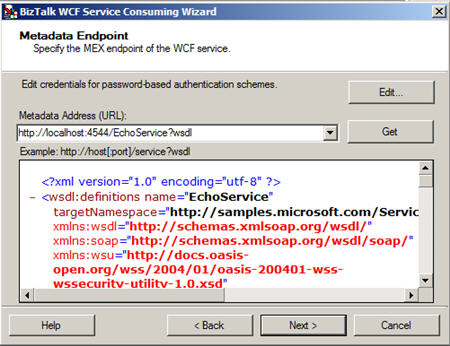
    With that out of the way, let’s see how to actually get BizTalk to call a cloud service.  First, I need my metadata to call the service (schemas, bindings).  While I could craft these by hand, it’s convenient to auto-generate them.  Now, to make life easier (and not have to wrestle with code generation wizards trying to authenticate with the cloud), I’ve rebuilt my Echo service to run locally (basicHttpBinding).  I did this by switching the binding, adding a base URI, adding a metadata behavior, and commenting out any cloud-specific code from the service.  Now my BizTalk project can use the Consume Adapter Service wizard to generate metadata.

    I end up with a number of artifacts (schemas, bindings, orchestration with ports) including the schema which describes the input and output of the .NET Services Echo sample service.

    After flipping my Echo service back to the Cloud-friendly configuration (including the netTcpRelayBinding), I deployed the BizTalk solution.  Then, I imported the (custom) binding into my BizTalk application.  Sure enough, I get a send port added to my application.

    First thing I do is switch the address of my service to the valid .NET Services Bus URI.

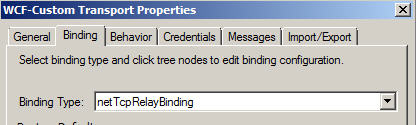
    Next, on the Bindings tab, I switch to the netTcpRelayBinding.

    I made sure my security mode was set to “Transport” and used the RelayAccessToken for its RelayClientAuthenticationType.

    Now, much my like my updated client configuration above, I need to add an endpoint behavior to my BizTalk send port configuration so that I can provide valid credentials to the service bus.  Now the WCF Configuration Editor within Visual Studio didn’t seem to provide me a way to add those username and password values; I had to edit the XML configuration manually.  So, I expected that the BizTalk adapter configuration would be equally deficient and I’d have to create a custom binding and hope that BizTalk accepted it.  However, imagine my surprise when I saw that BizTalk DID expose those credential fields to me!

    I first had to add a new endpoint behavior of type transportClientEndpointBehavior.  Then, set its credentialType attribute to UserNamePassword.

    Then, click the ClientCredential type we’re interested in (UserNamePassword) and key in the data valid to the .NET Services authentication service.

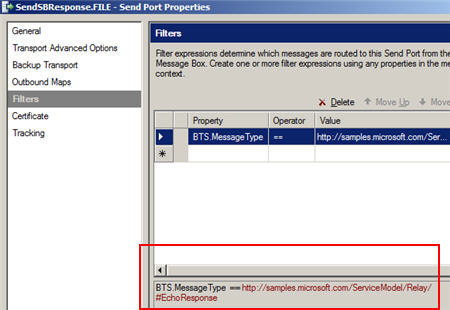
    After that, I added a subscription and saved the send port. Next I created a new send port that would process the Echo response.  I subscribed on the message type of the cloud service result.

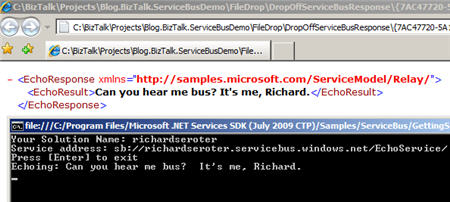
    Now we’re ready to test this masterpiece.  First, I fired up the Echo service and ensured that it was bound to the cloud.  The image below shows that my service host is running locally, and the public service bus has my local service in its registry.  Neato.

    Now for magic time.  Here’s the message I’ll send in:

    If this works, I should see a message printed on my service host’s console, AND, I should get a message sent to disk.  What happens?


    I have to admit that I didn’t think this would work.  But, you would have never read my blog again if I had strung you along this far and showed you a broken demo.   Disaster averted.

    So there you have it.  I can use BizTalk Server 2009 to SECURELY call the Service Bus from the Azure .NET Services offering which means that I am seamlessly doing integration between on-premises offerings via the cloud.  Lots and lots of use cases (and more demos from me) on this topic.

    Technorati Tags: , , ,

    Share

  • Interview Series: Four Questions With … Mick Badran

    In this month’s interview with a “connected systems” thought leader, I have a little pow-wow with the one and only Mick Badran.  Mick is a long-time blogger, Microsoft MVP, trainer, consultant and a stereotypical Australian.  And by that I mean that he has a thick Australian accent, is a ridiculously nice guy, and has probably eaten a kangaroo in the past 48 hours.

    Let’s begin …

    Q: Talk to us a bit about your recent experiences with mobile applications and RFID development with BizTalk Server.  Have you ever spoken with a potential customer who didn’t even realize they could make use of RFID technology  until you explained the benefits?

    A: Richard – funny enough you ask, (I’ll answer these in reverse order) essentially the drivers for this type of scenario is clients talking about how they want to know ‘how long this takes…’ or how to capture how long people spend in a room in a gym – they then want to surface this information through to their management systems.

    Client’s will rarely say – “we need RFID technology for this solution”. It’s more like – “we have a problem that all our library books get lost and there’s a huge manual process around taking books in/out” or (hotels etc) “we lose so much laundry sheets/pillows and the like – can you help us get better ROI.”

    So in this context I think of BizTalk RFID as applying BAM to the physical world.

    Part II – Mobile BizTalk RFID application development – if I said “it couldn’t be easier” I’d be lying. Great set of libraries and RFID support from within BizTalk RFID Mobile – this leaves me to concentrate on building the app.

    A particularly nice feature is that the Mobile RFID ‘framework’ will run on a Windows Mobile capable device (WM 5+) so essentially any windows mobile powered device can become a potential reader. This allows problems to be solved in unique ways – for e.g. a typical RFID based solution we think of Readers being fixed, plastered to a wall somewhere and the tags are the things that move about – this is usually the case….BUT…. for e.g. trucks could be the ones carrying the mobile readers and the end destinations could have tags on boom gates/wherever and when the truck arrives – it scans the tag. This maybe more cost effective.

    A memorable challenge in the Windows Mobile space was developing an ‘enterprise app’ (distributed to units running around the globe – so *very* hands off from my side) – I was coding for a PPC and got the app to a certain level in the Emulator and life was good. I then deployed to my local physical device for ‘a road test’.

    While the device is ‘plugged in’ via a USB cable to my laptop – all is good, but disconnect a PPC will go into a ‘standby’ mode (typically the screen goes black – wakes as soon as you touch it).

    The problem was – that if my app had a connection to the RFID reader and the PPC went to sleep, when woke my app still thought it had a valid connection and the Reader (connected via the CF slot) was in a limbo state.

    After doing some digging I found out that the Windows Mobile O/S *DOES* send your app an event to tell it get ready to sleep – the *problem* was, but the time my app had a chance to run 1 line of code…the device was asleep!

    Fortunately – when the O/S wakes the App, I could query how I woke up….. this solved it.

    ….wrapping up, so you can see most of my issues are around non-RFID stuff where the RFID mobile component is solved. It’s a known, time to get building the app….

    Q: It seems that a debate/discussion we’ll all be having more and more over the coming years centers around what to put in the cloud, and how to integrate with on-premises applications.  As you’ve dug into the .NET Services offering, how has this new toolkit influenced your thinking on the “when” and “what” of the cloud and how to best describe the many patterns for integration?

    A: Firstly I think the cloud is fantastic! Specifically the .NET services aspects which as an integrator/developer there are some *must* have features in there – to add to the ‘bat utility’ belt.

    There’s always the question of uncertainty and I’m putting the secret to Coca Cola out there in the ‘cloud’…not too happy about that, but strangely enough as website hosting has been around for many years now, going to any website popping in personal details/buying things etc – as passing thought of “oh..it’s hosted…fine”. I find people don’t really pass a second thought to that. Why?? Maybe cause it’s a known quantity and has been road tested over the years.

    We move into the ‘next gen’ applications (web 2.0/SAAS whatever you want to call it) and how do we utilize this new environment is the question asked. I believe there are several appropriate ‘transitional phases’ as follows:

    1. All solution components hosted on premise but need better access/exposure to offered WCF/Web Services (we might be too comfortable with having things off premise – keep on a chain)
      – here I would use the Service Bus component of the .NET Services which still allows all requests to come into for e.g. our BTS Boxes and run locally as per normal. The access to/from the BTS Application has been greatly improved.
      Service Bus comes in the form of WCF Bindings for the Custom WCF Adapter – specify a ‘cloud location’ to receive from and you’re good to go.
      – applications can then be pointed to the ‘cloud WCF/WebService’ endpoint from anywhere around the world (our application even ran in China first time). The request is then synchronously passed through to our BTS boxes.
      BTS will punch a hole to the cloud to establish ‘our’ side of the connection.
      – the beautiful thing about the solution is a) you can move your BTS boxes anywhere – so maybe hosted at a later date….. and b) Apps that don’t know WCF can still call through Web Service standards – the apps don’t even need to know you’re calling a Service Bus endpoint.
      ..this is just the beginning….
    2. The On Premise Solution is under load – what to do?
      – we could push out components of the Solution into the Cloud (typically we’d use the Azure environment) and be able to securely talk back to our on-premise solution. So we have the ability to slice and dice our solution as demand dictates.
      – we still can physically touch our servers/hear the hum of drives and feel the bursts of Electromagnetic Radiation from time to time.
    3. Push our solution out to someone else to manage the operation oftypically the Cloud
      – We’d be looking into Azure here I’d say and the beauty I find about Azure is the level of granularity you get – as an application developer you can choose to run ‘this webservice’, ‘that workflow’ etc. AND dictate the  # of CPU cores AND Amount of RAM desired to run it – Brilliant.
      – Hosting is not new, many ISPs do it as we all know but Azure gives us some great fidelity around our MS Technology based solutions. Most ISPs on the other hand say “here’s your box and there’s your RDP connection to it – knock yourself out”… you then find you’re saying “so where’s my sql, IIS, etc etc”

    ** Another interesting point around all of this cloud computing is many large companies have ‘outsourced’ data centers that host their production environments today – there is a certain level of trust in this…these times and the market – everyone is looking squeeze the most out of what they have. **

    I feel that this Year is year of the cloud 🙂

    Q: You have taught numerous BizTalk classes over the years.  Give us an example of an under-used BizTalk Server capability that you highlight when teaching these classes.

    A: This changes from time to time over the years, currently it’s got to be being able to use Multiple Host/Host Instances within BTS on a single box or group. Students then respond with “oooooohhhhh can you do that…”

    It’s just amazing the amount of times I’ve come up against a Single Host/Single Instance running the whole shooting match – the other one is going for a x64 bit environment rather than x86.

    Q [stupid question]: I have this spunky 5 year old kid on my street who has started playing pranks on my neighbors (e.g. removing packages from front doors and “redelivering” them elsewhere, turning off the power to a house).  I’d like to teach him a lesson.  Now the lesson shouldn’t be emotionally cruel (e.g. “Hey Timmy, I just barbequed your kitty cat and he’s DELICIOUS”), overly messy (e.g. fill his wagon to the brim with maple syrup) or extremely dangerous (e.g. loosen all the screws on his bicycle).  Basically nothing that gets me arrested.  Give me some ideas for pranks to play on a mischievous youngster.

    A: Richard – you didn’t go back in time did you? 😉

    I’d setup a fake package and put it on my doorstep with a big sign – on the floor under the package I’d stick a photo of him doing it. Nothing too harsh

    As an optional extra – tie some fishing line to the package and on the other end of the line tie a bunch of tin cans that make a lot of noise. Hide this in the bushes and when he tries to redeliver, the cans will give him away.

    I usually play “spot the exclamation point” when I read Mick’s blog posts, so hopefully I was able to capture a bit of his excitement in this interview!!!!

    Technorati Tags: , ,

  • Recent Links of Interest

    It’s the Friday before a holiday here in the States so I’m clearing out some of the interesting things that caught my eye this week.

    • BizTalk “Cloud” Adapter is coming.  Check out Danny’s blog where he talks about what he demonstrated at TechEd.  Specifically, we should be on the lookout for a Azure adapter for BizTalk.  This is pretty cool given what I showed in my last blog post.  Think of exposing a specific endpoint of your internal BizTalk Server to a partner via the cloud.
    • Updated BizTalk 24×7 site.  Saravana did a nice refresh of this site and arguably has the site that the BizTalk team itself SHOULD have on MSDN.  Well done.
    • BizTalk Adapter Pack 2.0 is out there.  You can now pull the full version of the Adapter Pack from the MSDN downloads (this link is to the free, evaluation version).  Also note that you can grab the new WCF SQL Server adapter only and put it into your BizTalk 2006 environment.  I think.
    • The ESB Guidance is now ESB Toolkit.  We have a name change and support change.  No longer a step-child to the product, the ESB Toolkit now gets full love and support from the parents.  Of course, it’s fantastic to already have an out-of-date book on BizTalk Server 2009.  Thanks guys.  Jerks 😉
    • The Open Group releases their SOA Source Book.  This compilation of SOA principles and considerations can be freely read online and contains a few useful sections.
    • Returning typed WCF exceptions from BizTalk orchestrations. Great post from Paolo on how to get BizTalk to return typed errors back to WCF callers. Neat use of WCF extensions.

    That’s it.  Quick thanks to all that have picked up the book or posted reviews around.  Appreciate that.

    Technorati Tags: , ,

  • Building a RESTful Cloud Service Using .NET Services

    On of the many actions items I took away from last week’s TechEd was to spend some time with the latest release of the .NET Services portion of the Azure platform from Microsoft.  I saw Aaron Skonnard demonstrate an example of a RESTful, anonymous cloud service, and I thought that I should try and build the same thing myself.  As an aside, if you’re looking for a nice recap of the “connected system” sessions at  TechEd, check out Kent Weare’s great series (Day1, Day2, Day3, Day4, Day5).

    So what I want is a service, hosted on my desktop machine, to be publicly available on the internet via .NET Services.  I’ve taken the SOAP-based “Echo” example from the .NET Services SDK and tried to build something just like that in a RESTful fashion.

    First, I needed to define a standard WCF contract that has the attributes needed for a RESTful service.

    using System.ServiceModel;
    using System.ServiceModel.Web;
    
    namespace RESTfulEcho
    {
        [ServiceContract(
            Name = "IRESTfulEchoContract", 
            Namespace = "http://www.seroter.com/samples")]
        public interface IRESTfulEchoContract
        {
            [OperationContract()]
            [WebGet(UriTemplate = "/Name/{input}")]
            string Echo(string input);
        }
    }
    

    In this case, my UriTemplate attribute means that something like http://<service path>/Name/Richard should result in the value of “Richard” being passed into the service operation.

    Next, I built an implementation of the above service contract where I simply echo back the name passed in via the URI.

    using System.ServiceModel;
    
    namespace RESTfulEcho
    {
        [ServiceBehavior(
            Name = "RESTfulEchoService", 
            Namespace = "http://www.seroter.com/samples")]
        class RESTfulEchoService : IRESTfulEchoContract
        {
            public string Echo(string input)
            {
                //write to service console
                Console.WriteLine("Input name is " + input);
    
                //send back to caller
                return string.Format(
                    "Thanks for calling Richard's computer, {0}", 
                    input);
            }
        }
    }
    

    Now I need a console application to act as my “on premises” service host.  The .NET Services Relay in the cloud will accept the inbound requests, and securely forward them to my machine which is nestled deep within a corporate firewall.   On this first pass, I will use a minimum amount of service code which doesn’t even explicitly include service host credential logic.

    using System.ServiceModel;
    using System.ServiceModel.Web;
    using System.ServiceModel.Description;
    using Microsoft.ServiceBus;
    
    namespace RESTfulEcho
    {
        class Program
        {
            static void Main(string[] args)
            {
                Console.WriteLine("Host starting ...");
    
                Console.Write("Your Solution Name: ");
                string solutionName = Console.ReadLine();
    
                // create the endpoint address in the solution's namespace
                Uri address = ServiceBusEnvironment.CreateServiceUri(
                    "http", 
                    solutionName, 
                    "RESTfulEchoService");
    
                //make sure to use WEBservicehost
                WebServiceHost host = new WebServiceHost(
                    typeof(RESTfulEchoService), 
                    address);
    
                host.Open();
    
                Console.WriteLine("Service address: " + address);
                Console.WriteLine("Press [Enter] to close ...");
    
                Console.ReadLine();
    
                host.Close();
            }
        }
    }
    

    So what did I do there?  First, I asked the user for the solution name.  This is the name of the solution set up when you register for your .NET Services account.

    Once I have that solution name, I use the Service Bus API to create the URI of the cloud service.  Based on the name of my solution and service, the URI should be:

    http://richardseroter.servicebus.windows.net/RESTfulEchoService.

    Note that the URI template I set up in the initial contract means that a fully exercised URI would look like:

    http://richardseroter.servicebus.windows.net/RESTfulEchoService/Name/Richard

    Next, I created an instance of the WebServiceHost.  Do not use the standard “ServiceHost” object for a RESTful service.  Otherwise you’ll be like me and waste way too much time trying to figure out why things didn’t work.  Finally, I open the host and print out the service address to the caller.

    Now, nowhere in there are my .NET Services credentials applied.  Does this mean that I’ve just allowed ANYONE to host a service on my solution?  Nope.  The Service Bus Relay service requires authentication/authorization and if none is provided here, then a Windows CardSpace card is demanded when the host is started up.  In my Access Control Service settings, you can see that I have a Windows CardSpace card associated with my .NET Services account.

    Finally, I need to set up my service configuration file to use the new .NET Services WCF bindings that know how to securely communicate with the cloud (and hide all the messy details from me).  My straightforward  configuration file looks like this:

    <configuration>
      <system.servicemodel>
          <bindings>
              <webhttprelaybinding>
                  <binding opentimeout="00:02:00" name="default">
                      <security relayclientauthenticationtype="None" />
                  </binding>
              </webhttprelaybinding>
          </bindings>
          <services>
              <service name="RESTfulEcho.RESTfulEchoService">
                  <endpoint name="RelayEndpoint" 
    	      address="" contract="RESTfulEcho.IRESTfulEchoContract" 
    	      bindingconfiguration="default" 
    	      binding="webHttpRelayBinding" />
              </service>
          </services>
      </system.servicemodel>
    </configuration>
    

    Few things to point out here.  First, notice that I use the webHttpRelayBinding for the service.  Besides my on-premises host, this is the first mention of anything cloud-related.  Also see that I explicitly created a binding configuration for this service and modified the timeout value from the default of 1 minute up to 2 minutes.  If I didn’t do this, I occasionally got an “Unable to establish Web Stream” error.  Finally, and most importantly to this scenario, see the RelayClientAuthenticationType is set to None which means that this service can be invoked anonymously.

    So what happens when I press “F5” in Visual Studio?  After first typing in my solution name, I am asked to chose a Windows Card that is valid for this .NET Services account.  Once selected, those credentials are sent to the cloud and the private connection between the Relay and my local application is established.


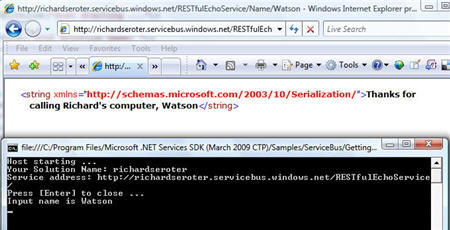
    I can now open a browser and ping this public internet-addressable space and see a value (my dog’s name) returned to the caller, and, the value printed in my local console application.

    Neato.  That really is something pretty amazing when you think about it.  I can securely unlock resources that cannot (or should not) be put into my organization’s DMZ, but are still valuable to parties outside our local network.

    Now, what happens if I don’t want to use Windows CardSpace for authentication?  No problem.  For now (until .NET Services is actually released and full ADFS federation is possible with Geneva), the next easiest thing to do is apply username/password authorization.  I updated my host application so that I explicitly set the transport credentials:

    static void Main(string[] args)
     {
       Console.WriteLine("Host starting ...");
    
       Console.Write("Your Solution Name: ");
       string solutionName = Console.ReadLine();
       Console.Write("Your Solution Password: ");
       string solutionPassword = ReadPassword();
    
       // create the endpoint address in the solution's namespace
       Uri address = ServiceBusEnvironment.CreateServiceUri(
           "http", 
           solutionName, 
           "RESTfulEchoService");
    
       // create the credentials object for the endpoint
      TransportClientEndpointBehavior userNamePasswordServiceBusCredential= 
           new TransportClientEndpointBehavior();
      userNamePasswordServiceBusCredential.CredentialType = 
           TransportClientCredentialType.UserNamePassword;
      userNamePasswordServiceBusCredential.Credentials.UserName.UserName= 
           solutionName;
      userNamePasswordServiceBusCredential.Credentials.UserName.Password= 
           solutionPassword;
    
       //make sure to use WEBservicehost
       WebServiceHost host = new WebServiceHost(
           typeof(RESTfulEchoService), 
           address);
       host.Description.Endpoints[0].Behaviors.Add(
    	userNamePasswordServiceBusCredential);
    
       host.Open();
    
       Console.WriteLine("Service address: " + address);
       Console.WriteLine("Press [Enter] to close ...");
    
       Console.ReadLine();
    
       host.Close();
    }
    

    Now, I have a behavior explicitly added to the service which contains the credentials needed to successfully bind my local service host to the cloud provider.  When I start the local host again, I am prompted to enter credentials into the console.  Nice.

    One last note.  It’s probably stupidity or ignorance on my part, but I was hoping that, like the other .NET Services binding types, that I could attach a ServiceRegistrySettings behavior to my host application.  This is what allows me to add my service to the ATOM feed of available services that .NET Services exposes to the world.  However, every time that I add this behavior to my service endpoint above, my service starts up but fails whenever I call it.  I don’t have the motivation to currently solve that one, but if there are restrictions on which bindings can be added to the ATOM feed, that’d be nice to know.

    So, there we have it.  I have a application sitting on my desktop and if it’s running, anyone in the world could call it.  While that would make our information security team pass out, they should be aware that this is a very secure way to expose this service since the cloud-based relay has hidden all the details of my on-premises application.  All the public consumer knows is a URI in the cloud that the .NET Services Relay then bounces to my local app.

    As I get the chance to play with the latest bits in this release of .NET Services, I’ll make sure to post my findings.

    Technorati Tags: , ,

  • TechEd 2009: Day 1 Session Notes

    Good first day.  Keynote was relatively interesting (even though I don’t fully understand why the presenters use fluffy “CEO friendly” slides and language in a room of techies) and had a few announcements.  The one that caught my eye was the public announcement of the complex event processing (CEP) engine being embedded in SQL Server 2008 R2.  In my book I talk about CEP and apply the principles to a BizTalk solution.  However, I’m much happier that Microsoft is going to put a real effort into this type of solution instead of the relative hack that I put together.  The session at TechEd on this topic is Tuesday.  Expect a write up from me.

    Below are some of the session notes from what I attended today.  I’m trying to balance sessions that interest me intellectually, and sessions that help me actually do my job better.  In the event of a tie, I choose the latter.

    Data Governance: A Solution to Privacy Issues

    This session interested me because I work for a healthcare organization and we have all sorts of rules and regulations that direct how we collect, store and use data.  Key Takeaway: New website from Microsoft on data governance at http://www.microsoft.com/datagovernance

    • Low cost of storage and needs to extend offerings with new business models have led to unprecedented volume of data stored about individuals
    • You need security to achieve privacy, but security is not a guarantee of privacy
    • Privacy, like security, has to be embedded into application lifecycle (not a checkbox to “turn on” at the end)
    • Concerns
      • Data breach …
      • Data retention
        • 66% of data breaches in 2008 involved data that was not known to reside on the affected system at the time of incident
    • Statutory and Regulatory Landscape
      • In EU, privacy is a fundamental right
        • Defined in 95/46/EC
          • Defines rules for transfer of personal data across member states’ borders
        • Data cannot be transported outside of EU unless citizen gives consent or legal framework, like Safe Harbor, is in place
          • Switzerland, Canada and Argentina have legal framework
          • US has “Safe Harbor” where agreement is signed with US Dept of Commerce which says we will comply with EU data directives
        • Even data that may individually not identify you, but if aggregated, might lead you to identify an individual; can’t do this as still considered “personal data”
      • In US, privacy is not a fundamental right
        • Unlike EU, in US you have patchwork of federal laws specific to industries, or specific to a given law (like data breach notification)
        • Personally identifiable information (PII) – info which can be used to distinguish or trace an individual’s identity
          • Like SSN, or drivers license #
      • In Latin America, some countries have adopted EU-style data protection legislation
      • In Asia, there are increased calls for unified legislation
    • How to cope with complexity?
      • Standards
        • ISO/IEC CD 29100 information technology – security techniques – privacy framework
          • How to incorp. best practices and how to make apps with privacy in mind
        • NIST SP 800-122 (Draft) – guidelines for gov’t orgs to identify PII that they might have and provides guidelines for how to secure that information and plan for data breach incident
      • Standards tell you WHAT to do, but not HOW
    • Data governance
      • Exercise of decision making and authority for data related matters (encompasses people, process and IT required for consistent and proper handling across the enterprise)
      • Why DG?
        • Maximize benefits from data assets
          • Improve quality, reliability and availability
          • Establish common data definitions
          • Establish accountability for information quality
        • Compliance
          • Meet obligations
          • Ensure quality of compliance related data
          • Provide flexibility to respond to new compliance requirements
        • Risk Management
          • Protection of data assets and IP
          • Establish appropriate personal data use to optimally balance ROI and risk exposure
      • DG and privacy
        • Look at compliance data requirements (that comes from regulation) and business data requirements
        • Feeds the strategy made up of documented policies and procedure
        • ONLY COLLECT DATA REQUIRED TO DO BUSINESS
          • Consider what info you ask of customers and make sure it has a specific business use
    • Three questions
      • Collecting right data aligned with business goals? Getting proper consent from users?
      • Managing data risk by protecting privacy if storing personal information
      • Handling data within compliance of rules and regulations that apply
    • Think about info lifecycle
      • How is data collected, processed and shared and who has access to it at each stage?
        • Who can update? How know about access/quality of attribute?
        • What sort of processing will take place, and who is allowed to execute those processes?
        • What about deletion? How does removal of data at master source cascade?
        • New stage: TRANSFER
          • Starts whole new lifecycle
          • Move from one biz unit to another, between organizations, or out of data center and onto user laptop
    • Data Governance and Technology Framework
      • Secure infrastructure – safeguard against malware, unauthorized access
      • Identity and access control
      • Information protection – while at risk, or while in transit; protecting both structured and unstructured data
      • Auditing and reporting – monitoring
    • Action plan
      • Remember that technology is only part of the solution
      • Must catalog the sensitive info
      • Catalog it (what is the org impact)
      • Plan the technical controls
        • Can do a matrix with stages on left (collect/update/process/delete/transfer/storage) and categories at top (infrastructure, identity and lifecycle, info protection, auditing and reporting)
        • For collection, answers across may be “secure both client and web”, “authN/authZ” and “encrypt traffic”
          • Authentication and authorization
        • For update, may log user during auditing and reporting
        • For process, may secure host (infra) and “log reason” in audit/reporting
    • Other tools
      • IT Compliance Management Guide
        • Compliance Planning Guide (Word)
        • Compliance Workbook (Excel)

    Programming Microsoft .NET Services

    I hope to spend a sizeable amount of time this year getting smarter on this topic, so Aaron’s session was a no-brainer today.  Of course I’ll be much happier if I can actually call the damn services from the office (TCP ports blocked).  Must spend time applying the HTTP ONLY calling technique. Key Takeaway: Dig into queues and routers and options in their respective policies and read the new whitepapers updated for the recent CTP release.

    • Initial focus of the offering is on three key developer challenges
      • Application integration and connectivity
        • Communication between cloud and on-premises apps
        • Clearly we’ve solved this problem in some apps (IM, file sharing), but lots of plumbing we don’t want to write
      • Access control (federation)
        • How can our app understand the various security tokens and schemes present in our environment and elsewhere?
      • Message orchestration
        • Coordinate activities happening across locations centrally
    • .NET Service Bus
      • What’s the challenge?
        • Give external users secure access to my apps
        • Unknown scale of integration or usage
        • Services may be running behind firewalls not typically accessible from the outside
      • Approach
        • High scale, high availability bus that supports open Internet protocols
      • Gives us global naming system in the cloud and don’t have to deal with lack of IP v4 available addresses
      • Service registry provides mapping from URIs to service
        • Can use ATOM pub interface to programmatically push endpoint entries to the cloud
      • Connectivity through relay or direct connect
        • Relay means that you actually go through the relay service in the bus
        • For direct, the relay helps negotiate a direct connection between the parties
      • The NetOneWayRelayBinding and NetEventRelayBinding don’t have a OOB WCF binding comparison, but both are set up for the most aggressive network traversal of the new bindings
      • For standard (one way) relay, need TCP 828 open on the receiver side (one way messages through TCP tunnel)
      • Q: Do relay bindings encrypt username/pw credentials sent to the bus? Must be through ACS.
      • Create specific binding config for binding in order to set connection mode
      • Have new “connectionstatechangedevent” so that client can respond to event after connection switches from relay to direct connection as result of relay negotiations based on “direct” binding config value
        • Similar thing happens with IM when exchanging files; some clients are smart enough to negotiate direct connections after the session is established
      • Did quick demo showing performance of around 900 messages per second until the auto switch to direct when all of sudden we saw 2600+ messages per second
      • For multi-cast binding (netEventRelayBinding), need same TCP ports open on receivers
      • How deal with durability for unavailable subscribers? Answer: queues
      • Now can create queue in SB account, and clients can send messages and listeners pull, even if online at different times
        • Can set how long queue lives using queue policy
        • Also have routers using router policy; now you can set how you want to route messages to listeners OR queues; sets a distribution policy and say distribute to “all” or “one” through a round-robin
        • Routers can feed queues or even other routers
    • .NET Access Control Service
      • Challenges
        • Support many identities, tokens and such without your app having to know them all
      • Approach
        • Automate federation through hosted STS (token service)
        • Model access control as rules
      • Trust established between STS and my app and NOT between my app and YOUR app
      • STS must transform into a claim consumable by your app (it really just does authentication (now) and transform claims)
      • Rules are set via web site or new management APIs
        • Define scopes, rules, claim types and keys
      • When on solution within management portal, manage scopes; set your solution; if pick workflow, can manage in additional interface;
        • E.g. For send rule, anytime there is a username token with X (and auth) then produce output claim with value of “Send”
        • Service bus is looking at “send” and “listen” rules
      • Note that you CAN do unauthenticated senders
    • .NET Workflow Service
      • Challenge
        • Describe long-running processes
      • Approach
        • Small layer of messaging orchestration through the service bus
      • APIs that allow you to deploy, manage and run workflows in the cloud
      • Have reliable, scalable, off-premises host for workflows focused specifically on message orchestration
      • Not a generic WF host; the WF has to be written for the cloud through use of specific activities