Category: Messaging

  • Using Concourse to continuously deliver a Service Bus-powered Java app to Pivotal Cloud Foundry on Azure

    Using Concourse to continuously deliver a Service Bus-powered Java app to Pivotal Cloud Foundry on Azure

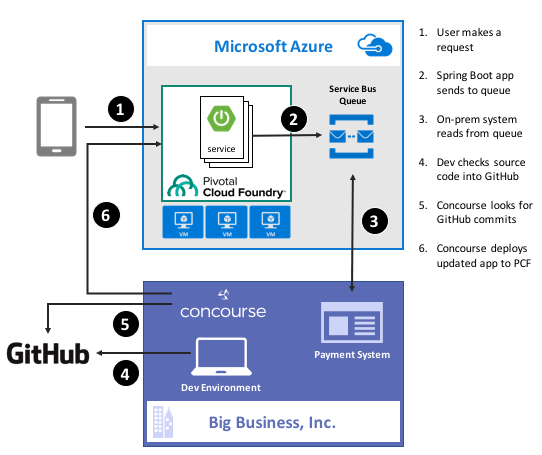
    Guess what? Deep down, cloud providers know you’re not moving your whole tech portfolio to their public cloud any time soon. Oh, your transition is probably underway, but you’ve got a whole stash of apps, data stores, and services that may not move for a while. That’s cool. There are more and more patterns and services available to squeeze value out of existing apps by extending them with more modern, scalable, cloudy tech. For instance, how might you take an existing payment transfer system that did B2B transactions and open it up to consumers without requiring your team to do a complete rewrite? One option might be to add a load-leveling queue in front of it, and take in requests via a scalable, cloud-based front-end app. In this post, I’ll show you how to implement that pattern by writing a Spring Boot app that uses Azure Service Bus Queues. Then, I’ll build a Concourse deployment pipeline to ship the app to Pivotal Cloud Foundry running atop Microsoft Azure.

    2016-11-28-azure-boot-01

    Ok, but why use a platform on top of Azure?

    That’s a fair question. Why not just use native Azure (or AWS, or Google Cloud Platform) services instead of putting a platform overlay like Pivotal Cloud Foundry atop it? Two reasons: app-centric workflow for developers, and “day 2” operations at scale.

    Most every cloud platform started off by automating infrastructure. That’s their view of the world, and it still seeps into most of their cloud app services. There’s no fundamental problem with that, except that many developers (“full stack” or otherwise) aren’t infrastructure pros. They want to build and ship great apps for customers. Everything else is a distraction. A platform such as Pivotal Cloud Foundry is entirely application-focused. Instead of the developer finding an app host, packaging the app, deploying the app, setting up a load balancer, configuring DNS, hooking up log collection, and configuring monitoring, the Cloud Foundry dev just cranks out an app and does a single action to get everything correctly configured in the cloud. And it’s an identical experience whether Pivotal Cloud Foundry is deployed to Azure, AWS, OpenStack, or whatever. The smartest companies realized that their developers should be exceptional at writing customer-facing software, not configuring firewall rules and container orchestration.

    Secondly, it’s about “day 2” operations. You know, all the stuff that happens to actually maintain apps in production. I have no doubt that any of you can build an app and quickly get it to cloud platforms like Azure Web Sites or Heroku with zero trouble. But what about when there are a dozen apps, or thousands? How about when it’s not just you, but a hundred of your fellow devs? Most existing app-centric platforms just aren’t set up to be org-wide, and you end up with costly inconsistencies between teams. With something like Pivotal Cloud Foundry, you have a resilient, distributed system that supports every major programing language, and provides a set of consistent patterns for app deployment, logging, scaling, monitoring, and more. Some of the biggest companies in the world deploy thousands of apps to their respective environments today, and we just proved that the platform can handle 250,000 containers with no problem. It’s about operations at scale.

    With that out of the way, let’s see what I built.

    Step 1 – Prerequisites

    Before building my app, I had to set up a few things.

    • Azure account. This is kind of important for a demo of things running on Azure. Microsoft provides a free trial, so take it for a spin if you haven’t already. I’ve had my account for quite a while, so all my things for this demo hang out there.
    • GitHub account. The Concourse continuous integration software knows how to talk to a few things, and git is one of them. So, I stored my app code in GitHub and had Concourse monitoring it for changes.
    • Amazon account. I know, I know, an Azure demo shouldn’t use AWS. But, Amazon S3 is a ubiquitous object store, and Concourse made it easy to drop my binaries there after running my continuous integration process.
    • Pivotal Cloud Foundry (PCF). You can find this in the Azure marketplace, and technically, this demo works with PCF running anywhere. I’ve got a full PCF on Azure environment available, and used that here.
    • Azure Service Broker. One fundamental concept in Cloud Foundry is a “service broker.” Service brokers advertise a catalog of services to app developers, and provide a consistent way to provision and de-provision the service. They also “bind” services to an app, which puts things like service credentials into that app’s environment variables for easy access. Microsoft built a service broker for Azure, and it works for DocumentDB, Azure Storage, Redis Cache, SQL Database, and the Service Bus. I installed this into my PCF-on-Azure environment, but you can technically run it on any PCF installation.

    Step 2 – Build Spring Boot App

    In my fictitious example, I wanted a Java front-end app that mobile clients interact with. That microservice drops messages into an Azure Service Bus Queue so that the existing on-premises app can pull messages from at their convenience, and thus avoid getting swamped by all this new internet traffic.

    Why Java? Java continues to be very popular in enterprises, and Spring Boot along with Spring Cloud (both maintained by Pivotal) have completely modernized the Java experience. Microsoft believes that PCF helps companies get a first-class Java experience on Azure.

    I used Spring Tool Suite to build a new Spring Boot MVC app with “web” and “thymeleaf” dependencies. Note that you can find all my code in GitHub if you’d like to reproduce this.

    To start with, I created a model class for the web app. This “web payment” class represents the data I connected from the user and passed on to the Service Bus Queue.

    package seroter.demo;
    
    public class WebPayment {
    	private String fromAccount;
    	private String toAccount;
    	private long transferAmount;
    
    	public String getFromAccount() {
    		return fromAccount;
    	}
    
    	public void setFromAccount(String fromAccount) {
    		this.fromAccount = fromAccount;
    	}
    
    	public String getToAccount() {
    		return toAccount;
    	}
    
    	public void setToAccount(String toAccount) {
    		this.toAccount = toAccount;
    	}
    
    	public long getTransferAmount() {
    		return transferAmount;
    	}
    
    	public void setTransferAmount(long transferAmount) {
    		this.transferAmount = transferAmount;
    	}
    }
    

    Next up, I built a bean that my web controller used to talk to the Azure Service Bus. Microsoft has an official Java SDK in the Maven repository, so I added this to my project.

    2016-11-28-azure-boot-03

    Within this object, I referred to the VCAP_SERVICES environment variable that I would soon get by binding my app to the Azure service. I used that environment variable to yank out the credentials for the Service Bus namespace, and then created the queue if it didn’t exist already.

    @Configuration
    public class SbConfig {
    
     @Bean
     ServiceBusContract serviceBusContract() {
    
       //grab env variable that comes from binding CF app to the Azure service
       String vcap = System.getenv("VCAP_SERVICES");
    
       //parse the JSON in the environment variable
       JsonParser jsonParser = JsonParserFactory.getJsonParser();
       Map<String, Object> jsonMap = jsonParser.parseMap(vcap);
    
       //create map of values for service bus creds
       Map<String,Object> creds = (Map<String,Object>)((List<Map<String, Object>>)jsonMap.get("seroter-azureservicebus")).get(0).get("credentials");
    
       //create service bus config object
       com.microsoft.windowsazure.Configuration config =
    	ServiceBusConfiguration.configureWithSASAuthentication(
    		creds.get("namespace_name").toString(),
    		creds.get("shared_access_key_name").toString(),
    		creds.get("shared_access_key_value").toString(),
    		".servicebus.windows.net");
    
       //create object used for interacting with service bus
       ServiceBusContract svc = ServiceBusService.create(config);
       System.out.println("created service bus contract ...");
    
       //check if queue exists
       try {
    	ListQueuesResult r = svc.listQueues();
    	List<QueueInfo> qi = r.getItems();
    	boolean hasQueue = false;
    
    	for (QueueInfo queueInfo : qi) {
              System.out.println("queue is " + queueInfo.getPath());
    
    	  //queue exist already?
    	  if(queueInfo.getPath().equals("demoqueue"))  {
    		System.out.println("Queue already exists");
    		hasQueue = true;
    		break;
    	   }
    	 }
    
    	if(!hasQueue) {
    	//create queue because we didn't find it
    	  try {
    	    QueueInfo q = new QueueInfo("demoqueue");
                CreateQueueResult result = svc.createQueue(q);
    	    System.out.println("queue created");
    	  }
    	  catch(ServiceException createException) {
    	    System.out.println("Error: " + createException.getMessage());
    	  }
            }
        }
        catch (ServiceException findException) {
           System.out.println("Error: " + findException.getMessage());
         }
        return svc;
       }
    }
    

    Cool. Now I could connect to the Service Bus. All that was left was my actual web controller that returned views, and sent messages to the Service Bus. One of my operations returned the data collection view, and the other handled form submissions and sent messages to the queue via the @autowired ServiceBusContract object.

    @SpringBootApplication
    @Controller
    public class SpringbootAzureConcourseApplication {
    
       public static void main(String[] args) {
         SpringApplication.run(SpringbootAzureConcourseApplication.class, args);
       }
    
       //pull in autowired bean with service bus connection
       @Autowired
       ServiceBusContract serviceBusContract;
    
       @GetMapping("/")
       public String showPaymentForm(Model m) {
    
          //add webpayment object to view
          m.addAttribute("webpayment", new WebPayment());
    
          //return view name
          return "webpayment";
       }
    
       @PostMapping("/")
       public String paymentSubmit(@ModelAttribute WebPayment webpayment) {
    
          try {
             //convert webpayment object to JSON to send to queue
    	 ObjectMapper om = new ObjectMapper();
    	 String jsonPayload = om.writeValueAsString(webpayment);
    
    	 //create brokered message wrapper used by service bus
    	 BrokeredMessage m = new BrokeredMessage(jsonPayload);
    	 //send to queue
    	 serviceBusContract.sendMessage("demoqueue", m);
    	 System.out.println("message sent");
    
          }
          catch (ServiceException e) {
    	 System.out.println("error sending to queue - " + e.getMessage());
          }
          catch (JsonProcessingException e) {
    	 System.out.println("error converting payload - " + e.getMessage());
          }
    
          return "paymentconfirm";
       }
    }
    

    With that, my microservice was done. Spring Boot makes it silly easy to crank out apps, and the Azure SDK was pretty straightforward to use.

    Step 3 – Deploy and Test App

    Developers use the “cf” command line interface to interact with Cloud Foundry environments. Running a “cf marketplace” command shows all the services advertised by registered service brokers. Since I added the Azure Service Broker to my environment, I instantiated an instance of the Service Bus service to my Cloud Foundry org. To tell the Azure Service Broker what to actually create, I built a simple JSON document that outlined the Azure resource group. region, and service.

    {
      "resource_group_name": "pivotaldemorg",
      "namespace_name": "seroter-boot",
      "location": "westus",
      "type": "Messaging",
      "messaging_tier": "Standard"
    }
    

    By using the Azure Service Broker, I didn’t have to go into the Azure Portal for any reason. I could automate the entire lifecycle of a native Azure service. The command below created a new Service Bus namespace, and made the credentials available to any app that binds to it.

    cf create-service seroter-azureservicebus default seroterservicebus -c sb.json
    

    After running this, my PCF environment had a service instance (seroterservicebus) ready to be bound to an app. I also confirmed that the Azure Portal showed a new namespace, and no queues (yet).
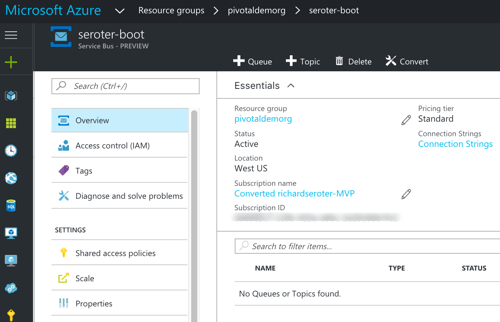
    2016-11-28-azure-boot-06

    Awesome. Next, I added a “manifest” that described my Cloud Foundry app. This manifest specified the app name, how many instances (containers) to spin up, where to get the binary (jar) to deploy, and which service instance (seroterservicebus) to bind to.

    ---
    applications:
    - name: seroter-boot-azure
      memory: 256M
      instances: 2
      path: target/springboot-azure-concourse-0.0.1-SNAPSHOT.jar
      buildpack: https://github.com/cloudfoundry/java-buildpack.git
      services:
        - seroterservicebus
    

    By doing a “cf push” to my PCF-on-Azure environment, the platform took care of all the app packaging, container creation, firewall updates, DNS changes, log setup, and more. After a few seconds, I had a highly-available front end app bound to the Service Bus. Below that you can see I had an app started with two instances, and the service was bound to my new app.
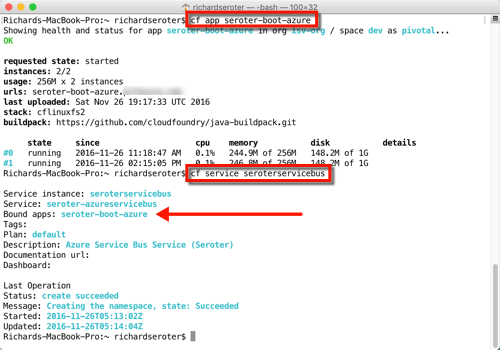
    2016-11-28-azure-boot-07

    All that was left was to test it. I fired up the app’s default view, and filled in a few values to initiate a money transfer.
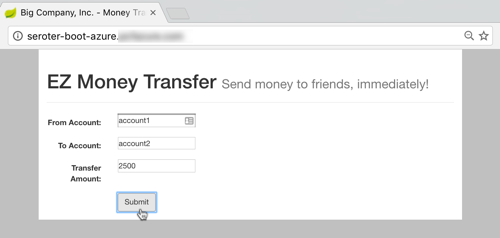
    2016-11-28-azure-boot-08

    After submitting, I saw that there was a new message in my queue. I built another Spring Boot app (to simulate an extension of my legacy “payments” system) that pulled from the queue. This app ran on my desktop and logged the message from the Azure Service Bus.

    2016-11-28-azure-boot-09

    That’s great. I added a mature, highly-available queue in between my cloud-native Java web app, and my existing line-of-business system. With this pattern, I could accept all kinds of new traffic without overloading the backend system.

    Step 4 – Build Concourse Pipeline

    We’re not done yet! I promised continuous delivery, and I deliver on my promises, dammit.

    To build my deployment process, I used Concourse, a pipeline-oriented continuous integration and delivery tool that’s easy to use and amazingly portable. Instead of wizard-based tools that use fixed environments, Concourse uses pipelines defined in configuration files and executed in ephemeral containers. No conflicts with previous builds, no snowflake servers that are hard to recreate. And, it has a great UI that makes it obvious when there are build issues.

    I downloaded a Vagrant virtual machine image with Concourse pre-configured. Then I downloaded the lightweight command line interface (called Fly) for interacting with pipelines.

    My “build and deploy” process consisted of four files: bootpipeline.yml that contained the core pipeline, build.yml which set up the Java build process, build.sh which actually performs the build, and secure.yml which holds my credentials (and isn’t checked into GitHub).

    The build.sh file clones my GitHub repo (defined as a resource in the main pipeline) and does a maven install.

    #!/usr/bin/env bash
    
    set -e -x
    
    git clone resource-seroter-repo resource-app
    
    cd resource-app
    
    mvn clean
    
    mvn install
    

    The build.yml file showed that I’m using the Maven Docker image to build my code, and points to the build.sh file to actually build the app.

    ---
    platform: linux
    
    image_resource:
      type: docker-image
      source:
        repository: maven
        tag: latest
    
    inputs:
      - name: resource-seroter-repo
    
    outputs:
      - name: resource-app
    
    run:
      path: resource-seroter-repo/ci/build.sh
    

    Finally, let’s look at my build pipeline. Here, I defined a handful of “resources” that my pipeline interacts with. I’ve got my GitHub repo, an Amazon S3 bucket to store the JAR file, and my PCF-on-Azure environment. Then, I have two jobs: one that builds my code and puts the result into S3, and another that takes the JAR from S3 (and manifest from GitHub) and pushes to PCF on Azure.

    ---
    resources:
    # resource for my GitHub repo
    - name: resource-seroter-repo
      type: git
      source:
        uri: https://github.com/rseroter/springboot-azure-concourse.git
        branch: master
    #resource for my S3 bucket to store the binary
    - name: resource-s3
      type: s3
      source:
        bucket: spring-demo
        region_name: us-west-2
        regexp: springboot-azure-concourse-(.*).jar
        access_key_id: {{s3-key-id}}
        secret_access_key: {{s3-access-key}}
    # resource for my Cloud Foundry target
    - name: resource-azure
      type: cf
      source:
        api: {{cf-api}}
        username: {{cf-username}}
        password: {{cf-password}}
        organization: {{cf-org}}
        space: {{cf-space}}
    
    jobs:
    - name: build-binary
      plan:
        - get: resource-seroter-repo
          trigger: true
        - task: build-task
          privileged: true
          file: resource-seroter-repo/ci/build.yml
        - put: resource-s3
          params:
            file: resource-app/target/springboot-azure-concourse-0.0.1-SNAPSHOT.jar
    
    - name: deploy-to-prod
      plan:
        - get: resource-s3
          trigger: true
          passed: [build-binary]
        - get: resource-seroter-repo
        - put: resource-azure
          params:
            manifest: resource-seroter-repo/manifest-ci.yml
    

    I was now ready to deploy my pipeline and see the magic.

    After spinning up the Concourse Vagrant box, I hit the default URL and saw that I didn’t have any pipelines. NOT SURPRISING.
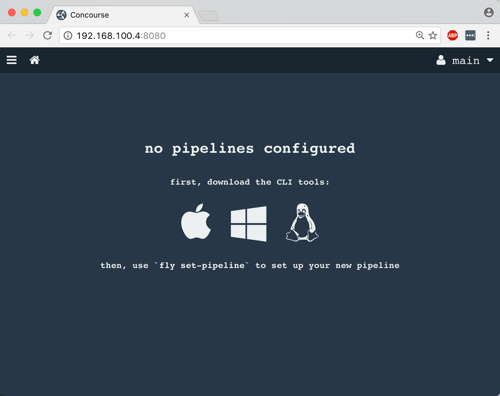
    2016-11-28-azure-boot-10

    From my Terminal, I used Fly CLI commands to deploy a pipeline. Note that I referred again to the “secure.yml” file containing credentials that get injected into the pipeline definition at deploy time.

    fly -t lite set-pipeline --pipeline azure-pipeline --config bootpipeline.yml --load-vars-from secure.yml
    

    In a second or two, a new (paused) pipeline popped up in Concourse. As you can see below, this tool is VERY visual. It’s easy to see how Concourse interpreted my pipeline definition and connected resources to jobs.
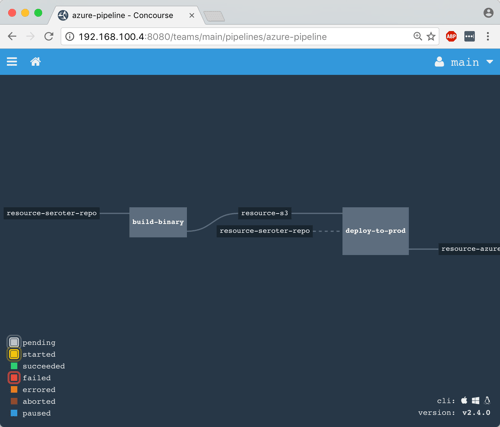
    2016-11-28-azure-boot-11

    I then un-paused the pipeline with this command:

    fly -t lite unpause-pipeline --pipeline azure-pipeline
    

    Immediately, the pipeline started up, retrieved my code from GitHub, built the app within a Docker container, dropped the result into S3, and deployed to PCF on Azure.

    2016-11-28-azure-boot-12

    After Concourse finished running the pipeline, I checked the PCF Application Manager UI and saw my new app up and running. Think about what just happened: I didn’t have to muck with any infrastructure or open any tickets to get an app from dev to production. Wonderful.

    2016-11-28-azure-boot-14

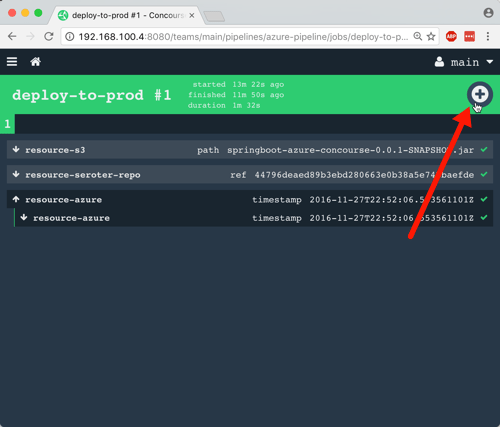
    The way I built this pipeline, I didn’t version the JAR when I built my app. In reality, you’d want to use the semantic versioning resource to bump the version on each build. Because of the way I designed this, the second job (“deploy to PCF”) won’t fire automatically after the first build, since there technically isn’t a new artifact in the S3 bucket. A cool side effect of this is that I could constantly do continuous integration, and then choose to manually deploy (clicking the “+” button below) when the company was ready for the new version to go to production. Continuous delivery, not deployment.
    2016-11-28-azure-boot-13

    Wrap Up

    Whew. That was a big demo. But in the scheme of things, it was pretty straightforward. I used some best-of-breed services from Azure within my Java app, and then pushed that app to Pivotal Cloud Foundry entirely through automation. Now, every time I check in a code change to GitHub, Concourse will automatically build the app. When I choose to, I take the latest build and tell Concourse to send it to production.

    magic

    A platform like PCF helps companies solve their #1 problem with becoming software-driven: improving their deployment pipeline. Try to keep your focus on apps not infrastructure, and make sure that whatever platform you use, you focus on sustainable operations at scale!
     

  • Trying out the “standard” and “enterprise” templates in Azure Logic Apps

    Is the Microsoft integration team “back”? It might be premature to say that Microsoft has finally figured out its app integration story, but the signs are very positive. There’s been a fresh influx of talent like Jon Fancey, Tord Glad Nordahl, and Jim Harrer, some welcome forethought into the overall Microsoft integration story, better community engagement, and a noticeable uptick in the amount of software released by these teams.

    One area that’s been getting tons of focus in Azure Logic Apps. Logic Apps are a potential successor to classic on-premises application integration tools, but with a cloud-first bent. Users can visually model flows made up of built-in, or custom, activities. The initial integrations supported by Logic Apps were focused on cloud endpoints, but with the recent beta release of the Enterprise Integration Pack, Microsoft is making its move to more traditional use cases. I haven’t messed around with Logic Apps for a few months, and lots of things have changed, so I tested out both the standard and enterprise templates.

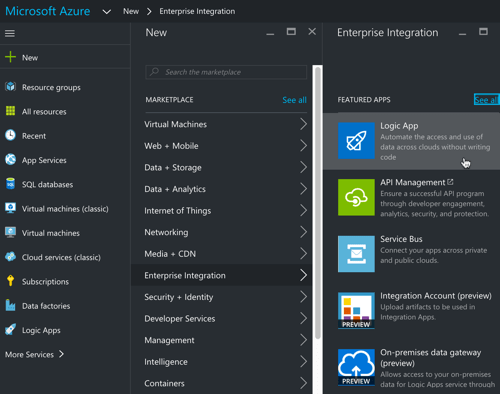
    One nice thing about things like Logic Apps is that anyone can get started with just a browser. If you’re building a standard workflow (read: doesn’t require extra services or the “enterprise integration” bits), then you don’t have to install a single thing. To start with, I went the Azure Portal (the new one, not the classic one), and created a new “Logic App.”

    2016-09-09-logic02

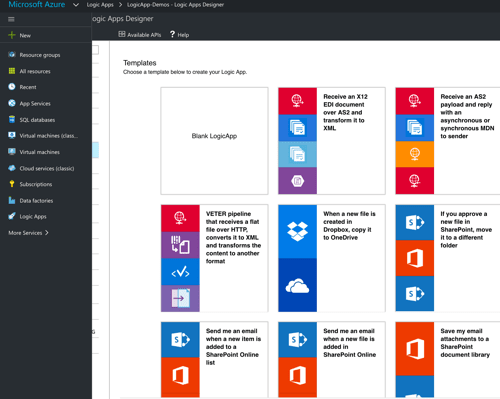
    I was then presented with a choice for how to populate the app itself. There’s the default “blank” template, or, I can start off with a few pre-canned options. Some of these are a bit contrived (“save my tweets to a SharePoint list” makes me sad), but they give you a good idea of what’s possible with the many built-in connectors.

    2016-09-09-logic01

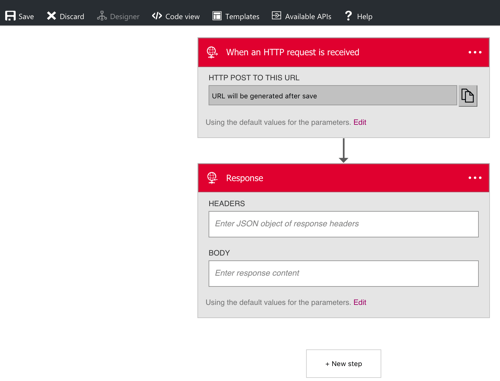
    I chose the HTTP Request-Response template since my goal was to build a simple synchronous web service. The portal showed me what this template does, and dropped me into the design canvas with the HTTP Request and HTTP Response activities in place.

    2016-09-09-logic03

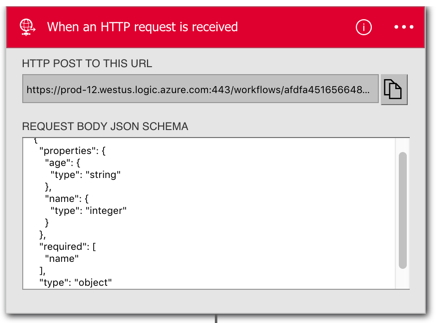
    I have a birthday coming and am feeling old, so I decided to build a simple service that would tell me if I was old or not. In order to easily use the fields of an inbound JSON message, I had to define a simple JSON schema inside the HTTP Request shape. This schema defines a string for the “name” and an integer for the “age.”

    2016-09-09-logic04

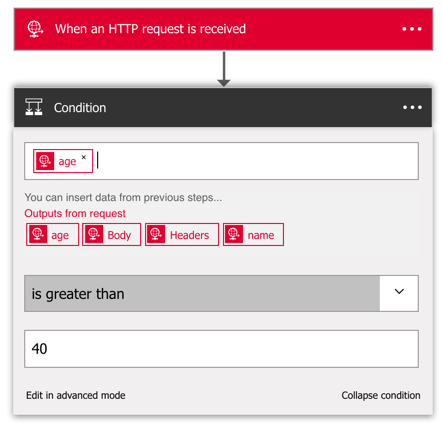
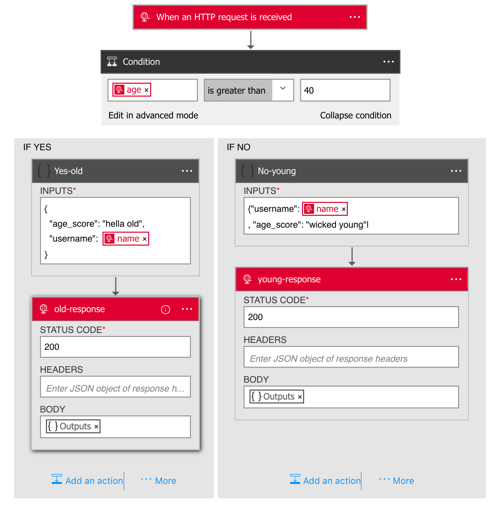
    Before sending a response, I want to actually do something! So, I added an if-then condition to the canvas. There are other conditionals available, such as for-each and do-until. I put this if-then shape in between the Request and Response elements, and was able to choose the “age” value for my conditional check.

    2016-09-09-logic06

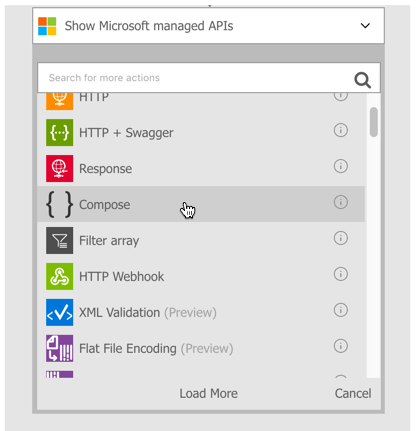
    Here, I checked to see if “age” is greater than 40. Notice that I also had access to the “name” field, as well as the whole request body or HTTP headers. Next, I wanted to send a different HTTP response for over-40, and under-40. The brand new “compose” activity is the answer. With this, I could create a new message to send back in the HTTP response.

    2016-09-09-logic07

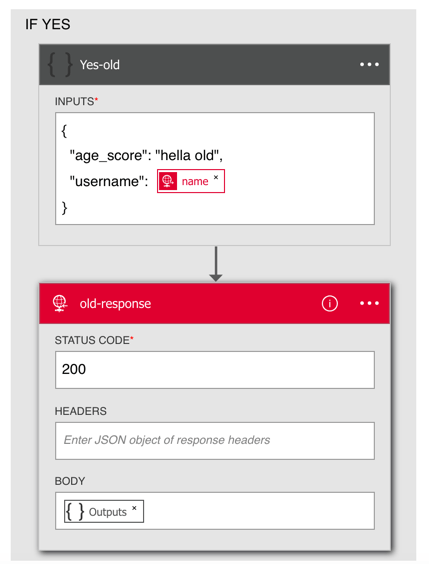
    I simply typed a new JSON message into the Compose activity, using the variable for the “name”, and adding some text to categorize the requestor’s age.

    2016-09-09-logic08

    I then did the same thing for the “no” path of the if-then and had a complete flow!

    2016.09.09.logic09.png

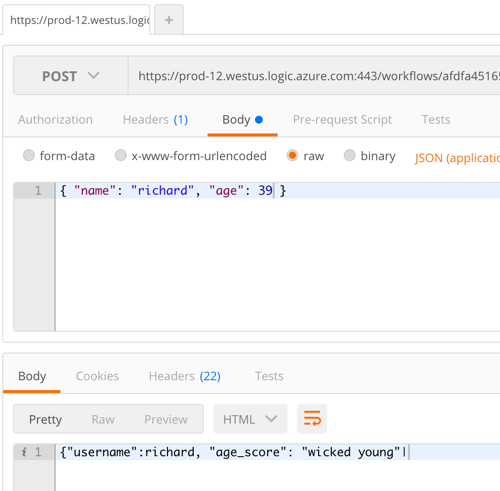
    Quick and easy! The topmost HTTP Receive activity has the URL for this particular Logic App, and since I didn’t apply any security policies, it was super simple to invoke. From within my favorite API testing tool, Postman, I submitted a JSON message to the endpoint. Sure enough, I got back a response that corresponded to the provided age.

    2016-09-09-logic10

    Great. But what about doing all the Enterprisey stuff? I built another new Logic App, and this time, wanted to send a comma separated payload to an HTTP endpoint and get back XML. There’s a Logic Apps template for that and when I selected it, I was told I needed an “integration account.”

    2016-09-09-logic11

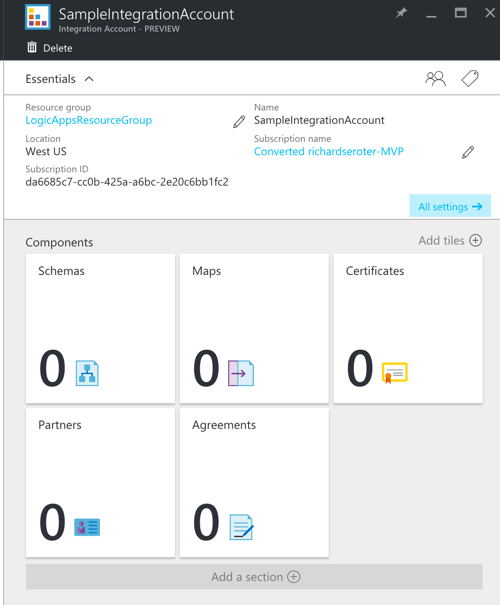
    So I got out of Logic Apps, and went off to create an Integration Account in the Portal. Integration Accounts are a preview service from Microsoft. These accounts hold all the integration artifacts used in enterprise integration scenarios: schemas, maps, certificates, partners, and trading agreements.

    2016-09-09-logic12

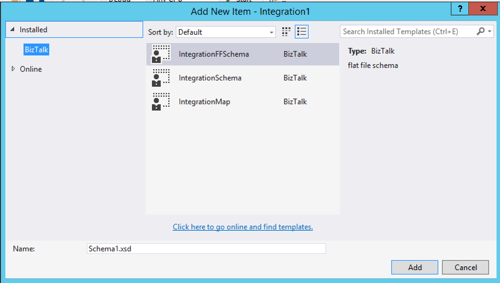
    How do I get these artifacts, you ask? This is where client-side development comes in. I downloaded the Enterprise Integration Tools–which is really just Visual Studio extensions that give you the BizTalk schema editor and mapper–and fired up Visual Studio. This adds an “integration” project type to Visual Studio, and also let me add XML schemas, flat file schemas, and maps to a project.

    2016-09-09-logic13

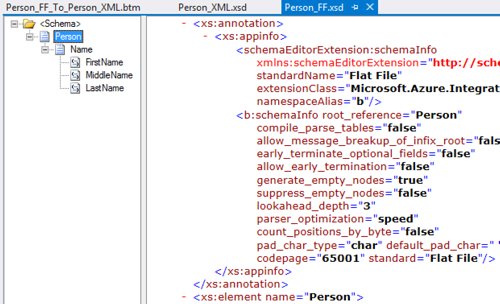
    I then set out to build some enterprise-class schemas defining a “person” (one flat file schema, one XML schema) and a map converting one format to another. I built the flat file schema using a sample comma-separated file and the provided Flat File Wizard. Hello, my old friend.

    2016-09-09-logic17

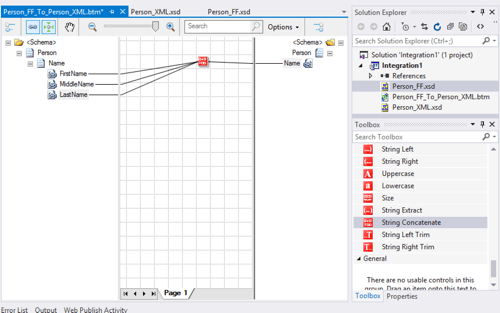
    The map is super simple. It just concatenates the inbound fields into a single outbound field in the XML schema. Note that the destination field has a “max occurs” of “*” to make sure that it adds one “name” element for each set of source elements. And yes, the mapper includes the Functoids for basic calculations, logical conditions, and string manipulation.

    2016-09-09-logic14

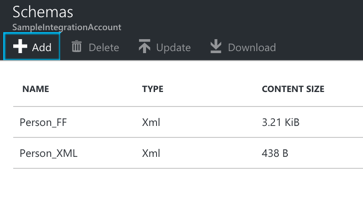
    The Azure Integration Account doesn’t take in DLLs, so I loaded in the raw XSD and map files. Note that you need to build the project to get the XSLT version of the map. The Azure portal doesn’t take the raw .btm map.

    2016-09-09-logic15

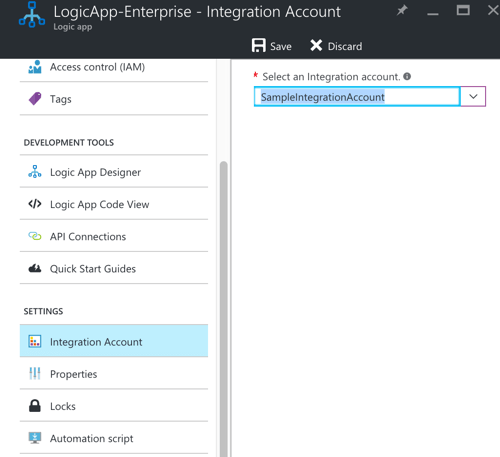
    Back in my Logic App, I found the Properties page for the app and made sure to set the “integration account” property so that it saw my schemas and maps.

    2016-09-09-logic16

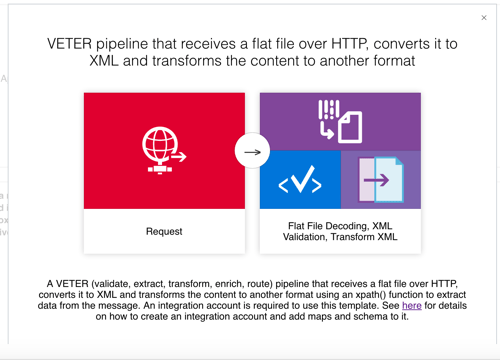
    I then went back and spun up the VETER Logic Apps template. Because there seemed to be a lot of places where things could go wrong, I removed all the other shapes from the design canvas and just started with the flat file decoding. Let’s get that working first! Since I associated my “Integration Account” with this Logic App, it was easy to select my schema from the drop-down list. With that, I tested.

    2016-09-09-logic19

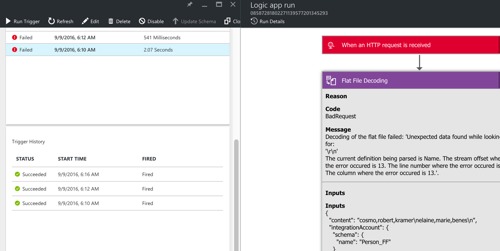
    Shoot. The first call failed. Fortunately, Logic Apps comes with a pretty sweet dashboard and tracing interface. I noticed that the flat file decoding failed, and it looked like it got angry with my schema defining a carriage-return-plus-line-feed delimiter for records, when all I sent it was a line feed (via my API testing tool). So, I went back to my schema, changed the record delimiter, updated my schema (and map) in the Integration Account, and tested again.

    2016-09-09-logic20

    Success! Notice that it turned my input flat file into an XML representation.

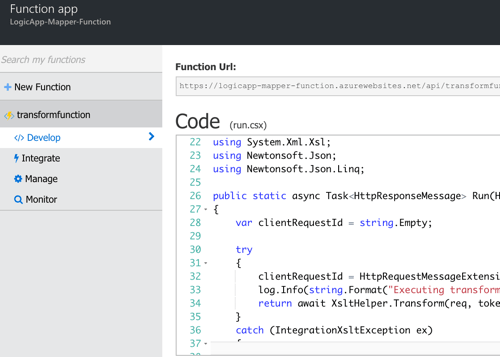
    Feeling irrationally confident, I went to the Logic Apps design surface, clicked the “templates” button at the top and re-selected the VETER template to get all the activities back that I needed. However, I forgot that the “mapping” activity requires that I have an Azure Functions container set up. Apparently the maps are executed inside Microsoft’s serverless framework, Azure Functions. Microsoft’s docs are pretty cryptic about what to do here, but if you follow the links in this KB (“create container”, “add function”), you get the default mapper template as an Azure Function.

    2016-09-09-logic21

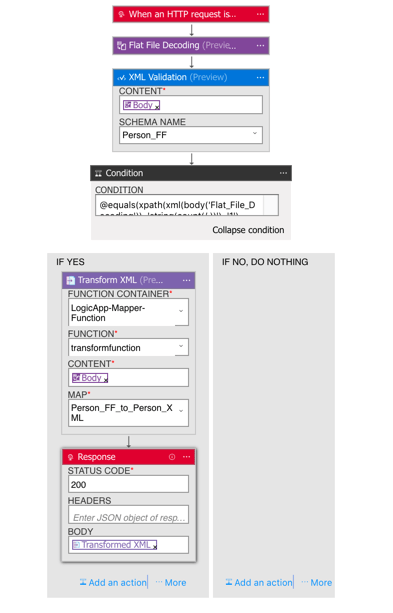
    Ok, now I was set. My final Logic App configuration looked like this.

    2016-09-09-logic23

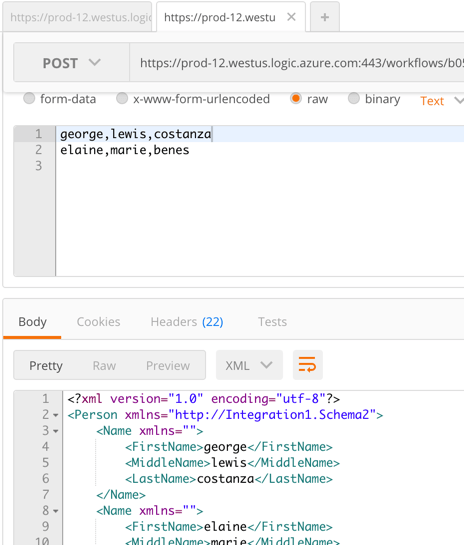
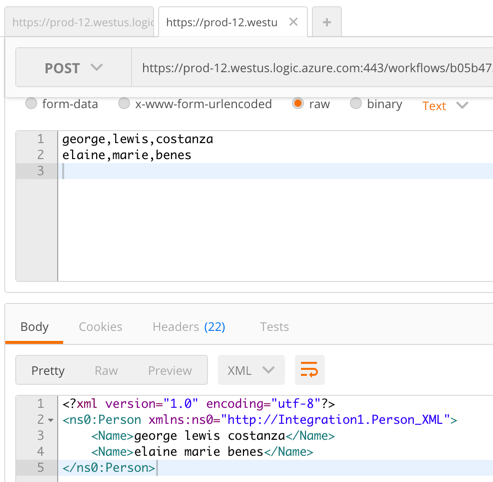
    The app takes in a flat file, validates the flat file using the flat file (really, XML) schema, uses a built-in check to see that it’s a decoded flat file, executes my map within an Azure Function, and finally returns the result back. I then called the Logic App from Postman.

    2016-09-09-logic24

    BAM! It worked. That’s … awesome. While some of you may have fainted in horror at the idea of using flat files and XML in a shiny new Logic App, this does show that Microsoft is trying to cater to some of the existing constraints of their customers.

    Overall, I thought the Logic Apps experience was pretty darn good. The tooling has a few rough edges, but was fairly intuitive. The biggest gap is the documentation and number of public samples, but that’s to be expected with such new technology. I’d definitely recommend giving the Enterprise Integration Pack a try and see what sort of unholy flows you can come up with!

  • Integration trends you should care about

    Everyone’s doing integration nowadays. It’s not just the grizzled vet who reminisces about EDI or the seasoned DBA who can design snowflake schemas for a data warehouse in their sleep. No, now we have data scientists mashing up data sources, developers processing streams and connecting things via APIs, and “citizen integrators” (non-technical users) building event-driven actions on their own. It’s wild.

    Here, I’ll take a look at a few things to keep an eye on, and the implications for you.

    iPaaS

    Research company Gartner coined the term Integration Platform-as-a-Service (iPaaS) to represent services that offer application integration capabilities in the cloud. Gartner delivers an annual assessment of these vendors in the form of a Magic Quadrant, and released the 2016 version back in March. While revenue in this space is still relatively small, the market is growing by 50%, and Gartner predicts that by 2019, iPaaS will be the preferred option for new projects. Kent Weare recently conducted an excellent InfoQ virtual panel about iPaaS with representatives from SnapLogic, Microsoft, and Mulesoft. I found a number of useful tidbits in there, and drew a few conclusions:

    • The vendors are pushing their own endpoint connectors, but all seem to (somewhat grudgingly) recognize the value of consume “raw” APIs without a forced abstraction.
    • An iPaaS model won’t take off unless it’s seen as viable for existing, on-premises systems. Latency and security matter, and it still seems like there’s work to be done here to ensure that iPaaS products can handle all the speed and connectivity requirements.
    • Elasticity is an increasingly important value proposition of iPaaS. Instead of trying to build out a complete integration stack themselves that handle peak traffic, companies want something that dynamically scales. This is especially true given that Internet-of-Things is seem as a huge driver of iPaaS in the years ahead.
    • User experience is more important than ever, and these vendors are paying special attention to the graphical UI. At the same time, they’ll need to keep working on the technical interface for things like automated testing. They seemed well positioned, however, to work with new types of transient microservices and short-lived containers.

    There’s some cool stuff in the iPaaS space. It’s definitely worth your time to read Kent’s panel and explore some of these technologies more closely.

    Microservices-driven integration

    Have you heard of “microservices”? Of course you have, unless you’ve been asleep for the past eighteen months. This model of single-purpose, independently deployable services has taken off as groups rebel against the monolithic apps (and teams!) they’re saddled with today.

    You’ll often hear microservices proponents question the usefulness of an Enterprise Service Bus. Why? They point out that ESBs are typically managed in organization silos, centralize too much of the processing, and offer much more functionality than most teams need. If you look at your application components arranged as a graph instead of a stack, then you realize a different integration toolset is needed.

    Back in May, I was at Integrate 2016 where I delivered a talk on the Open Source Messaging Landscape (video now online). Lightweight messaging is BACK, baby! I’m seeing more and more teams looking to (open source) distributed messaging solutions when connecting their disparate services. This means software like Kafka, RabbitMQ, ZeroMQ, and NATS are going to continue to increase in relevance in the months and years ahead.

    How are you supposed to orchestrate all these microservices integrations? That’s not an easy answer. One technology that’s trying to address this is Spring Cloud Data Flow. I saw a demo a couple week back, and walked away very impressed.

    Spring Cloud Data Flow is software that helps you create and run pipelines of data microservices. These microservices are loosely coupled but linked through a shared messaging layer and sit atop a variety of runtimes including Kubernetes, Apache Mesos, and Cloud Foundry. This gives you a very cool way to design and run modern system integration.

    Serverless and “citizen integrators”

    Microservices is a hot trend, but “serverless” is probably even hotter! A more accurate name is “function as a service” and engineer Mike Roberts wrote a great piece that covers criteria and use cases. Basically, it’s about running short-lived, often asynchronous, single operations without any knowledge about the underlying infrastructure.

    This matters for integration people not just because you’ll see more and more messaging-oriented scenarios interacting with serverless engines, but because it’s opened up the door for many citizen developers to build event-driven integrations. These integration services meet the definition of “serverless” with their pay-pay-use, short-lived actions that abstract the infrastructure.

    Look at the crazy popularity of IFTTT. “Regular” people can design pretty darn powerful integrations that start with an external trigger and end with an action. This stuff isn’t just for making automatic updates to Pinterest. Have you investigated Zapier? Their directory of connectors contains an impressive array of leading CRM, Finance, and Support systems that anyone can use. Microsoft’s in the game now with Flow for simple cloud-based workflows. Developers can take advantage of serverless products like AWS Lambda and Webtask (from Auth0) when custom code is needed.

    Implications

    What does all this mean to you? First and foremost, integration is hot again! I’m willing to bet that you’d benefit from investing some time in learning new and emerging tech. If you haven’t learned anything new in the integration space over the past two years, you’ve missed a lot. Take a course, pick up a book, or just hack around.

    Recognize the growth of microservices and think about how it impacts your team. What tools will developers use to connect their services? What needs to be upgraded? What does this type of distributed integration do to your tracing and troubleshooting procedures? How can you break down the organizational silos and keep the “integration team” from being a bottleneck? Take a look at messaging software that can complement existing ESB software.

    Finally, don’t miss out on this “citizen integrator” trend. How can you help your less technical colleagues connect their systems in novel ways? The world will always need integration specialists, but it’s important to support the growing needs of those who shouldn’t have to queue up for help from the experts.

    What do you think? Any integration trends that stand out to you?

  • Modern Open Source Messaging: Apache Kafka, RabbitMQ and NATS in Action

    Modern Open Source Messaging: Apache Kafka, RabbitMQ and NATS in Action

    Last week I was in London to present at INTEGRATE 2016. While the conference is oriented towards Microsoft technology, I mixed it up by covering a set of messaging technologies in the open source space; you can view my presentation here. There’s so much happening right now in the messaging arena, and developers have never had so many tools available to process data and link systems together. In this post, I’ll recap the demos I built to test out Apache Kafka, RabbitMQ, and NATS.

    One thing I tried to make clear in my presentation was how these open source tools differ from classic ESB software. A few things you’ll notice as you check out the technologies below:

    • Modern brokers are good at one thing. Instead of cramming in every sort of workflow, business intelligence, and adapter framework in the software, these OSS services are simply great at ingesting and routing lots of data. They are typically lightweight, but deployable in highly available configurations as well.
    • Endpoints now have significant responsibility. Traditional brokers took on tasks such as message transformation, reliable transportation, long-running orchestration between endpoints, and more. The endpoints could afford to be passive, mostly-untouched participants in the integration. These modern engines don’t cede control to a centralized bus, but rather use the bus only to transport opaque data. Endpoints need to be smarter and I think that’s a good thing.
    • Integration is approachable for ALL devs. Maybe a controversial opinion, but I don’t think integration work belongs in an” integration team.” If agility matters to you, then you can’t silo off a key function and force (micro)service teams to line up to get their work done. Integration work needs to be democratized, and many of these OSS tools make integration very approachable to any developer.

    Apache Kafka

    With Kafka you can do both real-time and batch processing. Ingest tons of data, route via publish-subscribe (or queuing). The broker barely knows anything about the consumer. All that’s really stored is an “offset” value that specifies where in the log the consumer left off. Unlike many integration brokers that assume consumers are mostly online, Kafka can successfully persist a lot of data, and supports “replay” scenarios. The architecture is fairly unique; topics are arranged in partitions (for parallelism), and partitions are replicated across nodes (for high availability).

    For this set of demos, I used Vagrant to stand up an Ubuntu box, and then installed both Zookeeper and Kafka. I also installed Kafka Manager, built by the engineering team at Yahoo!. I showed the conference audience this UI, and then added a new topic to hold server telemetry data.

    2016-05-17-messaging01

    All my demo apps were built with Node.js. For the Kafka demos, I used the kafka-node module. The consumer is simple: write 50 messages to our “server-stats” Kafka topic.

    var serverTelemetry = {server:'zkee-022', cpu: 11.2, mem: 0.70, storage: 0.30, timestamp:'2016-05-11:01:19:22'};
    
    var kafka = require('../../node_modules/kafka-node'),
        Producer = kafka.Producer,
        client = new kafka.Client('127.0.0.1:2181/'),
        producer = new Producer(client),
        payloads = [
            { topic: 'server-stats', messages: [JSON.stringify(serverTelemetry)] }
        ];
    
    producer.on('error', function (err) {
        console.log(err);
    });
    producer.on('ready', function () {
    
        console.log('producer ready ...')
        for(i=0; i<50; i++) {
            producer.send(payloads, function (err, data) {
                console.log(data);
            });
        }
    });
    

    Before consuming the data (and it doesn’t matter that we haven’t even defined a consumer yet; Kafka stores the data regardless), I showed that the topic had 50 messages in it, and no consumers.

    2016-05-17-messaging02

    Then, I kicked up a consumer with a group ID of “rta” (for real time analytics) and read from the topic.

    var kafka = require('../../node_modules/kafka-node'),
        Consumer = kafka.Consumer,
        client = new kafka.Client('127.0.0.1:2181/'),
        consumer = new Consumer(
            client,
            [
                { topic: 'server-stats' }
            ],
            {
                groupId: 'rta'
            }
        );
    
        consumer.on('message', function (message) {
            console.log(message);
        });
    

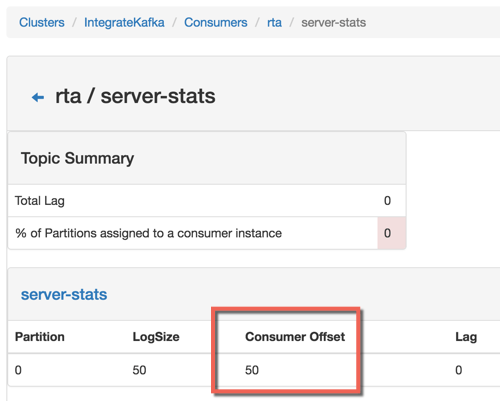
    After running the code, I could see that my consumer was all caught up, with no “lag” in Kafka.

    2016-05-17-messaging03
    For my second Kafka demo, I showed off the replay capability. Data is removed from Kafka based on an expiration policy, but assuming the data is still there, consumers can go back in time and replay from any available point. In the code below, I go back to offset position 40 and read everything from that point on. Super useful if apps fail to process data and you need to try again, or if you have batch processing needs.

    var kafka = require('../../node_modules/kafka-node'),
        Consumer = kafka.Consumer,
        client = new kafka.Client('127.0.0.1:2181/'),
        consumer = new Consumer(
            client,
            [
                { topic: 'server-stats', offset: 40 }
            ],
            {
                groupId: 'rta',
                fromOffset: true
            }
        );
    
        consumer.on('message', function (message) {
            console.log(message);
        });
    

    RabbitMQ

    RabbitMQ is a messaging engine that follows the AMQP 0.9.1 definition of a broker. It follows a standard store-and-forward pattern where you have the option to store the data in RAM, on disk, or both. It supports a variety of message routing paradigms. RabbitMQ can be deployed in a clustered fashion for performance, and mirrored fashion for high availability. Consumers listen directly on queues, but publishers only know about “exchanges.” These exchanges are linked to queues via bindings, which specify the routing paradigm (among other things).

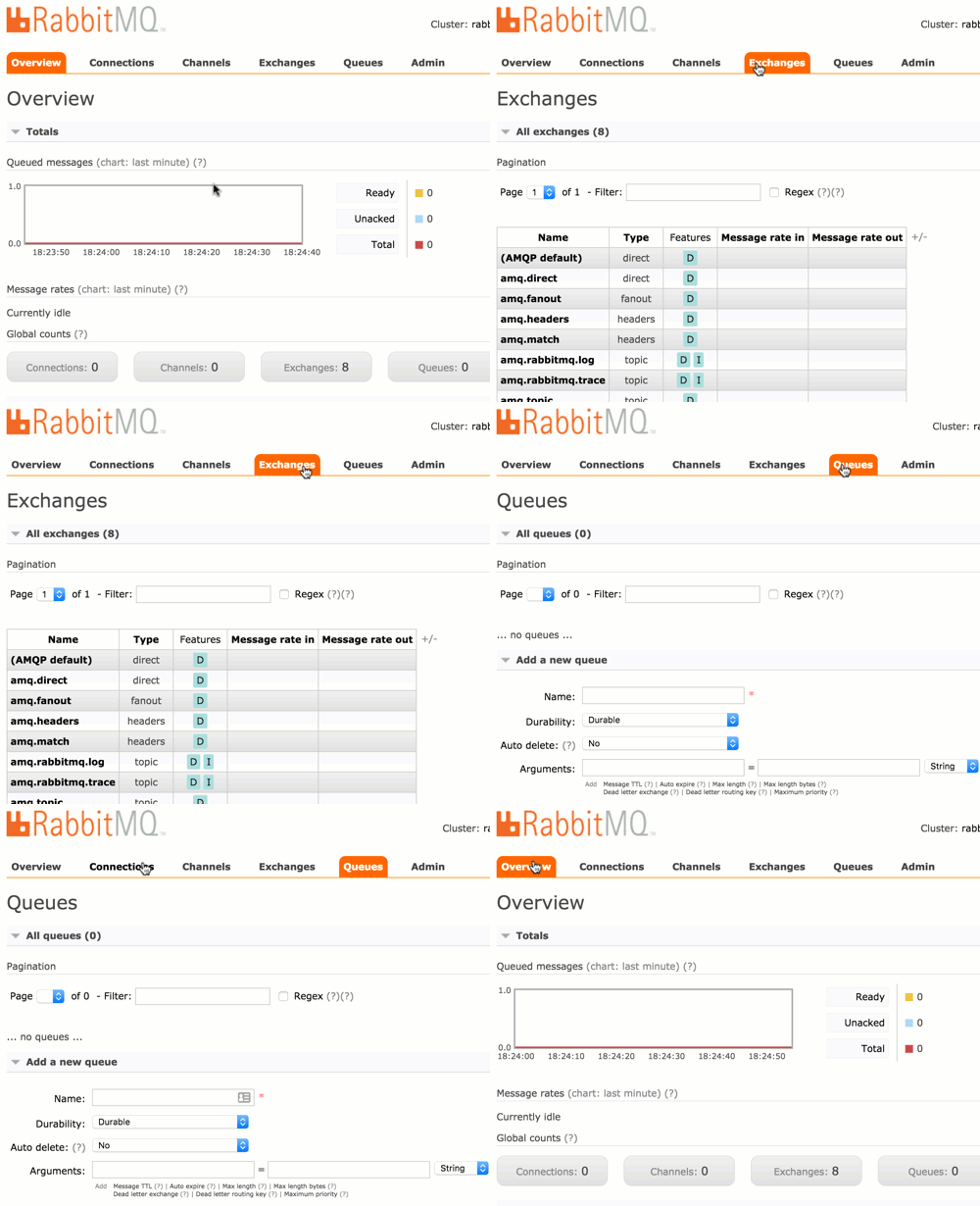
    For these demos (I only had time to do two of them at the conference), I used Vagrant to build another Ubuntu box and installed RabbitMQ and the management console. The management console is straightforward and easy to use.

    2016-05-17-messaging04

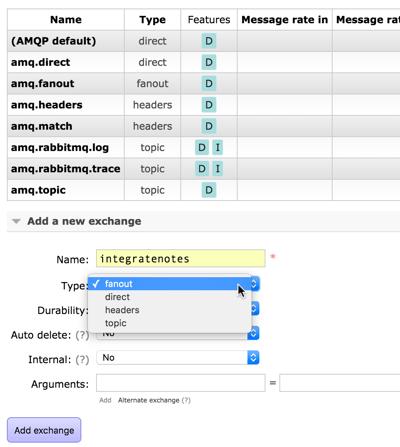
    For the first demo, I did a publish-subscribe example. First, I added a pair of queues: notes1 and notes2. I then showed how to create an exchange. In order to send the inbound message to ALL subscribers, I used a fanout routing type. Other options include direct (specific routing key), topic (depends on matching a routing key pattern), or headers (route on message headers).

    2016-05-17-messaging05

    I have an option to bind this exchange to another exchange or a queue. Here, see that I bound it to the new queues I created.

    2016-05-17-messaging06

    Any message into this exchange goes to both bound queues. My Node.js application used the amqplib module to publish a message.

    var amqp = require('../../node_modules/amqplib/callback_api');
    
    amqp.connect('amqp://rseroter:rseroter@localhost:5672/', function(err, conn) {
      conn.createChannel(function(err, ch) {
        var exchange = 'integratenotes';
    
        //exchange, no specific queue, message
        ch.publish(exchange, '', new Buffer('Session: Open-source messaging. Notes: Richard is now showing off RabbitMQ.'));
        console.log(" [x] Sent message");
      });
      setTimeout(function() { conn.close(); process.exit(0) }, 500);
    });
    

    As you’d expect, both apps listening on the queue got the message. The second demo used a direct routing with specific routing keys. This means that each queue will receive messages if their binding matches the provided routing key.

    2016-05-17-messaging07

    That’s handy, but you can also use a topic binding and then apply wildcards. This helps you route based on a pattern matching scenario. In this case, the first queue will receive a message if the routing key has 3 sections separated by a period, and the third value equals “slides.” So “day2.seroter.slides” would work, but “day2.seroter.recap” wouldn’t. The second queue gets a message only if the routing key starts with “day2”, has any middle value, and then “recap.”

    2016-05-17-messaging08

    NATS

    If you’re looking for a high velocity communication bus that supports a host of patterns that aren’t realistic with traditional integration buses, then NATS is worth a look! NATS was originally built with Ruby and achieved a respectable 150k messages per second. The team rewrote it in Go, and now you can do an absurd 8-11 million messages per second. It’s tiny, just a 3MB Docker image! NATS doesn’t do persistent messaging; if you’re offline, you don’t get the message. It works as a publish-subscribe engine, but you can also get synthetic queuing. It also aggressively protects itself, and will auto-prune consumers that are offline or can’t keep up.

    In my first demo, I did a poor man’s performance test. To be clear, this is not a good performance test. But I wanted to show that even a synchronous loop in Node.js could achieve well over a million messages per second. Here I pumped in 12 million messages and watched the stats using nats-top.

    2016-05-17-messaging09

    1.6 million messages per second, and barely using any CPU. Awesome.

    The next demo was a new type of pattern. In a microservices world, it’s important to locate service at runtime, not hard-code references to them at design time. Solutions like Consul are great, but if you have a performant message bus, you can actually use THAT as the right loosely coupled intermediary. Here, an app wants to look up a service endpoint, so it publishes a request and waits to hear back from which service instances are online.

    // Server connection
    var nats = require('../../node_modules/nats').connect();
    
    console.log('startup ...');
    
    nats.request('service2.endpoint', function(response) {
        console.log('service is online at endpoint: ' + response);
    });
    

    Each microservice then has a listener attached to NATS and replies if it gets an “are you online?” request.

    // Server connection
    var nats = require('../../node_modules/nats').connect();
    
    console.log('startup ...');
    
    //everyone listens
    nats.subscribe('service2.endpoint', function(request, replyTo) {
        nats.publish(replyTo, 'available at http://www.seroter.com/service2');
    });
    

    When I called the endpoint, I got back a pair of responses, since both services answered. The client then chooses which instance to call. Or, I could put the service listeners into a “queue group” which means that only one subscriber gets the request. Given that consumers aren’t part of the NATS routing table if they are offline, I can be confident that whoever responds, is actually online.

    // Server connection
    var nats = require('../../node_modules/nats').connect();
    
    console.log('startup ...');
    
    //subscribe with queue groups, so that only one responds
    nats.subscribe('service2.endpoint', {'queue': 'availability'}, function(request, replyTo) {
        nats.publish(replyTo, 'available at http://www.seroter.com/service2');
    });
    

    It’s a cool pattern. It only works if you can trust your bus. Any significant delay introduced by the messaging bus, and your apps slow to a crawl.

    Summary

    I came away from INTEGRATE 2016 impressed with Microsoft’s innovative work with integration-oriented Azure services. Event Hubs, Logic Apps and the like are going to change how we process data and events in the cloud. For those who want to run their own engines – and at no commercial licensing cost – it’s exciting to explore the open source domain. Kafka, RabbitMQ, and NATS are each different, and may complement your existing integration strategy, but they’re each worth a deep look!