Category: Messaging

  • Four Spring Cloud Projects That You Should Be Using

    Since I’ve moved up to the Seattle-area three years ago, there’s been a hole in my life. No longer. The Habit just opened up around the corner from me. I missed that place! While most of the attention (including my own) is on the Charburger, they actually have a pretty deep menu. I thought about that this week when looking at the latest Spring Cloud portfolio. While it’s used millions of times per month by Java developers —and usage grew 137% over the past year alone—Spring Cloud is best known for its Config Server and packaging of NetflixOSS tech. You know, things for service discovery, load balancing, circuit breakers, etc. THEY DESERVE THE GLORY. But there are four other interesting packages that you shouldn’t overlook.

    Spring Cloud Stream

    It’s no secret that I’m a big fan of this library. It abstracts away all the complexity of dealing with message brokers like RabbitMQ and Apache Kafka. Spring Cloud Stream has a straightforward programming model that makes it simple to do complex things. Content-based routing? Dead letter queuing? Content-type conversions? Partitioned processing, even on brokers that don’t natively support it? You get all that.

    I’ve seen more and more companies move away from the heavy, centralized ESB and towards a federated messaging model. With Stream, you can use your choice of message broker, but make it a late-binding decision for developers. And if you’re doing event processing and want to chain a series of action together, Spring Cloud Stream works great with Spring Cloud Data Flow.

    If you want to dig in, check out my Pluralsight course that has a whole module on Spring Cloud Stream. Or just go build something!

    Spring Cloud Contract

    Consumer-driven contracts are a fresh take on testing APIs. You know the classic way we share API info: create an API and expose operations and payloads for teams to model and test against. With consumer-driven contracts, the API creator builds and tests their service against a set of consumer expectations. But this has traditionally been a bit difficult to pull off. Enter Spring Cloud Contract.

    It’s described in the docs as moving “TDD to the level of software architecture.” It does this by “covering a range of options for writing tests, publishing them as assets, and asserting that a contract is kept by producers and consumers.”

    You write contracts in Groovy or YAML, and testing stubs get generated and used by both producers and consumers. This enables fast feedback for both side. What’s cool about these generated testing stubs (and the associated “stub runner”) is that you can mock complex distributed systems with a few code annotations. This includes the messaging layer as well. Powerful stuff, and a big deal for today’s software developers.

    Read this insightful interview with Spring Cloud Contract’s creator, Marcin Grzejszczak. And check out the docs for all the gory details.

    Spring Cloud Gateway

    This one’s pretty new, so I’ll excuse you if you haven’t heard of it. BUT ONLY THIS ONCE! Spring Cloud Gateway gives you a powerful API gateway based on Spring components.

    Use (built-in or custom) route predicates to determine how requests are handled. Built-in ones include datetime (before, after, or between), cookies, headers, host, method, path, query, and more. Combine them to get whatever behavior you need. You can also modify incoming or outgoing traffic. Add headers, integrate with Hystrix for circuit breaker behavior, check a rate limiter, do directors, among other things. As you’d expect, this is quite extensible and scalable.

    API gateways form an important part of your architecture, and having a bunch of mini-gateways deployed (instead of a single, monolithic one) might give you extra flexibility. Check out the docs and try it out.

    Spring Cloud Function

    Unless you’ve awoken from a three-year slumber, you’re probably familiar with “serverless” tech. Spring Cloud Function is a pretty wicked (generally available) framework that does a few things you might not expect.

    It’s not just about making Spring Boot friendly to function platforms like AWS Lambda or Azure Functions. That’s there (see AWS and Azure adapter guidance). But besides providing a consistent programming model across clouds, it also has stuff you need to run it standalone.

    Decorate your code with annotations that result in HTTP or stream-processing endpoints getting attached to your function. Your function can take part in messaging as a source, processor (takes data in, publishes data out), or sink. Or it can get be a standalone web app that gets activated upon HTTP request. Neato. Read the docs and see how easy it is to get started.

    Spring Cloud is a pretty unique collection of projects, and the Spring team is constantly upgrading and improving them. The whole point is to make it simple to incorporate proven distributed systems pattern in your apps. From what I can tell, it’s achieving that mission.

  • Here’s where you’ll find me over the Summer

    I mean, you’ll mainly find me in Seattle, where I actually live. But, I’m also speaking on a variety of topics at a few shows over the next few months, and thought I’d point those out.

    Architecting Highly Available Cloud Integrations” at Integrate 2018 (June 4-6, London)

    If the thing that connects your other things together isn’t resilient, you’re in trouble. In this talk, I’ll take a look at some core availability patterns for application/data integration, and then review how to configure Azure’s integration services for high availability. This is always a terrific show with compelling speakers, and the hosts at BizTalk360 always do a bang-up job putting it on.

    Product Ownership, Explained” at Agile 2018 (August 6-10, San Diego)

    I know a few things about product ownership, such as how to be a good product owner, and a bad one. Primarily because I’ve been both. In this talk at the “big Agile” show, I’ll look at the role and what a product owner should do. I’m starting to work on this presentation now, and will likely list 10+ things that you should do, and a few things to avoid. This will be my second time speaking at this conference, and I enjoy hearing from so many folks focused on software teams and getting code to production.

    What NASA’s Voyager Mission Teaches Us About Building Distributed Systems” at Pluralsight LIVE (August 28-30, Salt Lake City)

    I’ve been geeking out on space exploration books and movies lately, and thought it’d be fun to translate the lessons from an iconic NASA mission to the everyday challenges faced by software engineers. Here, I’ll show how some of the key ideas applied by NASA engineers reinforce some of the best practices when designing complex software systems. I didn’t attend the inaugural edition of this conference last year, but I’m jazzed to be part of it this time around.

    I hope I’ll see you at some of these! If you’ll be at any one of them (or all three, if you’re my stalker!), do let me know.


  • My latest Pluralsight course—Architecting for High Availability in Microsoft Azure—is out!

    Imagine that someone asks you to build a cloud-hosted app. So far so good. And that app should be resilient against any glitches within the data center. Um, ok. And the app should stay online even if a whole region goes offline. Wait, what? While public clouds make it easier to build highly available systems, it’s not automatic. How do you set it up? What’s your responsibility, and what does the cloud provider do for you? I answer this, and more, in my new Pluralsight course: Architecting for High Availability in Microsoft Azure.

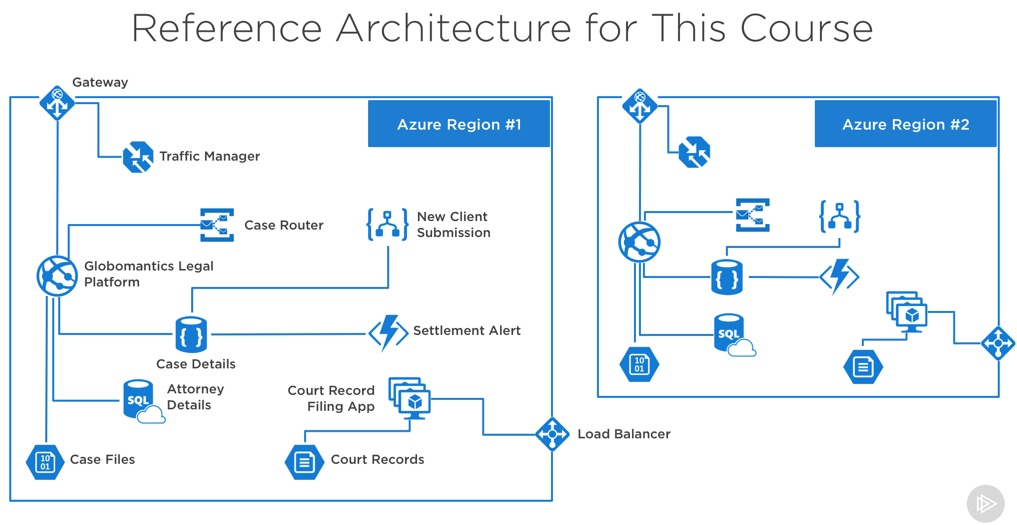
    This course is a four hour tour through the core Azure services, and how to configure each for high availability. Along the way, we discuss general resilience patterns. To prove how things work, we also build out a reference app that shows how everything works. At the end of the course, you’ll have a good idea of how to use Azure, and configure it effectively.

    2018-05-18-pluralsight

    The six course modules are:

    Patterns for High Availability in the Cloud. Here we discuss some core ideas around highly available distributed systems, and patterns you should know.

    Provisioning Durable Azure Storage. In this module, we check out Azure Storage and how Blob, File, and Disk storage works.

    Configuring Resilient Azure Databases. Databases can be a vulnerable part of your architecture, so you need to pay special attention here. We’ll look at Azure SQL Database, Cosmos DB, Redis Cache, and more.

    Deploying Redundant Azure Compute. This is arguably what cloud was first famous for, and here we’ll play around with Azure Virtual Machines, Azure App Service, and Azure Functions.

    Scale Processing via Azure Integration Capabilities. Messaging is so hot right now! A bulletproof integration tier is critical, so we’ll dig into how to set up Azure Service Bus, Azure Event Hubs, and Azure Logic Apps for resilience.

    Configuring Uninterrupted Traffic with Azure Networking. If your assets aren’t routable, it doesn’t matter how resilient they are! In this module, we explore Azure networking services like Virtual Networks, Load Balancing, App Gateway, and Traffic Manager.

    I hope you watch this course and enjoy it. It took me months to put together, but the final result should be worth it!

  • 2017 in Review: Reading and Writing Highlights

    kid-3What a fun year. Lots of things to be grateful for. Took on some more responsibility at Pivotal, helped put on a couple conferences, recorded a couple dozen podcast episodes, wrote news/articles/eMags for InfoQ.com, delivered a couple Pluralsight courses (DevOps, and Java related), received my 10th straight Microsoft MVP award, wrote some blog posts, spoke at a bunch of conferences, and added a third kid to the mix.

    Each year, I like to recap some of the things I enjoyed writing and reading. Enjoy!

    Things I Wrote

    I swear that I’m writing as much as I ever have, but it definitely doesn’t all show up in one place anymore! Here are a few things I churned out that made me happy.

    Things I Read

    I plowed through thirty four books this year, mostly on my wonderful Kindle. As usual, I choose a mix of biographies, history, sports, religion, leadership, and mystery/thriller. Here’s a handful of the ones I enjoyed the most.

    • Apollo 8: The Thrilling Story of the First Mission to the Moon, by Jeffrey Kluger (@jeffreykluger). Brilliant storytelling about our race to the moon. There was a perfect mix of character backstory, science, and narrative. Really well done.
    • Boyd: The Fighter Pilot Who Changed the Art of War, by Robert Coram (@RobertBCoram). I had mixed feelings after finishing this. Boyd’s lessons on maneuverability are game-changing. His impact on the world is massive. But this well-written story also highlights a man obsessed; one who grossly neglected his family. Important book for multiple reasons.
    • The Game: Inside the Secret World of Major League Baseball’s Power Brokers, by Jon Pessah (@JonPessah). Gosh, I love baseball books. This one highlights the Bud Selig era as commissioner, the rise of steroid usage, complex labor negotiations, and the burst of new stadiums. Some amazing behind-the-scenes insight here.
    • Not Forgotten: The True Story of My Imprisonment in North Korea, by Kenneth Bae. One might think that an American held in captivity by North Koreans longer than anyone since the Korean War would be angry. Rather, Bae demonstrates sympathy and compassion for people who aren’t exposed to a better way. Good story.
    • Shoe Dog: A Memoir by the Creator of Nike, by Phil Knight (@NikeUnleash). I went and bought new Nikes after this. MISSION ACCOMPLISHED PHIL KNIGHT. This was a fantastic book. Knight’s passion and drive to get Blue Ribbon (later, Nike) off the ground was inspiring. People can create impactful businesses even if they don’t feel an intense calling, but there’s something special about those that do.
    • Dynasty: The Rise and Fall of the House of Cesar, by Tom Holland (@holland_tom). This is somewhat of a “part 2” from Holland’s previous work. Long, but engaging, this book tells the tale of the first five emperors. It’s far from a dry history book, as Holland does a admirable job weaving specific details into an overarching story. Books like this always remind me that nothing happens in politics today that didn’t already happen thousands of years ago.
    • Avenue of Spies: A True Story of Terror, Espionage, and One American Family’s Heroic Resistance in Nazi-Occupied Paris, by Alex Kershaw (@kershaw_alex). Would you protect the most vulnerable, even if your life was on the line as a result? Many during WWII faced that choice. This book tells the story of one family’s decision, the impact they had, and the hard price they paid.
    • Stalling for Time: My Life as an FBI Hostage Negotiator, by Gary Noesner. Fascinating book that explains the principles of hostage negotiation, but also lays out the challenge of introducing it to an FBI conditioned to respond with force. Lots of useful nuggets in here for people who manage complex situations and teams.
    • The Things Our Fathers Saw: The Untold Stories of the World War II Generation from Hometown, USA, by Matthew Rozell (@marozell). Intensely personal stories from those who fought in WWII, with a focus on the battles in the Pacific. Harrowing, tragic, inspiring. Very well written.
    • I Don’t Have Enough Faith to Be an Atheist, by Norman Geisler (@NormGeisler) and Frank Turek (@Frank_Turek). Why are we here? Where did we come from? This book outlines the beautiful intersection of objective truth, science, philosophy, history, and faith. It’s a compelling arrangement of info.
    • The Late Show, by Michael Connelly (@Connellybooks). I’d read a book on kangaroo mating rituals if Connelly wrote it. Love his stuff. This new cop-thriller introduced a multi-dimensional lead character. Hopefully Connelly builds a new series of books around her.
    • The Toyota Way: 14 Management Principles from the World’s Greatest Manufacturer, by Jeffrey Liker. Ceremonies and “best practices” don’t matter if you have the wrong foundation. Liker’s must-read book lays out, piece by piece, the fundamental principles that help Toyota achieve operational excellence. Everyone in technology should read this and absorb the lessons. It puts weight behind all the DevOps and continuous delivery concepts we debate.
    • One Mission: How Leaders Build a Team of Teams, by Chris Fussell (@FussellChris). I read, and enjoyed, Team of Teams last year. Great story on the necessity to build adaptable organizations. The goal of this book is to answer *how* you create an adaptable organization. Fussell uses examples from both military and private industry to explain how to establish trust, create common purpose, establish a shared consciousness, and create spaces for “empowered execution.”
    • Win Bigly: Persuasion in a World Where Facts Don’t Matter, by Scott Adams (@ScottAdamsSays). What do Obama, Steve Jobs, Madonna, and Trump have in common? Remarkable persuasion skills, according to Adams. In his latest book, Adams deconstructs the 2016 election, and intermixes a few dozen persuasion tips you can use to develop more convincing arguments.
    • Value Stream Mapping: How to Visualize Work and Align Leadership for Organizational Transformation, by Karen Martin (@KarenMartinOpEx) and Mike Osterling (@leanmike). How does work get done, and are you working on things that matter? I’d suspect that most folks in IT can’t confidently answer either of those questions. That’s not the way IT orgs were set up. But I’ve noticed a change during the past year+, and there’s a renewed focus on outcomes. This book does a terrific job helping you understand how work flows, techniques for mapping it, where to focus your energy, and how to measure the success of your efforts.
    • The Five Dysfunctions of a Team, by Patrick Lencioni (@patricklencioni). I’ll admit that I’m sometimes surprised when teams of “all stars” fail to deliver as expected. Lencioni spins a fictitious tale of a leader and her team, and how they work through the five core dysfunctions of any team. Many of you will sadly nod your head while reading this book, but you’ll also walk away with ideas for improving your situation.
    • Setting the Table: The Transforming Power of Hospitality in Business, by Danny Meyer (@dhmeyer). How does your company make people feel? I loved Meyer’s distinction between providing a service and displaying hospitality in a restaurant setting, and the lesson is applicable to any industry. A focus on hospitality will also impact the type of people you hire. Great book that that leaves you hungry and inspired.
    • Extreme Ownership: How U.S. Navy SEALs Lead and Win, by Jocko Willink (@jockowillink) and Leif Babin (@LeifBabin). As a manager, are you ready to take responsibility for everything your team does? That’s what leaders do. Willink and Babin explain that leaders take extreme ownership of anything impacting their mission. Good story, with examples, of how this plays out in reality. Their advice isn’t easy to follow, but the impact is undeniable.
    • Strategy: A History, by Sir Lawrence Freedman (@LawDavF). This book wasn’t what I expected—I thought it’d be more about specific strategies, not strategy as a whole. But there was a lot to like here. The author looks at how strategy played a part in military, political, and business settings.
    • Radical Candor: Be a Kick-Ass Boss Without Losing Your Humanity, by Kim Scott (@kimballscott). I had a couple hundred highlights in this book, so yes, it spoke to me. Scott credibly looks at how to guide a high performing team by fostering strong relationships. The idea of “radical candor” altered my professional behavior and hopefully makes me a better boss and colleague.
    • The Lean Startup: How’s Today’s Entrepreneurs Use Continuous Innovation to Create Radically Successful Businesses, by Eric Ries (@ericries). A modern classic, this book walks entrepreneurs through a process for validated learning and figuring out the right thing to build. Ries sprinkles his advice with real-life stories as proof points, and offers credible direction for those trying to build things that matter.
    • Hooked: How to Build Habit-Forming Products, by Nir Eyal (@nireyal). It’s not about tricking people into using products, but rather, helping people do things they already want to do. Eyal shares some extremely useful guidance for those building (and marketing) products that become indispensable.
    • The Art of Action: How Leaders Close the Gap between Plans, Actions, and Results, by Stephen Bungay. Wide-ranging book that covers a history of strategy, but also focuses on techniques for creating an action-oriented environment that delivers positive results.

    Thank you all for spending some time with me in 2017, and I look forward to learning alongside you all in 2018.

  • Can’t figure out which SpringOne Platform sessions to attend? I’ll help you out.

    Can’t figure out which SpringOne Platform sessions to attend? I’ll help you out.

    Next week is SpringOne Platform (S1P). This annual conference is where developers from around the world learn about about Spring, Cloud Foundry, and modern architecture. It’s got a great mix of tech talks, product demos, and transformational case studies. Hear from software engineers and leaders that work at companies like Pivotal, Boeing, Mastercard, Microsoft, Google, FedEx, HCSC, The Home Depot, Comcast, Accenture, and more.

    If you’re attending (and you are, RIGHT?!?), how do you pick sessions from the ten tracks over three days? I helped build the program, and thought I’d point out the best talks for each type of audience member.

    The “multi-cloud enthusiast”

    Your future involves multiple clouds. It’s inevitable. Learn all about the tech and strategies to make it more successful.

    The “bleeding-edge developer”

    The vast major of S1P attendees are developers who want to learn about the hottest technologies. Here are some highlights for them.

    The “enterprise change agent”

    I’m blown away by the number of real case studies at this show. If you’re trying to create a lasting change at your company, these are the talks that prep you for success.

    The “ambitious operations pro”

    Automation doesn’t spell the end of Ops. But it does change the nature of it. These are talks that forward-thinking operations folks want to attend to learn how to build and manage future tech.

    The “modern app architect”

    What a fun time to be an architect! We’re expected to deliver software with exceptional availability and scale. That requires a new set of patterns. You’ll learn them in these talks.

    The “curious data pro”

    How we collect, process, store, and retrieve data is changing. It has to. There’s more data, in more formats, with demands for faster access. These talks get you up to speed on modern data approaches.

    The “plugged-in manager”

    Any engineering lead, manager, or executive is going to spend considerable time optimizing the team, not building software. But that doesn’t mean you shouldn’t be up-to-date on what your team is working with. These talks will make you sound hip at the water cooler after the conference.

    Fortunately all these sessions will be recorded and posted online. But nothing beats the in-person experience. If you haven’t bought a ticket, it’s not too late!

  • Surprisingly simple messaging with Spring Cloud Stream

    Surprisingly simple messaging with Spring Cloud Stream

    You’ve got a lot of options when connecting microservices together. You could use service discovery and make direct calls. Or you might use a shared database to transfer work. But message brokers continue to be a popular choice. These range from single purpose engines like Amazon SQS or RabbitMQ, to event stream processors like Azure Event Hubs or Apache Kafka, all the way to sophisticated service buses like Microsoft BizTalk Server. When developers choose any one of those, they need critical knowledge to be use them effectively. How can you shrink the time to value and help developers be productive, faster? For Java developers, Spring Cloud Stream offers a valuable abstraction.

    Spring Cloud Stream offers an interface for developers that requires no knowledge of the underlying broker. That broker, either Apache Kafka or RabbitMQ, gets configured by Spring Cloud Stream. Communication to and from the broker is also done via the Stream library.

    What’s exciting to me is that all brokers are treated the same. Spring Cloud Stream normalizes behavior, even if it’s not native to the broker. For example, want a competing consumer model for your clients, or partitioned processing? Those concepts behave differently in RabbitMQ and Kafka. No problem. Spring Cloud Stream makes it work the same, transparently. Let’s actually try both of those scenarios.

    Competing consumers through “consumer groups”

    By default, Spring Cloud Stream sets up everything as a publish-subscribe relationship. This makes it easy to share data among many different subscribers. But what if you want multiple instances of one subscriber (for scale out processing)? One solution is consumer groups. These don’t behave the same in both messaging brokers. Spring Cloud Stream don’t care! Let’s build an example app using RabbitMQ.

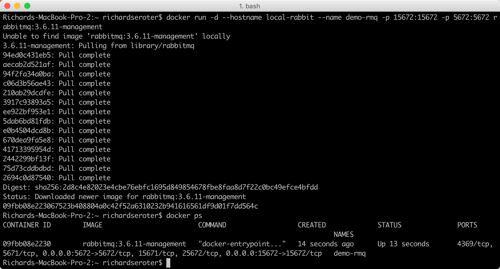
    Before writing code, we need an instance of RabbitMQ running. The most dead-simple option? A Docker container for it. If you’ve got Docker installed, the only thing you need to do is run the following command:

    -docker run -d –hostname local-rabbit –name demo-rmq -p 15672:15672 -p 5672:5672 rabbitmq:3.6.11-management
    2017.09.05-stream-02

    After running that, I have a local cache of the image, and a running container with port mapping that makes the container accessible from my host.

    How do we get messages into RabbitMQ? Spring Cloud Stream supports a handful of patterns. We could publish on a schedule, or on-demand. Here, let’s build a web app that publishes to the bus when the user issues a POST command to a REST endpoint.

    Publisher app

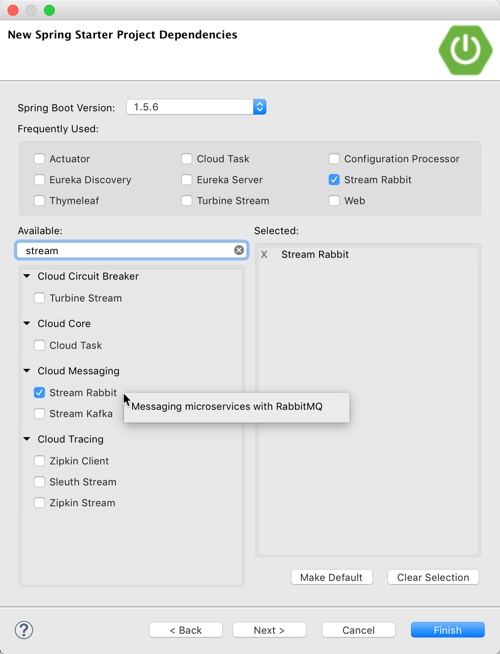
    First, build a Spring Boot application that leverages spring-cloud-starter-stream-rabbit (and spring-boot-starter-web). This brings in everything I need to use Spring Cloud Stream, and RabbitMQ as a destination.
    2017.09.05-stream-01

    Add a new class that acts as our REST controller. A simple @EnableBinding annotation lights this app up as a Spring Cloud Stream project. Here, I’m using the built-in “Source” interface that defines a single communication channel, but you can also build your own.

    @EnableBinding(Source.class)
    @RestController
    public class BriefController {
    

    In this controller class, add an @Autowired variable that references the bean that Spring Cloud Stream adds for the Source interface. We can then use this variable to directly publish to the bound channel! Same code whether talking to RabbitMQ or Kafka. Simple stuff.

    @EnableBinding(Source.class)
    @RestController
    public class BriefController {
      //refer to instance of bean that Stream adds to container
      @Autowired
      Source mysource;
    
      //take in a message via HTTP, publish to broker
      @RequestMapping(path="/brief", method=RequestMethod.POST)
      public String publishMessage(@RequestBody String payload) {
    
        System.out.println(payload);
    
        //send message to channel
        mysource.output().send(MessageBuilder.withPayload(payload).build());
    
        return "success";
      }
    

    Our publisher app is done, so all that’s left is some basic configuration. This configuration tells Spring Cloud Stream how to connect to the right broker. Note that we don’t have to tell Spring Cloud Stream to use RabbitMQ; it happens automatically by having that dependency in our classpath. No, all we need is connection info to our broker, an explicit reference to a destination (without it, the RabbitMQ exchange would be called “output”), and a command to send JSON.

    server.port=8080
    
    #rabbitmq settings for Spring Cloud Stream to use
    spring.rabbitmq.host=127.0.0.1
    spring.rabbitmq.port=5672
    spring.rabbitmq.username=guest
    spring.rabbitmq.password=guest
    
    spring.cloud.stream.bindings.output.destination=legalbriefs
    spring.cloud.stream.default.contentType=application/json
    

    Consumer app

    This part’s almost too easy. Here, build a new Spring Boot application and only choose the spring-cloud-starter-stream-rabbit dependency.

    In the default class, decorate it with @EnableBinding and use the built-in Sink interface. Then, all that’s left is to create a method to process any messages found in the broker. To do that, we decorate the operation with @StreamListener, and all the content type handling is done for us. Wicked.

    @EnableBinding(Sink.class)
    @SpringBootApplication
    public class BlogStreamSubscriberDemoApplication {
    
      public static void main(String[] args) {
        SpringApplication.run(BlogStreamSubscriberDemoApplication.class, args);
      }
    
      @StreamListener(target=Sink.INPUT)
      public void logfast(String msg) {
        System.out.println(msg);
      }
    }
    

    The configuration for this app is straightforward. Like above, we have connection details for RabbitMQ. Also, note that the binding now references “input”, which was the name of the channel in the default “Sink” interface. Finally, observe that I used the SAME destination as the source, to ensure that Spring Cloud Stream wires up my publisher and subscriber successfully. For kicks, I didn’t yet add the consumer group settings.

    server.port=0
    
    #rabbitmq settings for Spring Cloud Stream to use
    spring.rabbitmq.host=127.0.0.1
    spring.rabbitmq.port=5672
    spring.rabbitmq.username=guest
    spring.rabbitmq.password=guest
    
    spring.cloud.stream.bindings.input.destination=legalbriefs
    

    Test the solution

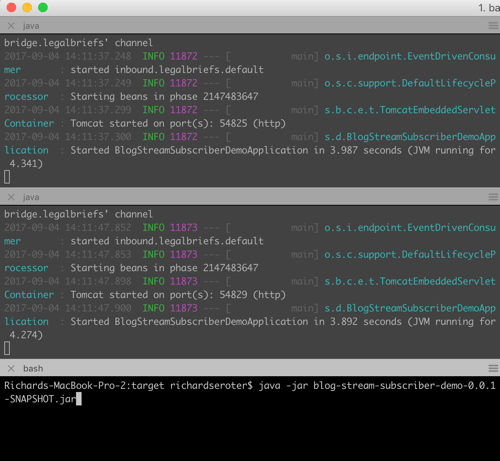
    Let’s see how this works. First, start up three instances of the subscriber app. I generated a jar file, and started up three instances in the shell.
    2017.09.05-stream-04

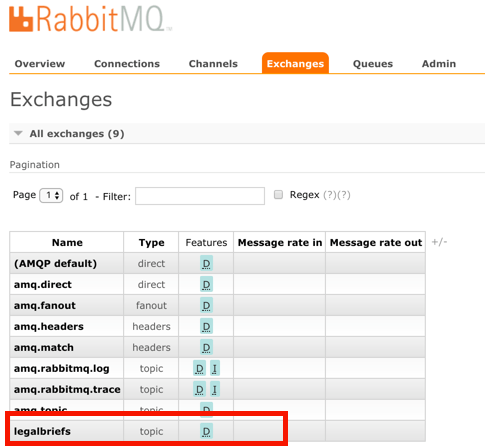
    When you start up these apps, Spring Cloud Stream goes to work. Log into the RabbitMQ admin console, and notice that one exchange got generated. This one, named “legalbriefs”, maps to the name we put in our configuration file.
    2017.09.05-stream-12

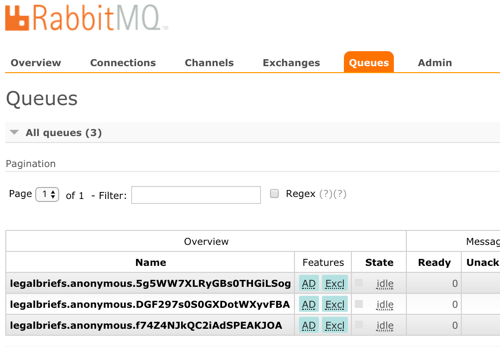
    We also have three queues that map to each of the three app instances we started up.
    2017.09.05-stream-13

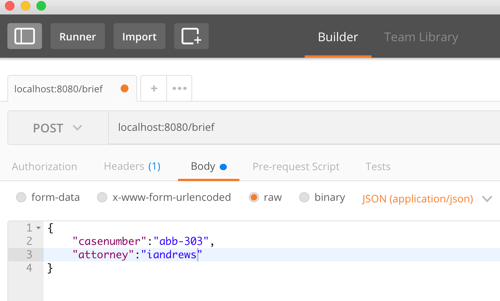
    Nice! Finally, start up the publisher, and post a message to the /briefs endpoint.
    2017.09.05-stream-05

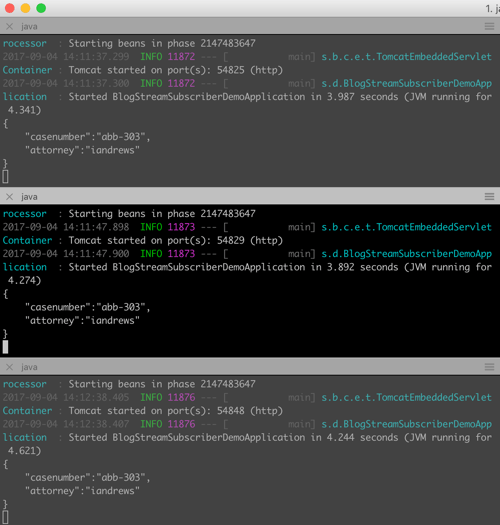
    What happens? As expected, each subscriber gets a copy of the message, because by default, everything happens in a pub/sub fashion.
    2017.09.05-stream-06

    Add consumer group configuration

    We don’t want each instance to get a copy. Rather, we want these instances to share the processing load. Only one should get each message. In the subscriber app, we add a single line to our configuration file. This tells Spring Cloud Stream that all the instances form a single consumer group that share work.

    #adds consumer group processing
    spring.cloud.stream.bindings.input.group=briefProcessingGroup
    

    After regenerating the subscriber jar file, and starting up each file, we see a different setup in RabbitMQ. What you see is a single, named queue, but three “consumers” of the queue.
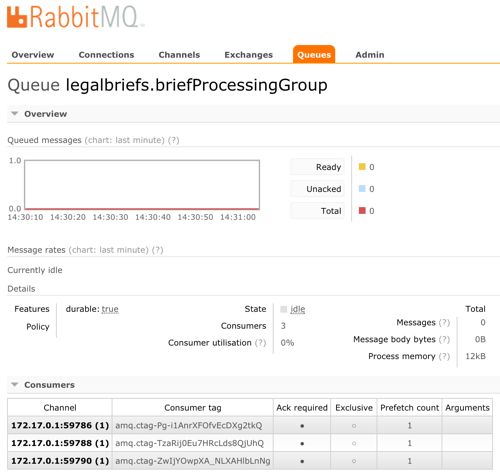
    2017.09.05-stream-07

    Send in two different messages, and see that each is only processed by a single subscriber instance. This is a simple way to use a message broker to scale out processing.
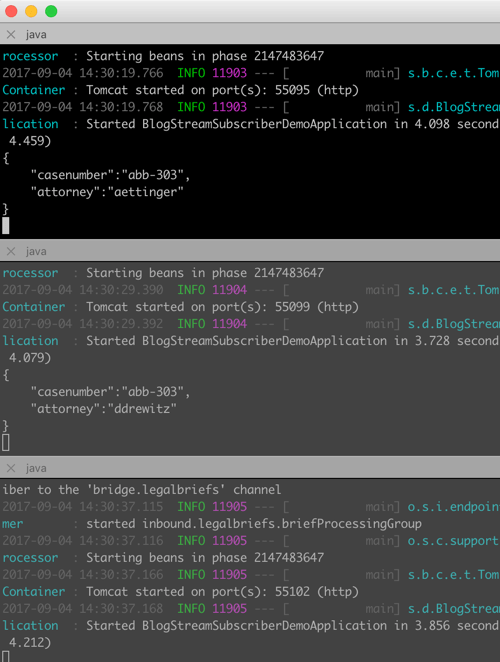
    2017.09.05-stream-08

    Doing stateful processing using partitioning

    Partitioning feels like a related, but different scenario than consumer groups. Partitions in Kafka introduce a level of parallel processing by writing data to different partitions. Then, each subscriber pulls from a given partition to do work. Here in Spring Cloud Stream, partitioning is useful for parallel processing, but also for stateful processing. When setting it up, you specify a characteristic that steers messages to a given partition. Then, a single app instance processes all the data in that partition. This can be handy for event processing or any scenario where it’s useful for related messages to get processed by the same instance. Think counters, complex event processing, or time-sensitive calculations.

    Unlike with consumer groups. partitioning requires configuration changes to both publishers AND subscribers.  On the publisher side, all that’s needed is (a) the number of partitions, and (b) the expression that describes how data is partitioned. That’s it. No code changes.

    #adding configuration for partition processing
    spring.cloud.stream.bindings.output.producer.partitionKeyExpression=payload.attorney
    spring.cloud.stream.bindings.output.producer.partitionCount=3
    

    On the subscriber side, you set the number of partitions, and set the “partitioned” property equal to “true.” What’s also interesting, but logical, is that as each subscriber starts, you need to give it an “index” so that Spring Cloud Streams knows which partition it should read from.

    #add partition processing
    spring.cloud.stream.bindings.input.consumer.partitioned=true
    #spring.cloud.stream.instanceIndex=0
    spring.cloud.stream.instanceCount=3
    

    Let’s start everything up again. The publisher starts up the same as before. Now though, each subscriber instance starts up with a “”spring.cloud.stream.instanceIndex=X” flag that specifies which index applies.
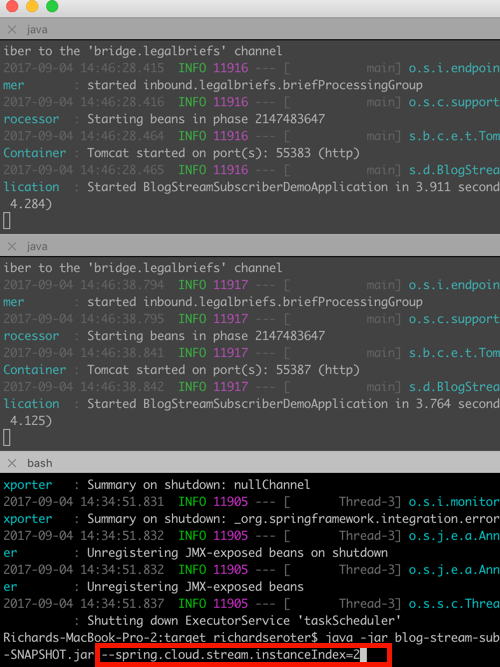
    2017.09.05-stream-09

    In RabbitMQ, the setup is different than before. Now, we have three queues, each with a different “routing key” that corresponds to its partition.
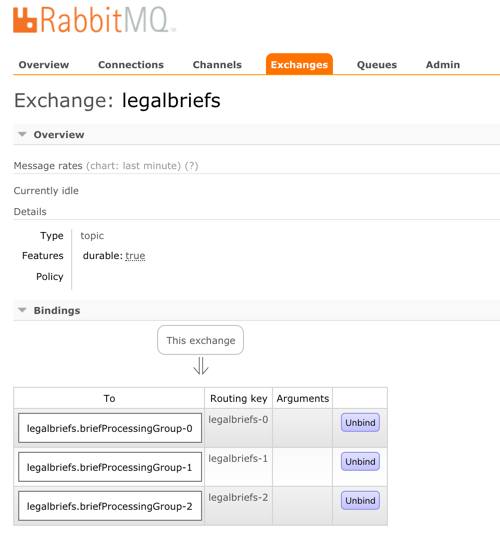
    2017.09.05-stream-10

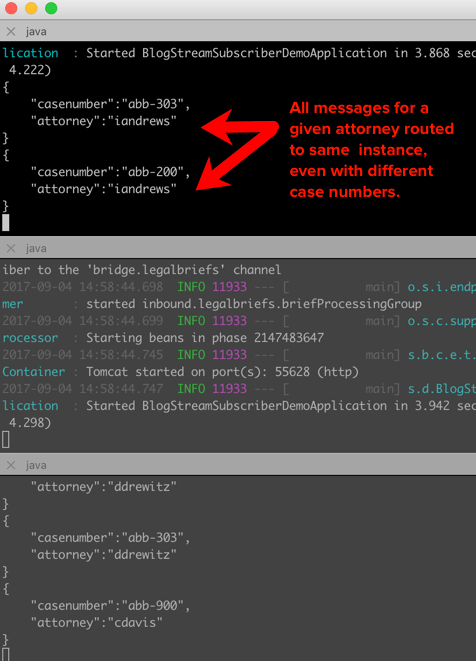
    Send in a message, and notice that all messages with the same attorney name go to one instance. Change the case number, and see that all messages still go to the same place. Switch the attorney ID, and observe that a different partition (likely) gets it. If you have more data varieties than you do partitions, you’ll see a partition handle more than one set of data. No problem, just know that happens.
    2017.09.05-stream-11

    Summary

    It shouldn’t have to be hard to deal with message brokers. Of course there are plenty of scenarios where you want to flex the advanced options of a broker, but there are also many cases where you just want a reliable intermediary. In those cases, Spring Cloud Stream makes it super easy to abstract away knowledge of the broker, while still normalizing behavior across the unique engines.

    In my latest Pluralsight course, I spent over an hour digging into Spring Cloud Stream, and another ninety minutes working with Spring Cloud Data Flow. That project helps you quickly string together Stream applications. Check it out for a deeper dive!

  • My new Pluralsight course about coordinating Java microservices with Spring Cloud, is out!

    No microservice is an island. Oh sure, we all talk about isolated components and independent teams. But your apps and services get combined and used in all sorts of ways. It’s inevitable. As you consider how your microservices interact with each other, you’ll uncover new challenges. Fortunately, there’s technology that’s made those challenges easier to solve.

    Spring Boot is hot. Like real hot. At this point, it’s basically the de facto way for Java developers build modern apps.

    Spring Cloud builds on Spring Boot and introduces all sorts of distributed systems capabilities to your code. Last year I delivered a Pluralsight course that looked at building services with it. But that was only half of the equation. A big portion of Spring Cloud simplifies interactions between services. So, I set out to do a sequel course on Spring Cloud, and am thrilled that the course came out today.
    2017.08.26-pluralsight-01

    This course, Java Microservices with Spring Cloud: Coordinating Services, focuses on helping you build a more effective, maintainable microservices architecture. How do you discover services? Can you prevent cascading failures? What are your routing options? How does messaging play a role? Can we rethink data integration and do it better? All those questions get answered in this ~6 hour course. The six modules of the course include:

    1. Introducing Spring Cloud and microservices coordination scenarios. A chat about the rise of microservices, problems that emerge, and what Spring Cloud is all about.
    2. Locating services at runtime using service discovery. The classic “configuration management DB” can’t keep up with the pace of change in a microservices architecture. No, you need a different way to see a live look at what services exist, and where they are. Enter Spring Cloud Eureka. We take a deep look at how to use it to register and discovery services.
    3. Protecting systems with circuit breakers. What happens when a service dependency goes offline? Bad things. But you can fail fast and degrade gracefully by using the right approach. We dig into Spring Cloud Hystrix in this module and look at the interesting ways to build a self-healing environment.
    4. Routing your microservices traffic. A centralized load balancer may not be the right fit for a fast-changing environment. Same goes for API gateways. This module looks at Spring Cloud Ribbon for client-side load balancing, and Spring Cloud Zuul as a lightweight microproxy.
    5. Connecting microservices through messaging. Message brokers offer one convenient way to link services in a loosely coupled way. Spring Cloud Stream is a very impressive library that makes messaging easy. Add competing consumers, partition processing, and more, whether you’re using RabbitMQ or Apache Kafka underneath. We do a deep dive in this module.
    6. Building data processing pipelines out of microservices. It’s time to rethink how we process data, isn’t it? This shouldn’t be the realm of experts, and require bulky, irregular updates. Spring Cloud Data Flow is one of the newest parts of Spring Cloud, and promises to mess with your mind. Here, we see how to do real-time or batch processing by connecting individual microservices together. Super fun.

    It’s always a pleasure creating content for the Pluralsight audience, and I do hope you enjoy the course!

  • Introducing cloud-native integration (and why you should care!)

    Introducing cloud-native integration (and why you should care!)

    I’ve got three kids now. Trying to get anywhere on time involves heroics. My son is almost ten years old and he’s rarely the problem. The bottleneck is elsewhere. It doesn’t matter how much faster my son gets himself ready, it won’t improve my family’s overall speed at getting out the door. The Theory of Constraints says that you improve the throughput of your process by finding and managing the bottleneck, or constraint. Optimizing areas outside the constraint (e.g. my son getting ready even faster) don’t make much of a difference. Does this relate to software, and application integration specifically? You betcha.

    Software delivery goes through a pipeline. Getting from “idea” to “production” requires a series of steps. And then you repeat it over and over for each software update. How fast you get through that process dictates how responsive you can be to customers and business changes. Your development team may operate LIKE A MACHINE and crank out epic amounts of code. But if your dedicated ops team takes forever to deploy it, then it just doesn’t matter how fast your devs are. Inventory builds up, value is lost. My assertion is that the app integration stage of the pipeline is becoming a bottleneck. And without making changes to how you do integration, your cloud-native efforts are going to waste.

    What’s “cloud native” all about? At this month’s Integrate conference, I had the pleasure of talking about it. Cloud-native refers to how software is delivered, not where. Cloud-native systems are built for scale, built for continuous change, and built to tolerate failure. Traditional enterprises can become cloud natives, but only if they make serious adjustments to how they deliver software.

    Even if you’ve adjusted how you deliver code, I’d suspect that your data, security, and integration practices haven’t caught up. In my talk, I explained six characteristics of a cloud-native integration environment, and mixed in a few demos (highlighted below) to prove my points.

    #1 – Cloud-native integration is more composable

    By composable, I mean capable of assembling components into something greater. Contrast this to classic integration solutions where all the logic gets embedded into a single artifact. Think ETL workflows where ever step of the process is in one deployable piece. Need to change one component? Redeploy the whole thing. One step require a ton of CPU processing? Find a monster box to host the process in.

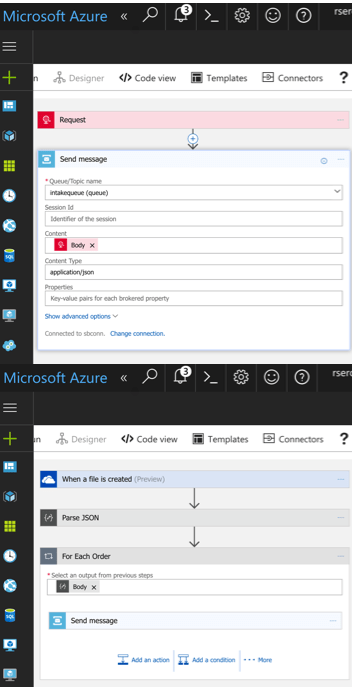
    A cloud-native integration gets built by assembling independent components. Upgrade and scale each piece independently. To demonstrate this, I built a series of Microsoft Logic Apps. Two of them take in data. The first takes in a batch file from Microsoft OneDrive, the other takes in real-time HTTP requests. Both drop the results to a queue for later processing.

    2017.07.10-integrate-01

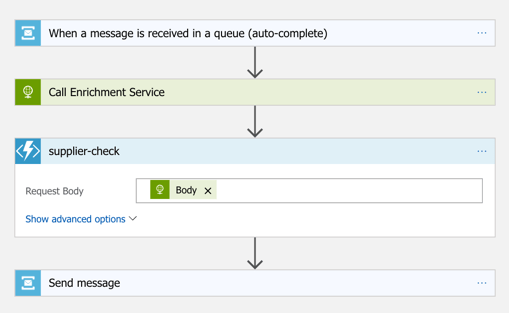
    The “main” Logic App takes in order entries, enriches the order via a REST service I have running in Azure App Service, calls an Azure Function to assign a fraud score, and finally dumps the results to a queue for others to grab.

    2017.07.10-integrate-02

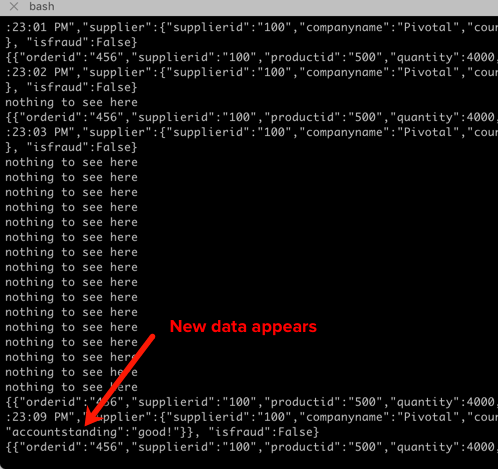
    My REST API sitting in Azure App Service is connected to a GitHub repo. This means that I should be able to upgrade that individual service, without touching the data pipeline sitting Logic Apps. So that’s what I did. I sent in a steady stream of requests, modified my API code, pushed the change to GitHub, and within a few seconds, the Logic App is emitting out a slightly different payload.

    2017.07.10-integrate-03

    #2 – Cloud-native integration is more “always on”

    One of the best things about early cloud platforms being less than 100% reliable was that it forced us to build for failure. Instead of assuming the infrastructure was magically infallible, we built systems that ASSUMED failure, and architected accordingly.

    For integration solutions, have we really done the same? Can we tolerate hardware failure, perform software upgrades, or absorb downstream dependency hiccups without stumbling? A cloud-native integration solution can handle a steady load of traffic while staying online under all circumstances.

    #3 – Cloud-native integration is built for scale

    Elasticity is a key attribute of cloud. Don’t build out infrastructure for peak usage; build for easy scale when demand dictates. I haven’t seen too many ESB or ETL solutions that transparently scale, on-demand with no special considerations. No, in most cases, scaling is a carefully designed part of an integration platform’s lifecycle. It shouldn’t be.

    If you want cloud-native integration, you’ll look to solutions that support rapid scale (in, or out), and let you scale individual pieces. Event ingestions unexpected and overwhelming? Scale that, and that alone. You’ll also want to avoid too much shared capacity, as that creates unexpected coupling and makes scaling the environment more difficult.

    #4 – Cloud-native integration is more self-service

    The future is clear: there will be more “citizen integrators” who don’t need specialized training to connect stuff. IFTTT is popular, as are a whole new set of iPaaS products that make it simple to connect apps. Sure, they aren’t crazy sophisticated integrations; there will always be a need for specialists there. But integration matters more than ever, and we need to democratize the ability to connect our stuff.

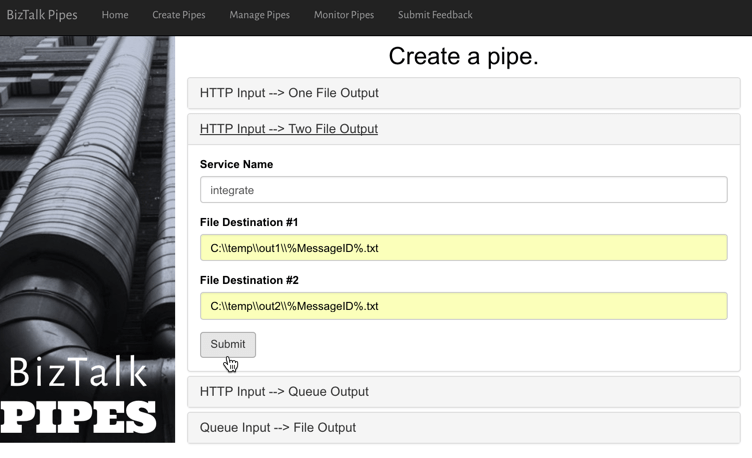
    One example I gave here was Pivotal Cloud Cache and Pivotal GemFire. Pivotal GemFire is an industry-leading in-memory data grid. Awesome tech, but not trivial to properly setup and use. So, Pivotal created an opinionated slice of GemFire with a subset of features, but an easier on-ramp. Pivotal Cloud Cache supports specific use cases, and an easy self-service provisioning experience. My challenge to the Integrate conference audience? Why couldn’t we create a simple facade for something powerful, but intimidating, like Microsoft BizTalk Server? What if you wanted a self-service way to let devs create simple integrations? I decided use the brand new Management REST API from BizTalk Server 2016 Feature Pack 1 to build one.

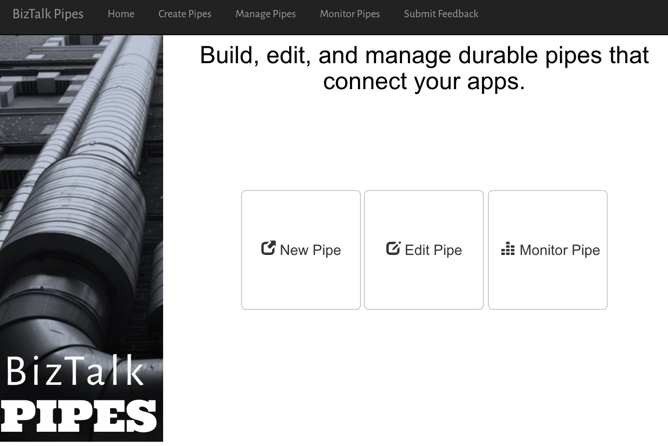
    I used the incomparable Spring Boot to build a Java app that consumed those REST APIs. This app makes it simple to create a “pipe” that uses BizTalk’s durable bus to link endpoints.

    2017.07.10-integrate-05

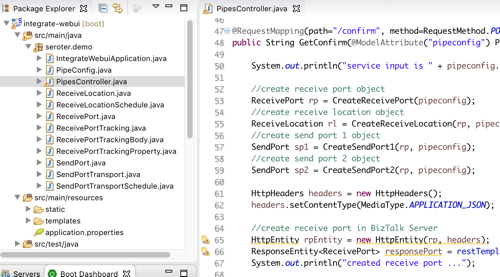
    I built a bunch of Java classes to represent BizTalk objects, and then created the required API payloads.

    2017.07.10-integrate-04

    The result? Devs can create a new pipe that takes in data via HTTP and drops the result to two file locations.

    2017.07.10-integrate-06

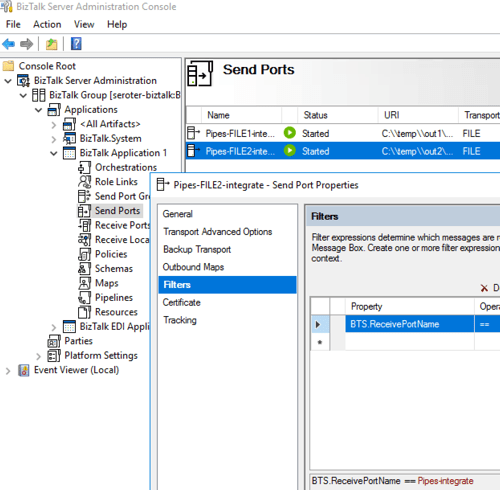
    When I click the button above, I use those REST APIs to create a new in-process HTTP receive location, two send ports, and the appropriate subscriptions.

    2017.07.10-integrate-07

    Fun stuff. This seems like one way you could unlock new value in your ESB, while giving it a more cloud-native UX.

    #5 – Cloud-native integration supports more endpoints

    There’s no turning back. Your hippest integration offered to enterprise devs CANNOT be SharePoint. Nope. Your teams want to creatively connect to Slack, PagerDuty, Salesforce, Workday, Jira, and yes, enterprisey things like SQL Server and IBM DB2.

    These endpoints may be punishing your integration platform with a constant data stream, or, process data irregularly, in bulk. Doing newish patterns like Event Sourcing? Your apps will talk to an integration platform that offers a distributed commit log. Are you ready? Be ready for new endpoints, with new data streams, consumed via new patterns.

    #6 – Cloud-native integration demands complete automation

    Are you lovingly creating hand-crafted production servers? Stop that. And devs should have complete replicas of production environments, on their desktop. That means packaging and automating the integration bus too. Cloud-natives love automation!

    Testing and deploying integration apps must be automated. Without automated tests, you’ll never achieve continuous delivery of your whole system. Additionally, if you have to log into one of your integration servers, you’re doing it wrong. All management (e.g. monitoring, deployments, upgrades) should be done via remote tools and scripts. Think fleets of servers, not long-lived named instances.

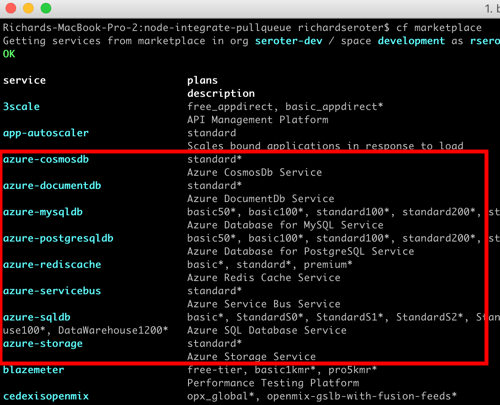
    To demonstrate this concept, I discussed automating the lifecycle of your integration dependency. Specifically, through the use of a service broker. Initially part of Cloud Foundry, the service broker API has caught on elsewhere. A broad set of companies are now rallying around a single API for advertising services, provisioning, de-provisioning, and more. Microsoft built a Cloud Foundry service broker, and it handles lots of good things. It handles lifecycle and credential sharing for services like Azure SQL Database, Azure Service Bus, Azure CosmosDB, and more. I installed this broker into my Pivotal Web Services account, and it advertised available services.

    2017.07.10-integrate-08

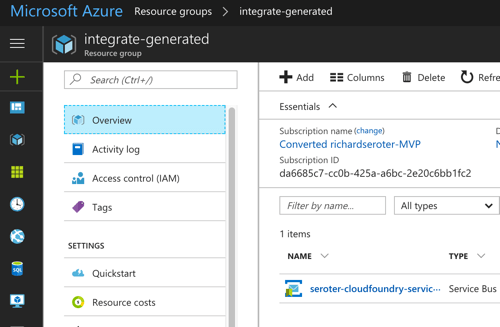
    Simply by typing in cf create-service azure-servicebus standard integratesb -c service-bus-config.json I kicked off a fast, automated process to generate an Azure Resource Group and create a Service Bus namespace.

    2017.07.10-integrate-09

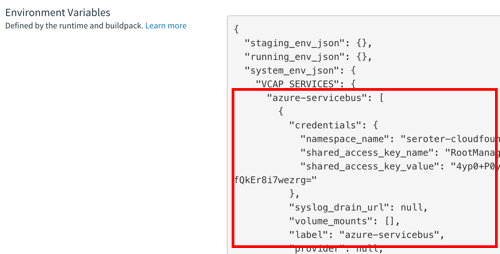
    Then, my app automatically gets access to environment variables that hold the credentials. No more embedding creds in code or config, no need to go to the Azure Portal. This makes integration easy, developer-friendly, and repeatable.

    2017.07.10-integrate-10

    Summary

    It’s such an exciting time to be a software developer. We’re solving new problems in new ways, and making life better for so many. The last thing we want is to be held back by a bottleneck in our process. Don’t let integration slow down your ambitions. The technology is there to help you build integration platforms that are more scalable, resilient, and friendly-to-change. Go for it!

  • Using speaking opportunities as learning opportunities

    Over this summer, I’ll be speaking at a handful of events. I sign myself up for these opportunities —in addition to teaching courses for Pluralsight —so that I commit time to learning new things. Nothing like a deadline to provide motivation!

    Do you find yourself complaining that you have a stale skill set, or your “brand” is unknown outside your company? You can fix that. Sign up for a local user group presentation. Create a short “course” on a new technology and deliver it to colleagues at lunch. Start a blog and share your musings and tech exploration. Pitch a talk to a few big conferences. Whatever you do, don’t wait for others to carve out time for you to uplevel your skills! For me, I’m using this summer to refresh a few of my own skill areas.

    In June, I’m once again speaking in London at Integrate. Application integration is arguably the most important/interesting part of Azure right now. Given Microsoft’s resurgence in this topic area, the conference matters more than ever. My particular session focuses on “cloud-native integration.” What is it all about? How do you do it? What are examples of it in action? I’ve spent a fair amount of time preparing for this, so hopefully it’s a fun talk. The conference is nearly sold out, but I know there are handful of tickets left. It’s one of my favorite events every year.

    Coming up in July, I’m signed up to speak at PerfGuild. It’s a first-time, online-only conference 100% focused on performance testing. My talk is all about distributed tracing and using it to uncover (and resolve) latency issues. The talk builds on a topic I covered in my Pluralsight course on Spring Cloud, with some extra coverage for .NET and other languages. As of this moment, you can add yourself to the conference waitlist.

    Finally, this August I’ll be hitting balmy Orlando, FL to speak at the Agile Alliance conference. This year’s “big Agile” conference has a track centered on foundational concepts. It introduces attendees to concepts like agile project delivery, product ownership, continuous delivery, and more. My talk, DevOps Explained, builds on things I’ve covered in recent Pluralsight courses, as well as new research.

    Speaking at conferences isn’t something you do to get wealthy. In fact, it’s somewhat expensive. But in exchange for incurring that cost, I get to allocate time for learning interesting things. I then take those things, and share them with others. The result? I feel like I’m investing in myself, and I get to hang out at conferences with smart people.

    If you’re just starting to get out there, use a blog or user groups to get your voice heard. Get to know people on the speaking circuit, and they can often help you get into the big shows! If we connect at any of the shows above, I’m happy to help you however I can.

  • Creating a JSON-Friendly Azure Logic App That Interacts with Functions, DocumentDB and Service Bus

    Creating a JSON-Friendly Azure Logic App That Interacts with Functions, DocumentDB and Service Bus

    I like what Microsoft’s doing in the app integration space. They breathed new life into their classic integration bus (BizTalk Server). The family of Azure Service Bus technologies (Queues, Topics, Relay) is super solid. API Management and Event Hubs solve real needs. And Azure Logic Apps is maturing at an impressive rate. That last one is the one I wanted to dig into more. Logic Apps gets updated every few weeks, and I thought it’d be fun to put a bunch of new functionality to the test. Specifically, I’m going to check out the updated JSON support, and invoke a bunch of Azure services.

    Step 1 – Create Azure DocumentDB collection

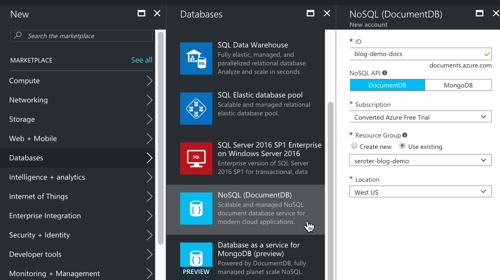
    In my fictitious example, I’m processing product orders. The Logic App takes in the order, and persists it in a database. In the Azure Portal, I created a database account.

    2017-02-22-logicapps-01

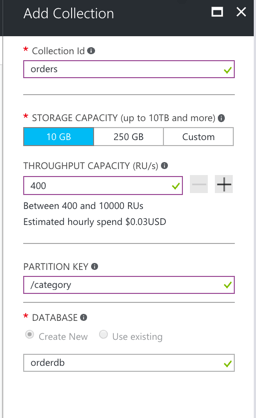
    DocumentDB stores content in “collections”, so I needed one of those. To define a collection you must provide some names, throughput (read/write) capacity, and a partition key. The partition key is used to shard the data, and document IDs have to be unique within that partition.

    2017-02-22-logicapps-02

    Ok, I was all set to store my orders.

    Step 2 – Create Azure Function

    Right now, you can’t add custom code inside a Logic App. Microsoft recommends that you call out to an Azure Function if you want to do any funny business. In this example, I wanted to generate a unique ID per order. So, I needed a snippet of code that generated a GUID.

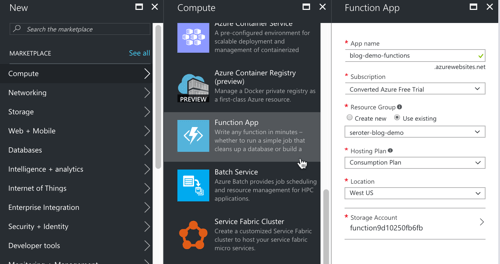
    First up, I created a new Azure Functions app.

    2017-02-22-logicapps-03

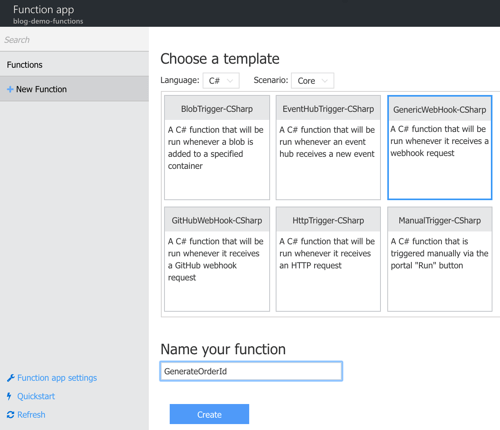
    Next up, I had to create an actual function. I could start from scratch, or use a template. I chose the “generic webhook” template for C#.

    2017-02-22-logicapps-05

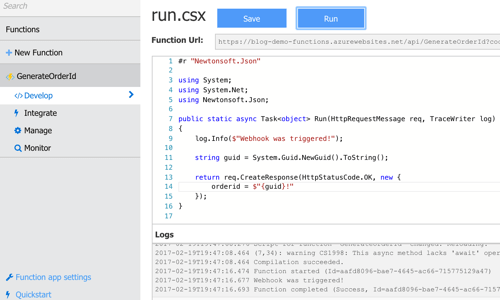
    This function is basic. All I do is generate a GUID, and return it back.

    2017-02-22-logicapps-06

    Step 3 – Create Service Bus Queue

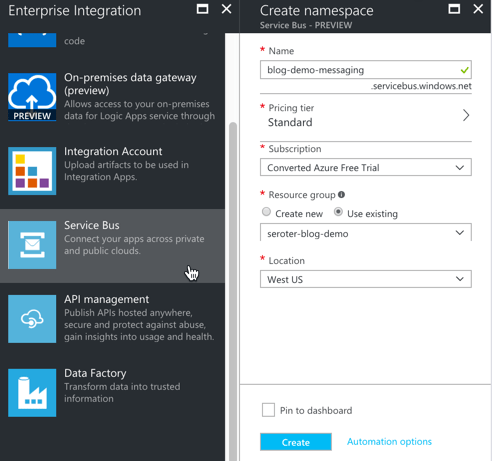
    When a big order came in, I wanted to route a message to a queue for further processing. Up front, I created a new Service Bus queue to hold these messages.

    2017-02-22-logicapps-07

    With my namespace created, I added a new queue named “largeorders.”

    That was the final prerequisite for this demo. Next up, building the Logic App!

    Step 4 – Create the Azure Logic App

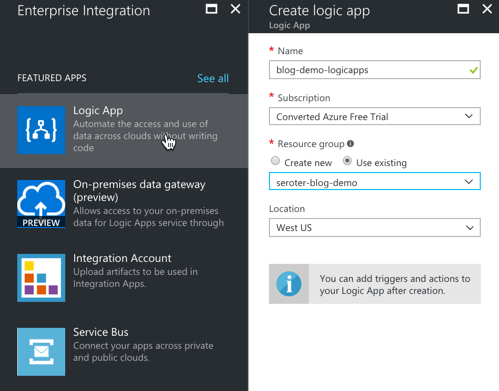
    First, I defined a new Logic App in the Azure Portal.

    2017-02-22-logicapps-08

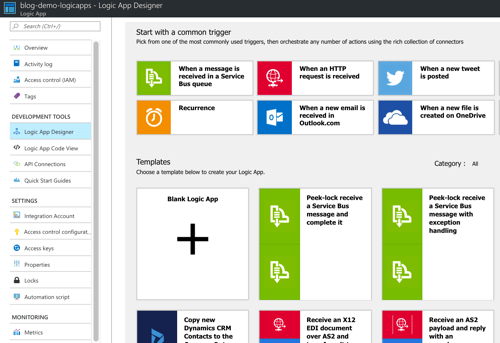
    Here’s the first new thing I saw: an updated “getting started” view. I could choose a “trigger” to start off my Logic App, or, choose from a base scenario template.

    2017-02-22-logicapps-09

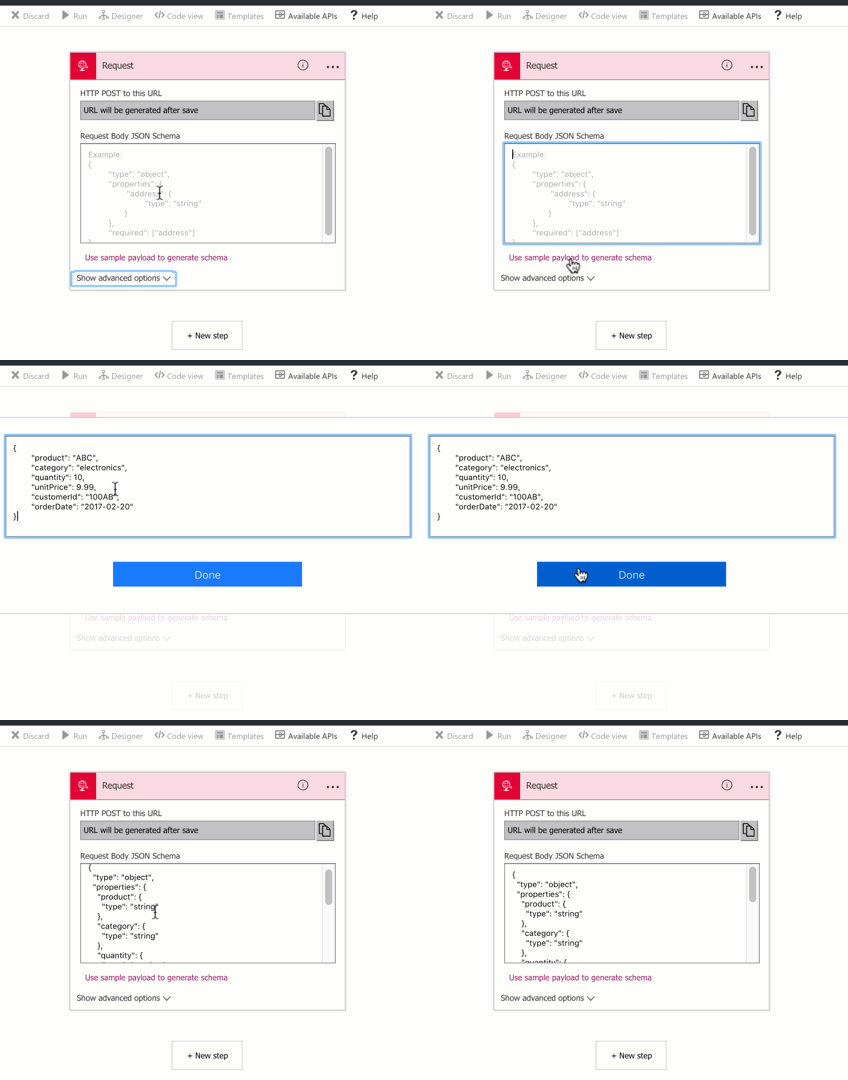
    I chose the trigger “when an HTTP request is received” and got an initial shape on my Logic App. Now, here’s where I saw the second cool update: instead of manually building a JSON schema, I could paste in a sample and generate one. Rad.

    2017-02-22-logicapps-10

    Step 5 – Call out to Azure Functions from Logic App

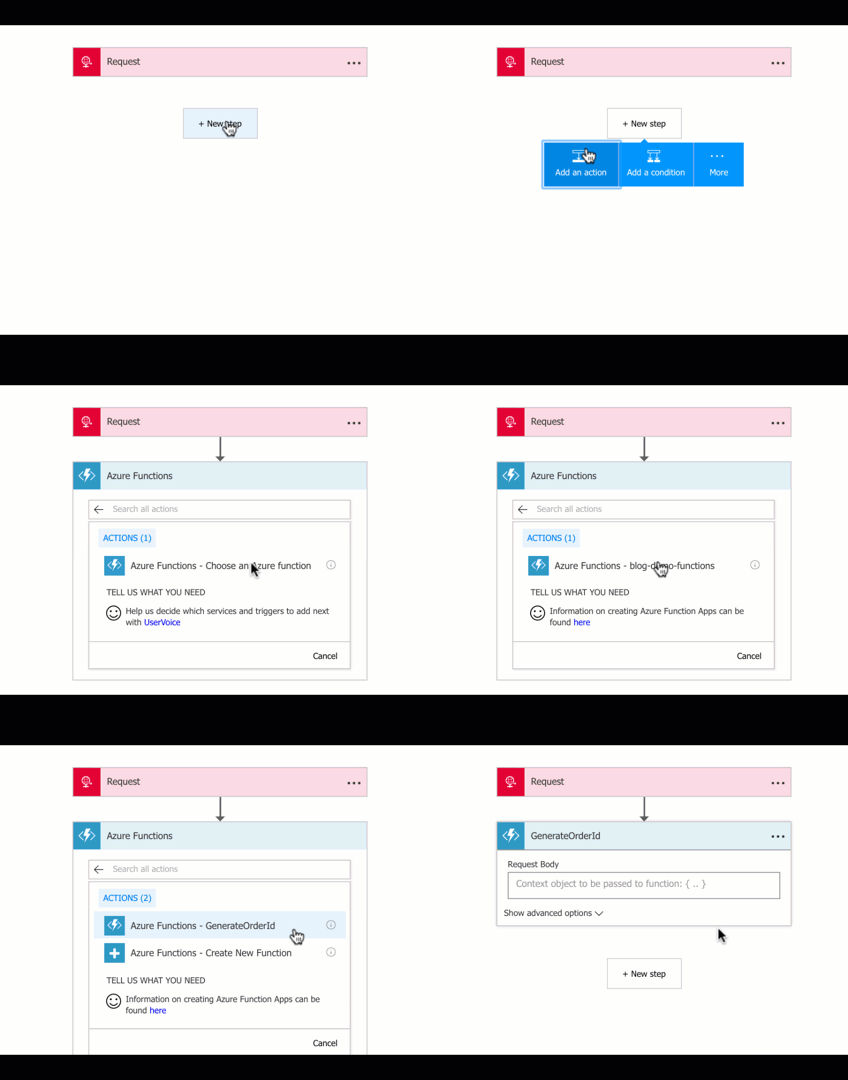
    After I received a message, I wanted to add it to DocumentDB. But first, I need my unique order ID. Recall that our Azure Function generated one. I chose to “add an action” and selected “Azure Functions” from the list. As you can see below, once I chose that action, I could browse the Function I already created. Note that a new feature of Logic Apps allows you to build (Node.js) Functions from within the Logic App designer itself. I wanted a C# Function, so that’s why I did it outside this UI.

    2017-02-22-logicapps-11

    Step 6 – Insert record into DocumentDB from Logic App

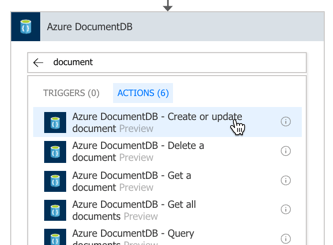
    Next up, I picked the “DocumentDB” activity, and chose the “create or update document” action.

    2017-02-22-logicapps-12

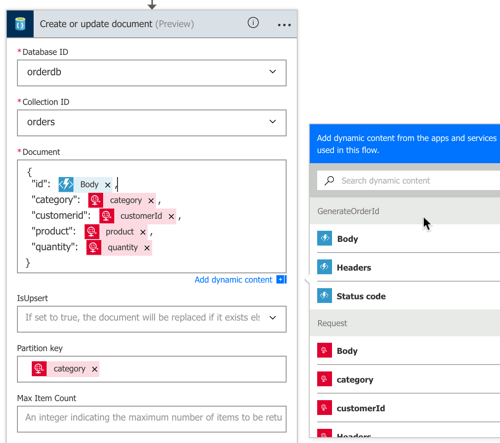
    Unfortunately, Logic Apps doesn’t (yet) look up connection strings for me. I opened another browser tab and navigated back to the DocumentDB “blade” to get my account name and authorization key. Once I did that, the Logic Apps Designer interrogated my account and let me pick my database and collection. After that, I built the payload to store the database. Notice that I built up a JSON message using values from the inbound HTTP message, and Azure Function. I also set the partition key to the “category” value from the inbound message.

    2017-02-22-logicapps-13

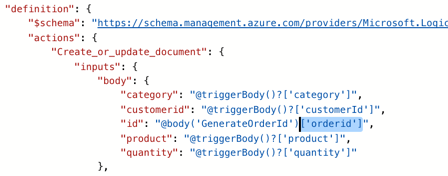
    What I have above won’t work. Why? In the present format, the “id” value is invalid. It would contain the whole JSON result from the Azure Function. There’s no way (yet) to grab a part of the JSON in the Designer, but there is a way in code. After switching to “code view”, I added [‘orderid’] reference to the right spot …

    2017-02-22-logicapps-14

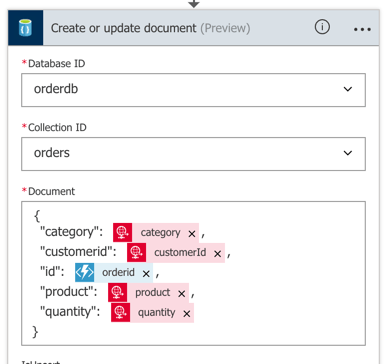
    When I switched back to the Designer view, I saw “orderid” the mapped value.

    2017-02-22-logicapps-15

    That finished the first part of the flow. In the second part, I wanted to do different things based on the “category” of the purchased product.

    Step 7 – Add conditional flows to Logic App

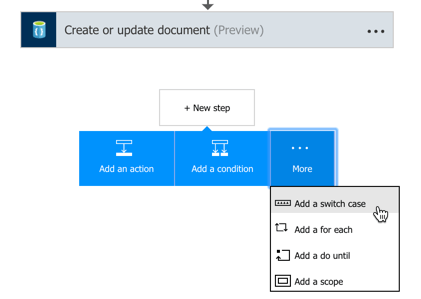
    Microsoft recently added a “switch” statement condition to the palette, so I chose that. After choosing the data field to “switch” on, I added a pair of paths for different categories of product.

    2017-02-22-logicapps-16

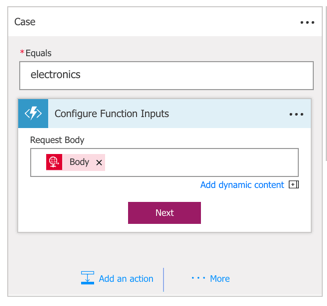
    Inside the “electronics” switch path, I wanted to check and see if this was a big order. If so, I’d drop a message to a Service Bus queue. At the moment, Logic Apps doesn’t let me create variables (coming soon!), so I needed another way to generate the total order amount. Azure Functions to the rescue! From within the Logic Apps Designer, I once again chose the Azure Functions activity, but this time, selected “Create New Function.” Here, I passed in the full body of the initial message.

    2017-02-22-logicapps-18

    Inside the Function, I wrote some code that multiplied the quantity by the unit price.

    2017.02.22-logicapps-19.png

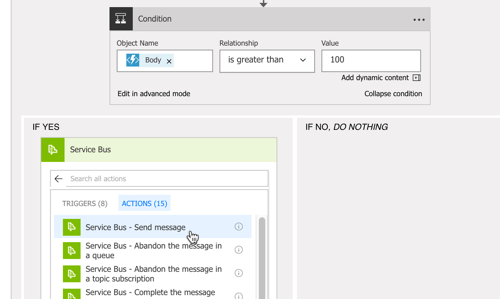
    We’re nearly done! After this Function, I added an if/else conditional that checked the Function’s result, and if it’s over 100, I send a message to the Azure Service Bus.

    2017-02-22-logicapps-20

    Step 8 – Send a response back to the Logic App caller

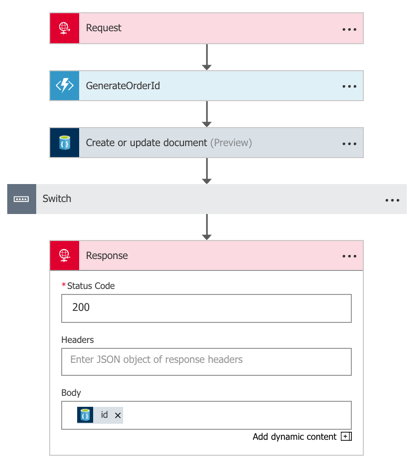
    Whew. Last step to do? Send an HTTP response back to the caller, containing the auto-generated order ID. Ok, my entire flow was finished. It took in a message, added it to DocumentDB, and based on a set of conditions, also shipped it over the Azure Service Bus.

    2017-02-22-logicapps-22

    Step 9 – Test this thing!

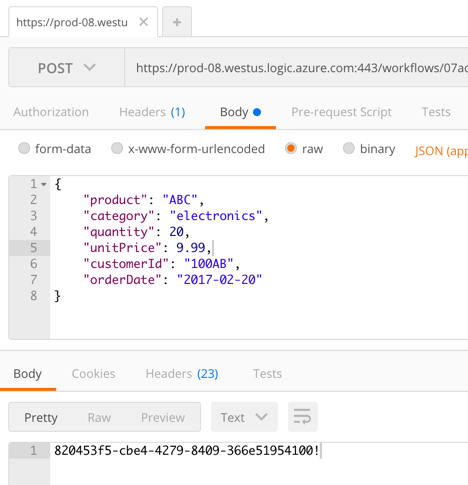
    I grabbed the URL for the Logic App from the topmost shape, and popped it into Postman. After sending in the JSON payload, I got back a GUID representing the generated order ID.

    2017-02-22-logicapps-23

    That’s great and all, but I needed to confirm everything worked! DocumentDB with a Function-generated ID? Check.

    2017-02-22-logicapps-24

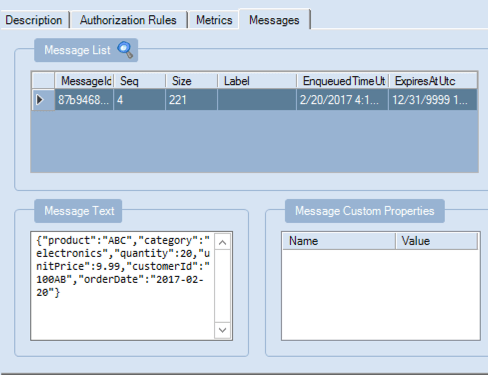
    Service Bus message viewable via the Service Bus Explorer? Check.

    2017-02-22-logicapps-25

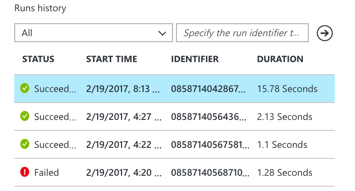
    The Logic Apps overview page on the Azure Portal also shows a “run history” and lets you inspect the success/failure of each step. This is new, and very useful.

    2017-02-22-logicapps-26

    Summary

    All in all, this was pretty straightfoward. The Azure Portal still has some UI quirks, but a decent Azure dev can crank out the above flow in 20 minutes. That’s pretty powerful. Keep an eye on Logic Apps, and consider taking it for a spin!