Category: General Architecture

  • My new Pluralsight course—Developing Java microservices with Spring Cloud—is now available

    Java is back. To be sure, it never really left, but it did appear to take a backseat during the past decade. While new, lightweight, mobile-friendly languages rose to prominence, Java—saddled with cumbersome frameworks and an uncertain future—seemed destined to be used only by the most traditional of enterprises.

    But that didn’t happen. It wasn’t just enterprises that depended on Java, but innovative startups. And heavyweight Java frameworks evolved into more approachable, simple-to-use tools. Case in point: the open-source Spring dependency injection framework. Spring’s been a mainstay of Java development for years, but its XML-heavy configuration model made it increasingly unwieldy. Enter Spring Boot in 2014. Spring Boot introduced an opinionated, convention-over-configuration model to Spring and instantly improved developer productivity. And now, companies large and small are using it at an astonishing rate.

    Spring Cloud followed in 2015. This open-source project included a host of capabilities—including a number of projects from Netflix engineering—for teams building modern web apps and distributed systems. It’s now downloaded hundreds of thousands of times per month.

    Behind all this Spring goodness is Pivotal, the company I work for. We’re the primary sponsor of Spring and after joining Pivotal in April, I thought it’d be fun to teach a course on these technologies. There’s just so much going on in Spring Cloud, that I’m doing a two-partner. First up: Java Microservices with Spring Cloud: Developing Services.

    In this five-hour course, we look at some of the Spring Cloud projects that help you build modern microservices. In the second part of the course (which I’m starting on soon), we’ll dig into the Spring Cloud projects that help you coordinate interactions between microservices (think load balancing, circuit breakers, messaging). So what’s in this current course? It’s got five action-packed modules:

    1. Introduction to Microservices, Spring Boot, and Spring Cloud. Here we talk about the core characteristics of microservices, describe Spring Boot, build a quick sample app using Spring Boot, walk through the Spring Cloud projects, and review the apps we’ll build throughout the course.
    2. Simplifying Environment Managed with Centralized Config. Spring Cloud Config makes it super easy to stand up and consume a Git-backed configuration store. In this module we see how to create a Config Server, review all the ways to query configs, see how to setup secure access, work to configure encryption, and more. What’s cool is that the Config Server is HTTP accessible, so while it’s simple to consume in Spring Boot apps with annotated variables, it’s almost just as easy to consume from ANY other type of app.
    3. Offloading Async Activities with Lightweight, Short-Lived Tasks. Modern software teams don’t just build web apps. No, more and more microservices are being built as short-lived, serverless activities. Here, we look at Spring Cloud Task explore how to build event-driven services that get instantiated, do their work, and gracefully shut down. We see how to build Tasks, store their execution history in a MySQL database, and even build a Task that gets instantiated by an HTTP-initiated message to RabbitMQ.
    4. Securing Your Microservices with a Declarative Model. As an industry, we keep SAYING that security is important in our apps, but it still seems to be an area of neglect. Spring Cloud Security is for teams that recognize the challenge of applying traditional security approaches to microservices, and want an authorization scheme that scales. In this module we talk about OAuth 2.0, see how to perform Authorization Code flows, build our own resource server and flow tokens between services, and even build a custom authorization server. Through it all, we see how to add annotations to code that secure our services with minimal fuss.
    5. Chasing Down Performance Issues Using Distributed Tracing. One of the underrated challenges of building microservices is recognizing the impact of latency on a distributed architecture. Where are there problems? Did we create service interactions that are suboptimal? Here, we look at Spring Cloud Sleuth for automatic instrumentation of virtually EVERY communication path. Then we see how Zipkin surfaces latency issues and lets you instantly visualize the bottlenecks.

    This course was a labor of love for the last 6 months. I learned a ton, and I think I’ve documented and explained things that are difficult to find elsewhere in one place. If you’re a Java dev or looking to add some cloud-native patterns to your microservices, I hope you’ll jet over to Pluralsight and check this course out!

  • Using Steeltoe for ASP.NET 4.x apps that need a microservices-friendly config store

    Using Steeltoe for ASP.NET 4.x apps that need a microservices-friendly config store

    Nowadays, all the cool kids are doing microservices. Whether or not you care, there ARE some really nice distributed systems patterns that have emerged from this movement. Netflix and others have shared novel solutions for preventing cascading failures, discovering services at runtime, performing client-side load balancing, and storing configurations off-box. For Java developers, many of these patterns have been baked into turnkey components as part of Spring Cloud. But what about .NET devs who want access to all this goodness? Enter Steeltoe.

    Steeltoe is an open-source .NET project that gives .NET Framework and .NET Core developers easy access to Spring Cloud services like Spring Cloud Config (Git-backed config server) and Spring Cloud Eureka (service discovery from Netflix). In this blog post, I’ll show you how easy it is to create a config server, and then connect to it from an ASP.NET app using Steeltoe.

    Why should .NET devs care about a config server? We’ve historically thrown our (sometimes encrypted) config values into web.config files or a database. Kevin Hoffman says that’s now an anti-pattern because you end up with mutable build artifacts and don’t have an easy way to rotate encryption keys. With fast-changing (micro)services, and more host environments than ever, a strong config strategy is a must. Spring Cloud Config gives you a web-scale config server that supports Git-backed configurations,  symmetric or asymmetric encryption, access security, and no-restart client refreshes.

    Many Steeltoe demos I’ve seen use .NET Core as the runtime, but my non-scientific estimate is that 99.991% of all .NET apps out there are .NET 4.x and earlier, so let’s build a demo with a Windows stack.

    Before starting to build the app, I needed actual config files! Spring Cloud Config works with local files, or preferably, a Git repo. I created a handful of files in a GitHub repository that represent values for an “inventory service” app. I have one file for dev, QA, and production environments. These can be YAML files or property files.

    2016-10-18-steeltoe07

    Let’s code stuff. I went and built a simple Spring Cloud Config server using Spring Tool Suite. To say “built” is to overstate how silly easy it is to do. Whether using Spring Tool Suite or the fantastic Spring Initializr site, if it takes you more than six minutes to build a config server, you must be extremely drunk.

    2016-10-18-steeltoe01

    Next, I chose which dependencies to add to the project. I selected the Config Server, which is part of Spring Cloud.

    2016-10-18-steeltoe02

    With my app scaffolding done, I added a ton of code to serve up config server endpoints, define encryption/decryption logic, and enable auto-refresh of clients. Just kidding. It takes a single annotation on my main Java class:

    import org.springframework.boot.SpringApplication;
    import org.springframework.boot.autoconfigure.SpringBootApplication;
    import org.springframework.cloud.config.server.EnableConfigServer;
    
    @SpringBootApplication
    @EnableConfigServer
    public class BlogConfigserverApplication {
    
    	public static void main(String[] args) {
    		SpringApplication.run(BlogConfigserverApplication.class, args);
    	}
    }
    

    Ok, there’s got to be more than that, right? Yes, I’m not being entirely honest. I also had to throw this line into my application.properties file so that the config server knew where to pull my GitHub-based configuration files.

    spring.cloud.config.server.git.uri=https://github.com/rseroter/blog-configserver
    

    That’s it for a basic config server. Now, there are tons of other things you CAN configure around access security, multiple source repos, search paths, and more. But this is a good starting point. I quickly tested my config server using Postman and saw that by just changing the profile (dev/qa/default) in the URL, I’d pull up a different config file from GitHub. Spring Cloud Config makes it easy to use one or more repos to serve up configurations for different apps representing different environments. Sweet.

    2016-10-18-steeltoe03

    Ok, so I had a config server. Next up? Using Steeltoe so that my ASP.NET 4.6 app could easily retrieve config values from this server.

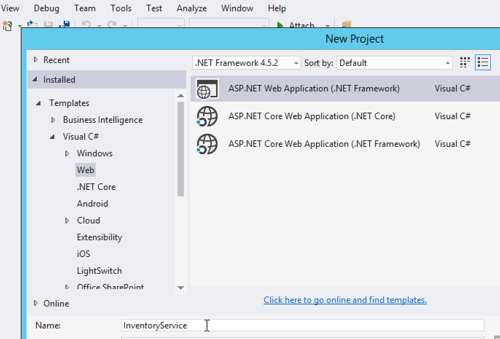
    I built a new ASP.NET MVC app in Visual Studio 2015.

    2016-10-18-steeltoe04

    Next, I searched NuGet for Steeltoe, and found the configuration server library.

    2016-10-18-steeltoe05

    Fortunately .NET has some extension points for plugging in an outside configuration source. First, I created a new appsettings.json file at the root of the project. This file describes a few settings that help map to the right config values on the server. Specifically, the name of the app and URL of the config server. FYI, the app name corresponds to the config file name in GitHub. What about whether we’re using dev, test, or prod? Hold on, I’m getting there dammit.

    {
        "spring": {
            "application": {
               "name": "inventoryservice"
             },
            "cloud": {
               "config": {
                 "uri": "[my ip address]:8080"
               }
            }
        }
    }
    

    Next up, I created the class in the “App_Start” project folder that holds the details of our configuration, and looks to the appsettings.json file for some pointers. I stole this class from the nice Steeltoe demos, so don’t give me credit for being smart.

    using System;
    using System.Collections.Generic;
    using System.Linq;
    using System.Web;
    
    //added by me
    using Microsoft.AspNetCore.Hosting;
    using System.IO;
    using Microsoft.Extensions.FileProviders;
    using Microsoft.Extensions.Configuration;
    using Steeltoe.Extensions.Configuration;
    
    namespace InventoryService
    {
        public class ConfigServerConfig
        {
            public static IConfigurationRoot Configuration { get; set; }
    
            public static void RegisterConfig(string environment)
            {
                var env = new HostingEnvironment(environment);
    
                // Set up configuration sources.
                var builder = new ConfigurationBuilder()
                    .SetBasePath(AppDomain.CurrentDomain.BaseDirectory)
                    .AddJsonFile("appsettings.json")
                    .AddConfigServer(env);
    
                Configuration = builder.Build();
            }
        }
        public class HostingEnvironment : IHostingEnvironment
        {
            public HostingEnvironment(string env)
            {
                EnvironmentName = env;
            }
    
            public string ApplicationName
            {
                get
                {
                    throw new NotImplementedException();
                }
    
                set
                {
                    throw new NotImplementedException();
                }
            }
    
            public IFileProvider ContentRootFileProvider
            {
                get
                {
                    throw new NotImplementedException();
                }
    
                set
                {
                    throw new NotImplementedException();
                }
            }
    
            public string ContentRootPath
            {
                get
                {
                    throw new NotImplementedException();
                }
    
                set
                {
                    throw new NotImplementedException();
                }
            }
    
            public string EnvironmentName { get; set; }
    
            public IFileProvider WebRootFileProvider { get; set; }
    
            public string WebRootPath { get; set; }
    
            IFileProvider IHostingEnvironment.WebRootFileProvider
            {
                get
                {
                    throw new NotImplementedException();
                }
    
                set
                {
                    throw new NotImplementedException();
                }
            }
        }
    }
    

    Nearly done! In the Global.asax.cs file, I needed to select which “environment” to use for my configurations. Here, I chose the “default” environment for my app. This means that the Config Server will return the default profile (configuration file) for my application.

    protected void Application_Start()
    {
      AreaRegistration.RegisterAllAreas();
      RouteConfig.RegisterRoutes(RouteTable.Routes);
    
      //add for config server, contains "profile" used
      ConfigServerConfig.RegisterConfig("default");
    }
    

    Ok, now to the regular ASP.NET MVC stuff. I added a new HomeController for the app, and looked into the configuration for my config value. If it was there, I added it to the ViewBag.

    public ActionResult Index()
    {
       var config = ConfigServerConfig.Configuration;
       if (null != config)
       {
           ViewBag.dbserver = config["dbserver"] ?? "server missing :(";
       }
    
       return View();
    }
    

    All that was left was to build a View to show the glorious result. I added a new Index.cshtml file and just printed out the value from the ViewBag. After starting up the app, I saw that the value printed out matches the value in the corresponding GitHub file:

    2016-10-18-steeltoe06

    If you’re a .NET dev like me, you’ll love Steeltoe. It’s easy to use and provides a much more robust, secure solution for app configurations. And while I think it’s best to run .NET apps in Pivotal Cloud Foundry, you can run these Steeltoe-powered .NET services anywhere you want.

    Steeltoe is still in a pre-release mode, so try it out, submit GitHub issues, and give the team feedback on what else you’d like to see in the library.

  • 12 ways that software engineering is like bridgebuilding

    12 ways that software engineering is like bridgebuilding

    Brooklyn Bridge. By Postdlf at the English language Wikipedia, CC BY-SA 3.0, https://commons.wikimedia.org/w/index.php?curid=1148431I just finished reading “The Great Bridge: The Epic Story of the Building of the Brooklyn Bridge” by David McCullough. It’s a long, intriguing story that it inspired parts of my new whitepaper about Netflix OSS. My buddy James liked my linkage between bridgebuilding and software engineering.

    https://twitter.com/jetpack/status/781919565831954432

    To be sure, software teams rarely take fourteen years to deliver a final product and the stakes may be different. But there are some fundamental lessons learned from the construction of the Brooklyn Bridge that apply to us in the software business.

    Lesson 1 – You need a strong lead engineer

    The original architect of the Brooklyn Bridge was John Roebling. He died before construction started, and his son Washington took over as chief engineer. Washington was also considered an expert in the field, and his experience and attention to detail established him as the authority on the project. However, he also brought on talented lieutenants who managed many of the day-to-day activities. Roebling was extremely hands on and stayed actively engaged, even when he became home-bound due to illness.

    On software projects, you also need an accomplished, hands-on engineering leader. I’m all for self-organizing teams, but you also expect that someone rises to the top and helps direct the effort. At the same time, there should be many leaders on a team who can step in for the lead engineer or own sub-activities without any oversight.

    Lesson 2- Seek out best practices from your peers

    I started off my whitepaper with an anecdote about the lack of knowledge sharing among bridgebuilders. Back then, engineers weren’t inclined to share their best practices and the field was quite competitive. However, Roebling did go to Europe for a year to learn about the latest advances in bridgebuilding, and found a number of willing collaborators. He brought that knowledge home and applied it in ways that were uncommon in the U.S.

    Likewise, software teams can’t operate in a vacuum. Now more than ever, there are significant advances in software architecture patterns and technologies, and we need to seek out our peers and learn from their experience. Go to conferences, read blogs, follow people on Twitter. If you only source ideas from in-house folks, you’re in trouble.

    Lesson 3 – Visible progress builds momentum

    There were MANY parties who objected to the construction of the Brooklyn Bridge. Chiefly, the existing water-based shipping and transportation industries that stood to get disrupted by this hulking bridge crossing the river. People wouldn’t need ferries to get to Brooklyn, and some tall ships might not be able to make it under the bridge. Once the massive bridge towers started taking shape, momentum for the bridge increased. People felt a sense of ownership of this magnificent structure and it was harder to claim that the bridge would be a failure or wasn’t worth doing.

    Software can be disruptive. Not just to competitors, but within the company itself. Antibodies within a company swarm to disruptive changes and try to put a halt to them because it upends their comfortable status quo. Software teams can’t get bogged down in lengthy design periods, as the apparent lack of progress threatens to derail their effort. Ship early and often to build momentum and create the perception of unstoppable progress.

    Lesson 4 – Respect the physical dangers of your work

    As you can imagine, building a bridge is dangerous. Especially 120+ years ago. During construction of the Brooklyn Bridge, a number of people were killed or injured. Some were killed when they ignored safety protocols, and many were injured due to accidents. And dozens experienced temporary, partial paralysis due to “caisson disease” because no one understood the impact of working deep underwater.

    Building software has its own dangers. While I doubt you face risks of multi-ton blocks of granite falling on you—unless you work in a peculiar open-office design—there are real health risks associated with modern software development. Listen to John Willis talk about burnout. It’s sobering. As a software industry, we often, stupidly, celebrate how many hours a team worked or how little sleep they got to deliver a project. Putting people in a high-stress environment for weeks or months on end is mentally AND physically dangerous. Recognize that, and take care of yourself and your team!

    Lesson 5 – Adapt to changing conditions and new information

    You might think that bridgebuilding is all about upfront design. Traditional waterfall projects. However, while the Brooklyn Bridge started out with a series of extremely detailed schematics, the engineers CONSTANTLY adjusted their plan based on the latest information. When the team started digging the New York side of the bridge base, they had no idea how deep they’d have to go. That answer would impact a cascading series of dependencies that had to be adjusted on the fly. The engineers didn’t believe they could factor everything in up front, and instead, stayed closely in tune to the construction process so that they could continually adjust.

    Software engineering is the same. There’s a reason why many developers detest waterfall project delivery! Agile isn’t perfect, but at least it’s realistic. Teams have to deliver in small batches and learn along the way. It’s remarkably difficult to design something upfront and expect that NOTHING will change during the subsequent construction.

    Lesson 6 – It’s critical to do testing along the way

    In reading this book, I was struck by how much math was involved in building a bridge. The engineers constantly calculated every dimension—water pressure, wire strength, tension, and much more—and then re-calculated once pieces went into place. They did rigorous testing of the wire provided by suppliers to make sure that their assumptions were correct.

    Software teams are no different. Whether or not you think test-driven development works, I doubt anyone doubts the value of rigorous (automated) testing. That’s one reason I think continuous integration is awesome: test constantly and don’t assume that these pieces will magically fit together perfectly at some future date.

    Lesson 7 – Build for unexpected use cases

    Roebling didn’t take any chances. He wanted to build a bridge that would last for hundreds of years, and therefore made sure that his bridge was much stronger than it had to be. At nearly every stage, he added cushion to account for the unexpected. When building the caisson that protected the workers as they dug the bridge foundation, Roebling designed it to withstand a remarkable amount of pressure. Same goes for the wire that holds the bridge up. He built it to be 5-10x stronger than necessary. That’s one reason that the introduction of the automobile didn’t require any changes to the bridge. In fact, there were NO major changes needed for the Brooklyn Bridge for fifty years. That’s impressive.

    With microservices, we see this principle apply more and more. We don’t exactly know how everything will get used, and tight coupling gets us in trouble. While we need to avoid over-engineering in an attempt to future-proof our services, it is important to recognize that your software will likely be used in ways you didn’t anticipate.

    Lesson 8 – Don’t settle for the cheapest material and contractors

    “The lowest bidder.” Those are three scary words when you actually care about quality. With the Brooklyn Bridge, the board of directors went against Roebling’s strong advice and chose a wire manufacturer that was the lowest bidder, but led by a suspect individual. This manufacturer ended up committing fraud by exchanging accepted wire for rejected wire because they couldn’t manufacture enough quality material.

    When building software that matters, you better use tech that works, regardless of price. Now, with the prevalence of excellent open source software, it’s not always the software cost itself that come into play. But, who builds your software, and who supports it, matters a ton and shouldn’t go to whoever does it the cheapest. Smart companies invest in their people and splurge when necessary to get software they can trust.

    Lesson 9 – Invest in your foundation

    When building a bridge, the base matters. During the age when Roebling was learning about and building bridges, there were many bridge that collapsed due to poor design. That’s kinda terrifying. Roebling was laser-focused on building a strong foundation for his bridge, and as mentioned above, built his towers to an unheard-of strength.

    The foundation of your software is going to directly decide how successful you are. What is it running on? A homegrown hodge-podge of tech that you’re scared to reboot? A ten year old operating system that’s no longer supported? Stop that. Sure, I think Pivotal Cloud Foundry is just about the best foundation you can have, but I don’t care what you choose. Your software foundation should be rock-solid, reliable, and a little boring.

    Lesson 10 – Accept that politics are necessary

    As you can imagine, embarking on one of the most expensive infrastructure projects in the history of the world required some strange bedfellows. In the case of the Brooklyn Bridge, it meant getting the support of the shady Boss Tweed. Likewise, Roebling and team had to constantly answer to a host of politicians who used the bridge as part of the political platforms.

    Software projects aren’t immune from politics. New projects may disrupt the status quo and make enemies within impacted organizations. Unexpected costs could require broad support from financial stakeholders. I’ve learned the hard way that you need a wide set of high-ranking supporters to have your back when projects or products hit a wall. Don’t take an “us-against-the-world” approach if you want to win.

    Lesson 11 – Be transparent on progress, but not TOO transparent

    Given the costs of the bridge, it’s easy to see why there was a lot of oversight and scrutiny. The engineers were constantly paraded in front of the board of directors to answer questions and share their progress. In some cases, they kept certain internal engineering debates private because they didn’t want non-technical stakeholders freaking out. It was important to openly share major issues, but airing ALL of the challenges would have led to clueless politicians blowing minor issues out of proportion.

    This is the same case when building software. I’m sure we’ve all had to roll-up our progress in a series of status reports to the various stakeholders. And even within our software teams, we’ve shared our progress at a morning standup. It’s super important to be honest in these settings. But, there are also issues that are best resolved within the team and not carelessly shared with those that cannot understand the implications. It’s a fine line, but one that good teams know how to straddle.

    Lesson 12 – Celebrate success!

    When the bridge was finally done, there was a massive party. The President of the United States, along with a whole host of luminaries, led a parade across the Brooklyn Bridge and partied for hours afterwards. The engineers were celebrated, and those that had poured years of their life into this project felt a profound sense of pride.

    Software teams have to do this as well. With our modern continuous delivery mindset, there aren’t as many major release milestones to rally around. However, it’d be a mistake to stop the tradition of pausing to reflect on progress, celebrate the accomplishment, and recognize those that worked hard.


  • Modern Open Source Messaging: Apache Kafka, RabbitMQ and NATS in Action

    Modern Open Source Messaging: Apache Kafka, RabbitMQ and NATS in Action

    Last week I was in London to present at INTEGRATE 2016. While the conference is oriented towards Microsoft technology, I mixed it up by covering a set of messaging technologies in the open source space; you can view my presentation here. There’s so much happening right now in the messaging arena, and developers have never had so many tools available to process data and link systems together. In this post, I’ll recap the demos I built to test out Apache Kafka, RabbitMQ, and NATS.

    One thing I tried to make clear in my presentation was how these open source tools differ from classic ESB software. A few things you’ll notice as you check out the technologies below:

    • Modern brokers are good at one thing. Instead of cramming in every sort of workflow, business intelligence, and adapter framework in the software, these OSS services are simply great at ingesting and routing lots of data. They are typically lightweight, but deployable in highly available configurations as well.
    • Endpoints now have significant responsibility. Traditional brokers took on tasks such as message transformation, reliable transportation, long-running orchestration between endpoints, and more. The endpoints could afford to be passive, mostly-untouched participants in the integration. These modern engines don’t cede control to a centralized bus, but rather use the bus only to transport opaque data. Endpoints need to be smarter and I think that’s a good thing.
    • Integration is approachable for ALL devs. Maybe a controversial opinion, but I don’t think integration work belongs in an” integration team.” If agility matters to you, then you can’t silo off a key function and force (micro)service teams to line up to get their work done. Integration work needs to be democratized, and many of these OSS tools make integration very approachable to any developer.

    Apache Kafka

    With Kafka you can do both real-time and batch processing. Ingest tons of data, route via publish-subscribe (or queuing). The broker barely knows anything about the consumer. All that’s really stored is an “offset” value that specifies where in the log the consumer left off. Unlike many integration brokers that assume consumers are mostly online, Kafka can successfully persist a lot of data, and supports “replay” scenarios. The architecture is fairly unique; topics are arranged in partitions (for parallelism), and partitions are replicated across nodes (for high availability).

    For this set of demos, I used Vagrant to stand up an Ubuntu box, and then installed both Zookeeper and Kafka. I also installed Kafka Manager, built by the engineering team at Yahoo!. I showed the conference audience this UI, and then added a new topic to hold server telemetry data.

    2016-05-17-messaging01

    All my demo apps were built with Node.js. For the Kafka demos, I used the kafka-node module. The consumer is simple: write 50 messages to our “server-stats” Kafka topic.

    var serverTelemetry = {server:'zkee-022', cpu: 11.2, mem: 0.70, storage: 0.30, timestamp:'2016-05-11:01:19:22'};
    
    var kafka = require('../../node_modules/kafka-node'),
        Producer = kafka.Producer,
        client = new kafka.Client('127.0.0.1:2181/'),
        producer = new Producer(client),
        payloads = [
            { topic: 'server-stats', messages: [JSON.stringify(serverTelemetry)] }
        ];
    
    producer.on('error', function (err) {
        console.log(err);
    });
    producer.on('ready', function () {
    
        console.log('producer ready ...')
        for(i=0; i<50; i++) {
            producer.send(payloads, function (err, data) {
                console.log(data);
            });
        }
    });
    

    Before consuming the data (and it doesn’t matter that we haven’t even defined a consumer yet; Kafka stores the data regardless), I showed that the topic had 50 messages in it, and no consumers.

    2016-05-17-messaging02

    Then, I kicked up a consumer with a group ID of “rta” (for real time analytics) and read from the topic.

    var kafka = require('../../node_modules/kafka-node'),
        Consumer = kafka.Consumer,
        client = new kafka.Client('127.0.0.1:2181/'),
        consumer = new Consumer(
            client,
            [
                { topic: 'server-stats' }
            ],
            {
                groupId: 'rta'
            }
        );
    
        consumer.on('message', function (message) {
            console.log(message);
        });
    

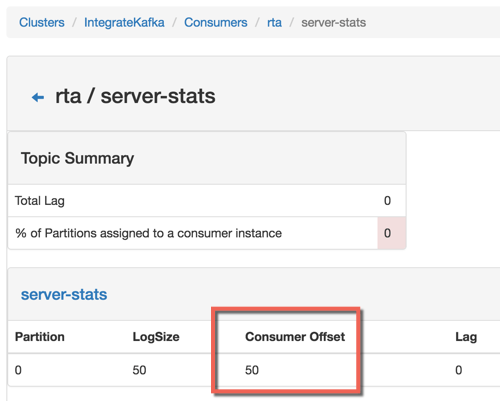
    After running the code, I could see that my consumer was all caught up, with no “lag” in Kafka.
    2016-05-17-messaging03
    For my second Kafka demo, I showed off the replay capability. Data is removed from Kafka based on an expiration policy, but assuming the data is still there, consumers can go back in time and replay from any available point. In the code below, I go back to offset position 40 and read everything from that point on. Super useful if apps fail to process data and you need to try again, or if you have batch processing needs.

    var kafka = require('../../node_modules/kafka-node'),
        Consumer = kafka.Consumer,
        client = new kafka.Client('127.0.0.1:2181/'),
        consumer = new Consumer(
            client,
            [
                { topic: 'server-stats', offset: 40 }
            ],
            {
                groupId: 'rta',
                fromOffset: true
            }
        );
    
        consumer.on('message', function (message) {
            console.log(message);
        });
    

    RabbitMQ

    RabbitMQ is a messaging engine that follows the AMQP 0.9.1 definition of a broker. It follows a standard store-and-forward pattern where you have the option to store the data in RAM, on disk, or both. It supports a variety of message routing paradigms. RabbitMQ can be deployed in a clustered fashion for performance, and mirrored fashion for high availability. Consumers listen directly on queues, but publishers only know about “exchanges.” These exchanges are linked to queues via bindings, which specify the routing paradigm (among other things).

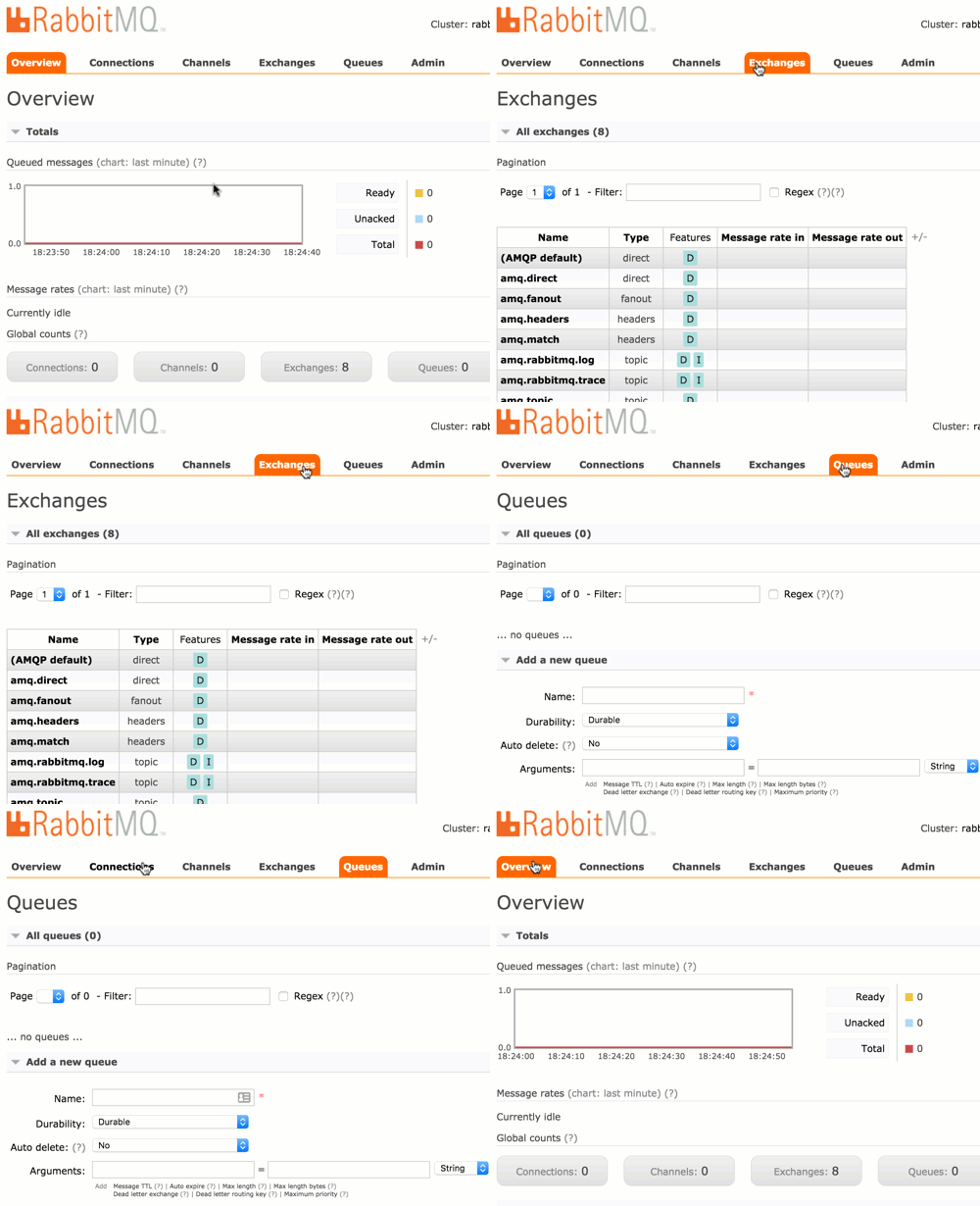
    For these demos (I only had time to do two of them at the conference), I used Vagrant to build another Ubuntu box and installed RabbitMQ and the management console. The management console is straightforward and easy to use.
    2016-05-17-messaging04

    For the first demo, I did a publish-subscribe example. First, I added a pair of queues: notes1 and notes2. I then showed how to create an exchange. In order to send the inbound message to ALL subscribers, I used a fanout routing type. Other options include direct (specific routing key), topic (depends on matching a routing key pattern), or headers (route on message headers).
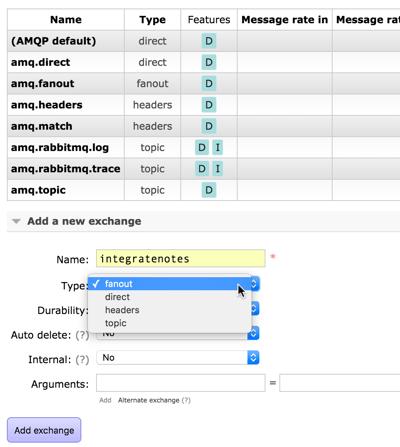
    2016-05-17-messaging05

    I have an option to bind this exchange to another exchange or a queue. Here, see that I bound it to the new queues I created.

    2016-05-17-messaging06

    Any message into this exchange goes to both bound queues. My Node.js application used the amqplib module to publish a message.

    var amqp = require('../../node_modules/amqplib/callback_api');
    
    amqp.connect('amqp://rseroter:rseroter@localhost:5672/', function(err, conn) {
      conn.createChannel(function(err, ch) {
        var exchange = 'integratenotes';
    
        //exchange, no specific queue, message
        ch.publish(exchange, '', new Buffer('Session: Open-source messaging. Notes: Richard is now showing off RabbitMQ.'));
        console.log(" [x] Sent message");
      });
      setTimeout(function() { conn.close(); process.exit(0) }, 500);
    });
    

    As you’d expect, both apps listening on the queue got the message. The second demo used a direct routing with specific routing keys. This means that each queue will receive messages if their binding matches the provided routing key.

    2016-05-17-messaging07

    That’s handy, but you can also use a topic binding and then apply wildcards. This helps you route based on a pattern matching scenario. In this case, the first queue will receive a message if the routing key has 3 sections separated by a period, and the third value equals “slides.” So “day2.seroter.slides” would work, but “day2.seroter.recap” wouldn’t. The second queue gets a message only if the routing key starts with “day2”, has any middle value, and then “recap.”

    2016-05-17-messaging08

    NATS

    If you’re looking for a high velocity communication bus that supports a host of patterns that aren’t realistic with traditional integration buses, then NATS is worth a look! NATS was originally built with Ruby and achieved a respectable 150k messages per second. The team rewrote it in Go, and now you can do an absurd 8-11 million messages per second. It’s tiny, just a 3MB Docker image! NATS doesn’t do persistent messaging; if you’re offline, you don’t get the message. It works as a publish-subscribe engine, but you can also get synthetic queuing. It also aggressively protects itself, and will auto-prune consumers that are offline or can’t keep up.

    In my first demo, I did a poor man’s performance test. To be clear, this is not a good performance test. But I wanted to show that even a synchronous loop in Node.js could achieve well over a million messages per second. Here I pumped in 12 million messages and watched the stats using nats-top.

    2016-05-17-messaging09

    1.6 million messages per second, and barely using any CPU. Awesome.

    The next demo was a new type of pattern. In a microservices world, it’s important to locate service at runtime, not hard-code references to them at design time. Solutions like Consul are great, but if you have a performant message bus, you can actually use THAT as the right loosely coupled intermediary. Here, an app wants to look up a service endpoint, so it publishes a request and waits to hear back from which service instances are online.

    // Server connection
    var nats = require('../../node_modules/nats').connect();
    
    console.log('startup ...');
    
    nats.request('service2.endpoint', function(response) {
        console.log('service is online at endpoint: ' + response);
    });
    

    Each microservice then has a listener attached to NATS and replies if it gets an “are you online?” request.

    // Server connection
    var nats = require('../../node_modules/nats').connect();
    
    console.log('startup ...');
    
    //everyone listens
    nats.subscribe('service2.endpoint', function(request, replyTo) {
        nats.publish(replyTo, 'available at http://www.seroter.com/service2');
    });
    

    When I called the endpoint, I got back a pair of responses, since both services answered. The client then chooses which instance to call. Or, I could put the service listeners into a “queue group” which means that only one subscriber gets the request. Given that consumers aren’t part of the NATS routing table if they are offline, I can be confident that whoever responds, is actually online.

    // Server connection
    var nats = require('../../node_modules/nats').connect();
    
    console.log('startup ...');
    
    //subscribe with queue groups, so that only one responds
    nats.subscribe('service2.endpoint', {'queue': 'availability'}, function(request, replyTo) {
        nats.publish(replyTo, 'available at http://www.seroter.com/service2');
    });
    

    It’s a cool pattern. It only works if you can trust your bus. Any significant delay introduced by the messaging bus, and your apps slow to a crawl.

    Summary

    I came away from INTEGRATE 2016 impressed with Microsoft’s innovative work with integration-oriented Azure services. Event Hubs, Logic Apps and the like are going to change how we process data and events in the cloud. For those who want to run their own engines – and at no commercial licensing cost – it’s exciting to explore the open source domain. Kafka, RabbitMQ, and NATS are each different, and may complement your existing integration strategy, but they’re each worth a deep look!

  • Do Apps Based on Packaged Software Belong in the Cloud? Five Options to Consider …

    Has your company been in business for more than a couple years? If so, it’s likely that you’ve installed and use packaged software, also know as commercial off-the-shelf (COTS) software. For some, the days of installing software via CD/DVD (or now, downloads) is drawing to a close as SaaS providers rapidly take the place of installing and running software on your own. But, what do you do about all those existing apps that probably run mission critical workloads and host your most strategic business logic and data? In this post, I’m playing around with ideas for what companies can do with their apps based on packaged software, and offering five options.

    What types of packaged software are we talking about here? The possibilities are seemingly endless. Client-server products, web applications, middleware, databases, infrastructure services (like email, directory services). Your business likely runs on things like Microsoft Dynamics CRM, JD Edwards Enterprise One, Siebel systems, learning management systems, inventory apps,  laboratory information management systems, messaging engines like BizTalk Server, databases like SQL Server, and so on. The challenge is that the cloud is different from traditional server environments. The value of the cloud is agility and elasticity. Few, if any, packaged software products are defined with 12-factor concepts in mind. They can’t automatically take advantage of the rapid deployment, instant scaling, or distributed services that are inherent in the cloud. Worse, these software packages aren’t friendly to the ephemeral nature of cloud resources and respond poorly to servers or services that come and go without warning. 12 factor apps cater to custom built solutions where you can own startup routines, state management, logging, and service discovery. Apps like THAT can truly take off in cloudy environments!

    So where should your apps run? That’s a loaded question with no single answer. It depends on your isolation needs and what’s available to you. From a location perspective, they can run today on dedicated servers onsite, hosted servers elsewhere, on-premises virtualization environments, public clouds, or private clouds. You’ve probably got a mix of all that today (if surveys are to be believed). From the perspective of cloudy delivery models, your apps might run on raw servers (IaaS), platform abstractions, or with a SaaS provider. As an aside, I haven’t seen many PaaS-like environments that work cleanly with packaged software, but it’s theoretically possible. Either way, I’ve met very few companies where “we’re great at running apps!” is a core competency that generates revenue for that business. Ideally, applications run in the place that offers the most accessibility, least intervention, and the greatest ability to redirect talented staff to high priority activities.

    I see five options for you to consider when figuring out what to do with your packaged software:

    Option #1 – Leave it the hell alone.

    If it ain’t broke, don’t fix it, amiright? That’s a terrible saying that’s wrong for so many reasons, but there are definitely cases where it’s not worth it to change something.

    Why do it?

    The packaged software might be hyper-specialized to your industry, and operate perfectly fine wherever it’s running. There’s no way to SaaS-ify it, and you see no real benefit in hosting it offsite. There could be a small team that keeps it up and running, and therefore it’s supportable in an adequate fashion. There’s no longer a licensing cost, and it’s fairly self-sufficient. Or the app is only used by a limited set of people, and therefore it’s difficult to justify the cost of migrating it.

    Why don’t do it?

    In my experience, there are tons of apps squirreled away in your organization, many of which have long outlived their usefulness or necessity and aren’t nearly as “self-sufficient” as people think. Rather than take my colleague Jim Newkirk’s extreme advice – he says to turn off all the apps once a year, and only turn apps back on once someone asks for it – I do see a lot of benefit to openly evaluating your portfolio and asking yourself why that app is running, and if the current host the right one. Leaving an app alone because it’s “not important enough” or “it works fine” might be ignoring hidden costs associated with infrastructure, software licensing, or 3rd party support. The total cost of ownership may be higher than you think. If you do nothing else, at least consider option #2 for more elastic development/test environments!


    Option #2 – Lift-and-shift to IaaS

    Unfortunately, picking up an app as-is and moving it to a cloud environment is is seen by many as the end-state for a “journey to the cloud.” It ignores the fundamental architectural and business model shifts that cloud introduces. But, it’s a start.

    Why do it?

    A move to cloud IaaS (private/public/whatever) gets you out of underutilized environments and into more dynamic, feature-rich sandboxes. Even if all you’re doing is taking that packaged app and running it in an infrastructure cloud, you’ll likely see SOME benefits. You’ll likely have access to more powerful hardware, enjoy the ability to right-size the infrastructure on demand, get easier access to that software by making it Internet-accessible, and have access to more API-centric tools for managing the app environment.

    Why don’t do it?

    Check out my cloud migration checklist for some of the things you really need to consider before doing a lift-and-shift migration. I could make an argument that apps that require users or services to know a server by name shouldn’t go to the cloud. But unless you rebuild your app in a server-less, DNS-friendly, service-discovery driven, 12-factor fashion, that’s not realistic. And, you may be missing out on some usefulness that the cloud can offer. However, your public/private IaaS or PaaS environment has all sorts of cloudy capabilities like auto-scaling, usage APIs, subscription APIs, security policy management, service catalogs and more that are tough to use with closed-source, packaged software. A lift-and-shift approach can give you the quick-win of adopting cloud, but will likely leave you disappointed with all the things you can’t magically take advantage of just because the app is running “in the cloud.” Elasticity is so powerful, and a lift-and-shift approach only gets you part of the way there. It also doesn’t force you to assess the business impact of adopting cloud as a whole.


    Option #3 – Migrate to SaaS version of same product

    Most large software vendors have seen the writing on the wall and are offering cloud-like versions of their traditionally boxed software. Companies from Adobe to Oracle are offering as-a-Service flavors of their flagship products.

    Why do it?

    If – and that’s a big “if” – your packaged software vendor offers a SaaS version of their software, then this likely provides the smoothest transition to the cloud.  Assuming the cloud version isn’t a complete re-write of the packaged version, then your configurations and data should move without issue. For instance, if you use Microsoft Dynamics CRM, then shifting to Microsoft CRM Online isn’t a major deal. Moving your packaged app to the cloud version means that you don’t deal with software upgrades any longer, you switch to a subscription-based consumption model versus Capex+Opex model, and you can scale capacity to meet your usage.

    Why don’t do it?

    Some packaged software products allow you do make some substantial customizations. If you’ve built custom adapters, reports directly against the database, JavaScript in the UI, or integrations with your messaging engine, then it may be difficult to keep most of that in place in the SaaS version. In some cases, it becomes an entirely new app when switching to cloud, and it may be time to revisit your technology choices. There’s another reason to question this option: you’ll find some cases where the “cloud” option provided by the vendor is nothing more than hosting. On the surface, that’s not a huge problem. But, it becomes one when you think you’re getting elasticity, a different licensing model, and full self-service control. What you actually get is a ticket-based or constrained environment that simply runs somewhere else.


    Option #4 – Re-platform to an equivalent SaaS product

    “Adopting cloud” may mean transitioning from one product to another. In this option, you drop your packaged software product for a similar one that’s entirely cloud-based.

    Why do it?

    Sometimes a clean break is what’s needed to change a company’s status quo. All of the above options are “more of the same,” to some extent. A full embrace of the cloud means understanding that the services you deliver, who you deliver them to, and how you deliver them, can fundamentally change for the better. Determine whether your existing software vendor’s “cloud” offering is simply a vehicle to protect revenue and prevent customer defections, or whether it’s truly an innovative way to offer the service. If the former, then take a fresh look at the landscape and see if there’s a more cloud-native service that offers the capabilities to you need (and didn’t even KNOW you needed!). If you hyper-customized the software and can’t do option #3 above, then it may actually be simpler to start over, define a minimum viable release, and pare down to the capabilities that REALLY matter. Don’t make the mistake of just copying everything (logic, UX, data) from the legacy packaged software to the SaaS product.

    Why don’t do it?

    Cloud-based modernization may not be worth it, especially if you’re dealing with packaged software that doesn’t have a clear SaaS equivalent. While areas like CRM, ERP, creative suites, educational tools, and travel are well represented with SaaS products, there are packaged software products that cater to specific industries and aren’t available as-a-Service. While you could take a multi-purpose data-driven platform like Force.com and build it, I’m not sure it adds enough value to make up for the development cost and new maintenance burden. It might be better to lift and shift the working software to a cloud IaaS platform, or accept a non best-of-breed SaaS offering from the same vendor instead.


    Option #5 – Rebuild as cloud-native application

    The “build versus buy” discussion has been around for ages. With a smart engineering team, you might gain significant value from developing new cloud-native systems to replace legacy packaged software. However, you run a clear risk of introducing complexity where none is required.

    Why do it?

    If your team looks at the current and available solutions and none of them do what your business needs, then you need to consider building it. That packaged software that you bought in 2006 may have been awesome at generating pre-approvals for home loans, but now you probably need something API-enabled, Internet-accessible, highly available, and mobile friendly. If you don’t see a SaaS product that does what’s necessary, then it’s never been easier to compose solutions out of established libraries and cloud services. You could use something like Spring Cloud to build wicked cloud-native apps where all the messaging, configuration management, and discovery is simple, and you can focus your attention on building relevant microservices, user interfaces and data repositories. You can build apps today based on cloud-based database, mobile, messaging, and analytics systems, thus making your work more composition-driven versus building tons of raw infrastructure services. In some cases, building an app to replace packaged software will give you the flexibility and agility you’re truly after.

    Why don’t do it?

    While a seductive option, this one carries plenty of risk. Regardless of how many frameworks are available – and there are a borderline ridiculous number of app development and container-based frameworks today – it’s not trivial to build a modern application that replaces a comprehensive commercial software solution. Without very clear MVP criteria and iterative development, you can get caught in a development quagmire where “cool technology” bogs down your progress. And even if you successfully build a replacement app, there’s still the issue of maintaining it. If you’ve developed your own “platform” and then defined tons of microservices all connected through distributed messaging … well, you don’t necessarily have the most intuitive system to manage. Keep the full lifecycle in mind before embarking on such an effort.


    Summary

    The best thing to put in the cloud is new apps designed with the cloud in mind. However, there is real value in migrating or modernizing some of your existing software. Start with the value you’re trying to add with this software. What problem is it solving? Who uses this “service”? What process(es) is it part of? Never undertake any effort to change the user’s experience without answering questions like that. Once  you know the goal,  consider the options above when assessing where to run those packaged apps.

  • What’s hot in tech? Reviewing the latest ThoughtWorks Radar

    I don’t know how you all keep up with technology nowadays. Has there ever been such a rapid rate of change in fundamental areas? To stay current, one can attend the occasional conference, stay glued to Twitter, or voraciously follow tech sites like The New Stack, InfoQ, and ReadWrite. If you’re overwhelmed with all that’s happening and don’t know what to do, you should check out the twice-yearly ThoughtWorks RadarIn this post, I’ll take a quick walk through some of the highlights.

    2015.11.22radar01

    The Radar looks at trends in Technologies, Platforms, Tools, and Languages/Frameworks. For each focus area, they categorize things as “adopt”  (use it now), “trial” (try it and make sure it’s a fit for your org), “assess” (explore to understand the impact), and “hold” (don’t touch with a ten foot pole – just kidding).

    ThoughtWorks has a pretty good track record of trend spotting, but like anyone, they have some misses. It’s fun to look at their first Radar back in 2010 and see them call Google Wave a “promising platform.” But in the same Radar, they point out things that we now consider standard in any modern organization: continuous deployment, distributed version control systems, and non-relational databases. Not bad!

    They summarize the November 2015 Radar with the following trends: Docker incites container ecosystem explosion, microservices and related tools grow in popularity, JavaScript tooling settles down, and security processes get baked into the SDLC. Let’s look at some highlights.

    For Techniques, they push for the adoption of items that reflect the new reality of high-performing teams in fast-changing environments. Teams should be generating infrastructure diagrams on demand (versus meticulously crafting schematics that are instantly out of date), treating code deployments different than end-user-facing releases, creating integration contract tests for microservices, and focusing on products over projects. Companies should trial things like creating different backend APIs for each frontend client, using Docker for builds, using idempotency filters to check for duplicates, and doing QA in production. They also push for teams to strongly consider Phoenix environments and stop wasting so much time trying to keep existing environments up to date.ThoughtWorks encourages us to assess the idea of using bug bounties to uncover issues, data lakes for immutable raw data, hosted IDEs (like Codenvy and Cloud9), and reactive architectures. Teams should hold the envy: don’t create microservices or web-scale architectures just because “everyone else is doing it.” ThoughtWorks also tells us to stop adding lots of complex commands to our CI/CD tools, and stop creating standalone DevOps teams.

    What Platforms should you know about? Only a single thing ThoughtWorks says to adopt: time-based one-time passwords as two-factor authentication. You’re probably noticing that implemented on more and more popular websites. Lots of things you should trial. These include data-related platforms like CDN-provider Fastly, SQL-on-Hadoop with Cloudera Impala, real-time data processing with Apache Spark and developer-friendly predictive analytics with H2O.  Teams should also take a look at Apache Mesos for container scheduling (among other things) and Amazon Lambda for running short-lived, stateless services. You’ll find some container lovin’ in the assess category. Here you’ll find Amazon’s container service ECS, Deis for a Heroku-like PaaS that can run anywhere, and both Kubernetes and Rancher for container management. From a storage perspective, take a look at time-series databases and Ceph for object storage. Some interesting items to hold on. ThoughtWorks says to favor embedded (web) servers over heavyweight application servers, avoid get roped into overly ambitious API gateway products, and stay away from superficial private clouds that just offer a thin veneer on top of a virtualization platform.

    Let’s look at Tools. They, like me, love Postman and think you should adopt it for testing REST (and even SOAP) services. ThoughtWorks suggests a handful of items to trial. Take a deep look at the Docker toolbox for getting Docker up and running on your local machine, Consul for service discovery and health, Git tools for visualizing commands and scanning for sensitive content, and Sensu for a new way of monitoring services based on their role. Teams should assess the messaging tool Kafka, ConcourseCI for CI/CD, Gauge for test automation, Prometheus for monitoring and alerting, RAML as an alternative to Swagger, and the free Visual Studio Code.ThoughtWorks says to cut it out (hold) on Citrix remote desktops for development. Just use cloud IDEs or some other sandboxed environment!

    Finally, Languages & Frameworks has a few things to highlight. ThoughtWorks says to adopt ECMAScript 6 for modern JavaScript development, Nancy for HTTP services in .NET, and Swift for Apple development. Teams should trial React.js for JavaScript UI/view development, SignalR for server-to-client (websocket) apps in .NET environments, and Spring Boot for getting powerful Java apps up and running. You should assess tools for helping JavaScript, Haskell, Java and Ruby developers.

    Pick a few things from the Radar and dig into them further! Choose things that you’re entirely unfamiliar with, and break into some new, uncomfortable areas. It’s never been a more exciting time for using technology to solve real business problems, and tools like the ThoughtWorks Radar help keep you from falling behind on relevant trends.

  • Recent Presentations (With Video!): Transitioning to PaaS and DevOps

    I just finished up speaking at a  run of conferences (Cloud Foundry Summit, ALM Forum, and the OpenStack Summit) and the recorded presentations are all online.

    The Cloud Foundry Summit was excellent and you can find all the conference videos on the Cloud Foundry Youtube channel. I encourage you to watch some of the (brief) presentations by customers to hear now real people use application platforms to solve problems. My presentation (slides here) was about the enterprise transition to PaaS, and what large companies need to think about when introducing PaaS to their environment.

    At the ALM Forum and OpenStack Summit, I talked about the journey to a DevOps organization and used CenturyLink as a case study. I went through our core values, logistics (org chart, office layout, tool set), and then a week-in-the-life that highlighted the various meetings and activities we do.

    Companies making either journey will realize significant benefits, but not without proper planning. PaaS can be supremely disruptive to how applications are being delivered today, and DevOps may represent a fundamental shift in how technology services are positioned and prioritized at your company. While not directly related, PaaS and DevOps both address the emerging desire to treat I.T. as a competitive advantage.

    Enjoy!

  • Containers, Microservices, and the Impact on IT

    Last September, I did a series of presentations on “The Future of Integration” and highlighted the popularity of containers and the growing momentum around microservices. Since then, interest in microservices has exploded within the technology industry and containers are seen as a major vehicle for delivering them.

    While I love new technology as much as the next person, my first thought is typically “how do established companies take advantage of it?” I’ve been consuming a lot (and creating a little) content around this over the past few months, and these are just a few pieces that discuss the practical aspects of containers and microservices:

    • The Microservice Revolution: Containerized Applications, Data and All. I just posted this piece by the ClusterHQ folks to InfoQ. It’s a nice the value proposition of containers and discusses some challenges around state management.
    • Virtual Roundtable: The Role of Containers in Modern Applications. I conducted this roundtable last month with five very smart, practical folks. We covered the impact of microservices and containers on existing organizations, and how developers should approach containers.
    • Integration and Microservices. The incomparable Charles Young has written a great three part series about microservices from an integration perspective. Part one discussed the intersection of integration/EAI and microservices. Part two looks at microservices and mediation services. Part three looks at iPaaS and microservices. All told, these three articles represent a thoughtful exploration of these new concepts.
    • Discussing All Things Distributed from The New Stack WarmUp. I recently participated in a fun session for The New Stack where we talked about distributed systems, containers, and microservices. I ended up pointing out some implications of these technologies on existing companies, and we had an engaging discussion that you can listen to here.

    If you’re in the Microsoft world, you also might enjoy attending the upcoming BizTalk Summit in London where Microsoft will talk more about their upcoming microservices cloud platform. In addition, many of the speakers are pragmatic integration-oriented individuals who give real-life advice for modernizing your stack.

    It’s a fun time to be in the technology domain, and I hope you keep an eye on all these new developments!

  • Survey Results: The Current State of Application Integration

    Before my recent trip to Europe to discuss technology trends that impact application integration, I hunted down a bunch of smart integration folks to find out what integration looks like today. What technologies are used? Is JSON climbing in popularity? Is SOAP use declining? To find out, I sent a survey to a few dozen people and got results back from 32 of them. Participants were asked to consider only the last two years of integration projects when answering.

    Let’s go through each question.

    Question #1 – How many integration projects have you worked on in the past 2 years?

    Number of answers: 32

    Result: 428 total projects

    Analysis:

    Individual answers ranged from “1” to “50”. Overall, seemed as if most integration efforts are measured in weeks and months, not years!


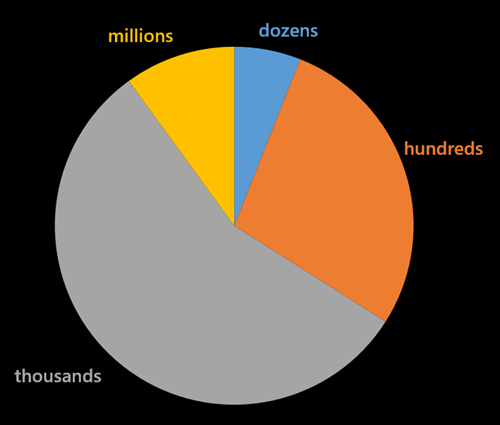
    Question #2 – What is the hourly message volume of your typical integration project?

    Number of answers: 32

    Result

    2014.09.25survey1


    Quantity # of Responses Percentage
    Dozens 2 6.25%
    Hundreds 9 28.13%
    Thousands 18 56.25%
    Millions 3 9.38%

    Analysis

    Most of today’s integration solutions are designed to handle thousands of messages per hour. Very few are building to handle a larger scale. An architecture that works fine for 3 messages per second (i.e. 10k per hour) could struggle to deal with 300 messages per second!

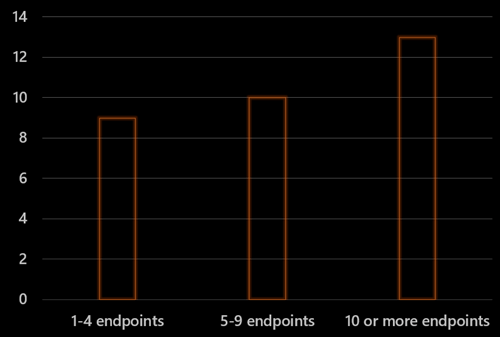
    Question #3 – How many endpoints are you integrating with on a typical project?

    Number of answers: 32

    Result

    2014.09.25survey2


    Analysis

    The average number of endpoints per response was 24.64, but the median was 5. Answers were all over the place and ranged from “1” to”300.” Most integration solutions still talk to a limited number of endpoints and might not be ready for more fluid, microservices oriented solutions.


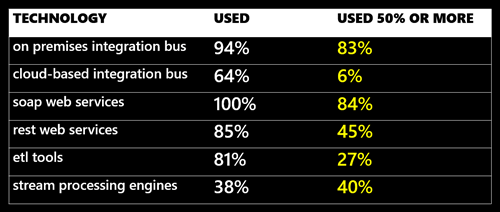
    Question #4 – How often do you use each of the technologies below on an integration project (%)

    Number of answers: 31

    Result

    2014.09.25survey3


    0% 10% 25% 50% 75% 100% Used Used > 50%
    On Prem Bus 2 2 3 5 8 11 94% 83%
    Cloud Bus 8 12 4 0 1 0 64% 6%
    SOAP 0 2 3 6 13 7 100% 84%
    REST 4 6 6 8 1 1 85% 45%
    ETL 5 8 8 2 3 1 81% 27%
    CEP 16 1 1 2 1 1 38% 40%


    Analysis

    Not surprisingly – given that I interviewed integration bus-oriented people – the on-premises integration bus rules. While 64% said that they’ve tried a cloud bus, only 6% of those actually use it on more than 50% of projects. SOAP is the dominant web services model for integration today. REST use is increasing, but not yet used on half the projects. I’d expect the SOAP and REST numbers to look much more similar in the years ahead.


    Question #5 – What do you integrate with the most (multiple choice)?

    Number of answers: 32

    Result

    2014.09.25survey4


    Analysis

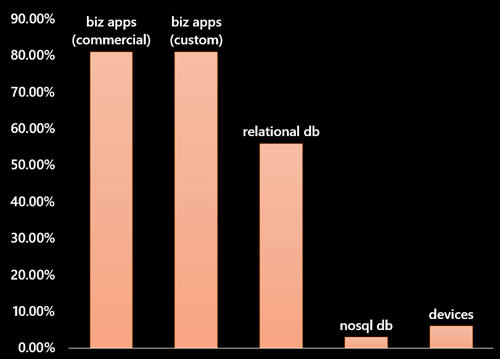
    Integration developers are connecting primarily to custom and commercial business applications. Not too surprising that 26 out of 32 respondents answered that way. 56% of the respondents (18/32) thought relational databases were also a primary target. Only a single person integrates most with NoSQL databases, and just two people integrate with devices. While those numbers will likely change over the coming years, I’m not surprised by the current state.


    Question #6 –  What is the most common data structure you deal with on integration projects?

    Number of answers: 32

    Result

    2014.09.25survey5


    Data Type # of Responses Percentage
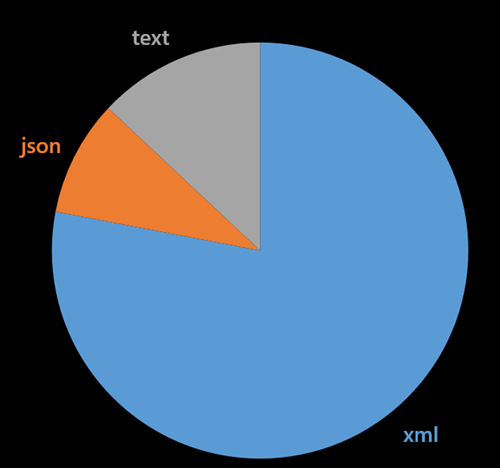
    XML 25 78.13%
    JSON 3 9.38%
    Text files 4 12.50%


    Analysis

    Integration projects are still married to the XML format. Some are still stuck dealing primarily with text files. This growing separation with the preferred format (JSON) of web developers may cause angst in the years ahead.


    Summary

    While not remotely scientific, this survey still gives a glimpse into the current state of application integration. While the industry trends tell us to expect more endpoints, more data, and more JSON, we apparently have a long way to go before this directly impacts the integration tier.

    Agree with the results? Seeing anything different?

  • New Pluralsight Course – “DevOps: The Big Picture” – Just Released

    DevOps has the potential to completely transform how an organization delivers technology services to its customers. But what does “DevOps” really mean? How can you get started on this transformation? What tools and technologies can assist in the adoption of a DevOps culture?

    To answer these questions, I put together a brief, easy-to-consume course for Pluralsight subscribers. “DevOps: The Big Picture” is broken up into three modules, and is targeted at technology leaders, developers, architects, and system administrators who are looking for a clearer understanding of the principles and technologies of DevOps.

    Module 1: Problems DevOps Solves. Here I identify some of the pain points and common wastes seen in traditional IT organizations today. Then I define DevOps and in the context of Lean and how DevOps can begin to address the struggles IT organizations experience when trying to deliver services.

    Module 2: Making a  DevOps Transition. How do you start the move to a DevOps mindset? I identify the cultural and organizational changes required, and how to address the common objections to implementing DevOps.

    Module 3: Introducing DevOps Automation. While the cultural and organizational aspects need to be aligned for DevOps to truly add value, the right technologies play a huge role in sustained success. Here I dig through the various technologies that make up a useful DevOps stack, and discuss examples of each.

    DevOps thinking continues to mature, so this is just the start. New concepts will arise, and new technologies will emerge in the coming years. If you understand the core DevOps principles and begin to adopt them, you’ll be well prepared for whatever comes next. I hope you check this course out, and provide feedback on what follow-up courses would be the most useful!