Category: Cloud

  • Sending Messages from BizTalk to Salesforce.com Chatter Service

    The US football Super Bowl was a bit of a coming-out party for the cool Chatter service offered by Salesforce.com. Salesforce.com aired a few commercials about the service and reached an enormous audience.  Chatter is a Facebook-like capability in Salesforce.com (or as a limited, standalone version at Chatter.com) that lets you follow and comment on various objects (e.g. users, customers, opportunities).  It’s an interesting way to opt-in to information within an enterprise and one of the few social tools that may actually get embraced within an organization.

    While users of a Salesforce.com application may be frequent publishers to Chatter, one could also foresee significant value in having enterprise systems also updating objects in Chatter. What if Salesforce.com is a company’s primary tool for managing a sales team? Within Salesforce.com they maintain details about territories, accounts, customers and other items relevant to the sales cycle. However, what if we want to communicate events that have occurred in other systems (e.g. customer inquiries, product returns) and are relevant to the sales team? We could blast out emails, create reports or try and stash these data points on the Salesforce.com records themselves. Or, we could publish messages to Chatter and let subscribers use (or ignore) the information as they see fit. What if a company uses an enterprise service bus such as BizTalk Server to act as a central, on-premises message broker? In this post, we’ll see how BizTalk can send relevant events to Chatter as part of its standard message distribution within an organization.

    If you have Chatter turned on within Salesforce.com, you’ll see the Chatter block above entities such as Accounts. Below, see that I have one message automatically added upon account creation and I added another indicating that I am going to visit the customer.

    2011.2.6chatter01

    The Chatter API (see example Chatter Cookbook here) is not apparently part of the default SOAP WSDL (“enterprise WSDL”) but does seem to be available in their new REST API. Since BizTalk Server doesn’t talk REST, I needed to create a simple service that adds a Chatter feed post when invoked. Luckily, this is really easy to do.

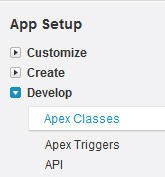
    First, I went to the Setup screens within my Salesforce.com account. From there I chose to Develop a new Apex Class where I could define a web service.

    2011.2.6chatter02

    I then created a very simple bit of code which defines a web service along with a single operation. This operation takes in any object ID (so that I can use this for any Salesforce.com object) and a string variable holding the message to add to the Chatter feed. Within the operation I created a FeedPost object, set the object ID and defined the content of the post. Finally, I inserted the post.

    2011.2.6chatter03

    Once I saved the class, I have the option of viewing the WSDL associated with the class.

    2011.2.6chatter04

    As a side note, I’m going to take a shortcut here for the sake of brevity. API calls to Salesforce.com require a SessionHeader that includes a generated token. You acquire this time-sensitive token by referencing the Salesforce.com Enterprise WSDL and passing in your SalesForce.com credentials to the Login operation. For this demo, I’m going to acquire this token out-of-band and manually inject it into my messages.

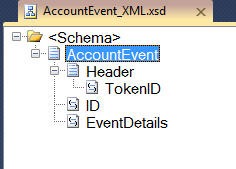
    At this point, I have all I need to call my Chatter service. I created a BizTalk project with a single schema that will hold an Account ID and a message we want to send to Chatter.

    2011.2.6chatter05

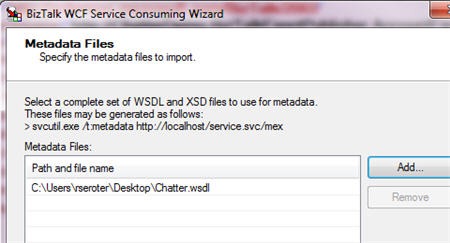
    Next, I walked through the Add Generated Items wizard to consume a WCF service and point to my ObjectChatter WSDL file.

    2011.2.6chatter06

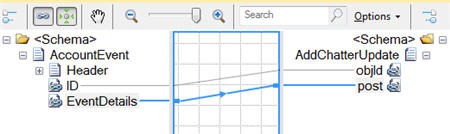
    The result of this wizard is some binding files, a schema defining the messages, and an orchestration that has the port and message type definitions. Because I have to pass a session token in the HTTP header, I’m going to use an orchestration to do so. For simplicity sake, I’m going to reuse the orchestration that was generated by the wizard. This orchestration takes in my AccountEvent message, creates a Chatter-ready message, adds a token to the header, and sends the message out.

    The map looks liked this:

    2011.2.6chatter07

    The orchestration looks like this:

    2011.2.6chatter08

    FYI, the header addition was coded as such:

    ChatterRequest(WCF.Headers) = "<headers><SessionHeader xmlns='urn:enterprise.soap.sforce.com'><sessionId>" 
    + AccountEventInput.Header.TokenID + 
    "</sessionId></SessionHeader></headers>";

    After deploying the application, I created a BizTalk receive location to pick up the event notification message. Next, I chose to import the send port configuration from the wizard-generated binding file. The send port uses a basic HTTP binding and points to the endpoint address of my custom web service.

    2011.2.6chatter09

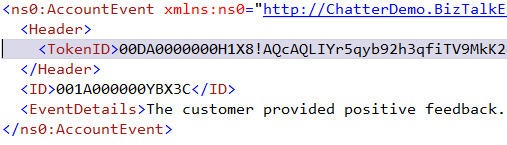
    After starting all the ports, and binding my orchestration to them, I sent a sample message into BizTalk Server.

    2011.2.6chatter10

    As I hoped, the message went straight to Salesforce.com and instantly updated my Chatter feed.

    2011.2.6chatter11

    What we saw here was a very easy way to send data from my enterprise messaging solution to the very innovative information dissemination engine provided by Salesforce.com. I’m personally very interested in “cloud integration” solutions because if we aren’t careful, our shiny new cloud applications will become yet another data silo in our overall enterprise architecture.  The ability to share data, in real-time, between (on or off premise) platforms is a killer scenario for me.

  • Interview Series: Four Questions With … Rick Garibay

    Welcome to the 27th interview in my series with thought leaders in the “connected systems” space.  This month, we’re sitting down with Rick Garibay who is GM of the Connected Systems group at Neudesic, blogger, Microsoft MVP and rabid tweeter.

    Let’s jump in.

    Q: Lately you’ve been evangelizing Windows Server AppFabric, WF and other new or updated technologies. What are the common questions you get from people, and when do you suspect that adoption of this newer crop of app plat technologies will really take hold?

    A: I think our space has seen two major disruptions over the last couple of years. The first is the shift in Microsoft’s middleware strategy, most tangibly around new investments in Windows Server AppFabric and Azure AppFabric as a compliment to BizTalk Server and the second is the public availability of Windows Azure, making their PaaS offering a reality in a truly integrated manner.

    I think that business leaders are trying to understand how cloud can really help them, so there is a lot of education around the possibilities and helping customers find the right chemistry and psychology for taking advantage of Platform as a Service offerings from providers like Microsoft and Amazon. At the same time, developers and architects I talk to are most interested in learning about what the capabilities and workloads are within AppFabric (which I define as a unified platform for building composite apps on-premise and in the cloud as opposed to focusing too much on Server versus Azure) how they differ from BizTalk, where the overlap is, etc. BizTalk has always been somewhat of a niche product, and BizTalk developers very deeply understand modeling and messaging so the transition to AppFabric/WCF/WF is very natural.

    On the other hand, WCF has been publically available since late 2006, but it’s really only in the last two years or so that I’ve seen developers really embracing it. I still see a lot of non-WCF services out there. WCF and WF both somewhat overshot the market which is common with new technologies that provide far more capabilities that current customers can fully digest or put to use. Value added investments like WCF Data Services, RIA Services, exemplary support for REST and a much more robust Workflow Services story not only showcase what WCF is capable of but have gone a long way in getting this tremendous technology into developer hands who previously may have only scratched the surface or been somewhat intimidated by it in the past. With WF written from the ground up, I think it has much more potential, but the adoption of model-driven development in general, outside of the CSD community is still slow.

    In terms of adoption, I think that Microsoft learned a lot about the space from BizTalk and by really listening to customers. The middleware space is so much different a decade later. The primary objective of Server AppFabric is developer and ops productivity and bringing WCF and WF Services into the mainstream as part of a unified app plat/middleware platform that remains committed to model-driven development, be it declarative or graphical in nature. A big part of that strategy is the simplification of things like hosting, monitoring and persistence while making tremendous strides in modeling technologies like WF and Entity Framework. I get a lot of “Oh wow!” moments when I show how easy it is to package a WF service from Visual Studio, import it into Server AppFabric and set up persistence and tracking with a few simple clicks. It gets even better when ops folks see how easily they can manage and troubleshoot Server AppFabric apps post deployment.

    It’s still early, but I remember how exciting it was when Windows Server 2003 and Vista shipped natively with .NET (as opposed to a separate install), and that was really an inflection point for .NET adoption. I suspect the same will be true when Server AppFabric just ships as a feature you turn on in Windows Server.

    Q: SOA was dead, now it’s back.  How do you think that the most recent MS products (e.g. WF, WCF, Server AppFabric, Windows Azure) support SOA key concepts and help organization become more service oriented?  in what cases are any of these products LESS supportive of true SOA?

    A: You read that report too, huh? 🙂

    In my opinion, the intersection of the two disruptions I mentioned earlier is the enablement of hybrid composite solutions that blur the lines between the traditional on-prem data center and the cloud. Microsoft’s commitment to SOA and model-driven development via the Oslo vision manifested itself into many of the shipping vehicles discussed above and I think that collectively, they allow us to really challenge the way we think about on-premise versus cloud. As a result I think that Microsoft customers today have a unique opportunity to really take a look at what assets are running on premise and/or traditional hosting providers and extend their enterprise presence by identifying the right, high value sweet spots and moving those workloads to Azure Compute, Data or SQL Azure.

    In order to enable these kinds of hybrid solutions, companies need to have a certain level of maturity in how they think about application design and service composition, and SOA is the lynchpin. Ironically, Gartner recently published a report entitled “The Lazerus Effect” which posits that SOA is very much alive. With budgets slowly resuming pre-survival-mode levels, organizations are again funding SOA initiatives, but the demand for agility and quicker time-to-value is going to require a more iterative approach which I think positions the current stack very well.

    To the last part of the question, SOA requires discipline, and I think that often the simplicity of the tooling can be a liability. We’ve seen this in JBOWS un-architectures where web services are scattered across the enterprise with virtually no discoverability, governance or reuse (because they are effortless to create) resulting in highly complex and fragile systems, but this is more of an educational dilemma than a gap in the platform. I also think that how we think about service-orientation has changed somewhat by the proliferation of REST. The fact that you can expose an entity model as an OData service with a single declaration certainly challenges some of the percepts of SOA but makes up for that with amazing agility and time-to-value.

    Q: What’s on your personal learning plan for 2011?  Where do you think the focus of a “connected systems” technologist should be?

    A: I think this is a really exciting time for connected systems because there has never been a more comprehensive, unified platform for building distributed application and the ability to really choose the right tool for the job at hand. I see the connected systems technologist as a “generalizing specialist”, broad across the stack, including BizTalk, and AppFabric (WCF/WF Services/Service Bus)  while wisely choosing the right areas to go deep and iterating as the market demands. Everyone’s “T” shape will be different, but I think building that breadth across the crest will be key.

    I also think that understanding and getting hands on with cloud offerings from Microsoft and Amazon should be added to the mix with an eye on hybrid architectures.

    Personally, I’m very interested in CEP and StreamInsight and plan on diving deep (your book is on my reading list) this year as well as continuing to grow my WF and AppFabric skills. The new BizTalk Adapter Pack is also on my list as I really consider it a flagship extension to AppFabric.

    I’ve also started studying Ruby as a hobby as its been too long since I’ve learned a new language.

    Q [stupid question]: I find it amusing when people start off a sentence with a counter-productive or downright scary disclaimer.  For instance, if someone at work starts off with “This will probably be the stupidest thing anyone has ever said, but …” you can guess that nothing brilliant will follow.  Other examples include “Now, I’m not a racist, but …” or “I would never eat my own children, however …” or “I don’t condone punching horses, but that said …”.  Tell us some terrible ways to start a sentence that would put your audience in a state of unrest.

    A: When I hear someone say “I know this isn’t the cleanest way to do it but…” I usually cringe.

    Thanks Rick!  Hopefully the upcoming MVP Summit gives us all some additional motivation to crank out interesting blog posts on connected systems topics.

  • Notes from Roundtable on Impact of Cloud on eDiscovery

    This week I participated in a leadership breakfast hosted by the Cowen Group.  The breakfast was attended by lawyers and IT personnel from a variety of industries including media and entertainment, manufacturing, law, electronics, healthcare, utilities and more.  The point of the roundtable was to discuss the impact of cloud computing on eDiscovery and included discussion on general legal aspects of the cloud.

    I could just brain-dump notes, but that’s lazy.  So, here are three key takeaways for me.

    Data volumes are increasing exponentially and we have to consider “what’s after ‘what’s next?’?”.

    One of the facilitators, who was a Director of Legal IS for a Los Angeles-based law firm, referred to the next decade as a “tsunami of electronic data.”  Lawyers are more concerned with data that may be part of a lawsuit vs. all the machine-borne data that is starting to flow into our systems.  Nonetheless, they specifically called out audio/visual content (e.g. surveillance) that is growing  at enormous rates for their clients.  Their research showed that the technology was barely keeping up for storing the exabytes of data being acquired each year.  If we assume that massive volumes of data will be the norm (e.g. “what’s next”), how we do we manage eDiscovery after that?

    Business clients are still getting their head around the cloud.

    I suspect that most of us regularly forget that many of our peers in IT, let alone those on the business-side, are not actively aware of trends in technology.  Many of the very smart people in this room were still looking for 100-level information on cloud concepts.  One attendee, when talking about Wikileaks, said that if you don’t want your data stolen, don’t put it online.  I completely disagree with that perspective, as in the case of Wikileaks and plenty of other cases, data was stolen from the inside.  Putting data into internet-accessible locations doesn’t make it inherently less secure.  We still have to get past some basic fears before we can make significant progress in these discussions.

    “Cost savings” was brought up as a reason to move to the cloud, but it seems that most modern thinking is that if you are moving to the cloud to purely save costs, you could be disappointed.  I highlighted speed to market and self-service provisioning as some of the key attractions that I’ve observed. It was also interesting to hear the lawyers discuss how the current generation views privacy and sharing differently and the rules around what data is accessible may be changing.

    Another person said that they saw the cloud as a way to consolidate their data more easily.  I actually proposed the opposite scenario whereas more choice, and more simplicity of provisioning meant that I now have MORE places to store my data and thus more places for our lawyers to track.  Adding new software to internal IT is no simple task so base platforms are likely to be used over and over.  With cloud platforms (I’m thinking SaaS here), it’s really easy to go best-of-breed for a given application.  That’s a simple perspective, as you certainly CAN standardize on distinct IaaS and SaaS platforms, but I don’t see the cloud ushering in a new era of consolidation.

    One attendee mentioned how “cloud” is just another delivery system and that it’s still all just Oracle, SAP or SQL Server underneath.  This reflects a simplistic thinking about cloud that compares it more to Application Service Providers and less like multi-tenet, distributed applications.  While “cloud” really is just another delivery system, it’s not necessarily an identical one to internal IT.

    It’s not all basic thinking about the cloud as these teams are starting to work through sticky issues in the cloud regarding provider contracts that dictate care, custody and control of data in the cloud.  Who is accountable for data leaks?  How do you do a “hold” on records stored in someone’s cloud?  We discussed that the client (data owner) still has responsibility for aspects of security and control and can’t hide behind 3rd parties.

    Better communication is needed between IT and legal staff

    I’ll admit to often believing in “ask for forgiveness, not permission” and that when it comes to the legal department, they are frequently annoyingly risk-averse and wishy washy.  But, that’s also simplistic thinking on my own part and doesn’t give those teams the credit they deserve for trying to protect an organization.  The legal community is trying to figure out what the cloud means for data discovery, custody and control and need our help.  Likewise, I need an education from my legal team so that I understand which technology capabilities expose us to unnecessary risk.  There’s a lot to learn by communicating more openly and not JUST when I need them to approve something or cover my tail.

  • 2010 Year in Review

    I learned a lot this year and I thought I’d take a moment to share some of my favorite blog posts, books and newly discovered blogs.

    Besides continuing to play with BizTalk Server, I also dug deep into Windows Server AppFabric, Microsoft StreamInsight, Windows Azure, Salesforce.com, Amazon AWS, Microsoft Dynamics CRM and enterprise architecture.  I learned some of those technologies for my last book, some was for work, and some was for personal education.  This diversity was probably evident in the types of blog posts I wrote this year.  Some of my most popular, or favorite posts this year were:

    While I find that I use Twitter (@rseroter) instead of blog posts to share interesting links, I still consider blogs to be the best long-form source of information.  Here are a few that I either discovered or followed closer this year:

    I tried to keep up a decent pace of technical and non-technical book reading this year and liked these the most:

    I somehow had a popular year on this blog with 125k+ visits and really appreciate each of you taking the time to read my musings.  I hope we can continue to learn together in 2011.

  • My Co-Authors Interviewed on Microsoft endpoint.tv

    You want this book!

    -Ron Jacobs, Microsoft

    Ron Jacobs (blog, twitter) runs the Channel9 show called endpoint.tv and he just interviewed Ewan Fairweather and Rama Ramani who were co-authors on my book, Applied Architecture Patterns on the Microsoft Platform.  I’m thrilled that the book has gotten positive reviews and seems to fill a gap in the offerings of traditional technology books.

    Ron made a few key observations during this interview:

    • As people specialize, they lose perspective of other ways to solve similar problems, and this book helps developers and architects “fill the gaps.”
    • Ron found the dimensions our “Decision Framework” to be novel and of critical importance when evaluating technology choices.  Specifically, evaluating a candidate architecture against design, development, operational and organizational factors can lead you down a different path than you might have expected.  Ron specifically liked the “organizational direction” facet which can be overlooked but should play a key role in technology choice.
    • He found the technology primers and full examples of such a wide range of technologies (WCF, WF, Server AppFabric, Windows Azure, BizTalk, SQL Server, StreamInsight) to be among the unique aspects of the book.
    • Ron liked how we actually addressed candidate architectures instead of jumping directly into a demonstration of a “best fit” solution.

    Have you read the book yet?  If so, I’d love to hear your (good or bad) feedback.  If not, Christmas is right around the corner, and what better way to spend the holidays than curling up with a beefy technology book?

  • Using Realistic Security For Sending and Listening to The AppFabric Service Bus

    I can’t think of any demonstration of the Windows Azure platform AppFabric Service Bus that didn’t show authenticating to the endpoints using the default “owner” account.  At the same time, I can’t imagine anyone wanting to do this in real life.  In this post, I’ll show you how you should probably define the proper permissions for listening the cloud endpoints and sending to them.

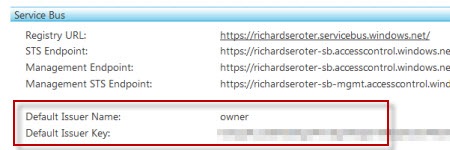
    To start with, you’ll want to grab the Azure AppFabric SDK.  We’re going to use two pieces from it.  First, go to the “ServiceBus\GettingStarted\Echo” demonstration in the SDK and set both projects to start together.  Next visit the http://appfabric.azure.com site and grab your default Service Bus issuer and key.

    2010.11.03cloud01

    Start up the projects and enter in your service namespace and default issuer name and key.  If everything is set up right, you should be able to communicate (through the cloud) between the two windows.

    2010.11.03cloud02

    Fantastic.  And totally unrealistic.  Why would I want to share what are in essence, my namespace administrator permissions, with every service and consumer?  Ideally, I should be scoping access to my service and providing specific claims to deal with the Service Bus.  How do we do this?  The Service Bus has a dedicated Security Token Service (STS) that manages access to the Service Bus.  Go to the “AccessControl\ExploringFeatures\Management\AcmBrowser” solution in the AppFabric SDK and build the AcmBrowser.  This lets us visually manage our STS.

    2010.11.03cloud03

    Note that the service namespace value used is your standard namespace PLUS “-sb” at the end.  You’ll get really confused (and be looking at the wrong STS) if you leave off the –sb suffix.  Once you “load from cloud” you can see all the default settings for connecting the Service Bus.  First, we have the default issuer that uses a Symmetric Key algorithm and defines an Issuer Name of “owner.”

    2010.11.03cloud04

    Underneath the Issuers, we see a default Scope.  This scope is at the root level of my service namespace meaning that the subsequent rules will provide access to this namespace, and anything underneath it.

    2010.11.03cloud05

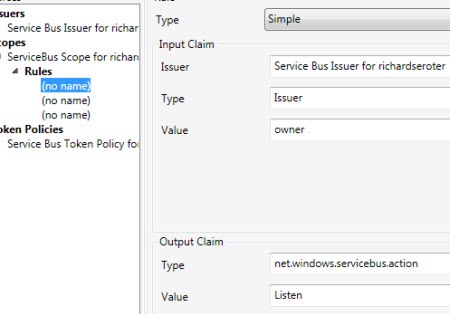
    One of the rules below the scope defines who can “Listen” on the scoped endpoint.  Here you see that if the service knows the secret key for the “owner” Issuer, then they will be given permission to “Listen” on any service underneath the root namespace.

    2010.11.03cloud06

    Similarly, there’s another rule that has the same criteria and the output claim lets the client “Send” messages to the Service Bus.  So this is what virtually all demonstrations of the Service Bus use.  However, as I mentioned earlier, someone who knows the “owner” credentials can listen or send to any service underneath the base namespace.  Not good.

    Let’s apply a tad bit more security.  I’m going to add two new Issuers (one who can listen, one who can send), and then create a scope specifically for my Echo service where the restricted Issuer is allowed to Listen and the other Issuer can Send.

    First, I’ll add an Issuer for my own fictitious company, Seroter Consulting.

    2010.11.03cloud07

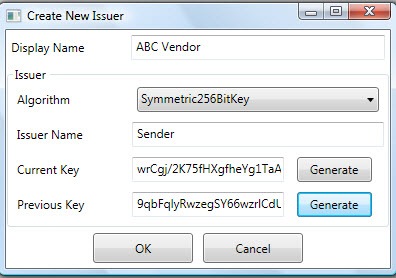
    Next I’ll create another Issuer that represents a consumer of my cloud-exposed service.

    2010.11.03cloud08

    Wonderful.  Now, I want to define a new scope specifically for my EchoService.

    2010.11.03cloud09

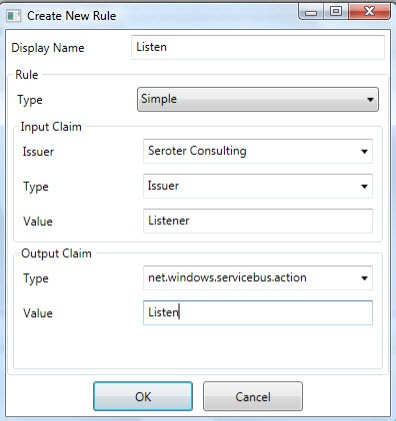
    Getting closer.  We need rules underneath this scope to govern who can do what with it.  So, I added a rule that says that if you know the Seroter Consulting Issuer name “(“Listener”) and key, then you can listen on the service.  In real life, you also might go a level lower and create Issuers for specific departments and such.

    2010.11.03cloud10

    Finally, I have to create the Send permissions for my vendors.  In this rule, if the person knows the Issuer name (“Sender”) and key for the Vendor Issuer, then they can send to the Service Bus.

    We are now ready to test this bad boy.  Within the AcmBrowser we have to save our updated configuration back to the cloud.  There’s a little quirk (which will be fixed soon) where you first have to delete everything in that namespace and THEN save your changes.  Basically, there’s no “merge” function.  So, I clicked “Clear Service Namespace in the Cloud” button, and then go ahead and “Save to Cloud”.

    To test our configuration, we can first try to listen to the cloud using the VENDOR AC credentials.  As you might expect, I get an authentication error because the vendor output claims don’t include the “net.windows.servicebus.action = Listen” claim.

    2010.11.03cloud12

    I then launched both the service and the client, and put the “Listener” issuer name and key into the service and the “Sender” issuer name and key into the client and …

    2010.11.03cloud13

    It worked!  So now, I have localized credentials that I can pass to my vendor without exposing my whole namespace to that vendor.  I also specific credentials for my own service without requiring root namespace access. 

    To me this seems like the right way to secure Service Bus connections in the real world.  Thoughts?

  • Interview Series: Four Questions With … Brent Stineman

    Greetings and welcome to the 25th interview in my series of chats with thought leaders in connected systems.  This month, I’ve wrangled Brent Stineman who works for consulting company Sogeti as a manager and lead for their Cloud Services practice,  is one of the first MVPs for Windows Azure, a blogger, and borderline excessive Tweeter.  I wanted to talk with Brent to get his thoughts on the recently wrapped up mini-PDC and the cloud announcements that came forth.  Let’s jump in.

    Q: Like me, you were watching some of the live PDC 2010 feeds and keeping track of key announcements.  Of all the news we heard, what do you think was the most significant announcement? Also, which breakout session did you find the most enlightening and why?

    A: I’ll take the second part first. “Inside Windows Azure” by Mark Russinovich was the session I found the most value in. it removed much of the mystery of what goes on inside the black box of windows Azure. And IMHO, having a good understanding of that will go a long way towards helping people build better Azure services. However, the most significant announcement to me was from Clemens Vasters’ future of Azure AppFabric presentation. I’ve long been a supporter of the Azure AppFabric and its nice to see they’re taking steps to give us broader uses as well as possibly making its service bus component more financially viable.

    Q: Most of my cloud-related blog posts get less traffic than other topics.  Either my writing inexplicably deteriorates on those posts, or many readers just aren’t dealing with cloud on a day-to-day basis.  Where do you see the technology community when it comes to awareness of cloud technologies, and, actually doing production deployments using SaaS, PaaS or IaaS technology?  What do you think the tipping point will be for mass adoption?

    A: There’s still many concerns as well as confusion about cloud computing. I am amazed by the amount of mis-information I encounter when talking with clients. But admittedly, we’re still early in the birth and subsequent adoption of this platform. While some are investing heavily in production usage, I see more folks simply testing the waters. To that end, I’m encouraging them to consider initial implementations outside of just production systems. Just like we did with virtualization, we can start exploring the cloud with development and testing solutions and once we grow more comfortable, move to production. Unfortunately, there won’t be a single tipping point. Each organization will have to find their own equilibrium between on-premises and cloud hosted resources.

    Q: Let’s say that in five years, many of the current, lingering fears about cloud (e.g. security, reliability, performance) dim and cloud platforms simply become another viable choice for most new solutions.  What do you see the role of on-premises software playing?  When will organizations still choose on-premise software/infrastructure over the cloud, even when cloud options exist?

    A: The holy grail for me is that eventually applications can move seamlessly between on-premises and the cloud. I believe we’re already seeing the foundation blocks for this being laid today. However, even when that happens, we’ll see times when performance or data protection needs will require applications to remain on-premises. Issues around bandwidth and network latency will unfortunately be with us for some time to come.

    Q [stupid question]: I recently initiated a game at the office where we share something about ourselves that other may find shocking, or at least mildly surprising.  My “fact” was that I’ve never actually drank a cup of coffee.  One of my co-workers shared the fact that he was a childhood acquaintance with two central figures in presidential assassinations (Hinkley and Jack Ruby).  He’s the current winner.  Brent, tell us something about you that may shock or surprise us.

    A: I have never watched a full episode of either “Seinfeld”  or “Friends”. 10 minutes of either show was about all I could handle. I’m deathly allergic to anything that is “in fashion”. This also likely explains why I break out in a rash whenever I handle an Apple product. 🙂

    Thanks Brent. The cloud is really a critical area to understand for today’s architect and developer. Keep an eye on Brent’s blog for more on the topic.

  • Metadata Handling in BizTalk Server 2010 AppFabric Connect for Services

    Microsoft just announced the new BizTalk Server 2010 AppFabric Connect for Services which is a set of tools used to expose BizTalk services to the cloud.  Specifically, you can expose BizTalk endpoints and LOB adapter endpoints to the Azure Service Bus.

    The blog post linked to above has a good overview, but seemed to leave out a lot of details.  So, I downloaded, installed and walked through some scenarios and thought I’d share some findings.  Specifically, I want to show how service metadata for BizTalk endpoints is exposed to cloud consumers. This has been a tricky thing up until now since AppFabric endpoints don’t respect the WCF metadataBehavior so you couldn’t just expose BizTalk receive location metadata without some slight of hand.  I’ve shown previously how you could just handcraft a WSDL and use it in the port and with Azure clients, but that’s a suboptimal solution.

    First off, I built a simple schema that I will expose as a web service.

    2010.10.28.cloud01

    Next up, I started the BizTalk WCF Service Publishing Wizard and noticed the new wording that came with installing the BizTalk Server 2010 Feature Pack.

    2010.10.28.cloud02

    Interesting.  Next up, I’m asked about creating my on-premises service endpoint and optionally, a receive location and a new on-premise metadata exchange point.

    2010.10.28.cloud03

    On the next wizard page, I’m able to optionally choose to extend this service to the Azure AppFabric cloud.

    2010.10.28.cloud04

    After this, I choose whether to expose an orchestration or schemas as a web service.  I chose to expose schemas as a service (i.e., build a service from scratch vs. using orchestration ports and messages to auto-produce a service).

    2010.10.28.cloud05

    As you can see, I have a one-way service to publish order messages.  Following this screen is the same “choose an on-premises location” page where you set the IIS directory for the new service.

    2010.10.28.cloud06

    After this wizard page is a new one where you set up a Service Bus endpoint.  You pick which Service Bus binding that you want and apply your own service namespace.  You can then choose to enable both a discovery behavior and a metadata exchange behavior.

    2010.10.28.cloud07

    Finally, we apply our Service Bus credentials for listening to the cloud.  Notice that I force authentication for the service endpoint itself, but not the metadata retrieval.

    2010.10.28.cloud08

    After the wizard is done, what I expected to see was a set of receive locations.  However, the only receive location that I have is the one using the on-premises WCF binding.

    2010.10.28.cloud09

    What the what?  I expected to see a receive location that used the Service Bus binding.  So what happened to all those configuration values I just set?  If you open up the WCF service created in IIS, you can see a whole host of Service Bus configuration settings.   First, we see that there are now three service endpoints.  The three service endpoints below include an on-premises MEX endpoint, a RelayEndpoint that binds to the cloud, and a MEX endpoint that binds to the cloud.

    2010.10.28.cloud10

    That’s a pretty smart way to go.  Instead of trying to hack up the receive location, Microsoft instead beefed up the proxy services to do all the cloud binding.

    I can use IIS 7.5 autostart to make sure that my cloud binding occurs as soon as the service starts (vs. waiting for the first invocation).  Once my receive location and service are started, I can hit my local service, and, see my service is also in my cloud registry.

    2010.10.28.cloud11

    If I drill into my service, I can also see my primary service and my MEX endpoint.

    2010.10.28.cloud12 

    When I click the primary service name in the Azure AppFabric registry, I get an HTTP 401 (unauthorized) error which makes sense since we have a client authentication requirement on this service. 

    If I click the MEX endpoint, I get a weird error.  I seem to recall that you can’t retrieve a MEX WSDL over HTTP.  Or maybe I’m crazy.  But, to test that my MEX endpoint really works, I plugged the MEX URL into an Add Service Reference window in Visual Studio.NET, and sure enough, it pulls back the metadata for my BizTalk-exposed service.

    2010.10.28.cloud14

    All that said, this looks really promising.  Seems like a smart decision to stay away from the receive location and move cloud configuration to the WCF service where it belongs.

  • Using the New AWS Web Console Interface to Set Up Simple Notification Services

    I’ve written a few times about the Amazon Web Services (AWS) offerings and in this post, want to briefly show you the new web-based interface for configuring the Simple Notification Services (SNS) product.

    I’m really a fan of the straightforward simplicity of the AWS service interfaces, and that principle applies to their web console as well.  You’ll typically find well-designed and very usable tools for configuring services.  AWS recently announced a web interface for their SNS offering, which is one of the AWS messaging services (along with Simple Queue Service [SQS]) for cloud-based integration/communication.  These products mirror some capabilities of Microsoft’s Windows Azure, but for both vendors, their are clear feature differences.  SNS is described by Amazon as:

    [SNS] provides developers with a highly scalable, flexible, and cost-effective capability to publish messages from an application and immediately deliver them to subscribers or other applications.

    SNS uses a topics and subscribers model where you publish messages to SNS topics, and subscribers are pushed a message through a protocol of their choice.  Each topic can have policies applied which may include granular restrictions with regards to who can publish messages or which subscriber protocols the topic will support.  Available subscriber protocols include HTTP (or HTTPS), email (straight text or JSON encoded), or AWS SQS.  SNS has “at least once delivery” and it appears that, like Windows Azure AppFabric, SNS doesn’t have a guaranteed delivery mechanism and they encourage developers to publish from SNS to SQS if you need a higher quality of service and delivery guarantees.  If you want to learn more about SNS (and I encourage you to do so), check out the SNS product page with all the documentation and such.  The SNS FAQ is also a great resource.

    Ok, let’s take a look at setting up a simple example that requires no coding and only web console configuration.  I’ve logged into my AWS web console, and now see an SNS tab at the top.

    2010.10.20sns01

    I’m then shown a large, friendly message asking me to create a topic, and because they asked nicely, I will do just that.

    2010.10.20sns02

    When I click that button, I’m given a small window and asked to name my topic.  I’ll end up with a SNS URI similar to how Windows Azure AppFabric provides a DNS-like addressing for it’s endpoints.

    2010.10.20sns03 

    After the topic is created, I get to a Topic Details screen where I can create subscriptions, view/edit a topic policy, and even publish a message to the topic.

    2010.10.20sns04

    I’ve chosen to view my topic’s policy, and I get a very clean screen showing how to restrict who can publish to my topic, and what people, endpoints and protocols are considered valid topic subscribers.  By default, as you can see, a topic is locked down to just the owner.

    2010.10.20sns05

    Next up, I’m going to create a new subscriber.  As you can see below, I have a number of protocol options.  I’m going to choose Email. Note that JSON is the encoding of choice in SNS, but nothing prevents me from publishing XML to an HTTP REST endpoint or sending XML in an email payload.

    2010.10.20sns06

    Every subscriber is required to confirm their subscription, and if you choose an email protocol, then you get an email with a link which acknowledges the subscription.

    2010.10.20sns07

    The confirmation email arrived a few moments later.

    2010.10.20sns08

    Clicking the link took me to a confirmation page that contained my specific subscription identifier.  At this point, my SNS web console shows one approved subscriber.

    2010.10.20sns09

    I’ll conclude this walkthrough by actually sending a message to this topic.  There is a Publish to Topic button on the console screen that lets me enter the text to send as a notification.  My notification includes a subject and a body message.  I could include any string of characters here, so for fun, I’ll throw in an XML message that an email poller (e.g. BizTalk) could read and process.

    2010.10.20sns10

    When I choose to Publish Message, I get a short confirmation message, and switch back to my inbox to find the notification.  Sure enough, I get a notification with the data payload I specified above.  You will notice that I get an email footer that I’d have to pre-process out or have my automated email poller ignore.

    2010.10.20sns11 

    Just so that I don’t leave you with questions, I’ve also configured an Email-JSON subscriber to compare the type of message sent to the subscriber.  I mentioned earlier that JSON is the preferred encoding, and you can see that in action here.  Because JSON encoded messages are expected to be processed by systems vs. humans, the email notification doesn’t include any additional footer “fluff” and only has the raw JSON formatted message.

    2010.10.20sns12

    Pretty nice, eh? And I didn’t have to think once about cost (it’s free up to a certain threshold) or even leave the web console to set up a solution.  Take note, Microsoft!  At some point, I’ll mess around with sending an SNS notification to a Windows Azure AppFabric endpoint, as I suspect we’ll see more of these sophisticated cloud integration scenarios in the coming years. 

    I encourage you to check out the AWS SNS offering and see if this sort of communication pattern can offer you new ways to solve problems.

  • Comparing AWS SimpleDB and Windows Azure Table Storage – Part II

    In my last post, I took an initial look at the Amazon Web Services (AWS) SimpleDB product and compared it to the Microsoft Windows Azure Table storage.  I showed that both solutions are relatively similar in that they embrace a loosely typed, flexible storage strategy and both provide a bit of developer tooling.  In that post, I walked through a demonstration of SimpleDB using the AWS SDK for .NET.

    In this post, I’ll perform a quick demonstration of the Windows Azure Table storage product and then conclude with a few thoughts on the two solution offerings.  Let’s get started.

    Windows Azure Table Storage

    First, I’m going to define a .NET object that represents the entity being stored in the Azure Table storage.  Remember that, as pointed out in the previous post, the Azure Table storage is schema-less so this new .NET object is just a representation used for creating and querying the Azure Table.   It has no bearing on the underlying Azure Table structure. However, accessing the Table through a typed object differs from the AWS SimpleDB which has a fully type-less .NET API model.

    I’ve built a new WinForm .NET project that will interact with the Azure Table.  My Azure Table will hold details about different conferences that are available for attendance.  My “conference record” object inherits from TableServiceEntity.

    public class ConferenceRecord: TableServiceEntity
        {
            public ConferenceRecord()
            {
                PartitionKey = "SeroterPartition1";
                RowKey = System.Guid.NewGuid().ToString();
    
            }
    
            public string ConferenceName { get; set; }
            public DateTime ConferenceStartDate { get; set; }
            public string ConferenceCategory { get; set; }
        }
    

    Notice that I have both a partition key and row key value.  The PartitionKey attribute is used to identify and organize data entities.  Entities with the same PartitionKey are physically co-located which in turn, helps performance.  The RowKey attribute uniquely defines a row within a given partition.  The PartitionKey + RowKey must be a unique combination.

    Next up, I built a table context class which is used to perform operations on the Azure Table.  This class inherits from TableServiceContext and has operations to get, add and update ConferenceRecord objects from the Azure Table.

    public class ConferenceRecordDataContext : TableServiceContext
        {
            public ConferenceRecordDataContext(string baseAddress, StorageCredentials credentials)
                : base(baseAddress, credentials)
            {}
    
            public IQueryable<ConferenceRecord> ConferenceRecords
            {
                get
                {
                    return this.CreateQuery<ConferenceRecord>("ConferenceRecords");
                }
            }
    
            public void AddConferenceRecord(ConferenceRecord confRecord)
            {
                this.AddObject("ConferenceRecords", confRecord);
                this.SaveChanges();
            }
    
            public void UpdateConferenceRecord(ConferenceRecord confRecord)
            {
                this.UpdateObject(confRecord);
                this.SaveChanges();
            }
        }
    

    In my WinForm code, I have a class variable of type CloudStorageAccount which is used to interact with the Azure account.  When the “connect” button is clicked on my WinForm, I establish a connection to the Azure cloud.  This is where Microsoft’s tooling is pretty cool.  I have a local “fabric” that represents the various Azure storage options (table, blob, queue) and can leverage this fabric without ever provisioning a live cloud account.

    2010.10.04storage01

    Connecting to my development storage through the CloudStorageAccount looks like this:

    string connString = "UseDevelopmentStorage=true";
    
    storageAcct = CloudStorageAccount.Parse(connString);
    

    After connecting to the local (or cloud) storage, I can create a new table using the ConferenceRecord type definition, URI of the table, and my cloud credentials.

     CloudTableClient.CreateTablesFromModel(
                    typeof(ConferenceRecordDataContext),
                    storageAcct.TableEndpoint.AbsoluteUri,
                    storageAcct.Credentials);
    

    Now I instantiate my table context object which will add new entities to my table.

    string confName = txtConfName.Text;
    string confType = cbConfType.Text;
    DateTime confDate = dtStartDate.Value;
    
    var context = new ConferenceRecordDataContext(
          storageAcct.TableEndpoint.ToString(),
          storageAcct.Credentials);
    
    ConferenceRecord rec = new ConferenceRecord
     {
           ConferenceName = confName,
           ConferenceCategory = confType,
           ConferenceStartDate = confDate,
      };
    
    context.AddConferenceRecord(rec);
    

    Another nice tool built into Visual Studio 2010 (with the Azure extensions) is the Azure viewer in the Server Explorer window.  Here I can connect to either the local fabric or the cloud account.  Before I run my application for the first time, we can see that my Table list is empty.

    2010.10.04storage02

    If I start up my application and add a few rows, I can see my new Table.

    2010.10.04storage03

    I can do more than just see that my table exists.  I can right-click that table and choose to View Table, which pulls up all the entities within the table.

    2010.10.04storage04

    Performing a lookup from my Azure Table via code is fairly simple and I can either loop through all the entities via a “foreach” and conditional, or, I can use LINQ.  Here I grab all conference records whose ConferenceCategory is equal to “Technology”.

    var val = from c in context.ConferenceRecords
                where c.ConferenceCategory == "Technology"
                select c;
    

    Now, let’s prove that the underlying storage is indeed schema-less.  I’ll go ahead and add a new attribute to the ConferenceRecord object type and populate it’s value in the WinForm UI.  A ConferenceAttendeeLimit of type int was added to the class and then assigned a random value in the UI.  Sure enough, my underlying table was updated with the new “column’” and data value.

    2010.10.04storage05

    I can also update my LINQ query to look for all conferences where the attendee limit is greater than 100, and only my latest column is returned.

    Summary of Part II

    In this second post of the series, we’ve seen that the Windows Azure Table storage product is relatively straightforward to work with.  I find the AWS SimpleDB documentation to be better (and more current) than the Windows Azure storage documentation, but the Visual Studio-integrated tooling for Azure storage is really handy.  AWS has a lower cost of entry as many AWS products don’t charge you a dime until you reach certain usage thresholds.  This differs from Windows Azure where you pretty much pay from day one for any type of usage.

    All in all, both of these products are useful for high-performing, flexible data repositories.  I’d definitely recommend getting more familiar with both solutions.