Category: BizTalk

  • Interview Series: Four Questions With … Jürgen Willis

    Greetings and welcome to the 44th interview in my series of talks with leaders in the “connected technology” space. This month, I reached out to Jürgen Willis who is Group Program Manager for the Windows Azure team at Microsoft with responsibility for Windows Workflow Foundation and the new Workflow Manager (on-prem and in Windows Azure). Jürgen frequently contributes blog posts to the Workflow Team blog, and is well known in the community for his participation in the development of BizTalk Server 2004 and Windows Communication Foundation.

    I’ve known Jürgen for years and he’s someone that I really admire for ability to explain technology to any audience. Let’s see how he puts up with my four questions.

    Q: Congrats on releasing the new Workflow Manager 1.0! It seems that after a quiet period, we’re back to have a wide range of Microsoft tools that can solve similar problems. Help me understand some of the cases when I’d use Windows Server AppFabric, and when I’d be bettering off pushing WF services to the Workflow Manager.

    A: Workflow Manager and AppFabric support somewhat different scenarios and have different design goals, much like WorkflowApplication and WorkflowServiceHost in .NET support different scenarios, while leveraging the same WF core.

    WorkflowServiceHost (WFSH) is focused on building workflows that consume WCF SOAP services and are addressable as WCF SOAP services.  The scenario focus is on standalone Enterprise apps/workflows that use service-based composition and integration.  AppFabric, in turn, focuses on adding management capabilities to IIS-hosted WFSH workflows.

    Workflow Manager 1.0 has as its key scenarios: multi-tenant ISVs and cloud scale (we are running the same technology as an Azure service behind Office 365).  From a messaging standpoint, we focused on REST and Service Bus support since that aligns with both our SharePoint integration story, as well as the predominant messaging models in new cloud-based applications.  We had to scope the capabilities in this release largely around the SharePoint scenarios, but we’ve already started planning the next set of capabilities/scenarios for Workflow Manager.

    If you’re using AppFabric and its meeting your needs, it makes sense to stick with that (and you should be sure to check out the new 4.5 investments we made in WFSH).  If you have a longer project timeline and have scenarios that require the multi-tenant and scaleout characteristics of Workflow Manager, are Azure-focused, require workflow/activity definition management or will primarily use REST and/or Service Bus based messaging, then you may want to evaluate Workflow Manager.

    Q: It seems that today’s software is increasingly built using an aggregation of frameworks/technologies as developers aren’t simply trying to use one technology to do everything. That said, what do you think is that sweet spot for Workflow Foundation in enterprise apps or public web applications? When should I realistically introduce WF into my applications instead of simply coding the (stateful) logic?

    A: I would consider WF in my application if I had one or more of these requirements:

    • Authors of the process logic are not full-time developers.  WF provides a great mechanism to provide application extensibility, which allows a broader set of people to extend/author process logic.  We have many examples of ISVs who have used WF to provide extensibility to their applications.  The rehostable WF designer, combined with custom activities specific to the organization/domain allow for a very tailored experience which provides great productivity to people who are domain experts, but perhaps not developers.  We have increasingly seen Enterprises doing similar things, where a central team builds an application that allows various departments to customize their use of the application via the WF tools.
    • The process flow is long running.  WF’s ability to automatically persist and reload workflow instances can remove the need to write a lot of tricky plumbing code for supporting long running process logic.
    • Coordination across multiple external systems/services is required.  WF makes it easier to write this coordination logic, including async messaging handling, parallel execution, correlation to workflow instances,  queued message support, and transactional coordination of inbound/outbound messages with process state.
    • Increased visibility to the process logic is desired.  This can be viewed in a couple of ways.  The graphical layout makes it much clearer what the process flow is – I’ve had many customers tell me about the value of a developer/implementer being able to review the workflow with the business owner to ensure that the requirements are being met.  The second aspect of this is that the workflow tracking data provides pretty thorough data about what’s happening in the process.  We have more we’d like to do in terms of surfacing this information via tools, but all the pieces are there for customers to build rich visualizations today.

    For those new to Workflow, we have a number of resources listed here.

    Q: You and I have spoken many times over the years about rules engines and the Microsoft products that love them. It seems that this is still a very fuzzy domain for Microsoft customers and I personally haven’t seen a mass demand for a more sophisticated rules engine from Microsoft. Is that really the case? Have you received a lot of requests for further investment in rules technology? If not, why do you think that is?

    A: We do get the question pretty regularly about further investments in rules engines, beyond our current BizTalk and WF rules engine technology.  However, rules engines are the kind of investment that is immensely valuable to a minority of our overall audience; to date, the overall priorities from our customers have been higher in other areas.  I do hope that the organization is able to make further investments in this area in the future; I believe there’s a lot of value that we could deliver.

    Q [stupid question]: Halloween is upon us, which means yet another round of trick-or-treating kids wearing tired outfits like princesses, pirates and superheroes. If a creative kid came to my door dressed as a beaver, historically-accurate King Henry VIII, or USB  stick, I’d probably throw an extra Snickers in their bag. What Halloween costume(s) would really impress you?

    A: It would be pretty impressive to see some kids doing a Chinese dragon dance 🙂

    Great answers, JĂźrgen. That’s some helpful insight into WF that I haven’t seen before.

  • Interview Series: Four Questions With … Hammad Rajjoub

    Greetings and welcome to the 43rd interview in my series of chats with thought leaders in the “connected technologies” domain. This month, I’m happy to have Hammad Rajjoub with us. Hammad is an Architect Advisor for Microsoft, former Microsoft MVP, blogger, published author, and  you can find him on Twitter at @HammadRajjoub.

    Let’s jump in.

    Q: You just published a book on Windows Server AppFabric (my book review here). What do you think is the least-appreciated capability that is provided by this product, and what should developers take a second look at?

    A: I think overall Windows Server AppFabric is an under-utilized technology. I see customers deploying WCF/WF services yet not utilizing AppFabric for hosting, monitoring and caching (note that Windows Server AppFabric is a free product). I will suggest all the developers to look at caching, hosting and monitoring capabilities provided by Windows Server AppFabric and use them appropriately in their ASP.Net, WCF and WF solutions.

    The use of distributed in-memory caching not only helps with performance, but also with scalability. If you cannot scale up then you have to scale out and that is exactly how distributed in-memory caching works for Windows Server AppFabric. Specifically, AppFabric Cache is feature rich and super easy to use. If you are using Windows Server and IIS to host your applications and services, I can’t see any reason why you wouldn’t want to utilize the power of AppFabric Cache.

    Q: As an Architect Advisor, you probably get an increasing number of questions about hybrid solutions that leverage both on-premises and cloud resources. While I would think that the goal of Microsoft (and other software vendors) is to make the communication between cloud and on-premises appear seamless, what considerations should architects explicitly plan for when trying to build solutions that span environments?

    A: Great question! Physical Architecture becomes so much more important. Solutions needs to be designed such that they are intrinsically Service Oriented and are very loosely coupled not only at the component level but at the physical level as well so that you can scale out on demand. Moving existing applications to the cloud is a fairly interesting exercise though. I will recommend architects to take a look at the Microsoft’s guide for building hybrid solutions for the cloud (at http://msdn.microsoft.com/en-us/library/hh871440.aspx).

    More specifically an Architect, working on a hybrid solution, should plan and consider following (non-exhaustive list of) aspects:-

    • data distribution and synchronization
    • protocols and payloads for cross-boundary communication
    • federated identify
    • message routing
    • Health and activity tracking as well as monitoring across hybrid environments

    From a vendor and solution perspective, I will highly recommend to pick a solution stack and technology provider that offers consistent design, development, deployment and monitoring tools across public, private and hybrid cloud environments.

    Q: A customer comes to you today and says that they need to build an internal solution for exchanging data between a few custom and packaged software applications. If we assume they are a Microsoft-friendly shop, how do you begin to identify whether this solution calls for WCF/WF/AppFabric, BizTalk, ASP.NET Web API, or one of the many open source / 3rd party messaging frameworks?

    A:  I think it depends a lot on the nature of the solution and 3rd party systems involved. Windows Server AppFabric are a great fit for solutions built using WCF/WF and ASP.NET technologies. BizTalk is a phenomenal technology for all things EAI with Adapters for SAP, Oracle, and Seibel etc. it’s a go to product for such scenarios. Honestly it depends on the situation. BizTalk is more geared towards EAI and ESB capabilities. WCF/WF and AppFabric are great at exposing LOB capabilities through web services. More often than not we see WCF/WF working side by side with BizTalk.

    Q [stupid question]: The popular business networking site LinkedIn recently launched an “endorsements” feature which lets individuals endorse the particular skills of another individual. This makes it easy for someone to endorse me for something like “Windows Azure” or “Enterprise Integration.” However, it’s also possible to endorse people for skills that are NOT currently in their LinkedIn skills profile. So, someone could theoretically endorse me for things like “firm handshakes”, “COM+”, or “making scrambled eggs.” Which LinkedIn endorsements would you like, and not like, on your profile?

    A: (This is totally new to me 🙂 ). I would like to explicitly opt-in and validate all the “endorsements” before they start appearing on my profile. [Editors Note: Because endorsements do not require validation, I propose that we all endorse Hammad for “.NET 1.0”]

    Thanks to Hammad for taking some time to chat with me!

  • Three Months at a Cloud Startup: A Quick Assessment

    It’s been nearly three months since I switched gears and left enterprise IT for the rough and tumble world of software startups and cloud computing. What are some of the biggest things that I’ve observed since joining Tier 3 in June?

    1. Having a technology-oriented peer group is awesome. Even though we’re a relatively small company, it’s amazing how quickly I can get hardcore technical  questions answered. Question about the type of storage we have? Instant answer. Challenge with getting Ruby running correctly on Windows? Immediate troubleshooting and resolution. At my previous job, there wasn’t much active application development being done by onsite, full time staff, so much of my meddling around was done in isolation. I’d have to use trial-and-error, internet forums, industry contacts, or black magic to solve many technical problems. I just love that I’m surrounded by infrastructure, development (.NET/Java/Node/Ruby), and cloud experts.
    2. There can be no “B” players in a small company. Everyone needs to be able to take ownership and crank out stuff quickly. No one can hide behind long project timelines or rely on other team members to pick up the slack. We’ve all been inexperienced at some point in our careers, but there can’t be a long learning curve in a fast-moving company. It’s a both daunting but motivational aspect of working here.
    3. The ego should take a hit on the first day. Otherwise, you’re doing it wrong! It’s probably impossible to not feel important after being wooed and hired by a company, but upon starting, I instantly realized how much incredible talent there was around me and that I could only be a difference maker if I really, really work hard at it. And I liked that. If I started and realized that I was the best person we had, then that’s a very bad place to be. Humility is a good thing!
    4. Visionary leadership is inspiring. I’d follow Adam, Jared, Wendy and Bryan through a fire at this point. I don’t even know if they’re right when it comes to our business strategy,  but I trust them. For instance, is deploying a unique Web Fabric (PaaS) instance for each customer the right thing to do? I can’t know for sure, but Jared does, and right now that’s good enough for me. There’s a good plan in place here and seeing quick-thinking, decisive professionals working hard to execute it is what gets me really amped each day.
    5. Expect vague instructions that must result in high quality output. I’ve had to learn (sometimes the hard way) that things are often needed quickly,  and people don’t know exactly what’s needed until they see it. I like working with ambiguity as it allows for creativity, but I’ve also had to adjust to high expectations with sporadic input. It’s a good challenge that will hopefully serve me well in the future.
    6. I have a ton of things to learn. I knew when I joined that there were countless areas of growth for me, but upon being here now, I see even more that I can learn a lot about hardware, development processes, building a business, and even creating analyst-friendly presentations!
    7. I am an average developer, at best. Boy, browsing our source code or seeing a developer take my code and refactor it, really reminds me that I am damn average as a programmer. I’m fine with that. While I’ve been at this for 15 years, I’ve never been an intense programmer but rather someone who learned enough to build what was needed in a relatively efficient way. Still, watching my peers has motivated me to keep working on the craft and try to not just build functional code when needed, but GOOD code.
    8. Working remotely isn’t as difficult as I expected. I had some hesitations about not working at the main office. Heck, it’s a primary reason why I initially turned this job down. But after doing it for a bit now, and seeing how well we use real-time collaboration tools, I’m on board. I don’t need to sit in meetings all day to be productive. Heck, I’ve produced more concrete output in the last three months than I had in the last two years! Feels good. That said, I love going up to Bellevue on a monthly basis, and those trips have been vital to my overall assimilation with the team.

    It’s been a pleasure to work here, and I’m looking forward to many more releases and experiences over the coming months.

  • Interview Series: Four Questions With … Paolo Salvatori

    Welcome to the 41st interview in this longer-than-expected running series of chats with thought leaders in the “connected technology” space.  This month, I’m pleased to snag Paolo Salvatori who is Senior Program Manager on the Business Platform Division Customer Advisory Team (CAT) at Microsoft, an epic blogger, frequent conference speaker, and recognized expert in distributed solution design. You can also stalk him on Twitter at @babosbird.

    There’s been a lot happening in the Microsoft space lately, so let’s see how he holds up to my probing questions.

    Q: With Microsoft recently outlining the details of BizTalk Server 2010 R2, it seems that there WILL be a relatively strong feature-based update coming soon. Of the new capabilities included in this version, which are you most interested in, and why?

    A: First of all let me point out that Microsoft has a strong commitment to investing in BizTalk Server as an integration platform for cloud, on-premises and hybrid scenarios and taking customers and partners forward. Microsoft’s strategy in the integration and B2B landscape is to allow customers to preserve their investments and provide them an easy way to migrate or extend their solutions to the cloud. The new on-premises version will align with the platform update: BizTalk Server 2010 R2 will provide support for Visual Studio 2012, Windows 8 Server, SQL Server 2012, Office 15 and System Center 2012. In addition, it will offer B2B enhancements to support the latest standards natively, better performance and improvements of the messaging engine like the possibility to associate dynamic send port to specific host handlers. Also the MLLP adapter has been improved to provide better scalability and latency. The ESB Toolkit will be a core part of BizTalk setup and product and the BizTalk Administration Console will be extended to visualize artifact dependencies.

    That said, the new features which I’m most interested in are the possibility to host BizTalk Server in Windows Azure Virtual Machines in an IaaS context, and the new connectivity features, in particular the possibility to directly consume REST services using a new dedicated adapter and the possibility to natively integrate with ACS and the Windows Azure Service Bus relay services, topics and queues. In particular, BizTalk on Windows Azure Virtual Machines will enable customers to eliminate hardware procurement lead times and reduce time and cost to setup, configure and maintain BizTalk environments. It will allow developers and system administrators to move existing applications from on-premises to Windows Azure or back if necessary and to connect to corporate data centers and access local services and data via a Virtual Network. I’m also pretty excited about the new capabilities offered by Windows Azure Service Bus EAI & EDI, which you can think of as BizTalk capabilities on Windows Azure as PaaS. The EAI capabilities will help bridge integration needs within one’s boundaries. Using EDI capabilities one will be able to configure trading partners and agreements directly on Windows Azure so as to send/receive EDI messages. The Windows Azure EAI & EDI capabilities are already in preview mode in the LABS environment at https://portal.appfabriclabs.com. The new capabilities cover the full range of needs for building hybrid integration solutions: on-premises with BizTalk Server, IaaS with BizTalk Server on Windows Azure Virtual Machines, and PaaS with Windows Azure EAI & EDI.  Taken together these capabilities give customers a lot of choice and will greatly ease the development of a new class of hybrid solutions.

    Q: In your work with customers, how do you think that they will marry their onsite integration platforms with new cloud environments? Will products like the Windows Azure Service Bus play a key role, or do you foresee many companies relying on tried-and-true ETL operations between environments? What role do you think BizTalk will play in this cloudy world?

    A: In today’s IT landscape, it’s quite common that data and services used by a system are located in multiple application domains. In this context, resources may be stored in a corporate data center, while other resources may be located across the organizational boundaries, in the cloud or in the data centers of business partners or service providers. An Internet Service Bus can be used to connect a set of heterogeneous applications across multiple domains and across network topologies, such as NAT and firewall. A typical Internet Service Bus provides connectivity and queuing capabilities, a service registry, a claims-based security model, support for RESTful services and intermediary capabilities such as message validation, enrichment, transformation, routing. BizTalk Server 2010 R2 and the Windows Azure Service Bus together will provide this functionality. Microsoft BizTalk Server enables organizations to connect and extend heterogeneous systems across the enterprise and with trading partners. The Service Bus is part of Windows Azure and is designed to provide connectivity, queuing, and routing capabilities not only for cloud applications but also for on-premises applications. As a I explained in my article “How to Integrate a BizTalk Server Application with Service Bus Queues and Topics” on MSDN, using these two technologies together enables a significant number of hybrid solutions that span the cloud and on premises environments:

    1.     Exchange electronic documents with trading partners.

    2.     Expose services running on-premises behind firewalls to third parties.

    3.     Enable communication between spoke branches and a hub back office system.

    BizTalk Server on-premises, BizTalk Server on Windows Azure Virtual Machines as IaaS, and Windows Azure EAI & EDI services as PaaS, along with the Service Bus allow you to seamlessly connect with Windows Azure artifacts, build hybrid applications that span Windows Azure and on-premises, access local LOB systems from Windows Azure and easily migrate application artifacts from on-premises to cloud. This year I had the chance to work with a few partners that leveraged the Service Bus as the backbone of their messaging infrastructure. For example, Bedin Shop Systems realized a retail management solution called aKite where front-office and back-office applications running in a point of sale can exchange messages in a reliable, secure and scalable manner with headquarters via Service Bus topics and queues. In addition, as the author of the Service Bus Explorer, I had the chance to receive a significant number of positive feedbacks from customers and partners about this technology. At this regard, my team is working with the BizTalk and Service Bus product groups to turn these feedbacks into new capabilities in the next release of our Windows Azure services. My personal perception, as an architect, is that the usage of BizTalk Server and Service Bus as an integration and messaging platform for on-premise, cloud and hybrid scenarios is set to grow in the immediate future.

    Q: With the Windows Azure SDK v1.7, Microsoft finally introduced some more vigorous Visual Studio-based management tooling for the Windows Azure Service Bus. Much like your excellent Service Bus Explorer tool, the Azure SDK now provides the ability for developers to send and receive test messages from Service Bus queues/topics. I’ve always found it interesting that “testing tools” from Microsoft always seem to come very late in the game, if at all. We still have the just-ok WCF Test Client tool for testing WCF (SOAP) services, Fiddler for REST services, nothing really for BizTalk input testing, and nothing much for StreamInsight. When I was working with the Service Bus EAI CTP last month, the provided “test tool” was relatively rudimentary and I ended up building my own. Should Microsoft provide more comprehensive testing tools for its products (and earlier in their lifecycles), or is the reliance on the community and 3rd parties the right way to go?

    A: Thanks for the compliments Richard, much appreciated. 🙂 Providing a good tooling is extremely important not to say crucial to drive the adoption of any technologies as it allows to lower the learning curve and decrease the time necessary to develop and test applications. One year ago I decided to build my tool to facilitate the management, debugging, monitoring and testing of hybrid solutions that make use of the relayed and brokered messaging capabilities of the Windows Azure Service Bus. My intention is to keep updating the tool as I did recently, so expect new capabilities in the future. To answer your question, I’m sure that Microsoft will  continue to invest in management, debugging, testing and profiling tooling that made Visual Studio and our technologies a successful application platform. At the same time, I’ve to admit that sometimes Microsoft concentrates its efforts in delivering the core functionality of products or technologies and pays less attention in building tools. In this context, community and 3rd parties tools sometimes can be perceived as filling a functionality gap, but at the same time they are an incentive for Microsoft to build a better tooling around its products. In addition, I think that tools built by the community plays an important role because they can be extended and customized by developers based on their needs and because they usually anticipate and surface the need for missing capabilities.

    Q [stupid question]: During a recent double-date, my friend’s wife proclaimed that someone was the “Bill Gates of wedding planners.” My friend and I were baffled at this comparison, so I proceeded to throw out other “X is they Y” scenarios that made virtually no sense. Examples include “this is the Angelina Jolie of Maine lobsters” or “he’s the Steve Jobs of exterminators.” Give us some comparisons that might make sense for a moment, but don’t hold up to any critical thinking.

    A:I’m Italian, so for this game I will use some references from my country: Windows Azure is the Leonardo da Vinci of the cloud platforms, while BizTalk Server and Service Bus, together, are the Gladiator of the integration and messaging platforms. 😉

    Great stuff, Paolo. Thanks for participating!

  • Is PaaS PLUS IaaS the Killer Cloud Combination?

    George Reese of enstratus just wrote a great blog post about VMware’s cloud strategy, but I zeroed in on one of his major sub-points. He mentions that the entrance into the IaaS space by Google and Microsoft signifies that PaaS isn’t getting the mass adoption that was expected.

    In short, Microsoft and Google moving into the IaaS space is the clearest signal that Platform as a Service just isn’t ready for the big leagues yet. While their respective PaaS offerings have proven popular among developers, the level of adoption of PaaS services is a rounding error in the face of IaaS adoption. The move of Google and Microsoft into the IaaS space may ultimately be a sign that PaaS isn’t the grand future of cloud everyone has been predicting, but instead just a component of a cloud infrastructure—perhaps even a niche component.

    I highlighted the part in the last sentence. Something that I’ve seen more of lately, and appreciate more now that I work for Tier 3, is that PaaS is still really ahead of its time. While many believe that PaaS is the best cloud model (see Krish’s many posts on PaaS is the Future of Cloud Services), I think we’ve seen some major companies (read: Google and Microsoft) accept that their well-established PaaS platforms simply weren’t getting the usage they wanted. One could argue that has something to do with the platforms themselves, but that would miss the point. Large companies seem to be now asking “how” not “why” when it comes to using cloud infrastructure, which is great. But it seems we’re a bit of a ways off from moving up the stack further and JUST leveraging application fabrics. During the recent GigaOM Structure conference, there was still a lot of focus on IaaS topics, but Satya Nadella, the president of Microsoft’s Server and Tools Business, refused to say that Microsoft’s PaaS-first decision was the wrong idea. But, he was realistic about needing to offer a more comprehensive set of options.

    One reason that I joined Tier 3 was because I liked their relatively unique story of having an extremely high quality IaaS offering, while also offering a polyglot PaaS service. Need to migrate legacy apps, scale quickly, or shrink your on-premises data center footprint? Use our Enterprise Cloud Platform (IaaS). Want to deploy a .NET/Ruby/Node/Java application that uses database and messaging services? Fire up a Web Fabric (PaaS) instance. Need to securely connect those two environments together using a private network? We can do that too.

    https://twitter.com/mccrory/status/218716025536004096

    It seems that we all keep talking about AWS and whether they have a PaaS or not, but maybe they’ve made the right short-term move by staying closer to the IaaS space (for whatever these cloud category names mean anymore). What do you think? Did Microsoft and Google make smart moves getting into the IaaS space? Are the IaaS and PaaS workloads fundamentally different, or will there be a slow, steady move to PaaS platforms in the coming years?

  • Interview Series: Four Questions With … Dean Robertson

    I took a brief hiatus from my series of interviews with “connected systems” thought leaders, but we’re back with my 39th edition. This month, we’re chatting with Dean Robertson who is a longtime integration architect, BizTalk SME, organizer of the Azure User Group in Brisbane, and both the founder and Technology Director of Australian consulting firm Mexia. I’ll be hanging out in person with Dean and his team in a few weeks when I visit Australia to deliver some presentations on building hybrid cloud applications.

    Let’s see what Dean has to say.

    Q: In the past year, we’ve seen a number of well known BizTalk-oriented developers embrace the new Windows Azure integration services. How do you think BizTalk developers should view these cloud services from Microsoft? What should they look at first, assuming these developers want to explore further?

    A: I’ve heard on the grapevine that a number of local BizTalk guys down here in Australia are complaining that Azure is going to take away our jobs and force us all to re-train in the new technologies, but in my opinion nothing could be further from the truth.

    BizTalk as a product is extremely mature and very well understood by both the developer & customer communities, and the business problems that a BizTalk-based EAI/SOA/ESB solution solves are not going to be replaced by another Microsoft product anytime soon.  Further, BizTalk integrates beautifully with the Azure Service Bus through the WCF netMessagingBinding, which makes creating hybrid integration solutions (that span on-premises & cloud) a piece of cake.  Finally the Azure Service Bus is conceptually one big cloud-scale BizTalk messaging engine anyway, with secure pub-sub capabilities, durable message persistence, message transformation, content-based routing and more!  So once you see the new Azure integration capabilities for what they are, a whole new world of ‘federated bus’ integration architectures reveal themselves to you.  So I think ‘BizTalk guys’ should see the Azure Service Bus bits as simply more tools in their toolbox, and trust that their learning investments will pay off when the technology circles back to on-premises solutions in the future.

    As for learning these new technologies, Pluralsight has some terrific videos by Scott Seely and Richard Seroter that help get the Azure Service Bus concepts across quickly.  I also think that nothing beats downloading the latest bits from MS and running the demo’s first hand, then building their own “Hello Cloud” integration demo that includes BizTalk.  Finally, they should come along to industry events (<plug>like Mexia’s Integration Masterclass with Richard Seroter</plug> 🙂 ) and their local Azure user groups to meet like-minded people love to talk about integration!

    Q: What integration problem do you think will get harder when hybrid clouds become the norm?

    A: I think Business Activity Monitoring (BAM) will be the hardest thing to consolidate because you’ll have integration processes running across on-premises BizTalk, Azure Service Bus queues & topics, Azure web & worker roles, and client devices.  Without a mechanism to automatically collect & aggregate those business activity data points & milestones, organisations will have no way to know whether their distributed business processes are executing completely and successfully.  So unless Microsoft bring out an Azure-based BAM capability of their own, I think there is a huge opportunity opening up in the ISV marketplace for a vendor to provide a consolidated BAM capture & reporting service.  I can assure you Mexia is working on our offering as we speak 🙂

    Q: Do you see any trends in the types of applications that you are integrating with? More off-premise systems? More partner systems? Web service-based applications?

    A: Whilst a lot of our day-to-day work is traditional on-premises SOA/EAI/ESB, Mexia has also become quite good at building hybrid integration platforms for retail clients by using a combination of BizTalk Server running on-premises at Head Office, Azure Service Bus queues and topics running in the cloud (secured via ACS), and Windows Service agents installed at store locations.  With these infrastructure pieces in place we can move lots of different types of business messages (such as sales, stock requests, online orders, shipping notifications etc) securely around world with ease, and at an infinitesimally low cost per message.

    As the world embraces cloud computing and all of the benefits that it brings (such as elastic IT capacity & secure cloud scale messaging) we believe there will be an ever-increasing demand for hybrid integration platforms that can provide the seamless ‘connective tissue’ between an organisations’ on-premises IT assets and their external suppliers, branch offices, trading partners and customers.

    Q [stupid question]: Here in the States, many suburbs have people on the street corners who swing big signs that advertise things like “homes for sales!’ and “furniture – this way!” I really dislike this advertising model because they don’t broadcast traditional impulse buys. Who drives down the street, sees one of these clowns and says “Screw it, I’m going to go pick up a new mattress right now.” Nobody. For you, what are your true impulse purchases where you won’t think twice before acting on an urge, and plopping down some money.

    A: This is a completely boring answer, but I cannot help myself on www.amazon.com.  If I see something cool that I really want to read about, I’ll take full advantage of the ‘1-click ordering’ feature before my cognitive dissonance has had a chance to catch up.  However when the book arrives either in hard-copy or on my Kindle, I’ll invariably be time poor for a myriad of reasons (running Mexia, having three small kids, client commitments etc) so I’ll only have time to scan through it before I put it on my shelf with a promise to myself to come back and read it properly one day.  But at least I have an impressive bookshelf!

    Thanks Dean, and see you soon!

  • Richard Going to Oz to Deliver an Integration Workshop? This is Happening.

    At the most recent MS MVP Summit, Dean Robertson, founder of IT consultancy Mexia, approached me about visiting Australia for a speaking tour. Since I like both speaking and koalas, this seemed like a good match.

    As a result, we’ve organized sessions for which you can now register to attend. I’ll be in Brisbane, Melbourne and Sydney talking about the overall Microsoft integration stack, with special attention paid to recent additions to the Windows Azure integration toolset. As usual, there MCpromoshould be lots of practical demonstrations that help to show the “why”, “when” and “how” of each technology.

    If you’re in Australia, New Zealand or just needed an excuse to finally head down under, then come on over! It should be lots of fun.

  • Three Software Updates to be Aware Of

    In the past few days, there have been three sizable product announcements that should be of interest to the cloud/integration community. Specifically, there are noticeable improvements to Microsoft’s CEP engine StreamInsight, Windows Azure’s integration services, and Tier 3’s Iron Foundry PaaS.

    First off, the Microsoft StreamInsight team recently outlined changes that are coming in their StreamInsight 2.1 release. This is actually a pretty major update with some fundamental modification to the programmatic object model. I can attest to the fact that it can be challenge to build up the necessary host/query/adapter plumbing necessary to get a solution rolling, and the StreamInsight team has acknowledged this. The new object model will be a bit more straightforward. Also, we’ll see IEnumerable and IObservable become more first-class citizens in the platform. Developers are going to be encouraged to use IEnumerable/IObservable in lieu of adapters in both embedded AND server-based deployment scenarios. In addition to changes to the object model, we’ll also see improved checkpointing (failure recovery) support. If you want to learn more about StreamInsight, and are a Pluralsight subscriber, you can watch my course on this product.

    Next up, Microsoft released the latest CTP for its Windows Azure Service Bus EAI and EDI components. As a refresher, these are “BizTalk in the cloud”-like services that improve connectivity, message processing and partner collaboration for hybrid situations. I summarized this product in an InfoQ article written in December 2011. So what’s new? Microsoft issued a description of the core changes, but in a nutshell, the components are maturing. The tooling is improving, the message processing engine can handle flat files or XML, the mapping and schema designers have enhanced functionality, and the EDI offering is more complete. You can download this release from the Microsoft site.

    Finally, those cats at Tier 3 have unleashed a substantial update to their open-source Iron Foundry (public or private) .NET PaaS offering. The big takeaway is that Iron Foundry is now feature-competitive with its parent project, the wildly popular Cloud Foundry. Iron Foundry now supports a full suite of languages (.NET as well as Ruby, Java, PHP, Python, Node.js), multiple backend databases (SQL Server, Postgres, MySQL, Redis, MongoDB), and queuing support through Rabbit MQ. In addition, they’ve turned on the ability to tunnel into backend services (like SQL Server) so you don’t necessarily need to apply the monkey business that I employed a few months back. Tier 3 has also beefed up the hosting environment so that people who try out their hosted version of Iron Foundry can have a stable, reliable experience. A multi-language, private PaaS with nearly all the services that I need to build apps? Yes, please.

    Each of the above releases is interesting in its own way and to me, they have relationships with one another. The Azure services enable a whole new set of integration scenarios, Iron Foundry makes it simple to move web applications between environments, and StreamInsight helps me quickly make sense of the data being generated by my applications. It’s a fun time to be an architect or developer!

  • ETL in the Cloud with Informatica: Part 4 – Sending Salesforce.com Data to Local Database

    The Informatica Cloud is an integration-as-a-service platform for designing and executing Extract-Transform-Load (ETL) tasks. This is the fourth and final post in a blog series that looked a few realistic usage scenarios for this platform. In this post, I’ll show you how you can send real-time data changes from Salesforce.com to a local SQL Server database.

    As a reminder, in this four-part blog series, I am walking through the following scenarios:

    Scenario Summary

    I originally tried to do this with a SQL Azure database, but the types of errors I was getting led me to believe that Informatica is not yet using a JDBC driver that supports Azure. So be it. Here’s what I built:

    2012.03.26informatica42

    In this solution, I (1) create the ETL task in the web-based designer, (2) setup Salesforce.com Outbound Messaging to send out an event whenever a new Account is added, (3) receive that event on an endpoint hosted in the Informatica Cloud and push the message to the on-premises agent, and (4) update the local database with the new account.

    Outbound Messaging is such a cool feature of Salesforce.com and a way to have a truly event-driven line of business application. Let’s see how it works.

    Building the ETL Package

    To start with, I  decided to reuse the same CrmAccount table that I created for the last post. This table holds some basic details for a given account.

    2012.03.26informatica30

    Next, I went to the Informatica Cloud task designer and created a new Data Synchronization task. I first need to create the task BEFORE I can set up Outbound Messaging in Salesforce.com. On the first page of the wizard, I defined my ETL and set the operation for Insert.

    2012.03.26informatica43

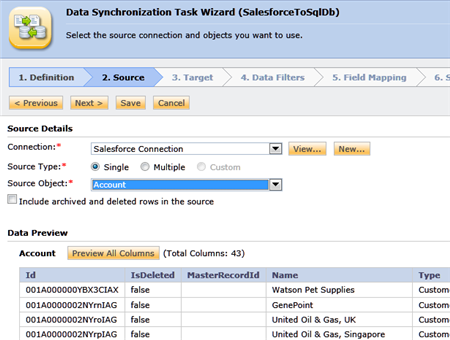
    On the next wizard page, I reused the Salesforce.com connection that I created in the second post of this blog series. I set the Source Object to Account and saw the simple preview of the accounts currently in Salesforce.com.

    2012.03.26informatica44

    I then set up my target, using the same SQL Server connection that I created in the previous post. I then chose the CrmAccount table and saw that there were no rows in there.

    2012.03.26informatica45

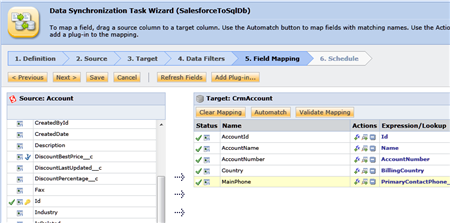
    I didn’t choose any filter of data and moved on to the Field Mapping section. Here, I filled each target field with a value from the source object.

    2012.03.26informatica46

    Finally, on the scheduling tab, I chose the “Run this task in real-time upon receiving an outbound message from Salesforce” option. When selected, this option reveals a URL that Salesforce.com can call from its Outbound Messaging activity.

    2012.03.26informatica47

    That’s it! Now, how about we go get Salesforce.com all set up for this solution?

    Setting up Salesforce.com Outbound Messaging

    In my Salesforce.com Setup console, I went to the Workflow Rules section.

    2012.03.26informatica48

    I then created a brand new Workflow Rule and selected the Account object. I then named the rule, set it to run when records are created or edited and gave it a simple evaluation rule that checks to see if the Account Name has a value.

    2012.03.26informatica49

    On the next page of this wizard, I was given the choice of what to do when that workflow condition is met. Notice that besides Outbound Messaging, there are also options for creating tasks and sending email messages.

    2012.03.26informatica50

    After choosing New Outbound Message, I needed to provide a name for this Outbound Message, the endpoint URL provided to me by the Informatica Cloud, and the data fields that my mapping will expect. In my case, there were five fields that were used in my mapping.

    2012.03.26informatica51

    After saving this configuration, I completed the Workflow Rule and activated it.

    Testing the ETL

    With my Informatica Cloud configuration ready, and Salesforce.com Workflow Rule activated, I went and created a brand new Account record.

    2012.03.26informatica52

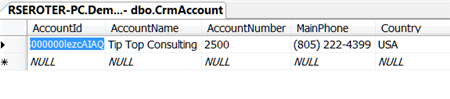
    After saving the new record, I went and looked in the Outbound Messaging Delivery Status view and it was empty, meaning that it had already completed! Sure enough, I checked my database table and BOOM, there it was.

    2012.03.26informatica53

    That’s impressive!

    Summary

    One of the trickiest aspects of Salesforce.com Outbound Messaging is that you need an public-facing internet endpoint to push to, even if your receiving app is inside your firewall. By using the Informatica Cloud, you get one! This scenario demonstrated a way to do *instant* data transfer from Salesforce.com to a local database. I think that’s pretty killer.

    I hope you found this series useful. A modern enterprise architecture landscape will include traditional components like BizTalk Server and Informatica (or SSIS for that matter), but also start to contain cloud-based integration tools. Informatica Cloud should be high on your list of options for integrating both on-premises and cloud applications, especially if you want to stop installing and maintaining integration software!

  • Interview Series: Four Questions With … Nick Heppleston

    Happy Monday and welcome to the 38th interview in this never-ending series of conversations with thought leaders in the connected systems space. This month, we’re chatting with Nick Heppleston who is a long time BizTalk community contributor, an independent BizTalk consultant in the UK, owner of BizTalk tool-provider Atomic-Scope,  occasional blogger and active Twitter user. I thought I’d poke into some of his BizTalk experience and glean some best practices from him. Let’s see how it goes …

    Q: Do you architect BizTalk solutions differently when you have a beefy, multi-server BizTalk environment vs. an undersized, resource-limited setup?

    A: In a word, no. I’m a big believer in KISS (Keep It Simple Stupid) when architecting solutions and try to leverage as much of the in-built scaling capabilities as I can – even with a single server, you can separate a lot of the processing through dedicated Hosts if you build the solution properly (simple techniques such as queues and direct binding are easy to implement). If you’re developing that solution for a multi-server production set-up, then great, nothing more to do, just leverage the scale-out/scale-up capabilities. If you’re running on a 64-bit platform, even more bang for your buck.

    I do however think that BizTalk is sometimes used in the wrong scenarios, such as large-volume ETL-style tasks (possibly because clients invest heavily in BizTalk and want to use it as extensively as possible) and we should be competent enough as BizTalk consultants/architects/developers to design solutions using the right tool for the job, even when the ‘right’ tool isn’t our favorite Microsoft integration platform….

    I also think that architects need to keep an eye on the development side of things – I’ve lost count of the number of times I’ve been asked by a client to see why their BizTalk solution is running slowly, only to discover that the code was developed and QA’d against a data-set containing a couple of records and not production volume data. We really need to keep an eye of what our end goal is and QA with realistic data – I learnt the hard-way back in 2006 when I had to re-develop an orchestration-based scatter-gather pattern overnight because my code wasn’t up-to scratch when we put it into production!

    Q: Where do you prefer to stick lookup/reference data for BizTalk solutions? Configuration files? SSO? Database? Somewhere else?

    A: Over the last several years I think I’ve put config data everywhere – in the btsntsvc.exe.config file (a pain for making changes following go-live), SSO (after reading one of your blog posts in fact; it’s a neat solution, but should config data really go there?), in various SQL Server tables (again a pain because you need to write interfaces and they tend to be specific to that piece of config).

    However about a year ago I discovered NoSQL and more recently RavenDb (www.ravendb.net) which I think has got amazing potential to provide a repository for lookup/reference data. With zero overhead in terms of table maintenance coupled with LINQ capabilities, its make a formidable offering in the config repo area, not just for BizTalk, but for any app requiring this functionality. I think that anyone wanting to introduce a config repository for their solution should take a look at NoSQL and RavenDb (although there are many other alternatives, I just like the ease of use and config of Raven).

    Q: What are you working on besides BizTalk Server, and what sorts of problems are you solving?

    A: Good question! I tend to have so many ideas for personal projects bouncing around my head at any one time that I struggle to stay focused long enough to deliver something (which is why I need one of these on my desk – http://read.bi/zUQYMO. I am however working on a couple of ideas:

    The first one is an internet proxy device based around the PlugComputer (see http://www.plugcomputer.org/) – which is a great little ARM based device that runs various flavors of Linux – to help parents ‘manage’ their children’s internet use, the idea being that you plug this thing into your broadband router and all machines within your home network use it as the proxy, rather than installing yet more software on your PC/laptop. I’ve almost produced a Minimum Viable Product and I’ll be asking local parents to start to beta test it for me in the next week or so. Amazingly, I’m starting to see my regular websites come back much quicker than usual, partly because it is running the caching proxy Squid. This little project has re-introduced me to socket programming (something I haven’t done since my C days at University) and Linux (I used to be a Linux SysAdmin before I moved into BizTalk).

    My second project is really getting up to speed on Azure which I think is an absolutely amazing solution, even better than Amazon’s offerings (dare I say that?), simply because you don’t have to worry about the infrastructure – develop and deploy the thing and it just works. So I can learn Azure properly, I’m writing a RosettaNet handler (similar to the BizTalk RosettaNet Adapter), however I hope that some of this stuff will come out of the great work being done by the Windows Azure Service Bus EAI & EDI Labs Team in a similar vein to the EDI functionality being delivered on top of Azure.

    I also continue to maintain the BizTalk Message Archiving Pipeline Component (shameless plug: download a free trial at www.atomic-scope.com/download-trial/), supporting existing customers and delivering great functionality to small and large customers worldwide.

    Q [stupid question]: I saw that an interesting new BizTalk blog was launched and its core focus is BizTalk Administration. While that’s a relatively broad topic, it still limits the number of areas you can cover. What are some hyper-specific blog themes that would really restrict your writing options? I’d suggest BizTalkConcatenateFunctoidTips.com, or CSharpWhileLoopTrivia.com. What about you?

    A: I actually investigated BizTalkHotfixes.com a while back as a website dedicated to, well, BizTalk Hotfixes. At the time I was really struggling to find all of the BizTalk Hotfixes relevant to a particularly obscure customer problem and couldn’t find an authoritative list of hotfixes. This issue has gone away to a certain extent now that we have CU’s for the product, but I think the idea still has legs, especially around some of the more obscure adapters (see http://www.sharepointhotfixes.com/ for example) and it might be something to resurrect in the future if I ever get the time!

    As for BizTalk Administration, it sounds like a narrow topic, but I think it’s just as important as the Dev side, especially when you think that the health of the underlying platform can make or break a solution. I also think admin specific content is also beneficial to the large number of SysAdmins who inherit a BizTalk platform once a solution goes live, simply because they are the ‘infrastructure guys’ without any formal or informal BizTalk training. I do quite a few health checks for clients where the underlying infrastructure hasn’t been maintained, causing major problems with backups, ESSO, clustering, massive data growth etc. The work produced by the BizTalk360 chaps is really helping in this area.

    Thanks Nick, great stuff!