Category: BizTalk

  • BizTalk Ordered Delivery Gotcha

    One of my colleagues recently lost a bit of work because of a tricky “gotcha” with messages going through an ordered delivery channel in BizTalk Server.

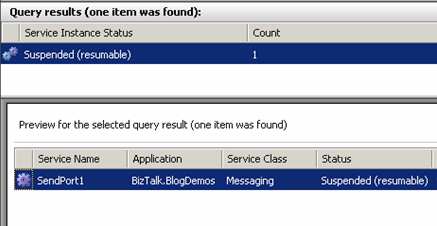
    For someone viewing suspended messages in the BizTalk Administration Console, there is no obvious way to identify a suspended port as an ordered delivery port. In the screenshot below, I’ve stopped an ordered delivery send port, and sent five messages through.

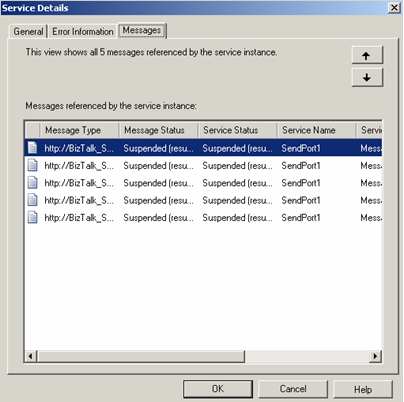
    As you can see, the console only shows a “1 Count” of suspended ports. That’s clearly not the case. How do I see the REAL count of messages? I’ve got two choices. First, I can double-click the suspended port and switch to the “Messages” tab.

    Another way to see the messages is to right-click the suspended instance and select “Show Messages.”

    So what’s the gotcha? My buddy wanted to delete a few of the messages in the queue, so he right-clicked the messages he wanted to delete, and chose “Terminate Instance.”

    To his absolute horror, this action terminated all the messages in the suspended port instance, instead of his expected goal of eliminating only choice messages. Yowza. If you turn on the “Stop sending subsequent messages on current message failure” flag on the port, you CAN eliminate a message, BUT, it’s only the front-most message in the queue that blocking up the pipe. To see this, I flipped that flag on, and sent a number of messages in. Now if I right-click the single suspended instance, I have the option to “Find Failed Message.”

    The message that is shown afterwards can be selected and deleted in this scenario. So, I was hoping that if I manipulate the query in the Admin Console, I too could delete ANY message in the queue. Alas, even searching by “Message ID” and returning a single instance from the queue (as the “Failed Message” processing does), doesn’t afford me the chance to delete any message of my choosing. All I can still do is “Terminate Instance” instead.

    So the takeaway is …

    • Warn administrators to be careful when deleting suspended instances associated with ordered delivery ports. They may THINK they are deleting a single instance, but in fact, are deleting dozens or hundreds of underlying messages.
    • You cannot terminate individual messages that are queued up for ordered delivery.

    Technorati Tags:

  • BizTalk SSO Configuration Data Storage Tool

    If you’ve been in the BizTalk world long enough, you’ve probably heard that you can securely store name/value pairs in the Enterprise Single Sign-On (SSO) database. However, I’ve never been thrilled with the mechanism for inserting and managing these settings, so, I’ve built a tool to fill the void.

    Jon Flanders did some great work with SSO for storing configuration data, and the Microsoft MSDN site also has a sample application for using SSO as a Configuration Store, but, neither gave me exactly what I wanted. I want to lower the barrier of entry for SSO since it’s such a useful way to securely store configuration data.

    So, I built the SSO Config Store Application Manager.

    I can go ahead and enter in an application name, description, account groups with access permissions, and finally, a collection of fields that I want to store. “Masking” has to do with confidential values and making sure they are only returned “in the clear” at runtime (using the SSO_FLAG_RUNTIME flag). Everything in the SSO database is fully encrypted, but this flag has to do with only returning clear values for runtime queries.

    You may not want to abandon the “ssomanage” command line completely. So, I let you export out the “new application” configuration into the SSO-ready format. You could also change this file for each environment (different user accounts, for instance), and then from the tool, load a particular XML configuration file during installation. So, I could create XML instances for development/test/production environments, open this tool in each environment, and load the appropriate file. Then, all you have to do is click “Create.”


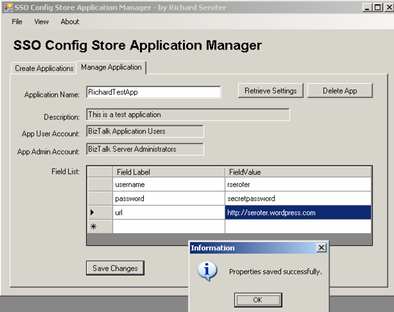
    If you flip to the “Manage” tab of the application, you can set the field values, or delete the application. Querying an application returns all the necessary info, and, the list of property names you previously defined.

    If you’re REALLY observant, and use the “ssomanage” tool to check out the created application, you’ll notice that the first field is always named “dummy.” This is because if every case I’ve tested, the SSO query API doesn’t return the first property value from the database. Drove me crazy. So, I put a “dummy” in there, so that you’re always guaranteed to get back what you put in (e.g. put in four fields, including dummy, and always get back the three you actually entered). So, you can go ahead and safely enter values for each property in the list.

    So how do we actually test that this works? I’ve included a class, SSOConfigHelper.cs (slightly modified from the MSDN SSO sample) in the below zip file, that you would included in your application or class library. This class has the “read” operation you need to grab the value from any SSO application. The command is as simple as:

    string response = SSOConfigHelper.Read(queryName, propertyName);

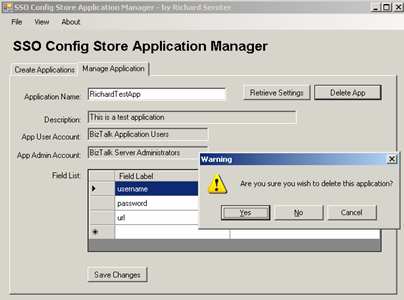
    Finally, when you’re done messing around in development, you can delete the application.

    I have plenty of situations coming up where the development team will need to secure store passwords and connection strings and I didn’t like the idea of trying to encrypt the BizTalk configuration file, or worse, just being lazy and embedding the credentials in the code itself. Now, with this tool, there’s really no excuse not to quickly build an SSO Config Store application and jam your values in there.

    You can download this tool from here.

    Technorati Tags:

  • BizTalk 2006 R2 Launch in Los Angeles

    If you’re in the Los Angeles area, check out the registration for the BizTalk 2006 R2 Launch Event. I just signed up. I’ll be the guy in the back heckling Marty and Chris with taunts such as “SOA is dead!”, and “BizTalk killed my parents!”. Good fun.

    Technorati Tags:

  • My BizTalk vNext Wish List

    Congrats to the Connected Systems Division for getting BizTalk Server 2006 R2 out the door. Now that we’re done with that, here’s my humble “wish list” for BizTalk Server vNext. I realize that development is well under way, but, hopefully some of these requests can make it in.

    Design Tools

    • High level modeling tool. Nothing the team doesn’t know already, but I want a tool/view that let’s me architect the BizTalk solution at a broader level. Much like the BizTalk Server 2006 Administration Console introduced “application management”, I want a similar metaphor for “application architecture.”
    • Modeling tools that support industry standards. The BizTalk team has done a great job in embracing industry standards for developed artifacts (e.g. XSD, XSLT, SOAP, WSDL, XML), and I’d love to see a similar embrace of the design environment. Specifically, UML and/or BPMN support in the above-mentioned higher level modeling toolset.

    BizTalk Administration

    • Option for subscriber throttling. I need to be able to pick any orchestration or any send port and tell the engine not to instantiate more than X number of them at one time. Many smart folks have come up with various solutions (e.g. singletons, ordered delivery, etc), but I can’t see why it’s too technically challenging to force the XLANG engine (or EPM) to verify running instances vs. throttle count prior to instantiating a new instance.
    • Stronger dependency visibility. I’d like to be able to open the BizTalk Administration Console, view a host, and see every artifact that uses it. Likewise, I’d like to be able to view a schema and see each map that references it. I need more ways to find out which artifacts have dependencies on others so that I can better plan application upgrades or retirements.
    • “Application” level permission controls. Right now, when our team adds someone to the “Operators” group, they have free reign over any application deployed in the environment. That makes me a tad nervous. Too easy to accidentally terminate someone else’s suspended messages, or see message content that they shouldn’t. I’d like the option to allow department-level administrators to own, manage and troubleshoot specific applications in the BizTalk environment.
    • Web-based Administration Console. While it’s fairly simple to do a “Admin only” install of BizTalk on a desktop machine, I’d appreciate a web-based management console that let’s me perform a subset of standard tasks. Easier to provide access to multiple administrators (only if the isolated ownership point above is enacted), and if you wanted to get fancy, you’d AJAX the UI and provide near-real-time updates of running and suspended instances without a manual refresh.
    • Better subscription analysis. It’s great that the Subscription Viewer is now part of the Admin Console, but I need more criteria to search for. For instance, I’d like to be able to search for any subscription built upon a particular message type. If I need to change a schema namespace, which subscriptions will it impact? Same with searching for subscriptions by port names, etc. Again it comes back to impact analysis of changes.
    • Additional subscription operators. Right now, I can’t create a subscription based on a field NOT existing in the schema. I can only do “exists”. I’d also like subscriptions based on “contains” where I could route messages (without orchestrations) where a “customer ID” contains a particular substring.
    • More health metrics in the Admin Console. Specifically, I would find it useful if there was a portion of the Administration Console where I would be notified if host throttling thresholds were approaching, if a particular application was backlogged, etc. I know that I can find out this information using performance counters, or MOM, but I’d like to have the Admin Console be more of a “one stop shop.”

    Adapters

    • Updated core adapters. It’d be great to refresh some of the core adapters with new capabilities. I’d like to see the FILE adapter support XPath-based file name tokens. If I want the output file name to contain a field from the message, it’d be much easier to manage this at the adapter level rather than introducing orchestrations or custom pipelines. For the SMTP adapter, it should be much easier to do dynamic addressing. To dynamically choose the “To:” address, I have to do an orchestration with a dynamic port. And instead of just setting the “To:” address, I also have to use the BRE or custom component to grab the SMTP Host, Subject, etc. Often, the only “dynamic” piece of the email is the address. Seems like lots of improvements are possible for the SQL adapter. I’d like an “after poll” process option (like the Oracle adapter), and support for querying tables/views instead of requiring a stored procedure (or updategram). Seems like the Oracle adapter has more features than the SQL Server one.
    • More browsing, less typing. One of the top 5 improvements in BizTalk 2006 was the addition of the “browse” button in the FILE ports. Why am I still typing URLs in the SOAP/HTTP ports, or typing settings for the SharePoint adapter? Why can’t we browse more settings instead of relying on me to inevitably type the values incorrectly?

    Development

    • Refresh auto-generated schemas. I love that I can update a “web reference” in Visual Studio.NET with no problem, but I absolutely dread changes to auto-generated BizTalk schemas (SQL stored procedure, Siebel business object, etc) since I have to walk through the Generate Schemas wizard again even for a simple update to the data source. I’d love to right click on the Oracle database view XSD schema, and choose “refresh schema from source” and have the update automatically taken care of.
    • Option to automatically GAC referenced assembly. I know that I could add post-build steps on my .NET component libraries which would GAC the component for me. But, how great would it be if the BizTalk project properties page had a choice to “GAC all referenced assemblies”?
    • Orchestration unit test. I don’t know how you’d implement this, but even a simple test of an orchestration process involves a full deploy, build ports, etc. Sometimes I would like a quick process logic test without going through the whole deployment production.
    • “Construct Blank Message” in orchestration. Seems that I often come across folks who use XmlDocument variables or maps to simply create a new, empty BizTalk orchestration message. For instance, I may want an empty message that I pass to the BRE, which in turn fills in all the fields I want. Or, I create an empty Oracle query schema, and use a distinguished field to actually set my query filter. I’d like a “construct blank message” which instantiates a message WITHOUT using a transform or “message1 = message2” assignment.

    That’s all I’ve got for now. Thoughts? Any of those requests seem outlandish?

    Technorati Tags:

  • Utilizing Spring.NET To Integrate BizTalk and SOA Software

    I recently had the situation where I wanted to reuse a web service proxy class for multiple BizTalk send ports but I required a unique code snippet specific to each send port.

    We use SAP XI to send data to BizTalk which in turn, fans out the data to interested systems. Let’s say that one of those SAP objects pertains to each of our external Vendors. Each consumer of the Vendor data (i.e. BizTalk, and then each downstream system) consumes the same WSDL. That is, each subscriber of Vendor data receives the same object type and has the same service operations.
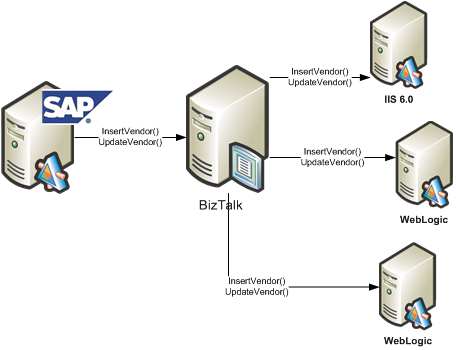
    So, I can generate a single proxy class using WSDL.exe and my “Vendor” WSDL, and use that proxy class for each BizTalk send port. It doesn’t matter the technology platform of my destination system, as this proxy should work fine whether the downstream service is Java, .NET, Unix, Windows, whatever.

    Now the challenge. We use SOA Software Service Manager to manage and secure our web services. As I pointed out during my posts about SOA Software and BizTalk, each caller of a service managed by Service Manager needs to add the appropriate headers to conform to the service policy. That is, if the web service operation requires a SAML token, then the service caller must inject that. Instead of forcing the developer to figure out how to correctly add the required headers, SOA Software provides an SDK which does this logic for you. However, each service may have different policies with different credentials required. So, how do I use the same proxy class, but inject subscriber-specific code at runtime in the send port?

    What I wanted was to do a basic Inversion of Control (IOC) pattern and inject code at runtime. At its base, an IOC pattern is simply really, really, really late binding. That’s all there is to it. So, the key is to find an easy to use framework that exploits this pattern. We are fairly regular uses of Spring (for Java), so I thought I’d utilize Spring.NET in my adventures here.

    I need four things to make this solution work:

      • A simple interface created that is implemented by the subscribing service team and contains the code specific to their Service Manager policy settings.
      • A Spring.NET configuration file which references these implemented interfaces
      • A singleton object which reads the configuration file once and provides BizTalk with pointers to these objects

    A modified web service proxy class that consumes the correct Service Manager code for a given send port

    First, I need an interface defined. Mine is comically simple.

    public interface IExecServiceManager
    {
    bool PrepareServiceCall();
    }

    Each web service subscriber can build a .NET component library that implements that interface. The “PrepareServiceCall” operation contains the code necessary to apply Service Manager policies.

    Next I need a valid Spring.NET configuration file. Now, I could have extended the standard btsntsvc.exe.config BizTalk configuration file (ala Enterprise Library), but, I actually PREFER keeping this separate. Easier to maintain, less clutter in the BizTalk configuration file. My Spring.NET configuration looks like this …

    <object name=”http://localhost/ERP.Vendor.Subscriber2
    /SubscriberService.asmx”
    type=”Demonstration.IOC.SystemBServiceSetup.ServiceSetup, Demonstration.IOC.SystemBServiceSetup” singleton=”false”/>
    </objects>

    I created two classes which implemented the previously defined interface and referenced them in that configuration file.

    Next I wanted a singleton object to load the configuration file and keep in memory. This is what trigger my research into BizTalk and singletons a while back. My singleton has a primary operation called LoadFactory during the initial constructor …

    using Spring.Context;
    using Spring.Objects.Factory.Xml;
    using Spring.Core.IO;

    private void LoadFactory()
    {
    IResource objectList = new FileSystemResource
    (@”C:\BizTalk\Projects\Demonstration.IOC\ServiceSetupObjects.xml”);
    //set private static value
    xmlFactory = new XmlObjectFactory(objectList);}

    Finally, I modified the auto-generated web service proxy class to utilize Spring.NET and load my Service Manager implementation class at runtime.

    using Spring.Context;
    using Spring.Objects.Factory.Xml;
    using Spring.Core.IO;
    using Demonstration.IOC.InterfaceObject;

    public void ProcessNewVendor(NewVendorType NewVendor)
    {//get WS URL, which can be used as our Spring config key
    string factoryKey = this.Url;

    //get pointer to factory
    XmlObjectFactory xmlFactory =
    XmlObjectFactorySingleton.Instance.GetFactory();

    //get the implementation object as an interface
    IExecServiceManager serviceSetup =
    xmlFactory.GetObject(factoryKey) as IExecServiceManager;

    //execute send port-specific code
    bool responseValue = serviceSetup.PrepareServiceCall();

    this.Invoke(“ProcessNewVendor”, new object[] {
    NewVendor});
    }

    Now, when a new subscriber comes online, all we do is create an implementation of IExecServiceManager, GAC it, and update the Spring.NET configuration file. The other option would have been to create separate web service proxy classes for each downstream subscriber, which would be a mess to maintain.

    I’m sure we’ll come up with many other ways to use Spring.NET and IOC patterns within BizTalk. However, you can easily go overboard with this dependency injection stuff and end up with an academically brilliant, but practically stupid architecture. I’m a big fan of maintainable simplicity.

    Technorati Tags:

  • RSSBus Updated With BizTalk-Specific Connector

    Those cats at \n software have released an updated version of RSSBus

    They’ve added a new feed creation wizard, improved caching and performance, and added a bunch of new connectors. Of specific interest to me, they’ve added a BizTalk Connector which extracts the following RSS feeds:

    • List of all service instances in BizTalk
    • List of all BizTalk applications and their status
    • Details about the contents of specific BizTalk applications
    • List of either just suspended, or just running service instances

    They didn’t add feeds to mirror the application-specific traffic metrics that I posted a while back. But that’s cool, since I can still use my old queries and the RSSBus SqlServer connector.

    Technorati Tags:

  • My BizTalk Code Review Checklist

    I recently put together a BizTalk Code Review checklist for our development teams, and thought I’d share the results.

    We didn’t want some gargantuan list of questions that made code review prohibitive and grueling. Instead, we wanted a collection of common sense, but concrete, guidelines for what a BizTalk solution should look like. I submit that any decent BizTalk code reviewer would already know to look out for the items below, but, having the checklist in written form ensures that developers starting new projects know EXACTLY what’s expected of them.

    I’m sure that I’ve missed a few things, and would welcome any substantive points that I’ve missed.

    BizTalk Code Review Checklist

    Naming Standards Review
    Standard Result Correction Details
    Pass Fail
    Visual Studio.NET solution name follows convention of:
    [Company].[Dept].[Project]
    Visual Studio.NET project name follows convention of:
    [Company].[Dept].[Project].[Function]

    Schema name follows convention of:
    [RootNodeName]_[Format].xsd

    Property schema name follows convention of:
    [DescriptiveName]_PropSchema.xsd

    XSLT map name follows convention of:
    [Source Schema]_To_[Dest Schema].btm

    Orchestration name follows convention of:
    [Meaningful name with verb-noun pattern].odx

    Pipeline name follows convention of:
    Rcv_[Description].btp /
    Snd_[Description].btp

    Orchestration shape names match BizTalk Naming Standards document
    Receive port name follow convention of:
    [ApplicationName].Receive[Description]

    Receive location name follows convention of:
    [Receive port name].[Transport]

    Send port name follows convention of:
    [ApplicationName].Send[Description].[Transport]

    Schema Review
    Standard Result Correction Details
    Pass Fail
    Namespace choice consistent across schemas in project/name
    Nodes have appropriate data types selected
    Nodes have restrictions in place (e.g. field length, pattern matching)
    Nodes have proper maxOccurs and minOccurs values
    Node names are specific to function and clearly identify their contents
    Auto-generated schemas (via adapters) have descriptive file names and “types”
    Schemas are imported from other locations where appropriate to prevent duplication
    Schemas that import other schemas have a “root reference” explicitly set
    Clear reasons exist for the values promoted in the schema
    Schema elements are distinguished appropriately
    Schema successfully “validates” in Visual Studio.NET
    Multiple different instance files successfully validate against the schema

    Mapping Review
    Standard Result Correction Details
    Pass Fail
    Destination schema has ALL elements defined with either an inbound link, functoid, or value.
    Functoids are used correctly
    Scripting functoid has limited inline code or XSLT.
    Scripting functoid with inline code or XSLT is well commented
    Database functoids are not used
    Multiple “pages” are set up for complex maps
    Conversion between data types is done in functoids (where necessary)
    Map can be validated with no errors
    Multiple different input instance files successfully validate against the map

    Orchestration Review
    Standard Result Correction Details
    Pass Fail
    Each message and variable defined in the orchestration are used by the process
    Transactions are used appropriately
    All calls to external components are wrapped in an exception-handling Scope
    No Expression shape contains an excessive amount of code that could alternately be included in an external component
    The Parallel shape is used correctly
    The Listen shape is not used in place of transaction timeouts
    All Loops have clearly defined exit conditions
    Where possible, message transformations are done at the “edges” (i.e. port configurations)
    Calling one orchestration from another orchestration is done in a manner that supports upgrades
    Correlation is configured appropriately
    All messages are created in an efficient manner
    The message is not “opened” in unnecessary locations
    All variables are explicitly instantiated
    No port operations are named the default “Operation_1”
    Port Types are reused where possible
    All Request/Response ports exposed as a web service are equipped with a SOAP fault message.
    Orchestration has trace points inserted to enable debugging in later environments
    Orchestration design patterns are used wherever possible

    Business Rule Review
    Standard Result Correction Details
    Pass Fail
    Business rule output tested for all variations of input
    Conflict resolution scenarios are non-existent or limited
    Long-term fact retrievers used for static facts
    Business Rule vocabulary defined for complex rule sets

    Configuration Review
    Standard Result Correction Details
    Pass Fail
    Receive Port / Send Port tracking configurations appropriately set
    Maps are applied on the Receive Port where appropriate
    Send port retry interval set according to use case
    Maps are applied on Send Port where appropriate
    Send port does NOT have filter attached if connected to an orchestration
    Subscriptions exist for every message processed by the application

    Deployment Package Review
    Standard Result Correction Details
    Pass Fail
    “Destination Location” for each artifact uses “%BTAD_InstallDir%” token vs. hard coded file path
    All supporting artifacts (e.g. helper components, web services, configuration files) are added as Resources
    Binding file is NOT a resource if ports use transports with passwords

    Overall Solution Architecture Review
    Standard Result Correction Details
    Pass Fail
    Solution is organized in Visual Studio.NET and on disk in a standard fashion
    Passwords are never stored in clear text
    All references to explicit file paths are removed / minimized
    All two-way services INTO BizTalk produce a response (either expected acknowledgement or controlled exception message)
    Calls to request/response web services that take an exceptional amount of time to process are reengineered to use an “asynchronous callback” pattern
    Exceptions are logged to an agreed upon location
    Long-running processes have a way to inspect progress to date
    Solution has been successfully tested with REAL data from source systems
    Solution has been successfully tested while running under user accounts with permissions identical to the production environment
    Messages are validated against their schema per use case requirements
    Processes are designed to be loosely coupled and promote reuse where possible

    Technorati Tags:

  • Important Hotfixes For the BizTalk Oracle Adapter

    We’ve encountered a few quirky things with the Oracle database adapter for BizTalk, so I thought I’d point out a few Microsoft KB articles and hotfixes that you should be aware of if you’re using this adapter.

    For some reason you need a compass and secret handshake to find these freakin’ things on the Microsoft website, so to grab the full list of Oracle adapter KB articles, visit here.

    Technorati Tags:

  • Interesting BizTalk Links From This Week

    I usually despise blogs that do nothing but link to other posts (breaking rule #11 in Jeff’s list of blog clichés), but, there were a few BizTalk/service things that caught my eye this week and I thought I’d briefly point them out.

    Good stuff.

    Technorati Tags:

  • Debatching Flat Files Into XML (With Header Intact)

    Today I was approached with the problem of how to take a flat file input, debatch it, add the “header” to each individual record, and return the results as XML messages.

    The first part of the equation was to successfully debatch the flat file. So, I took the header and body schemas that the developer built and added them to a new Receive pipeline’s “flat file disassembler”. On the flat file disassembler, I flipped the Preserve header property to “True” to ensure that the header would be injected into the context collection of each debatched record.

    I can prove that Preserve header works by stopping my send port, and checking out the temporarily suspended messages. If I view the context collection for a given message, I’ll see the FlatFileHeaderDocument value and my header message (in XML format) embedded inside.

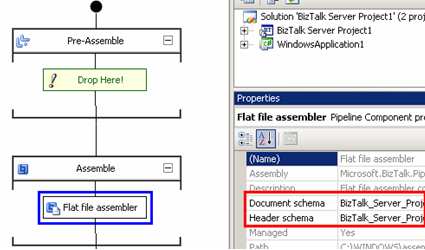
    To transmit a flat file result (with header attached), all I have to do is create a custom Send pipeline, use the flat file assembler component, and once again choose the document and header schemas. This will cause the FlatFileHeaderDocument to be sucked out of context and converted back to delimited text, and slapped on top of each message.

    That’s cool, but in our case, we wanted XML output with the header appended. I could have tried some gnarly solution involving orchestrations calling a “flat file” send pipeline (to add the header) and then an “xml” send pipeline to generate XML content, but that didn’t seem clean. Instead, I created an orchestration that first grabs the FlatFileHeaderDocument out of context and creates a valid orchestration message from it.

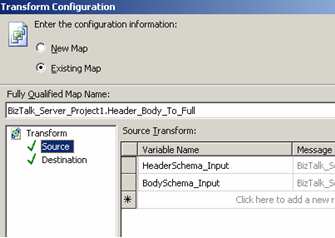
    The XMLNORM.FlatFileHeaderDocument is the specific context value from which I can yank a string representation of the XML header message. I then loaded that into an XmlDocument variable and used that variable to instantiate an orchestration message. Next, I passed both the body AND the newly-constructed header message into a multi-part map. This map takes those two values and outputs a single document format containing both header and body values.

    So now, BizTalk can take the flat file containing 20 records, debatch it, and reassemble it (header and all) into valid XML output.

    Technorati Tags: