Category: BizTalk

  • What Are All of Microsoft Azure’s Application Integration Services?

    As a Microsoft MVP for Integration – or however I’m categorized now – I keep a keen interest in where Microsoft is going with (app) integration technologies. Admittedly, I’ve had trouble keeping up with all the various changes, and thought it’d be useful to take a tour through the status of the Microsoft integration services. For each one, I’ll review its use case, recent updates, and how to consume it.

    What qualifies as an integration technology nowadays? For me, it’s anything that lets me connect services in a distributed system. That “system” may be comprised of components running entirely on-premises, between business partners, or across cloud environments. Microsoft doesn’t totally agree with that definition, if their website information architecture is any guide. They spread around the services in categories like “Hybrid Integration”, “Web and Mobile”, “Internet of Things”, and even “Analytics.”

    But, whatever. I’m considering the following Microsoft technologies as part of their cloud-enabled integration stack:

    • Service Bus
    • Event Hubs
    • Data Factory
    • Stream Analytics
    • BizTalk Services
    • Logic Apps
    • BizTalk Server on Cloud Virtual Machines

    I considered, but skipped, Notification Hubs, API Apps, and API Management. They all empower application integration scenarios in some fashion, but it’s more ancillary. If you disagree, tell me in the comments!

    Service Bus

    What is it?

    The Service Bus is a general purpose messaging engine released by Microsoft back in 2008. It’s made up of two key sets of services: the Service Bus Relay, and Service Bus Brokered Messaging.

    https://twitter.com/clemensv/status/648902203927855105

    The Service Bus Relay is a unique service that makes it possible to securely expose on-premises services to the Internet through a cloud-based relay. The service supports a variety of messaging patterns including request/reply, one-way asynchronous, and peer-to-peer.

    But what if the service client and server aren’t online at the same time? Service Bus Brokered Messaging offers a pair of asynchronous store-and-forward services. Queues provide first-in-first-out delivery to a single consumer. Data is stored in the queue until retrieved by the consumer. Topics are slightly different. They make it possible for multiple recipients to get a message from a producer. It offers a publish/subscribe engine with per-recipient filters.

    How does the Service Bus enable application integration? The Relay lets companies expose legacy apps through public-facing services, and makes cross-organization integration much simpler than setting up a web of VPN connections and FTP data exchanges. Brokered Messaging makes it possible to connect distributed apps in a loosely coupled fashion, regardless of where those apps reside.

    What’s new?

    This is a fairly mature service with a slow rate of change. The only thing added to the Service Bus in 2015 is Premium messaging. This feature gives customers the choice to run the Brokered Messaging components in a single-tenant environment. This gives users more predictable performance and pricing.

    From the sounds of it, Microsoft is also looking at finally freeing Service Bus Relay from the shackles of WCF. Here’s hoping.

    https://twitter.com/clemensv/status/639714878215835648

    How to use it?

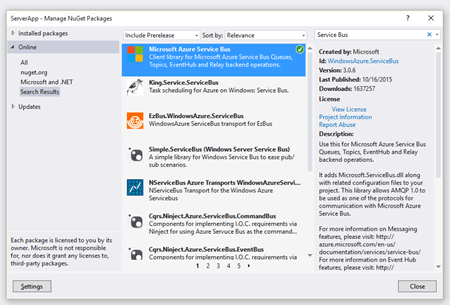
    Developers work with the Service Bus primarily by writing code. To host a Relay service, you must write a WCF service that uses one of the pre-defined Service Bus bindings. To make it easy, developers can add the Service Bus package to their projects via NuGet.
    2015.10.21integration01

    The only aspect that requires .NET is hosting Relay services. Developers can consume Relay-bound services, Queues, and Topic subscriptions from a host of other platforms, or even just raw REST APIs. The Microsoft SDKs for Java, PHP, Ruby, Python and Node.js all include the necessary libraries for talking to the Service Bus. AMQP support appears to be in a subset of the SDKs.

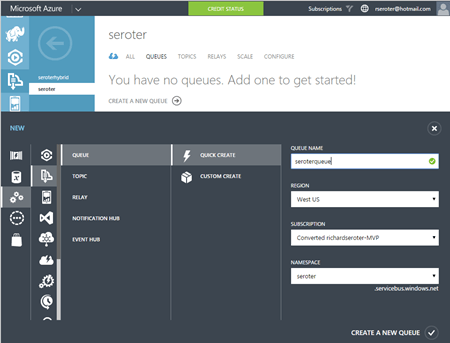
    It’s also possible to set up Service Bus Queues and Topics via the Azure Portal. From here, I can create new Queues, add Topics, and configure basic Subscriptions. I can also see any active Relay service endpoints.
    2015.10.21integration02

    Finally, you can interact with the Service Bus through the super powerful (and open source) Service Bus Explorer created by Micosoftie Paolo Salvatori. From here, you can configure and test virtually every aspect of the Service Bus.


    Event Hubs

    What is it?

    Azure Event Hubs is a scalable service for high-volume event intake. Stream in millions of events per second from applications or devices. It’s not an end-to-end messaging engine, but rather, focuses heavily on being a low latency “front door” that can reliably handle consistent or bursty event streams.

    Event Hubs works by putting an ordered sequence of events into something called a partition. Like Apache Kafka, an Event Hub partition acts like an append-only commit log. Senders – who communicate with Event Hubs via AMQP and HTTP – can specify a partition key when submitting events, or leave it out so that a round-robin approach decides which partition the event goes to. Partitions are accessed by readers through Consumer Groups. A consumer group is like a view of the event stream. There should only be a single partition reader at one time, and Event Hub users definitely have some responsibility for managing connections, tracking checkpoints, and the like.

    How do Event Hubs enable application integration? A core use case of Event Hubs is capturing high volume “data exhaust” thrown off by apps and devices. You may also use this to aggregate data from multiple sources, and have a consumer process pull data for further processing and sending to downstream systems.

    What’s new?

    In July of 2015, Microsoft added support for AMQP over web sockets. They also added the service to an addition region in the United States.

    How to use it?

    It looks like only the .NET SDK has native libraries for Event Hubs, but developers can still use either the REST API or AMQP libraries in their language of choice (e.g. Java).

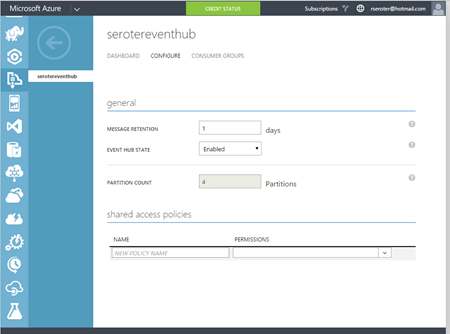
    The Azure Portal lets you create Event Hubs, and do some basic configuration.
    2015.10.21integration03

    Paolo also added support for Event Hubs in the Service Bus Explorer.


    Data Factory

    What is it?

    The Azure Data Factory is a cloud-based data integration service that does traditional extract-transform-load but with some modern twists. Data Factory can pull data from either on-premises or cloud endpoints. There’s an agent-based “data management gateway” for extracting data from on-premises file systems, SQL Servers, Oracle databases, Teradata databases, and more. Data transformation happens in Hadoop cluster or batch processing environment. All the various processing activities are collected into a pipeline that gets executed. Activities can have policies attached. A policy controls concurrency, retries, delay duration, and more.

    How does the Data Factory enable application integration? This could play a useful part in synchronizing data used by distributed systems. It’s designed for large data sets and is much more efficient than using messaging-based services to ship chunks of data between repositories.

    What’s new?

    This service just hit “general availability” in August, so the whole service is kinda new.

    How to use it?

    You have a few choices for interacting with the Data Factory service. As mentioned earlier, there are a whole bunch of supported database and file endpoints, but what about creating and managing the factories themselves? Your choices are Visual Studio, PowerShell, REST API, or the graphical designer in the Azure Preview Portal. Developers can download a package to add the appropriate project types to Visual Studio, and download the latest Azure PowerShell executable to get Data Factory extensions.

    To do any visual design, you need to jump into the (still) Preview Portal. Here you can create, manage, and monitor individual factories.
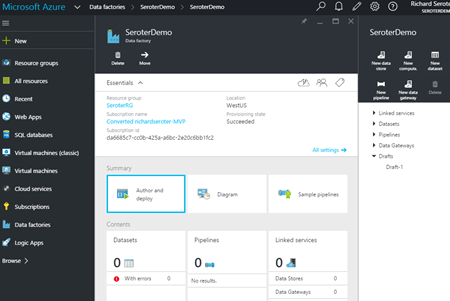
    2015.10.21integration04


    Stream Analytics

    What is it?

    Stream Analytics is a cloud-hosted event processing engine. Point it at an event source (real-time or historical) and run data over queries written in a SQL-like language. An event source could be a stream (like Event Hubs), or reference data (like Azure Blob storage). Queries can join streams, convert data types, match patterns, count unique values, look for changed values, find specific events in windows, detect absence of events, and more.

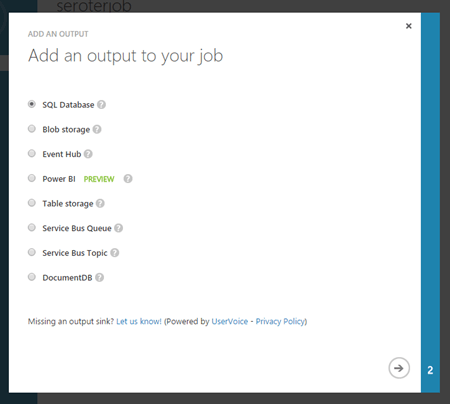
    Once the data has been processed, it goes to one of many possible destinations. These include Azure SQL Databases, Blob storage, Event Hubs, Service Bus Queues, Service Bus Topics, Power BI, or Azure Table Storage. The choice of consumer obviously depends on what you want to do with the data. If the stream results should go back through a streaming process, then Event Hubs is a good destination. If you want to stash the resulting data in a warehouse for later BI, go that way.

    How does Stream Analytics enable application integration? The output of a stream can go into the Service Bus for routing to other systems or triggering actions in applications hosted anywhere. One system could pump events through Stream Analytics to detect relevant business conditions and then send the output events to those systems via database or messaging.

    What’s new?

    This service became generally available in April 2015. In July, Microsoft added support for Service Bus Queues and Topics as output types. A few weeks ago, there was another update that added IoT-friendly capabilities like DocumentDB as an output, support for the IoT Hub service, and more.

    How to use it?

    Lots of different app services can connect to Stream Analytics (including Event Hubs, Power BI, Azure SQL Databases), but it looks like you’ve got limited choices today in setting up the stream processing jobs themselves. There’s the REST API, .NET SDK, or classic Portal UI.

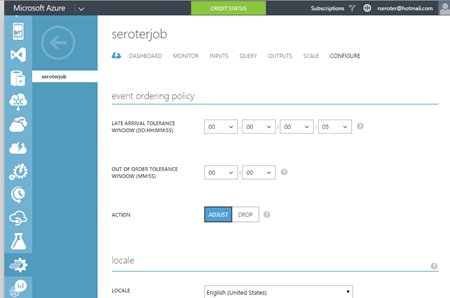
    The Portal UI lets you create jobs, configure inputs, write and test queries, configure outputs, scale streaming units up and down, and change job settings.
    2015.10.21integration05

    2015.10.21integration06


    BizTalk Services

    What is it?

    BizTalk Services targets EAI (enterprise application integration) and EDI (electronic data exchange) scenarios by offering tools and connectors that are designed to bridge protocol and data mismatches between systems. Developers send in XML or flat file data, and it can be validated, transformed, and routed via a “bridge” component. Message validation is done against an XSD schema, and XSLT transformations are created visually in a sophisticated mapping tool. Data comes into BizTalk Services via HTTP, S/FTP, Service Bus Queues, or Service Bus Topic subscription. Valid destinations for the output of a bridge include FTP, Azure Blob storage, one-way Service Bus Relay endpoints, Service Bus Queues, and more. Microsoft also added a BizTalk Adapter Service that lets you expose on-premises endpoints – options include SQL Server, Oracle databases, Oracle E-Business Suite, SAP, and Siebel – to cloud-hosted bridges.

    BizTalk Services also has some business-to-business capabilities. This includes support for a wide range of EDI and EDIFACT schemas, and a basic trading partner management portal.

    How does BizTalk Services enable application integration? BizTalk Services makes it possible for applications with different endpoints and data structures to play nice. Obviously this has potential to be a useful part of an application integration portfolio. Companies need to connect their assets, which are more distributed now more than ever.

    What’s new?

    BizTalk Services itself seems a bit stagnant (judging by the sparse release notes), but some of its services are now exposed in Logic and API apps (see below). Not sure where this particular service is heading, but its individual pieces will remain useful to teams that want access to transformation and connectivity services in their apps.

    How to use it?

    Working with BizTalk Services means using the REST API, PowerShell commandlets, or Visual Studio. There’s also a standalone management portal that hangs off the main Azure Portal.

    In Visual Studio, developers need to add the BizTalk Services SDK in order to get the necessary components. After installing, it’s easy enough to model out a bridge with all the necessary inputs, outputs, schemas, and maps.
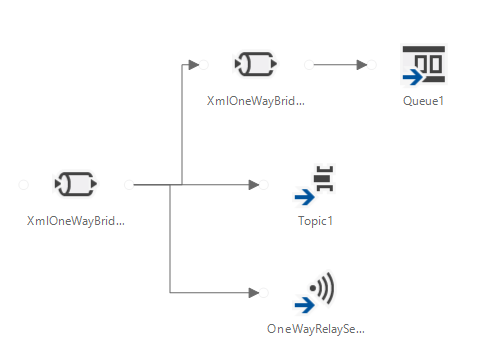
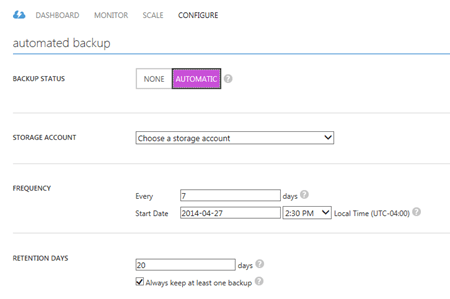
    In the standalone portal, you can search for and delete bridges, upload schemas and maps, add certificates, and track messages. Back in the standard Azure Portal, you configure things like backup policies and scaling settings.
    2015.10.21integration07


    Logic Apps

    What is it?

    Logic Apps let developers build and host workflows in the cloud. These visually-designed processes run a series of steps (called “actions”) and use “connectors” to access remote data and business logic. There are tons of connectors available so far, and it’s possible to create your own. Core connectors include Azure Service Bus, Salesforce Chatter, Box, HTTP, SharePoint, Slack, Twilio, and more. Enterprise connectors include an AS2 connector, BizTalk Transform Service, BizTalk Rules Service, DB2 connector, IBM WebSphere MQ Server, POP3, SAP, and much more.

    Triggers make a Logic App run, and developers can trigger manually, or off the action of a connector. You could start a Logic app with an HTTP call, a recurring schedule, or upon detection of a relevant Tweet in Twitter. Within the Logic App, you can specify repeating operations and some basic conditional logic. Developers can see and edit the underlying JSON that describes a Logic App. Features like shared parameters are ONLY available to those writing code (versus visually designing the workflow). The various BizTalk-branded API actions offer the ability to validate, transform, and encode data, or execute independently-maintained business rules.

    How do Logic Apps enable application integration? This service helps developers put together cloud-oriented application integration workflows that don’t need to run in an on-premises message bus. The various social and SaaS connectors help teams connect to more modern endpoints, while the on-premises connectors and classic BizTalk functionality addresses more enterprise-like use cases.

    What’s new?

    This is clearly an area of attention for Microsoft. Lots of updates since the server launched in March. Microsoft has added Visual Studio support for designing Logic Apps, future execution scheduling, connector search in the Preview Portal, do … until looping, improvements to triggers, and more.

    How to use it?

    This is still a preview service, so it’s not surprising that you only have a few ways to interact with it. There’s a REST API for management, and the user experience in the Azure Preview Portal.

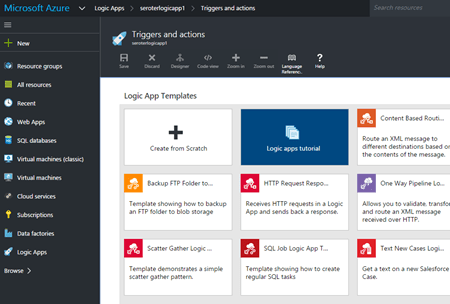
    Within the Preview Portal, developers can create and manage their Logic Apps. You can either start from scratch, or use one of the pre-built templates that reflect common patterns like content-based routing, scatter-gather, HTTP request/response, and more.
    2015.10.21integration08

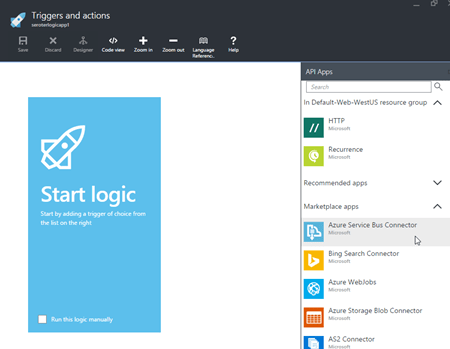
    If you want to build your own, you choose from any existing or custom-built API apps.
    2015.10.21integration09

    You then save your Logic App and can have it run either manually or based on a trigger.


    BizTalk Server (on Cloud Virtual Machines)

    What is it?

    Azure users can provision and manage their own BizTalk Server integration server in Azure Virtual Machines using prebuilt images. BizTalk Server is the mature, feature-rich integration bus used to connect enterprise apps. With it, customers get a stateful workflow engine, reliable pub/sub messaging engine, adapter framework, rules engine, trading partner management platform, and full design experience in Visual Studio. While not particularly cloud integrated (with the exception of a couple Service Bus adapters), it can be reasonably used to connect to integrate apps across environments.

    What’s new?

    BizTalk Server 2013 R2 was released in the middle of last year and included some incremental improvements like native JSON support, and updates to some built-in adapters. The next major release of the platform is expected in 2016, but without a publicly announced feature set.

    How to use it?

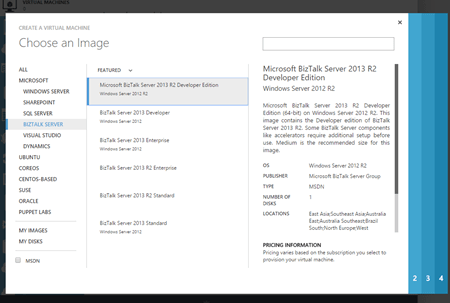
    Deploy the image from the template library if you want to run it in Azure, or do the same in any other infrastructure cloud.
    2015.10.21integration10


    Summary

    Whew. Those are a lot of options. Definitely some overlap, but Microsoft also seems to be focused on building these in a microservices fashion. Specifically, single purpose services that do one thing really well and don’t encroach into unnatural territory. For example, Stream Analytics does one thing, and relies on other services to handle other parts of the processing pipeline. I like this trend, as it gets away from a heavyweight monolithic integration service that has a bunch of things I don’t need, but have to deploy. It’s much cleaner (although potentially MORE complex) to assemble services as needed!
  • Survey Results: The Current State of Application Integration

    Before my recent trip to Europe to discuss technology trends that impact application integration, I hunted down a bunch of smart integration folks to find out what integration looks like today. What technologies are used? Is JSON climbing in popularity? Is SOAP use declining? To find out, I sent a survey to a few dozen people and got results back from 32 of them. Participants were asked to consider only the last two years of integration projects when answering.

    Let’s go through each question.

    Question #1 – How many integration projects have you worked on in the past 2 years?

    Number of answers: 32

    Result: 428 total projects

    Analysis:

    Individual answers ranged from “1” to “50”. Overall, seemed as if most integration efforts are measured in weeks and months, not years!


    Question #2 – What is the hourly message volume of your typical integration project?

    Number of answers: 32

    Result

    2014.09.25survey1


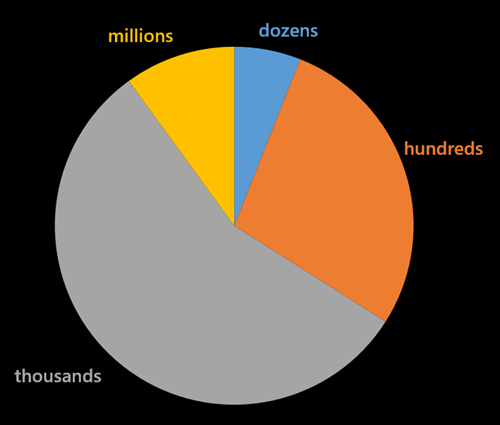
    Quantity # of Responses Percentage
    Dozens 2 6.25%
    Hundreds 9 28.13%
    Thousands 18 56.25%
    Millions 3 9.38%

    Analysis

    Most of today’s integration solutions are designed to handle thousands of messages per hour. Very few are building to handle a larger scale. An architecture that works fine for 3 messages per second (i.e. 10k per hour) could struggle to deal with 300 messages per second!

    Question #3 – How many endpoints are you integrating with on a typical project?

    Number of answers: 32

    Result

    2014.09.25survey2


    Analysis

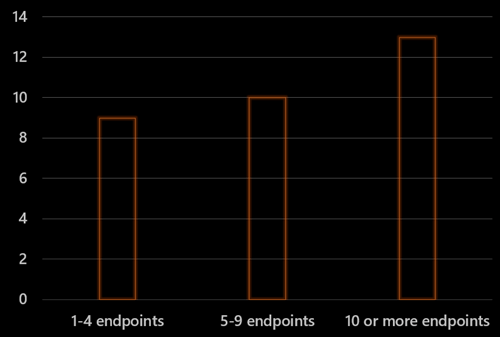
    The average number of endpoints per response was 24.64, but the median was 5. Answers were all over the place and ranged from “1” to”300.” Most integration solutions still talk to a limited number of endpoints and might not be ready for more fluid, microservices oriented solutions.


    Question #4 – How often do you use each of the technologies below on an integration project (%)

    Number of answers: 31

    Result

    2014.09.25survey3


    0% 10% 25% 50% 75% 100% Used Used > 50%
    On Prem Bus 2 2 3 5 8 11 94% 83%
    Cloud Bus 8 12 4 0 1 0 64% 6%
    SOAP 0 2 3 6 13 7 100% 84%
    REST 4 6 6 8 1 1 85% 45%
    ETL 5 8 8 2 3 1 81% 27%
    CEP 16 1 1 2 1 1 38% 40%


    Analysis

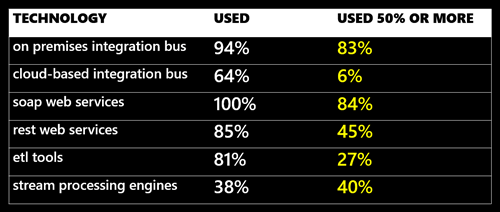
    Not surprisingly – given that I interviewed integration bus-oriented people – the on-premises integration bus rules. While 64% said that they’ve tried a cloud bus, only 6% of those actually use it on more than 50% of projects. SOAP is the dominant web services model for integration today. REST use is increasing, but not yet used on half the projects. I’d expect the SOAP and REST numbers to look much more similar in the years ahead.


    Question #5 – What do you integrate with the most (multiple choice)?

    Number of answers: 32

    Result

    2014.09.25survey4


    Analysis

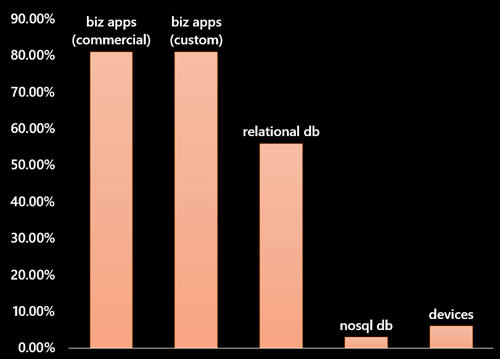
    Integration developers are connecting primarily to custom and commercial business applications. Not too surprising that 26 out of 32 respondents answered that way. 56% of the respondents (18/32) thought relational databases were also a primary target. Only a single person integrates most with NoSQL databases, and just two people integrate with devices. While those numbers will likely change over the coming years, I’m not surprised by the current state.


    Question #6 –  What is the most common data structure you deal with on integration projects?

    Number of answers: 32

    Result

    2014.09.25survey5


    Data Type # of Responses Percentage
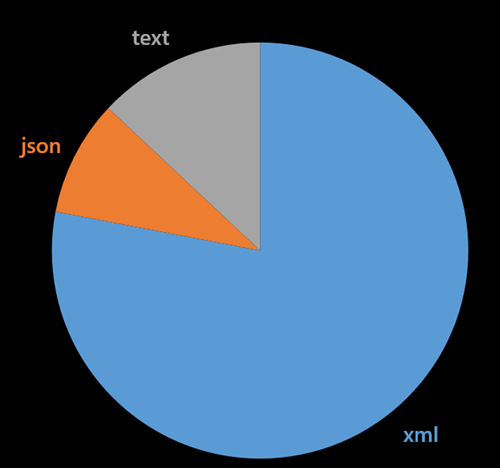
    XML 25 78.13%
    JSON 3 9.38%
    Text files 4 12.50%


    Analysis

    Integration projects are still married to the XML format. Some are still stuck dealing primarily with text files. This growing separation with the preferred format (JSON) of web developers may cause angst in the years ahead.


    Summary

    While not remotely scientific, this survey still gives a glimpse into the current state of application integration. While the industry trends tell us to expect more endpoints, more data, and more JSON, we apparently have a long way to go before this directly impacts the integration tier.

    Agree with the results? Seeing anything different?

  • What’s the future of application integration? I’m heading to Europe to talk about it!
    We’re in the midst of such an interesting period of technology change. There are new concepts for delivering services (e.g. DevOps), new hosts for running applications (e.g. cloud), lots of new devices generating data (e.g. Internet of Things), and more. How does all this impact an organization’s application integration strategy?

    Next month, I’m traveling through Europe to discuss how these industry trends impact those planning and building integration solutions. On September 23rd, I’ll be in Belgium (city of Ghent) at an event (Codit Integration Summit) sponsored by the integration folks at Codit. The following day I’ll trek over to the Netherlands (city of Utrecht) to deliver this presentation at an event sponsored by Axon Olympus. Finally, on September 25th, I’ll in Norway (city of Oslo) talking about integration at the BizTalk Innovation Day event.

    If you’re close by to any of these events, duck away from work and hang out with some of the best integration technologists I know. And me.

  • Integrating Microsoft Azure BizTalk Services with Salesforce.com

    BizTalk Services is far from the most mature cloud-based integration solution, but it’s viable one for certain scenarios. I haven’t seen a whole lot of demos that show how to send data to SaaS endpoints, so I thought I’d spend some of my weekend trying to make that happen. In this blog post, I’m going to walk through the steps necessary to make BizTalk Services send a message to a Salesforce REST endpoint.

    I had four major questions to answer before setting out on this adventure:

    1. How to authenticate? Salesforce uses an OAuth-based security model where the caller acquires a token and uses it in subsequent service calls.
    2. How to pass in credentials at runtime? I didn’t want to hardcode the Salesforce credentials in code.
    3. How to call the endpoint itself? I needed to figure out the proper endpoint binding configuration and the right way to pass in the headers.
    4. How to debug the damn thing. BizTalk Services – like most cloud hosted platforms without an on-premises equivalent – is a black box and decent testing tools are a must.

    The answers to first two is “write a custom component.” Fortunately, BizTalk Services has an extensibility point where developers can throw custom code into a Bridge. I added a class library project and added the following class which takes in a series of credential parameters from the Bridge design surface, calls the Salesforce login endpoint, and puts the security token into a message context property for later use. I also dumped a few other values into context to help with debugging. Note that this library references the great JSON.NET NuGet package.

    using System;
    using System.Collections.Generic;
    using System.Linq;
    using System.Text;
    using System.Threading.Tasks;
    
    using Microsoft.BizTalk.Services;
    
    using System.Net.Http;
    using System.Net.Http.Headers;
    using Newtonsoft.Json.Linq;
    
    namespace SeroterDemo
    {
        public class SetPropertiesInspector : IMessageInspector
        {
            [PipelinePropertyAttribute(Name = "SfdcUserName")]
            public string SfdcUserName_Value { get; set; }
    
            [PipelinePropertyAttribute(Name = "SfdcPassword")]
            public string SfdcPassword_Value { get; set; }
    
            [PipelinePropertyAttribute(Name = "SfdcToken")]
            public string SfdcToken_Value { get; set; }
    
            [PipelinePropertyAttribute(Name = "SfdcConsumerKey")]
            public string SfdcConsumerKey_Value { get; set; }
    
            [PipelinePropertyAttribute(Name = "SfdcConsumerSecret")]
            public string SfdcConsumerSecret_Value { get; set; }
    
            private string oauthToken = "ABCDEF";
    
            public Task Execute(IMessage message, IMessageInspectorContext context)
            {
                return Task.Factory.StartNew(() =>
                {
                    if (null != message)
                    {
                        HttpClient authClient = new HttpClient();
    
                        //create login password value
                        string loginPassword = SfdcPassword_Value + SfdcToken_Value;
    
                        //prepare payload
                        HttpContent content = new FormUrlEncodedContent(new Dictionary<string, string>
                            {
                                {"grant_type","password"},
                                {"client_id",SfdcConsumerKey_Value},
                                {"client_secret",SfdcConsumerSecret_Value},
                                {"username",SfdcUserName_Value},
                                {"password",loginPassword}
                            }
                            );
    
                        //post request and make sure to wait for response
                        var message2 = authClient.PostAsync("https://login.salesforce.com/services/oauth2/token", content).Result;
    
                        string responseString = message2.Content.ReadAsStringAsync().Result;
    
                        //extract token
                        JObject obj = JObject.Parse(responseString);
                        oauthToken = (string)obj["access_token"];
    
                        //throw values into context to prove they made it into the class OK
                        message.Promote("consumerkey", SfdcConsumerKey_Value);
                        message.Promote("consumersecret", SfdcConsumerSecret_Value);
                        message.Promote("response", responseString);
                        //put token itself into context
                        string propertyName = "OAuthToken";
                        message.Promote(propertyName, oauthToken);
                    }
                });
            }
        }
    }
    

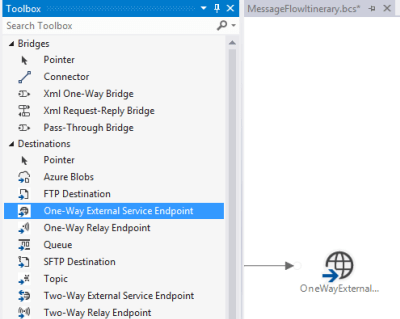
    With that code in place, I focused next on getting the write endpoint definition in place to call Salesforce. I used the One Way External Service Endpoint destination, which by default, uses the BasicHttp WCF binding.

    2014.07.14mabs01

    Now *ideally*, the REST endpoint is pulled from the authentication request and applied at runtime. However, I’m not exactly sure how to take the value from the authentication call and override a configured endpoint address. So, for this example, I called the Salesforce authentication endpoint from an outside application and pulled out the returned service endpoint manually. Not perfect, but good enough for this scenario. Below is the configuration file I created for this destination shape. Notice that I switched the binding to webHttp and set the security mode.

    <configuration>
      <system.serviceModel>
        <bindings>
          <webHttpBinding>
            <binding name="restBinding">
              <security mode="Transport" />
            </binding>
          </webHttpBinding>
        </bindings>
        <client>
          <clear />
          <endpoint address="https://na15.salesforce.com/services/data/v25.0/sobjects/Account"
            binding="webHttpBinding" bindingConfiguration="restBinding"
            contract="System.ServiceModel.Routing.ISimplexDatagramRouter"
            name="OneWayExternalServiceEndpointReference1" />
        </client>
      </system.serviceModel>
    </configuration>
    

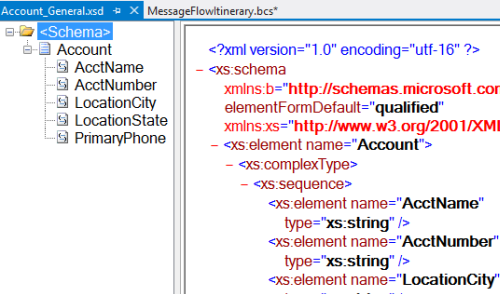
    With this in place, I created a pair of XML schemas and a map. The first schema represents a generic “account” definition.

    2014.07.14mabs02

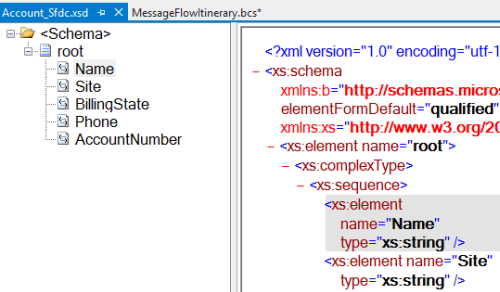
    My next schema defines the format expected by the Salesforce REST endpoint. It’s basically a root node called “root” (with no namespace) and elements named after the field names in Salesforce.

    2014.07.14mabs03

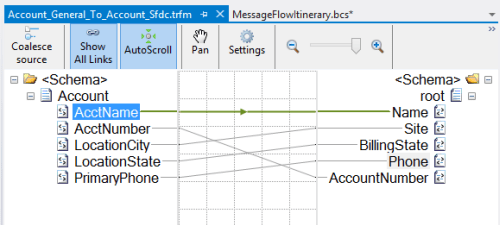
    As expected, my mapping between these two is super complicated. I’ll give you a moment to study its subtle beauty.

    2014.07.14mabs04

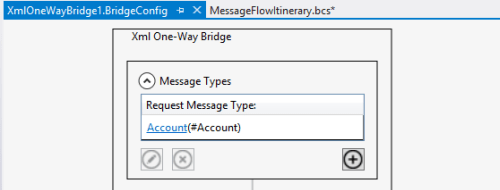
    With those in place, I was ready to build out my bridge.  I dragged an Xml One-Way Bridge shape to the message flow surface. There were two goals of my bridge: transform the message, and put the credentials into context. I started the bridge by defining the input message type. This is the first schema I created which describes the generic account message.

    2014.07.14mabs05

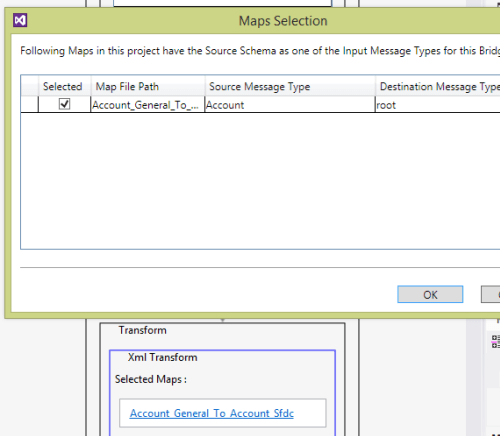
    Choosing a map is easy; just add the appropriate map to the collection property on the Transform stage.

    2014.07.14mabs06

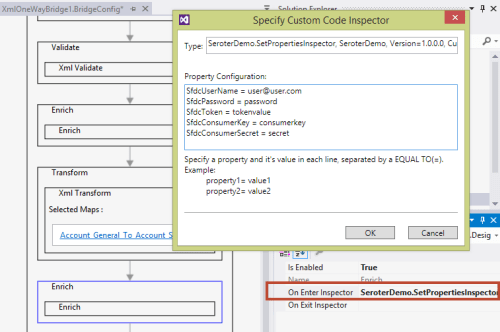
    With the message transformed, I had to then get the property bag configured with the right context properties. On the final Enrich stage of the pipeline, I chose the On Enter Inspector to select the code to run when this stage gets started. I entered the fully qualified name, and then on separate lines, put the values for each (authorization) property I defined in the class above. Note that you do NOT wrap these values in quotes. I wasted an hour trying to figure out why my values weren’t working correctly!

    2014.07.14mabs07

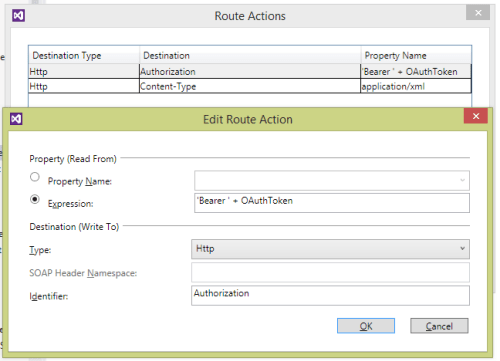
    The web service endpoint was already configured above, so all that was left was to configure the connector. The connector between the bridge and destination shapes was set to route all the messages to that single destination (“Filter condition: 1=1”). The most important configuration was the headers. Clicking the Route Actions property of the connector opens up a window to set any SOAP or HTTP headers on the outbound message. I defined a pair of headers. One sets the content-type so that Salesforce knows I’m sending it an XML message, and the second defines the authorization header as a combination of the word “Bearer” (in single quotes!) and the OAuthToken context value we created above.

    2014.07.14mabs08

    At this point, I had a finished message flow itinerary and deployed the project to a running instance of BizTalk Services. Now to test it. I first tested it by putting a Service Bus Queue at the beginning of the flow and pumping messages through. After the 20th vague error message, I decided to crack this nut open.  I installed the BizTalk Services Explorer extension from the Visual Studio Gallery. This tool promises to aid in debugging and management of BizTalk Services resources and is actually pretty handy. It’s also not documented at all, but documentation is for sissies anyway.

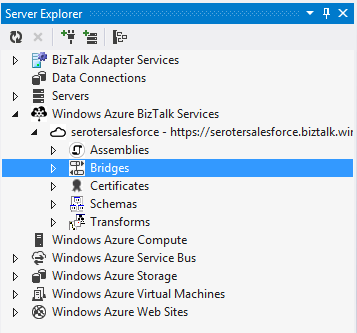
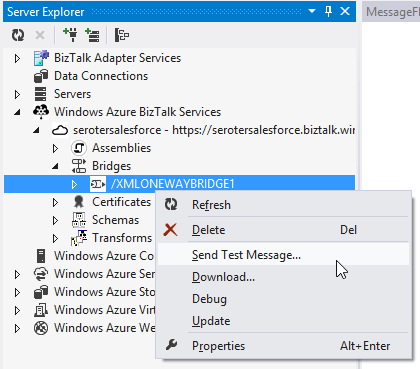
    Once installed, you get a nice little management interface inside the Server Explorer view in Visual Studio.

    2014.07.14mabs09

    I could just send a test message in (and specify the payload myself), but that’s pretty much the same as what I was doing from my own client application.

    2014.07.14mabs10

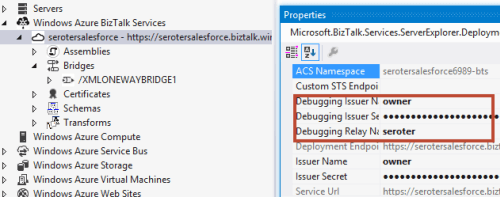
    No, I wanted to see inside the process a bit. First, I set up the appropriate credentials for calling the bridge endpoint. Do NOT try and use the debugging function if you have a Queue or Topic as your input channel! It only works with Relay input.

    2014.07.14mabs11

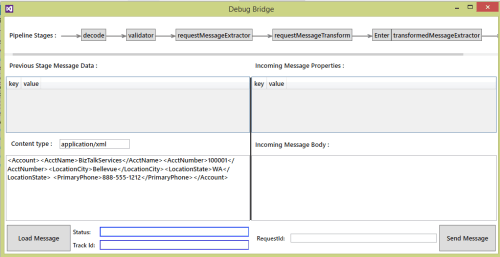
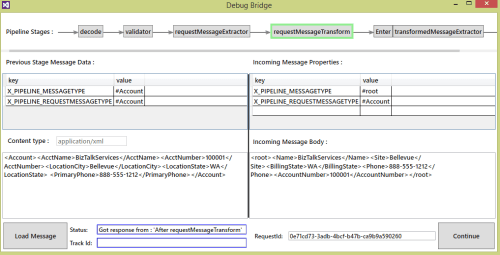
    I then right-clicked the bridge and chose “Debug.” After entering my source XML, I submitted the initial message into the bridge. This tool shows you each stage of the bridge as well as the corresponding payload and context properties.

    2014.07.14mabs12

    At the Transform stage, I could see that my message was being correctly mapped to the Salesforce-ready structure.

    2014.07.14mabs13

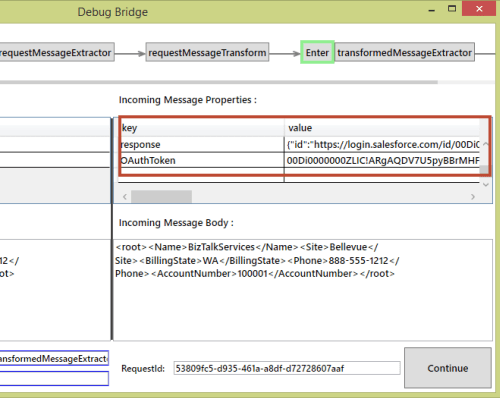
    After the Enrich stage – where we had our custom code callout – I saw my new context values, including the OAuth token.

    2014.07.14mabs14

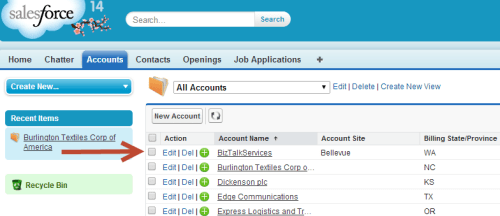
    The whole process completes with an error, only because Salesforce returns an XML response and I don’t handle it. Checking Salesforce showed that my new account definitely made it across.

    2014.07.14mabs15

    This took me longer than I thought, just given the general newness of the platform and lack of deep documentation. Also, my bridge occasionally flakes out because it seems to “forget” the authorization property configuration values that are part of the bridge definition. I had to redeploy my project to make it “remember” them again. I’m sure it’s a “me” problem, but there may be some best practices on custom code properties that I don’t know yet.

    Now that you’ve seen how to extend BizTalk Services, hopefully you can use this same flow when sending messages to all sorts of SaaS systems.

  • Windows Azure BizTalk Services Just Became 19% More Interesting

    Buried in the laundry list of new Windows Azure features outlined by Scott Guthrie was a mention of some pretty intriguing updates to Windows Azure BizTalk Services (WABS). Specifically, this cloud-based brokered messaging service can now accept messages from Windows Azure Service Bus Topics and Queues ( there were some other updates to the service as well, and you can read about them on the BizTalk team blog). Why does this make the service more interesting to me? Because it makes this a more useful service for cloud integration scenarios. Instead of only offering REST or FTP input channels, WABS now lets you build complex scenarios that use the powerful pub-sub capabilities of Windows Azure Service Bus brokered messaging. This blog post will take a brief look at how to use these new features, and why they matter.

    First off, there’s a new set of developer components to use. Download the installer to get the new capabilities.

    2014.02.21biztalk01

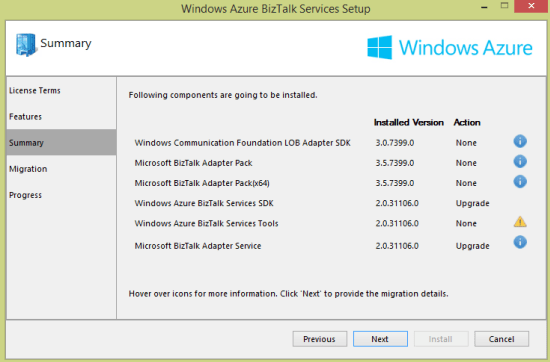
    I’m digging this new style of Windows installer that lets you know which components need upgrading.

    2014.02.21biztalk02

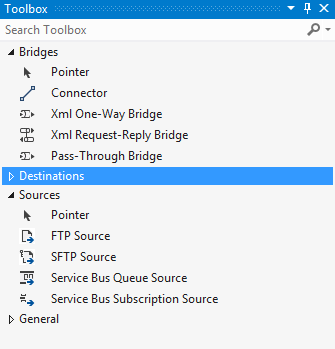
    After finishing the upgrade, I fired up Visual Studio 2012 (as I didn’t see a template added for Visual Studio 2013 usage), and created a new WABS project. Sure enough, there are two new “sources” in the Toolbox.

    2014.02.21biztalk05

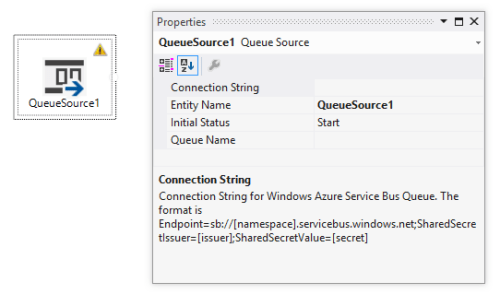
    What are the properties of each? When I added the Service Bus Queue Source to the bridge configuration, I saw that you add a connection string and queue name.

    2014.02.21biztalk06

    For Service Bus Topics, you use a Service Bus Subscription Source and specify the connection string and subscription name.

    2014.02.21biztalk07

    What was missing in the first release of WABS was the ability to do durable messaging as an input channel. In addition, the WABS bridge engine still doesn’t support a broadcast scenario, so if you want to send the same message to 10 different endpoints, you can’t. One solution was to use the Topic destination, but what if you wanted to add endpoint-specific transformations or lookup logic first? You’re out of luck. NOW, you could build a solution where you take in messages from a combination of queues, REST endpoints, and topic subscriptions, and route it accordingly. Need to send a message to 5 recipients? Now you send it to a topic, and then have bridges that respond to each topic subscription with endpoint-specific transformation and logic. MUCH better. You just have more options to build reliable integrations between endpoints now.

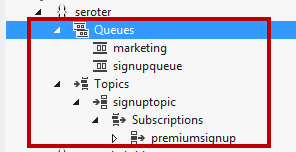
    Let’s deploy an example. I used the Sever Explorer in Visual Studio to create a new queue and a topic with a single subscription. I also added another queue (“marketing”) that will receive all the inbound messages.

    2014.02.21biztalk08

    I then built a bridge configuration that took in messages from multiple sources (queue and topic) and routed to a single queue.

    2014.02.21biztalk09

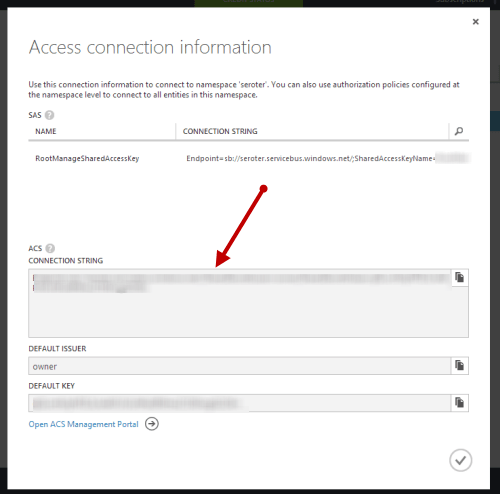
    Configuring the sources isn’t as easy as it should be. I still have to copy in a connection string (vs. look it up from somewhere), but it’s not too painful. The Windows Azure Portal does a nice job of showing you the connection string value you need.

    2014.02.21biztalk10

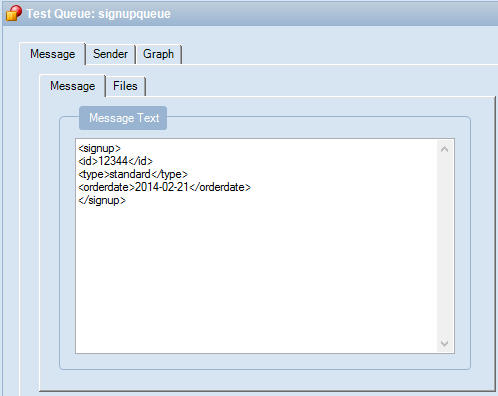
    After deploying the bridge successfully, I opened up the Service Bus Explorer and sent a message to the input queue.

    2014.02.21biztalk11

    I then sent another message to the input topic.

    2014.02.21biztalk12

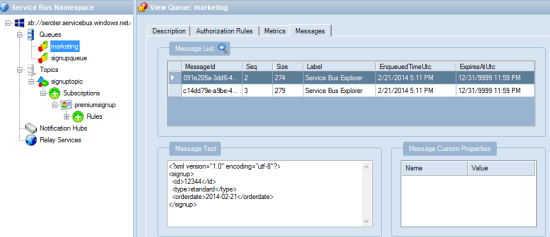
    After a second or two, I queried the “marketing” queue which should have both messages routed through the WABS bridge. Hey, there it is! Both messages were instantly routed to the destination queue.

    2014.02.21biztalk13

    WABS is a very new, but interesting tool in the integration-as-a-service space. This February update makes it more likely that I’d recommend it for legitimate cloud integration scenarios.

  • Upcoming Speaking Engagements in London and Seattle

    In a few weeks, I’ll kick off a run of conference presentations that I’m really looking forward to.

    First, I’ll be in London for the BizTalk Summit 2014 event put on by the BizTalk360 team. In my talk “When To Use What: A Look at Choosing Integration Technology”, I take a fresh look at the topic of my book from a few years ago. I’ll walk through each integration-related technology from Microsoft and use a “buy, hold, or sell” rating to indicate my opinion on its suitability for a project today. Then I’ll discuss a decision framework for choosing among this wide variety of technologies, before closing with an example solution. The speaker list for this event is fantastic, and apparently there are only a handful of tickets remaining.

    The month after this, I’ll be in Seattle speaking at the ALM Forum. This well-respected event for agile software practitioners is held annually and I’m very excited to be part of the program. I am clearly the least distinguished speaker in the group, and I’m totally ok with that. I’m speaking in the Practices of DevOps track and my topic is “How Any Organization Can Transition to DevOps – 10 Practical Strategies Gleaned from a Cloud Startup.” Here I’ll drill into a practical set of tips I learned by witnessing (and participating in) a DevOps transformation at Tier 3 (now CenturyLink Cloud). I’m amped for this event as it’s fun to do case studies and share advice that can help others.

    If you’re able to attend either of those events, look me up!

  • How Do BizTalk Services Work? I Asked the Product Team to Find Out

    Windows Azure BizTalk Services was recently released by Microsoft, and you can find a fair bit about this cloud service online. I wrote up a simple walkthrough, Sam Vanhoutte did a nice comparison of features between BizTalk Server and BizTalk Services,  the Neudesic folks have an extensive series of blog posts about it, and the product documentation isn’t half bad.

    However, I wanted to learn more about how the service itself works, so I reached out to Karthik Bharathy who is a senior PM on the BizTalk team and part of the team that shipped BizTalk Services. I threw a handful of technical questions at him, and I got back some fantastic answers. Hopefully you learn something new;  I sure did!

    Richard: Explain what happens after I deploy an app. Do you store the package in my storage account and add it to a new VM that’s in a BizTalk Unit?

    Karthik: Let’s start with some background information – the app that you are referring today is the VS project with a combination of the bridge configuration and artifacts like maps, schemas and DLLs. When you deploy the project, each of the artifacts and the bridge configuration are uploaded into one by one. The same notion also applies through the BizTalk Portal when you are deploying an agreement and uploading artifacts to the resources.

    The bridge configuration represents the flow of the message in the pipeline in XML format. Every time you build BizTalk Services project in Visual Studio, an <entityName>.Pipeline.atom is generated in the project bins folder. This atom file is the XML representation of the pipeline configuration. For example, under the <pipelines> section you can see the bridges configured along with the route information. You can also get a similar listing by issuing a GET operation on the bridge endpoint with the right ACS credentials.

    Now let’s say the bridge is configured with Runtime URL <deploymentURL>/myBridge1. After you click deploy, the pipeline configuration gets published in the repository of the <deploymentURL> for handling /myBridge1. For every message sent to the <deploymentURL>, the role looks at the complete path including /myBridge1 and load the pipeline configuration from the repository. Once the pipeline configuration is loaded, the message is processed per the configuration. If the configuration does not exist, then an error is returned to the caller.

    Richard: What about scaling an integration application? How does that work?

    Karthik: Messages are processed by integration roles in the deployment. When the customer initiates a scale operation, we update the service configuration to add/remove instances based on the ask. The BizTalk Services deployment updates its state during scaling operation and new messages to the deployment is handled by one of the instances of the role. This is similar to how Web or Worker roles are scaled up/down in Azure today.

    Richard: Is there any durability in the bridge? What if a downstream endpoint is offline?

    Karthik: The concept of a bridge is close to a messaging channel if we may borrow the phrase from Enterprise Integration Patterns. It helps in bridging the impedance between two messaging systems. As such the bridge is a stateless system and does not have persistence built into it. Therefore bridges need to report any processing errors back to the sender. In the case where the downstream endpoint is offline, the bridge propagates the error back to the sender – the semantics are slightly different a) based on the bridge and b) based on the source from where the message has been picked up.

    For EAI, bridges with HTTP the error code is sent back to the sender while with the same bridge using an FTP head, the system tries to pickup and process the message again from the source at regular intervals (and errors out eventually). In both cases you can see relevant track records in the portal.

    For B2B, our customers rarely intend to send an HTTP error back to their partners. When the message cannot be sent to a downstream (success) endpoint, the message is routed to the suspend endpoint. You might argue that the suspend endpoint could be down as well – while this is generally a bad idea to put in a flaky target in success or suspend endpoints, we don’t rule out this possibility. In the worst case we deliver the error code back to the sender.

    Richard: Bridges resemble BizTalk Server ESB Toolkit itineraries. Did you ever consider re-using that model?

    Karthik: ESB is an architectural pattern and you should look at the concept of bridge as being part of the ESB model for BizTalk Services on Azure. The sources and destinations are similar to the on-ramp, off-ramp model and the core processing is part of the bridge. Of course, additional capabilities like exception management, governance, alerts will need to added to bring it closer to the ESB Toolkit.

    Richard: How exactly does the high availability option work?

    Karthik: Let’s revisit the scaling flow we talked about earlier. If we had a scale >=2, you essentially have a system that can process messages even when one of the machines can down in your configuration. If one of the machines are down, the load balancer in our system routes the message to the running instances. For example, this is taken care of during “refresh” when customers can restart their deployment after updating a user DLL. This ensures message processing is not impacted.

    Richard: It looks like backup and restore is for the BizTalk Services configuration, not tracking data. What’s the recommended way to save/store an audit trail for messages?

    Karthik: The purpose of backup and restore is for the deployment configuration including schemas, maps, bridges, agreements. The tracking data comes from the Azure SQL database provided by the customer. The customer can add the standard backup/restore tools directly on that storage. To save/store an audit of messages, you have couple of options at the moment – with B2B you can turn archiving on either AS2 or X12 processing and with EAI you can plug-in an IMessageInspector extension that can read the IMessage data and save it to an external store.

    Richard: What part of the platform are you most excited about?

    Karthik: Various aspects of the platform are exciting – we started off building capabilities with ‘AppFabric Connect’ to enable server customers leverage existing investments with the cloud. Today, we have built a richer set of functionality with BizTalk Adapter services to connect popular LOBs with Bridges. In the case of B2B, BizTalk Server traditionally exposed functionality for IT Operators to manage trading partner relationships using the Admin Console. Today, we have a rich TPM functionality in the BizTalk Portal and also have the OM API public for the developer community. In EAI we allow extending message processing using custom code  If I should call out one I like, it has to be custom code enablement. The dedicated deployment model managed by Microsoft makes this possible. It is always a challenge to enable user DLL to execute without providing some sort of sandboxing. Then there are also requirements around performance guarantees. BizTalk Services dedicated deployment takes care of all these – if the code behaves in an unexpected way, only that deployment is affected. As the resources are isolated, there are also better guarantees about the performance. In a configuration driven experience this makes integration a whole lot simpler.

    Thanks Karthik for an informative chat!

  • Window Azure BizTalk Services: How to Get Started and When to Use It

    The “integration as a service” space continues to heat up, and Microsoft officially entered the market with the General Availability of Windows Azure BizTalk Services (WABS) a few weeks ago.  I recently wrote up an InfoQ article that summarized the product and what it offered. I also figured that I should actually walk through the new installation and deployment process to see what’s changed. Finally, I’ll do a brief assessment of where I’d consider using this vs. the other cloud-based integration tools.

    Installation

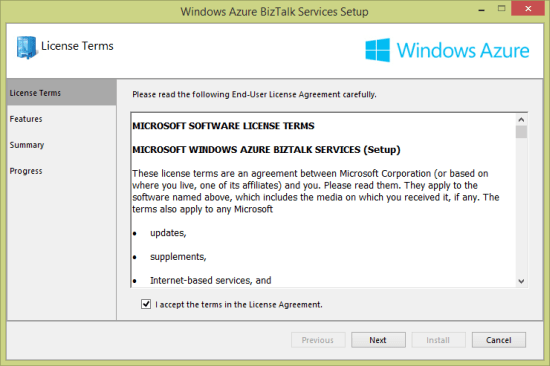
    Why am I installing something if this is a cloud service? Well, the development of integration apps still occurs on premises, so I need an SDK for the necessary bits. Grab the Windows Azure BizTalk Services SDK Setup and kick off the process. I noticed what seems to be a much cleaner installation wizard.

    2013.12.10biztalkservices01

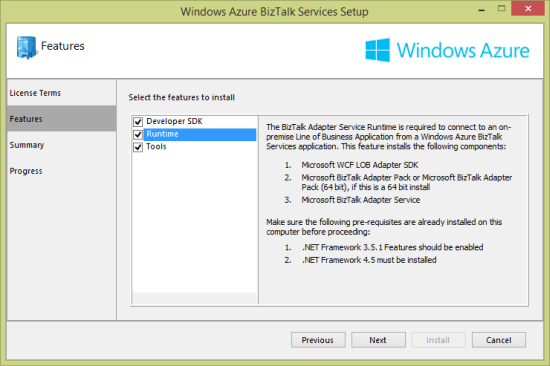
    After choosing the components that I wanted to install (including the runtime, developer tools, and developer SDK) …

    2013.12.10biztalkservices02

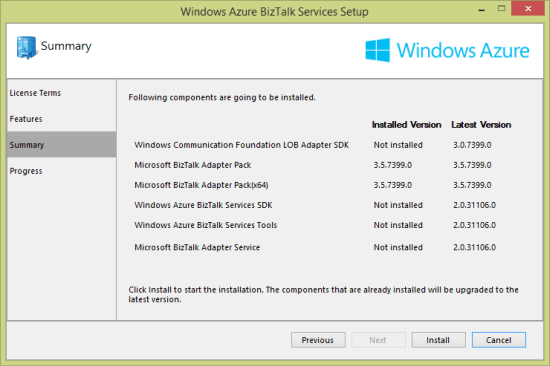
    … you are presented with a very nice view of the components that are needed, and which versions are already installed.

    2013.12.10biztalkservices03

    At this point, I have just about everything on my local developer machine that’s needed to deploy an integration application.

    Provisioning

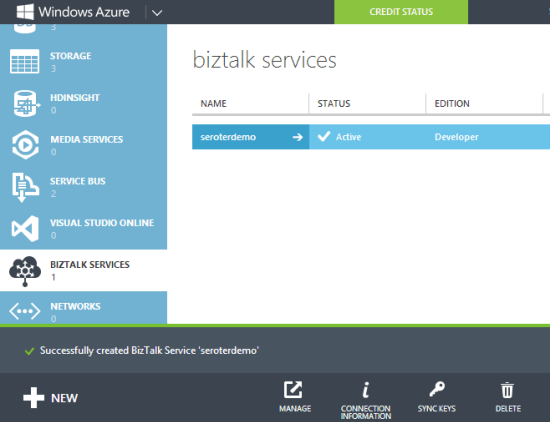
    WABS applications run in the Windows Azure cloud. Developers provision and manage their WABS instances in the Windows Azure portal. To start with, choose App Services and then BizTalk Services before selecting Custom Create.

    2013.12.10biztalkservices04

    Next, I’m asked to pick an instance name, edition, geography, tracking database, and Windows Azure subscription. There are four editions: basic, developer, standard, and premium. As you move between editions (and pay more money), you have access to greater scalability, more integration applications, on-premises connectivity, archiving, and high availability.

    2013.12.10biztalkservices05

    I created a new database instance and storage account to ensure that there would be no conflicts with old (beta) WABS instances. Once the provisioning process was complete (maybe 15 minutes or so), I saw my new instance in the Windows Azure Portal.

    2013.12.10biztalkservices07

    Drilling into the WABS instance, I saw connection strings, IP addresses, certificate information, usage metrics, and more.

    2013.12.10biztalkservices08

    The Scale tab showed me the option to add more “scale units” to a particular instance. Basic, standard and premium edition instances have “high availability” built in where multiple VMs are beneath a single scale unit. Adding scale units to an instance requires standard or premium editions.

    2013.12.10biztalkservices09

    In the technical preview and beta releases of WABS, the developer was forced to create a self-signed certificate to use when securing a deployment. Now, I can download a dev certificate from the Portal and install it into my personal certificate store and trusted root authority. When I’m ready for production, I can also upload an official certificate to my WABS instance.

    Developing

    WABS projects are built in Visual Studio 2012/2013. There’s an entirely new project type for WABS, and I could see it when creating a new project.

    2013.12.10biztalkservices10

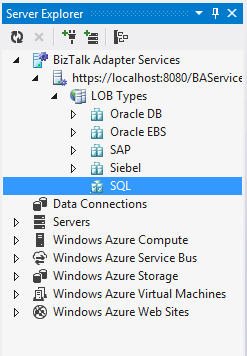
    Let’s look at what we have in Visual Studio to create WABS solutions. First, the Server Explorer includes a WABS component for creating cloud-accessible connections to line-of-business systems. I can create connections to Oracle/SAP/Siebel/SQL Server repositories on-premises and make them part of the “bridges” that define a cloud integration process.

    2013.12.10biztalkservices11

    Besides line-of-business endpoints, what else can you add to a Bridge? The final palette of activities in the Toolbox is shown below. There are a stack of destination endpoints that cover a wide range of choices. The source options are limited, but there are promises of new items to come. The Bridges themselves support one-way or request-response scenarios.

    2013.12.10biztalkservices12

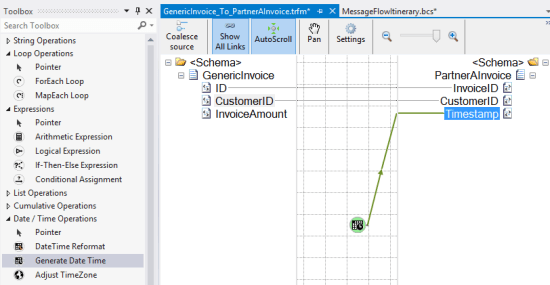
    Bridges expect either XML or flat file messages. A message is defined by a schema. The schema editor is virtually identical to the visual tool that ships with the standard BizTalk Server product. Since source and destination message formats may differ, it’s often necessary to include a transformation component. Transformation is done via a very cool Mapper that includes a sophisticated set of canned operations for transforming the structure and content of a message. This isn’t the Mapper that comes with BizTalk Server, but a much better one.

    2013.12.10biztalkservices14


    A bridge configuration model includes a source, one or more bridges (which can be chained together), and one or more destinations. In the case below, I built a simple one-way model that routes to a Windows Azure Service Bus Queue.

    2013.12.10biztalkservices15

    Double-clicking a particular bridge shows me the bridge configuration. In this configuration, I specified an XML schema for the inbound message, and a transformation to a different format.

    2013.12.10biztalkservices16


    At this point, I have a ready-to-go integration solution.

    Deploying

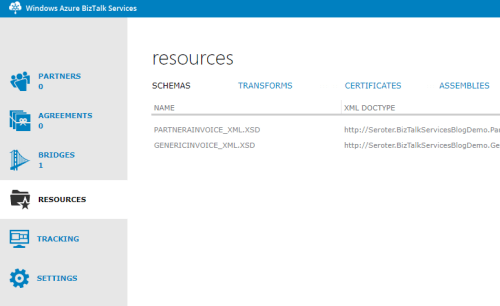
    To deploy one of theses solutions, you’ll need a certificate installed (see earlier note), and the Windows Azure Access Control Service credentials shown in the Windows Azure Portal. With that info handy, I right-clicked the project in Visual Studio and chose Deploy. Within a few seconds, I was told that everything was up and running. To confirm, I clicked the Manage button on the WABS instance page was visited the WABS-specific Portal. This Portal shows my deployed components, and offers tracking services. Ideally, this would be baked into the Windows Azure Portal itself, but at least it somewhat resembles the standard Portal.

    2013.12.10biztalkservices17

    So it looks like I have everything I need to build a test.

    Testing

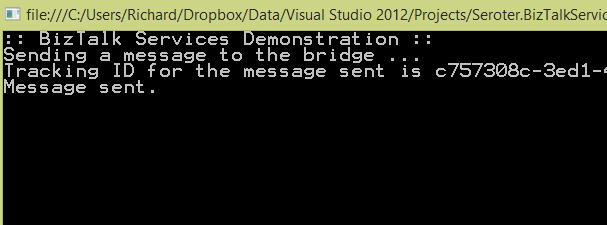
    I finally built a simple Console application in Visual Studio to submit a message to my Bridge. The basic app retrieved a valid ACS token and sent it along with my XML message to the bridge endpoint. After running the app, I got back the tracking ID for my message.

    2013.12.10biztalkservices19

    To actually see that this worked, I first looked in the WABS Portal to find the tracked instance. Sure enough, I saw a tracked message.

    2013.12.10biztalkservices18

    As a final confirmation, I opened up the powerful Service Bus Explorer tool and connected to my Windows Azure account. From here, I could actually peek into the Windows Azure Service Bus Queue that the WABS bridge published to. As you’d expect, I saw the transformed message in the queue.

    2013.12.10biztalkservices20

    Verdict

    There is a wide spectrum of products in the integration-as-a-service domain. There are batch-oriented tools like Informatica Cloud and Dell Boomi, and things like SnapLogic that handle both real-time and batch. Mulesoft sells the CloudHub which is a comprehensive platform for real-time integration. And of course, there are other integration solutions like AWS Simple Notification Services or the Windows Azure Service Bus.

    So where does WABS fit in? It’s clearly message-oriented, not batch-oriented. It’s more than a queuing solution, but less than an ESB. It seems like a good choice for simple connections between different organizations, or basic EDI processing. There are a decent number of source and destination endpoints available, and the line-of-business connectivity is handy. The built in high availability and optional scalability mean that it can actually be used in production right now, so that’s a plus.

    There’s still lots of room for improvement, but I guess that’s to be expected with a v1 product. I’d like to see a better entry-level pricing structure, more endpoint choices, more comprehensive bridge options (like broadcasting to multiple endpoints), built-in JSON support, and SDKs that support non-.NET languages.

    What do you think? See any use cases where you’d use this today, or are there specific features that you’ll be waiting for before jumping in?

  • Heading to the UK in September to speak on Windows Azure cloud integration

    On September 11th, I’ll be speaking in London at a one-day event hosted by the UK Connected Systems Group. This event focuses on hybrid integration strategies using Windows Azure and the Microsoft platform. I’ll be delivering two sessions: one on cloud integration patterns, and another on integrating with SaaS CRM systems. In both sessions, I’ll be digging into a wide range of technologies and reviewing practical ways to use them to connect various systems together.

    I’m really looking forward to hearing the other speakers at the event! The always-insightful Clemens Vasters will be there, as well as highly respected integration experts Sam Vanhoutte and Mike Stephenson.

    If you’re in the UK, I’d love to see you at the event. There are a fixed number of available tickets, so grab one today!

  • TechEd North America Session Recap, Recording Link

    Last week I had the pleasure of visiting New Orleans to present at TechEd North America. My session, Patterns of Cloud Integration, was recorded and is now available on Channel9 for everyone to view.

    I made the bold (or “reckless”, depending on your perspective) decision to show off as many technology demos as possible so that attendees could get a broad view of the options available for integrating applications, data, identity, and networks. Being a Microsoft conference, many of my demonstrations highlighted aspects of the Microsoft product portfolio – including one of the first public demos of Windows Azure BizTalk Services – but I also snuck in a few other technologies as well. My demos included:

    1. [Application Integration] BizTalk Server 2013 calls REST-based Salesforce.com endpoint and authenticates with custom WCF behavior. Secondary demo also showed using SignalR to incrementally return the results of multiple calls to Salesforce.com.
    2. [Application Integration] ASP.NET application running in Windows Azure Web Sites using the Windows Azure Service Bus Relay Service to invoke a web service on my laptop.
    3. [Application Integration] App running in Windows Azure Web Sites sending message to Windows Azure BizTalk Services. Message then dropped to one of three queues that was polled by Node.js application running in CloudFoundry.com.
    4. [Application Integration] App running in Windows Azure Web Sites sending message to Windows Azure Service Bus Topic, and polled by both a Node.js application in CloudFoundry.com, and a BizTalk Server 2013 server on-premises.
    5. [Application/Data Integration] ASP.NET application that uses local SQL Server database but changes connection string (only) to instead point to shared database running in Windows Azure.
    6. [Data Integration] Windows Azure SQL Database replicated to on-premises SQL Server database through the use of Windows Azure SQL Data Sync.
    7. [Data Integration] Account list from Salesforce.com copied into on-premises SQL Server database by running ETL job through the Informatica Cloud.
    8. [Identity Integration] Using a single set of credentials to invoke an on-premises web service from a custom VisualForce page in Salesforce.com. Web service exposed via Windows Azure Service Bus Relay.
    9. [Identity Integration] ASP.NET application running in Windows Azure Web Sites that authenticates users stored in Windows Azure Active Directory.
    10. [Identity Integration] Node.js application running in CloudFoundry.com that authenticates users stored in an on-premises Active Directory that’s running Active Directory Federation Services (AD FS).
    11. [Identity Integration] ASP.NET application that authenticates users via trusted web identity providers (Google, Microsoft, Yahoo) through Windows Azure Access Control Service.
    12. [Network Integration] Using new Windows Azure point-to-site VPN to access Windows Azure Virtual Machines that aren’t exposed to the public internet.

    Against all odds, each of these demos worked fine during the presentation. And I somehow finished with 2 minutes to spare. I’m grateful to see that my speaker scores were in the top 10% of the 350+ breakouts, and hope you’ll take some time to watch it. Feedback welcome!