Category: BizTalk

  • Four Questions With … Me

    It was bound to happen.  Someone turned the interview spotlight on me and forced me take my own medicine.  To mark my visit to the Swedish BizTalk User Group in September, their ringleader Mikael forced me to answer “4 Questions” of his own making.  If I didn’t comply, he threatened to book me in a seedy hostel and tell the guests that I secretly enjoy late night molestations.  Not good times.  So, I gave in to Mikael’s demand. 

    It should be a fun presentation in Stockholm as I’m crafting a number of demos related to SOA and BizTalk, and leaving about half of the discussion to showcase 4-5 cloud integration scenarios/demos.

    Share

  • Interview Series: Four Questions With … Kent Weare

    Here we are, one year into this interview series.  It’s been fun so far chatting up the likes of Tomas Restrepo, Alan Smith, Matt Milner, Yossi Dahan, Jon Flanders, Stephen Thomas, Jesus Rodriguez, Ewan Fairweather, Ofer Ashkenazi, Charles Young, and Mick Badran.  Hopefully you’ve discovered something new or at least been mildly amused by the discussions we’ve had so far.

    This month, I’m sitting down with Kent Weare.  Kent is a BizTalk MVP, active blogger, unrepentant Canadian, new father, IT guru for an energy firm in Calgary, and a helleva good guy.

    Q: You’ve recently published a webcast on the updated WCF SAP Adapter and are quite familiar with ERP integration scenarios.  From your experience, what are some of the challenges of ERP integration scenarios and how do they differ from integration with smaller LOB applications?

    A: There are definitely a few challenges that a BizTalk developer has to overcome when integrating with SAP. The biggest being they likely have no, or very little, experience with SAP.  On the flip side, SAP resources probably have had little exposure to a middleware tool like BizTalk.  This can lead to many meetings with a lot of questions, but few answers.  The terminology and technologies used by each of these technology stacks are vastly different.  SAP resources may throw out terms like transports, ALE, IDoc, BAPI, RFC where as BizTalk resources may use terms such as Orchestrations, Send Ports, Adapters, Zombies and Dehydration.  When a BizTalk developer needs to connect to an Oracle or SQL Database, they presumably have had some exposure in the past. They can also reach out to a DBA to get the information that they require without it being a painful conversation.  Having access to an Oracle or SQL Server is much easier than getting your hands on a full blown SAP environment.  I don’t know too many people who have a personal SAP deployment running in their basement.

    Another challenge has nothing to do with technology, but rather politics.  While the relationship between Microsoft and SAP has improved considerably over the past few years, they still compete and so do their consultants.  Microsoft tools may be perceived poorly by others and therefore the project environment may become rather hostile.  This is why it is really important to have strong support from the project sponsor as you may need to rely on their influence to keep the project on track.  Once you can demonstrate how flexible and quickly you can turn around solutions, you will find that others will start to recognize the value that BizTalk brings to the table.  Even if you are an expert in integrating with SAP, there is just some information that will require the help of an SAP resource.  Whether this is creating the partner profile for BizTalk or understanding the structure of an IDoc, you will not be able to do this on your own.  I recommend finding a “buddy” on the SAP team whether they be a BASIS admin or an ABAP developer.  Having a good working relationship with this person will help you get the information you need quicker and without the battle scars.  Luckily for me, I do have a buddy on our BASIS team who is more interested in Fantasy Football than technology turf wars.

    Overall, Microsoft has done a good job with the Consume Adapter Service Wizard.  If you can generate a schema for SQL Server, then you can generate a schema for an SAP IDoc.  You will just need some help from a SAP resource to fill in any remaining gaps.

    Q: “High availability” is usually a requirement for a solution but sometimes taken for granted when you buy a packaged application (like BizTalk).  For a newer BizTalk architect, what tips do you have for ensuring that ALL aspects of a BizTalk environment are available at runtime and in case of disaster?

    A: Certainly understanding the BizTalk architecture helps, but at a minimum you need to ensure that each functional component is redundant.  I also feel that understanding future requirements may save you many headaches down the road.  For instance most people will start with 2 BizTalk Application servers and cluster a SQL back end and figure that they are done with high availability.  They then realize that when they are trying to pull a message from a FTP or POP3 server that they start to process duplicate messages since they have multiple host instances.  So the next step is to introduce clustered host instances so that you have high availability but only one instance runs at a time.  The next hurdle is that the original Operating System is only “Standard” edition and can’t be clustered.  You then re-pave the BizTalk servers and create clustered host instances to support POP3/FTP only to run into a pitfall with hosted Web/WCF Services since you need to load balance those requests across multiple servers. Since you can’t mix Windows Network Load Balancing with Windows Clustering, this becomes an issue.  There are a few options when it comes to providing NLB and clustering capabilities, but you may suffer from sticker shock.

    Another pitfall that I have seen is someone creating a highly available environment, but neglecting to cluster the Master Secret Server for Enterprise Single Sign On.  The Enterprise Single Sign On service does not get a lot of visibility but it is a critical function in a BizTalk environment.  If you lose your Master Secret Server, your BizTalk environment will continue to use a cached secret until this service comes back online.  This works as long as you do not have to bounce a host instance due to a deployment or unplanned outage.  Should this situation occur, you will be offline until you get your Master Secret Server back up and running.  Having this service clustered allows you some additional agility as you are no longer tightly coupled to a particular physical node.

    Q: I’ve asked other interview subjects which technologies are highest on their “to do” list.  However, I’m interested in knowing which technologies you’re purposely pushing to the back burner because you don’t have the cycles to go deep in them.  For instance, as much as I’d like to dig deep into Silverlight, ASP.NET MVC and WF, I just can’t prioritize those things over other technologies relevant to me at the moment.  What are your “nice to learn, but don’t have the time” technologies?

    A: Oslo and SharePoint. 

    Oslo is a technology that will be extremely relevant in the future.  I would be surprised if I am not using Oslo to model applications in the next couple years.  In the mean time I am happy to sit on the sidelines and watch guys like Yossi Dahan, Mikael Håkanssson and Brian Loesgen challenge the limits of Oslo with Connected Systems technology.  Once the feature set is complete and is ready for primetime I plan on jumping on that bandwagon.

    A lot of people feel that SharePoint is simply a website that you just throw your documents on and forget about.  What I have learned over the last year or so while working with some talented colleagues is that it is much more powerful than that.  I have seen some creative, integrated solutions provided to our field employees that are just amazing.  Having such talented colleagues take care of these solutions reduces my desire to get involved since they can take care of the problem so much quicker, and better, than I could.

    By no means am I knocking either of these technologies.  BizTalk continues to keep me busy on a daily basis and when I do have some time to investigate new technologies I tend to spend this time up in the cloud with the .Net Service bus.   These requirements are more pressing for me than Oslo or SharePoint.

    Q [stupid question]: The tech world was abuzz in July over the theft and subsequent posting of confidential Twitter documents.  The hacker got those documents, in part, because of lax password security and easy-to-guess password reset questions.  One solution: amazingly specific, impossible-to-guess password reset questions.  For instance:

    • How many times did you eat beef between 2002 and 2007?
    • What’s the name of the best-looking cashier at the local grocery store?
    • What is the first sentence on the 64th page of the book closest to you?

    Give us a password reset question that only you could know the answer to.

    A: As a kid which professional athlete did you snub when they offered you an autograph?

    Wayne Gretzky

    True story, as a kid my minor hockey team was invited to a Winnipeg Jets practice.  While waiting inside the rink, the entire Edmonton Oilers team walked by.  Wayne Gretzky stopped expecting my brother and I to go running up to him asking for an autograph.  At the time, we both were New York Islander and Mike Bossy fans so we weren’t interested in the autograph. He seemed a little surprised and just walked away. In retrospect this was probably a stupid move as this was probably the greatest ice hockey team of all time that included the likes of Mark Messier, Paul Coffee, Jari Kurri and Grant Fuhr.

    Thanks Kent.  Some good stuff in there.

    Technorati Tags:

    Share

  • "Quick Win" Feature Additions for BizTalk Server 2011

    Yeah, I just gave a name to the next version.  Who knows what it’ll actually be?  Anyway, a BizTalk discussion list I’m on starting down a path talking about “little changes” that would please BizTalk developers.  It’s easy to focus on big ticket items we wish to see in our every-day platforms (for BizTalk, things like web-based tooling, low latency, BPM, etc), but often the small changes actually make our day to day lives easier.  For instance, most of us know that adding the simple “browse” button to the FILE adapter caused many a roof to be raised.

    So that said, I thought I’d throw out a few changes that I THINK would be relatively straightforward to implement, and would make a pleasant difference for developers.  I put together a general wish list a while back (as did many other folks), and don’t think I’m stealing more than 1 thing from that list.

    Without further ado, here are a few things that I’d like to see (from my own mind, or gleaned from Twitter or discussions with others):

    • Adapter consistency (from Charles).  It’s cool that the new WCF SQL Adapter lets you mash together commands inside a polling statement, but the WCF Oracle adapter has a specific “Post Poll” operation.  Pick one model and stick with it.
    • Throw a few more pipeline components in the box.  There are plenty of community pipelines, but come on, let’s stash a few more into the official install (zip, context manipulation, PGP, etc).
    • Functoid copying and capabilities.  Let me drag and drop functoids between mapping tabs, or at least give me a copy and paste.  I always HATED having to manually duplicate functoids in a big map.  And how about you throw a couple more functoids out there?  Maybe an if…else or a service lookup?
    • More lookups, less typing.  Richard wants more browsing, less typing.  When I set a send port subscription that contains the more common criteria (BTS.MessageType, BTS.ReceivePortName), I shouldn’t have to put those values in by hand.  Open a window and let me search and select from existing objects.  Same with pipeline per-instance configuration.  Do a quick assessment of every spot that requires a free text entry and ask yourself why you can’t let me select from a list.
    • Refresh auto-generated schemas.  I hate when small changes make go through the effort to regenerate schemas/bindings.  Let’s go … right click, Update Reference. 
    • Refresh auto-generated receive ports/locations/services.  When I walk through the WCF Service Publishing Wizard, make a tiny schema change and have to do it again, that sucks.  There are a enough spots where I have to manually enter data that allows a doofus like me to get it wrong.  Rebuild the port/location/service on demand.
    • Figure out another way to move schema nodes around.  Seriously, if I have too much caffeine, it’s impossible to move schema nodes around a tree.  I need the trained hands of a freakin’ brain surgeon to put an existing node under a new parent.
    • Add web sites/services as resources to an application via the Console.  I think you still have to do this by the command line too.  The only one that requires that.  Let’s fix that.
    • Build the MSI using source files.  I pointed this out a while back, but the stuff that goes into a BizTalk application MSI is the stuff loaded into the database.  If you happened to change the source resource and not update the app, you’re SOL.  It’d be nice if the build process grabbed the most recent files available, or at least gave me the option to do so.
    • Export only what I want in a binding.  If I right click an app and export the binding, I get everything in the app.  For big ones, it’s a pain to remove the unwanted bits by hand.  Maybe a quick pop-up that let’s me do “all” or “selected”?
    • Copy and paste messaging objects.  Let me copy a receive port and location and reuse it for another process.  Same with send ports.  I built a tool to do send ports, but no reason that can’t get built in, right?

    That’s what I got.  What are your “quick fixes” that might not take much to accomplish, but would make you smile when you saw it?

    Technorati Tags:

    Share

  • BizTalk Azure Adapters on CodePlex

    Back at TechEd, the Microsoft guys showed off a prototype of an Azure adapter for BizTalk.  Sure enough, now you can find the BizTalk Azure Adapter SDK up on CodePlex.

    What’s there?  I have to dig in a bit, but looks like you’re getting both Live Framework integration and .NET Services.  This means both push and pull of Mesh objects, and both publish/subscribe with the .NET Service bus.

    Given my recent forays into this arena, I am now forced to check this out further and see what sort of configuration options are exposed.  Very cool for these guys to share their work.

    Stay tuned.

    Technorati Tags:

    Share

  • Sending Messages From Azure Service Bus to BizTalk Server 2009

    In my last post, I looked at how BizTalk Server 2009 could send messages to the Azure .NET Services Service Bus.  It’s only logical that I would also try and demonstrate integration in the other direction: can I send a message to a BizTalk receive location through the cloud service bus?

    Let’s get started.  First, I need to define the XSD schema which reflects the message I want routed through BizTalk Server.  This is a painfully simple “customer” schema.

    Next, I want to build a custom WSDL which outlines the message and operation that BizTalk will receive.  I could walk through the wizards and the like, but all I really want is the WSDL file since I’ll pass this off to my service client later on.  My WSDL references the previously built schema, and uses a single message, single port and single service.

    <?xml version="1.0" encoding="utf-8"?>
    <wsdl:definitions name="CustomerService"
                 targetNamespace="http://Seroter.Blog.BusSubscriber"
                 xmlns:wsdl="http://schemas.xmlsoap.org/wsdl/"
                 xmlns:soap="http://schemas.xmlsoap.org/wsdl/soap/"
                 xmlns:tns="http://Seroter.Blog.BusSubscriber"
                 xmlns:xsd="http://www.w3.org/2001/XMLSchema">
      <!-- declare types-->
      <wsdl:types>
        <xsd:schema targetNamespace="http://Seroter.Blog.BusSubscriber">
          <xsd:import
    	schemaLocation="http://rseroter08:80/Customer_XML.xsd"
    	namespace="http://Seroter.Blog.BusSubscriber" />
        </xsd:schema>
      </wsdl:types>
      <!-- declare messages-->
      <wsdl:message name="CustomerMessage">
        <wsdl:part name="part" element="tns:Customer" />
      </wsdl:message>
      <wsdl:message name="EmptyResponse" />
      <!-- decare port types-->
      <wsdl:portType name="PublishCustomer_PortType">
        <wsdl:operation name="PublishCustomer">
          <wsdl:input message="tns:CustomerMessage" />
          <wsdl:output message="tns:EmptyResponse" />
        </wsdl:operation>
      </wsdl:portType>
      <!-- declare binding-->
      <wsdl:binding
    	name="PublishCustomer_Binding"
    	type="tns:PublishCustomer_PortType">
        <soap:binding transport="http://schemas.xmlsoap.org/soap/http"/>
        <wsdl:operation name="PublishCustomer">
          <soap:operation soapAction="PublishCustomer" style="document"/>
          <wsdl:input>
            <soap:body use ="literal"/>
          </wsdl:input>
          <wsdl:output>
            <soap:body use ="literal"/>
          </wsdl:output>
        </wsdl:operation>
      </wsdl:binding>
      <!-- declare service-->
      <wsdl:service name="PublishCustomerService">
        <wsdl:port
    	binding="PublishCustomer_Binding"
    	name="PublishCustomerPort">
          <soap:address
    	location="http://localhost/Seroter.Blog.BusSubscriber"/>
        </wsdl:port>
      </wsdl:service>
    </wsdl:definitions>

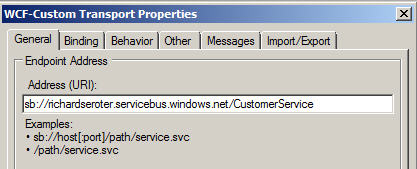
    Note that the URL in the service address above doesn’t matter.  We’ll be replacing this with our service bus address.  Next (after deploying our BizTalk schema), we should configure the service-bus-connected receive location.  We can take advantage of the WCF-Custom adapter here.

    First, we set the Azure cloud address we wish to establish.

    Next we set the binding, which in our case is the NetTcpRelayBinding.  I’ve also explicitly set it up to use Transport security.

    In order to authenticate with our Azure cloud service endpoint, we have to define our security scheme.  I added an TransportClientEndpointBehavior and set it to use UserNamePassword credentials.  Then, don’t forget to click the UserNamePassword node and enter your actual service bus credentials.

    After creating a send port that subscribes on messages to this port and emits them to disk, we’re done with BizTalk.  For good measure, you should start the receive location and monitor the event log to ensure that a successful connection is established.

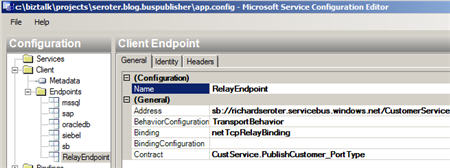
    Now let’s turn our attention to the service client.  I added a service reference to our hand-crafted WSDL and got the proxy classes and serializable types I was after.  I didn’t get much added to my application configuration, so I went and added a new service bus endpoint whose address matches the cloud address I set in the BizTalk receive location.

    You can see that I’ve also chosen a matching binding and was able to browse the contract by interrogating the client executable.  In order to handle security to the cloud, I added the same TransportClientEndpointBehavior to this configuration file and associated it with my service.

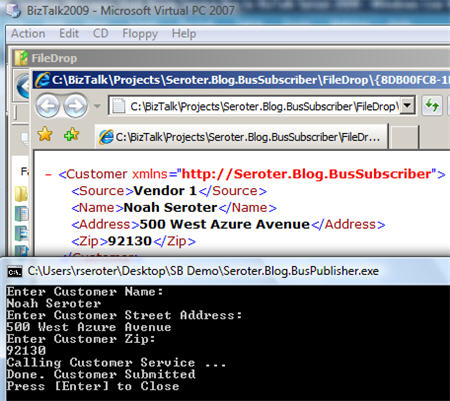
    All that’s left is to test it.  To better simulate the cloud experience, I gone ahead and copied the service client to my desktop computer and left my BizTalk Server running in its own virtual machine.  If all works right, my service client should successfully connect to the cloud, transmit a message, and the .NET Service Bus will redirect (relay) that message, securely, to the BizTalk Server running in my virtual machine.  I can see here that my console app has produced a message in the file folder connected to BizTalk.

    And opening the message shows the same values entered in the service client’s console application.

    Sweet.  I honestly thought connecting BizTalk bi-directionally to Azure services was going to be more difficult.  But the WCF adapters in BizTalk are pretty darn extensible and easily consume these new bindings.  More importantly, we are beginning to see a new set of patterns emerge for integrating on-premises applications through the cloud.  BizTalk may play a key role in receive from, sending to, and orchestrating cloud services in this new paradigm.

    Technorati Tags: , , ,

    Share

  • Securely Calling Azure Service Bus From BizTalk Server 2009

    I just installed the July 2009 .NET Services SDK and after reviewing it for changes, I started wondering how I might call a cloud service from BizTalk using the out-of-the-box BizTalk adapters.  While I showed in a previous blog how to call .NET Services service anonymously, that isn’t practical for most scenarios.  I want to SECURELY call an Azure cloud service from BizTalk.

    If you’re familiar with the “Echo” sample for the .NET Service Bus, then you know that the service host authenticates with the bus via inline code like this:

    // create the credentials object for the endpoint
    TransportClientEndpointBehavior userNamePasswordServiceBusCredential =
       new TransportClientEndpointBehavior();
    userNamePasswordServiceBusCredential.CredentialType =
        TransportClientCredentialType.UserNamePassword;
    userNamePasswordServiceBusCredential.Credentials.UserName.UserName =
        solutionName;
    userNamePasswordServiceBusCredential.Credentials.UserName.Password =
        solutionPassword;

    While that’s ok for the service host, BizTalk would never go for that (without a custom adapter). I need my client to use configuration-based credentials instead.  To test this out, try removing the Echo client’s inline credential code and adding a new endpoint behavior to the configuration file:

    <endpointBehaviors>
      <behavior name="SbEndpointBehavior">
        <transportClientEndpointBehavior credentialType="UserNamePassword">
           <clientCredentials>
              <userNamePassword userName="xxxxx" password="xxxx" />
           </clientCredentials>
         </transportClientEndpointBehavior>
       </behavior>
    </endpointBehaviors>

    Works fine. Nice.  So that proves that we can definitely take care of credentials outside of code, and thus have an offering that BizTalk stands a chance of calling securely.

    With that out of the way, let’s see how to actually get BizTalk to call a cloud service.  First, I need my metadata to call the service (schemas, bindings).  While I could craft these by hand, it’s convenient to auto-generate them.  Now, to make life easier (and not have to wrestle with code generation wizards trying to authenticate with the cloud), I’ve rebuilt my Echo service to run locally (basicHttpBinding).  I did this by switching the binding, adding a base URI, adding a metadata behavior, and commenting out any cloud-specific code from the service.  Now my BizTalk project can use the Consume Adapter Service wizard to generate metadata.
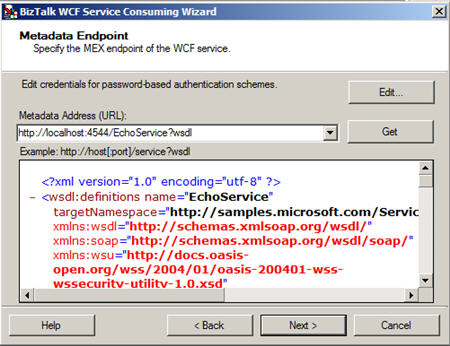
    I end up with a number of artifacts (schemas, bindings, orchestration with ports) including the schema which describes the input and output of the .NET Services Echo sample service.

    After flipping my Echo service back to the Cloud-friendly configuration (including the netTcpRelayBinding), I deployed the BizTalk solution.  Then, I imported the (custom) binding into my BizTalk application.  Sure enough, I get a send port added to my application.

    First thing I do is switch the address of my service to the valid .NET Services Bus URI.

    Next, on the Bindings tab, I switch to the netTcpRelayBinding.
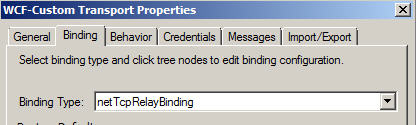
    I made sure my security mode was set to “Transport” and used the RelayAccessToken for its RelayClientAuthenticationType.

    Now, much my like my updated client configuration above, I need to add an endpoint behavior to my BizTalk send port configuration so that I can provide valid credentials to the service bus.  Now the WCF Configuration Editor within Visual Studio didn’t seem to provide me a way to add those username and password values; I had to edit the XML configuration manually.  So, I expected that the BizTalk adapter configuration would be equally deficient and I’d have to create a custom binding and hope that BizTalk accepted it.  However, imagine my surprise when I saw that BizTalk DID expose those credential fields to me!

    I first had to add a new endpoint behavior of type transportClientEndpointBehavior.  Then, set its credentialType attribute to UserNamePassword.

    Then, click the ClientCredential type we’re interested in (UserNamePassword) and key in the data valid to the .NET Services authentication service.

    After that, I added a subscription and saved the send port. Next I created a new send port that would process the Echo response.  I subscribed on the message type of the cloud service result.
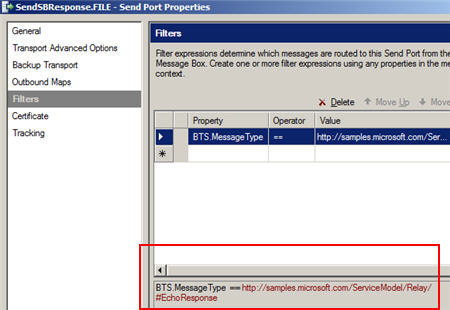
    Now we’re ready to test this masterpiece.  First, I fired up the Echo service and ensured that it was bound to the cloud.  The image below shows that my service host is running locally, and the public service bus has my local service in its registry.  Neato.

    Now for magic time.  Here’s the message I’ll send in:

    If this works, I should see a message printed on my service host’s console, AND, I should get a message sent to disk.  What happens?
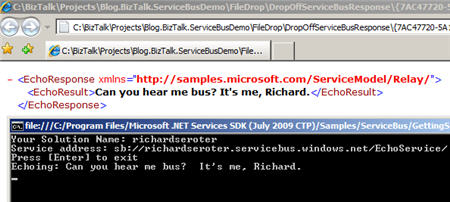

    I have to admit that I didn’t think this would work.  But, you would have never read my blog again if I had strung you along this far and showed you a broken demo.   Disaster averted.

    So there you have it.  I can use BizTalk Server 2009 to SECURELY call the Service Bus from the Azure .NET Services offering which means that I am seamlessly doing integration between on-premises offerings via the cloud.  Lots and lots of use cases (and more demos from me) on this topic.

    Technorati Tags: , , ,

    Share

  • 10 Architecture Tips From "The Timeless Way of Building"

    During vacation time last week, I finally sat down to really read The Timeless Way of Building by Christopher Alexander.  I had flipped through it before, but never took the time to digest it.  This is the classic book on design pattern which applies to physical buildings and towns, but remains immensely relevant to software architecture as well.  While the book can admittedly be a bit dry and philosophical at times, I also found many parts of it quite compelling and thought I’d share 10 of my favorite points from the book.

    1. “… We have come to think of buildings, even towns as ‘creations’ — again thought out, conceived entire, designed … All this has defined the task of creation, or design, as a huge task, in which something gigantic is brought to birth, suddenly in a single act … Imagine, by contrast, a system of simple rules, not complicated, patiently applied, until they gradually form a thing … The mastery of what is made does not lie in the depths of some impenetrable ego; it lies, instead in the simple mastery of the steps in the process …” (p.161-162)  He considers architecture as the mastery of the definition and application of a standard set of steps and patterns to construct solutions.  We don’t start with a blank slate or have to just burp out a complete solution — we start with knowledge of patterns and experience and use those to put together a viable solution.
    2. “Your power to create a building is limited entirely by the rules you happen to have in your language now … He does not have time to think about it from scratch … He is faced with the need to act, he has to act fast.” (p.204)  You can only architect things based on the patterns in your vocabulary.  All the more reason to constantly seek out new ideas and bolster the collection of experiences to work with.
    3. “An architect’s power also comes from his capacity to observe the relationships which really matter — the ones which are deep, profound, the ones which do the work.” (p. 218)  The skill of observation and prioritization is critical and this highlights what will make an architect successful or not.  We have to focus on the key solution aspects and not get caught in the weeds for too long.
    4. “A man who knows how to build has observed hundreds of rooms and has finally understood the ‘secret’ of making a room with beautiful proportions … It may have taken years of observation for him to finally understand …” (p. 222).  This is the fact that most of us hate to hear.  No amount of reading or studying can make up for good ol’ fashion experience.  All the more reason to constantly seek out new experiences and expect that our inevitable failures along the way help us use better judgement in the future.
    5. “The central task of ‘architecture’ is the creation of a single, shared, evolving, pattern language, which everyone contributes to, and everyone can use.” (p. 241)  Alexander is big on not making architecture such a specialty that only a select few can do it well.  Evangelism of what we learn is vital for group success.
    6. “To make the pattern really useful, we must define the exact range of contexts where the stated problem occurs, and where this particular solution to the problem is appropriate.” (p. 253).  It’s sometimes tempting to rely on a favorite pattern or worse, just use particular patterns for the heck of it.  We need to keep our core problem in mind and look to use the most efficient solution and not the one that is simply the most interesting to us.  
    7. If you can’t draw a diagram of it, it isn’t a pattern.” (p. 267)  Ah, the value of modeling.  I’ve really gained a lot of value by learning UML over the past few years.  For all its warts, UML still provides me a way to diagram a concept/pattern/solution and know that my colleagues can instantly follow my point (assuming I build a competent diagram).
    8. “Conventional wisdom says that a building cannot be designed, in sequence, step by step … Sequences are bad if they are the wrong sequences.” (p. 382-383)  The focus here is that your design sequence should start with the dominant, primary features first (broad architecture) and move down to the secondary features (detailed architecture).  I shouldn’t design the elevator shaft until I know the shape of the building. Don’t get caught designing a low level feature first until you have perspective of the entire design.
    9. “A group of people who use a common pattern language can make a design together just as well as a single person can within his mind.” (p. 432)  This is one of the key points of the book.  When you put folks on the same page and they can converse in a common language, you drastically increase efficiency and allow the team to work in a complimentary fashion.
    10. “Each building when it is first built, is an attempt to make a self-maintaining whole configuration … But our predictions are invariably wrong … It is therefore necessary to keep changing the buildings, according to the real events which actually happen there.” (p. 479-480) The last portion of the book drives home that fact that no building  (software application) is ever perfect.  We shouldn’t look down on “repair” but instead see it as a way to continually mature what we’ve built and apply what we’ve learned along they way.

    For a book that came out in 1979, those are some pretty applicable ideas to chew on.  Designing software is definitely part art and part science and it takes years of experience to build up the confidence that you are building something in the “right” way.  If you get the chance, pick the book up and read some of the best early thinking on the topic.

  • My ESB Toolkit Webcast is Online

    That Alan Smith is always up to something.  He’s just created a new online community for hosting webcasts about Microsoft technologies (Cloud TV).  It’s mainly an excuse for him to demonstrate his mastery of Azure.  Show off.  Anyway, I recently produced a webcast on the ESB Toolkit 2.0 for Mick Badran Productions, and we’ve uploaded that to Alan’s site.

    It’s about 20 minutes or so, and it covers why the need for the Toolkit arose, what the core services are, and some demonstrations of the core pieces (including the Management Portal).  It was fun to put together, and I did my best to keep it free of gratuitous swearing and vaguely suggestive comments.

    While you’re on Alan’s site, definitely check out a few more of the webcasts.  I’ll personally be watching a number of them including Kent’s session about the SAP adapter, Thiago’s session on the SQL adapter, plus other ones on Oslo, M and Dublin.

    Technorati Tags:

  • Publishing XML Content From SQL Server 2008 to BizTalk Server 2009

    I’m looking at the XML capabilities of SQL Server a bit this week, and it reminded me to take another look at how the new BizTalk Server 2009 SQL Adapter (WCF-based) interacts with XML content stored in SQL Server.

    I’ve shown in the past (in my book, and available as a free read here) that the new adapter can indeed read/write to SQL Server’s XML data type, but it does so in a bit of a neutered way.  That is, the XML content is stuffed into a string element instead of a structured node, or even an “any” node.  That said, I want to see how to take XML data from SQL Server and have it directly published to BizTalk for routing.

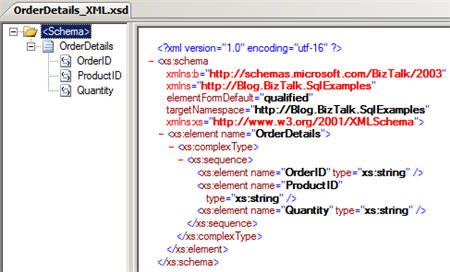
    First things first, I need to create a table in SQL Server with an XML data type.  I wanted to “type” this column (just for the heck of it), so I built a valid XSD schema using the BizTalk Editor in Visual Studio.

    I then opened the SQL Server 2008 Management Studio and defined a new XML Schema Collection.  The definition of the XML structure consists of the XSD schema we just created in Visual Studio.

    Next, I created a new table and made one of the columns (“DetailsXml”) use the xml data type.  Then, I set the XML Type Specification’s “Schema Collection” property equal to our recently defined “OrderDetailsSchema” XML definition.

    To test this configuration, I ran a quick SQL statement to make sure that an insert consisting of a schema-compliant XML fragment would successfully process.

    Lookin’ good.  Now I have a row in that new table.  Ok, next, I went back to my BizTalk project in Visual Studio and walked through the Consume Adapter Service wizard to generate SQL adapter-compliant bits.  Specifically, in my “connection” I had to set the client credentials, InboundId (because we’re polling here), initial catalog, server, inbound operation type (typed polling), polled data available (“SELECT COUNT([OrderID]) FROM [BlogDemo]”) and polling statement (“SELECT [OrderID] ,[DetailsXml] FROM [BlogDemo]”).   Once those connection properties were set, I was able to connect to my local SQL Server 2008 instance.  I then switched to a “service” contract type (since we’re polling, not pushing) and picked the “typed polling” contract.

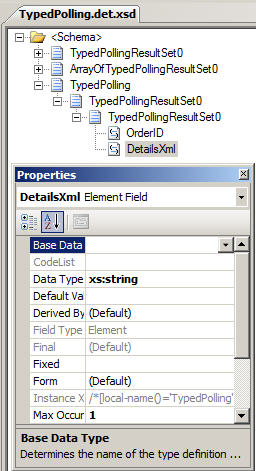
    As with all the WCF adapters, you end up with XSD files and binding files after the Consume Adapter Service wizard completes.  My schema shows that the “DetailsXml” node is typed as a xsd:string.  So whether you “type” the XML column in SQL Server or not, the adapter will not ever give you a structured message schema.

    After deploying the BizTalk project, and importing the wizard-generated binding into my BizTalk application, I have a valid receive location that can poll my database table.  I built a quick send port that subscribed on the receive port name.  What’s the output when I turn the receive location on?  Take a look:

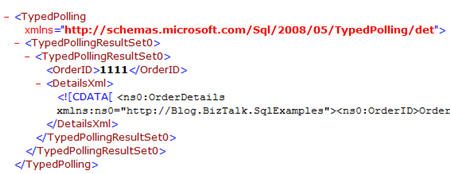
    We have the “typedpolling” root node, and our lovely XML content is slapped into a CDATA blob inside the string node.  That’s not very nice.  Now, I have two options as to what to do next: First, I could take this message, pull it into an orchestration and leech out the desired XML blob and republish it to the bus.  This is a decent option IF you also need other data points from the SQL Server message.  However, if ALL you want is the XML blob, then we want option #2.  Here, I muck with the generated receive location and tell it to pull out the XML node from the inbound message and only publish THAT to the bus.

    I do this by going to the “Messages” tab of the adapter configuration and switching the source from “body” (which is the default) to “path” which let’s me set a forward-only Xpath statement.

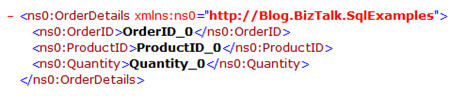
    Note that the encoding is string.  I wasn’t sure this would work right, but when I turned my receive location back on after making this update, this is the message my send port distributed:

    Well hello my lady.  Nice to see you.  To go for the home run here, I switched the receive location’s pipeline to XmlReceive (to force message typing) and set the send port’s subscription to the BTS.MessageType.  I wanted to confirm that there were no other shenanigans going on, and that I was indeed getting a typed XML message going through, not a message of type “string.”  Sure enough, I can see from the context that I have a valid message type, and it came from my SQL adapter.

    So, I’m glad this capability (extract and type the nested XML) is here, or else the BizTalk Server 2009 promise of “SQL Server XML data type compatibility” would have been a bit of a sham.   Has anyone tried accessing the data from an orchestration instead?  I’m assuming the orchestration xpath function could be used to get at the nested XML.  Feel free to share experiences.

    Technorati Tags: ,

  • Interview Series: Four Questions With … Mick Badran

    In this month’s interview with a “connected systems” thought leader, I have a little pow-wow with the one and only Mick Badran.  Mick is a long-time blogger, Microsoft MVP, trainer, consultant and a stereotypical Australian.  And by that I mean that he has a thick Australian accent, is a ridiculously nice guy, and has probably eaten a kangaroo in the past 48 hours.

    Let’s begin …

    Q: Talk to us a bit about your recent experiences with mobile applications and RFID development with BizTalk Server.  Have you ever spoken with a potential customer who didn’t even realize they could make use of RFID technology  until you explained the benefits?

    A: Richard – funny enough you ask, (I’ll answer these in reverse order) essentially the drivers for this type of scenario is clients talking about how they want to know ‘how long this takes…’ or how to capture how long people spend in a room in a gym – they then want to surface this information through to their management systems.

    Client’s will rarely say – “we need RFID technology for this solution”. It’s more like – “we have a problem that all our library books get lost and there’s a huge manual process around taking books in/out” or (hotels etc) “we lose so much laundry sheets/pillows and the like – can you help us get better ROI.”

    So in this context I think of BizTalk RFID as applying BAM to the physical world.

    Part II – Mobile BizTalk RFID application development – if I said “it couldn’t be easier” I’d be lying. Great set of libraries and RFID support from within BizTalk RFID Mobile – this leaves me to concentrate on building the app.

    A particularly nice feature is that the Mobile RFID ‘framework’ will run on a Windows Mobile capable device (WM 5+) so essentially any windows mobile powered device can become a potential reader. This allows problems to be solved in unique ways – for e.g. a typical RFID based solution we think of Readers being fixed, plastered to a wall somewhere and the tags are the things that move about – this is usually the case….BUT…. for e.g. trucks could be the ones carrying the mobile readers and the end destinations could have tags on boom gates/wherever and when the truck arrives – it scans the tag. This maybe more cost effective.

    A memorable challenge in the Windows Mobile space was developing an ‘enterprise app’ (distributed to units running around the globe – so *very* hands off from my side) – I was coding for a PPC and got the app to a certain level in the Emulator and life was good. I then deployed to my local physical device for ‘a road test’.

    While the device is ‘plugged in’ via a USB cable to my laptop – all is good, but disconnect a PPC will go into a ‘standby’ mode (typically the screen goes black – wakes as soon as you touch it).

    The problem was – that if my app had a connection to the RFID reader and the PPC went to sleep, when woke my app still thought it had a valid connection and the Reader (connected via the CF slot) was in a limbo state.

    After doing some digging I found out that the Windows Mobile O/S *DOES* send your app an event to tell it get ready to sleep – the *problem* was, but the time my app had a chance to run 1 line of code…the device was asleep!

    Fortunately – when the O/S wakes the App, I could query how I woke up….. this solved it.

    ….wrapping up, so you can see most of my issues are around non-RFID stuff where the RFID mobile component is solved. It’s a known, time to get building the app….

    Q: It seems that a debate/discussion we’ll all be having more and more over the coming years centers around what to put in the cloud, and how to integrate with on-premises applications.  As you’ve dug into the .NET Services offering, how has this new toolkit influenced your thinking on the “when” and “what” of the cloud and how to best describe the many patterns for integration?

    A: Firstly I think the cloud is fantastic! Specifically the .NET services aspects which as an integrator/developer there are some *must* have features in there – to add to the ‘bat utility’ belt.

    There’s always the question of uncertainty and I’m putting the secret to Coca Cola out there in the ‘cloud’…not too happy about that, but strangely enough as website hosting has been around for many years now, going to any website popping in personal details/buying things etc – as passing thought of “oh..it’s hosted…fine”. I find people don’t really pass a second thought to that. Why?? Maybe cause it’s a known quantity and has been road tested over the years.

    We move into the ‘next gen’ applications (web 2.0/SAAS whatever you want to call it) and how do we utilize this new environment is the question asked. I believe there are several appropriate ‘transitional phases’ as follows:

    1. All solution components hosted on premise but need better access/exposure to offered WCF/Web Services (we might be too comfortable with having things off premise – keep on a chain)
      – here I would use the Service Bus component of the .NET Services which still allows all requests to come into for e.g. our BTS Boxes and run locally as per normal. The access to/from the BTS Application has been greatly improved.
      Service Bus comes in the form of WCF Bindings for the Custom WCF Adapter – specify a ‘cloud location’ to receive from and you’re good to go.
      – applications can then be pointed to the ‘cloud WCF/WebService’ endpoint from anywhere around the world (our application even ran in China first time). The request is then synchronously passed through to our BTS boxes.
      BTS will punch a hole to the cloud to establish ‘our’ side of the connection.
      – the beautiful thing about the solution is a) you can move your BTS boxes anywhere – so maybe hosted at a later date….. and b) Apps that don’t know WCF can still call through Web Service standards – the apps don’t even need to know you’re calling a Service Bus endpoint.
      ..this is just the beginning….
    2. The On Premise Solution is under load – what to do?
      – we could push out components of the Solution into the Cloud (typically we’d use the Azure environment) and be able to securely talk back to our on-premise solution. So we have the ability to slice and dice our solution as demand dictates.
      – we still can physically touch our servers/hear the hum of drives and feel the bursts of Electromagnetic Radiation from time to time.
    3. Push our solution out to someone else to manage the operation oftypically the Cloud
      – We’d be looking into Azure here I’d say and the beauty I find about Azure is the level of granularity you get – as an application developer you can choose to run ‘this webservice’, ‘that workflow’ etc. AND dictate the  # of CPU cores AND Amount of RAM desired to run it – Brilliant.
      – Hosting is not new, many ISPs do it as we all know but Azure gives us some great fidelity around our MS Technology based solutions. Most ISPs on the other hand say “here’s your box and there’s your RDP connection to it – knock yourself out”… you then find you’re saying “so where’s my sql, IIS, etc etc”

    ** Another interesting point around all of this cloud computing is many large companies have ‘outsourced’ data centers that host their production environments today – there is a certain level of trust in this…these times and the market – everyone is looking squeeze the most out of what they have. **

    I feel that this Year is year of the cloud 🙂

    Q: You have taught numerous BizTalk classes over the years.  Give us an example of an under-used BizTalk Server capability that you highlight when teaching these classes.

    A: This changes from time to time over the years, currently it’s got to be being able to use Multiple Host/Host Instances within BTS on a single box or group. Students then respond with “oooooohhhhh can you do that…”

    It’s just amazing the amount of times I’ve come up against a Single Host/Single Instance running the whole shooting match – the other one is going for a x64 bit environment rather than x86.

    Q [stupid question]: I have this spunky 5 year old kid on my street who has started playing pranks on my neighbors (e.g. removing packages from front doors and “redelivering” them elsewhere, turning off the power to a house).  I’d like to teach him a lesson.  Now the lesson shouldn’t be emotionally cruel (e.g. “Hey Timmy, I just barbequed your kitty cat and he’s DELICIOUS”), overly messy (e.g. fill his wagon to the brim with maple syrup) or extremely dangerous (e.g. loosen all the screws on his bicycle).  Basically nothing that gets me arrested.  Give me some ideas for pranks to play on a mischievous youngster.

    A: Richard – you didn’t go back in time did you? 😉

    I’d setup a fake package and put it on my doorstep with a big sign – on the floor under the package I’d stick a photo of him doing it. Nothing too harsh

    As an optional extra – tie some fishing line to the package and on the other end of the line tie a bunch of tin cans that make a lot of noise. Hide this in the bushes and when he tries to redeliver, the cans will give him away.

    I usually play “spot the exclamation point” when I read Mick’s blog posts, so hopefully I was able to capture a bit of his excitement in this interview!!!!

    Technorati Tags: , ,