I had team meetings today, which made me grateful to work with excellent folks. Before starting this offsite, I read through some fascinating pieces that you’ll find below.
[blog] Advancing Our Chef Infrastructure. I can’t imagine that companies swap out infrastructure-as-code or configuration management investments often. Slack is all-in on Chef, and explains their evolution.
[blog] Should we decompose our monolith? This post looks at the messy world of today’s environments where there’s a mix of monolithic and microservice approaches.
[blog] Legacy Modernization meets GenAI. The ThoughtWorks crew has an interesting tool they’ve built to make modernizations better and more approachable.
[article] How (and why) should teams try distributed pair programming? While some companies are pushing return-to-office, many still have distributed teams that need to work together. This post looks at a study showing what makes distributed pair programming successful.
As hoped for, I mostly skipped doing work this weekend and spent longer-than-expected building an Apollo 11 lunar lander with one of my kids. We had fun. Today was back to the work that pays for these Lego sets.
[blog] Building LLM-powered applications in Go. Eli reminds us that the vast majority of “AI apps” are really just like apps that call LLMs. He shows off a handful of ways to create a RAG server in Go.
[blog] Open Source Foundations Considered Helpful. Do open source foundations just exist to throw lavish conferences? Nah. They add legit value, as James points out here.
[blog] RAG API. Here’s a good post about a managed solution for augmenting your LLM requests with customized data sources. I hadn’t tried this service out yet, and now i want to.
[youtube-video] Safe RAG for LLMs. *Three* RAG pieces today? Let’s embrace the discomfort. I liked this video which looked at patterns for RAG that avoid data leakage.
[article] Predicting developer attrition. How do you know a developer is on their way out the door? This paper looks at attrition and notes how burnout prevention and “opportunities to learn” are big factors.
Today was a good day. I got enough done that I think I can skip most work this weekend, and build that Lego set sitting on my shelf that my kiddo been asking me “when can we build this?” This weekend, son.
[blog] Intro to Ray for AI on Kubernetes. Kaslin explains this open source framework, why you’d use it, and how to get it running on Kubernetes.
[blog] Message Queues in System Design. Classic technology, but there’s always someone learning about it for the first time. Posts like this are a solid intro to how and when to use queues.
I’m starting to wonder if I’m writing too much. Between this daily list, blog posts (new one today), and a couple newsletters each week, maybe I need to use other mediums too. I dunno. Hopefully you’re enjoying it!
[blog] How big up-front design fails. Here are some lessons learned from projects with big upfront planning and design, and why a more iterative approach works better.
[podcast] 274: The Cloud Pod is Still Not Open Source. This latest episode of the podcast that reviews news from AWS, Microsoft and Google spent some time discussing my recent post about technical debt. Neat!
Want to get this update sent to you every day? Subscribe to my RSS feed or subscribe via email below:
School is back in session, and I just met with a handful of teachers at a recent back-to-school night. They’re all figuring out how to account for generative AI tools that students have access to. I say, let’s give teachers the same tools to use. Specifically, what if a teacher wants a quick preliminary grade on book reports submitted by their students? To solve this, I used Gemini Flash 1.5 in Google Cloud Vertex AI in three different ways—one-off in the prompt editor, through code, and via declarative workflow.
Grade Homework in Vertex AI Studio
Maybe you just have one or two papers to grade. Something like Vertex AI Studio is a good choice. Even if you’re not a Google Cloud customer, you can use it for free through this link.
You don’t have any book reports handy to test this with? Me neither. In Vertex AI Studio, I prompted with something like “Write a 300 word book report for Pride and Prejudice from the perspective of an 8th grade student with a good vocabulary and strong writing skills.”
With that handy, let’s “grade” the paper. Here I’m using system instructions to direct the model. I used Gemini to generate the initial version and then I tweaked it a bit. Here’s the instructions:
Task: Evaluate 8th-grade book reports for an honors English class. You are a tough grader. Input: Book report text. Output: Initial letter grade (A, B, C, D, or F) based on: Structure: Clear introduction, body, and conclusion Grammar: Spelling, punctuation, sentence structure. Content: Understanding of the book, critical thinking. Consider: Age and language proficiency of the student.
This tells the model what to look for, the expected quality (“honors English”), and the desired output.
I added the system instructions to the marked section within Vertex AI Studio.
Then I simply pasted the book report into the “prompt” section and submitted the prompt.
I thought this was a pretty good book report, but Gemini 1.5 Flash had a high bar after obeying my system instructions.
This book report shows good understanding of the book and a strong grasp of the themes. However, there are some issues:

Structure:
The introduction is a little long and could be more concise.
The conclusion is also repetitive.
The report could benefit from more clear paragraph breaks to organize the information more effectively.

Grammar:
No significant grammar issues.

Content:
The student demonstrates good understanding of the novel's major themes and characters.
There's a strong focus on plot summary, which is okay, but the report could benefit from more critical analysis. The student needs to go beyond just describing the events to analyze how they impact the themes, characters, or messages of the book.
Overall: This report shows good effort, but it needs to be refined.

Grade: B-
If I’m a teacher, this is a fascinating way to get a preliminary assessment of a writing assignment!
Grade Homework Through Code
The above solution works fine for one-off experiences, but how might you scale this AI-assisted grader? Another option is code.
To try this scenario out, I used Cloud Firestore as my document database holding the book reports. I created a collection named “Papers” in the default database and added three documents. Each one holds a different book report.
I think used the Firestore API and Vertex AI API to write some simple Go code that iterates through each Firestore document, calls Vertex AI using the provided system instructions, and then logs out the grade for each report. Note that I could have used a meta framework like LangChain, LlamaIndex, or Firebase Genkit, but I didn’t see the need.
package main

import (
	"context"
	"fmt"
	"log"
	"os"

	"cloud.google.com/go/firestore"
	"cloud.google.com/go/vertexai/genai"
	"google.golang.org/api/iterator"
)

func main() {
	// get configuration from environment variables
	projectID := os.Getenv("PROJECT_ID")
	collectionName := os.Getenv("COLLECTION_NAME") // "Papers"
	location := os.Getenv("LOCATION")              //"us-central1"
	modelName := os.Getenv("MODEL_NAME")           // "gemini-1.5-flash-001"

	ctx := context.Background()

	//initialize Vertex AI client
	vclient, err := genai.NewClient(ctx, projectID, location)
	if err != nil {
		log.Fatalf("error creating vertex client: %v\n", err)
	}
	gemini := vclient.GenerativeModel(modelName)

	//add system instructions
	gemini.SystemInstruction = &genai.Content{
		Parts: []genai.Part{genai.Text(`Task: Evaluate 8th-grade book reports for an honors English class. You are a tough grader. Input: Book report text. Output: Initial letter grade (A, B, C, D, or F) based on: Structure: Clear introduction, body, and conclusion Grammar: Spelling, punctuation, sentence structure. Content: Understanding of the book, critical thinking. Consider: Age and language proficiency of the student.
		`)},
	}

	// Initialize Firestore client
	client, err := firestore.NewClient(ctx, projectID)
	if err != nil {
		log.Fatalf("Failed to create client: %v", err)
	}
	defer client.Close()

	// Get documents from the collection
	iter := client.Collection(collectionName).Documents(ctx)
	for {
		doc, err := iter.Next()
		if err != nil {
			if err == iterator.Done {
				break
			}
			log.Fatalf("error iterating through documents: %v\n", err)
		}

		//create the prompt
		prompt := genai.Text(doc.Data()["Contents"].(string))

		//call the model and get back the result
		resp, err := gemini.GenerateContent(ctx, prompt)
		if err != nil {
			log.Fatalf("error generating context: %v\n", err)
		}

		//print out the top candidate part in the response
		log.Println(resp.Candidates[0].Content.Parts[0])
	}

	fmt.Println("Successfully iterated through documents!")
}
The code isn’t great, but the results were. I’m also getting more verbose responses from the model, which is cool. This is a much more scalable way to quickly grade all the homework.
Grade Homework in Cloud Workflows
I like the code solution, but maybe I want to run this preliminary grading on a scheduled basis? Every Tuesday night? I could do that with my above code, but how about using a no-code workflow engine? Our Google Cloud Workflows product recently got a Vertex AI connector. Can I make it work with the same system instructions as the above two examples? Yes, yes I can.
I might be the first person to stitch all this together, but it works great. I first retrieved the documents from Firestore, looped through them, and called Vertex AI with the provided system instructions. Here’s the workflow’s YAML definition:
main:
  params: [args]
  steps:
  - init:
      assign:
        - collection: ${args.collection_name}
        - project_id: ${args.project_id}
        - location: ${args.location}
        - model: ${args.model_name}
  - list_documents:
        call: googleapis.firestore.v1.projects.databases.documents.list
        args:
            collectionId: ${collection}
            parent: ${"projects/" + project_id + "/databases/(default)/documents"}
        result: documents_list
  - process_documents:
        for:
          value: document
          in: ${documents_list.documents}
          steps:
            - ask_llm:
                call: googleapis.aiplatform.v1.projects.locations.endpoints.generateContent
                args:
                    model: ${"projects/" + project_id + "/locations/" + location + "/publishers/google/models/" + model}
                    region: ${location}
                    body:
                        contents:
                            role: "USER"
                            parts:
                                text: ${document.fields.Contents.stringValue}
                        systemInstruction:
                            role: "USER"
                            parts:
                                text: "Task: Evaluate 8th-grade book reports for an honors English class. You are a tough grader. Input: Book report text. Output: Initial letter grade (A, B, C, D, or F) based on: Structure: Clear introduction, body, and conclusion Grammar: Spelling, punctuation, sentence structure. Content: Understanding of the book, critical thinking. Consider: Age and language proficiency of the student."
                        generation_config:
                            temperature: 0.5
                            max_output_tokens: 2048
                            top_p: 0.8
                            top_k: 40
                result: llm_response
            - log_file_name:
                call: sys.log
                args:
                    text: ${llm_response}
No code! I executed the workflow, passing in all the runtime arguments.
In just a moment, I saw my workflow running, and “grades” being logged to the console. In real life, I’d probably update the Firestore document with this information. I’d also use Cloud Scheduler to run this on a regular basis.
While I made this post about rescuing educators from the toil of grading papers, you can apply these patterns to all sorts of scenarios. Use prompt editors like Vertex AI Studio for experimentation and finding the right prompt phrasing. Then jump into code to interact with models in a repeatable, programmatic way. And consider low-code tools when model interactions are scheduled, or part of long running processes.
23 years later, I still think about where I was the moment I heard that a plane crashed into the Twin Towers. Let’s never forget.
[youtube-video] Decoding Google Gemini with Jeff Dean. I liked this episode of the DeepMind podcast featuring our Chief Scientist. Jeff shares history, and future.
[blog] Kaggle Model Upload Made Easy. Millions of folks use Kaggle to try models, access datasets, compete in AI competitions, and more. This post looks at how you upload models.
[repo] Automatic Password Rotation. Do you regularly rotate your database passwords? Is that a manual or automated process? This reference architecture (and IaC scripts) shows you how to do it.
Big reading list today. Sorry, not sorry. Hopefully you find a few fun things that catch your eye.
[blog] Free Tools Every ML Beginner Should Use. There’s seemingly a new AI/ML tool released every day, but these are mature options for beginners and experts.
[blog] Cloud Run job with a Python Module. Background jobs with Cloud Run are great. Mazlum offers a detailed post about using Python modules with them.
[paper] In Defense of RAG in the Era of Long-Context Language Models. We got it going with Gemini’s 1m (now 2m) long context window, but now other models are starting to grow their input token size. But does that negate the need for RAG? Not according to this paper.
[site] Illuminate. Coolest thing I saw today. Generate an on-demand “podcast” for research papers and books. Try it with the paper above. Worked amazingly well.
[article] Coaching Founder Mode. Marty offers a must-read essay that proposes all product leaders be coached into a “founder mode” mindset.
[article] Take Your First Steps with Git. Git is for more than just developers; I’ve seen content authors, ops folks, database pros, and product managers rely on it. Having a base understanding is helpful.
[blog] Tinder API Style Guide — Part 1. Creating some API standards around URI patterns and headers? Take a look at what the Tinder engineering team put together.
Want to get this update sent to you every day? Subscribe to my RSS feed or subscribe via email below:
Did you have a good start to your week? After writing a few thousand words this weekend about Cloud Run, I’m hunting for the next tech to mess around with. Suggestions?
[article] Measuring developers’ jobs-to-be-done. This story reviews a recent Google paper that explored “developer goals” that help internal teams optimize the dev experience.
[article] Why Generalists Own the Future. Specialists or generalists? It’s a common debate. Dan argues that generalists are well positioned in this dynamic future because they will adapt faster than those with specific expertise.
[blog] New Gemini model in LangChain4j. If you want a simple model-as-a-service experience with Gemini, the Google AI edition is a great place to start. If you’re looking for more advanced AI/ML features to go with it, Google Cloud’s Vertex AI is an ideal starting point. For the former, you can now use LangChain4j.
[blog] The insidious problem of configuration sprawl. If you’ve got all your system, application, and infrastructure configurations in a single place … you’re a unicorn. I’d like to meet you. Most folks have configs all over the place, as Brian talks about here.
Want to get this update sent to you every day? Subscribe to my RSS feed or subscribe via email below:
I’ll admit it, I’m a PaaS guy. Platform-as-a-Service is an ideal abstraction for those that don’t get joy from fiddling with infrastructure. From Google App Engine, to Heroku, to Cloud Foundry, I’ve appreciated attempts to deliver runtimes that makes it easier to ship and run code. Classic PaaS-type services were great at what they did. The problem with all of them—this includes all the first generation serverless products like Amazon Lambda—were that they were limited. Some of the necessary compromises were well-meaning and even healthy: build 12-factor apps, create loose coupling, write less code and orchestrate manage services instead. But in the end, all these platforms, while successful in various ways, were too constrained to take on a majority of apps for a majority of people. Times have changed.
Google Cloud Run started as a serverless product, but it’s more of an application platform at this point. It’s reminiscent of a PaaS, but much better. While not perfect for everything—don’t bring Windows apps, always-on background components, or giant middleware—it’s becoming my starting point for nearly every web app I build. There are ten reasons why Cloud Run isn’t limited by PaaS-t constraints, is suitable for devs at every skill level, and can run almost any web app.
Note that Cloud Run also has “jobs” for run-to-completion batch work. I’m focusing solely on Cloud Run web services here.
I like “functions.” Write short code blocks that respond to events, and perform an isolated piece of work. There are many great uses cases for this.
The new Cloud Run functions experience makes it easy to bang out a function in minutes. It’s baked into CLI and UI. Once I decide to create a function ….
I only need to pick a service name, region, language runtime, and whether access to this function is authenticated or not.
Then, I see a browser-based editor where I can write, test, and deploy my function. Simple, and something most of us equate with “serverless.”
But there’s more. Cloud Run does apps too. That means instead of a few standalone functions to serve a rich REST endpoint, you’re deploying one Spring Boot app with all the requisite listeners. Instead of serving out a static site, you could return a full web app with server-side capabilities. You’ve got nearly endless possibilities when you can serve any container that accepts HTTP, HTTP/2, WebSockets, or gRPC traffic.
Use either abstraction, but stay above the infrastructure and ship quickly.
This is where the power of containers shows up, and why many previous attempts at PaaS didn’t break through. It’s ok if a platform only supports new architectures and new apps. But then you’re accepting that you’ll need an additional stack for EVERYTHING ELSE.
Cloud Run is a great choice because you don’t HAVE to start fresh to use it. Deploy from source in an existing GitHub repo or from cloned code on your machine. Maybe you’ve got an existing Next.js app sitting around that you want to deploy to Cloud Run. Run a headless CMS. Does your old app require local volume mounts for NFS file shares? Easy to do. Heck, I took a silly app I built 4 1/2 years ago, deployed it from the Docker Hub, and it just worked.
Of course, Cloud Run shines when you’re building new apps. Especially when you want fast experimentation with new paradigms. With its new GPU support, Cloud Run lets you do things like serve LLMs via tools like Ollama. Or deploy generative AI apps based on LangChain or Firebase Genkit. Build powerful web apps in Go, Java, Python, .NET, and more. Cloud Run’s clean developer experience and simple workflow makes it ideal for whatever you’re building next.
#3. Use by itself AND as part of a full cloud solution.
There aren’t many tech products that everyone seems to like. But folks seem to really like Cloud Run, and it regularly wins over the Hacker News crowd! Some classic PaaS solutions were lifestyle choices; you had to be all in. Use the platform and its whole way of working. Powerful, but limiting.
You can choose to use Cloud Run all by itself. It’s got a generous free tier, doesn’t require complicated HTTP gateways or routers to configure, and won’t force you to use a bunch of other Google Cloud services. Call out to databases hosted elsewhere, respond to webhooks from SaaS platforms, or just serve up static sites. Use Cloud Run, and Cloud Run alone, and be happy.
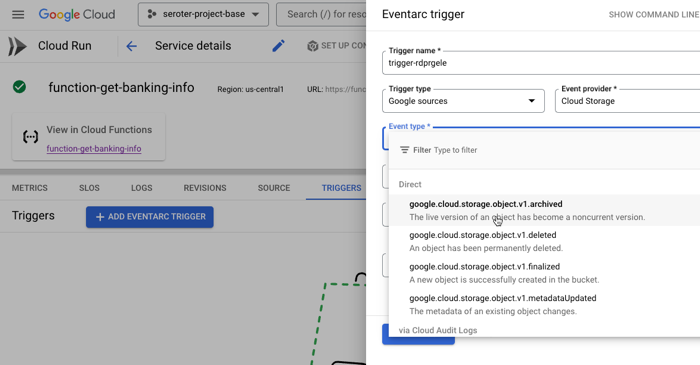
And of course, you can use it along with other great cloud services. Tack on a Firestore database for a flexible storage option. Add a Memorystore caching layer. Take advantage of our global load balancer. Call models hosted in Vertex AI. If you’re using Cloud Run as part of an event-driven architecture, you might also use built-in connections to Eventarc to trigger Cloud Run services when interesting things happen in your account—think file uploaded to object storage, user role deleted, database backup completes.
Use it by itself or “with the cloud”, but either way, there’s value.
#4. Choose simple AND sophisticated configurations.
One reason PaaS-like services are so beloved is because they often provide a simple onramp without requiring tons of configuration. “cf push” to get an app to Cloud Foundry. Easy! Getting an app to Cloud Run is simple too. If you have a container, it’s a single command:
rseroter$ gcloud run deploy go-app --image=gcr.io/seroter-project-base/go-restapi
If all you have is source code, it’s also a single command:
rseroter$ gcloud run deploy node-app --source .
In both cases, the CLI asks me to pick a region and whether I want requests authenticated, and that’s it. Seconds later, my app is running.
This works because Cloud Run sets a series of smart, reasonable default settings.
But sometimes you do want more control over service configuration, and Cloud Run opens up dozens of possible settings. What kind of sophisticated settings do you have control over?
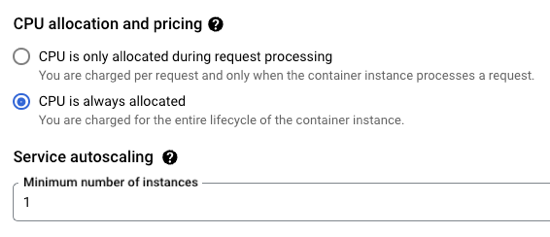
CPU allocation. Do you want CPU to be always on, or quit when idle?
Ingress controls. Do you want VPC-only access or public access?
Multi-container services. Add a sidecar.
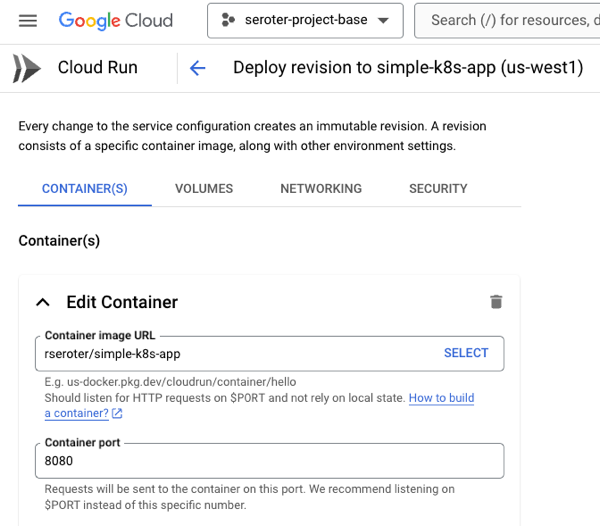
Container port. The default is 8080, but set to whatever you want.
Memory. The default value is 512 MiB per instance, but you can go up to 32GB.
CPU. It defaults to 1, but you can go less than 1, or up to 8.
Healthchecks. Define startup or liveliness checks that ping specific endpoints on a schedule.
Variables and secrets. Define environment variables that get injected at runtime. Same with secrets that get mounted at runtime.
Persistent storage volumes. There’s ephemeral scratch storage in every Cloud Run instance, but you can also mount volumes from Cloud Storage buckets or NFS shares.
Request timeout. The default value is 5 minutes, but you can go up to 60 minutes.
Max concurrency. A given service instance can handle more than one request. The default value is 80, but you can go up to 1000!
and much more!
You can do something simple, you can do something sophisticated, or a bit of both.
One of the challenge with early PaaS services was that they were just sitting on the public internet. That’s no good as you get to serious, internal-facing systems.
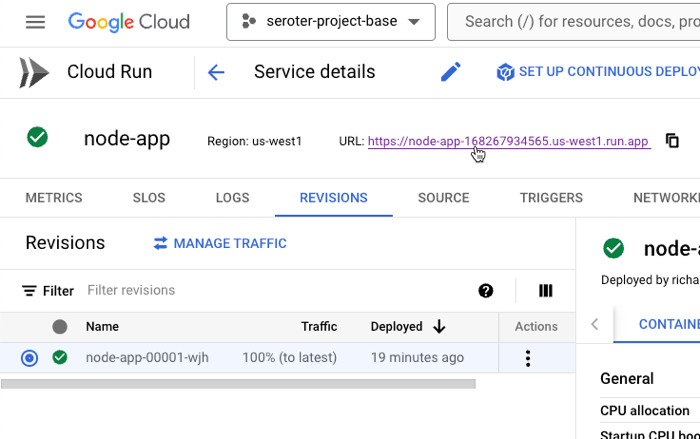
First off, Cloud Run services are public by default. You control the authentication level (anonymous access, or authenticated user) and need to explicitly set that. But the service itself is publicly reachable. What’s great is that this doesn’t require you to set up any weird gateways or load balancers to make it work. As soon as you deploy a service, you get a reachable address.
Awesome! Very easy. But what if you want to lock things down? This isn’t difficult either.
Cloud Run lets me specify that I’ll only accept traffic from my VPC networks. I can also choose to securely send messages to IPs within a VPC. This comes into play as well if you’re routing requests to a private on-premises network peered with a cloud VPC. We even just added support for adding Cloud Run services to a service mesh for more networking flexibility. All of this gives you a lot of control to create truly private services.
I don’t necessarily believe that cloud is more expensive than on-premises—regardless of some well-publicized stories—but keeping idle cloud services running isn’t helping your cost posture.
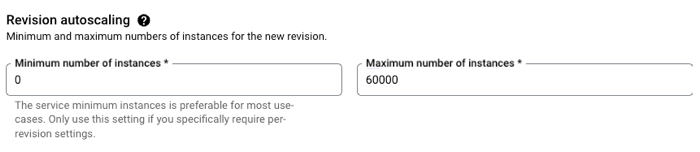
Google Cloud Run truly scales to zero. If nothing is happening, nothing is running (or costing you anything). However, when you need to scale, Cloud Run scales quickly. Like, a-thousand-instances-in-seconds quickly. This is great for bursty workloads that don’t have a consistent usage pattern.
But you probably want the option to have an affordable way to keep a consistent pool of compute online to handle a steady stream of requests. No problem. Set the minimum instance to 1 (or 2, or 10) and keep instances warm. And, set concurrency high for apps that can handle it.
If you don’t have CPU always allocated, but keep a minimum instance online, we actually charge you significantly less for that “warm” instance. And you can apply committed use discounts when you know you’ll have a service running for a while.
Run bursty workloads or steadily-used workloads all in a single platform.
#7. Do one-off deploys AND set up continuous delivery pipelines.
I mentioned above that it’s easy to use a single command or single screen to get an app to Cloud Run. Go from source code or container to running app in seconds. And you don’t have to set up any other routing middleware or Cloud networking to get a routable serivce.
Sometimes you just want to do a one-off deploy without all the ceremony. Run the CLI, use the Console UI, and get on with life. Amazing.
But if that was your only option, you’d feel constrained. So you can use something like GitHub Actions to deploy to Cloud Run. Most major CI/CD products support it.
Another great option is Google Cloud Deploy. This managed service takes container artifacts and deploys them to Google Kubernetes Engine or Google Cloud Run. It offers some sophisticated controls for canary deploys, parallel deploys, post-deploy hooks, and more.
Cloud Deploy has built-in support for Cloud Run. A basic pipeline (defined in YAML, but also configured via point-and-click in the UI if you want) might show three stages for dev, test, and prod.
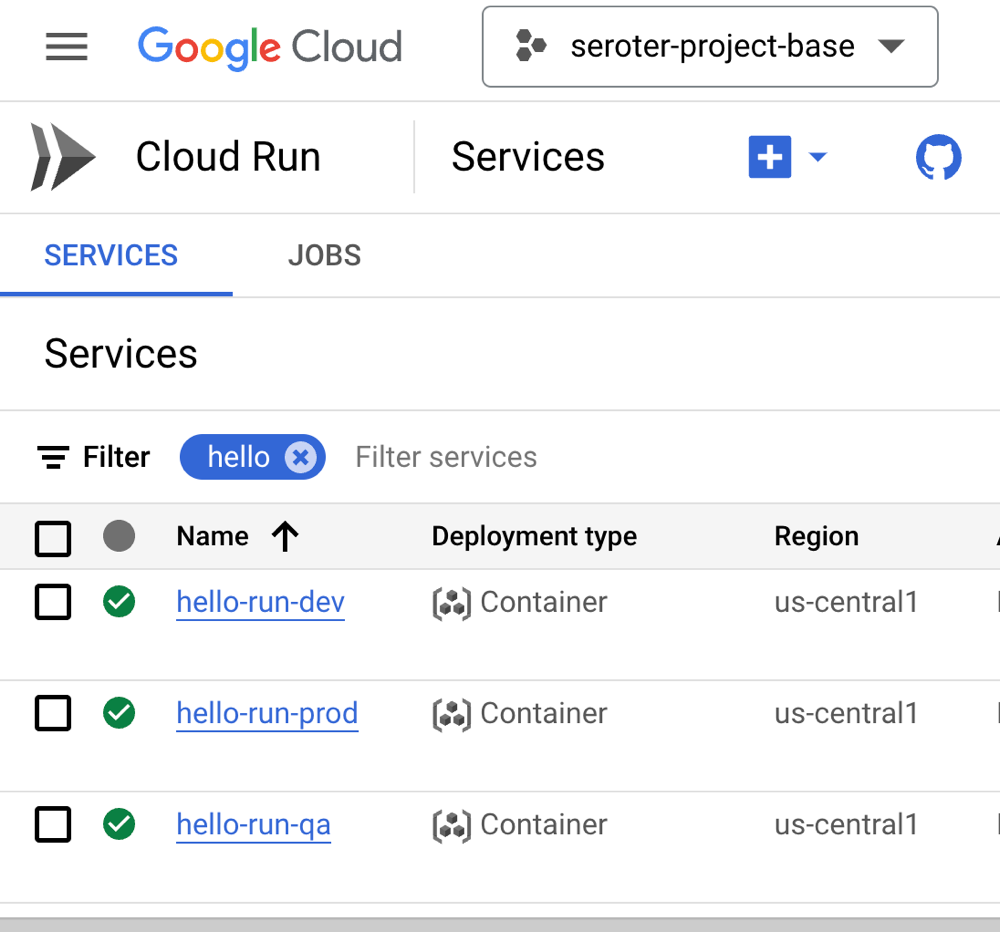
When the pipeline completes, we see three separate Cloud Run instances deployed, representing each stage of the pipeline.
You want something more sophisticated? Ok. Cloud Deploy supports Cloud Run canary deployments. You’d use this if you want a subset of traffic to go to the new instance before deciding to cut over fully.
This is taking advantage of Cloud Run’s built-in traffic management feature. When I check the deployed service, I see that after advancing my pipeline to 75% of production traffic for the new app version, the traffic settings are properly set in Cloud Run.
Serving traffic in multiple regions? Cloud Deploy makes it possible to ship a release to dozens of places simultaneously. Here’s a multi-target pipeline. The production stage deploys to multiple Cloud Run regions in the US.
When I checked Cloud Run, I saw instances in all the target regions. Very cool!
If you want a simple deploy, do that with the CLI or UI. Nothing stops you. However, if you’re aiming for a more robust deployment strategy, Cloud Run readily handles it through services like Cloud Deploy.
#8. Own aspects of security AND offload responsibility.
On reason that you choose managed compute platforms is to outsource operational tasks. It doesn’t mean you’re not capable of patching infrastructure, scaling compute nodes, or securing workloads. It means you don’t want to, and there are better uses of your time.
With Cloud Run, you can drive aspects of your security posture, and also let Cloud Run handle key aspects on your behalf.
What are you responsible for? You choose an authentication approach, including public or private services. This includes control of how you want to authenticate developers who use Cloud Run. You can authenticate end users, internal or external ones, using a handful of supported methods.
It’s also up to you to decide which service account the Cloud Service instance should impersonate. This controls what a given instance has access to. If you want to ensure that only containers with verified provenance get deployed, you can also choose to turn on Binary Authorization.
So what are you offloading to Cloud Run and Google Cloud?
You can outsource protection from DDoS and other threats by turning on Cloud Armor. The underlying infrastructure beneath Cloud Run is completely managed, so you don’t need to worry about upgrading or patching any of that. What’s also awesome is that if you deploy Cloud Run services from source, you can sign up for automatic base image updates. This means we’ll patch the OS and runtime of your containers. Importantly, it’s still up to you to patch your app dependencies. But this is still very valuable!
#9. Treat as post-build target AND as upfront platform choice.
You might just want a compute host for your finished app. You don’t want to have to pick that host up front, and just want a way to run your app. Fair enough! There aren’t “Cloud Run apps”; they’re just containers. That said, there are general tips that make an app more suitable for Cloud Run than not. But the key is, for modern apps, you can often choose to treat Cloud Run as a post-build decision.
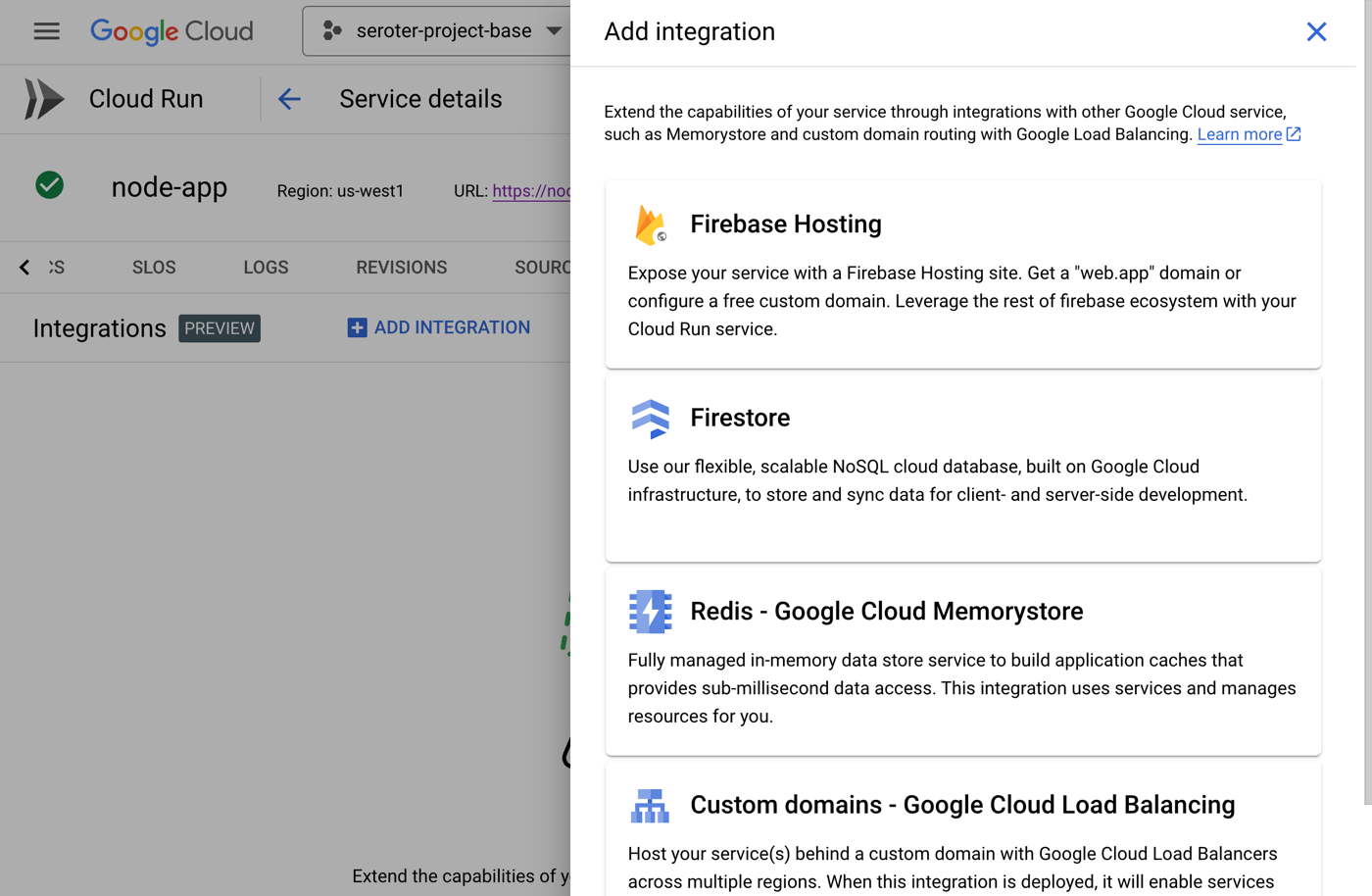
Or, you can design with Cloud Run in mind. Maybe you want to trigger Cloud Run based on a specific Eventarc event. Or you want to capitalize on Cloud Run concurrency so you code accordingly. You could choose to build based on a specific integration provided by Cloud Run (e.g. Memorystore, Firestore, or Firebase Hosting).
There are times that you build with the target platform in mind. In other cases, you want a general purpose host. Cloud Run is suitable for either situation, which makes it feel unique to me.
#10. Rely on built-in SLOs, logs, metrics AND use your own observability tools.
If you want it to be, Cloud Run can feel like an all-in-one solution. Do everything from one place. That’s how classic PaaS was, and there was value in having a tightly-integrated experience. From within Cloud Run, you have built-in access to logs, metrics, and even setting up SLOs.
The metrics experience is powered by Cloud Monitoring. I can customize event types, the dashboards, time window, and more. This even includes the ability to set uptime checks which periodically ping your service and let you know if everything is ok.
The embedded logging experience is powered by Cloud Logging and gives you a view into all your system and custom logs.
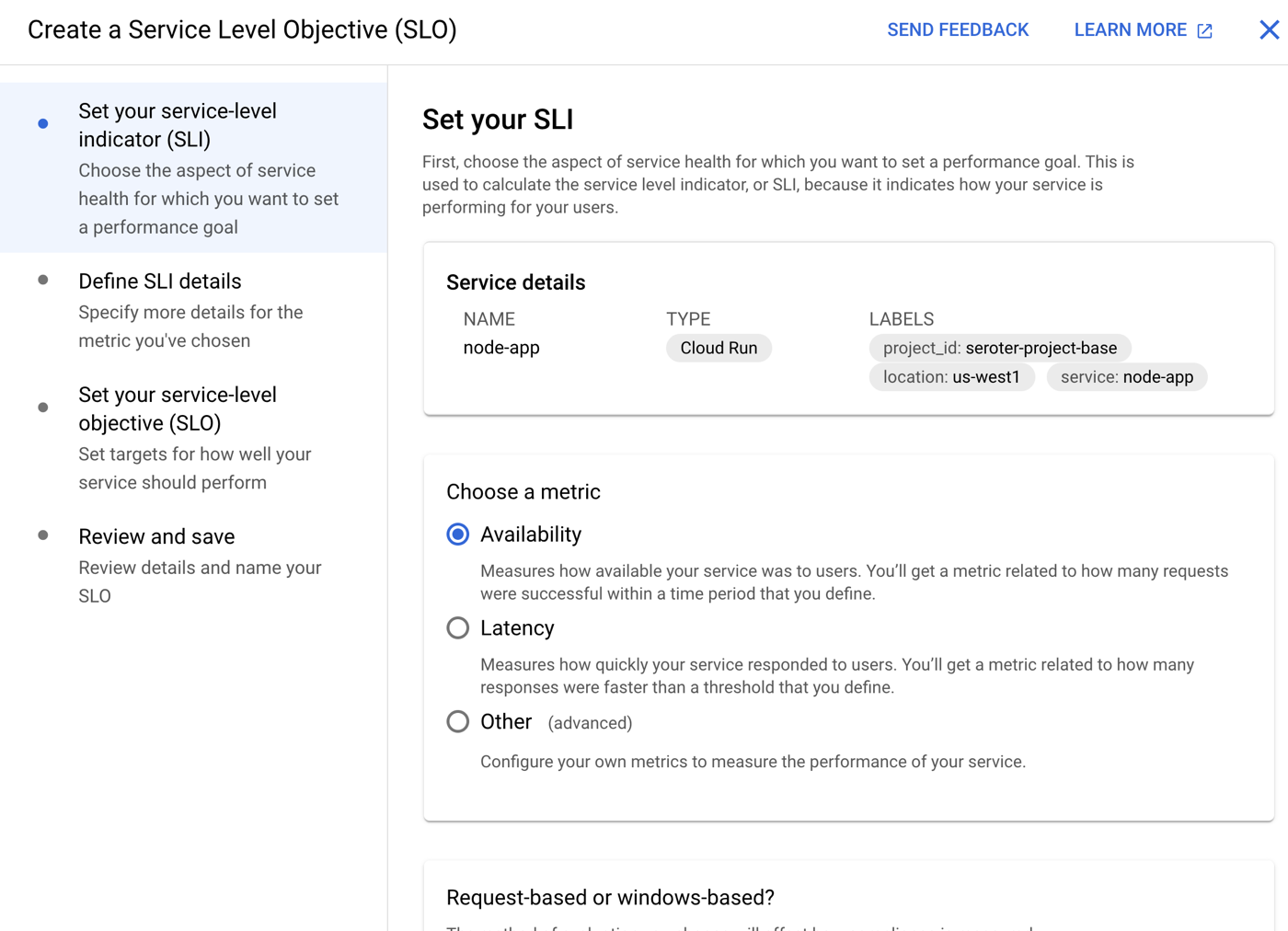
We’ve even added an SLO capability where you can define SLIs based on availability, latency, or custom metrics. Then you set up service level objectives for service performance.
Kubernetes, virtual machines, and bare metal boxes all play a key role for many workloads. But you also may want to start with the highest abstraction possible so that you can focus on apps, not infrastructure. IMHO, Google Cloud Run is the best around and satisfies the needs of most any modern web app. Give it a try!
It was officially a 4-day workweek, but felt like a regular week. Lots going on, and plenty of things to do. But I greatly prefer that to the alternative! Have a great weekend, y’all.
[blog] Serving Stable Diffusion with RayServe on GKE Autopilot. How would you make this text-to-image model available to other apps in your environment? William gives us a step by step for getting it going on Kubernetes.
[blog] Coaching Feedback. I’m familiar with the SHARE model for giving feedback, but don’t always remember to use it. This is a good reminder to break it out more often.
[article] Cycle Time. Most of you are trying to shrink the time it takes to go from idea to working software in production. But what activity starts the “cycle time” clock? And when is the software considered “shipped”?