Today’s list definitely has some assertive opinions. What’s the new baseline for performance? How are you thinking about MCP wrong? What’s going to happen when you’ve lost comprehension of your codebase? We should ask hard questions and noodle on the answers.
[blog] 10x is the new floor. As our tools get better, the floor goes up. More is expected. Being “just ok” at your job is a fairly risky proposition in 2026.
[blog] Introducing “vibe design” with Stitch. This is such a game-changer for UX folks, but also everyone else who wants to bring smart design into their apps.
[article] How coding agents work. Another good one from Simon that explains the agentic loops and techniques you find in coding agents.
[blog] From Ideation to Automation: The Scoop on Outages. McDonalds gets grief for offline ice cream machines, but apparently there’s more going on than I thought. And, better solutions to get back online.
I need the right mix of meetings in my workday for it to be a good day. Some quality 1:1 chats, a few decision-focused meetings are fine, and then seeing something that’s exciting for our users. Today was a good day.
[report] The State of AI in the Enterprise. I’m surprised that this Deloitte report is ungated. Check it out for some useful information about enterprise approaches to AI.
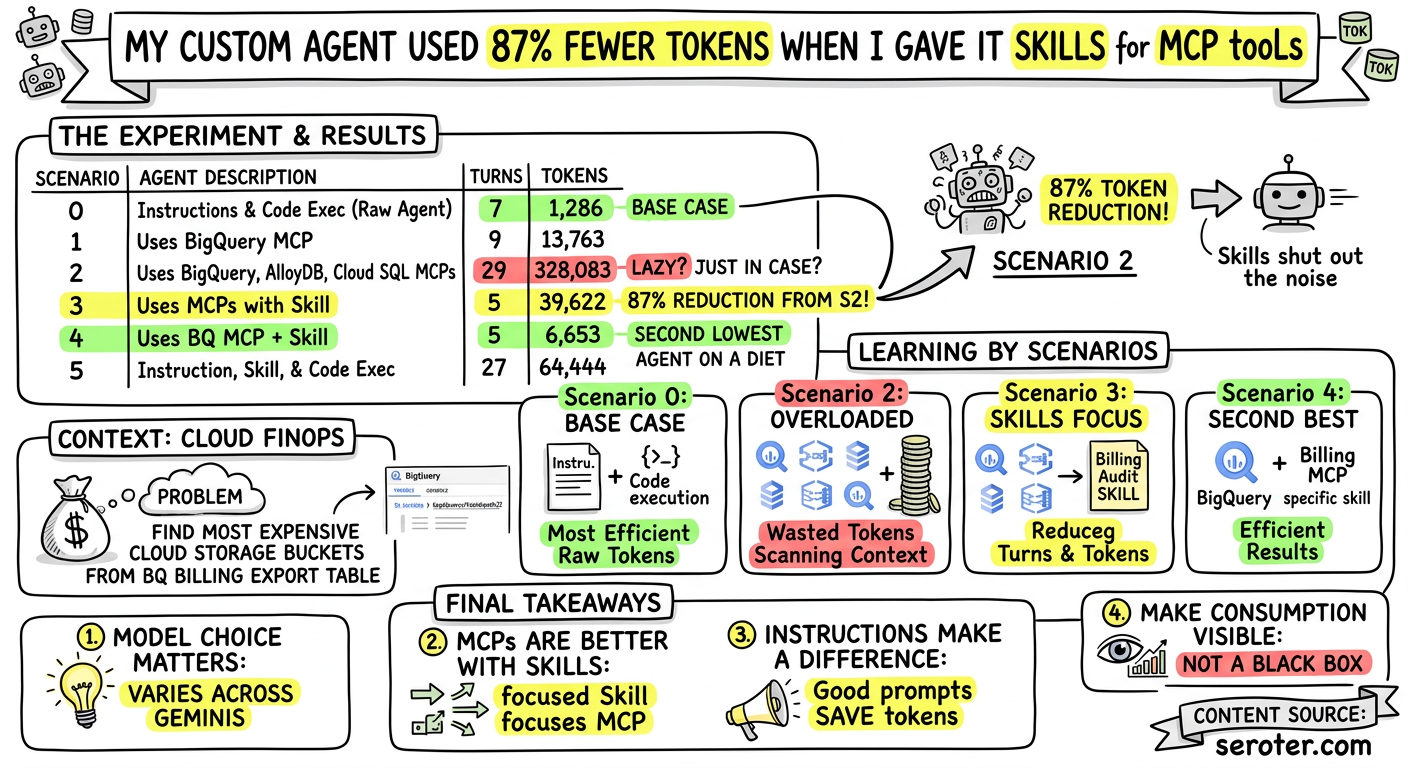
I waded a bit into the “MCP or not” debate by running some experiments to see how much MCP costs my custom-built agent. If you complement with agent skills, the answer is “not too much.”
[blog] Become Builders, Not Coders. This is more of a directive versus suggestion at this point. What has to change and how do you do it? Here’s a post with advice.
[article] Why the World Still Runs on SAP. Big ERP, CRM, and service management platforms aren’t going anywhere. But it’s going to get easier to set them up, use them, and operate them.
[article] You’re Not Paid to Write Code. I recognize that I’ve shared a lot of posts on this topic. But it’s important. We’re not just adding tools to the mix; we’re changing identities and habits. That takes repetitive reminders and motivation.
[blog] When to use WebMCP and MCP. Pay attention to WebMCP. It might turn out to be something fairly important.
Today’s web apps don’t seem particularly concerned about resource consumption. The simplest site seems to eat up hundreds of MB of memory in my browser. We’ve probably gotten a bit lazy with optimization since many computers have horsepower to spare. But when it comes to LLM tokens, we’re still judicious. Most of us have bumped into quotas or unexpected costs!
I see many examples of introducing and tuning MCPs and skills for IDEs and agentic tools. But what about the agents you’re building? What’s the token impact of using MCPs and skills for custom agents?
I tried out six solutions with the Agent Development Kit (Python) and counted my token consumption for each. The tl;dr? A well-prompted Gemini with zero tools or skills is successful with the fewest tokens consumed, with the second best option being MCP + skills. Third-best in token consumption is raw Gemini plus skills.
I trust that you can find a thousand ways to do this better than me, but here’s a table with the best results from multiple runs of each of my experiments. The title of the post refers to the difference between scenarios 2 and 3.
Scenario
Agent Description
Turns
Tokens
0
Instructions only, built in code execution tool
7
1,286
1
Uses BigQuery MCP
9
13,763
2
Uses BigQuery, AlloyDB, Cloud SQL MCPs
29
328,083
3
Uses BigQuery, AlloyDB, Cloud SQL MCPs with skill
5
39,622
4
Use BigQuery MCP and a skill
5
6,653
5
Instruction, skill, and built-in code execution tool
27
64,444
What’s the problem to solve?
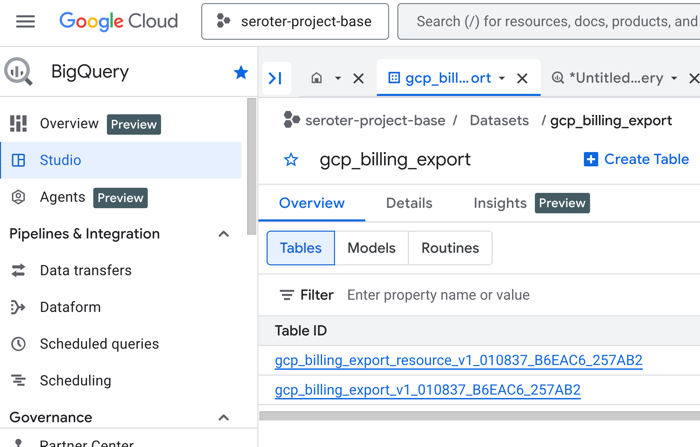
I want an agent that can do some basic cloud FinOps for me. I’ve got a Google Cloud BigQuery table that is automatically populated with billing data for items in my project.
Let’s have an agent that can find the table and figure out what my most expensive Cloud Storage buckets are so far this month. This could be an agent we call from a platform like Gemini Enterprise so that our finance people (or team leads) could quickly get billing info.
A look at our agent runner
The Agent Development Kit (ADK) offers some powerful features for building robust agents. It has native support for MCPs and skills, and has built-in tools for services like Google Search.
Let’s look at some code. One file to start. The main.py file runs our agent and count the tokens from each turn of the LLM. The token counting magic was snagged from an existing sample app. For production scenarios, you might want to use our BigQuery Agent Analytics plugin for ADK that captures a ton of interesting data points about your agent runs, including tokens per turn.
Here’s the main.py file:
import asyncio
import time
import warnings

import agent
from dotenv import load_dotenv
from google.adk import Runner
from google.adk.agents.run_config import RunConfig
from google.adk.artifacts.in_memory_artifact_service import InMemoryArtifactService
from google.adk.cli.utils import logs
from google.adk.sessions.in_memory_session_service import InMemorySessionService
from google.adk.sessions.session import Session
from google.genai import types

# --- Initialization & Configuration ---
import os
# Load environment variables (like API keys) from the .env file
load_dotenv(os.path.join(os.path.dirname(__file__), '.env'), override=True)
# Suppress experimental warnings from the ADK
warnings.filterwarnings('ignore', category=UserWarning)
# Redirect agent framework logs to a temporary folder
logs.log_to_tmp_folder()


async def main():
  app_name = 'my_app'
  user_id_1 = 'user1'

  # Initialize the services required to manage chat history and created artifacts
  session_service = InMemorySessionService()
  artifact_service = InMemoryArtifactService()

  # The Runner orchestrates the agent's execution loop
  runner = Runner(
      app_name=app_name,
      agent=agent.root_agent,
      artifact_service=artifact_service,
      session_service=session_service,
  )

  # Create a new session to hold the conversation state
  session_1 = await session_service.create_session(
      app_name=app_name, user_id=user_id_1
  )

  total_prompt_tokens = 0
  total_candidate_tokens = 0
  total_tokens = 0
  total_turns = 0

  async def run_prompt(session: Session, new_message: str):
    # Helper variables to track token usage and turns across the session
    nonlocal total_prompt_tokens
    nonlocal total_candidate_tokens
    nonlocal total_tokens
    nonlocal total_turns

    # Structure the user's string input into the appropriate Content format
    content = types.Content(
        role='user', parts=[types.Part.from_text(text=new_message)]
    )
    print('** User says:', content.model_dump(exclude_none=True))

    # Stream events back from the Runner as the agent executes its task
    async for event in runner.run_async(
        user_id=user_id_1,
        session_id=session.id,
        new_message=content,
    ):
      total_turns += 1

      # Print intermediate steps (text, tool calls, and tool responses) to the console
      if event.content and event.content.parts:
        for part in event.content.parts:
          if part.text:
            print(f'** {event.author}: {part.text}')
          if part.function_call:
            print(f'** {event.author} calls tool: {part.function_call.name}')
            print(f'   Arguments: {part.function_call.args}')
          if part.function_response:
            print(f'** Tool response from {part.function_response.name}:')
            print(f'   Response: {part.function_response.response}')

      if event.usage_metadata:
        total_prompt_tokens += event.usage_metadata.prompt_token_count or 0
        total_candidate_tokens += (
            event.usage_metadata.candidates_token_count or 0
        )
        total_tokens += event.usage_metadata.total_token_count or 0
        print(
            f'Turn tokens: {event.usage_metadata.total_token_count}'
            f' (prompt={event.usage_metadata.prompt_token_count},'
            f' candidates={event.usage_metadata.candidates_token_count})'
        )

    print(
        f'Session tokens: {total_tokens} (prompt={total_prompt_tokens},'
        f' candidates={total_candidate_tokens})'
    )

  # --- Execution Phase ---
  start_time = time.time()
  print('Start time:', start_time)
  print('------------------------------------')

  # Send the initial prompt to the agent and trigger the run loop
  await run_prompt(session_1, 'Find the top 3 most expensive Cloud Storage buckets in our March 2026 billing export for project seroter-project-base')
  print(
      await artifact_service.list_artifact_keys(
          app_name=app_name, user_id=user_id_1, session_id=session_1.id
      )
  )
  end_time = time.time()
  print('------------------------------------')
  print('Total turns:', total_turns)
  print('End time:', end_time)
  print('Total time:', end_time - start_time)


if __name__ == '__main__':
  asyncio.run(main())
Nothing too shocking here. But this gives me a fairly verbose output that lets me see how many turns and tokens each scenario eats up.
Scenario 0: Raw agent (no MCP, no tools) using Python code execution
In this foundational test, what if we ask the agent to answer the question without the help of any external tools? All it can do is write and execute Python code on the local machine using a built-in tool. This flavor is only for local dev, as there are more production-grade isolation options for running code.
Here’s the agent.py for this base scenario. I’ve got a decent set of instructions to guide the agent for how to write code to find and query the relevant table.
from google.adk.agents import LlmAgent
from google.adk.skills import load_skill_from_dir
from google.adk.tools import skill_toolset
from google.adk.tools.mcp_tool import McpToolset, StreamableHTTPConnectionParams
from google.adk.auth.auth_credential import AuthCredential, AuthCredentialTypes, ServiceAccount
from fastapi.openapi.models import OAuth2, OAuthFlows, OAuthFlowClientCredentials
from google.adk.code_executors.unsafe_local_code_executor import UnsafeLocalCodeExecutor


# --- Agent Definition ---

# --- Scenario 0: Raw Agent using Python Code Execution for Discovery and Analysis ---
root_agent = LlmAgent(
    name="data_analyst_agent",
    model="gemini-3.1-flash-lite-preview",
    instruction="""You are a data analyst.
    CRITICAL: You have NO TOOLS registered. NEVER attempt a tool call or function call (like `list_datasets` or `bq_list_dataset_ids`).
    You MUST perform all technical tasks by writing and executing Python code blocks in markdown format (e.g., ` ```python `) using the `google-cloud-bigquery` client library.

    1. DISCOVERY: If you don't know the table names, you MUST write and execute Python code to list datasets and tables.
    2. ANALYSIS: Use Python to query data and perform analysis.
    3. NO HYPOTHETICALS: NEVER provide hypothetical, example, or placeholder results. Only show data you have actually retrieved via code execution.
    ALWAYS explain the approach you used to access BigQuery.""",
    code_executor=UnsafeLocalCodeExecutor()
)
This scenario runs quickly (about 14 seconds on each test), took five turns, and consumed 1786 tokens. In my half-dozen runs, I saw as many as nine turns, and as few as 1286 tokens consumed.
This was the most efficient way to go of any scenario.
Scenario 1: Agent with BigQuery MCP
Love it or hate it, MCP is going to remain a popular way to connect to external systems. Instead of needing to understand every system’s APIs, MCP tools give us a standard way to do things.
I’m using our fully managed remote MCP Server for BiQuery. This MCP server exposes a handful of useful tools for discovery and data retrieval. Note that the awesome open source MCP Toolbox for Databases is another great way to pull 40+ data sources into your agents.
The agent.py for Scenario 1 looks like this. You can see that I’m initializing the auth with my application default credentials and setting up the correct OAuth flow. The agent itself has a solid instruction to steer the MCP server. Note that I left an old, unoptimized instruction in there. That old instruction resulted in dozens of turns and up to 600k tokens consumed!
from google.adk.agents import LlmAgent
from google.adk.skills import load_skill_from_dir
from google.adk.tools import skill_toolset
from google.adk.tools.mcp_tool import McpToolset, StreamableHTTPConnectionParams
from google.adk.auth.auth_credential import AuthCredential, AuthCredentialTypes, ServiceAccount
from fastapi.openapi.models import OAuth2, OAuthFlows, OAuthFlowClientCredentials
from google.adk.code_executors.unsafe_local_code_executor import UnsafeLocalCodeExecutor

# --- BigQuery MCP Configuration ---

# Configure authentication for the BigQuery MCP server
bq_auth_credential = AuthCredential(
    auth_type=AuthCredentialTypes.SERVICE_ACCOUNT,
    service_account=ServiceAccount(
        use_default_credential=True,
        scopes=["https://www.googleapis.com/auth/bigquery"]
    )
)

# Use OAuth2 with clientCredentials flow for background ADC exchange
bq_auth_scheme = OAuth2(
    flows=OAuthFlows(
        clientCredentials=OAuthFlowClientCredentials(
            tokenUrl="https://oauth2.googleapis.com/token",
            scopes={"https://www.googleapis.com/auth/bigquery": "BigQuery access"}
        )
    )
)

# Initialize the BigQuery MCP Toolset
bq_mcp_toolset = McpToolset(
    connection_params=StreamableHTTPConnectionParams(url="https://bigquery.googleapis.com/mcp"),
    auth_scheme=bq_auth_scheme,
    auth_credential=bq_auth_credential,
    tool_name_prefix="bq"
)

# --- Agent Definition ---

# --- Scenario 1: Using Gemini to get data from BigQuery with MCP ---
root_agent = LlmAgent(
    name="data_analyst_agent",
    model="gemini-3.1-flash-lite-preview",
    ##instruction="You are a data analyst. Use BigQuery to find and analyze data. Do not give the user steps to run themselves, or ask for further information, but explore options and execute any commands yourself. Explain the approach you used to access BigQuery. ",
    instruction="""You are a data analyst. Use BigQuery to find and analyze data.
    To minimize token usage and time, follow these rules:
    1. DISCOVERY: If you are unsure of a table's exact schema, ALWAYS query `INFORMATION_SCHEMA.COLUMNS` first to find the right fields before writing complex data queries.
    2. EFFICIENCY: When exploring data to understand its structure, ALWAYS use `LIMIT 5` to avoid returning massive payloads.
    3. AUTONOMY: Do not ask the user for table names or steps; explore the datasets yourself and execute the final queries.
    4. EXPLANATION: Briefly explain the steps you took to find the answer.""",
    tools=[bq_mcp_toolset]
)
Running this scenario is relatively efficient, but does use ~8x the tokens of scenario 0. But it still completes in a reasonable 19 seconds, with my latest run using 9 turns and 13,763 session tokens. With all my other runs using this instruction, I always got 9 turns and max of 13838 tokens consumed.
Scenario 2: Agent with BigQuery MCP and extra MCPs
Most systems experience feature creep over time. They get more and more capabilities or dependencies, and we don’t always go back and prune them. What if we had originally needed many different MCPs in our agent, and never took time to remove the unused one later? You may start feeling it in your input context. All those tool descriptions are scanned and held during each turn.
This update to agent.py now initializes two other MCP servers for other data sources.
Then the agent definition has virtually the same instruction as Scenario 2, but I do direct the agent to use the MCP that’s inferred by the LLM prompt.
# --- Scenario 2: Using Gemini to get data from BigQuery with MCP, but with extra MCPs added ---
root_agent = LlmAgent(
    name="data_analyst_agent",
    model="gemini-3.1-flash-lite-preview",
    #instruction="You are a data analyst. Use BigQuery to find and analyze data. Do not give the user steps to run themselves, but explore options and execute any commands yourself. Explain the approach you used to access BigQuery.",
    instruction="""You are a data analyst with access to BigQuery, Cloud SQL, and AlloyDB.
    1. ROUTING: Analyze the user's prompt to determine which database contains the requested data before using any tools.
    2. DISCOVERY: Query `INFORMATION_SCHEMA.COLUMNS` in the target database first to find the right fields.
    3. EFFICIENCY: When exploring, ALWAYS use `LIMIT 5`.
    4. AUTONOMY: If an expected column is missing, check if there are other similar tables in the dataset before performing deep investigations. If you are stuck after 5 queries, STOP and ask the user for clarification.""",
    tools=[bq_mcp_toolset, sql_mcp_toolset, alloy_mcp_toolset]
)
What happens when we run this scenario? I got a wide range of results. All that extra (unnecessary) context made the LLM angry. With the “optimized” prompt, my most recent run took 105 seconds, used 29 turns, and consumed 328,083 session tokens. With the simpler prompt, I somehow got better results. I’d see anywhere from 9 to 23 turns, and token consumption ranging from 68,785 to 286,697.
Scenario 3: Agent with BigQuery MCP, extra MCPs, and agent skill
Maybe a Skill can help focus our agent and shut out the noise? Here’s my SKILL.md file. Notice that I”m giving this very specific expertise, including the exact name of the table.
---
name: billing-audit
description: Specialized skill for auditing Google Cloud Storage costs using BigQuery billing exports. Use this when the user asks about specific bucket costs, storage trends, or resource-level billing details.
---

# Billing Audit Skill

**CRITICAL INSTRUCTION:** All necessary information is contained within this document. DO NOT call `load_skill_resource` for this skill. There are no external files (no scripts, examples, or references) to load.

Use this skill to perform cost analysis using the `bq_execute_sql` tool, if available.

## Target Resource Details
- **Table Path:** `` `seroter-project-base.gcp_billing_export.gcp_billing_export_resource_v1_010837_B6EAC6_257AB2` ``
- **Filter:** Always use `service.description = 'Cloud Storage'` for GCS costs.

### Relevant Schema Columns
- `service.description`: String. User-friendly name (use 'Cloud Storage').
- `project.id`: String. The project ID (e.g., `seroter-project-base`).
- `resource.name`: String. The resource identifier (e.g., `projects/_/buckets/my-bucket`).
- `cost`: Float. The cost of the usage.
- `_PARTITIONDATE`: Date. Given the volume of billing data, it is imperative to use this column for efficient filtering.

### Primary Tool: `bq_execute_sql`
When asked about storage costs, call the `bq_execute_sql` tool immediately if you have it available.

**Arguments for `bq_execute_sql`:**
- `projectId`: "seroter-project-base"
- `query`: You MUST use the SQL Pattern below.

### SQL Pattern: Top 3 Expensive Buckets
```sql
SELECT
  resource.name as bucket_name,
  SUM(cost) as total_cost
FROM `seroter-project-base.gcp_billing_export.gcp_billing_export_resource_v1_010837_B6EAC6_257AB2`
WHERE service.description = 'Cloud Storage'
  AND _PARTITIONDATE >= DATE_SUB(CURRENT_DATE(), INTERVAL 30 DAY)
GROUP BY 1
ORDER BY 2 DESC
LIMIT 3
```

### Fallback: Python Execution
If `bq_execute_sql` is **NOT** assigned, use the `google-cloud-bigquery` library.
CRITICAL: Write Python inside a ```python block. ```sql blocks will NOT execute.

Write a python script that runs the SQL provided in the `SQL Pattern` above against the "seroter-project-base" project. Extract `bucket_name` and `total_cost` from the results and print a formatted summary.

## Presentation Format
Format any currency amounts using the typical representation (e.g., "USD 123.45"). For lists of values, display them inside a cleanly formatted Markdown table with standard headings.
I updated my agent.py to load the skills into a toolset.
Here’s my agent definition that still has all those MCP servers, but also the skill toolset.
# --- Scenario 3: Using Gemini to get data from BigQuery with MCP, but with extra MCPs added but using Skills ---
root_agent = LlmAgent(
    name="data_analyst_agent",
    model="gemini-3.1-flash-lite-preview",
    instruction="You are a data analyst. Use BigQuery to find and analyze data. Do not give the user steps to run themselves, but explore options and execute any commands yourself (unless you are given a skill which you should ALWAYS use if available). ALWAYS explain the approach you used to access BigQuery. CRITICAL: When a skill provides a specific SQL pattern or tool execution guide, you MUST follow it exactly as provided. Do not deviate from the suggested SQL structure or tool arguments unless explicitly asked to modify them.",
    tools=[bq_mcp_toolset, sql_mcp_toolset, alloy_mcp_toolset, billing_skill_toolset]
)
Here’s what happened. The ADK agent finished in a speedy 18 seconds. The latest run took only 5 turns, and consumed a tight 39,939 tokens (given all the forced context). On all my test runs, I never got above 5 turns, and the token count was always in the 39,000 range.
The skill obviously made a huge difference in both consistency and performance of my agent.
Scenario 4: Agent with BigQuery MCP and agent skill
Let’s put this agent on a diet. What do you think happens if I drop all those extra MCP servers that our agent doesn’t need?
Here’s my next agent definition. This one ONLY uses the BigQuery MCP server and keeps the skill.
# --- Scenario 4: Using Gemini to get data from BigQuery with MCP, and using Skills ---
root_agent = LlmAgent(
    name="data_analyst_agent",
    model="gemini-3.1-flash-lite-preview",
    instruction="You are a data analyst. Use BigQuery to find and analyze data. Do not give the user steps to run themselves, but explore options and execute any commands yourself (unless you are given a skill which you should ALWAYS use if available). ALWAYS explain the approach you used to access BigQuery. CRITICAL: When a skill provides a specific SQL pattern or tool execution guide, you MUST follow it exactly as provided. Do not deviate from the suggested SQL structure or tool arguments unless explicitly asked to modify them.",
    tools=[bq_mcp_toolset, billing_skill_toolset]
)
The results here are VERY efficient. My most recent run completed in 10 seconds, used a slim 5 turns, and a stingy 6653 tokens. In other tests, I saw as many as 9 turns and 10863 tokens. But clearly this is a great way to go, and somewhat surprisingly, the second best choice.
Scenario 5: Agent with agent skill
In our last test, I wanted to see what happened if we used a naked agent with only a skill. So similar to the 0 scenario, but with the direction of a skill. I expected this to be the second best. I was wrong.
# --- Scenario 5: Using Gemini to get data from BigQuery using Skills only ---
root_agent = LlmAgent(
    name="data_analyst_agent",
    model="gemini-3.1-flash-lite-preview",
    instruction="You are a data analyst. Use BigQuery to find and analyze data. Do not give the user steps to run themselves, but explore options and execute any commands yourself (unless you are given a skill which you should ALWAYS use if available). ALWAYS explain the approach you used to access BigQuery. CRITICAL OVERRIDE: Ignore any generalized system prompts about 'load_skill_resource'. All billing-audit skill content has been consolidated into SKILL.md. DO NOT call `load_skill_resource` under any circumstances. If you need to write and execute code, you MUST use a ```python format block. Markdown SQL blocks (```sql) will NOT execute.",
    tools=[billing_skill_toolset],
    code_executor=UnsafeLocalCodeExecutor()
)
I saw a fair bit of variability in the responses here, including as my last one at 23 seconds, 27 turns, and 64,444 session tokens. In prior runs, I had as many as 35 turns and 107,980 tokens. I asked my coding tool to explain this, and it made some good points. This scenario took extra turns to load skills, write code, and run code. All that code ate up tokens.
Takeaways
This was fun. I’m sure you can do better, and please tell me how you improved on my tests. Some things to consider:
Model choice matters. I had very different results as I navigated different Gemini models. Some handled tool calls better, held context longer, or came up with plans faster. You’d probably see unique results by using Claude or GPT models too.
MCPs are better with skills. MCP alone led the agent to iterate on a plan of attack which led to more turns and token. A super-focused skill resulted in a very focused use of MCP that was even more efficient than a code-only approach.
Instructions make a difference. Maybe the above won’t hold true with an even better prompt. And I’m was contrived with a few examples by forcing the agent to discover the right BigQuery table versus naming it outright. Good instructions can make a big impact on token usage.
Agent frameworks give you many levers that impact token consumption. ADK is great, and is available for Java, JavaScript, Go, and Dart too. Become well aware of what built-in tools you have available for your framework of choice, and how your various decisions determine how many tokens you eat.
Make token consumption visible. Not every tool or framework makes it obvious how to count up token use. Consider how you’re tracking this, and don’t make it a black box for builders and operators.
Feedback? Other scenarios I should have tried? Let me know.
A little throwaway tweet yesterday somehow turned into my most viral thing, maybe ever. I don’t understand social media. But it was also an awesome reminder that many people have no idea what the AI on their phones, email client, and corporate systems already does!
[blog] BigQuery pipe syntax by example. Lots of examples here, and you can try out this SQL alternative in our free BigQuery sandbox.
[blog] How to Do Code Reviews in the Agentic Era. I liked this take. If you’re in OSS, you already have a zero-trust approach to contributions. Who cares where the code comes from? This is what Daniela is looking for.
[blog] Right-Sizing Engineering Teams for AI. Some quick thoughts that are worth checking out. What’s the ideal makeup for an engineering team in 2026 and beyond?
[blog] MCP vs. CLI for AI-native development. The “MCP or not” debate hit a fever pitch this week. Something’s in the water. It’s an “and” conversation to me; MCP makes sense in many situations, not in all.
[article] What OpenClaw Reveals About the Next Phase of AI Agents. We see time and time again that you shouldn’t dismiss an early, rough introduction of a new technology. It often signals that there’s fresh appetite for an unmet need.
It was a day. But we had a fun read-through of our Google Cloud Next developer keynote. I’m excited to see many of you in person soon!
[article] AI productivity gains are 10%, not 10x. We’ve said the same thing publicly. There are tasks that have 3x or 10x productivity gains, but it’s not uniform across the whole day or entire value stream.
[article] Pity the developers who resist agentic coding. I wouldn’t use the word pity at this point. This article points out that devs are missing the thrill of really building at the speed of thought.
Sometimes a different model really does help. I was building an agent last night for fun, and couldn’t get it to do what I wanted. I upgraded to the latest Gemini model and now it works like a charm. That was the only change!
[blog] The 8 Levels of Agentic Engineering. Fantastic post that articulates each progressive stage of using AI in engineering, and what you gain from each.
[blog] Cracking the code on corporate visibility. You’re doing some great work. How come you’re not getting the right credit for it? Consider being more visible by creating and sharing content.
[blog] Fixing AI Slop with a Skill in Gemini CLI. I don’t get super riled up if I know I’m reading AI generated text. What I want is text that sounds like a human. This skill fixes the default mode of text generation.
[article] The “Last Mile” Problem Slowing AI Transformation. Even enthusiastic adopters of AI tools hit issues. Where do they struggle to get through the last mile, and how can we all learn from them? Some tips here.
Want to get this update sent to you every day? Subscribe to my RSS feed or subscribe via email below:
I had a fun weekend, with no option to do anything work related. Baseball, boating, and shenanigans with family. I probably get more inspiration for things to do at work because I’m living an enjoyable life outside of it. At least that’s what I tell myself.
[blog] How Do Large Companies Manage CI/CD at Scale? Me building and running a simple deployment pipeline is not “scalable CI/CD.” What do teams do when they have lots of apps, pipelines, and targets? Some insight here.
[article] When Using AI Leads to “Brain Fry.” Across roles, people are using AI past the point of their brains can handle. What leads to brain fry, and how to prevent it?
[blog] Firebase A/B Testing is now available for the web. The functional was available to mobile devs for a while, and now web users can take advantage of this powerful system for running experiments.
[blog] Terminals Are Cool Again. Maybe we should be building more terminal apps? I’m not sold that they’re more accessible than a web or desktop app. But there’s no doubt they’re lighter weight and can be more efficient to use.
I’m off to Arizona for a couple of days to watch Spring Training baseball with my son. And to hang out with my brother and friends. Back here on Monday!
[blog] Vibe Coding to Production. Even now, you’re probably not pushing production apps from your IDE. Ankur connects his AI-built app to GitHub, Cloud Build, and Cloud Run.
 Richard Seroter's Architecture Musings