Isn’t it frustrating to build great software and helplessly watch as it waits to get deployed? We don’t just want to build software in small batches, we want to ship it in small batches. This helps us learn faster, and gives our users a non-stop stream of new value.
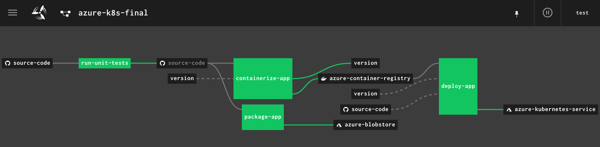
I’m a big fan of Concourse. It’s a continuous integration platform that reflects modern cloud-native values: it’s open source, container-native, stateless, and developer-friendly. And all pipeline definitions are declarative (via YAML) and easily source controlled. I wanted to learn how build a Concourse pipeline that unit tests an ASP.NET Core app, packages it up and stashes a tarball in Azure Storage, creates a Docker container and stores it in Azure Container Registry, and then deploy the app to Azure Kubernetes Service. In this three part blog series, we’ll do just that! Here’s the final pipeline:
This first posts looks at everything I did to set up the scenario.
My ASP.NET Core web app
I used Visual Studio for Mac to build a new ASP.NET Core Web API. I added NuGet package dependencies to xunit and xunit.runner.visualstudio. The API controller is super basic, with three operations.
[Route("api/[controller]")]
[ApiController]
public class ValuesController : ControllerBase
{
    [HttpGet]
    public ActionResult<IEnumerable<string>> Get()
    {
        return new string[] { "value1", "value2" };
    }

    [HttpGet("{id}")]
    public string Get(int id)
    {
        return "value1";
    }

    [HttpGet("{id}/status")]
    public string GetOrderStatus(int id)
    {
        if (id > 0 && id <= 20)
        {
            return "shipped";
        }
        else
        {
            return "processing";
        }
    }
}
I also added a Testing class for unit tests.
    public class TestClass
    {
        private ValuesController _vc;

        public TestClass()
        {
            _vc = new ValuesController();
        }

        [Fact]
        public void Test1()
        {
            Assert.Equal("value1", _vc.Get(1));
        }

        [Theory]
        [InlineData(1)]
        [InlineData(3)]
        [InlineData(9)]
        public void Test2(int value)
        {
            Assert.Equal("shipped", _vc.GetOrderStatus(value));
        }
    }
Next, I right-clicked my project and added “Docker Support.”
What this does is add a Docker Compose project to the solution, and Dockerfile to the project. Due to relative paths and such, if you try and “docker build” from directly within the project directory containing the Docker file, Docker gets angry. It’s meant to be invoked from the parent directory with a path to the project’s directory, like:
docker build -f seroter-api-k8s/Dockerfile .
I wasn’t sure if my pipeline could handle that nuance when containerizing my app, so just went ahead and moved the generated Dockerfile to the parent directory like in the screenshot below. From here, I could just execute the docker build command.
Where should we store our pipeline-created container images? You’ve got lots of options. You could use the Docker Hub, self-managed OSS projects like VMware’s Harbor, or cloud-specific services like Azure Container Registry. Since I’m trying to use all-things Azure, I chose the latter.
It’s easy to set up an ACR. Once I provided the couple parameters via the Azure Dashboard, I had a running, managed container registry.
Provisioning an Azure Storage blob
Container images are great. We may also want the raw published .NET project package for archival purposes, or to deploy to non-container runtimes. I chose Azure Storage for this purpose.
I created a blob storage account named seroterbuilds, and then a single blob container named coreapp. This isn’t a Docker container, but just a logical construct to hold blobs.
Creating an Azure Kubernetes Cluster
It’s not hard to find a way to run Kubernetes. I think my hair stylist sells a distribution. You can certainly spin up your own vanilla server environment from the OSS bits. Or run it on your desktop with minikube. Or run an enterprise-grade version anywhere with something like VMware PKS. Or run it via managed service with something like Azure Kubernetes Service (AKS).
AKS is easy to set up, and I provided the version (1.13.9), node pool size, service principal for authentication, and basic HTTP routing for hosted containers. My 3-node cluster was up and running in a few minutes.
Starting up a Concourse environment
Finally, Concourse. If you visit the Concourse website, there’s a link to a Docker Compose file you can download and start up via docker-compose up. This starts up the database, worker, and web node components needed to host pipelines.
Once Concourse is up and running, the web-based Dashboard is available on localhost:8080.
From there you can find links (bottom left) to downloads for the command line tool (called fly). This is the primary UX for deploying and troubleshooting pipelines.
With fly installed, we create a “target” that points to our environment. Do this with the following statement. Note that I’m using “rs” (my initials) as the alias, which gets used for each fly command.
fly -t rs login -c http://localhost:8080
Once I request a Concourse login (default username is “test” and password is “test”), I’m routed to the dashboard to get a token, which gets loaded automatically into the CLI.
At this point, we’ve got a functional ASP.NET Core app, a container registry, an object storage destination, a managed Kubernetes environment, and a Concourse. In the next post, we’ll build the first part of our Azure-focused pipeline that reads source code, runs tests, and packages the artifacts.
Serverless things don’t always complete their work in milliseconds. With the introduction of AWS Step Functions and Azure Durable Functions, we have compute instances that exist for hours, days, or even months. With serverless workflow tools like Azure Logic Apps, it’s also easy to build long-running processes. So in this world of continuous delivery and almost-too-easy update processes, what happens when you update the underlying definition of things that have running instances? Do they use the version they started with? Do they pick up changes and run with those after waking up? Do they crash and cause the heat death of the universe? I was curious, so I tried it out.
Azure Durable Functions
Azure Durable Functions extends “regular” Azure Functions. They introduce a stateful processing layer by defining an “orchestrator” that calls Azure Functions, checkpoints progress, and manages intermediate state.
Let’s build one, and then update it to see what happens to the running instances.
First, I created a new Function App in the Azure Portal. A Function App holds individual functions. This one uses the “consumption plan” so I only pay for the time a function runs, and contains .NET-based functions. Also note that it provisions a storage account, which we’ll end up using for checkpointing.
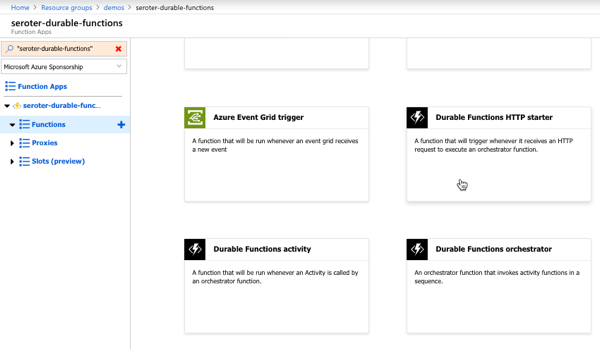
Durable Functions are made up of a client function that create an orchestration, orchestration functions that coordinate work, and activity functions that actually do the work. From the Azure Portal, I could see a template for creating an HTTP client (or starter) function.
The function code generated by the template works as-is.
#r "Microsoft.Azure.WebJobs.Extensions.DurableTask"
#r "Newtonsoft.Json"

using System.Net;

public static async Task<HttpResponseMessage> Run(
    HttpRequestMessage req,
    DurableOrchestrationClient starter,
    string functionName,
    ILogger log)
{
    // Function input comes from the request content.
    dynamic eventData = await req.Content.ReadAsAsync<object>();

    // Pass the function name as part of the route
    string instanceId = await starter.StartNewAsync(functionName, eventData);

    log.LogInformation($"Started orchestration with ID = '{instanceId}'.");

    return starter.CreateCheckStatusResponse(req, instanceId);
}
Next I created the activity function. Like with the client function, the Azure Portal generates a working function from the template. It simply takes in a string, and returns a polite greeting.
The final step was to create the orchestrator function. The template-generated code is below. Notice that our orchestrator calls the “hello” function three times with three different inputs, and aggregates the return values into a single output.
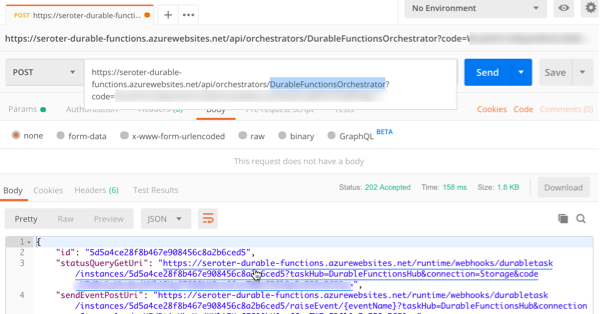
After saving this function, I went back to the starter/client function and clicked the “Get function URL” link to get the URL I need to invoke to instantiate this orchestrator. Then, I plugged that into Postman, and submitted a POST request.
Since the Durable Function is working asynchronously, I get back URIs to check the status, or terminate the orchestrator. I invoked the “get status” endpoint, and saw the aggregated results returned from the orchestrator function.
So it all worked. Terrific. Next I wanted to add a delay in between activity function calls to simulate a long-running process. What’s interesting with Durable Functions is that every time it gets results back from an async call (or timer), it reruns the entire orchestrator from scratch. Now, it checks the execution log to avoid calling the same operation again, but this made me wonder how it would respond if I added *new* activities in the mix, or deleted activities.
First, I added some instrumentation to the orchestrator function (and injected function input) so that I could see more about what was happening. In the code below, if we’re not replaying activities (so, first time it’s being called), it traces out a message.
public static async Task<List<string>> Run(DurableOrchestrationContext context, ILogger log)
{
    var outputs = new List<string>();

    outputs.Add(await context.CallActivityAsync<string>("Hello", "Tokyo"));
    if (!context.IsReplaying) log.LogInformation("Called function once.");

    outputs.Add(await context.CallActivityAsync<string>("Hello", "Seattle"));
    if (!context.IsReplaying) log.LogInformation("Called function twice.");

    outputs.Add(await context.CallActivityAsync<string>("Hello", "London"));
    if (!context.IsReplaying) log.LogInformation("Called function thrice.");

    // returns ["Hello Tokyo!", "Hello Seattle!", "Hello London!"]
    return outputs;
}
After saving this update, I triggered the client function again, and with the streaming “Logs” view open in the Portal. Here, I saw trace statements for each call to an activity function.
A durable function supports Timers that pause processing for up to seven days. I added the following code between the second and third function calls. This pauses the function for 30 seconds.
    if (!context.IsReplaying) log.LogInformation("Starting delay.");
    DateTime deadline = context.CurrentUtcDateTime.Add(TimeSpan.FromSeconds(30));
    await context.CreateTimer(deadline, System.Threading.CancellationToken.None);
    if (!context.IsReplaying) log.LogInformation("Delay finished.");
If you trigger the client function again, it will take 30-ish seconds to get results back, as expected.
Next I tested three scenarios to see how Durable Functions handled them:
Wait until the orchestrator hits the timer, andchange the payload for an activity function call that executed before the timer started. What happens when the framework tries to re-run a step that’s changed? I changed the first function’s payload from “Tokyo” to “Mumbai” after the function instance had already passed the first call, and was paused at the timer. After the function resumed from the timer, the orchestrator failed with a message of: “Non-Deterministic workflow detected: TaskScheduledEvent: 0 TaskScheduled Hello.” Didn’t like that. Changing the call signature, or apparently even the payload is a no-no if you don’t want to break running instances.
Wait until the orchestrator hits the timer, and update the function to introduce a new activity function call in code above the timer. Does the framework execute that new function call when it wakes up and re-runs, or ignore it? Indeed, it runs it. So after the timer wrapped up, the NEW, earlier function call got invoked, AND it ran the timer again before continuing. That part surprised me, and it only kinda worked. Instead of returning the expected value from the activity function, I got a “2” back. And some times when I tested this, I got the above “non-deterministic workflow” error. So, your mileage may vary.
Add an activity call after the timer, and see if it executes it after the delay is over. Does the orchestrator “see” the new activity call I added to the code after it woke back up? The first time I tried this, I again got the “non-deterministic workflow” error, but with a few more tests, I saw it actually executed the new function after waking back up, AND running the timer a second time.
What have we learned? The “version” a Durable Function starts with isn’t serialized and used for the entirety of the execution. It’s picking up things changing along the way. Be very aware of side effects! For a number of these tests, I also had to “try again” and would see different results. I feel like I was breaking Azure Functions!
What’s the right way to version these? Microsoft offers some advice, which ranges from “do nothing and let things fail” to “deploy an entirely new function.” But from these tests, I’d advise against changing function definitions outside of explicitly deploying new versions.
Azure Logic Apps
Let’s take a look at Logic Apps. This managed workflow service is designed for constructing processes that integrate a variety of sources and targets. It supports hundreds of connectors to things likes Salesforce.com, Amazon Redshift, Slack, OneDrive, and more. A Logic App can run for 90 days in the multi-tenant environment, and up to a year in the dedicated environment. So, most users of Logic Apps are going to have instances in-flight when it comes time to deploy updates.
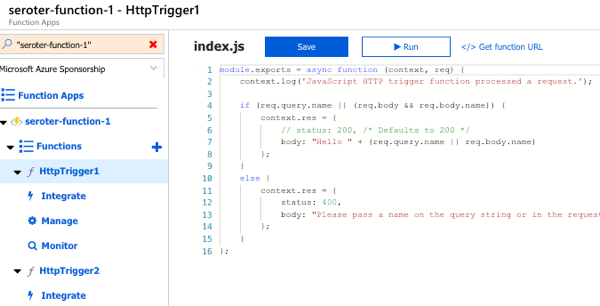
To test this out, I first created a couple of Azure Functions that Logic Apps could call. These JavaScript functions are super lame, and just return a greeting.
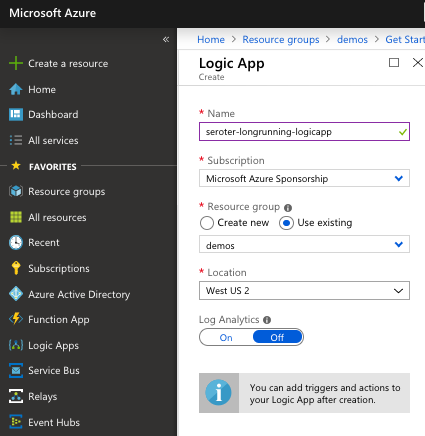
Next up, I created a Logic App. It’s easy.
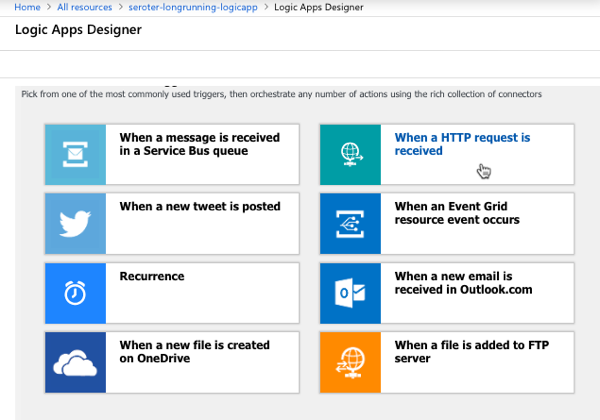
After a few moments, I could jump in and start designing my workflow. As a “serverless” service, Logic Apps only run when invoked, and start with a trigger. I chose the HTTP trigger.
My Logic App takes in an HTTP request, has a 45 second “delay” (which could represent waiting for new input, or a long-running API call) before invoke our simple Azure Function.
I saved the Logic App, called the HTTP endpoint via Postman, and waited. After about 45 seconds, I saw that everything succeeded.
Next, I kicked off another instance, and quickly went in and added another Function call after the first one. What would Logic Apps do with that after the delay was over? It ignored the new function call. Then I kicked off another Logic Apps instance, and quickly deleted the second function call. Would the instance wake up and now only call one Function? Nope, it called them both.
So it appears that Logic Apps snapshot the workflow when it starts, and it executes that version, regardless of what changes in the underlying definition after the fact. That seems good. It results in a more consistent, predictable process. Logic Apps does have the concept of versioning, and you can promote previous versions to the active one as needed.
AWS Step Functions
AWS doesn’t have something exactly like Logic Apps, but AWS Step Functions is somewhat similar to Azure Durable Functions. With Step Functions, you can chain together a series of AWS services into a workflow. It basically builds a state machine that you craft in their JSON-based Amazon State Language. A given Step Function can be idle for up to a year, so again. you’ll probably have long-running instances going at all times!
I jumped into the AWS console and started with their “hello world” template.
This state machine has a couple basic states that execute immediately. Then I added a 20 second wait.
After deploying the Step Function, it was easy to see that it ran everything quickly and successfully.
Next, I kicked off a new instance, and added a new step to the state machine while the instance was waiting. The Step Function that was running ignored it.
When I kicked off another Step Function and removed the step after the wait step, it also ignored it. It seems pretty clear that AWS Step Functions snapshot the workflow at the start proceed with that snapshot, even if the underlying definition changes. I didn’t find much documentation around formally versioning Step Functions, but it seems to keep you fairly safe from side effects.
With all of these, it’s important to realize that you also have to consider versioning of downstream calls. I could have an unchanged Logic App, but the function or API it invokes had its plumbing entirely updated after the Logic App started running. There’s no way to snapshot the state of all the dependencies! That’s normal in a distributed system. But, something to remember.
Have you observed any different behavior with these stateful serverless products?
Microsoft Azure isn’t a platform. Like every other public cloud, it’s an environment and set of components you’ll use to construct your platform. It’s more like an operating system that you build on, versus some integrated product you just start using. And that’s exciting. Which platform will you create? Let’s look at what a software platform is, how I landed on 295,680 unique configurations — 10,036,224,000 configurations if you add a handful of popular 3rd party products — and the implications of all this.
What’s a software platform?
Let’s not overthink this. When I refer to a software platform, I’m thinking of the technologies that come together to help you deploy, run, and manage software. This applies whether we’re talking about stuff in your data center or in the public cloud. It applies to serverless systems or good ol’ virtual machines.
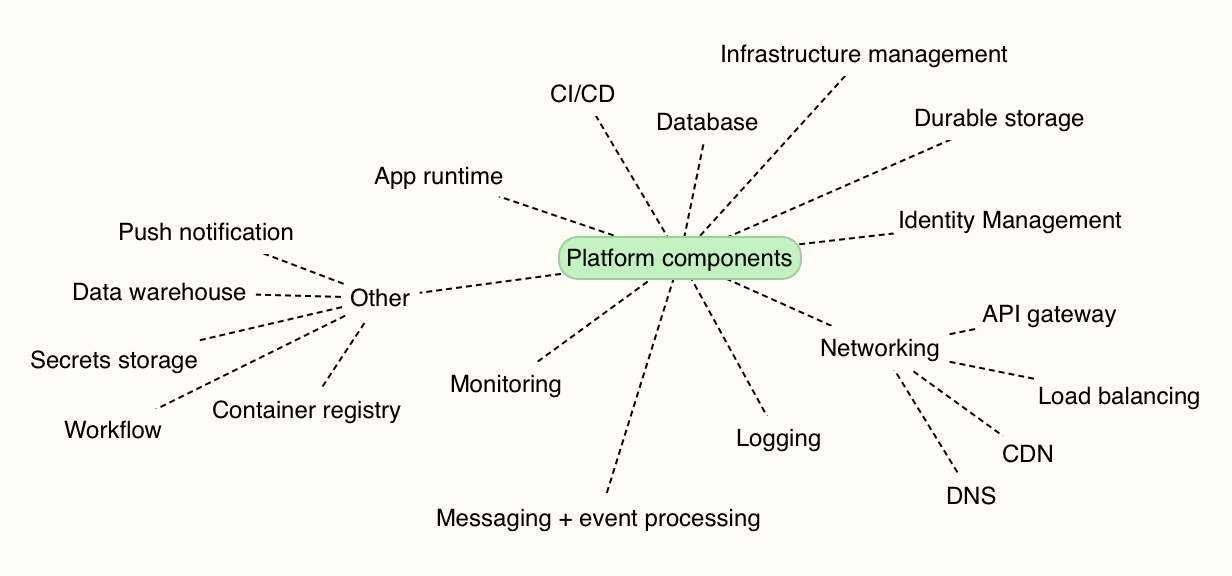
I made a map of the non-negotiable capabilities. One way or another, you’re stitching these things together. You need an app runtime (e.g. VMs, FaaS, containers), databases, app deployment tools, infrastructure/config management, identity systems, networking, monitoring, and more. Pretty much all your running systems depend on this combination of things.
How many platform combinations are there in Microsoft Azure?
I’m not picking on Microsoft here; you face the same decision points in every cloud. Each customer — realistically, each tenant in your account — chooses among the various services to assemble the platform they want. Let’s first talk about only using Microsoft’s first-party services. So, assume you aren’t using any other commercial or OSS products to build and run your systems. Unlikely, but hey, work with me here.
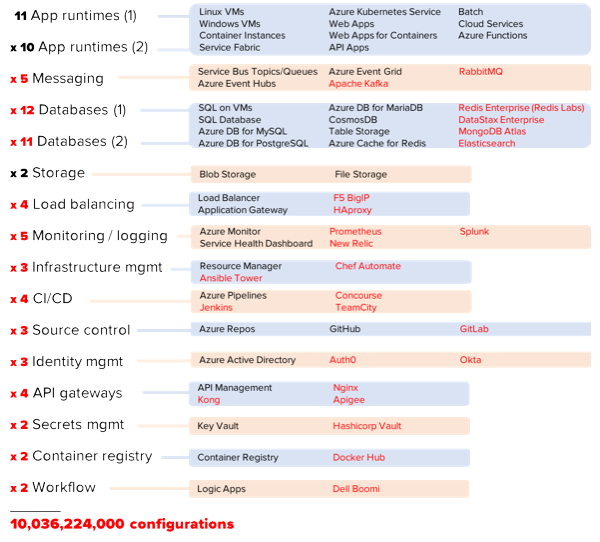
For math purposes, let’s calculate unique combinations by assuming your platform uses one thing from each category. The exception? App runtimes and databases. I think it’s more likely you’re using at least a pair of runtimes (e.g. Azure App Service AND Azure Kubernetes Service, or, Windows VMs AND Linux VMs), and a pair of databases. You may be using more, but I’m being conservative.
295,680 unique platforms you can build on Azure using only native services. Ok, that’s a lot. Now that said, I suspect it’s VERY unlikely you’ll only use native cloud services to build and run software. You might love using Terraform to deploy infrastructure. Or MongoDB Atlas for a managed MongoDB environment. Kong may offer your API gateway of choice. Maybe Prometheus is your standard for monitoring. And don’t forget about all the cool managed services like Twilio, Auth0, or Algolia. The innovation outside of any one cloud will always be greater than the innovation within that cloud. You want in on some of that action! So what happens if I add just a few leading non-Azure services to your platform?
Yowza. 10 billion platform combinations. You can argue with my math or approach, but hopefully you get my point.
And again, this really isn’t about any particular cloud. You can end up in the same place on AWS, Digital Ocean, or Alibaba. It’s simply the result of all the amazing choices we have today.
Who cares?
If you’re working at a small company, or simply an individual using cloud services, this doesn’t really matter. You’ll choose the components that help you deliver software best, and go with it.
Where this gets interesting is in the enterprise. You’ve got many distinct business units, lots of existing technology in use, and different approaches to using cloud computing. Done poorly, your cloud environment stands to be less secure, harder to maintain, and more chaotic than anything you have today. Done well, your cloud environment will accelerate time-to-market and lower your infrastructure costs so that you can spend more time building software your customers love.
My advice? Decide on your tenancy model up-front, and purposely limit your choices.
In the public cloud, you can separate user pools (“tenants”) in at least three different ways:
Everyone in one account. Some companies start this way, and use role-based access or other in-account mechanisms (e.g. resource groups) to silo individual groups or apps. On the positive side, this model is easier to audit and developers can easily share access to services. Challenges here include a bigger blast radius for mistakes, and greater likelihood of broad processes (e.g. provisioning or policy changes) that slow individuals down.
Separate-but-equal sub accounts. I’ve seen some large companies use child accounts or subscriptions for each individual tenant. Each tenant’s account is set up in the same way, with access to the same services. Every tenant owns their own resources, but they operate a standard “platform.” On the plus side, this makes it easier to troubleshoot problems across the org, and enforce a consistent security profile. It also makes engineer rotation easier, since each team has the same stack. On the downside, this model doesn’t account for unique needs of each team and may force suboptimal tech choices in the name of consistency.
Independent sub accounts. A few weeks ago, I watched my friend Brian Chambers explain that each of 30 software teams at Chick-fil-A has their own AWS account, with a recommended configuration that tenants can use, modify, or ignore. Here, every tenant can do their own thing. One of the benefits is that each group can cater their platform to their needs. If a team wants to go entirely serverless, awesome. Another may be all in on Kubernetes. The downside of this model is that you can’t centralize things like security patching, and you can end up with snowflake environments that increase your costs over time.
Finally, it’s wise to purposely limit choices. I wrote about this topic last month. Facing too many choices can paralyze you, and all that choice adds only incremental benefits. For mature categories like databases, pick two and stop there. If it’s an emerging space, offer more freedom until commoditization happens. Give your teams some freedom to build their platform on the public cloud, but put some guardrails in place.
Serverless computing. Let’s talk about it. I don’t think it’s crazy to say that it represents the first cloud-native software model. Done right, it is inherently elastic and pay-per-use, and strongly encourages the use of cloud managed services. And to be sure, it’s about much more than just Function-as-a-Service platforms like AWS Lambda.
So, what exactly is it, why does it matter, and what technologies and architecture patterns should you know? To answer that question, I spent a few months researching the topic, and put together a new Pluralsight course, Serverless Computing: The Big Picture.
The course is only an hour long, but I get into some depth on benefits, challenges, and patterns you should know.
The first module looks at the various serverless definitions offered by industry experts, why serverless is different from what came before it, how serverless compares to serverful systems, challenges you may face adopting it, and example use cases.
The second module digs into the serverless tech that matters. I look at public cloud function-as-a-service platforms, installable platforms, dev tools, and managed services.
The final module of the course looks at architecture patterns. We start by looking at best practices, then review a handful of patterns.
As always, I had fun putting this together. It’s my 19th Pluralsight course, and I don’t see stopping any time soon. If you watch it, I’d love your feedback. I hope it helps you get a handle on this exciting, but sometimes-confusing, topic!
You’ve got microservices. Great. They’re being continuous delivered. Neato. Ok … now what? The next hurdle you may face is data processing amongst this distributed mesh o’ things. Brokered messaging engines like Azure Service Bus or RabbitMQ are nice choices if you want pub/sub routing and smarts residing inside the broker. Lately, many folks have gotten excited by stateful stream processing scenarios and using distributed logs as a shared source of events. In those cases, you use something like Apache Kafka or Azure Event Hubs and rely on smart(er) clients to figure out what to read and what to process. What should you use to build these smart stream processing clients?
I’ve written about Spring Cloud Stream a handful of times, and last year showed how to integrate with the Kafka interface on Azure Event Hubs. Just today, Microsoft shipped a brand new “binder” for Spring Cloud Stream that works directly with Azure Event Hubs. Event processing engines aren’t useful if you aren’t actually publishing or subscribing to events, so I thought I’d try out this new binder and see how to light up Azure Event Hubs.
Setting Up Microsoft Azure
First, I created a new Azure Storage account. When reading from an Event Hubs partition, the client maintains a cursor. This cursor tells the client where it should start reading data from. You have the option to store this cursor server-side in an Azure Storage account so that when your app restarts, you can pick up where you left off.
There’s no need for me to create anything in the Storage account, as the Spring Cloud Stream binder can handle that for me.
Next, the actual Azure Event Hubs account! First I created the namespace. Here, I chose things like a name, region, pricing tier, and throughput units.
Like with the Storage account, I could stop here. My application will automatically create the actual Event Hub if it doesn’t exist. In reality, I’d probably want to create it first so that I could pre-define things like partition count and message retention period.
Creating the event publisher
The event publisher takes in a message via web request, and publishes that message for others to process. The app is a Spring Boot app, and I used the start.spring.io experience baked into Spring Tools (for Eclipse, Atom, and VS Code) to instantiate my project. Note that I chose “web” and “cloud stream” dependencies.
With the project created, I added the Event Hubs binder to my project. In the pom.xml file, I added a reference to the Maven package.
Now before going much farther, I needed a credentials file. Basically, it includes all the info needed for the binder to successfully chat with Azure Event Hubs. You use the az CLI tool to generate it. If you don’t have it handy, the easiest option is to use the Cloud Shell built into the Azure Portal.
From here, I did az list to show all my Azure subscriptions. I chose the one that holds my Azure Event Hub and copied the associated GUID. Then, I set that account as my default one for the CLI with this command:
az account set -s 11111111-1111-1111-1111-111111111111
With that done, I issued another command to generate the credential file.
az ad sp create-for-rbac --sdk-auth > my.azureauth
I opened up that file within the Cloud Shell, copied the contents, and pasted the JSON content into a new file in the resources directory of my Spring Boot app.
Next up, the code. Because we’re using Spring Cloud Stream, there’s no specific Event Hubs logic in my code itself. I only use Spring Cloud Stream concepts, which abstracts away any boilerplate configuration and setup. The code below shows a simple REST controller that takes in a message, and publishes that message to the output channel. Behind the scenes, when my app starts up, Boot discovers and inflates all the objects needed to securely talk to Azure Event Hubs.
How simple is that? All that’s left is the application properties used by the app. Here, I set a few general Spring Cloud Stream properties, and a few related to the Event Hubs binder.
 #point to credentials
 spring.cloud.azure.credential-file-path=my.azureauth
 #get these values from the Azure Portal
 spring.cloud.azure.resource-group=demos
 spring.cloud.azure.region=East US
 spring.cloud.azure.eventhub.namespace=seroter-event-hub

 #choose where to store checkpoints
 spring.cloud.azure.eventhub.checkpoint-storage-account=serotereventhubs

 #set the name of the Event Hub
 spring.cloud.stream.bindings.output.destination=seroterhub

 #be lazy and let the app create the Storage blobs and Event Hub
 spring.cloud.azure.auto-create-resources=true
With that, I had a working publisher.
Creating the event subscriber
It’s no fun publishing messages if no one ever reads them. So, I built a subscriber. I walked through the same start.spring.io experience as above, this time ONLY choosing the Cloud Stream dependency. And then added the Event Hubs binder to the pom.xml file of the created project. I also copied the my.azureauth file (containing our credentials) from the publisher project to the subscriber project.
It’s criminally simple to pull messages from a broker using Spring Cloud Stream. Here’s the full extent of the code. Stream handles things like content type transformation, and so much more.
The final step involved defining the application properties, including the Storage account for checkpointing, and whether to automatically create the Azure resources.
 #point to credentials
 spring.cloud.azure.credential-file-path=my.azureauth
 #get these values from the Azure Portal
 spring.cloud.azure.resource-group=demos
 spring.cloud.azure.region=East US
 spring.cloud.azure.eventhub.namespace=seroter-event-hub

 #choose where to store checkpoints
 spring.cloud.azure.eventhub.checkpoint-storage-account=serotereventhubs

 #set the name of the Event Hub
 spring.cloud.stream.bindings.input.destination=seroterhub
 #set the consumer group
 spring.cloud.stream.bindings.input.group=system3

 #read from the earliest point in the log; default val is LATEST
 spring.cloud.stream.eventhub.bindings.input.consumer.start-position=EARLIEST

 #be lazy and let the app create the Storage blobs and Event Hub
 spring.cloud.azure.auto-create-resources=true
And now we have a working subscriber.
Testing this thing
First, I started up the producer app. It started up successfully, and I can see in the startup log that it created the Event Hub automatically for me after connecting.
To be sure, I checked the Azure Portal and saw a new Event Hub with 4 partitions.
Sweet. I called the REST endpoint on my app three times to get a few messages into the Event Hub.
Now remember, since we’re dealing with a log versus a queuing system, my consumers don’t have to be online (or even registered anywhere) to get the data at their leisure. I can attach to the log at any time and start reading it. So that data is just hanging out in Event Hubs until its retention period expires.
I started up my Spring Boot subscriber app. After a couple moments, it connected to Azure Event Hubs, and read the three entries that it hadn’t ever seen before.
Back in the Azure Portal, I checked and saw a new blob container in my Storage account, with a folder for my consumer group, and checkpoints for each partition.
If I sent more messages into the REST endpoint, they immediately appeared in my subscriber app. What if I defined a new consumer group? Would it read all the messages from the beginning?
I stopped the subscriber app, changed the application property for “consumer group” to “system4” and restarted the app. After Spring Cloud Stream connected to each partition, it pumped out whatever it found, and responded immediately to any new entries.
Whether you’re building a change-feed listener off of Cosmos DB, sharing data between business partners, or doing data processing between microservices, you’ll probably be using a broker. If it’s an event bus like Azure Event Hubs, you now have an easy path with Spring Cloud Stream.
Creating new .NET apps, or modernizing existing ones? If you’re following the 12-factor criteria, you’re probably keeping your configuration out of the code. That means not stashing feature flags in your web.config file, or hard-coding connection strings inside your classes. So where’s this stuff supposed to go? Environment variables are okay, but not a great choice; no version control or access restrictions. What about an off-box configuration service? Now we’re talking. Fortunately AWS, and now Microsoft Azure, offer one that’s friendly to .NET devs. I’ll show you how to create and access configurations in each cloud, and as a bonus, throw out a third option.
.NET Core has a very nice configuration system that makes it easy to read configuration data from a variety of pluggable sources. That means that for the three demos below, I’ve got virtually identical code even though the back-end configuration stores are wildly different.
AWS
Setting it up
AWS offers a parameter store as part of the AWS Systems Manager service. This service is designed to surface information and automate tasks across your cloud infrastructure. While the parameter store is useful to support infrastructure automation, it’s also a handy little place to cram configuration values. And from what I can tell, it’s free to use.
To start, I went to the AWS Console, found the Systems Manager service, and chose Parameter Store from the left menu. From here, I could see, edit or delete existing parameters, and create new ones.
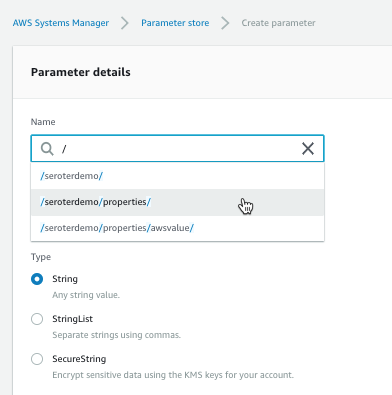
Each parameter gets a name and value. For the name, I used a “/” to define a hierarchy. The parameter type can be a string, list of strings, or encrypted string.
The UI was smart enough that when I went to go add a second parameter (/seroterdemo/properties/awsvalue2), it detected my existing hierarchy.
Ok, that’s it. Now I was ready to use it my .NET Core web app.
Using from code
Before starting, I installed the AWS CLI. I tried to figure out where to pass credentials into the AWS SDK, and stumbled upon some local introspection that the SDK does. Among other options, it looks for files in a local directory, and those files get created for you when you install the AWS CLI. Just a heads up!
I created a new .NET Core MVC project, and added the Amazon.Extensions.Configuration.SystemsManager package. Then I created a simple “Settings” class that holds the configuration values we’ll get back from AWS.
public class Settings
{
   public string awsvalue { get; set; }
   public string awsvalue2 { get; set; }
}
In the appsettings.json file, I told my app which AWS region to use.
Finally, I wanted to make my configuration properties available to my app code. So in the Startup.cs file, I grabbed the configuration properties I wanted, inflated the Settings object, and made it available to the runtime container.
public void ConfigureServices(IServiceCollection services) { services.Configure<Settings>(Configuration.GetSection("properties"));
Last step? Accessing the configuration properties! In my controller, I defined a private variable that would hold a local reference to the configuration values, pulled them in through the constructor, and then grabbed out the values in the Index() operation.
        private readonly Settings _settings;

        public HomeController(IOptions<Settings> settings)
        {
            _settings = settings.Value;
        }

        public IActionResult Index()
        {
            ViewData["configval"] = _settings.awsvalue;
            ViewData["configval2"] = _settings.awsvalue2;

            return View();
        }
After updating my View to show the two properties, I started up my app. As expected, the two configuration values showed up.
What I like
You gotta like that price! AWS Systems Manager is available at no cost, and there appears to be no cost to the parameter store. Wicked.
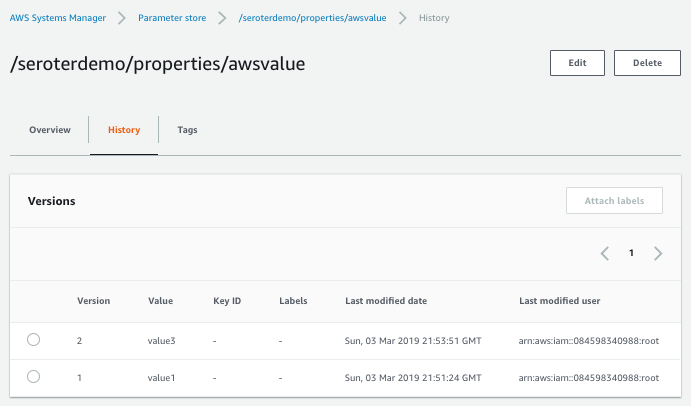
Also, it’s cool that you have an easily-visible change history. You can see below that the audit trail shows what changed for each version, and who changed it.
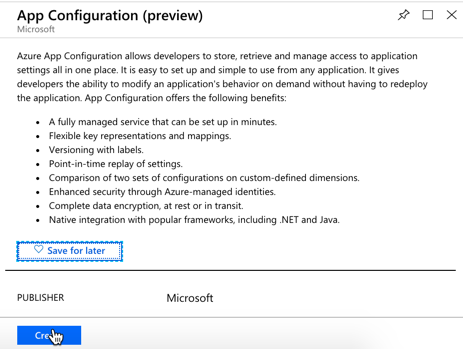
Microsoft just shared the preview release of the Azure App Configuration service. This managed service is specifically created to help you centralize configurations. It’s brand new, but seems to be in pretty good shape already. Let’s take it for a spin.
From the Microsoft Azure Portal, I searched for “configuration” and found the preview service.
I named my resource seroter-config, picked a region and that was it. After a moment, I had a service instance to mess with. I quickly added two key-value combos.
public class Settings
{
    public string azurevalue1 { get; set; }
    public string azurevalue2 { get; set; }
}
Next up, I updated my Program.cs file to read the Azure App Configuration. I passed the connection string in here, but there are better ways available.
public class Program
{
    public static void Main(string[] args)
    {
        CreateWebHostBuilder(args).Build().Run();
    }

    public static IWebHostBuilder CreateWebHostBuilder(string[] args) =>
        WebHost.CreateDefaultBuilder(args)
            .ConfigureAppConfiguration((hostingContext, config) => {
                var settings = config.Build();
                    config.AddAzureAppConfiguration("[con string]");
                })
            .UseStartup<Startup>();
}
I also updated the ConfigureServices() operation in my Startup.cs file. Here, I chose to only pull configurations that started with seroterdemo:properties.
public void ConfigureServices(IServiceCollection services) { //added services.Configure<Settings>(Configuration.GetSection("seroterdemo:properties"));
To read those values in my controller, I’ve got just about the same code as in the AWS example. The only difference was what I called my class members!
private readonly Settings _settings;

public HomeController(IOptions<Settings> settings)
{
    _settings = settings.Value;
}

public IActionResult Index()
{
   ViewData["configval"] = _settings.azurevalue1;
   ViewData["configval2"] = _settings.azurevalue2;

   return View();
}
I once again updated my View to print out the configuration values, and not shockingly, it worked fine.
What I like
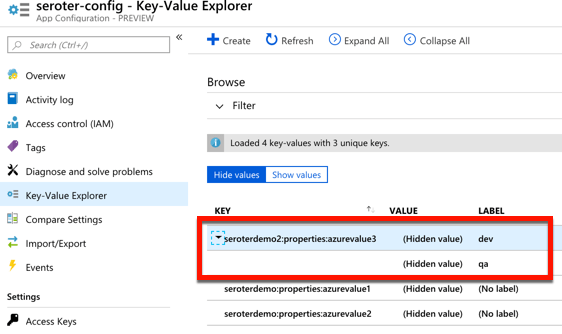
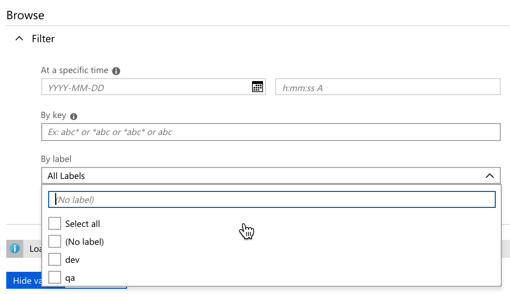
For a new service, there’s a few good things to like here. The concept of labels is handy, as it lets me build keys that serve different environments. See here that I created labels for “qa” and “dev” on the same key.
I saw a “compare” feature which looks handy. There’s also a simple search interface here too, which is valuable.
Pricing isn’t yet available, no I’m not clear as to how I’d have to pay for this.
Spring Cloud Config
Setting it up
Both of the above service are quite nice. And super convenient if you’re running in those clouds. You might also want a portable configuration store that offers its own pluggable backing engines. Spring Cloud Config makes it easy to build a config store backed by a file system, git, GitHub, Hashicorp Vault, and more. It’s accessible via HTTP/S, supports encryption, is fully open source, and much more.
I created a new Spring project from start.spring.io. I chose to include the Spring Cloud Config Server and generate the project.
Literally all the code required is a single annotation (@EnableConfigServer).
My GitHub repo has a configuration file called blogconfig.properties with the following content:
With that, I started up the project, and had a running configuration server.
Using from code
To talk to this configuration store from my .NET app, I used the increasingly-popular Steeltoe library. These packages, created by Pivotal, bring microservices patterns to your .NET (Framework or Core) apps.
For the last time, I created a .NET Core MVC project. This time I added a dependency to Steeltoe.Extensions.Configuration.ConfigServerCore. Again, I added a Settings class to hold these configuration properties.
public class Settings
{
    public string property1 { get; set; }
    public string property2 { get; set; }
    public string property3 { get; set; }
    public string property4 { get; set; }
}
In my appsettings.json, I set my application name (to match the config file’s name I want to access) and URI of the config server.
My Program.cs file has a “using” statement for the Steeltoe.Extensions.Configuration.ConfigServer package, and then used the “AddConfigServer” operation to add the config server as a source.
public class Program
{
    public static void Main(string[] args)
    {
        CreateWebHostBuilder(args).Build().Run();
    }

    public static IWebHostBuilder CreateWebHostBuilder(string[] args) =>
        WebHost.CreateDefaultBuilder(args)
            .AddConfigServer()
            .UseStartup<Startup>();
}
I once again updated the Startup.cs file to load the target configurations into my typed object.
public IActionResult Index() { ViewData["configval"] = _mySettings.property1; return View(); }
Updating the view, and starting the .NET Core app yielded the expected results.
What I like
Spring Cloud Config is a very mature OSS project. You can deliver this sort of microservices machinery along with your apps in your CI/CD pipelines — these components are software that you ship versus services that need to be running — which is powerful. It offers a variety of backends, OAuth2 for security, encryption/decryption of values, and much more. It’s a terrific choice for a consistent configuration store on every infrastructure.
But realistically, I don’t care which of the above you use. Just use something to extract environment-specific configuration settings from your .NET apps. Use these robust external stores to establish some rigor around these values, and make it easier to share configurations, and keep them in sync across all of your application instances.
Of all the app modernization strategies, “lift and shift” is my least favorite. To me, picking up an app and dropping it onto a new host is like transferring your debt to a new credit card with a lower interest rate. It’s better, but mostly temporary relief. That said, if your app can inherit legitimate improvements without major changes by running on a new platform, you’d be crazy to not consider it.
Examples? Here are eight things I think you should expect of a platform that runs your existing .NET apps. And when I say “platform”, I don’t mean an infrastructure host or container runtime. Rather, I’m talking about application-centric platform that supplies what’s needed for a fully configured, routable app. I’ll use Azure Web Apps (part of Azure App Service) and Pivotal Cloud Foundry (PCF) as the demo platforms for this post.
#1 Secure app packaging
First, a .NET-friendly app platform should package up my app for me. Containers are cool. I’ll be happy if I never write another Dockerfile, though. Just get me from source-to-runnable-artifact as easily as possible. This can be a BIG value-add for existing .NET apps where getting them to production is a pain in the neck.
Both Azure Web Apps and PCF do this for me.
I built a “classic” ASP.NET Web Service to simulate a legacy app that I want to run on one of these new-fangled platforms. The source code is in GitHub, so you can follow along. This SOAP web service returns a value, and also does things like pull values from environment variables, and writes out log statements.
To deploy it to Azure Web Apps using the Azure CLI, I followed a few steps, none of which required up-front containerization. First, I created a “plan” for my app, which can include things like a resource group, data center location, and more.
az appservice plan create -g demos -n BlogPlan
Next, I created the actual Web App. For the moment, I didn’t point to source code, but just provisioned the environment. In reality, this creates lightweight Windows Server VMs. Microsoft did recently add experimental support for Windows Containers, but I’m not using that here.
az webapp create -g demos -p BlogPlan -n aspnetservice
After a few minutes, I saw everything show up in the Azure portal. Microsoft took care of the packaging of my application and properly laying it atop a managed runtime. I manually went into the “Application Settings” properties for my Web App and added environment variables too.
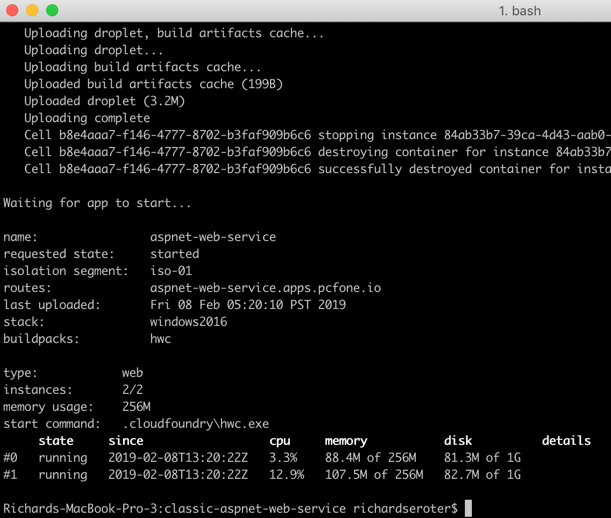
PCF (and Pivotal Application Service, specifically) is similar, and honestly a bit easier. While I could have published this .NET Framework project completely as-is to PCF, I did add a manifest.yml file to the project. This file simply tells Cloud Foundry what to name the app, how many instances to run, and such. From the local git repo, I used the Cloud Foundry CLI to simply cf push. This resulted in my app artifacts getting uploaded, a buildpack compiling and packaging the app, and a Windows Container spinning up on the platform. Yes, it’s a full-on Windows Server Container, built on your behalf, and managed by the platform.
When I built this project using Visual Studio for Mac, I could only push the app to PCF. Azure kept gurgling about a missing build profile. Once I built the app using classic Visual Studio on Windows, it all worked. Probably user error.
Either way, both platforms took care of building up the runnable artifact. No need for me to find the right Windows base image, and securely configure the .NET runtime. That’s all taken care of by a good platform.
#2 Routable endpoints
A web app needs to be reachable. SHOCKING, I KNOW. Simply deploying an application to a VM or container environment isn’t the end state. A good platform also ensures that my app has a routable endpoint that humans or machines can access. Again, for existing .NET apps, if you have a way to speed up the path to production by making apps reachable in seconds, that’s super valuable.
For Azure Web Apps, this is built-in. When I deployed the app above, I immediately got a URL back from the platform. Azure Web Apps automatically takes care of getting me an HTTP/S endpoint.
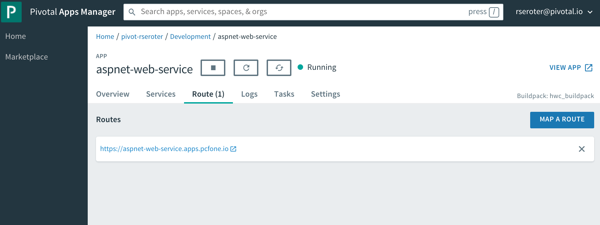
Same for PCF. When you push an app to PCF, you immediately get a load balanced network route. And you have complete control over DNS names, etc. And you can easily set up TCP routes in addition to HTTP/S ones.
It’s one thing to get app binaries onto a host. For many, it’s a whole DIFFERENT task to get routable IPs, firewalls opened up, load balancers configured, and all that gooey networking stuff required to call an app “ready.” A good application platform does that, especially for .NET apps.
#3 Log aggregation
As someone who had to spend lots of time scouring Windows Event Logs to troubleshoot, I’m lovin’ the idea of something that automatically collects application logs from all the hosts. If you have existing .NET apps and don’t like spelunking around for logs, a good application platform should help.
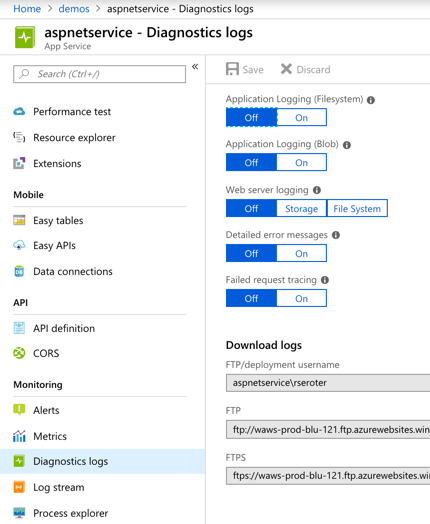
Azure Web Apps offers built-in log collection and log streaming. These are something you turn on (after picking where to store the logs), but it’s there.
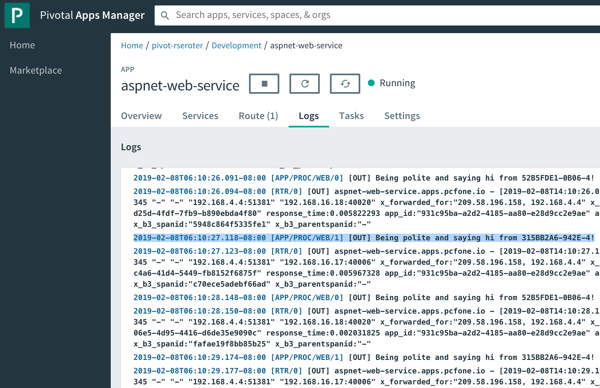
PCF immediately starts streaming application logs when you deploy an app, and also has collectors for things like the Windows Event Log. As you see below, after calling my ASP.NET Web Service a few times, I see the log output, and the reference to the individual hosts each instance is running on (pulled from the environment and written to the log). You can pipe these aggregated logs to off-platform environments like Splunk or even Azure Log Analytics.
Log aggregation is one of those valuable things you may not consider up front, but it’s super handy if the platform does it for you automatically.
#4 App metrics collection and app monitoring
No matter how great, no platform will magically light up your existing apps with unimaginable telemetry. But, a good application platform does automatically capture infrastructure and application metrics and correlate them. And preferably, such a platform does it without requiring you to explicitly add monitoring agents or code to your existing app. If your .NET app can instantly get high quality, integrated monitoring simply by running somewhere else, that’s good, right?
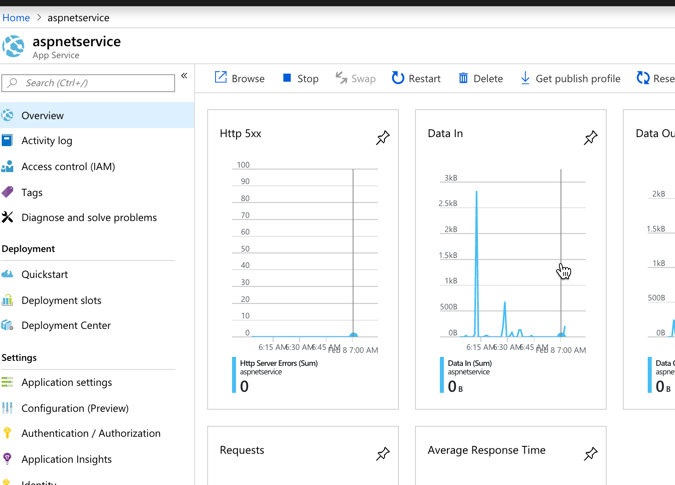
Does Azure Web Apps do this? You betcha. By default, you get some basic traffic-in/traffic-out sort of metrics on the Web Apps dashboard in the Azure Portal.
Once you flip on Application Insights (not on by default), you get a much, much deeper look at your running application. This seems pretty great, and it “just works” with my old-and-busted ASP.NET Web Service.
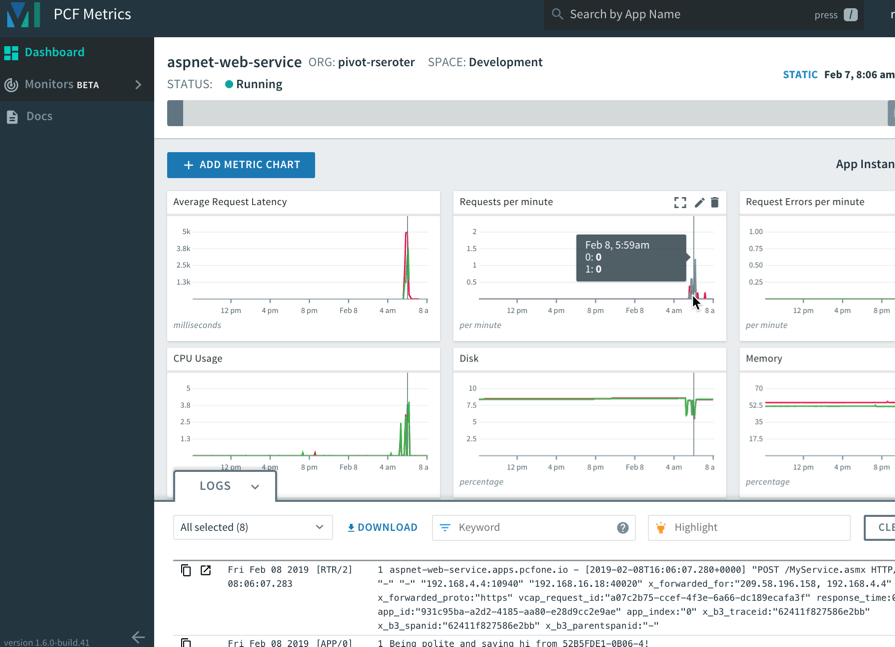
Speaking of “just works”, the same applies to PCF and your .NET Framework apps. After I pushed the ASP.NET Web Service to PCF, I automatically saw a set of data points, thanks to the included, integrated PCF Metrics service.
It’s simple to add, remove, or change charts based on included or your own custom metrics. And the application logs get correlated here, so clicking on a time slice in the chart also highlights logs from that time period.
For either Azure or PCF, you can use best-of-breed application performance monitoring tools like New Relic too. Whatever you do, expect that your .NET applications get native access to at-scale monitoring capabilities.
#5 Manual or auto-scaling
An application platform knows how to scale apps. Up or down, in or out. Manually or automatically. If “file a ticket” is your scaling strategy, maybe it’s time for a new one?
As you’d expect, both Azure and PCF make app scaling easy, even on Windows Server. Azure Web Apps let you scale the amount of allocated resources (up or down) and number of instances (in or out). Because I was a cheapskate with my Azure Web App, I chose a tier that didn’t support autoscaling. So, know ahead of time what you’ve chosen as it can impact how much you can scale.
For PCF, there aren’t any “plans” that constrain features. So I can either manually scale resource allocation or instance count, or define an auto-scale policy that triggers based on resource consumption, queue depth, or HTTP traffic.
Move .NET apps to a platform that improve app resilience. One way you get that is through easy, automated scaling.
#6 Fault detection and recovery
If you’re lifting-and-shifting .NET apps, you’re probably not going back and fixing a lot of stuff. Maybe your app has a memory leak and crashes every 14 hours. And maybe you wrote a Windows Scheduled Task that bounces the web server’s app pool every 13 hours to prevent the crash. NO ONE IS JUDGING YOU. A good platform knows that things went wrong, and automatically recovers you to a good state.
Now, most of the code I write crashes on its own, but I wanted to be even more explicit to see how each platform handles unexpected failures. So, I did a VERY bad thing. I created a SOAP endpoint that violently aborts the thread.
[WebMethod]
public void CrashMe()
{
     System.Threading.Thread.CurrentThread.Abort();
}
After calling that endpoint on the Azure Web Apps-hosted service, the instance crashed, and Azure resurrected after a minute or two. Nice!
In PCF, things worked the same way. Since we’re dealing with Windows Server Containers in PCF, the recovery was faster. You can see in the screenshot below that the app instance crashed, and a new instance immediately spawned to replace it.
Cool. My classic .NET Framework app gets auto-recovery in these platforms. This is an underrated feature, but one you should demand.
#7 Underlying infrastructure access
One of the biggest benefits of PaaS is that developers can stop dealing with infrastructure. FINALLY. The platform should do all the things above so that I never mess with servers, networking, agents, or anything that makes me sad. That said, sometimes you do want to dip into the infrastructure. For a legacy .NET app, maybe you want to inspect a temporary log file written to disk, see what got installed into which directories, or even to download extra bits after deploying the app. I’d barely recommend doing any of those things on ephemeral instances, but sometimes the need is there.
Both Azure and PCF make it straightforward to access the application instances. From the Azure portal, I can dip into a console pointing at the hosting VM.
I can browse elsewhere on the hosting VM, but only have r/w access to the directory the console drops me into.
PCF uses Windows Server Containers, so I could SSH right into it. Once I’m in this isolated space, I have r/w access to lots of things. And can trigger PowerShell commands and more.
If infrastructure access is REQUIRED to deploy and troubleshoot your app, you’re not using an application platform. And that may be fine, but you should expect more. For those cases when you WANT to dip down to the host, a platform should offer a pathway.
#8 Zero-downtime deployment
Does your .NET Framework app need to be rebuilt to support continuous updates? Not necessarily. In fact, a friendly .NET app platform makes it possible to keep updating the app in production without taking downtime.
Azure Web Apps offers deployment slots. This makes it possible to publish a new version, and swap it out for what’s already running. It’s a cool feature that requires a “standard” or “premium” plan to use.
PCF supports rolling deployments for apps written in any language, to Windows or Linux. Let’s say I have four instances of my app running. I made a small code change to my ASP.NET Web Service and did a cf v3-zdt-push aspnet-web-service. This command did a zero-downtime push, which means that new instances of the app replaced old instances, without disrupting traffic. As you can see below, 3 of the instances were swapped out, and the fourth one was coming online. When the fourth came online, it replaced the last remaining “old” instance of the app.
Over time, you should probably replatform most .NET Framework apps to .NET Core. It makes sense for many reasons. But that journey may take a decade. Find platforms that treat Windows and Linux, .NET Framework and .NET Core the same way. Expect all these 8 features in your platform of choice so that you get lots of benefits for “free” until you can do further modernization.
What do you think of when you hear the phrase “multi-cloud”? Ok, besides stupid marketing people and their dumb words. You might think of companies with on-premises environments who are moving some workloads into a public cloud. Or those who organically use a few different clouds, picking the best one for each workload. While many suggest that you get the best value by putting everything on one provider, that clearly isn’t happening yet. And maybe it shouldn’t. Who knows. But can you get the best of each cloud while retaining some portability? I think you can.
One multi-cloud solution is to do the lowest-common-denominator thing. I really don’t like that. Multi-cloud management tools try to standardize cloud infrastructure but always leave me disappointed. And avoiding each cloud’s novel services in the name of portability is unsatisfying and leaves you at a competitive disadvantage. But why should we choose the cloud (Azure! AWS! GCP!) and runtime (Kubernetes! VMs!) before we’ve even written a line of code? Can’t we make those into boring implementation details, and return our focus to writing great software? I’d propose that with good app frameworks, and increasingly-standard interfaces, you can create great software that runs on any cloud, while still using their novel services.
In this post, I’ll build a RESTful API with Spring Boot and deploy it, without code changes, to four different environments, including:
Local environment running MongoDB software in a Docker container.
Side note: Ok, so multi-cloud sounds good, but it seems like a nightmare of ops headaches and nonstop dev training. That’s true, it sure can be. But if you use a good multi-cloud app platform like Pivotal Cloud Foundry, it honestly makes the dev and ops experience virtually the same everywhere. So, it doesn’t HAVE to suck, although there are still going to be challenges. Ideally, your choice of cloud is a deploy-time decision, not a design-time constraint.
Creating the app
In my career, I’ve coded (poorly) with .NET, Node, and Java, and I can say that Spring Boot is the fastest way I’ve seen to build production-quality apps. So, I chose Spring Boot to build my RESTful API. This API stores and returns information about cloud databases. HOW VERY META. I chose MongoDB as my backend database, and used the amazing Spring Data to simplify interactions with the data source.
From start.spring.io, I created a project with dependencies on spring-boot-starter-data-rest (auto-generated REST endpoints for interacting with databases), spring-boot-starter-data-mongodb (to talk to MongoDB), spring-boot-starter-actuator (for “free” health metrics), and spring-cloud-cloudfoundry-connector (to pull connection details from the Cloud Foundry environment). Then I opened the project and created a new Java class representing a CloudProvider.
package seroter.demo.cloudmongodb;

import org.springframework.data.annotation.Id;

public class CloudProvider {

	@Id private String id;

	private String providerName;
	private Integer numberOfDatabases;
	private Boolean mongoAsService;

	public String getProviderName() {
		return providerName;
	}

	public void setProviderName(String providerName) {
		this.providerName = providerName;
	}

	public Integer getNumberOfDatabases() {
		return numberOfDatabases;
	}

	public void setNumberOfDatabases(Integer numberOfDatabases) {
		this.numberOfDatabases = numberOfDatabases;
	}

	public Boolean getMongoAsService() {
		return mongoAsService;
	}

	public void setMongoAsService(Boolean mongoAsService) {
		this.mongoAsService = mongoAsService;
	}
}
Thanks to Spring Data REST (which is silly powerful), all that was left was to define a repository interface. If all I did was create an annotate the interface, I’d get full CRUD interactions with my MongoDB collection. But for fun, I also added an operation that would return all the clouds that did (or did not) offer a MongoDB service.
package seroter.demo.cloudmongodb;

import java.util.List;

import org.springframework.data.mongodb.repository.MongoRepository;
import org.springframework.data.rest.core.annotation.RepositoryRestResource;

@RepositoryRestResource(collectionResourceRel = "clouds", path = "clouds")
public interface CloudProviderRepository extends MongoRepository<CloudProvider, String> {

	//add an operation to search for a specific condition
	List<CloudProvider> findByMongoAsService(Boolean mongoAsService);
}
That’s literally all my code. Crazy.
Run using Dockerized MongoDB
To start this test, I wanted to use “real” MongoDB software. So I pulled the popular Docker image and started it up on my local machine:
docker run -d -p 27017:27017 --name serotermongo mongo
When starting up my Spring Boot app, I could provide database connection info (1) in an app.properties file, or, as (2) input parameters that require nothing in the compiled code package itself. I chose the file option for readability and demo purposes, which looked like this:
After starting the app, I issued a base request to my API via Postman. Sure enough, I got a response. As expected, no data in my MongoDB database. Note that Spring Data automatically creates a database if it doesn’t find the one specified, so the “demodb” now existed.
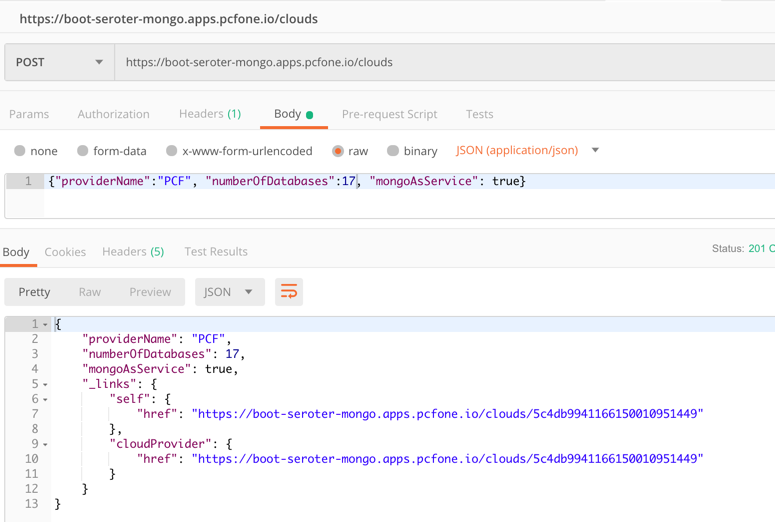
I then issued a POST command to add a record to MongoDB, and that worked great too. I got back the URI for the new record in the response.
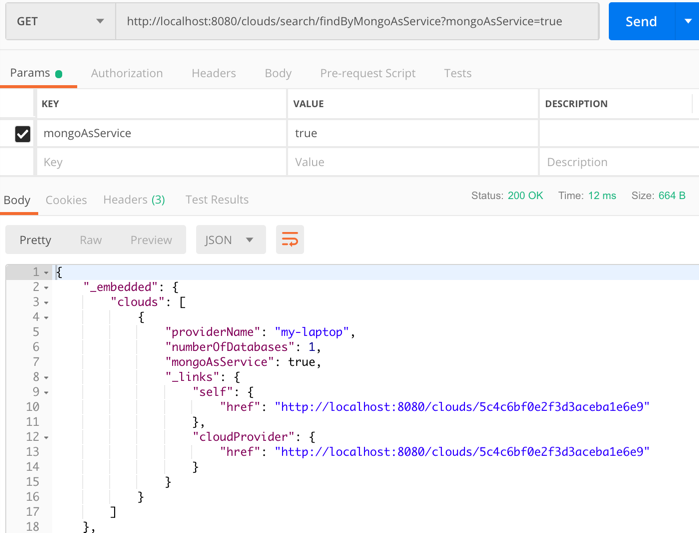
I also tried calling that custom “search” interface to filter the documents where “mongoAsService” is true. That worked.
So, running my Spring Boot REST API with a local MongoDB worked fine.
Run using Microsoft Azure Cosmos DB
Next up, I pointed this application to Microsoft Azure. One of the many databases in Azure is Cosmos DB. This underrated database offers some pretty amazing performance and scale, and is only available from Microsoft in their cloud. NO PROBLEM. It serves up a handful of standard interfaces, including Cassandra and MongoDB. So I can take advantage of all the crazy-great hosting features, but not lock myself into any of them.
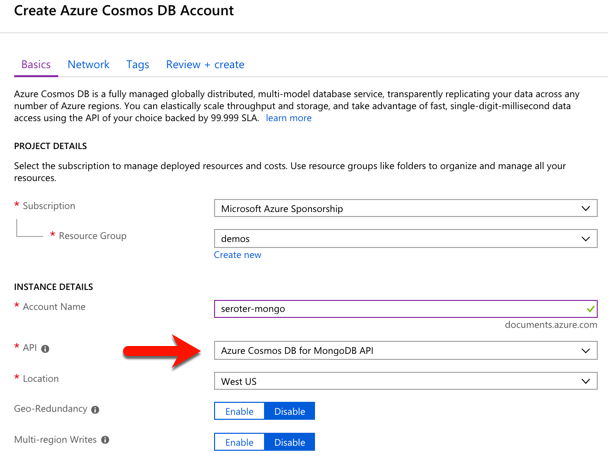
I started by visiting the Microsoft Azure portal. I chose to create a new Cosmos DB instance, and selected which API (SQL, Cassandra, Gremlin, MongoDB) I wanted.
After a few minutes, I had an instance of Cosmos DB. If I had wanted to, I could have created a database and collection from the Azure portal, but I wanted to confirm that Spring Data would do it for me automatically.
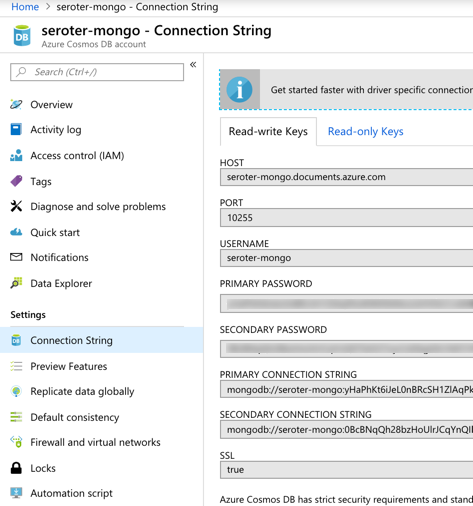
I located the “Connection String” properties for my new instance, and grabbed the primary one.
With that in hand, I went back to my application.properties file, commented out my “local” configuration, and added entries for the Azure instance.
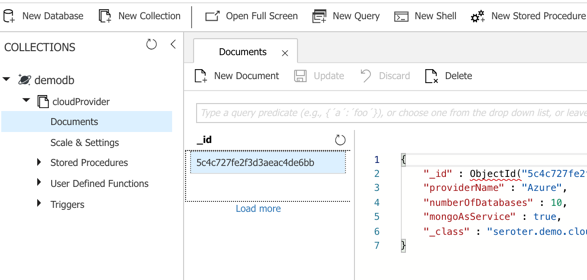
I could publish this app to Azure, but because it’s also easy to test it locally, I just started up my Spring Boot REST API again, and pinged the database. After POSTing a new record to my endpoint, I checked the Azure portal and sure enough, saw a new database and collection with my “document” in it.
Here, I’m using a super-unique cloud database but don’t need to manage my own software to remain “portable”, thanks to Spring Boot and MongoDB interfaces. Wicked.
Run using Amazon DocumentDB
Amazon DocumentDB is the new kid in town. I wrote up an InfoQ story about it, which frankly inspired me to try all this out.
Like Azure Cosmos DB, this database isn’t running MongoDB software, but offers a MongoDB-compatible interface. It also offers some impressive scale and performance capabilities, and could be a good choice if you’re an AWS customer.
For me, trying this out was a bit of a chore. Why? Mainly because the database service is only accessible from within an AWS private network. So, I had to properly set up a Virtual Private Cloud (VPC) network and get my Spring Boot app deployed there to test out the database. Not rocket science, but something I hadn’t done in a while. Let me lay out the steps here.
First, I created a new VPC. It had a single public subnet, and I added two more private ones. This gave me three total subnets, each in a different availability zone.
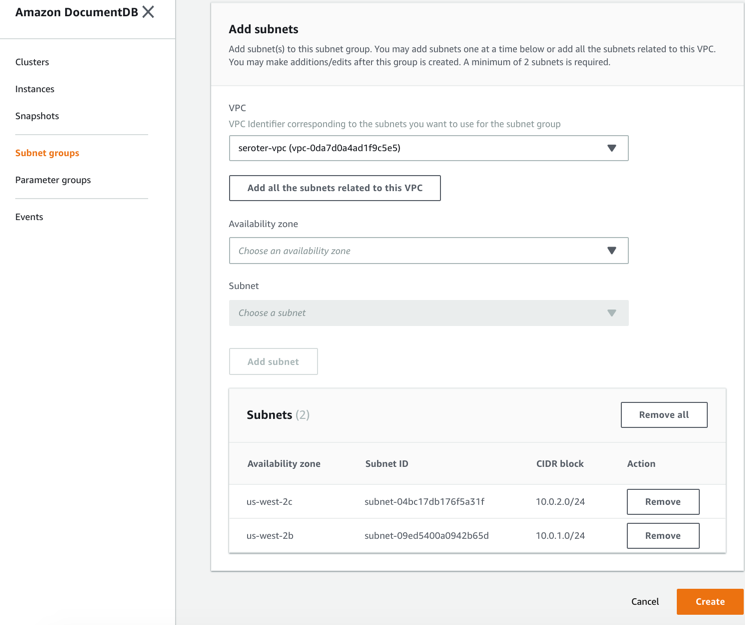
Next, I switched to the DocumentDB console in the AWS portal. First, I created a new subnet group. Each DocumentDB cluster is spread across AZs for high availability. This subnet group contains both the private subnets in my VPC.
I also created a parameter group. This group turned off the requirement for clients to use TLS. I didn’t want my app to deal with certs, and also wanted to mess with this capability in DocumentDB.
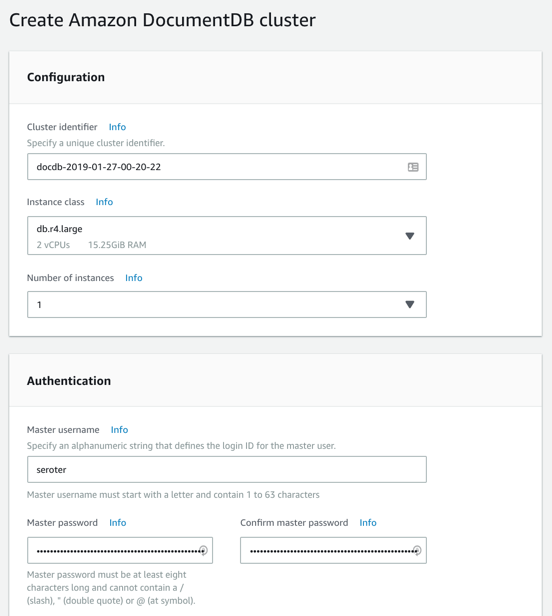
Next, I created my DocumentDB cluster. I chose an instance class to match my compute and memory needs. Then I chose a single instance cluster; I could have chosen up to 16 instances of primaries and replicas.
I also chose my pre-configured VPC and the DocumentDB subnet group I created earlier. Finally, I set my parameter group, and left default values for features like encryption and database backups.
After a few minutes, my cluster and instance were up and running. While this console doesn’t expose the ability to create databases or browse data, it does show me health metrics and cluster configuration details.
Next, I took the connection string for the cluster, and updated my application.properties file.
Now to deploy the app to AWS. I chose Elastic Beanstalk as the application host. I selected Java as my platform, and uploaded the JAR file associated with my Spring Boot REST API.
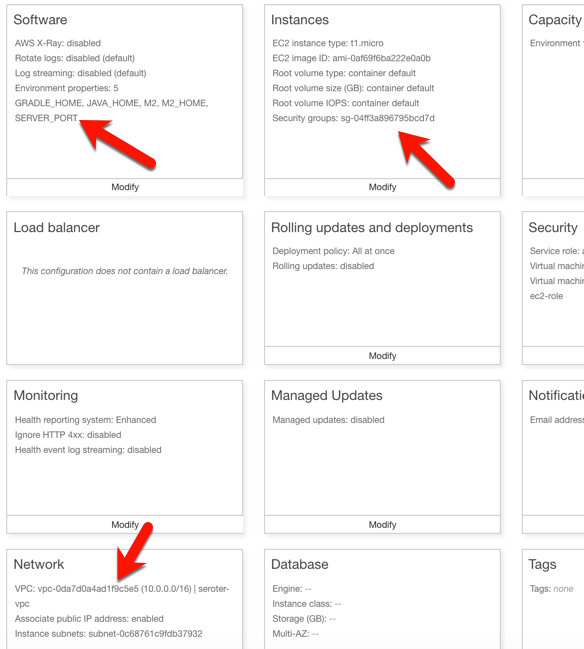
I had to set a few more parameters for this app to work correctly. First, I set a SERVER_PORT environment variable to 5000, because that’s what Beanstalk expects. Next, I ensured that my app was added to my VPC, provisioned a public IP address, and chose to host on the public subnet. Finally, I set the security group to the default one for my VPC. All of this should ensure that my app is on the right network with the right access to DocumentDB.
After the app was created in Beanstalk, I queried the endpoint of my REST API. Then I created a new document, and yup, it was added successfully.
So again, I used a novel, interesting cloud-only database, but didn’t have to change a lick of code.
Run using MongoDB in Pivotal Cloud Foundry
The last place to try this app out? A multi-cloud platform like PCF. If you did use something like PCF, the compute layer is consistent regardless of what public/private cloud you use, and connectivity to data services is through a Service Broker. In this case, MongoDB clusters are managed by PCF, and I get my own cluster via a Broker. Then my apps “bind” to that cluster.
First up, provisioning MongoDB. PCF offers MongoDB Enterprise from Mongo themselves. To a developer, this looks like a database-as–a-service because clusters are provisioned, optimized, backed up, and upgraded via automation. Via the command line or portal, I could provision clusters. I used the portal to get myself happy little instance.
After giving the service a name, I was set. As with all the other examples, no code changes were needed. I actually removed any MongoDB-related connection info from my application.properties file because that spring-cloud-cloudfoundry-connector dependency actually grabs the credentials from the environment variables set by the service broker.
One thing I *did* create for this environment — which is entirely optional — is a Cloud Foundry manifest file. I could pass these values into a command line instead of creating a declarative file, but I like writing them out. These properties simply tell Cloud Foundry what to do with my app.
With that, I jumped to a terminal, navigated to a directory holding that manifest file, and typed cf push. About 25 seconds later, I had a containerized, reachable application that connected to my MongoDB instance.
Fortunately, PCF treats Spring Boot apps special, so it used the Spring Boot Actuator to pull health metrics and more. Above, you can see that for each instance, I saw extra health information for my app, and, MongoDB itself.
Once again, I sent some GET requests into my endpoint, saw the expected data, did a POST to create a new document, and saw that succeed.
Wrap Up
Now, obviously there are novel cloud services without “standard” interfaces like the MongoDB API. Some of these services are IoT, mobile, or messaging related —although Azure Event Hubs has a Kafka interface now, and Spring Cloud Stream keeps message broker details out of the code. Other unique cloud services are in emerging areas like AI/ML where standardization doesn’t really exist yet. So some applications will have a hard coupling to a particular cloud, and of course that’s fine. But increasingly, where you run, how you run, and what you connect to, doesn’t have to be something you choose up front. Instead, first you build great software. Then, you choose a cloud. And that’s pretty cool.
For the 11th year in a row, I thought it’d be fun to list out what I enjoyed writing and reading this year.
Things I Wrote
I kept up a decent pace of writing this year across InfoQ, my personal blog, and the Pivotal blog. Here are a few things I enjoyed writing.
[Book] Modernizing .NET Applications. I’ve told anyone that would listen that I’d never write another book. Clearly, I’m a filthy liar. But I couldn’t pass up the opportunity this year, and it gave me a chance to write down some things bouncing around in my head.
[InfoQ] Recap of AWS re:Invent 2018 Announcements. re:Invent is such an industry-defining event each year. It was a lot of work to read through the announcements and synthesize it all into one piece. I think it turned out ok.
[Blog] Wait, THAT runs on Pivotal Cloud Foundry? This was a series of five blog posts in five days that looked an unexpected workloads that run on Pivotal’s flagship platform. I look for any excuse to keep up my coding chops!
Over the course of 2018, I read 35 books on a variety of topics. Here’s a subset of the ones that stood out to me the most.
Grant, by Ron Chernow. This book is a monster in size, but maybe the best thing I read in 2018. Meticulously research but entirely readable, the book walks through U.S. Grant’s incredible life. Unbelievable highs, crushing lows.
Thanks for the Feedback: The Science and Art of Receiving Feedback Well, by Douglas Stone and Sheila Heen. Safe to say this was the most impactful business-y book that I read in 2018. While attention was paid to effectively giving feedback, the bulk of the book was about receiving feedback. I’ve read very little about that, and this book completely changed my thinking on the topic.
Discrimination and Disparities, by Thomas Sowell. I followed up the previous book with this one. Wanted to hear more on this topic. Sowell is an insightful economist, and explores the role that discrimination does, and doesn’t, play in disparities we see around us. He attempts to escape emotional appeals and find rational answers.
Meg: A Novel of Deep Terror, by Steve Alten (@meg82159). I admittedly didn’t know about this book series until the movie came out in 2018, but who doesn’t love giant sharks? The book wasn’t the same as the movie; it was better. Fun read.
Martin Luther: The Man Who Rediscovered God and Changed the World, by Eric Metaxas (@ericmetaxas). I read a book about a freakin’ prehistoric shark, yet this book about a 16th century monk had some of the most thrilling moments I read this year. My knowledge of Martin Luther was limited to “something something Reformation” and “something something 95 theses”, but this book helped me recognize his massive contribution to the world. We owe many of the freedoms we have today to Luther’s courageous stand.
Bad Blood: Secrets and Lies in a Silicon Valley Startup, by John Carreyrou (@JohnCarreyrou). Wow, what a book. I was peripherally aware of this company (Theranos) and storyline already, but this book is an eye-opening account of what really happened. I’m not even sure there’s a “good intentions” angle here, as it just seems like bad people doing bad things.
Five Stars: The Communication Secrets to Get from Good to Great, by Carmine Gallo (@carminegallo). If you’re wondering why your career is stagnant, there’s a chance it’s because you’re a subpar communicator. Gallo makes the case that moving others to action is the quintessential skill of this century. His book uses tons of anecdotes to drive the point home, and he sprinkles in plenty of actionable advice.
The Manager’s Path: A Guide for Tech Leaders Navigating Growth and Change, by Camille Fournier (@skamille). This is a book aimed at new managers of technical teams. There’s some general advice in here that’s useful for managers of any type of team, but it’s most helpful if you lead (or want to empathize with) a tech team. Fournier’s experience shines through, in this easy-to-read book.
How Christianity Changed the World, by Alvin J. Schmidt. Good book that outlined the massive impact of Christianity on Western society. Regardless of what you believe (or don’t!), it’s impressive to recognize that Christianity elevated the value of human life (by bringing an end to infanticide, child abandonment, gladiator battles) and women’s rights, introduced orphanages, old-age homes, and hospitals, erected the first universities, colleges, and public school systems, and ushered in a new era of art, science, and government. Wild stuff.
To Sell is Human: The Surprising Truth About Moving Others, by Daniel H. Pink (@DanielPink). Most of us are selling something, whether we recognize it or not. Pink lays out the reality, and why our ability to move others is key to success. And importantly, he offers some legitimately useful ways to make that happen.
The F*It List: Lessons fro a Human Crash Test Dummy, by Eric Byrnes (@byrnes22). I knew Byrnes, the colorful professional baseball player. I did not know Eric Byrnes, the uber-athlete and ultra-marathoner. He’s got a refreshing approach to life, and wrote a compelling autobiography. Thanks to @wearsy for the recommendation.
Essentialism: The Disciplined Pursuit of Less, by Greg McKeown (@GregoryMcKeown). This book stands to have the biggest impact on my life in 2019. It’s about constantly stopping and evaluating whether we’re working on the right things. On purpose. I’m giving myself permission to be more selective in 2019, and will be more mindful about where I can make the biggest impact.
The Interstellar Age: Inside the Forty-Year Voyager Mission, by Jim Bell (@Jim_Bell). Thanks to this book and the movie “The Farthest”, I became obsessed with the Voyager missions. I even did a couple talks about it to tech audiences this year. Bell’s book is detailed, exciting, and inspirational.
The Industrial Revolutionaries: The Making of the Modern World, 1776-1914, by Gavin Weightman. I read about how artificial intelligence will upend the world and economy as we know it, so I thought it’d be smart to look at the last world-changing revolution. This was a fascinating book and I learned a lot. It still blows me away that many comforts of our current life are fairly recent inventions.
Playing to Win: How Strategy Really Works, by A.G. Lafley and Roger L. Martin. The authors call out five questions at the heart of the business strategy: what’s your winning aspiration, where to play, how to win, what capabilities must be in place, and what management systems are required. I found the book engaging, relevant, and motivational.
High Output Management, by Andy Grove. Best business book that I read all year. It’s also one that Horowitz refers to a lot in his book (above). Every manager should read this. Grove focuses on value and outcomes, and lays out what good management looks like.
When: The Scientific Secrets of Perfect Timing, by Daniel H Pink (@DanielPink). Sheesh, two Pink books in the same year? The man writes a good tome, what can I say? This is a book about timing. What time of day we should perform certain activities. When and how to “start” things, when to end. And how to synchronize teams. As always, an engaging read that made me rethink my approaches.
Showstopper!: The Breakneck Race to Create Windows NT and the Next Generation at Microsoft, by G Pascal Zachary. If you didn’t think a story about creating Windows NT could be compelling, THINK AGAIN. Part history lesson and part adventure tale, this book provides a fascinating behind-the-scenes featuring some characters you’ll recognize. I probably say this every year, but sincerely, thank you all for being on this journey with me. Each day, I learn so much from the people (virtually and physically) around me. Let’s all have a 2019 where we learn a lot and make those around us better.
Platforms should run on Kubernetes, apps should run on PaaS. That simple heuristic seems to resonate with the companies I talk to. When you have access to both environments, it makes sense to figure out what runs where. PaaS is ideal when you have custom code and want an app-aware environment that wires everything together. It’s about velocity, and straightforward Day 2 management. Kubernetes is a great choice when you have closely coordinated, distributed components with multiple exposed network ports and a need to access to infrastructure primitives. You know, a platform! Things like databases, message brokers, and hey, integration platforms.In this post, I see what it takes to get a platform up and running on Azure’s new Kubernetes service.
While Kubernetes itself is getting to be a fairly standard component, each public cloud offers it up in a slightly different fashion. Some clouds manage the full control plane, others don’t. Some are on the latest version of Kubernetes, others aren’t. When you want a consistent Kubernetes experience in every infrastructure pool, you typically use an installable product like Pivotal Container Service (PKS). But I’ll be cloud-specific in this demo, since I wanted to take Azure Kubernetes Service (AKS) for a spin. And we’ll use Spring Cloud Data Flow as our “platform” to install on AKS.
To start with, I went to the Azure Portal and chose to add a new instance of AKS. I was first asked to name my cluster, choose a location, pick a Kubernetes version, and set my initial cluster size.
For my networking configuration, I turned on “HTTP application routing” which gives me a basic (non-production grade) ingress controller. Since my Spring Cloud Data Flow is routable and this is a basic demo, it’ll work fine.
After about eleven minutes, I had a fully operational Kubernetes cluster.
Now, this is a “managed” service from Microsoft, but they definitely show you all the guts of what’s stood up to support it. When I checked out the Azure Resource Group that AKS created, it was … full. So, this is apparently the hooves and snouts of the AKS sausage. It’s there, but I don’t want to know about it.
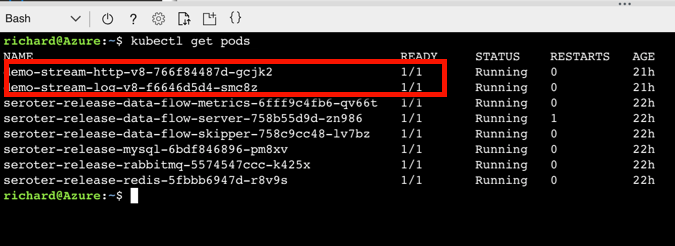
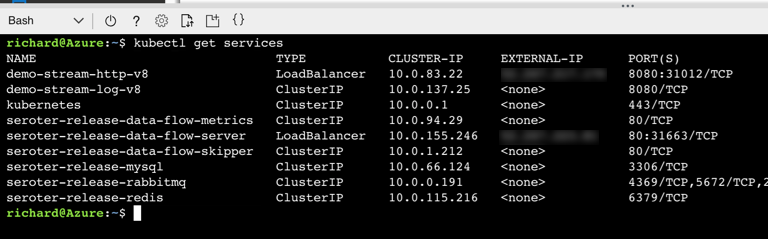
The Azure Cloud Shell is a hidden gem of the Microsoft cloud. It’s a browser-based shell that’s stuffed with powerful components. Instead of prepping my local machine to talk to AKS, I just used this. From the Azure Portal, I spun up the Shell, loaded my credentials to the AKS cluster, and used the kubectl command to check out my nodes.
Groovy. Let’s install stuff. Spring Cloud Data Flow (SCDF) makes it easy to build data pipelines. These pipelines are really just standalone apps that get stitched together to form a sequential data processing pipeline. SCDF is a platform itself; it’s made up of a server, Redis node, MySQL node, and messaging broker (RabbitMQ, Apache Kafka, etc). It runs atop a number of different engines, including Cloud Foundry or Kubernetes. Spring Cloud Data Flow for Kubernetes has simple instructions for installing it via Helm.
I issued a Helm command from the Azure Cloud Shell (as Helm is pre-installed there) and in moments, had SCDF deployed.
When it finished, I saw that I had new Kubernetes pods running, and a load balancer service for routing traffic to the Data Flow server.
SCDF offers up a handful of pre-built “apps” to bake into pipelines, but the real power comes from building your own apps. I showed that off a few weeks ago, so for this demo, I’ll keep it simple. This streaming pipeline simply takes in an HTTP request, and drop the payload into a log file. THRILLING!
The power of a platform like SCDF comes out during deployment of a pipeline. See here that I chose Kubernetes as my underlying engine, created a load balancer service (to make my HTTP component routable) via a property setting, and could have optionally chose different instance counts for each component in the pipeline. Love that.
If you have GUI-fatique, you can always set these deploy-time properties via free text. I won’t judge you.
After deploying my streaming pipeline, I saw new pods shows up in AKS: one pod for each component of my pipeline.
I ran the kubectl get services command to confirm that SCDF built out a load balancer service for the HTTP app and assigned a public IP.
SCDF reads runtime information from the underlying engine (AKS, in this case) and showed me that my HTTP app was running, and its URL.
I spun up Postman and sent a bunch of JSON payloads to the first component of the SCDF pipeline running on AKS.
I then ran a kubectl logs [log app’s pod name] command to check the logs of the pipeline component that’s supposed to write logs.
And that’s it. In a very short period of time, I stood up a Kubernetes cluster, deployed a platform on top of it, and tested it out. AKS makes this fairly easy, and the fact that it’s vanilla Kubernetes is nice. When using public cloud container-as-a-service products or installable software that runs everywhere, consider Kubernetes a great choice for running platforms.