Scott Guthrie announced a handful of changes to the Windows Azure Portal, and among them, was the long-awaited migration of Service Bus resources from the old-and-busted Silverlight Portal to the new HTML hotness portal. You’ll find some really nice additions to the Service Bus Queues and Topics. In addition to creating new queues/topics, you can also monitor them pretty well. You still can’t submit test messages (ala Amazon Web Services and their Management Portal), but it’s going in the right direction.

One thing that caught my eye was the “Relays” portion of this. In the “add” wizard, you see that you can “quick create” a Service Bus relay.

However, all this does is create the namespace, not a relay service itself, as can be confirmed by viewing the message on the Relays portion of the Portal.
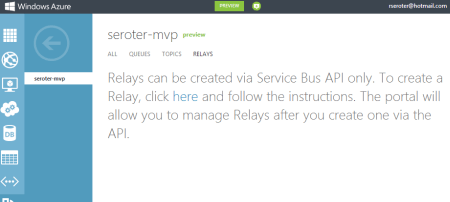
So, this portal is just for the *management* of relays. Fair enough. Let’s see what sort of management I get! I created a very simple REST service that listens to the Windows Azure Service Bus. I pulled in the proper NuGet package so that I had all the Service Bus configuration values and assembly references. Then, I proceeded to configure this service using the webHttpRelayBinding.

I started up the service and invoked it a few times. I was hoping that I’d see performance metrics like those found with Service Bus Queues/Topics.
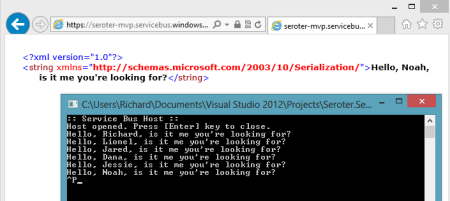
However, when I returned to the Windows Azure Portal, all I saw was the name of my Relay service and confirmation of a single listener. This is still an improvement from the old portal where you really couldn’t see what you had deployed. So, it’s progress!

You can see the Service Bus load balancing feature represented here. I started up a second instance of my “hello service” listener and pumped through a few more messages. I could see that messages were being sent to either of my two listeners.
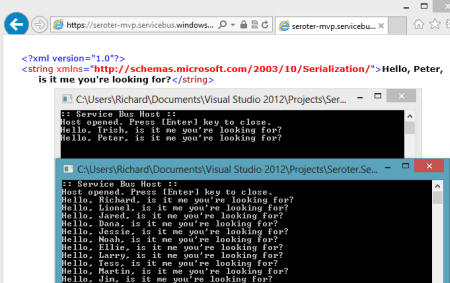
Back in the Windows Azure Portal, I immediately saw that I now had two listeners.

Good stuff. I’d still like to see monitoring/throughput information added here for the Relay services. But, this is still more useful than the last version of the Portal. And for those looking to use Topics/Queues, this is a significant upgrade in overall user experience.


 Richard Seroter's Architecture Musings
Leave a comment