I get tired of showing Microsoft StreamInsight demos where my (complex) events get emitted to a console. So, as part of a recent demonstration, I built a simple Windows Form dashboard that receives events and uses the built-in Windows Form Charting Controls to display the results. In this post, I’ll show you the full solution that I built and provide a link to the download package so that you can run the whole thing yourself.
If you’re not familiar with Microsoft StreamInsight, here’s a quick recap. StreamInsight is a complex event processing engine that can receive high volumes of data via adapters and pass it through LINQ-authored queries. The result is real-time intelligence about the pattern of events found in the engine. You can read more about it on the Microsoft MSDN page for StreamInsight, my own blog posts on it, or pick up a book by a set of good-looking authors.
Assuming you have StreamInsight 1.1 installed (download here) you can execute my solution, which has these Visual Studio projects:

The first project, DataPublisher is my custom StreamInsight adapter that sends “call center” events to the StreamInsight engine.

The CallCenterAdapterPoint.cs class is my actual input adapter that leverages the FakeDataSource.cs class which creates a new CallCenterRequestEventType every 500 milliseconds. The CallCenterRequestEvenType has its properties (e.g. product, call type) randomly assigned upon creation.
The next VS 2010 project that I’ll highlight is my web service adapter (which I describe in depth in this blog post).

I’m going to use this adapter to send complex events from StreamInsight to my Windows Form.
The next project is my Windows Form project, named EventReceiver.WinUI.

This Windows Form hosts a WCF service that when invoked, updates the Chart control on the main form.
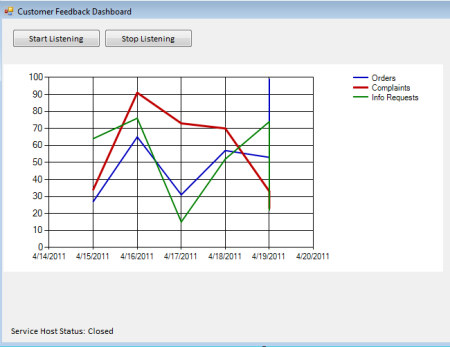
I had to do some fun work with .NET delegates to successfully host a WCF and allow the service to update the chart. Seems to work ok.
The final project, and meatiest, is the StreamInsightQuery project. This project starts up an embedded StreamInsight server, and has a set of six queries that you can play with. The first five are meant to be output to the Tracer (console) adapter. These queries show how to filter events, create tumbling windows, hopping windows and running totals. If you set the one line of code here to the query you want and press F5, you can see StreamInsight in action.
//start SI query for queries #1-5
#region Tracer Adapter Query

 var siQuery = query4.ToQuery(myApp, "SI Query", string.Empty, typeof(TracerFactory), tracerConfig, EventShape.Point, StreamEventOrder.FullyOrdered);

#endregion
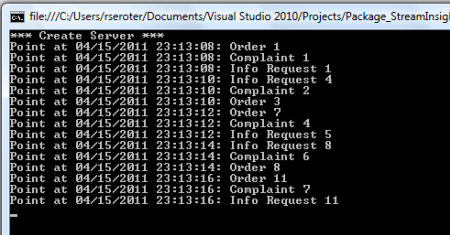
Cool. If you want to try out the Windows Form chart, simply comment out the previous siQuery variable and uncomment out the one that follows.
//start SI query for query #6
 #region Web Adapter Query

var siQuery = query6.ToQuery(myApp, "SI Query", string.Empty, typeof(WebOutputFactory), webAdapterConfig, EventShape.Point, StreamEventOrder.FullyOrdered);

 #endregion
Now, you’ll want to go and manually start up the Windows Form console, click the Start Listening button, and make sure that the status of the service is Open.

We can now press F5 again within VS 2010 and start up our StreamInsight server. Instead of writing events to the Console, StreamInsight is calling the Web adapter and sending messages to the web service hosted by our Windows Form. Within a few seconds after starting the StreamInsight server, we should see our “running totals by call center type” complex events drawing on the Chart.

When you’re finished being mildly impressed, you can shut down the StreamInsight server and then Stop Listening on the Windows Form.
So that’s it. You can download the full source code for this whole demo. StreamInsight is a pretty cool technology and I hope that by making it easy to try it, I’ve motivated you to give it a whirl.


 Richard Seroter's Architecture Musings
Leave a reply to Ken Cancel reply