I’m looking at the XML capabilities of SQL Server a bit this week, and it reminded me to take another look at how the new BizTalk Server 2009 SQL Adapter (WCF-based) interacts with XML content stored in SQL Server.
I’ve shown in the past (in my book, and available as a free read here) that the new adapter can indeed read/write to SQL Server’s XML data type, but it does so in a bit of a neutered way. That is, the XML content is stuffed into a string element instead of a structured node, or even an “any” node. That said, I want to see how to take XML data from SQL Server and have it directly published to BizTalk for routing.
First things first, I need to create a table in SQL Server with an XML data type. I wanted to “type” this column (just for the heck of it), so I built a valid XSD schema using the BizTalk Editor in Visual Studio.
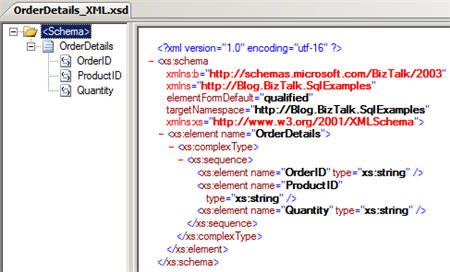
I then opened the SQL Server 2008 Management Studio and defined a new XML Schema Collection. The definition of the XML structure consists of the XSD schema we just created in Visual Studio.

Next, I created a new table and made one of the columns (“DetailsXml”) use the xml data type. Then, I set the XML Type Specification’s “Schema Collection” property equal to our recently defined “OrderDetailsSchema” XML definition.

To test this configuration, I ran a quick SQL statement to make sure that an insert consisting of a schema-compliant XML fragment would successfully process.

Lookin’ good. Now I have a row in that new table. Ok, next, I went back to my BizTalk project in Visual Studio and walked through the Consume Adapter Service wizard to generate SQL adapter-compliant bits. Specifically, in my “connection” I had to set the client credentials, InboundId (because we’re polling here), initial catalog, server, inbound operation type (typed polling), polled data available (“SELECT COUNT([OrderID]) FROM [BlogDemo]”) and polling statement (“SELECT [OrderID] ,[DetailsXml] FROM [BlogDemo]”). Once those connection properties were set, I was able to connect to my local SQL Server 2008 instance. I then switched to a “service” contract type (since we’re polling, not pushing) and picked the “typed polling” contract.

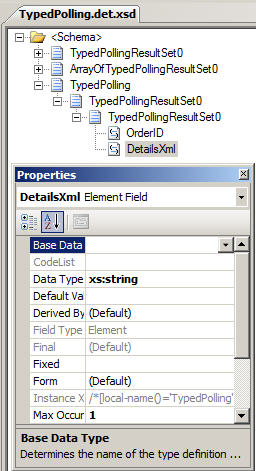
As with all the WCF adapters, you end up with XSD files and binding files after the Consume Adapter Service wizard completes. My schema shows that the “DetailsXml” node is typed as a xsd:string. So whether you “type” the XML column in SQL Server or not, the adapter will not ever give you a structured message schema.
After deploying the BizTalk project, and importing the wizard-generated binding into my BizTalk application, I have a valid receive location that can poll my database table. I built a quick send port that subscribed on the receive port name. What’s the output when I turn the receive location on? Take a look:
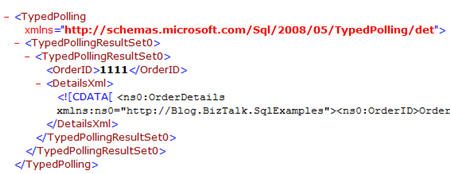
We have the “typedpolling” root node, and our lovely XML content is slapped into a CDATA blob inside the string node. That’s not very nice. Now, I have two options as to what to do next: First, I could take this message, pull it into an orchestration and leech out the desired XML blob and republish it to the bus. This is a decent option IF you also need other data points from the SQL Server message. However, if ALL you want is the XML blob, then we want option #2. Here, I muck with the generated receive location and tell it to pull out the XML node from the inbound message and only publish THAT to the bus.
I do this by going to the “Messages” tab of the adapter configuration and switching the source from “body” (which is the default) to “path” which let’s me set a forward-only Xpath statement.

Note that the encoding is string. I wasn’t sure this would work right, but when I turned my receive location back on after making this update, this is the message my send port distributed:
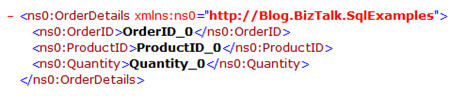
Well hello my lady. Nice to see you. To go for the home run here, I switched the receive location’s pipeline to XmlReceive (to force message typing) and set the send port’s subscription to the BTS.MessageType. I wanted to confirm that there were no other shenanigans going on, and that I was indeed getting a typed XML message going through, not a message of type “string.” Sure enough, I can see from the context that I have a valid message type, and it came from my SQL adapter.

So, I’m glad this capability (extract and type the nested XML) is here, or else the BizTalk Server 2009 promise of “SQL Server XML data type compatibility” would have been a bit of a sham. Has anyone tried accessing the data from an orchestration instead? I’m assuming the orchestration xpath function could be used to get at the nested XML. Feel free to share experiences.
Technorati Tags: BizTalk, SQL Server


 Richard Seroter's Architecture Musings
Leave a reply to vijaya Cancel reply